display MERCEDES-BENZ SPRINTER 2013 MY13 Operator’s Manual
[x] Cancel search | Manufacturer: MERCEDES-BENZ, Model Year: 2013, Model line: SPRINTER, Model: MERCEDES-BENZ SPRINTER 2013Pages: 334, PDF Size: 3.88 MB
Page 35 of 334
Instrumen
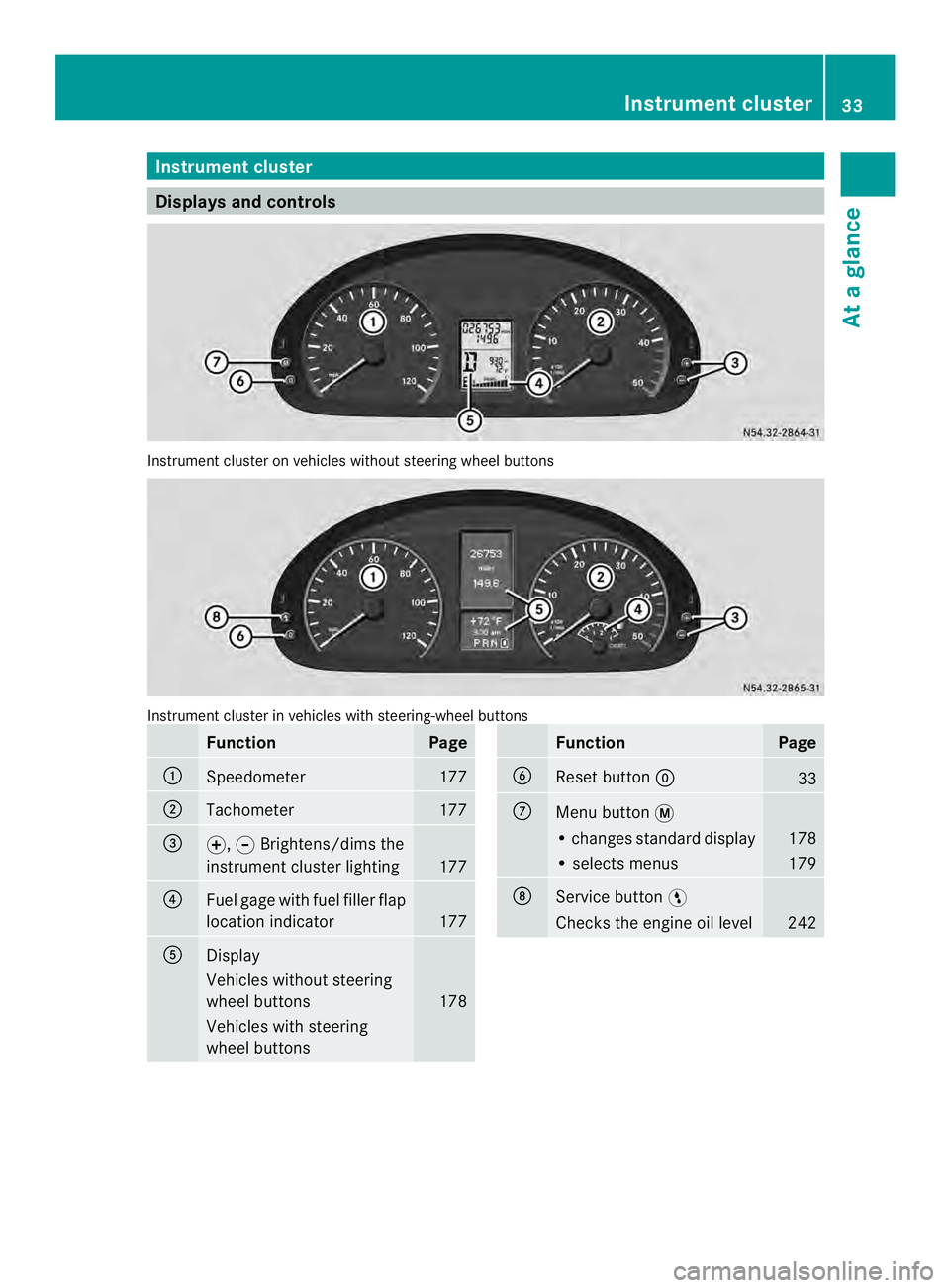
tcluster Displays and controls
Instrument cluster on vehicles without steering wheel buttons
Instrument cluster in vehicles with steering-wheel buttons
Function Page
0005
Speedometer 177
0006
Tachometer 177
0026
000E,
000FBrightens/dims the
instrumen tcluster lighting 177
0025
Fuel gage with fuel filler flap
location indicator
177
0023
Display
Vehicles without steering
wheel buttons
178
Vehicles with steering
wheel buttons Function Page
0024
Reset button
0007 33
0018
Menu button
0004 • changes standard display 178
• selects menus 179
0019
Service button
0012 Checks the engine oil level 242Instrument cluster
33At a glance
Page 37 of 334
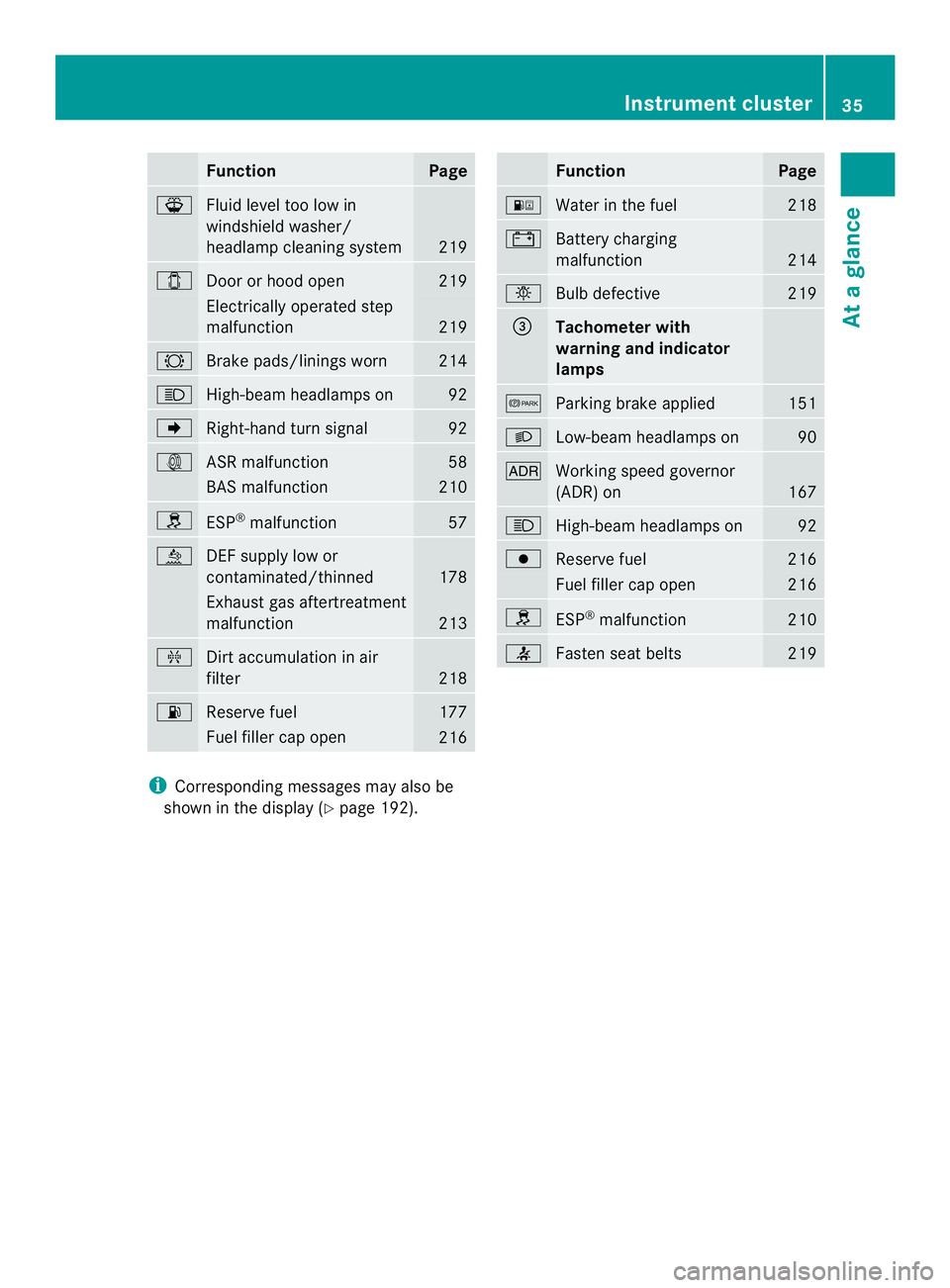
Function Page
000F
Fluid level too low in
windshield washer/
headlamp cleaning system
219
0004
Door or hood open 219
Electrically operated step
malfunction
219
0005
Brake pads/linings worn 214
0003
High-beam headlamps on 92
0003
Right-hand tur
nsignal 92
000A
ASR malfunction 58
BAS malfunction 210
0002
ESP
®
malfunction 57
0009
DE
Fs upply low or
contaminated/thinned 178
Exhaust gas aftertreatment
malfunction
213
0013
Dirt accumulation in air
filter
218
000A
Reserve fuel 177
Fuel fille
rcap open 216 Function Page
000E
Water in the fuel 218
0010
Battery charging
malfunction
214
0002
Bulb defective 219
0026
Tachometer with
warning and indicator
lamps
000B
Parking brake applied 151
0004
Low-beam headlamps on 90
0004
Working speed governor
(ADR) on
167
0003
High-beam headlamps on 92
0006
Reserve fuel 216
Fuel fille
rcap open 216
0002
ESP
®
malfunction 210
0014
Faste
nseat belts 219
i
Corresponding messages may also be
shown in the display (Y page 192). Instrument cluster
35At a glance
Page 38 of 334
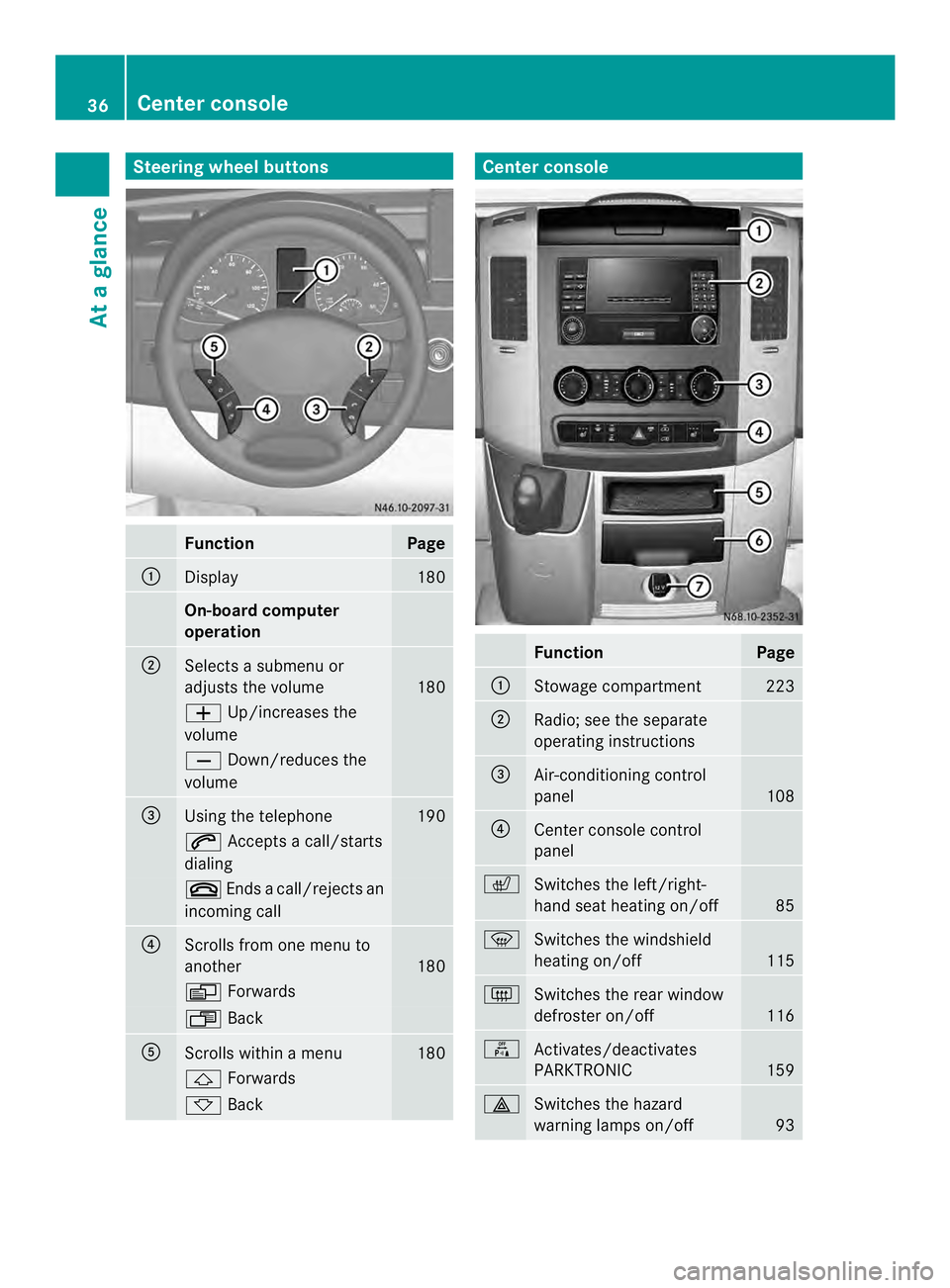
Steering wheel buttons
Function Page
0005
Display 180
On-board computer
operation
0006
Selects a submenu or
adjusts the volume
180
0011
Up/increases the
volume 0012
Down/reduces the
volume 0026
Using the telephone 190
0001
Accepts a call/starts
dialing 0005
Ends a call/rejects an
incoming call 0025
Scrolls from one menu to
another
180
0010
Forwards 0007
Back 0023
Scrolls within a menu 180
0001
Forwards 0009
Back Center console
Function Page
0005
Stowage compartment 223
0006
Radio; see the separate
operating instructions
0026
Air-conditioning control
panel
108
0025
Center console control
panel
0007
Switches the left/right-
hand seat heating on/off
85
0021
Switches the windshield
heating on/off
115
0019
Switches the rear window
defroster on/off
116
000C
Activates/deactivates
PARKTRONIC
159
0011
Switches the hazard
warning lamps on/off
9336
Center consoleAt a glance
Page 74 of 334
Electrical closing assist
If your vehicle is equipped with electrical
closing assist, you will require less force to
close the sliding door. Electrical step
Important safety notes
If you do no tuse the grab handle and the step,
you could injure yourselfw hen getting in and
out of the vehicle.
In order to reduce risks:
R draw the passengers' attention to the
electrical step. Wait until the electrical step
is fully extended.
R do not jump out of the vehicle.
R only use the grab handle and step. Only
they are designed for such a load.
R keep grab handles, access steps and entry
sills free from dirt, e.g. mud, clay, snow and
ice. Operation and obstacle detection
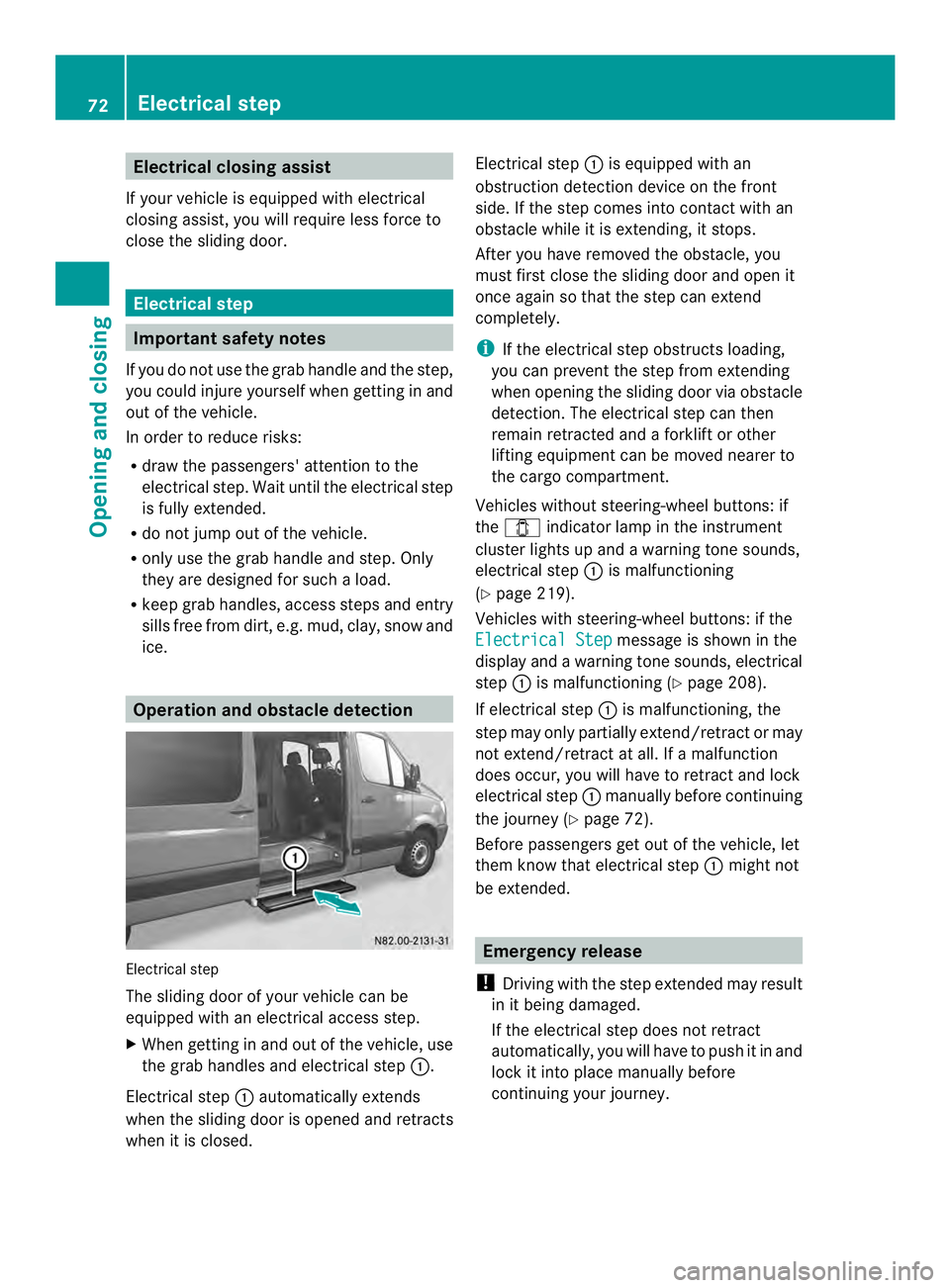
Electrical step
The sliding door of your vehicle can be
equipped with an electrical access step.
X When getting in and out of the vehicle, use
the grab handles and electrical step 0005.
Electrical step 0005automatically extends
when the sliding door is opened and retracts
when it is closed. Electrical step
0005is equipped with an
obstruction detection device on the front
side. If the step comes into contact with an
obstacle while it is extending, it stops.
After you have removed the obstacle, you
must first close the sliding door and open it
once again so that the step can extend
completely.
i If the electrical step obstructs loading,
you can prevent the step from extending
when opening the sliding door via obstacle
detection. The electrical step can then
remain retracted and aforklift or other
lifting equipment can be moved nearer to
the cargo compartment.
Vehicles without steering-wheel buttons: if
the 0004 indicator lamp in the instrument
cluster lights up and a warning tone sounds,
electrical step 0005is malfunctioning
(Y page 219).
Vehicles with steering-wheel buttons: if the
Electrical Step message is shown in the
display and a warning tones ounds, electrical
step 0005is malfunctioning (Y page 208).
If electrical step 0005is malfunctioning, the
step may only partially extend/retract or may
not extend/retract at all. If a malfunction
does occur, you will have to retrac tand lock
electrical step 0005manually before continuing
the journey (Y page 72).
Before passengers ge tout of the vehicle, let
them know that electrical step 0005might not
be extended. Emergency release
! Driving with the step extended may result
in it being damaged.
If the electrical step does not retract
automatically, you will have to push it in and
loc kiti nto place manually before
continuing your journey. 72
Electrical stepOpening and closing
Page 92 of 334
Useful information
This Operator's Manual describes all models
as well as standard and optional equipment
of your vehicle that were available at the time
of going to print. Country-specific variations
are possible. Note that your vehicle may not
be equipped with all of the described
functions. This also applies to systems and
functions relevant to safety.
Read the information on qualified specialist
workshops (Y page 26). Exterior lighting
Important safety notes
For reasons of safety, we recommend that
you drive with the lights switched on even
during the daytime. There may be differences
in operation due to legal requirements and
voluntary recommendations in some
countries. Lamp failure indicator
The bulb failure indicator is only an aid. You
are responsible for the proper functioning of
the vehicle lighting. Insufficient or non-
functioning vehicle lightin gputs the operating
safety of the vehicle at risk.
For this reason, check the condition and
function of your vehicle's lighting system and,
if necessary, that of the trailer before each
journey.
The bulb failure indicator monitors all of the
exterio rlighting lamps, except the perimeter
lamp and the trailer lighting. If a bulb fails,
either the 0002(Ypage 34) indicator lamp
lights up, or you will see a corresponding
message in the display (Y page 201).
i Depending on the equipment, the bulb
failure indicator can fail for all lamps with
the exceptio nofthe turn signal lamps. Light switch
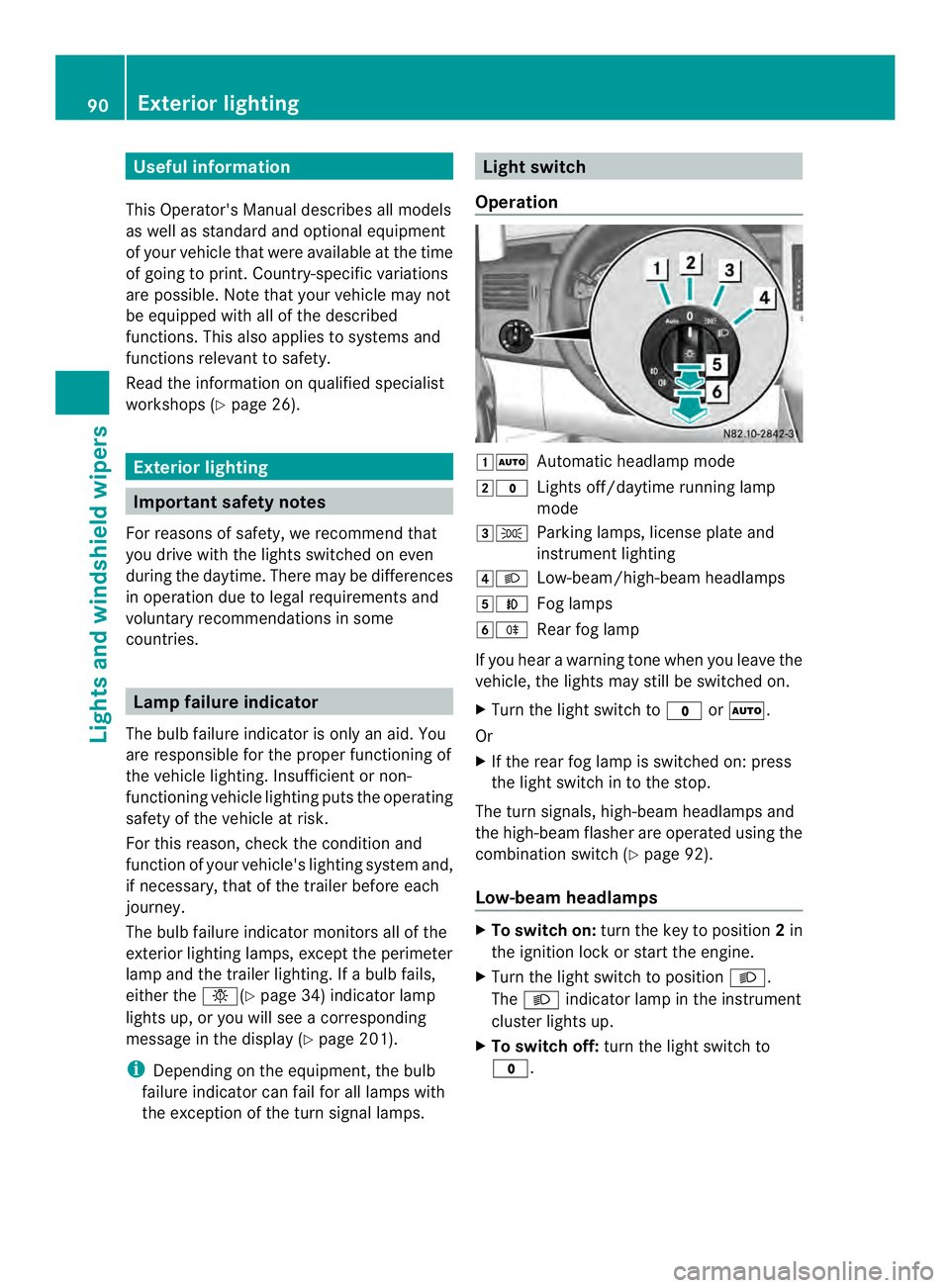
Operation 00080007
Automatic headlamp mode
0009000C Lights off/daytime running lamp
mode
000A000B Parking lamps, license plate and
instrumentl ighting
000E0004 Low-beam/high-beam headlamps
000F0005 Fog lamps
00100007 Rear fog lamp
If you hear a warning tone when you leave the
vehicle, the lights may still be switched on.
X Turn the light switch to 000Cor0007.
Or
X If the rear fog lamp is switched on: press
the light switch in to the stop.
The tur nsignals, high-beam headlamps and
the high-beam flasher are operated using the
combination switch (Y page 92).
Low-beam headlamps X
To switch on: turnthe key to position 2in
the ignition lock or start the engine.
X Turn the light switch to position 0004.
The 0004 indicator lamp in the instrument
cluster lights up.
X To switch off: turn the light switch to
000C. 90
Exterior lightingLights and windshield wipers
Page 112 of 334
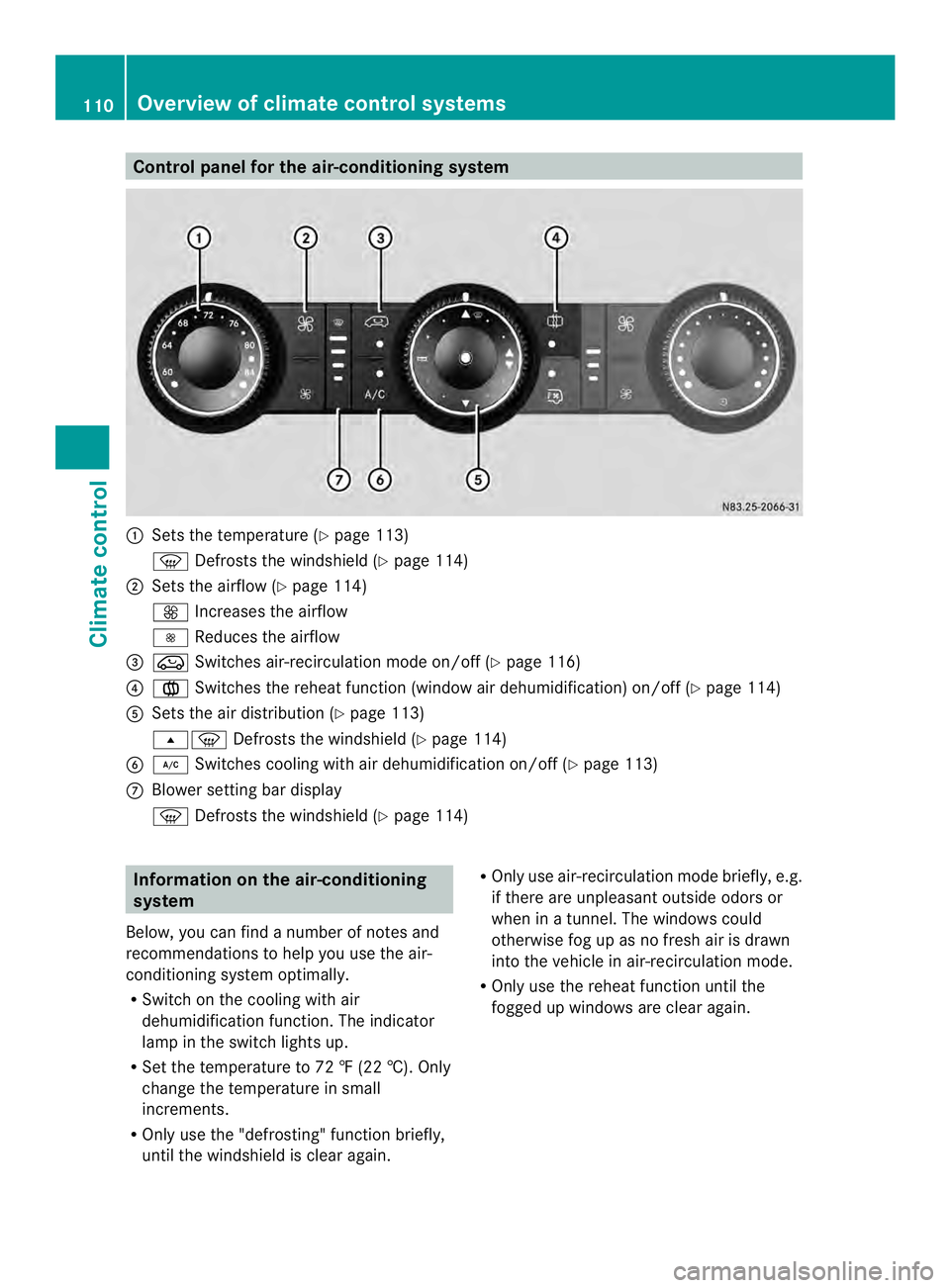
Control panel for the air-conditioning system
0005
Sets the temperature (Y page 113)
0021 Defrosts the windshield (Y page 114)
0006 Sets the airflow (Y page 114)
0026 Increases the airflow
0025 Reduces the airflow
0026 0022 Switches air-recirculation mode on/off (Y page 116)
0025 001F Switches the reheat function (window air dehumidification) on/of f(Ypage 114)
0023 Sets the air distribution (Y page 113)
000B0021 Defrosts the windshield (Y page 114)
0024 0008 Switches cooling with air dehumidification on/off ( Ypage 113)
0018 Blower setting bar display
0021 Defrosts the windshield (Y page 114)Information on the air-conditioning
system
Below, you can find a number of notes and
recommendations to help you use the air-
conditioning system optimally.
R Switch on the cooling with air
dehumidification function .The indicator
lamp in the switch lights up.
R Set the temperature to 72 ‡ (22 †). Only
change the temperature in small
increments.
R Only use the "defrosting" function briefly,
until the windshield is clear again. R
Only use air-recirculation mode briefly, e.g.
if there are unpleasant outside odors or
when in a tunnel. The windows could
otherwise fog up as no fresh air is drawn
into the vehicle in air-recirculation mode.
R Only use the reheat function until the
fogged up windows are clear again. 110
Overview of climate control systemsClimate control
Page 114 of 334
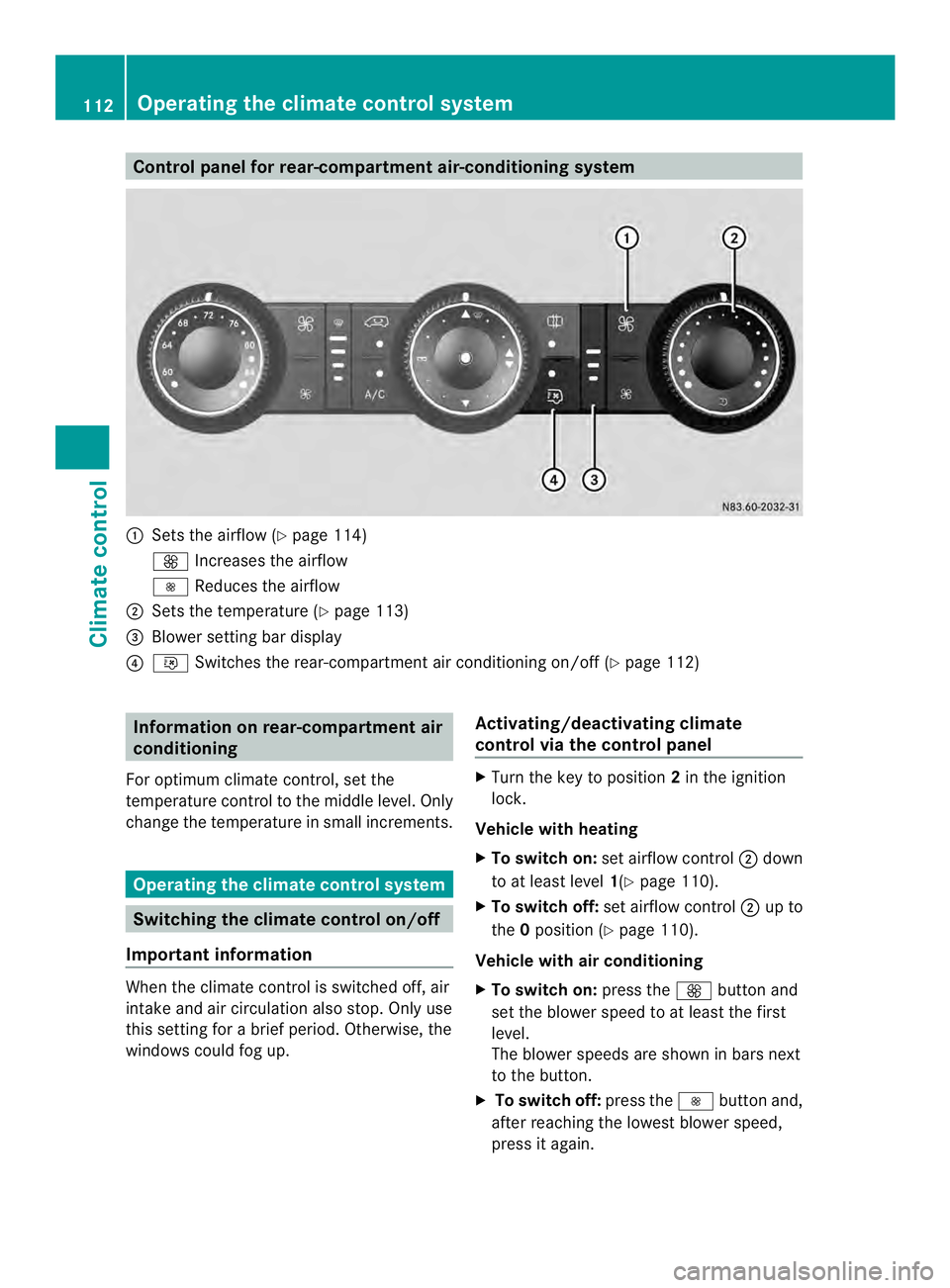
Control panel for rear-compartment air-conditioning system
0005
Sets the airflow (Y page 114)
0026 Increases the airflow
0025 Reduces the airflow
0006 Sets the temperature (Y page 113)
0026 Blower setting bar display
0025 001B Switches the rear-compartment air conditioning on/off (Y page 112)Information on rear-compartment air
conditioning
For optimum climate control, set the
temperature control to the middle level. Only
change the temperature in small increments. Operating the climate control system
Switching the climate control on/off
Important information When the climate control is switched off, air
intake and air circulation also stop. Only use
this setting for a brie
fperiod. Otherwise, the
windows could fog up. Activating/deactivating climate
control via the control panel X
Turn the key to position 2in the ignition
lock.
Vehicle with heating
X To switch on: set airflow control 0006down
to at least level 1(Ypage 110).
X To switch off: set airflow control 0006up to
the 0position (Y page 110).
Vehicle with air conditioning
X To switch on: press the0026button and
set the blower speed to at least the first
level.
The blower speeds are shown in bars next
to the button.
X To switch off: press the0025button and,
after reaching the lowest blower speed,
press it again. 112
Operating the climate control systemClimate control
Page 116 of 334
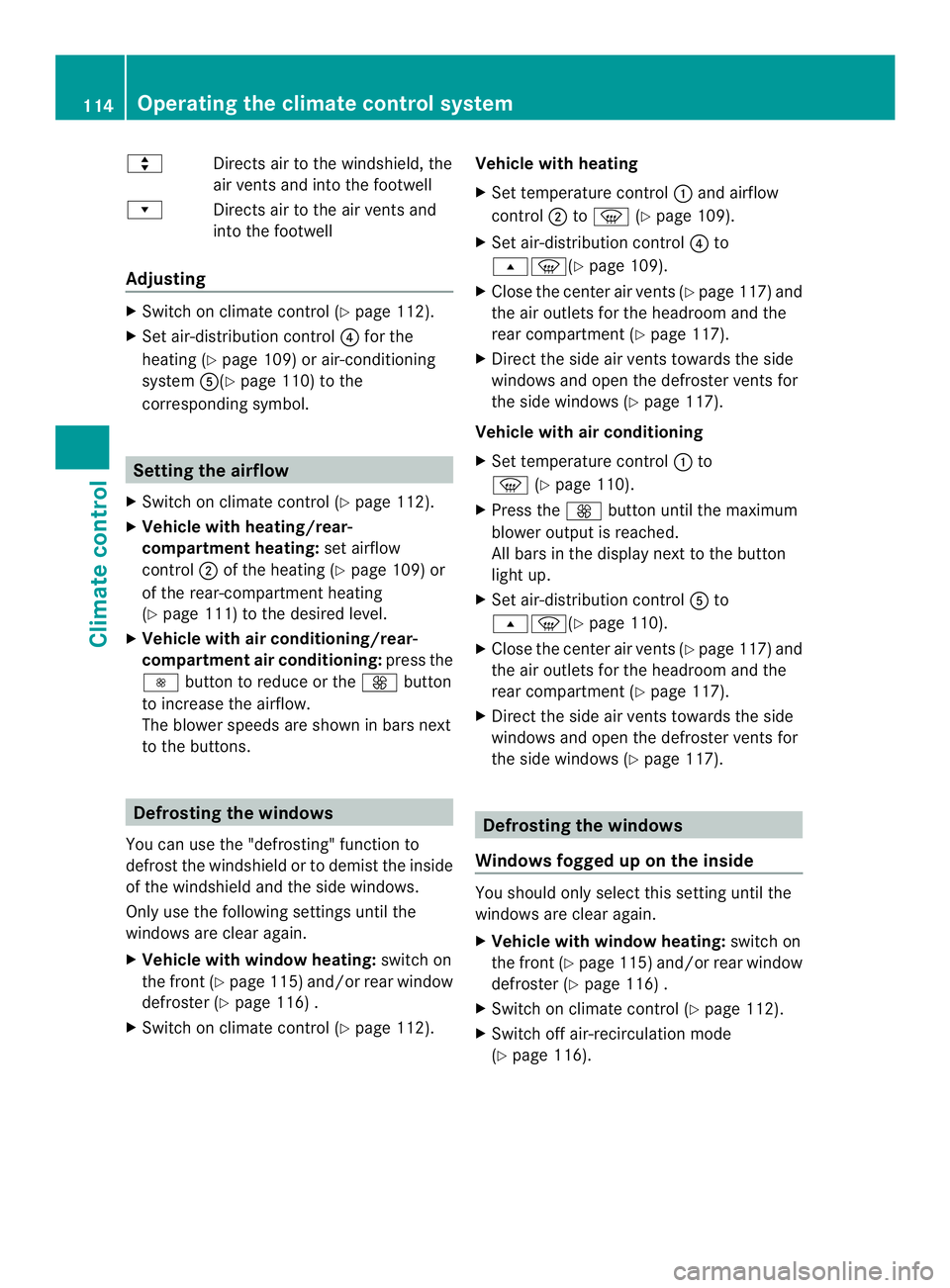
000C
Directs airto the windshield, the
air vents and into the footwell
000D Directs air to the air vents and
into the footwell
Adjusting X
Switch on climate control (Y page 112).
X Set air-distribution control 0025for the
heating (Y page 109) or air-conditioning
system 0023(Ypage 110) to the
corresponding symbol. Setting the airflow
X Switch on climate control (Y page 112).
X Vehicle with heating/rear-
compartment heating: set airflow
control 0006of the heating (Y page 109) or
of the rear-compartment heating
(Y page 111) to the desired level.
X Vehicle with air conditioning/rear-
compartment air conditioning: press the
0025 button to reduce or the 0026button
to increase the airflow.
The blower speeds are shown in bars next
to the buttons. Defrosting the windows
You can use the "defrosting" function to
defrost the windshield or to demist the inside
of the windshield and the side windows.
Only use the following settings until the
windows are clear again.
X Vehicle with window heating: switch on
the front (Y page 115) and/or rear window
defroster (Y page 116) .
X Switch on climate control (Y page 112).Vehicle with heating
X
Set temperature control 0005and airflow
control 0006to0021 (Ypage 109).
X Set air-distribution control 0025to
000B0021(Y page 109).
X Close the center air vents (Y page 117) and
the air outlets for the headroom and the
rear compartment (Y page 117).
X Direct the side air vents towards the side
windows and open the defroster vents for
the side windows (Y page 117).
Vehicle with air conditioning
X Set temperature control 0005to
0021 (Ypage 110).
X Press the 0026button until the maximum
blower output is reached.
All bars in the display next to the button
light up.
X Set air-distribution control 0023to
000B0021(Y page 110).
X Close the center air vents (Y page 117) and
the air outlets for the headroom and the
rear compartment (Y page 117).
X Direct the side air vents towards the side
windows and open the defroster vents for
the side windows (Y page 117). Defrosting the windows
Windows fogged up on the inside You should only select this setting until the
windows are clear again.
X
Vehicle with window heating: switch on
the front (Y page 115) and/or rear window
defroster (Y page 116) .
X Switch on climate control (Y page 112).
X Switch off air-recirculation mode
(Y page 116). 114
Operating the climate control systemClimate control
Page 122 of 334
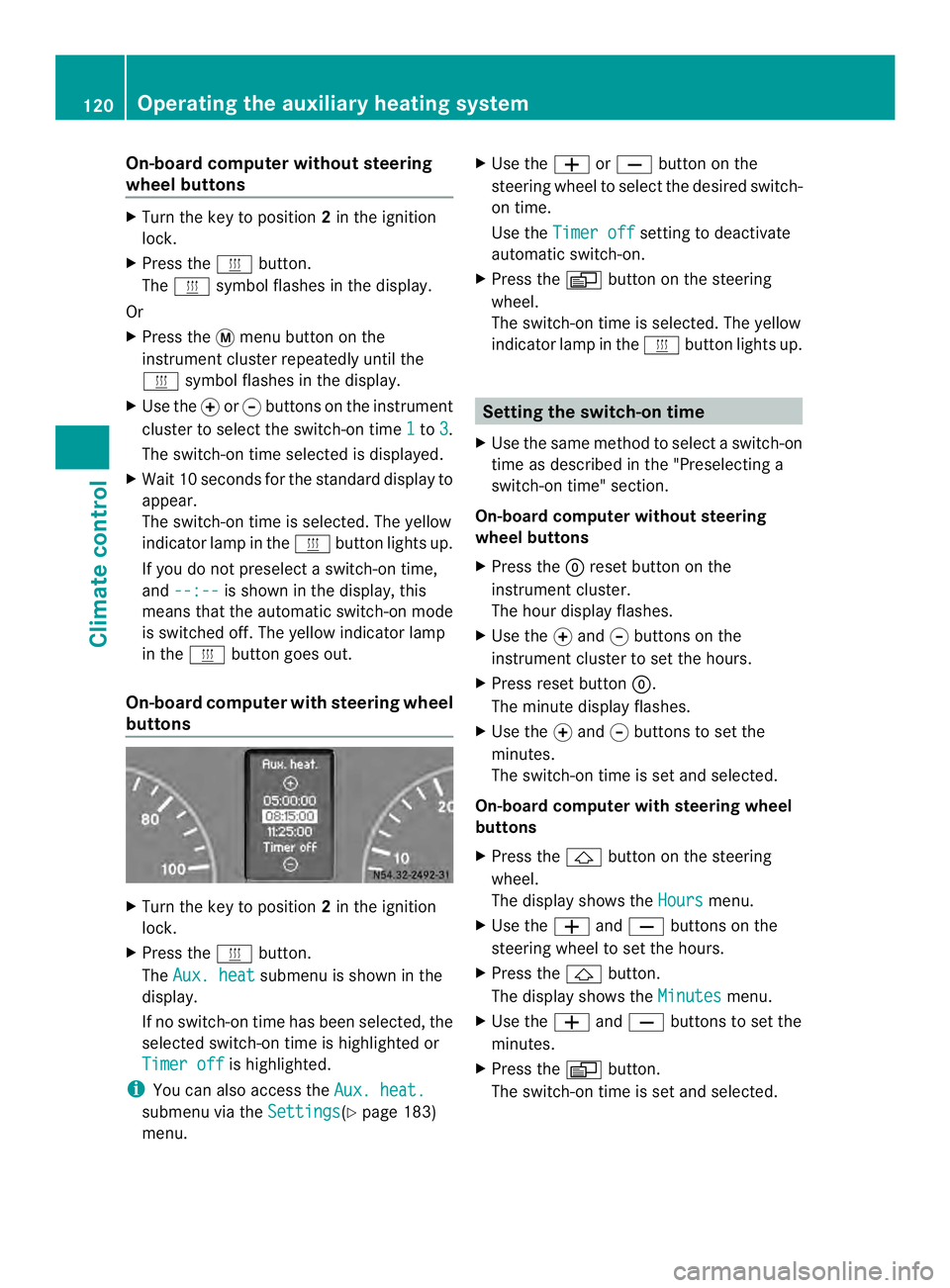
On-board computer without steering
wheel buttons
X
Turn the key to position 2in the ignition
lock.
X Press the 0020button.
The 0020 symbol flashes in the display.
Or
X Press the 0004menu button on the
instrument cluster repeatedly until the
0020 symbol flashes in the display.
X Use the 000Eor000F buttons on the instrument
cluster to select the switch-on time 1 to
3 .
The switch-on time selected is displayed.
X Wait 10 seconds for the standard display to
appear.
The switch-on time is selected. The yellow
indicator lamp in the 0020button lights up.
If you do not preselect a switch-on time,
and --:-- is shown in the display, this
means that the automatic switch-on mode
is switched off. The yellow indicator lamp
in the 0020button goes out.
On-boar dcomputer with steering wheel
buttons X
Turn the key to position 2in the ignition
lock.
X Press the 0020button.
The Aux. heat submenu is shown in the
display.
If no switch-on time has been selected, the
selected switch-on time is highlighted or
Timer off is highlighted.
i You can also access the Aux. heat.submenu via the
Settings (Y
page 183)
menu. X
Use the 0011or0012 button on the
steering wheel to selec tthe desired switch-
on time.
Use the Timer off setting to deactivate
automatic switch-on.
X Press the 0010button on the steering
wheel.
The switch-on time is selected. The yellow
indicator lamp in the 0020button lights up. Setting the switch-on time
X Use the same method to select a switch-on
time as described in the "Preselecting a
switch-on time" section.
On-board computer without steering
wheel buttons
X Press the 0007reset button on the
instrument cluster.
The hour display flashes.
X Use the 000Eand 000Fbuttons on the
instrument cluster to set the hours.
X Press reset button 0007.
The minute display flashes.
X Use the 000Eand 000Fbuttons to set the
minutes.
The switch-on time is set and selected.
On-board computer with steering wheel
buttons
X Press the 0001button on the steering
wheel.
The display shows the Hours menu.
X Use the 0011and0012 buttons on the
steering wheel to set the hours.
X Press the 0001button.
The display shows the Minutes menu.
X Use the 0011and0012 buttons to set the
minutes.
X Press the 0010button.
The switch-on time is set and selected. 120
Operating the auxiliary heating systemClimate control
Page 125 of 334
R
If the ventilation is insufficient, poisonous
exhaust gases can collect, in particular
carbon monoxide. This is the case in
enclosed spaces, for example .There is a
risk of fatal injuries.
R If highly flammable substances or
flammable materials are nearby, there is a
risk of a risk of fire and explosion.
Always deactivate the preselected switch-on
times if you stop the vehicle in such or similar
situations.
Use the timer to:
R activate/deactivate immediate heating
mode
R set up to three switch-on times
R set the operating duration from 10to
120 minutes or to continuous operation
R set the heating level (preselected
temperature) to a range between 10 and 30
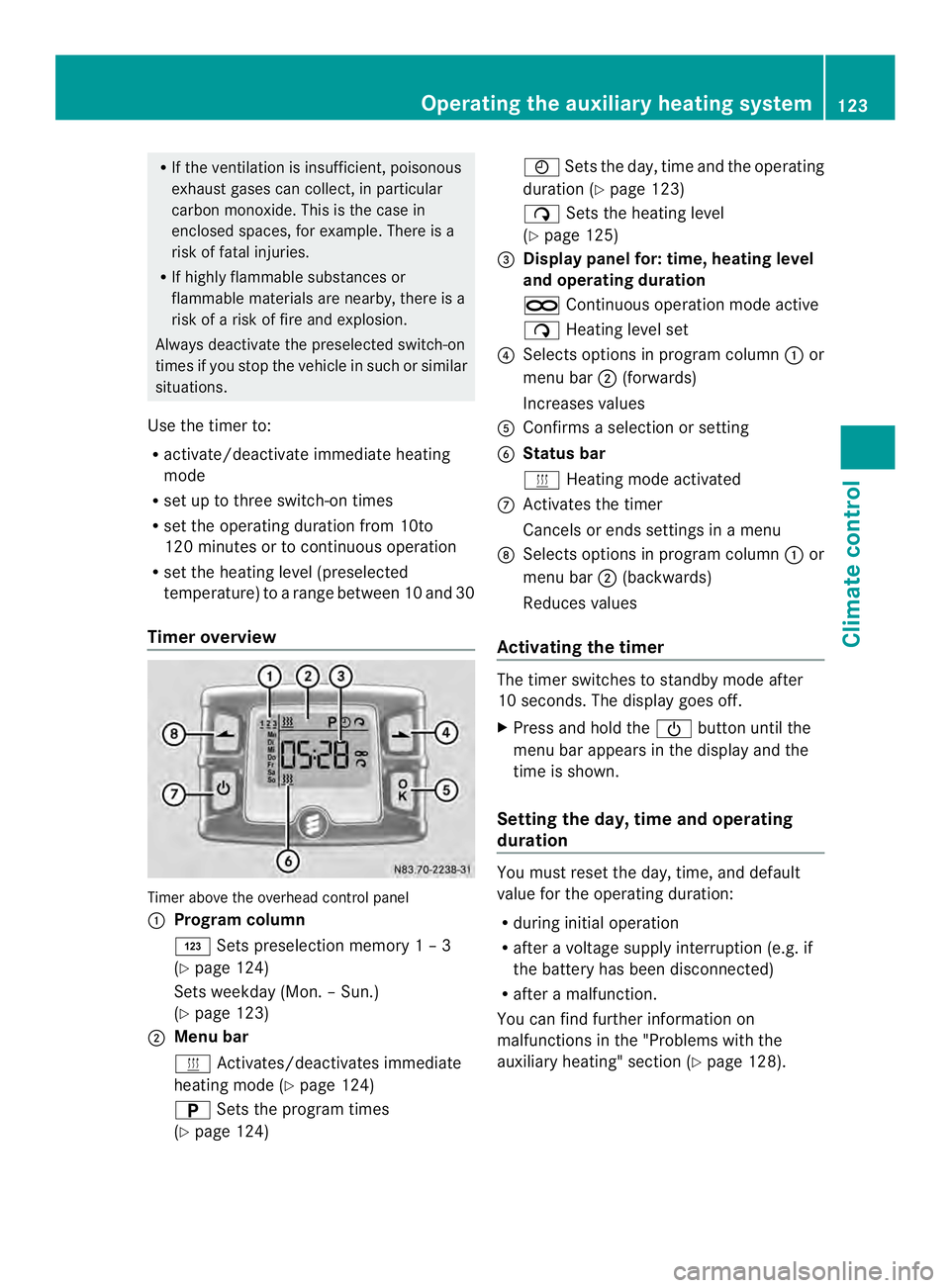
Timer overview Timer above the overhead control panel
0005
Program column
0001 Sets preselection memory 1 – 3
(Y page 124)
Sets weekday (Mon. – Sun.)
(Y page 123)
0006 Menu bar
0020 Activates/deactivates immediate
heating mode (Y page 124)
0002 Sets the program times
(Y page 124) 0001
Sets the day, time and the operating
duration (Y page 123)
0004 Sets the heating level
(Y page 125)
0026 Display panel for: time, heating level
and operating duration
0005 Continuous operation mode active
0004 Heating level set
0025 Selects options in program column 0005or
menu bar 0006(forwards)
Increases values
0023 Confirms a selection or setting
0024 Status bar
0020 Heating mode activated
0018 Activates the timer
Cancels or ends settings in a menu
0019 Selects options in program column 0005or
menu bar 0006(backwards)
Reduces values
Activating the timer The timer switches to standby mode after
10 seconds. The display goes off.
X
Press and hold the 0002button until the
menu bar appears in the display and the
time is shown.
Setting the day, time and operating
duration You must reset the day, time, and default
value for the operating duration:
R
during initial operation
R after a voltage supply interruption (e.g. if
the battery has been disconnected)
R after a malfunction.
You can find further information on
malfunctions in the "Problems with the
auxiliary heating" section (Y page 128). Operating the auxiliary heating system
123Climate control Z