reset MERCEDES-BENZ SPRINTER 2013 MY13 Operator’s Manual
[x] Cancel search | Manufacturer: MERCEDES-BENZ, Model Year: 2013, Model line: SPRINTER, Model: MERCEDES-BENZ SPRINTER 2013Pages: 334, PDF Size: 3.88 MB
Page 192 of 334
i
When you call up the trip computer again,
it displays the last function called up.
The units of the statistical information
displayed are set permanently for each
specific country, and are therefore
independen tofthe units selected in the
Settings menu.
Trip computer "After start" or "After
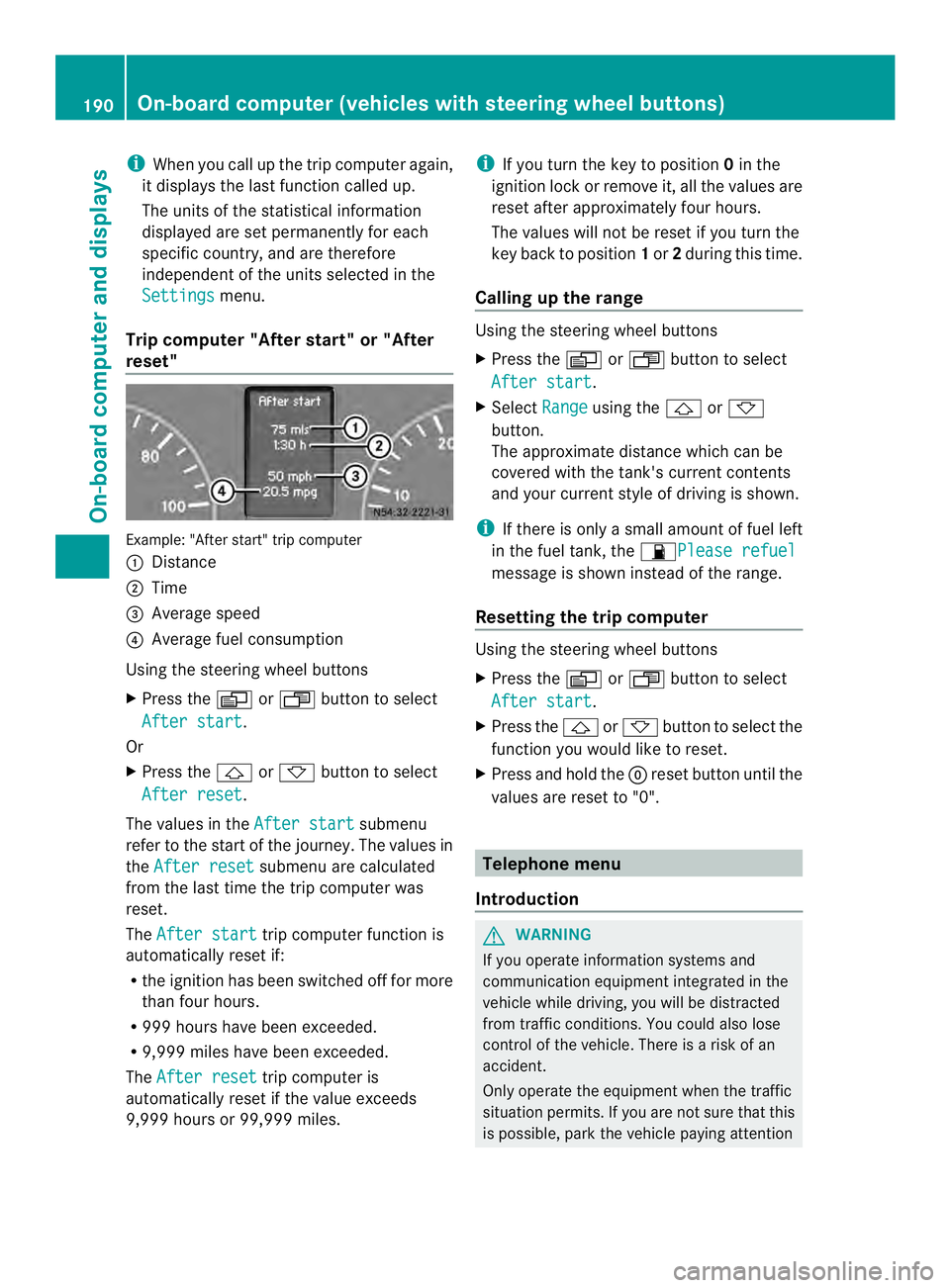
reset" Example: "After start" trip computer
0005
Distance
0006 Time
0026 Average speed
0025 Average fuel consumption
Using the steering wheel buttons
X Press the 0010or0007 button to select
After start .
Or
X Press the 0001or0009 button to select
After reset .
The values in the After start submenu
refer to the start of the journey. The values in
the After reset submenu are calculated
from the last time the trip computer was
reset.
The After start trip computer function is
automatically reset if:
R the ignition has been switched off for more
than four hours.
R 999 hours have been exceeded.
R 9,999 miles have been exceeded.
The After reset trip computer is
automatically reset if the value exceeds
9,999 hours or 99,999 miles. i
If you turn the key to position 0in the
ignition lock or remove it, all the values are
reset after approximately four hours.
The values will not be reset if you turn the
key back to position 1or 2during this time.
Calling up the range Using the steering wheel buttons
X
Press the 0010or0007 button to select
After start .
X Select Range using the
0001or0009
button.
The approximate distance which can be
covered with the tank's current contents
and your current style of driving is shown.
i If there is only a small amount of fuel left
in the fuel tank, the 0016Please refuel message is shown instead of the range.
Resetting the trip computer Using the steering wheel buttons
X
Press the 0010or0007 button to select
After start .
X Press the 0001or0009 button to select the
function you would like to reset.
X Press and hold the 0007reset button until the
values are reset to "0". Telephone menu
Introduction G
WARNING
If you operate information systems and
communication equipment integrated in the
vehicle while driving, you will be distracted
from traffic conditions. You could also lose
control of the vehicle. There is a risk of an
accident.
Only operate the equipment when the traffic
situation permits. If you are not sure that this
is possible, park the vehicle paying attention 190
On-board computer (vehicles with steering wheel buttons)On-board computer and displays
Page 195 of 334
button on the steering wheel or the
0007reset
button.
You cannot hide display messages of the
highest priority. These messages will
continue to be shown in the display until their
cause has been eliminated.
The on-board computer stores certain display
messages in the message memory
(Y page 193).
The following shows all the messages that
could appear in the display, arranged
alphabetically. Message memory
The on-board computer only records and
shows malfunctions and warnings from
certain systems .Therefore, make sure that
your vehicle is safe to use. You could cause
an accident by driving an unsafe vehicle.
The on-board computer stores certain display
messages. In the Message memory menu,
you can call up stored display messages.
Using the steering wheel buttons
X Press the 0010or0007 button repeatedly
until the number of stored display
messages, e.g. 2 messages , appears in the
display.
If no malfunctions have occurred, the Nomessages message appears.
X Scroll through the stored display messages
with the 0001or0009 button.
X To exit the message memory menu:
press the 0010or0007 button.
When you switch off the ignition, all display
messages are deleted from the message
memory. Display messages
193On-board computer and displays Z
Page 254 of 334
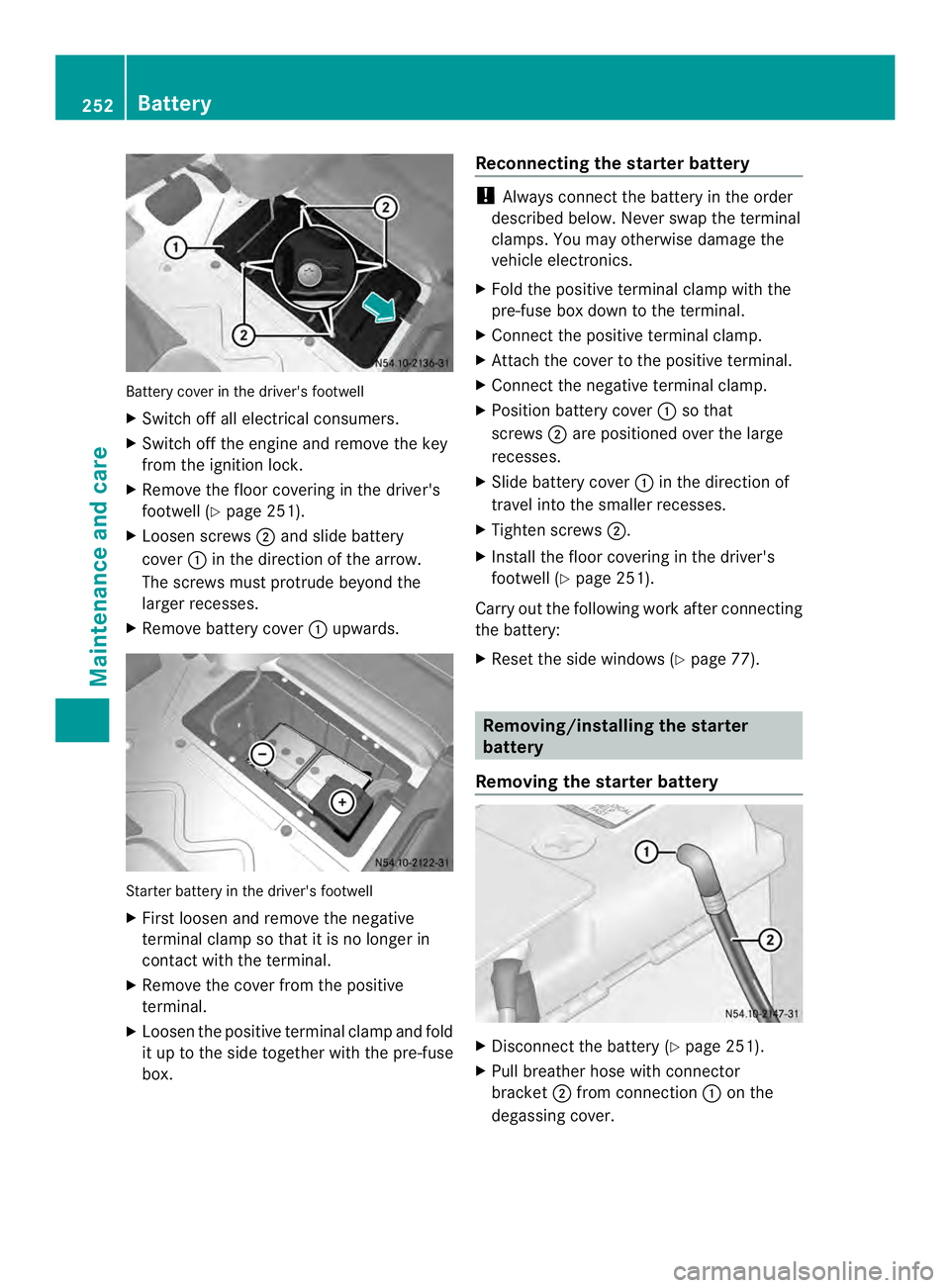
Battery cover in the driver's footwell
X
Switch off all electrical consumers.
X Switch off the engine and remove the key
from the ignition lock.
X Remove the floor covering in the driver's
footwell (Y page 251).
X Loosen screws 0006and slide battery
cover 0005in the direction of the arrow.
The screws mus tprotrude beyond the
larger recesses.
X Remove battery cover 0005upwards. Starter battery in the driver's footwell
X
First loosen and remove the negative
terminal clamp so that it is no longer in
contact with the terminal.
X Remove the cover from the positive
terminal.
X Loosen the positive terminal clamp and fold
it up to the side together with the pre-fuse
box. Reconnecting the starter battery !
Always connect the battery in the order
described below. Never swap the terminal
clamps. You may otherwise damage the
vehicle electronics.
X Fold the positive terminal clamp with the
pre-fuse box downt o the terminal.
X Connect the positive terminal clamp.
X Attach the cover to the positive terminal.
X Connect the negative terminal clamp.
X Position battery cover 0005so that
screws 0006are positioned over the large
recesses.
X Slide battery cover 0005in the direction of
travel into the smaller recesses.
X Tighten screws 0006.
X Install the floor covering in the driver's
footwell (Y page 251).
Carry out the following work after connecting
the battery:
X Reset the side windows (Y page 77). Removing/installing the starter
battery
Removing the starter battery X
Disconnect the battery (Y page 251).
X Pull breather hose with connector
bracket 0006from connection 0005on the
degassing cover. 252
BatteryMaintenance and care
Page 256 of 334
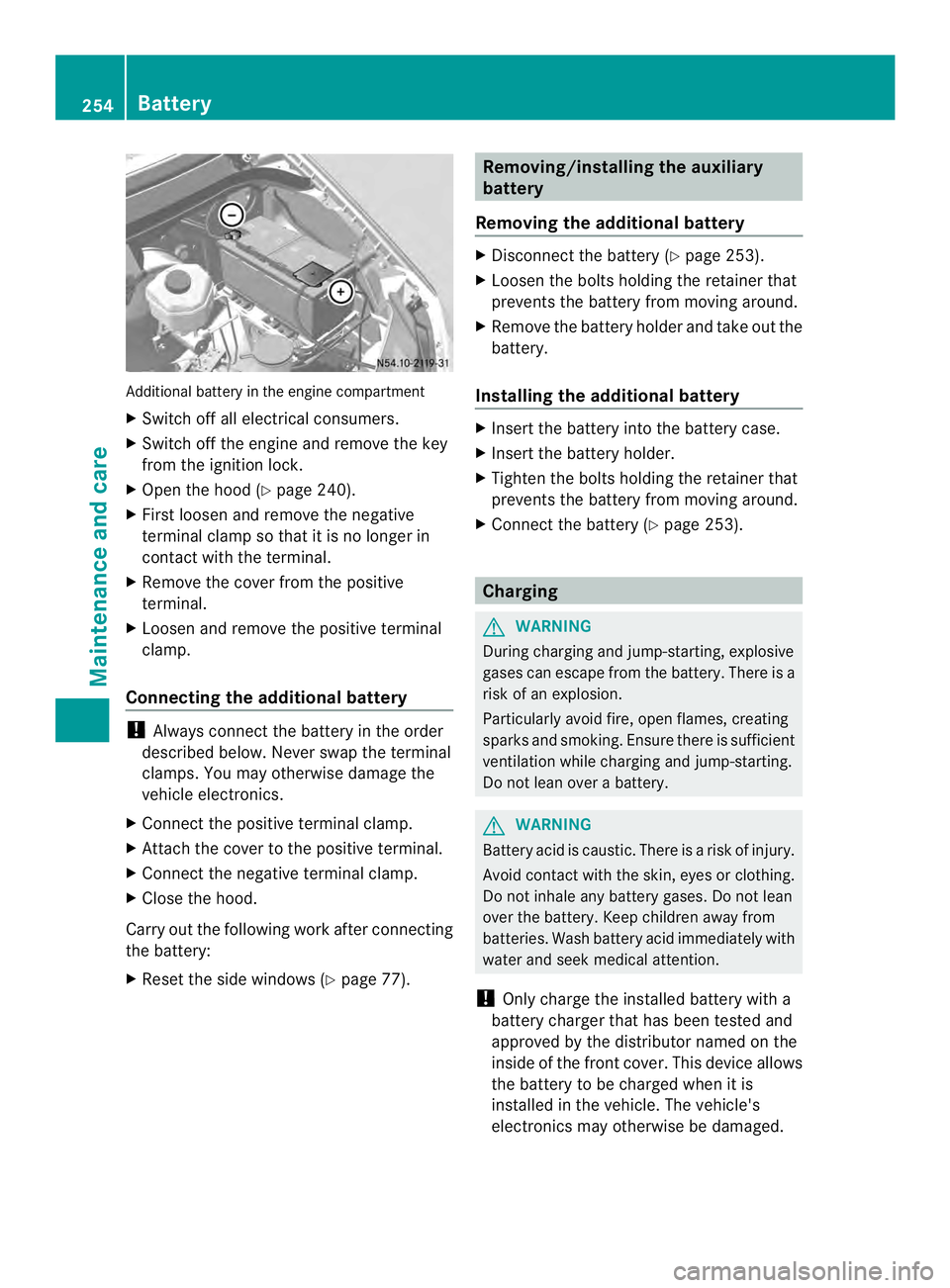
Additional battery in the engine compartment
X
Switch off all electrical consumers.
X Switch off the engine and remove the key
from the ignition lock.
X Ope nthe hood (Y page 240).
X First loosen and remove the negative
terminal clamp so that it is no longer in
contact with the terminal.
X Remove the cover from the positive
terminal.
X Loosen and remove the positive terminal
clamp.
Connecting the additional battery !
Always connect the battery in the order
described below. Never swap the terminal
clamps. You may otherwise damage the
vehicle electronics.
X Connect the positive terminal clamp.
X Attach the cover to the positive terminal.
X Connect the negative terminal clamp.
X Close the hood.
Carry out the following work after connecting
the battery:
X Reset the side windows (Y page 77). Removing/installing the auxiliary
battery
Removing the additional battery X
Disconnect the battery (Y page 253).
X Loosen the bolts holding the retainer that
prevents the battery from moving around.
X Remove the battery holder and take out the
battery.
Installing the additional battery X
Insert the battery into the battery case.
X Insert the battery holder.
X Tighten the bolts holding the retainer that
prevents the battery from moving around.
X Connect the battery (Y page 253). Charging
G
WARNING
During charging and jump-starting, explosive
gases can escape from the battery. There is a
risk of an explosion.
Particularly avoid fire, open flames, creating
sparks and smoking. Ensure there is sufficient
ventilation while charging and jump-starting.
Do not lean over a battery. G
WARNING
Battery acid is caustic. There is a risk of injury.
Avoid contact with the skin, eyes or clothing.
Do not inhale any battery gases. Do not lean
over the battery. Keep children away from
batteries. Wash battery acid immediately with
water and seek medical attention.
! Only charge the installed battery with a
battery charger that has been tested and
approved by the distributor named on the
inside of the front cover. This device allows
the battery to be charged when it is
installed in the vehicle. The vehicle's
electronics may otherwise be damaged. 254
BatteryMaintenance and care
Page 285 of 334
message. The
000Atire pressure loss warning
lamp in the instrument cluster (Y page 218)
lights up.
The tire pressure is show nin2red rectangles.
The pressure of the tire concerned is shown
in one of the two rectangles (Y page 192).
Additionally, a warning tone sounds.
Each tire that is affected by a significant loss
of pressure is highlighted in the pressure
display.
Restarting the tire pressure monitor When you restart the tire pressure monitor,
the currently set tire pressure are taken as
reference values for monitoring.
In most cases, the tire pressure monitor
detects the new reference values
automatically, e.g. after you have:
R changed the tire pressure
R changed wheels or tires
R installed new wheels or tires
However, you can also define reference
values manually as described here.
Before restarting the tire pressure
monitor:
X Set the tire pressure to the value
recommended on the Tire and Loading
Information placard or the tire pressure
table on the B-pillar on the driver's side
(Y page 278).
Observe the notes on tire pressure when
doing so (Y page 278).
X Make sure that the tire pressure is correct
on all four wheels. Restarting the tire pressure monitor
(vehicles without steering wheel
buttons):
X
Turn the key to position 2in the ignition
lock.
X Press the 0004menu button on the
instrument cluster repeatedly until the
display shows the following message:
+CAL- TPMS X
Press the 000Ebutton on the instrument
cluster.
The display shows:
OK TPMS The tire pressure monitor activation
process has begun. The tire pressures
measured for the individual wheels are
stored as the new reference values,
provided that the tire pressure monitor
considers them to be plausible.
If you wish to cancel the restart:
X Press the 000Fbutton or the 0004menu button
on the instrument cluster.
The activation process is canceled
automatically if 30 seconds elapse with no
input.
Restarting the tire pressure monitor
(vehicles with steering wheel buttons):
X Turn the key to position 2in the ignition
lock.
X Press the 0010or0007 button on the
steering wheel repeatedly until the
standard display is shown (Y page 182).
X Press the 0001or0009 button on the
steering wheel repeatedly until the current
pressure of the individual tires is displayed
or the display shows the following
message:
Tire pres. displayed after driving
for several minutes
X
Press the 0007reset button on the
instrument cluster.
The display shows the following message: Tire pressure
283Wheels and tires Z