warning lights MERCEDES-BENZ SPRINTER 2013 MY13 Operator’s Manual
[x] Cancel search | Manufacturer: MERCEDES-BENZ, Model Year: 2013, Model line: SPRINTER, Model: MERCEDES-BENZ SPRINTER 2013Pages: 334, PDF Size: 3.88 MB
Page 96 of 334
signal lamps on the side of the vehicle
selected will light up.
The hazard warning lamps switch on
automatically if:
R
an air bag is deployed.
R you brake sharply and bring the vehicle to
a halt from a speed of more than 45 mph
(70 km/h).
If the hazard warning lamps have been
switched on automatically, press the 0011
hazard warning lamp switch to switch them
off.
i The hazard warning lamps work even
when the ignition is switched off. Headlamp cleaning system
The headlamps are cleaned automatically
with a high-pressure water jet if the "Wipe
with washer fluid" function is activated
(Y page 103) while the low-beam headlamps
are on and the engine is running.
Information on checking the washer fluid
level can be found in the "Maintenance and
care" (Y page 246) section. Headlamps fogged up on the inside
The headlamps may fog up on the inside if
there is high atmospheric humidity.
X Switch on the low-beam headlamps and
drive off.
The level of moisture diminishes,
depending on the length of the journey and
the weather conditions (humidity and
temperature).
If the level of moisture does not diminish:
X Have the headlamps checked at a qualified
specialist workshop. Interior lighting
Switching the dashboard lighting on/
off
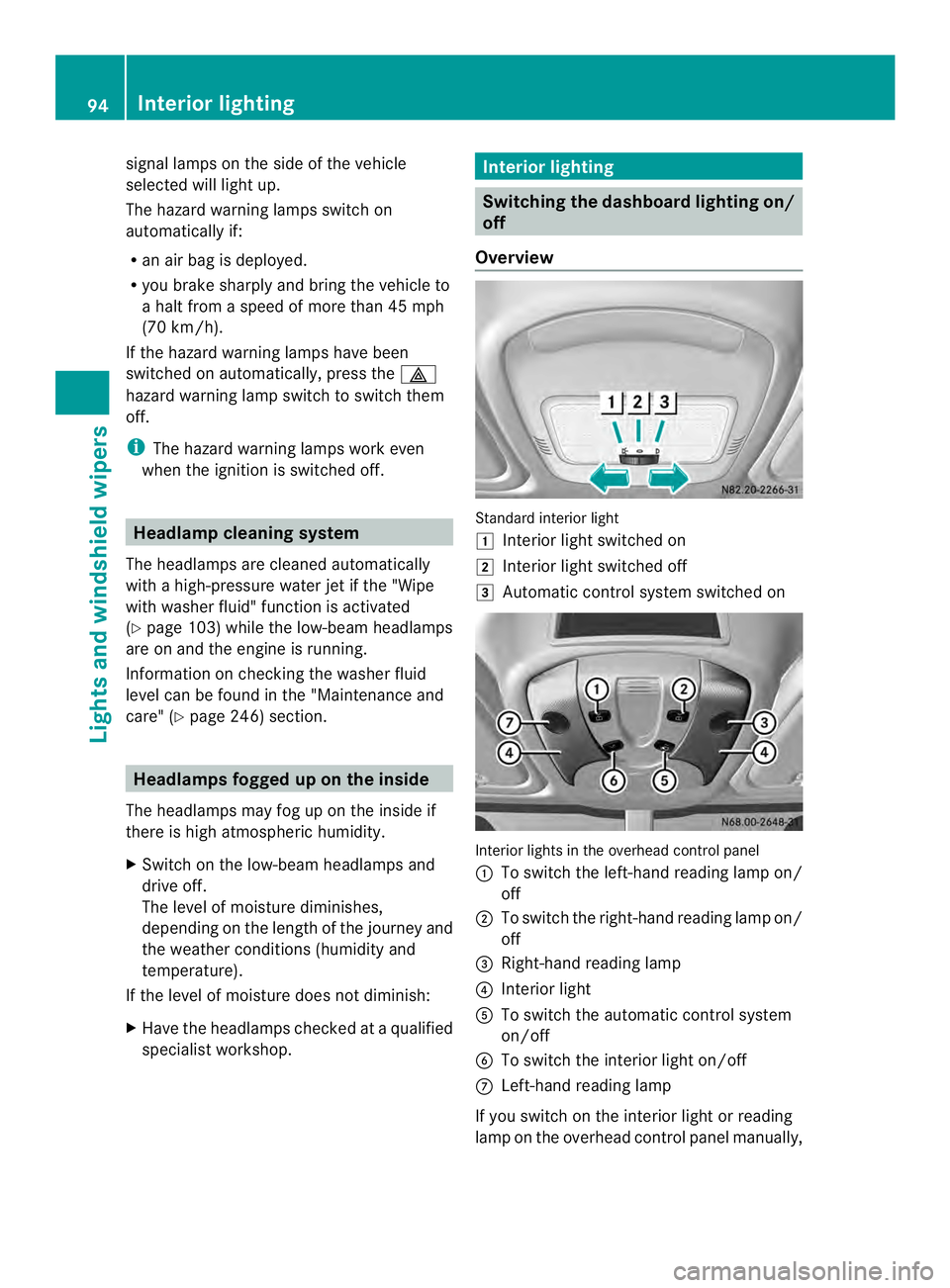
Overview Standard interior light
0008
Interior light switched on
0009 Interior light switched off
000A Automatic control system switched on Interior lights in the overhead control panel
0005 To switch the left-hand reading lamp on/
off
0006 To switch the right-hand reading lamp on/
off
0026 Right-hand reading lamp
0025 Interior light
0023 To switch the automatic control system
on/off
0024 To switch the interior light on/off
0018 Left-hand reading lamp
If you switch on the interior light or reading
lamp on the overhead control panel manually, 94
Interior lightingLights and windshield wipers
Page 98 of 334
If you move the switch to automatic control,
the rear/cargo compartment lamps go on
when you open a door or unlock the vehicle.
It switches off automatically after
20 minutes, or when you close the doors.
Motion detector
G
WARNING
The motion detector sends the invisible
infrared radiation emitted by LEDs (light
emitting diodes).
These LEDs are classified as class 1M lasers
and can damage the retina if you:
R look directly into the unfiltered laserb eam
of the motion detector for an extended
period
R look directly into the laser beam of the
motion detector using optical instruments,
e.g. eyeglasses or a magnifying glass.
There is a risk of injury.
Never look directly into the motion detector.
The cargo compartment lighting is also
switched on by the motion detector in the
cargo compartment of Cargo Vans equipped
with this feature.
If the motion detector detects a movemen tin
the cargo compartment when the vehicle is
stationary, the cargo compartment lighting
switches on for approximately two minutes.
The cargo compartment lighting can be
switched on by the motion detecto rwithin
four seconds if:
R the rear interior light switch (Y page 95) is
set to automatic control.
R the vehicle is stationary, the parking brake
is applied and the brake pedal is not being
depressed
Or R
the selector lever is in position Pon
vehicles with automatic transmission and
the brake pedal is not being depressed and
R the vehicle has not been locked fro mthe
outside using the key
The motion detector switches off
automatically if no change is detected in the
vehicle for several hours, e.g. if a door is
opened, if the ignition key is turned, etc. This
prevents the battery from becoming
discharged. Changing bulbs
Important safety notes
G
DANGER
Xenon bulbs carry a high voltage. You can get
an electric shock if you remove the cover of
the Xenon bulb and touch the electrical
contacts. There is a risk of fatal injury.
Never touch the parts or the electrical
contacts of the Xenon bulb. Always have work
on the Xenon bulbs carried out at a qualified
specialist workshop. G
WARNING
Bulbs, lamps and connectors can get very hot
when operating. If you change a bulb, you
could burn yourself on these components.
There is a risk of injury.
Allow these components to cool down before
changing a bulb.
! Make sure the bulbs are always securely
installed.
If your vehicle is equipped with Bi-Xenon
bulbs, you can recognize this by the following:
the cone of light from the Xenon bulbs moves
from the top to the bottom and back again
when you start the engine. For this to be
observed, the low-beam headlamps must be
switched on before startingt he engine.
The bulbs and lamps are an essential
componentofv ehicle safety. You must
therefore make sure that these function 96
Changing bulbsLights and windshield wipers
Page 106 of 334
X
Turn the key to position 1or 2in the
ignition lock.
X Turn the combination switch in the
direction of arrow 0005to the appropriate
setting depending on the intensity of the
rain.
X Single wipe: push the combination switch
briefly up to the pressure point in the
direction of arrow 0006.
X To wipe with washer fluid: press the
combination switch beyond the pressure
point in the direction of arrow 0006.
i Wipe the windshield using washer fluid
even if it is raining. By doing so, you will
prevent smears on the windshield.
The detent positions of the combination
switch correspond to the following wiper
speeds:
0W indshield wipers off
II ntermittent wipe
II Normal wipe
III Rapid wipe
i Canada only:
If the windshield wipers are switched on
and you stop the vehicle, the windshield
wipe rspeed is reduced. For example, if you
have selected level IIand stop the vehicle,
wiping continues with intermitten twipe
while the vehicle is stationary. If
intermitten twipe is selected, the intervals
become longer.
Vehicles with arain and light sensor:
you can use level Ias the universal setting.
The rai nand light sensor sets the
appropriate wiping frequency
automatically, according to the intensity of
the rain. Whe nyou stop the vehicle, levels
III and IIare switched down to level I
automatically.
The windshield wiper will return to the
original level when you drive faster than
5 mph (8 km/h) again. You can adjust the sensitivity of the rain and
light sensor using the on-board computer
(Y
page 189).
Information on checking the washer fluid
level can be found in the "Maintenance and
care" (Y page 246) section. Switching the rear window wiper on/
off
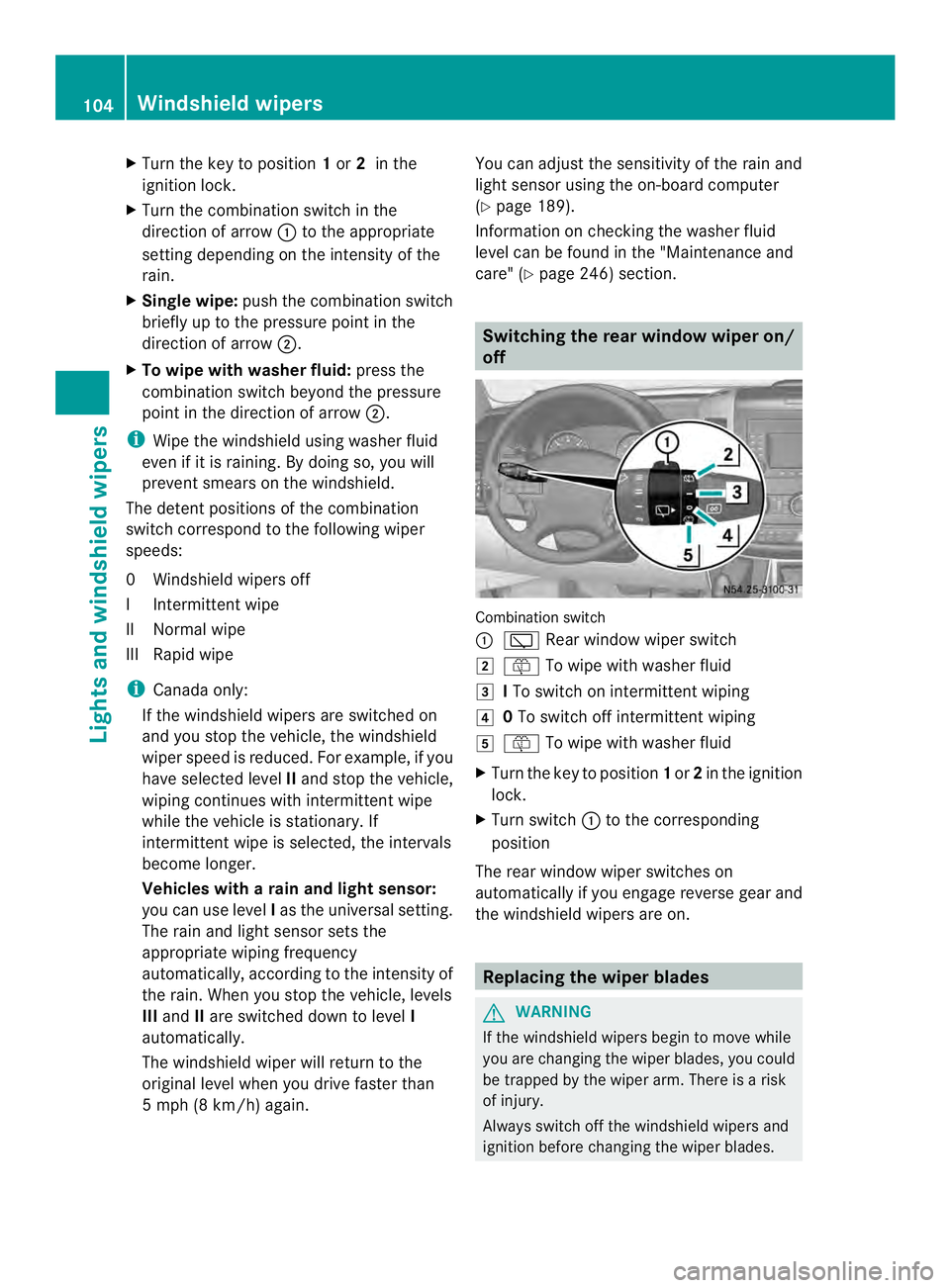
Combination switch
0005
0001 Rear window wiper switch
0009 0006 To wipe with washer fluid
000A ITo switch on intermittent wiping
000E 0To switch off intermittent wiping
000F 0006 To wipe with washer fluid
X Turn the key to position 1or 2in the ignition
lock.
X Turn switch 0005to the corresponding
position
The rear window wiper switches on
automatically if you engage reverse gear and
the windshield wipers are on. Replacing the wiper blades
G
WARNING
If the windshield wipers begin to move while
you are changing the wiper blades, you could
be trapped by the wiper arm. There is a risk
of injury.
Always switch off the windshield wipers and
ignition before changing the wiper blades. 104
Windshield wipersLights and windshiel
dwipers
Page 128 of 334
At an outside temperature of up to
39 ‡(4 †) the fuel-fired heate
rbooster
system heats the vehicle interior as quickly
as possible when the engine is running.
The auxiliary heating automatically switches
to heater booster mode after the engine is
started.
At an outside temperature above 39 ‡(4 †)
the auxiliary heating system and the heater
booster function switch off automatically.
If you switch off the engine without switching
off the heater booster function, the system
will be switched on the next time the engine
is started (memory function).
i Switch the auxiliary heating on or off with
the 0020 button (Y page 119).
X To switch on/off: press the0013switch.
If the indicator lamp in the button lights up,
the heater booster function is switched on.
After switching off, the auxiliary heating
operates for about another three minutes and
then switches off automatically. Replacing the remote control battery
G
WARNING
Batteries contain toxic and corrosive
substances. If batteries are swallowed, it can
result in severe health problems. There is a
risk of fatal injury.
Keep batteries out of the reach of children. If
a battery is swallowed, seek medical attention
immediately. H
Environmental note Batteries contain dangerous
substances. It is against the
law to dispose of them with
the household rubbish. They
must be collected separately
and recycled to protect the
environment.
Dispose of batteries in an
environmentally friendly
manner
.Take discharged
batteries to a qualified
specialist workshop or a
special collectio npoint for
used batteries.
If the indicator lamp on the remote control
flashes red rapidly, the remote control battery
is discharged. You should replace the remote
control battery.
You need a battery of the type CR2430, which
can be obtained at any qualified specialist
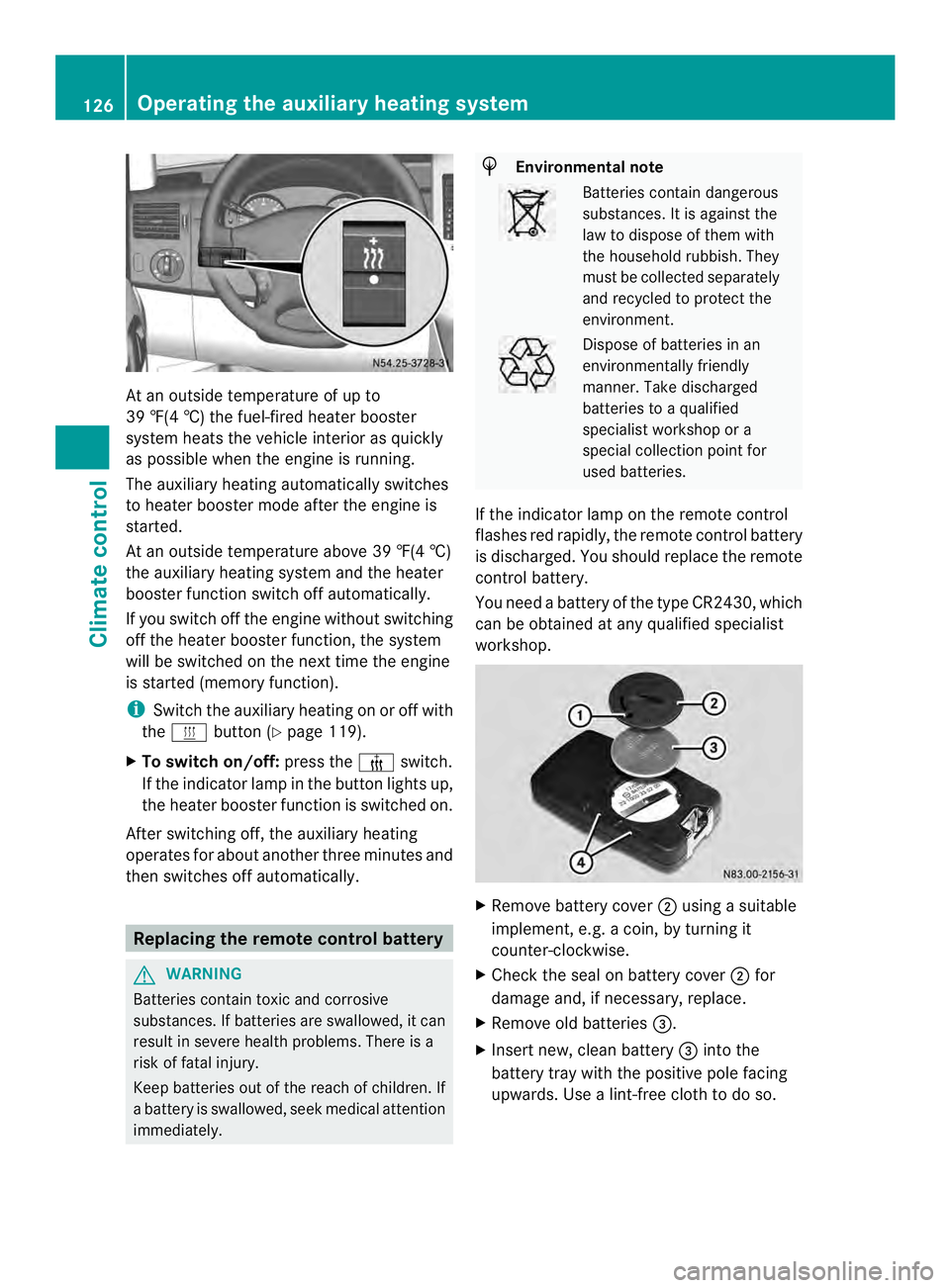
workshop. X
Remove battery cover 0006using a suitable
implement, e.g. a coin, by turning it
counter-clockwise.
X Check the seal on battery cover 0006for
damage and, if necessary, replace.
X Remove old batteries 0026.
X Insert new, clean battery 0026into the
battery tray with the positive pole facing
upwards. Use a lint-free cloth to do so. 126
Operating the auxiliary heating systemClimate control
Page 137 of 334
R
all the doors are closed.
R all the vehicle occupants are wearing
their seat belts correctly.
R the parking brake is applied.
i If you depress the brake pedal before
starting the engine, th epedal travel is short
and pedal resistance is high.
If you depress the brake pedal again after
starting the engine, pedal travel and
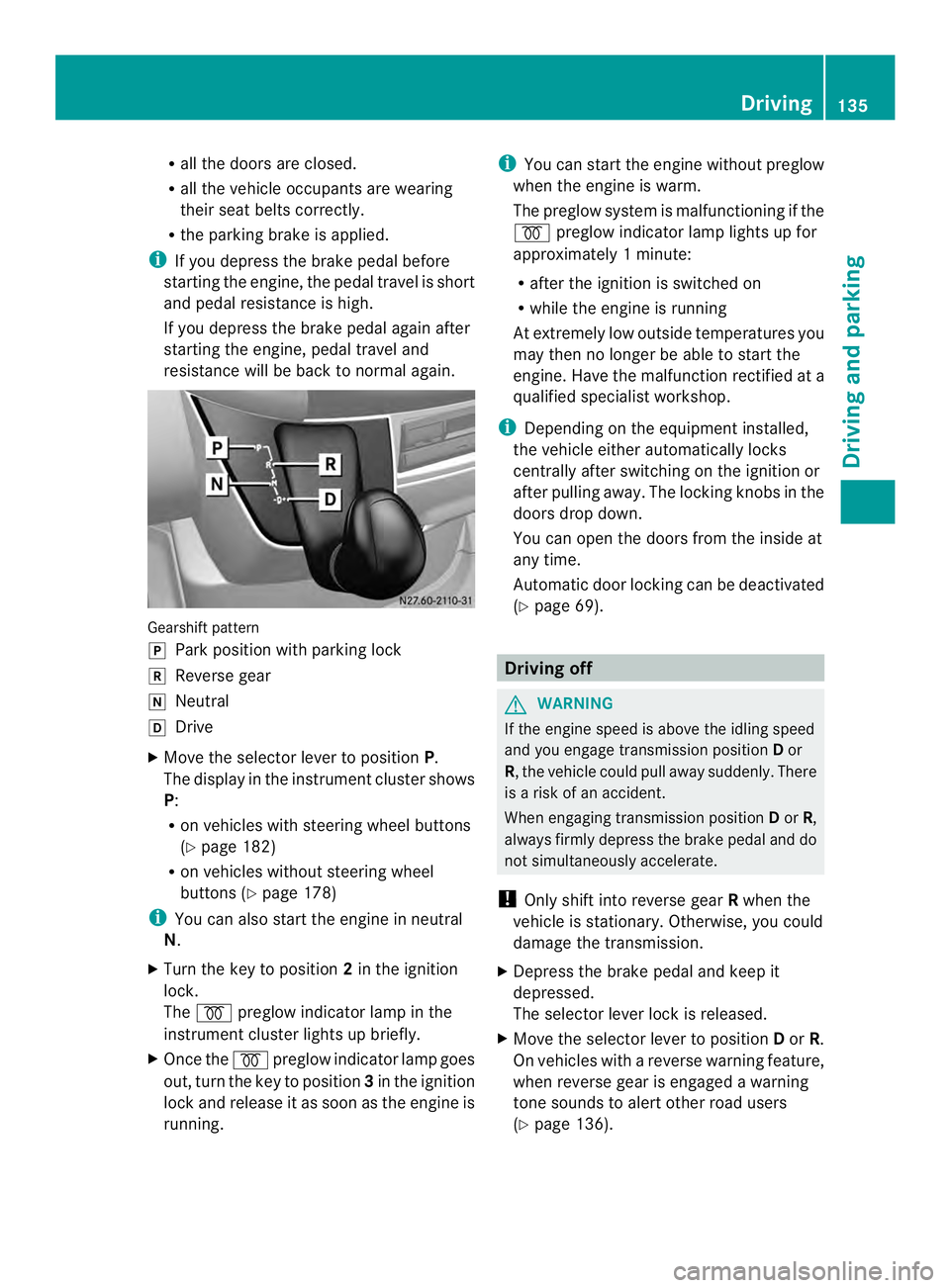
resistance will be back to normal again. Gearshift pattern
0016
Park position with parking lock
0012 Reverse gear
0013 Neutral
0015 Drive
X Move the selector lever to position P.
The display in the instrument cluster shows
P:
R on vehicles with steering wheel buttons
(Y page 182)
R on vehicles without steering wheel
buttons (Y page 178)
i You can also start the engine in neutral
N.
X Turn the key to position 2in the ignition
lock.
The 000D preglow indicator lamp in the
instrument cluster lights up briefly.
X Once the 000Dpreglow indicator lamp goes
out, turn the key to position 3in the ignition
lock and release it as soon as the engine is
running. i
You can start the engine without preglow
when the engine is warm.
The preglow system is malfunctioning if the
000D preglow indicator lamp lights up for
approximately 1minute:
R after the ignition is switched on
R while the engine is running
At extremely low outside temperatures you
may the nno longer be able to start the
engine. Have the malfunction rectified at a
qualified specialist workshop.
i Depending on the equipment installed,
the vehicle either automatically locks
centrally after switching on the ignition or
after pulling away.T he locking knobs in the
doors drop down.
You can open the doors from the inside at
any time.
Automatic door locking can be deactivated
(Y page 69). Driving off
G
WARNING
If the engine speed is above the idling speed
and you engage transmission position Dor
R, the vehicle could pull away suddenly. There
is a risk of an accident.
When engaging transmission position Dor R,
always firmly depress the brake pedal and do
not simultaneously accelerate.
! Only shift into reverse gear Rwhen the
vehicle is stationary. Otherwise, you could
damage the transmission.
X Depress the brake pedal and keep it
depressed.
The selector lever lock is released.
X Move the selector lever to position Dor R.
On vehicles with a reverse warning feature,
when reverse gear is engaged a warning
tone sounds to alert other road users
(Y page 136). Driving
135Driving and parking Z
Page 148 of 334
Use the wheel chock (Y
page 147) to do so.Parking brake
G
WARNING
If you leave children unsupervised in the
vehicle, they could set it in motion by, for
example:
R releasing the parking brake
R shifting the automatic transmission out of
the parking position P
R starting the engine.
They could also operate the vehicle's
equipment. There is a risk of an accident and
injury.
When leaving the vehicle, always take the
SmartKey with you and lock the vehicle. Never
leave children unsupervised in the vehicle. G
WARNING
If you must brake the vehicle with the parking
brake, the braking distance is considerably
longer and the wheels could lock. There is an
increased danger of skidding and accidents.
Only use the parking brake to brake the
vehicle when the service brake is faulty. Do
not apply the parking brake too firmly. If the
wheels lock, release the parking brake until
the wheels begin turning again. The brake lamps are not illuminated when you
brake the vehicle using the parking brake.
As a rule, you may only apply the parking
brake when the vehicle is stationary. X
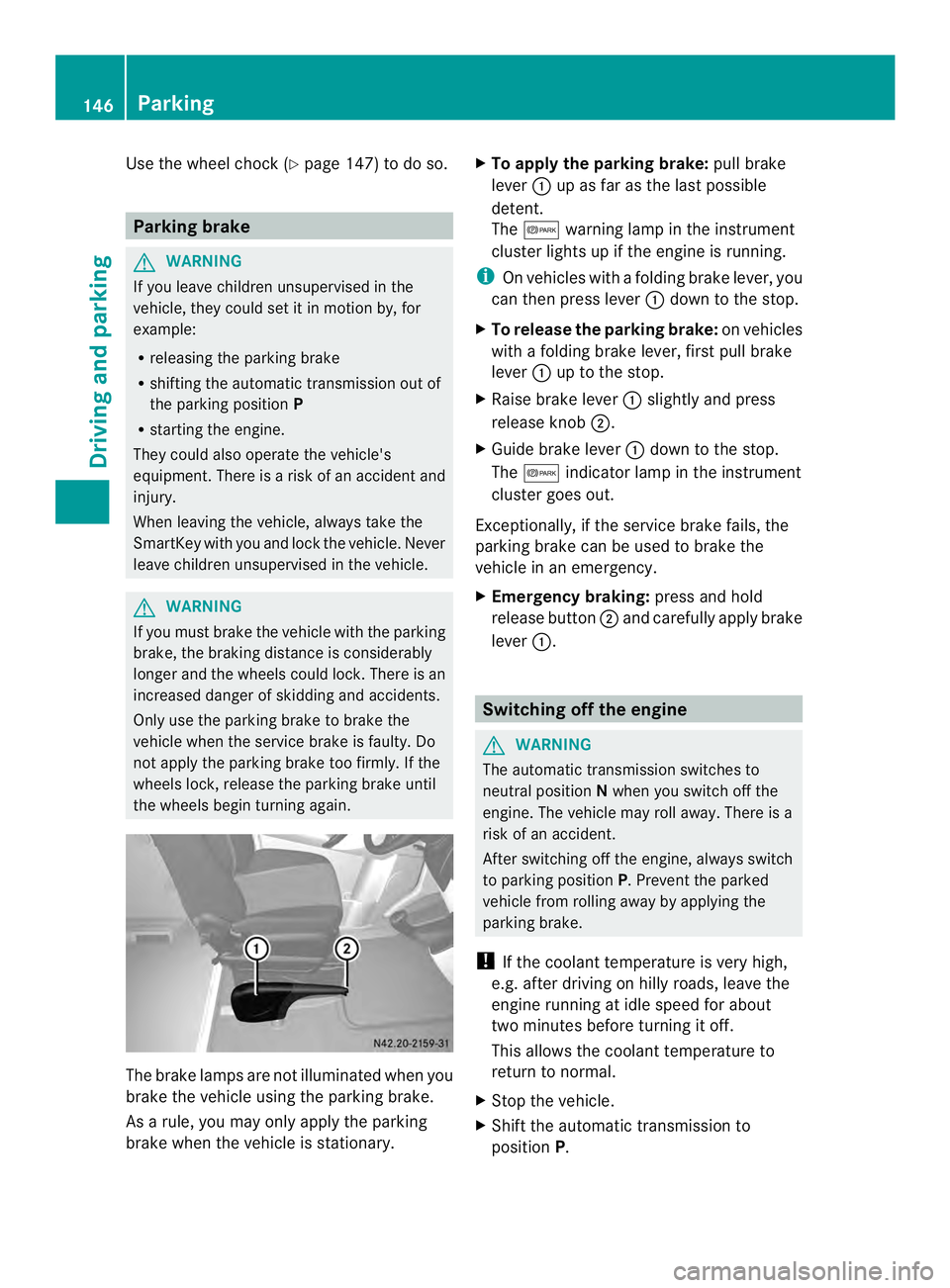
To apply the parking brake: pull brake
lever 0005up as far as the last possible
detent.
The 000B warning lamp in the instrument
cluster lights up if the engine is running.
i On vehicles with a folding brake lever, you
can then press lever 0005down to the stop.
X To release the parking brake: on vehicles
with a folding brake lever, first pull brake
lever 0005up to the stop.
X Raise brake lever 0005slightly and press
release knob 0006.
X Guide brake lever 0005down to the stop.
The 000B indicator lamp in the instrument
cluster goes out.
Exceptionally, if the service brake fails, the
parking brake can be used to brake the
vehicle in an emergency.
X Emergency braking: press and hold
release button 0006and carefully apply brake
lever 0005. Switching off the engine
G
WARNING
The automatic transmission switches to
neutral position Nwhen you switch off the
engine. The vehicle may roll away. There is a
risk of an accident.
After switching off the engine, always switch
to parking position P. Prevent the parked
vehicle from rolling away by applying the
parking brake.
! If the coolant temperature is very high,
e.g. after driving on hilly roads, leave the
engine running at idle speed for about
two minutes before turning it off.
This allows the coolant temperature to
return to normal.
X Stop the vehicle.
X Shift the automatic transmission to
position P. 146
ParkingDriving and parking
Page 159 of 334
Deactivating cruise control
There are various ways to deactivate cruise
control:
X Briefly press the cruise control lever
forwards 0025.
Or
X Apply the brakes.
The last speed set remains stored. The last
speed stored is deleted when you switch off
the engine.
Cruise control is deactivated automatically
when:
R you apply the brakes
R you apply the parking brake and the 000B
indicator lamp in the instrument cluster
lights up
R you are driving slower than 20 mph
(30 km/h)
R you shift the automatic transmissio nto
neutral position Nwhile the vehicle is in
motion
R ESP ®
or ASR intervenes
R there is a malfunction in the ESP ®
, ASR or
ABS system
Problems with cruise control On vehicles with steering wheel buttons, the
speed canno
tbe set when cruise control is
activated.
The display is showing a message of high
priority and cannot therefore show a change
in speed.
X Proceed as instructed by the message in
the display.
X Deactivate cruise control PARKTRONIC
Important safety notes PARKTRONIC is only an aid. It cannot replace
your own awareness of the immediate
surroundings. You are responsible for safe maneuvering, parking and pulling away. When
maneuvering, parking and pulling away, make
sure that there are no persons, animals or
objects in the maneuverin
garea.
PARKTRONIC does not account for obstacles
that are:
R beneath its detection range, e.g. persons,
animals or objects
R above its detection range, e.g. overhanging
loads, overhangs or truck loading ramps
PARKTRONIC is an electronic parking aid with
ultrasonic sensors. It indicates the distance
between yourv ehicle and an objec tvisually
and audibly.
Your vehicle features two separate sound
emitters with different frequencies for the
warning tones. The warning ranges in front of
and behind the vehicle are indicated by
different warning tones.
PARKTRONIC is activated automatically when
you:
R tur nthe key to position 2in the ignition lock
R release the parking brake and
R move the selector lever to D,Nor R.
PARKTRONIC is deactivated at speeds above
11 mph (18 km/h). PARKTRONIC is
reactivated at speeds below 10 mph
(16 km/h).
PARKTRONIC monitors the area around your
vehicle with sensors in the front and rear
bumpers.
Range of the sensors !
Pay particular attention to obstacles
above or below the sensors when parking,
such as flower pots or trailer towbars.
PARKTRONIC does not recognize such
objects when they are in the immediate
vicinity of the vehicle. You could damage
the vehicle or objects. Driving systems
157Driving and parking Z
Page 163 of 334
Problems with PARKTRONIC
Problem Possible causes/consequences and
0004 Solutions
Only the red segments
in the PARKTRONIC
warning displays are lit.
Aw
arning tone also
sounds for
approximately
2s econds.
PARKTRONIC is
deactivated after
approximately
20 seconds.
The indicator lamp of
the 000C button lights
up and the red
segments in the
PARKTRONIC warning
display go out. PARKTRONIC has malfunctioned and has switched itself off.
X
If problems persist, have PARKTRONIC checked at a qualified
specialist workshop. The PARKTRONIC
warning displays
implausible distances.
For example, all the
segments may be lit
even though there is no
obstacle present. The PARKTRONIC sensors are dirty or iced up.
X
Clean the PARKTRONIC sensors (Y page 259).
X Turn the key to position 2again in the ignition lock. The license plate or other parts attached near the sensors may
not be secured correctly.
X
Check the license plate and attachment parts near the sensors
for correct seating. An external radio or ultrasonic source may be causing
interference.
X
Check PARKTRONIC functions in a different location. Rear view camera
Important safety notes !
Objects that are not at ground level
appear further away than they actually are,
for example:
R the bumper of the vehicle parked behind
R the drawbar of a trailer
R the ball coupling of a trailer tow hitch R
the tail-end of a truck
R slanted posts
Only use the camera guide lines for
orientation. Do not get any closer to
objects than the lowest horizontal guide
line. You may otherwise damage your
vehicle and/or the object.
The rear view camera is only an aid. It cannot
replace your own awareness of the
immediate surroundings. You are responsible Driving systems
161Driving and parking Z
Page 174 of 334
available from the police and local
authorities.
Observe the following when towing a trailer:
R
Practice driving around bends, stopping
and backing up at a place where there is no
traffic. This enables you to gain experience
and get used to the new handling
characteristics.
R Before driving, check:
-that the trailer tow hitch and ball
coupling are secure
- that the safety switch for a braked trailer
is functioning properly
- that the safety chains are secure and not
damaged
- that the electrical connections are
secure
- that the lights are working
- that the wheels are in good order and the
tire pressure is correct
R Adjust the exterior mirrors to provide an
unobstructed view of the rear sectio nofthe
trailer.
R If the trailer has electronically controlled
brakes, pull the vehicle/trailer
combination away carefully. Brake
manually using the brake controller and
check that the brakes are working.
R Secure the load on the trailer according to
the applicable specifications and current
standards on securing loads
(Y page 234).
R When driving with a trailer, check at regular
intervals that the load is secured and that
the brakes and lights are working.
R Bear in mind that the handling will be less
stable when towing a trailer than when
driving without one. Avoid sudden steering
movements.
R The vehicle/trailer combination is heavier,
accelerates more slowly and has a
decreased gradient climbing capability and
a longer braking distance.
It is more susceptible to crosswinds and
requires cautious steering. R
If possible, do not brake suddenly, but
rather moderately at first so that the trailer
can activate its brakes. Then increase the
force on the brake pedal.
R If the automatic transmission repeatedly
shifts between gears when driving on
inclines, restrict the shift range. Select shift
range 4,3,2or 1.
Driving in a low gear and at a low speed
reduces the risk of damaging the engine.
R When driving on a downhill gradient, shift
to a low gear and take advantage of the
engine's braking effect.
Avoid continuous brake application as this
may overheat the vehicle brakes and, if
installed, the trailer brakes.
R If the coolant temperature increases
dramatically while the air-conditioning
system is switched on, switch off the air-
conditioning system.
Coolant heat can also be dissipated by
switching the airflow and the temperature
of the heater/air conditioning to the
maximum level. Open the windows if
necessary.
R When overtaking, pay particular attention
to the extended length of your vehicle/
trailer combination.
Due to the length of your vehicle/trailer
combination you need an additional
distance before you can return to your
original lane. Uncoupling
atrailer G
WARNING
If you uncouple a trailer with the overrun
brake engaged, you could trap your hand
between the vehicle and the trailer drawbar.
There is a risk of injury.
Do not uncouple a trailer if the overru nbrake
is engaged.
! Do not disconnect a trailer with an
engaged overru nbrake. Otherwise, your 172
Towing
atrailerDriving an d parking
Page 179 of 334
R
press the 0007reset button
R switch on the lights
The display switches off automatically after
approximately 30 seconds if:
R the vehicle lighting is not switched on.
R the key is in position 0in the ignition lock. Instrument lighting
When the lights are switched on, you can
adjust the brightness of the instrument
cluster lighting using the 000Eand 000Fbuttons.
X To brighten: press the000Ebutton.
X To dim: press the 000Fbutton.
i Vehicles with automatic headlamp mode:
the instrument lighting also adapts to
automatic headlamp mode. Tachometer
! Do not drive in the overrevving range, as
this could damage the engine. H
Environmental note
Avoid driving at high engine speeds. This
unnecessarily increases the fuel consumption
of your vehicle and harms the environmen tas
a result of increased emissions.
The red band in the tachometer indicates the
engine's overrevving range.
To protect the engine, the fuel supply is
interrupted when the red band is reached. Outside temperature
You should pay special attention to road
conditions when temperatures are around
the freezing point.
On vehicles without steering wheel buttons
(Y page 178) and on vehicles with steering
wheel buttons (Y page 182), the outside
temperature display is in the display. Changes in the outside temperature are
displayed after a shor
tdelay. Speedometer
The speed can also be shown in the display.
You can find information on the digital
speedometer for vehicles without steering
wheel buttons under (Y page 178) and for
vehicles with steering wheel buttons under
(Y page 182).
i In some countries, a warning sounds
when the vehicle reaches the maximum
speed limit, e.g. at 75 mph ( 120 km/h). Trip odometer
X To reset: make sure that the display is
showing the trip odometer if you have a
vehicle with steering wheel buttons
(Y page 182).
X Press and hold the 0007reset button until the
trip odometer is reset to 0.0 .
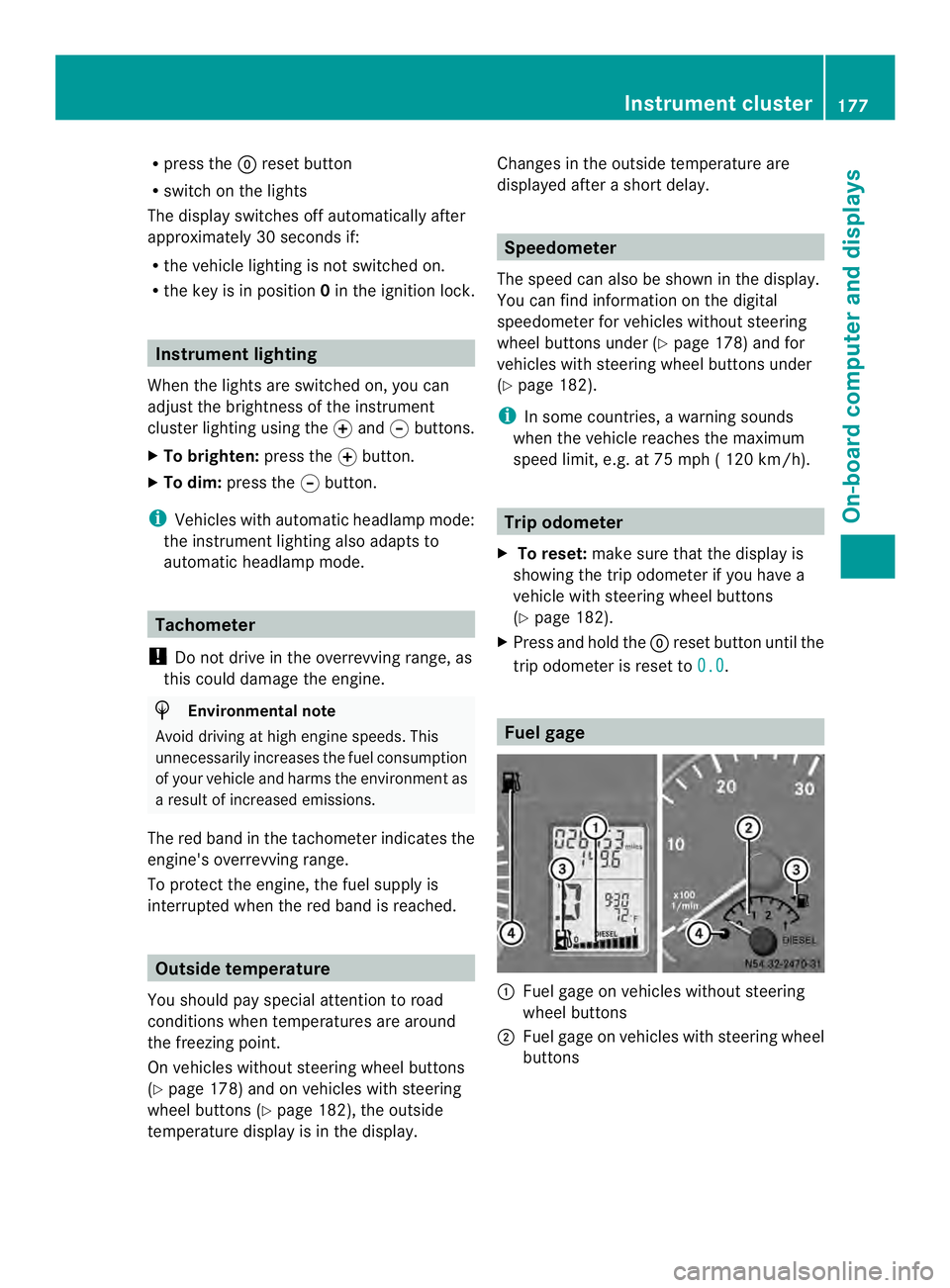
Fuel gage
0005
Fuel gage on vehicles without steering
wheel buttons
0006 Fuel gage on vehicles with steering wheel
buttons Instrument cluster
177On-board computer and displays Z