check engine MERCEDES-BENZ SPRINTER 2013 MY13 Operator’s Manual
[x] Cancel search | Manufacturer: MERCEDES-BENZ, Model Year: 2013, Model line: SPRINTER, Model: MERCEDES-BENZ SPRINTER 2013Pages: 334, PDF Size: 3.88 MB
Page 178 of 334
Useful information
This Operator's Manual describes all models
as well as standard and optional equipment
of your vehicle that were available at the time
of going to print. Country-specific variations
are possible. Note that your vehicle may not
be equipped with all of the described
functions. This also applies to systems and
functions relevant to safety.
Read the information on qualified specialist
workshops (Y page 26). Important safety notes
G
WARNING
If you are driving and reach through the
steering wheel to operate the adjustment
knob, you could lose control of the vehicle.
There is a risk of an accident and injury.
Only operate the adjustment knobs when the
vehicle is stationary. Do not reach through the
steering wheel when driving. G
WARNING
If you operate information systems and
communication equipment integrated in the
vehicle while driving, you will be distracted
from traffic conditions. You could also lose
control of the vehicle. There is a risk of an
accident.
Only operate the equipment when the traffic
situatio npermits .Ifyou are not sure that this
is possible, park the vehicle paying attention
to traffic conditions and operate the
equipment when the vehicle is stationary. G
WARNING
If the instrument cluster has failed or
malfunctioned, you may not recognize
function restrictions in systems relevant to
safety. The operating safety of your vehicle
may be impaired. There is a risk of an
accident. Drive on carefully. Have the vehicle checked
at a qualified specialist workshop
immediately.
If uncertainties regarding the operating safety
of the vehicle arise when continuing the
journey, stop the vehicle, paying attention to
road and traffic conditions.
You must observe the legal requirements for
the country in which you are currently driving
when operating COMAND. Instrument cluster
Overview
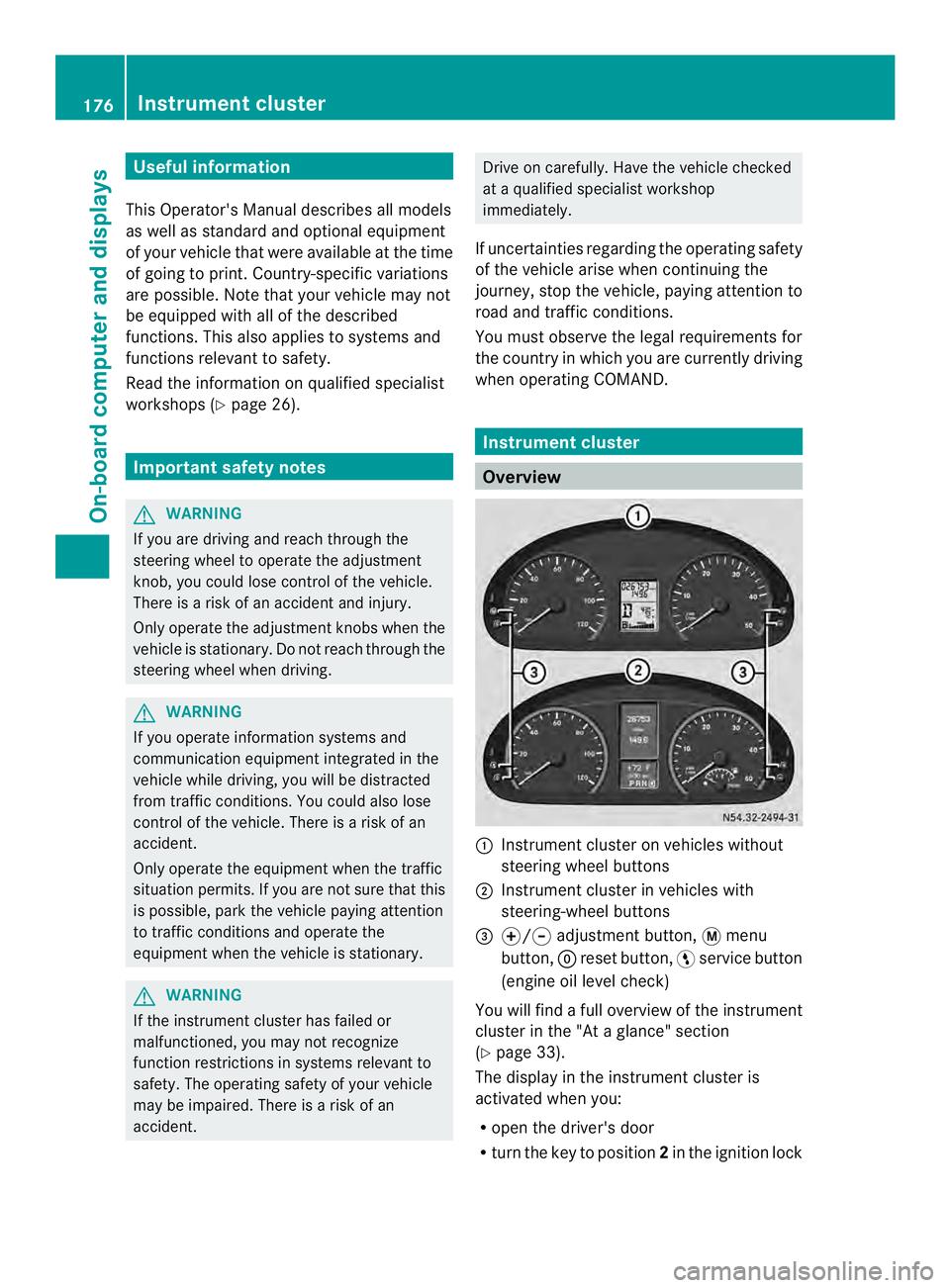
0005
Instrument cluster on vehicles without
steering wheel buttons
0006 Instrument cluster in vehicles with
steering-wheel buttons
0026 000E/000F adjustment button, 0004menu
button, 0007reset button, 0012service button
(engine oil level check)
You will find a full overview of the instrument
cluster in the "At a glance" section
(Y page 33).
The display in the instrument cluster is
activated when you:
R open the driver's door
R turn the key to position 2in the ignition lock 176
Instrument clusterOn-board computer and displays
Page 180 of 334
0026
Fuel fille rflap location indicator 000F: the
fuel filler flap is on the left-hand side. Fuel
filler flap location indicator 001E:the fuel
filler flap is on the right-hand side
0025 Reserve fuel warning lamp (Y page 216)DEF gauge
Vehicles without steering wheel
buttons If the supply of DEF is less than 1.5 US gal
(5.5 l), the 0009indicator lamp lights up and
the 0002dEF Chk display message appears.
If the supply of DEF falls below the reserve
range of 0.8 US gal (3.0 l), the 0009indicator
lamp lights up and the 0002StArtS RExxdisplay message appears. In the display,
xxcorresponds to the number of possible
remaining engine starts (16
to
0 ).
Further information on DEF consumption can
be found in the "Service products and filling
capacity" section (Y page 320).
Vehicles with steering wheel buttons If the supply of DEF is less than 1.5 US gal
(5.5 l), the Check Diesel Exhaust Fluid See Operator's Manual message is shown
in the display.
If the supply of DEF falls below the reserve
range of 0.8 US gal (3.0 l), the 0009xxstarts remaining message is displayed. In
the display, xx corresponds to the number of
possible remaining engine starts (16 to
0 ).
Further information on DEF consumption can
be found in the "Service products and filling
capacity" section (Y page 320). On-board computer (vehicles without
steering wheel buttons)
Operating the on-board computer
General notes The on-board computer is activated as soon
as you turn the key to position
1in the ignition
lock.
The on-board computer shows vehicle
information and settings in the display.
You can control the displaya nd the settings
in the on-board compute rusing the
adjustment buttons on the instrument
cluster.
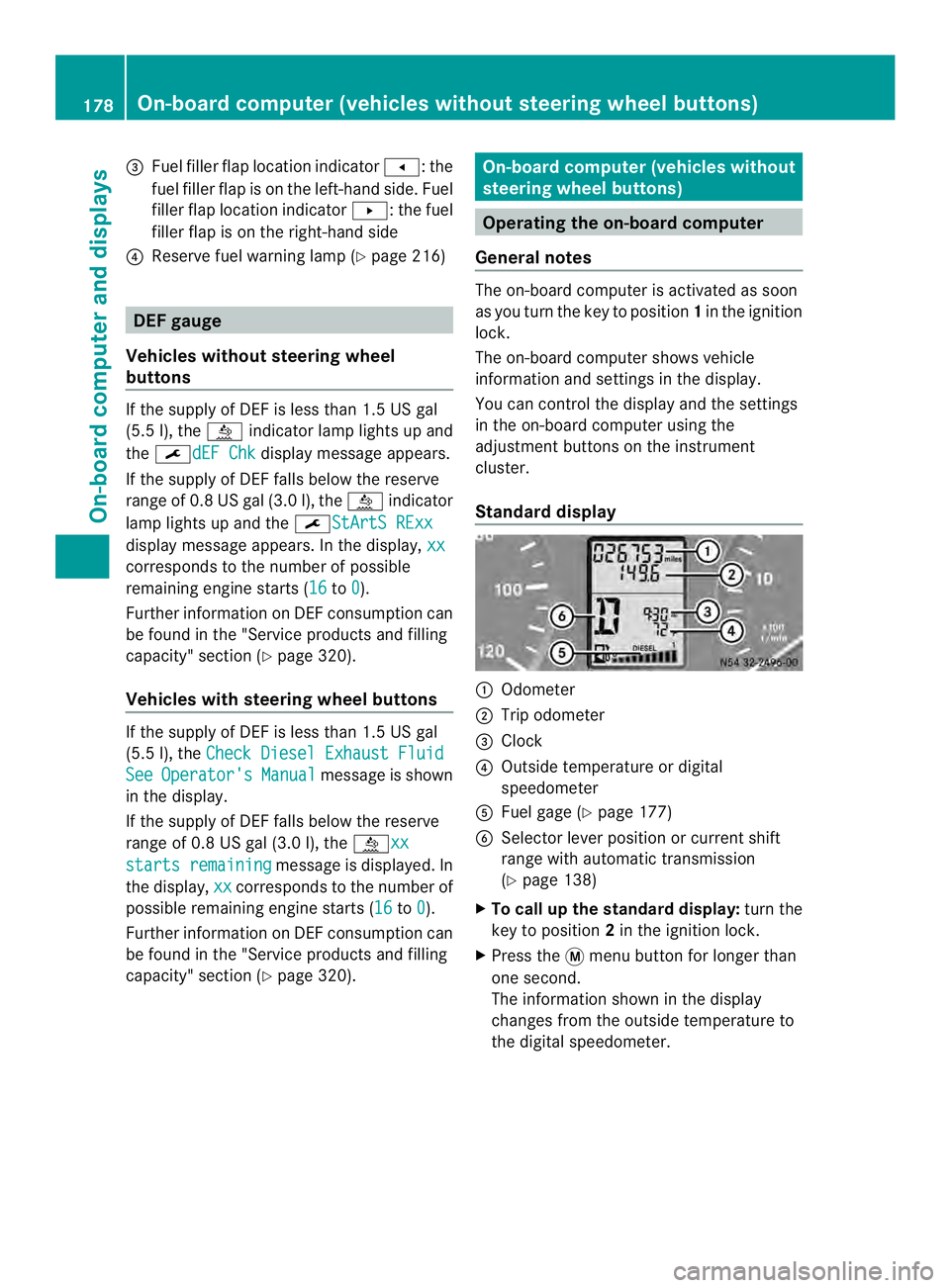
Standard display 0005
Odometer
0006 Trip odometer
0026 Clock
0025 Outside temperature or digital
speedometer
0023 Fuel gage (Y page 177)
0024 Selector lever position or current shift
range with automatic transmission
(Ypage 138)
X To call up the standard display: turn the
key to position 2in the ignition lock.
X Press the 0004menu button for longer than
one second.
The information shown in the display
changes from the outside temperature to
the digital speedometer. 178
On-board computer (vehicles without steering wheel buttons)On-board computer and displays
Page 181 of 334
Menus in the on-board computer
Overview If you wish to exit a menu and go to the
standard display:
X Press the 0004menu button for longer than
one second.
Or
X Do not press any button for 10 seconds.
The display accepts the changed settings.
Using the 000E,000F,0004or0007 adjustment
buttons, you can select the following
functions:
R Calling up the service due date
(Y page 249)
R Checking the oil level (Y page 242)
R Preselecting/setting the auxiliary heating
switch-on time ( Ypage 119)
R Tire pressure monitor (Y page 281)
R Setting the time (Y page 179)
R Setting daytime running lamp mode
(Y page 179)
Setting the time X
Turn the key to position 2in the ignition
lock.
X Press the 0004menu button repeatedly until
the hours figure flashes.
X Press the 000Eor000F button to set the hour.
X Press the 0007reset button.
The minute display flashes.
X Press the 000Eor000F button to set the minute.
i If you keep the 000Eor000F button pressed,
the value will change continuously.
Setting daytime running lamp mode For safety reasons, it is only possible to
change this setting when the vehicle is
stationary. The factory setting is
On in
countries in which daytime running lamp
mode is mandatory. X
Turn the key to position 2in the ignition
lock.
X Press the 0004menu button repeatedly until
the 0004 indicator lamp flashes and the
on or
OFF message appears in the display.
X Press the 000Eor000F button to activate or
deactivate daytime running lamp mode.
If you have activated daytime running lamp
mode and the light switch is set to 000C, the
following light up automatically when the
engine is running:
R Parking lamps
R Low-beam headlamps
R Tail lamps
R License plate lamp
i USA only:
If you turn the light switch to 000Bor
0004, the corresponding light switches on.
If you turn the light switch to 0007, daytime
running lamp mode stays switched on.
Canada only:
If you turn the light switch to 0004, the low-
beamh eadlamps switch on. If you turn the
light switch to 000Bor0007, daytime
running lamp mode stays switched on. On-boar
dcomputer (vehicles without steering wheel buttons)
179On-board computer and displays Z
Page 183 of 334
Menu Overview
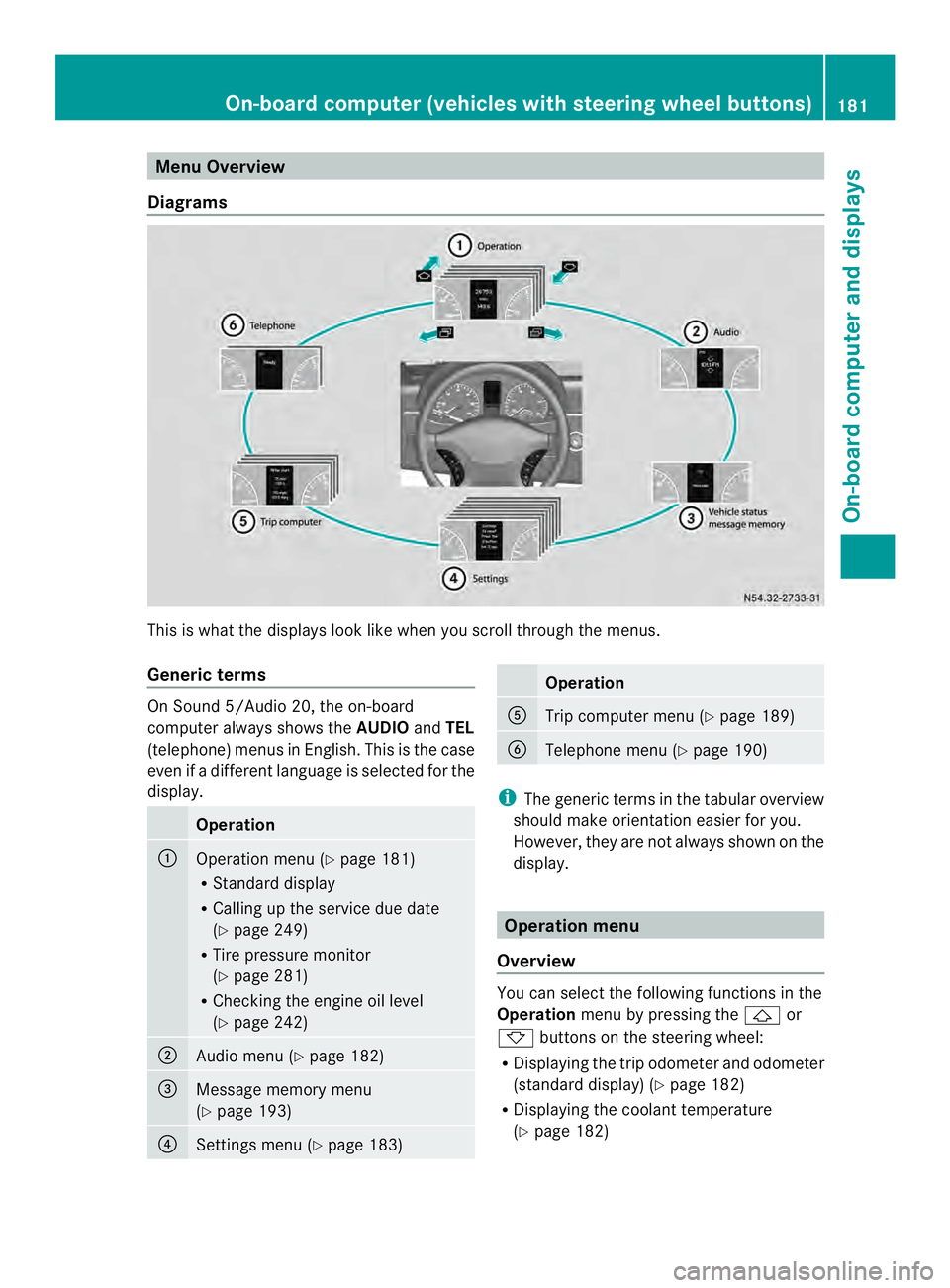
Diagrams This is whatt
he displays look like when you scroll through the menus.
Generic terms On Sound 5/Audio 20, the on-board
computer always shows the
AUDIOandTEL
(telephone) menus in English. This is the case
even if a different language is selected for the
display. Operation
0005
Operation menu (Y
page 181)
R Standard display
R Calling up the service due date
(Y page 249)
R Tire pressure monitor
(Y page 281)
R Checking the engine oil level
(Y page 242) 0006
Audio menu (Y
page 182) 0026
Message memory menu
(Y
page 193) 0025
Settings menu (Y
page 183) Operation
0023
Trip computer menu (Y
page 189) 0024
Telephone menu (Y
page 190) i
The generic terms in the tabular overview
should make orientation easier for you.
However, they are not always shown on the
display. Operation menu
Overview You can select the following functions in the
Operation
menu by pressing the 0001or
0009 buttons on the steering wheel:
R Displaying the trip odometer and odometer
(standard display) (Y page 182)
R Displaying the coolant temperature
(Y page 182) On-board computer (vehicles with steering wheel buttons)
181On-board computer and displays Z
Page 197 of 334
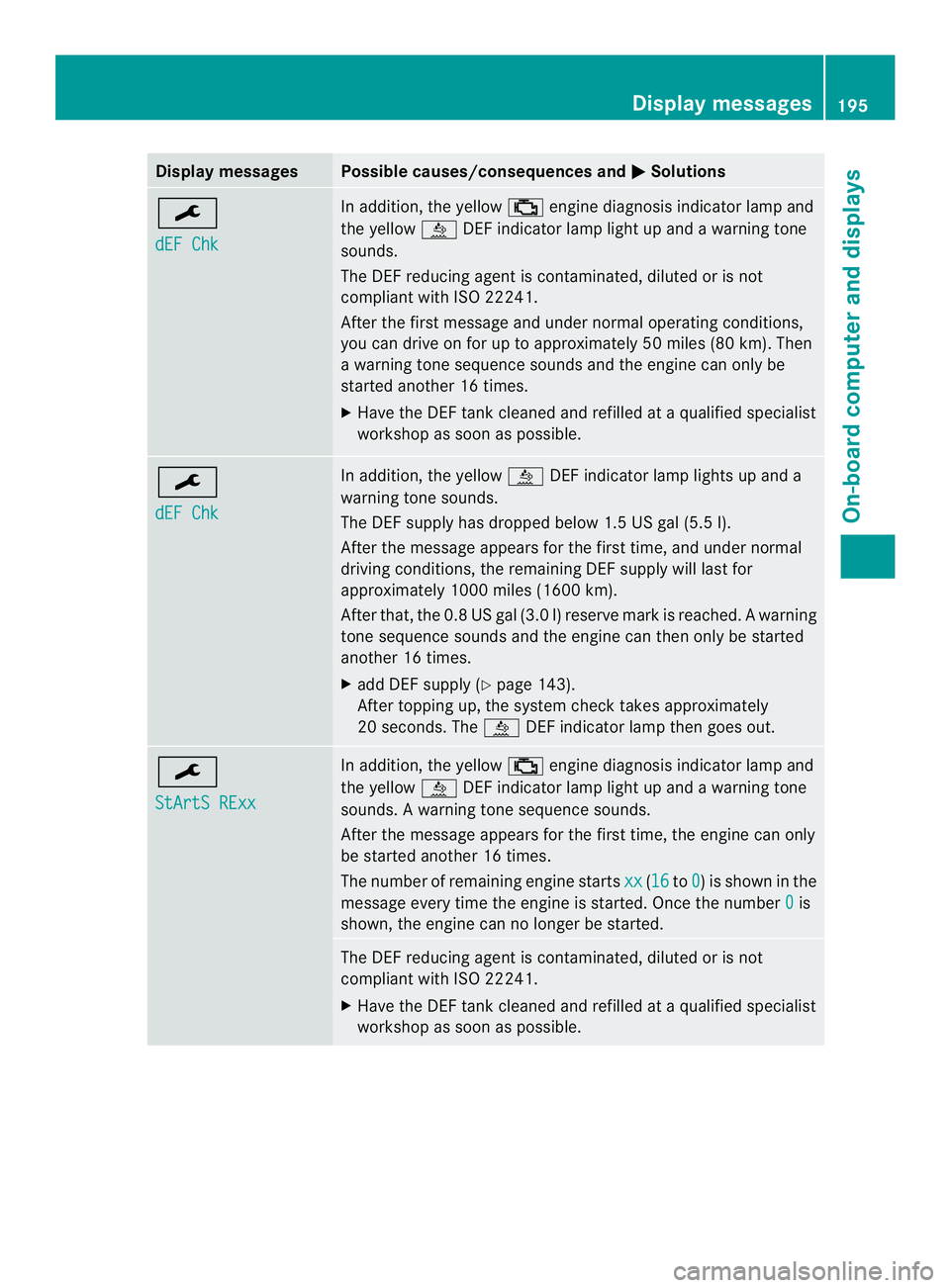
Display messages Possible causes/consequences and
0004 Solutions
0002
dEF Chk In addition, the yellow
0018engine diagnosis indicato rlamp and
the yellow 0009DEF indicator lamp light up and a warning tone
sounds.
The DE Freducing agent is contaminated, diluted or is not
compliant with ISO 22241.
After the first message and under normal operating conditions,
you can drive on for up to approximately 50 miles (80 km). Then
a warning tone sequence sounds and the engine can only be
started another 16 times.
X Have the DEFt ank cleaned and refilled at a qualified specialist
workshop as soon as possible. 0002
dEF Chk In addition, the yellow
0009DEFindicato rlamp lights up and a
warning tone sounds.
The DE Fsupply has dropped below 1. 5USgal (5.5l).
After the message appears for the first time, and under normal
driving conditions, the remaining DEFs upply will last for
approximately 1000 miles (1600 km).
After that, th e0.8 US ga l(3.0 l) reserv emark is reached. A warning
tone sequence sounds and th eengine can then only be started
another 16 times.
X add DEF supply (Y page 143).
After topping up, the system check takes approximately
20 seconds. The 0009DEF indicator lamp then goes out. 0002
StArtS RExx In addition, the yellow
0018engine diagnosis indicator lamp and
the yellow 0009DEF indicator lamp light up and a warning tone
sounds. Awarning tone sequence sounds.
Afte rthe message appears for the first time, the engine can only
be started another 16 times.
The number of remaining engine starts xx (16 to
0 ) is shown in the
message every time the engine is started. Once the number 0 is
shown, the engine can no longer be started. The DEF reducing agent is contaminated, diluted or is not
compliant with ISO 22241.
X
Have the DEF tank cleaned and refilled at a qualified specialist
workshop as soon as possible. Display messages
195On-board computer and displays Z
Page 198 of 334
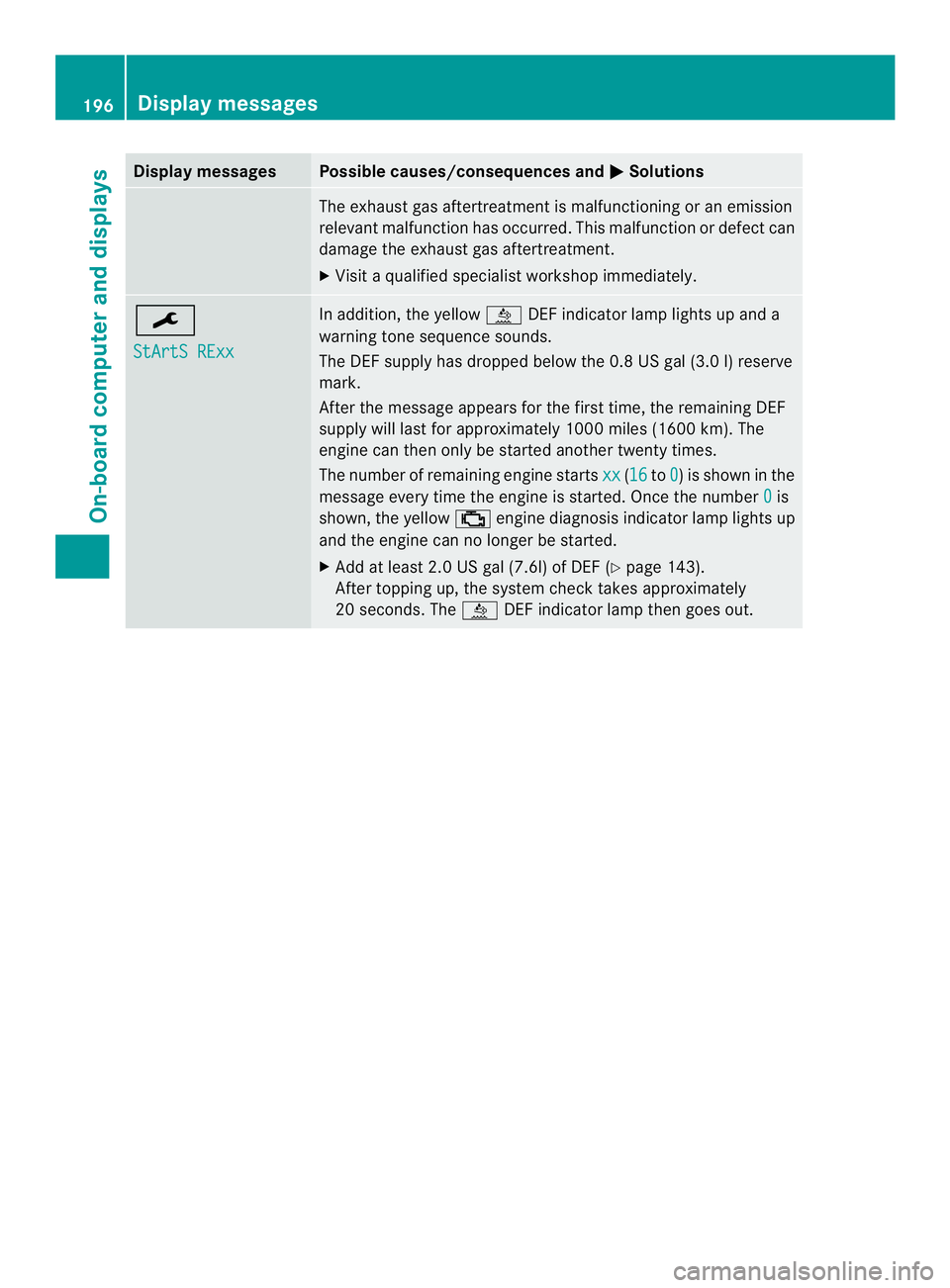
Display messages Possible causes/consequences and
0004 Solutions
The exhaus
tgas aftertreatmen tis malfunctioning or an emission
relevant malfunction has occurred. This malfunction or defect can
damage the exhaust gas aftertreatment.
X Visit a qualified specialist workshop immediately. 0002
StArtS RExx In addition, the yellow
0009DEF indicator lamp lights up and a
warning tone sequence sounds.
The DEF supply has dropped below the 0.8 US gal (3.0 l) reserve
mark.
After the message appears for the first time, the remaining DEF
supply will last for approximately 1000 miles (1600 km). The
engine can then only be started another twenty times.
The number of remaining engine starts xx (16 to
0 ) is shown in the
message every time the engine is started. Once the number 0 is
shown, the yellow 0018engine diagnosis indicator lamp lights up
and the engine can no longer be started.
X Add at least 2.0 US gal (7.6l) of DEF (Y page 143).
After topping up, the system check takes approximately
20 seconds. The 0009DEF indicator lamp then goes out. 196
Display messagesOn-board computer and displays
Page 206 of 334
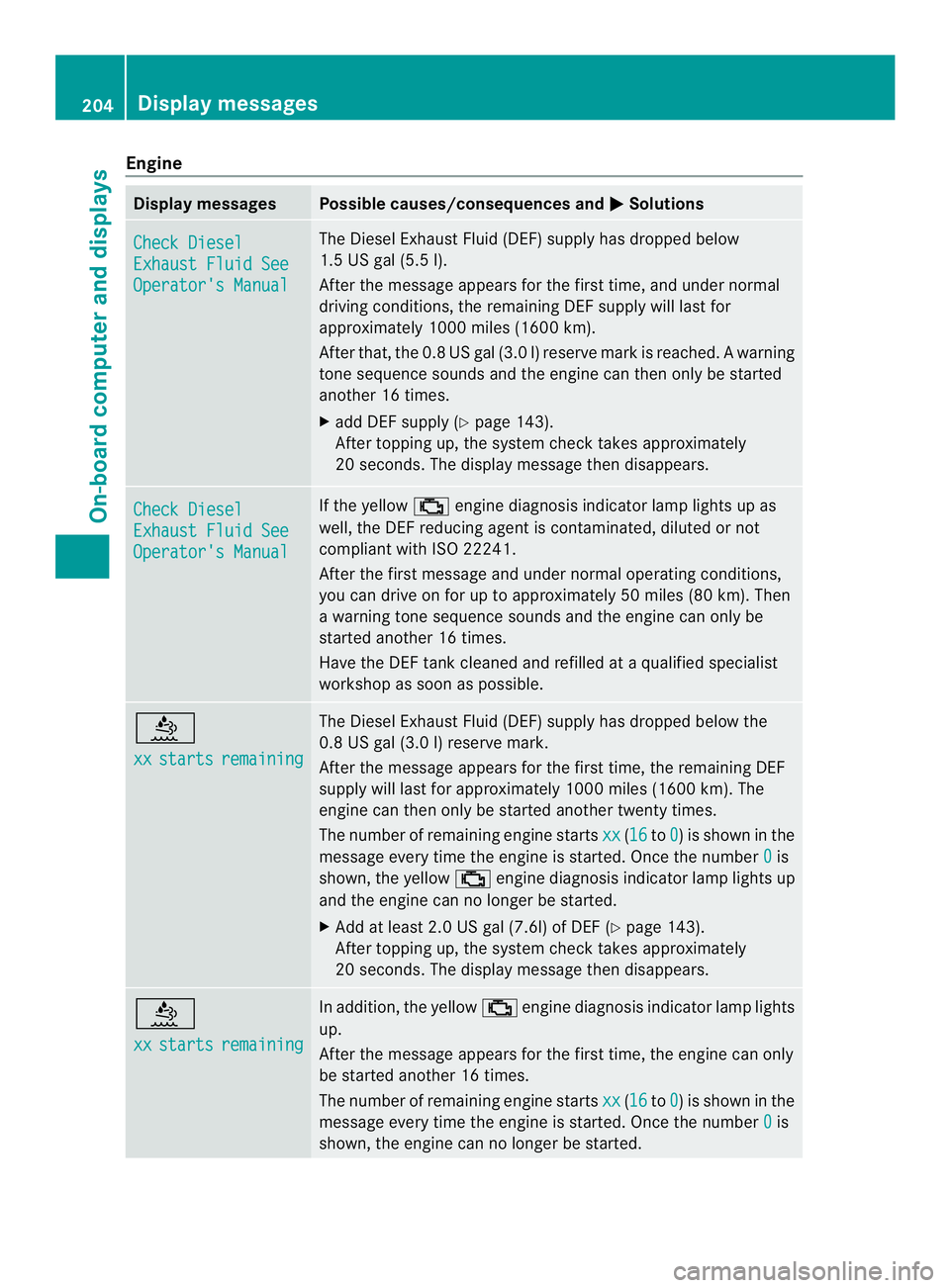
Engine
Display messages Possible causes/consequences and
0004 Solutions
Check Diesel
Exhaust Fluid See
Operator's Manual The Diesel Exhaust Fluid (DEF) supply has dropped below
1.5 US gal (5.5 l).
After the message appears for the first time, and under normal
driving conditions, the remaining DE
Fsupply will last for
approximately 1000 miles (1600 km).
After that, th e0.8 US ga l(3.0 l) reserv emark is reached. A warning
tone sequence sounds and th eengine can then only be started
another 16 times.
X add DEF supply (Y page 143).
After topping up, the system check takes approximately
20 seconds. The display message then disappears. Check Diesel
Exhaust Fluid See
Operator's Manual If the yellow
0018engine diagnosis indicator lamp lights up as
well, the DEF reducing agent is contaminated, diluted or not
compliant with ISO 22241.
After the first message and under normal operating conditions,
you can drive on for up to approximatel y50 miles (80 km). Then
a warning tone sequence sounds and the engine can only be
started another 16 times.
Have the DEF tank cleaned and refilled at a qualified specialist
workshop as soon as possible. 0009
xx
starts remaining The Diesel Exhaus
tFluid (DEF) supply has dropped below the
0.8 US gal (3.0 l) reserve mark.
After the message appears for the first time, the remaining DEF
supply will last for approximately 100 0miles (1600 km). The
engine can the nonly be started another twenty times.
The numbe rofremaining engine starts xx (16 to
0 ) is shown in the
message every time the engine is started. Once the number 0 is
shown, the yellow 0018engine diagnosis indicator lamp lights up
and the engine can no longer be started.
X Add at least 2.0 US gal (7.6l) of DEF (Y page 143).
After topping up, the system chec ktakes approximately
20 seconds. The display message then disappears. 0009
xx
starts remaining In addition, the yellow
0018engine diagnosis indicator lamp lights
up.
Afte rthe message appears for the first time, the engine can only
be started another 16 times.
The number of remaining engine starts xx (16 to
0 ) is shown in the
message every time the engine is started. Once the number 0 is
shown, the engine can no longer be started. 204
Display messagesOn-board computer and displays
Page 207 of 334
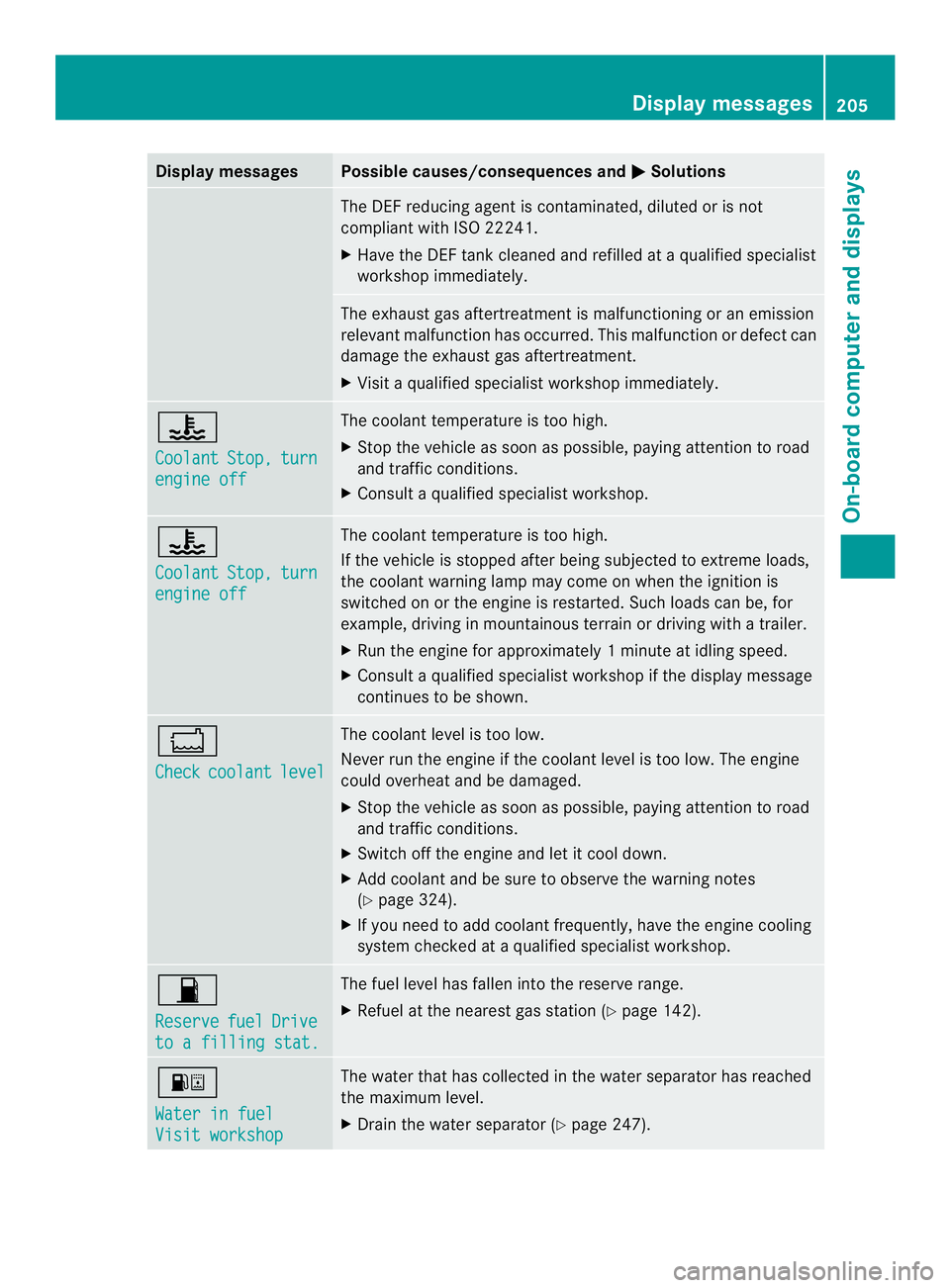
Display messages Possible causes/consequences and
0004 Solutions
The DE
Freducing agent is contaminated, diluted or is not
compliant with ISO 22241.
X Have the DEFt ank cleaned and refilled at a qualified specialist
workshop immediately. The exhaust gas aftertreatmen
tis malfunctioning or an emission
relevant malfunction has occurred. This malfunction or defect can
damage the exhaust gas aftertreatment.
X Visit a qualified specialist workshop immediately. 0014
Coolant
Stop, turn
engine off The coolant temperature is too high.
X
Stop the vehicle as soon as possible, paying attention to road
and traffic conditions.
X Consult a qualified specialist workshop. 0014
Coolant
Stop, turn
engine off The coolant temperature is too high.
If the vehicle is stopped after being subjected to extreme loads,
the coolant warning lamp may come on when the ignition is
switched on or the engine is restarted. Such loads can be, for
example, driving in mountainous terrain or driving with a trailer.
X
Run the engine for approximately 1minute at idling speed.
X Consult a qualified specialist workshop if the display message
continues to be shown. 0017
Check
coolant level The coolan
tlevel is too low.
Never run the engine if the coolant level is too low. The engine
could overheat and be damaged.
X Stop the vehicle as soon as possible, paying attention to road
and traffic conditions.
X Switch off the engine and let it cool down.
X Add coolant and be sure to observe the warning notes
(Y page 324).
X If you need to add coolant frequently, have the engine cooling
system checked at a qualified specialist workshop. 0016
Reserve
fuel Drive
to a filling stat. The fuel level has fallen into the reserve range.
X Refuel at the nearest gas station (Y page 142).000E
Water in fuel
Visit workshop The water that has collected in the water separator has reached
the maximum level.
X
Drain the water separator (Y page 247). Display messages
205On-board computer and displays Z
Page 208 of 334
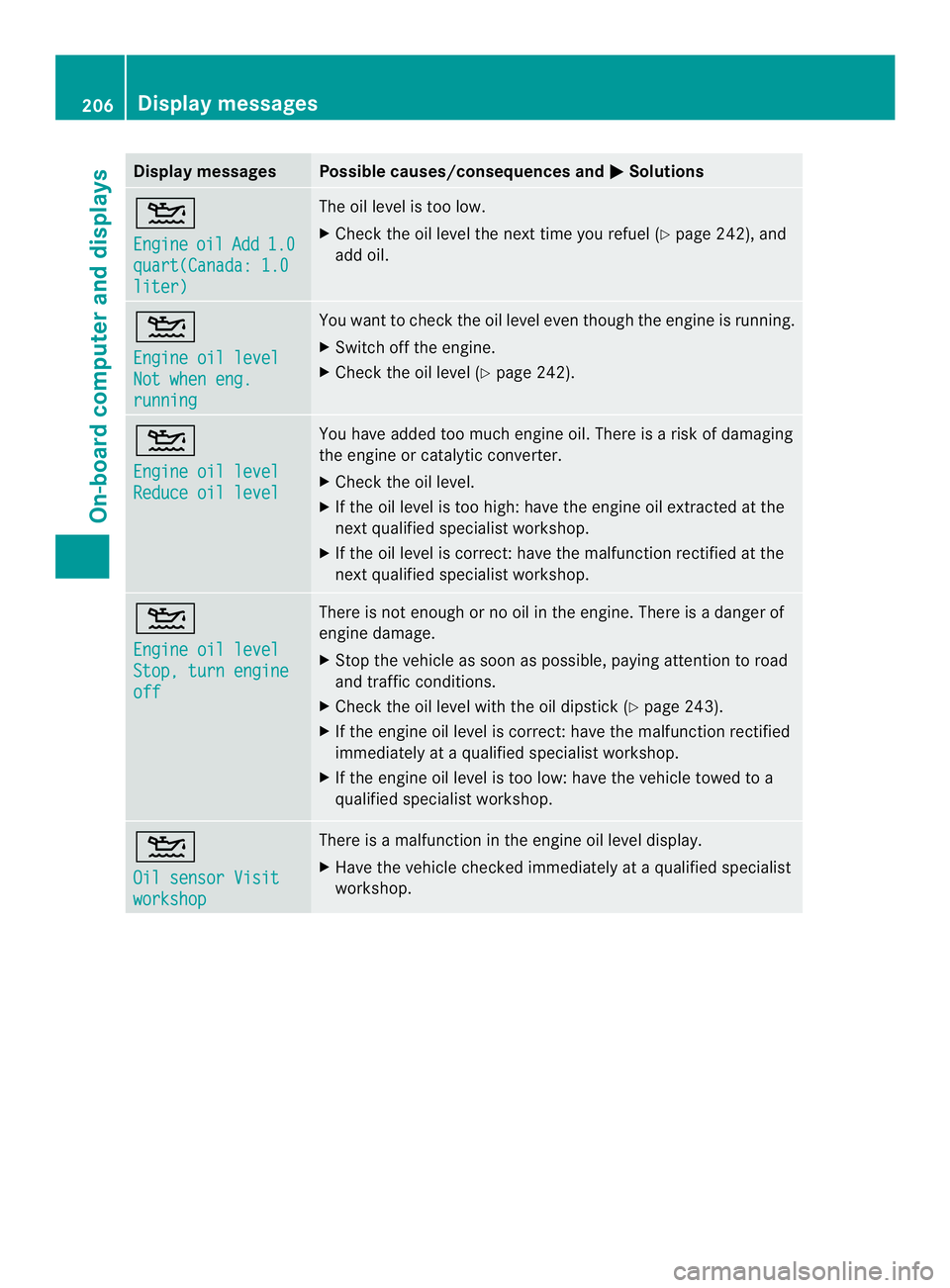
Display messages Possible causes/consequences and
0004 Solutions
001D
Engine
oil Add 1.0
quart(Canada: 1.0
liter) The oil level is too low.
X
Chec kthe oil level the next time you refuel (Y page 242), and
add oil. 001D
Engine oil level
Not when eng.
running You want to check the oil level even though the engine is running.
X
Switch off the engine.
X Check the oil level (Y page 242).001D
Engine oil level
Reduce oil level You have added too much engine oil. There is a risk of damaging
the engine or catalytic converter.
X
Check the oil level.
X If the oil level is too high: have the engine oil extracted at the
next qualified specialist workshop.
X If the oil level is correct: have the malfunction rectified at the
next qualified specialist workshop. 001D
Engine oil level
Stop, turn engine
off There is not enough or no oil in the engine. There is a danger of
engine damage.
X
Stop the vehicle as soon as possible, paying attention to road
and traffic conditions.
X Check the oil level with the oil dipstick (Y page 243).
X If the engine oil level is correct: have the malfunction rectified
immediately at a qualified specialist workshop.
X If the engine oil level is too low: have the vehicle towed to a
qualified specialist workshop. 001D
Oil sensor Visit
workshop There is a malfunction in the engine oil level display.
X
Have the vehicle checked immediately at a qualified specialist
workshop. 206
Display messagesOn-board computer and displays
Page 213 of 334
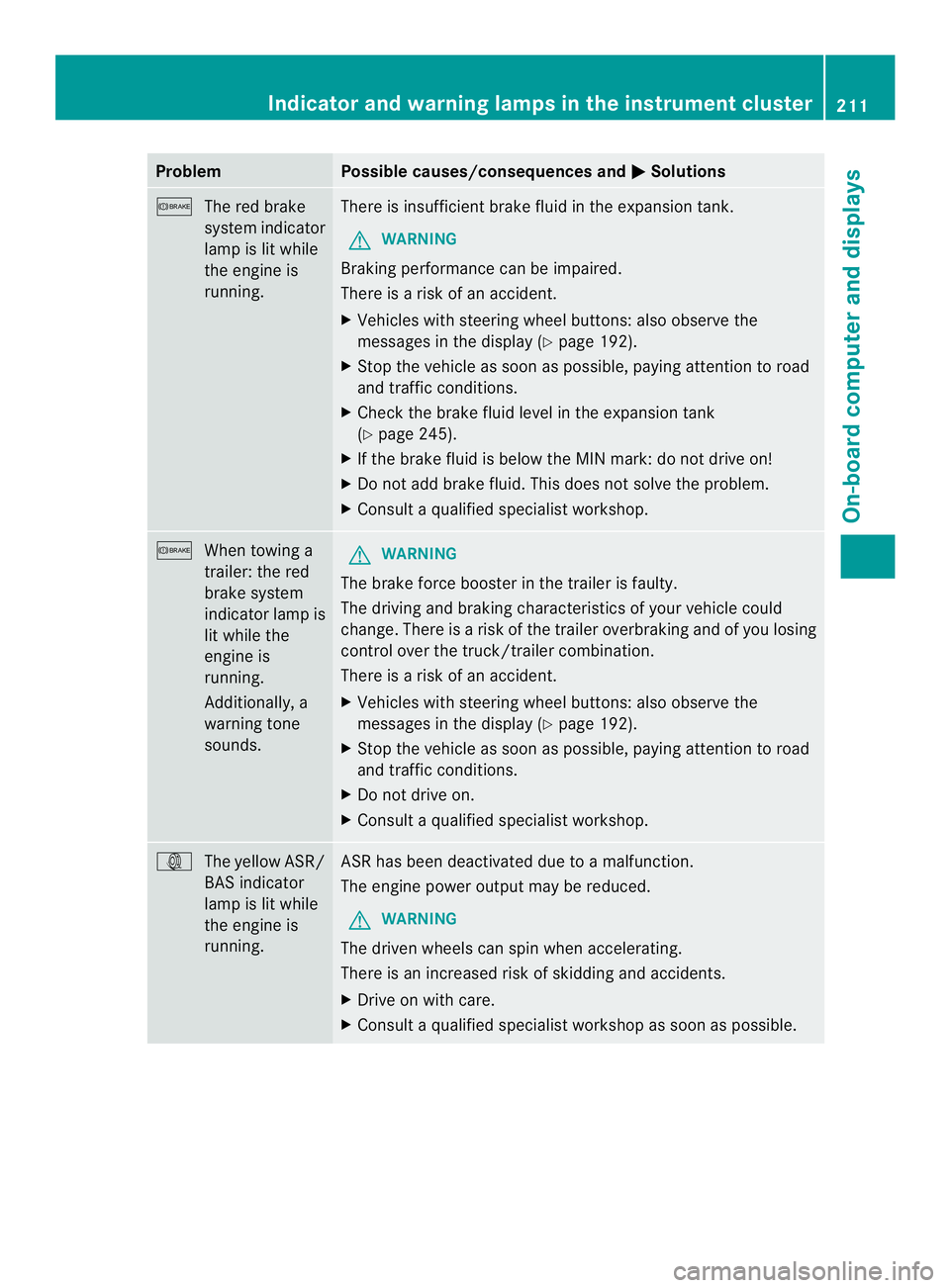
Problem Possible causes/consequences and
0004 Solutions
0008
The red brake
system indicator
lamp is lit while
the engine is
running. There is insufficient brake fluid in the expansion tank.
G WARNING
Braking performance can be impaired.
There is a risk of an accident.
X Vehicles with steering wheel buttons:a lso observe the
messages in the display (Y page 192).
X Stop the vehicle as soon as possible, paying attention to road
and traffic conditions.
X Check the brake fluid level in the expansion tank
(Y page 245).
X If the brake fluid is below the MIN mark: do not drive on!
X Do not add brake fluid. This does not solve the problem.
X Consult a qualified specialist workshop. 0008
When towing a
trailer: the red
brake system
indicator lamp is
lit while the
engine is
running.
Additionally, a
warning tone
sounds. G
WARNING
The brake force booster in the trailer is faulty.
The driving and braking characteristics of your vehicle could
change. There is a risk of the trailer overbraking and of you losing
control over the truck/trailer combination.
There is a risk of an accident.
X Vehicles with steering wheel buttons :also observe the
messages in the display (Y page 192).
X Stop the vehicle as soon as possible, paying attention to road
and traffic conditions.
X Do not drive on.
X Consult a qualified specialist workshop. 000A
The yellow ASR/
BAS indicator
lamp is lit while
the engine is
running. ASR has been deactivated due to a malfunction.
The engine power output may be reduced.
G WARNING
The drive nwheels can spin when accelerating.
There is an increased risk of skidding and accidents.
X Drive on with care.
X Consult a qualified specialist workshop as soon as possible. Indicator and warning lamps in the instrument cluster
211On-board computer and displays Z