lights MERCEDES-BENZ SPRINTER 2013 MY13 Operator’s Manual
[x] Cancel search | Manufacturer: MERCEDES-BENZ, Model Year: 2013, Model line: SPRINTER, Model: MERCEDES-BENZ SPRINTER 2013Pages: 334, PDF Size: 3.88 MB
Page 118 of 334
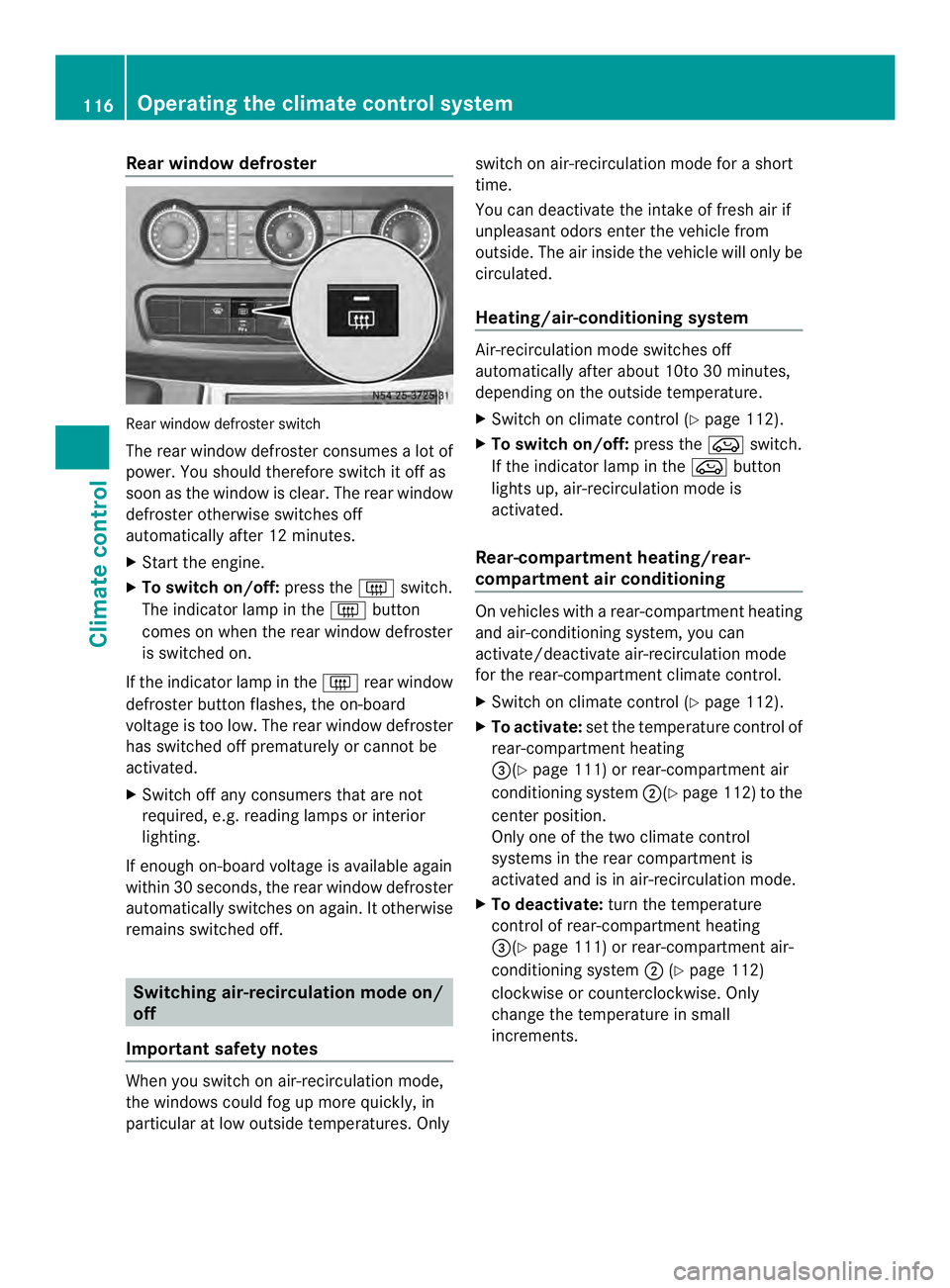
Rear window defroster
Rear window defroste
rswitch
The rear window defroster consumes a lot of
power. You should therefore switch it off as
soon as the window is clear .The rear window
defroster otherwise switches off
automatically after 12 minutes.
X Start the engine.
X To switch on/off: press the0019switch.
The indicator lamp in the 0019button
comes on when the rear window defroster
is switched on.
If the indicator lamp in the 0019rear window
defroster button flashes, the on-board
voltage is too low. The rear window defroster
has switched off prematurely or cannot be
activated.
X Switch off any consumers that are not
required, e.g. reading lamps or interior
lighting.
If enough on-board voltage is available again
within 30 seconds, the rear window defroster
automatically switches on again. It otherwise
remains switched off. Switching air-recirculation mode on/
off
Important safety notes When you switch on air-recirculation mode,
the windows could fog up more quickly, in
particular at low outside temperatures. Only switch on air-recirculation mode for a short
time.
You can deactivate the intake of fresh air if
unpleasant odors enter the vehicle from
outside. The air inside the vehicle will only be
circulated.
Heating/air-conditioning system
Air-recirculation mode switches off
automatically after about 10to 30 minutes,
depending on the outside temperature.
X
Switch on climate control (Y page 112).
X To switch on/off: press the0022switch.
If the indicator lamp in the 0022button
lights up, air-recirculation mode is
activated.
Rear-compartment heating/rear-
compartment air conditioning On vehicles with a rear-compartment heating
and air-conditioning system, you can
activate/deactivate air-recirculation mode
for the rear-compartment climate control.
X Switch on climate control (Y page 112).
X To activate: set the temperature control of
rear-compartment heating
0026(Y page 111) or rear-compartment air
conditioning system 0006(Ypage 112) to the
center position.
Only one of the two climate control
systems in the rear compartment is
activated and is in air-recirculation mode.
X To deactivate: turn the temperature
control of rear-compartment heating
0026(Y page 111) or rear-compartment air-
conditioning system 0006(Ypage 112)
clockwise or counterclockwise. Only
change the temperature in small
increments. 116
Operating the climate control systemClimate control
Page 121 of 334
The auxiliary heating works independently of
the engine and supplements the climate
control system in the vehicle. The auxiliary
heating heats the air in the vehicle interior to
the temperature set.
If your vehicle is equipped with a hot-water
auxiliary heater, the auxiliary heating also
keeps the coolant warm. This way, the load
on the engine is minimized and fuel is saved.
The heater booster function of the auxiliary
heating supports the climate control system
when the engine is runnin gand the outside
temperature is low.
You can use the auxiliary heating at an
outside temperature of up to 39 ‡ (4 †). At
an outside temperature above 39 ‡(4† ) the
auxiliary heating system and the heater
booster function switch off automatically.
i If the interior motion sensor (Y page 61)
is armed and the auxiliary heating is
switched on, it is possible that the interior
temperature monitoring may cause a false
alarm. In this case, either deactivate the
interior motion sensor or switch off the
auxiliary heating. Before switching on
X Check the fuel level and top up if necessary.
The auxiliary heating is operated directly
using the vehicle's fuel. The tan kmust be
at least a quarter full to ensure that the
auxiliary heating functions.
X Switch on climate control (Y page 112).
X Se tthe temperature control to the desired
temperature (Y page 113).
X Set the air distribution as required
(Y page 113).
X Open the center (Y page 117) and side air
vents (Y page 117) and set them to the
middle position.
i The auxiliary heating automatically
switches to heater booster mode after the
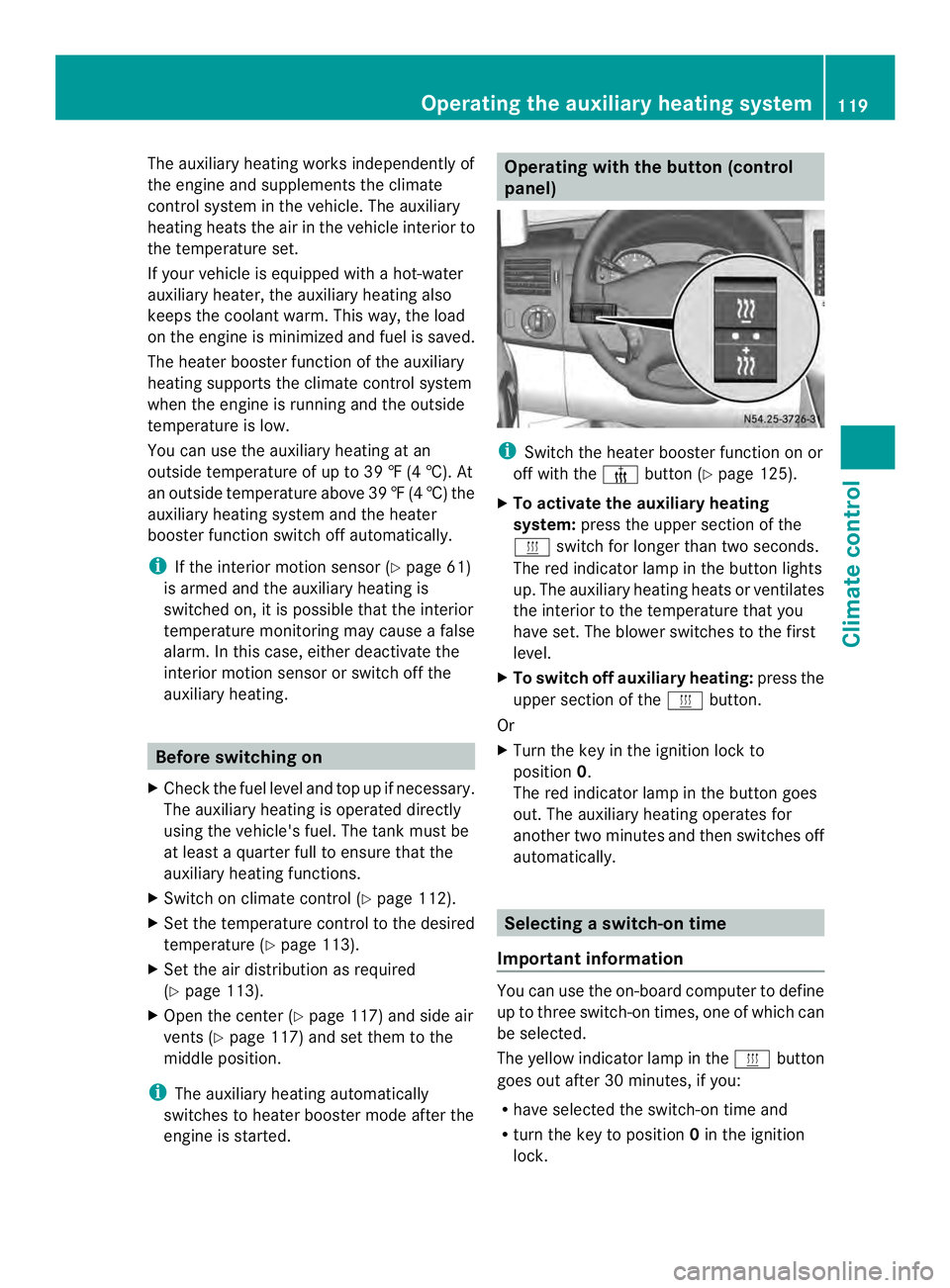
engine is started. Operating with the button (control
panel)
i
Switch the heater booster function on or
off with the 0013button (Y page 125).
X To activate the auxiliary heating
system: press the upper section of the
0020 switch for longer than two seconds.
The red indicator lamp in the button lights
up. The auxiliary heating heats or ventilates
the interior to the temperature that you
have set. The blower switches to the first
level.
X To switch off auxiliary heating: press the
upper section of the 0020button.
Or
X Turn the key in the ignition lock to
position 0.
The red indicator lamp in the button goes
out. The auxiliary heating operates for
another two minutes and then switches off
automatically. Selecting
aswitch-on time
Important information You can use the on-boar
dcomputer to define
up to three switch-on times, one of which can
be selected.
The yellow indicator lamp in the 0020button
goes out after 30 minutes, if you:
R have selected the switch-on time and
R turn the key to position 0in the ignition
lock. Operating the auxiliary heating system
119Climate control Z
Page 122 of 334
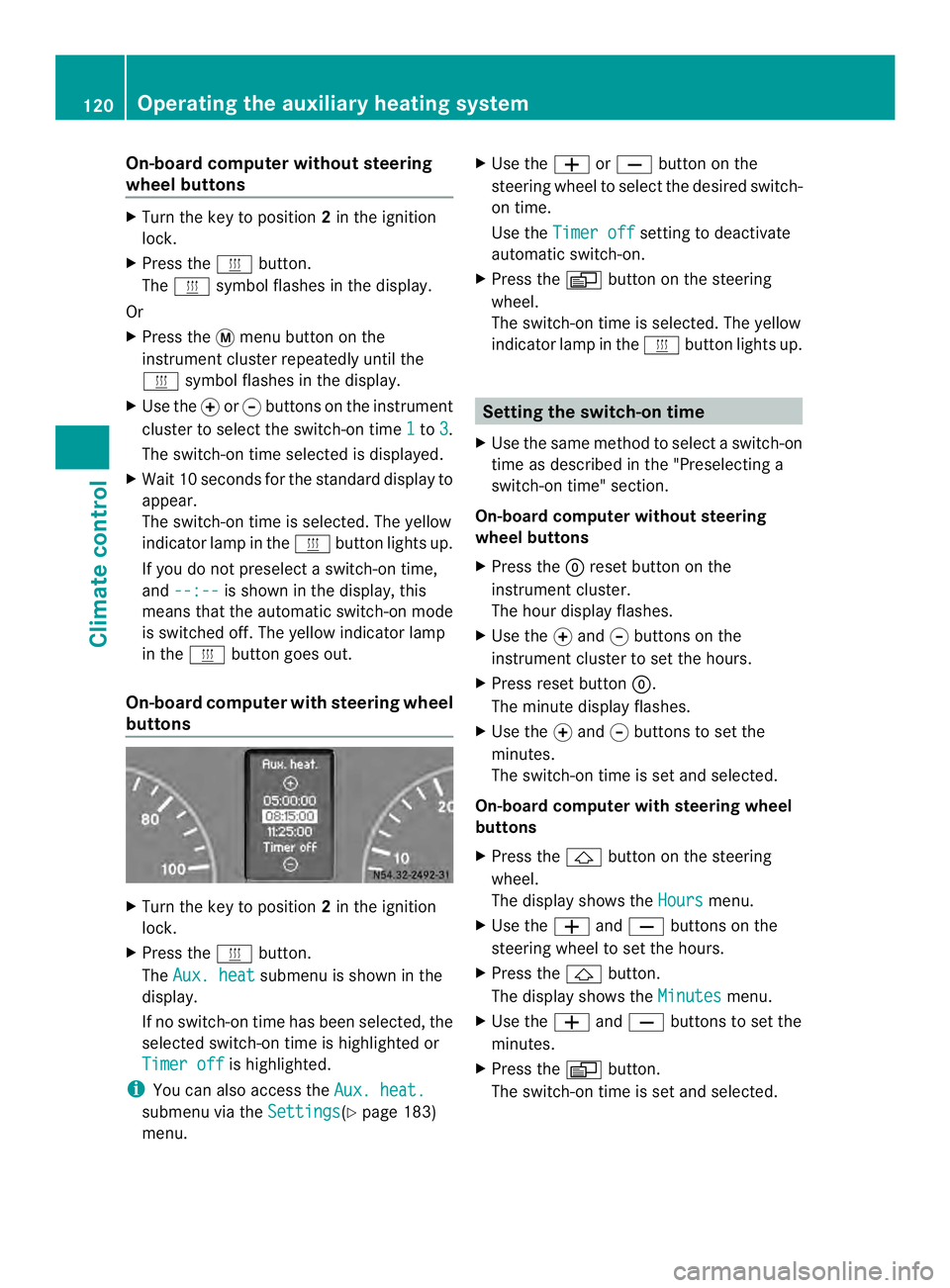
On-board computer without steering
wheel buttons
X
Turn the key to position 2in the ignition
lock.
X Press the 0020button.
The 0020 symbol flashes in the display.
Or
X Press the 0004menu button on the
instrument cluster repeatedly until the
0020 symbol flashes in the display.
X Use the 000Eor000F buttons on the instrument
cluster to select the switch-on time 1 to
3 .
The switch-on time selected is displayed.
X Wait 10 seconds for the standard display to
appear.
The switch-on time is selected. The yellow
indicator lamp in the 0020button lights up.
If you do not preselect a switch-on time,
and --:-- is shown in the display, this
means that the automatic switch-on mode
is switched off. The yellow indicator lamp
in the 0020button goes out.
On-boar dcomputer with steering wheel
buttons X
Turn the key to position 2in the ignition
lock.
X Press the 0020button.
The Aux. heat submenu is shown in the
display.
If no switch-on time has been selected, the
selected switch-on time is highlighted or
Timer off is highlighted.
i You can also access the Aux. heat.submenu via the
Settings (Y
page 183)
menu. X
Use the 0011or0012 button on the
steering wheel to selec tthe desired switch-
on time.
Use the Timer off setting to deactivate
automatic switch-on.
X Press the 0010button on the steering
wheel.
The switch-on time is selected. The yellow
indicator lamp in the 0020button lights up. Setting the switch-on time
X Use the same method to select a switch-on
time as described in the "Preselecting a
switch-on time" section.
On-board computer without steering
wheel buttons
X Press the 0007reset button on the
instrument cluster.
The hour display flashes.
X Use the 000Eand 000Fbuttons on the
instrument cluster to set the hours.
X Press reset button 0007.
The minute display flashes.
X Use the 000Eand 000Fbuttons to set the
minutes.
The switch-on time is set and selected.
On-board computer with steering wheel
buttons
X Press the 0001button on the steering
wheel.
The display shows the Hours menu.
X Use the 0011and0012 buttons on the
steering wheel to set the hours.
X Press the 0001button.
The display shows the Minutes menu.
X Use the 0011and0012 buttons to set the
minutes.
X Press the 0010button.
The switch-on time is set and selected. 120
Operating the auxiliary heating systemClimate control
Page 123 of 334
Operation with the remote control
Important information You can switch the auxiliary heating on/off
and set the operating duration using the
remote control. You can use up to 4 remote
control units on the vehicle. These must be
synchronized for the receiver in your vehicle
(Y page 122).
The remote control has a maximum range of
approximately 600 meters. This range is
reduced by:
R sources of interference
R solid objects between the remote control
and the vehicle
R the remote control being in an unfavorable
position in relation to the vehicle
R transmitting from an enclosed space
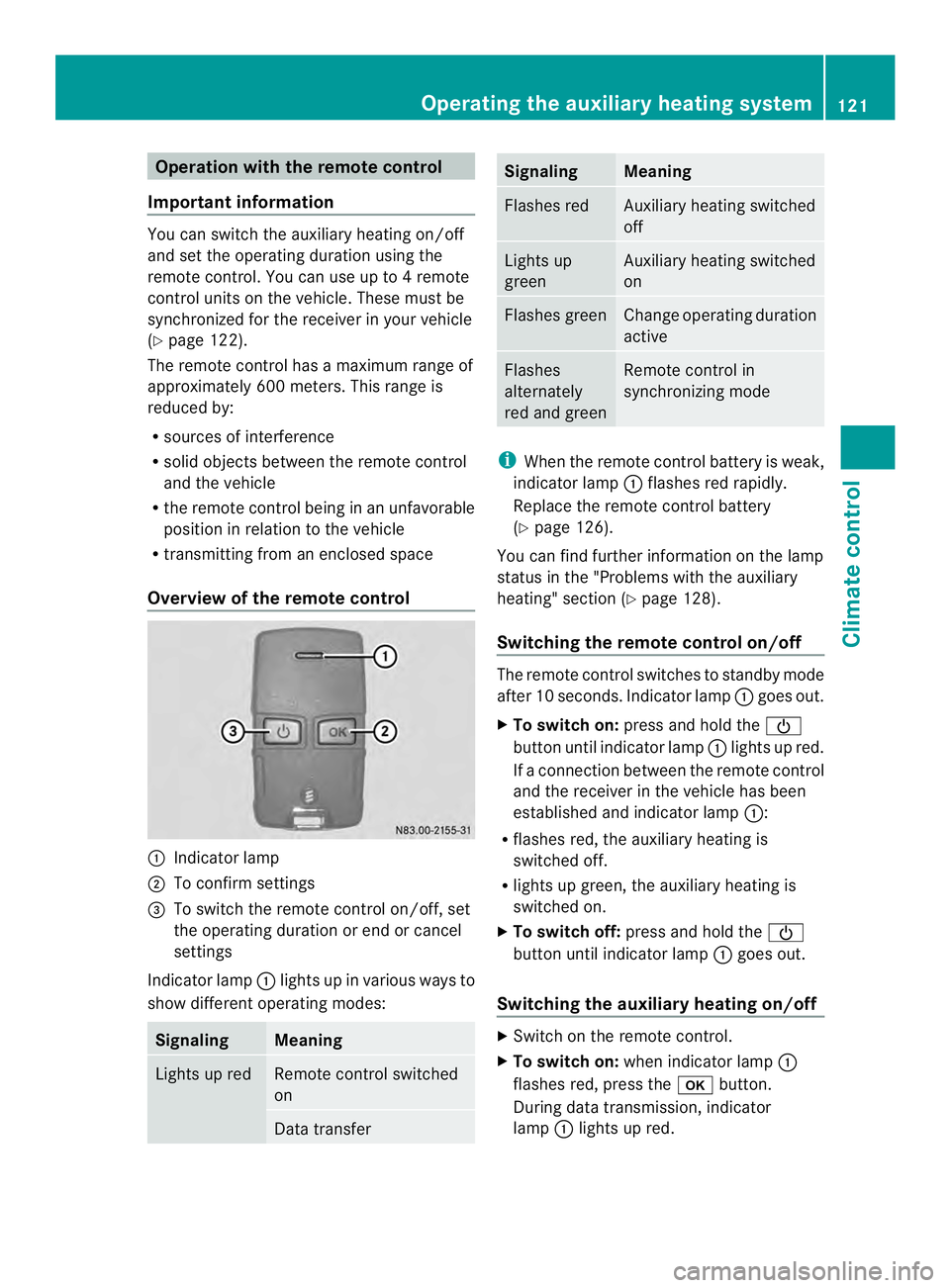
Overview of the remote control 0005
Indicator lamp
0006 To confirm settings
0026 To switch the remote control on/off, set
the operating duration or end or cancel
settings
Indicator lamp 0005lights up in various ways to
show differen toperating modes: Signaling Meaning
Lights up red Remote control switched
on
Data transfer Signaling Meaning
Flashes red Auxiliary heating switched
off
Lights up
green Auxiliary heating switched
on
Flashes green Change operating duration
active
Flashes
alternately
red and green Remote control in
synchronizing mode
i
When the remote control battery is weak,
indicator lamp 0005flashes red rapidly.
Replace the remote control battery
(Y page 126).
You can find further information on the lamp
status in the "Problems with the auxiliary
heating" section (Y page 128).
Switching the remote control on/off The remote control switches to standby mode
after 10 seconds. Indicator lamp
0005goes out.
X To switch on: press and hold the 0002
button until indicator lamp 0005lights up red.
If ac onnection between the remote control
and the receiver in the vehicle has been
established and indicator lamp 0005:
R flashes red, the auxiliary heating is
switched off.
R lights up green, the auxiliary heating is
switched on.
X To switch off: press and hold the 0002
button until indicator lamp 0005goes out.
Switching the auxiliary heating on/off X
Switch on the remote control.
X To switch on: when indicator lamp 0005
flashes red, press the 000Abutton.
During data transmission, indicator
lamp 0005lights up red. Operating the auxiliary heating system
121Climate control Z
Page 124 of 334
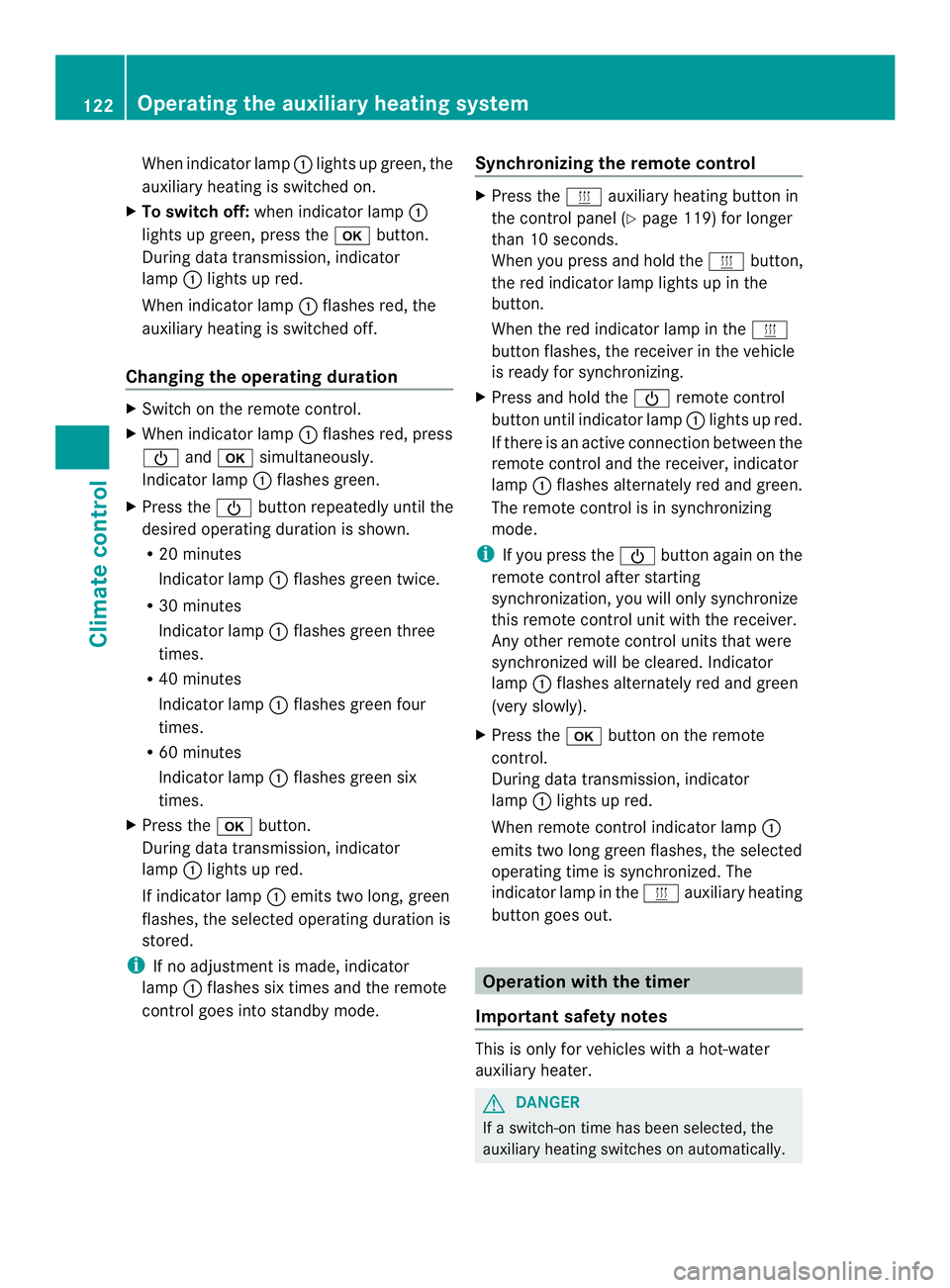
When indicato
rlamp 0005lights up green, the
auxiliary heating is switched on.
X To switch off: when indicator lamp 0005
lights up green, press the 000Abutton.
During data transmission, indicator
lamp 0005lights up red.
When indicator lamp 0005flashes red, the
auxiliary heating is switched off.
Changing the operating duration X
Switch on the remote control.
X When indicator lamp 0005flashes red, press
0002 and000A simultaneously.
Indicato rlamp 0005flashes green.
X Press the 0002buttonrepeatedly until the
desired operating duration is shown.
R 20 minutes
Indicator lamp 0005flashes green twice.
R 30 minutes
Indicator lamp 0005flashes green three
times.
R 40 minutes
Indicator lamp 0005flashes green four
times.
R 60 minutes
Indicator lamp 0005flashes green six
times.
X Press the 000Abutton.
During data transmission, indicator
lamp 0005lights up red.
If indicator lamp 0005emits two long, green
flashes, the selected operatin gduration is
stored.
i If no adjustmen tis made, indicator
lamp 0005flashes six times and the remote
control goes into standby mode. Synchronizing the remote control X
Press the 0020auxiliary heating button in
the control panel (Y page 119) for longer
than 10 seconds.
When you press and hold the 0020button,
the red indicator lamp lights up in the
button.
When the red indicator lamp in the 0020
button flashes, the receiver in the vehicle
is ready for synchronizing.
X Press and hold the 0002remote control
button until indicator lamp 0005lights up red.
If there is an active connection between the
remote control and the receiver, indicator
lamp 0005flashes alternately red and green.
The remote control is in synchronizing
mode.
i If you press the 0002button againont he
remote control after starting
synchronization, you will only synchronize
this remote control unit with the receiver.
Any other remote control units that were
synchronized will be cleared. Indicator
lamp 0005flashes alternately red and green
(very slowly).
X Press the 000Abutton on the remote
control.
During data transmission, indicator
lamp 0005lights up red.
When remote control indicator lamp 0005
emits two long green flashes, the selected
operating time is synchronized. The
indicator lamp in the 0020auxiliary heating
button goes out. Operation with the timer
Important safety notes This is only for vehicles with a hot-water
auxiliary heater.
G
DANGER
If a switch-on time has been selected, the
auxiliary heating switches on automatically. 122
Operating the auxiliary heating systemClimate control
Page 128 of 334
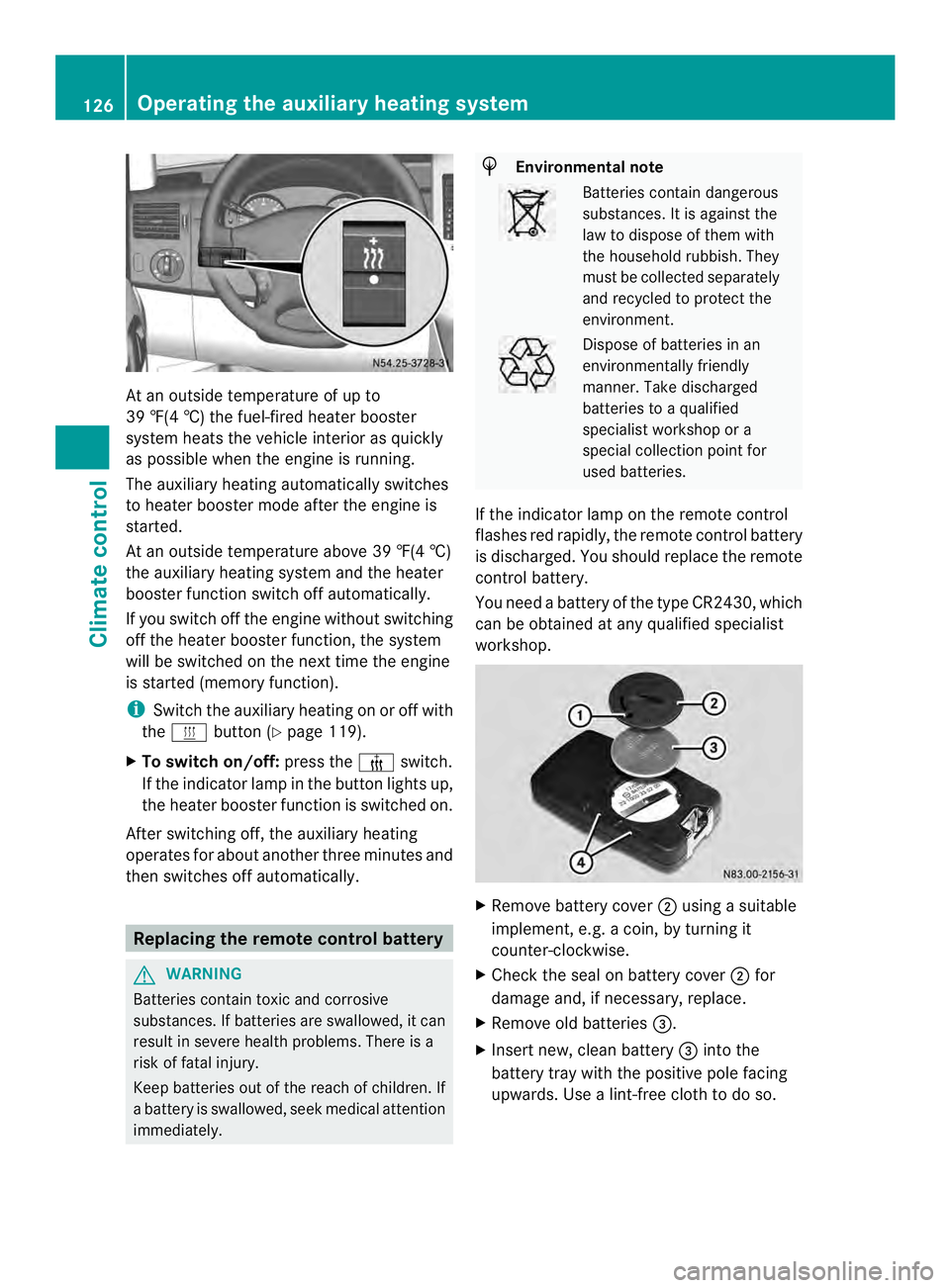
At an outside temperature of up to
39 ‡(4 †) the fuel-fired heate
rbooster
system heats the vehicle interior as quickly
as possible when the engine is running.
The auxiliary heating automatically switches
to heater booster mode after the engine is
started.
At an outside temperature above 39 ‡(4 †)
the auxiliary heating system and the heater
booster function switch off automatically.
If you switch off the engine without switching
off the heater booster function, the system
will be switched on the next time the engine
is started (memory function).
i Switch the auxiliary heating on or off with
the 0020 button (Y page 119).
X To switch on/off: press the0013switch.
If the indicator lamp in the button lights up,
the heater booster function is switched on.
After switching off, the auxiliary heating
operates for about another three minutes and
then switches off automatically. Replacing the remote control battery
G
WARNING
Batteries contain toxic and corrosive
substances. If batteries are swallowed, it can
result in severe health problems. There is a
risk of fatal injury.
Keep batteries out of the reach of children. If
a battery is swallowed, seek medical attention
immediately. H
Environmental note Batteries contain dangerous
substances. It is against the
law to dispose of them with
the household rubbish. They
must be collected separately
and recycled to protect the
environment.
Dispose of batteries in an
environmentally friendly
manner
.Take discharged
batteries to a qualified
specialist workshop or a
special collectio npoint for
used batteries.
If the indicator lamp on the remote control
flashes red rapidly, the remote control battery
is discharged. You should replace the remote
control battery.
You need a battery of the type CR2430, which
can be obtained at any qualified specialist
workshop. X
Remove battery cover 0006using a suitable
implement, e.g. a coin, by turning it
counter-clockwise.
X Check the seal on battery cover 0006for
damage and, if necessary, replace.
X Remove old batteries 0026.
X Insert new, clean battery 0026into the
battery tray with the positive pole facing
upwards. Use a lint-free cloth to do so. 126
Operating the auxiliary heating systemClimate control
Page 137 of 334
R
all the doors are closed.
R all the vehicle occupants are wearing
their seat belts correctly.
R the parking brake is applied.
i If you depress the brake pedal before
starting the engine, th epedal travel is short
and pedal resistance is high.
If you depress the brake pedal again after
starting the engine, pedal travel and
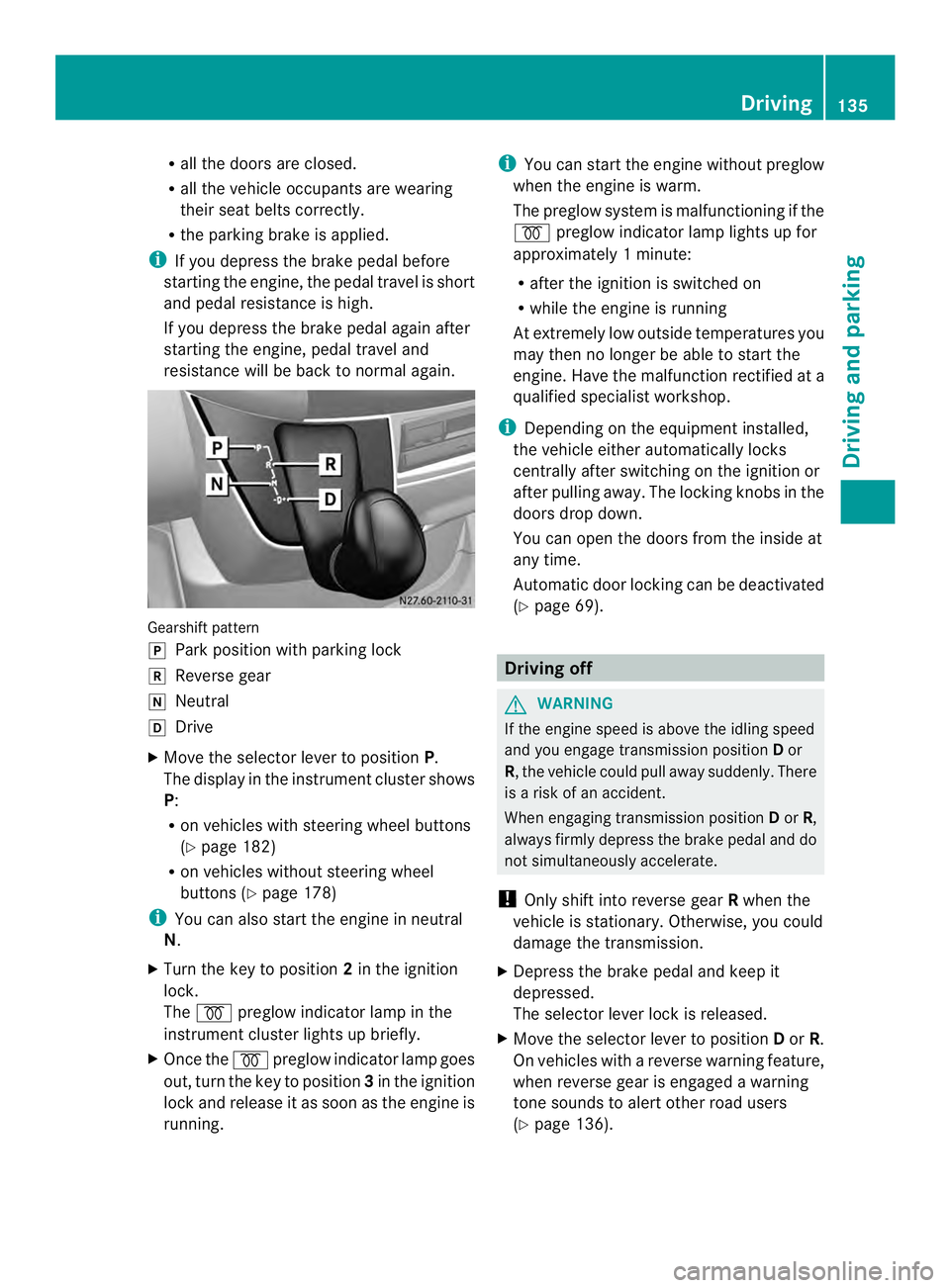
resistance will be back to normal again. Gearshift pattern
0016
Park position with parking lock
0012 Reverse gear
0013 Neutral
0015 Drive
X Move the selector lever to position P.
The display in the instrument cluster shows
P:
R on vehicles with steering wheel buttons
(Y page 182)
R on vehicles without steering wheel
buttons (Y page 178)
i You can also start the engine in neutral
N.
X Turn the key to position 2in the ignition
lock.
The 000D preglow indicator lamp in the
instrument cluster lights up briefly.
X Once the 000Dpreglow indicator lamp goes
out, turn the key to position 3in the ignition
lock and release it as soon as the engine is
running. i
You can start the engine without preglow
when the engine is warm.
The preglow system is malfunctioning if the
000D preglow indicator lamp lights up for
approximately 1minute:
R after the ignition is switched on
R while the engine is running
At extremely low outside temperatures you
may the nno longer be able to start the
engine. Have the malfunction rectified at a
qualified specialist workshop.
i Depending on the equipment installed,
the vehicle either automatically locks
centrally after switching on the ignition or
after pulling away.T he locking knobs in the
doors drop down.
You can open the doors from the inside at
any time.
Automatic door locking can be deactivated
(Y page 69). Driving off
G
WARNING
If the engine speed is above the idling speed
and you engage transmission position Dor
R, the vehicle could pull away suddenly. There
is a risk of an accident.
When engaging transmission position Dor R,
always firmly depress the brake pedal and do
not simultaneously accelerate.
! Only shift into reverse gear Rwhen the
vehicle is stationary. Otherwise, you could
damage the transmission.
X Depress the brake pedal and keep it
depressed.
The selector lever lock is released.
X Move the selector lever to position Dor R.
On vehicles with a reverse warning feature,
when reverse gear is engaged a warning
tone sounds to alert other road users
(Y page 136). Driving
135Driving and parking Z
Page 148 of 334
Use the wheel chock (Y
page 147) to do so.Parking brake
G
WARNING
If you leave children unsupervised in the
vehicle, they could set it in motion by, for
example:
R releasing the parking brake
R shifting the automatic transmission out of
the parking position P
R starting the engine.
They could also operate the vehicle's
equipment. There is a risk of an accident and
injury.
When leaving the vehicle, always take the
SmartKey with you and lock the vehicle. Never
leave children unsupervised in the vehicle. G
WARNING
If you must brake the vehicle with the parking
brake, the braking distance is considerably
longer and the wheels could lock. There is an
increased danger of skidding and accidents.
Only use the parking brake to brake the
vehicle when the service brake is faulty. Do
not apply the parking brake too firmly. If the
wheels lock, release the parking brake until
the wheels begin turning again. The brake lamps are not illuminated when you
brake the vehicle using the parking brake.
As a rule, you may only apply the parking
brake when the vehicle is stationary. X
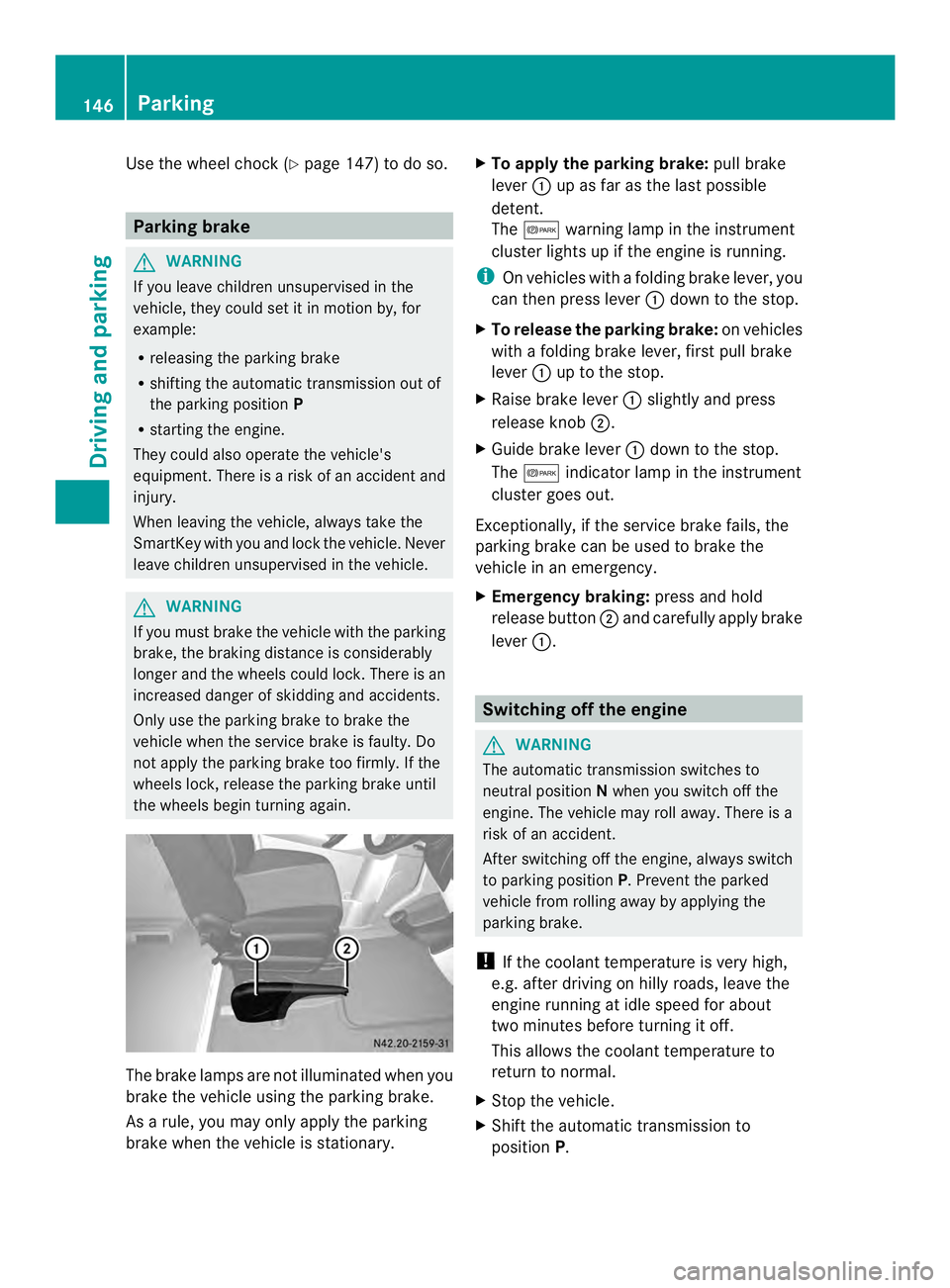
To apply the parking brake: pull brake
lever 0005up as far as the last possible
detent.
The 000B warning lamp in the instrument
cluster lights up if the engine is running.
i On vehicles with a folding brake lever, you
can then press lever 0005down to the stop.
X To release the parking brake: on vehicles
with a folding brake lever, first pull brake
lever 0005up to the stop.
X Raise brake lever 0005slightly and press
release knob 0006.
X Guide brake lever 0005down to the stop.
The 000B indicator lamp in the instrument
cluster goes out.
Exceptionally, if the service brake fails, the
parking brake can be used to brake the
vehicle in an emergency.
X Emergency braking: press and hold
release button 0006and carefully apply brake
lever 0005. Switching off the engine
G
WARNING
The automatic transmission switches to
neutral position Nwhen you switch off the
engine. The vehicle may roll away. There is a
risk of an accident.
After switching off the engine, always switch
to parking position P. Prevent the parked
vehicle from rolling away by applying the
parking brake.
! If the coolant temperature is very high,
e.g. after driving on hilly roads, leave the
engine running at idle speed for about
two minutes before turning it off.
This allows the coolant temperature to
return to normal.
X Stop the vehicle.
X Shift the automatic transmission to
position P. 146
ParkingDriving and parking
Page 159 of 334
Deactivating cruise control
There are various ways to deactivate cruise
control:
X Briefly press the cruise control lever
forwards 0025.
Or
X Apply the brakes.
The last speed set remains stored. The last
speed stored is deleted when you switch off
the engine.
Cruise control is deactivated automatically
when:
R you apply the brakes
R you apply the parking brake and the 000B
indicator lamp in the instrument cluster
lights up
R you are driving slower than 20 mph
(30 km/h)
R you shift the automatic transmissio nto
neutral position Nwhile the vehicle is in
motion
R ESP ®
or ASR intervenes
R there is a malfunction in the ESP ®
, ASR or
ABS system
Problems with cruise control On vehicles with steering wheel buttons, the
speed canno
tbe set when cruise control is
activated.
The display is showing a message of high
priority and cannot therefore show a change
in speed.
X Proceed as instructed by the message in
the display.
X Deactivate cruise control PARKTRONIC
Important safety notes PARKTRONIC is only an aid. It cannot replace
your own awareness of the immediate
surroundings. You are responsible for safe maneuvering, parking and pulling away. When
maneuvering, parking and pulling away, make
sure that there are no persons, animals or
objects in the maneuverin
garea.
PARKTRONIC does not account for obstacles
that are:
R beneath its detection range, e.g. persons,
animals or objects
R above its detection range, e.g. overhanging
loads, overhangs or truck loading ramps
PARKTRONIC is an electronic parking aid with
ultrasonic sensors. It indicates the distance
between yourv ehicle and an objec tvisually
and audibly.
Your vehicle features two separate sound
emitters with different frequencies for the
warning tones. The warning ranges in front of
and behind the vehicle are indicated by
different warning tones.
PARKTRONIC is activated automatically when
you:
R tur nthe key to position 2in the ignition lock
R release the parking brake and
R move the selector lever to D,Nor R.
PARKTRONIC is deactivated at speeds above
11 mph (18 km/h). PARKTRONIC is
reactivated at speeds below 10 mph
(16 km/h).
PARKTRONIC monitors the area around your
vehicle with sensors in the front and rear
bumpers.
Range of the sensors !
Pay particular attention to obstacles
above or below the sensors when parking,
such as flower pots or trailer towbars.
PARKTRONIC does not recognize such
objects when they are in the immediate
vicinity of the vehicle. You could damage
the vehicle or objects. Driving systems
157Driving and parking Z
Page 162 of 334
X
Press the 000Cbutton.
If PARKTRONIC is deactivated, the
indicator lamp in the switch lights up.
Towing atrailer PARKTRONIC detects a coupled trailer if your
vehicle is equipped with the corresponding
electrical installations for trailer towing.
PARKTRONIC is deactivated for the rea
rarea
when you establish an electrical connection
between yourv ehicle andatrailer. If you use
an adapter for the socket, remove it from the
socket after detaching the trailer. Otherwise,
PARKTRONIC remains deactivated for the
rear area.
Remove a detachable trailer coupling if it is
no longer required .PARKTRONIC measures
the minimum detection range to an obstacle
fro mt he bumper, not the ball coupling. 160
Driving systemsDriving and parking