jump start MERCEDES-BENZ SPRINTER 2013 MY13 Operator’s Manual
[x] Cancel search | Manufacturer: MERCEDES-BENZ, Model Year: 2013, Model line: SPRINTER, Model: MERCEDES-BENZ SPRINTER 2013Pages: 334, PDF Size: 3.88 MB
Page 7 of 334
Automatic transmission
emergency mode
...............................141
Auxiliary heating Activating/deactivating heater
booster mode ................................ 125
Conditions for switching on ...........119
Important safety notes ..................118
Operating with the button (control
panel) ............................................ 119
Operation with the remote control .121
Operation with the timer ................122
Problem (malfunction) ...................128
Selecting a switch-on time ............. 119
Setting the switch-on time .............120
see Auxiliary heating
Axle load, permissible (trailer
towing) ............................................... 329B
Backup lamps Changing bulbs ........................ 99, 101
Backup lamps (Chassis Cab)
Changing bulbs .............................. 100
BAS (Brake Assist System)
Display message ............................ 198
Function/notes ................................ 56
Indicator lamp ................................ 210
Basic settings
see Settings
Battery
Isolating switch .............................. 132
Replacing (SmartKey) ................66, 67
Battery (SmartKey)
Checking .......................................... 66
Important safety notes ....................66
Replacing ................................... 66, 67
Battery (vehicle)
Care ............................................... 255
Charge indicator lamp ...................214
Charging ........................................ 254
Disconnecting and connecting
(driver's footwell) ........................... 251
Disconnecting and connecting
(engine compartment) ...................253
Display message ............................ 208
Important safety notes ..................250Installing/removing (driver's
footwell) ......................................... 252
Installing/removing (engine
compartment)
................................ 254
Jump starting ................................. 267
Location ......................................... 250
Removing/installing the floor
covering (driver's footwell) ............251
Belt
see Seat belts
Bio-diesel ........................................... 317
Bleeding the fuel system ..................137
Bodies Body/equipment mounting
directives for trucks .........................28
Bottle holder ...................................... 227
see Cuph older
Brake
EBD .................................................. 57
Brake Assist System
see BAS (Brake Assist System)
Brake fluid
Checking the level .........................245
Display message ............................ 199
Notes .................................... .245, 324
Warning lamp ................................. 211
Brake force distribution,
electronic
see EBD (electronic brake force
distribution)
Brake lamps
Changing bulbs ........................ 99, 101
Brake lamps (Chassis Cab)
Changing bulbs .............................. 100
Brake linings
Display message ............................ 199
Indicator lamp ................................ 214
Brakes
ABS .................................................. 56
Applying the parking brake ............146
BAS .................................................. 56
Brake fluid (notes) .................245, 324
Checking brake fluid leve l.............. 245
Display messages ..........................199
Driving tips .................................... 150
Important safety notes ..................150
Maintenance .................................. 210
Parking brake (notes) ..................... 151 Index
5
Page 8 of 334
Brake system
Malfunction .................................... 198
Warning lamp ................................. 210
Breakdown
Fire extinguisher ............................ 266
First-ai dkit.................................... 266
Jump-starting ................................. 267
Reflective safety jacket .................. 265
Vehicle tool kit ............................... 264
Warning lamp ................................. 265
Warning triangl e............................ 265
see Flat tire
see Towing away
see Tow-starting
Bulb
see Changing bulbs
Bulb failure indicator ..........................90C
Care Car wash ........................................ 256
Display ........................................... 260
Exterior lights ................................ 258
Notes ............................................. 255
Paint .............................................. 257
Plastic trim .................................... 260
Power washer ................................ 257
Rea rview camera .......................... 259
Roof lining ...................................... 261
Seat bel t........................................ 261
Seat cover ..................................... 261
Selector leve r................................ 260
Sensors ......................................... 259
Sliding door ................................... 259
Steering wheel ............................... 260
Step (electrical )............................. 260
Trim pieces .................................... 260
Washing by hand ........................... 256
Washing the engine .......................257
Wheels ........................................... 258
Windows ........................................ 257
Wiper blades .................................. 258
Cargo compartment
Activating/deactivating
ventilation ...................................... 129
Cargo compartment floor ...................28Cargo tie-down points and tie
downs
Important safety notes ..................234
Cargo tie-down rings
Installing ........................................ 236
Permissible tensile loa d................. 327
Car wash (care) ................................. 256
CD player/CD changer ......................183
Cell phone see Mobile phone
Center console overview ....................36
Central locking Automatic locking ............................ 69
Important safety notes ....................69
Locking/unlocking (buttons) ...........69
Locking/unlocking (SmartKey) ........64
Locking/unlocking manually ............ 69
Central locking system
see Centra llocking
Changing bulbs
Additional indicators (roof) ............101
Additional turn signals ...................101
Backup lamp (Chassis Cab) ...........100
Backup lamps .......................... 99, 101
Bi-Xenon bulbs ................................. 96
Brake lamps ............................ .99, 101
Brake lamps (Chassis Cab) ............100
Cornering lamps .............................. 98
Courtesy lights ............................... 101
Display message ............................ 201
Fog lamps ........................................ 98
Front interio rlight .......................... 102
High-beam headlamps .....................98
Important safety notes ....................96
Interior light ................................... 102
Interior lighting .............................. 102
License plate lamp ................100, 101
License plate lamp (Chassis Cab) ..100
Low-beam headlamps ......................98
Overview of lamp types (front
bulbs) .............................................. .97
Overview of lamp types (rear
bulbs, Cargo Van/Passenger Van) ...99
Overview of lamp types (rear
bulbs, Chassis Cab) .......................100
Parking lamps .................................. 98
Perimeter lamp .............................. 101
Rea rfog lamp .......................... 99, 1016
Index
Page 12 of 334
Engine speed setting (working
mode)
............................................ 168
Irregularr unning............................ 137
Jump-starting ................................. 267
Operating safety .............................. 25
Starting .......................................... 134
Starting problems ..........................137
Switching off .................................. 146
Tow-starting (vehicle) ..................... 271
Engine, jump-starting .......................267
Engine electronics Notes ............................................. 314
Problem (malfunction) ...................137
Engine oil
Adding ........................................... 244
Additives ........................................ 322
Checking the oil level (on-board
computer) ...................................... 242
Checking the oil level using the
dipstick .......................................... 243
Display message ............................ 206
Filling capacity ............................... 323
Information about oil
consumption .................................. 323
Mixing ............................................ 322
Notes about oil grades ................... 321
Oil change ...................................... 322
Oil leve l(note) ............................... 242
Viscosity ........................................ 321
Warning lamp ................................. 214
Engine spee dsetting (working
mode) ................................................. 167
Equipment/conversions .....................27
ESP ®
(Electronic Stability
Program) Display message ............................ 200
Function/notes ................................ 57
Indicator lamp ................................ 213
Warning lamp ................................. 210
Exhaus tcheck ................................... 148
Exhaust gas aftertreatment ...............27
DEF leve lindicato r......................... 178
DEF reducing agent .................27, 320
Diesel Exhaus tFluid (DEF) .............320
Display messages (vehicles
without steering wheel buttons) ....195
Display messages (vehicles with
steering wheel buttons) .................204Indicator lamp ................................ 213
Malfunction ...................................
.204
Refilling DEF .................................. 143
Exterior lighting
Daytime running lamp mode
(vehicles without steering wheel
buttons) ......................................... 179
Daytime running lamp mode
(vehicles with steering wheel
buttons) ......................................... 187
see Lights
Exterior mirrors
Adjusting ......................................... 86
Important safety notes ....................86
Eyeglasses compartment .................223 F
FAME fuel Bio-diesel ....................................... 317
Fire extinguisher ............................... 266
First-aid kit ......................................... 266
Flat tire Changing a wheel/mounting the
spare wheel ................................... 303
General notes ................................ 295
Preparing the vehicle .....................295
Using tire sealant ........................... 295
Fog lamps
Switching on/off .............................. 91
Folding seat ......................................... 82
Folding table ...................................... 225
Frequencies Mobile phone ................................. 314
Two-way radio ................................ 314
Front fog lamps
Changing the bulbs ..........................98
Switching on/off .............................. 91
Fron tinterior light
Changing bulbs .............................. 102
Fron twindshield
see Windshield
Fuel
Additives (diesel) ........................... 318
Bio-diesel (FAME fuel ).................... 317
Consumption information ..............319
Consumption statistics ..................19010
Index
Page 14 of 334
J
Jack Jacking points ................................ 304
Preparation .................................... 304
Storage location ............................ 264
Using ............................................. 304
Jump-starting ..................................... 267K
Key Position in the ignition lock ............ 133
see SmartKey
Kickdown ........................................... 140L
Lamps see Warning and indicator lamps
Language
Display (vehicles with steering
wheel buttons) ............................... 185
Lashing points and tie downs
Permissible tensile loa d................. 327
LATCH-type (ISOFIX) child seat
anchors ................................................ 52
License plate lamp Changing bulbs ......................100, 101
License plate lamp (Chassi sCab)
Changing bulbs .............................. 100
Lighting
see Lights
Lights
Activating/deactivating daytime
running lamp mode (vehicle swith
steerin gwheel buttons) ................... 91
Activating/deactivating surround
lighting (vehicles with steering
wheel buttons) ............................... 187
Automatic headlamp mode ..............91
Bulb failure indicator ........................90
Cornering light function ...................93
Driving abroad ............................... 149
Fog lamps ........................................ 91
Hazard warning lamps .....................93
Headlamp range .............................. 93
High bea mflasher ............................ 92
High-beam headlamps .....................92Important safety notes
....................90
Ligh tswitc h..................................... 90
Low-beam headlamps ......................90
Parking lamps .................................. 90
Rea rfog lamp .................................. 91
Setting the exterio rlighting
delayed switch-off (vehicles with
steerin gwheel buttons) .................188
Switching the daytime running
lamp mode on/off (switch) ..............91
Turn signals ..................................... 92
see Changing a bulb
see Interior lighting
Light sensor ......................................... 91
Limited Warranty ................................ 29
Load distribution ............................... 234
Loading guidelines Important safety notes ..................232
Loading rails
Installing cargo tie-down rings .......236
Maximum tensile strength .............327
Loads
Securing ........................................ 234
Transporting .................................. 232
Load securing aids
Carrier systems ............................. 236
Locator lighting
Setting (vehicles with steering
wheel buttons) ............................... 187
Locking
see Centra llocking
Locking and unlocking manually .......69
Locking centrally see Centra llocking
Low-beam headlamps
Changing bulbs ................................ 98
Daytime running lamp mode
(vehicles without steering wheel
buttons) ......................................... 179
Daytime running lamp mode
(vehicles with steering wheel
buttons) ......................................... 187
Display message ............................ 201
Driving abroad ............................... 149
Switching on/off .............................. 90
Lumbar support ................................... 8012
Index
Page 70 of 334
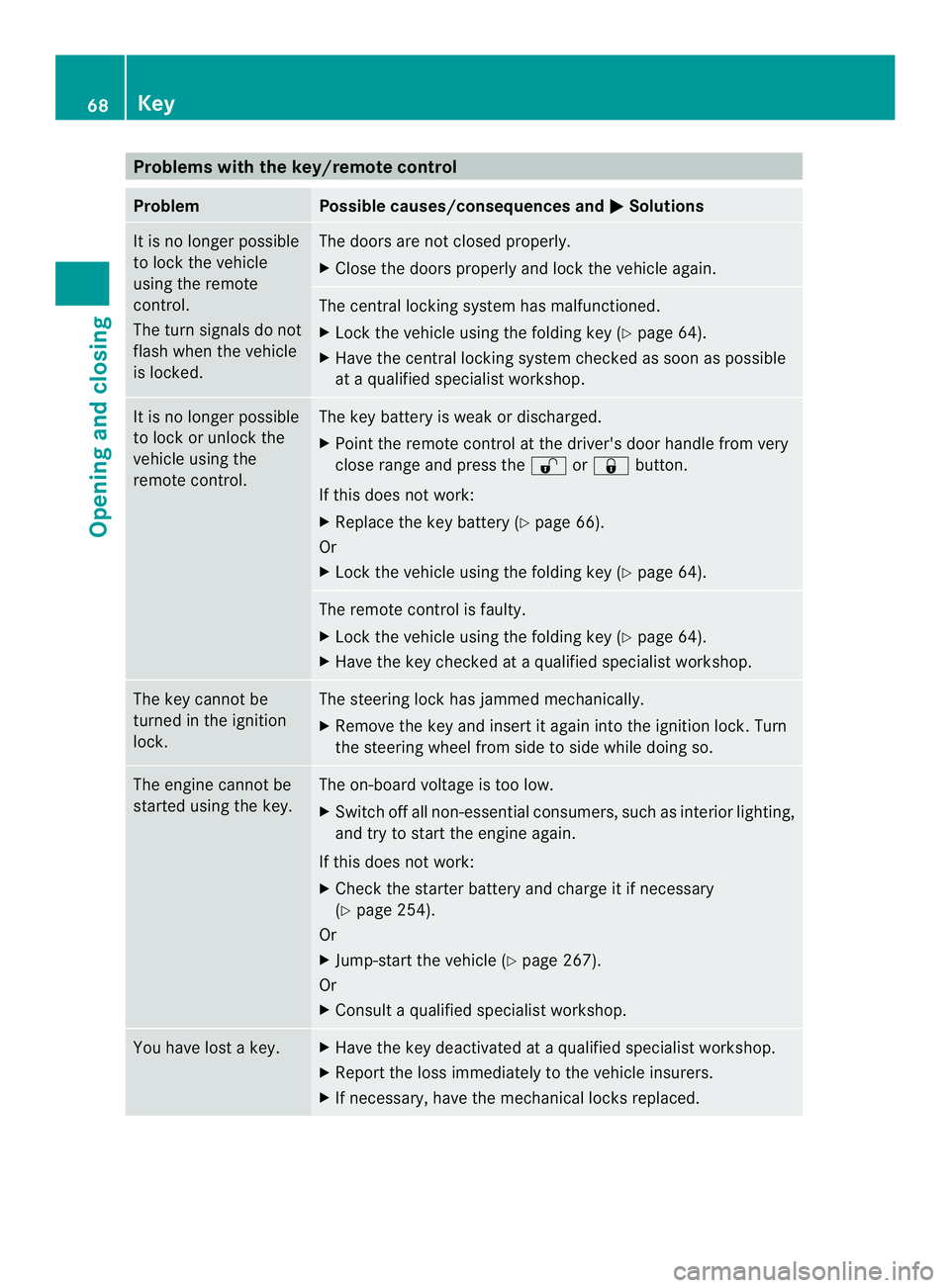
Problems with the key/remote control
Problem Possible causes/consequences and
0004 Solutions
It is no longer possible
to lock the vehicle
using the remote
control.
The turn signals do not
flash when the vehicle
is locked. The doors are not closed properly.
X
Close the doors properly and lock the vehicle again. The central locking system has malfunctioned.
X
Lock the vehicle using the folding key (Y page 64).
X Have the central locking system checked as soon as possible
at a qualified specialist workshop. It is no longer possible
to lock or unlock the
vehicle using the
remote control. The key battery is weak or discharged.
X
Point the remote control at the driver's door handle from very
close range and press the 0009or0008 button.
If this does not work:
X Replace the key battery (Y page 66).
Or
X Lock the vehicle using the folding key (Y page 64). The remote control is faulty.
X
Lock the vehicle using the folding key (Y page 64).
X Have the key checked at a qualified specialist workshop. The key cannot be
turned in the ignition
lock. The steering lock has jammed mechanically.
X
Remove the key and insert it again into the ignition lock. Turn
the steering wheel from side to side while doing so. The engine cannot be
started using the key. The on-board voltage is too low.
X
Switch off all non-essential consumers, such as interior lighting,
and try to start the engine again.
If this does not work:
X Check the starter battery and charge it if necessary
(Y page 254).
Or
X Jump-start the vehicle (Y page 267).
Or
X Consult a qualified specialist workshop. You have lost a key. X
Have the key deactivated at a qualified specialist workshop.
X Report the loss immediately to the vehicle insurers.
X If necessary, have the mechanical locks replaced. 68
KeyOpening and closing
Page 140 of 334
Problem Possible causes/consequences and
0004 Solutions
The engine does not
start.
The starter motor
cannot be heard. The on-board voltage is too low. The battery is too weak or
discharged.
X
Jump-start the vehicle (Y page 267).
If the engine cannot be jump-started, the starter motor is faulty.
X Consult a qualified specialist workshop. The engine does not
start.
The starter motor
cannot be heard. The battery is discharged or faulty.
X
Check the battery for damage.
X Charge the battery (Y page 254).Automatic transmission
Important safety notes
G
WARNING
If the engine speed is above the idling speed
and you engage transmission position Dor
R, the vehicle could pull away suddenly. There
is a risk of an accident.
When engaging transmission position Dor R,
always firmly depress the brake pedal and do
not simultaneously accelerate.
! Vehicles with automatic transmission
may roll only briefly in the neutral position
N.P rolonged rolling of the wheels, e.g.
when being towed, will result in
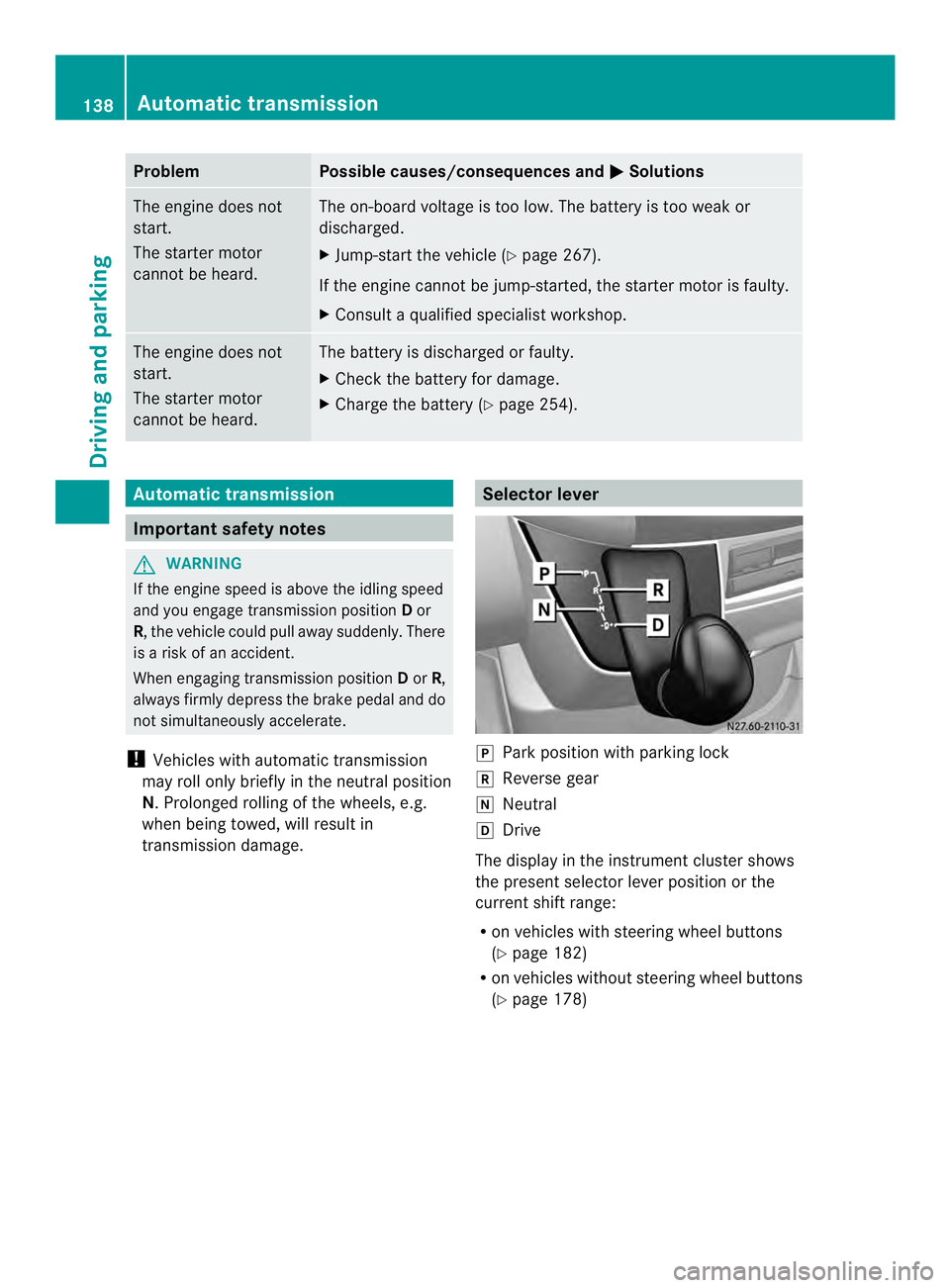
transmission damage. Selector lever
0016
Park position with parking lock
0012 Reverse gear
0013 Neutral
0015 Drive
The display in the instrument cluster shows
the present selector leve rposition or the
current shift range:
R on vehicles with steering wheel buttons
(Y page 182)
R on vehicles without steerin gwheel buttons
(Y page 178) 138
Automatic transmissionDriving and parking
Page 253 of 334
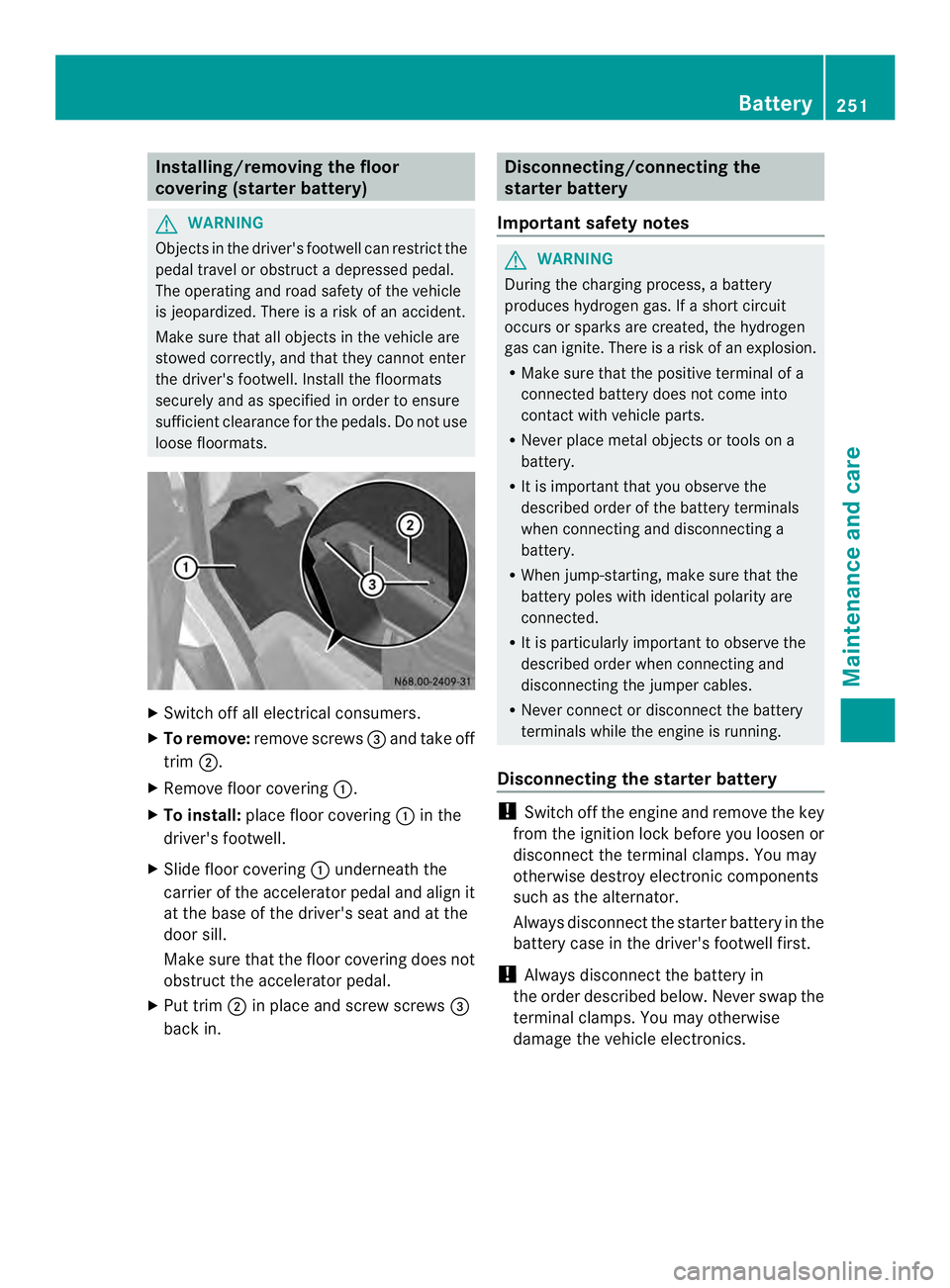
Installing/removing the floor
covering (starter battery)
G
WARNING
Objects in the driver' sfootwell can restric tthe
pedal travel or obstruct adepressed pedal.
The operating and road safety of the vehicle
is jeopardized. There is a risk of an accident.
Make sure that all objects in the vehicle are
stowed correctly, and that they cannot enter
the driver's footwell. Install the floormats
securely and as specified in order to ensure
sufficien tclearance for the pedals. Do not use
loose floormats. X
Switch off all electrical consumers.
X To remove: remove screws 0026and take off
trim 0006.
X Remove floor covering 0005.
X To install: place floor covering 0005in the
driver's footwell.
X Slide floor covering 0005underneath the
carrier of the accelerator pedal and align it
at the base of the driver's seat and at the
door sill.
Make sure that the floor covering does not
obstruct the accelerator pedal.
X Put trim 0006in place and screw screws 0026
back in. Disconnecting/connecting the
starter battery
Important safety notes G
WARNING
During the charging process, a battery
produces hydroge ngas. If a shor tcircuit
occurs or sparks are created, the hydrogen
gas can ignite. There is a risk of an explosion.
R Make sure that the positive terminal of a
connected battery does not come into
contact with vehicle parts.
R Never place metal objects or tools on a
battery.
R It is important that you observe the
described order of the battery terminals
when connecting and disconnecting a
battery.
R When jump-starting, make sure that the
battery poles with identical polarity are
connected.
R It is particularly important to observe the
described order when connecting and
disconnecting the jumper cables.
R Never connect or disconnect the battery
terminals while the engine is running.
Disconnecting the starter battery !
Switch off the engine and remove the key
fro mt he ignition lock before you loosen or
disconnectt he terminal clamps. You may
otherwise destroy electronic components
such as the alternator.
Always disconnectt he starter battery in the
battery case in the driver's footwell first.
! Always disconnectt he battery in
the order described below. Never swap the
terminal clamps. You may otherwise
damage the vehicle electronics. Battery
251Maintenance and care Z
Page 255 of 334
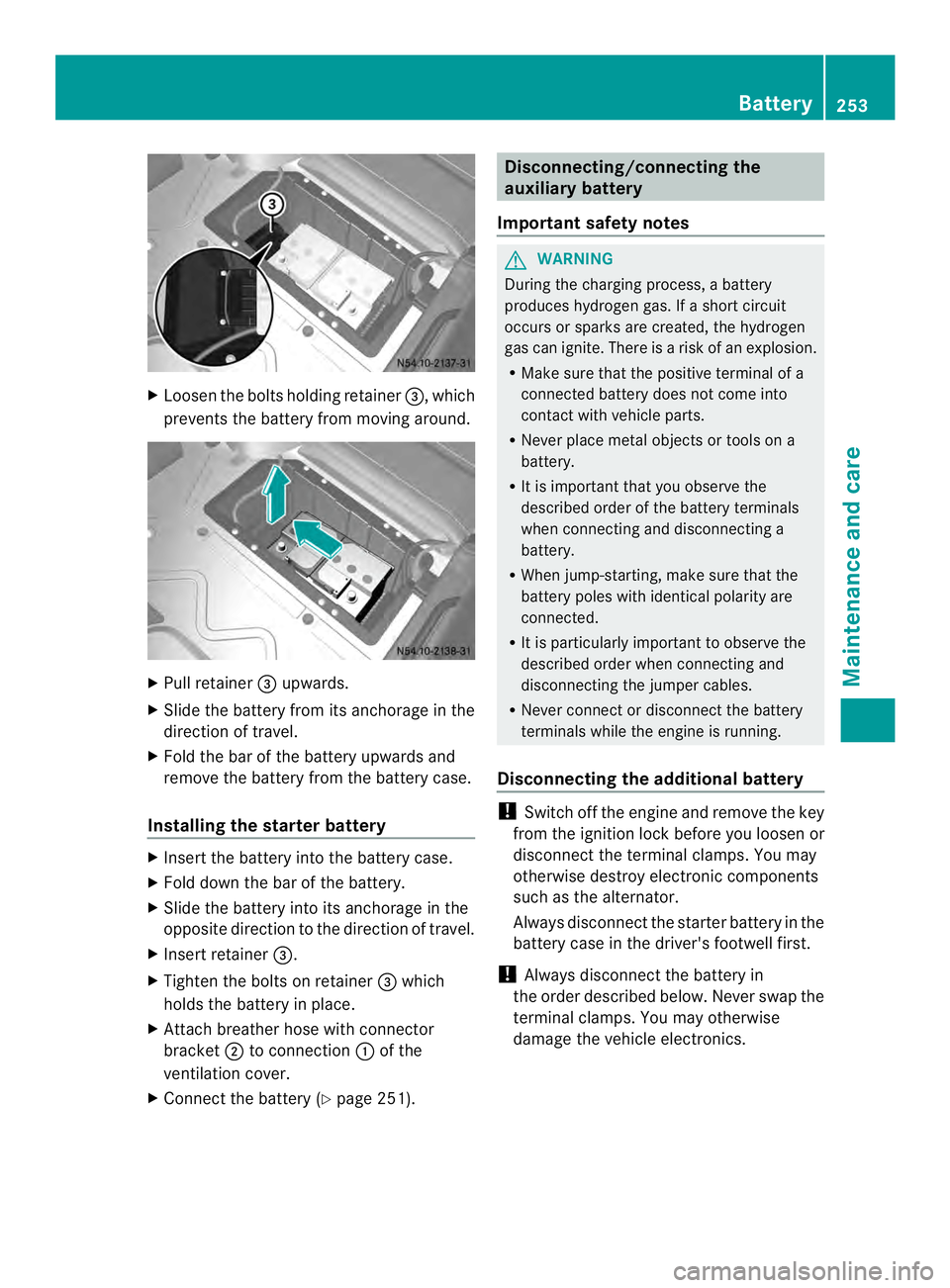
X
Loosen the bolts holding retainer 0026, which
prevents the battery from moving around. X
Pull retainer 0026upwards.
X Slide the battery from its anchorage in the
direction of travel.
X Fold the bar of the battery upwards and
remove the battery from the battery case.
Installing the starter battery X
Insert the battery into the battery case.
X Fold down the bar of the battery.
X Slide the battery into its anchorage in the
opposite direction to the direction of travel.
X Insert retainer 0026.
X Tighten the bolts on retainer 0026which
holds the battery in place.
X Attach breather hose with connector
bracket 0006to connection 0005of the
ventilation cover.
X Connect the battery (Y page 251). Disconnecting/connecting the
auxiliary battery
Important safety notes G
WARNING
During the charging process, a battery
produces hydrogen gas. If a short circuit
occurs or sparks are created, the hydrogen
gas can ignite. There is a risk of an explosion.
R Make sure that the positive terminal of a
connected battery does not come into
contact with vehicle parts.
R Never place metal objects or tools on a
battery.
R It is important that you observe the
described order of the battery terminals
when connecting and disconnecting a
battery.
R When jump-starting, make sure that the
battery poles with identical polarity are
connected.
R It is particularly important to observe the
described order when connecting and
disconnecting the jumper cables.
R Never connect or disconnect the battery
terminals while the engine is running.
Disconnecting the additional battery !
Switch off the engine and remove the key
from the ignition lock before you loosenor
disconnec tthe terminal clamps. You may
otherwise destroy electronic components
such as the alternator.
Always disconnectt he starter battery in the
battery case in the driver's footwell first.
! Always disconnectt he battery in
the order described below. Never swap the
terminal clamps. You may otherwise
damage the vehicle electronics. Battery
253Maintenance and care Z
Page 256 of 334
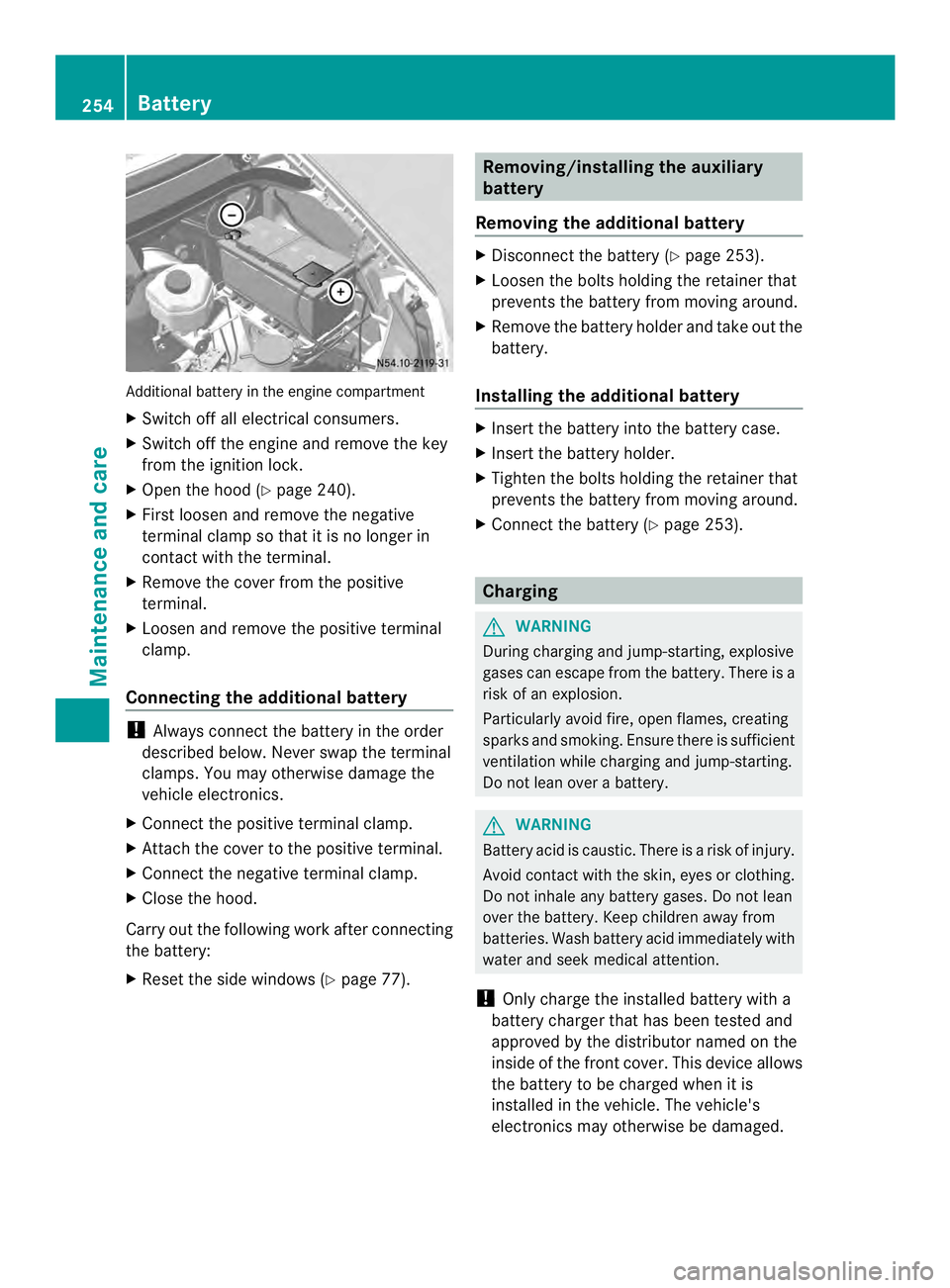
Additional battery in the engine compartment
X
Switch off all electrical consumers.
X Switch off the engine and remove the key
from the ignition lock.
X Ope nthe hood (Y page 240).
X First loosen and remove the negative
terminal clamp so that it is no longer in
contact with the terminal.
X Remove the cover from the positive
terminal.
X Loosen and remove the positive terminal
clamp.
Connecting the additional battery !
Always connect the battery in the order
described below. Never swap the terminal
clamps. You may otherwise damage the
vehicle electronics.
X Connect the positive terminal clamp.
X Attach the cover to the positive terminal.
X Connect the negative terminal clamp.
X Close the hood.
Carry out the following work after connecting
the battery:
X Reset the side windows (Y page 77). Removing/installing the auxiliary
battery
Removing the additional battery X
Disconnect the battery (Y page 253).
X Loosen the bolts holding the retainer that
prevents the battery from moving around.
X Remove the battery holder and take out the
battery.
Installing the additional battery X
Insert the battery into the battery case.
X Insert the battery holder.
X Tighten the bolts holding the retainer that
prevents the battery from moving around.
X Connect the battery (Y page 253). Charging
G
WARNING
During charging and jump-starting, explosive
gases can escape from the battery. There is a
risk of an explosion.
Particularly avoid fire, open flames, creating
sparks and smoking. Ensure there is sufficient
ventilation while charging and jump-starting.
Do not lean over a battery. G
WARNING
Battery acid is caustic. There is a risk of injury.
Avoid contact with the skin, eyes or clothing.
Do not inhale any battery gases. Do not lean
over the battery. Keep children away from
batteries. Wash battery acid immediately with
water and seek medical attention.
! Only charge the installed battery with a
battery charger that has been tested and
approved by the distributor named on the
inside of the front cover. This device allows
the battery to be charged when it is
installed in the vehicle. The vehicle's
electronics may otherwise be damaged. 254
BatteryMaintenance and care
Page 257 of 334
X
Recharge the removed battery. Observe
the notes in the operating instructions for
your battery charger.
X Install the battery. Observe the notes on
reconnecting the battery.
i If batteries are no tbeing used, you should
charge them once a month.
It is also possible to charge the starter
battery using the jump-starting connection
point in the engine compartment
(Y page 267). Care
! Dirty battery clamps and battery surfaces
cause leak currents which lead to the
batteries discharging.
! Do not use cleaning agents containing
fuel. Cleaning agents containing fuel
corrode the battery housing.
! If dirt gets into the battery cell, battery
self-discharge will increase and the battery
may be damaged.
The following points on battery care must be
observed:
X Regularly chec kthe battery terminals and
the fastening of the negative cable to the
chassis to ensure that they are firmly
seated.
X Always keep the battery terminals and
battery surfaces clean and dry.
X Lightly grease the undersides of the battery
terminals with acid-resistant grease.
X Only clean the batteries when the caps are
screwed on.
Otherwise, dirt could get into the battery
cells.
X Unscrew the caps and clean blocked
breathers with a suitable tool such as a
piece of wire.
If you do not unscrew the caps for cleaning,
there is a risk of short circuit. The breathers in the caps and the cell
ventilation tubes must be open. Otherwise,
gas cannot escape.
X Only clean the battery casing with a
commercially available cleaning product. Care
Notes on care
G
WARNING
If you use openings in the bodywork or
detachable parts as steps, you could:
R slip and/or fall
R damage the vehicle and cause yourself to
fall.
There is a risk of injury.
Always use secure climbing aids, e.g. a
suitable ladder.
! For cleaning your vehicle, do not use any
of the following:
R dry, rough or hard cloths
R abrasive cleaning agents
R solvents
R cleaning agents containing solvents
Do not scrub.
Do not touch the surfaces or protective
films with hard objects, e.g. a ring or ice
scraper. You could otherwise scratch or
damage the surfaces and protective film.
! Do not park the vehicle for an extended
period straight after cleaning it, particularly
after having cleaned the wheels with wheel
cleaner. Wheel cleaners could cause
increased corrosion of the brake discs and
brake pads/linings. For this reason, you
should drive for a few minutes after
cleaning. Braking heats the brake discs and
the brake pads/linings, thus drying them.
The vehicle can then be parked. Care
255Maintenance and care Z