warning MERCEDES-BENZ SPRINTER 2014 MY14 Operator’s Manual
[x] Cancel search | Manufacturer: MERCEDES-BENZ, Model Year: 2014, Model line: SPRINTER, Model: MERCEDES-BENZ SPRINTER 2014Pages: 338, PDF Size: 6.78 MB
Page 96 of 338
or
0058 position, the daytime running
lamps remain switched on.
Automatic headlamp mode G
WARNING
When the light switch is set to 0058, the low-
beam headlamps may not be switched on
automatically if there is fog, snow or other
causes of poor visibility due to the weather
conditions such as spray. There is a risk of an
accident.
In such situations, turn the light switch to
0058.
Automatic headlamp mode is only a driving
aid. You are responsible for the vehicle light-
ing at all times.
Depending on ambient light, the rain and light
sensor automatically switches on the parking
lamps, low-beam headlamps and the license
plate lamp. This excludes weather-related
impairments to visibility, such as snow, fog or
spray.
If there is fog, snow or spray, turn the light
switch quickly from 0058to0058. You could
otherwise briefly interrupt operation of the
headlamps.
X To switch on automatic headlamp
mode: turn the light switch to 0058.
SmartKey in position 1in the ignition lock:
the parking lamps switch on or off auto-
matically depending on the ambient light.
When the engine is running: if you activate
the "daytime running lamps" function using
the on-board computer, the daytime run-
ning lamps are switched on. The parking
lamps and low-beam headlamps also
switch on or off automatically, depending
on the ambient light.
When the low-beam headlamps are
switched on, the 0058indicator lamp in the
instrument cluster lights up. Fog lamp/rear fog lamp G
WARNING
If you suspect that driving conditions will be
foggy, turn the light switch to 0058before you
start your journey. Your vehicle may other-
wise not be visible and you could endanger
yourself and others. G
WARNING
In low ambient lighting or foggy conditions,
only switch from position 0058to0058 with
the vehicle at a standstill in a safe location.
Switching from 0058to0058 will briefly
switch off the headlamps. Doing so while driv-
ing in low ambient lighting conditions may
result in an accident.
X Turn the ignition key to position 2in the
ignition lock or start the engine.
X Turn the light switch to 0058or0060.
i If your vehicle is only equipped with one
rear fog lamp, you must turn the light
switch to 0058.
i When the light switch is set to 0058, you
cannot switch on the front or rear fog
lamps.
X To switch on the front fog lamps: pull the
light switch out to the first locking point.
The green 005Aindicator lamp on the light
switch lights up.
X To switch on the rear fog lamp: pull the
light switch out to the second locking point.
The yellow 005Eindicator lamp on the light
switch lights up.
X To switch off the front fog lamps/rear
fog lamp: push in the light switch to the
stop.
The 005E and005A indicator lamp on the
light switch go out. 94
Exterior lightingLights and windshield wipers
Page 98 of 338

X
Turn headlamp range control 0043to the cor-
responding position. The road ahead
should be lit up for 40 mto 100 mand the
low-beam headlamps should not cause
glare to oncoming traffic.
Select position 005Aif the vehicle is unladen. Cornering light function (vehicles
with Bi-Xenon headlamps)
The cornering lamps improve the illumination
of the road over a wide angle in the direction
you are turning, enabling better visibility in
tight bends, for example.
The cornering light function switches on
automatically, if:
R you are traveling at a speed of less than
25 mph (40 km/h) and you switch on a turn
signal or turn the steering wheel.
R you are traveling at a speeds of between
25 mph (40 km/h) and 43 mph (70 km/h)
and turn the steering wheel.
The cornering lamp may remain lit for a short
time, but is automatically switched off after
no more than 3 minute s.
i If reverse gear is engaged the lamp on the
opposite side of the vehicle switches on
instead. Hazard warning lamps
G
WARNING
The rear exterior light will be covered if you:
R open the rear doors by 90°
R open the rear dropside.
The vehicle will then be difficult for other road
users to see or will not be seen by them at all,
particularly if it is dark or visibility is poor.
There is a risk of an accident.
You should therefore ensure in this and simi-
lar situations that the vehicle is visible from
the rear in accordance with the relevant national regulations, by using the warning tri-
angle, for instance. Hazard warning lamp switch
X
To switch on/off: press the002Fhazard
warning lamp switch.
If you have indicated a turn while the hazard
warning lamps are switched on, only the turn
signal lamps on the side of the vehicle
selected will light up.
The hazard warning lamps switch on auto-
matically if:
R an air bag is deployed.
R you brake sharply and bring the vehicle to
a halt from a speed of more than 45 mph
(70 km/h).
If the hazard warning lamps have been
switched on automatically, press the 002F
hazard warning lamp switch to switch them
off.
i The hazard warning lamps work even
when the ignition is switched off. Headlamp cleaning system
The headlamps are cleaned automatically
with a high-pressure water jet if the "Wipe
with washer fluid" function is activated
(Y page 107) while the low-beam headlamps
are on and the engine is running.
Information on checking the washer fluid
level can be found in the "Maintenance and
care" (Y page 257) section. 96
Exterior lightingLights and windshield wipers
Page 99 of 338
Active light function
The active light function is a system that
moves the headlamps according to the steer-
ing movements of the front wheels. In this
way, relevant areas will be illuminated to a
greater extent while driving. This allows you
to recognize pedestrians, cyclists and ani-
mals.
Active: when the lights are switched on. Highbeam Assist
General notes You can use this function to set the head-
lamps to change between high beam and low
beam automatically. The system recognizes
vehicles with their lights on, either approach-
ing from the opposite direction or traveling in
front of your vehicle, and consequently
switches the headlamps from high beam to
low beam.
Once the system no longer detects any other
vehicles, it reactivates the high-beam head-
lamps.
The system's optical sensor is located behind
the windshield near the overhead control
panel.
Important safety notes G
WARNING
Highbeam Assist does not recognize road
users:
R who have no lights, e.g. pedestrians
R who have poor lighting, e.g. cyclists
R whose lighting is blocked, e.g. by a barrier
In very rare cases, Highbeam Assist may fail
to recognize other road users who have lights,
or may recognize them too late. In this or sim-
ilar situations, the automatic high-beam head-
lamps will not be deactivated or will be acti-
vated regardless. There is a risk of an acci-
dent. Always carefully observe the traffic conditions
and switch off the high-beam headlamps in
good time.
Highbeam Assist cannot take into account
road, weather or traffic conditions. Highbeam
Assist is only an aid. You are responsible for
adjusting the vehicle's lighting to the prevail-
ing light, visibility and traffic conditions.
In particular, the detection of obstacles can
be restricted if there is:
R poor visibility, e.g. due to fog, heavy rain or
snow
R dirt on the sensors or anything else cover-
ing the sensors
Activating/deactivating Highbeam
Assist X
To activate: switch on the Highbeam
Assist function using the on-board com-
puter (Y page 194).
X Turn the light switch to the 0058position.
X Press the combination switch beyond the
pressure point in the direction of arrow 0043
(Y page 95).
Highbeam Assist is active.
The or
00CE indicator lamp in the
multifunction display lights up when it is
dark and the light sensor activates the low-
beam headlamps.
If you are driving at speeds above approx-
imately 22 mph (35 km/h) and no other
road users have been detected:
The high-beam headlamps are switched on
automatically. The 0057indicator lamp in
the instrument cluster also lights up.
If you are driving at speeds below approx-
imately 19 mph (30 km/h) other road users
are recognized or the roads are adequately
lit:
The high-beam headlamps are switched off
automatically. The 0057indicator lamp in
the instrument cluster goes out. The 00CE Exterior lighting
97Lights and windshield wipers Z
Page 102 of 338
Motion detector
G
WARNING
The motion detector sends the invisible infra-
red radiation emitted by LEDs (light emitting
diodes).
These LEDs are classified as class 1M lasers
and can damage the retina if you:
R look directly into the unfiltered laser beam
of the motion detector for an extended
period
R look directly into the laser beam of the
motion detector using optical instruments,
e.g. eyeglasses or a magnifying glass.
There is a risk of injury.
Never look directly into the motion detector.
The cargo compartment lighting is also
switched on by the motion detector in the
cargo compartment of Cargo Vans equipped
with this feature.
If the motion detector detects a movement in
the cargo compartment when the vehicle is
stationary, the cargo compartment lighting
switches on for approximately two minutes.
The cargo compartment lighting can be
switched on by the motion detector within
four seconds if:
R the rear interior light switch (Y page 99) is
set to automatic control.
R the vehicle is stationary, the parking brake
is applied and the brake pedal is not being
depressed
Or
R the selector lever is in position Pon vehi-
cles with automatic transmission and the
brake pedal is not being depressed and
R the vehicle has not been locked from the
outside using the key
The motion detector switches off automati-
cally if no change is detected in the vehicle
for several hours, e.g. if a door is opened, if
the ignition key is turned, etc. This prevents
the battery from becoming discharged. Changing bulbs
Important safety notes
G
DANGER
Xenon bulbs carry a high voltage. You can get
an electric shock if you remove the cover of
the Xenon bulb and touch the electrical con-
tacts. There is a risk of fatal injury.
Never touch the parts or the electrical con-
tacts of the Xenon bulb. Always have work on
the Xenon bulbs carried out at a qualified spe-
cialist workshop. G
WARNING
Bulbs, lamps and connectors can get very hot
when operating. If you change a bulb, you
could burn yourself on these components.
There is a risk of injury.
Allow these components to cool down before
changing a bulb.
! Make sure the bulbs are always securely
installed.
If your vehicle is equipped with Bi-Xenon
bulbs, you can recognize this by the following:
the cone of light from the Xenon bulbs moves
from the top to the bottom and back again
when you start the engine. For this to be
observed, the low-beam headlamps must be
switched on before starting the engine.
The bulbs and lamps are an essential compo-
nent of vehicle safety. You must therefore
make sure that these function correctly at all
times. Have the headlamp setting checked
regularly.
R Always switch off the vehicle's lighting sys-
tem before changing a bulb.
This will prevent a short circuit.
R Do not touch the glass tube of new bulbs
with your bare hands. Always use a clean,
lint-free cloth or only touch the base of the
bulb when installing.
Even minor contamination can burn into
the glass surface and reduce the service life
of the bulbs. 100
Changing bulbsLights and windshield wipers
Page 110 of 338

The detent positions of the combination
switch correspond to the following wiper
speeds:
0W indshield wipers off
II ntermittent wipe
II Normal wipe
III Rapid wipe
i Canada only:
If the windshield wipers are switched on
and you stop the vehicle, the windshield
wiper speed is reduced. For example, if you
have selected level IIand stop the vehicle,
wiping continues with intermittent wipe
while the vehicle is stationary. If intermit-
tent wipe is selected, the intervals become
longer.
Vehicles with a rain and light sensor:
you can use level Ias the universal setting.
The rain and light sensor sets the appropri-
ate wiping frequency automatically,
according to the intensity of the rain. When
you stop the vehicle, levels IIIand IIare
switched down to level Iautomatically.
The windshield wiper will return to the orig-
inal level when you drive faster than
5 mph (8 km/h).
You can adjust the sensitivity of the rain and
light sensor using the on-board computer
(Y page 196).
Information on checking the washer fluid
level can be found in the "Maintenance and
care" (Y page 257) section. Switching the rear window wiper on/
off Combination switch
0043
00C5 Rear window wiper switch
0048 00E2 To wipe with washer fluid
0049 ITo switch on intermittent wiping
004A 0To switch off intermittent wiping
004B 00E2 To wipe with washer fluid
X Turn the key to position 1or 2in the ignition
lock.
X Turn switch 0043to the corresponding posi-
tion
The rear window wiper switches on automat-
ically if you engage reverse gear and the wind-
shield wipers are on. Replacing the wiper blades
G
WARNING
If the windshield wipers begin to move while
you are changing the wiper blades, you could
be trapped by the wiper arm. There is a risk
of injury.
Always switch off the windshield wipers and
ignition before changing the wiper blades.
! Never open the hood if a windshield wiper
arm has been folded away from the wind-
shield.
Never fold a windshield wiper arm without
a wiper blade back onto the windshield/
rear window. 108
Windshield wipersLights and
windshield wipers
Page 123 of 338
Adjusting the air vents
Important safety notes
G
WARNING
Very hot or very cold air can flow from the air
vents. This could result in burns or frostbite in
the immediate vicinity of the air vents. There
is a risk of injury.
Make sure that all vehicle occupants always
maintain a sufficient distance to the air out-
lets. If necessary, redirect the airflow to
another area of the vehicle interior.
The center and side air vents are adjustable.
On vehicles with a rear-compartment air-con-
ditioning system, you can also adjust the air
vents in the roof duct.
i For virtually draft-free ventilation, adjust
the sliders of the center air vents to the
center position.
In order to ensure the direct flow of fresh air
through the air vents into the vehicle interior,
please observe the following notes:
R keep the air inlet grille on the hood free of
blockages, such as ice, snow or leaves.
R never cover the vents or the ventilation
grilles in the vehicle interior. Setting the center air vents
0043
Center air vent, left
0044 Center air vent, right
0087 Thumbwheel for center air vent, right
0085 Thumbwheel for center air vent, left X
To open: turn thumbwheel 0087to the right
or thumbwheel 0085to the left.
X To close: turn thumbwheel 0087to the left or
thumbwheel 0085to the right. Setting the side air vents
Side air vent (example: right-hand side of the vehi-
cle)
X
To open: turn thumbwheel 0087of side air
vents 0043upward.
X To close: turn thumbwheel 0087of side air
vents 0043downward.
i If the 0060 symbol can be seen on thumb-
wheel 0087, defroster vent 0044is open. Adjusting air vents for the passenger
compartment
Air vents (example: right-hand side of the vehicle)
You can use the air vents to ventilate the
vehicle interior on the left and right, in the rear
and the headroom. Adjusting the air vents
121Climate control Z
Page 124 of 338
X
To open: for the right-hand side of the vehi-
cle, turn thumbwheel 0044or for the left-hand
side of the vehicle, thumbwheel 0043of the
air vents clockwise.
X To close: for the right-hand side of the
vehicle, turn thumbwheel 0044or for the left-
hand side of the vehicle, thumbwheel 0043of
the air vents counter-clockwise. Adjusting the air vents in the roof duct
! Always leave at least one air vent open.
If the rear-compartment air conditioning is
switched on and all the air vents are closed,
the air-conditioning system may be dam-
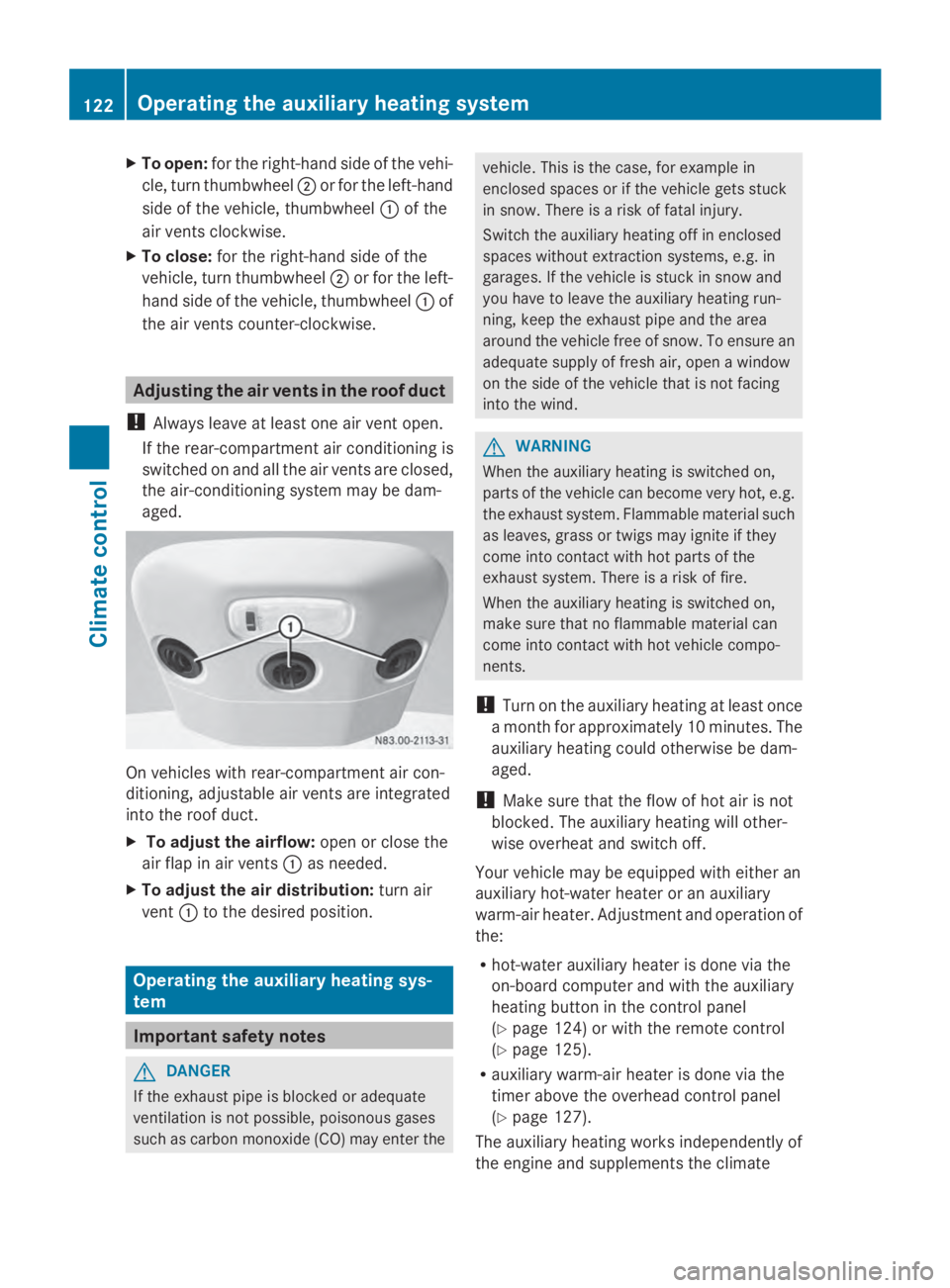
aged. On vehicles with rear-compartment air con-
ditioning, adjustable air vents are integrated
into the roof duct.
X To adjust the airflow: open or close the
air flap in air vents 0043as needed.
X To adjust the air distribution: turn air
vent 0043to the desired position. Operating the auxiliary heating sys-
tem Important safety notes
G
DANGER
If the exhaust pipe is blocked or adequate
ventilation is not possible, poisonous gases
such as carbon monoxide (CO) may enter the vehicle. This is the case, for example in
enclosed spaces or if the vehicle gets stuck
in snow. There is a risk of fatal injury.
Switch the auxiliary heating off in enclosed
spaces without extraction systems, e.g. in
garages. If the vehicle is stuck in snow and
you have to leave the auxiliary heating run-
ning, keep the exhaust pipe and the area
around the vehicle free of snow. To ensure an
adequate supply of fresh air, open a window
on the side of the vehicle that is not facing
into the wind. G
WARNING
When the auxiliary heating is switched on,
parts of the vehicle can become very hot, e.g.
the exhaust system. Flammable material such
as leaves, grass or twigs may ignite if they
come into contact with hot parts of the
exhaust system. There is a risk of fire.
When the auxiliary heating is switched on,
make sure that no flammable material can
come into contact with hot vehicle compo-
nents.
! Turn on the auxiliary heating at least once
a month for approximately 10 minutes. The
auxiliary heating could otherwise be dam-
aged.
! Make sure that the flow of hot air is not
blocked. The auxiliary heating will other-
wise overheat and switch off.
Your vehicle may be equipped with either an
auxiliary hot-water heater or an auxiliary
warm-air heater. Adjustment and operation of
the:
R hot-water auxiliary heater is done via the
on-board computer and with the auxiliary
heating button in the control panel
(Y page 124) or with the remote control
(Y page 125).
R auxiliary warm-air heater is done via the
timer above the overhead control panel
(Y page 127).
The auxiliary heating works independently of
the engine and supplements the climate 122
Operating the auxiliary heating systemClimate control
Page 131 of 338
The auxiliary heating operates for another
two minutes and then switches off auto-
matically.
i If you switch off the ignition while imme-
diate heating mode (operating duration
10– 120 minutes) is active, immediate
heating mode is also switched off. The aux-
iliary heating operates for another
two minutes and then switches off auto-
matically.
If you have set continuous operation as the
operating duration and you switch off the
ignition, the auxiliary heating switches off
automatically after about 15 minutes. If, in
the remaining time, the ignition is switched
on again, continuous operation of the aux-
iliary heating continues.
Setting the preselection time G
WARNING
The auxiliary heating must not be operated if
there are highly flammable substances
nearby or in enclosed spaces without an
extraction system. Make sure that the auxili-
ary heating is not switched on automatically
by the timer in such places. If this possibility
exists, deactivate the respective programmed
time.
You can set three preselection times using
the timer.
Observe that when setting the preselection
time, this does not correspond to the switch-
on time but to the switch-off or departure
time. The auxiliary heating system starts up
automatically and runs for the operating dura-
tion set prior to departure.
Example: For a planned departure time of
7:00 a.m., you should also set the preselec-
tion time to 7:00 a.m. If the operating dura-
tion is preset to 40 minutes, for example, the
auxiliary heating starts up at 6:20 a.m.
If an identical time (time and day) is set in the
preselection memory, only the last time set is
saved. After a malfunction or if the battery has been
disconnected, you must set the preselection
times again. You can find further information
on malfunctions in the "Problems with the
auxiliary heating" section ( Ypage 132).
X Press the 00CFor00DB button until the
0045 symbol in the menu bar flashes.
X Press the 0070button.
In the program column, the 0059preselec-
tion memory numbers appear. The selected
preselection memory flashes.
X Press the 00CFor00DB button to select the
desired preselection memory.
X Press the 0070button.
The preselection memory is selected. The
days are shown.
X Set the day and time as described in the
"Setting the day, time and operating dura-
tion" section (Y page 128).
The preselection time is stored. The pro-
gram column disappears. In the display
panel, the on
on message and the 0084sym-
bol appear.
X Press the 0070button.
The operating duration flashes.
X Press the 00CFor00DB button to set the
minute value (10 – 120).
X Press the 0070button.
The operating duration for the preselection
time is saved. The time and number of the
selected preselection memory are shown.
i The preselection memory that will be acti-
vated next is underlined. Additionally, the
day that is set appears.
Deactivating the preselection time X
Carry out the steps as described in the
"Setting the preselection time" section. Operating the auxiliary heating system
129Climate control Z
Page 132 of 338
If the
0084 symbol in the status bar is shown:
X Press the 00CFor00DB button until the
off
off message in the display panel is shown.
X Press the 0070button.
The preselection time is deactivated. The
time is shown.
Setting the heating level You can set the heating level to a range
between 10 and 30.
The heating level corresponds to a preselec-
tion temperature for the vehicle interior. This
is a guide value and may, depending on the
outside temperature, differ from the actual
vehicle interior temperature.
X Press the 00CFor00DB button until the
00D1 symbol in the menu bar flashes.
X Press the 0070button.
The heating level display flashes.
X Using the 00CFand00DB buttons, set the
desired heating level to a range between 10
and 30.
X Press the 0070button.
The heating level is set and the 0084sym-
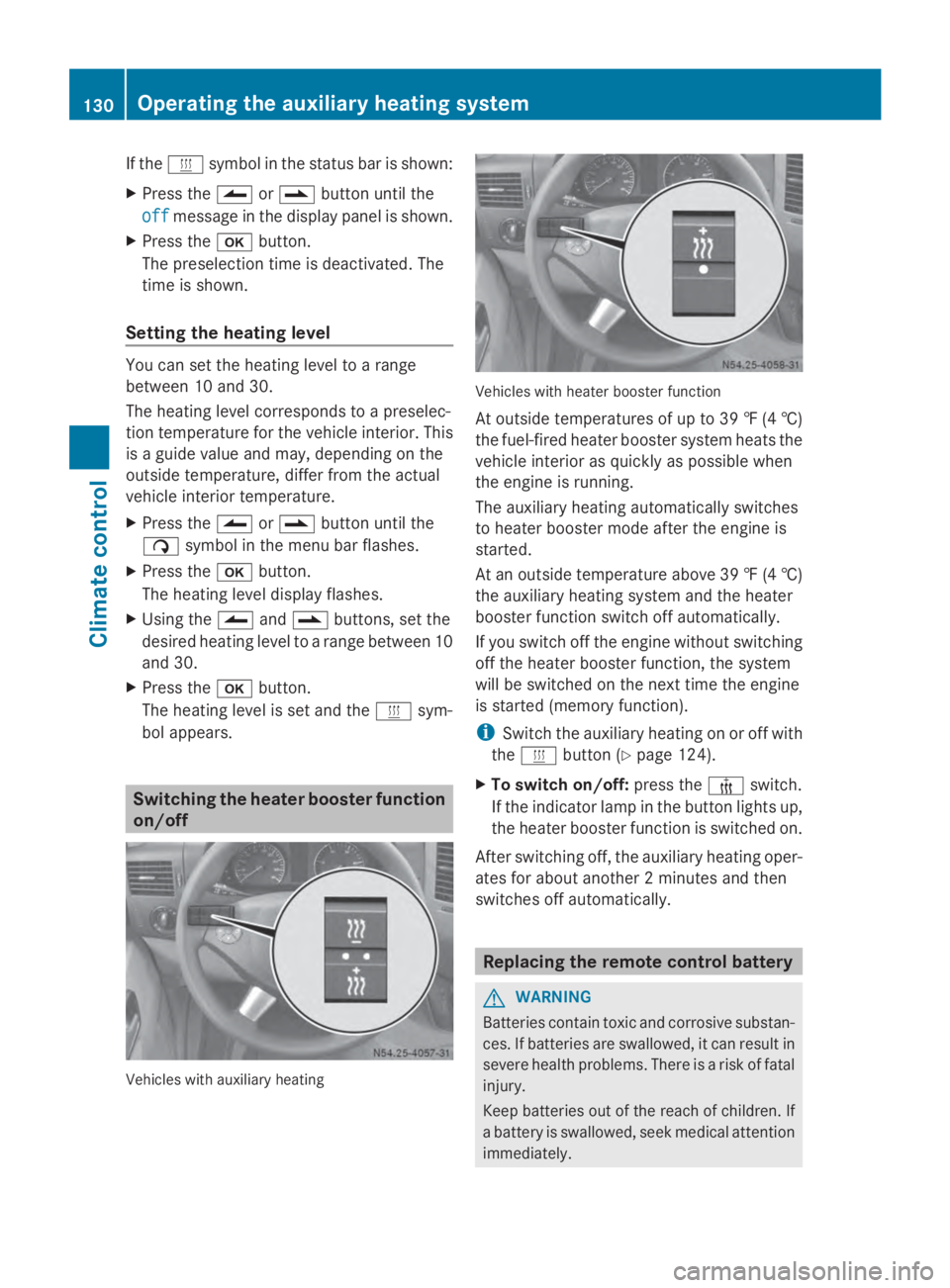
bol appears. Switching the heater booster function
on/off Vehicles with auxiliary heating Vehicles with heater booster function
At outside temperatures of up to 39 ‡
(4†)
the fuel-fired heater booster system heats the
vehicle interior as quickly as possible when
the engine is running.
The auxiliary heating automatically switches
to heater booster mode after the engine is
started.
At an outside temperature above 39 ‡ (4†)
the auxiliary heating system and the heater
booster function switch off automatically.
If you switch off the engine without switching
off the heater booster function, the system
will be switched on the next time the engine
is started (memory function).
i Switch the auxiliary heating on or off with
the 0084 button (Y page 124).
X To switch on/off: press the006Aswitch.
If the indicator lamp in the button lights up,
the heater booster function is switched on.
After switching off, the auxiliary heating oper-
ates for about another 2 minutes and then
switches off automatically. Replacing the remote control battery
G
WARNING
Batteries contain toxic and corrosive substan-
ces. If batteries are swallowed, it can result in
severe health problems. There is a risk of fatal
injury.
Keep batteries out of the reach of children. If
a battery is swallowed, seek medical attention
immediately. 130
Operating the auxiliary heating systemClimate control
Page 138 of 338
Useful information
This Operator's Manual describes all models
as well as standard and optional equipment
of your vehicle that were available at the time
of going to print. Country-specific variations
are possible. Note that your vehicle may not
be equipped with all of the described func-
tions. This also applies to systems and func-
tions relevant to safety.
Read the information on qualified specialist
workshops (Y page 26). Breaking-in notes
The first 1000 miles (1500 km)
New or replaced brake pads and brake disks
only reach their optimum braking effect after
a few hundred miles (a few
hundred kilometers). Until then, compensate
for this by applying greater force to the brake
pedal.
For the service life and economy of your vehi-
cle it is crucial that you break in the engine
with due care.
R Therefore, protect the engine for the first
1000 miles (1500 km) by driving at varying
vehicle and engine speeds.
R Avoid overstraining the vehicle and high
engine speeds during this period, e.g. driv-
ing at full throttle. Do not exceed 00C6of the
maximum speed for each gear.
R Do not change down a gear manually in
order to brake.
R Try to avoid depressing the accelerator
pedal beyond the point of resistance (kick-
down).
R The shift ranges 3,2or 1should only be
engaged when driving slowly, e.g. when
driving in mountainous terrain.
After 1000 miles (1500 km), you can increase
the engine speed gradually and accelerate
the vehicle to full speed. i
You should also observe these notes on
breaking-in if the engine or parts of the
drive train on your vehicle have been
replaced. Driving
Important safety notes
G
WARNING
If you switch off the ignition while driving,
safety-relevant functions are only available
with limitations, or not at all. This could affect,
for example, the power steering and the brake
boosting effect. You will require considerably
more effort to steer and brake. There is a risk
of an accident.
Do not switch off the ignition while driving. G
WARNING
If the parking brake has not been fully
released when driving, the parking brake can:
R overheat and cause a fire
R lose its hold function.
There is a risk of fire and an accident. Release
the parking brake fully before driving off. Battery isolating switch
Important safety notes !
Make sure that the key is in position 0in
the ignition lock and wait at least 20 sec-
onds before disconnecting or connecting
the battery isolating switch. You could oth-
erwise damage electrical system compo-
nents.
You can use the battery isolating switch to
disconnect the power supply to all your vehi-
cle's consumers. This will prevent uncontrol-
led battery discharge caused by off-load cur-
rent consumption.
If your vehicle is equipped with an auxiliary
battery in the engine compartment, you will
need to disconnect both batteries. Only then 136
DrivingDriving and parking