reset MERCEDES-BENZ SPRINTER 2019 MY19 with 7” screen
[x] Cancel search | Manufacturer: MERCEDES-BENZ, Model Year: 2019, Model line: SPRINTER, Model: MERCEDES-BENZ SPRINTER 2019Pages: 354, PDF Size: 6.15 MB
Page 192 of 354
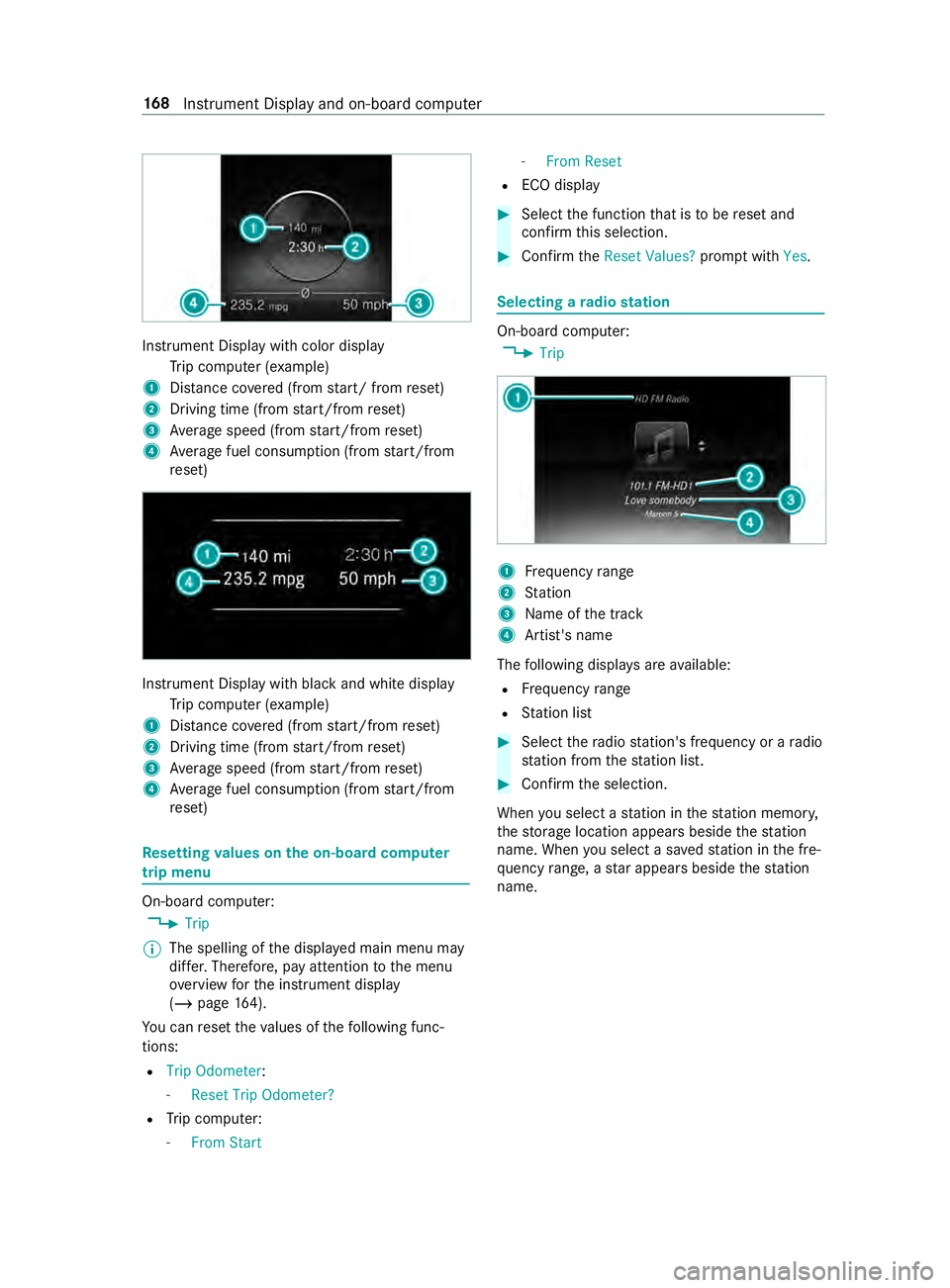
Instrument Display with color display
Trip computer (e xamp le)
1 Distance co vered (from start/ from reset)
2 Driving time (from start/from reset)
3 Average speed (from start/from reset)
4 Average fuel consum ption (from start/from
re set) Instrument Display with black and white display
Trip computer (e xamp le)
1 Distance co vered (from start/from reset)
2 Driving time (from start/from reset)
3 Average speed (from start/from reset)
4 Average fuel consum ption (from start/from
re set) Re
setting values on the on-boa rdcompu ter
trip menu On-board computer:
4 Trip
% The spelling of
the displa yed main menu may
dif fer. Therefore, pay attention tothe menu
ove rview forth e instrument display
(/ page 164).
Yo u can reset theva lues of thefo llowing func‐
tions:
R Trip Odometer :
- Reset Trip Odometer?
R Trip computer:
- From Start -
From Reset
R ECO display #
Select the function that is tobe reset and
confirm this selection. #
Confirm theReset Values? promptwith Yes. Selecting a
radio station On-board computer:
4 Trip 1
Frequency range
2 Station
3 Name of the track
4 Artist's name
The following displa ysare available:
R Frequency range
R Station list #
Select thera dio station's frequency or a radio
st ation from thest ation list. #
Confirm the selection.
When you select a station in thest ation memor y,
th estorage location appears beside thest ation
name. When you select a sa vedstation in the fre‐
qu ency range, a star appears beside thest ation
name. 16 8
Instrument Display and on-board computer
Page 205 of 354
Ac
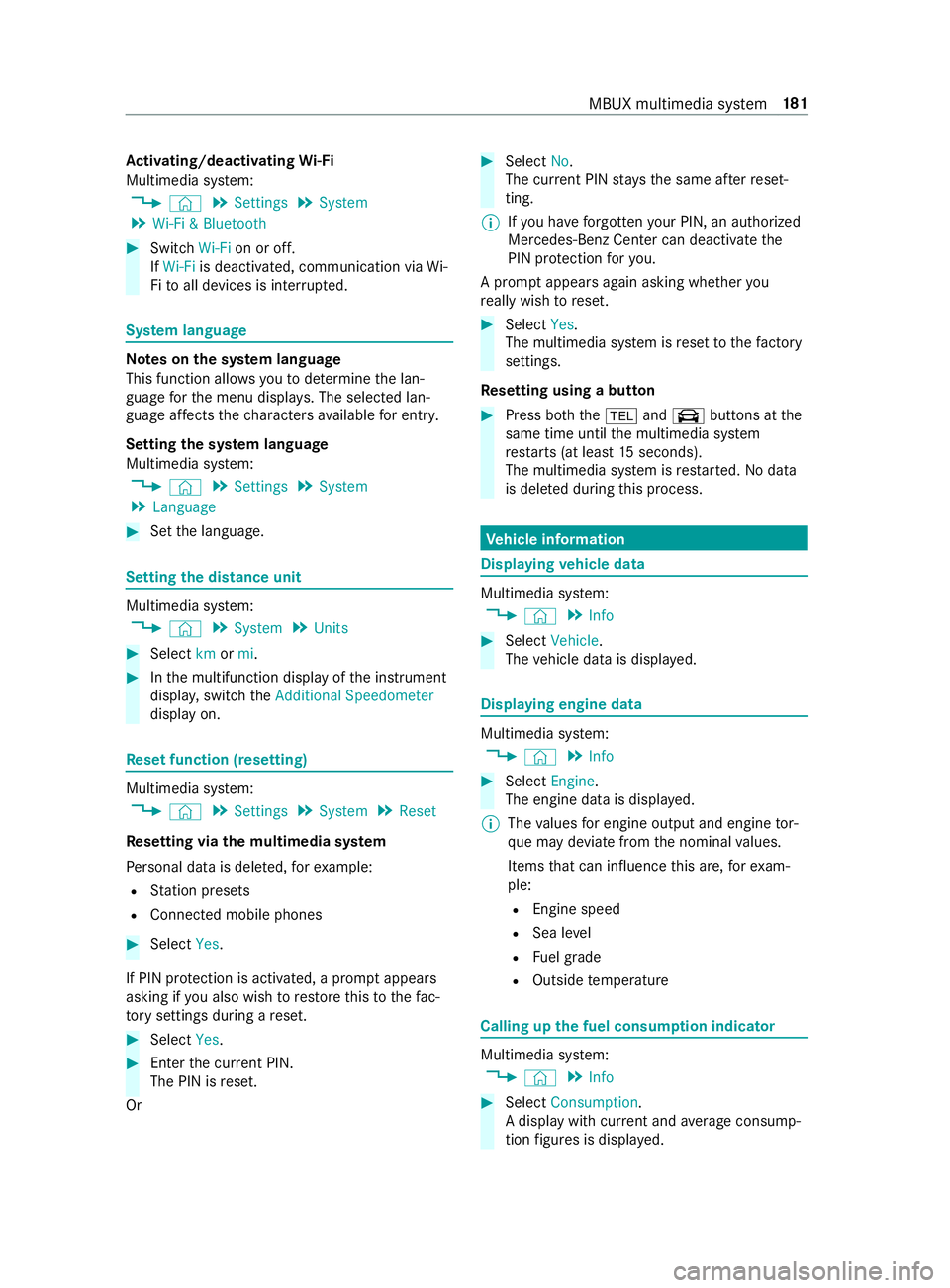
tivating/deactivating Wi-Fi
Multimedia sy stem:
4 © 5
Settings 5
System
5 Wi-Fi & Bluetooth #
Switch Wi-Fion or off.
If Wi-Fi is deactivated, communication via Wi-
Fi to all devices is inter rupte d. Sy
stem language Note
s onthe sy stem language
This function allo wsyouto determ ine the lan‐
guage forth e menu displa ys. The selected lan‐
guage af fects thech aracters available for entr y.
Setting the sy stem language
Multimedia sy stem:
4 © 5
Settings 5
System
5 Language #
Set the language. Setting
the distance unit Multimedia sy
stem:
4 © 5
System 5
Units #
Select kmormi. #
Inthe multifunction display of the instrument
displa y,switch theAdditional Speedometer
display on. Re
set function (resetting) Multimedia sy
stem:
4 © 5
Settings 5
System 5
Reset
Re setting via the multimedia sy stem
Pe rsonal data is dele ted, forex ample:
R Station presets
R Connected mobile phones #
Select Yes.
If PIN pr otection is activated, a prom ptappears
asking if you also wish torestore this to thefa c‐
to ry settings during a reset. #
Select Yes. #
Enter the cur rent PIN.
The PIN is reset.
Or #
Select No.
The cur rent PIN stay sth e same af terre set‐
ting.
% If
yo u ha veforg ottenyo ur PIN, an authorized
Mercedes-Benz Center can deactivate the
PIN pr otection foryo u.
A prom ptappears again asking whe ther you
re ally wish toreset. #
Select Yes.
The multimedia sy stem is reset tothefa ctory
settings.
Re setting using a button #
Press bo th the002B and\ buttons at the
same time until the multimedia sy stem
re starts (at least 15seconds).
The multimedia sy stem is restar ted. No data
is dele ted during this process. Ve
hicle information Displaying
vehicle data Multimedia sy
stem:
4 © 5
Info #
Select Vehicle .
The vehicle data is displa yed. Displaying engine data
Multimedia sy
stem:
4 © 5
Info #
Select Engine.
The engine data is displa yed.
% The
values for engine output and engine tor‐
qu e may deviate from the nominal values.
Items that can influence this are, forex am‐
ple:
R Engine speed
R Sea le vel
R Fuel grade
R Outside temp erature Calling up
the fuel consum ption indicator Multimedia sy
stem:
4 © 5
Info #
Select Consumption .
A display with cur rent and average consu mp‐
tion figures is displa yed. MBUX multimedia sy
stem 181
Page 212 of 354
Information on Android
Auto
While using Android Auto,va rious functions of
th e multimedia sy stem, forex ample the media
source Blue tooth®
audio, are not available.
Connecting a mobile phone via Android Auto
Requ irements:
R The mobile phone supports Android Auto
from Android 5.0.
R The Android Autoapp is ins talled on the
mobile phone.
R In order touse thete lephone functions, the
mobile phone must be connected tothe mul‐
timedia sy stem via Blue tooth®
(/ page 182).
If th ere was no prior Internet connection, this
is es tablished with the use of the mobile
phone with Android Auto.
R The mobile phone is connected tothe multi‐
media sy stem via the USB port 00C2using a
suitable cable (/ page190).
R There is an Internet connection forth e full
ra nge of functions for Android Auto.
Multimedia sy stem:
4 © 5
Smartphone
5 Mercedes PRO & Apps 5
Android Auto
5 Start Android Auto
Ac cepting/rejecting the data pr otection pro‐
visions
% The
firs t acti vation of Android Autoon the
multimedia sy stem must be car ried out when
th eve hicle is stationary for saf etyre asons.
A message with the data pr otection pr ovisions
appears. #
Select Accept & Start.
Exiting Android Auto #
Press the00E2 button.
% If Android
Autowa s not displa yed in thefo re‐
ground before disconnecting, the application
st arts in the bac kground when reconnected.
Yo u can call up Android Autointhe main
menu.
Calling up the Android Autosound settings
Multimedia sy stem:
4 © 5
Smartphone 5
Android Auto
5 Z #
Select sound settings. Ending Android
Auto #
Disconnect the connecting cable between the
mobile phone and multimedia sy stem.
Mercedes-Benz recommends disconnecting
th e connecting cable only when theve hicle is
st ationar y. Tr
ansfer redve hicle data with Android Auto
and Apple CarPlay™ Overview of transfer
redve hicle data
When using Android Autoor Apple CarPlay™, cer‐
ta in vehicle data is transfer redto the mobile
phone. This enables youto getth e best out of
selected mobile phone services. Vehicle data is
not directly accessible.
The following sy stem information is transmit ted:
R Software release of the multimedia sy stem
R System ID (anonymized)
The transfer of this data is used tooptimize com‐
munication between theve hicle and the mobile
phone.
To do this, and toassign se veralve hicles tothe
mobile phone, a vehicle ID is random lyge ner‐
ated.
This has no connection totheve hicle identifica‐
tion number (VIN) and is dele ted when the multi‐
media sy stem is reset (/ page181).
The following vehicle status data is transmitted:
R Transmission position engaged
R Distinction between par ked, standstill, rolling
and driving
R Day/night mode of the instrument clus ter
The transfer of this data is used toalter how con‐
te nt is displ ayedto cor respond tothe driving sit‐
uation.
The following position data is transmitte d:
R Coordinates
R Speed
R Compass direction
R Accele ration di rection
This da tais only transfer red while the navigation
sy stem is active, in order toimpr ove it (e.g. so it
can continue functioning when in a tunnel). 18 8
MBUX multimedia sy stem
Page 217 of 354
Switching
the HD radio function on/o ff Multimedia sy
stem:
4 © 5
Radio 5
HD FM #
Switch HDon or off.
% HD
Radio Tech nology manu factured under
license from iBi quity Digital Corporation. U.S.
and Foreign Patents. For patents see DTS
we bsite. HD Radio and the HD, HD Radio,
and "ARC" logos are regis tere d trademar ksor
trademar ksof iBiquity Digital Corporation in
th e United States and/or other countries. Setting
the frequency band Multimedia sy
stem:
4 © 5
Radio #
Select a frequency band. Selecting a
radio station Multimedia sy
stem:
4 © 5
Radio #
Swipe tothe left or right on the cont rol ele‐
ment. Calling up
thera dio station list Multimedia sy
stem:
4 © 5
Radio #
Select .
The station list appears. #
Select a station. Sear
ching forra dio stations using station
names or direct frequency entry Multimedia sy
stem:
4 © 5
Radio #
Select .
#
Select 00D3. #
Ente r astation name or frequenc y. #
Select a station. St
oring radio stations Multimedia sy
stem:
4 © 5
Radio #
Select a radio station.
Memory slots are available in station presets #
Select 0081.
or #
Press and hold on thera dio station.
Re placing an entry in the station presets #
Press and hold on an entry in thest ation pre‐
sets. #
Select Yes. Editing
station presets Multimedia sy
stem:
4 © 5
Radio
Moving stations: #
Press and hold a stored station. #
Select Move. #
Movethest ation tothe new position.
Deleting stations: #
Press and hold a station. #
Select Delete.
Re placing a station: #
Press and hold a station. #
Select Replace Radio Station . MBUX multimedia sy
stem 19 3
Page 343 of 354
Setting options ...................................
14
Overhead control panel Adjusting the interior lighting .............82
Overview ............................................ 10P
Pa int (cleaning instructions) ................211
Pa int code ............................................ .261
Pa rk position
Engaging ........................................... 11 6
Engaging au tomatically .................... .116
Pa rking aid
see Parking Assist PARKTRONIC
Pa rking Assist PARKTRONIC ...............14 5
Ac tivating ......................................... 14 6
Ad justing warning tones ................... 14 6
Drive AwayAssi st............................. 154
Fu nction ........................................... 14 5
Switching off .................................... 14 6
Sy stem limitations ............................1 45
Pa rking brake (electrical)
see Electric parking brake
Pa rking brake (manual)
see Manual parking brake
Pa rking for an extended period ...........13 6
Pa rking light .......................................... .79
Pa rtition sliding door
Fr om the cargo compartment .............51
Fr om the driver's compartment ..........51
Pe rm issible gross mass ...................... .261
Pe rm issible towing me thods .............. .224
Pe ts in the vehicle .................................. 40
Phone book see Contacts
Placing a load on the wheel ar ch........ 201
Pla stic trim (care) ................................ .214
Po we r supp ly
Battery main switch .......................... 11 4
Switching on (s tart/s top button) ...... 103
Po we rwa sher (care) ............................2 10
Po we r windo ws
see Side window Q
QR code (rescue card) ...........................24
Qualified specialist workshop .............. 23 R
Ra ck systems (information) ................19 8
Ra dar senso rs....................................... 13 6
Ra dio
Ac tivating/deactivating radio text .... 194
Calling up thest ation list .................. 19 3
Del eting channels ............................ .193
Direct frequency entry ..................... .193
Displ aying information ...................... 194
Displ aying radio text ......................... 194
Editing station presets ...................... 19 3
Menu (on-board computer) ............... 16 8
Moving stations ................................ 19 3
Overview .......................................... 19 2
Sea rching forst ations ...................... 19 3
Setting a channel .............................. 19 3
Setting thewa veband .......................1 93
Showing accident reports .................1 94
St oring radio stations ...................... .193
Switching on ..................................... 19 2
Switching the HD radio function
on/off .............................................. 19 3
Ra dio connection
Ke y .................................................... .41
Re alwo od (care) .................................. .214
Re ar
Motion de tector .................................. 83
Re ar ben chseat
see Seats
Re ar Cross Traf fic Alert ...................... .154
Re ar fog light .......................................... 79
Re ar view camera ................................. 147
Care .................................................. 212
Fu nction ........................................... 147
Switching au tomatic operation
on/off (360° Camera) ...................... 151
Re ar window wiper
Re placing ...........................................90
Switching on/off ................................ 89
Re ar-co mpartment heating ................... 96
Re ar-end doors
Opening and closing (from inside) ...... 51
Opening and closing (from outside) ....50
Re ducing agent
see DEF
Re frigerant (air conditioning)
No tes ................................................ 271
Re fueling
Displaying the DEF fill le vel .............. .128
Displ aying the DEF range .................. 12 8 Index
319
Page 344 of 354
Re
fueling theve hicle ........................ 12 5
To pping up DEF ................................ 12 9
Re generation
No tes ................................................ 11 4
Re gistration
Ve hicle ............................................... 23
Re moving the vehicle tool kit ............ .230
Re placing a wheel
Ins talling a new wheel ...................... 253
Re placing light bulbs
Indicators (rear) (Cargo Van and
Pa ssenger Van) ................................... 86
Re versing lights (Cargo Van and
Pa ssenger Van) ................................... 86
Re porting saf ety defects ....................... 24
Re scue card ............................................ 24
Re set function (multimedia sy stem) ...1 81
Re storing (factory settings)
see Reset function (multimedia sy stem)
Re stra int sy stem .................................... 28
Children, no tes on safe transpor ta‐
tion ..................................................... 34
Fu nction in an accident ...................... 29
Fu nctionality ....................................... 28
Malfunction ........................................ 28
Pr otection ...........................................28
Re duced pr otection ............................28
Self-test .............................................. 28
Wa rning lamp .................................... .28
Re stricting the shift range ...................1 17
Re versing light
Changing bulbs .................................. .87
Re versing lights
Re placing light bulbs (Cargo Van
and Passenger Van) ............................ 86
Rims (care) ............................................ 212
Ro adside Assistance (breakdown) ........21
Ro llaw ay protection
see HOLD function
Ro of car rier (inside) ............................ .199
Ro ofrack ............................................... 276
Ro ofrack (information) ........................ 19 8 S
Saf etyve st ............................................ 216
Seat belt .................................................. 30
Care .................................................. 214
Pr otection ...........................................30 Seat belt
warning
see Seat belts
Seat belts ................................................ 32
Ad justing the height ........................... 31
Fa stening ............................................ 31
Re duced pr otection ............................30
Re leasing ............................................ 32
Wa rning lamp .................................... .32
Seat co ver (care) ................................... 214
Seats .................................................5 9, 66
4-w aylumbar support ........................ 64
8-w ayadjustment options .................. 62
Ad justing armrests ............................. 66
Ad justing the armrests (rear bench
seat) ................................................... 69
Ad justing the head restra ints
mechanically ...................................... 70
cor rect driver's seat position .............. 59
Fo lding thefo lding seat up/down ...... 66
front (adjust elect rically) .................... 62
Fr ont (adjusting manually, with
Seat Comfort Package) ...................... .61
Fr ont (adjusting mechanicall y,
without Seat Comfort Package) .......... 59
Fr ont (adjusting mechanically) ............ 61
Ins talling and removing rear ben ch
seat ....................................................66
Memory function ................................ 62
Operating the memory function ......... 64
Setting options ................................... 14
Tu rning (front seat) ............................ .65
Wi th Seat Comfort Package ................ 61
Wi thout Seat Comfort Package .......... 59
Securing luggage ............................72,19 5
Selecto r lever
see DIRECT SELECT le ver
Sensors (care) ....................................... 212
Service see ASS YST PLUS
Service (on-board computer) ..............16 6
Service center see Qualified specialist workshop
Service inter val display
see AS SYST PLUS
Service products Refrigerant (air conditioning) ............ 271
Setting the da teform at ....................... 180
Setting the distance unit .....................181
Setting the speed
see Cruise control 320
Index
Page 345 of 354
Settings (on-board computer)
.............170
Short-distance trips .............................107
Side airbag ..............................................32
Side window ...........................................53
Closing .............................................. .53
Closing (all) ........................................ 53
Closing using theke y ........................ .54
Con venience closing ......................... .54
Con venience opening ......................... 54
Opening ..............................................53
Opening (all) ....................................... 53
Opening with theke y .......................... 54
Side windo ws
Problem ..............................................55
Re setting ............................................ 55
Size designation (tire) ..........................24 5
Sliding door B-pillar door sill (button) ..................... 47
Cen ter console (button) ...................... 47
Child saf ety lock ................................ .39
Closing (from inside) .......................... 46
Closing (from outside) ........................ 45
Opening (from inside) ........................ .46
Opening (from outside) ......................45
SmartK ey
Ac oustic locking verification signal .... 42
Smartphone see Android Auto
see Apple CarPlay™
see Telephone
Snow chains ......................................... 233
Soc ket (12 V) ........................................... 75
Cargo co mpartment .......................... .76
Driver's seat ....................................... 76
Fr ont center console .......................... 75
Soc ket (1 15V) ......................................... 76
Lo we r control panel ............................ 76
Sound see Sound settings
Sound settings ...................................... 194
Ad justing the balance/fader .............1 94
Ad justing treble, mid-range and
bass settings .................................... 194
Au tomatic volume adjustment .......... 194
Calls up the sound menu .................. 194
Information ....................................... 194
Spare wheel Installing/ removing ......................... .256
No tes ............................................... 255
Special seat belt retractor ..................... 35 Speciali
stwo rkshop .............................. 23
Speed rating (ti re)................................ 24 5
Speedome ter (digital) .......................... 167
St andby mode
Ac tivating/deactivating .................... 13 6
St art/s top button
Pa rking theve hicle ........................... 13 2
St arting theve hicle .......................... 104
Switching on the po wer supply or
th e ignition ....................................... 103
St arting
see Vehicle
St arting-o ffaid
see Hill start assist
St ation
Deleting ............................................ 19 3
Direct frequency entry ...................... 19 3
Moving ..............................................1 93
Sear ching ........................................ .193
Setting .............................................. 19 3
St oring ..............................................1 93
St ation list
Calling up ......................................... 19 3
St ation presets
Modifying ......................................... 19 3
St ationary heating
Problems .......................................... 101
St ationary heating/ventilation
Ad justing (on-board computer) ......... 101
St ationary heating/ventilation
see Auxilia ryheating
see Hot-water auxiliary heater
Ste ering wheel ...................................... 16 4
Ad justing ............................................ 71
Buttons ............................................. 16 4
St opping the ala rm(ATA )...................... .56
St ow age areas
see Stow age space
St ow age comp artments
see Stow age space
St ow age space ........................................ 73
Armrest .............................................. 73
Cen ter console ................................... 73
Cockpit .............................................. .73
Door ................................................... 73
Glasses compartment ........................ .74
Glo vebox ...........................................73
Sulfur content ...................................... 264
Summer tires ........................................2 32 Index
321