service MERCEDES-BENZ SPRINTER 2019 MY19 with 7” screen
[x] Cancel search | Manufacturer: MERCEDES-BENZ, Model Year: 2019, Model line: SPRINTER, Model: MERCEDES-BENZ SPRINTER 2019Pages: 354, PDF Size: 6.15 MB
Page 263 of 354
re
placement or alternate tires or wheels on
th eve hicle that pr event the TPMS from func‐
tioning proper ly.
Alw aysch eck the TPMS malfunction warning
lamp af terre placing one or more tires or
wheels on your vehicle toensure that the
re placement or alternate tires and wheels
allow the TPMS tocontinue tofunction prop‐
er ly. The sy
stem checks the tire pressure and thete m‐
perature of the tires ins talled totheve hicle by
means of a tire pressure sensor.
New tire pressure sensors, e.g. in winter tires,
are automatically taught-in thefirs t time they are
driven.
The tire pressure and the tire temp erature appear
in the multifunction display (/ page165).
If th ere is a subs tantial loss of tire pressure, a
wa rning is issued:
R via display messages (/ page 290)
R viathe0077 warning lamp in the instrument
clus ter
It is the driver's responsibility toset the tire pres‐
sure tothere commended cold tire pressure suit‐
able forth e operating situation. Set the tire pres‐
sure for cold tires using a tire pressu regauge.
No tethat the cor rect tire pressure forth e cur rent
ope rating situation mu stfirs t be taught-in tothe
tire pressure moni toring sy stem.
In most cases, the tire pressure monitoring sys‐
te m will automatically update the new refere nce
va lues af teryo u ha vechanged the tire pressure.
Yo u can, ho wever,also update there fere nce val‐
ues byrestarting the tire pressure monitoring
sy stem manually (/ page240).
Sy stem limitations
The sy stem may be impaired or may not function
in thefo llowing situations:
R ifth e tire pressure is set incor rectly
R ifth ere is a sudden pressure loss caused by a
fo re ign object penetrating the tire, forex am‐
ple
R ifth ere is a malfunction caused byano ther
ra dio signal source
Make sure toobser vethefo llowing fur ther rela‐
te d subject:
R Notes on tire pressure (/ page 234) Checking
the tire pressure with the tire pres‐
sure monitoring sy stem
Requ irements:
R The ignition is switched on
On-board computer: 4 Service 5
Tires
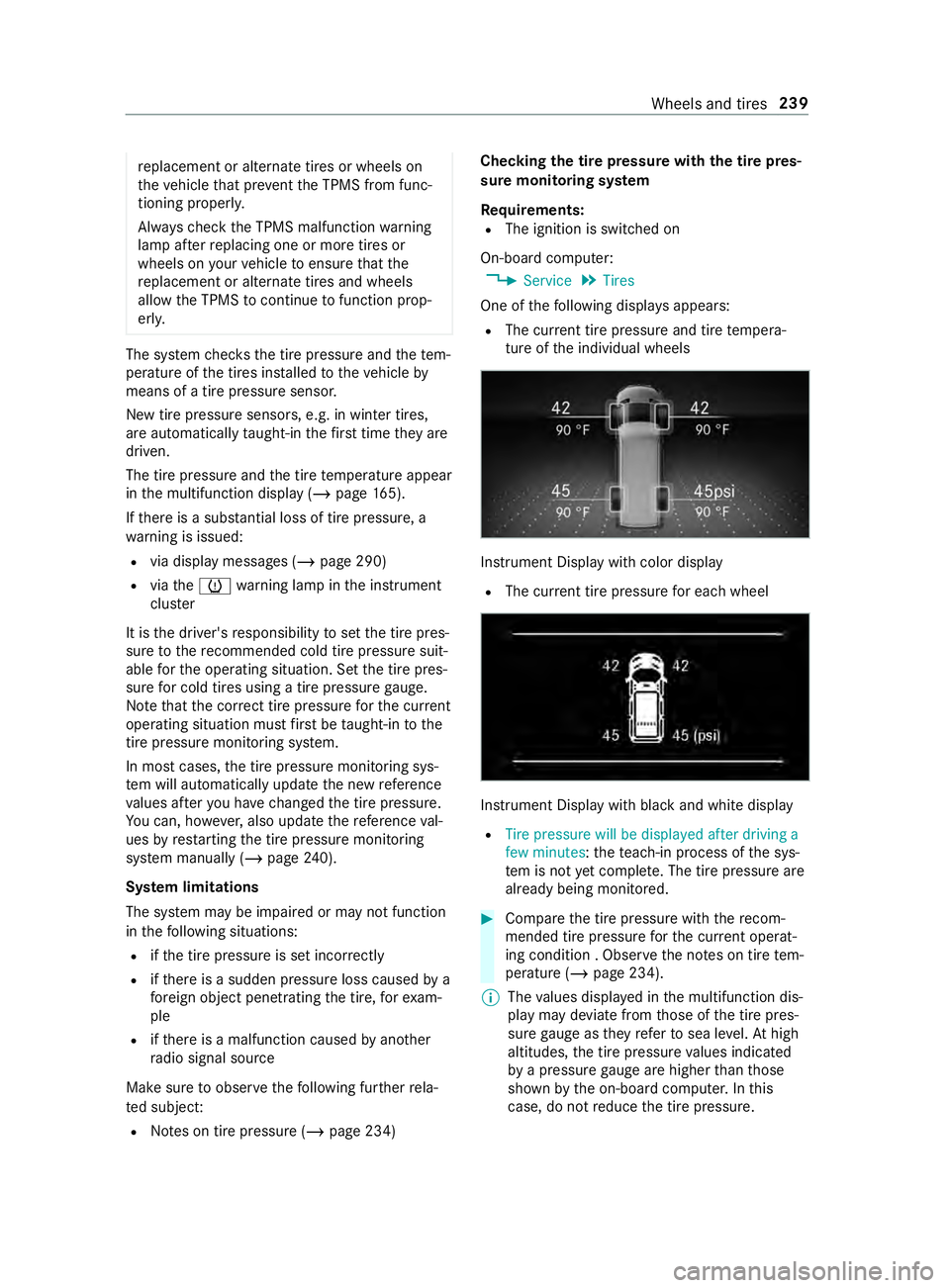
One of thefo llowing displa ysappears:
R The cur rent tire pressure and tire temp era‐
ture of the individual wheels Instrument Display with color display
R The cur rent tire pressure for each wheel Instrument Display with black
and white display
R Tire pressure will be displayed after driving a
few minutes :th ete ach-in process of the sys‐
te m is not yet compl ete. The tire pressure are
already being monitored. #
Compare the tire pressure with there com‐
mended tire pressure forth e cur rent ope rat‐
ing condition . Obser vethe no tes on tire tem‐
perature (/ page 234).
% The
values displa yed in the multifunction dis‐
play may deviate from those of the tire pres‐
sure gauge as they referto sea le vel.At high
altitudes, the tire pressure values indicated
by a pressure gauge are higher than those
shown bythe on-board computer. In this
case, do not reduce the tire pressure. Wheels and tires
239
Page 264 of 354
Make sure
toobser vethefo llowing fur ther rela‐
te d subject:
R Notes on tire pressure (/ page 234)
Rest arting the tire pressure monitor
Requ irements:
R The recommended tire pressure is cor rectly
set forth ere spective operating condition on
each of the wheels (/ page 234).
R Re
start the tire pressure monitoring sys‐
te m in the following situations:
- The tire pressure has changed.
- The wheels or tires ha vebeen changed or
newly ins talled.
On-board computer: 4 Service 5
Tires #
Scroll down in the menu.
The Use Current Pressures as New Refer-
ence Values message appears in the multi‐
function displa y. #
Con firm the message toinitiate a restart.
The Tire Press. Monitor Restarted message
appears in the multifunction displa y.
Cur rent wa rning messages are dele ted and
th e0077 yellow warning lamp goes out.
Af teryo u ha vedriven for a few minutes, the
sy stem checks whe ther the cur rent tire pres‐
su res are within the specified range. The cur‐
re nt tire pressures are then accep ted as ref‐
erence values and monitored.
Make sure toobser vethefo llowing fur ther rela‐
te d subject:
R Notes on tire pressure (/ page 234) Ra
dio-equipment appr oval of the tire pres‐
sure monitoring sy stem
Ra dio equipment appr oval numbers Countr
yRadio equipment appr oval
number
Canada IC: 4008C- TSSRE4A
Ope ration is subject tothefo llow‐
ing two conditions:
(1) this device may not cause
harmful inter fere nce, and
(2) this device must acce ptany
inter fere nce received, including
inter fere nce that may cause
undesired operation.
Mexic oM odel:TSSRE4A & TSSSG4G6,
IFETEL: RLVHUTS17-0806
US AF CC ID:YGOTSSRE4A
This device complies wi th Part15
of the FCC Rules. Operation is
subject tothefo llowing two con‐
ditions: (1) this device may not
cause harmful inter fere nce, and
(2) this device must acce ptany
inter fere nce received, including
inter fere nce that may cause
undesired operation.
WA RNING: Any changes or modi fi‐
cation not expressly appr ovedby
th e party responsible for compli‐
ance could void the user's author‐
ity tooperate this equipment. Loading the
vehicle Ti
re and Loading Information placard &
WARNING Risk of an accident when driv‐
ing wi than ove rloaded tire
Overloaded tires may overheat and bur stas a
consequence. Overloaded tires can also
impair thesteering and handling characteris‐
tics and lead tobrake failure. #
Obser vethe load rating of the tires. #
The load rating mu stbe at least half the
gross axleweight rating of theve hicle.
Mercedes-Benz recommends you use
th e load-bearing index, which is given in
th eve hicle documents. 240
Wheels and tires
Page 267 of 354
Ti
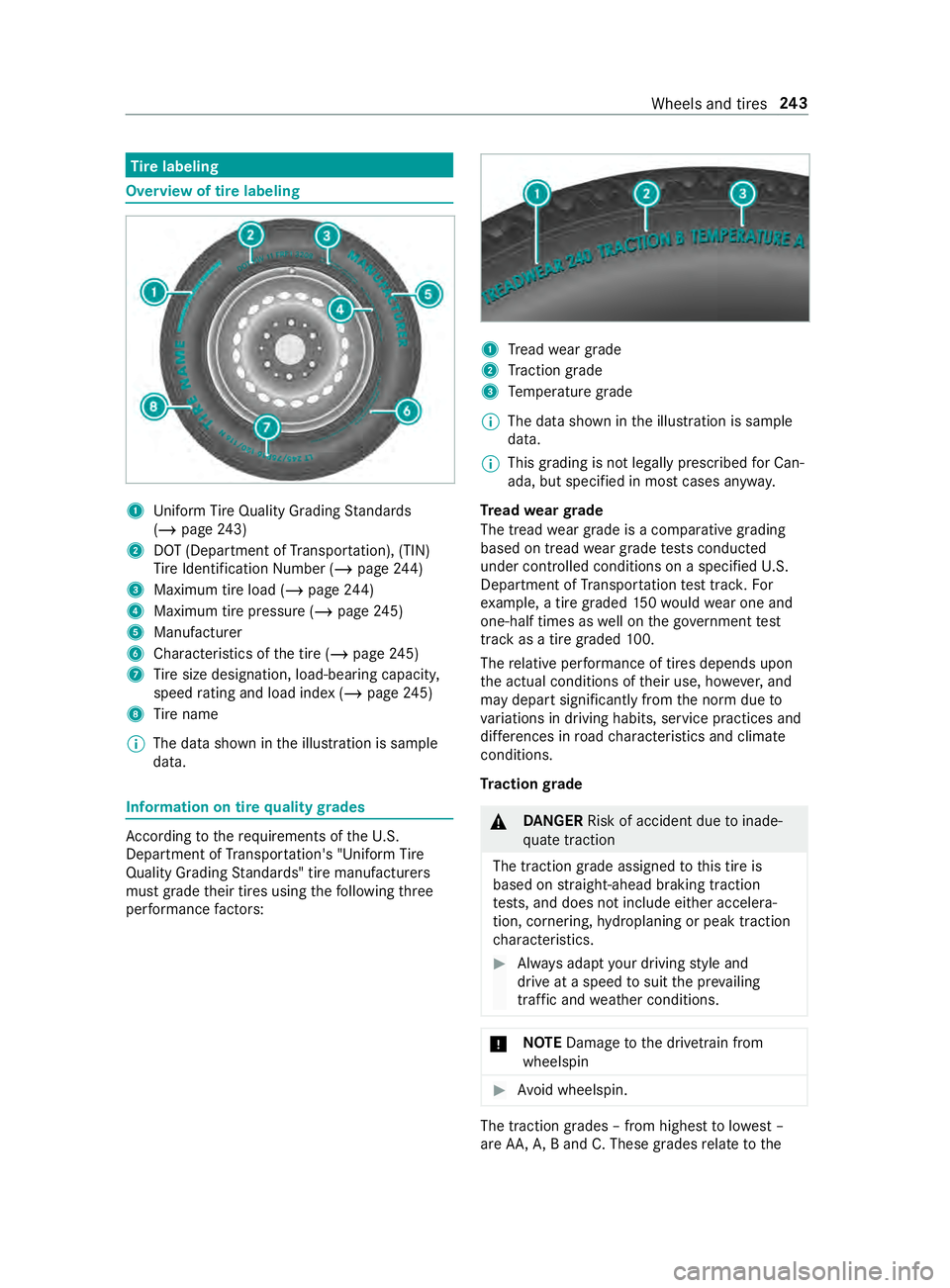
re labeling Overview of tire labeling
1
Uniform Ti reQuality Grading Standards
(/ page 243)
2 DOT (Depa rtment of Transpor tation), (TIN)
Ti re Identification Number (/ page244)
3 Maximum tire load (/ page244)
4 Maximum tire pressu re (/ page 245)
5 Manu facturer
6 Characteristics of the tire (/ page245)
7 Tire size designation, load-beari ng capacity,
speed rating and load ind ex (/page 245)
8 Tire name
% The da
tashown in the illustration is sample
data. Information on tire
quality grades Ac
cording totherequ irements of theU. S.
Depa rtment of Transpor tation's "Uni form Tire
Quality Grading Standards" tire manufacturers
must grade their tires using thefo llowing three
per form ance factors: 1
Tread weargrade
2 Traction grade
3 Temp erature grade
% The data shown in
the illustration is sample
data.
% This grading is not legally prescribed
for Can‐
ada, but specified in most cases anyw ay.
Tr ead weargrade
The tread wear grade is a comparative grading
based on tread wear grade tests conducted
under contro lled conditions on a specified U.S.
Depa rtment of Transpor tation test trac k.For
ex ample, a tire graded 150wo uld wear one and
one-half times as well on the go vernment test
track as a tire graded 100.
The relative per form ance of tires depends upon
th e actual conditions of their use, ho wever,and
may depart significantly from the norm due to
va riations in driving habits, service practices and
dif fere nces in road characteristics and climate
conditions.
Tr action grade &
DANG ER Risk of accident due toinade‐
qu ate traction
The traction grade assigned tothis tire is
based on stra ight-ahead braking traction
te sts, and does not include either accelera‐
tion, cornering, hydroplaning or peak traction
ch aracteristics. #
Always adapt your driving style and
drive at a speed tosuit the pr evailing
traf fic and weather conditions. *
NO
TEDama getothe driv etra in from
wheelspin #
Avoid wheelspin. The traction grades – from highest
tolowest –
are AA, A,B and C. These grades relate tothe Wheels and tires
243
Page 275 of 354
Preparing
theve hicle for a wheel change Re
quirements:
R The tire-change tool kit is available.
R The vehicle is not on a slope.
R The vehicle is on solid, non-slippery and le vel
ground. #
Appl yth e parking brake. #
Movethe front wheels tothest ra ight-ahead
position. #
Vehicles with automatic transmission:
shift the transmission toposition 005D. #
Switch off the engine. #
Make sure that the engine cann otbe star ted. #
Take theve hicle tool kit from thefo ot we ll on
th e front passsenger side (/ page 229).Ve
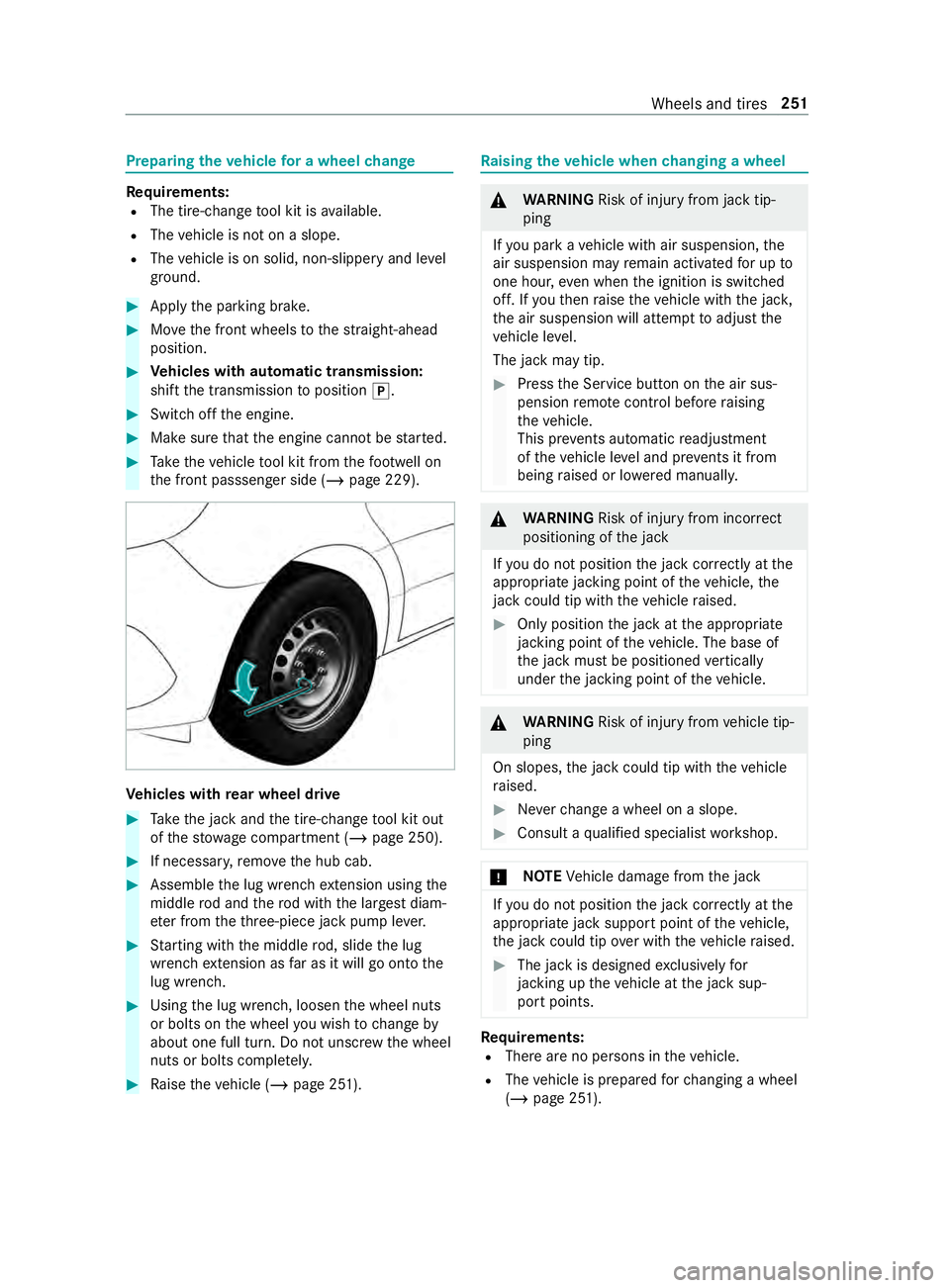
hicles with rear wheel drive #
Take the jack and the tire-change tool kit out
of thestow age compartment (/ page 250).#
If necessar y,remo vethe hub cab. #
Assemble the lug wrench extension using the
middle rod and thero d with the lar gest diam‐
et er from theth re e-piece jack pump le ver. #
Starting with the middle rod, slide the lug
wrench extension as far as it will go onto the
lug wrench. #
Using the lug wrench, loosen the wheel nuts
or bolts on the wheel you wish tochange by
about one full turn. Do not unscr ewthe wheel
nuts or bolts comple tely. #
Raise theve hicle (/ page 251). Ra
ising theve hicle when changing a wheel &
WARNING Risk of inju ryfrom jack tip‐
ping
If yo u park a vehicle with air suspension, the
air suspension may remain activated for up to
one hour, even when the ignition is switched
off. If youth en raise theve hicle with the jac k,
th e air suspension will attem pttoadjust the
ve hicle le vel.
The jack may tip. #
Press the Service button on the air sus‐
pension remo tecontrol before raising
th eve hicle.
This pr events au tomatic readjustment
of theve hicle le vel and pr events it from
being raised or lo wered manually. &
WARNING Risk of inju ryfrom incor rect
positioning of the jack
If yo u do not position the jack cor rectly at the
appropriate jacking point of theve hicle, the
jack could tip wi th theve hicle raised. #
Only position the jack at the appropriate
jacking point of theve hicle. The base of
th e jack must be positioned vertically
under the jacking point of theve hicle. &
WARNING Risk of inju ryfrom vehicle tip‐
ping
On slopes, the jack could tip with theve hicle
ra ised. #
Neverch ange a wheel on a slope. #
Consult a qualified specialist workshop. *
NO
TEVehicle damage from the jack If
yo u do not position the jack cor rectly at the
appropriate jack support point of theve hicle,
th e jack could tip over with theve hicle raised. #
The jack is designed exclusively for
jacking up theve hicle at the jack sup‐
port points. Re
quirements:
R There are no persons in theve hicle.
R The vehicle is prepared forch anging a wheel
(/ page 251). Wheels and tires
251
Page 291 of 354
#
Immedia tely rinse su rfaces that come in
con tact wi thDEF when filling with water
or remo veDEF wi tha damp clo thand
cold water.
If DEF has already cr ystallized, clean using a
spon geand cold water. If
yo u open the DEF tank, small amounts of
ammonia vapor may be released. Do not inhale
any ammonia vapor that may be released. Fill the
DEF tank only in well-ventilated areas.
DEF consum ption and filling capacity
DEF consum ption
Like fuel consum ption, DEF consum ption is highly
dependent upon driving style and operating con‐
ditions. DEF consum ption is usually within a
ra nge of 0 and 10% of the fuel consum ption. If
necessar y,DEF mu stbe refilled in acco rdance
with the instructions when there fill message is
displa yed in the instrument clus ter.This may also
be necessary between the scheduled mainte‐
nance.
To tal capacity of DEF tank Ve
hicl eT otal capacity
All model s5 .8gal (22 liters ) Exhau
stgas af tertre atment
The exhaust gas af tertre atment sy stem must be
operated in conjunction with DEF if it is tofunc‐
tion cor rectl y.
If yo u operate theve hicle without DEF or with
emissions-rele vant malfunctions, the legal MOT
appr oval is in validated. You will then probably no
longer be permitted tooperate theve hicle on
public roads.
It may be improper or punishable in some coun‐
tries tooperate a vehicle that uses no DEF or one
th at does not comply with the specifications of
th ese operating instructions.
Engine management monitors theex haust gas
af te rtre atment components for compliance with
emissions la wsand regulations. If you attem ptto
operate theve hicle without DEF, with diluted DEF
or with a dif fere nt reducing agent, this will be
de tected bythe engine management sy stem.
Other emissions- releva nt malfunctions, e.g.
me tering malfunctions or sensor er rors, are also
de tected and log ged. The engine management sy
stem subsequently
pr eve nts the engine being restar ted af ter issuing
a wa rning message.
Therefore add DEF tank regular lyduring vehicle
operation or, at the latest, af terre ceiving thefirst
wa rning message via the instrument clus ter. Engine oil
Note
s on engine oil
Obser vethe no tes on operating fluids
(/ page 263). *
NO
TEEngine damage caused byan
incor rect oil filter, incor rect oil or addi‐
tives #
Do not use engine oils or oil filters other
th an those which meet the specifica‐
tions necessary forth e prescribed
service inter vals. #
Do not alter the engine oil or oil filter in
order toachie velonger change inter vals
th an presc ribed. #
Do not use additives. #
Have the engine oil changed af terthe
prescribed inter vals. Mercedes-Benz
recommends having the oil
ch anged at a qualified specialist workshop.
Fu rther information on engine oil and oil filter:
R inthe MB Specifications for operating fluidsat
http://be vo.mercedes-benz.com (by entering
th e designation)
R at a qualified specialist workshop Te
ch nical da ta267
Page 301 of 354
Display messages
Int
roduction Fu
nction of display messages
The display messages appear on the multifunc‐
tion displa y.
The display messages with graphic displa yscan
be displa yed in simplified form at in the operating
instructions and may deviate from the display on
th e multifunction displa y.The multifunction dis‐
play sho wshigh-priority display messages in red.
In addition, a warning tone sounds for specific
display messa ges.
Ac t in accordance wi th the display messages and
comply with the additional instructions in this
operating instructions.
In addition, symbols are shown for some display
messa ges:
0091 Fu
rther information
0061 Hiding display messages
Yo u can use the left-hand Touch Control toselect
between the symbols byswiping tothe left or
ri ght. Pressing 0091displa ysfur ther information on
the multifunction displa y.Pressing 0061hides
th e display message.
Yo u can hide lo w-priority display messages by
pressing the¤ button or with the left-hand
To uch Control. The displ aymessages are sa ved in
th e message memor y.
Re ctify the cause of a display message as quickly
as possible.
Yo u cannot hide high-priority displ aymessages.
The multifunction display will show these display
messages until their causes ha vebeen rectified.
Calling up sa ved displ aymessages
On-boa rdcompu ter:
4 Service 5
1 Message
If th ere are no display messages, No Messages
appears on the multifunction displa y. #
Brows eth ro ugh the display messages by
swiping upwards or down wards on left-hand
To uch Control. #
Exiting the message memor y:press the
0038 button. Saf
ety sy stems Display messages
Possible causes/consequences and 0050 0050Solutions
0075
Left Side Curtain Airbag
Malfunction Service
Required (exa mp le) *T
he window cur tain airbag in question is malfunctioning . &
WARNING Risk of inju ryor fata l injury due tomalfunctions
in the window airbag
If th e window airbag is malfunctioning, it might be triggered
unintentionally or might not be triggered at all in theeve nt of an
accident wi thhigh deceleration. #
Have the window airbag checked and repaired immediately
at a qualified specialist workshop. #
Visit a qualified specialist workshop immediately.
0075 Front Left Malfunction
Service Required (exa m‐
ple) *T
herestra int sy stem in question is malfunctioning . &
WARNING Risk of inju rydue tomalfunctions in there stra int
sy stem
If th ere stra int sy stem is malfunctioning, restra int sy stem com‐
ponents may be triggered unintentionally or may not deploy as
intended during an accident. This may af fect the Emer gency Ten‐
sioning Devices or airbags, forex ample. #
Have there stra int sy stem checked and repaired immedi‐
ately at a qualified specialist workshop. Display messages and
warning and indicator lamps 277
Page 302 of 354
Display messages
Possible causes/consequences and 0050 0050Solutions
De tection of a restra int sy stem malfunction:
R The 0075 restra int sy stem warning lamp does not light up when
th e ignition is switched on.
R The 0075 restra int sy stem warning lamp lights up continuously
or repeatedly during a journe y. #
Visit a qualified specialist workshop immediately.
0075 SRS Malfunction Service
Required *T
herestra int sy stem is malfunctioning . &
WARNING Risk of inju rydue tomalfunctions in there stra int
sy stem
If th ere stra int sy stem is malfunctioning, restra int sy stem com‐
ponents may be triggered unintentionally or may not deploy as
intended during an accident. This may af fect the Emer gency Ten‐
sioning Devices or airbags, forex ample. #
Have there stra int sy stem checked and repaired immedi‐
ately at a qualified specialist workshop. De
tection of a restra int sy stem malfunction:
R The 0075 restra int sy stem warning lamp does not light up when
th e ignition is switched on.
R The 0075 restra int sy stem warning lamp lights up continuously
or repeatedly during a journe y. #
Visit a qualified specialist workshop immediately.
0024 Parking Brake Inopera-
tive *A
malfunction has occur red in the sy stem, the parking brake is inop‐
erative. &
WARNING Risk of an accident due toa brake sy stem mal‐
function
If th e brake sy stem is malfunctioning, braking characteristics
may be impaired. #
Drive on carefull y. #
Have the brake sy stem checked immediately at a qualified
specialist workshop. #
Park theve hicle on a le vel sur face only and secu reit against
ro lling away. #
Vehicles with automatic transmission: shiftthe transmission
to position 005D. #
Have the brake sy stem checked at a qualified specialist work‐
shop immediatel y.
0024 Incline Too Steep See
Operator's Manual *T
he on-board electrical sy stem voltage is low or a malfunction has
occur red in the sy stem; the holding forc e may not be suf ficient for
th e incline. 278
Displaymessa ges and warning and indicator lamps
Page 312 of 354
Display messages
Possible causes/consequences and 0050 0050Solutions #
Stop in a safe location immediately and switch off the engine. #
Consult a qualified specialist workshop.
00AC
Coolant Too Hot Stop
Vehicle Turn Engine Off *T
he coolant is too hot. #
Stop in a safe location immediately and switch off the engine. &
WARNING Danger of bu rns when opening the hood
If yo u open the hood when the engine has overheated or during
a fire inthe engine compartment, you could come into con tact
wi th hot gases or other escaping operating fluids. #
Before opening the hood, allow the engine tocool down. #
Intheeve nt of a fire inthe engine compartment, keep the
hood closed and call thefire service. &
WARNING Risk of scalding from hot coolant
The engine cooling sy stem is pressurized, particularly when the
engine is warm. If you open the cap, you could be scalded byhot
coolant spr aying out. #
Let the engine cool down before opening the cap. #
When opening the cap, wear pr otective glove s and saf ety
gl asses. #
Open the cap slowly torelease pressure. #
Wait until the engine has cooled down. #
Ensure that the air supply tothe engine radiator is not obstruc‐
te d.
00AC Check Coolant Level See
Operator's Manual *T
he coolant le vel is too lo w. &
WARNING Risk of scalding from hot coolant
The engine cooling sy stem is pressurized, particularly when the
engine is warm. If you open the cap, you could be scalded byhot
coolant spr aying out. #
Let the engine cool down before opening the cap. #
When opening the cap, wear pr otective glove s and saf ety
gl asses. #
Open the cap slowly torelease pressure. *
NO
TEEngine damage due toinsuf ficient coolant #
Avoid long journe yswith insuf ficient coolant. #
Top up coolant (/ page 206).
Regeneration not possi-
ble *N
otall conditions ha vebeen met forre ge neration of the diesel par‐
ticulate filter . #
Continue driving as normal until all conditions ha vebeen met for
re ge neration of the diesel particulate filter. 288
Display messages and warning and indicator lamps
Page 318 of 354
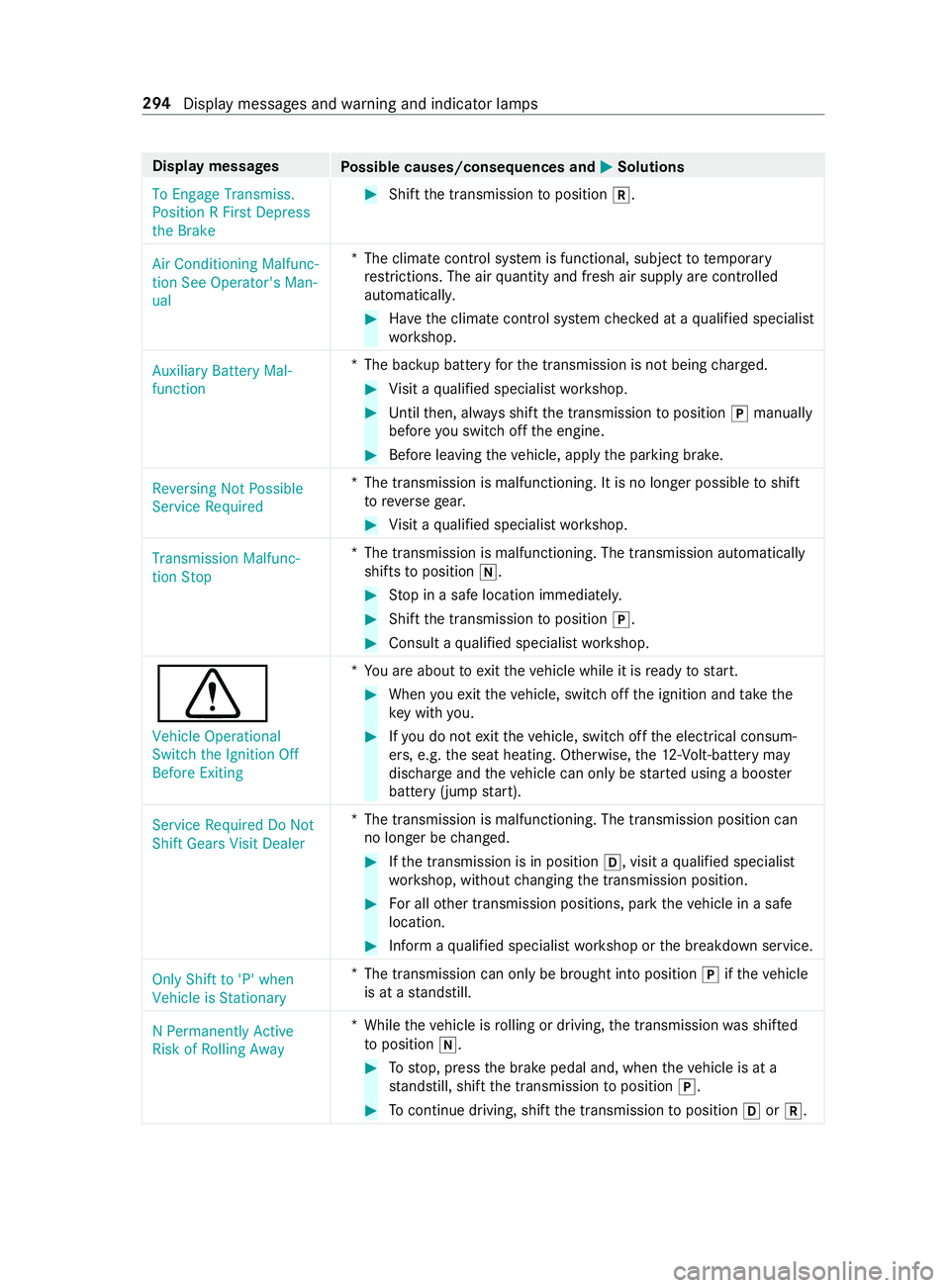
Display messages
Possible causes/consequences and 0050 0050Solutions
To Engage Transmiss.
Position R First Depress
the Brake #
Shift the transmission toposition 005E.
Air Conditioning Malfunc-
tion See Operator's Man-
ual *T
he climate contro l system is functional, subject totemp orary
re strictions. The air quantity and fresh air supply are controlled
automaticall y. #
Have the climate cont rol sy stem checked at a qualified specialist
wo rkshop.
Auxiliary Battery Mal-
function *T
he bac kup battery forth e transmission is not being charge d. #
Visit a qualified specialist workshop. #
Until then, alw ays shift the transmission toposition 005Dmanually
before you swit choff the engine. #
Before leaving theve hicle, apply the parking brake.
Reversing Not Possible
Service Required *T
he transmission is malfunctioning. It is no longer possible toshift
to reve rsege ar. #
Visit a qualified specialist workshop.
Transmission Malfunc-
tion Stop *T
he transmission is malfunctioning. The transmission automatically
shifts toposition 005C. #
Stop in a safe location immediately. #
Shift the transmission toposition 005D. #
Consult a qualified specialist workshop.
0072
Vehicle Operational
Switch the Ignition Off
Before Exiting *Y
ou are about toexitth eve hicle while it is ready tostart. #
When youex itth eve hicle, switch off the ignition and take the
ke y with you. #
Ifyo u do not exitth eve hicle, switch off the electrical consum‐
ers, e.g. the seat heating. Otherwise, the12 ‑Volt‑battery may
discha rge and theve hicle can only be star ted using a boos ter
battery (jump start).
Service Required Do Not
Shift Gears Visit Dealer *T
he transmission is malfunctioning. The transmission position can
no longer be changed. #
Ifth e transmission is in position 005B, visit aqualified specialist
wo rkshop, without changing the transmission position. #
For all other transmission positions, park theve hicle in a safe
location. #
Inform a qualified specialist workshop or the breakdown service.
Only Shift to 'P' when
Vehicle is Stationary *
The transmission can only be brought into position 005Difth eve hicle
is at a standstill.
N Permanently Active
Risk of Rolling Away *W
hile theve hicle is rolling or driving, the transmission was shif ted
to position 005C. #
Tostop, press the brake pedal and, when theve hicle is at a
st andstill, shift the transmission toposition 005D. #
Tocontinue driving, shi ftthe transmission toposition 005Bor005E. 294
Display messages and warning and indicator lamps
Page 319 of 354
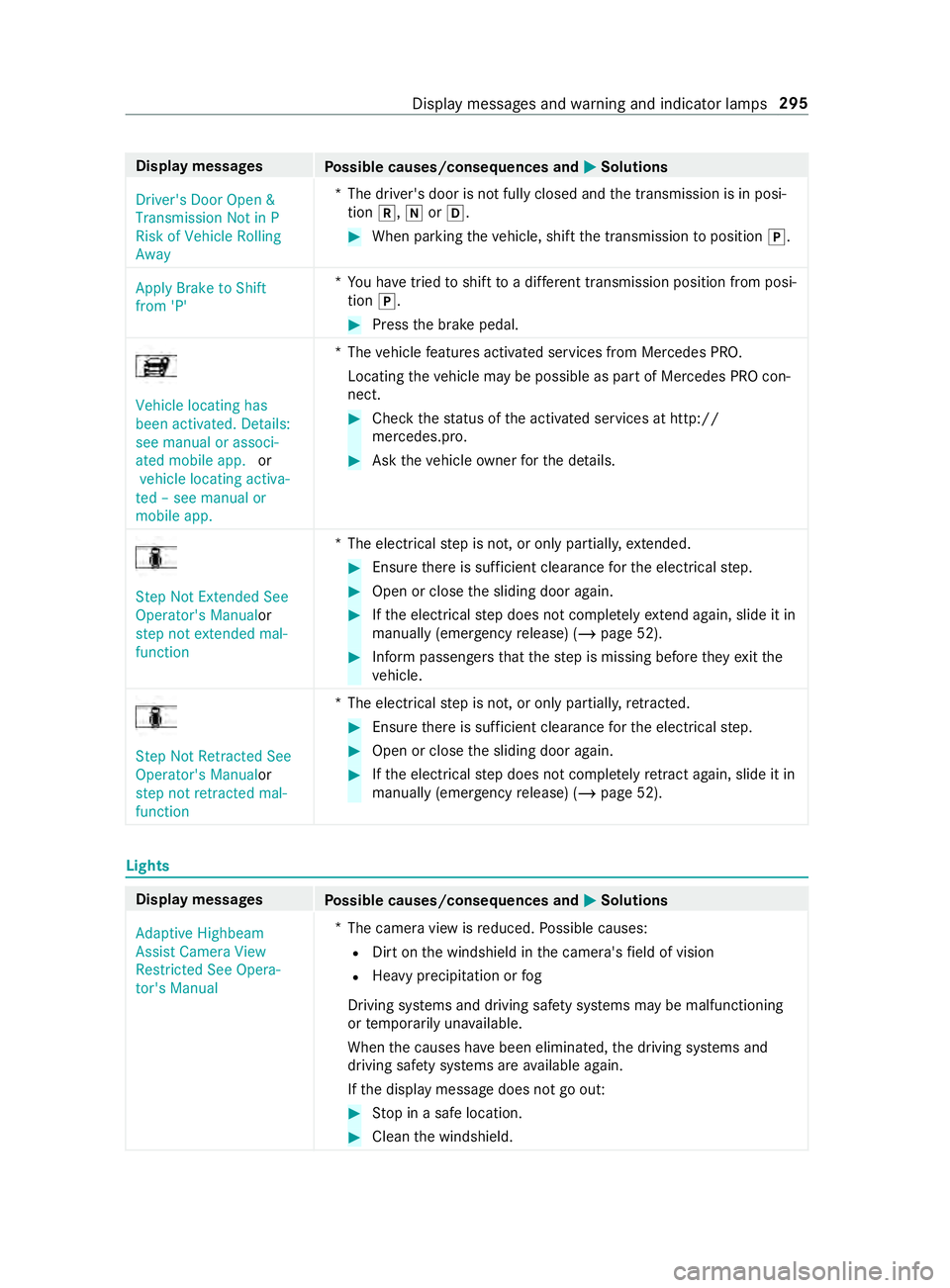
Display messages
Possible causes/consequences and 0050 0050Solutions
Driver's Door Open &
Transmission Not in P
Risk of Vehicle Rolling
Away *T
he driver's door is not fully closed and the transmission is in posi‐
tion 005E,005Cor005B. #
When parking theve hicle, shift the transmission toposition 005D.
Apply Brake to Shift
from 'P' *Y
ou ha vetried toshift toa dif fere nt transmission position from posi‐
tion 005D. #
Press the brake pedal. Vehicle locating has
been activated. Details:
see manual or associ-
ated mobile app.
or
vehicle locating activa-
ted – see manual or
mobile app. *T
hevehicle features activated services from Mercedes PRO.
Locating theve hicle may be possible as part of Mercedes PRO con‐
nect. #
Check thest atus of the activated services at http://
mercedes.pro. #
Ask theve hicle owner forth e de tails. Step Not Extended See
Operator's Manual
or
step not extended mal-
function *T
he electrical step is not, or only partially, extended. #
Ensu rethere is suf ficient clea rance forth e electrical step. #
Open or close the sliding door again. #
Ifth e electrical step does not comple tely ex tend again, slide it in
manually (emergency release) (/ page 52). #
Inform passen gers that thestep is missing before they exitthe
ve hicle. Step Not Retracted See
Operator's Manualor
step not retracted mal-
function *T
he electrical step is not, or only partially, retracted. #
Ensu rethere is suf ficient clea rance forth e electrical step. #
Open or close the sliding door again. #
Ifth e electrical step does not comple tely retract again, slide it in
manually (emergency release) (/ page 52). Lights
Display messa
ges
Possible causes/consequences and 0050 0050Solutions
Adaptive Highbeam
Assist Camera View
Restricted See Opera-
tor's Manual *
The camera view is reduced. Possible causes:
R Dirt on the windshield in the camera's field of vision
R Heavy precipitation or fog
Driving sy stems and driving saf ety sy stems may be malfunctioning
or temp orarily una vailable.
When the causes ha vebeen eliminated, the driving sy stems and
driving saf ety sy stems are available again.
If th e display message does not go out: #
Stop in a safe location. #
Clean the windshield. Display messages and
warning and indicator lamps 295