differential MITSUBISHI 3000GT 1991 Workshop Manual
[x] Cancel search | Manufacturer: MITSUBISHI, Model Year: 1991, Model line: 3000GT, Model: MITSUBISHI 3000GT 1991Pages: 1146, PDF Size: 76.68 MB
Page 614 of 1146
27-18REAR AXLE
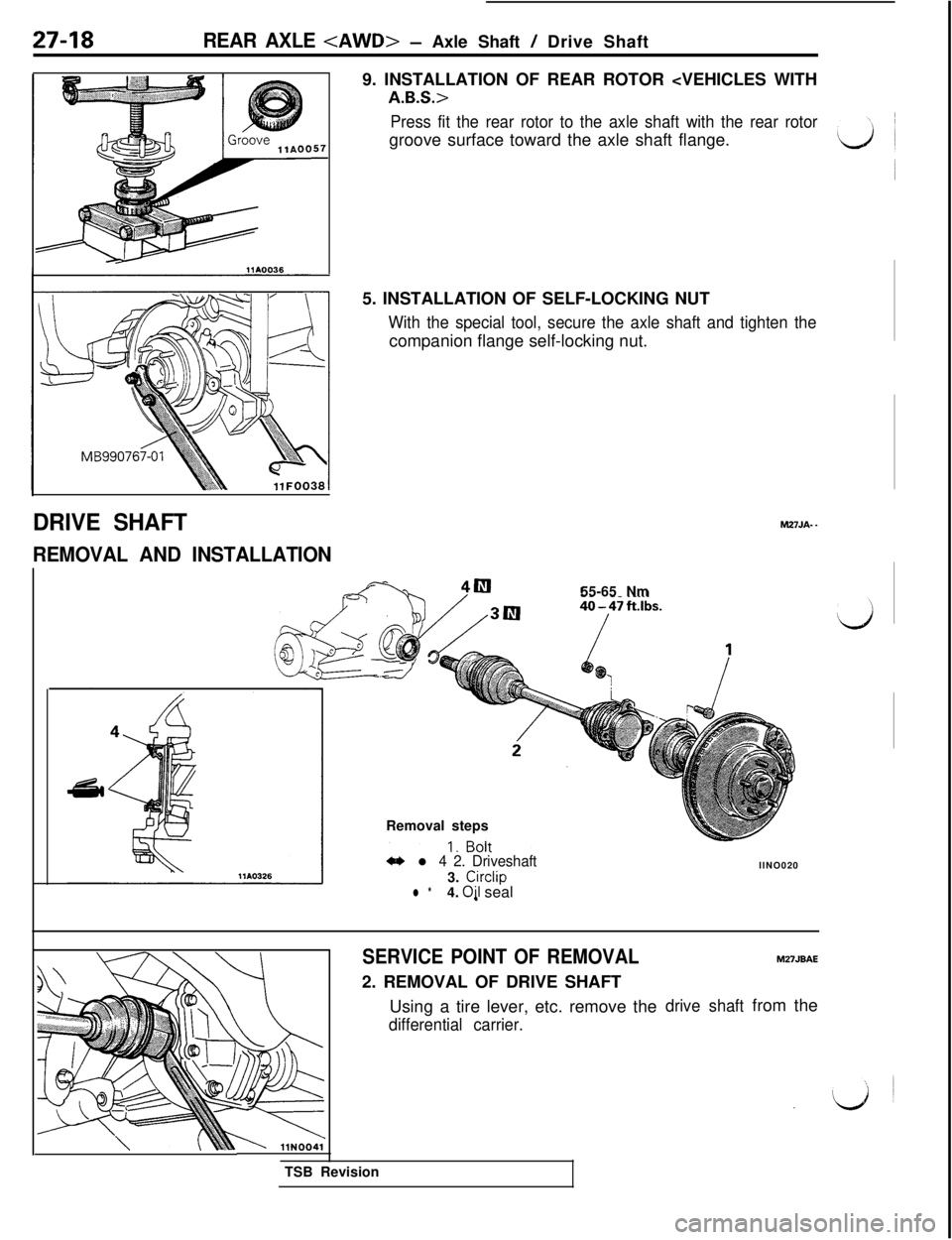
57-9. INSTALLATION OF REAR ROTOR
Press fit the rear rotor to the axle shaft with the rear rotorgroove surface toward the axle shaft flange.
5. INSTALLATION OF SELF-LOCKING NUT
With the special tool, secure the axle shaft and tighten thecompanion flange self-locking nut.
DRIVE SHAFT
REMOVAL AND INSTALLATIONM27JA-
-55-65 Nm
Removal steps4I)
l 4 2. Driveshaft3.
Circlipl *4. Oil sealllNO020
SERVICE POINT OF REMOVAL2. REMOVAL OF DRIVE SHAFT
Using a tire lever, etc. remove the
differential carrier.TSB Revision
drive shaftfrom the
M27JBAE
Page 615 of 1146
REAR AXLE
i
INSPECTIONM27JHAB
lCheck the drive shaft boots for damage or deterioration.l
Check the ball joints for excessive play or check operation.l Check the drive shaft spline for wear or damage.
MB991380llFOO1;
Two-part serration
llAO280
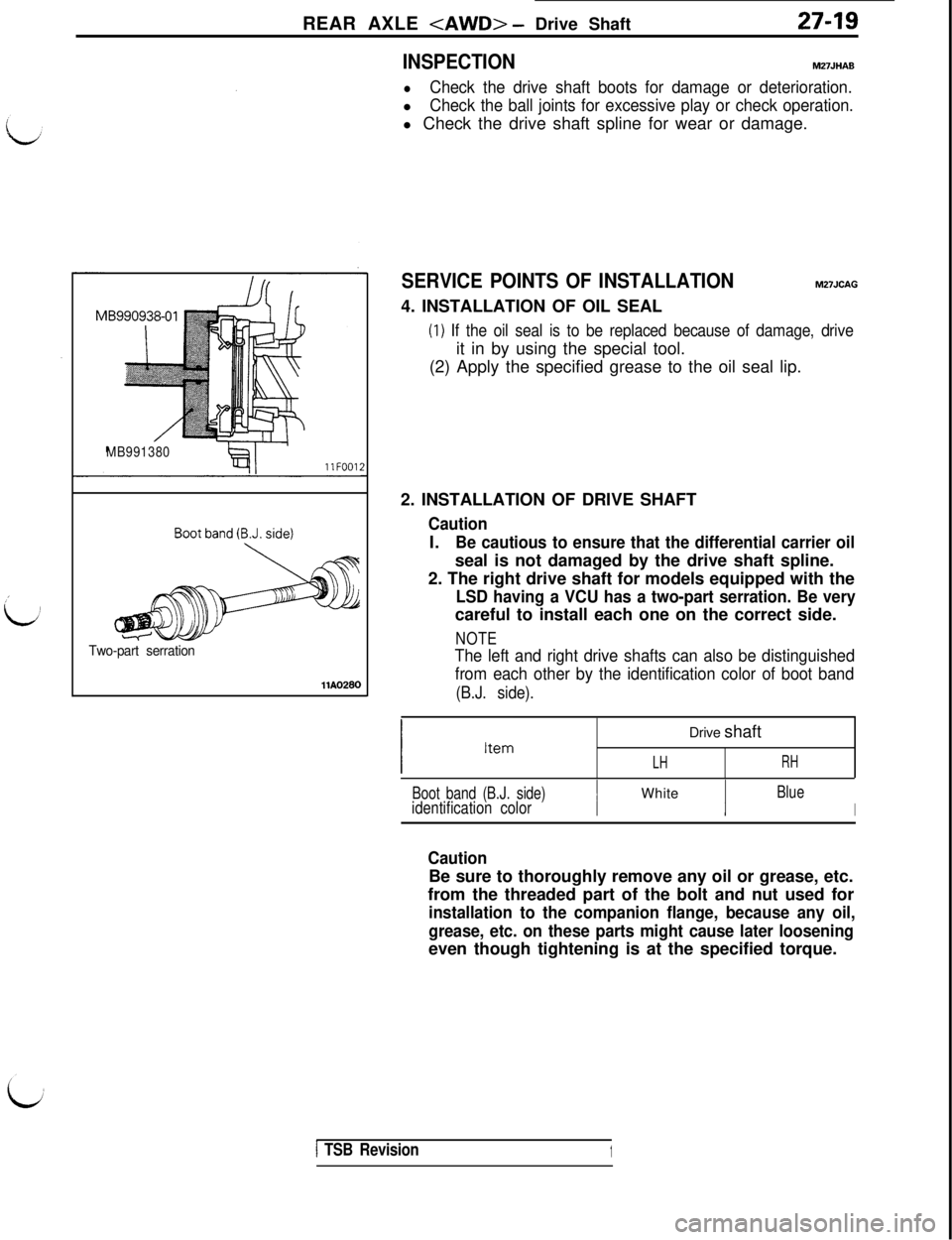
SERVICE POINTS OF INSTALLATIONM27JCAG4. INSTALLATION OF OIL SEAL
(1) If the oil seal is to be replaced because of damage, driveit in by using the special tool.
(2) Apply the specified grease to the oil seal lip.
2. INSTALLATION OF DRIVE SHAFT
CautionI.
Be cautious to ensure that the differential carrier oilseal is not damaged by the drive shaft spline.
2. The right drive shaft for models equipped with the
LSD having a VCU has a two-part serration. Be verycareful to install each one on the correct side.
NOTE
The left and right drive shafts can also be distinguished
from each other by the identification color of boot band
(B.J. side).Drive shaft
LHRH
Boot band (B.J. side)identification colorIWhite
Blue
I
CautionBe sure to thoroughly remove any oil or grease, etc.
from the threaded part of the bolt and nut used for
installation to the companion flange, because any oil,
grease, etc. on these parts might cause later looseningeven though tightening is at the specified torque.
1 TSB Revision1
Page 620 of 1146
27-24REAR AXLE
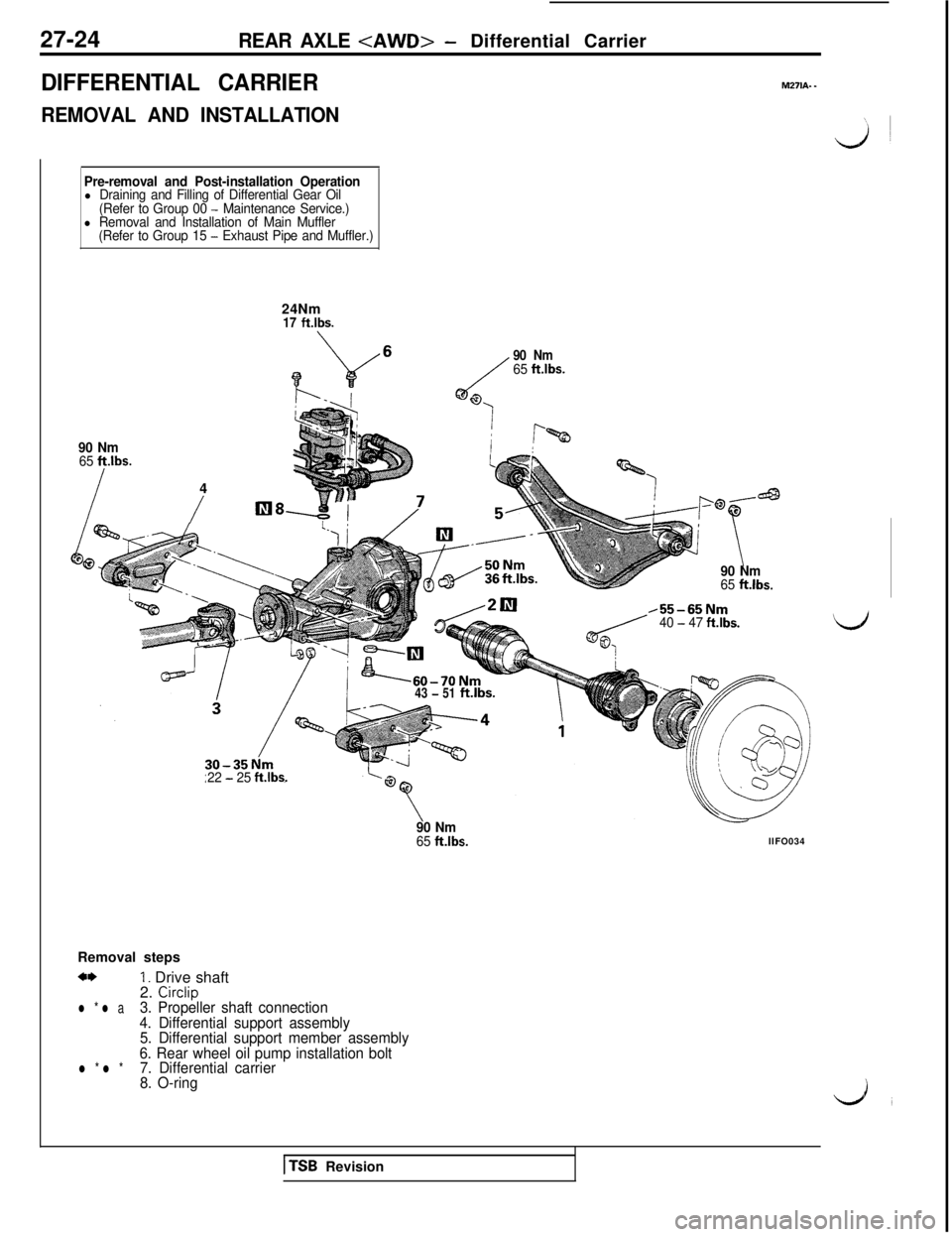
DIFFERENTIAL CARRIER
REMOVAL AND INSTALLATION
M271A. -
Pre-removal and Post-installation Operationl Draining and Filling of Differential Gear Oil
(Refer to Group 00 - Maintenance Service.)l Removal and Installation of Main Muffler
(Refer to Group 15 - Exhaust Pipe and Muffler.)24Nm
17 ft.lbs.
90 Nm65 ft.lbs.4
/lIl8
c/
90 Nm65 ft.lbs.
63
i
i !f%
43 - 51ft.lbs.
90 Nm65 ftlbs.
,55-65Nm40 - 47 fklbs.
22 - 25 ft.lbs.
90 Nm65 ft.lbs.llFO034
Removal steps
a*1. Drive shaft
2. Circlipl * l a3. Propeller shaft connection
4. Differential support assembly
5. Differential support member assembly
6. Rear wheel oil pump installation bolt
l * l *7. Differential carrier
8. O-ring
1 TSB Revision
Page 621 of 1146
REAR AXLE
27-25
Mating marks
//
MB991 153
MBggo8477J=f 4
Differential support member
llNOOl1
DifferentialllN0053
SERVICE POINTS OF REMOVALm27wAm
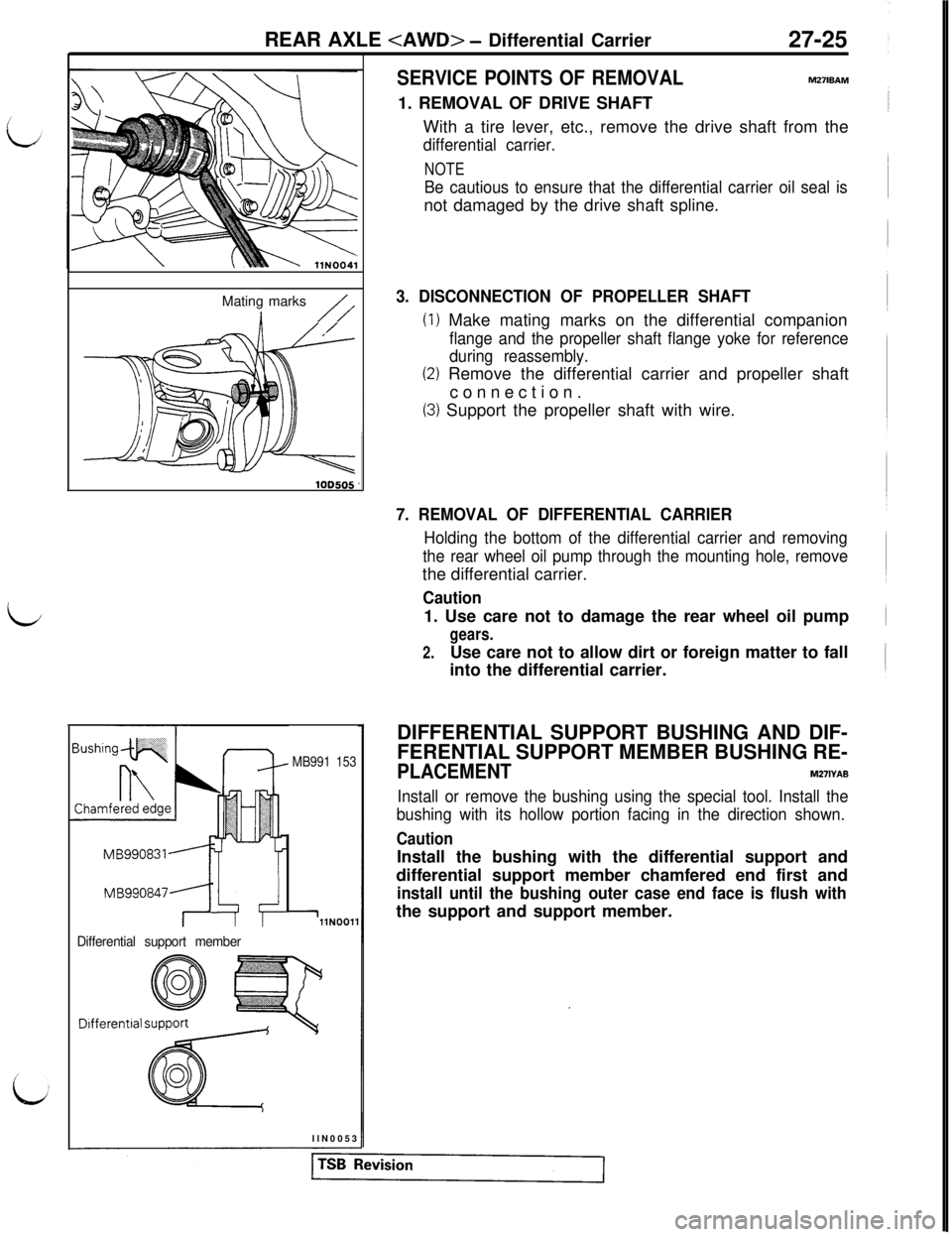
1. REMOVAL OF DRIVE SHAFT
With a tire lever, etc., remove the drive shaft from the
differential carrier.
NOTE
Be cautious to ensure that the differential carrier oil seal isnot damaged by the drive shaft spline.
3. DISCONNECTION OF PROPELLER SHAFT
(1) Make mating marks on the differential companion
flange and the propeller shaft flange yoke for reference
during reassembly.
(2) Remove the differential carrier and propeller shaft
connection.
(3) Support the propeller shaft with wire.
7. REMOVAL OF DIFFERENTIAL CARRIER
Holding the bottom of the differential carrier and removing
the rear wheel oil pump through the mounting hole, removethe differential carrier.
Caution1. Use care not to damage the rear wheel oil pump
gears.
2.Use care not to allow dirt or foreign matter to fall
into the differential carrier.
DIFFERENTIAL SUPPORT BUSHING AND DIF-
FERENTIAL SUPPORT MEMBER BUSHING RE-
PLACEMENTM271YAB
Install or remove the bushing using the special tool. Install the
bushing with its hollow portion facing in the direction shown.
CautionInstall the bushing with the differential support and
differential support member chamfered end first and
install until the bushing outer case end face is flush withthe support and support member.
Page 622 of 1146
27-26
REAR AXLE
SERVICE POINTS OF INSTALLATION
7. INSTALLATION OF DIFFERENTIAL CARRIERm27lDAL
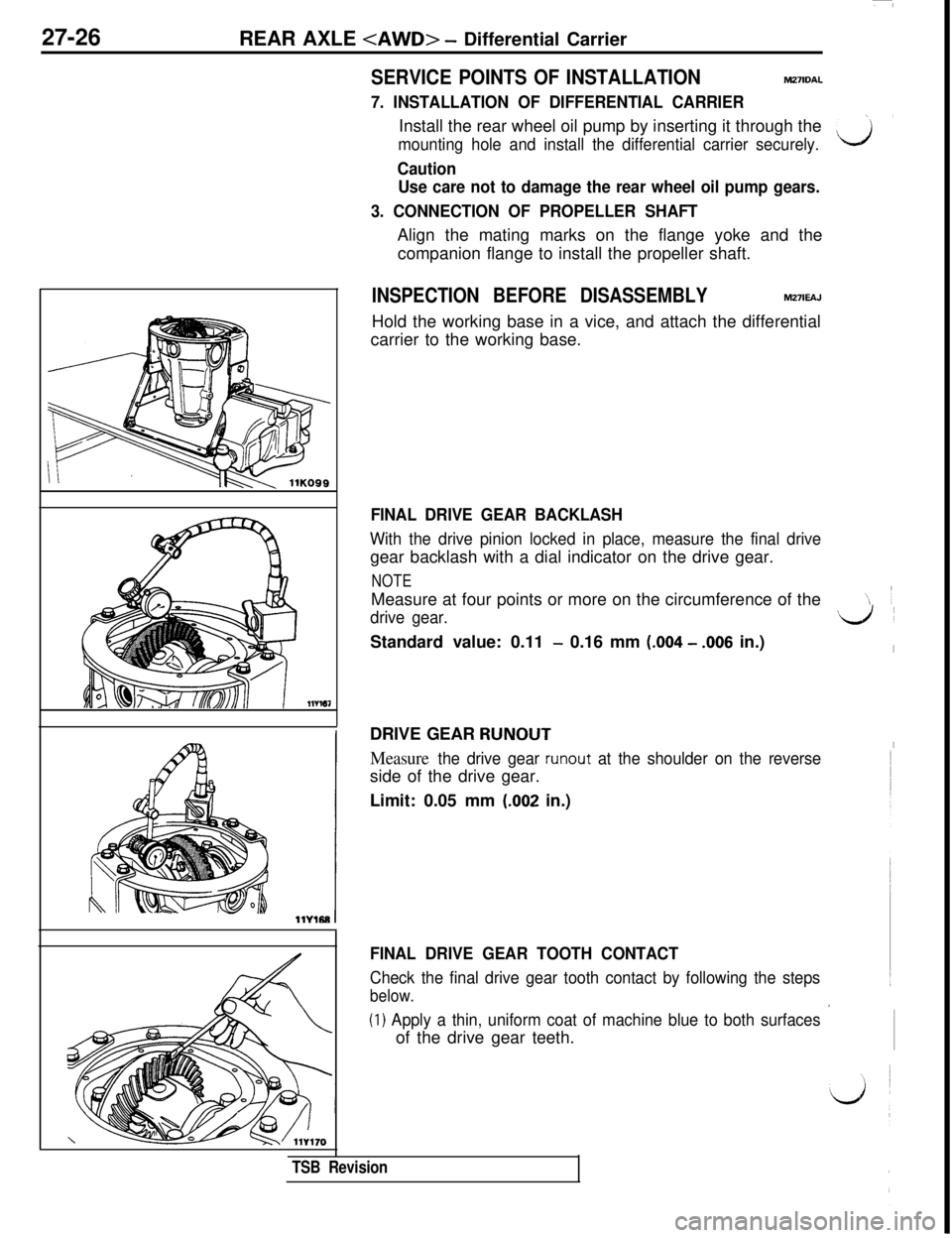
Install the rear wheel oil pump by inserting it through the
mounting hole and install the differential carrier securely.\yiIlYl61
Caution
Use care not to damage the rear wheel oil pump gears.
3. CONNECTION OF PROPELLER SHAFTAlign the mating marks on the flange yoke and the
companion flange to install the propeller shaft.
INSPECTION BEFORE DISASSEMBLYM27lEAJHold the working base in a vice, and attach the differential
carrier to the working base.
FINAL DRIVE GEAR BACKLASH
With the drive pinion locked in place, measure the final drivegear backlash with a dial indicator on the drive gear.
NOTEMeasure at four points or more on the circumference of the
drive gear.d’Standard value: 0.11
- 0.16 mm (.004 - .006 in.)IDRIVE GEAR
RUNOUTI
Measure the drive gear runout at the shoulder on the reverseside of the drive gear.
Limit: 0.05 mm
(.002 in.)
FINAL DRIVE GEAR TOOTH CONTACT
Check the final drive gear tooth contact by following the steps
below.
(1) Apply a thin, uniform coat of machine blue to both surfaces ’of the drive gear teeth.
TSB Revision
Page 623 of 1146
/
i.J
I
i
REAR AXLE
CT2flG0076
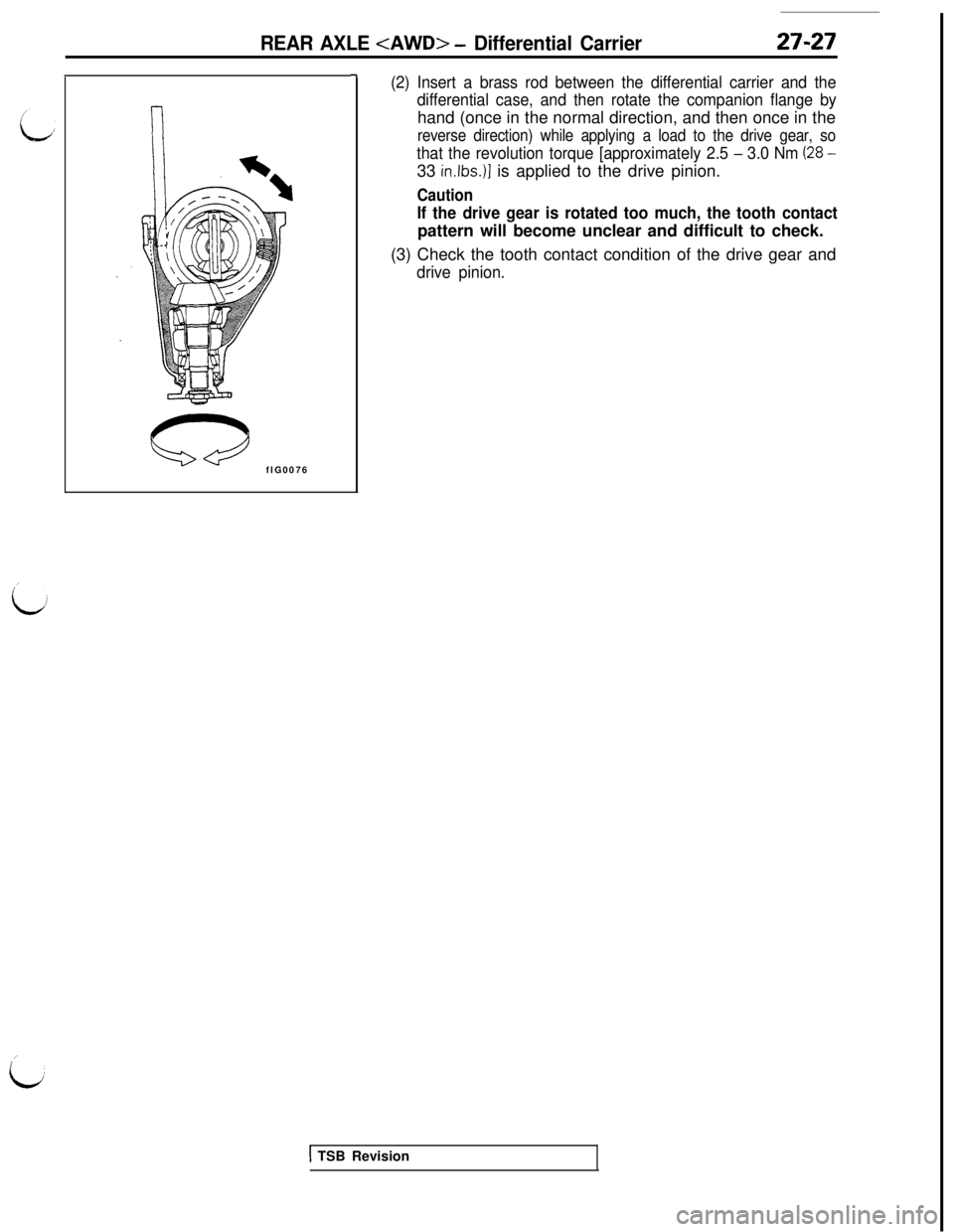
-7(2) Insert a brass rod between the differential carrier and the
differential case, and then rotate the companion flange byhand (once in the normal direction, and then once in the
reverse direction) while applying a load to the drive gear, so
that the revolution torque [approximately 2.5 - 3.0 Nm (28 -33
in.lbs.)] is applied to the drive pinion.
Caution
If the drive gear is rotated too much, the tooth contactpattern will become unclear and difficult to check.
(3) Check the tooth contact condition of the drive gear and
drive pinion.
1 TSB Revision
Page 624 of 1146
27-28
REAR AXLE
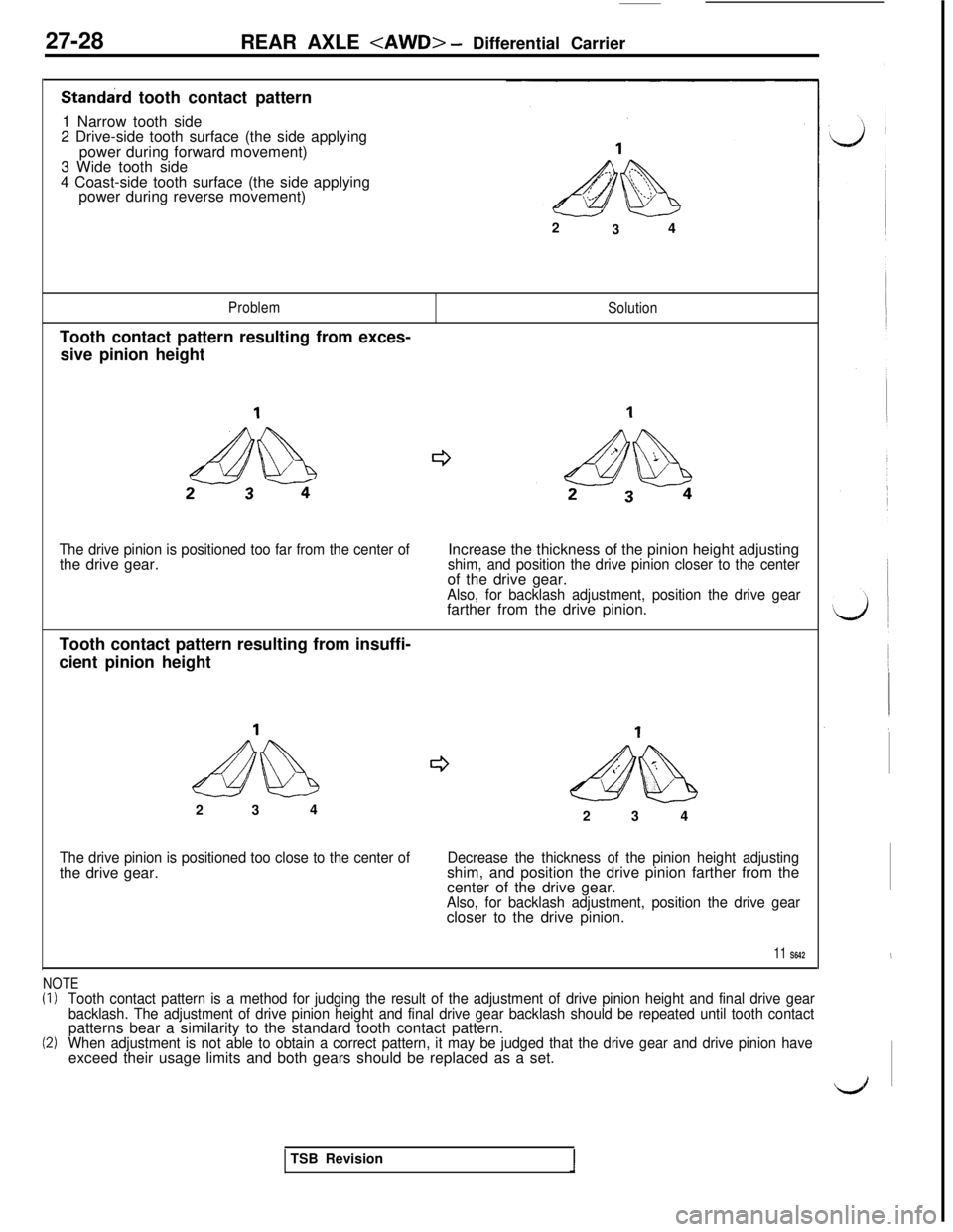
Standard tooth contact pattern
1 Narrow tooth side
2 Drive-side tooth surface (the side applying
power during forward movement)
3 Wide tooth side
4 Coast-side tooth surface (the side applying
power during reverse movement)
2
34
ProblemTooth contact pattern resulting from exces-
sive pinion heightSolution
The drive pinion is positioned too far from the center ofthe drive gear.Increase the thickness of the pinion height adjustingshim, and position the drive pinion closer to the centerof the drive gear.
Also, for backlash adjustment, position the drive gearfarther from the drive pinion.
Tooth contact pattern resulting from insuffi-
cient pinion height
ectdb
e52 34&$%$I$&2 3 4
The drive pinion is positioned too close to the center ofthe drive gear.Decrease the thickness of the pinion height adjustingshim, and position the drive pinion farther from the
center of the drive gear.
Also, for backlash adjustment, position the drive gearcloser to the drive pinion.
11 S642
NOTE(I)Tooth contact pattern is a method for judging the result of the adjustment of drive pinion height and final drive gear
backlash. The adjustment of drive pinion height and final drive gear backlash should be repeated until tooth contactpatterns bear a similarity to the standard tooth contact pattern.
(2)When adjustment is not able to obtain a correct pattern, it may be judged that the drive gear and drive pinion haveexceed their usage limits and both gears should be replaced as a set.
,
dTSB Revision
Page 625 of 1146
DISASSEMBLYREAR AXLE
M27lF- -
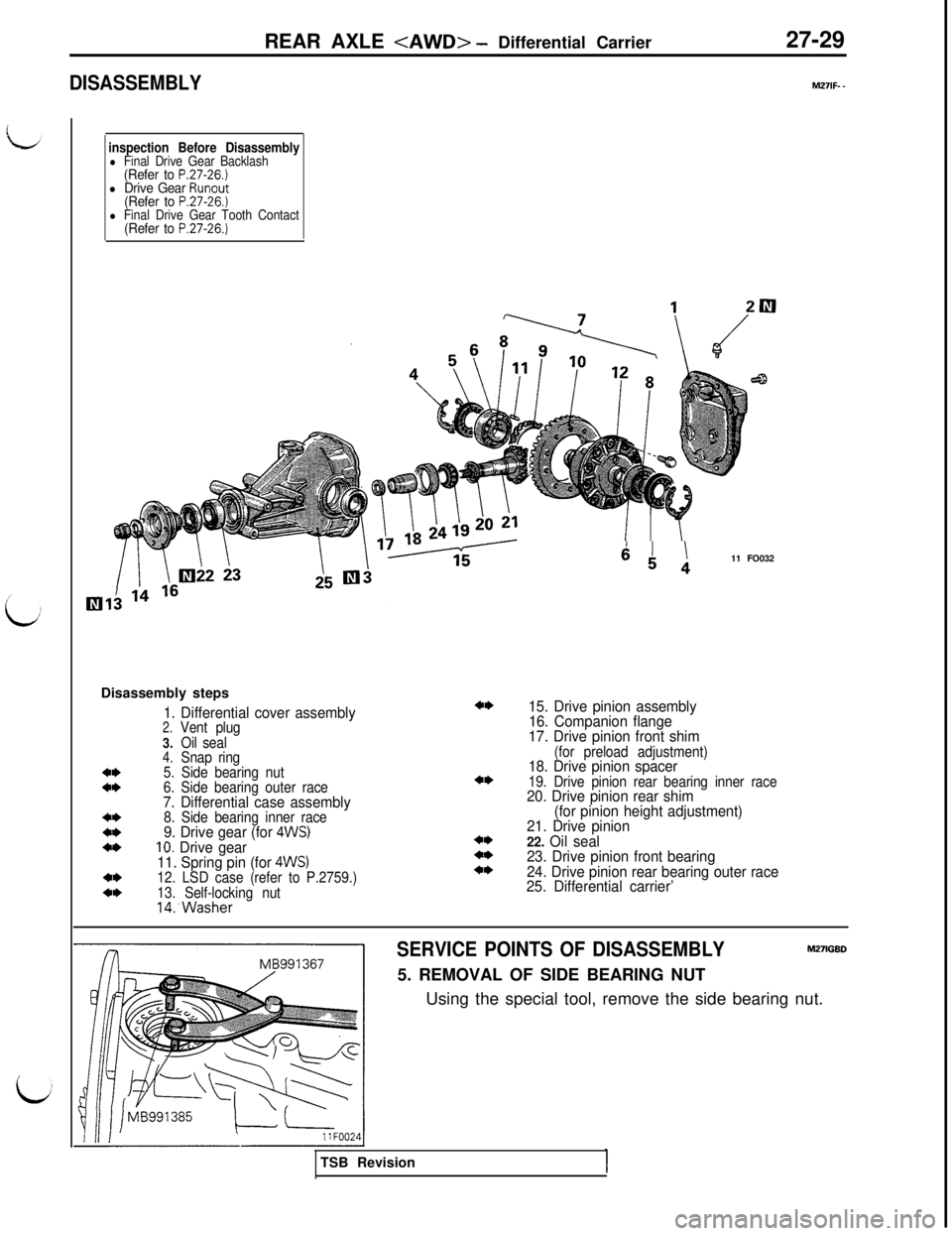
inspection Before Disassemblyl Final Drive Gear Backlash(Refer to P.27-26.)l Drive Gear Runout(Refer to P.27-26.)l Final Drive Gear Tooth Contact(Refer to P.27-26.)Disassembly steps
1. Differential cover assembly2.Vent plug
3.Oil seal
4.Snap ring4*5. Side bearing nut4*6. Side bearing outer race7. Differential case assembly4*8. Side bearing inner race4*9. Drive gear (for 4WS)4*10. Drive gear
11. Spring pin (for 4WS)4*12. LSD case (refer to P.2759.)4*13. Self-locking nut14:Washer
4*
4*
4*4*4*
64 111 FO032
15. Drive pinion assembly
16. Companion flange
17. Drive pinion front shim
(for preload adjustment)18. Drive pinion spacer19. Drive pinion rear bearing inner race20. Drive pinion rear shim
(for pinion height adjustment)
21. Drive pinion
22. Oil seal
23. Drive pinion front bearing
24. Drive pinion rear bearing outer race
25. Differential carrier’
SERVICE POINTS OF DISASSEMBLYM27lGBD5. REMOVAL OF SIDE BEARING NUT
Using the special tool, remove the side bearing nut.
TSB Revision
Page 626 of 1146
27-30REAR AXLE
VlB990811-01
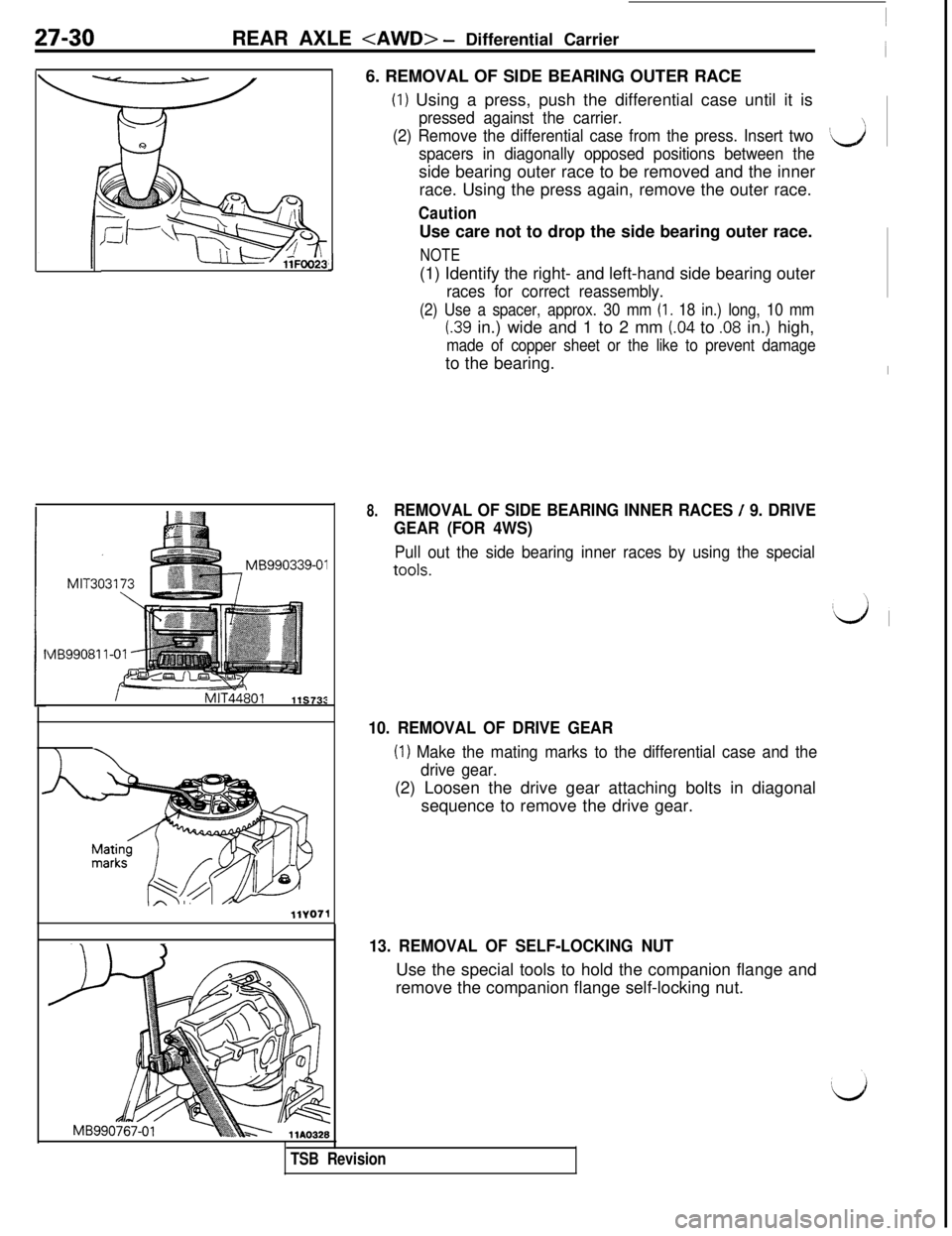
J6. REMOVAL OF SIDE BEARING OUTER RACE
(I) Using a press, push the differential case until it is
pressed against the carrier.
(2) Remove the differential case from the press. Insert two
spacers in diagonally opposed positions between the‘dside bearing outer race to be removed and the inner
race. Using the press again, remove the outer race.
CautionUse care not to drop the side bearing outer race.
NOTE(1) Identify the right- and left-hand side bearing outer
races for correct reassembly.
(2) Use a spacer, approx. 30 mm (I. 18 in.) long, 10 mm
I.39 in.) wide and 1 to 2 mm (.04 to .08 in.) high,
made of copper sheet or the like to prevent damageto the bearing.
8.REMOVAL OF SIDE BEARING INNER RACES / 9. DRIVE
GEAR (FOR 4WS)
Pull out the side bearing inner races by using the special
tools.
10. REMOVAL OF DRIVE GEAR
(I) Make the mating marks to the differential case and the
drive gear.(2) Loosen the drive gear attaching bolts in diagonal
sequence to remove the drive gear.
13. REMOVAL OF SELF-LOCKING NUTUse the special tools to hold the companion flange and
remove the companion flange self-locking nut.
TSB Revision
Page 627 of 1146
REAR AXLE
Mating marks
MB990339-01
llY175J
1
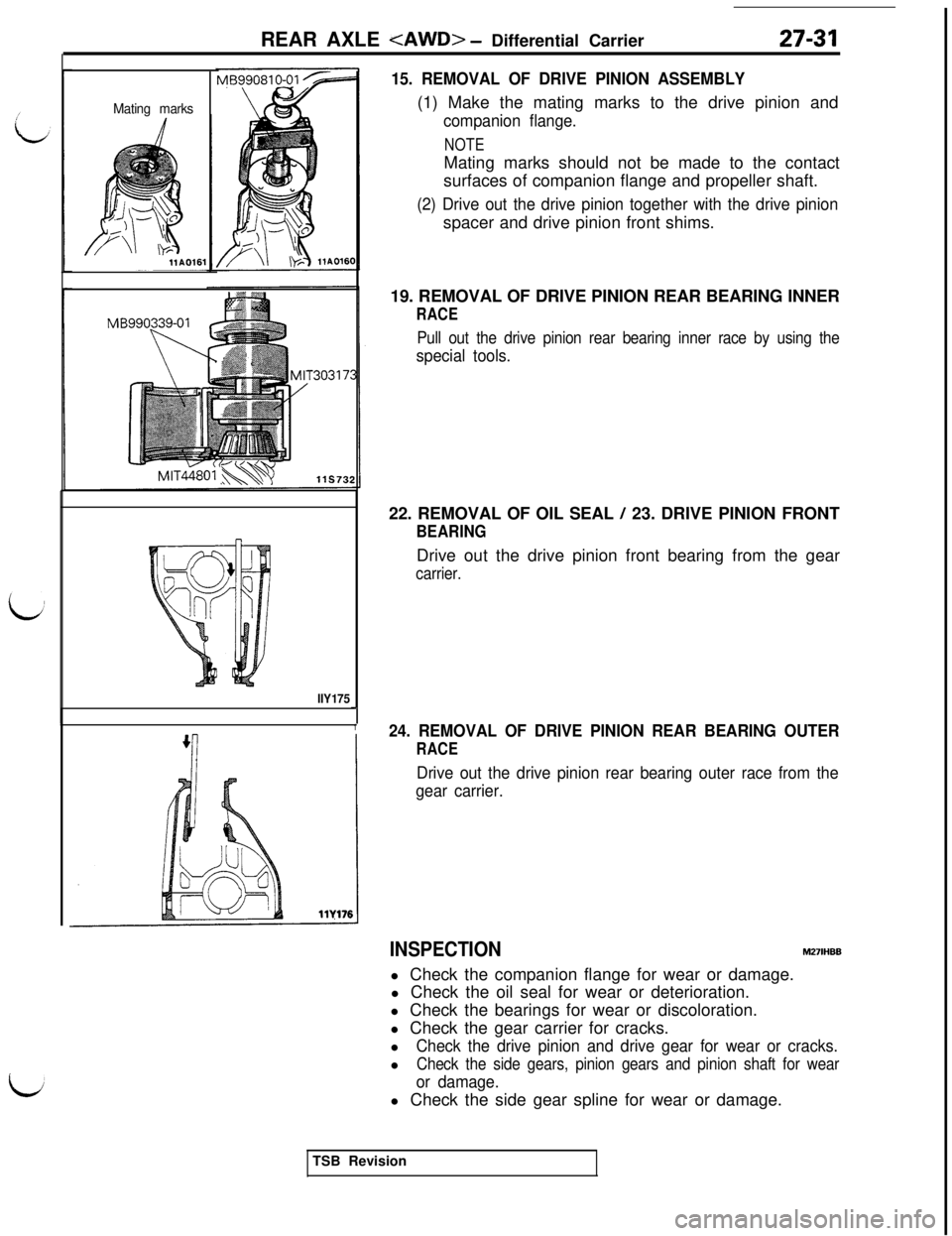
15. REMOVAL OF DRIVE PINION ASSEMBLY(1) Make the mating marks to the drive pinion and
companion flange.
NOTEMating marks should not be made to the contact
surfaces of companion flange and propeller shaft.
(2) Drive out the drive pinion together with the drive pinionspacer and drive pinion front shims.
19. REMOVAL OF DRIVE PINION REAR BEARING INNER
RACE
Pull out the drive pinion rear bearing inner race by using the
special tools.22. REMOVAL OF OIL SEAL
/ 23. DRIVE PINION FRONT
BEARINGDrive out the drive pinion front bearing from the gear
carrier.
24. REMOVAL OF DRIVE PINION REAR BEARING OUTER
RACE
Drive out the drive pinion rear bearing outer race from the
gear carrier.
INSPECTIONM27lHBBl Check the companion flange for wear or damage.
l Check the oil seal for wear or deterioration.
l Check the bearings for wear or discoloration.
l Check the gear carrier for cracks.
l
Check the drive pinion and drive gear for wear or cracks.l
Check the side gears, pinion gears and pinion shaft for wear
or damage.l Check the side gear spline for wear or damage.
TSB Revision