usb MITSUBISHI ENDEAVOR 2004 Service Owner's Guide
[x] Cancel search | Manufacturer: MITSUBISHI, Model Year: 2004, Model line: ENDEAVOR, Model: MITSUBISHI ENDEAVOR 2004Pages: 3870, PDF Size: 98.47 MB
Page 1272 of 3870
generator output line and ground line in good condition?
If Yes, then go to next step. If No, check the generator output line and ground line.
8. Is the output current normal? If Yes, then go to next step. If No, then check the generator.
9. Is the regulated voltage normal? If Yes, then go to next step. If No, then check the generator.
10. Is the voltage drop in the generator output line normal? If Yes, then generator is normal. Check other systems. If No, then check the output line.
ON-VEHICLE TESTING GENERATOR OUTPUT LINE VOLTAGE DROP TEST Required special tools: MB991958: Scan Tool MUT-III Sub Assembly,
MB991824: V.C.I., MB991827: MUT-III USB Cable, MB991910: MUT-III Main
Harness A.
This test determines whether the wiring from the generator B-terminal to positive batter
y terminal
(includin
g the fusible link
) is in
good condition or not. See Fig. 3
.
2004 Mitsubishi Endeavor Limited
2004 STARTING & CHARGING SYSTEMS Generators & Regulators - Endeavor
Page 1275 of 3870
link). If a terminal is not sufficiently tight or if the harness has become
discolored due to overheating, repair and then test again.
12. After the test, run the engine at idle.
13. Turn off all lights and turn the ignition switch to the LOCK (OFF) position.
14. Disconnect the negative battery cable.
15. Disconnect the ammeter and voltmeter.
16. Connect the negative battery cable.
17. Run engine for 10 minutes at an idle.
OUTPUT CURRENT TEST Required special tool: MB991958: Scan Tool MUT-III Sub Assembly, MB991824:
V.C.I., MB991827 MUT-III USB Cable, MB5991910: MUT-III Main Harness A.
This test determines whether the generator outputs normal current. For best results,
use a char
ging system tester. If not available, follow the ste
ps below. See Fig. 4
.
2004 Mitsubishi Endeavor Limited
2004 STARTING & CHARGING SYSTEMS Generators & Regulators - Endeavor
Page 1279 of 3870
MB991824: V.C.I. MB991827: MUT-III USB Cable. MB991910: MUT-III Main Harness A. MB991519: Generator Harness Connector.
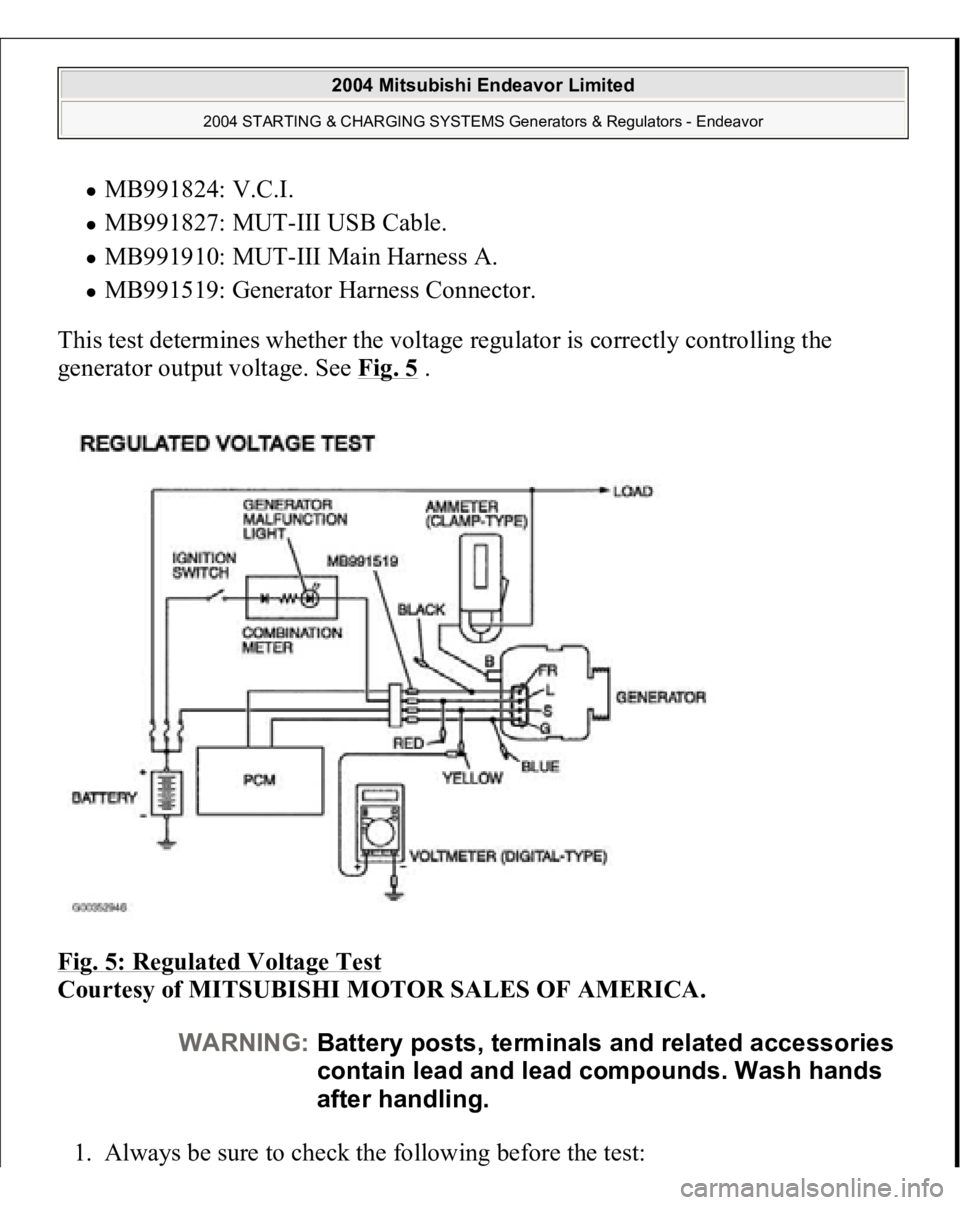
This test determines whether the voltage regulator is correctly controlling the
generator output voltage. See Fig. 5
.
Fig. 5: Regulated Voltage Test
Courtesy of MITSUBISHI MOTOR SALES OF AMERICA.
1. Always be sure to check the following before the test:
WARNING:Battery posts, terminals and related accessories
contain lead and lead compounds. Wash hands
after handling.
2004 Mitsubishi Endeavor Limited
2004 STARTING & CHARGING SYSTEMS Generators & Regulators - Endeavor
Page 1516 of 3870
Required Special Tool
:
MB991958: Scan Tool (MUT-III Sub Assembly)
MB991824: V.C.I. MB991827: MUT-III USB Cable MB991910: MUT-III Main Harness A
1. Before checks set the vehicle in the following condition:
Engine coolant temperature: 80 - 95°C (176 - 203°F) Lights and all accessories: OFF Transaxle: P range
2. Connect scan tool MB991958 to the data link connec
tor.
NOTE: Vehicles for Canada, the headlight, taillight, etc. remain
lit even when the lighting switch is in "OFF" position
but this is no problem for checks.
CAUTION: To prevent damage to scan tool MB991958,
always turn the ignition switch to the
"LOCK" (OFF) position before connecting or
disconnecting scan tool MB991958.
2004 Mitsubishi Endeavor Limited
2004 ENGINE Engine - Endeavor
Page 1519 of 3870
MB991958: Scan Tool (MUT-III Sub Assembly)
MB991824: V.C.I. MB991827: MUT-III USB Cable MB991910: MUT-III Main Harness A
1. Before checks set the vehicle in the following condition:
Engine coolant temperature: 80 - 95°C (176 - 203°F) Lights and all accessories: OFF Transaxle: P range
2. Connect scan tool MB991958 to the data link connec
tor.
NOTE: Vehicles for Canada, the headlight, taillight, etc. remain
lit even when the lighting switch is in "OFF" position
but this is no problem for checks.
CAUTION: To prevent damage to scan tool MB991958,
always turn the ignition switch to the
"LOCK" (OFF) position before connecting or
disconnecting scan tool MB991958.
2004 Mitsubishi Endeavor Limited
2004 ENGINE Engine - Endeavor
Page 1521 of 3870
Courtesy of MITSUBISHI MOTOR SALES OF AMERICA
.
3. Check the basic ignition timing.
Standard value: 5° BTDC+/-3°
4. Start the engine.
5. Run the engine at idle for 2 minutes.
6. Check the idle speed. Select item number 22 and take a reading of the idle
speed.
Curb idle speed: 680+/-100 r/min
7. If the idle speed is outside the standard value, refer to MULTIPORT FUEL
INJECTION (MFI) DIAGNOSIS
.
IDLE MIXTURE CHECK Required Special Tool:
MB991958: Scan Tool (MUT-III Sub Assembly)
MB991824: V.C.I. MB991827: MUT-III USB Cable MB991910: MUT-III Main Harness A
1. Before checks set the vehicle in the following condition:
Engine coolant temperature: 80 - 95°C (176 - 203°F) Lights and all accessories: OFF Transaxle: P range
NOTE: The idle speed is controlled automaticall
y by the idle air
control system.
NOTE: Vehicles for Canada, the headlight, taillight, etc. remain
lit even when the lighting switch is in "OFF" position
but this is no problem for checks.
2004 Mitsubishi Endeavor Limited
2004 ENGINE Engine - Endeavor
Page 1525 of 3870
MB991958: Scan Tool (MUT-III Sub Assembly)
MB991824: V.C.I. MB991827: MUT-III USB Cable MB991910: MUT-III Main Harness A
1. Before checks set the vehicle in the following condition:
Engine coolant temperature: 80 - 95°C (176 - 203°F) Lights and all accessories: OFF Transaxle: P range
2. Remove all of the ignition coils and spark plugs.
3. Disconnect the crankshaft position sensor connector.
NOTE: Vehicles for Canada, the headlight, taillight, etc. remain
lit even when the lighting switch is in "OFF" position
but this is no problem for checks.
NOTE: Doing this will prevent the engine control module from
carrying out ignition and fuel injection.
2004 Mitsubishi Endeavor Limited
2004 ENGINE Engine - Endeavor
Page 2002 of 3870
INTRODUCTION TO HEATER, AIR CONDITIONING AND VENTILATION DIAGNOSISAir is drawn into the heater assembly from either the outside, or from the inside of
the passenger cabin if DEFROST, maximum cooling or RECIRCULATION are
selected. The air is then forced through the evaporator where heat is removed,
cooling and de-humidifying the air. Depending on the temperature selected, a
portion of this air is then forced through the heater core to achieve the selected
discharge temperature.
If the system does not cool properly, look for a problem with the refrigerant, blower
or air distribution systems. If the system does not heat properly, look for a problem
with the coolant, blower or air distribution systems. In either case all system fuses,
circuit breaker and relays should be checked. HEATER, AIR CONDITIONING AND VENTILATION DIAGNOSTIC TROUBLESHOOTING
STRATEGY Use these steps to plan your diagnostic strategy. If you follow them carefully, you
will be sure that you have exhausted most of the possible ways to find a heater, air
conditioning and ventilation fault.
1. Gather information from the customer.
2. Verify that the condition described by the customer exists.
3. Find the malfunction by following
SYMPTOM CHART
4. Verify that the malfunction is eliminated.
DIAGNOSTIC FUNCTION HOW TO CONNECT THE SCAN TOOL (MUT-III) REQUIRED SPECIAL TOOL:
MB991958: Scan Tool (MUT-III Sub Assembly)
MB991824: Vehicle Communication Interface (V.C.I.) MB991827: MUT-III USB Cable MB991910: MUT-III Main Harness A (Vehicles with CAN
communication system)
2004 Mitsubishi Endeavor LS
2004 HVAC Heater Air Conditioning, Ventilation - Endeavor
Page 2005 of 3870
Courtesy of MITSUBISHI MOTOR SALES OF AMERICA
.
HOW TO READ AND ERASE DIAGNOSTIC TROUBLE CODES REQUIRED SPECIAL TOOL:
MB991958: Scan Tool (MUT-III Sub Assembly)
MB991824: Vehicle Communication Interface (V.C.I.) MB991827: MUT-III USB Cable MB991910: MUT-III Main Harness A (Vehicles with CAN
communication system)
1. Connect scan tool MB991958 to the data link connector.
2. Turn the ignition switch to the "ON" position.
3. Select "Interactive Diagnosis" from the start-up screen.
4. Select "System select."
5. Choose "Air Conditioner" from the "BODY" tab.
6. Select "MITSUBISHI."
7. Select "Diagnostic Trouble Code."
8. If a DTC is set, it is shown.
9. Choose "Erase DTCs" to erase the DTC. CAUTION: To prevent damage to scan tool MB991958, always
turn the ignition switch to the "LOCK" (OFF) position
before connecting or disconnecting scan tool
MB991958.
NOTE: If the battery voltage is low, diagnostic trouble codes will
not be set. Check the battery if scan tool MB991958 does
not display.
2004 Mitsubishi Endeavor LS
2004 HVAC Heater Air Conditioning, Ventilation - Endeavor
Page 2007 of 3870
HOW TO READ DATA LIST REQUIRED SPECIAL TOOL:
MB991958: Scan Tool (MUT-III Sub Assembly)
MB991824: Vehicle Communication Interface (V.C.I.) MB991827: MUT-III USB Cable MB991910: MUT-III Main Harness A (Vehicles with CAN
communication system)
1. Connect scan tool MB991958 to the data link connector.
2. Turn the ignition switch to the "ON" position.
3. Select "Interactive Diagnosis" from the start-up screen.
4. Select "System select."
5. Choose "Air Conditioner" from the "BODY" tab.
6. Select "MITSUBISHI."
7. Select "Data List."
8. Choose an a
ppropriate item and select the "OK" but
ton.
CAUTION: To prevent damage to scan tool MB991958, always
turn the ignition switch to the "LOCK" (OFF) position
before connecting or disconnecting scan tool
MB991958.
2004 Mitsubishi Endeavor LS
2004 HVAC Heater Air Conditioning, Ventilation - Endeavor