ECU MITSUBISHI L200 2015 (in English) User Guide
[x] Cancel search | Manufacturer: MITSUBISHI, Model Year: 2015, Model line: L200, Model: MITSUBISHI L200 2015Pages: 418, PDF Size: 25.8 MB
Page 72 of 418
WARNINGlWhen the vehicle is moving do not adjust
the seat where the child restraint system
is installed.
1. Remove the head restraint from the loca-
tion in which you wish to install a child
restraint. Refer to “Head restraints” on
page 4-08.
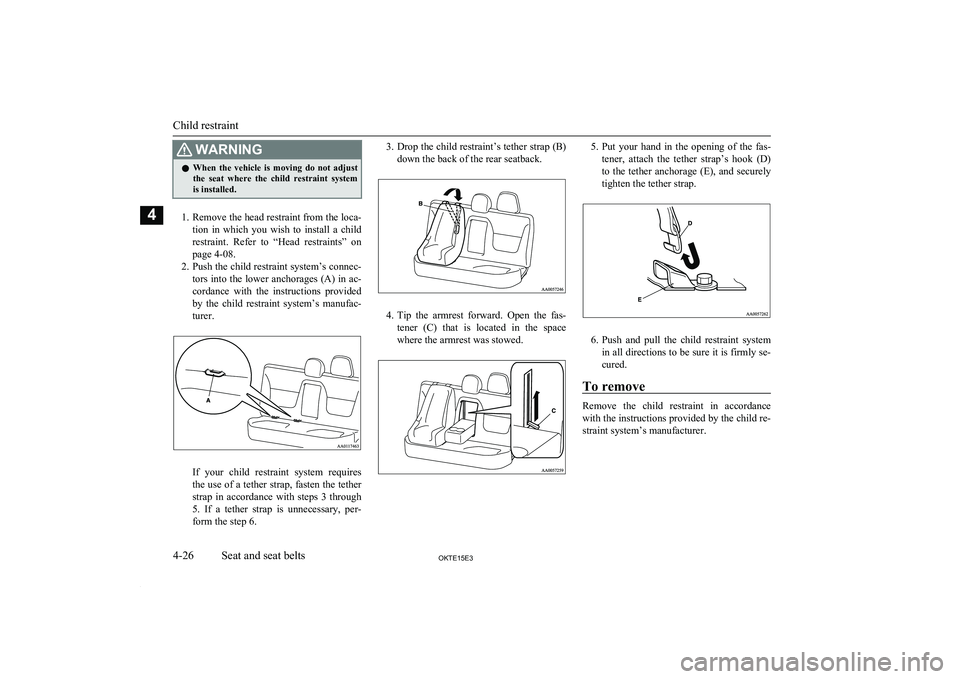
2. Push the child restraint system’s connec-
tors into the lower anchorages (A) in ac-
cordance with the instructions provided
by the child restraint system’s manufac-
turer.
If your child restraint system requires
the use of a tether strap, fasten the tether strap in accordance with steps 3 through
5. If a tether strap is unnecessary, per- form the step 6.
3. Drop the child restraint’s tether strap (B)
down the back of the rear seatback.
4. Tip the armrest forward. Open the fas-
tener (C) that is located in the space where the armrest was stowed.
5. Put your hand in the opening of the fas-
tener, attach the tether strap’s hook (D)
to the tether anchorage (E), and securely
tighten the tether strap.
6. Push and pull the child restraint system
in all directions to be sure it is firmly se- cured.
To remove
Remove the child restraint in accordance
with the instructions provided by the child re-
straint system’s manufacturer.
Child restraint
4-26OKTE15E3Seat and seat belts4
Page 73 of 418
Installing a child restraint sys-tem to a 3-point type seat belt (with emergency locking mech-anism)
E00408700822
Installation:
1. Put a child restraint system on the seat in
which you wish to install it.
If the head restraint is adjustable, re- move the head restraint from the seat.
Refer to “Head restraints” on page 4-08
2. Fasten the seat belt to secure the child
restraint system.
Make sure you hear a “click” when you insert the latch plate in the buckle.
3. Remove all slack by using the locking
clip.
4. Push and pull the child restraint in all di-
rections to be sure it is secure.
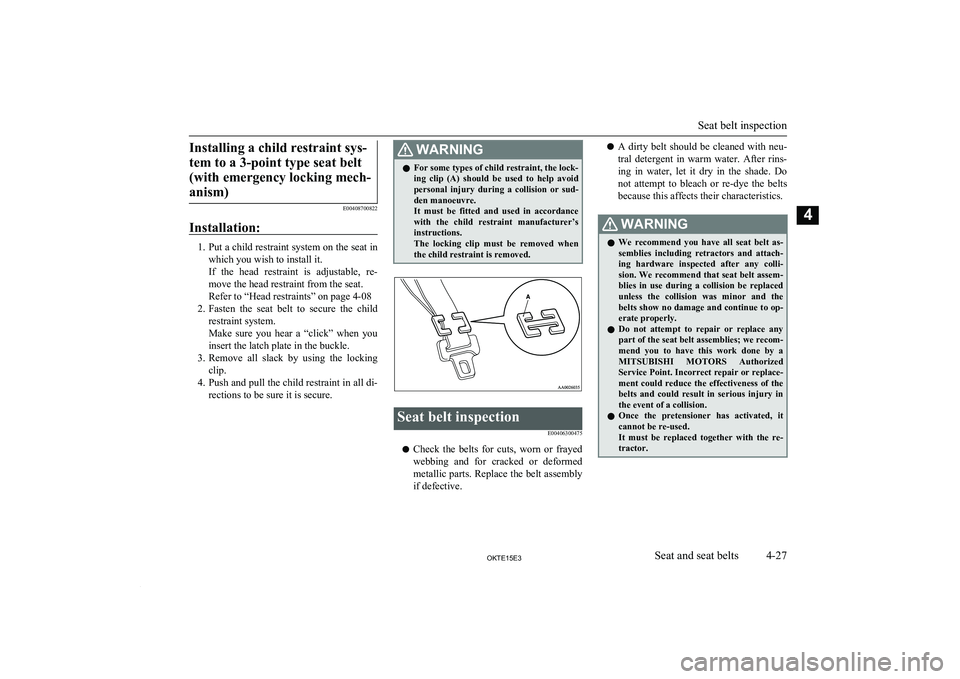
WARNINGl For some types of child restraint, the lock-
ing clip (A) should be used to help avoid personal injury during a collision or sud-den manoeuvre.
It must be fitted and used in accordance with the child restraint manufacturer’s
instructions.
The locking clip must be removed when the child restraint is removed.Seat belt inspection
E00406300475
lCheck the belts for cuts, worn or frayed
webbing and for cracked or deformed metallic parts. Replace the belt assembly
if defective.
l A dirty belt should be cleaned with neu-
tral detergent in warm water. After rins-
ing in water, let it dry in the shade. Do not attempt to bleach or re-dye the belts
because this affects their characteristics.WARNINGl We recommend you have all seat belt as-
semblies including retractors and attach-
ing hardware inspected after any colli-
sion. We recommend that seat belt assem- blies in use during a collision be replaced unless the collision was minor and the
belts show no damage and continue to op-
erate properly.
l Do not attempt to repair or replace any
part of the seat belt assemblies; we recom-
mend you to have this work done by a MITSUBISHI MOTORS Authorized
Service Point. Incorrect repair or replace- ment could reduce the effectiveness of the
belts and could result in serious injury in
the event of a collision.
l Once the pretensioner has activated, it
cannot be re-used.
It must be replaced together with the re- tractor.
Seat belt inspection
4-27OKTE15E3Seat and seat belts4
Page 135 of 418
Drinking coffee or taking a cold shower willnot make you sober.
Similarly, prescription and nonprescription
drugs affect your alertness, perception and re- action time. Consult with your doctor or
pharmacist before driving while under the in- fluence of any of these medications.WARNINGl NEVER DRINK AND DRIVE.
Your perceptions are less accurate, your
reflexes are slower and your judgment is
impaired.Safe driving techniques
E00600300491
Driving safety and protection against injury
cannot be fully ensured. However, we recom- mend that you pay extra attention to the fol-
lowing:
Seat belts
Before starting the vehicle, make sure that you and your passengers have fastened your
seat belts.
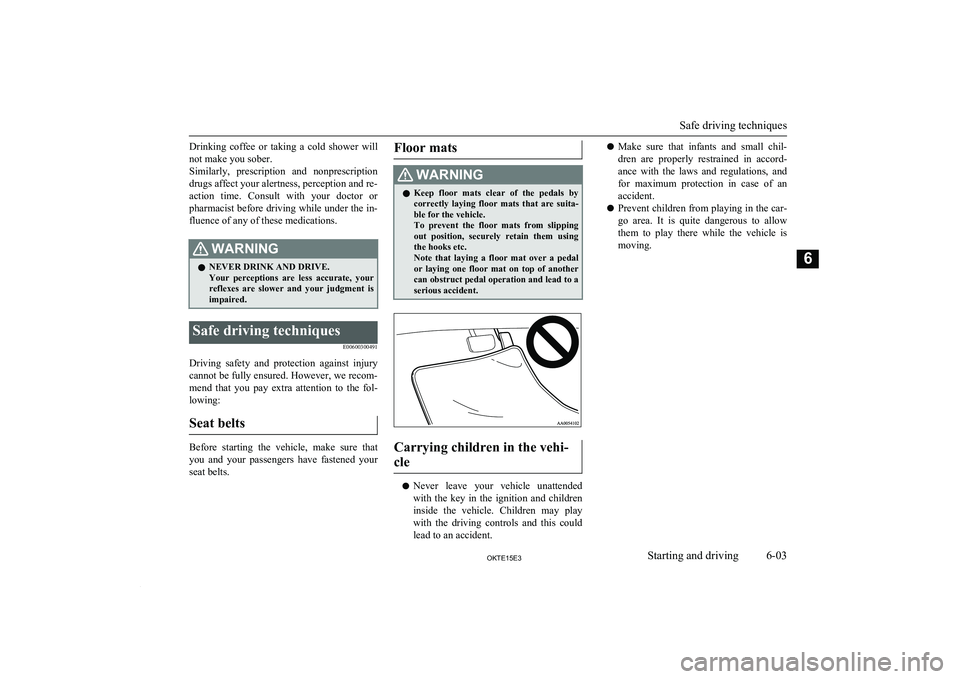
Floor matsWARNINGl Keep floor mats clear of the pedals by
correctly laying floor mats that are suita-ble for the vehicle.
To prevent the floor mats from slipping
out position, securely retain them using the hooks etc.
Note that laying a floor mat over a pedal or laying one floor mat on top of another
can obstruct pedal operation and lead to a
serious accident.
Carrying children in the vehi-
cle
l Never leave your vehicle unattended
with the key in the ignition and children
inside the vehicle. Children may play with the driving controls and this could
lead to an accident.
l Make sure that infants and small chil-
dren are properly restrained in accord-
ance with the laws and regulations, and for maximum protection in case of an
accident.
l Prevent children from playing in the car-
go area. It is quite dangerous to allow
them to play there while the vehicle is
moving.
Safe driving techniques
6-03OKTE15E3Starting and driving6
Page 141 of 418
Where you park
Your front bumper can be damaged if you
scrape it over kerbs or parking stop blocks.
Be careful when travelling up or down steep slopes where your bumper can scrape theroad.
WARNINGl Do not park your vehicle in areas where
combustible materials such as dry grass
or leaves can come in contact with a hot
exhaust, since a fire could occur.
When leaving the vehicle
Always remove the key from the ignition
switch and lock all doors when leaving the vehicle unattended.
Always try to park your vehicle in a well lit
area.
Steering wheel height
adjustment E00600700219
To adjust the steering wheel height, releasethe tilt lock lever while holding the steering
wheel by hand, and raise or lower the steer- ing wheel to the desired height.
After adjustment, securely lock the lever by
pulling it upward.
1- Locked
2- Release
WARNINGl After adjusting to the desired height,
check to be sure that the lever is locked.
l Do not attempt to adjust the steering
wheel while you are driving the vehicle.
l When releasing the tilt lock lever, move it
to the release position (2) and hold the
steering wheel by hand to prevent it fall- ing to the lowest position.Inside rear-view mirror
E00600800106
Adjust the rear-view mirror only after mak-
ing any seat adjustments so you have a clear
view to the rear of the vehicle.
WARNINGl Do not attempt to adjust the rear-view
mirror while driving. This can be danger-
ous.
Always adjust the mirror before driving.
Adjust the rear-view mirror to maximize the
view through the rear window.
To adjust the vertical mirror position
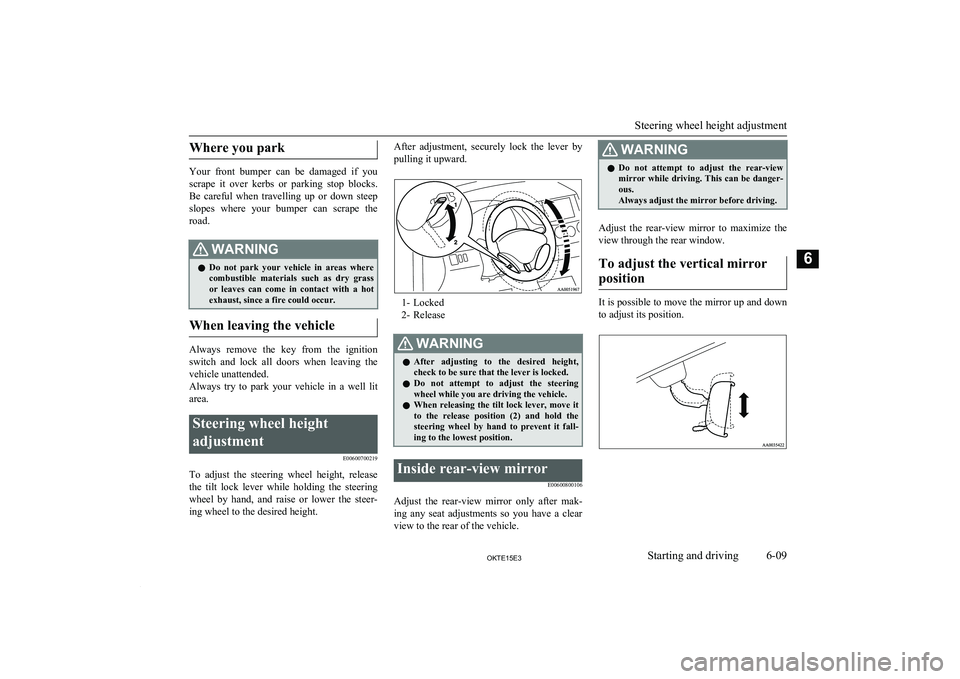
It is possible to move the mirror up and down
to adjust its position.
Steering wheel height adjustment
6-09OKTE15E3Starting and driving6
Page 153 of 418
CAUTIONlNever shift into the “P” (PARK) or “R”
(REVERSE) position while the vehicle is in motion to avoid transmission damage.
“N” NEUTRAL
At this position the transmission is disengag-
ed. It is the same as the neutral position on aM/T , and should only be used when the vehi-
cle is stationary for an extended length of time during driving, such as in a traffic jam.
WARNINGl Never move the selector lever to the “N”
(NEUTRAL) position while driving. A se-rious accident could occur since you could
accidentally move the lever into the “P” (PARK) or “R” (REVERSE) position or
you will lose engine braking.
l On a gradient the engine should be star-
ted in the “P” (PARK) position, not in the “N” (NEUTRAL) position.
l Always keep your right foot on the brake
pedal when shifting into or out of “N” (NEUTRAL), to minimize the risk of loss
of control.
“D” DRIVE
This position is for normal driving. The
transmission automatically selects a suitable
gear ratio for your speed and acceleration.
CAUTIONl Never shift into the “D” (DRIVE) position
from the “R” (REVERSE) position while the
vehicle is in motion to avoid transmission damage.Sports mode
E00603901323
Whether the vehicle is stationary or in mo-
tion, sports mode is selected by gently push-ing the selector lever from the “D” (DRIVE)
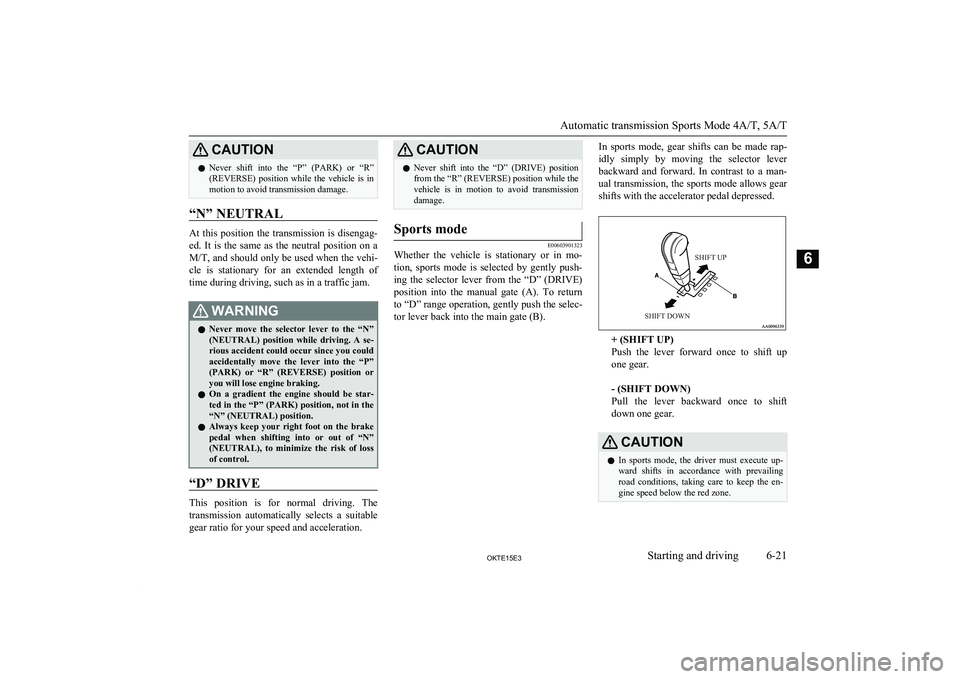
position into the manual gate (A). To return to “D” range operation, gently push the selec-tor lever back into the main gate (B).
In sports mode, gear shifts can be made rap-
idly simply by moving the selector lever backward and forward. In contrast to a man- ual transmission, the sports mode allows gear shifts with the accelerator pedal depressed.SHIFT UPSHIFT DOWN
+ (SHIFT UP)
Push the lever forward once to shift up
one gear.
- (SHIFT DOWN)
Pull the lever backward once to shift
down one gear.
CAUTIONl In sports mode, the driver must execute up-
ward shifts in accordance with prevailingroad conditions, taking care to keep the en-
gine speed below the red zone.
Automatic transmission Sports Mode 4A/T, 5A/T
6-21OKTE15E3Starting and driving6
Page 172 of 418
NOTElIt is recommended to start the vehicle with
parking brake partially, but not completely,applied by slightly pulling the parking brake
lever.
After the vehicle has become free, do not forget to release the parking brake.
l If it is necessary to drive in extremely mud-
dy conditions, the use of tyre chains is rec-
ommended. Because the extent of muddy conditions is difficult to judge and the vehi- cle could become bogged down very deeply,
operation should be at a low speed. If possi-
ble, get out of the vehicle and check the con- ditions ahead before proceeding.
l Driving over roads in coastal areas or roads
on which anti-skid preparations have been spread can cause rust on the vehicle; wash
the vehicle thoroughly as soon as possible
after such use.
Climbing sharp grades
Set the transfer shift lever to “4L” position
(easy select 4WD), “4LLc” position (super
select 4WD) to maximize the engine torque.
WARNINGl Go straight up. Do not try to traverse
across a steep slope.WARNINGl If you begin to lose traction, ease off the
accelerator pedal and gently turn the
steering wheel alternatively left and right to regain adequate traction again.NOTEl Choose as smooth a slope as possible with
few stones or other obstacles.
l Before attempting to drive up the slope,
walk up it to confirm that the vehicle canhandle the grade.
Descending sharp grades
Set the transfer shift lever to “4L” position
(easy select 4WD), “4LLc” position (super
select 4WD), use the engine brake (down- shifting) and descend slowly.
WARNINGl Avoid snaking down a sharp grade. De-
scend the grade as straight as possible.NOTEl When descending a sharp grade, if the
brakes are applied suddenly because of an
obstacle encountered, control of the vehicle
could be lost. Before descending the slope,
walk down it and confirm the path.NOTEl Before descending a grade, it is necessary to
choose the appropriate gear. Avoid changing
gears or depressing the clutch while de-
scending the grade.
l MITSUBISHI
MOTORS is not responsible
to the operator for any damage or injury caused or liability incurred by improper and
negligent operation of a vehicle. All techni- ques of vehicle operation described herein depend on the skill and experience of the op- erator and other participating parties and any
deviation from the recommended operation
instructions above is at their own risk.
Turning sharp corners
When turning a sharp corner in “4H” or “4L”
position (easy select 4WD), “4HLc” or “4LLc” position (super select 4WD) at low speed, a slight difference in steering may be
experienced similar to as if the brakes were applied. This is called tight corner braking and results from each of the 4 tyres being at a
different distance from the corner.
The phenomenon is peculiar to 4-wheel drive vehicles. If this occurs, either straighten the steering wheel, or change to rear-wheel drive.
4-wheel drive operation
6-40OKTE15E3Starting and driving6
Page 176 of 418
Brake system
The service brake is divided into two brake
circuits. And your vehicle is equipped with
power brakes. If one brake circuit fails, the
other is available to stop the vehicle. If you should lose the power assist for some reason, the brakes will still work. In these situations,
even if the brake pedal moves down to the
very end of its possible stroke or resists being
depressed, keep depressing the brake pedal down harder and further than usual; stop
driving as soon as possible and have the
brake system repaired.
WARNINGl Do not turn off the engine while your ve-
hicle is in motion. If you turn off the en-
gine while driving, the power assistance for the braking system will stop working
and your brakes will not work effectively.
l If the power assist is lost or if either brake
hydraulic system stops working properly, have your vehicle checked immediately.
Warning lamp
The brake warning lamp illuminates to indi-
cate a fault in the braking system. Refer to “Brake warning lamp” on page 5-08.
When brakes are wet
Check the brake system while driving at a
low speed immediately after starting, espe- cially when the brakes are wet, to confirmthey work normally.
A film of water can be formed on the brake
discs or brake drums and prevent normal braking after driving in heavy rain or through
large puddles, or after the vehicle is washed.
If this occurs, dry the brakes out by driving
slowly while lightly depressing the brake pedal.
When driving downhill
It is important to take advantage of the en- gine braking by shifting to a lower shift posi-tion while driving on steep downhill roads in
order to prevent the brakes from overheating.
WARNINGl Do not leave any objects near the brake
pedal or let a floor mat slide under it; do-
ing so could prevent the full pedal stroke that would be necessary in an emergency.Make sure that the pedal can be operatedfreely at all times. Make sure the floor
mat is securely held in place.Brake pads and linings
l Avoid hard braking situations.
New brakes need to be broken-in by
moderate use for the first 200 km (124 miles).
l The disc brakes are provided with a
warning device which emits a shrieking
metallic sound while braking if the brake pads have reached their wear limit.
If you hear this sound, have the brake pads replaced.
WARNINGl Driving with worn brake pads will make
it harder to stop, and can cause an acci-
dent.Brake assist system*
E00627000392
The brake assist system is a device assistingdrivers who cannot depress the brake pedalfirmly when it is necessary to do so (such as
in emergency stop situations) and provides
greater braking force.
If the brake pedal is depressed suddenly, the brakes will be applied with more force thanusual.
Brake assist system*
6-44OKTE15E3Starting and driving6
Page 191 of 418
Ventilators........................................................................................... 7-02
Heater/Manual air conditioning*........................................................ 7-04 Automatic air conditioning*............................................................... 7-09
Important operation tips for the air conditioning................................ 7-14 Air purifier*........................................................................................ 7-14LW/MW/FM electronic tuning radio with CD player (au- dio system type 1) *........................................................................ 7-15
To play tracks from USB device (audio system type 1) *.................. 7-30
To play tracks from a Bluetooth ®
device (audio system type 1) *..... 7-40
To use the external audio input function (audio system type 1) *...... 7-43
Steering wheel remote control switch (audio system type 1) *.......... 7-44
Error codes (audio system type 1).......................................................7-47 Audio system anti-theft feature (audio system type 1)....................... 7-49
Handling of compact discs (audio system type 1).............................. 7-49
LW/MW/FM radio/CD player (audio system type 2)*.......................7-51
Handling of Discs (audio system type 2)............................................ 7-55
Audio Files (MP3/WMA/AAC) (audio system type 2)...................... 7-56
Important Points on Safety for the Customer (audio system type 2)............................................................................................. 7-60
Operation Keys (audio system type 2)................................................ 7-60
Listen to Radio (audio system type 2)................................................ 7-63
Listen to DAB (audio system type 2) *...............................................7-64
Listen to Traffic Messages (audio system type 2).............................. 7-66
Listen to CDs (audio system type 2)................................................... 7-66
Listen to MP3s (audio system type 2).................................................7-67
Listen to an iPod (audio system type 2).............................................. 7-68
Listen to Audio Files on a USB Device (audio system type 2).......... 7-70
Listen to Bluetooth Audio (audio system type 2) *............................ 7-72
Use AUX (audio system type 2) *...................................................... 7-74Display Indicator (audio system type 2)............................................. 7-75
Audio Quality and Volume Balance Adjustment (audio system type 2)................................................................................. 7-75
System Settings (audio system type 2)............................................... 7-76 Troubleshooting (audio system type 2)...............................................7-80
Antenna............................................................................................... 7-83 Link System*...................................................................................... 7-84
Bluetooth ®
2.0 interface......................................................................7-84
USB input terminal*......................................................................... 7-103
Sun visors.......................................................................................... 7-106 Vanity mirror*...................................................................................7-107Ashtray.............................................................................................. 7-107Cigarette lighter.................................................................................7-108
Accessory socket*............................................................................. 7-109
Digital clock*.................................................................................... 7-109
Interior lamps.................................................................................... 7-110
Storage spaces................................................................................... 7-112
Cup holder*....................................................................................... 7-115
Bottle holder......................................................................................7-115
Convenient hook............................................................................... 7-116
Coat hook*........................................................................................ 7-116
First-aid kit and warning triangle securing bands*........................... 7-117For pleasant driving
OKTE15E37
Page 246 of 418
lDo not insert irregularly-shaped discs
(for example, heartshaped), as these may
result in malfunction. Additionally, discs that have transparent portions may notbe played back.
l Discs that have not been finalized cannot
be played back.
l Even if recorded using the correct for-
mat on a recorder or computer, applica- tion software settings and environments;
disc peculiarities, damage, or marking;
or dirt or condensation on the lens inside the product may render the disc unplaya-
ble.
l Depending on the disc, some functions
may not be used, or the disc may not play back.
l Do not use discs with cracks or warps.
l If the disc has stickers affixed, remains
from removed stickers, or affixed adhe- sive, then do not use the disc.
l Discs that have decorative labels or
stickers may not be used.
Nonstandard CDs
This product will play back audio CDs, how-
ever please be aware of the following points
regarding CD standards.
l Ensure that you use discs with
on the
label surface.
l Playback of other than standard CDs is
not guaranteed. Even if the audio can be played back, the audio quality cannot be
guaranteed.
l When playing back other than standard
CDs, the following may occur. • There may be noise during playback.
• There may be jumping in the audio.
• The disc may not be recognized.
• The first track may not be played
back.
• It may take longer than usual until
start of playback of tracks.
• Playback may start from within the
track.
• Some parts may not be played back.
• Tracks may freeze during playback.
• Tracks may be displayed erroneously.Audio Files (MP3/WMA/
AAC) (audio system type 2) E00736101036
This product can play back MP3/WMA/AAC
format audio files recorded on CD-ROM,
CD-R/RW, and USB devices.
There are limitations on the files and media that can be used, therefore read the following
prior to recording MP3/WMA/AAC format audio files on discs or USB devices.
Additionally, ensure you read the user man-
uals for your CD-R/RW drive and the writing
software, and ensure these are used correctly.
If the MP3/WMA/AAC format audio files in-
cludes title information or other data, then this can be displayed.CAUTIONl CD-ROM
and CD-R/RW media can only
play back MP3 format audio files.
l Actions such as copying audio CDs or files
and either distributing these to others for free or for charge, or uploading files via the Internet or other means to servers is an in- fringement of the law.
l Do not append the file extensions “.mp3”,
“.wma”, or “.m4a”, to other than
MP3/WMA/AAC format files. Playing back
discs with these types of files recorded upon them may cause the files to be incorrectly
identified for playback, which may lead to
loud noise, resulting in speaker damage or
accident.NOTEl Depending on the condition of the disc re-
corder or recording software used, correct
playback may not be possible. In these ca- ses, refer to the user manual for your product or software.
Audio Files (MP3/WMA/AAC) (audio system type 2)
7-56OKTE15E3For pleasant driving7
Page 273 of 418
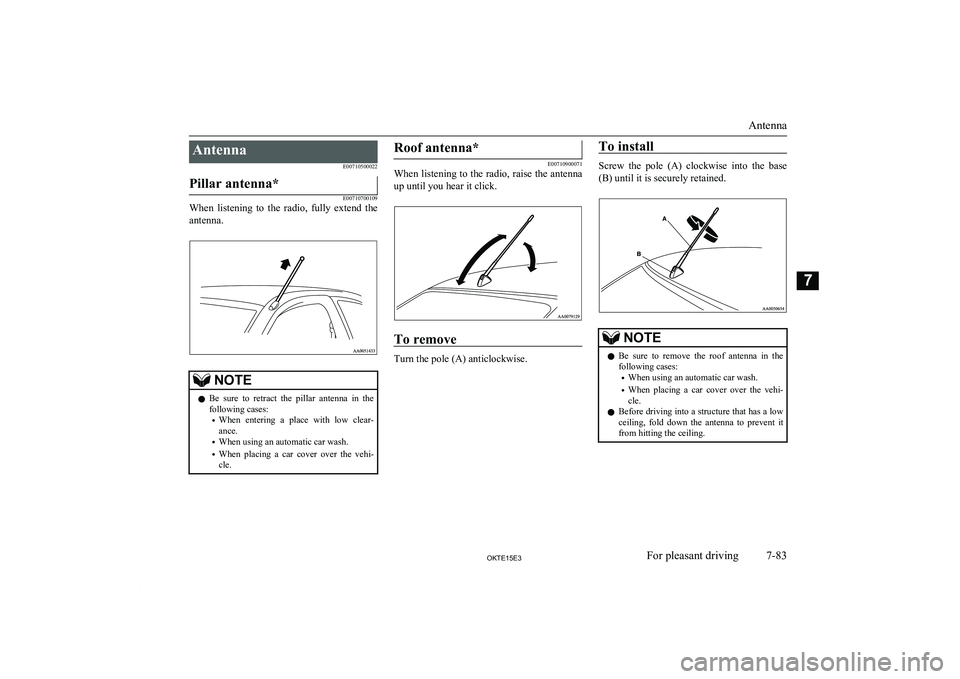
AntennaE00710500022Pillar antenna*
E00710700109
When listening to the radio, fully extend theantenna.
NOTEl Be sure to retract the pillar antenna in the
following cases:
• When entering a place with low clear-
ance.
• When using an automatic car wash.
• When placing a car cover over the vehi-
cle.Roof antenna*
E00710900071
When listening to the radio, raise the antenna
up until you hear it click.
To remove
Turn the pole (A) anticlockwise.
To install
Screw the pole (A) clockwise into the base (B) until it is securely retained.
NOTEl Be sure to remove the roof antenna in the
following cases:
• When using an automatic car wash.
• When placing a car cover over the vehi-
cle.
l Before driving into a structure that has a low
ceiling, fold down the antenna to prevent it
from hitting the ceiling.
Antenna
7-83OKTE15E3For pleasant driving7