ignition MITSUBISHI L200 2015 (in English) Workshop Manual
[x] Cancel search | Manufacturer: MITSUBISHI, Model Year: 2015, Model line: L200, Model: MITSUBISHI L200 2015Pages: 418, PDF Size: 25.8 MB
Page 205 of 418
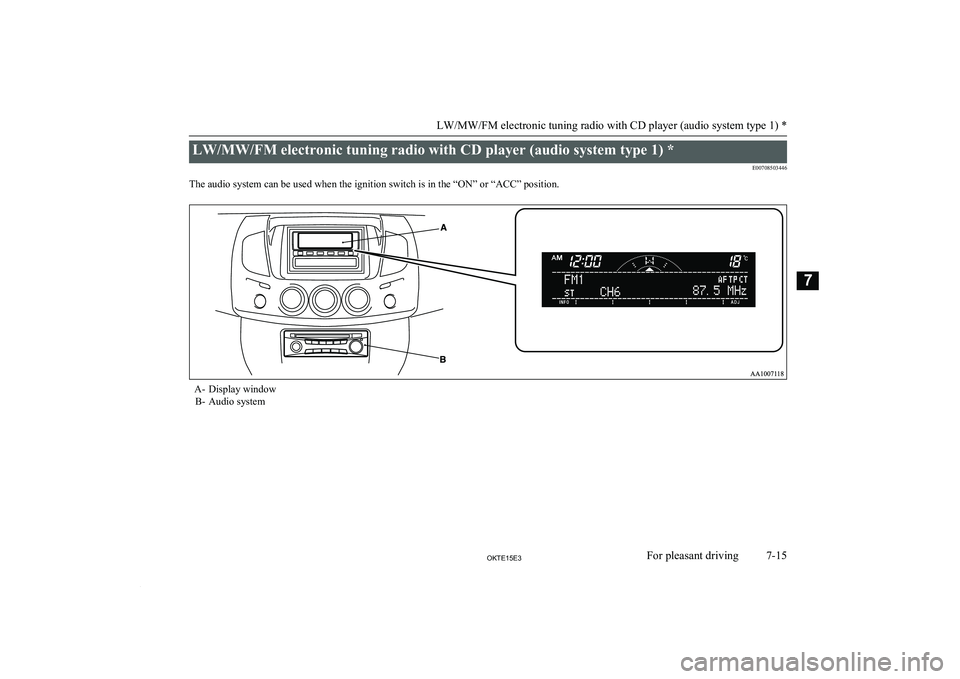
LW/MW/FM electronic tuning radio with CD player (audio system type 1) *E00708503446
The audio system can be used when the ignition switch is in the “ON” or “ACC” position.A- Display window B- Audio system
LW/MW/FM electronic tuning radio with CD player (audio system type 1) *
7-15OKTE15E3For pleasant driving7
Page 206 of 418
NOTElTo listen to the audio system while the engine is stopped, turn the ignition key to the “ACC” position.
l If a cellular phone is used inside the vehicle, it may create noise from the audio equipment. This does not mean that anything is wrong with your audio
equipment. In such a case, use the cellular phone at a place as far away as possible from the audio equipment.
l If foreign objects or water get into the audio equipment, or if smoke or a strange odour comes from it, immediately turn off the audio system. We recom-
mend you to have it checked. Never try to repair it by yourself. Avoid continuous usage without inspection by a qualified person.
l The audio system’s control knob can be removed to deter thieves. For details, refer to “Audio system anti-theft feature (audio system type 1)” on page 7-49.
l The audio amplifier (if so equipped) is located under the front right seat.
Do not subject the amplifier to a strong impact.
It could damage the amplifier or malfunctioning could result.
LW/MW/FM electronic tuning radio with CD player (audio system type 1) *
7-16OKTE15E3For pleasant driving7
Page 214 of 418
TP (Traffic information Pro-gram) search function
E00721800168
The traffic information program standby
function is turned on (with the TP indicator
(13) shown on the display) and after about 45
seconds since the RDS indicator (9) turns off due to weak signal or the tuning station is
changed over from a TP station to a station
which does not broadcast traffic information,
and seeks out a TP station in all frequencies
automatically.
The TP search function can be turned ON and OFF.
Refer to “Function setup mode” on page
7-24.
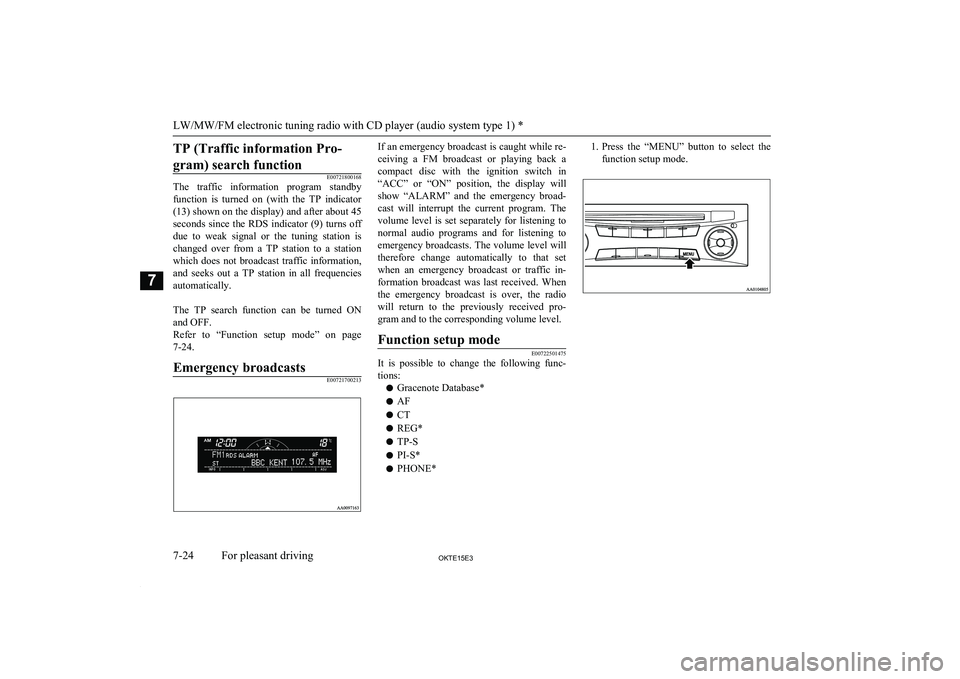
Emergency broadcastsE00721700213
If an emergency broadcast is caught while re-
ceiving a FM broadcast or playing back a
compact disc with the ignition switch in “ACC” or “ON” position, the display willshow “ALARM” and the emergency broad-
cast will interrupt the current program. The volume level is set separately for listening to
normal audio programs and for listening to emergency broadcasts. The volume level will
therefore change automatically to that set when an emergency broadcast or traffic in-
formation broadcast was last received. When the emergency broadcast is over, the radio
will return to the previously received pro-
gram and to the corresponding volume level.Function setup mode
E00722501475
It is possible to change the following func- tions:
l Gracenote Database*
l AF
l CT
l REG*
l TP-S
l PI-S*
l PHONE*
1.
Press the “MENU” button to select the
function setup mode.
LW/MW/FM electronic tuning radio with CD player (audio system type 1) *
7-24OKTE15E3For pleasant driving7
Page 234 of 418
To activate the external audioinput mode
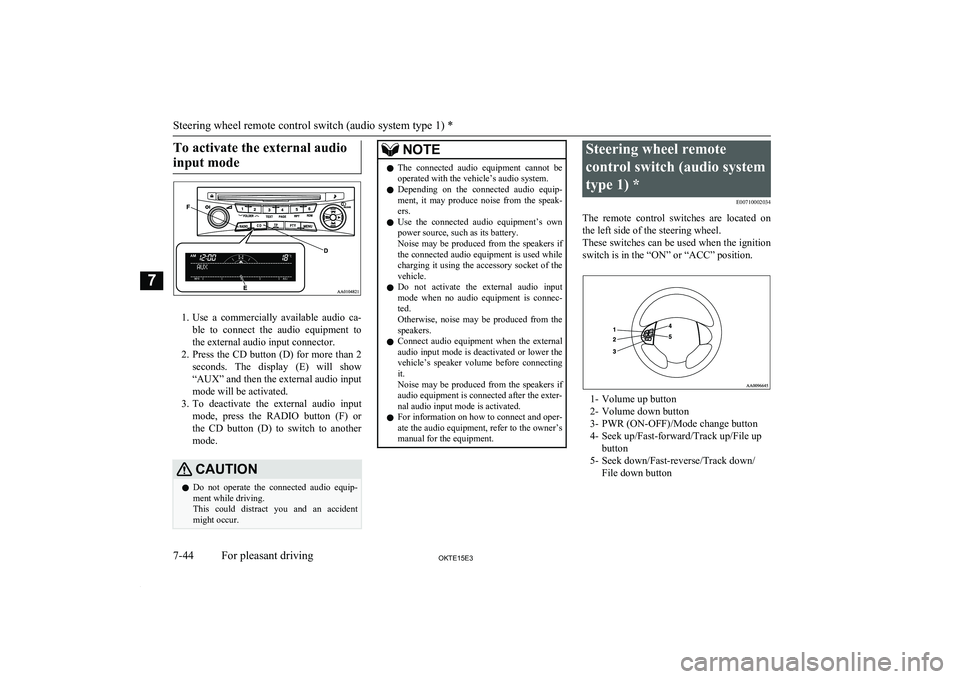
1. Use a commercially available audio ca-
ble to connect the audio equipment to
the external audio input connector.
2. Press the CD button (D) for more than 2
seconds. The display (E) will show
“AUX” and then the external audio input
mode will be activated.
3. To deactivate the external audio input
mode, press the RADIO button (F) orthe CD button (D) to switch to another
mode.
CAUTIONl Do not operate the connected audio equip-
ment while driving.
This could distract you and an accident might occur.NOTEl The connected audio equipment cannot be
operated with the vehicle’s audio system.
l Depending on the connected audio equip-
ment, it may produce noise from the speak- ers.
l Use the connected audio equipment’s own
power source, such as its battery.
Noise may be produced from the speakers if the connected audio equipment is used while
charging it using the accessory socket of the vehicle.
l Do not activate the external audio input
mode when no audio equipment is connec-
ted.
Otherwise, noise may be produced from the
speakers.
l Connect audio equipment when the external
audio input mode is deactivated or lower the
vehicle’s speaker volume before connecting it.
Noise may be produced from the speakers if
audio equipment is connected after the exter-
nal audio input mode is activated.
l For information on how to connect and oper-
ate the audio equipment, refer to the owner’s manual for the equipment.Steering wheel remote
control switch (audio system type 1) * E00710002034
The remote control switches are located on the left side of the steering wheel.
These switches can be used when the ignition
switch is in the “ON” or “ACC” position.
1- Volume up button
2- Volume down button
3- PWR (ON-OFF)/Mode change button
4- Seek up/Fast-forward/Track up/File up button
5- Seek down/Fast-reverse/Track down/ File down button
Steering wheel remote control switch (audio system type 1) *
7-44OKTE15E3For pleasant driving7
Page 239 of 418
Audio system anti-theftfeature (audio system type
1) E00710201387
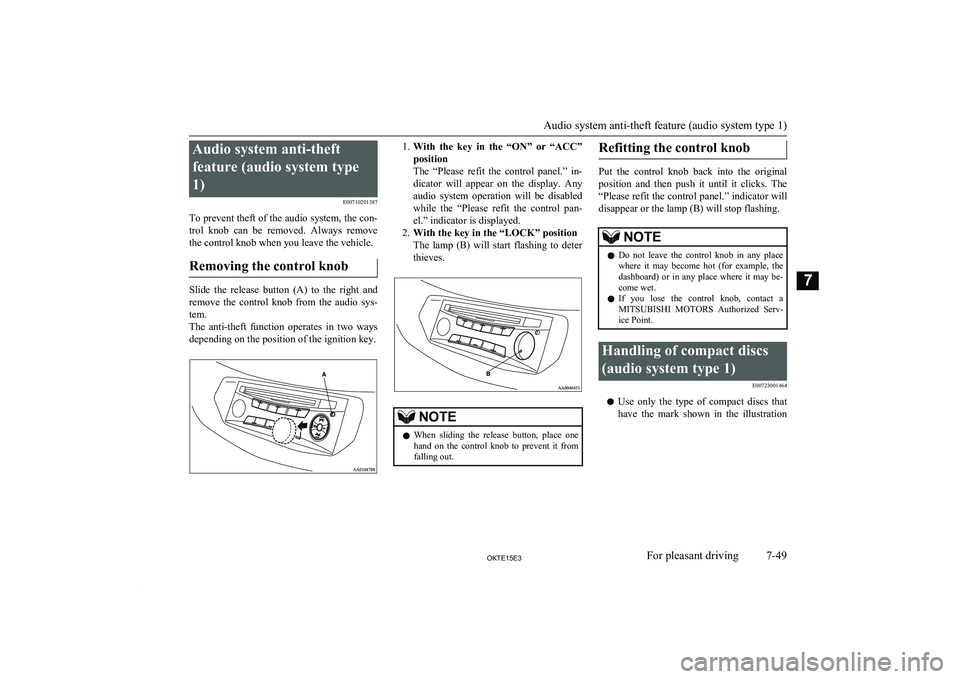
To prevent theft of the audio system, the con- trol knob can be removed. Always remove the control knob when you leave the vehicle.
Removing the control knob
Slide the release button (A) to the right and remove the control knob from the audio sys-
tem.
The anti-theft function operates in two ways
depending on the position of the ignition key.
1. With the key in the “ON” or “ACC”
position
The “Please refit the control panel.” in-
dicator will appear on the display. Any audio system operation will be disabledwhile the “Please refit the control pan-
el.” indicator is displayed.
2. With the key in the “LOCK” position
The lamp (B) will start flashing to deter thieves.NOTEl When sliding the release button, place one
hand on the control knob to prevent it fromfalling out.Refitting the control knob
Put the control knob back into the original
position and then push it until it clicks. The “Please refit the control panel.” indicator will
disappear or the lamp (B) will stop flashing.
NOTEl Do not leave the control knob in any place
where it may become hot (for example, the
dashboard) or in any place where it may be- come wet.
l If you lose the control knob, contact a
MITSUBISHI MOTORS Authorized Serv-
ice Point.Handling of compact discs
(audio system type 1) E00723001464
lUse only the type of compact discs that
have the mark shown in the illustration
Audio system anti-theft feature (audio system type 1)
7-49OKTE15E3For pleasant driving7
Page 241 of 418
lDo not use a ball point pen, felt pen,
pencil, etc. to write on the label surface
of the disc.
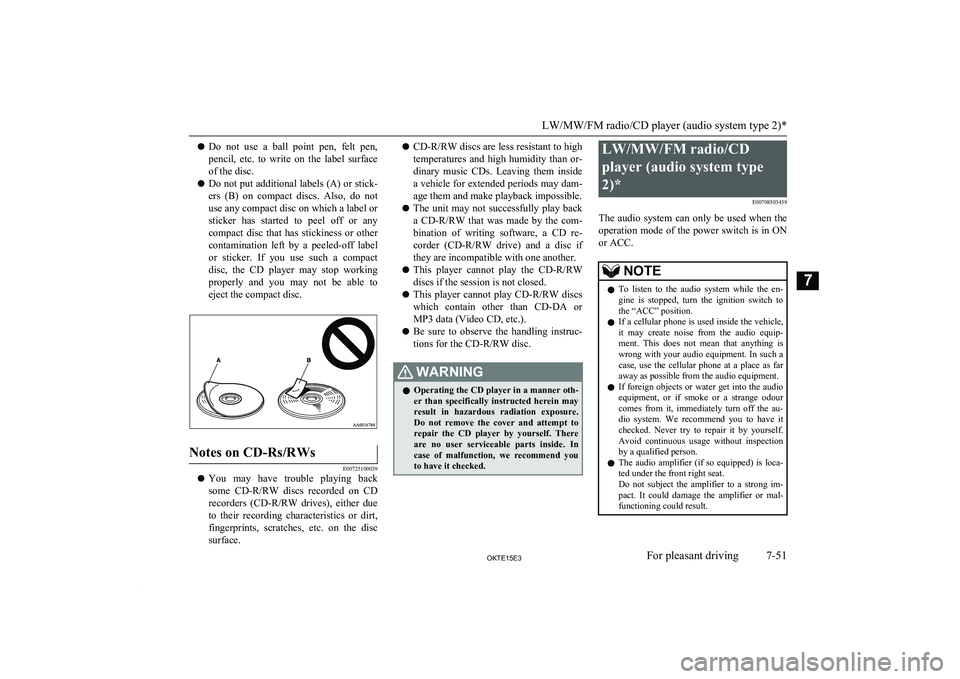
l Do not put additional labels (A) or stick-
ers (B) on compact discs. Also, do not
use any compact disc on which a label or
sticker has started to peel off or any compact disc that has stickiness or othercontamination left by a peeled-off label or sticker. If you use such a compact
disc, the CD player may stop working properly and you may not be able to eject the compact disc.Notes on CD-Rs/RWs
E00725100039
l You may have trouble playing back
some CD-R/RW discs recorded on CD
recorders ( CD-R/RW drives), either due
to their recording characteristics or dirt, fingerprints, scratches, etc. on the disc
surface.
l CD-R/RW
discs are less resistant to high
temperatures and high humidity than or- dinary music CDs. Leaving them inside
a vehicle for extended periods may dam- age them and make playback impossible.
l The unit may not successfully play back
a CD-R/RW that was made by the com-
bination of writing software, a CD re-
corder ( CD-R/RW drive) and a disc if
they are incompatible with one another.
l This player cannot play the
CD-R/RW
discs if the session is not closed.
l This player cannot play
CD-R/RW discs
which contain other than CD-DA or
MP3 data (Video CD, etc.).
l Be sure to observe the handling instruc-
tions for the CD-R/RW disc.WARNINGl Operating the CD player in a manner oth-
er than specifically instructed herein mayresult in hazardous radiation exposure.
Do not remove the cover and attempt to repair the CD player by yourself. There
are no user serviceable parts inside. In case of malfunction, we recommend you
to have it checked.LW/MW/FM radio/CD
player (audio system type
2)* E00708503459
The audio system can only be used when the operation mode of the power switch is in ON
or ACC.NOTEl To listen to the audio system while the en-
gine is stopped, turn the ignition switch to
the “ACC” position.
l If a cellular phone is used inside the vehicle,
it may create noise from the audio equip-
ment. This does not mean that anything is wrong with your audio equipment. In such acase, use the cellular phone at a place as far
away as possible from the audio equipment.
l If foreign objects or water get into the audio
equipment, or if smoke or a strange odour
comes from it, immediately turn off the au-
dio system. We recommend you to have it checked. Never try to repair it by yourself.
Avoid continuous usage without inspection by a qualified person.
l The audio amplifier (if so equipped) is loca-
ted under the front right seat.
Do not subject the amplifier to a strong im-
pact. It could damage the amplifier or mal- functioning could result.
LW/MW/FM radio/CD player (audio system type 2)*
7-51OKTE15E3For pleasant driving7
Page 260 of 418
Shuffle Playback (RDM)
Press the 2RDM key.
Play tracks in the category currently being
played in a random order.
NOTEl Pressing again will cancel.
Album Shuffle Playback
Hold down the 2RDM key.
Play back the album in a random order
(tracks in any order on the album).
NOTEl Pressing again will cancel.
Search Tracks
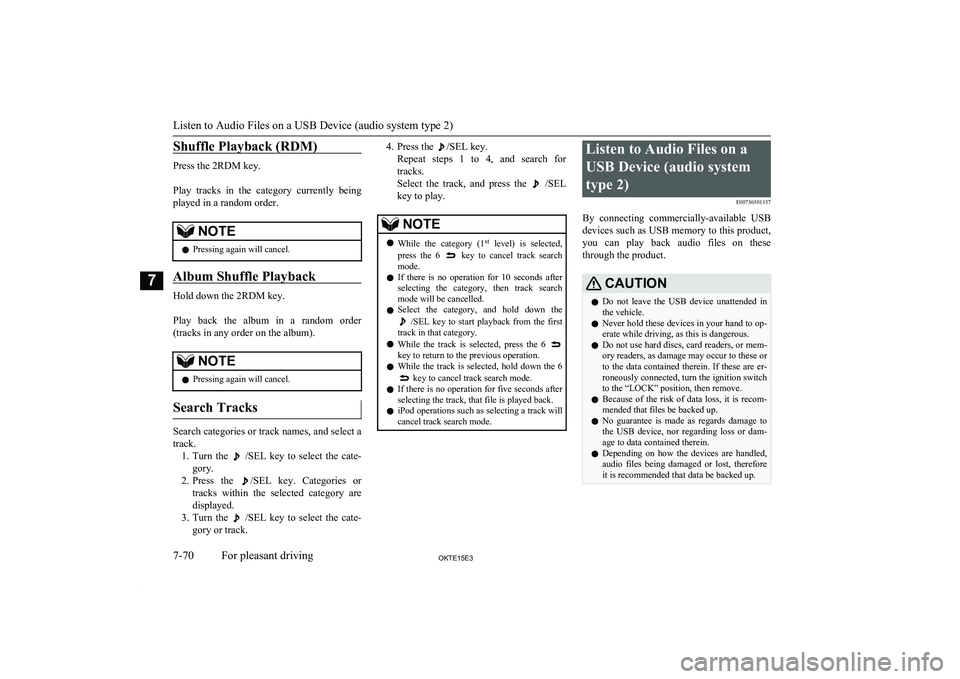
Search categories or track names, and select a
track. 1. Turn the
/SEL key to select the cate-
gory.
2. Press the
/SEL key. Categories or
tracks within the selected category are displayed.
3. Turn the
/SEL key to select the cate-
gory or track.
4. Press the /SEL key.
Repeat steps 1 to 4, and search for tracks.
Select the track, and press the
/SEL
key to play.
NOTEl While the category (1 st
level) is selected,
press the 6 key to cancel track search
mode.
l If there is no operation for 10 seconds after
selecting the category, then track search
mode will be cancelled.
l Select the category, and hold down the
/SEL key to start playback from the first
track in that category.
l While the track is selected, press the 6
key to return to the previous operation.
l While the track is selected, hold down the 6
key to cancel track search mode.
l If there is no operation for five seconds after
selecting the track, that file is played back.
l iPod operations such as selecting a track will
cancel track search mode.
Listen to Audio Files on a
USB Device (audio systemtype 2) E00736501157
By connecting commercially-available USB
devices such as USB memory to this product,
you can play back audio files on these through the product.CAUTIONl Do not leave the USB device unattended in
the vehicle.
l Never hold these devices in your hand to op-
erate while driving, as this is dangerous.
l Do not use hard discs, card readers, or mem-
ory readers, as damage may occur to these or
to the data contained therein. If these are er- roneously connected, turn the ignition switchto the “LOCK” position, then remove.
l Because of the risk of data loss, it is recom-
mended that files be backed up.
l No guarantee is made as regards damage to
the USB device, nor regarding loss or dam- age to data contained therein.
l Depending on how the devices are handled,
audio files being damaged or lost, therefore it is recommended that data be backed up.
Listen to Audio Files on a USB Device (audio system type 2)
7-70OKTE15E3For pleasant driving7
Page 274 of 418
Link System*E00764501309
The Link System takes overall control of the devices connected via the USB input terminal
or the Bluetooth ®
2.0 interface allowing the
connected devices to be operated by using the
switches in the vehicle or voice commands.
See the following section for details on how
to operate.
Refer to “Bluetooth® 2.0 interface” on page
7-84.
Refer to “USB input terminal” on page 7-103.
Vehicles equipped with the au-
dio system type 1
Refer to “To play tracks from USB device” on page 7-30.
Refer to “To play tracks from a Bluetooth ®
device” on page 7-40.
Refer to “To use the external audio input function” on page 7-43.
Vehicles equipped with the au- dio system type 2
Refer to “Listen to Audio Files on a USB De-
vice (audio system type 2)” on page 7-70.
Refer to “Listen to Bluetooth Audio” on page
7-72.
Refer to “Use AUX” on page 7-74.
Bluetooth ®
is a registered trademark of
BLUETOOTH SIG, INC.Link System End User Licence
Agreement
E00764600013
You have acquired a device that includes software licensed by MITSUBISHI
MOTORS CORPORATION from JOHN-
SON CONTROLS Inc (the automotive expe-
rience business unit), and their subsequent 3 rd
party suppliers. For a complete list of these 3 rd
party products and their end user licence
agreements, please go to the following web-
site.
http://www.jciblueconnect.com/faq/fulldi-
sclosure.pdf
Bluetooth ®
2.0 interface
E00726001986
The Bluetooth®
2.0 interface allows for mak-
ing/receiving hands-free calls in the vehicle
using a Bluetooth ®
compatible cellular phone
based on the wireless communication tech-
nology commonly known as Bluetooth ®
. It
also allows the user to play music, saved in a
Bluetooth ®
music player, from the vehicle’s
speakers.
The system is equipped with a voice recogni-
tion function, which allows you to make hands-free calls by simple switch operations
and voice command operations using a de-
fined voice tree.
The Bluetooth ®
2.0 interface can be used
when the ignition switch is in the “ON” or
“ACC” position.
Before you can use the Bluetooth ®
2.0 inter-
face, you must pair the Bluetooth ®
device
and Bluetooth ®
2.0 interface. Refer to “Con-
necting the Bluetooth® 2.0 interface and Bluetooth® device” on page 7-90.
Bluetooth ®
is a registered trademark of
BLUETOOTH SIG, INC.WARNINGl Although the Bluetooth ®
2.0 interface al-
lows you to make hands-free calls, if you choose to use the cellular phone while
driving, you must not allow yourself to be
distracted from the safe operation of your vehicle. Anything, including cellularphone usage, that distracts you from the safe operation of your vehicle increases
your risk of an accident.
Link System*
7-84OKTE15E3For pleasant driving7
Page 278 of 418
When the security function is turned on, it is
necessary to make a voice input of a 4-digit password in order to use all functions of the
Bluetooth ®
2.0 interface, except for recep-
tion.
Setting the password
Use the following procedure to turn on the security function by setting a password. 1. Press the SPEECH button.
2. Say “Setup”.
3. Say “Password.”
4. The voice guide will say “Password is
disabled. Would you like to enable it?”
Answer “Yes.”
Answer “No” to cancel the setting of the
password and return to the main menu.
5. The voice guide will say “Please say a 4-
digit password. Remember this pass-
word. It will be required to use this sys-
tem”.
Say a 4-digit number which you want to set as a password.
6. For confirmation purposes, the voice
guide will say “Password <4-digit pass-
word>. Is this correct?” Answer “Yes.”
Answer “No” to return to the password input in Step 5.
7. When the registration of the password is
completed, the voice guide will say “Password is enabled” and the systemwill return to the main menu.
NOTEl Password will be required to access the sys-
tem after the next ignition cycle.
l It is required for a little time after engine
stop that the entered password is actually re-corded in the system.
If the ignition switch is made to “ACC” or
“ON” or the engine is started immediately
after engine stop, there is a case when the entered password is not recorded in the sys-tem. At this time, please try to enter the
password again.
Entering the password
If a password has been set and the security
function is enabled, the voice guide will say “Hands-free system is locked. State the pass-word to continue” when the SPEECH button
is pressed to enter voice recognition mode.
Say the 4-digit password number to enter the
password.
If the entered password is wrong, the voice
guide will say “<4- digit password>, Incor-
rect password. Please try again”. Enter the correct password.
NOTEl You can re-enter the password as many
times as you want.NOTEl If you have forgotten your password, say
“Cancel” to quit the voice input mode andthen check with a MITSUBISHI MOTORS
Authorized Service Point.
Disabling the password
Use the following procedure to turn off the
security function by disabling the password.
NOTEl System must be unlocked to disable the
password.
1. Press the SPEECH button.
2. Say “Setup”.
3. Say “Password.”
4. The voice guide will say “Password is
enabled. Would you like to disable it?”
Answer “Yes.” Answer “No” to cancel
the disabling of the password and return to the main menu.
5. When the disabling of the password is
completed, the voice guide will say “Password is disabled” and the system
will return to the main menu.
Bluetooth ®
2.0 interface
7-88OKTE15E3For pleasant driving7
Page 286 of 418
6.The voice guide will say “Calling
tem will dial the telephone number.NOTEl When the confirmation function is on, the
system will ask if the name and location of the receiver are correct.
If the name is correct, answer “Yes.”
To change the name or location to call, an- swer “No.” The system will return to Step 3.
Redialing
You can redial the last number called, based
on the history of dialed calls in the paired cel-
lular phone.
Use the following procedure to redial. 1. Press the SPEECH button.
2. Say “Redial.”
SEND function
E00761300035
During a call, press the SPEECH button to
enter voice recognition mode, then say “
For example, if during a call you need to sim- ulate the press of a phone button as a re-
sponse to an automated system, press the SPEECH button and speak “1 2 3 4 pound SEND” and the 1234# will be sent on your
cellular phone.
Receiving calls
E00761600012
If an incoming phone call is received while
the ignition switch is in the “ACC” or “ON”
position, the audio system will be automati- cally turned on and switched to the incomingcall, even when the audio system was origi-
nally off.
The voice guide announcement for the in- coming call will be output from the front pas- senger’s seat speaker.
If the CD player or radio was playing when
the incoming call was received, the audio
system will mute the sound from the CD player or radio and output only the incomingcall.
To receive the call, press the PICK-UP but- ton on the steering wheel control switch.
When the call is over, the audio system will
return to its previous state.
MUTE function
E00760300041
At any time during a call, you can mute the
vehicle microphone.
Pressing the SPEECH button and then saying
“Mute” during a call will turn ON the MUTE
function and mute the microphone.
Saying “Mute off” in the same way will turn off the MUTE function and cancel the muteon the microphone.
Switching between hands-free
mode and private mode
E00761400036
The Bluetooth ®
2.0 interface can switch be-
tween Hands-free mode (Hands-free calls) and private mode (calls using cellular phone).If you press the SPEECH button and say “Transfer call” during a Hands-free call, you
can stop the Hands-free mode and talk in pri-
vate mode.
To return to Hands-free mode, press the SPEECH button again and say “Transfer
call”.
Phone book function
E00763700017
The Bluetooth ®
2.0 interface has 2 types of
unique phone books that are different from
the phone book stored in the cellular phone. They are the vehicle phone book and the mo-
bile phone book.
These phone books are used to register tele- phone numbers and to make calls to desired
numbers via the voice recognition function.
NOTEl Disconnecting the battery cable will not de-
lete information registered in the phone
book.
Bluetooth ®
2.0 interface
7-96OKTE15E3For pleasant driving7