wheel MITSUBISHI LANCER EVOLUTION 2007 Service Manual PDF
[x] Cancel search | Manufacturer: MITSUBISHI, Model Year: 2007, Model line: LANCER EVOLUTION, Model: MITSUBISHI LANCER EVOLUTION 2007Pages: 1449, PDF Size: 56.82 MB
Page 850 of 1449
MANUAL TRANSMISSION - On-vehicle Service22A-42
BLEEDING
1. Lift up the vehicle.
2. Set the MUT-IIto the 16-pin diagnosis connector.
Caution
Turn the ignition switch to the “LOCK”(OFF) position
before connecting or disconnecting the MUT-II.
3. Turn the ignition switch to the “ON” position.
4. Set the steering wheel in the straight-ahead position.
5. Perform the MUT-IIactuator test (Item No.02), and forcibly
drive the hydraulic unit.
NOTE
(1) The actuator test (Item No.01: Bleeding Mode) will
be performed for 5 minutes, after which it will be
cleared automatically. Drive can also be cleared during
forced driving using the clear key of the MUT-II.
(2) If the hydraulic unit function has been stopped by
fail-safe, the hydraulic unit cannot be forcibly driven.
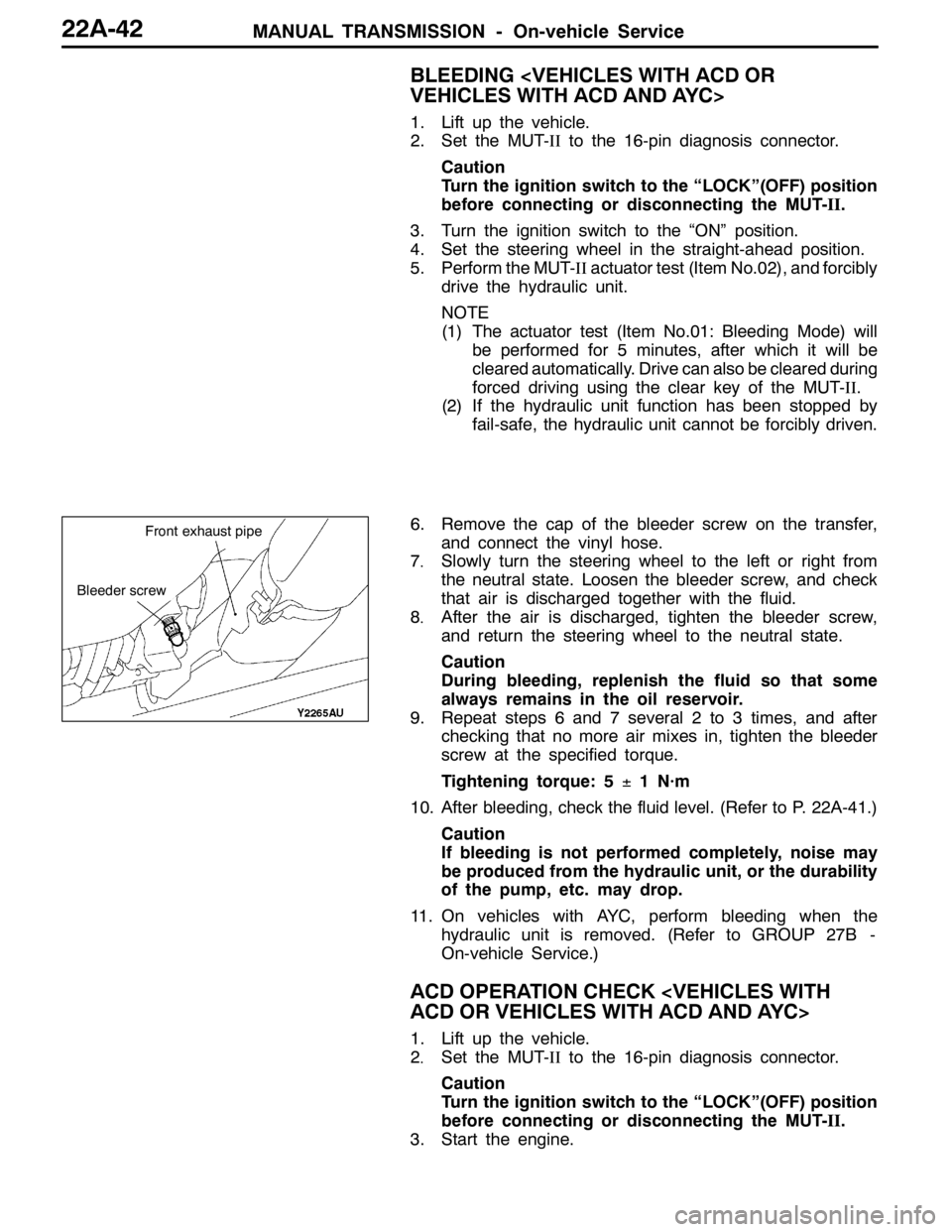
6. Remove the cap of the bleeder screw on the transfer,
and connect the vinyl hose.
7
.Slowly turn the steering wheel to the left or right from
the neutral state. Loosen the bleeder screw, and check
that air is discharged together with the fluid.
8
.After the air is discharged, tighten the bleeder screw,
and return the steering wheel to the neutral state.
Caution
During bleeding, replenish the fluid so that some
always remains in the oil reservoir.
9. Repeat steps 6 and 7 several 2 to 3 times, and after
checking that no more air mixes in, tighten the bleeder
screw at the specified torque.
Tightening torque: 5±1 N·m
10. After bleeding, check the fluid level. (Refer to P. 22A-41.)
Caution
If bleeding is not performed completely, noise may
be produced from the hydraulic unit, or the durability
of the pump, etc. may drop.
11. On vehicles with AYC, perform bleeding when the
hydraulic unit is removed. (Refer to GROUP 27B -
On-vehicle Service.)
ACD OPERATION CHECK
1. Lift up the vehicle.
2
.Set the MUT-IIto the 16-pin diagnosis connector.
Caution
Turn the ignition switch to the “LOCK”(OFF) position
before connecting or disconnecting the MUT-II.
3. Start the engine.
Bleeder screw
Front exhaust pipe
Page 851 of 1449
MANUAL TRANSMISSION - On-vehicle Service22A-43
4. Set the gear to the 2nd gear or above, operate the MUT-II,
and check from the service data (Item No.09) that the
wheel speed is within 10 km/h to 20 km/h.
NOTE
(1) Set the steering wheel to the neutral position
(2) The ACD may continue operating (operation sounds
can be heard) when the steering wheel is steered,
this is not a system fault. In this case, set the steering
wheel to the neutral position, and perform the following
operations to stop the ACD.
DRelease the clutch.
DSet the gear to “N”.
DStop the engine
5. Perform the MUT-IIactuator test (Item No.05), and forcibly
drive the transfer.
NOTE
(1) The actuator test (Item No. 05: ACD Operation Check
Mode) is performed for 1 minute, after which it will
be cleared automatically. Drive can also be cleared
during forced driving using the clear key of the MUT-II.
(2) If the hydraulic unit function has been stopped by
fail-safe, the transfer cannot be forcibly driven.
6. Check that the front and rear wheel speeds satisfy the
following in the MUT-IIactuator test (Item No.05).
The front wheel will be faster than the back wheels by
more than 2 km/h.
NOTE
If the above are not satisfied, check the oil pressure as
the system may be faulty.
HYDRAULIC PRESSURE CHECK
1. Lift up the vehicle.
2. Set the MUT-IIto the 16-pin diagnosis connector.
Caution
Turn the ignition switch to the “LOCK”(OFF) position
before connecting or disconnecting the MUT-II.
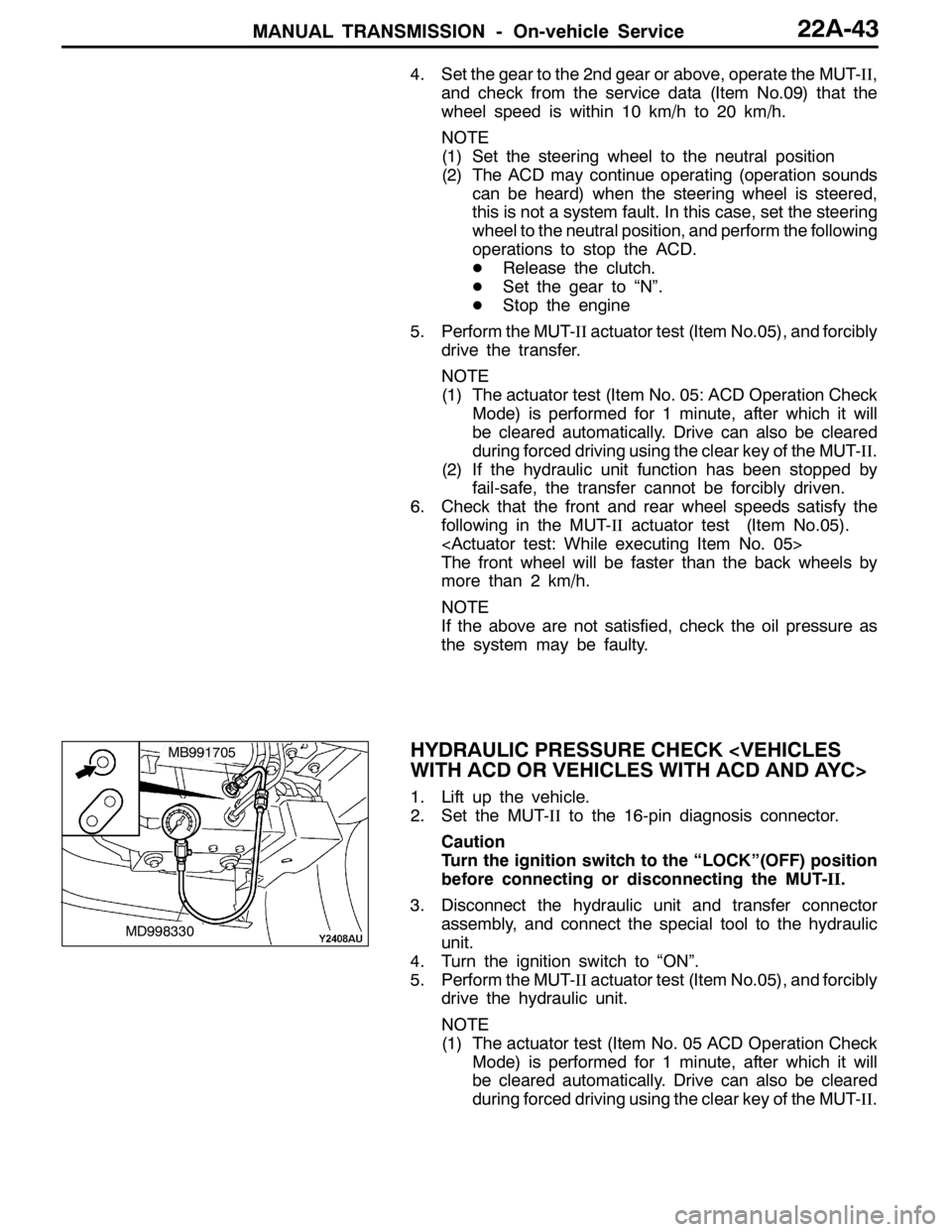
3. Disconnect the hydraulic unit and transfer connector
assembly, and connect the special tool to the hydraulic
unit.
4. Turn the ignition switch to “ON”.
5. Perform the MUT-IIactuator test (Item No.05), and forcibly
drive the hydraulic unit.
NOTE
(1) The actuator test (Item No. 05 ACD Operation Check
Mode) is performed for 1 minute, after which it will
be cleared automatically. Drive can also be cleared
during forced driving using the clear key of the MUT-II.
MD998330
MB991705
Page 852 of 1449

MANUAL TRANSMISSION - On-vehicle Service22A-44
(2) If the hydraulic unit function has been stopped by
fail-safe, the hydraulic unit cannot be forcibly driven.
6. Check that the generated oil pressure of the hydraulic
unit satisfies the standard value.
Standard value: 1.0 – 1.6 MPa
Caution
While the oil pressure is checked, add fluid as
necessary to ensure that it is left in the oil reservoir
during the entire procedure.
7. If the measured value exceeds the standard value, replace
the hydraulic unit.
8. Connect the hydraulic unit and transfer connector
assembly, and tighten the flare nut at the specified torque.
Tightening torque: 34±5 N·m (when screw is dry)
26±4 N·m (when screw is applied with oil)
9. Supply the specified fluid up to the MAX level of the
oil reservoir, and bleed the oil pressure pipes.
Specified fluid: DIA QUEEN ATF SP III
Quantity:
0.9 dm
3
1.0 dm3
WHEEL SPEED SENSOR OUTPUT VOLTAGE
MEASUREMENT
1. Lift the vehicle, and release the parking brake.
2. Disconnect the 4WD-ECU connector, and measure at
the connector of the harness.
Caution
Insert the probe from the harness of the connector.
Inserting in the terminal side may cause contact fault.
3. Rotate the measured wheel by about 1/2 to 1
rotations/second, and check the output voltage between
the following terminals using a circuit tester (AC mV range)
or oscilloscope.
Terminal No.
Front leftFront rightRear leftRear right
6987
19222120
Page 853 of 1449
MANUAL TRANSMISSION - On-vehicle Service22A-45
Output voltage:
Above 70 mV when measured with the circuit
tester
Above 200 mVP-P when measured with the
oscilloscope
4. If the output voltage is lower than the above values, the
following reasons may be suspected. Check or replace
the wheel speed sensor.
DExcessive clearance between the ball piece of the
wheel speed sensor and ABS rotor
DWheel speed sensor faul
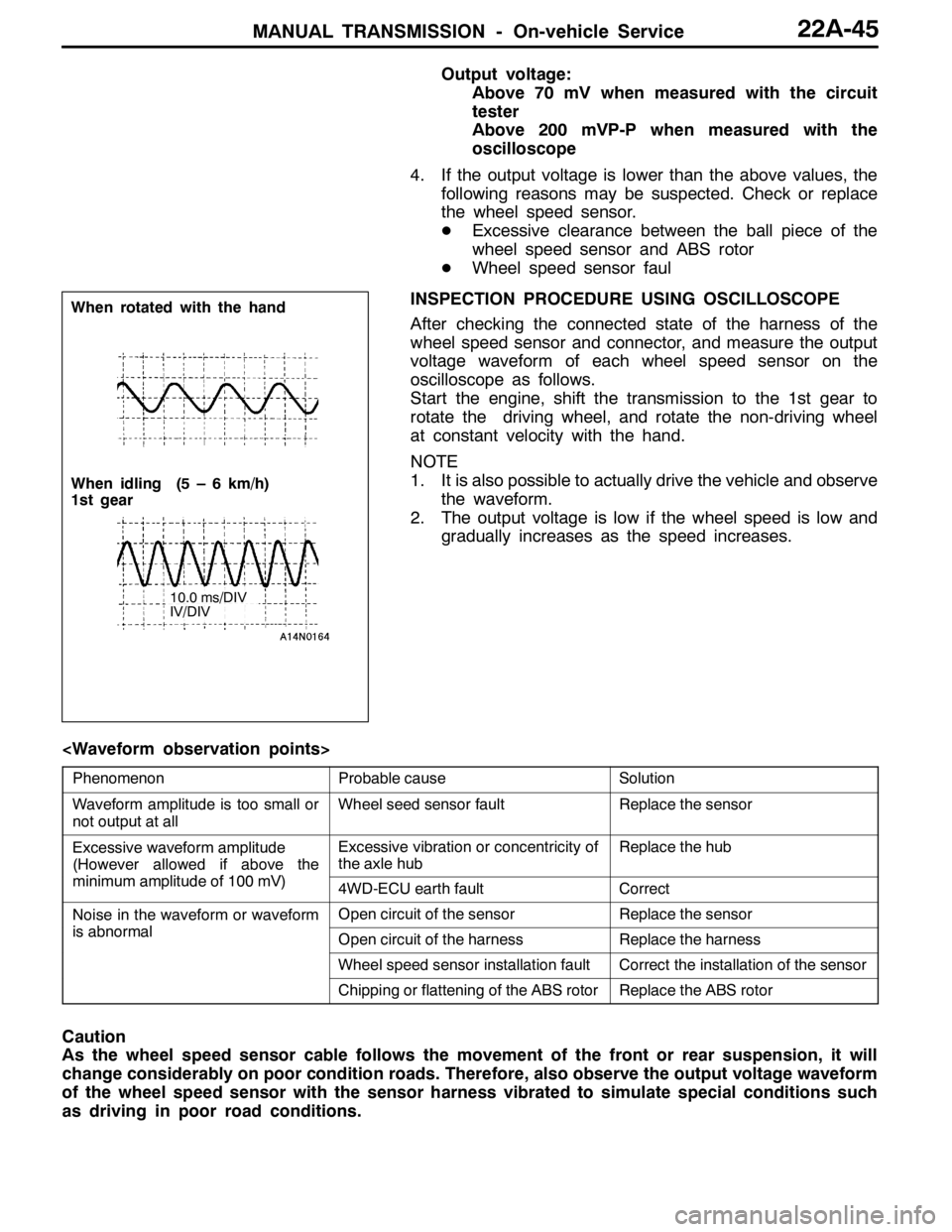
INSPECTION PROCEDURE USING OSCILLOSCOPE
After checking the connected state of the harness of the
wheel speed sensor and connector, and measure the output
voltage waveform of each wheel speed sensor on the
oscilloscope as follows.
Start the engine, shift the transmission to the 1st gear to
rotate the driving wheel, and rotate the non-driving wheel
at constant velocity with the hand.
NOTE
1. It is also possible to actually drive the vehicle and observe
the waveform.
2. The output voltage is low if the wheel speed is low and
gradually increases as the speed increases.
PhenomenonProbable causeSolution
Waveform amplitude is too small or
not output at allWheel seed sensor faultReplace the sensor
Excessive waveform amplitude
(However allowed if above the
iilit df100V)
Excessive vibration or concentricity of
the axle hubReplace the hub
(
minimum amplitude of 100 mV)4WD-ECU earth faultCorrect
Noise in the waveform or waveform
ibl
Open circuit of the sensorReplace the sensor
is abnormalOpen circuit of the harnessReplace the harness
Wheel speed sensor installation faultCorrect the installation of the sensor
Chipping or flattening of the ABS rotorReplace the ABS rotor
Caution
As the wheel speed sensor cable follows the movement of the front or rear suspension, it will
change considerably on poor condition roads. Therefore, also observe the output voltage waveform
of the wheel speed sensor with the sensor harness vibrated to simulate special conditions such
as driving in poor road conditions.
When rotated with the hand
When idling (5 – 6 km/h)
1st gear
10.0 ms/DIV
IV/DIV
Page 857 of 1449
MANUAL TRANSMISSION - Transfer Assembly22A-49
TRANSFER ASSEMBLY
REMOVAL AND INSTALLATION
Pre-removal and Post-installation Operation
DUnder Cover Removal and Installation (Refer to GROUP 51 - Front Bumper.)
DSide Under Cover Removal and Installation
DTransmission Oil Draining and Supplying (Refer to P.22A-40.)
DTransfer Oil Draining and Supplying (Refer to P.22A-40.)
DEngine Coolant Draining and Supplying (Refer to GROUP 14 - On-vehicle Service.)
DCrossmember Bar Removal and Installation (Refer to GROUP 32 - Engine Roll Stopper, Centermember.)
DFront Exhaust Pipe Removal and Installation (Refer to GROUP 15 - Exhaust Pipe and Main Muffler.)
DBattery and Battery Tray Removal and Installation
DAir Cleaner, Air Intake Hose Removal and Installation (Refer to GROUP 15 - Air Cleaner.)
DSecondary Air Hose Removal and Installation (Refer to GROUP 15 - Secondary Air Control System.)
DStrut Tower Bar Removal and Installation (Refer to GROUP 42.)
DAir Hose E, Air By-pass Hose and Air By-pass Valve, Air Pipe C, Air Hose D, Air Pipe B, Air Hose A Removal and
Installation (Refer to GROUP 15 - Intercooler.)
DRadiator Removal and Installation (Refer to GROUP 14.)
DBleeding and Hydraulic Pressure Check
12 3
4
5 6 7
8
25±5 N·m
108±10 N·m
39±5 N·m
39±5 N·m
245±29 N·m
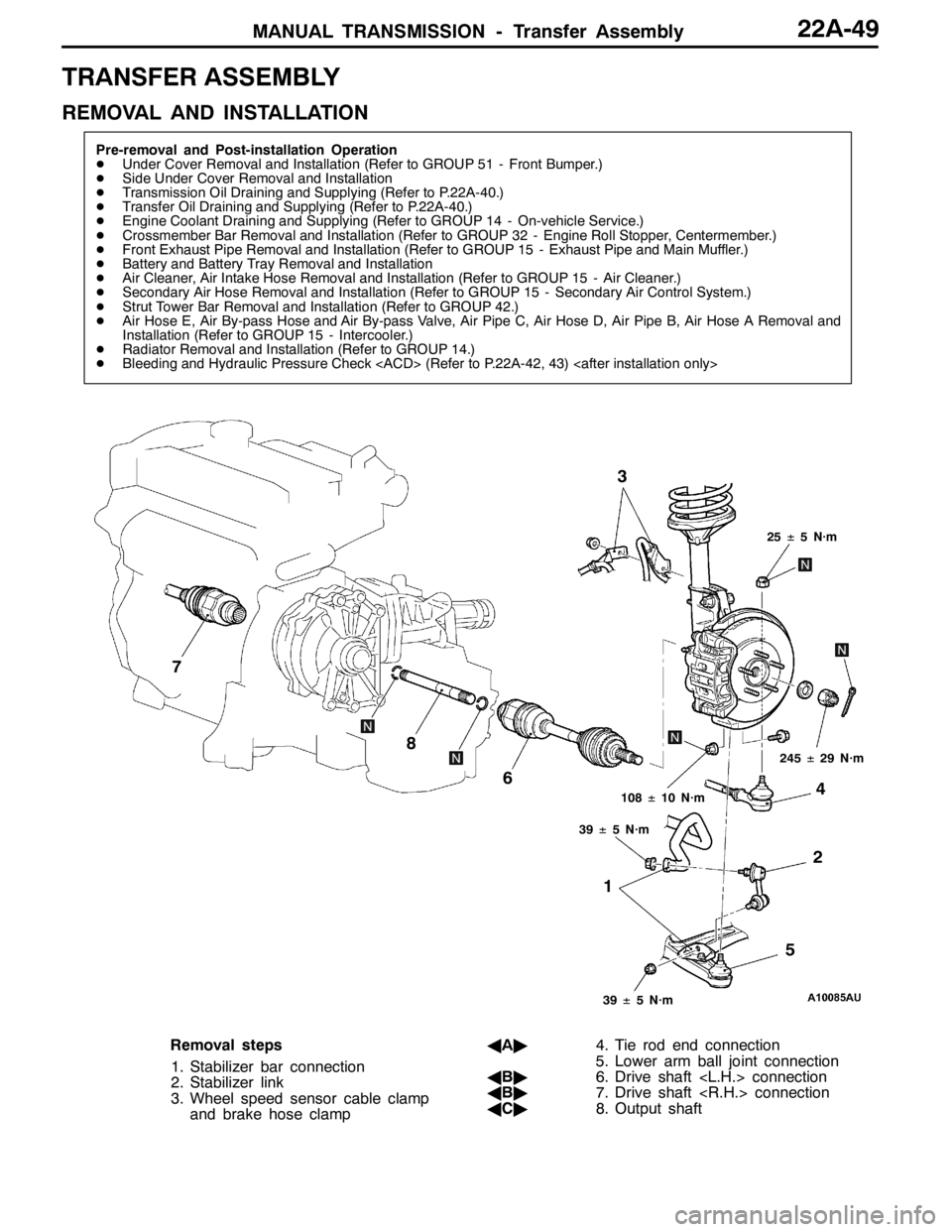
Removal steps
1. Stabilizer bar connection
2. Stabilizer link
3. Wheel speed sensor cable clamp
and brake hose clampAA"4. Tie rod end connection
5. Lower arm ball joint connection
AB"6. Drive shaft
AB"7. Drive shaft
AC"8. Output shaft
Page 864 of 1449
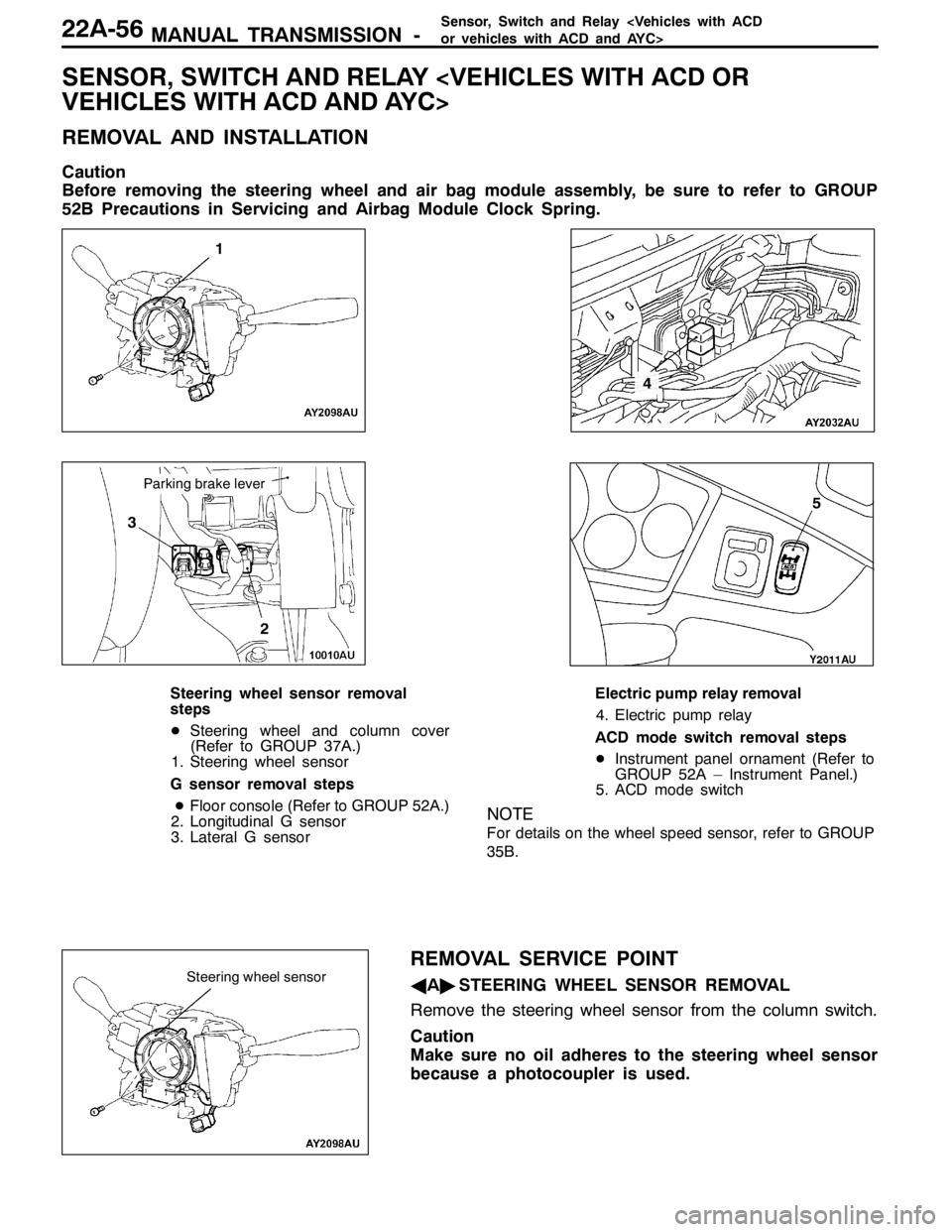
MANUAL TRANSMISSION -Sensor, Switch and Relay
SENSOR, SWITCH AND RELAY
REMOVAL AND INSTALLATION
Caution
Before removing the steering wheel and air bag module assembly, be sure to refer to GROUP
52B Precautions in Servicing and Airbag Module Clock Spring.
1
3
2
4
5
Parking brake lever
Steering wheel sensor removal
steps
DSteering wheel and column cover
(Refer to GROUP 37A.)
1. Steering wheel sensor
G sensor removal steps
DFloor console (Refer to GROUP 52A.)
2. Longitudinal G sensor
3. Lateral G sensorElectric pump relay removal
4. Electric pump relay
ACD mode switch removal steps
DInstrument panel ornament (Refer to
GROUP 52A – Instrument Panel.)
5. ACD mode switch
NOTE
For details on the wheel speed sensor, refer to GROUP
35B.
REMOVAL SERVICE POINT
AA"STEERING WHEEL SENSOR REMOVAL
Remove the steering wheel sensor from the column switch.
Caution
Make sure no oil adheres to the steering wheel sensor
because a photocoupler is used.Steering wheel sensor
Page 929 of 1449

26-1
FRONT AXLE
CONTENTS
GENERAL INFORMATION 2..................
SERVICE SPECIFICATIONS 3.................
LUBRICANTS 3..............................
SPECIAL TOOLS 3...........................ON-VEHICLE SERVICE 5.....................
Wheel Bearing Axial Play Check 5..............
Hub bolt replacement 5.........................
HUB AND KNUCKLE ASSEMBLY 6...........
DRIVE SHAFT 10............................
Page 930 of 1449

FRONT AXLE -General Information26-2
GENERAL INFORMATION
The front axle consists of front hubs, knuckles,
wheel bearings and drive shafts, and it has the
following features.
DThe wheel beearing is unit bearing integrated
with hub (Double-row angular contact ball
bearing).
DThe drive shaft incorporates B.J.-T.J. type
constant velocity joints with high transmission
efficiency and low vibration and noise.DABS rotors for detecting the wheel speeds are
press-fitted to the B.J. outer wheels in vehicles
with ABS or ACD.
NOTE
1. B.J.: Birfield Joint
2. T.J.: Tripod Joint
SPECIFICATIONS
ItemSpecifications
Wheel
bearingsWheel bearing typeHub unit bearing (Double-row angular
contact ball bearing)
g
Bearing (outside diameter) mm87*1
Drive
shaft
Joint typeOutsideB.J.
shaftInsideT.J.
Shaft length*2×Shaft diameter mmLeft350×26
Right427×26
NOTE
*1: The wheel beearing is integrated with hub, only the outer diameter is shown.
*2: The shaft length indicates the length between the center points of each joint.
STRUCTURAL DIAGRAM
B.J.T. J . KnuckleOutput shaft Strut assembly
Drive shaft
Wheel bearing Front hubT.J. (L.H.)
Output shaftT.J. (R.H.)
Page 931 of 1449

FRONT AXLE -Service Specifications/Lubricants/Special Tools26-3
SERVICE SPECIFICATIONS
ItemStandard valueLimit
Wheel bearing axial play mm-0.06
WheelbearingrotationstartingtorqueN·m-103orlessWheelbearing rotation startingtorqueN·m-1.03orless
Setting of T.J. boot length mm85±3-
Opening dimension of the
special tool (MB991561) mmWhen the B.J.boot band
(small) is crimped.2.9-
When the B.J.boot band
(big) is crimped.3.2-
Crimped width of the B.J.boot band mm2.4 - 2.8-
LUBRICANTS
ItemsSpecified lubricantsQuantity g
T.J. boot greaseRepair kit grease120±10
B.J.boot greaseRepair kit grease11 0±10
SPECIAL TOOLS
ToolNumberNameUse
MB990767End yoke holderFixing of the hub
MB991618Hub bolt removerRemoval of the hub bolt
MB991113 or
MB990635Steering linkage
pullerDisconnection of ball joint
A
B
MB990241
A: MB990242
B: MB990244Axle shaft puller
A: Puller shaft
B: Puller barDRemoval of the drive shaft
DRemoval of the hub
MB991354Puller bodyDRemoval of the drive shaft
DRemoval of the hub
Page 932 of 1449

FRONT AXLE -Special Tools26-4
Tool UseName Number
MB990685Torque wrenchMeasurement of wheel bearing rotation
starting torque
MB990326Preload socketMeasurement of wheel bearing rotation
starting torque
A
B
C
A: MB991017
B: MB990998
C: MB991000A,B: Front hub
remover and
installer
C: SpacerDProvisional holding of the wheel bearing
DMeasurement of wheel bearing rotation
starting torque
DMeasurement of wheel bearing axial play
MB991000, which belongs to MB990998,
should be used as a spacer.
MB991721Sliding hammerOutput shaft removal
MB991561Boot band clipping
toolResin boot band installation
MB990925
Brass bar
Installer adapterTool box
Bar (snap-in type) ACB
TypeTool numberO.D. mmTypeTool numberO.D. mm
MB99092639MB99093363.5
MB99092745MB99093467.5
MB99092849.5AMB99093571.5
AMB99092951MB99093675.5
MB99093054MB99093779
MB99093157BMB990938-
MB99093261CMB990939-