PAG MITSUBISHI MIRAGE 2017 6.G Manual Online
[x] Cancel search | Manufacturer: MITSUBISHI, Model Year: 2017, Model line: MIRAGE, Model: MITSUBISHI MIRAGE 2017 6.GPages: 307, PDF Size: 9.02 MB
Page 227 of 307
To play tracks from USB device (if so equipped)
7
N00763701042
1. Say “Play” on the main menu. 2. After the voice guide says “Would you like to play by Artist, Album, Playlist or Genre?,” say “Genre”. would you like to play?,” say the musictype. 4. If there is only one ma
tch, the system pro-
ceeds to step 6.5. If there are two or more matches, the voice guide will say “More than one match was found, would you like to play
If you say “No,” the next matching genre is spoken by the system. 6. After the voice gui
de says “Playing
the voice recognition
mode and starts playback.
N00763901073
To search by genre
NOTE
The Bluetooth
® 2.0 interface starts recogniz-
ing the connected device.If the connected device
cannot be recognized
or a connection error
occurs, the Bluetooth
®
2.0 interface starts
an appropriate voice
guide. Follow the voice guide.NOTE
If you say “Genre
NOTE
If you say “No” to three or all genres offered, the voice guide will
say “Genre not found,
please try again” and the system returns tostep 2.NOTE
If the confirmation function is active, the voice guide confirms if
the genre is correct.
If the genre is correct, say “Yes”. If not, say“No”. After the voice
guide says “Genre not
found, please try again,” the system returns to step 2. Refer to “Confirmation functionsetting” on page 5-89.
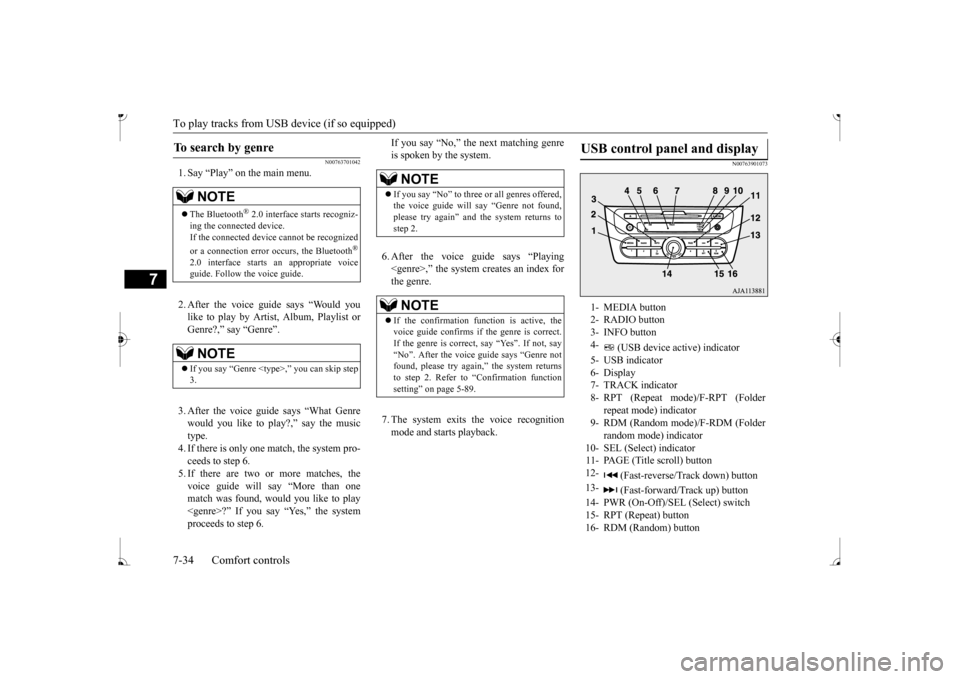
USB control panel and display
1- MEDIA button 2- RADIO button3- INFO button 4-
(USB device active) indicator
5- USB indicator 6- Display7- TRACK indicator 8- RPT (Repeat mode)/F-RPT (Folder
repeat mode) indicator
9- RDM (Random mode)/F-RDM (Folder
random mode) indicator
10- SEL (Select) indicator11- PAGE (Title scroll) button 12-
(Fast-reverse/Tr
ack down) button
13-
(Fast-forward/Track up) button
14- PWR (On-Off)/SEL
(Select) switch
15- RPT (Repeat) button 16- RDM (Random) button
BK0236100US.book 34 ページ 2016年2月1日 月曜日 午前10時15分
Page 228 of 307
To play tracks from USB device (if so equipped)
Comfort controls 7-35
7
N00764001101
1. Press the PWR switch to turn on the audio system. The system turns on in the lastmode used. 2. Connect your USB memory device to the USB input terminal.Refer to “How to connect a USB memory device” on page 5-106. 3. Press the MEDIA button several times to switch to the USB mode. The input mode changes as follow
s every time the
MEDIA button is pressed: CD mode
USB mode
Bluetooth
® mode (if so
equipped)
AUX mode
CD mode.
The USB indicator is illuminated and then the USB mode will be activated. 4. Once the device is selected, playback starts and indicator appears on the dis- play. 5. To stop the playback, press the RADIO button or MEDIA button to switch to a different mode.
N00764100105
This audio can play
MP3, WMA and AAC
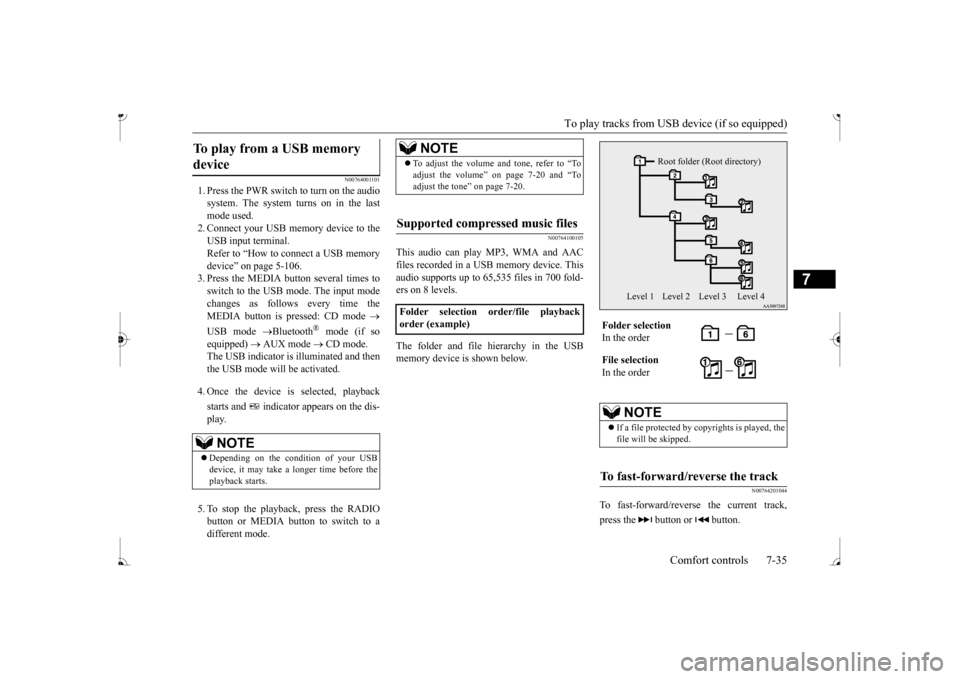
files recorded in a USB memory device. This audio supports up to 65,535 files in 700 fold-ers on 8 levels. The folder and file hierarchy in the USB memory device is shown below.
N00764201044
To fast-forward/revers
e the current track,
press the button or button.
To play from a USB memory device
NOTE
Depending on the condition of your USB device, it may take a longer time before theplayback starts.
NOTE
To adjust the volume and tone, refer to “To adjust the volume” on page 7-20 and “Toadjust the tone” on page 7-20.
Supported compressed music files
Folder selection order/file playback order (example)
Folder selection In the order File selection In the order
NOTE
If a file protected by c
opyrights is played, the
file will be skipped.
To fast-forward/reverse the track
Root folder (Root directory)
Level 1 Level 2 Level 3 Level 4
BK0236100US.book 35 ページ 2016年2月1日 月曜日 午前10時15分
Page 230 of 307
To play tracks from a Bluetooth® device (vehicles with Bluetooth® 2.0 interface)
Comfort controls 7-37
7
To exit this mode, press the button again.
N00765101053
You can displays titles with tag information. The display changes as follows every time the INFO button is pressed during playback:Folder name
File name
Normal display.
1. Press and hold the INFO button until you hear a beep.2. The display changes as follows every time the INFO button is pressed briefly: Album TAG
Track TAG
Artist TAG
Genre TAG (vehicles with Bluetooth
® 2.0
interface)
Normal display.
N00765200073
Desired tracks can be
selected and played
from your USB memory device by “Artist”, “Album”, “Playlist”
and “Genre” using voice
commands.For information concerning the voice recog- nition function or spea
ker registration func-
tion, refer to “Bluetooth
® 2.0 interface” on
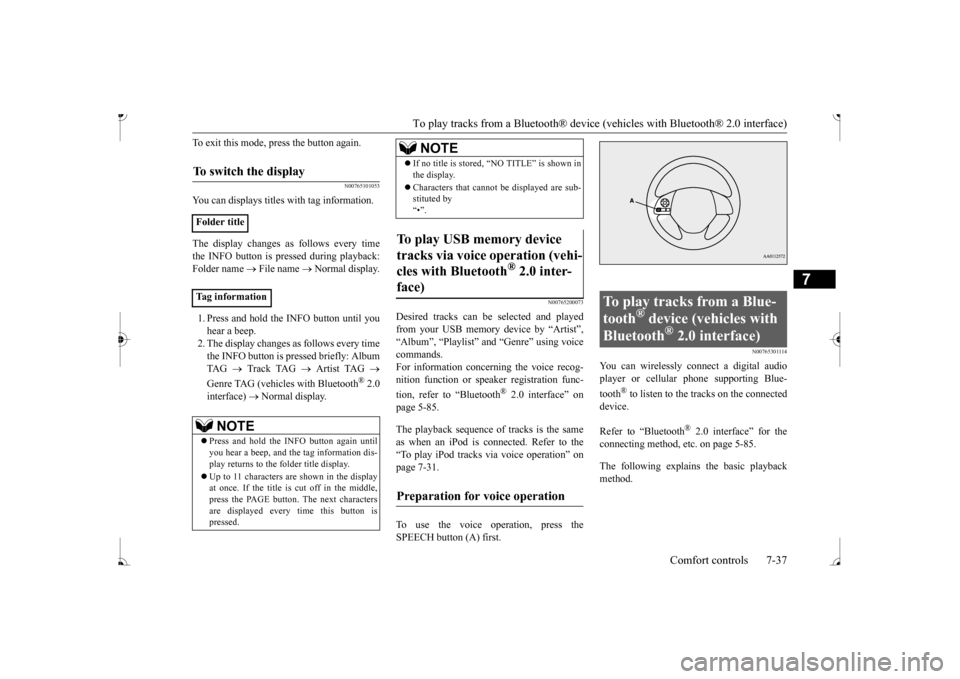
page 5-85. The playback sequence of tracks is the same as when an iPod is connected. Refer to the “To play iPod tracks via voice operation” onpage 7-31. To use the voice operation, press the SPEECH button (A) first.
N00765301114
You can wirelessly connect a digital audioplayer or cellular phone supporting Blue- tooth
® to listen to the tracks on the connected
device. Refer to “Bluetooth
® 2.0 interface” for the
connecting method, et
c. on page 5-85.
The following explains the basic playback method.
To switch the display
Folder title Tag information
NOTE
Press and hold the INFO button again until you hear a beep, and the tag information dis-play returns to the folder title display. Up to 11 characters are shown in the display at once. If the title is cut off in the middle, press the PAGE button. The next characters are displayed every
time this button is
pressed.
If no title is stored, “NO TITLE” is shown in the display. Characters that cannot
be displayed are sub-
stituted by “•”.
To play USB memory device tracks via voice operation (vehi- cles with Bluetooth
® 2.0 inter-
face)
Preparation for voice operation
NOTE
To play tracks from a Blue- tooth
® device (vehicles with
Bluetooth
® 2.0 interface)
BK0236100US.book 37 ページ 2016年2月1日 月曜日 午前10時15分
Page 231 of 307
To play tracks from a Bluetooth® device
(vehicles with Blue
tooth® 2.0 interface)
7-38 Comfort controls
7
N00765401072
N00765501103
1. Press the PWR switch to turn on the audio system. The system turns on in the last mode used.2. Press the MEDIA button several times to switch to the BT-A (Bluetooth
®) mode.
The input mode changes as follows everytime the MEDIA button is pressed: CD mode
iPod mode
Bluetooth
® mode
(if so equipped)
AUX mode
CD
mode. The BT indicator is illuminated and then the BT-A mode will be activated. 3. Connect your Bluetooth
® device.
Refer to “Connecting the Bluetooth
® 2.0
interface and Bluetooth
® device” on page
5-91.
4. Playback starts automatically.
N00765600035
To stop the playback, press the Stop button. To restart the playback, press the Play/Pausebutton.
N00765700036
To pause the playback, press and hold thePlay/Pause button until you hear a beep.To restart the playback, press the Play/Pause button.
N00703201023
To fast-forward/reverse the current track, press the button or button.
NOTE
Depending on the connect
ed device, opera-
tion of the connected device is limited to itsavailable functions. Depending on the connected device, the device may not ope
rate correctly.
A file protected by c
opyright might not be
able to playback. It is recommended to adjust the equalizer of the connected
device to 0 db or neutral.
The voice operation is not available to access music files on the connected Bluetooth
®
device.
Bluetooth
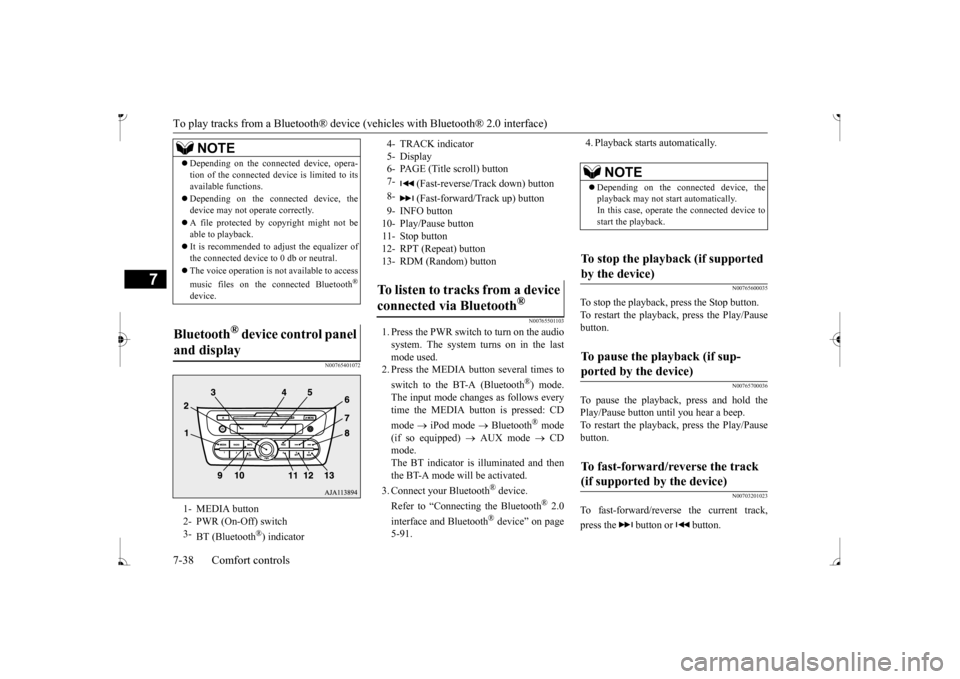
® device control panel
and display 1- MEDIA button 2- PWR (On-Off) switch 3-
BT (Bluetooth
®) indicator
4- TRACK indicator 5- Display 6- PAGE (Title scroll) button7-
(Fast-reverse/Track down) button
8-
(Fast-forward/Track up) button
9- INFO button 10- Play/Pause button 11- Stop button 12- RPT (Repeat) button 13- RDM (Random) buttonTo listen to tracks from a device connected via Bluetooth
®
NOTE
Depending on the connected device, the playback may not start automatically. In this case, operate
the connected device to
start the playback.
To stop the playback (if supported by the device) To pause the playback (if sup- ported by the device) To fast-forward/reverse the track (if supported by the device)
BK0236100US.book 38 ページ 2016年2月1日 月曜日 午前10時15分
Page 232 of 307
To play tracks from a Bluetooth® device (vehicles with Bluetooth® 2.0 interface)
Comfort controls 7-39
7
To fast-forward the current track, press and hold the button. To fast-reverse the current track, press and hold the button.
N00765800037
Press the button repeatedly until the desired file number a
ppears on the display.
Press the button repeatedly until the desired file number a
ppears on the display.
N00765900038
Press the RPT button several times to switch to show “RPT” in the display. The mode changes as follows every time the RPT button is pressed:No display (not repeat)
RPT (repeat same
track)
F-RPT (repeat all tracks)
No dis-
play To exit this mode, press the button again.
N00703301024
Press the RPT button several times to switch to show “F-RPT” in the display. The mode changes as follows every time the RPT button is pressed:No display (no repeat)
RPT (repeat same
track)
F-RPT (repeat all tracks)
No dis-
play (no repeat) All tracks in the Bluetooth
® device are played
repeatedly. To exit this mode, press the button again.
N00766001033
Press the RDM button to show “RDM” in thedisplay. The system randomly selects and plays tracks from the Bluetooth
® device.
To exit this mode, press the button again.
N00766201051
The system can display tag information. 1. Press the INFO button. 2. The display changes as follows every time the INFO button is pressed: Album title
Title name
Artist name
Genre
Normal display
Fast-forward Fast-reverseTo select a track (if supported by the device) Tr a c k u p Tr a c k d o w n
NOTE
Pressing the button once during the song will cause the audio system to restart play- back from the beginning of the file.
To play the same track repeatedly (if supported by the device) To play all tracks repeatedly (if supported by the device)
To play tracks in random order (if supported by the device) To switch the display (if supported by the device)
NOTE
Up to 11 characters are shown in the display at once. If the title is cut off in the middle, press the PAGE button.
The next characters
are displayed every
time this button is
pressed. If no title is stored, “NO TITLE” is shown in the display. Characters that cannot
be displayed are sub-
stituted by “•”.
BK0236100US.book 39 ページ 2016年2月1日 月曜日 午前10時15分
Page 241 of 307
If the vehicle breaks down 8-2 For emergencies
8
N00836300233
If your vehicle breaks down on the road, move to the shoulder and turn on the hazard warning flashers. If there is no shoulder, orthe shoulder is not safe, drive in the right lane slowly with the haza
rd lights flashing until
you come to a safe stopping place. Keep theflashers flashing. If the engine stops, there will be no power assist to the steering and brakes, making these difficult to use. The brake booster will not work, so the brakes will not grip well. The brake pedal will be harder to press than usual. Since there is no power steering assist, the steering wheel will be hard to turn.
Get help from your passengers, bystanders, etc. to push the vehicle
and move it to a safe
area.
N00836401837
If the engine cannot be started because the battery is weak or de
ad, you can start it with
the battery from anothe
r vehicle using jumper
cables. 1. Take off any metal jewelry such as watch bands or bracelets th
at might create an
accidental electrical contact. 2. Position the vehi
cles close enough
together so that the jumper cables canreach, but be sure the vehicles aren’t touching each other.
3. You could be injured if the vehicles move. Set the parking brake firmly on each vehi- cle. Put an automatic transaxle or CVT in “P” (PARK) or a manual transaxle in “N”(Neutral). 4. Turn the ignition switch to the “OFF”OFF. 5. Make sure your battery electrolyte is at the proper level. (Refer to “Battery” on page 9-10.)
If the vehicle breaks down If the engine stops/fails When the engine fails at the intersection
Jump-starting the engine
WA R N I N G To reduce the risk of igniting flammable gas that may be emitted from the battery,carefully read this section before jump- starting the vehicle. Do not try to start you
r vehicle by pushing
or towing. This can cause an accident resulting in serious
injury or death and
can damage the vehicle.NOTE
Do not use jumper cables if they have dam- age or corrosion.
CAUTION Check the other vehicle.
It must have a 12-
volt battery. If the other system isn’t 12-volt,both systems can be damaged.NOTE
Turn off all lights, heat
er, and othe
r electrical
loads. This will avoid sparks and help save both batteries.WA R N I N G If the electrolyte fluid is not visible, or looks frozen, DO NOT ATTEMPT JUMPSTARTING!! The battery might spli
t open or explode if
the temperature is below the freezingpoint or if it is not filled to the proper level.
BK0236100US.book 2 ページ 2016年2月1日 月曜日 午前10時15分
Page 244 of 307
Jack and tools
For emergencies 8-5
8
10. Replace the radiator
cap and tighten it
fully. Check the coolant temperaturewarning light. You can start driving again when the high coolant temperature warn- ing light does not come on.
11. Have the system in
spected by your autho-
rized Mitsubishi Motors dealer or a repair facility of your choice.
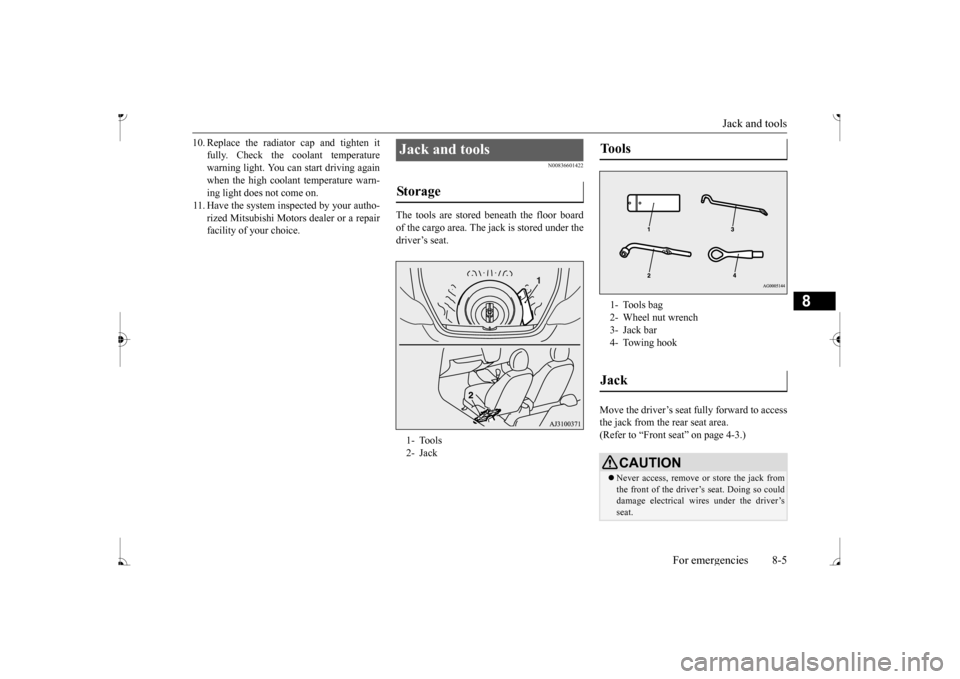
N00836601422
The tools are stored beneath the floor boardof the cargo area. The jack is stored under the driver’s seat.
Move the driver’s seat fully forward to access the jack from the rear seat area.(Refer to “Front seat” on page 4-3.)
Jack and tools Storage 1- Tools 2- Jack
Tools 1- Tools bag2- Wheel nut wrench 3- Jack bar4- Towing hookJack
CAUTION Never access, remove or store the jack from the front of the driver’s seat. Doing so could damage electr
ical wires under the driver’s
seat.
BK0236100US.book 5 ページ 2016年2月1日 月曜日 午前10時15分
Page 246 of 307
How to change a tire
For emergencies 8-7
8
6. Get the jack, bar and wheel nut wrench ready. (Refer to “Jack and t
ools” on page 8-5.)
N00849600344
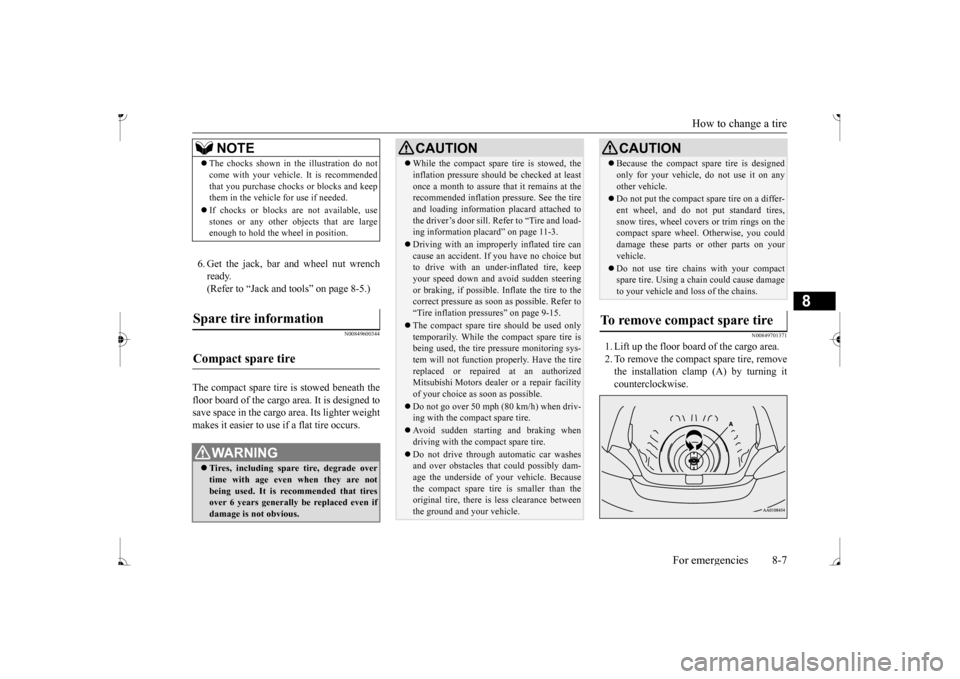
The compact spare tire is stowed beneath the floor board of the cargo area. It is designed to save space in the cargo area. Its lighter weightmakes it easier to use if a flat tire occurs.
N00849701371
1. Lift up the floor board of the cargo area. 2. To remove the compact spare tire, remove the installation clamp (A) by turning itcounterclockwise.
NOTE
The chocks shown in the illustration do not come with your vehicl
e. It is recommended
that you purchase chocks or blocks and keepthem in the vehicle for use if needed. If chocks or blocks
are not available, use
stones or any other obj
ects that are large
enough to hold the wheel in position.
Spare tire information Compact spare tire
WA R N I N G Tires, including spar
e tire, degrade over
time with age even when they are notbeing used. It is recommended that tires over 6 years generally
be replaced even if
damage is not obvious.
CAUTION While the compact spare tire is stowed, the inflation pressure shoul
d be checked at least
once a month to assure that it remains at therecommended inflation pressure. See the tire and loading informati
on placard attached to
the driver’s door sill. Refer to “Tire and load-ing information placard” on page 11-3. Driving with an imprope
rly inflated tire can
cause an accident. If
you have no choice but
to drive with an under-inflated tire, keep your speed down and av
oid sudden steering
or braking, if possible. Inflate the tire to the correct pressure as soon as possible. Refer to “Tire inflation pressures” on page 9-15. The compact spare tire should be used only temporarily. While th
e compact spare tire is
being used, the tire pr
essure monitoring sys-
tem will not function
properly. Have the tire
replaced or repaired at an authorizedMitsubishi Motors dealer
or a repair facility
of your choice as soon as possible. Do not go over 50 mph (80 km/h) when driv- ing with the compact spare tire. Avoid sudden starting and braking when driving with the compact spare tire. Do not drive through automatic car washes and over obstacles that
could possibly dam-
age the underside of your vehicle. Becausethe compact spare tire is smaller than the original tire, there is less clearance between the ground and your vehicle.
Because the compact spare tire is designed only for your vehicle, do not use it on anyother vehicle. Do not put the compact spare tire on a differ- ent wheel, and do not put standard tires,snow tires, wheel covers
or trim rings on the
compact spare wheel. Otherwise, you could damage these parts or other parts on yourvehicle. Do not use tire chains with your compact spare tire. Using a chain could cause damage to your vehicle and loss of the chains.
To remove compact spare tire
CAUTION
BK0236100US.book 7 ページ 2016年2月1日 月曜日 午前10時15分
Page 247 of 307
How to change a tire 8-8 For emergencies
8
N00849801529
1. On vehicles with
wheel covers, first
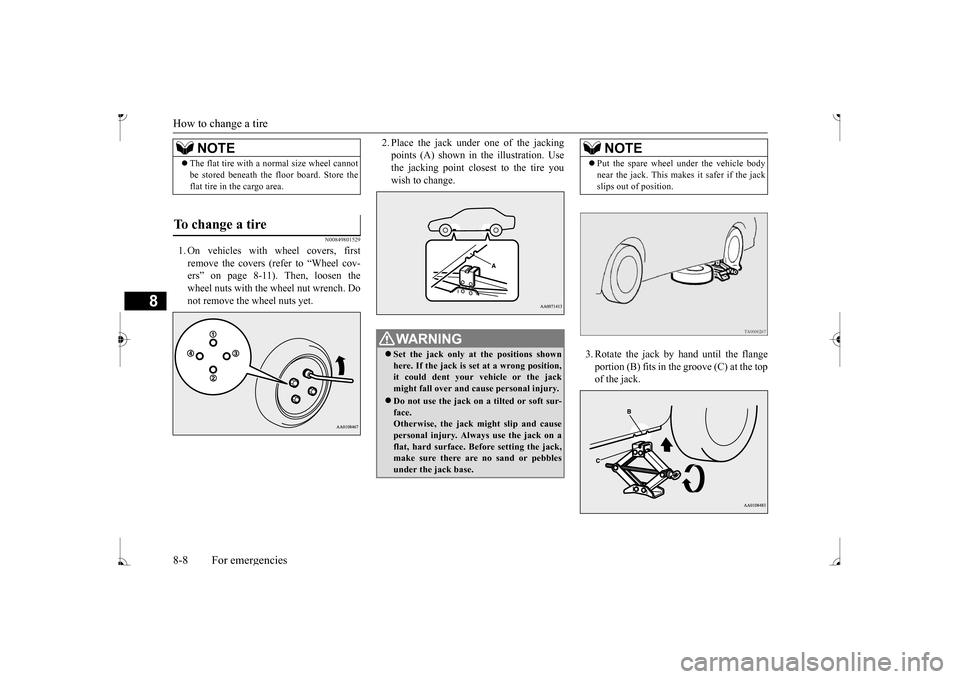
remove the covers (refer to “Wheel cov- ers” on page 8-11). Then, loosen thewheel nuts with the wheel nut wrench. Do not remove the wheel nuts yet.
2. Place the jack under one of the jacking points (A) shown in th
e illustration. Use
the jacking point closest to the tire you wish to change.
3. Rotate the jack by hand until the flange portion (B) fits in the groove (C) at the top of the jack.
NOTE
The flat tire with a
normal size wheel cannot
be stored beneath the floor board. Store theflat tire in the cargo area.
To change a tire
WA R N I N G Set the jack only at
the positions shown
here. If the jack is set at a wrong position, it could dent your vehicle or the jackmight fall over and ca
use personal injury.
Do not use the jack on a tilted or soft sur- face. Otherwise, the jack might slip and cause personal injury. Always
use the jack on a
flat, hard surface. Before setting the jack, make sure there are no sand or pebbles under the jack base.
NOTE
Put the spare wheel
under the vehicle body
near the jack. This makes it safer if the jackslips out of position.
BK0236100US.book 8 ページ 2016年2月1日 月曜日 午前10時15分
Page 249 of 307
How to change a tire 8-10 For emergencies
8
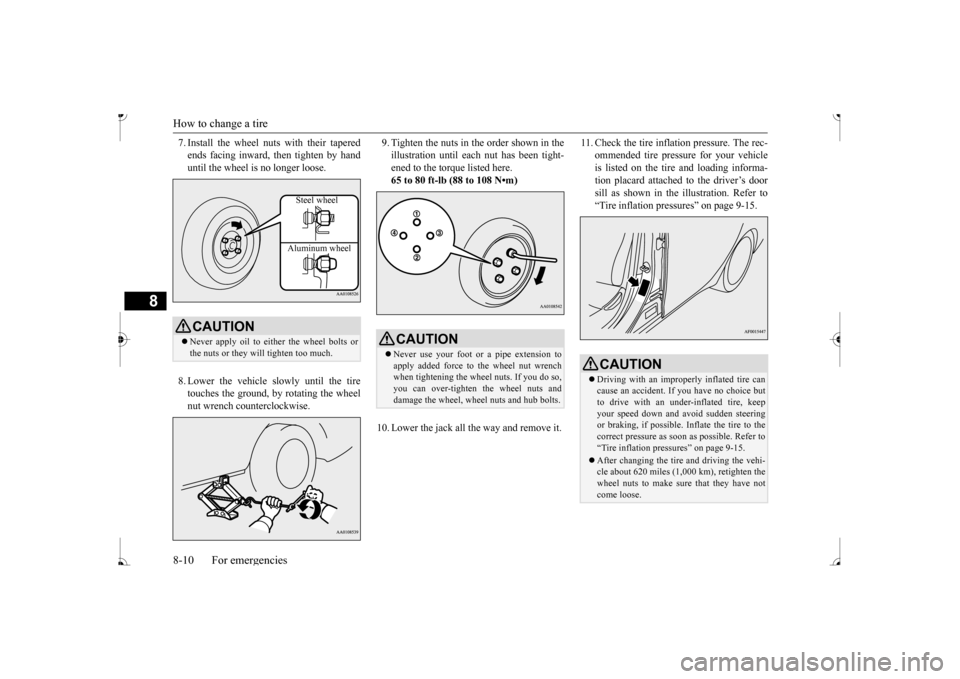
7. Install the wheel nuts with their tapered ends facing inward, then tighten by handuntil the wheel is no longer loose. 8. Lower the vehicle slowly until the tire touches the ground, by rotating the wheel nut wrench counterclockwise.
9. Tighten the nuts in the order shown in the illustration until each
nut has been tight-
ened to the torque listed here. 65 to 80 ft-lb (88 to 108 N•m)
10. Lower the jack all the way and remove it.
11. Check the tire inflation pressure. The rec-
ommended tire pressure for your vehicleis listed on the tire
and loading informa-
tion placard attached to the driver’s door sill as shown in the illustration. Refer to“Tire inflation pressures” on page 9-15.
CAUTION Never apply oil to either the wheel bolts or the nuts or they will tighten too much.
Steel wheel Aluminum wheel
CAUTION Never use your foot or a pipe extension to apply added force to the wheel nut wrench when tightening the wh
eel nuts. If you do so,
you can over-tighten the wheel nuts and damage the wheel, wheel nuts and hub bolts.
CAUTION Driving with an imprope
rly inflated tire can
cause an accident. If
you have no choice but
to drive with an under-inflated tire, keep your speed down and av
oid sudden steering
or braking, if possible. Inflate the tire to thecorrect pressure as soon as possible. Refer to “Tire inflation pressures” on page 9-15. After changing the tire
and driving the vehi-
cle about 620 miles (1,000 km), retighten the wheel nuts to make sure that they have notcome loose.
BK0236100US.book 10 ページ 2016年2月1日 月曜日 午前10時15分