PAG MITSUBISHI MIRAGE 2017 6.G Service Manual
[x] Cancel search | Manufacturer: MITSUBISHI, Model Year: 2017, Model line: MIRAGE, Model: MITSUBISHI MIRAGE 2017 6.GPages: 307, PDF Size: 9.02 MB
Page 133 of 307
Multi-information display 5-72 Features and controls
5
3. With this indicator flashing, if you lightly press the multi-information meter switch,the display switches from “---” to “cLEAr”. After that, the time until the next periodic inspection is shown.
N00556801267
The “Average fuel co
nsumption reset mode”, it” and “Temperature
unit” setting can be
modified as desired,
when the ignition switch or the operation mode is ON.
N00575501032
You can change the mode condition for theaverage fuel consumption display to “Auto reset” or “Manual reset”.
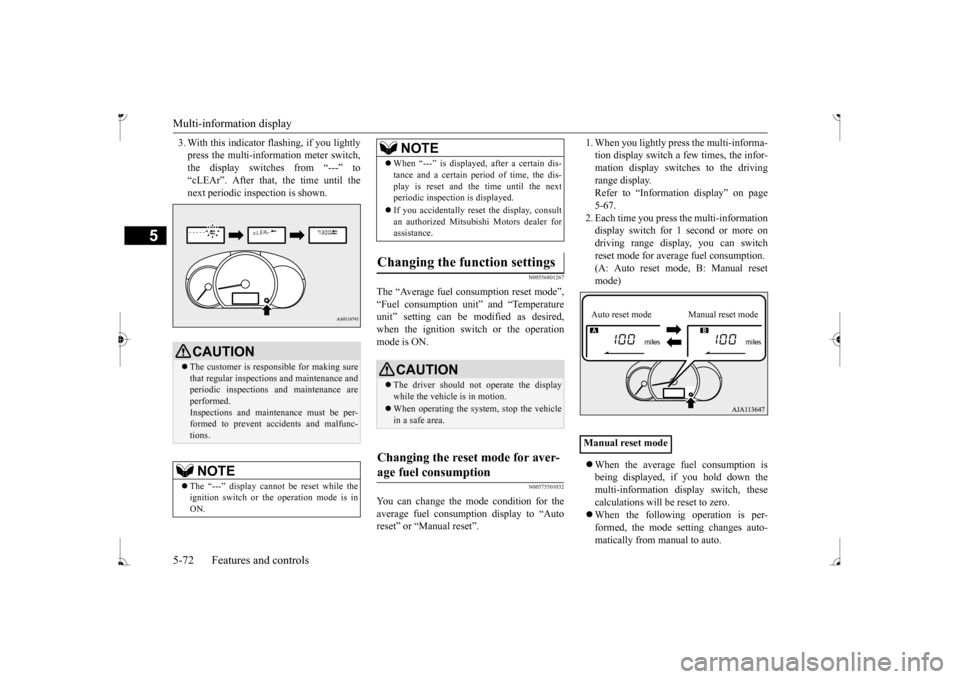
tion display switch a few times, the infor-mation display switches to the driving range display. Refer to “Information display” on page5-67. 2. Each time you press the multi-information display switch for 1 second or more ondriving range display, you can switch reset mode for average fuel consumption. (A: Auto reset mode, B: Manual reset mode) When the average fuel consumption is being displayed, if you hold down themulti-information display switch, these calculations will
be reset to zero.
When the following operation is per- formed, the mode setting changes auto- matically from manual to auto.
CAUTION The customer is responsible for making sure that regular inspections
and maintenance and
periodic inspections
and maintenance are
performed.Inspections and mainte
nance must be per-
formed to prevent accidents and malfunc- tions.NOTE
The “---” display cannot
be reset while the
ignition switch or th
e operation mode is in
ON.
When “---” is displaye
d, after a certain dis-
tance and a certain pe
riod of time, the dis-
play is reset and the time until the nextperiodic inspecti
on is displayed.
If you accidentally rese
t the display, consult
an authorized Mitsubishi Motors dealer for assistance.
Changing the function settings
CAUTION The driver should not operate the display while the vehicle is in motion. When operating the system, stop the vehicle in a safe area.
Changing the reset mode for aver- age fuel consumption
NOTE
Manual reset modeAuto reset mode Manual reset mode
BK0236100US.book 72 ページ 2016年2月1日 月曜日 午前10時15分
Page 134 of 307
![MITSUBISHI MIRAGE 2017 6.G Service Manual Multi-information display
Features and controls 5-73
5
[Except for vehicles equipped with the F. A . S . T. - k e y ]Turn the ignition switch to the “ON” posi- tion from the “ACC” or “OFFâ€](/img/19/7512/w960_7512-133.png "MITSUBISHI MIRAGE 2017 6.G Service Manual Multi-information display
Features and controls 5-73
5
[Except for vehicles equipped with the F. A . S . T. - k e y ]Turn the ignition switch to the “ON” posi- tion from the “ACC” or “OFFâ€")
Multi-information display
Features and controls 5-73
5
[Except for vehicles equipped with the F. A . S . T. - k e y ]Turn the ignition switch to the “ON” posi- tion from the “ACC” or “OFF” position. [For vehicles equipped with the F.A.S.T.- key]Change the operation mode to ON from ACC or OFF. When the average fuel consumption is being displayed, if you hold down the multi-information display switch, these calculations will be reset to zero. When the engine switch or the operation mode is in the following conditions, the average fuel consumption display willautomatically reset. [Except for vehicles equipped with the F. A . S . T. - k e y ] The ignition switch has been set to the“ACC” or “OFF” position for about 4 hours or more. [For vehicles equipped with the F.A.S.T.- key]The operation mode has been set to ACC or OFF for about 4 hours or more.
N00557100156
The fuel consumption display unit can bechanged. The distance and amount units are also switched to match the selected fuel con-sumption unit. 1. When you lightly press the multi-informa- tion display switch a few times, the infor- mation display switches to the averagefuel consumption display. Refer to “Information display” on page 5-67.2. Press and hold the multi-information dis- play switch for about 5 seconds or more until buzzer sound
is heard twice.
3. Press and hold the mu
lti-information dis-
play switch to switch in sequence from“km/L”
“L/100 km”
“km/L”.
The distance units is also changed in the fol- lowing combinations to match the selected fuel consumption unit.
Auto reset mode
NOTE
The average fuel cons
umption display can be
reset separately for the auto reset mode andfor the manual reset mode. Disconnecting the batt
ery cable will erase
from memory the manual reset mode or autoreset mode setting for the average fuel con- sumption display. The initial (default) setting is “Auto reset mode”.
Changing the fuel consumption display unit
NOTE
The display units for the driving range, the average fuel consumption are changed, but the units for the indica
ting needle (speedom-
eter), the odometer, the trip odometer and theservice reminder will
remain unchanged.
If the battery is disconnected, the memory of the unit setting is erased and it returns auto- matically to fa
ctory setting.
BK0236100US.book 73 ページ 2016年2月1日 月曜日 午前10時15分
Page 135 of 307
Multi-information display 5-74 Features and controls
5
N00557201183
The temperature display unit can be switched. 1. When you lightly press the multi-informa- tion display switch a few times, the infor- mation display switches to the outsidetemperature display. Refer to “Information display” on page 5-67. 2. Each time you press the multi-information display switch for 5 seconds or more onoutside temperatur
e display, you can
switch from °F to °C or from °C to °F unit of outside temperature display.Fuel consumption
Distance
(driving range)
L/100 km km mpg mile (s)
Changing the temperature unit
(if
so equipped)
NOTE
The temperature value on air conditioning panel is switched in
conjunction with outside
temperature display unit of the multi-infor-mation display. However, “°F” or “°C” are not shown to tem- perature display of
an air conditioning.
BK0236100US.book 74 ページ 2016年2月1日 月曜日 午前10時15分
Page 137 of 307
Indicators 5-76 Features and controls
5
N00519900127 N00520000216
The arrows will flash in time with the corre- sponding exterior turn signals when the turn signal lever is used. Both arrows will flash
when the hazard warn-
ing flasher swit
ch is pressed.
N00520100086
A blue light comes on when the headlights are on high beam.
N00520200175
This indicator comes on while the front fog lights are on.
N00551301049
This indicator light illuminates while theparking lights are on.
N00575600010
This indicator comes on in green while thecoolant temperature is low.
N00568800036
This indicator comes on while fuel-efficientdriving is achieved.
N00520300147 N00520400526
This light comes on when the ignition switch is turned to the “ON” position (engine off) or the operation mode is put in ON.When the engine is st
arted, the light should
go off a few seconds later. The warning light also illuminates after start- ing the engine under the following condi- tions. When the parking brake is still applied. When the brake fluid level is low. When the brake system circuit is not working properly.
When the vehicle is moving at more than 5 mph (8 km/h) and the parking brake applied, a buzzer will sound to in
form the driver that
the parking brake is not properly release. Before driving, be sure that the parking brake is fully released and the brake warning light is off.
24- For details, refer
to “Warning activa-
tion” on page 5-14 (if so equipped)
Indicators Turn signal indicators/Hazard warning lights
NOTE
If the indicator flashes faster than usual or if the indicator stays on wi
thout flashing, check
for a malfunctioning turn signal light bulb or turn signal connection.
High beam indicator
Front fog light indicator
(if so
equipped)Position indicator
(if so equipped)
Low coolant temperature indi- cator - green
NOTE
When the indicator goes out, this should be used as a rough indication of when the heat- ing starts working.
ECO indicator
Warning lights Brake warning light and buzzer
BK0236100US.book 76 ページ 2016年2月1日 月曜日 午前10時15分
Page 139 of 307
Warning lights 5-78 Features and controls
5
N00520600313
This light comes on in the event of a malfunc- tion in the charging system or when the igni-tion switch is turned to the “ON” position (engine off) or the operation mode is put in ON. When the engine
is started, the light
should go out. Check to make sure that the light has gone out before driving.
N00520700170
This light comes on when the engine oil pres-sure is below normal. If the light stays on while driving, stop the
engine as soon as pos-
sible. Do not run the e
ngine until the cause of
the low oil pressure is corrected.
N00575700011
This light comes on in red if the coolant tem- perature becomes excessively high.
N00520901342
This light comes on when any door is open ornot completely closed. When the vehicle is moving at more than 5 mph (8 km/h) and any door is open or ajar, atone will sound 4 times to inform the driver that any door is not properly shut.
NOTE
Do not disconnect the ba
ttery cable when the
engine malfunction i
ndicator (“SERVICE
ENGINE SOON” or “Che
ck engine light”) is
on. The engine electronic
control module stores
critical OBD information (especially exhaustemission data), which ma
y be lost if the bat-
tery cable is disconne
cted while the engine
malfunction indicator is
on. This will make it
difficult to diagnose th
e cause of future prob-
lems.
Charging system warning light
CAUTION If the warning light stays on while the engine is running, park your ve
hicle in a safe place
as soon as possible and
contact an authorized
Mitsubishi Motors dealer
or a repair facility
of your choice to have the system checked.
Oil pressure warning light
CAUTION If this light comes on when the engine oil level is not low, have
your vehicle checked at
an authorized Mitsubish
i Motors dealer or a
repair facility of your choice. This warning light does not show the amount of oil in the crankcase. This can only be determined by checking the oil level with the dipstick with the engine turned off.
High coolant temperature warning light - red
CAUTION If the light comes on
during vehicle opera-
tion, it indicates that
the engine is possibly
overheating. Continued driving could makethe engine fail. Immedi
ately stop the vehicle
in a safe place and ta
ke appropriate action.
(Refer to “Engine overh
eating” on page 8-4.)
NOTE
The high coolant temp
erature warning light
may illuminate when
the vehicle has been
driven at high speeds or on hilly roads. This illuminating does not ne
cessarily indicate a
problem. It should stop if you keep the engine running for a wh
ile or continue driv-
ing the vehicle.
Door-ajar warning light and buzzer
CAUTION Before driving, make sure that the door-ajar warning light is off.
BK0236100US.book 78 ページ 2016年2月1日 月曜日 午前10時15分
Page 140 of 307
Combination headlights and dimmer switch
Features and controls 5-79
5
N00590300021
This light comes on when the washer fluid is running low.If the light comes on, replenish the container with washer fluid. Refe
r to “Washer fluid” on
page 9-9.
N00522501889
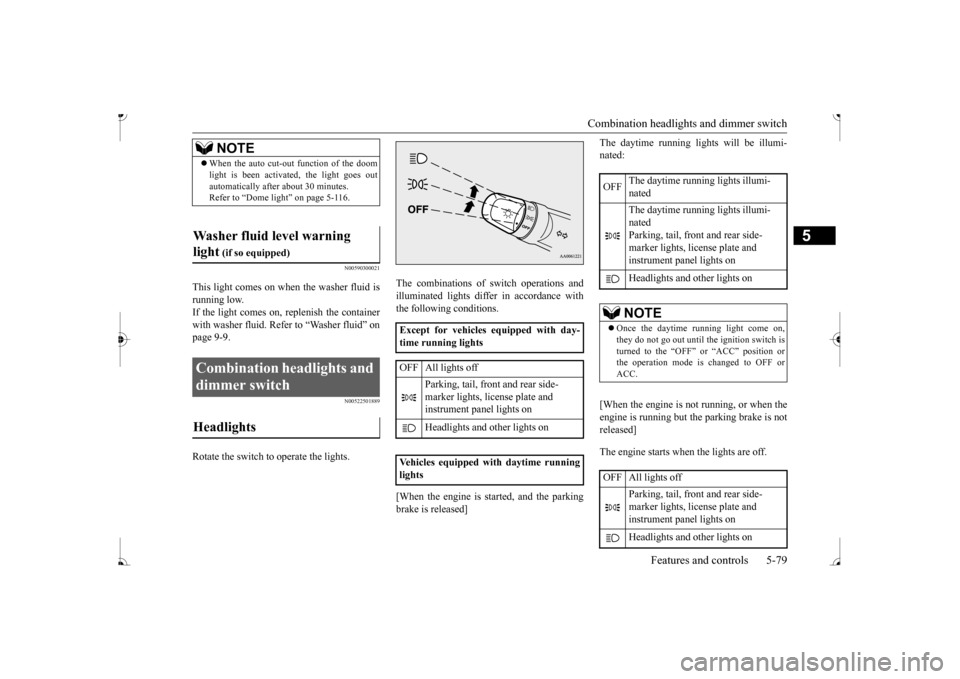
Rotate the switch to operate the lights.
The combinations of
switch operations and
illuminated lights differ in accordance withthe following conditions. [When the engine is st
arted, and the parking
brake is released]
The daytime running light
s will be illumi-
nated: [When the engine is not running, or when the engine is running but the parking brake is not released] The engine starts when the lights are off.
NOTE
When the auto cut-out function of the doom light is been activa
ted, the light goes out
automatically after about 30 minutes.Refer to “Dome light” on page 5-116.
Washer fluid level warning light
(if so equipped)
Combination headlights and dimmer switch Headlights
Except for vehicles equipped with day- time running lights OFF All lights off
Parking, tail, front and rear side- marker lights, license plate and instrument panel lights on Headlights and other lights on
Vehicles equipped with daytime running lights
OFF
The daytime running lights illumi- nated The daytime running lights illumi- nated Parking, tail, front and rear side-marker lights, lic
ense plate and
instrument panel lights on Headlights and other lights onNOTE
Once the daytime running light come on, they do not go out until the ignition switch isturned to the “OFF” or “ACC” position or the operation mode is changed to OFF or ACC.
OFF All lights off
Parking, tail, front and rear side- marker lights, lic
ense plate and
instrument panel lights on Headlights and other lights on
BK0236100US.book 79 ページ 2016年2月1日 月曜日 午前10時15分
Page 146 of 307
Horn switch
Features and controls 5-85
5
N00523800185
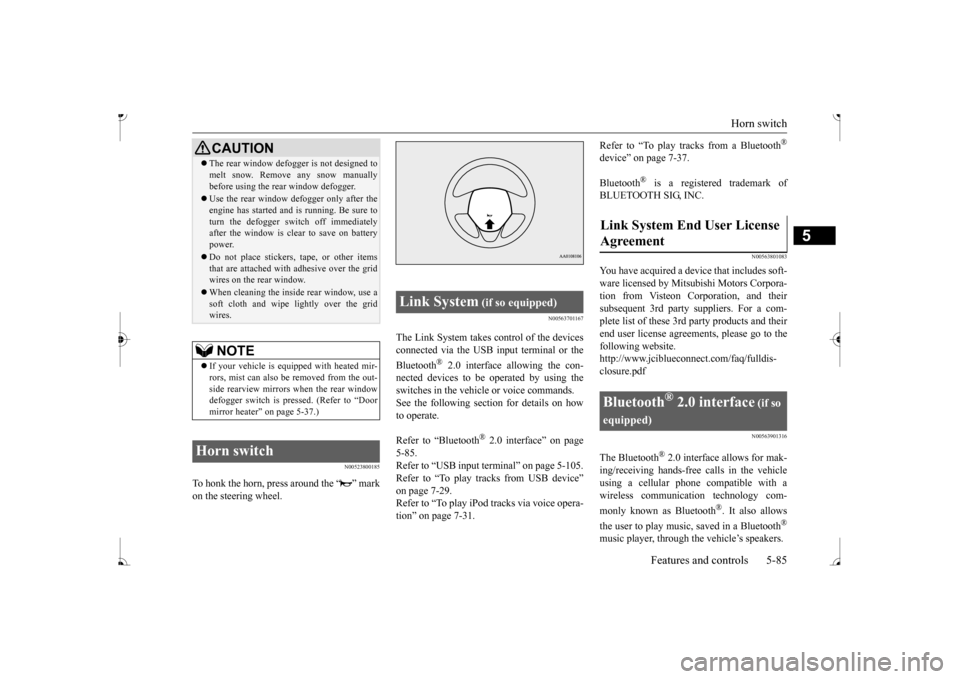
To honk the horn, press around the “ ” mark on the steering wheel.
N00563701167
The Link System takes co
ntrol of the devices
connected via the USB input terminal or the Bluetooth
® 2.0 interface allowing the con-
nected devices to be operated by using the switches in the vehicl
e or voice commands.
See the following sect
ion for details on how
to operate. Refer to “Bluetooth
® 2.0 interface” on page
5-85. Refer to “USB input terminal” on page 5-105.Refer to “To play tracks from USB device” on page 7-29. Refer to “To play iPod tracks via voice opera-tion” on page 7-31.
Refer to “To play tracks from a Bluetooth
®
device” on page 7-37. Bluetooth
® is a registered trademark of
BLUETOOTH SIG, INC.
N00563801083
You have acquired a devi
ce that includes soft-
ware licensed by Mitsub
ishi Motors Corpora-
tion from Visteon Corporation, and their subsequent 3rd party suppliers. For a com- plete list of these 3rd
party products and their
end user license agreements, please go to the following website. http://www.jciblueconne
ct.com/faq/fulldis-
closure.pdf
N00563901316
The Bluetooth
® 2.0 interface allows for mak-
ing/receiving ha
nds-free calls in the vehicle
using a cellular phone compatible with awireless communicat
ion technology com-
monly known as Bluetooth
®. It also allows
the user to play music, saved in a Bluetooth
®
music player, through the vehicle’s speakers.
CAUTION The rear window defogge
r is not designed to
melt snow. Remove
any snow manually
before using the rear window defogger. Use the rear window de
fogger only after the
engine has started and
is running. Be sure to
turn the defogger swit
ch off immediately
after the window is cl
ear to save on battery
power. Do not place stickers,
tape, or other items
that are attached with adhesive over the gridwires on the rear window. When cleaning the inside
rear window, use a
soft cloth and wipe lightly over the grid wires.NOTE
If your vehicle is equi
pped with heated mir-
rors, mist can also be removed from the out-side rearview mirrors when the rear window defogger switch is pressed. (Refer to “Door mirror heater” on page 5-37.)
Horn switch
Link System
(if so equipped)
Agreement
Bluetooth
® 2.0 interface
(if so
equipped)
BK0236100US.book 85 ページ 2016年2月1日 月曜日 午前10時15分
Page 147 of 307
Bluetooth® 2.0 interface (if so equipped) 5-86 Features and controls
5
The system is equipped with a voice recogni- tion function, which allows you to makehands-free calls by si
mple switch and voice
command operations us
ing a defined voice
tree. The Bluetooth
® 2.0 interface can be used
when the ignition switch or the operation mode is in ON or ACC. Before you can use the Bluetooth
® 2.0 inter-
face, you must pa
ir the Bluetooth
® device
and Bluetooth
® 2.0 interface. Refer to “Con-
necting the Bluetooth
® 2.0 interface and
Bluetooth
® device” on page 5-91.
Bluetooth
® is a registered trademark of
BLUETOOTH SIG, INC.
Steering control sw
itch and microphone
P.5-87Voice recognition function
P.5-88
Useful voice commands
P.5-89
Speaker enrollment function
P. 5 - 9 0
Connecting the Bluetooth
® 2.0 interface and
the Bluetooth
® device
P.5-91
Operating a music player connected via Blue- tooth
® P.5-96
How to make or r
eceive hands-free calls
P.5-96Phonebook function
P.5-98
WA R N I N GAlthough the Bluetooth
® 2.0 interface
allows you to make ha
nds-free calls, if you
choose to use the cellular phone while driving, you must not allow yourself to bedistracted from the sa
fe operation of your
vehicle. Anything, including cellular phone usage, that distracts you from thesafe operation of your vehicle increases your risk of
an accident.
Refer to and comply with all state and local laws in your area regarding cellular phone usage wh
ile driving.
NOTE
For vehicles equipped with the F.A.S.T.-key, if the operation mode is left in ACC, theaccessory power will automatically turn offafter a certain period
of time and you will no
longer be able to use the Bluetooth
® 2.0
interface. The accessory power comes on again if the engine
switch is operated.
Refer to “ACC power
auto-cutout function”
on page 5-14. The Bluetooth
® 2.0 interface
cannot be used
if the Bluetooth
® device has a dead battery
or the device power is turned off. Hands-free calls will
not be possible if your
phone does not have
service available.
If you place the Bluetooth
® device in the
cargo area, you may not be able to use the Bluetooth
® 2.0 interface.
Some Bluetooth
® devices are not compatible
with the Bluetooth
® 2.0 interface.
You can confirm the Link System software version by pressing the HANG-UP button 3 times (press and hold 2 times and then pressbriefly) within 10 seconds.
For detail of the Bluetooth
® 2.0 interface,
refer to the following website: [For vehicles sold in U.S.A.] You can access the Mits
ubishi Motors North
America website. [For vehicles so
ld in Canada]
You can access the Mitsubishi Motors web-site. Please read and agree to the “Warning about Links to the Web Sites of Other Companies”,the websites mentione
d above may connect
you to websites other than the Mitsubishi Motors website.http://www.mitsubishi
-motors.com/en/prod-
ucts/index.html Software updates by cellular phone/digital audio device manufacturers may change/alter devi
ce connectivity.
NOTE
BK0236100US.book 86 ページ 2016年2月1日 月曜日 午前10時15分
Page 149 of 307
Bluetooth® 2.0 interface (if so equipped) 5-88 Features and controls
5
Your voice will be re
cognized by a micro-
phone in the overhead console, allowing you to make hands-free ca
lls with voice com-
mands.
N00564100086
The Bluetooth
® 2.0 interface is equipped
with a voice recognition function. Simply say voice commands and you can per- form various operations
and make or receive
hands-free calls. With the Bluetooth
® 2.0 interface, voice rec-
ognition is possible for
US English, North
American Spanish, Canadian French and Jap- anese. The factory se
tting is “English.”
1. Press the SPEECH button. 2. Say “Setup.” 3. Say “Language.”
4. The voice guide wi
ll say “Select a lan-
guage: English, Spanish, French or Japa-nese.” Say the desired language. (Example: “English”) 5. The voice guide wi
ll say “English (Span-
ish, French or Japanese) selected. Is this correct?” Say “Yes.”Step 4. 6. When the voice guide says “English (Spanish, French or Japanese) selected,” the language change process will be com-pleted and the system will return to the main menu.
Call waiting and three-
way calls can be used
by the Bluetooth
® 2.0 interface, only if it is
possible to use those services with your cel- lular phone.
Microphone
NOTE
If a cellular phone is
within close proximity
of the microphone, it may distort the sound quality. In this case,
place the cellular phone
as far as possible from the microphone.
Voice recognition function
NOTE
NOTE
If the voice command
that you say differs
from the predefined command or cannot be recognised due to ambient noise or some other reason, the Bluetooth
® 2.0 interface
will ask you for the voice command again upto 3 times. For best performance and further reduction of ambient noise, the vehicle windows should be closed, lower the blower speed and refrain from conversation with your passen-gers while engaging
the voice recognition
function. Some voice commands have alternative commands. Depending on the sele
cted language, some
functions may not
be available.
Language can be change
d by using the audio
control panel besides
the following proce-
dure. For details, refer to “To change the language (vehicles with Bluetooth
® 2.0 interface)” on
page 7-27.
Selecting the language
NOTE
The voice guide will repeat the same mes- sage twice. The first message is in the cur- rent language, and th
e second message is in
the selected
language.
If many entries are regist
ered in the vehicle
phonebook, changing the language will takea longer time. Changing the language
deletes the mobile
phonebook imported to the Bluetooth
® 2.0
interface. If you wish to use it, you will haveto import it again.
BK0236100US.book 88 ページ 2016年2月1日 月曜日 午前10時15分
Page 152 of 307
Bluetooth® 2.0 interface (if so equipped)
Features and controls 5-91
5
3. Say “Voice training.” 4. The voice guide will say “This operationmust be performed in a quiet environment while the vehicle is
stopped. See the
owner’s manual for the list of requiredtraining phrases. Press and release the SPEECH button when you are ready to begin. Press the HANG-UP button to can-cel at any time.”
ton to start the
speaker enrollment process. 5. The voice guide will prompt for phrase 1. Repeat the correspondi
ng phrase listed in
table “Enrollment commands” on page 5-105.The system will register your voice and then move on to the registration of the next command. Continue the process untilall phrases have been registered.
6. When all enrollme
nt commands have
been read out, the vo
ice guide will say
“Speaker enrollment is complete.” The system will then end the speaker enroll-ment process and return to the main menu.
N00564900055
You can turn a voice model registered with the speaker enrollment function on and off whenever you want. You can also retrain the system.Use the following procedure to perform these actions. 1. Press the SPEECH button.
2. Say “Voice training.” 3. If you have completed a speaker enroll-ment process once already, the voice guide will say eith
er “Enrollment is
enabled. Would you like to disable orretrain?” or “Enrollment is disabled. Would you like to enable or retrain?” 4. When enrollment is “enabled,” the voicemodel is on; when enrollment is “dis- abled,” the voice model is off. Say the command that fits your needs. Say “Retrain” to start the speaker enroll- ment process and re
create a new voice
model. (Refer to “Speaker enrollment” on page 5-90.)
N00565001366
Before you can make
or receive hands-free
calls or play music using the Bluetooth
® 2.0
interface function, you must pair the Blue- tooth
® device and Bluetooth
® 2.0 interface.
NOTE
If you do not start the speaker enrollment process within 3 minut
es after pressing the
SPEECH button, the speaker enrollmentfunction will time out. The voice guide will say “Speaker enroll- ment has timed out.”
The system will then
beep and the voice reco
gnition mode will be
deactivated.
NOTE
To repeat the most re
cent voice training com-
mand, press and rele
ase the SPEECH button.
If you press the HANG-UP button anytime during the process, the
system will beep and
stop the speaker en
rollment process.
NOTE
Completing the speaker enrollment process will turn on the voice model automatically. The commands “Help” a
nd “Cancel” will not
work in this mode.
Enabling and disabling the voice model and retraining
Connecting the Bluetooth
® 2.0
interface and Bluetooth
® device
BK0236100US.book 91 ページ 2016年2月1日 月曜日 午前10時15分