ECO mode MITSUBISHI PAJERO IV 2011 Owner's Manual
[x] Cancel search | Manufacturer: MITSUBISHI, Model Year: 2011, Model line: PAJERO IV, Model: MITSUBISHI PAJERO IV 2011Pages: 377, PDF Size: 29.43 MB
Page 59 of 377
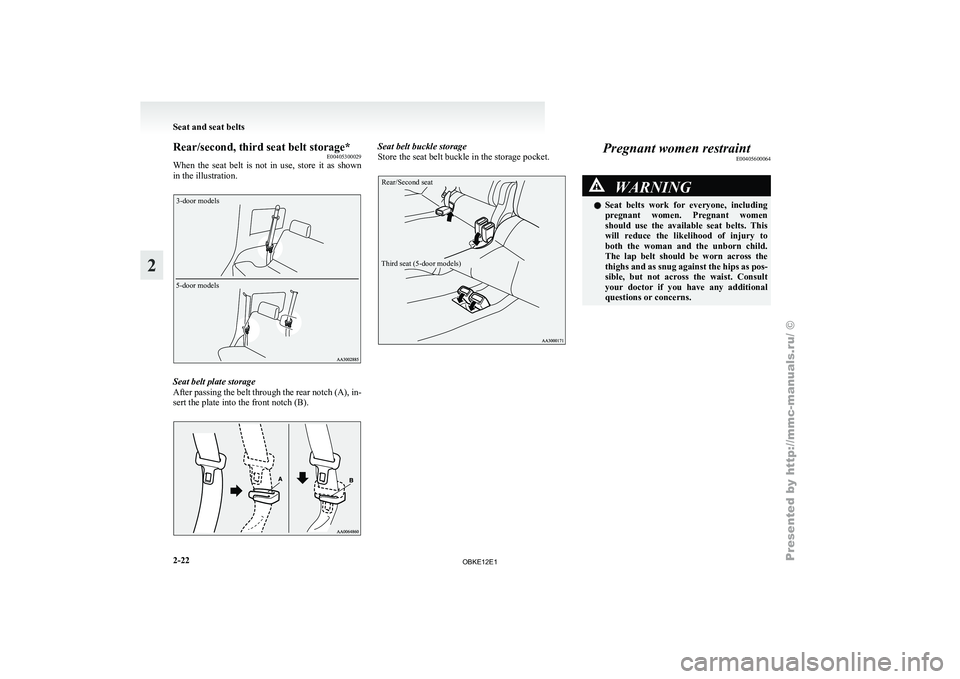
Rear/second, third seat belt storage*
E00405300029
When the seat
belt is not in use, store it as shown
in the illustration.
3-door models
5-door models Seat belt plate storage
After passing
the
belt through the rear notch (A), in-
sert the plate into the front notch (B). Seat belt buckle storage
Store the seat belt buckle in the storage pocket.
Rear/Second seat
Third seat (5-door models) Pregnant women restraint
E00405600064 WARNING
l Seat belts
work
for everyone, including
pregnant women. Pregnant women
should use the available seat belts. This
will reduce the likelihood of injury to
both the woman and the unborn child.
The lap belt should be worn across the
thighs and as snug against the hips as pos-
sible, but not across the waist. Consult
your doctor if you have any additional
questions or concerns. Seat and seat belts
2-22
2
OBKE12E1
Page 62 of 377
l
The child
restraint system should be appropri-
ate for the child’s weight and height and prop-
erly fit in the vehicle. For a higher degree of
safety: THE CHILD RESTRAINT SYSTEM
SHOULD BE INSTALLED IN THE REAR
SEAT.
l Before purchasing a child restraint system,
try installing it in the rear seat to make sure
there is a good fit. Because of the location of
the seat belt buckles and the shape of the seat
cushion, it may be difficult to securely install
some manufacturer’s child restraint systems.
If the child restraint system can be pulled for-
ward or to either side easily on the seat cush-
ion after the seat belt has been tightened,
choose another manufacturer’s child restraint
system. WARNING
l When installing
a
child restraint system,
refer to the instructions provided by the
manufacturer of the restraint system. Fail-
ure to do so can result in severe or fatal
injury to the child.
l After installation, push and pull the child
restraint system back and forth, and side
to side, to see that it is properly secured.
If the child restraint system is not instal-
led securely, it may cause injury to the
child or other occupants in the case of ac-
cident or sudden stops. WARNING
l When the child
restraint system is not in
use, keep your child restraint system se-
cured with the seat belt or remove it from
the vehicle in order to prevent it from be-
ing thrown around inside the vehicle dur-
ing an accident.
NOTE l Depending
on the
seating position in the ve-
hicle and the child restraint system that you
have, the child restraint can be attached us-
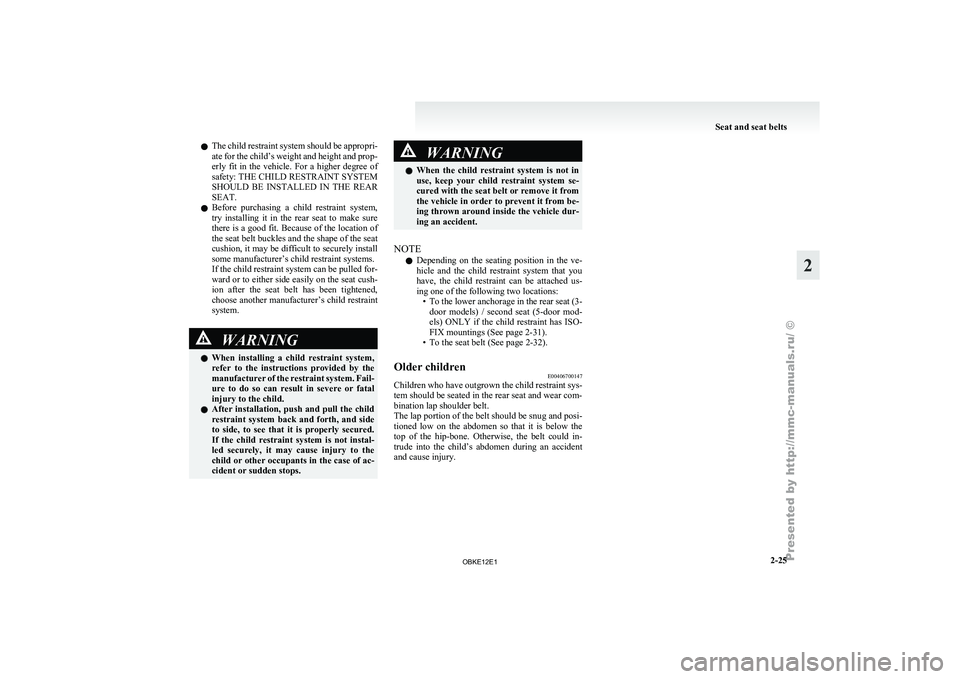
ing one of the following two locations: • To the lower anchorage in the rear seat (3-door models) / second seat (5-door mod-
els) ONLY if the child restraint has ISO-
FIX mountings (See page 2-31).
• To the seat belt (See page 2-32).
Older children E00406700147
Children who have outgrown the child restraint sys-
tem should be seated in the rear seat and wear com-
bination lap shoulder belt.
The lap portion of the belt should be snug and posi-
tioned low on
the abdomen so that it is below the
top of the hip-bone. Otherwise, the belt could in-
trude into the child’s abdomen during an accident
and cause injury. Seat and seat belts
2-25 2
OBKE12E1
Page 68 of 377
Installing a child restraint system to
the lower anchorage (ISOFIX child re-
straint mountings) and tether anchor-
age*
E00408900387
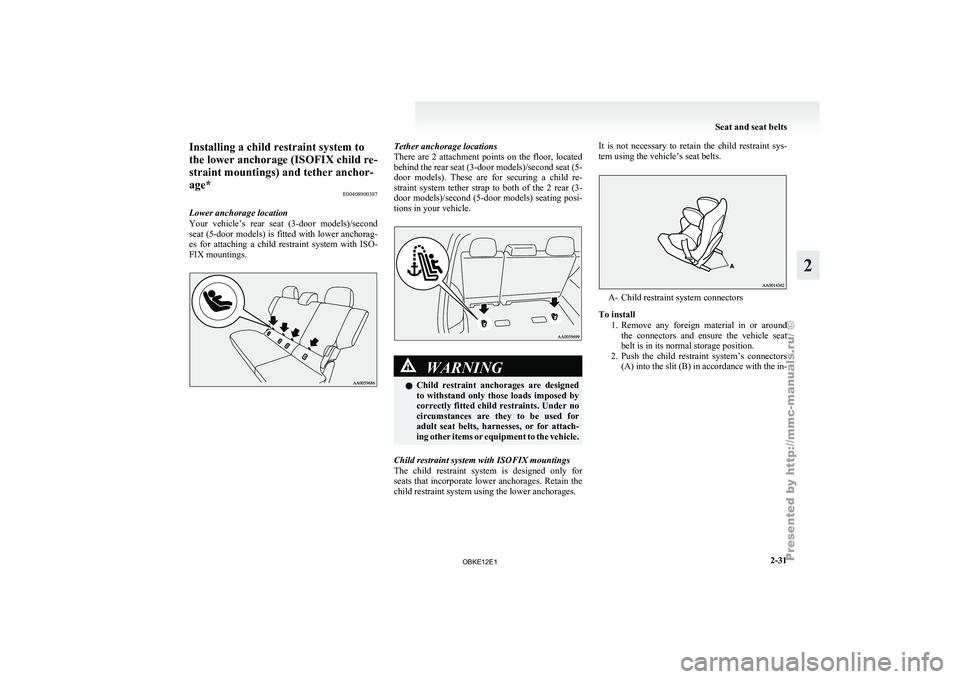
Lower anchorage location
Your vehicle’s rear
seat (3-door models)/second
seat (5-door models) is fitted with lower anchorag-
es for attaching a child restraint system with ISO-
FIX mountings. Tether anchorage locations
There are 2
attachment points on the floor, located
behind the rear seat (3-door models)/second seat (5-
door models). These are for securing a child re-
straint system tether strap to both of the 2 rear (3-
door models)/second (5-door models) seating posi-
tions in your vehicle. WARNING
l Child restraint
anchorages
are designed
to withstand only those loads imposed by
correctly fitted child restraints. Under no
circumstances are they to be used for
adult seat belts, harnesses, or for attach-
ing other items or equipment to the vehicle.
Child restraint system with ISOFIX mountings
The child restraint
system is designed only for
seats that incorporate lower anchorages. Retain the
child restraint system using the lower anchorages. It is not necessary to retain the child restraint sys-
tem using the vehicle’s seat belts.
A- Child restraint system connectors
To install 1. Remove any foreign
material in or around
the connectors and ensure the vehicle seat
belt is in its normal storage position.
2. Push the child restraint system’s connectors (A) into the slit (B) in accordance with the in- Seat and seat belts
2-31 2
OBKE12E1
Page 70 of 377
WARNING
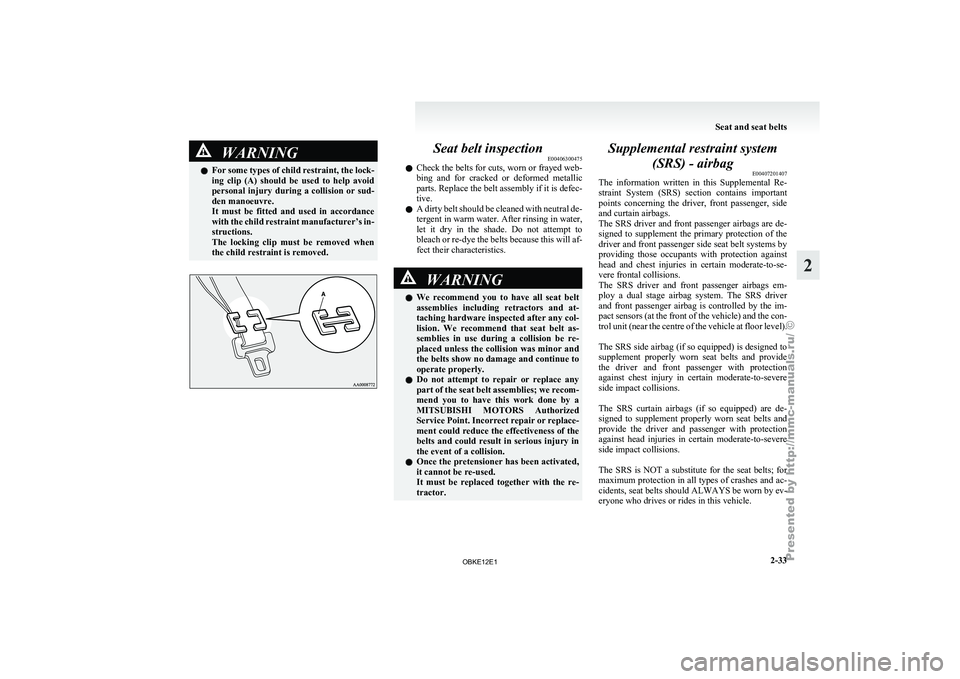
l For some types of child restraint, the lock-
ing clip (A) should be used to help avoid
personal injury during a collision or sud-
den manoeuvre.
It must be fitted and used in accordance
with the child restraint manufacturer’s in-
structions.
The locking clip must be removed when
the child restraint is removed. Seat belt inspection
E00406300475
l Check the
belts
for cuts, worn or frayed web-
bing and for cracked or deformed metallic
parts. Replace the belt assembly if it is defec-
tive.
l A dirty belt should be cleaned with neutral de-
tergent in warm water. After rinsing in water,
let it dry in the shade. Do not attempt to
bleach or re-dye the belts because this will af-
fect their characteristics. WARNING
l We recommend
you
to have all seat belt
assemblies including retractors and at-
taching hardware inspected after any col-
lision. We recommend that seat belt as-
semblies in use during a collision be re-
placed unless the collision was minor and
the belts show no damage and continue to
operate properly.
l Do not attempt to repair or replace any
part of the seat belt assemblies; we recom-
mend you to have this work done by a
MITSUBISHI MOTORS Authorized
Service Point. Incorrect repair or replace-
ment could reduce the effectiveness of the
belts and could result in serious injury in
the event of a collision.
l Once the pretensioner has been activated,
it cannot be re-used.
It must be replaced together with the re-
tractor. Supplemental restraint system
(SRS) - airbag E00407201407
The information written
in this Supplemental Re-
straint System (SRS) section contains important
points concerning the driver, front passenger, side
and curtain airbags.
The SRS driver and front passenger airbags are de-
signed to supplement the primary protection of the
driver and front passenger side seat belt systems by
providing those occupants with protection against
head and chest injuries in certain moderate-to-se-
vere frontal collisions.
The SRS driver and front passenger airbags em-
ploy a dual stage airbag system. The SRS driver
and front passenger airbag is controlled by the im-
pact sensors (at the front of the vehicle) and the con-
trol unit (near the centre of the vehicle at floor level).
The SRS side airbag (if so equipped) is designed to
supplement properly worn seat belts and provide
the driver and front passenger with protection
against chest injury in certain moderate-to-severe
side impact collisions.
The SRS curtain airbags (if so equipped) are de-
signed to supplement properly worn seat belts and
provide the driver and passenger with protection
against head injuries in certain moderate-to-severe
side impact collisions.
The SRS is NOT a substitute for the seat belts; for
maximum protection in all types of crashes and ac-
cidents, seat belts should ALWAYS be worn by ev-
eryone who drives or rides in this vehicle. Seat and seat belts
2-33 2
OBKE12E1
Page 77 of 377
WARNING
l Right after the airbag inflation, several
airbag system components will be hot. Do
not touch them; you could be burned.
l The airbag system is designed to work on-
ly once. Once the airbags have deployed,
they will not work again. They must
promptly be replaced, and we recom-
mend you to have the entire airbag sys-
tem inspected by a MITSUBISHI
MOTORS Authorized Service Point.
Side airbag system* E00407600198
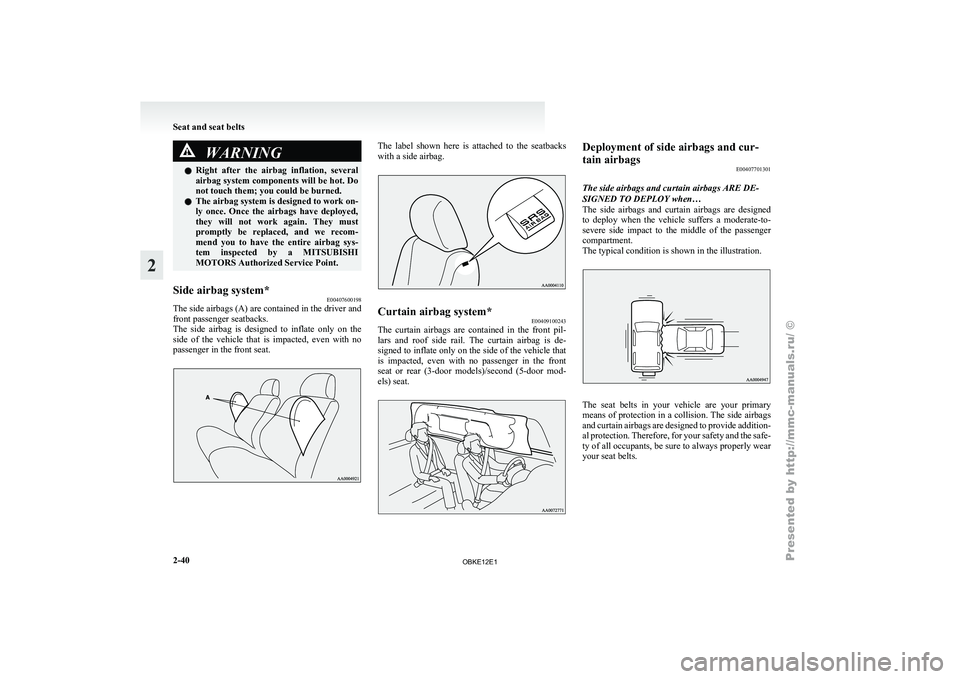
The side airbags (A) are contained in the driver and
front passenger seatbacks.
The side airbag
is designed to inflate only on the
side of the vehicle that is impacted, even with no
passenger in the front seat. The label shown here is attached to the seatbacks
with a side airbag.
Curtain airbag system*
E00409100243
The curtain airbags are contained in the front pil-
lars and roof
side rail. The curtain airbag is de-
signed to inflate only on the side of the vehicle that
is impacted, even with no passenger in the front
seat or rear (3-door models)/second (5-door mod-
els) seat. Deployment of side airbags and cur-
tain airbags
E00407701301
The side airbags and curtain airbags ARE DE-
SIGNED TO DEPLOY when…
The side airbags
and curtain airbags are designed
to deploy when the vehicle suffers a moderate-to-
severe side impact to the middle of the passenger
compartment.
The typical condition is shown in the illustration. The seat belts in your vehicle are your primary
means of
protection
in a collision. The side airbags
and curtain airbags are designed to provide addition-
al protection. Therefore, for your safety and the safe-
ty of all occupants, be sure to always properly wear
your seat belts. Seat and seat belts
2-40
2
OBKE12E1
Page 96 of 377
Average fuel consumption
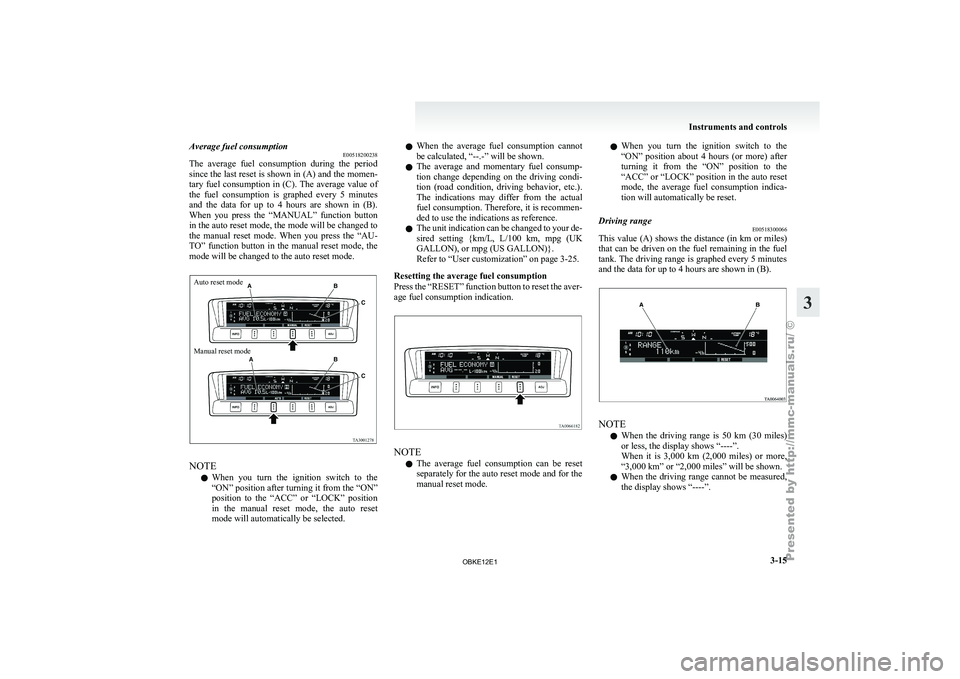
E00518200238
The average fuel
consumption during the period
since the last reset is shown in (A) and the momen-
tary fuel consumption in (C). The average value of
the fuel consumption is graphed every 5 minutes
and the data for up to 4 hours are shown in (B).
When you press the “MANUAL” function button
in the auto reset mode, the mode will be changed to
the manual reset mode. When you press the “AU-
TO” function button in the manual reset mode, the
mode will be changed to the auto reset mode.
Auto reset mode
Manual reset mode NOTE
l When
you turn
the ignition switch to the
“ON” position after turning it from the “ON”
position to the “ACC” or “LOCK” position
in the manual reset mode, the auto reset
mode will automatically be selected. l
When
the
average
fuel consumption cannot
be calculated, “--.-” will be shown.
l The average and momentary fuel consump-
tion change depending on the driving condi-
tion (road condition, driving behavior, etc.).
The indications may differ from the actual
fuel consumption. Therefore, it is recommen-
ded to use the indications as reference.
l The unit indication can be changed to your de-
sired setting {km/L, L/100 km, mpg (UK
GALLON), or mpg (US GALLON)}.
Refer to “User customization” on page 3-25.
Resetting the average fuel consumption
Press the “RESET” function button to reset the aver-
age fuel consumption indication. NOTE
l The
average fuel
consumption can be reset
separately for the auto reset mode and for the
manual reset mode. l
When you
turn
the ignition switch to the
“ON” position about 4 hours (or more) after
turning it from the “ON” position to the
“ACC” or “LOCK” position in the auto reset
mode, the average fuel consumption indica-
tion will automatically be reset.
Driving range E00518300066
This value (A) shows the distance (in km or miles)
that can be
driven on the fuel remaining in the fuel
tank. The driving range is graphed every 5 minutes
and the data for up to 4 hours are shown in (B). NOTE
l When
the driving
range is 50 km (30 miles)
or less, the display shows “----”.
When it is 3,000 km (2,000 miles) or more,
“3,000 km” or “2,000 miles” will be shown.
l When the driving range cannot be measured,
the display shows “----”. Instruments and controls
3-15 3
OBKE12E1
Page 97 of 377
l
The driving
range is shown based on the ac-
cumulated fuel consumption data, however,
may be changed depending on the driving con-
dition (road condition, driving behavior,
etc.). If the battery terminals are disconnec-
ted, the accumulated fuel consumption data
will be erased. It is recommended to use the
indication as reference.
l When the vehicle is fueled, the driving range
will be updated. However, if the amount of
fueling is small, the indication may not be cor-
rect. Therefore, fill up the tank as much as
possible in case of fueling.
l When the vehicle is stopped on a steep slope,
the value of the driving range may increase.
This is caused by the fuel movement inside
the tank on the slope and is not deemed as a
failure.
Resetting the driving range
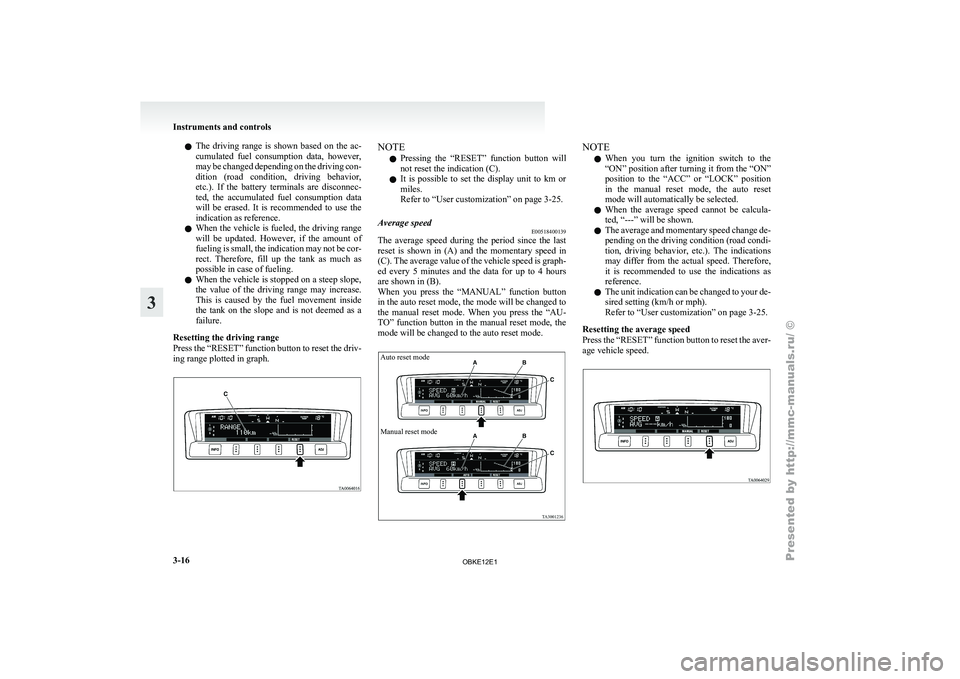
Press the “RESET” function button to reset the driv-
ing range plotted in graph. NOTE
l Pressing
the “RESET”
function button will
not reset the indication (C).
l It is possible to set the display unit to km or
miles.
Refer to “User customization” on page 3-25.
Average speed E00518400139
The average speed during the period since the last
reset is
shown
in (A) and the momentary speed in
(C). The average value of the vehicle speed is graph-
ed every 5 minutes and the data for up to 4 hours
are shown in (B).
When you press the “MANUAL” function button
in the auto reset mode, the mode will be changed to
the manual reset mode. When you press the “AU-
TO” function button in the manual reset mode, the
mode will be changed to the auto reset mode.
Auto reset mode
Manual reset mode NOTE
l When
you turn
the ignition switch to the
“ON” position after turning it from the “ON”
position to the “ACC” or “LOCK” position
in the manual reset mode, the auto reset
mode will automatically be selected.
l When the average speed cannot be calcula-
ted, “---” will be shown.
l The average and momentary speed change de-
pending on the driving condition (road condi-
tion, driving behavior, etc.). The indications
may differ from the actual speed. Therefore,
it is recommended to use the indications as
reference.
l The unit indication can be changed to your de-
sired setting (km/h or mph).
Refer to “User customization” on page 3-25.
Resetting the average speed
Press the “RESET” function button to reset the aver-
age vehicle speed. Instruments and controls
3-16
3
OBKE12E1
Page 98 of 377
NOTE
l The
average speed
can be reset separately for
the auto reset mode and for the manual reset
mode.
l When you turn the ignition switch to the
“ON” position about 4 hours (or more) after
turning it from the “ON” position to the
“ACC” or “LOCK” position in the auto reset
mode, the average speed indication will auto-
matically be reset.
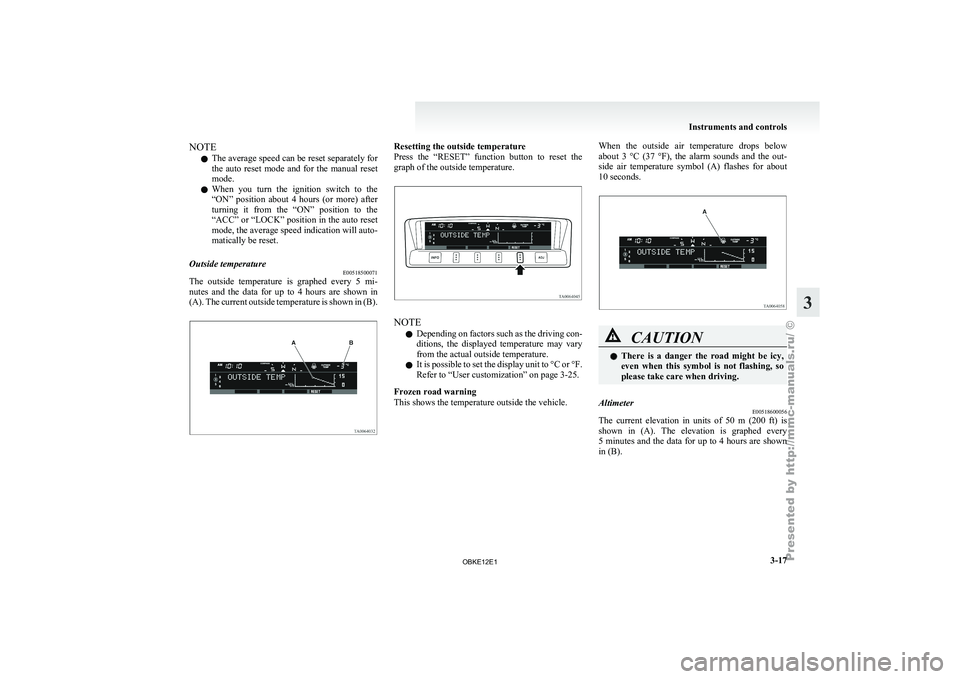
Outside temperature E00518500071
The outside temperature is graphed every 5 mi-
nutes and
the
data for up to 4 hours are shown in
(A). The current outside temperature is shown in (B). Resetting the outside temperature
Press the “RESET”
function button to reset the
graph of the outside temperature. NOTE
l Depending
on factors
such as the driving con-
ditions, the displayed temperature may vary
from the actual outside temperature.
l It is possible to set the display unit to °C or °F.
Refer to “User customization” on page 3-25.
Frozen road warning
This shows the temperature outside the vehicle. When the outside air temperature drops below
about 3
°C
(37 °F), the alarm sounds and the out-
side air temperature symbol (A) flashes for about
10 seconds. CAUTION
l
There is
a
danger the road might be icy,
even when this symbol is not flashing, so
please take care when driving.
Altimeter E00518600056
The current elevation in units of 50 m (200 ft) is
shown in (A).
The elevation is graphed every
5 minutes and the data for up to 4 hours are shown
in (B). Instruments and controls
3-17 3
OBKE12E1
Page 115 of 377
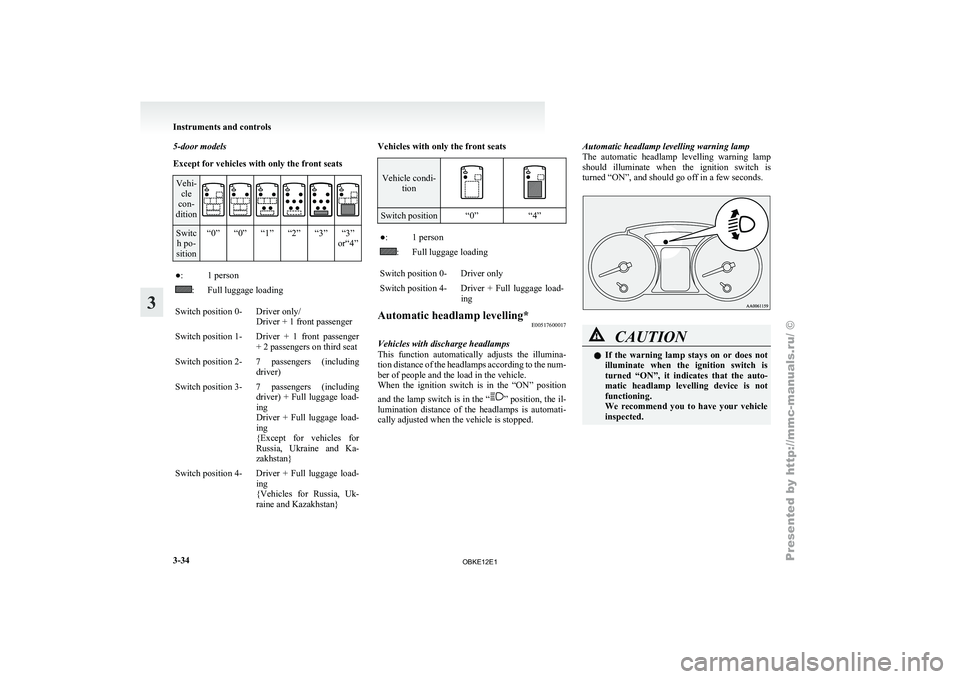
5-door models
Except for vehicles with only the front seats
Vehi-
cle
con-
dition Switc
h po-
sition “0” “0” “1” “2” “3” “3”
or“4”●: 1 person
: Full luggage loading
Switch position 0- Driver only/ Driver + 1 front passenger
Switch position 1- Driver + 1 front passenger + 2 passengers on third seat
Switch position 2- 7 passengers (including driver)
Switch position 3- 7 passengers (including driver) + Full
luggage load-
ing
Driver + Full luggage load-
ing
{Except for vehicles for
Russia, Ukraine and Ka-
zakhstan}
Switch position 4- Driver + Full luggage load- ing
{Vehicles for Russia,
Uk-
raine and Kazakhstan} Vehicles with only the front seats Vehicle condi-
tion Switch position “0”
“4” ●: 1 person
: Full luggage loading
Switch position 0- Driver only
Switch position 4- Driver + Full luggage load- ing
Automatic headlamp levelling* E00517600017
Vehicles with discharge headlamps
This function automatically
adjusts the illumina-
tion distance of the headlamps according to the num-
ber of people and the load in the vehicle.
When the ignition switch is in the “ON” position
and the lamp switch is in the “ ” position, the il-
lumination distance
of the headlamps is automati-
cally adjusted when the vehicle is stopped. Automatic headlamp levelling warning lamp
The automatic
headlamp
levelling warning lamp
should illuminate when the ignition switch is
turned “ON”, and should go off in a few seconds. CAUTION
l
If the
warning
lamp stays on or does not
illuminate when the ignition switch is
turned “ON”, it indicates that the auto-
matic headlamp levelling device is not
functioning.
We recommend you to have your vehicle
inspected. Instruments and controls
3-34
3
OBKE12E1
Page 122 of 377
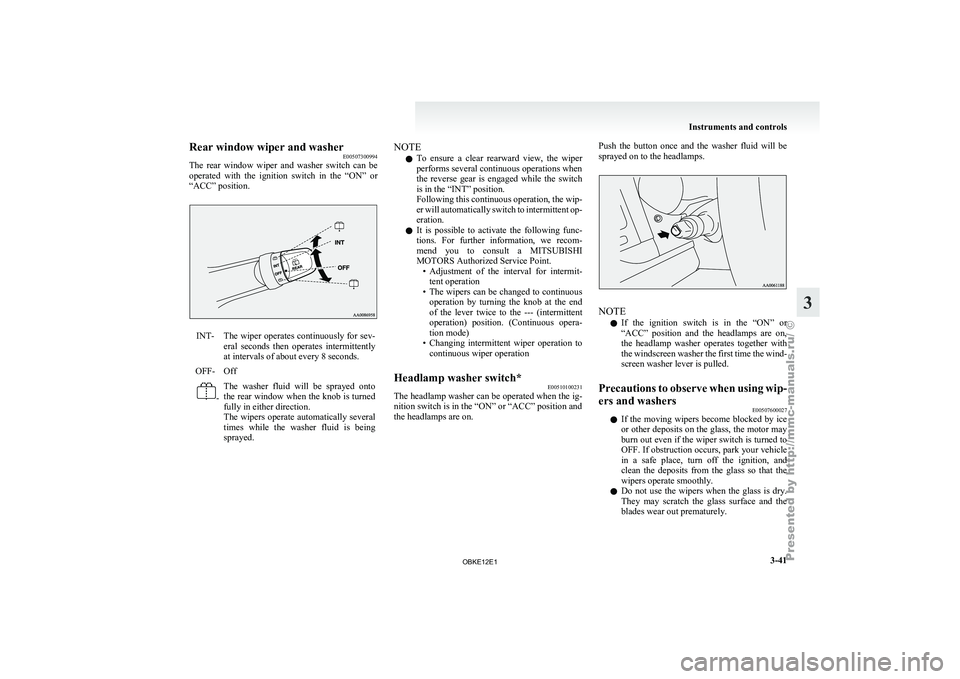
Rear window wiper and washer
E00507300994
The rear window
wiper and washer switch can be
operated with the ignition switch in the “ON” or
“ACC” position. INT- The wiper operates continuously for sev-
eral seconds then
operates intermittently
at intervals of about every 8 seconds.
OFF- Off -
The washer fluid will be sprayed onto
the
rear window
when the knob is turned
fully in either direction.
The wipers operate automatically several
times while the washer fluid is being
sprayed. NOTE
l To
ensure a
clear rearward view, the wiper
performs several continuous operations when
the reverse gear is engaged while the switch
is in the “INT” position.
Following this continuous operation, the wip-
er will automatically switch to intermittent op-
eration.
l It is possible to activate the following func-
tions. For further information, we recom-
mend you to consult a MITSUBISHI
MOTORS Authorized Service Point.
• Adjustment of the interval for intermit-tent operation
• The wipers can be changed to continuous operation by turning the knob at the end
of the lever twice to the --- (intermittent
operation) position. (Continuous opera-
tion mode)
• Changing intermittent wiper operation to continuous wiper operation
Headlamp washer switch* E00510100231
The headlamp washer can be operated when the ig-
nition switch is in the “ON” or “ACC” position and
the headlamps are on. Push the button once and the washer fluid will be
sprayed on to the headlamps.
NOTE
l If
the ignition
switch is in the “ON” or
“ACC” position and the headlamps are on,
the headlamp washer operates together with
the windscreen washer the first time the wind-
screen washer lever is pulled.
Precautions to observe when using wip-
ers and washers E00507600027
l If the
moving
wipers become blocked by ice
or other deposits on the glass, the motor may
burn out even if the wiper switch is turned to
OFF. If obstruction occurs, park your vehicle
in a safe place, turn off the ignition, and
clean the deposits from the glass so that the
wipers operate smoothly.
l Do not use the wipers when the glass is dry.
They may scratch the glass surface and the
blades wear out prematurely. Instruments and controls
3-41 3
OBKE12E1