set NISSAN GT-R 2015 R35 Multi Function Display Owners Manual
[x] Cancel search | Manufacturer: NISSAN, Model Year: 2015, Model line: GT-R, Model: NISSAN GT-R 2015 R35Pages: 298, PDF Size: 11.39 MB
Page 152 of 298
![NISSAN GT-R 2015 R35 Multi Function Display Owners Manual 1. Push<PHONE> and select [Quick Dial].
2. Select [Add New] at the top of the screen.
3. Choose the method for entering the phone- book entry. For this example, select [Enter
Number by Keypad].
4. Ent](/img/5/423/w960_423-151.png "NISSAN GT-R 2015 R35 Multi Function Display Owners Manual 1. Push<PHONE> and select [Quick Dial].
2. Select [Add New] at the top of the screen.
3. Choose the method for entering the phone- book entry. For this example, select [Enter
Number by Keypad].
4. Ent")
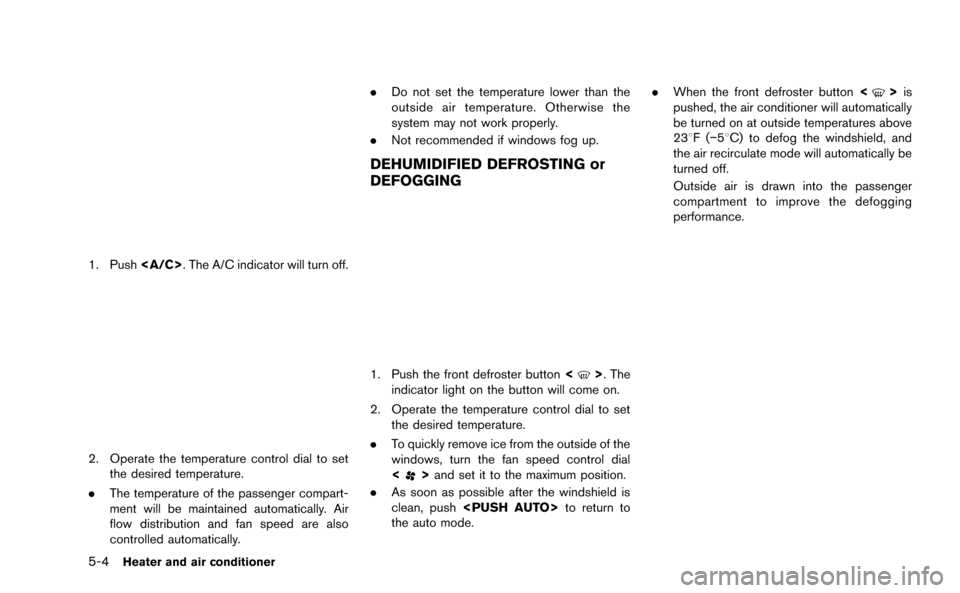
1. Push
2. Select [Add New] at the top of the screen.
3. Choose the method for entering the phone- book entry. For this example, select [Enter
Number by Keypad].
4. Enter the digits and select [OK].
“How to input letters and numbers”
(page 1-14)
5. Select [Voicetag] to record a name to speak when using NISSAN Voice Recognition
system.
6. Select [Store] and prepare to speak the name after the tone.
7. When the voicetag is successfully saved, select [OK] to save the phonebook entry.
8. After the phonebook entry is saved, it will show a screen that is ready to call the
number. Press
quick dial.
There are different methods to input a phone
number. Select one of the following options
instead of [Enter Number by Keypad] in step 3.
. [Copy from Call History]:
The system will show a list of incoming,
outgoing or missed calls that were down-
loaded from the connected cellular phone
(depending on the phone’s compatibility) .
Select one of these entries to save in the quick dial.
. [Copy from the Handset]:
The system will show the connected cellular
phone’s phonebook that was downloaded
(depending on the phone’s compatibility) .
Select one of these entries to save in the
quick dial.Editing the Quick Dial
1. Push
2. Select the desired entry from the displayed list.
3. Select [Edit].
4. Select the desired item to change.
Bluetooth®Hands-Free Phone System4-5
Page 154 of 298
![NISSAN GT-R 2015 R35 Multi Function Display Owners Manual .[Answer]:
Accept an incoming call to talk.
. [Hold Call]:
Put an incoming call on hold.
. [Reject Call]:
Reject an incoming call.
To finish the call, perform one of the
following procedures listed be](/img/5/423/w960_423-153.png "NISSAN GT-R 2015 R35 Multi Function Display Owners Manual .[Answer]:
Accept an incoming call to talk.
. [Hold Call]:
Put an incoming call on hold.
. [Reject Call]:
Reject an incoming call.
To finish the call, perform one of the
following procedures listed be")
.[Answer]:
Accept an incoming call to talk.
. [Hold Call]:
Put an incoming call on hold.
. [Reject Call]:
Reject an incoming call.
To finish the call, perform one of the
following procedures listed below.
1. Select [Hang up].
2. Push
3. Push <
>on the steering wheel.
DURING A CALL
There are some options available during a call.
Select one of the following displayed on the
screen if necessary.
. [Hang up]:
Finish the call. .
[Use Handset]:
Transfer the call to the cellular phone.
. [Mute]:
Mute your voice to the person.
. [Keypad]:
Using the touch tone, send digits to the
connected party for using services such as
voicemail.
. [Cancel Mute]:
This will appear after [Mute] is selected.
Mute will be canceled.
PHONE SETTING
To set up the Bluetooth®Hands-Free Phone
System to your preferred settings, push
Edit Quick Dial
Quick dial registration and editing/deleting the
registered quick dial can be performed.
Delete Quick Dial
The quick dial entries can be deleted all at the
same time or one by one.
Download Phonebook
Download the contacts registered in a Blue-
tooth®cellular phone. Availability of this function
depends on each cellular phone. The memory
downloading procedure from the cellular phone
also varies according to each cellular phone.
See cellular phone Owner’s Manual for details.
Volume & Ringtone
The following kinds of phone volume can be set.
Pushing
Ringtone] can also operate the same settings.
. [Ringtone]/[Incoming Call]/[Outgoing
Call]:
To increase or decrease the volume, select
[Ringtone], [Incoming Call] or [Outgoing
Call] and adjust it with the center dial.
. [Automatic Hold]:
When this function is activated, an incoming
phone call is automatically held.
Bluetooth®Hands-Free Phone System4-7
Page 157 of 298
5-2Heater and air conditioner
WARNING
.The air conditioner cooling function
operates only when the engine is
running.
. Do not leave children or adults who
would normally require the support
of others alone in your vehicle. Pets
should not be left alone either. On
hot, sunny days, temperatures in a
closed vehicle could quickly become
high enough to cause severe or
possibly fatal injuries to people or
animals.
. Do not use the recirculation mode
for long periods as it may cause the
interior air to become stale and the
windows to fog up.
Start the engine and operate the heater and air
conditioner system.
You can individually set the driver and front
passenger side temperature using each tem-
perature control switch.
INFO:
. Odors from inside and outside the vehicle
can build up in the air conditioner unit. Odor
can enter the passenger compartment
through the vents.
. When parking, set the heater and air
conditioner controls to turn off air recircula-
tion to allow fresh air into the passenger
compartment. This should help reduce
odors inside the vehicle.
HOW TO VIEW SCREEN
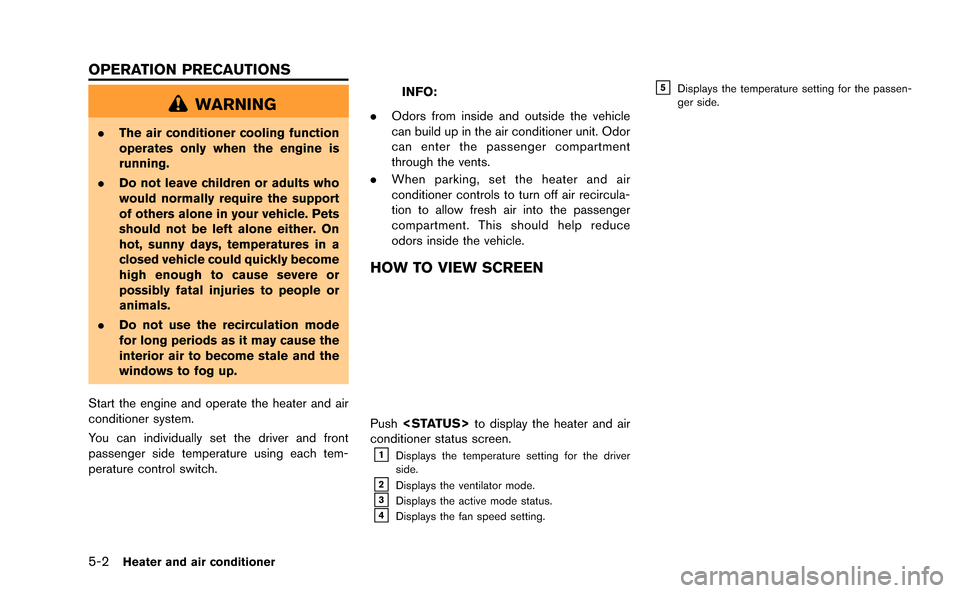
Push
conditioner status screen.
&1Displays the temperature setting for the driver
side.
&2Displays the ventilator mode.&3Displays the active mode status.&4Displays the fan speed setting.
&5Displays the temperature setting for the passen-
ger side.
OPERATION PRECAUTIONS
Page 158 of 298
COOLING AND/OR DEHUMIDIFIED
HEATING (AUTO)
This mode may be used all year round. The
system works automatically to control the inside
temperature, air flow distribution and fan speed
after the preferred temperature is set manually.
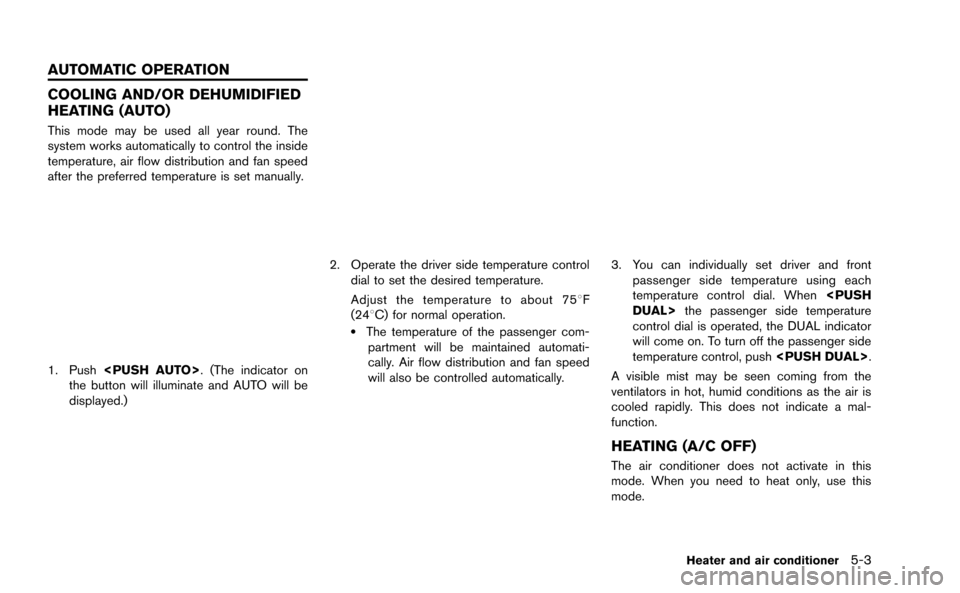
1. Push
the button will illuminate and AUTO will be
displayed.)
2. Operate the driver side temperature control dial to set the desired temperature.
Adjust the temperature to about 758 F
(248C) for normal operation.
.The temperature of the passenger com- partment will be maintained automati-
cally. Air flow distribution and fan speed
will also be controlled automatically.
3. You can individually set driver and front passenger side temperature using each
temperature control dial. When
control dial is operated, the DUAL indicator
will come on. To turn off the passenger side
temperature control, push
A visible mist may be seen coming from the
ventilators in hot, humid conditions as the air is
cooled rapidly. This does not indicate a mal-
function.
HEATING (A/C OFF)
The air conditioner does not activate in this
mode. When you need to heat only, use this
mode.
Heater and air conditioner5-3
AUTOMATIC OPERATION
Page 159 of 298
Page 160 of 298
FAN SPEED CONTROL
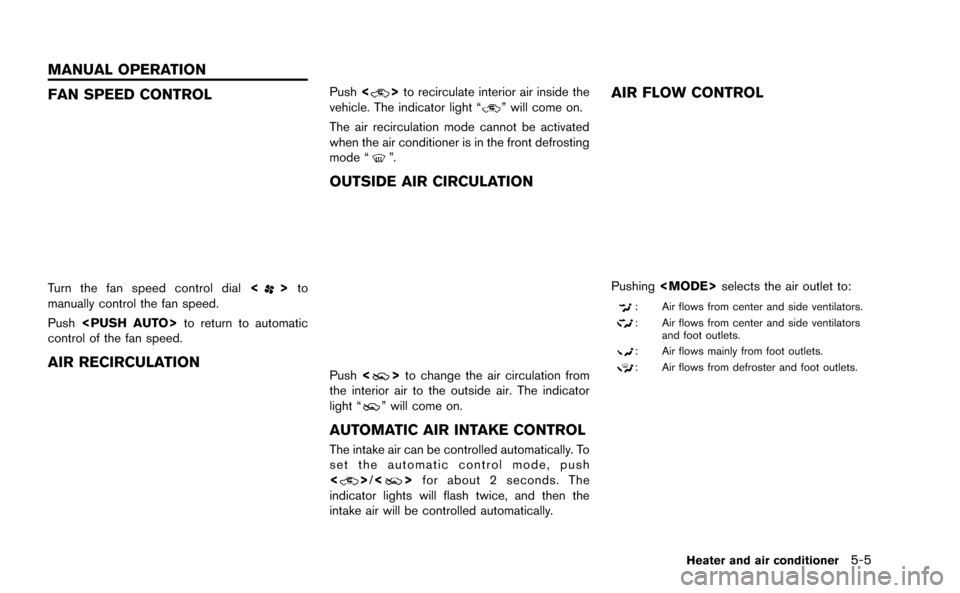
Turn the fan speed control dial<>to
manually control the fan speed.
Push
control of the fan speed.
AIR RECIRCULATION
Push <>to recirculate interior air inside the
vehicle. The indicator light “” will come on.
The air recirculation mode cannot be activated
when the air conditioner is in the front defrosting
mode “
”.
OUTSIDE AIR CIRCULATION
Push <>to change the air circulation from
the interior air to the outside air. The indicator
light “
” will come on.
AUTOMATIC AIR INTAKE CONTROL
The intake air can be controlled automatically. To
set the automatic control mode, push
<
> /<> for about 2 seconds. The
indicator lights will flash twice, and then the
intake air will be controlled automatically.
AIR FLOW CONTROL
Pushing
: Air flows from center and side ventilators.
: Air flows from center and side ventilators
and foot outlets.
: Air flows mainly from foot outlets.
: Air flows from defroster and foot outlets.
Heater and air conditioner5-5
MANUAL OPERATION
Page 164 of 298

6 Viewing technical information
Status screen ........................................................................\
...... 6-2
Information screen ..................................................................... 6-2Basic operation .................................................................... 6-2
Viewing information about current vehicle location .......... 6-3 Basic operation .................................................................... 6-3
Vehicle information display ...................................................... 6-4
Fuel economy information .................................................. 6-4
Tire pressure information ................................................... 6-4
Maintenance information .................................................... 6-6
Viewing available traffic information ...................................... 6-7 Basic operation .................................................................... 6-8
Info on route ........................................................................\
.. 6-8
Nearby traffic info. ............................................................... 6-9 Display urgent traffic information ................................... 6-9
Traffic information on map ............................................ 6-10
Traffic information settings ........................................... 6-11
Viewing available weather information .............................. 6-12 Displaying weather information screen ..................... 6-13
Destination weather on suggested route screen ... 6-19
Automatically display warnings/watches .................. 6-20
Map update ........................................................................\
..... 6-21
Viewing navigation system version information .............. 6-22
Basic operation ............................................................... 6-22
Viewing GPS current location information ...................... 6-22 Basic operation ............................................................... 6-22
Page 165 of 298
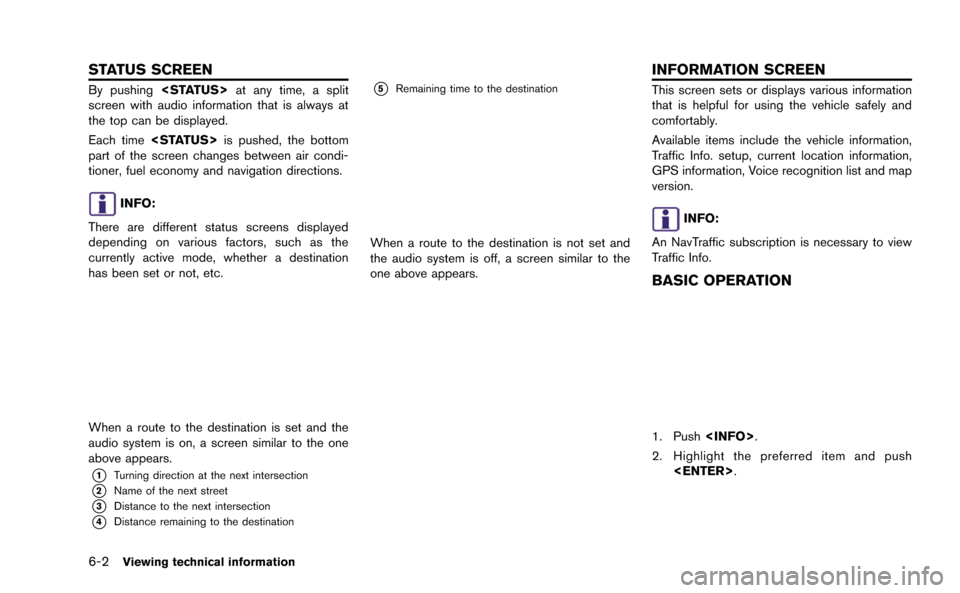
6-2Viewing technical information
By pushing
screen with audio information that is always at
the top can be displayed.
Each time
part of the screen changes between air condi-
tioner, fuel economy and navigation directions.
INFO:
There are different status screens displayed
depending on various factors, such as the
currently active mode, whether a destination
has been set or not, etc.
When a route to the destination is set and the
audio system is on, a screen similar to the one
above appears.
*1Turning direction at the next intersection
*2Name of the next street
*3Distance to the next intersection
*4Distance remaining to the destination
*5Remaining time to the destination
When a route to the destination is not set and
the audio system is off, a screen similar to the
one above appears.
This screen sets or displays various information
that is helpful for using the vehicle safely and
comfortably.
Available items include the vehicle information,
Traffic Info. setup, current location information,
GPS information, Voice recognition list and map
version.
INFO:
An NavTraffic subscription is necessary to view
Traffic Info.
BASIC OPERATION
1. Push
2. Highlight the preferred item and push
STATUS SCREEN INFORMATION SCREEN
Page 166 of 298
![NISSAN GT-R 2015 R35 Multi Function Display Owners Manual Available items
.[Fuel Economy]:
Displays the fuel economy information.
“Fuel economy information” (page 6-4)
. [Tire Pressure]:
Displays the tire pressure information.
“Tire pressure informatio](/img/5/423/w960_423-165.png "NISSAN GT-R 2015 R35 Multi Function Display Owners Manual Available items
.[Fuel Economy]:
Displays the fuel economy information.
“Fuel economy information” (page 6-4)
. [Tire Pressure]:
Displays the tire pressure information.
“Tire pressure informatio")
Available items
.[Fuel Economy]:
Displays the fuel economy information.
“Fuel economy information” (page 6-4)
. [Tire Pressure]:
Displays the tire pressure information.
“Tire pressure information” (page 6-4)
. [Maintenance]:
Displays the vehicle maintenance informa-
tion.
“Maintenance information” (page 6-6)
. [Where am I?]:
Displays information regarding the current
vehicle location.
“Viewing information about current
vehicle location” (page 6-3)
. [Traffic Info]:
Allows Traffic Info. setup.
“Viewing available traffic information”
(page 6-7)
. [Weather Info]:
Displays weather information.
“Viewing available weather informa-
tion” (page 6-12)
. [Others]: — [Map Update]:
Display the map version and enable
updating of the map data.
“Map update” (page 6-21)
— [Navigation Version]: Displays the current navigation system
version.
“Viewing navigation system version
information” (page 6-22)
— [GPS Position]: Displays GPS information regarding the
current vehicle location.
“Viewing GPS current location in-
formation” (page 6-22)
— [Voice Recognition]: Displays the voice recognition list.
“8. Voice recognition”
This displays the information about the vehicle
location on the route when driving according to
route guidance.
BASIC OPERATION
1. Push
2. Highlight [Where am I?] and push
3. Push
screen. Push
Page 167 of 298
6-4Viewing technical information
*4Displays the distance to the next intersection on
the route.
*5Displays the distance traveled from the previous
intersection on the route.
Setting by voice command
1. Push <
>located on the steering wheel.
2. After the tone sounds, speak a command.
To display the information about the vehicle
location:
“Information” “Where am I?” (Standard Mode)
“Where am I?” (Alternate Command Mode)
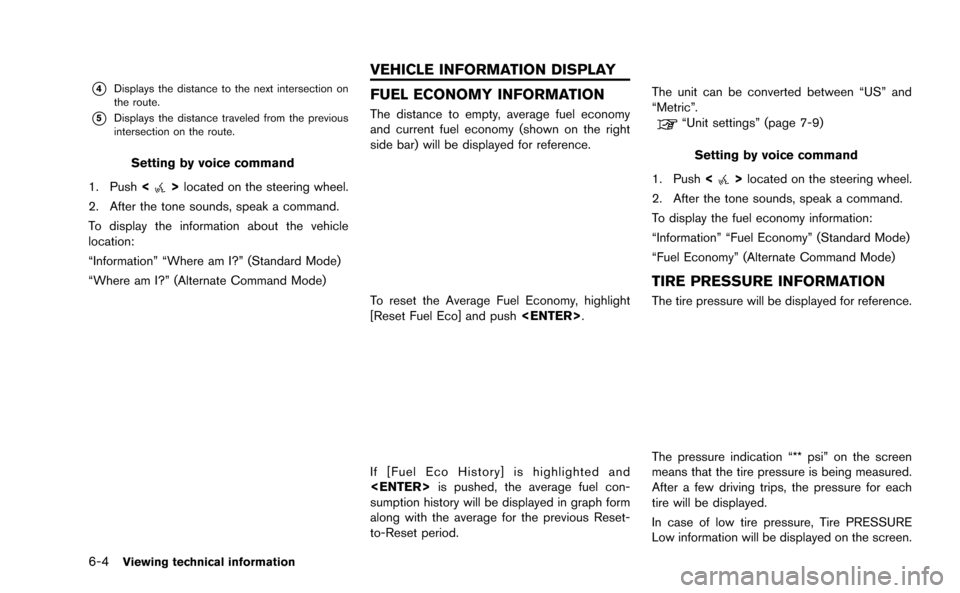
FUEL ECONOMY INFORMATION
The distance to empty, average fuel economy
and current fuel economy (shown on the right
side bar) will be displayed for reference.
To reset the Average Fuel Economy, highlight
[Reset Fuel Eco] and push
If [Fuel Eco History] is highlighted and
sumption history will be displayed in graph form
along with the average for the previous Reset-
to-Reset period. The unit can be converted between “US” and
“Metric”.
“Unit settings” (page 7-9)
Setting by voice command
1. Push <
>located on the steering wheel.
2. After the tone sounds, speak a command.
To display the fuel economy information:
“Information” “Fuel Economy” (Standard Mode)
“Fuel Economy” (Alternate Command Mode)
TIRE PRESSURE INFORMATION
The tire pressure will be displayed for reference.
The pressure indication “** psi” on the screen
means that the tire pressure is being measured.
After a few driving trips, the pressure for each
tire will be displayed.
In case of low tire pressure, Tire PRESSURE
Low information will be displayed on the screen.
VEHICLE INFORMATION DISPLAY