low NISSAN GT-R 2017 R35 Multi Function Display User Guide
[x] Cancel search | Manufacturer: NISSAN, Model Year: 2017, Model line: GT-R, Model: NISSAN GT-R 2017 R35Pages: 248, PDF Size: 1.72 MB
Page 42 of 248
3. Audio system
COMPACT DISC (CD) PLAYER
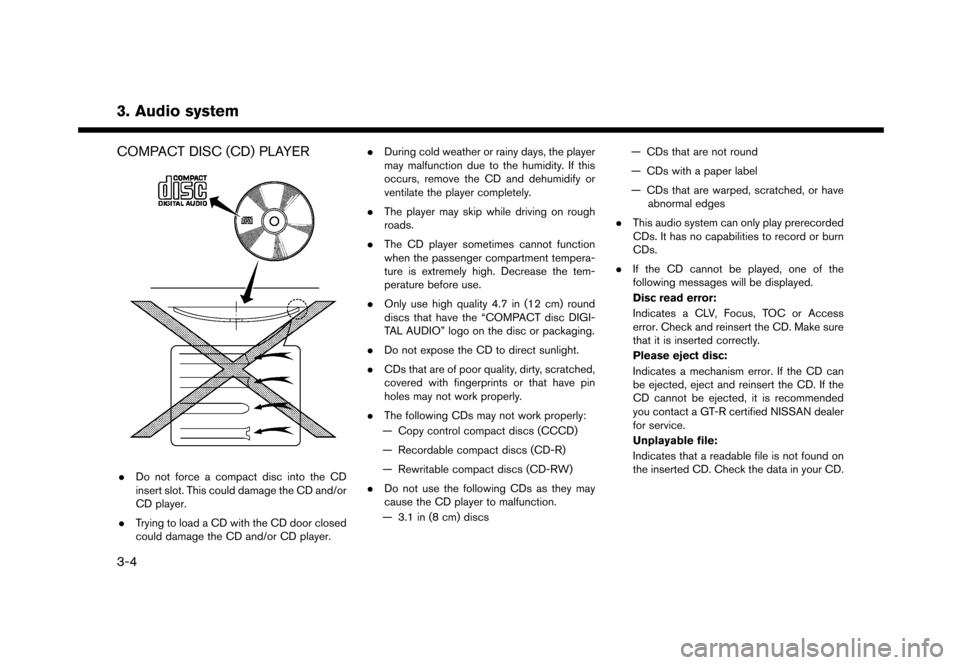
.Do not force a compact disc into the CD
insert slot. This could damage the CD and/or
CD player.
. Trying to load a CD with the CD door closed
could damage the CD and/or CD player. .
During cold weather or rainy days, the player
may malfunction due to the humidity. If this
occurs, remove the CD and dehumidify or
ventilate the player completely.
. The player may skip while driving on rough
roads.
. The CD player sometimes cannot function
when the passenger compartment tempera-
ture is extremely high. Decrease the tem-
perature before use.
. Only use high quality 4.7 in (12 cm) round
discs that have the “COMPACT disc DIGI-
TAL AUDIO” logo on the disc or packaging.
. Do not expose the CD to direct sunlight.
. CDs that are of poor quality, dirty, scratched,
covered with fingerprints or that have pin
holes may not work properly.
. The following CDs may not work properly:
— Copy control compact discs (CCCD)
— Recordable compact discs (CD-R)
— Rewritable compact discs (CD-RW)
. Do not use the following CDs as they may
cause the CD player to malfunction.
— 3.1 in (8 cm) discs — CDs that are not round
— CDs with a paper label
— CDs that are warped, scratched, or have
abnormal edges
. This audio system can only play prerecorded
CDs. It has no capabilities to record or burn
CDs.
. If the CD cannot be played, one of the
following messages will be displayed.
Disc read error:
Indicates a CLV, Focus, TOC or Access
error. Check and reinsert the CD. Make sure
that it is inserted correctly.
Please eject disc:
Indicates a mechanism error. If the CD can
be ejected, eject and reinsert the CD. If the
CD cannot be ejected, it is recommended
you contact a GT-R certified NISSAN dealer
for service.
Unplayable file:
Indicates that a readable file is not found on
the inserted CD. Check the data in your CD.
3-4
Page 45 of 248
COMPRESSED AUDIO FILES (MP3/
WMA/AAC)
Explanation of terms
.MP3 — MP3 is short for Moving Pictures
Experts Group Audio Layer 3. MP3 is the
most well-known compressed digital audio
file format. This format allows for near “CD
quality” sound, but at a fraction of the size of
normal audio files. MP3 conversion of an
audio track can reduce the file size by
approximately a 10:1 ratio (Sampling: 44.1
kHz, Bit rate: 128 kbps) with virtually no
perceptible loss in quality. The compression
reduces certain parts of sound that seem
inaudible to most people.
. WMA — Windows Media Audio (WMA) is a
compressed audio format created by Micro-
soft as an alternative to MP3. The WMA
codec offers greater file compression than
the MP3 codec, enabling storage of more
digital audio tracks in the same amount of
space when compared to MP3s at the same
level of quality.
. Bit rate — Bit rate denotes the number of bits
per second used by a digital music file. The
size and quality of a compressed digital
audio file is determined by the bit rate used
when encoding the file. .
Sampling frequency — Sampling frequency
is the rate at which the samples of a signal
are converted from analog to digital (A/D
conversion) per second.
. Multisession — Multisession is one of the
methods for writing data to media. Writing
data once to the media is called a single
session, and writing more than once is called
a multisession.
. ID3/WMA tag — The ID3/WMA tag is the
part of the encoded MP3 or WMA file that
contains information about the digital music
file such as song title, artist, album title,
encoding bit rate, track time duration, etc.
ID3 tag information is displayed on the
Album/Artist/Track title line on the display.
. AAC — Advanced Audio Coding (AAC) is a
compressed audio format. AAC offers great-
er file compression than MP3 and enables
music file creation and storage at the same
quality as MP3.
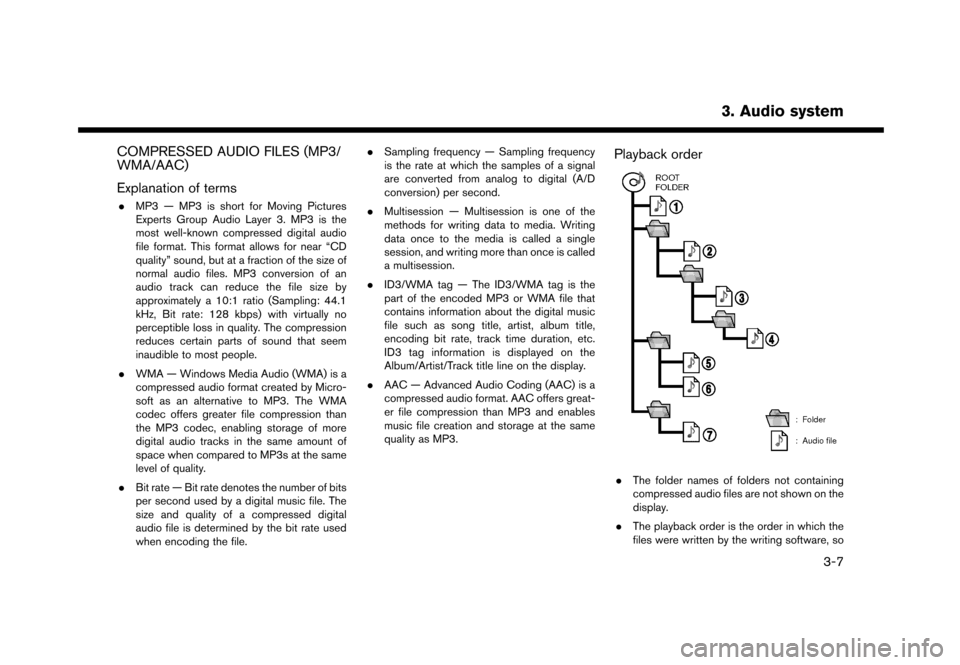
Playback order
.The folder names of folders not containing
compressed audio files are not shown on the
display.
. The playback order is the order in which the
files were written by the writing software, so
3. Audio system
3-7
Page 47 of 248
*1 Files created with a combination of 48 kHz sampling frequency and 64 kbps bit rate cannot be played.
*2 Protected WMA files (DRM) cannot be played.
*3 Made by iTunes
Š.
*4 Available codes depend on what kind of media, versions and information are going to be displayed.
BLUETOOTHŠSTREAMING AUDIO
. Some BluetoothŠaudio devices may not be
recognized by the in-vehicle audio system.
. It is necessary to set up the wireless
connection between a compatible Blue-
tooth
Šaudio device and the in-vehicle Blue-
toothŠmodule before using the BluetoothŠ
streaming audio.
. The Bluetooth
Šstreaming audio may stop
playing when
— receiving a hands-free call.
— checking the connection to the hands- free phone.
— connecting the hands-free phone or the audio device.
— downloading the phonebook memory from the connected cellular phone.
. Do not place a Bluetooth
Šaudio device in an
area surrounded by metal or far away from
the in-vehicle Bluetooth
Šmodule to prevent
tone quality degradation and wireless con-
nection disruption. .
While an audio device is connected through
a Bluetooth
Šwireless connection, the bat-
tery of the device may discharge quicker than
usual.
. This system supports the Bluetooth
ŠAd-
vanced Audio Distribution Profile (A2DP)
and Audio/Video Remote Control Profile
(AVRCP) .
. Wireless LAN (Wi-Fi) and the Bluetooth
Š
functions share the same frequency band
(2.4 GHz) . Using the BluetoothŠand the
wireless LAN functions at the same time may
slow down or disconnect the communication
and cause undesired noise. It is recom-
mended that you turn off the wireless LAN
(Wi-Fi) when using the Bluetooth
Šfunctions.
3. Audio system
3-9
Page 51 of 248
*7TAG indicator (for U.S.):
TAG indicator is displayed if the iTunesŠ
Tagging information exists in the HD broad-
cast receiving.
“Radio Menu” (page 3-14)
*8Preset list:
To listen to a preset station, touch the
corresponding key in the preset list. Touch [
< ] or [ > ] to scroll the preset list. Touch and
hold one of the keys in the preset list to store
the station or channel currently tuned to.
“Presetting” (page 3-13)
*9Mode indicator (for U.S.):
On AM and FM screens, HD Radio icon will
appear when HD mode setting is turned on.
“Radio Menu” (page 3-14)
“Live” will appear when in ballgame mode
during reception of the HD broadcast.
INFO:
. An icon indicating the signal strength ap-
pears on the SXM screen.
. HD Radio (for U.S.) reception needs to be
activated to receive HD Radio broadcasts.
This enables you to receive radio broadcasts
digitally (where available) , providing a better
quality sound with clear reception. When this feature is not activated or HD Radio broad-
casts are not available, you will receive
analog radio (AM/FM) broadcasts.
“Radio Menu” (page 3-14)
Radio operation
Radio activation and band selection:
To listen to the radio, turn on the audio system
and select a preferred radio band on the audio
source menu screen.
“Selecting audio source” (page 3-11)
INFO:
When the stereo broadcast signal is weak, the
radio will automatically change from stereo to
monaural reception.
Tuning:
To tune to stations/channels manually, turn
station is selected.
Seek tuning:
Tilt and hold <
>/<>on the steering
wheel to seek up/down to the next receivable
broadcast station or channel. Scan tuning:
To scan tune the stations/channels, touch [FM
Menu], [AM Menu] or [SXM Menu] on the radio
screen and then touch [SCAN]. The stations/
channels will be tuned from low to high
frequencies and stop at each broadcasting
station/channel for several seconds. Touching
[SCAN] again during this period of several
seconds will stop scan tuning and the radio will
remain tuned to that station/channel.
Pushing and holding
<
>/<>will also
scan tune the stations/channels.
Presetting:
Up to 6 for AM, 12 for FM and 18 for SXM
stations/channels can be registered in the preset
list.
1. Select a radio band (AM, FM or SXM) .
2. Tune to the station/channel you wish to store in the preset list.
3. Touch and hold one of the preset numbers in the preset list.
4. The information such as frequency (AM/FM) , channel number (SXM) , etc. will be dis-
played on the preset list.
3. Audio system
3-13
Page 52 of 248
3. Audio system
To select and listen to the preset stations/
channels, tilt<>/<> on the steering
wheel briefly or touch a preferred station/channel
on the preset list on the radio screen.
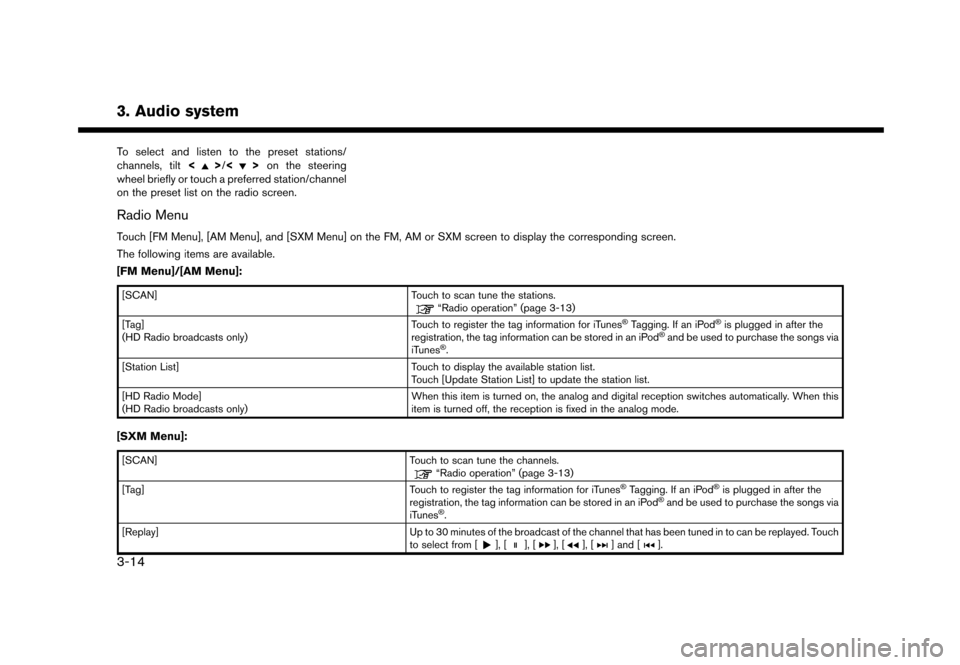
Radio Menu
Touch [FM Menu], [AM Menu], and [SXM Menu] on the FM, AM or SXM screen to display the corresponding screen.
The following items are available.
[FM Menu]/[AM Menu]:
[SCAN] Touch to scan tune the stations.“Radio operation” (page 3-13)
[Tag]
(HD Radio broadcasts only) Touch to register the tag information for iTunesŠTagging. If an iPodŠis plugged in after the
registration, the tag information can be stored in an iPodŠand be used to purchase the songs via
iTunesŠ.
[Station List] Touch to display the available station list.
Touch [Update Station List] to update the station list.
[HD Radio Mode]
(HD Radio broadcasts only) When this item is turned on, the analog and digital reception switches automatically. When this
item is turned off, the reception is fixed in the analog mode.
[SXM Menu]:
[SCAN]
Touch to scan tune the channels.“Radio operation” (page 3-13)
[Tag] Touch to register the tag information for iTunesŠTagging. If an iPodŠis plugged in after the
registration, the tag information can be stored in an iPodŠand be used to purchase the songs via
iTunesŠ.
[Replay] Up to 30 minutes of the broadcast of the channel that has been tuned in to can be replayed. Touch
to select from [
], [], [], [], [] and [].
3-14
Page 56 of 248
![NISSAN GT-R 2017 R35 Multi Function Display User Guide 3. Audio system
[] Each time [] is touched, the
repeat mode changes.
“Changing play mode”
(page 3-18)
[
] Touch once to return to the begin- ning of the current track. Touch again
to select the pr](/img/5/524/w960_524-55.png "NISSAN GT-R 2017 R35 Multi Function Display User Guide 3. Audio system
[] Each time [] is touched, the
repeat mode changes.
“Changing play mode”
(page 3-18)
[
] Touch once to return to the begin- ning of the current track. Touch again
to select the pr")
3. Audio system
[] Each time [] is touched, the
repeat mode changes.
“Changing play mode”
(page 3-18)
[
] Touch once to return to the begin- ning of the current track. Touch again
to select the previous track. Touch
and hold to rewind the current track.
[
] Touch to play the track.
[
] Touch to pause the track.
[
] Touch to select the next track. Touch and hold to fast-forward the track.
[
] Each time [] is touched, the
random mode changes.
“Changing play mode”
(page 3-18)
*8Track and folder number:
Indicates the track number and the folder
number.
*9Data type indicator:
Indicates the type of data currently playing.
CD player operation
Loading:
Insert a CD into the slot with the label side facing
up. The CD will be guided automatically into the
slot and start playing.
After loading the CD, the CD screen will appear
on the display.
Activation and playing:
The CD mode can be also selected from the
source list with a CD loaded.
“Selecting audio source” (page 3-11)
Skipping tracks:
To skip the tracks, push <
>/<>, touch
[]/[] on the screen, or tilt up/down
<>/<> on the steering wheel repeatedly
until preferred track is selected.
INFO:
Depending on the condition, skipping to the
previous track may require pushing the button or
touching the key twice. Pushing the button or
touching the key once may only restart the
currently track from the beginning. Changing folders:
To change folders, touch [CD Menu] and touch
[Folder List].
“CD Menu” (page 3-19)
Turn
different folders. If no folders are found, tracks
will be skipped.
Fast-forwarding/rewinding:
The following operation methods are available for
rewinding and fast-forwarding the track.
Control panel operation:
. Push and hold <
>/<>.
. Touch and hold [
]/[].
Steering wheel switch operation: . Tilt and hold <
>/<>on the steering
wheel.
Changing play mode:
Repeat mode
Touch [
] on the CD screen to change the
repeat mode as follows.
. CD:
[Disc] ⇔[1 Track]
. CD with compressed audio files:
[All] ?[1 Track] ?[1 Folder] ?[All]
3-18
Page 57 of 248
![NISSAN GT-R 2017 R35 Multi Function Display User Guide Random mode
Touch [
] on the CD screen to change the
random mode as follows.
. CD:
(off) ⇔[Disc]
. CD with compressed audio files:
(off) ?[1 Folder] ?[All] ?(off)
Ejecting CD:
Push <
>to eject a CD.](/img/5/524/w960_524-56.png "NISSAN GT-R 2017 R35 Multi Function Display User Guide Random mode
Touch [
] on the CD screen to change the
random mode as follows.
. CD:
(off) ⇔[Disc]
. CD with compressed audio files:
(off) ?[1 Folder] ?[All] ?(off)
Ejecting CD:
Push <
>to eject a CD.")
Random mode
Touch [
] on the CD screen to change the
random mode as follows.
. CD:
(off) ⇔[Disc]
. CD with compressed audio files:
(off) ?[1 Folder] ?[All] ?(off)
Ejecting CD:
Push <
>to eject a CD. If the CD is ejected
and left unremoved, it will be reloaded into the
slot for protection.
INFO:
The ignition switch must be placed in the ACC or
ON position in order for the CD to eject.
CD Menu
Touch [CD Menu] on the CD screen to display
the CD menu screen.
The following items are available.
[Now Playing] Touch to display the CD screen.
[SCAN] Touch to scan the tracks on the CD. During scanning, the first
several seconds of all the tracks
will be played. Touching [SCAN]
again will cancel the scanning
mode and the CD will return to
play normally from the track
which is playing.
[Folder List]* Touch to display the folder list. Touch an item on the list to
select the folder.
Touch [
] and go back to the
previous screen to select tracks
in the folder.
Track List A list of the tracks on the CD is displayed. Touch an item on the
list to select the track.
*: Displayed only when available.
3. Audio system
3-19
Page 60 of 248
![NISSAN GT-R 2017 R35 Multi Function Display User Guide 3. Audio system
*7USB operation keys:
Touch an icon for operations.
[] Each time [] is touched, the
repeat mode changes.
“Changing play mode”
(page 3-22)
[
] Touch to return to the beginning of th](/img/5/524/w960_524-59.png "NISSAN GT-R 2017 R35 Multi Function Display User Guide 3. Audio system
*7USB operation keys:
Touch an icon for operations.
[] Each time [] is touched, the
repeat mode changes.
“Changing play mode”
(page 3-22)
[
] Touch to return to the beginning of th")
3. Audio system
*7USB operation keys:
Touch an icon for operations.
[] Each time [] is touched, the
repeat mode changes.
“Changing play mode”
(page 3-22)
[
] Touch to return to the beginning of the current track. Touch again to
select the previous track. Touch and
hold to rewind the current track.
[
] Touch to play the track.
[
] Touch to pause the track.
[
] Touch to select the next track. Touch and hold to fast-forward the track.
[
] Each time [] is touched, the
random mode changes.
“Changing play mode”
(page 3-22)
*8Track and folder number:
Indicates the track number and the folder
number.
*9Data type indicator:
Indicates the type of data currently playing.
USB memory device player operation
Activation and playing:
Connecting the USB memory device into the
port will activate the USB mode.
USB memory device can also be played by
selecting the source on the audio source menu
screen.
“Selecting audio source” (page 3-11)
To pause playing the USB memory device, touch
[
]. To resume playing, touch [].
Skipping tracks:
To skip the tracks, push <
>/<>, touch
[]/[] on the screen, or tilt up/down
<
>/<> on the steering wheel repeatedly
until preferred track is selected.
INFO:
Depending on the condition, skipping to the
previous track may require pushing the button or
touching the key twice. Pushing the button or
touching the key once may only restart the
current track from the beginning.
Changing folders:
To change folders, touch [USB Menu] and touch
[Folder List].
“USB Menu” (page 3-22)
Turn
different folders. If no folders are found, tracks
will be skipped.
Fast-forwarding/rewinding:
To rewind or fast-forward the track, push and
hold <
>/<>, touch and hold []/[],
or tilt and hold <>/<>on the steering
wheel.
Changing play mode:
Repeat mode
Touch [
] on the screen to change the repeat
mode as follows.
[All] ?[1 Track] ?[1 Folder] ?[All]
Random mode
Touch [
] on the screen to change the random
mode as follows.
(off) ?[1 Folder] ?[All] ?(off)
USB Menu
Touch [USB Menu] on the USB screen to display
the USB Menu screen.
The following items are available.
3-22
Page 64 of 248
![NISSAN GT-R 2017 R35 Multi Function Display User Guide 3. Audio system
[] Each time [] is touched, the
mode changes.
“Changing play mode”
(page 3-26)
[
] Touch to return to the beginning of the current track. Touch again to
select the previous track.](/img/5/524/w960_524-63.png "NISSAN GT-R 2017 R35 Multi Function Display User Guide 3. Audio system
[] Each time [] is touched, the
mode changes.
“Changing play mode”
(page 3-26)
[
] Touch to return to the beginning of the current track. Touch again to
select the previous track.")
3. Audio system
[] Each time [] is touched, the
mode changes.
“Changing play mode”
(page 3-26)
[
] Touch to return to the beginning of the current track. Touch again to
select the previous track. Touch and
hold to rewind the current track.
[
] Touch to play the track.
[
] Touch to pause the track.
[
] Touch to select the next track. Touch and hold to fast-forward the track.
[
] Each time [] is touched, the
mode changes.
“Changing play mode”
(page 3-26)
*8Track number:
Indicates the track number and the total
number of tracks.
iPodŠplayer operation
Activation and playing:
Connecting iPod
Što the vehicle via USB cable
will activate the iPodŠmode.
The iPodŠcan also be played by selecting the
source on the audio source menu screen.
“Selecting audio source” (page 3-11) Selecting search method:
A list of search methods is displayed in the iPod
Š
menu.
Touch [iPod Menu] to display the iPodŠmenu.
Touch and select an item to play the iPodŠin your
preferred settings.
Skipping tracks:
To skip the tracks, push <
>/<>, touch
[]/[] on the screen, or tilt up/down
<>/<> on the steering wheel repeatedly
until preferred track is selected.
INFO:
Depending on the condition, skipping to the
previous track may require pushing the button or
touching the key twice. Pushing the button or
touching the key once may only restart the
current track from the beginning.
Turning
track is playing will also skip the tracks.
Skipping items:
Touch [iPod Menu] to display the item list. Turn
items on the list. Fast-forwarding/rewinding:
To fast-forward or rewind the track, push and
hold
<
>/<>, touch and hold []/[],
or tilt and hold <>/<>on the steering
wheel.
Changing play mode:
Repeat mode
Touch [
] on the screen to change the repeat
mode as follows.
(off) ?[One] ?[All] ?(off)
Random mode
Touch [
] on the screen to change the random
mode as follows.
(off) ?[Songs] ?[Albums] ?(off)
INFO:
Even when iPod
Šor iPhoneŠare inserted into
both of the two USB ports, the system recog-
nizes only one connected iPod
Šor iPhoneŠat a
time.
3-26
Page 65 of 248
![NISSAN GT-R 2017 R35 Multi Function Display User Guide iPodŠMenu
Touch [iPod Menu] on the iPodŠscreen to
display the iPodŠmenu screen.
The following items are available.
[Now Play-
ing] Touch to display the iPodŠscreen.
[Current
List] Touch to dis](/img/5/524/w960_524-64.png "NISSAN GT-R 2017 R35 Multi Function Display User Guide iPodŠMenu
Touch [iPod Menu] on the iPodŠscreen to
display the iPodŠmenu screen.
The following items are available.
[Now Play-
ing] Touch to display the iPodŠscreen.
[Current
List] Touch to dis")
iPodŠMenu
Touch [iPod Menu] on the iPodŠscreen to
display the iPodŠmenu screen.
The following items are available.
[Now Play-
ing] Touch to display the iPodŠscreen.
[Current
List] Touch to display the menu list
which was displayed most recently.
[Album Art-
work] Touch to turn on/off the album
artwork display on the iPod
Š
screen.
[Playlists] Touch to display the playlist and touch an item on the list to select
the playlist.
[Artists] Touch to display the artist list and touch an item on the list to select
the artist.
[Albums] Touch to display the album list and touch an item on the list to select
the album.
[Songs] Touch to display the song list and touch an item on the list to select
the song.
[Podcasts] Touch to display the podcast list and touch an item on the list to
select the podcast.
[Genres] Touch to display the genre list and touch an item on the list to select
the genre.
[Compo-
sers] Touch to display the composer list
and touch an item on the list to
select the composer. [Audio-
books]
Touch to display the audiobook list
and touch an item on the list to
select the audiobook.
INFO:
On the list screen, touch and hold [
]or[]
on the right side of the screen to jump by letter
for faster scrolling.
3. Audio system
3-27