low NISSAN GT-R 2017 R35 Multi Function Display Owner's Guide
[x] Cancel search | Manufacturer: NISSAN, Model Year: 2017, Model line: GT-R, Model: NISSAN GT-R 2017 R35Pages: 248, PDF Size: 1.72 MB
Page 80 of 248
![NISSAN GT-R 2017 R35 Multi Function Display Owners Guide 4. Hands-Free Phone
Sending a text message
1. Touch [Phone] on the Launch Bar.
2. Touch [Text Message].
3. Touch [Create Message].
The following items are available.
Available itemAction
[To] [Quick D](/img/5/524/w960_524-79.png "NISSAN GT-R 2017 R35 Multi Function Display Owners Guide 4. Hands-Free Phone
Sending a text message
1. Touch [Phone] on the Launch Bar.
2. Touch [Text Message].
3. Touch [Create Message].
The following items are available.
Available itemAction
[To] [Quick D")
4. Hands-Free Phone
Sending a text message
1. Touch [Phone] on the Launch Bar.
2. Touch [Text Message].
3. Touch [Create Message].
The following items are available.
Available itemAction
[To] [Quick Dial]
Select a recipient from Quick Dial.
[Phonebook] Select a contact from the Phonebook.
[Call History] Select a contact/phone number from call history.
[Enter Number by Keypad] Enter the phone number of the recipient using the keypad. Touch [OK] to confirm the
address.
[Select Text] [Fixed Text] Touch to display a list of pre-defined text messages.
[Custom Text] Touch to display a list of custom text message templates.
Custom text can be created or edited from the setting menu.
“Phone and text message assistant settings” (page 4-9)
[Send] Touch to send the message.
4-8
Page 81 of 248
![NISSAN GT-R 2017 R35 Multi Function Display Owners Guide PHONE AND TEXT MESSAGE ASSISTANT SETTINGS
Phone settings
Hands-Free Phone System settings can be changed according to the user’s preference.
1. Touch [Settings] on the Launch Bar.
2. Touch [Phone].](/img/5/524/w960_524-80.png "NISSAN GT-R 2017 R35 Multi Function Display Owners Guide PHONE AND TEXT MESSAGE ASSISTANT SETTINGS
Phone settings
Hands-Free Phone System settings can be changed according to the user’s preference.
1. Touch [Settings] on the Launch Bar.
2. Touch [Phone].")
PHONE AND TEXT MESSAGE ASSISTANT SETTINGS
Phone settings
Hands-Free Phone System settings can be changed according to the user’s preference.
1. Touch [Settings] on the Launch Bar.
2. Touch [Phone].
The following phone setting items are available.
Setting itemAction
[Quick Dial] [Edit] Entries in the Quick Dial can be edited. Touch [Add New] to register a new
entry.
[Delete All] Deletes all of the phone number in the Quick Dial.
[Call History] [Incoming] Items in the calls history can be deleted or be registered in the Quick Dial.
[Outgoing]
[Missed]
[Phonebook] [Download Entire Phonebook] All of the phone numbers that are stored in a phonebook of a cellular phone
that is connected to the vehicle are downloaded at once.
[Download 1 Entry] Each of the phone numbers that are stored in the phonebook of a cellular
phone that is connected to the vehicle is downloaded one by one.
[Downloaded List] The downloaded phonebook data is displayed. The items on the list can be
added to the Quick Dial entries or be deleted from the phonebook.
4. Hands-Free Phone
4-9
Page 88 of 248
![NISSAN GT-R 2017 R35 Multi Function Display Owners Guide 5. Information
Menu itemResult
[SXM Stocks] To add a favorite stock, touch [Yes] to display a List of Matching Stocks. Select a
stock by performing a search or typing in the symbol. Touch [Yes] to add](/img/5/524/w960_524-87.png "NISSAN GT-R 2017 R35 Multi Function Display Owners Guide 5. Information
Menu itemResult
[SXM Stocks] To add a favorite stock, touch [Yes] to display a List of Matching Stocks. Select a
stock by performing a search or typing in the symbol. Touch [Yes] to add")
5. Information
Menu itemResult
[SXM Stocks] To add a favorite stock, touch [Yes] to display a List of Matching Stocks. Select a
stock by performing a search or typing in the symbol. Touch [Yes] to add a stock to
the list or touch [No] to go back. Touching [Add Stock] will also allow adding a
favorite stock. Once a stock is added, it’s price, trend, and date can be viewed. Red
indicates the stock is down and green indicates the stock is up. Touch [Delete Stock]
to [Delete All] or [Delete One]. Up to 20 stocks can be saved. Only supported stocks
can be added.
[SXM Fuel Prices] [Select Fuel]Select a gas station from the list to see all of the fuel prices or to set it as a destination.
Touch [Select Fuel] to display prices for a different fuel type.
Touch [By Distance]/[By Price] to sort the list by distance or by price.
Touch [Near Dest]/[Nearby] to show a list of gas stations near the destination or near
the current location.
[By Distance]/[By Price]
[Near Dest]/[Nearby]
[SXM Movie Listings] [Nearby Theaters]Displays a list of theaters by distance. Select the theater for Theater Details such as
its location and phone number. While viewing the Theater Details, touch [Go here] for
route guidance. While viewing the list of Nearby Theaters, touch [Movies] to display a
list of movies that are playing at that theater. Select the movie to display Movie Details
including the rating, running time, and show times.
[Current Movies] Displays a list of movies that are currently playing. Touch [Details] to display Movie
Details including the rating, running time, and show times. While viewing the list of
Current Movies, select the movie to display a list of Nearby Theaters. Select the
theater for Theater Details such as its location and phone number. Touch [Movies] for
a detailed description and show times of the selected movie. Touch [Go Here] for
route guidance to the selected theater.
[Vehicle] [Eco Drive Report]Displays the Eco Drive Report.
“Viewing Eco Drive Report” (page 5-6)
[Tire Pressure] Displays the tire pressure information.
“Viewing Tire Pressure information” (page 5-6)
5-4
Page 90 of 248
![NISSAN GT-R 2017 R35 Multi Function Display Owners Guide 5. Information
VIEWING ECO DRIVE REPORT
Your driving score will be displayed in real time,
with 100 points designated as the score for ideal
eco-driving.
1. Touch [Info] on the Launch Bar.
2. Touch [V](/img/5/524/w960_524-89.png "NISSAN GT-R 2017 R35 Multi Function Display Owners Guide 5. Information
VIEWING ECO DRIVE REPORT
Your driving score will be displayed in real time,
with 100 points designated as the score for ideal
eco-driving.
1. Touch [Info] on the Launch Bar.
2. Touch [V")
5. Information
VIEWING ECO DRIVE REPORT
Your driving score will be displayed in real time,
with 100 points designated as the score for ideal
eco-driving.
1. Touch [Info] on the Launch Bar.
2. Touch [Vehicle] and touch [Eco Drive Re-port].
Touch [Log] to view the Drive Report history.
Touch [Reset] to clear the past records.
To improve your score: . When starting off, depress the accelerator
gently.
. When cruising, accelerate and decelerate as
little as possible.
. When decelerating, release the accelerator
early.
VIEWING TIRE PRESSURE INFOR-
MATION
The tire pressure will be displayed for reference.
The pressure indication “** psi” on the screen
means that the tire pressure is being measured.
After a few driving trips, the pressure for each tire
will be displayed.
In case of low tire pressure, low tire pressure
screen will be displayed. Check the pressure for
all tires.
Tire pressure rises and falls depending on the
heat caused by the vehicle’s traveling condition
and the temperature.
To change the measurement units, touch [Select
Units].
The units can also be changed from the Settings
menu.
“Language and unit settings” (page 2-20)
WARNING
.When a wheel is replaced, tire pres-
sure will not be indicated, the TPMS
will not function and the low tire
pressure warning light will flash for
approximately 1 minute. The light will
remain on after 1 minute. It is recom-
mended you contact a NISSAN dealer
or GT-R certified NISSAN dealer as
soon as possible for tire replacement
and/or system resetting.
. Replacing tires with those not origin-
ally specified by NISSAN could affect
the proper operation of the TPMS.
5-6
Page 91 of 248
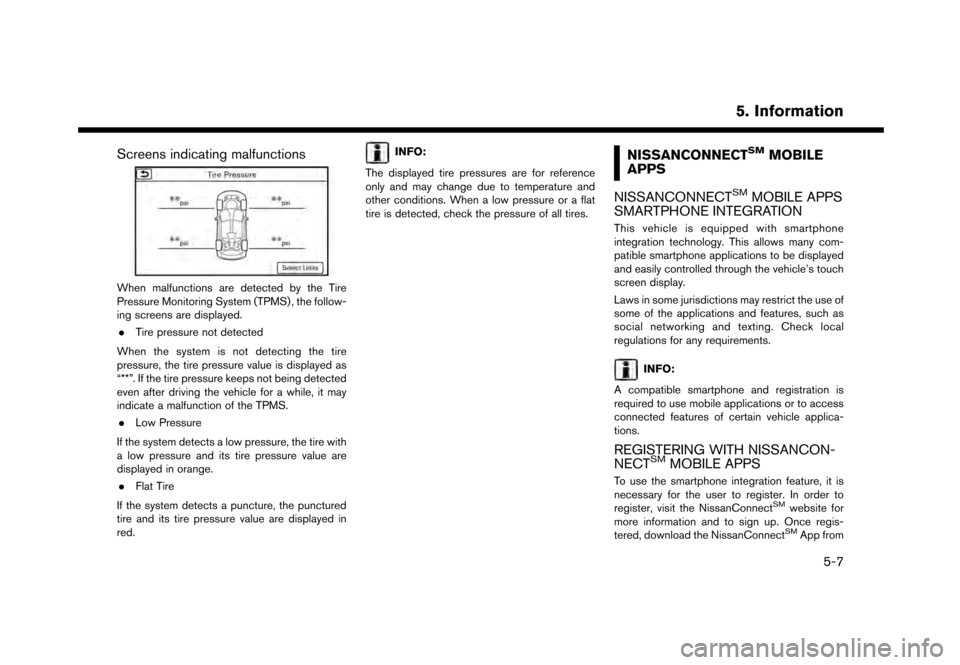
Screens indicating malfunctions
When malfunctions are detected by the Tire
Pressure Monitoring System (TPMS) , the follow-
ing screens are displayed.. Tire pressure not detected
When the system is not detecting the tire
pressure, the tire pressure value is displayed as
“**”. If the tire pressure keeps not being detected
even after driving the vehicle for a while, it may
indicate a malfunction of the TPMS. . Low Pressure
If the system detects a low pressure, the tire with
a low pressure and its tire pressure value are
displayed in orange. . Flat Tire
If the system detects a puncture, the punctured
tire and its tire pressure value are displayed in
red.
INFO:
The displayed tire pressures are for reference
only and may change due to temperature and
other conditions. When a low pressure or a flat
tire is detected, check the pressure of all tires.NISSANCONNECTSMMOBILE
APPS
NISSANCONNECT
SMMOBILE APPS
SMARTPHONE INTEGRATION
This vehicle is equipped with smartphone
integration technology. This allows many com-
patible smartphone applications to be displayed
and easily controlled through the vehicle’s touch
screen display.
Laws in some jurisdictions may restrict the use of
some of the applications and features, such as
social networking and texting. Check local
regulations for any requirements.
INFO:
A compatible smartphone and registration is
required to use mobile applications or to access
connected features of certain vehicle applica-
tions.
REGISTERING WITH NISSANCON-
NECTSMMOBILE APPS
To use the smartphone integration feature, it is
necessary for the user to register. In order to
register, visit the NissanConnect
SMwebsite for
more information and to sign up. Once regis-
tered, download the NissanConnect
SMApp from
5. Information
5-7
Page 92 of 248
5. Information
your compatible phone’s application download
source and then log into the application.
For more information about this technology, visit
the website or contact NissanConnect
SMMobile
Apps Customer Service.
For U.S. customers:
Website:
www.nissanusa.com/connect
For Canadian customers: Website:
www.nissan.ca/nissanconnect (English)
www.nissan.ca/nissanconnect/fr (French)
CONNECTING PHONE
To use this feature, a compatible smartphone
must be connected via BluetoothŠor USB to the
vehicle.
“Connecting BluetoothŠdevice”
(page 2-21)
“USB (Universal Serial Bus) Connection
Ports and AUX (auxiliary) input jack”
(page 2-7)
INFO:
. For Apple iPhone
Š, NissanConnectSMMo-
bile Apps REQUIRES the phone to be
connected via USB after the Bluetooth
Š
connection is established.
. For Android phones, NissanConnect
SMMo-
bile Apps REQUIRES the phone to be paired
via Bluetooth
Š.
APPLICATION DOWNLOAD
Once connected, the NissanConnectSMApp will
search your phone to determine which compa-
tible applications are currently installed. The
vehicle will then download the in-vehicle inter-
face for each of these compatible applications.
Once downloaded, the user can access many
smartphone Applications through the vehicle
touch screen display with the following opera-
tion.
1. Touch [Info] on the Launch Bar.
2. Touch [NissanConnect Apps].
For more information on application availability
visit the NissanConnect
SMwebsite or contact
NissanConnectSMMobile Apps Customer Ser-
vice. For U.S. customers:
Website:
www.nissanusa.com/connect
For Canadian customers: Website:
www.nissan.ca/nissanconnect (English)
www.nissan.ca/nissanconnect/fr (French)
5-8
Page 94 of 248
5. Information
WARNING
.Please note that the Automatic Colli-
sion Notification service and Emer-
gency Call function cannot be used in
the following conditions:
— Emergency functions and services will not be available without a paid
subscription to NissanConnect
SM
Services.
— The NissanConnect
SMServices
network system is disabled.
— The vehicle moves outside the service area where the TCU (Tele-
matics Control Unit) is connected
to the system.
— The vehicle is outside the area where the cellular network service
is receivable.
— The vehicle is in a location with poor signal reception such as tun-
nels, underground parking gar-
ages, behind buildings or in
mountainous areas.
— The line is busy. — The TCU (Telematics Control Unit)
or other systems of your vehicle
are not working properly.
— It may not be possible to make an emergency call depending on the
severity of a collision and/or emer-
gency.
. Park the vehicle in a safe location
and set the parking brake before
operating
. Only use this service in case of an
emergency. There may be a penalty
for inappropriate use of the service.
. Radio waves could adversely affect
electric medical equipment. Indivi-
duals who use a pacemaker should
contact the device manufacturer re-
garding any possible effects before
using the system.
. The TCU (Telematics Control Unit)
antenna is installed inside the upper
central part of the instrument panel.
An occupant should not get any
closer to the antenna than specified
by the pacemaker manufacturer. The
radio waves from the TCU antenna
may adversely affect the operation of
the pacemaker while using the Nis- sanConnect
SMServices.
INFO:
. NissanConnect
SMServices features are
dependent upon subscription enrollment
and the telematics device being in operative
condition, cellular connectivity, navigation
map data and GPS satellite signal reception.
Terms and conditions of the NissanCon-
nect
SMServices Subscription Agreement
apply.
. Enrollment is required in order to receive
NissanConnect
SMServices. The services
that can be received vary depending on the
plan in which you are enrolled.
. A six-month trial is included beginning on the
date of purchase, however you must still be
enrolled and activated to use services.
. After the trial period, you must enroll in a paid
subscription for NissanConnect
SMServices
to continue using the features. The services
that can be received vary depending on the
plan to which you subscribe.
. Laws in some jurisdictions may restrict the
use of “Text-to-Speech.” Check local reg-
ulations before using this feature.
5-10
Page 95 of 248
NissanConnectSMServices may be updated.
The latest detailed information is available on
the following websites or from the support line.
NissanConnect
SMServices website:
For U.S.
www.nissanusa.com/connect
For Canada
www.nissan.ca/nissanconnect (English)
www.nissan.ca/nissanconnect/fr (French)
NissanConnect
SMServices support
line:
1-855-426-6628
. Roadside Assistance Service:
Enhanced Roadside Assistance allows you
to receive assistance from the Roadside
Response Specialist for a non-emergency
incident that requires a towing or third-party
response service. The service is accessed by
touching the Voice Menu button on the
navigation screen. Roadside Assistance
may also be used in conjunction with the
Emergency Assistance service, if warranted.
“Emergency support” (page 5-17)
. Emergency Calling (E-Call):
The Emergency Calling (E-Call) feature
provides emergency assistance by connect- ing to a Response Specialist. In the event of
an emergency, by push the in-vehicle
button to use this feature. The
Response Specialist provides various assis-
tance depending on the situation.
“Emergency support” (page 5-17)
. Automatic Collision Notification (ACN):
The TCU (Telematics Control Unit) gener-
ates a signal automatically to the Nissan-
Connect
SMServices Response Center in the
case of an accident severe enough to trigger
one of the vehicle’s air bags. Upon the signal,
a Response Specialist receives the vehicle
location and customer information and no-
tifies the proper authorities in accordance
with established policies and procedures.
. Curfew Alert:
Customers can set time interval for accep-
table and unacceptable operation of the
vehicle via NissanConnect
SMPortal Website
and NissanConnectSMServices Companion
App. If the time restrictions are violated, the
customer will be automatically notified (e-
mail, text message, or phone call) .
. Remote Door Lock/Unlock:
The Remote Door Lock/Unlock feature
allows the customer to access the vehicle
remotely from the NissanConnect
SMSer- vices website or Companion App to send
lock or unlock commands to the vehicle.
“Connecting to Interactive Voice
Menu” (page 5-14)
. Remote Sound Horn and Flash Lights:
Customers can activate the vehicle’s head-
lights and horn via the NissanConnect
SM
Services website or Companion App.
. Alarm Notification:
Customers will be notified if the vehicle alarm
system is activated based on their notifica-
tion preferences (e-mail, text, phone call) .
. Boundary Alert:
Customers can set an area for the vehicle to
stay in or out of via the NissanConnect
SM
Services website or Companion App. Cus-
tomers will be notified when vehicle is out-of-
bounds based on their notification prefer-
ences (e-mail, text, phone call).
. Maintenance Alert/Reminder:
The center sends maintenance and other
relevant info. to registered e-mail address
(PC/Mobile) based on the vehicle informa-
tion (e.g. driving mileage and etc.) sent at the
center access timing. Details of vehicle
information are separately examined.
5. Information
5-11
Page 97 of 248
INFO:
If the vehicle is owned by another person and is
resold, the subscription for this service must be
canceled and all data stored on the device must
be deleted.
Operating tips
WARNING
. Use NissanConnectSMServices after
stopping your vehicle in a safe loca-
tion. If you have to use NissanCon-
nect
SMServices while driving,
exercise extreme caution at all times
so full attention may be given to
vehicle operation.
. If you are unable to devote full
attention to vehicle operation while
talking with the NissanConnect
SM
Services, pull off the road to a safe
location and stop your vehicle.
. Do not use NissanConnect
SMServices with
the engine stopped. Doing so may discharge
the vehicle battery.
. NissanConnect
SMServices cannot be used
under the following conditions: — NissanConnect
SMServices subscription
has expired.
— The vehicle is outside the area where the cellular network service is receivable.
— The vehicle is in a location with poor signal reception such as tunnels, under-
ground parking garages, behind buildings
or in mountainous areas.
— The line is busy.
— The TCU (Telematics Control Unit) or other systems of your vehicle are not
working properly.
— The NissanConnect
SMServices network
system is disabled.
. Information Feeds download cannot be used
when the vehicle is connected to the
NissanConnect
SMServices Data Center
and NissanConnectSMServices Response
Center.
. Communication with the NissanConnect
SM
Services Data Center is related to the data
communication mode and may cause occa-
sional difficulty in receiving signals, and the
signal receivable area may be limited com-
pared to regular mobile phones. .
You may hear clicks or experience interrup-
tions while speaking with the NissanCon-
nect
SMServices Response Specialists. This
is due to a shift in the connection zone and is
not a malfunction.
. Depending on the line used, the sound
volume may decrease. Adjust the volume as
necessary.
. Received sounds may be distorted or
ambient noise may sound like voices of a
crowd. This is due to the use of the digital
line and is not a malfunction.
. You may hear your own voice from the
speaker when talking with the NissanCon-
nect
SMServices Response Specialists due
to a network disturbance. When this occurs,
reconnect the line after a few minutes or at a
different location.
. This vehicle incorporates a communication
device that is called a TCU (Telematics
Control Unit) . The communication connec-
tion between this unit and the NissanCon-
nect
SMData Center allows for various
services. When the system connects to the
NissanConnect
SMData Center, an antenna
icon will appear in the upper right corner of
the screen. Use the service in a location
where the symbol representing good signal
5. Information
5-13
Page 101 of 248
![NISSAN GT-R 2017 R35 Multi Function Display Owners Guide After parking the vehicle in a safe location and
touching [Menu], the operation menu is dis-
played on the right side of the screen.
INFO:
The availability of the operation menu items
differs dependin](/img/5/524/w960_524-100.png "NISSAN GT-R 2017 R35 Multi Function Display Owners Guide After parking the vehicle in a safe location and
touching [Menu], the operation menu is dis-
played on the right side of the screen.
INFO:
The availability of the operation menu items
differs dependin")
After parking the vehicle in a safe location and
touching [Menu], the operation menu is dis-
played on the right side of the screen.
INFO:
The availability of the operation menu items
differs depending on the contents of the
selected information.
EMERGENCY SUPPORT
NissanConnectSMServices provides various
services to support dealing with emergencies
of the subscribed vehicle and the driver. For example, in case of an illness or serious
injury, you can seek support by pushing the in-
vehicle
NissanConnect
SMServices. NissanConnectSM
Services can specify the location of the vehicle
via GPS, and the information will be sent to the
police or other agencies as needed.
For information about other NissanConnect
SM
Services emergency support related services,
refer to the NissanConnectSMServices Services
website or contact the NissanConnectSMSer-
vices support line.
NissanConnect
SMServices website:
For U.S.
www.nissanusa.com/connect
For Canada
www.nissan.ca/nissanconnect (English)
www.nissan.ca/nissanconnect/fr (French)
NissanConnect
SMServices support
line:
1-855-426-6628
WARNING
. Please note that the Automatic Colli-
sion Notification service and Emer-
gency Call function cannot be used in
the following conditions:
— Emergency functions and services will not be available without a paid
subscription to NissanConnect
SM
Services.
— The NissanConnect
SMServices
network system is disabled.
— The vehicle moves outside the service area where the TCU (Tele-
matics Control Unit) is connected
to the system.
— The vehicle is outside the area where the cellular network service
is receivable.
— The vehicle is in a location with poor signal reception such as tun-
nels, underground parking gar-
ages, behind buildings or in
mountainous areas.
— The line is busy.
5. Information
5-17