low NISSAN GT-R 2017 R35 Multi Function Display Workshop Manual
[x] Cancel search | Manufacturer: NISSAN, Model Year: 2017, Model line: GT-R, Model: NISSAN GT-R 2017 R35Pages: 248, PDF Size: 1.72 MB
Page 124 of 248
![NISSAN GT-R 2017 R35 Multi Function Display Workshop Manual 6. Navigation
4. Enter the state/province, house number,street and city of the destination and then
touch [OK]. The route is displayed.
5. Touch [Start] to start route guidance.
Voice command
1. Push](/img/5/524/w960_524-123.png "NISSAN GT-R 2017 R35 Multi Function Display Workshop Manual 6. Navigation
4. Enter the state/province, house number,street and city of the destination and then
touch [OK]. The route is displayed.
5. Touch [Start] to start route guidance.
Voice command
1. Push")
6. Navigation
4. Enter the state/province, house number,street and city of the destination and then
touch [OK]. The route is displayed.
5. Touch [Start] to start route guidance.
Voice command
1. Push <
>located on the steering wheel.
2. After the tone sounds, speak a command.
Use the following voice command to search for a
destination by address:
“Street Address”*
*: This voice command operation is available only
when the language setting is in English.
FINDING NEARBY PLACE
A facility located near the current vehicle location
can be set as the destination.
1. Touch [Navi] on the Launch Bar.
2. Touch [Nearby Points of Interest]. The category list is displayed.
3. Select [Emergency Services] for example.
4. Select preferred category from the sub
category list.
5. Touch the preferred destination from the list.The position of the selected location is
displayed in the preview on the touch screen
display.
INFO:
.If the suggested route is already set, by
touching [Show Along Route] on the
touch screen display, the system displays
only the facilities located along the route.
.A maximum of 100 facilities can bedisplayed on the list screen.
6. Touch [Start] to start route guidance.
INFO:
. Depending on the type of facility, a message
asking if you have checked the facility
availability may be displayed. Touch [Yes] or
[No] after reading the message.
. You can also set the destination by touching
[
] when scrolling the map and selecting
[Nearby POIs] from the menu.
. Nearby Points of Interest category list can be
customized from [Customize Nearby POIs].
“Navigation settings” (page 6-54)
6-18
Page 125 of 248
Voice command
1. Push <
>located on the steering wheel.
2. After the tone sounds, speak a command.
Use the following voice command to set a nearby
place as a destination:
“Nearby”
FINDING POINTS OF INTEREST
This allows you to find a facility by name or by
category. Specify the region and city of the
destination to find it more quickly.
NOTE:
Locations and business hours of facilities
are subject to change, which may not be
reflected in the map data. Double-check
this information before you go to an
emergency facility to ensure that you can
receive the proper support. Otherwise, you
may not receive emergency help when you
arrive at the destination.
A confirmation message also appears on
the navigation screen. Follow the displayed
instructions and check the items required.
Searching for a specific name
1. Touch [Navi] on the Launch Bar.
2. Touch [Points of Interest].
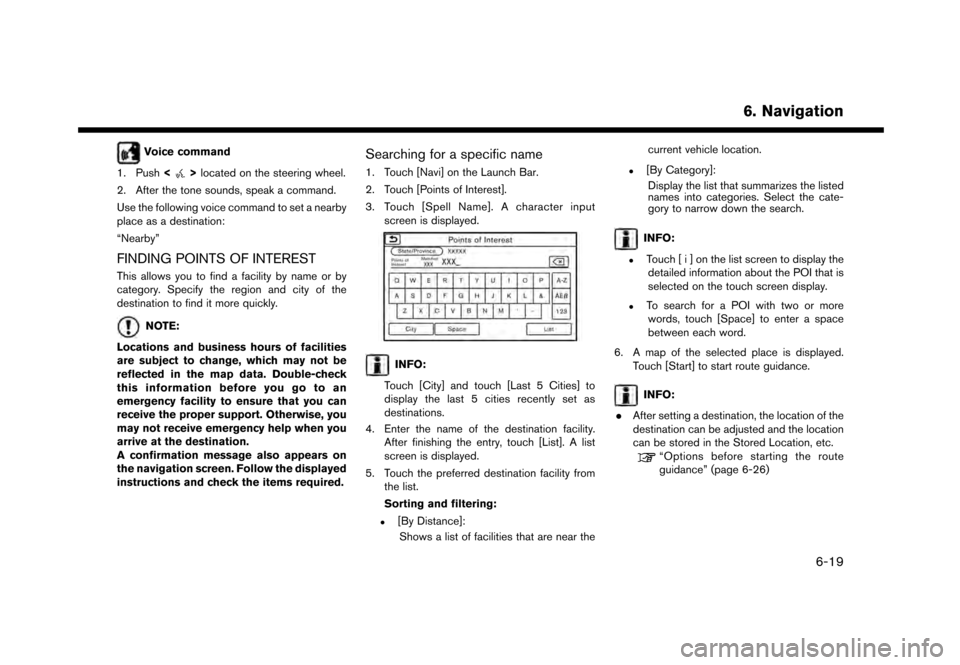
3. Touch [Spell Name]. A character input screen is displayed.
INFO:
Touch [City] and touch [Last 5 Cities] to
display the last 5 cities recently set as
destinations.
4. Enter the name of the destination facility. After finishing the entry, touch [List]. A list
screen is displayed.
5. Touch the preferred destination facility from the list.
Sorting and filtering:
.[By Distance]:
Shows a list of facilities that are near the current vehicle location.
.[By Category]:
Display the list that summarizes the listed
names into categories. Select the cate-
gory to narrow down the search.
INFO:
.Touch [ i ] on the list screen to display thedetailed information about the POI that is
selected on the touch screen display.
.To search for a POI with two or more
words, touch [Space] to enter a space
between each word.
6. A map of the selected place is displayed. Touch [Start] to start route guidance.
INFO:
. After setting a destination, the location of the
destination can be adjusted and the location
can be stored in the Stored Location, etc.
“Options before starting the route
guidance” (page 6-26)
6. Navigation
6-19
Page 126 of 248
6. Navigation
Voice command
1. Push <
>located on the steering wheel.
2. After the tone sounds, speak a command.
Use the following voice command to search for
Points of Interest from a facility name:
“Points of Interest
*: This voice command operation is available only
when the language setting is set to English.
Searching Points of Interest by cate-
gory
1. Touch [Navi] on the Launch Bar.
2. Touch [Points of Interest]. The main category menu is displayed.
3. Touch the main category. The subcategory list is displayed.
4. Touch the subcategory. Narrow down con- dition screen is displayed.
5. Touch the narrow down category. Search conditions:
.[By Name]:Enter the name of the facility
.[Select a City]:Input the city to narrow down the target
city.
.[Near Current Location]:
Facilities near the current vehicle location
are displayed in a list.
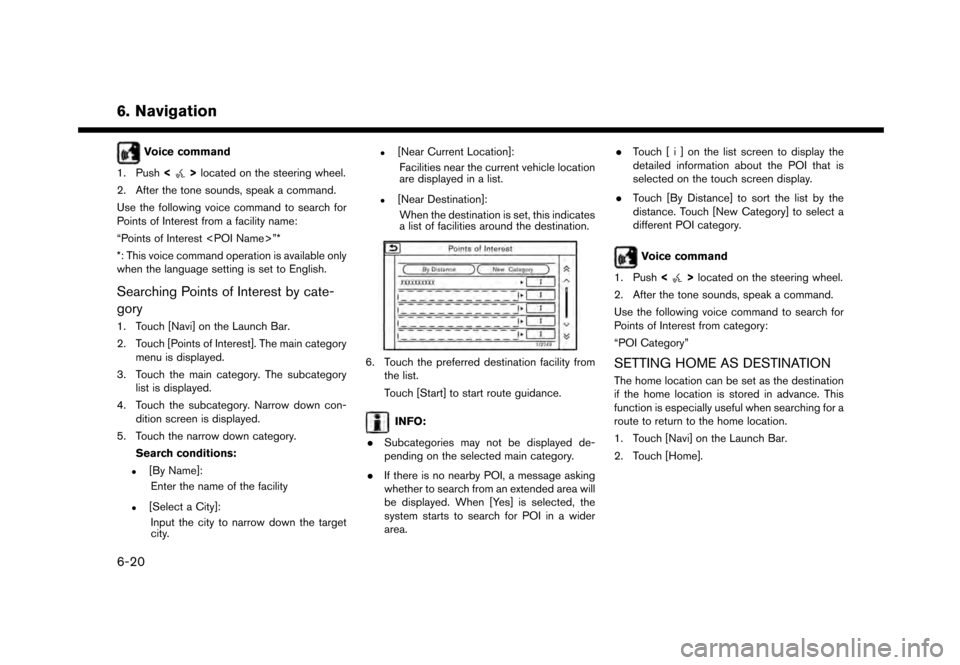
.[Near Destination]:When the destination is set, this indicates
a list of facilities around the destination.
6. Touch the preferred destination facility from the list.
Touch [Start] to start route guidance.
INFO:
. Subcategories may not be displayed de-
pending on the selected main category.
. If there is no nearby POI, a message asking
whether to search from an extended area will
be displayed. When [Yes] is selected, the
system starts to search for POI in a wider
area. .
Touch [ i ] on the list screen to display the
detailed information about the POI that is
selected on the touch screen display.
. Touch [By Distance] to sort the list by the
distance. Touch [New Category] to select a
different POI category.
Voice command
1. Push <
>located on the steering wheel.
2. After the tone sounds, speak a command.
Use the following voice command to search for
Points of Interest from category:
“POI Category”
SETTING HOME AS DESTINATION
The home location can be set as the destination
if the home location is stored in advance. This
function is especially useful when searching for a
route to return to the home location.
1. Touch [Navi] on the Launch Bar.
2. Touch [Home].
6-20
Page 127 of 248
![NISSAN GT-R 2017 R35 Multi Function Display Workshop Manual INFO:
If the home location is not stored yet, the
system will display a message asking if you
wish to store a home location. Touch [Yes] to
store the home location.
“Storing home location” (page 6](/img/5/524/w960_524-126.png "NISSAN GT-R 2017 R35 Multi Function Display Workshop Manual INFO:
If the home location is not stored yet, the
system will display a message asking if you
wish to store a home location. Touch [Yes] to
store the home location.
“Storing home location” (page 6")
INFO:
If the home location is not stored yet, the
system will display a message asking if you
wish to store a home location. Touch [Yes] to
store the home location.
“Storing home location” (page 6-46)
3. An entire route to the destination is dis- played. Touch [Start] to start route guidance.
Voice command
1. Push <
>located on the steering wheel.
2. After the tone sounds, speak a command.
Use the following voice command to set home as
the destination:
“Go Home”
SEARCHING FROM ADDRESS
BOOK
Locations frequently visited can be stored in the
Address Book and reused to set destinations.
“Storing location” (page 6-46)
1. Touch [Navi] on the Launch Bar.
2. Touch [Address Book].
3. Touch the preferred location from the list.
INFO:
.Selecting [Sort] displays a list of various sort functions.
— [Sorted By Number]: The Address Book entries are displayed
in ascending numerical order.
— [Sorted By Name]: The Address Book entries are displayed
in alphabetic order.
— [Sorted By Icon]: By selecting a particular icon, a list that
contains only the Address Book entries
associated with that icon is displayed.
— [Sorted By Group]: By selecting a particular group (family,
friends, leisure, etc.) , the selected group
is displayed at the top of the list.
.Touch [Add New] to add a new location.
4. The selected destination is displayed. Touch [Start] to start route guidance.
Voice command
1. Push <
>located on the steering wheel.
2. After the tone sounds, speak a command.
Use the following voice command to set a
destination from the Address Book:
“Address Book”
SEARCHING FROM PREVIOUS
DESTINATIONS
A previous destination and a previous start point
can be set as the destination.
Up to 100 previous destinations will be auto-
matically stored. If the number of previous
destinations exceeds 100, the oldest one is
automatically deleted and the new destination is
added.
1. Touch [Navi] on the Launch Bar.
2. Touch [Previous Destinations]. A list screen is displayed.
3. Touch the previous destination or a previous start point from the list.
6. Navigation
6-21
Page 128 of 248
![NISSAN GT-R 2017 R35 Multi Function Display Workshop Manual 6. Navigation
4. Touch [Start] to start route guidance.
Voice command
1. Push <
>located on the steering wheel.
2. After the tone sounds, speak a command.
Use the following voice commands to display t](/img/5/524/w960_524-127.png "NISSAN GT-R 2017 R35 Multi Function Display Workshop Manual 6. Navigation
4. Touch [Start] to start route guidance.
Voice command
1. Push <
>located on the steering wheel.
2. After the tone sounds, speak a command.
Use the following voice commands to display t")
6. Navigation
4. Touch [Start] to start route guidance.
Voice command
1. Push <
>located on the steering wheel.
2. After the tone sounds, speak a command.
Use the following voice commands to display the
previous destinations/start point list:
“Previous Destinations”
“Previous Start Point”
SEARCHING BY CONNECTING TO
THE INTERNET (if so equipped)
It is possible to find a point of interest by
inputting a keyword and connecting to the
Internet. The searched location can be set as a
destination.
1. Touch [Navi] on the Launch Bar.
2. Touch [Connected Search].
3. Enter the keyword and touch [Search]. The system will connect to the NissanConnect
SM
Services and the search results will be
displayed.
4. Touch the preferred destination from the list.
5. The entire destination is displayed. Touch [Start] to start route guidance.
INFO:
Connected Search is a NissanConnect
SMSer-
vices feature. It is necessary to subscribe to
NissanConnect
SMServices in order to use the
feature.
SETTING INTERSECTION
It is possible to set an intersection of any two
streets as the destination and have the system
calculate a route.
1. Touch [Navi] on the Launch Bar.
2. Touch [Intersection]. Intersection screen is displayed.
3. Input the Intersection.
.Touch [State/Province] to enter the state
or province name if necessary.
.Touch [City] to enter the city name.
.Touch [1st Street] to enter the first streetname. After finishing the entry, touch [List]. A list screen is displayed.
.After first street information is entered,
touch [2nd Street] to enter the second
street name. After finishing the entry,
touch [List]. A list screen is displayed.
4. Enter the state/province, city, and street of the destination and then touch [OK]. The
route is displayed.
5. The selected destination is displayed at the center of the map. Touch [Start] to start route
guidance.
Voice command
1. Push <
>located on the steering wheel.
2. After the tone sounds, speak a command.
Use the following voice command to set an
intersection as destination:
“Intersections”*
*: This voice command operation is available only
when the language setting is set to English.
SETTING BY PHONE NUMBER
If the phone number of a facility is known, it is
possible to search for a facility by entering the
phone number.
6-22
Page 129 of 248
INFO:
. If the area code of the specified telephone
number does not exist in the map data, the
system cannot search for the location.
. Only the locations included in the database
in the map data can be searched for by
phone number. Residential phone numbers
cannot be used to search for a location.
1. Touch [Navi] on the Launch Bar.
2. Touch [Phone Number]. The telephone number input screen is displayed.
3. Enter the telephone number including the area code. After finishing entry, touch [OK].
4. The selected destination is displayed. Touch [Start] after confirming the location of the
displayed destination.
INFO:
If there are more than one location registered for
the phone number, a list screen is displayed.
Touch an item on the list to select a preferred
location.
SETTING CITY CENTER
It is possible to set the center of a specified city
as a destination.
1. Touch [Navi] on the Launch Bar.
2. Touch [City Center]. A character input screen is displayed.
3. Enter the name of the city and touch [List]. A list screen is displayed.
INFO:
Touch [Last 5 Cities] to display the last 5
cities recently set as destinations.
4. Touch the preferred destination from the list.
INFO:
Touch [By Distance] to sort the list by the
nearest distance. Touch [By Name] to sort
the list by the alphabetic order.
5. The selected destination is displayed on the map. Touch [Start] after confirming the
location of the displayed destination.
Voice command
1. Push <
>located on the steering wheel.
2. After the tone sounds, speak a command.
Use the following voice command to set city
center as a destination:
“City Center”*
*: This voice command operation is available only
when the language setting is in English.
SETTING FREEWAY ENTRANCE/
EXIT
It is possible to set the destination to an entrance
or exit of a freeway.
1. Touch [Navi] on the Launch Bar.
2. Touch [Freeway Entrance/Exit] to display the keyboard input screen.
3. Enter the name of the freeway. After finishing entry, touch [List].
4. Touch the preferred freeway.
6. Navigation
6-23
Page 132 of 248
6. Navigation
“Connecting to Interactive Voice Menu”
(page 5-14)
OPTIONS BEFORE STARTING THE
ROUTE GUIDANCE
Before starting the route guidance, select menus
for route details to modify the route, preview the
turn list, or store the route.
There are two types of route details menu that
are displayed depending on the conditions and
the methods used to set the destinations.
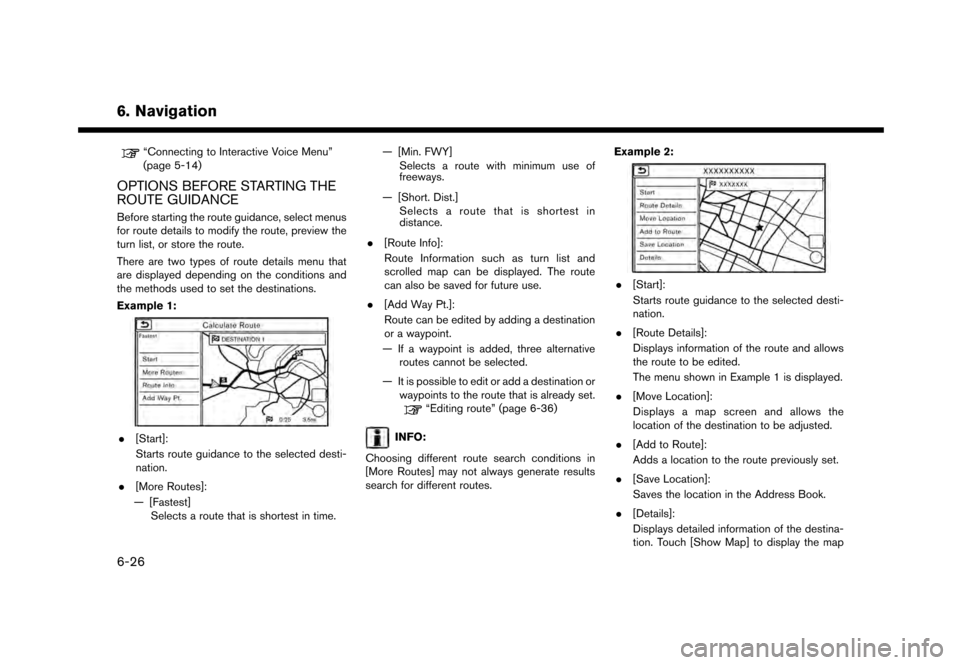
Example 1:
.[Start]:
Starts route guidance to the selected desti-
nation.
. [More Routes]:
— [Fastest] Selects a route that is shortest in time. — [Min. FWY]
Selects a route with minimum use of
freeways.
— [Short. Dist.] Selects a route that is shortest in
distance.
. [Route Info]:
Route Information such as turn list and
scrolled map can be displayed. The route
can also be saved for future use.
. [Add Way Pt.]:
Route can be edited by adding a destination
or a waypoint.
— If a waypoint is added, three alternative routes cannot be selected.
— It is possible to edit or add a destination or waypoints to the route that is already set.
“Editing route” (page 6-36)
INFO:
Choosing different route search conditions in
[More Routes] may not always generate results
search for different routes. Example 2:
.
[Start]:
Starts route guidance to the selected desti-
nation.
. [Route Details]:
Displays information of the route and allows
the route to be edited.
The menu shown in Example 1 is displayed.
. [Move Location]:
Displays a map screen and allows the
location of the destination to be adjusted.
. [Add to Route]:
Adds a location to the route previously set.
. [Save Location]:
Saves the location in the Address Book.
. [Details]:
Displays detailed information of the destina-
tion. Touch [Show Map] to display the map
6-26
Page 133 of 248
![NISSAN GT-R 2017 R35 Multi Function Display Workshop Manual around the destination. Touch [Call] (when
available) to make a phone call to the facility
set as a destination.ROUTE GUIDANCE
ABOUT ROUTE GUIDANCE
After setting the route, select [Start] to start the](/img/5/524/w960_524-132.png "NISSAN GT-R 2017 R35 Multi Function Display Workshop Manual around the destination. Touch [Call] (when
available) to make a phone call to the facility
set as a destination.ROUTE GUIDANCE
ABOUT ROUTE GUIDANCE
After setting the route, select [Start] to start the")
around the destination. Touch [Call] (when
available) to make a phone call to the facility
set as a destination.ROUTE GUIDANCE
ABOUT ROUTE GUIDANCE
After setting the route, select [Start] to start the
route guidance.
Throughout the route guidance, the system
navigates you through the guide points using
visual and voice guidance.
WARNING
. The navigation system’s visual and
voice guidance is for reference pur-
poses only. The contents of the
guidance may be inappropriate de-
pending on the situation.
. Follow all traffic regulations when
driving along the suggested route
(e.g., one-way traffic) .
“Route guidance” (page 6-62)
Voice guidance during route guidance
Basics of voice guidance:
Voice guidance announces which direction to
turn when approaching an intersection for which
a turn is necessary.
INFO:
. There may be some cases in which voice
guidance and actual road conditions do not
correspond. This may occur because of
discrepancies between the actual road and
the information on the map data, or may also
be due to the vehicle speed.
. In case voice guidance does not correspond
to the actual road conditions, follow the
information obtained from traffic signs or
notices on the road.
. Route guidance provided by the navigation
system does not take carpool lane driving
into consideration, especially when carpool
lanes are separated from other road lanes.
. The system will announce street names
when the system language is set to English.
Street names are not announced when the
system is set to French or Spanish.
INFO:
. When approaching a guide point (intersec-
tion or corner) , destination, etc. during route
guidance, voice guidance announces the
remaining distance and/or turning direction.
Push and hold
Page 135 of 248
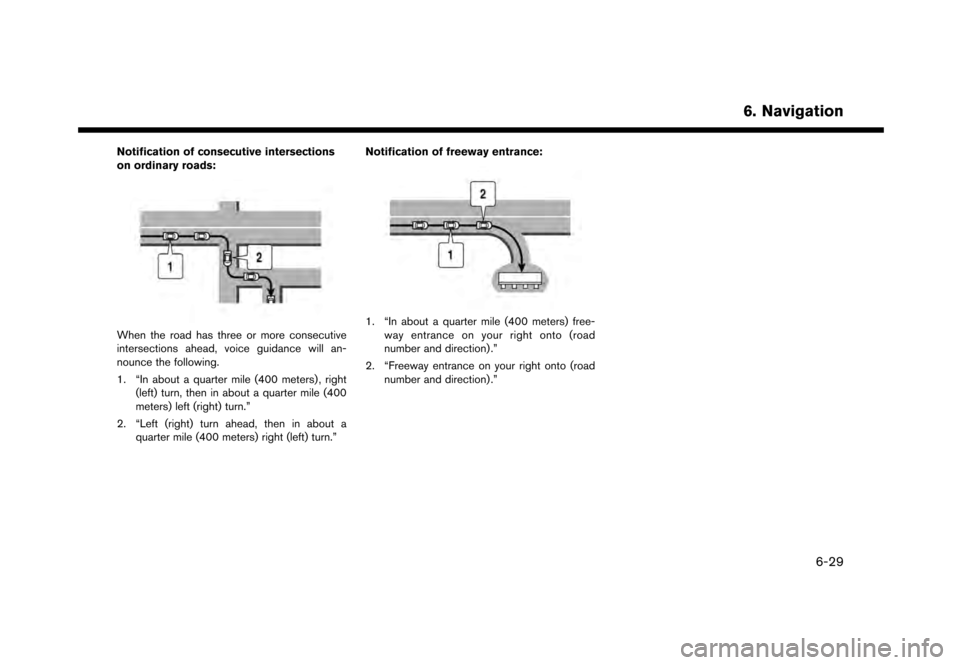
Notification of consecutive intersections
on ordinary roads:
When the road has three or more consecutive
intersections ahead, voice guidance will an-
nounce the following.
1. “In about a quarter mile (400 meters) , right(left) turn, then in about a quarter mile (400
meters) left (right) turn.”
2. “Left (right) turn ahead, then in about a quarter mile (400 meters) right (left) turn.” Notification of freeway entrance:1. “In about a quarter mile (400 meters) free-
way entrance on your right onto (road
number and direction) .”
2. “Freeway entrance on your right onto (road number and direction) .”
6. Navigation
6-29
Page 137 of 248
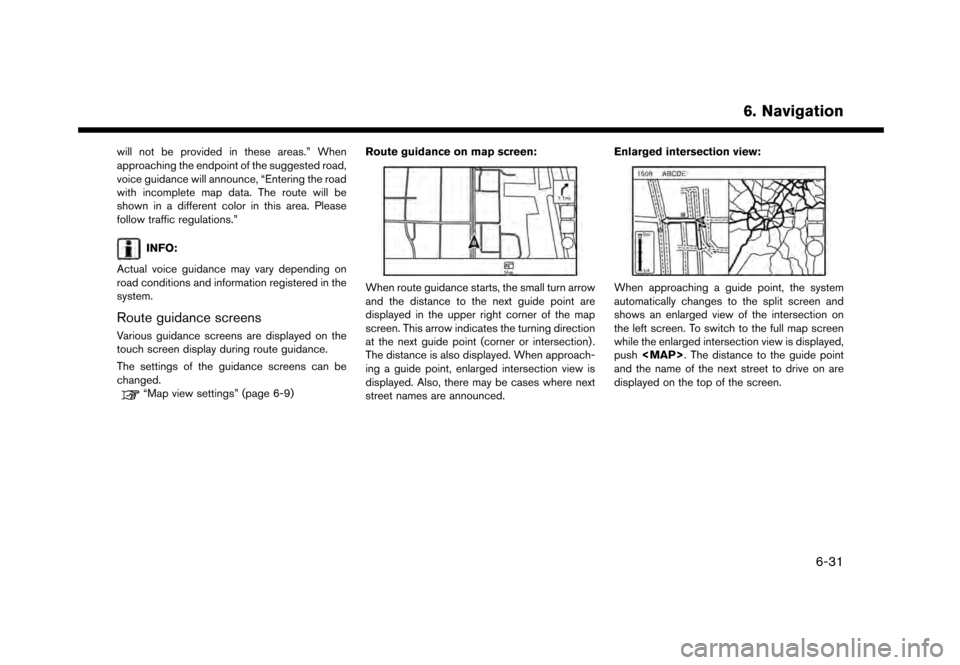
will not be provided in these areas.” When
approaching the endpoint of the suggested road,
voice guidance will announce, “Entering the road
with incomplete map data. The route will be
shown in a different color in this area. Please
follow traffic regulations.”
INFO:
Actual voice guidance may vary depending on
road conditions and information registered in the
system.
Route guidance screens
Various guidance screens are displayed on the
touch screen display during route guidance.
The settings of the guidance screens can be
changed.
“Map view settings” (page 6-9) Route guidance on map screen:
When route guidance starts, the small turn arrow
and the distance to the next guide point are
displayed in the upper right corner of the map
screen. This arrow indicates the turning direction
at the next guide point (corner or intersection) .
The distance is also displayed. When approach-
ing a guide point, enlarged intersection view is
displayed. Also, there may be cases where next
street names are announced. Enlarged intersection view:When approaching a guide point, the system
automatically changes to the split screen and
shows an enlarged view of the intersection on
the left screen. To switch to the full map screen
while the enlarged intersection view is displayed,
push