display NISSAN NAVARA 2005 Repair Workshop Manual
[x] Cancel search | Manufacturer: NISSAN, Model Year: 2005, Model line: NAVARA, Model: NISSAN NAVARA 2005Pages: 3171, PDF Size: 49.59 MB
Page 741 of 3171
THEFT WARNING SYSTEM
BL-157
C
D
E
F
G
H
J
K
L
MA
B
BL
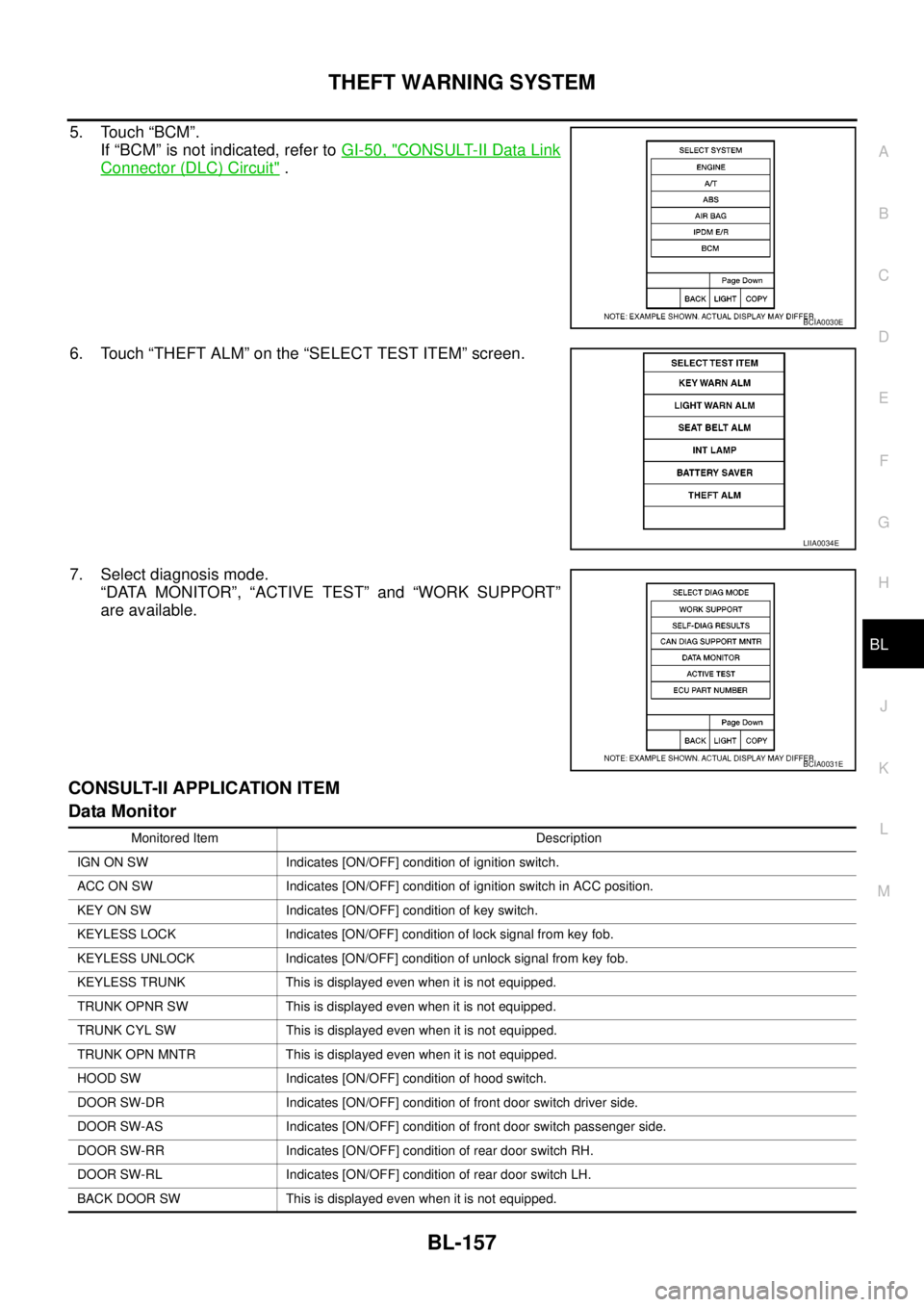
5. Touch “BCM”.
If “BCM” is not indicated, refer toGI-50, "
CONSULT-II Data Link
Connector (DLC) Circuit".
6. Touch “THEFT ALM” on the “SELECT TEST ITEM” screen.
7. Select diagnosis mode.
“DATA MONITOR”, “ACTIVE TEST” and “WORK SUPPORT”
are available.
CONSULT-II APPLICATION ITEM
Data Monitor
BCIA0030E
LIIA0034E
BCIA0031E
Monitored Item Description
IGN ON SW Indicates [ON/OFF] condition of ignition switch.
ACC ON SW Indicates [ON/OFF] condition of ignition switch in ACC position.
KEY ON SW Indicates [ON/OFF] condition of key switch.
KEYLESS LOCK Indicates [ON/OFF] condition of lock signal from key fob.
KEYLESS UNLOCK Indicates [ON/OFF] condition of unlock signal from key fob.
KEYLESS TRUNK This is displayed even when it is not equipped.
TRUNK OPNR SW This is displayed even when it is not equipped.
TRUNK CYL SW This is displayed even when it is not equipped.
TRUNK OPN MNTR This is displayed even when it is not equipped.
HOOD SW Indicates [ON/OFF] condition of hood switch.
DOOR SW-DR Indicates [ON/OFF] condition of front door switch driver side.
DOOR SW-AS Indicates [ON/OFF] condition of front door switch passenger side.
DOOR SW-RR Indicates [ON/OFF] condition of rear door switch RH.
DOOR SW-RL Indicates [ON/OFF] condition of rear door switch LH.
BACK DOOR SW This is displayed even when it is not equipped.
Page 742 of 3171

BL-158
THEFT WARNING SYSTEM
Active Test
Work Support
KEY CYL LK-SW This is displayed even when it is not equipped.
KEY CYL UN-SW This is displayed even when it is not equipped.
CDL LOCK SW Indicates [ON/OFF] condition of lock signal from door lock/unlock switch LH and RH.
CDL UNLOCK SW Indicates [ON/OFF] condition of unlock signal from door lock/unlock switch LH and RH.
AUTO RELOCK This is displayed even when it is not equipped.
GLS BREAK SEN This is displayed even when it is not equipped.Monitored Item Description
Test Item Description
THEFT INDThis test is able to check security indicator lamp operation. The lamp will be turned on when “ON”
on CONSULT-II screen is touched.
FLASHERThis test is able to check theft warning turn signal lamp operation. The turn signal lamp will be
activated on when “ON” on CONSULT-II screen is touched.
VEHICLE SECURITY HORNThis test is able to check theft warning alarm operation. The horns will be activated for 0.5 sec-
onds after “ON” on CONSULT-II screen is touched.
Test Item Description
SECURITY ALARM SET This mode can confirm and change theft warning alarm ON-OFF setting.
THEFT ALM TRGThe switch which triggered theft warning alarm is recorded. This mode is able to confirm and
erase the record of theft warning alarm. The trigger data can be erased by touching “CLEAR” on
CONSULT-II screen.
Page 762 of 3171
BL-178
NATS(NISSAN ANTI-THEFT SYSTEM)
Trouble Diagnoses
EIS00DB0
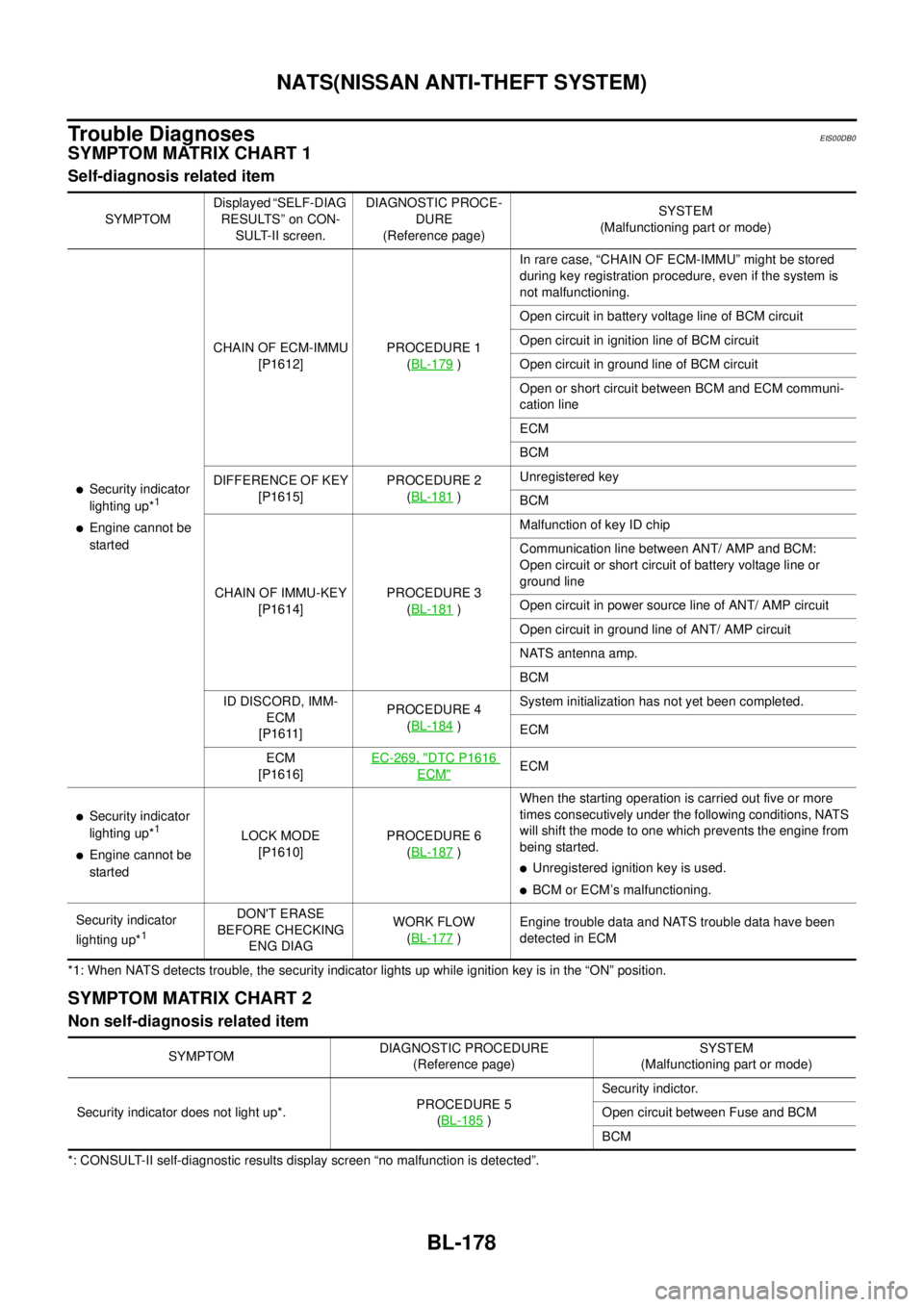
SYMPTOM MATRIX CHART 1
Self-diagnosis related item
*1: When NATS detects trouble, the security indicator lights up while ignition key is in the “ON” position.
SYMPTOM MATRIX CHART 2
Non self-diagnosis related item
*: CONSULT-II self-diagnostic results display screen “no malfunction is detected”.SYMPTOMDisplayed “SELF-DIAG
RESULTS” on CON-
SULT-II screen.DIAGNOSTIC PROCE-
DURE
(Reference page)SYSTEM
(Malfunctioning part or mode)
lSecurity indicator
lighting up*1
lEngine cannot be
startedCHAIN OF ECM-IMMU
[P1612]PROCEDURE 1
(BL-179
)In rare case, “CHAIN OF ECM-IMMU” might be stored
during key registration procedure, even if the system is
not malfunctioning.
Open circuit in battery voltage line of BCM circuit
Open circuit in ignition line of BCM circuit
Open circuit in ground line of BCM circuit
Open or short circuit between BCM and ECM communi-
cation line
ECM
BCM
DIFFERENCE OF KEY
[P1615]PROCEDURE 2
(BL-181
)Unregistered key
BCM
CHAIN OF IMMU-KEY
[P1614]PROCEDURE 3
(BL-181
)Malfunction of key ID chip
Communication line between ANT/ AMP and BCM:
Open circuit or short circuit of battery voltage line or
ground line
Open circuit in power source line of ANT/ AMP circuit
Open circuit in ground line of ANT/ AMP circuit
NATS antenna amp.
BCM
ID DISCORD, IMM-
ECM
[P1611]PROCEDURE 4
(BL-184
)System initialization has not yet been completed.
ECM
ECM
[P1616]EC-269, "
DTC P1616
ECM"ECM
lSecurity indicator
lighting up*1
lEngine cannot be
startedLOCK MODE
[P1610]PROCEDURE 6
(BL-187)When the starting operation is carried out five or more
times consecutively under the following conditions, NATS
will shift the mode to one which prevents the engine from
being started.
lUnregistered ignition key is used.
lBCM or ECM’s malfunctioning.
Security indicator
lighting up*
1
DON'T ERASE
BEFORE CHECKING
ENG DIAGWORK FLOW
(BL-177
)Engine trouble data and NATS trouble data have been
detected in ECM
SYMPTOMDIAGNOSTIC PROCEDURE
(Reference page)SYSTEM
(Malfunctioning part or mode)
Security indicator does not light up*.PROCEDURE 5
(BL-185
)Security indictor.
Open circuit between Fuse and BCM
BCM
Page 763 of 3171
NATS(NISSAN ANTI-THEFT SYSTEM)
BL-179
C
D
E
F
G
H
J
K
L
MA
B
BL
Diagnostic Procedure 1EIS00DB1
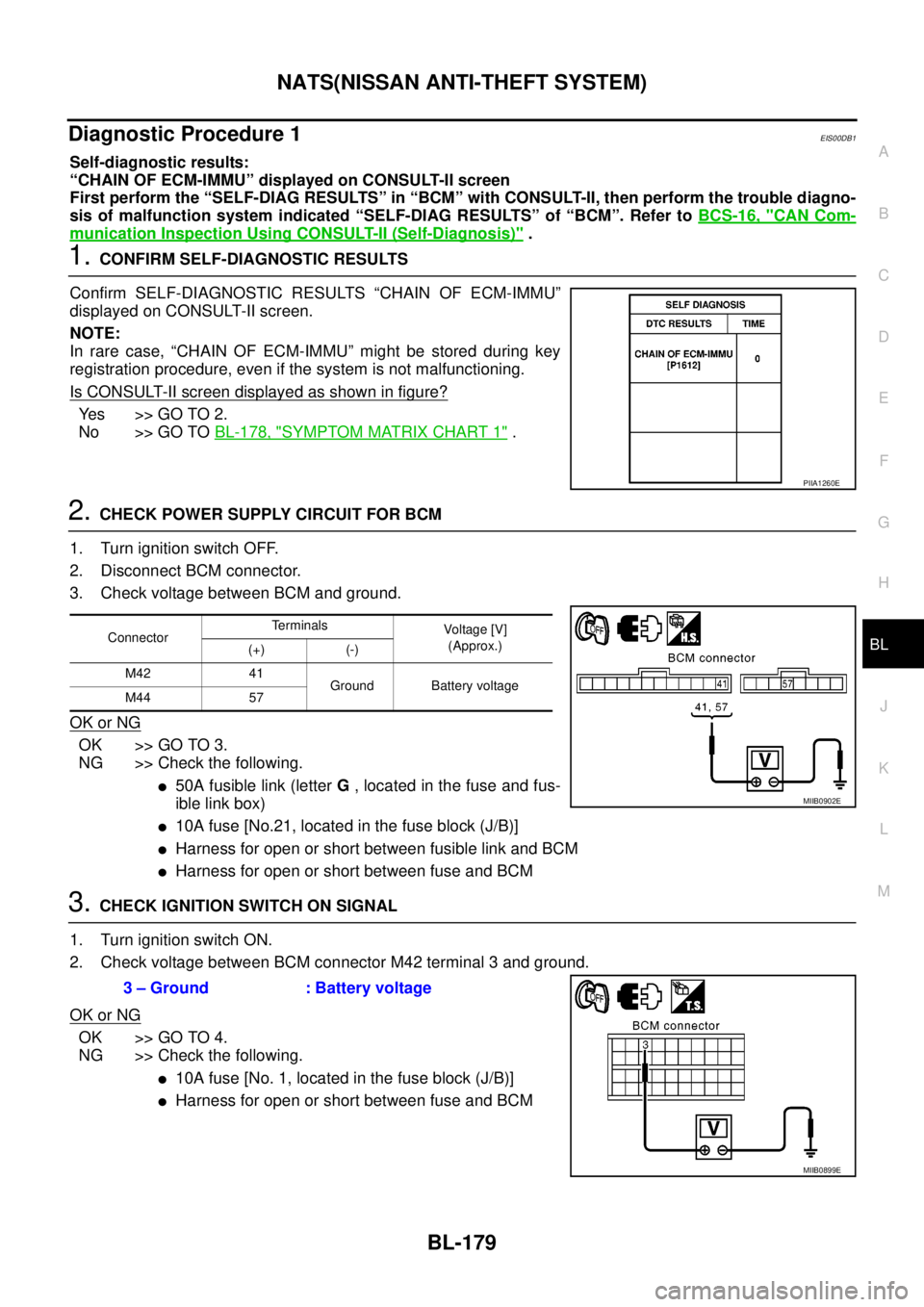
Self-diagnostic results:
“CHAIN OF ECM-IMMU” displayed on CONSULT-II screen
First perform the “SELF-DIAG RESULTS” in “BCM” with CONSULT-II, then perform the trouble diagno-
sis of malfunction system indicated “SELF-DIAG RESULTS” of “BCM”. Refer toBCS-16, "
CAN Com-
munication Inspection Using CONSULT-II (Self-Diagnosis)".
1.CONFIRM SELF-DIAGNOSTIC RESULTS
Confirm SELF-DIAGNOSTIC RESULTS “CHAIN OF ECM-IMMU”
displayed on CONSULT-II screen.
NOTE:
In rare case, “CHAIN OF ECM-IMMU” might be stored during key
registration procedure, even if the system is not malfunctioning.
Is CONSULT-II screen displayed as shown in figure?
Ye s > > G O T O 2 .
No >> GO TOBL-178, "
SYMPTOM MATRIX CHART 1".
2.CHECK POWER SUPPLY CIRCUIT FOR BCM
1. Turn ignition switch OFF.
2. Disconnect BCM connector.
3. Check voltage between BCM and ground.
OK or NG
OK >> GO TO 3.
NG >> Check the following.
l50A fusible link (letterG, located in the fuse and fus-
ible link box)
l10A fuse [No.21, located in the fuse block (J/B)]
lHarness for open or short between fusible link and BCM
lHarness for open or short between fuse and BCM
3.CHECK IGNITION SWITCH ON SIGNAL
1. Turn ignition switch ON.
2. Check voltage between BCM connector M42 terminal 3 and ground.
OK or NG
OK >> GO TO 4.
NG >> Check the following.
l10A fuse [No. 1, located in the fuse block (J/B)]
lHarness for open or short between fuse and BCM
PIIA1260E
ConnectorTerminals
Voltag e [V]
(Approx.)
(+) (-)
M42 41
Ground Battery voltage
M44 57
MIIB0902E
3 – Ground : Battery voltage
MIIB0899E
Page 765 of 3171
NATS(NISSAN ANTI-THEFT SYSTEM)
BL-181
C
D
E
F
G
H
J
K
L
MA
B
BL
Diagnostic Procedure 2EIS00DB2
Self-diagnostic results:
“DIFFERENCE OF KEY” displayed on CONSULT-II screen
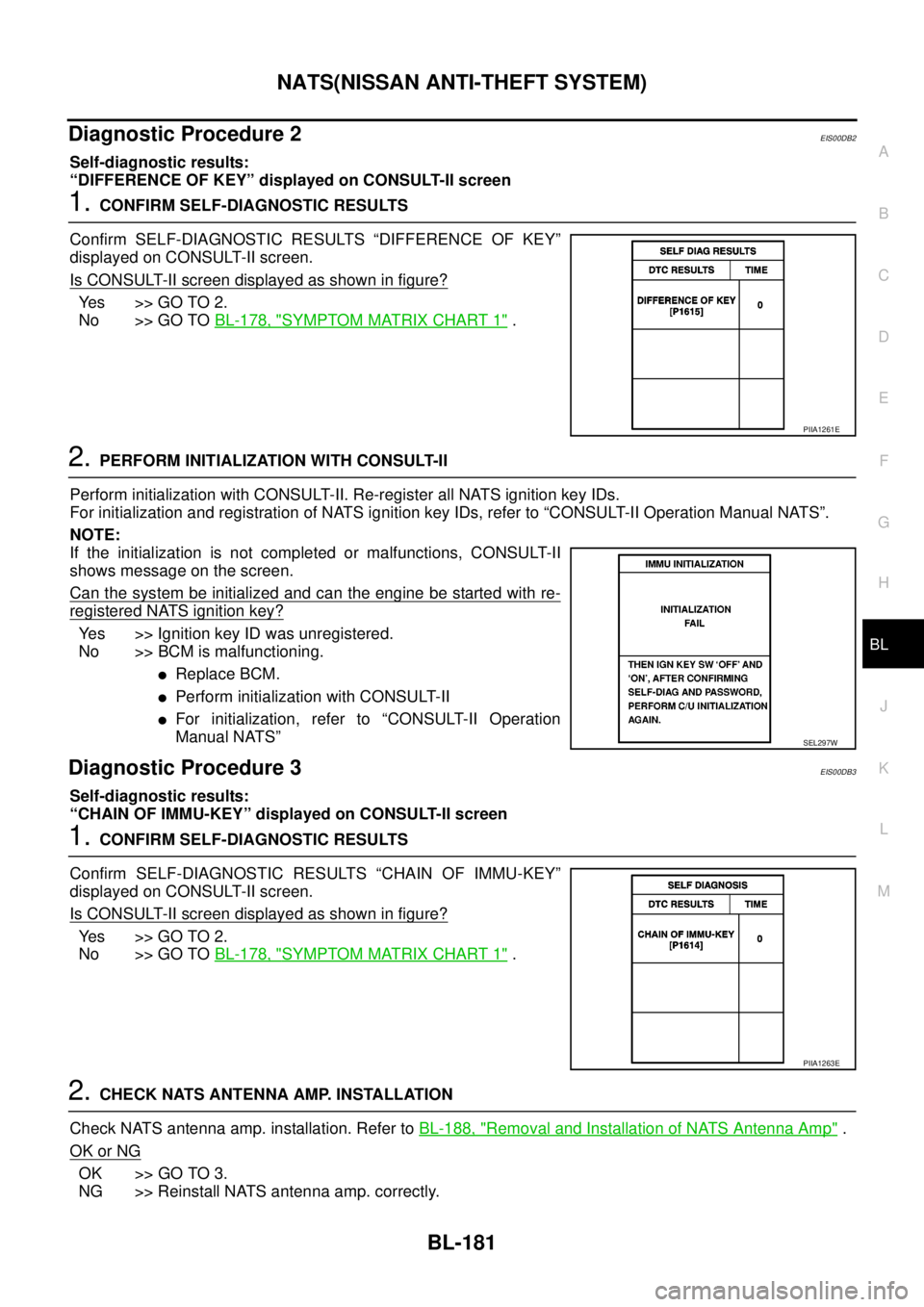
1.CONFIRM SELF-DIAGNOSTIC RESULTS
Confirm SELF-DIAGNOSTIC RESULTS “DIFFERENCE OF KEY”
displayed on CONSULT-II screen.
Is CONSULT-II screen displayed as shown in figure?
Ye s > > G O T O 2 .
No >> GO TOBL-178, "
SYMPTOM MATRIX CHART 1".
2.PERFORM INITIALIZATION WITH CONSULT-II
Perform initialization with CONSULT-II. Re-register all NATS ignition key IDs.
For initialization and registration of NATS ignition key IDs, refer to “CONSULT-II Operation Manual NATS”.
NOTE:
If the initialization is not completed or malfunctions, CONSULT-II
shows message on the screen.
Can the system be initialized and can the engine be started with re-
registered NATS ignition key?
Yes >> Ignition key ID was unregistered.
No >> BCM is malfunctioning.
lReplace BCM.
lPerform initialization with CONSULT-II
lFor initialization, refer to “CONSULT-II Operation
Manual NATS”
Diagnostic Procedure 3EIS00DB3
Self-diagnostic results:
“CHAIN OF IMMU-KEY” displayed on CONSULT-II screen
1.CONFIRM SELF-DIAGNOSTIC RESULTS
Confirm SELF-DIAGNOSTIC RESULTS “CHAIN OF IMMU-KEY”
displayed on CONSULT-II screen.
Is CONSULT-II screen displayed as shown in figure?
Ye s > > G O T O 2 .
No >> GO TOBL-178, "
SYMPTOM MATRIX CHART 1".
2.CHECK NATS ANTENNA AMP. INSTALLATION
Check NATS antenna amp. installation. Refer toBL-188, "
Removal and Installation of NATS Antenna Amp".
OK or NG
OK >> GO TO 3.
NG >> Reinstall NATS antenna amp. correctly.
PIIA1261E
SEL297W
PIIA1263E
Page 768 of 3171
BL-184
NATS(NISSAN ANTI-THEFT SYSTEM)
Diagnostic Procedure 4
EIS00DB4
Self-diagnostic results:
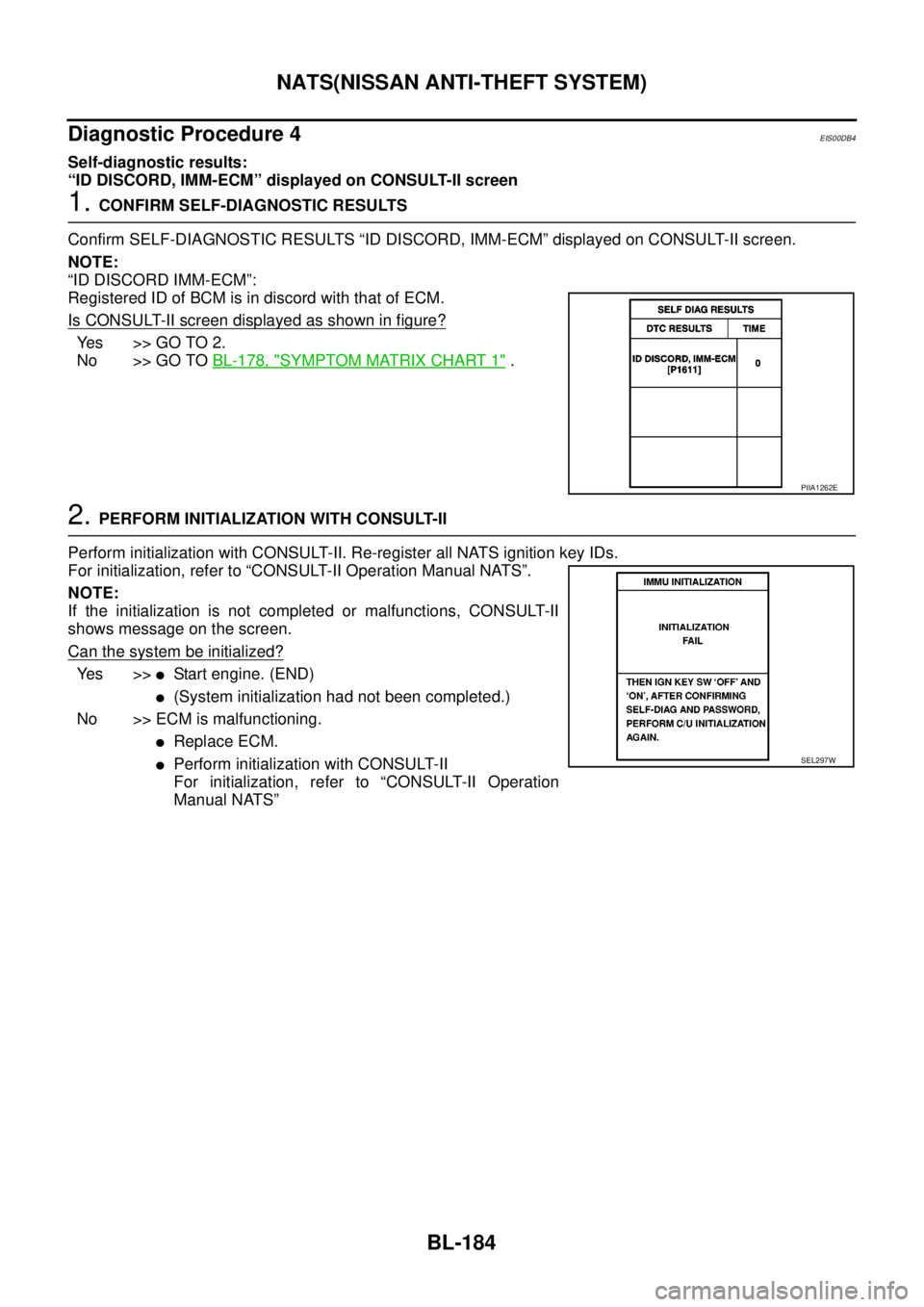
“ID DISCORD, IMM-ECM” displayed on CONSULT-II screen
1.CONFIRM SELF-DIAGNOSTIC RESULTS
Confirm SELF-DIAGNOSTIC RESULTS “ID DISCORD, IMM-ECM” displayed on CONSULT-II screen.
NOTE:
“ID DISCORD IMM-ECM”:
Registered ID of BCM is in discord with that of ECM.
Is CONSULT-II screen displayed as shown in figure?
Yes >>GOTO2.
No >> GO TOBL-178, "
SYMPTOM MATRIX CHART 1".
2.PERFORM INITIALIZATION WITH CONSULT-II
Perform initialization with CONSULT-II. Re-register all NATS ignition key IDs.
For initialization, refer to “CONSULT-II Operation Manual NATS”.
NOTE:
If the initialization is not completed or malfunctions, CONSULT-II
shows message on the screen.
Can the system be initialized?
Ye s > >lStart engine. (END)
l(System initialization had not been completed.)
No >> ECM is malfunctioning.
lReplace ECM.
lPerform initialization with CONSULT-II
For initialization, refer to “CONSULT-II Operation
Manual NATS”
PIIA1262E
SEL297W
Page 771 of 3171
NATS(NISSAN ANTI-THEFT SYSTEM)
BL-187
C
D
E
F
G
H
J
K
L
MA
B
BL
Diagnostic Procedure 6EIS00DB6
Self-diagnostic results:
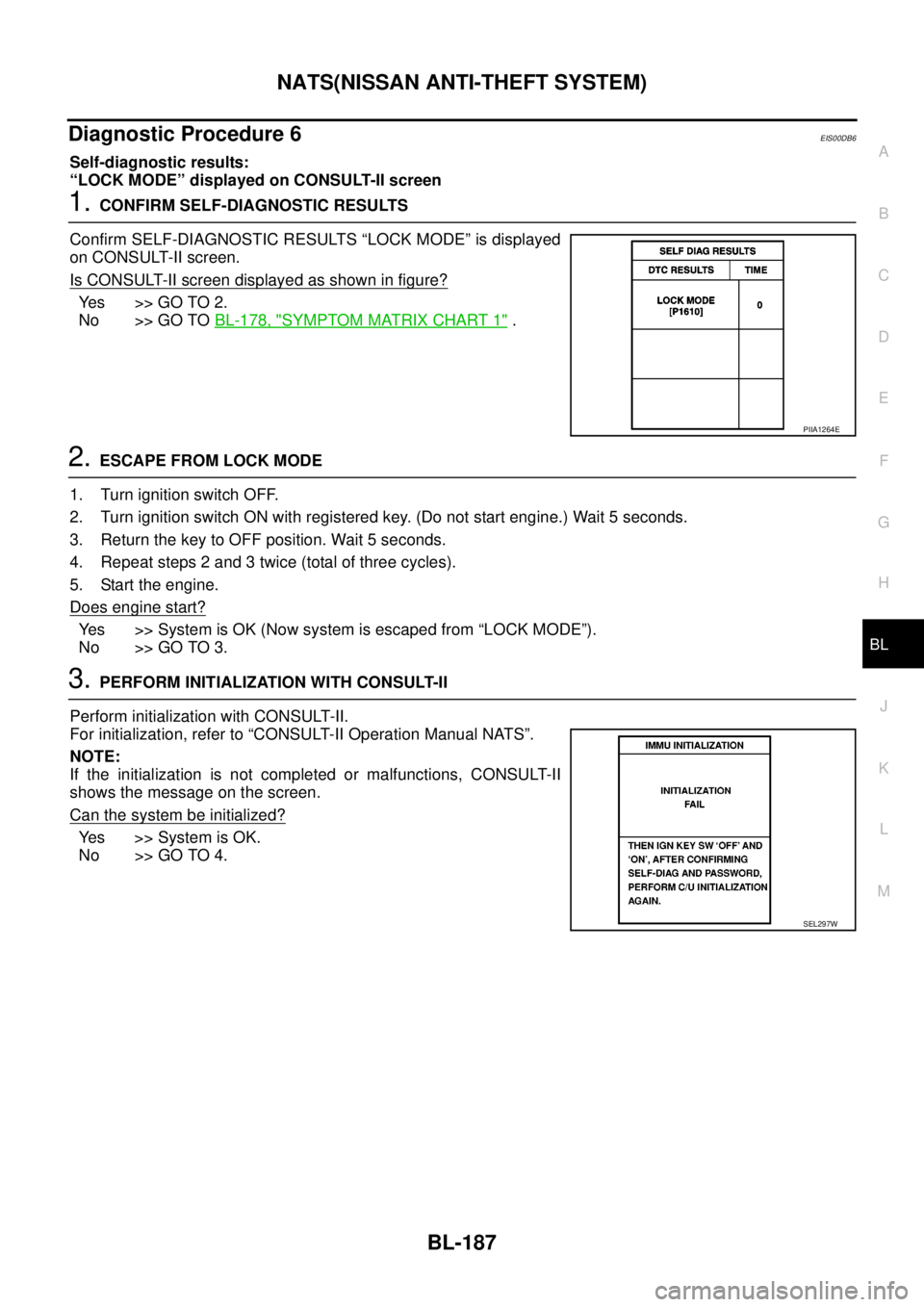
“LOCK MODE” displayed on CONSULT-II screen
1.CONFIRM SELF-DIAGNOSTIC RESULTS
Confirm SELF-DIAGNOSTIC RESULTS “LOCK MODE” is displayed
on CONSULT-II screen.
Is CONSULT-II screen displayed as shown in figure?
Ye s > > G O T O 2 .
No >> GO TOBL-178, "
SYMPTOM MATRIX CHART 1".
2.ESCAPE FROM LOCK MODE
1. Turn ignition switch OFF.
2. Turn ignition switch ON with registered key. (Do not start engine.) Wait 5 seconds.
3. Return the key to OFF position. Wait 5 seconds.
4. Repeat steps 2 and 3 twice (total of three cycles).
5. Start the engine.
Does engine start?
Yes >>SystemisOK(Nowsystemisescapedfrom“LOCKMODE”).
No >> GO TO 3.
3.PERFORM INITIALIZATION WITH CONSULT-II
Perform initialization with CONSULT-II.
For initialization, refer to “CONSULT-II Operation Manual NATS”.
NOTE:
If the initialization is not completed or malfunctions, CONSULT-II
shows the message on the screen.
Can the system be initialized?
Yes >>SystemisOK.
No >> GO TO 4.
PIIA1264E
SEL297W
Page 823 of 3171
BRC-1
BRAKE CONTROL SYSTEM
F BRAKES
CONTENTS
C
D
E
G
H
I
J
K
L
M
SECTIONBRC
A
B
BRC
BRAKE CONTROL SYSTEM
ABS
PRECAUTIONS .......................................................... 3
Precautions for Supplemental Restraint System
(SRS)“AIRBAG”and“SEATBELTPRE-TEN-
SIONER” .................................................................. 3
Precautions for Brake System .................................. 3
Precautions for Brake Control .................................. 3
PREPARATION ........................................................... 4
Special Service Tools (SST) ..................................... 4
SYSTEM DESCRIPTION ............................................ 5
System Diagram ....................................................... 5
Functions .................................................................. 5
Operation That Is Not “System Error” ...................... 5
Fail-Safe Function .................................................... 5
ABS, EBD SYSTEM .............................................. 5
Hydraulic Circuit Diagram ........................................ 6
CAN COMMUNICATION ............................................ 7
System Description .................................................. 7
TROUBLE DIAGNOSIS .............................................. 8
How to Perform Trouble Diagnosis for Quick and
Accurate Repair ....................................................... 8
INTRODUCTION ................................................... 8
DIAGNOSIS FLOWCHART .................................. 9
ASKING COMPLAINTS ...................................... 10
EXAMPLE OF DIAGNOSIS SHEET ................... 10
Component Parts Location ...................................... 11
Schematic — ABS — ............................................. 12
Wiring Diagram — ABS — ..................................... 13
CONSULT- II Functions .......................................... 17
CONSULT-II MAIN FUNCTION ........................... 17
CONSULT-II BASIC OPERATION PROCEDURE
... 17
Self-Diagnosis ........................................................ 18
OPERATION PROCEDURE ............................... 18
ERASE MEMORY ............................................... 18
DISPLAY ITEM LIST ........................................... 18
Data Monitor ........................................................... 20
OPERATION PROCEDURE ............................... 20
DISPLAY ITEM LIST ........................................... 20Active Test .............................................................. 21
OPERATION PROCEDURE ................................ 21
SOLENOID VALVE .............................................. 22
ABS MOTOR ....................................................... 22
For Fast and Accurate Diagnosis ........................... 23
PRECAUTIONS FOR DIAGNOSIS ..................... 23
Basic Inspection ..................................................... 23
BASIC INSPECTION 1 BRAKE FLUID LEVEL,
LEAKS, AND BRAKE PADS ................................ 23
BASIC INSPECTION 2 POWER SYSTEM TER-
MINAL LOOSENESS AND BATTERY INSPEC-
TION .................................................................... 23
BASIC INSPECTION 3 ABS WARNING LAMP
AND BRAKE WARNING LAMP INSPECTION .... 24
Inspection 1 Wheel Sensor System ........................ 24
Inspection 2 ABS Actuator and Electric Unit (Control
Unit) ........................................................................ 26
Inspection 3 ABS Actuator Relay or ABS Motor
Relay Circuit ........................................................... 26
Inspection 4 CAN Communication Circuit .............. 28
Inspection 5 ABS Actuator and Electric Unit (Control
Unit) Power Supply and Ground Circuit .................. 28
Inspection 6 Brake Fluid Level Switch Circuit ......... 30
Inspection 7 Parking Brake Switch Circuit .............. 32
Inspection 8 Warning lamp system ......................... 33
Symptom 1: Excessive ABS Function Operation
Frequency ............................................................... 33
Symptom 2: Unexpected Pedal Reaction ............... 34
Symptom 3: The Stopping Distance Is Long .......... 34
Symptom 4: ABS Function Does Not Operate ....... 35
Symptom 5: Pedal Vibration or ABS Operation
Sound Occurs ......................................................... 35
Symptom 6: ABS Warning Lamp Indication Is Not
Normal .................................................................... 35
WHEEL SENSORS ................................................... 37
Removal and Installation ........................................ 37
REMOVAL ........................................................... 38
INSTALLATION ................................................... 38
Page 840 of 3171
![NISSAN NAVARA 2005 Repair Workshop Manual BRC-18
[ABS]
TROUBLE DIAGNOSIS
Self-Diagnosis
EFS005TU
OPERATION PROCEDURE
1. Turn ignition switch OFF.
2. Connect CONSULT-II and CONSULT-II CONVERTER to data link connector.
3. Turn ignition switch O](/img/5/57362/w960_57362-839.png "NISSAN NAVARA 2005 Repair Workshop Manual BRC-18
[ABS]
TROUBLE DIAGNOSIS
Self-Diagnosis
EFS005TU
OPERATION PROCEDURE
1. Turn ignition switch OFF.
2. Connect CONSULT-II and CONSULT-II CONVERTER to data link connector.
3. Turn ignition switch O")
BRC-18
[ABS]
TROUBLE DIAGNOSIS
Self-Diagnosis
EFS005TU
OPERATION PROCEDURE
1. Turn ignition switch OFF.
2. Connect CONSULT-II and CONSULT-II CONVERTER to data link connector.
3. Turn ignition switch ON.
4. Start engine and drive vehicle at 30 km/h (19 MPH) or more for approximately 1 minute.
5. After stopping vehicle, with engine running, touch “START (NISSAN BASED VHCL)”, “ABS”, “SELF-DIAG
RESULTS” in order on CONSULT-II screen.
CAUTION:
If “START (NISSAN BASED VHCL)” is touched immediately after starting engine or turn on the
ignition switch, “ABS” might not be displayed in the “SELECT SYSTEM” screen. In this case,
repeat the operation from step 1.
6. The self-diagnostic results are displayed. (Touch “PRINT” to print out self-diagnostic results, If necessary.)
lCheck ABS warning lamp if “NO FAILURE” is displayed.
7. Perform the appropriate inspection from display item list, and repair or replace the malfunctioning compo-
nent. Refer toBRC-18, "
Display Item List".
8. Start engine and drive vehicle at 30 km/h (19 MPH) or more for approximately 1 minute.
CAUTION:
When the wheel sensor malfunctions, after inspecting the wheel sensor system, the ABS warning
lamp and brake warning lamp will not turn off even when the system is normal unless the vehicle
is driving at 30 km/h (19MPH) or more for approximately 1 minute.
ERASE MEMORY
1. Turn ignition switch OFF.
2. Start engine and touch “START (NISSAN BASED VHCL)”, “ABS”, “SELF-DIAG RESULTS”, “ERASE
MEMORY” in order on CONSULT-II screen to erase the error memory.
If “ABS” is not indicated, go toGI-50, "
CONSULT-II Data Link Connector (DLC) Circuit".
CAUTION:
If the error memory is not erased, re-perform the operation from step 4.
3. Perform self-diagnosis again, and make sure that diagnostic memory is erased.
4. Drive vehicle at 30 km/h (19 MPH) or more for approximately 1 minute as the final inspection, and make
sure that the ABS warning lamp turn off.
DISPLAY ITEM LIST
Self-diagnostic item Malfunction detecting condition Check system
RR RH SENSOR-1 Circuit of rear RH wheel sensor is open.
BRC-24, "
Inspection 1
Wheel Sensor System"
(Note 1) RR LH SENSOR-1 Circuit of rear LH wheel sensor is open.
FR RH SENSOR-1 Circuit of front RH wheel sensor is open.
FR LH SENSOR-1 Circuit of front LH wheel sensor is open.
RR RH SENSOR-2When the circuit in the rear RH wheel sensor is short-circuited. Or
when the sensor power voltage is outside the standard. When the
distance between the wheel sensor and sensor rotor is too large
and the sensor pulse cannot be recognized by the control unit.
RR LH SENSOR-2When the circuit in the rear LH wheel sensor is short-circuited. Or
when the sensor power voltage is outside the standard. When the
distance between the wheel sensor and sensor rotor is too large
and the sensor pulse cannot be recognized by the control unit.
FR RH SENSOR-2When the circuit in the front RH wheel sensor is short-circuited. Or
when the sensor power voltage is outside the standard. When the
distance between the wheel sensor and sensor rotor is too large
and the sensor pulse cannot be recognized by the control unit.
FR LH SENSOR-2When the circuit in the front LH wheel sensor is short-circuited. Or
when the sensor power voltage is outside the standard. When the
distance between the wheel sensor and sensor rotor is too large
and the sensor pulse cannot be recognized by the control unit.
Page 841 of 3171
![NISSAN NAVARA 2005 Repair Workshop Manual TROUBLE DIAGNOSIS
BRC-19
[ABS]
C
D
E
G
H
I
J
K
L
MA
B
BRC
Note 1: After completing repairs of shorted sensor circuit, when ignition switch is turned ON, ABS warning lamp turns on. Make sure that
ABS w](/img/5/57362/w960_57362-840.png "NISSAN NAVARA 2005 Repair Workshop Manual TROUBLE DIAGNOSIS
BRC-19
[ABS]
C
D
E
G
H
I
J
K
L
MA
B
BRC
Note 1: After completing repairs of shorted sensor circuit, when ignition switch is turned ON, ABS warning lamp turns on. Make sure that
ABS w")
TROUBLE DIAGNOSIS
BRC-19
[ABS]
C
D
E
G
H
I
J
K
L
MA
B
BRC
Note 1: After completing repairs of shorted sensor circuit, when ignition switch is turned ON, ABS warning lamp turns on. Make sure that
ABS warning lamp turns off while driving vehicle at 30 km/h (19 MPH) or more for approximately 1 minute according to self-diagnosis
procedure. In addition, if wheel sensor 2 is displayed for wheels, check wheel sensor circuit and also check control unit power voltage.
Note 2: When errors are detected in several systems, including CAN communication system [U1000], troubleshoot CAN communication
circuit. Refer toBRC-28, "
Inspection 4 CAN Communication Circuit". BATTERY VOLTAGE
[MALFUNCTION]ABS actuator and electric unit (control unit) power voltage is too low.BRC-28, "
Inspection 5
ABS Actuator and Elec-
tric Unit (Control Unit)
Power Supply and
Ground Circuit"
CONTROLLER FAILURE Internal malfunction of ABS actuator and electric unit (control unit)BRC-26, "
Inspection 2
ABS Actuator and Elec-
tric Unit (Control Unit)"
PUMP MOTORDuring actuator motor operation with ON, when actuator motor turns
OFF or when control line for actuator motor relay is open.BRC-26, "
Inspection 3
ABS Actuator Relay or
ABS Motor Relay Cir-
cuit"During actuator motor operation with OFF, when actuator motor
turns ON or when control line for relay is shorted to ground.
ABS SENSOR
[MALFUNCTION SIGNAL]Wheel sensor input is malfunction.BRC-24, "
Inspection 1
Wheel Sensor System"
(Note 1)
FR LH IN ABS SOLWhen the control unit detects an error in the front LH inlet solenoid
circuit.
BRC-26, "
Inspection 3
ABS Actuator Relay or
ABS Motor Relay Cir-
cuit"
FR LH OUT ABS SOLWhen the control unit detects an error in the front LH outlet solenoid
circuit.
FR RH IN ABS SOLWhen the control unit detects an error in the front RH inlet solenoid
circuit.
FR RH OUT ABS SOLWhen the control unit detects an error in the front RH outlet solenoid
circuit.
RR LH IN ABS SOLWhen the control unit detects an error in the rear LH inlet solenoid
circuit.
RR LH OUT ABS SOLWhen the control unit detects an error in the rear LH outlet solenoid
circuit.
RR RH IN ABS SOLWhen the control unit detects an error in the rear RH inlet solenoid
circuit.
RR RH OUT ABS SOLWhen the control unit detects an error in the rear RH outlet solenoid
circuit.
ACTUATOR RLY When the control unit detects an error in the actuator relay circuit.
CAN COMM CIRCUIT
[U1000]When there is an error in the CAN communications.BRC-28, "
Inspection 4
CAN Communication
Circuit"(Note 2) Self-diagnostic item Malfunction detecting condition Check system