battery NISSAN NAVARA 2005 Repair Workshop Manual
[x] Cancel search | Manufacturer: NISSAN, Model Year: 2005, Model line: NAVARA, Model: NISSAN NAVARA 2005Pages: 3171, PDF Size: 49.59 MB
Page 2530 of 3171

PG-1
POWER SUPPLY, GROUND & CIRCUIT ELEMENTS
K ELECTRICAL
CONTENTS
C
D
E
F
G
H
I
J
L
M
SECTIONPG
A
B
PG
POWER SUPPLY, GROUND & CIRCUIT ELEMENTS
PRECAUTIONS .......................................................... 3
Precautions for Supplemental Restraint System
(SRS)“AIRBAG”and“SEATBELTPRE-TEN-
SIONER” .................................................................. 3
Wiring Diagrams and Trouble Diagnosis .................. 3
POWER SUPPLY ROUTING CIRCUIT ...................... 4
Schematic ................................................................ 4
Wiring Diagram — POWER — ................................. 5
BATTERY POWER SUPPLY — IGNITION SW.
IN ANY POSITION ................................................ 5
ACCESSORY POWER SUPPLY — IGNITION
SW. IN ACC OR ON ............................................ 10
IGNITION POWER SUPPLY — IGNITION SW.
IN ON ................................................................... 11
IGNITION POWER SUPPLY — IGNITION SW.
IN ON AND/OR START ....................................... 12
IPDM E/R (INTELLIGENT POWER DISTRIBUTION
MODULE ENGINE ROOM) ...................................... 14
System Description ................................................ 14
SYSTEMS CONTROLLED BY IPDM E/R ........... 14
CAN COMMUNICATION LINE CONTROL ......... 14
IPDM E/R STATUS CONTROL ........................... 15
CAN Communication System Description .............. 15
Function of Detecting Ignition Relay Malfunction ... 15
CONSULT-II Function (IPDM E/R) ......................... 16
CONSULT-II BASIC OPERATION ...................... 16
SELF-DIAGNOSTIC RESULTS .......................... 17
DATA MONITOR ................................................. 17
CAN DIAG SUPPORT MNTR ............................. 18
ACTIVE TEST ..................................................... 18
Auto Active Test ..................................................... 19
DESCRIPTION .................................................... 19
OPERATION PROCEDURE ............................... 19
INSPECTION IN AUTO ACTIVE TEST MODE... 20
Schematic .............................................................. 22
IPDM E/R Terminal Arrangement ........................... 23
Check IPDM E/R Power Supply and Ground Circuit... 24Inspection with CONSULT-II (Self-Diagnosis) ........ 25
Removal and Installation of IPDM E/R ................... 26
REMOVAL ........................................................... 26
INSTALLATION ................................................... 26
GROUND CIRCUIT ................................................... 27
Ground Distribution ................................................. 27
MAIN HARNESS ................................................. 27
ENGINE ROOM HARNESS ................................ 30
ENGINE CONTROL HARNESS .......................... 34
BODY HARNESS (LH SIDE) .............................. 35
BODY HARNESS (RH SIDE) .............................. 36
DEFOGGER CABLE ........................................... 37
HARNESS ................................................................. 38
Harness Layout ...................................................... 38
HOW TO READ HARNESS LAYOUT ................. 38
OUTLINE/DOUBLE CAB MODELS .................... 39
OUTLINE/KING CAB MODELS .......................... 40
MAIN HARNESS/LHD MODELS ......................... 41
MAIN HARNESS/RHD MODELS ........................ 44
ENGINE ROOM HARNESS/LHD MODELS ........ 47
ENGINE ROOM HARNESS/RHD MODELS ....... 49
ENGINE CONTROL HARNESS .......................... 51
CHASSIS HARNESS .......................................... 53
BODY HARNESS (LH SIDE)/DOUBLE CAB
MODELS ............................................................. 54
BODY HARNESS (RH SIDE)/DOUBLE CAB
MODELS ............................................................. 56
BODY HARNESS (LH SIDE)/KING CAB MOD-
ELS ...................................................................... 58
BODY HARNESS (RH SIDE)/KING CAB MOD-
ELS ...................................................................... 60
ROOM LAMP HARNESS .................................... 62
FRONT DOOR LH HARNESS/LHD MODELS .... 63
FRONT DOOR RH HARNESS/LHD MODELS ... 63
FRONT DOOR LH HARNESS/RHD MODELS ... 64
FRONT DOOR RH HARNESS/RHD MODELS ... 64
REAR DOOR LH HARNESS/DOUBLE CAB
MODELS ............................................................. 65
REAR DOOR RH HARNESS/DOUBLE CAB
MODELS ............................................................. 65
Page 2534 of 3171
POWER SUPPLY ROUTING CIRCUIT
PG-5
C
D
E
F
G
H
I
J
L
MA
B
PG
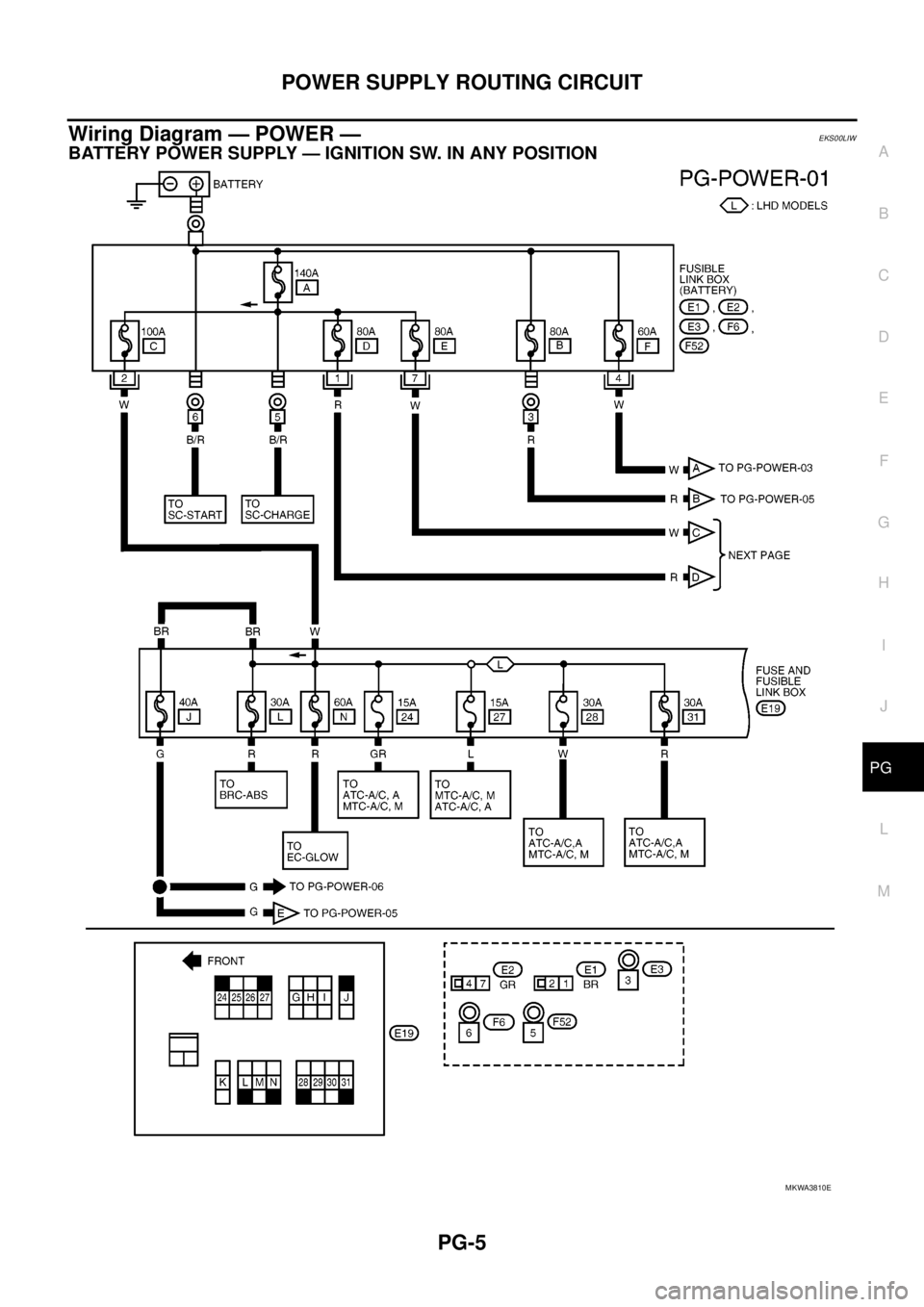
Wiring Diagram — POWER —EKS00LIW
BATTERY POWER SUPPLY — IGNITION SW. IN ANY POSITION
MKWA3810E
Page 2553 of 3171
PG-24
IPDM E/R (INTELLIGENT POWER DISTRIBUTION MODULE ENGINE ROOM)
Check IPDM E/R Power Supply and Ground Circuit
EKS00PAF
1.CHECK FUSES AND FUSIBLE LINK
Check for blown fuses and fusible link.
OK or NG
OK >> GO TO 2.
NG >> If fuse or fusible link is blown, be sure to eliminate cause of malfunction before installing new fuse
or fusible link.
2.CHECK POWER SUPPLY CIRCUIT
1. Turn ignition switch OFF.
2. Disconnect IPDM E/R harness connector.
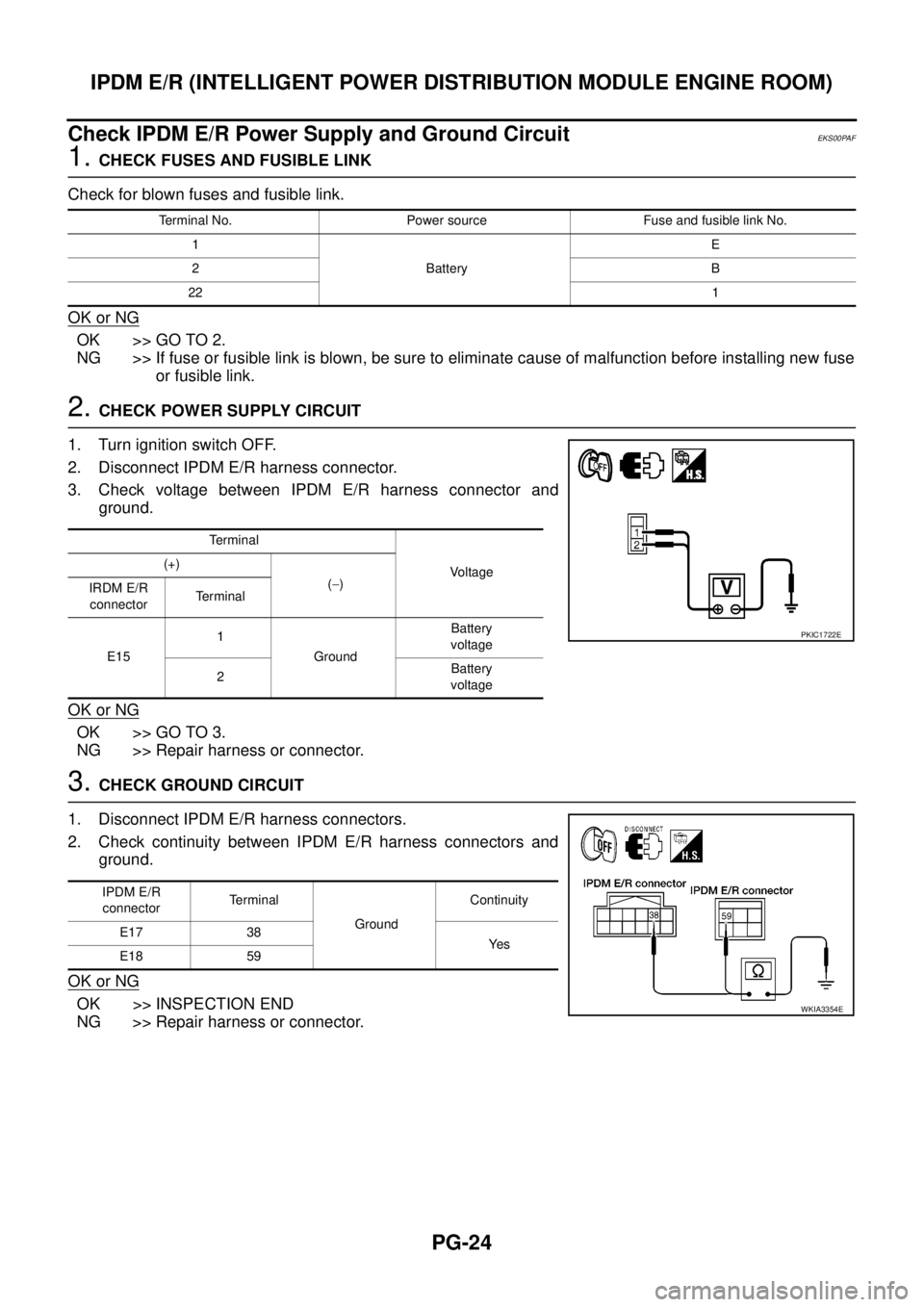
3. Check voltage between IPDM E/R harness connector and
ground.
OK or NG
OK >> GO TO 3.
NG >> Repair harness or connector.
3.CHECK GROUND CIRCUIT
1. Disconnect IPDM E/R harness connectors.
2. Check continuity between IPDM E/R harness connectors and
ground.
OK or NG
OK >> INSPECTION END
NG >> Repair harness or connector.
Terminal No. Power source Fuse and fusible link No.
1
BatteryE
2B
221
Te r m i n a l
Vo l ta g e (+)
(-)
IRDM E/R
connectorTerminal
E151
GroundBattery
voltage
2Battery
voltage
PKIC1722E
IPDM E/R
connectorTerminal
GroundContinuity
E17 38
Ye s
E18 59
WKIA3354E
Page 2555 of 3171
PG-26
IPDM E/R (INTELLIGENT POWER DISTRIBUTION MODULE ENGINE ROOM)
Removal and Installation of IPDM E/R
EKS00PAH
REMOVAL
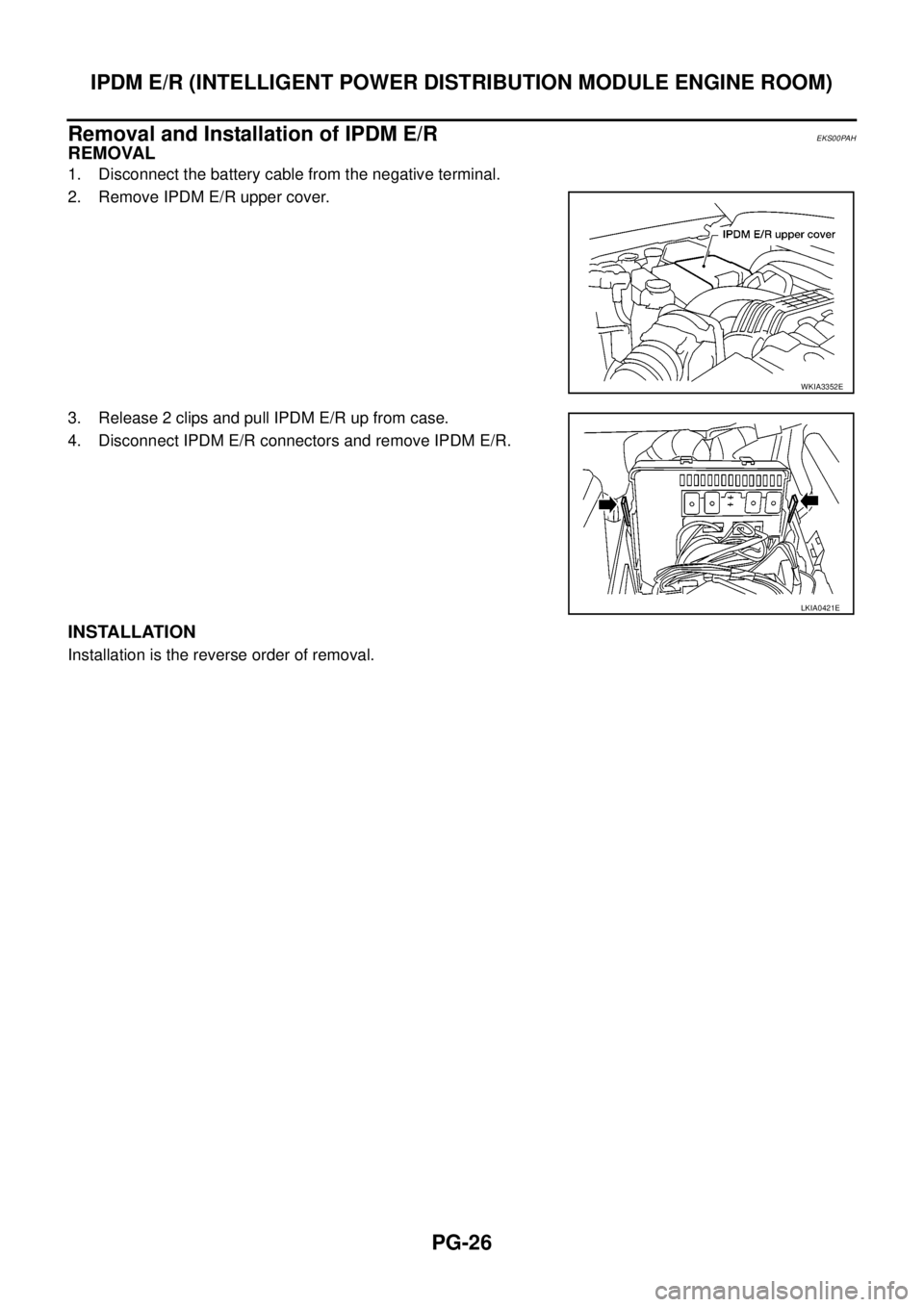
1. Disconnect the battery cable from the negative terminal.
2. Remove IPDM E/R upper cover.
3. Release 2 clips and pull IPDM E/R up from case.
4. Disconnect IPDM E/R connectors and remove IPDM E/R.
INSTALLATION
Installation is the reverse order of removal.
WKIA3352E
LKIA0421E
Page 2679 of 3171

RF-2
PRECAUTIONS
PRECAUTIONS
PFP:00001
Precautions for Supplemental Restraint System (SRS) “AIR BAG” and “SEAT
BELT PRE-TENSIONER”
EIS00CE9
The Supplemental Restraint System such as “AIR BAG” and “SEAT BELT PRE-TENSIONER”, used along
with a front seat belt, helps to reduce the risk or severity of injury to the driver and front passenger for certain
types of collision. Information necessary to service the system safely is included in the SRS and SB section of
this Service Manual.
WARNING:
lTo avoid rendering the SRS inoperative, which could increase the risk of personal injury or death
in the event of a collision which would result in air bag inflation, all maintenance must be per-
formed by an authorized NISSAN/INFINITI dealer.
lImproper maintenance, including incorrect removal and installation of the SRS, can lead to per-
sonal injury caused by unintentional activation of the system. For removal of Spiral Cable and Air
Bag Module, see the SRS section.
lDo not use electrical test equipment on any circuit related to the SRS unless instructed to in this
Service Manual. SRS wiring harnesses can be identified by yellow and/or orange harnesses or
harness connectors.
PrecautionsEIS00B92
lDisconnect both battery cables in advance.
lNever tamper with or force air bag lid open, as this may adversely affect air bag performance.
lBe careful not to scratch pad and other parts.
lWhen removing or disassembling any part, be careful not to damage or deform it. Protect parts which may
get in the way with cloth.
lWhen removing parts with a screwdriver or other tool, protect parts by wrapping them with vinyl or tape.
lKeep removed parts protected with cloth.
lIf a clip is deformed or damaged, replace it.
lIf an unreusable part is removed, replace it with a new one.
lTighten bolts and nuts firmly to the specified torque.
lAfter re-assembly has been completed, make sure each part functions correctly.
lRemove stains in the following way.
Water-soluble stains:
Dip a soft cloth in warm water, and then squeeze it tightly. After wiping the stain, wipe with a soft dry cloth.
Oil stain:
Dissolve a synthetic detergent in warm water (density of 2 to 3% or less), dip the cloth, then clean off the stain
with the cloth. Next, dip the cloth in fresh water and squeeze it tightly. Then clean off the detergent completely.
Thenwipetheareawithasoftdrycloth.
lDo not use any organic solvent, such as thinner or benzine.
Page 2689 of 3171

RF-12
SUNROOF
MEMORY RESET PROCEDURE
1. Please observe the following instructions while confirming the sunroof operation.
NOTE:
Do not disconnect the electronic power while the sunroof is operating or within 5 seconds after the sunroof
stops. (to wipe-out the memory of lid position and operating friction.)
2. Initialization of system should be conducted after the following conditions.
lWhen the battery is out or connector is disconnected while sunroof is operating or within 5 seconds
after sunroof stops.
lWhen the sunroof motor is changed.
lWhen an emergency handle is used.
lWhen the sunroof does not operate normally. (Incomplete initialization conditions)
INITIALIZATION PROCEDURE
If sunroof does not close or open normally, use following procedure to return sunroof operation to normal.
1. Close sunroof if it is not in close position. It may be necessary to repeatedly push TILT UP/SLIDE CLOSE
switch to close sunroof.
2. Tilt up sunroof, and release TILT UP/SLIDE CLOSE switch once.
3. Keep pushing TILT UP/SLIDE CLOSE switch. After 10seconds, glass lid will back up a few millimeters.
then will be stopped at normal tilt up position.
(Keep pushing TILT UP/SLIDE CLOSE switch during this operation.)
4. Within first 10 seconds of releasing TILT UP/SLIDE CLOSE switch, keep pushing TILT UP/SLIDE CLOSE
switch again. After 4 seconds, glass lid will be automatically TILT DOWN®SLIDE OPEN®SLIDE
CLOSE.
(Keep pushing TILT UP/SLIDE CLOSE switch during this operation.)
5. After glass lid stops, release TILT UP/SLIDE CLOSE switch later 0.5 seconds.
6. Initializing procedure is completed. Confirm proper operation of sunroof (slide open, slide close, tilt up, tilt
down).
Page 2692 of 3171
SUNROOF
RF-15
C
D
E
F
G
H
J
K
L
MA
B
RF
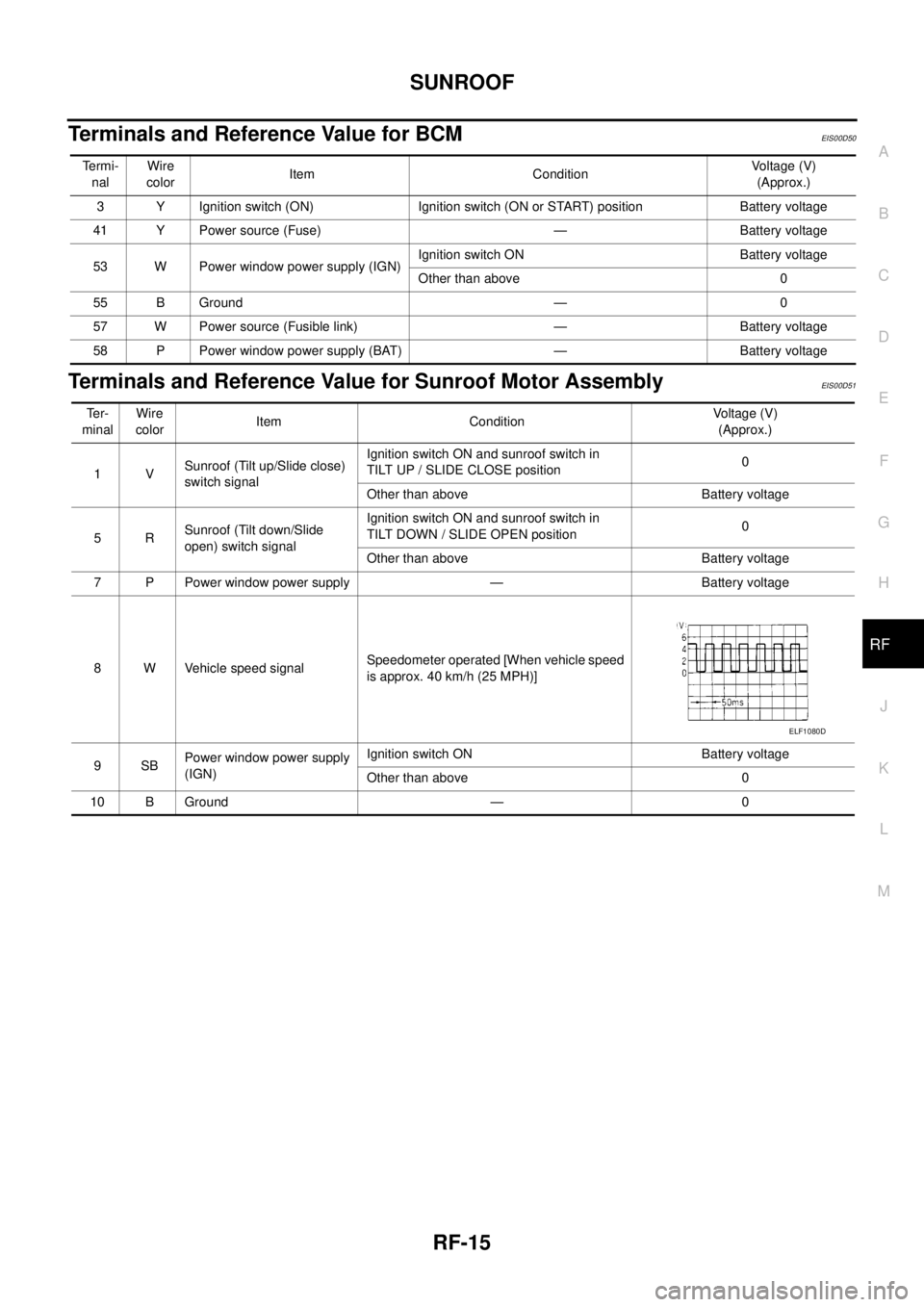
Terminals and Reference Value for BCMEIS00D50
Terminals and Reference Value for Sunroof Motor AssemblyEIS00D51
Te r m i -
nalWire
colorItem ConditionVo l ta g e (V )
(Approx.)
3 Y Ignition switch (ON) Ignition switch (ON or START) position Battery voltage
41 Y Power source (Fuse) — Battery voltage
53 W Power window power supply (IGN)Ignition switch ON Battery voltage
Other than above 0
55 B Ground — 0
57 W Power source (Fusible link) — Battery voltage
58 P Power window power supply (BAT) — Battery voltage
Te r -
minalWire
colorItem ConditionVoltage (V)
(Approx.)
1VSunroof (Tilt up/Slide close)
switch signalIgnition switch ON and sunroof switch in
TILT UP / SLIDE CLOSE position0
Other than above Battery voltage
5RSunroof (Tilt down/Slide
open) switch signalIgnition switch ON and sunroof switch in
TILT DOWN / SLIDE OPEN position0
Other than above Battery voltage
7 P Power window power supply — Battery voltage
8 W Vehicle speed signalSpeedometer operated [When vehicle speed
is approx. 40 km/h (25 MPH)]
9SBPower window power supply
(IGN)Ignition switch ON Battery voltage
Other than above 0
10 B Ground — 0
ELF1080D
Page 2693 of 3171
RF-16
SUNROOF
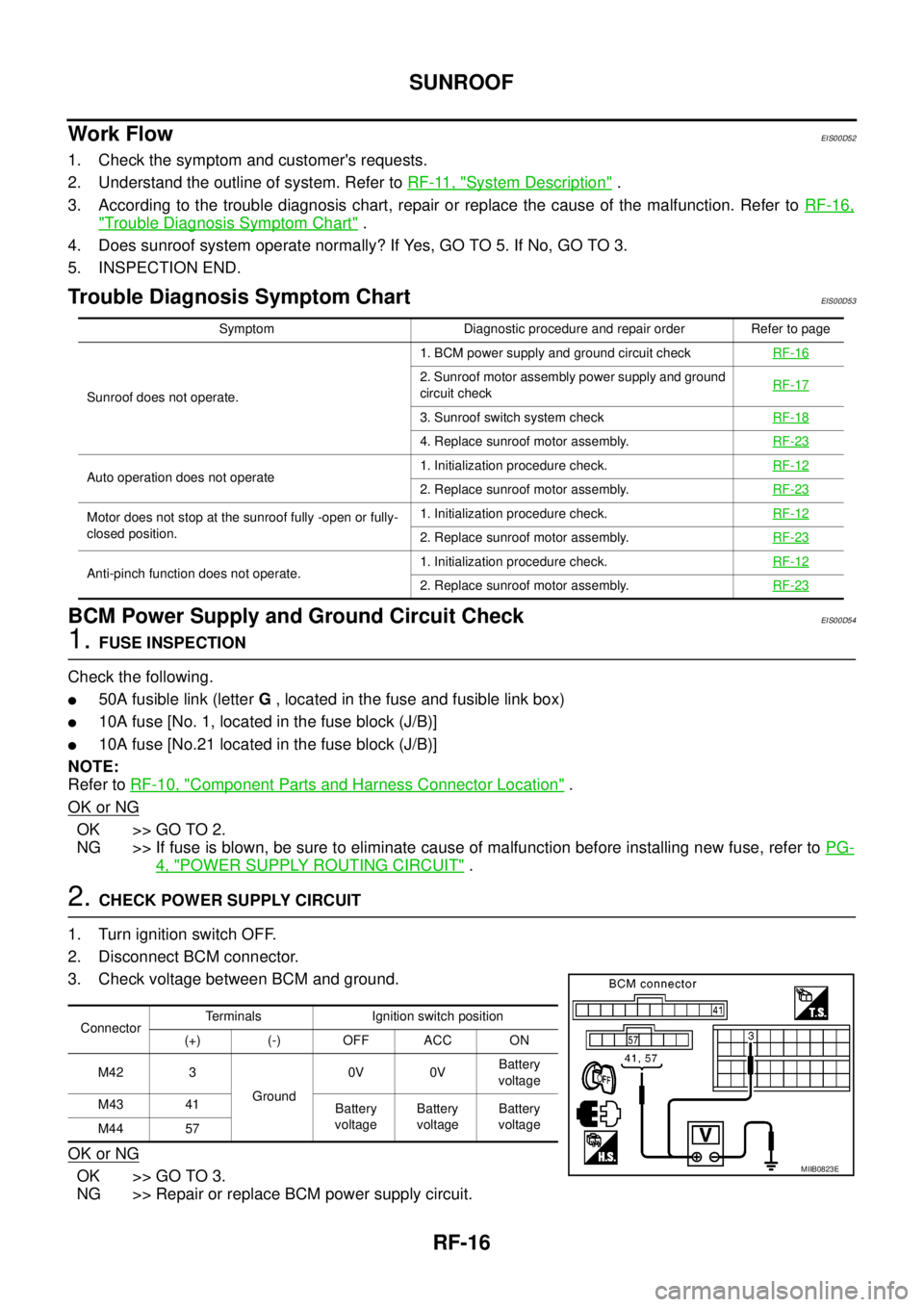
Work Flow
EIS00D52
1. Check the symptom and customer's requests.
2. Understand the outline of system. Refer toRF-11, "
System Description".
3. According to the trouble diagnosis chart, repair or replace the cause of the malfunction. Refer toRF-16,
"Trouble Diagnosis Symptom Chart".
4. Does sunroof system operate normally? If Yes, GO TO 5. If No, GO TO 3.
5. INSPECTION END.
Trouble Diagnosis Symptom ChartEIS00D53
BCM Power Supply and Ground Circuit CheckEIS00D54
1.FUSE INSPECTION
Check the following.
l50A fusible link (letterG, located in the fuse and fusible link box)
l10A fuse [No. 1, located in the fuse block (J/B)]
l10A fuse [No.21 located in the fuse block (J/B)]
NOTE:
Refer toRF-10, "
Component Parts and Harness Connector Location".
OK or NG
OK >> GO TO 2.
NG >> If fuse is blown, be sure to eliminate cause of malfunction before installing new fuse, refer toPG-
4, "POWER SUPPLY ROUTING CIRCUIT".
2.CHECK POWER SUPPLY CIRCUIT
1. Turn ignition switch OFF.
2. Disconnect BCM connector.
3. Check voltage between BCM and ground.
OK or NG
OK >> GO TO 3.
NG >> Repair or replace BCM power supply circuit.
Symptom Diagnostic procedure and repair order Refer to page
Sunroof does not operate.1. BCM power supply and ground circuit checkRF-16
2. Sunroof motor assembly power supply and ground
circuit checkRF-17
3. Sunroof switch system checkRF-18
4. Replace sunroof motor assembly.RF-23
Auto operation does not operate1. Initialization procedure check.RF-122. Replace sunroof motor assembly.RF-23
Motor does not stop at the sunroof fully -open or fully-
closed position.1. Initialization procedure check.RF-12
2. Replace sunroof motor assembly.RF-23
Anti-pinch function does not operate.1. Initialization procedure check.RF-122. Replace sunroof motor assembly.RF-23
ConnectorTerminals Ignition switch position
(+) (-) OFF ACC ON
M42 3
Ground0V 0VBattery
voltage
M43 41
Battery
voltageBattery
voltageBattery
voltage
M44 57
MIIB0823E
Page 2694 of 3171
SUNROOF
RF-17
C
D
E
F
G
H
J
K
L
MA
B
RF
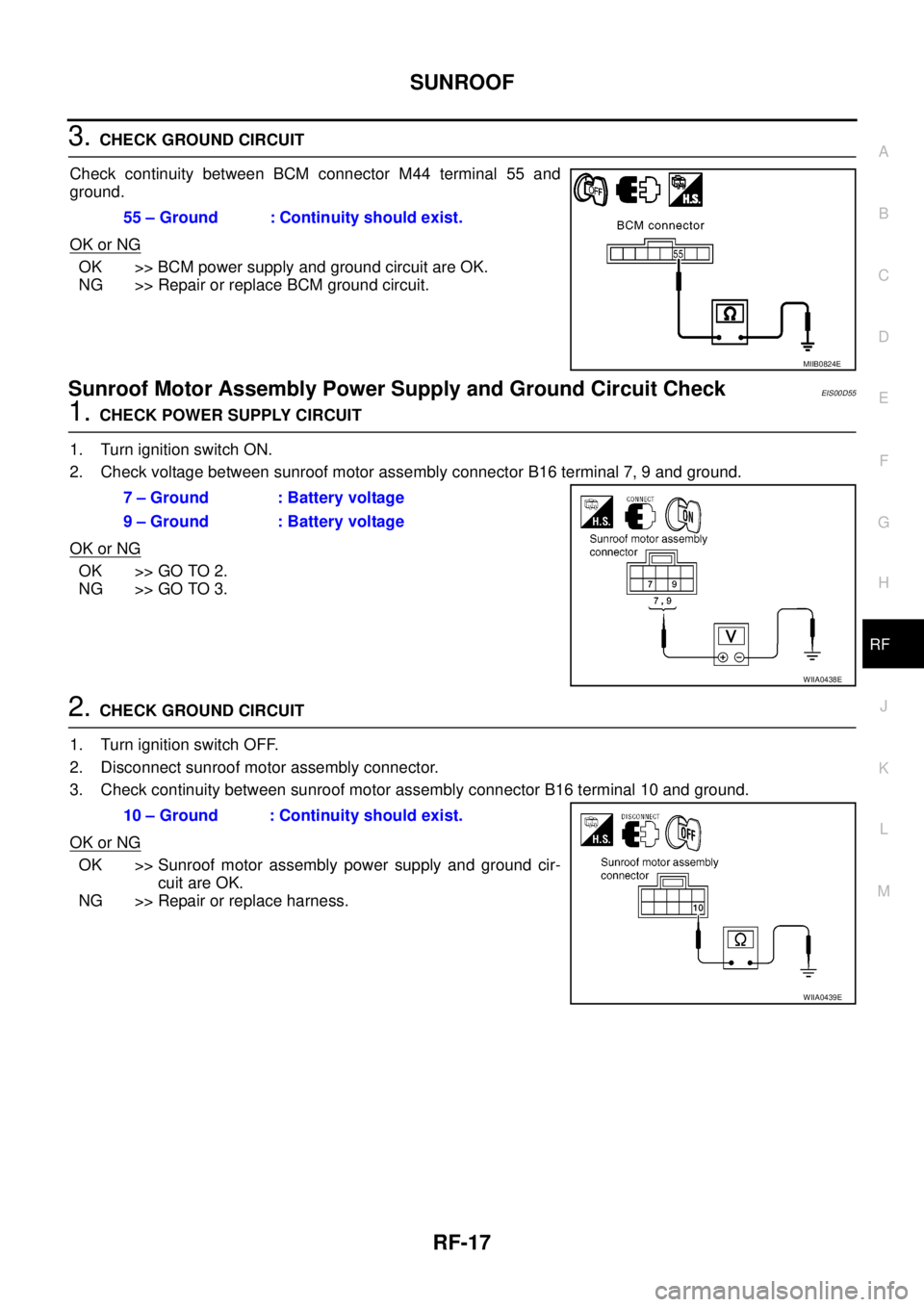
3.CHECK GROUND CIRCUIT
Check continuity between BCM connector M44 terminal 55 and
ground.
OK or NG
OK >> BCM power supply and ground circuit are OK.
NG >> Repair or replace BCM ground circuit.
Sunroof Motor Assembly Power Supply and Ground Circuit CheckEIS00D55
1.CHECK POWER SUPPLY CIRCUIT
1. Turn ignition switch ON.
2. Check voltage between sunroof motor assembly connector B16 terminal 7, 9 and ground.
OK or NG
OK >> GO TO 2.
NG >> GO TO 3.
2.CHECK GROUND CIRCUIT
1. Turn ignition switch OFF.
2. Disconnect sunroof motor assembly connector.
3. Check continuity between sunroof motor assembly connector B16 terminal 10 and ground.
OK or NG
OK >> Sunroof motor assembly power supply and ground cir-
cuit are OK.
NG >> Repair or replace harness.55 – Ground : Continuity should exist.
MIIB0824E
7 – Ground : Battery voltage
9 – Ground : Battery voltage
WIIA0438E
10 – Ground : Continuity should exist.
WIIA0439E
Page 2695 of 3171
RF-18
SUNROOF
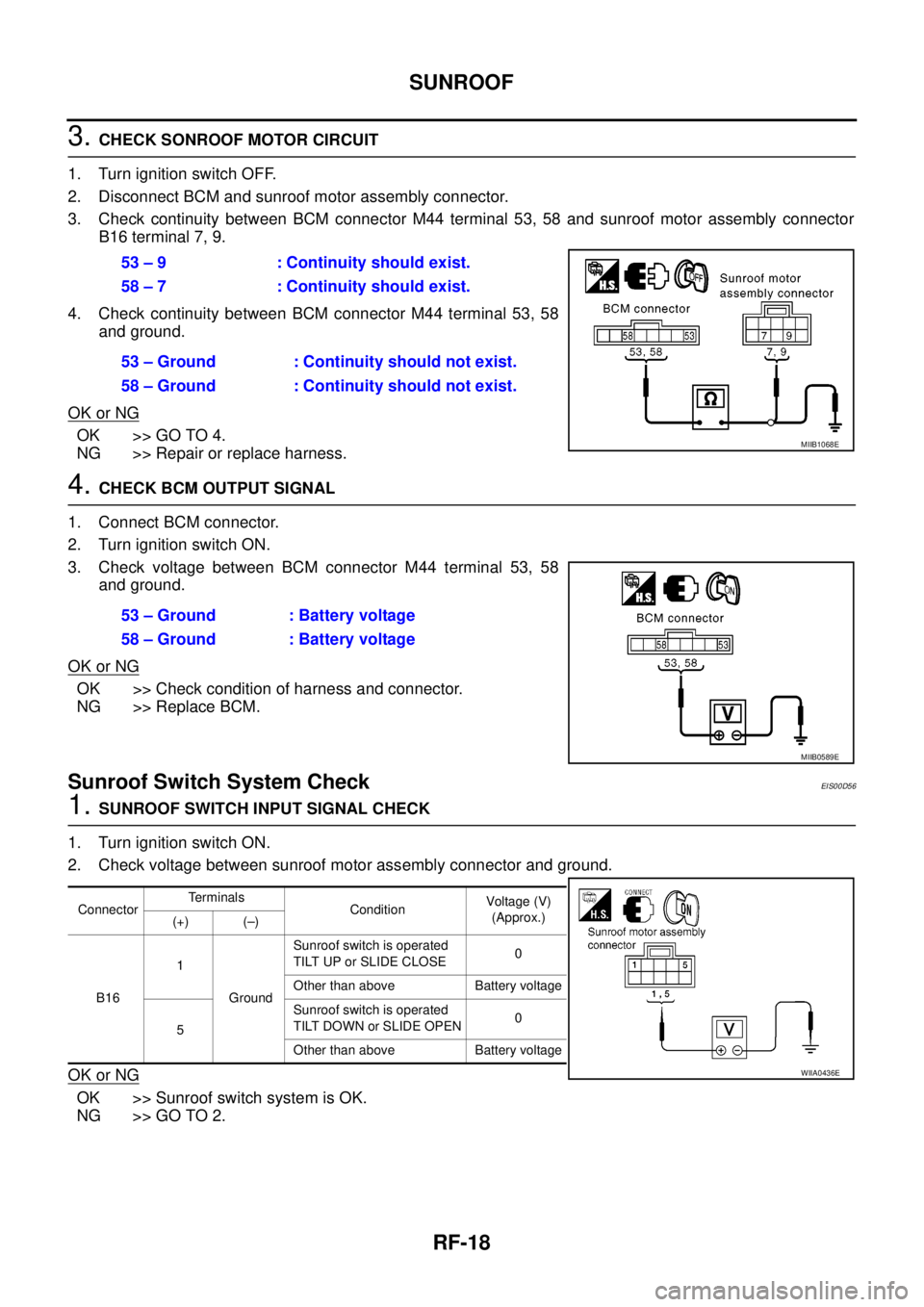
3.CHECK SONROOF MOTOR CIRCUIT
1. Turn ignition switch OFF.
2. Disconnect BCM and sunroof motor assembly connector.
3. Check continuity between BCM connector M44 terminal 53, 58 and sunroof motor assembly connector
B16 terminal 7, 9.
4. Check continuity between BCM connector M44 terminal 53, 58
and ground.
OK or NG
OK >> GO TO 4.
NG >> Repair or replace harness.
4.CHECK BCM OUTPUT SIGNAL
1. Connect BCM connector.
2. Turn ignition switch ON.
3. Check voltage between BCM connector M44 terminal 53, 58
and ground.
OK or NG
OK >> Check condition of harness and connector.
NG >> Replace BCM.
Sunroof Switch System CheckEIS00D56
1.SUNROOF SWITCH INPUT SIGNAL CHECK
1. Turn ignition switch ON.
2. Check voltage between sunroof motor assembly connector and ground.
OK or NG
OK >> Sunroof switch system is OK.
NG >> GO TO 2.53 – 9 : Continuity should exist.
58 – 7 : Continuity should exist.
53 – Ground : Continuity should not exist.
58 – Ground : Continuity should not exist.
MIIB1068E
53 – Ground : Battery voltage
58 – Ground : Battery voltage
MIIB0589E
ConnectorTerminals
ConditionVoltag e (V)
(Approx.)
(+) (–)
B161
GroundSunroof switch is operated
TILT UP or SLIDE CLOSE0
Other than above Battery voltage
5Sunroof switch is operated
TILT DOWN or SLIDE OPEN0
Other than above Battery voltage
WIIA0436E