window NISSAN NAVARA 2005 Repair Owner's Manual
[x] Cancel search | Manufacturer: NISSAN, Model Year: 2005, Model line: NAVARA, Model: NISSAN NAVARA 2005Pages: 3171, PDF Size: 49.59 MB
Page 1368 of 3171
EI-30
DOOR FINISHER
DOOR FINISHER
PFP:80900
Removal and InstallationEIS00DYM
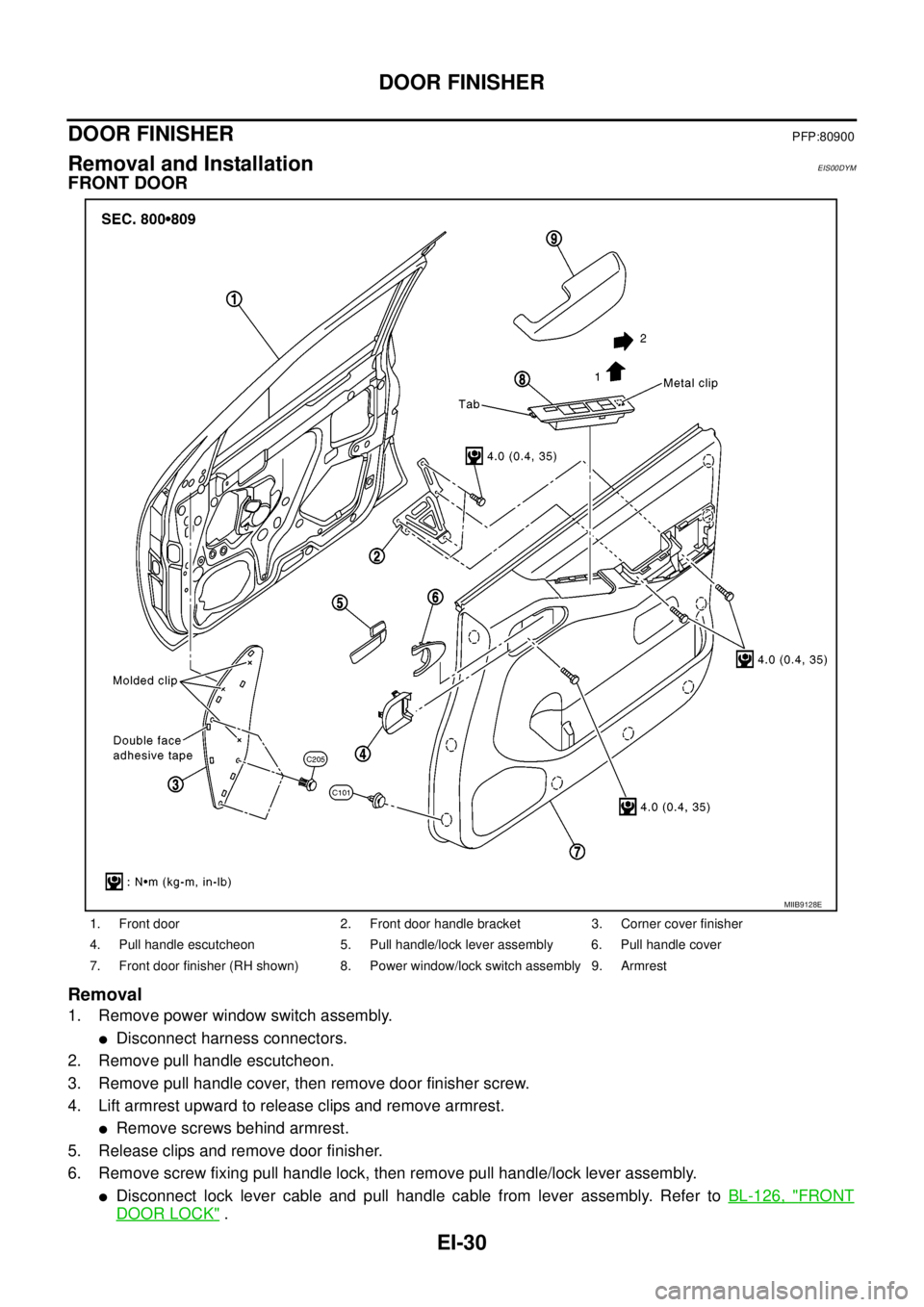
FRONT DOOR
Removal
1. Remove power window switch assembly.
lDisconnect harness connectors.
2. Remove pull handle escutcheon.
3. Remove pull handle cover, then remove door finisher screw.
4. Lift armrest upward to release clips and remove armrest.
lRemove screws behind armrest.
5. Release clips and remove door finisher.
6. Remove screw fixing pull handle lock, then remove pull handle/lock lever assembly.
lDisconnect lock lever cable and pull handle cable from lever assembly. Refer toBL-126, "FRONT
DOOR LOCK".
1. Front door 2. Front door handle bracket 3. Corner cover finisher
4. Pull handle escutcheon 5. Pull handle/lock lever assembly 6. Pull handle cover
7. Front door finisher (RH shown) 8. Power window/lock switch assembly 9. Armrest
MIIB9128E
Page 1369 of 3171
DOOR FINISHER
EI-31
C
D
E
F
G
H
J
K
L
MA
B
EI
Installation
Installation is in the reverse order of removal.
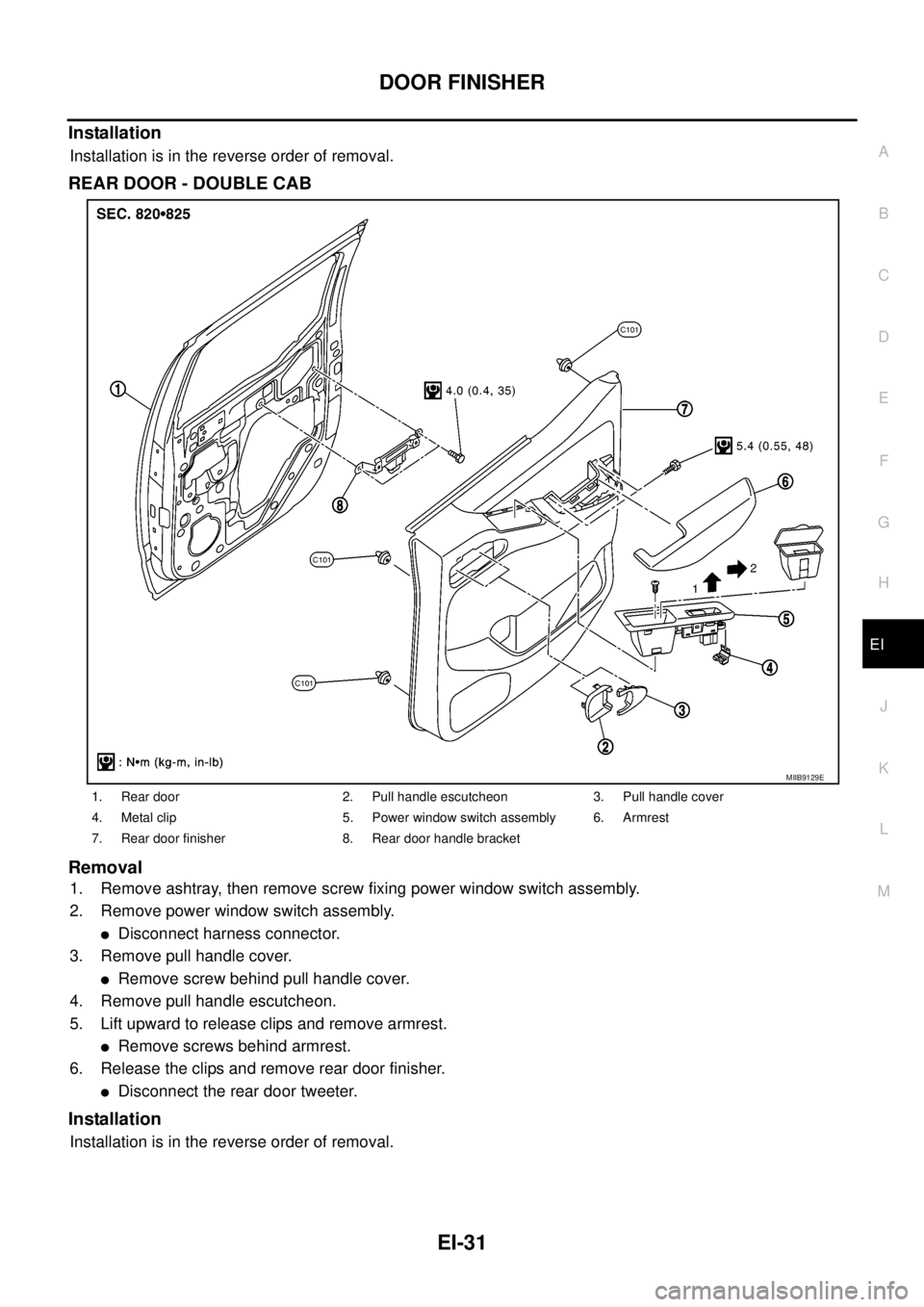
REAR DOOR - DOUBLE CAB
Removal
1. Remove ashtray, then remove screw fixing power window switch assembly.
2. Remove power window switch assembly.
lDisconnect harness connector.
3. Remove pull handle cover.
lRemove screw behind pull handle cover.
4. Remove pull handle escutcheon.
5. Lift upward to release clips and remove armrest.
lRemove screws behind armrest.
6. Release the clips and remove rear door finisher.
lDisconnect the rear door tweeter.
Installation
Installation is in the reverse order of removal.
1. Rear door 2. Pull handle escutcheon 3. Pull handle cover
4. Metal clip 5. Power window switch assembly 6. Armrest
7. Rear door finisher 8. Rear door handle bracket
MIIB9129E
Page 1648 of 3171
GI-26
SERVICE INFORMATION FOR ELECTRICAL INCIDENT
UNDER SEATING AREAS
An unclamped or loose harness can cause wiring to be pinched by seat components (such as slide guides)
during vehicle vibration. If the wiring runs under seating areas, inspect wire routing for possible damage or
pinching.
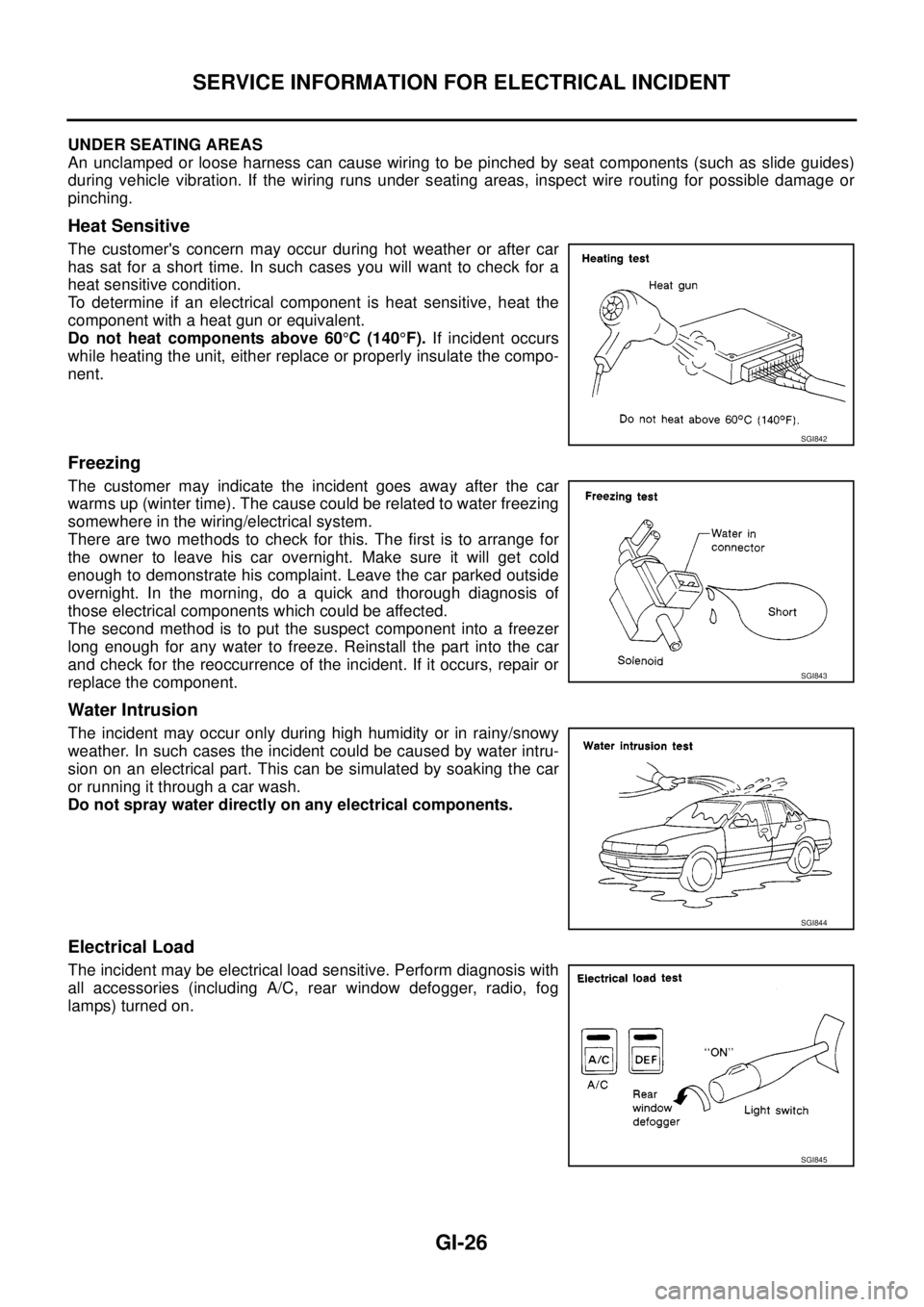
Heat Sensitive
The customer's concern may occur during hot weather or after car
has sat for a short time. In such cases you will want to check for a
heat sensitive condition.
To determine if an electrical component is heat sensitive, heat the
component with a heat gun or equivalent.
Do not heat components above 60°C(140°F).If incident occurs
while heating the unit, either replace or properly insulate the compo-
nent.
Freezing
The customer may indicate the incident goes away after the car
warms up (winter time). The cause could be related to water freezing
somewhere in the wiring/electrical system.
There are two methods to check for this. The first is to arrange for
the owner to leave his car overnight. Make sure it will get cold
enough to demonstrate his complaint. Leave the car parked outside
overnight. In the morning, do a quick and thorough diagnosis of
those electrical components which could be affected.
The second method is to put the suspect component into a freezer
long enough for any water to freeze. Reinstall the part into the car
and check for the reoccurrence of the incident. If it occurs, repair or
replace the component.
Water Intrusion
The incident may occur only during high humidity or in rainy/snowy
weather. In such cases the incident could be caused by water intru-
sion on an electrical part. This can be simulated by soaking the car
or running it through a car wash.
Do not spray water directly on any electrical components.
Electrical Load
The incident may be electrical load sensitive. Perform diagnosis with
all accessories (including A/C, rear window defogger, radio, fog
lamps) turned on.
SGI842
SGI843
SGI844
SGI845
Page 1687 of 3171

GW-1
GLASSES, WINDOW SYSTEM & MIRRORS
IBODY
CONTENTS
C
D
E
F
G
H
J
K
L
M
SECTIONGW
A
B
GW
GLASSES, WINDOW SYSTEM & MIRRORS
PRECAUTIONS .......................................................... 3
Precautions for Supplemental Restraint System
(SRS)“AIRBAG”and“SEATBELTPRE-TEN-
SIONER” .................................................................. 3
Precautions for Procedures without Cowl Top Cover..... 3
Handling for Adhesive and Primer ........................... 3
Trouble Diagnosis Precaution .................................. 3
PREPARATION ........................................................... 4
Commercial Service Tool ......................................... 4
SQUEAK AND RATTLE TROUBLE DIAGNOSES..... 5
Work Flow ................................................................ 5
CUSTOMER INTERVIEW ..................................... 5
DUPLICATE THE NOISE AND TEST DRIVE ....... 6
CHECK RELATED SERVICE BULLETINS ........... 6
LOCATE THE NOISE AND IDENTIFY THE
ROOT CAUSE ...................................................... 6
REPAIR THE CAUSE ........................................... 6
CONFIRM THE REPAIR ....................................... 7
Generic Squeak and Rattle Troubleshooting ........... 7
INSTRUMENT PANEL .......................................... 7
CENTER CONSOLE ............................................. 7
DOORS ................................................................. 7
TRUNK .................................................................. 8
SUNROOF/HEADLINING ..................................... 8
SEATS ................................................................... 8
UNDERHOOD ....................................................... 8
Diagnostic Worksheet .............................................. 9
WINDSHIELD GLASS ...............................................11
Removal and Installation ......................................... 11
REMOVAL ............................................................ 11
INSTALLATION .................................................... 11
POWER WINDOW SYSTEM .................................... 15
Component Parts and Harness Connector Location... 15
System Description ................................................ 15
MANUAL OPERATION ....................................... 16
AUTO OPERATION ............................................ 18
POWER WINDOW LOCK ................................... 18
DRIVER WINDOW ANTI-PINCH FUNCTION ..... 18
Schematic .............................................................. 19Wiring Diagram – WINDOW – ................................ 20
Terminal and Reference Value for Power Window
Main Switch ............................................................ 24
Terminal and Reference Value for Each Door's
Power Window Switch ............................................ 24
Terminal and Reference Value for BCM ................. 25
Work Flow ............................................................... 25
Trouble Diagnosis Symptom Chart ......................... 25
BCM Power Supply and Ground Circuit Check ...... 26
Power Window Main Switch Power Supply and
Ground Circuit Check ............................................. 27
Driver Side Power Window Motor Check ............... 28
Passenger Side Power Window Motor Circuit
Check ..................................................................... 29
Rear LH Power Window Motor Circuit Check ......... 30
Rear RH Power Window Motor Circuit Check ........ 31
Passenger Side Power Window Circuit Check ....... 31
Rear LH Power Window Circuit Check ................... 32
Rear RH Power Window Circuit Check .................. 33
Power Window Switch Check 1 .............................. 33
Power Window Switch Check 2 .............................. 34
FRONT DOOR GLASS AND REGULATOR ............. 35
Removal and Installation ........................................ 35
DOOR GLASS ..................................................... 35
REGULATOR ASSEMBLY .................................. 36
Disassembly and Assembly .................................... 37
REGULATOR ASSEMBLY .................................. 37
Inspection after Installation ..................................... 37
FITTING INSPECTION ....................................... 37
RESET OPERATION ........................................... 37
REAR DOOR GLASS AND REGULATOR ............... 38
Removal and Installation ........................................ 38
DOOR GLASS ..................................................... 38
REGULATOR ASSEMBLY .................................. 39
Disassembly and Assembly .................................... 40
REGULATOR ASSEMBLY .................................. 40
Inspection after Installation ..................................... 40
FITTING INSPECTION ....................................... 40
Page 1688 of 3171

GW-2
SIDE WINDOW GLASS ............................................ 41
Removal and Installation ........................................ 41
REMOVAL ........................................................... 41
INSTALLATION .................................................... 42
REAR WINDOW GLASS AND MOLDING ................ 43
Removal and Installation ........................................ 43
REMOVAL ........................................................... 43
INSTALLATION .................................................... 44
INSIDE MIRROR ....................................................... 45
Wiring Diagram –I/MIRR– ...................................... 45
Removal and Installation ........................................ 46
REMOVAL ........................................................... 46
INSTALLAION ..................................................... 46
REAR WINDOW DEFOGGER .................................. 47
Component Parts and Harness Connector Location... 47
System Description ................................................. 47
CAN Communication System Description .............. 48
Schematic ............................................................... 49
Wiring Diagram –DEF– ........................................... 50
Terminal and Reference Value for BCM ................. 53
Terminal and Reference Value for IPDM E/R ......... 53
Work Flow ............................................................... 53
CONSULT-II Function (BCM) .................................. 54
CONSULT-II BASIC OPERATION PROCEDURE... 54
DATA MONITOR .................................................. 55
ACTIVE TEST ...................................................... 55
Trouble Diagnoses Symptom Chart ........................ 56
BCM Power Supply and Ground Circuit Check ...... 56
Rear Window Defogger Switch Circuit Check ......... 57
Rear Window Defogger Power Supply Circuit
Check ...................................................................... 59
Rear Window Defogger Circuit Check .................... 59
Rear Window Defogger Signal Check .................... 60
Filament Check ....................................................... 61
Filament Repair ....................................................... 61
REPAIR EQUIPMENT ......................................... 61
REPAIRING PROCEDURE ................................. 62
DOOR MIRROR ......................................................... 63
Wiring Diagram – MIRROR – / LHD Models .......... 63
Wiring Diagram – MIRROR – / RHD Models ......... 64
Door Mirror Assembly ............................................. 65
REMOVAL ............................................................ 65
INSTALLATION .................................................... 65
Disassembly and Assembly .................................... 65
DISASSEMBLY .................................................... 65
ASSEMBLY .......................................................... 66
Page 1698 of 3171

GW-12
WINDSHIELD GLASS
lWhile the urethane adhesive is curing, open a door window. This will prevent the glass from being forced
out by passenger compartment air pressure when a door is closed.
lThe molding must be installed securely so that it is in position and leaves no gap.
lInform the customer that the vehicle should remain stationary until the urethane adhesive has completely
cured (preferably 24 hours). Curing time varies with temperature and humidity.
lInstall parts removed.
WARNING:
lKeep heat and open flames away as primers and adhesive are flammable.
lThe materials contained in the kit are harmful if swallowed, and may irritate skin and eyes. Avoid
contact with the skin and eyes.
lUse in an open, well ventilated location. Avoid breathing the vapors. They can be harmful if
inhaled. If affected by vapor inhalation, immediately move to an area with fresh air.
lDriving the vehicle before the urethane adhesive has completely cured may affect the perfor-
mance of the windshield in case of an accident.
CAUTION:
lDo not use an adhesive which is past its usable term. Shelf life of this product is limited to six
months after the date of manufacture. Carefully adhere to the expiration or manufacture date
printed on the box.
lKeep primers and adhesive in a cool, dry place. Ideally, they should be stored in a refrigerator.
lDo not leave primers or adhesive cartridge unattended with their caps open or off.
lThe vehicle should not be driven for at least 24 hours or until the urethane adhesive has com-
pletely cured. Curing time varies depending on temperature and humidities. The curing time will
increase under lower temperatures and lower humidities.
Page 1701 of 3171
POWER WINDOW SYSTEM
GW-15
C
D
E
F
G
H
J
K
L
MA
B
GW
POWER WINDOW SYSTEMPFP:25401
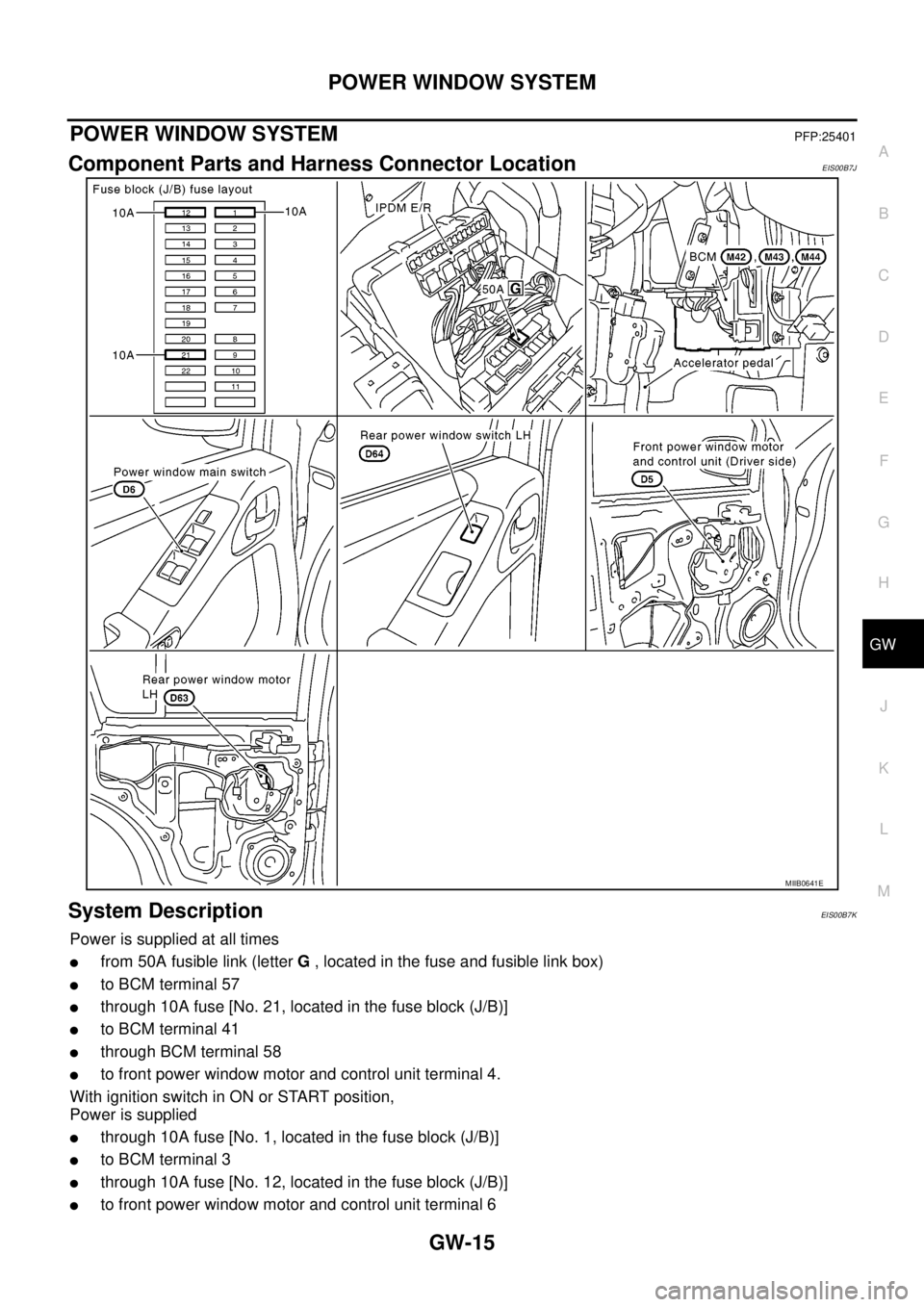
Component Parts and Harness Connector LocationEIS00B7J
System DescriptionEIS00B7K
Power is supplied at all times
lfrom 50A fusible link (letterG, located in the fuse and fusible link box)
lto BCM terminal 57
lthrough 10A fuse [No. 21, located in the fuse block (J/B)]
lto BCM terminal 41
lthrough BCM terminal 58
lto front power window motor and control unit terminal 4.
With ignition switch in ON or START position,
Power is supplied
lthrough 10A fuse [No. 1, located in the fuse block (J/B)]
lto BCM terminal 3
lthrough 10A fuse [No. 12, located in the fuse block (J/B)]
lto front power window motor and control unit terminal 6
MIIB0641E
Page 1702 of 3171

GW-16
POWER WINDOW SYSTEM
lthrough BCM terminal 53
lto power window main switch terminal 2
lto ftont power window switch (passenger side) terminal 1
lto rear power window switches LH and RH terminal 1 (with rear power window).
Ground is supplied
lto BCM terminal 55
lto front power window motor and control unit terminal 3
lto power window main switch terminal 3
lthrough body grounds M21, M80 and M83.
MANUAL OPERATION
Front Driver Side Door
WINDOW UP
When the driver side switch in the power window main switch is pressed in the up position,
Ground is supplied
lto front power window motor and control unit terminal 2
lthrough power window main switch terminal 4
lthrough power window main switch terminal 3
Then, the motor raises the window until the switch is released.
WINDOW DOWN
When the driver side switch in the power window main switch is pressed in the down position
Ground is supplied
lto front power window motor and control unit terminal 1
lthrough power window main switch terminal 5
lthrough power window main switch terminal 3
Then, the motor lowers the window until the switch is released.
Front Passenger Side Door
FRONT POWER WINDOW SWITCH (PASSENGER SIDE) OPERATION
WINDOW UP
When the front power window switch (passenger side) is operated in the up position
Power is supplied
lthrough front power window switch (passenger side) terminal 1 and 5
lto front power window motor (passenger side) terminal 2.
Ground is supplied
lto front power window motor (passenger side) terminal 1
lthrough front power window switch (passenger side) terminal 4 and 3
lthrough power window main switch terminal 7
Then, the motor raises the window until the switch is released.
WINDOW DOWN
When the front power window switch (passenger side) is opeataed in the down position
Power is supplied
lthrough front power window switch (passenger side) terminal 1 and 4
lto front power window motor (passenger side) terminal 1.
Ground is supplied
lto front power window motor (passenger side) terminal 2
lthrough front power window switch (passenger side) terminal 5 and 2
lthrough power window main switch terminal 6
Then, the motor lowers the window until the switch is released.
POWER WINDOW MAIN SWITCH OPERATION
WINDOW UP
When the passenger side switch in power window main switch is operated in the up position
Power is supplied
Page 1703 of 3171

POWER WINDOW SYSTEM
GW-17
C
D
E
F
G
H
J
K
L
MA
B
GW
lthrough power window main switch terminal 6
lto front power window switch (passenger side) terminal 2 and 5
lto front power window motor (passenger side) terminal 2.
Ground is supplied
lto front power window motor (passenger side) terminal 1
lthrough front power window switch (passenger side) terminal 4 and 3
lthrough power window main switch terminal 7
Then, the motor raises the window until the switch is released.
WINDOW DOWN
When the passenger side switch in power window main switch is operated in the down position
Power is supplied
lthrough power window main switch terminal 7
lto front power window switch (passenger side) terminal 3 and 4
lto front power window motor (passenger side) terminal 1.
Ground is supplied
lto front power window motor (passenger side) terminal 2
lthrough front power window switch (passenger side) terminal 5 and 2
lthrough power window main switch terminal 6
Then, the motor lowers the window until the switch is released.
Rear Door (LH or RH)
REAR POWER WINDOW SWITCH LH OR RH OPERATION
WINDOW UP
When the rear power window switch LH or RH is operated in the up position
Power is supplied
lthrough rear power window switch LH or RH terminal 1 and 5
lto rear power window motor LH or RH terminal 1.
Ground is supplied
lto rear power window motor LH or RH terminal 2
lthrough rear power window switch LH or RH terminal 4 and 3
lthrough power window main switch 11 (LH) or 9 (RH)
Then, the motor raises the window until the switch is released.
WINDOW DOWN
When the rear power window switch LH or RH is pressed in the down position
Power is supplied
lthrough rear power window switch LH or RH terminal 1 and 4
lto rear power window motor LH or RH terminal 2.
Ground is supplied
lto rear power window motor LH or RH terminal 1
lthrough rear power window switch LH or RH terminal 5 and 2
lthrough power window main switch 1 (LH) or 7 (RH)
Then, the motor lowers the window until the switch is released.
POWERWINDOWMAINSWITCHOPERATION
WINDOW UP
When the rear LH or RH switch in the power window main switch is operated in the up position
Power is supplied
lthrough power window main switch terminal 10 (LH) or 8 (RH)
lto rear power window switch LH or RH terminal 5 and 2
lto rear power window motor LH or RH terminal 1.
Ground is supplied
lto rear power window motor LH or RH terminal 2
lthrough rear power window switch LH or RH terminal 4 and 3
Page 1704 of 3171

GW-18
POWER WINDOW SYSTEM
lthrough power window main switch terminal 11 (LH) or 9 (RH).
Then, the motor raises the window until the switch is released.
WINDOW DOWN
When the rear LH or RH switch in the power window main switch is operated in the down position
Power is supplied
lthrough power window main switch terminal 11 (LH) or 9 (RH)
lto rear power window switch LH or RH terminal 4 and 3
lto rear power window motor LH or RH terminal 2.
Ground is supplied
lto rear power window motor LH or RH terminal 1
lthrough rear power window switch LH or RH terminal 5 and 2
lthrough power window main switch terminal 10 (LH) or 8 (RH).
Then, the motor raises the window until the switch is released.
AUTO OPERATION
The power window AUTO feature enables the driver to open the window without holding the window switch in
thedownposition.
POWER WINDOW LOCK
The power window lock is designed to lock operation of all windows except for front door window LH and RH.
When in the lock position, the power window lock disables power window and door lock/unlock switch RH and
rear power window switch LH and RH by disconnecting switch ground signal. This prevents the power window
motors from operating.
DRIVER WINDOW ANTI-PINCH FUNCTION
During raising operation of driver side window, if door control module detects that foreign object is pinched,
power window lowers approximately 150 mm (5.91 in).
NOTE:
Depending on environment and driving conditions, if a similar impact or load is applied to power window, it
may lower.
Operation Conditions
lDriver side window is between fully-open and just before fully-closed position (when the limit switch is
ON).
lDuring automatic operation when ignition switch is turned ON.
lDuring automatic or manual operation when ignition switch is other than ON position (when the timer
operates).