light NISSAN NAVARA 2005 Repair Service Manual
[x] Cancel search | Manufacturer: NISSAN, Model Year: 2005, Model line: NAVARA, Model: NISSAN NAVARA 2005Pages: 3171, PDF Size: 49.59 MB
Page 911 of 3171
DI-1
DRIVER INFORMATION SYSTEM
K ELECTRICAL
CONTENTS
C
D
E
F
G
H
I
J
L
M
SECTIONDI
A
B
DI
DRIVER INFORMATION SYSTEM
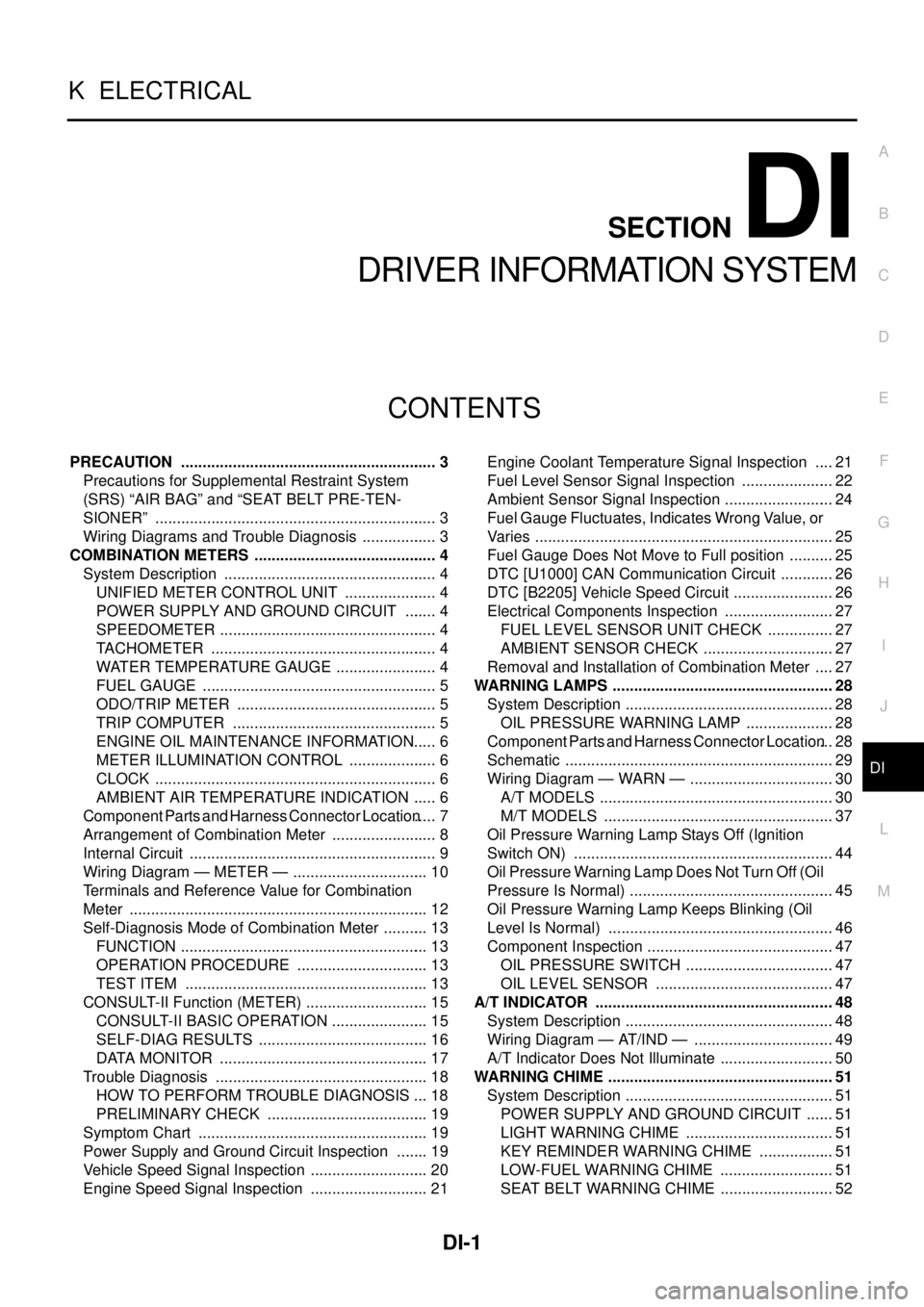
PRECAUTION ............................................................ 3
Precautions for Supplemental Restraint System
(SRS)“AIRBAG”and“SEATBELTPRE-TEN-
SIONER” .................................................................. 3
Wiring Diagrams and Trouble Diagnosis .................. 3
COMBINATION METERS ........................................... 4
System Description .................................................. 4
UNIFIED METER CONTROL UNIT ...................... 4
POWER SUPPLY AND GROUND CIRCUIT ........ 4
SPEEDOMETER ................................................... 4
TACHOMETER ..................................................... 4
WATER TEMPERATURE GAUGE ........................ 4
FUEL GAUGE ....................................................... 5
ODO/TRIP METER ............................................... 5
TRIP COMPUTER ................................................ 5
ENGINE OIL MAINTENANCE INFORMATION..... 6
METER ILLUMINATION CONTROL ..................... 6
CLOCK .................................................................. 6
AMBIENT AIR TEMPERATURE INDICATION ...... 6
Component Parts and Harness Connector Location..... 7
Arrangement of Combination Meter ......................... 8
Internal Circuit .......................................................... 9
Wiring Diagram — METER — ................................ 10
Terminals and Reference Value for Combination
Meter ...................................................................... 12
Self-Diagnosis Mode of Combination Meter ........... 13
FUNCTION .......................................................... 13
OPERATION PROCEDURE ............................... 13
TEST ITEM ......................................................... 13
CONSULT-II Function (METER) ............................. 15
CONSULT-II BASIC OPERATION ....................... 15
SELF-DIAG RESULTS ........................................ 16
DATA MONITOR ................................................. 17
Trouble Diagnosis .................................................. 18
HOW TO PERFORM TROUBLE DIAGNOSIS ... 18
PRELIMINARY CHECK ...................................... 19
Symptom Chart ...................................................... 19
Power Supply and Ground Circuit Inspection ........ 19
Vehicle Speed Signal Inspection ............................ 20
Engine Speed Signal Inspection ............................ 21Engine Coolant Temperature Signal Inspection ..... 21
Fuel Level Sensor Signal Inspection ...................... 22
Ambient Sensor Signal Inspection .......................... 24
Fuel Gauge Fluctuates, Indicates Wrong Value, or
Varies ...................................................................... 25
Fuel Gauge Does Not Move to Full position ........... 25
DTC [U1000] CAN Communication Circuit ............. 26
DTC [B2205] Vehicle Speed Circuit ........................ 26
Electrical Components Inspection .......................... 27
FUEL LEVEL SENSOR UNIT CHECK ................ 27
AMBIENT SENSOR CHECK ............................... 27
Removal and Installation of Combination Meter ..... 27
WARNING LAMPS .................................................... 28
System Description ................................................. 28
OIL PRESSURE WARNING LAMP ..................... 28
Component Parts and Harness Connector Location... 28
Schematic ............................................................... 29
Wiring Diagram — WARN — .................................. 30
A/T MODELS ....................................................... 30
M/T MODELS ...................................................... 37
Oil Pressure Warning Lamp Stays Off (Ignition
Switch ON) ............................................................. 44
Oil Pressure Warning Lamp Does Not Turn Off (Oil
Pressure Is Normal) ................................................ 45
Oil Pressure Warning Lamp Keeps Blinking (Oil
Level Is Normal) ..................................................... 46
Component Inspection ............................................ 47
OIL PRESSURE SWITCH ................................... 47
OIL LEVEL SENSOR .......................................... 47
A/T INDICATOR ........................................................ 48
System Description ................................................. 48
Wiring Diagram — AT/IND — ................................. 49
A/T Indicator Does Not Illuminate ........................... 50
WARNING CHIME ..................................................... 51
System Description ................................................. 51
POWER SUPPLY AND GROUND CIRCUIT ....... 51
LIGHT WARNING CHIME ................................... 51
KEY REMINDER WARNING CHIME .................. 51
LOW-FUEL WARNING CHIME ........................... 51
SEAT BELT WARNING CHIME ........................... 52
Page 912 of 3171

DI-2
Component Parts and Harness Connector Location... 52
Wiring Diagram — CHIME — ................................. 53
LHD MODELS ..................................................... 53
RHD MODELS ..................................................... 55
Terminals and Reference Value for BCM ................ 57
Terminals and Reference Value for Combination
Meter ...................................................................... 57
CONSULT-II Function (BCM) .................................. 58
DIAGNOSTIC ITEMS DESCRIPTION ................. 58
CONSULT-II BASIC OPERATION PROCEDURE
... 58
DATA MONITOR .................................................. 59
ACTIVE TEST ..................................................... 59
SELF-DIAG RESULTS ........................................ 60
Trouble Diagnosis ................................................... 60
HOW TO PERFORM TROUBLE DIAGNOSIS .... 60
PRELIMINARY INSPECTION ............................. 60
SYMPTOM CHART ............................................. 61
Meter Buzzer Circuit Inspection .............................. 61Lighting Switch Signal Inspection ........................... 62
Front Door Switch (Driver Side) Signal Inspection... 62
Seat Belt Buckle Switch Signal Inspection (Driver
Side) ........................................................................ 63
Electrical Component Inspection ............................ 64
FRONT DOOR SWITCH (DRIVER SIDE) ........... 64
SEAT BELT BUCKLE SWITCH (DRIVER SIDE)... 64
CAN COMMUNICATION ........................................... 65
System Description ................................................. 65
CAN Communication Unit ....................................... 65
COMPASS ................................................................. 66
System Description ................................................. 66
DIRECTION DISPLAY ......................................... 66
Zone Variation Change Procedure .......................... 66
Correction Functions of the Compass Display ........ 67
AUTOMATIC CORRECTION ............................... 67
MANUAL CORRECTION PROCEDURE ............. 67
Wiring Diagram — COMPAS — .............................. 68
Removal and Installation of Compass ..................... 69
Page 916 of 3171
DI-6
COMBINATION METERS
ENGINE OIL MAINTENANCE INFORMATION
lEngine oil maintenance information displays maintenance intervals of engine oil.
lWith ignition switch ON position, engine oil maintenance information is displayed on odo/trip meter display
for 5 seconds.
NOTE:
Refer to Owner's Manual for setting.
METER ILLUMINATION CONTROL
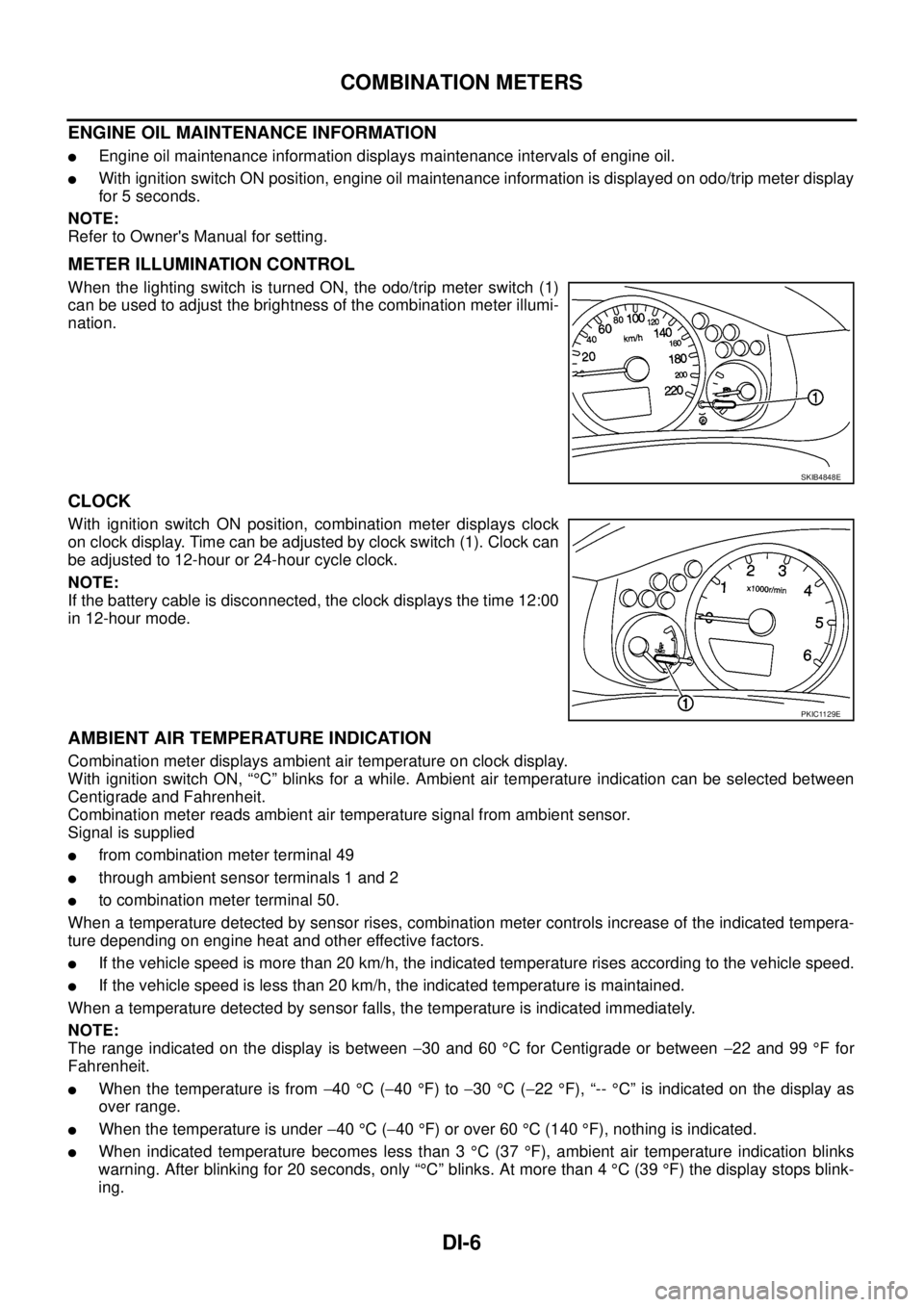
When the lighting switch is turned ON, the odo/trip meter switch (1)
can be used to adjust the brightness of the combination meter illumi-
nation.
CLOCK
With ignition switch ON position, combination meter displays clock
on clock display. Time can be adjusted by clock switch (1). Clock can
be adjusted to 12-hour or 24-hour cycle clock.
NOTE:
If the battery cable is disconnected, the clock displays the time 12:00
in 12-hour mode.
AMBIENT AIR TEMPERATURE INDICATION
Combination meter displays ambient air temperature on clock display.
With ignition switch ON, “°C” blinks for a while. Ambient air temperature indication can be selected between
Centigrade and Fahrenheit.
Combination meter reads ambient air temperature signal from ambient sensor.
Signal is supplied
lfrom combination meter terminal 49
lthrough ambient sensor terminals 1 and 2
lto combination meter terminal 50.
When a temperature detected by sensor rises, combination meter controls increase of the indicated tempera-
ture depending on engine heat and other effective factors.
lIf the vehicle speed is more than 20 km/h, the indicated temperature rises according to the vehicle speed.
lIf the vehicle speed is less than 20 km/h, the indicated temperature is maintained.
When a temperature detected by sensor falls, the temperature is indicated immediately.
NOTE:
The range indicated on the display is between-30 and 60°C for Centigrade or between-22 and 99°Ffor
Fahrenheit.
lWhen the temperature is from-40°C(-40°F) to-30°C(-22°F), “--°C” is indicated on the display as
over range.
lWhen the temperature is under-40°C(-40°F) or over 60°C(140°F), nothing is indicated.
lWhen indicated temperature becomes less than 3°C(37°F), ambient air temperature indication blinks
warning. After blinking for 20 seconds, only “°C” blinks. At more than 4°C(39°F) the display stops blink-
ing.
SKIB4848E
PKIC1129E
Page 961 of 3171
WARNING CHIME
DI-51
C
D
E
F
G
H
I
J
L
MA
B
DI
WARNING CHIMEPFP:24814
System DescriptionEKS00L9D
lBuzzer for warning chime system is installed in the combination meter.
lThe buzzer sounds at the following conditions:
–When combination meter receives buzzer output signal with CAN communication line
–When combination meter judges warning chime sound condition is found
POWER SUPPLY AND GROUND CIRCUIT
Power is supplied at all times
lthrough 50A fusible link (letterG, located in the fuse and fusible link box)
lto BCM terminal 57.
With ignition switch in the ON or START position, power is supplied
lthrough 10A fuse [No. 1, located in the fuse block (J/B)]
lto BCM terminal 3.
Ground is supplied
lto BCM terminal 55
lthrough grounds M21, M80 and M83.
LIGHT WARNING CHIME
With ignition switch in OFF or ACC position, driver's door open, and lighting switch in 1ST or 2ND position, the
light warning chime will sound.
lBCM detects ignition switch in OFF or ACC position, front door switch (driver side) ON, and lighting switch
in 1ST or 2ND position. And then transmits buzzer output signal (light warning chime) to combination
meter with CAN communication line.
lWhen combination meter receives buzzer output signal (light warning chime), it sounds the buzzer.
NOTE:
For further details of combination switch, refer toBCS-3, "
COMBINATION SWITCH READING FUNCTION".
KEY REMINDER WARNING CHIME
Key reminder chime sounds, at the same time, when key reminder system starts operating.
key reminder chime also sounds when the following three conditions are simultaneously met.
lKey is inserted in the ignition key cylinder
lDriver¢s door is opened
lThe setting of driver¢s door lock knob is “LOCK”
For information regarding key reminder system, refer toBL-21, "
POWER DOOR LOCK SYSTEM".
LOW-FUEL WARNING CHIME
Low-fuel warning chime sounds, when low-fuel warning lamp is turned ON.
Combination meter sounds warning chime three times when low-fuel warning lamp turns ON.
Page 967 of 3171
WARNING CHIME
DI-57
C
D
E
F
G
H
I
J
L
MA
B
DI
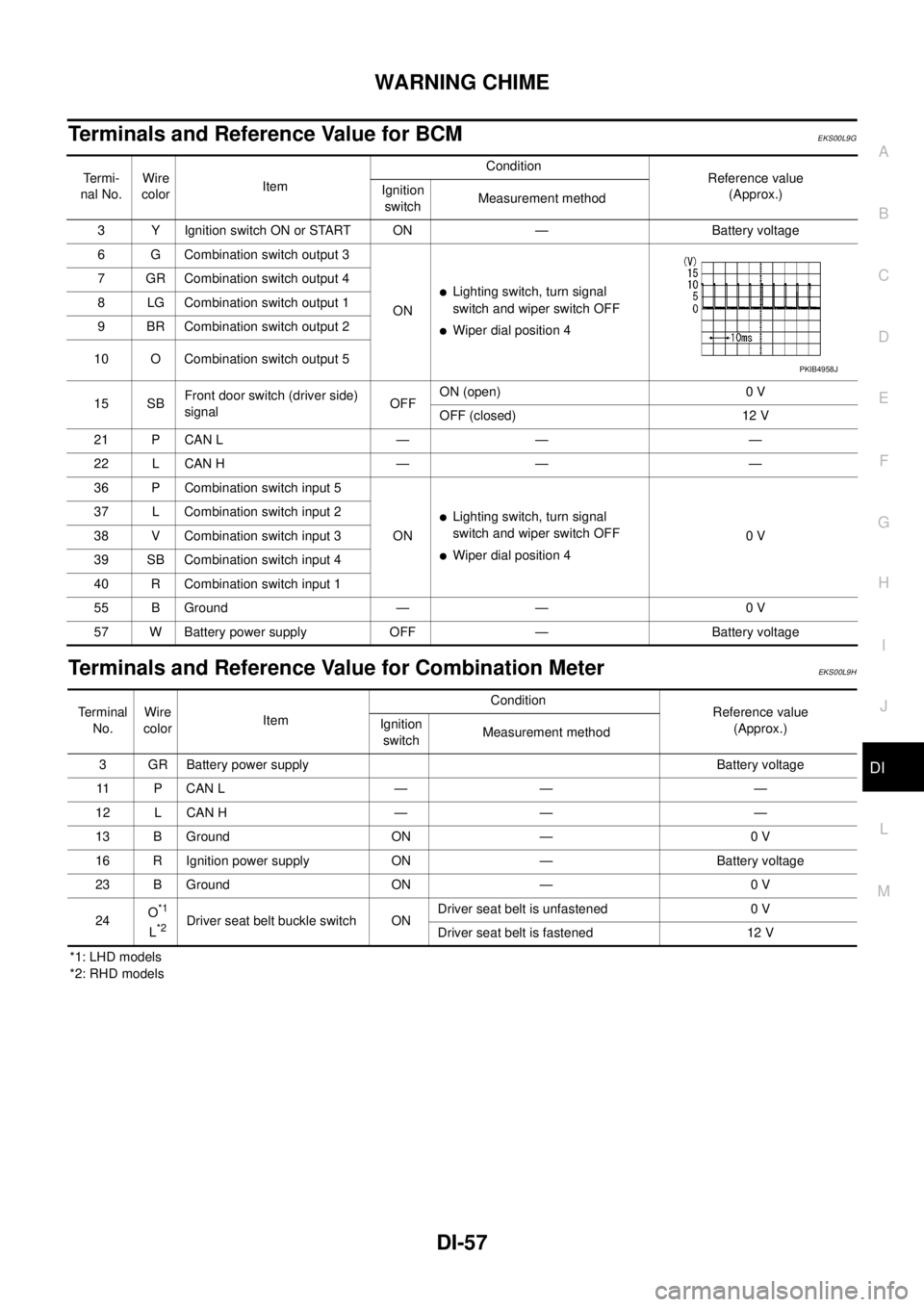
Terminals and Reference Value for BCMEKS00L9G
Terminals and Reference Value for Combination MeterEKS00L9H
*1: LHD models
*2: RHD modelsTe r m i -
nal No.Wire
colorItemCondition
Reference value
(Approx.) Ignition
switchMeasurement method
3 Y Ignition switch ON or START ON — Battery voltage
6 G Combination switch output 3
ON
lLighting switch, turn signal
switch and wiper switch OFF
lWiper dial position 4 7 GR Combination switch output 4
8 LG Combination switch output 1
9 BR Combination switch output 2
10 O Combination switch output 5
15 SBFront door switch (driver side)
signalOFFON (open) 0 V
OFF (closed) 12 V
21 P CAN L — — —
22 L CAN H — — —
36 P Combination switch input 5
ON
lLighting switch, turn signal
switch and wiper switch OFF
lWiper dial position 40V 37 L Combination switch input 2
38 V Combination switch input 3
39 SB Combination switch input 4
40 R Combination switch input 1
55 B Ground — — 0 V
57 W Battery power supply OFF — Battery voltage
PKIB4958J
Terminal
No.Wire
colorItemCondition
Reference value
(Approx.) Ignition
switchMeasurement method
3 GR Battery power supply Battery voltage
11 P C A N L — — —
12 L CAN H — — —
13 B Ground ON — 0 V
16 R Ignition power supply ON — Battery voltage
23 B Ground ON — 0 V
24O
*1
L*2Driver seat belt buckle switch ONDriver seat belt is unfastened 0 V
Driver seat belt is fastened 12 V
Page 969 of 3171
WARNING CHIME
DI-59
C
D
E
F
G
H
I
J
L
MA
B
DI
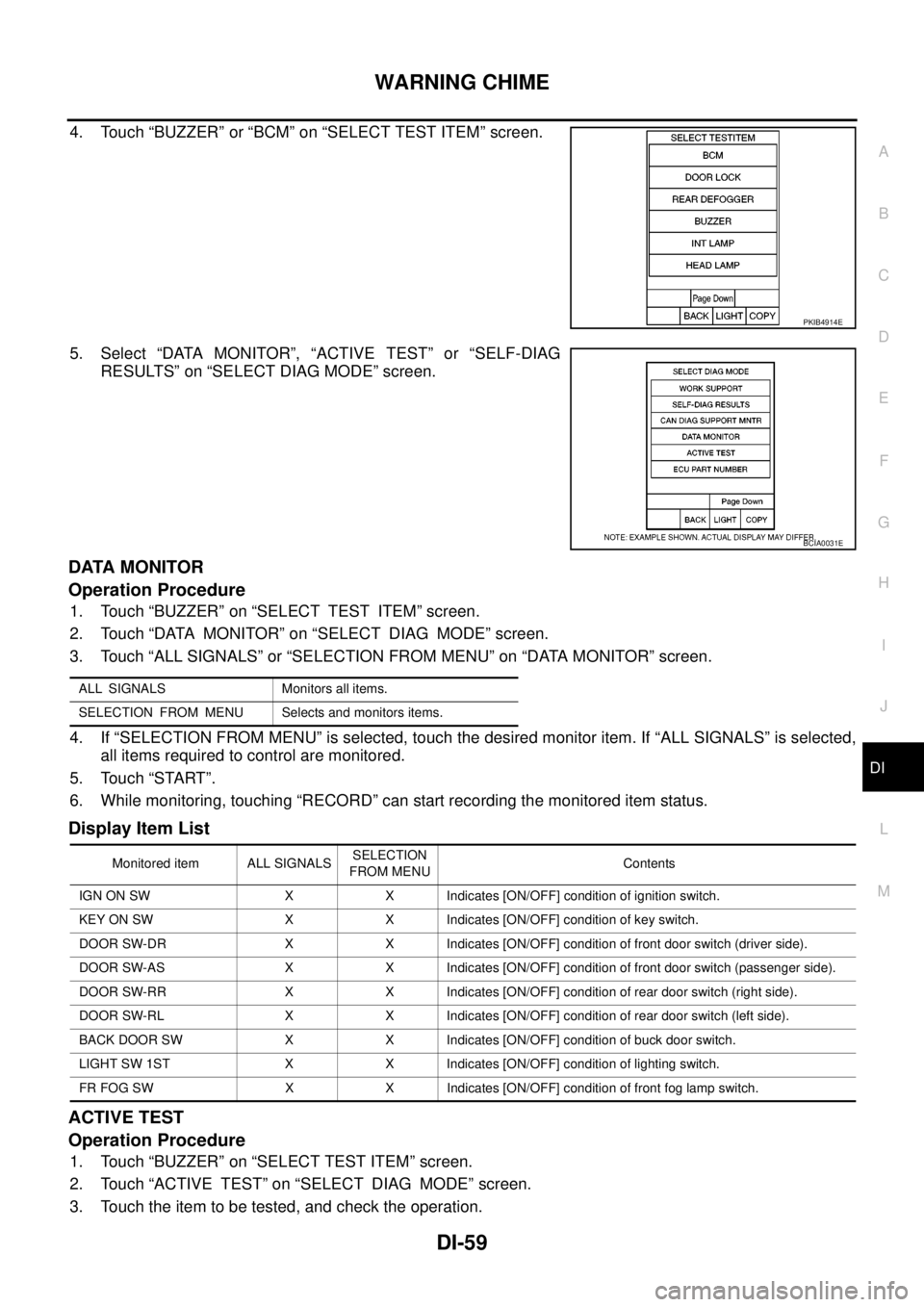
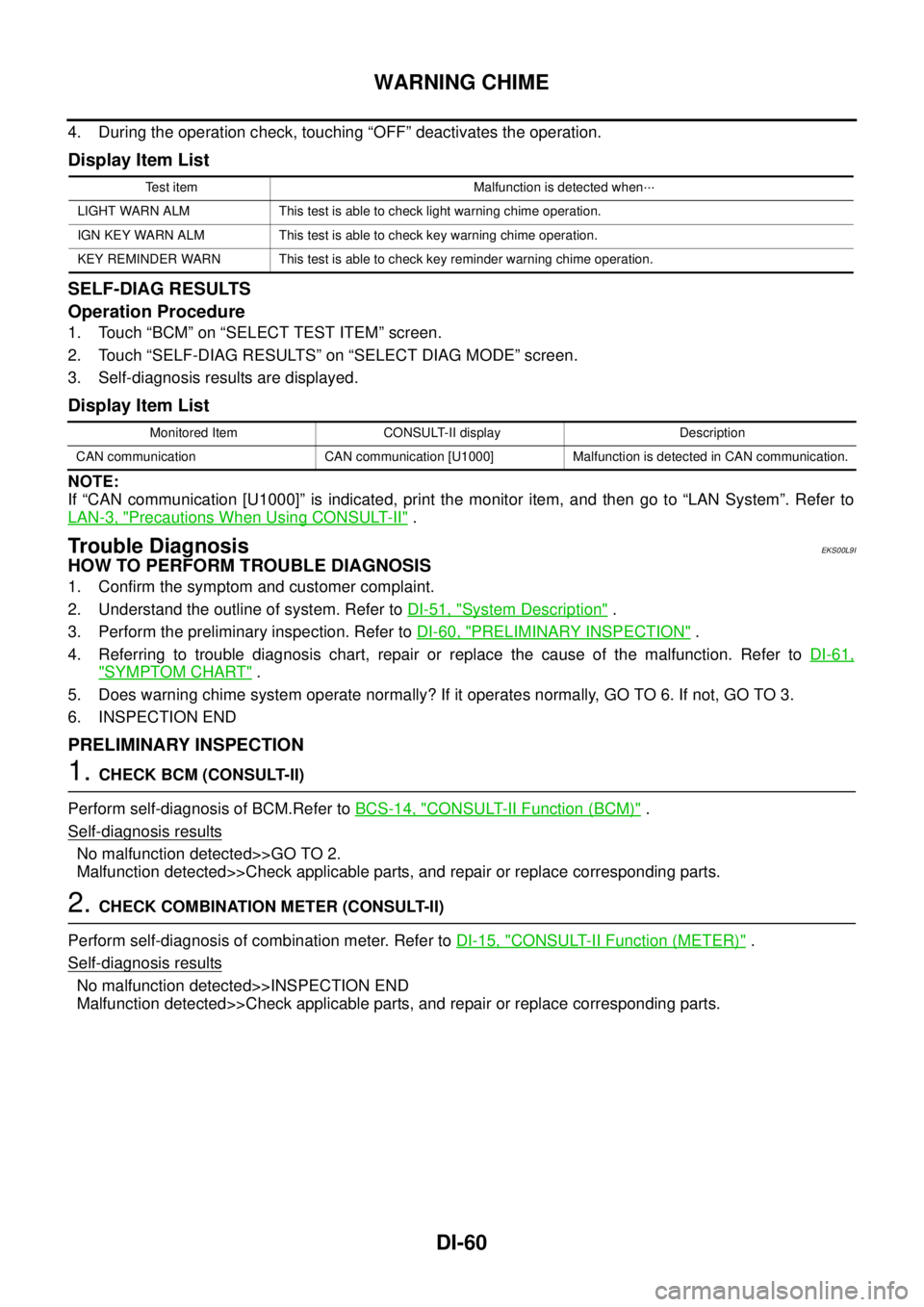
4. Touch “BUZZER” or “BCM” on “SELECT TEST ITEM” screen.
5. Select “DATA MONITOR”, “ACTIVE TEST” or “SELF-DIAG
RESULTS” on “SELECT DIAG MODE” screen.
DATA MONITOR
Operation Procedure
1. Touch “BUZZER” on “SELECT TEST ITEM” screen.
2. Touch “DATA MONITOR” on “SELECT DIAG MODE” screen.
3. Touch “ALL SIGNALS” or “SELECTION FROM MENU” on “DATA MONITOR” screen.
4. If “SELECTION FROM MENU” is selected, touch the desired monitor item. If “ALL SIGNALS” is selected,
all items required to control are monitored.
5. Touch “START”.
6. While monitoring, touching “RECORD” can start recording the monitored item status.
Display Item List
ACTIVE TEST
Operation Procedure
1. Touch “BUZZER” on “SELECT TEST ITEM” screen.
2. Touch “ACTIVE TEST” on “SELECT DIAG MODE” screen.
3. Touch the item to be tested, and check the operation.
PKIB4914E
BCIA0031E
ALL SIGNALS Monitors all items.
SELECTION FROM MENU Selects and monitors items.
Monitored item ALL SIGNALSSELECTION
FROM MENUContents
IGN ON SW X X Indicates [ON/OFF] condition of ignition switch.
KEY ON SW X X Indicates [ON/OFF] condition of key switch.
DOOR SW-DR X X Indicates [ON/OFF] condition of front door switch (driver side).
DOOR SW-AS X X Indicates [ON/OFF] condition of front door switch (passenger side).
DOOR SW-RR X X Indicates [ON/OFF] condition of rear door switch (right side).
DOOR SW-RL X X Indicates [ON/OFF] condition of rear door switch (left side).
BACK DOOR SW X X Indicates [ON/OFF] condition of buck door switch.
LIGHT SW 1ST X X Indicates [ON/OFF] condition of lighting switch.
FR FOG SW X X Indicates [ON/OFF] condition of front fog lamp switch.
Page 970 of 3171
DI-60
WARNING CHIME
4. During the operation check, touching “OFF” deactivates the operation.
Display Item List
SELF-DIAG RESULTS
Operation Procedure
1. Touch “BCM” on “SELECT TEST ITEM” screen.
2. Touch “SELF-DIAG RESULTS” on “SELECT DIAG MODE” screen.
3. Self-diagnosis results are displayed.
Display Item List
NOTE:
If “CAN communication [U1000]” is indicated, print the monitor item, and then go to “LAN System”. Refer to
LAN-3, "
Precautions When Using CONSULT-II".
Trouble DiagnosisEKS00L9I
HOW TO PERFORM TROUBLE DIAGNOSIS
1. Confirm the symptom and customer complaint.
2. Understand the outline of system. Refer toDI-51, "
System Description".
3. Perform the preliminary inspection. Refer toDI-60, "
PRELIMINARY INSPECTION".
4. Referring to trouble diagnosis chart, repair or replace the cause of the malfunction. Refer toDI-61,
"SYMPTOM CHART".
5. Does warning chime system operate normally? If it operates normally, GO TO 6. If not, GO TO 3.
6. INSPECTION END
PRELIMINARY INSPECTION
1.CHECK BCM (CONSULT-II)
Perform self-diagnosis of BCM.Refer toBCS-14, "
CONSULT-II Function (BCM)".
Self
-diagnosis results
No malfunction detected>>GO TO 2.
Malfunction detected>>Check applicable parts, and repair or replace corresponding parts.
2.CHECK COMBINATION METER (CONSULT-II)
Perform self-diagnosis of combination meter. Refer toDI-15, "
CONSULT-II Function (METER)".
Self
-diagnosis results
No malfunction detected>>INSPECTION END
Malfunction detected>>Check applicable parts, and repair or replace corresponding parts.
Test item Malfunction is detected when···
LIGHT WARN ALM This test is able to check light warning chime operation.
IGN KEY WARN ALM This test is able to check key warning chime operation.
KEY REMINDER WARN This test is able to check key reminder warning chime operation.
Monitored Item CONSULT-II display Description
CAN communication CAN communication [U1000] Malfunction is detected in CAN communication.
Page 971 of 3171
WARNING CHIME
DI-61
C
D
E
F
G
H
I
J
L
MA
B
DI
SYMPTOM CHART
Meter Buzzer Circuit InspectionEKS00L9L
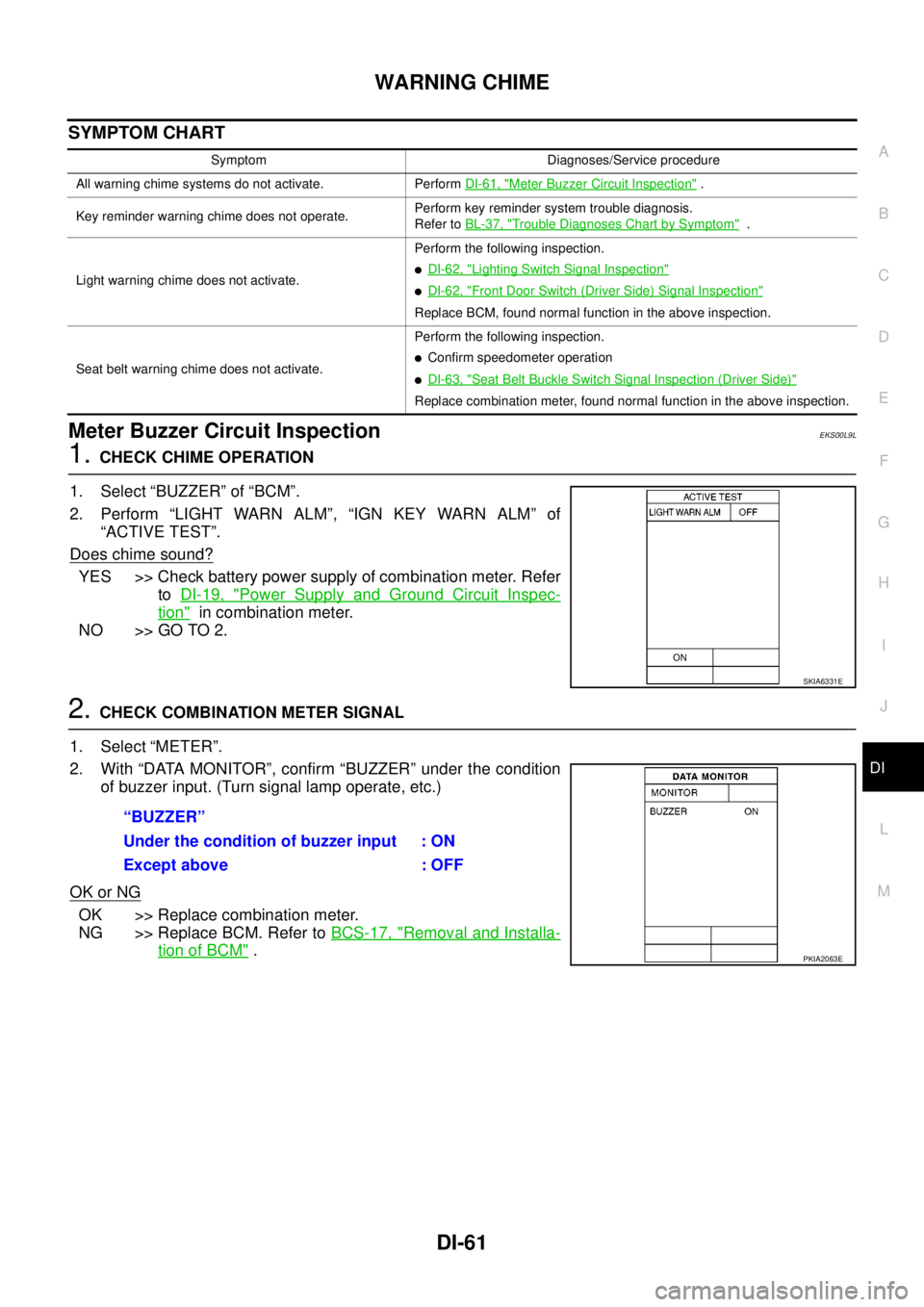
1.CHECK CHIME OPERATION
1. Select “BUZZER” of “BCM”.
2. Perform “LIGHT WARN ALM”, “IGN KEY WARN ALM” of
“ACTIVE TEST”.
Does chime sound?
YES >> Check battery power supply of combination meter. Refer
toDI-19, "
Power Supply and Ground Circuit Inspec-
tion"in combination meter.
NO >> GO TO 2.
2.CHECK COMBINATION METER SIGNAL
1. Select “METER”.
2. With “DATA MONITOR”, confirm “BUZZER” under the condition
of buzzer input. (Turn signal lamp operate, etc.)
OK or NG
OK >> Replace combination meter.
NG >> Replace BCM. Refer toBCS-17, "
Removal and Installa-
tion of BCM".
Symptom Diagnoses/Service procedure
All warning chime systems do not activate. PerformDI-61, "
Meter Buzzer Circuit Inspection".
Key reminder warning chime does not operate.Perform key reminder system trouble diagnosis.
Refer toBL-37, "
Trouble Diagnoses Chart by Symptom".
Light warning chime does not activate.Perform the following inspection.
lDI-62, "Lighting Switch Signal Inspection"
lDI-62, "Front Door Switch (Driver Side) Signal Inspection"
Replace BCM, found normal function in the above inspection.
Seat belt warning chime does not activate.Perform the following inspection.
lConfirm speedometer operation
lDI-63, "Seat Belt Buckle Switch Signal Inspection (Driver Side)"
Replace combination meter, found normal function in the above inspection.
SKIA6331E
“BUZZER”
Under the condition of buzzer input : ON
Except above : OFF
PKIA2063E
Page 972 of 3171
DI-62
WARNING CHIME
Lighting Switch Signal Inspection
EKS00L9O
1.CHECK BCM INPUT SIGNAL
1. Select “BCM”.
2. With “DATA MONITOR” of “BUZZER”, confirm “LIGHT SW 1ST”
whenthelightingswitchisoperated.
OK or NG
OK >> Lighting switch signal is OK. Return toDI-61, "SYMP-
TOM CHART".
NG >> Check the lighting switch. Refer toLT- 11 8 , "
Combination
Switch Inspection".
Front Door Switch (Driver Side) Signal InspectionEKS00L9M
1.CHECK BCM INPUT SIGNAL
1. Select “BCM”.
2. With “DATA MONITOR” of “BUZZER”, confirm “DOOR SW-DR”
when the driver side door is opened/closed.
OK or NG
OK >> Front door switch (driver side) signal is OK. Return to
DI-61, "
SYMPTOM CHART".
NG >> GO TO 2.
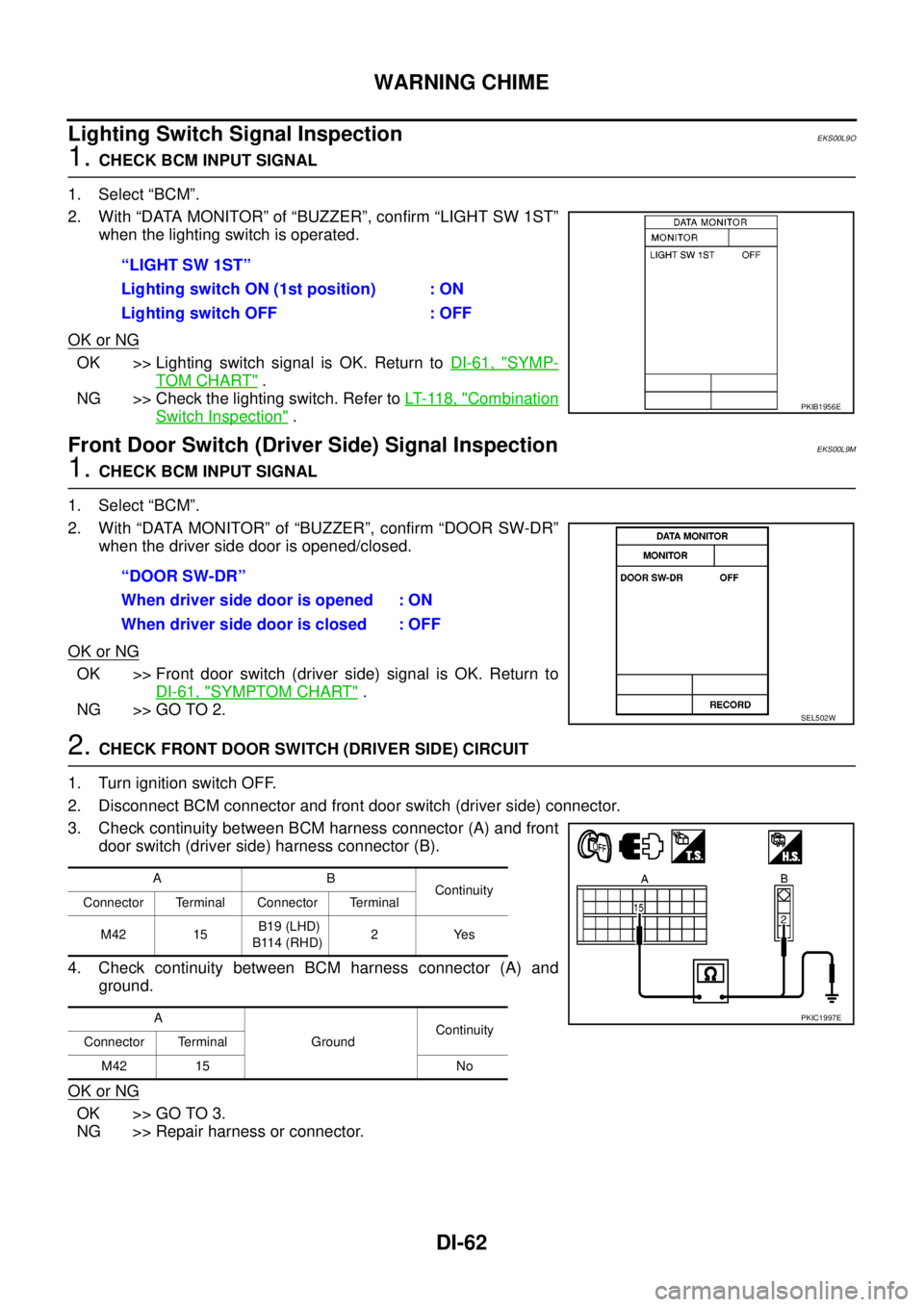
2.CHECK FRONT DOOR SWITCH (DRIVER SIDE) CIRCUIT
1. Turn ignition switch OFF.
2. Disconnect BCM connector and front door switch (driver side) connector.
3. Check continuity between BCM harness connector (A) and front
door switch (driver side) harness connector (B).
4. Check continuity between BCM harness connector (A) and
ground.
OK or NG
OK >> GO TO 3.
NG >> Repair harness or connector.“LIGHT SW 1ST”
Lighting switch ON (1st position) : ON
Lighting switch OFF : OFF
PKIB1956E
“DOOR SW-DR”
When driver side door is opened : ON
When driver side door is closed : OFF
SEL502W
AB
Continuity
Connector Terminal Connector Terminal
M42 15B19 (LHD)
B114 (RHD)2Yes
A
GroundContinuity
Connector Terminal
M42 15 No
PKIC1997E
Page 986 of 3171
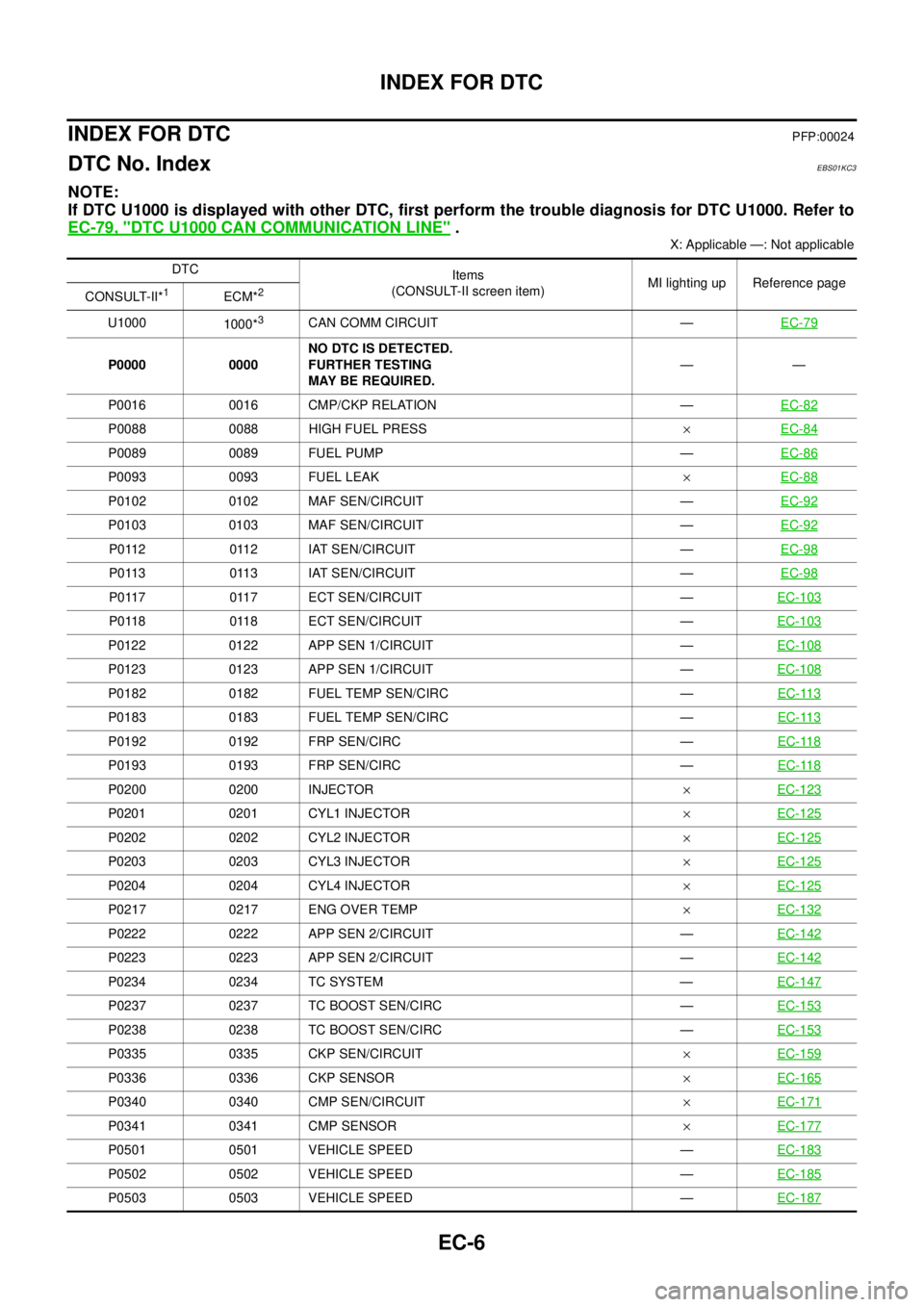
EC-6
INDEX FOR DTC
INDEX FOR DTC
PFP:00024
DTC No. IndexEBS01KC3
NOTE:
If DTC U1000 is displayed with other DTC, first perform the trouble diagnosis for DTC U1000. Refer to
EC-79, "
DTC U1000 CAN COMMUNICATION LINE".
X: Applicable —: Not applicable
DTC
Items
(CONSULT-II screen item)MI lighting up Reference page
CONSULT-II*
1ECM*2
U1000
1000*3CAN COMM CIRCUIT —EC-79
P0000 0000NO DTC IS DETECTED.
FURTHER TESTING
MAY BE REQUIRED.——
P0016 0016 CMP/CKP RELATION —EC-82
P0088 0088 HIGH FUEL PRESS´EC-84
P0089 0089 FUEL PUMP —EC-86
P0093 0093 FUEL LEAK´EC-88
P0102 0102 MAF SEN/CIRCUIT —EC-92
P0103 0103 MAF SEN/CIRCUIT —EC-92
P0112 0112 IAT SEN/CIRCUIT —EC-98
P0113 0113 IAT SEN/CIRCUIT —EC-98
P0117 0117 ECT SEN/CIRCUIT —EC-103
P0118 0118 ECT SEN/CIRCUIT —EC-103
P0122 0122 APP SEN 1/CIRCUIT —EC-108
P0123 0123 APP SEN 1/CIRCUIT —EC-108
P0182 0182 FUEL TEMP SEN/CIRC —EC-113
P0183 0183 FUEL TEMP SEN/CIRC —EC-113
P0192 0192 FRP SEN/CIRC —EC-118
P0193 0193 FRP SEN/CIRC —EC-118
P0200 0200 INJECTOR´EC-123
P0201 0201 CYL1 INJECTOR´EC-125
P0202 0202 CYL2 INJECTOR´EC-125
P0203 0203 CYL3 INJECTOR´EC-125
P0204 0204 CYL4 INJECTOR´EC-125
P0217 0217 ENG OVER TEMP´EC-132
P0222 0222 APP SEN 2/CIRCUIT —EC-142
P0223 0223 APP SEN 2/CIRCUIT —EC-142
P0234 0234 TC SYSTEM —EC-147
P0237 0237 TC BOOST SEN/CIRC —EC-153
P0238 0238 TC BOOST SEN/CIRC —EC-153
P0335 0335 CKP SEN/CIRCUIT´EC-159
P0336 0336 CKP SENSOR´EC-165
P0340 0340 CMP SEN/CIRCUIT´EC-171
P0341 0341 CMP SENSOR´EC-177
P0501 0501 VEHICLE SPEED —EC-183
P0502 0502 VEHICLE SPEED —EC-185
P0503 0503 VEHICLE SPEED —EC-187