lock NISSAN NAVARA 2005 Repair Repair Manual
[x] Cancel search | Manufacturer: NISSAN, Model Year: 2005, Model line: NAVARA, Model: NISSAN NAVARA 2005Pages: 3171, PDF Size: 49.59 MB
Page 218 of 3171
AT-210
SHIFT CONTROL SYSTEM
Control Cable Removal and Installation
ECS00G55
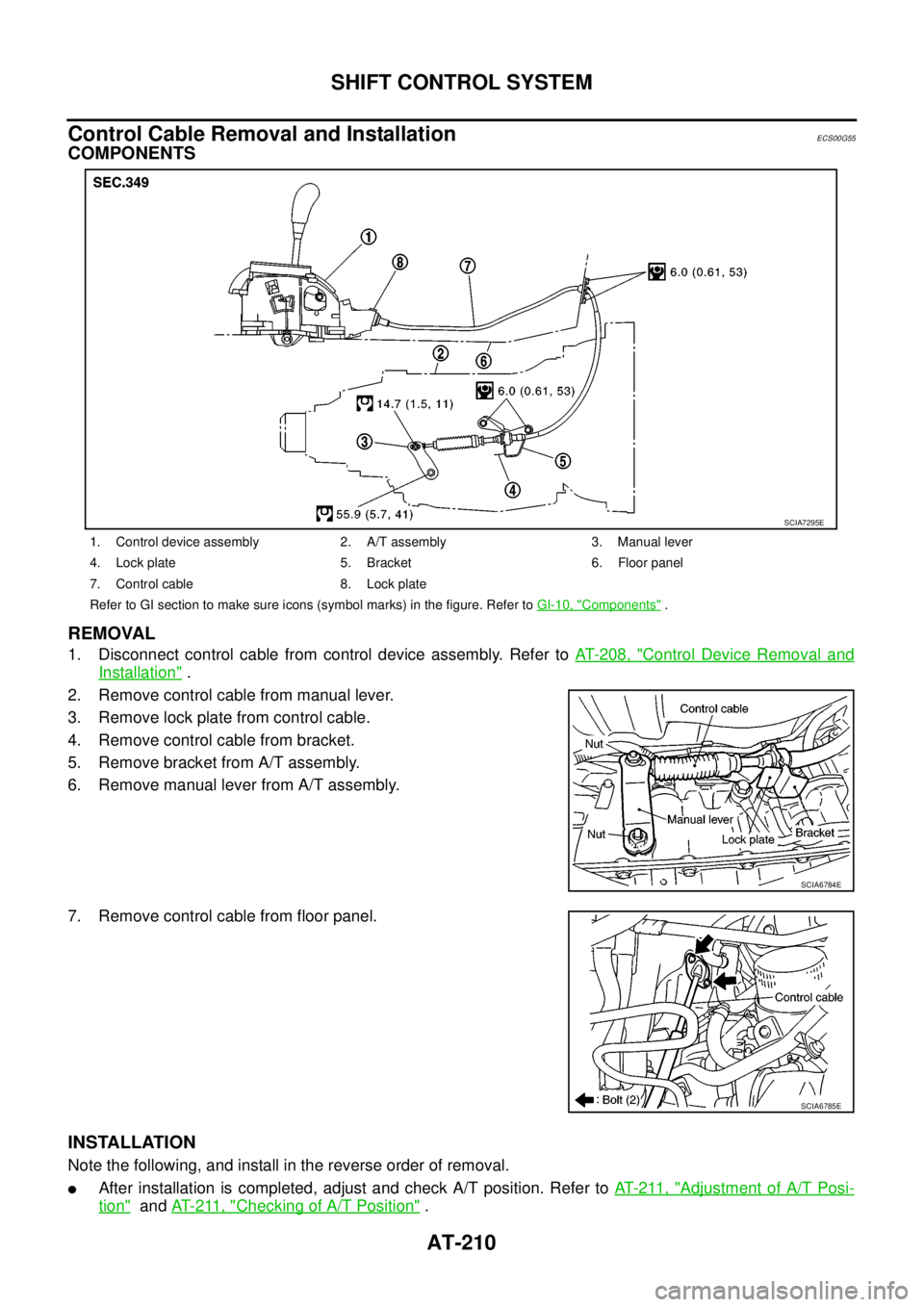
COMPONENTS
REMOVAL
1. Disconnect control cable from control device assembly. Refer toAT- 2 0 8 , "Control Device Removal and
Installation".
2. Remove control cable from manual lever.
3. Remove lock plate from control cable.
4. Remove control cable from bracket.
5. Remove bracket from A/T assembly.
6. Remove manual lever from A/T assembly.
7. Remove control cable from floor panel.
INSTALLATION
Note the following, and install in the reverse order of removal.
lAfter installation is completed, adjust and check A/T position. Refer toAT- 2 11 , "Adjustment of A/T Posi-
tion"andAT- 2 11 , "Checking of A/T Position".
1. Control device assembly 2. A/T assembly 3. Manual lever
4. Lock plate 5. Bracket 6. Floor panel
7. Control cable 8. Lock plate
Refer to GI section to make sure icons (symbol marks) in the figure. Refer toGI-10, "
Components".
SCIA7295E
SCIA6784E
SCIA6785E
Page 219 of 3171
SHIFT CONTROL SYSTEM
AT-211
D
E
F
G
H
I
J
K
L
MA
B
AT
Adjustment of A/T PositionECS00G2X
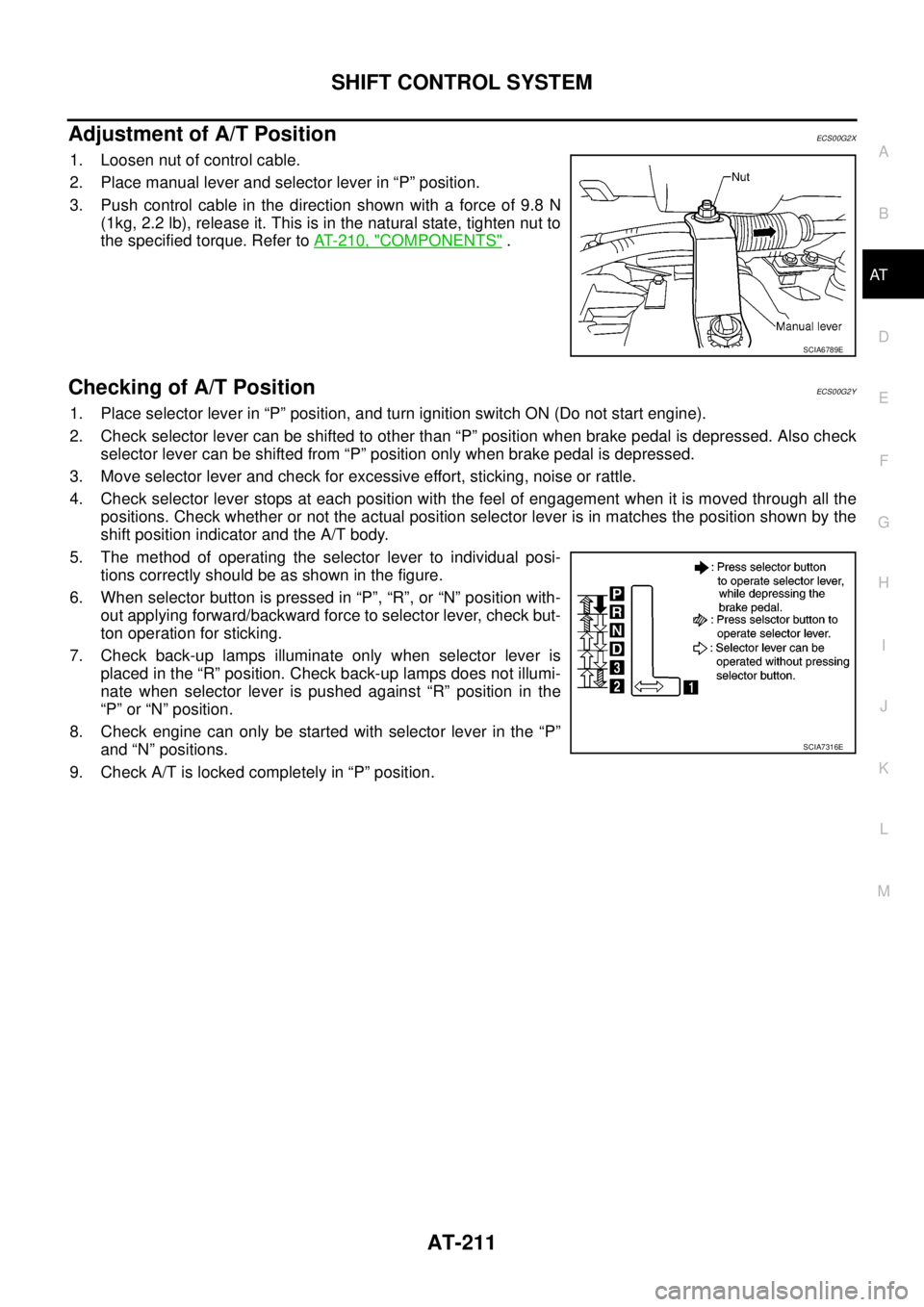
1. Loosen nut of control cable.
2. Place manual lever and selector lever in “P” position.
3. Push control cable in the direction shown with a force of 9.8 N
(1kg, 2.2 lb), release it. This is in the natural state, tighten nut to
the specified torque. Refer toAT- 2 1 0 , "
COMPONENTS".
Checking of A/T PositionECS00G2Y
1. Place selector lever in “P” position, and turn ignition switch ON (Do not start engine).
2. Check selector lever can be shifted to other than “P” position when brake pedal is depressed. Also check
selector lever can be shifted from “P” position only when brake pedal is depressed.
3. Move selector lever and check for excessive effort, sticking, noise or rattle.
4. Check selector lever stops at each position with the feel of engagement when it is moved through all the
positions. Check whether or not the actual position selector lever is in matches the position shown by the
shift position indicator and the A/T body.
5. The method of operating the selector lever to individual posi-
tions correctly should be as shown in the figure.
6. When selector button is pressed in “P”, “R”, or “N” position with-
out applying forward/backward force to selector lever, check but-
ton operation for sticking.
7. Check back-up lamps illuminate only when selector lever is
placed in the “R” position. Check back-up lamps does not illumi-
nate when selector lever is pushed against “R” position in the
“P” or “N” position.
8. Check engine can only be started with selector lever in the “P”
and “N” positions.
9. Check A/T is locked completely in “P” position.
SCIA6789E
SCIA7316E
Page 220 of 3171
AT-212
A/T SHIFT LOCK SYSTEM
A/T SHIFT LOCK SYSTEM
PFP:34950
DescriptionECS00G2Z
lThe mechanical key interlock mechanism also operates as a shift lock:
With the ignition switch turned to ON, selector lever cannot be shifted from “P” position to any other posi-
tion unless brake pedal is depressed.
With the key removed, selector lever cannot be shifted from “P” position to any other position.
The key cannot be removed unless selector lever is placed in “P” position.
lThe shift lock and key interlock mechanisms are controlled by ON-OFF operation of the shift lock solenoid
and by the operation of the rotator and slider located inside the key cylinder, respectively.
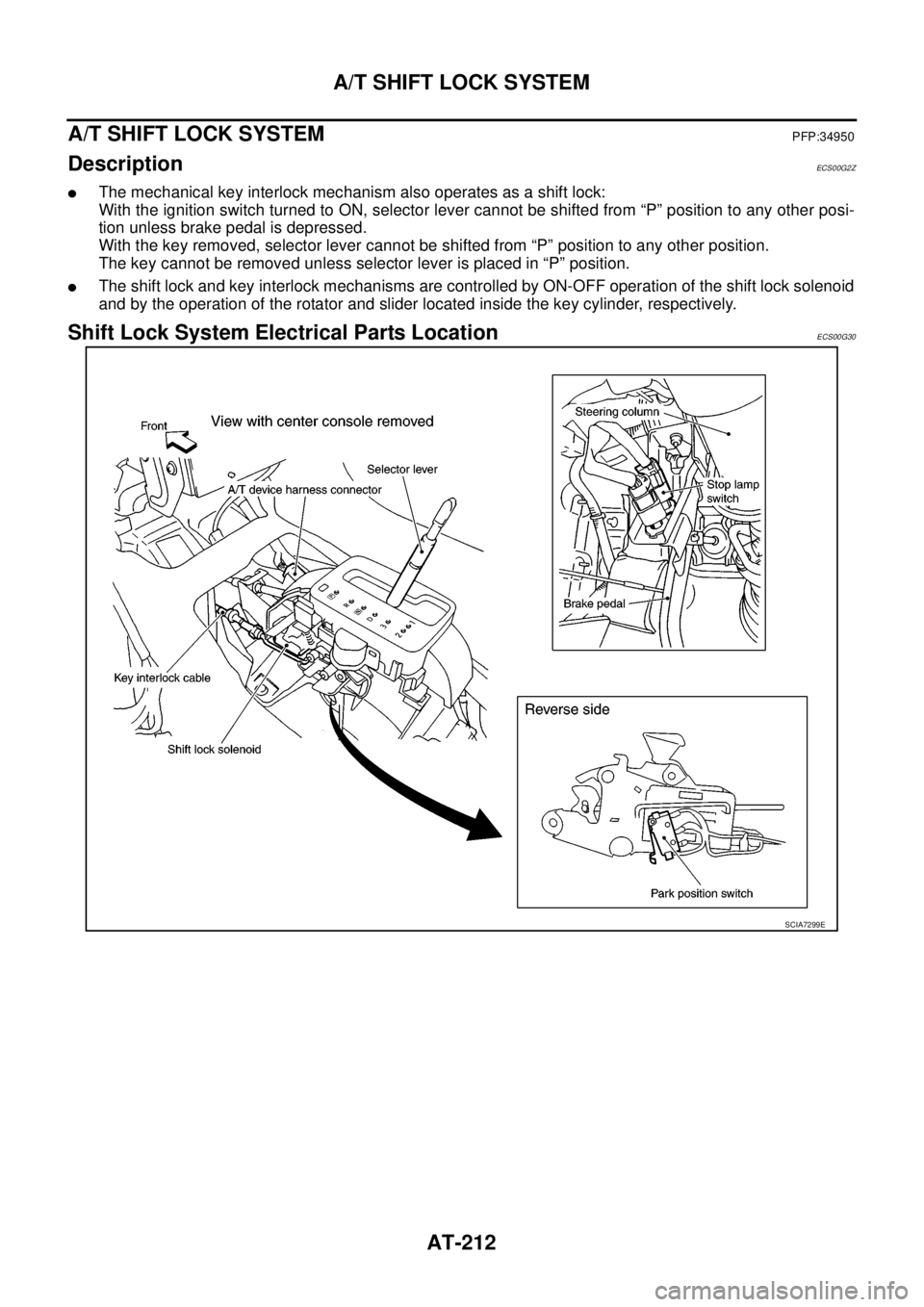
Shift Lock System Electrical Parts LocationECS00G30
SCIA7299E
Page 221 of 3171
A/T SHIFT LOCK SYSTEM
AT-213
D
E
F
G
H
I
J
K
L
MA
B
AT
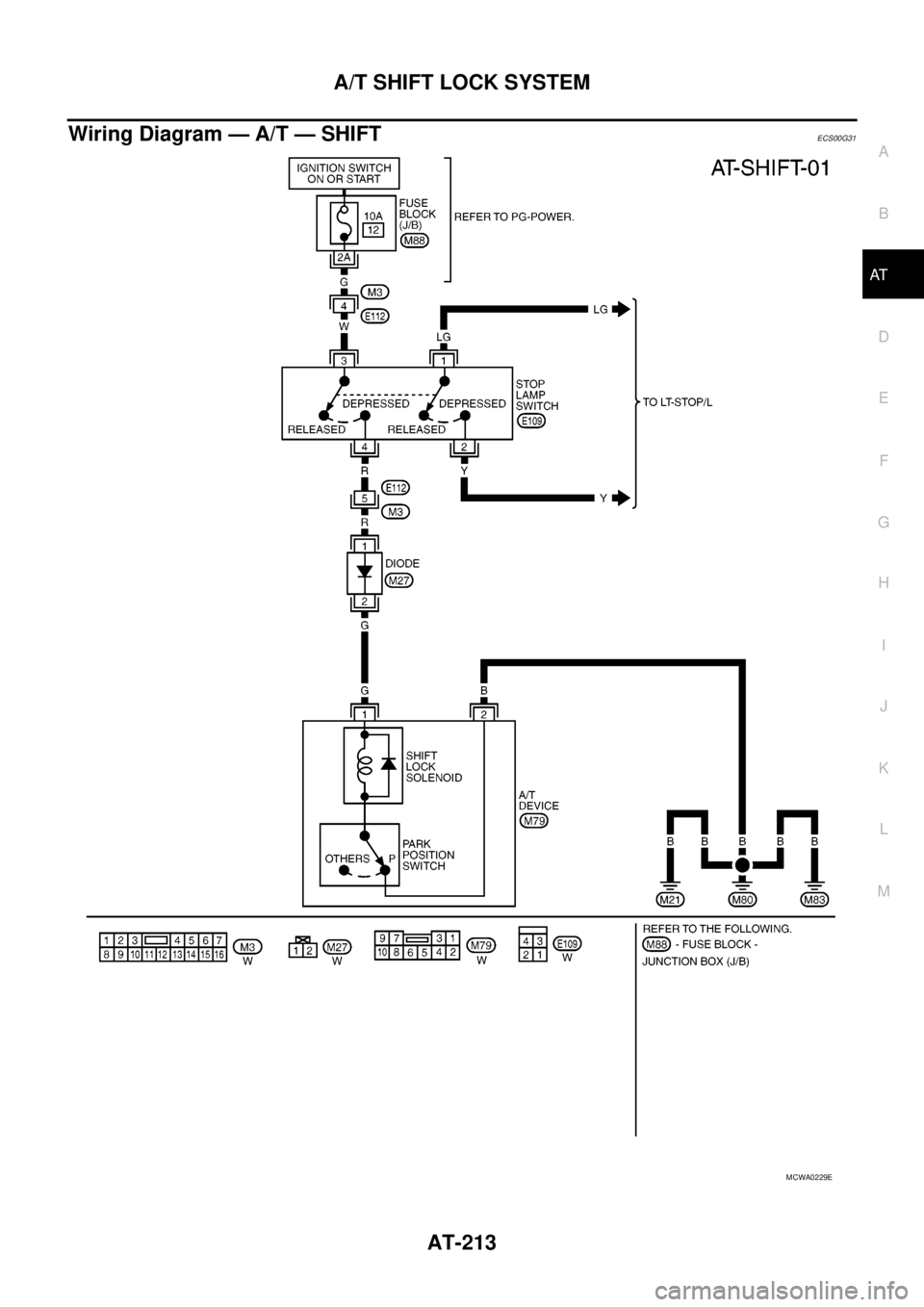
Wiring Diagram — A/T — SHIFTECS00G31
MCWA0229E
Page 222 of 3171
AT-214
A/T SHIFT LOCK SYSTEM
Diagnostic Procedure
ECS00G32
SYMPTOM 1:
lSelector lever cannot be moved from “P” position with key in ON position and brake pedal
applied.
lSelector lever can be moved from “P” position with key in ON position and brake pedal released.
lSelector lever can be moved from “P” position when key is removed from key cylinder.
SYMPTOM 2:
lIgnition key cannot be removed when selector lever is set to “P” position.
lIgnition key can be removed when selector lever is set to any position except “P” position.
1.CHECK KEY INTERLOCK CABLE
Check key interlock cable for damage.
OK or NG
OK >> GO TO 2.
NG >> Repair or replace key interlock cable. Refer toAT- 2 1 6 , "
Removal and Installation".
2.CHECK SELECTOR LEVER POSITION
Check selector lever position for damage. Refer toAT- 2 11 , "
Checking of A/T Position"
OK or NG
OK >> GO TO 3.
NG >> Adjust control cable. Refer toAT- 2 11 , "
Adjustment of A/T Position".
3.CHECK SHIFT LOCK SOLENOID AND PARK POSITION SWITCH
1. Connect A/T device harness connector.
2. Turn ignition switch ON. (Do not start engine.)
3. Selector lever is set in “P” position.
4. Check operation.
OK or NG
OK >>INSPECTION END
NG >> GO TO 4.
4.CHECK POWER SOURCE
1. Turn ignition switch ON. (Do not start engine.)
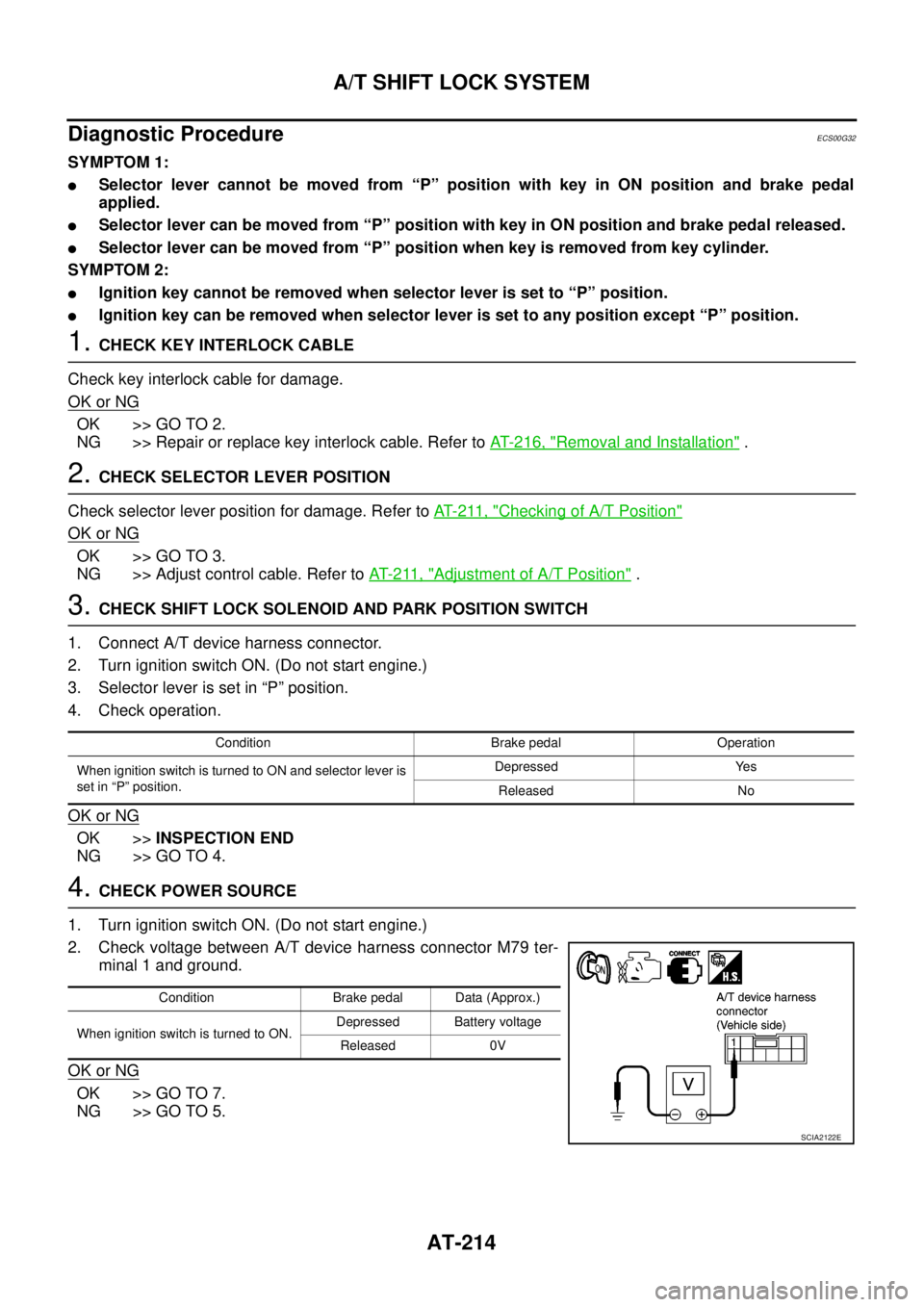
2. Check voltage between A/T device harness connector M79 ter-
minal 1 and ground.
OK or NG
OK >> GO TO 7.
NG >> GO TO 5.
Condition Brake pedal Operation
When ignition switch is turned to ON and selector lever is
set in “P” position.Depressed Yes
Released No
Condition Brake pedal Data (Approx.)
When ignition switch is turned to ON.Depressed Battery voltage
Released 0V
SCIA2122E
Page 223 of 3171
A/T SHIFT LOCK SYSTEM
AT-215
D
E
F
G
H
I
J
K
L
MA
B
AT
5.CHECK STOP LAMP SWITCH
1. Turn ignition switch OFF.
2. Disconnect stop lamp switch harness connector.
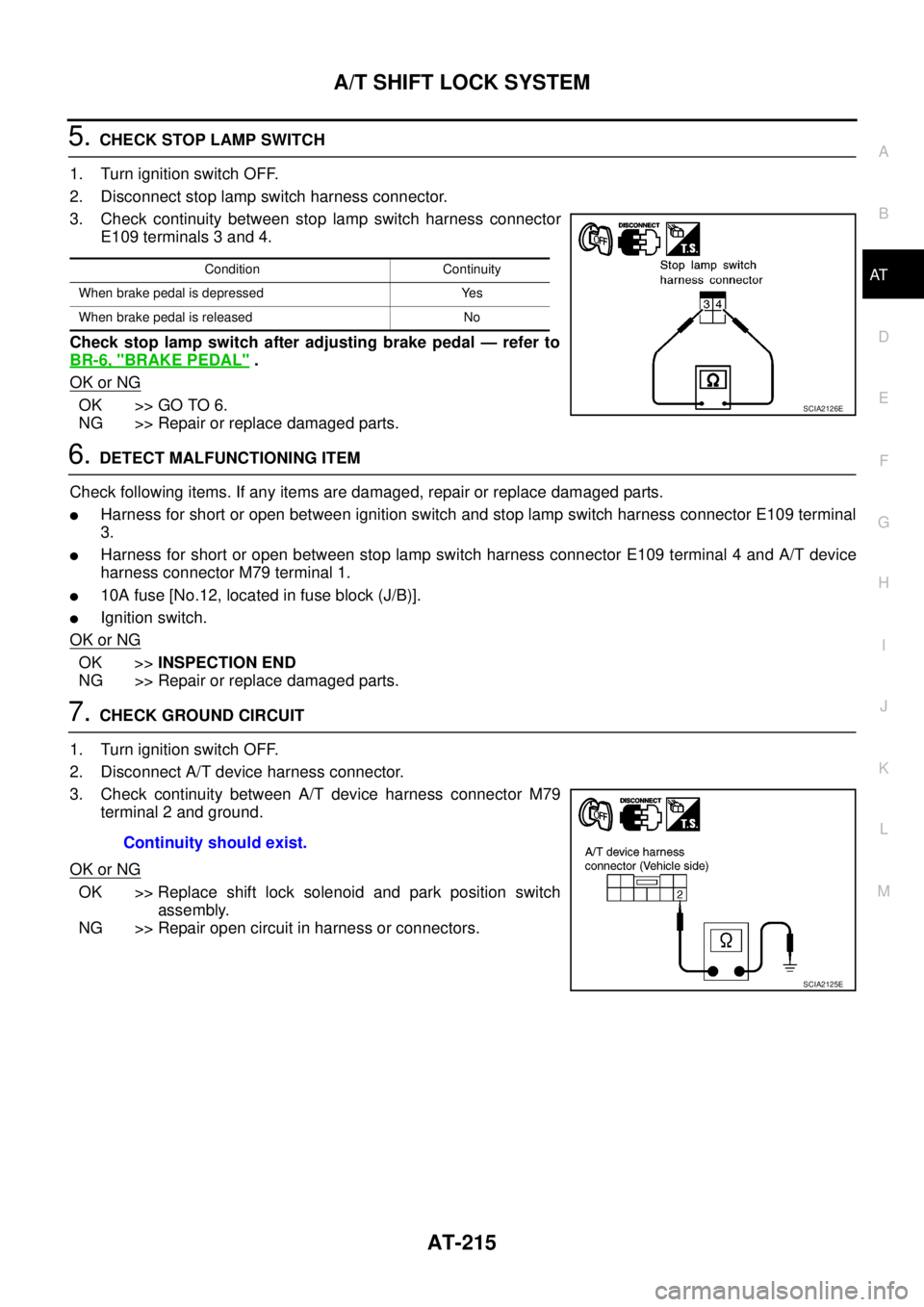
3. Check continuity between stop lamp switch harness connector
E109 terminals 3 and 4.
Check stop lamp switch after adjusting brake pedal — refer to
BR-6, "
BRAKE PEDAL".
OK or NG
OK >> GO TO 6.
NG >> Repair or replace damaged parts.
6.DETECT MALFUNCTIONING ITEM
Check following items. If any items are damaged, repair or replace damaged parts.
lHarness for short or open between ignition switch and stop lamp switch harness connector E109 terminal
3.
lHarness for short or open between stop lamp switch harness connector E109 terminal 4 and A/T device
harness connector M79 terminal 1.
l10A fuse [No.12, located in fuse block (J/B)].
lIgnition switch.
OK or NG
OK >>INSPECTION END
NG >> Repair or replace damaged parts.
7.CHECK GROUND CIRCUIT
1. Turn ignition switch OFF.
2. Disconnect A/T device harness connector.
3. Check continuity between A/T device harness connector M79
terminal 2 and ground.
OK or NG
OK >> Replace shift lock solenoid and park position switch
assembly.
NG >> Repair open circuit in harness or connectors.
Condition Continuity
When brake pedal is depressed Yes
When brake pedal is released No
SCIA2126E
Continuity should exist.
SCIA2125E
Page 224 of 3171
AT-216
KEY INTERLOCK CABLE
KEY INTERLOCK CABLE
PFP:34908
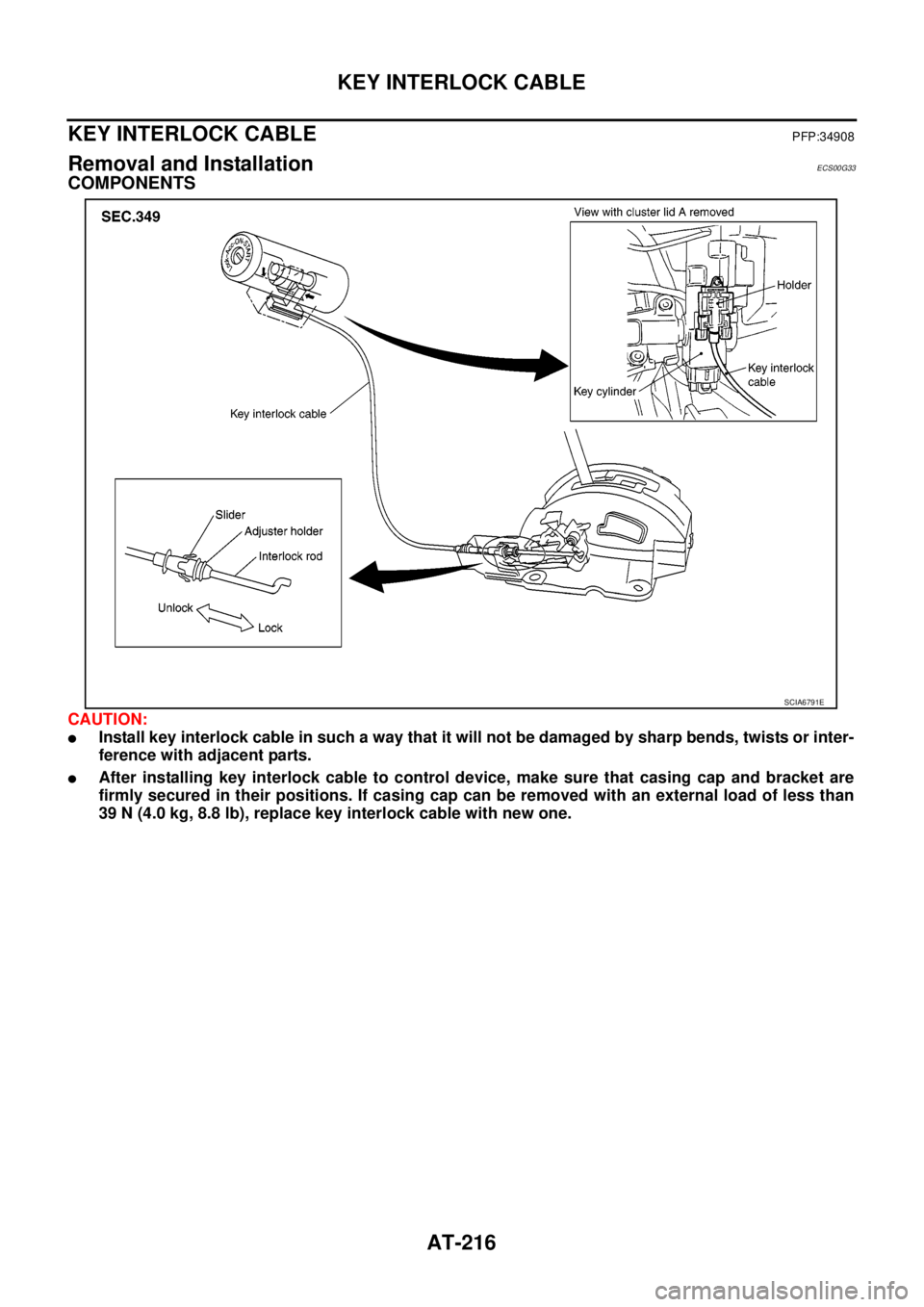
Removal and InstallationECS00G33
COMPONENTS
CAUTION:
lInstall key interlock cable in such a way that it will not be damaged by sharp bends, twists or inter-
ference with adjacent parts.
lAfter installing key interlock cable to control device, make sure that casing cap and bracket are
firmly secured in their positions. If casing cap can be removed with an external load of less than
39 N (4.0 kg, 8.8 lb), replace key interlock cable with new one.
SCIA6791E
Page 225 of 3171
KEY INTERLOCK CABLE
AT-217
D
E
F
G
H
I
J
K
L
MA
B
AT
REMOVAL
1. Remove center console. Refer toIP-16, "CENTER CONSOLE".
2. Remove lower instrument panel LH (for LHD models) or lower instrument panel RH (for RHD models) and
cluster lid A. Refer toIP-13, "
LOWER INSTRUMENT PANEL LH",IP-15, "LOWER INSTRUMENT
PANEL RH AND GLOVE BOX",IP-10, "INSTRUMENT PANEL".
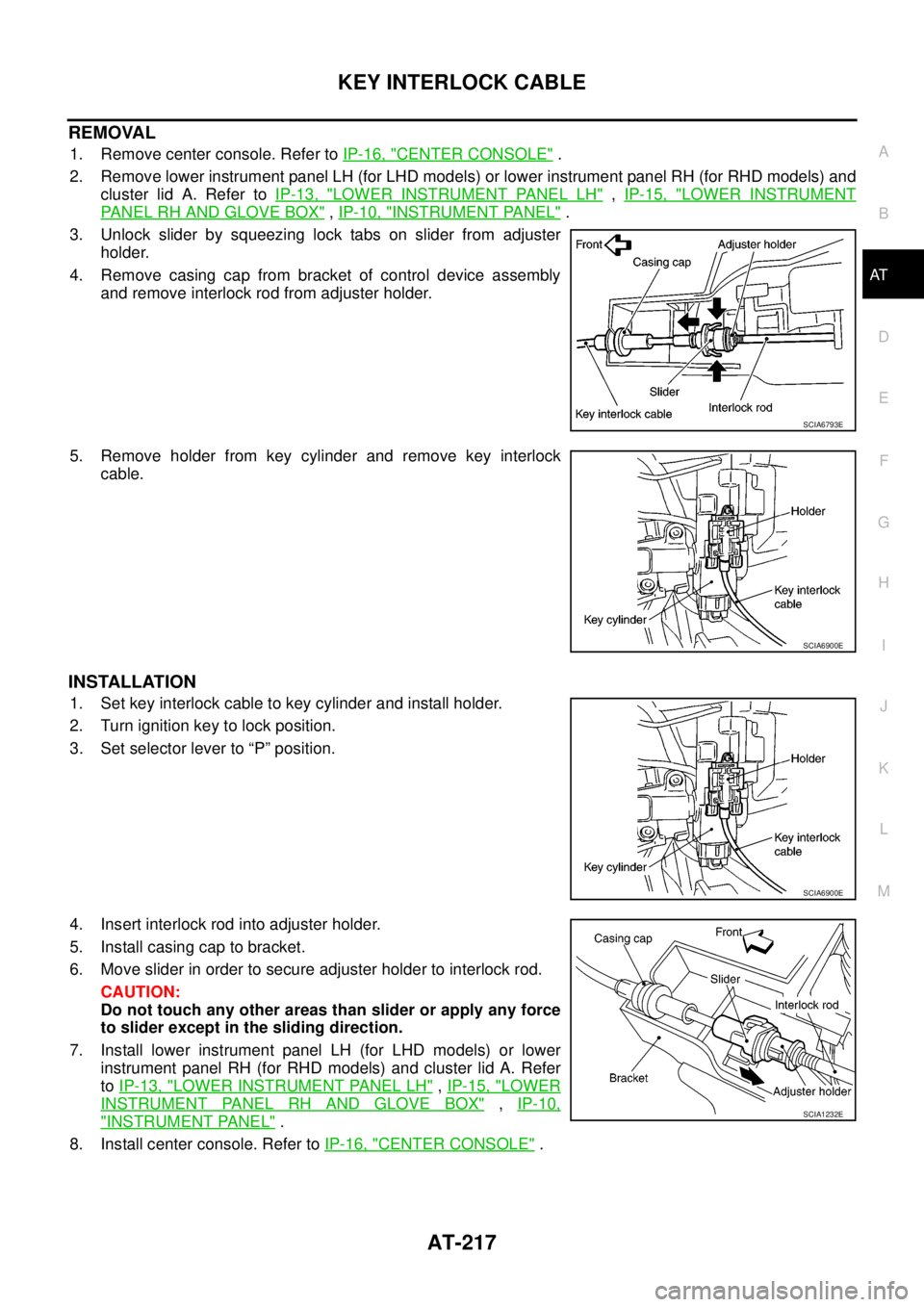
3. Unlock slider by squeezing lock tabs on slider from adjuster
holder.
4. Remove casing cap from bracket of control device assembly
and remove interlock rod from adjuster holder.
5. Remove holder from key cylinder and remove key interlock
cable.
INSTALLATION
1. Set key interlock cable to key cylinder and install holder.
2. Turn ignition key to lock position.
3. Set selector lever to “P” position.
4. Insert interlock rod into adjuster holder.
5. Install casing cap to bracket.
6. Move slider in order to secure adjuster holder to interlock rod.
CAUTION:
Do not touch any other areas than slider or apply any force
to slider except in the sliding direction.
7. Install lower instrument panel LH (for LHD models) or lower
instrument panel RH (for RHD models) and cluster lid A. Refer
toIP-13, "
LOWER INSTRUMENT PANEL LH",IP-15, "LOWER
INSTRUMENT PANEL RH AND GLOVE BOX",IP-10,
"INSTRUMENT PANEL".
8. Install center console. Refer toIP-16, "
CENTER CONSOLE".
SCIA6793E
SCIA6900E
SCIA6900E
SCIA1232E
Page 247 of 3171
ON-VEHICLE SERVICE
AT-239
D
E
F
G
H
I
J
K
L
MA
B
AT
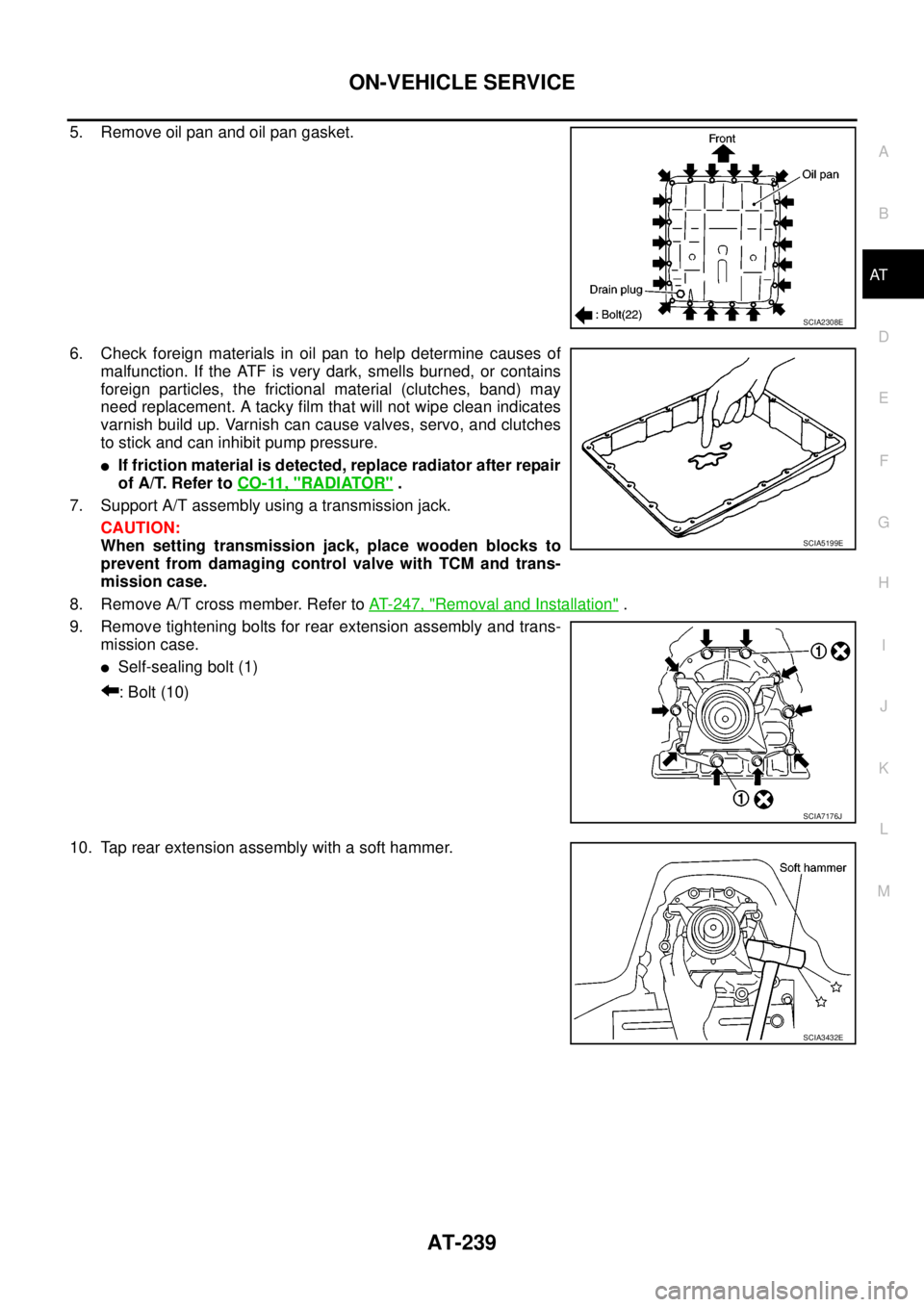
5. Remove oil pan and oil pan gasket.
6. Check foreign materials in oil pan to help determine causes of
malfunction. If the ATF is very dark, smells burned, or contains
foreign particles, the frictional material (clutches, band) may
need replacement. A tacky film that will not wipe clean indicates
varnish build up. Varnish can cause valves, servo, and clutches
to stick and can inhibit pump pressure.
lIf friction material is detected, replace radiator after repair
of A/T. Refer toCO-11, "
RADIATOR".
7. Support A/T assembly using a transmission jack.
CAUTION:
When setting transmission jack, place wooden blocks to
prevent from damaging control valve with TCM and trans-
mission case.
8. Remove A/T cross member. Refer toAT- 2 4 7 , "
Removal and Installation".
9. Remove tightening bolts for rear extension assembly and trans-
mission case.
lSelf-sealing bolt (1)
: Bolt (10)
10. Tap rear extension assembly with a soft hammer.
SCIA2308E
SCIA5199E
SCIA7176J
SCIA3432E
Page 251 of 3171
AIR BREATHER HOSE
AT-243
D
E
F
G
H
I
J
K
L
MA
B
AT
AIR BREATHER HOSEPFP:31098
Removal and InstallationECS00GVO
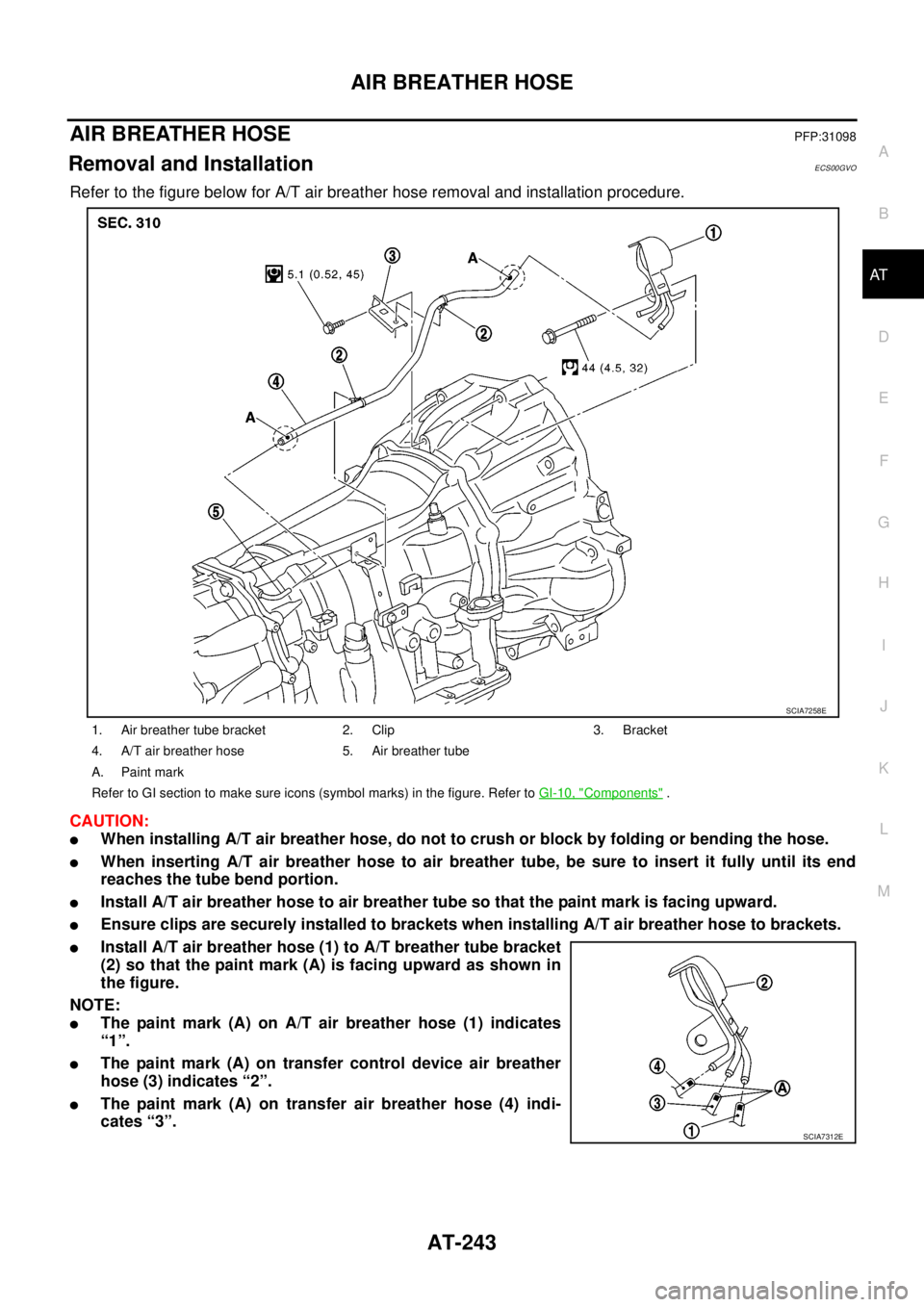
Refer to the figure below for A/T air breather hose removal and installation procedure.
CAUTION:
lWhen installing A/T air breather hose, do not to crush or block by folding or bending the hose.
lWhen inserting A/T air breather hose to air breather tube, be sure to insert it fully until its end
reaches the tube bend portion.
lInstall A/T air breather hose to air breather tube so that the paint mark is facing upward.
lEnsure clips are securely installed to brackets when installing A/T air breather hose to brackets.
lInstall A/T air breather hose (1) to A/T breather tube bracket
(2) so that the paint mark (A) is facing upward as shown in
the figure.
NOTE:
lThe paint mark (A) on A/T air breather hose (1) indicates
“1”.
lThe paint mark (A) on transfer control device air breather
hose (3) indicates “2”.
lThe paint mark (A) on transfer air breather hose (4) indi-
cates “3”.
1. Air breather tube bracket 2. Clip 3. Bracket
4. A/T air breather hose 5. Air breather tube
A. Paint mark
Refer to GI section to make sure icons (symbol marks) in the figure. Refer toGI-10, "
Components".
SCIA7258E
SCIA7312E