start NISSAN NOTE 2016 Service Repair Manual
[x] Cancel search | Manufacturer: NISSAN, Model Year: 2016, Model line: NOTE, Model: NISSAN NOTE 2016Pages: 3641, PDF Size: 28.72 MB
Page 619 of 3641
CHG-24
< DTC/CIRCUIT DIAGNOSIS >
L TERMINAL CIRCUIT (OPEN)
L TERMINAL CIRCUIT (OPEN)
DescriptionINFOID:0000000012431253
The “L” terminal circuit controls the charge warning lamp. The charge warning lamp turns ON when the igni-
tion switch is set to ON or START. When the generator is providing sufficient voltage with the engine running,
the charge warning lamp turns OFF. If the charge warn ing lamp illuminates with the engine running, a malfunc-
tion is indicated.
Diagnosis ProcedureINFOID:0000000012431254
Regarding Wiring Diagram information. Refer to CHG-9, "Wiring Diagram".
1.CHECK “L” TERMINAL CONNECTION
1. Turn ignition switch OFF.
2. Check if “L” terminal is clean and tight.
Is the inspection result normal?
YES >> GO TO 2.
NO >> Repair “L” terminal connection. Confirm repa ir by performing complete Charging system test
using EXP-800 NI or GR8-1200 NI (if available). Refer to applicable Instruction Manual for proper
testing procedures.
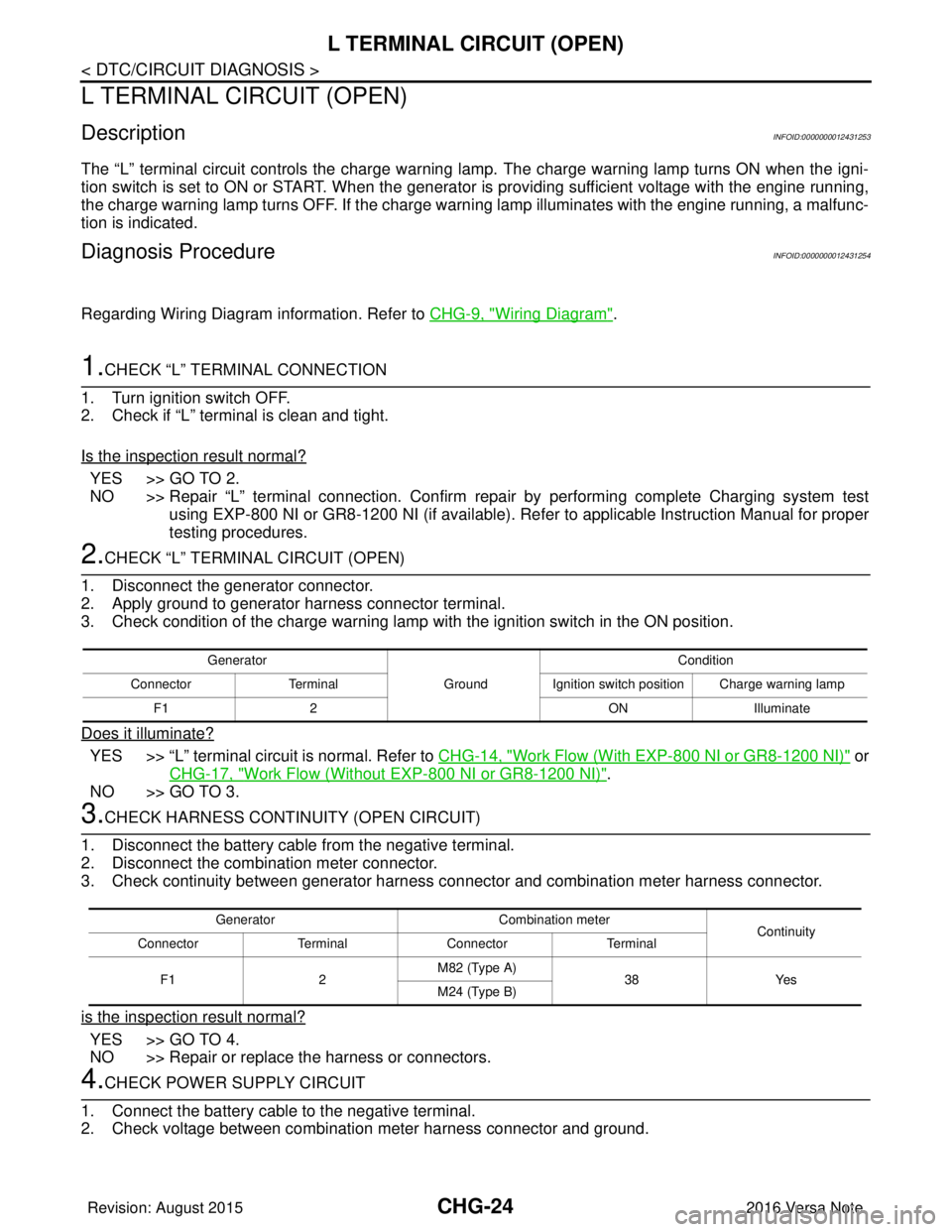
2.CHECK “L” TERMIN AL CIRCUIT (OPEN)
1. Disconnect the generator connector.
2. Apply ground to generator harness connector terminal.
3. Check condition of the charge warning lamp with the ignition switch in the ON position.
Does it illuminate?
YES >> “L” terminal circuit is normal. Refer to CHG-14, "Work Flow (With EXP-800 NI or GR8-1200 NI)" or
CHG-17, "
Work Flow (Without EXP-800 NI or GR8-1200 NI)".
NO >> GO TO 3.
3.CHECK HARNESS CONTI NUITY (OPEN CIRCUIT)
1. Disconnect the battery cable from the negative terminal.
2. Disconnect the combination meter connector.
3. Check continuity between generator harness c onnector and combination meter harness connector.
is the inspection result normal?
YES >> GO TO 4.
NO >> Repair or replace the harness or connectors.
4.CHECK POWER SUPPLY CIRCUIT
1. Connect the battery cable to the negative terminal.
2. Check voltage between combination meter harness connector and ground.
Generator
GroundCondition
Connector Terminal Ignition switch position Charge warning lamp
F1 2 ONIlluminate
Generator Combination meter
Continuity
Connector TerminalConnector Terminal
F1 2M82 (Type A)
38Yes
M24 (Type B)
Revision: August 2015 2016 Versa Note
cardiagn.com
Page 621 of 3641
CHG-26
< DTC/CIRCUIT DIAGNOSIS >
L TERMINAL CIRCUIT (SHORT)
L TERMINAL CIRCUIT (SHORT)
DescriptionINFOID:0000000012431255
The terminal “L” circuit controls the charge warning lamp. The charge warning lamp turns ON when the igni-
tion switch is set to ON or START. When the generator is providing sufficient voltage with the engine running,
the charge warning lamp turns off. If the charge warning lamp illuminates with the engine running, a malfunc-
tion is indicated.
Diagnosis ProcedureINFOID:0000000012431256
Regarding Wiring Diagram information, refer to CHG-9, "Wiring Diagram".
1.CHECK “L” TERMINAL CIRCUIT (SHORT)
1. Turn ignition switch OFF.
2. Disconnect generator connector.
3. Turn ignition switch ON.
Does charge warning lamp illuminate?
YES >> GO TO 2.
NO >> Refer to CHG-14, "
Work Flow (With EXP-800 NI or GR8-1200 NI)" or CHG-17, "Work Flow (With-
out EXP-800 NI or GR8-1200 NI)".
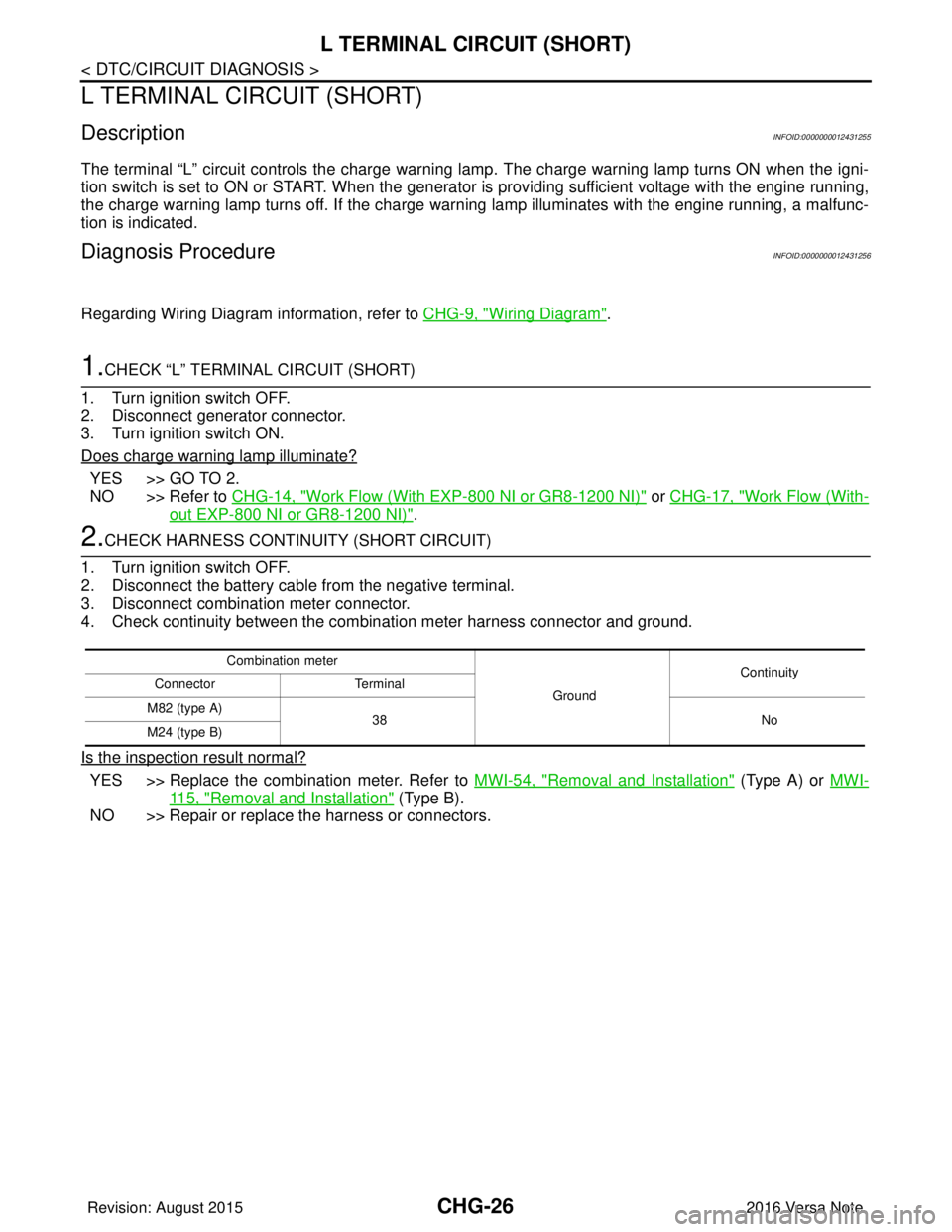
2.CHECK HARNESS CONTI NUITY (SHORT CIRCUIT)
1. Turn ignition switch OFF.
2. Disconnect the battery cable from the negative terminal.
3. Disconnect combination meter connector.
4. Check continuity between the combination meter harness connector and ground.
Is the inspection result normal?
YES >> Replace the combination meter. Refer to MWI-54, "Removal and Installation" (Type A) or MWI-
115, "Removal and Installation" (Type B).
NO >> Repair or replace the harness or connectors.
Combination meter
GroundContinuity
Connector Terminal
M82 (type A) 38 No
M24 (type B)
Revision: August 2015 2016 Versa Note
cardiagn.com
Page 623 of 3641

CHG-28
< SYMPTOM DIAGNOSIS >
CHARGING SYSTEM
SYMPTOM DIAGNOSIS
CHARGING SYSTEM
Symptom TableINFOID:0000000012431259
SymptomReference
Battery discharged
Refer to CHG-14, "
Work Flow (With EXP-800 NI or GR8-1200 NI)"
or CHG-17, "
Work Flow (Without EXP-800 NI or GR8-1200 NI)".
The charge warning lamp does not illuminate when the ignition
switch is set to ON.
The charge warning lamp does not turn OFF after the engine
starts.
The charging warning lamp turns ON when increasing the engine
speed.
Revision: August 2015
2016 Versa Note
cardiagn.com
Page 625 of 3641
CHG-30
< REMOVAL AND INSTALLATION >
GENERATOR
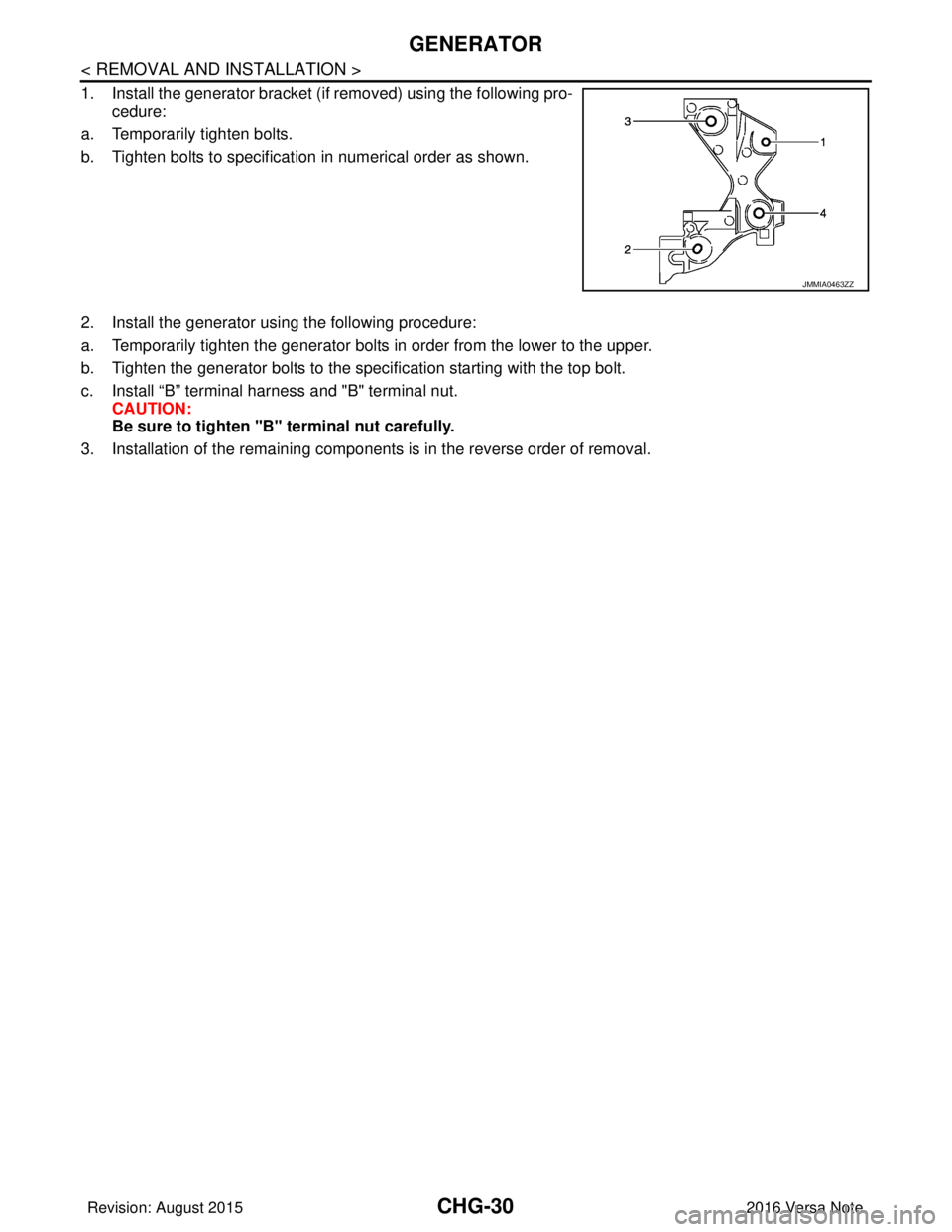
1. Install the generator bracket (if removed) using the following pro-cedure:
a. Temporarily tighten bolts.
b. Tighten bolts to specification in numerical order as shown.
2. Install the generator using the following procedure:
a. Temporarily tighten the generator bolts in order from the lower to the upper.
b. Tighten the generator bolts to the specification starting with the top bolt.
c. Install “B” terminal harness and "B" terminal nut. CAUTION:
Be sure to tighten "B" terminal nut carefully.
3. Installation of the remaining components is in the reverse order of removal.
JMMIA0463ZZ
Revision: August 2015 2016 Versa Note
cardiagn.com
Page 631 of 3641
CLUTCH PEDALCL-5
< PERIODIC MAINTENANCE >
CEF
G H
I
J
K L
M A
B
CL
N
O P
PERIODIC MAINTENANCE
CLUTCH PEDAL
Inspection and AdjustmentINFOID:0000000012432215
INSPECTION
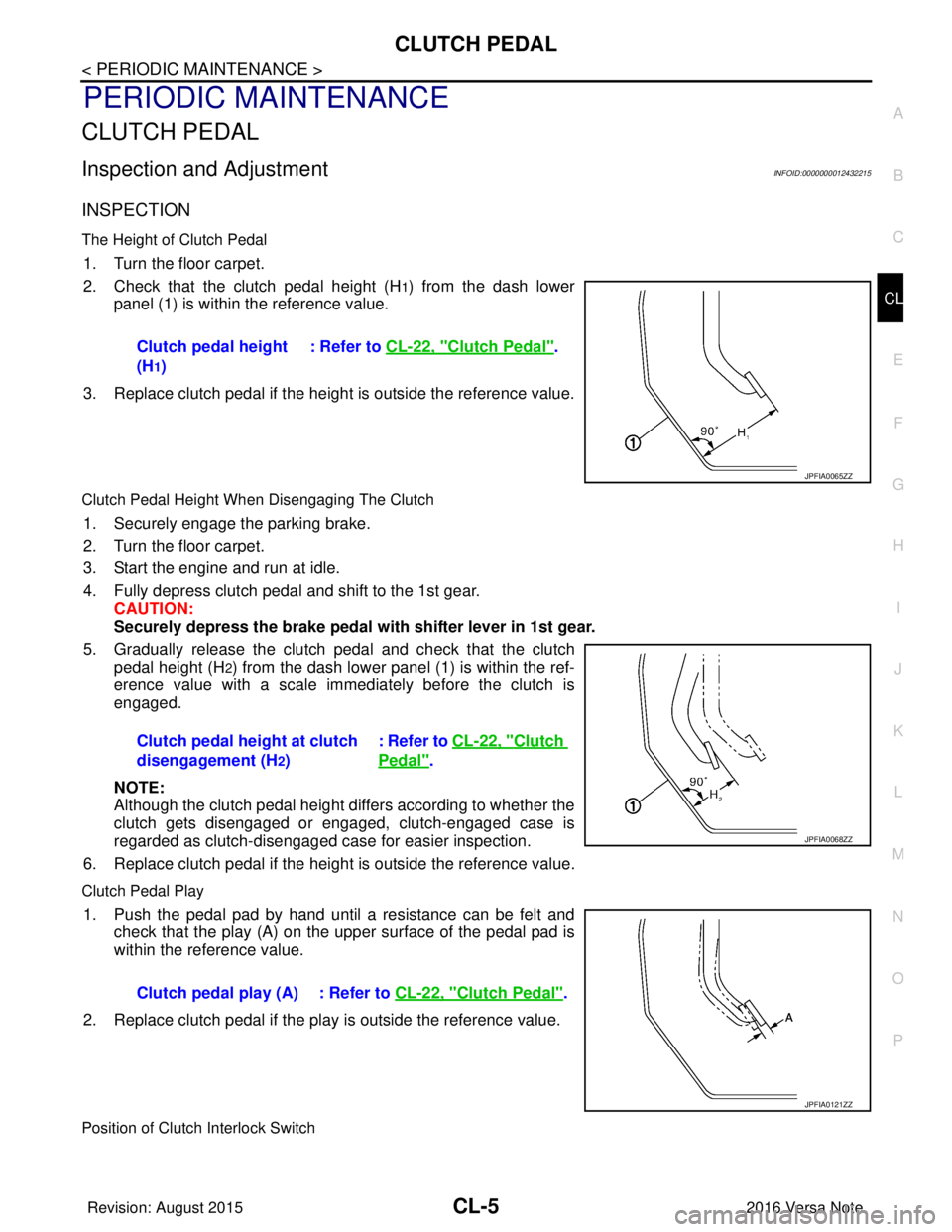
The Height of Clutch Pedal
1. Turn the floor carpet.
2. Check that the clutch pedal height (H
1) from the dash lower
panel (1) is within the reference value.
3. Replace clutch pedal if the height is outside the reference value.
Clutch Pedal Height When Disengaging The Clutch
1. Securely engage the parking brake.
2. Turn the floor carpet.
3. Start the engine and run at idle.
4. Fully depress clutch pedal and shift to the 1st gear. CAUTION:
Securely depress the brake pedal with shifter lever in 1st gear.
5. Gradually release the clutch pedal and check that the clutch pedal height (H
2) from the dash lower panel (1) is within the ref-
erence value with a scale immediately before the clutch is
engaged.
NOTE:
Although the clutch pedal height differs according to whether the
clutch gets disengaged or engaged, clutch-engaged case is
regarded as clutch-disengaged case for easier inspection.
6. Replace clutch pedal if the height is outside the reference value.
Clutch Pedal Play
1. Push the pedal pad by hand until a resistance can be felt and check that the play (A) on the upper surface of the pedal pad is
within the reference value.
2. Replace clutch pedal if the play is outside the reference value.
Position of Clutch Interlock Switch
Clutch pedal height
(H
1) : Refer to
CL-22, "
Clutch Pedal".
JPFIA0065ZZ
Clutch pedal height at clutch
disengagement (H
2) : Refer to CL-22, "
Clutch
Pedal".
JPFIA0068ZZ
Clutch pedal play (A) : Refer to
CL-22, "Clutch Pedal".
JPFIA0121ZZ
Revision: August 2015 2016 Versa Note
cardiagn.com
Page 703 of 3641
![NISSAN NOTE 2016 Service Repair Manual DLK-14
< SYSTEM DESCRIPTION >[WITH INTELLIGENT KEY SYSTEM]
COMPONENT PARTS
A. View with instrument panel assembly
removed B. View with glove box door removed C. View with front grille removed
D. View](/img/5/57363/w960_57363-702.png "NISSAN NOTE 2016 Service Repair Manual DLK-14
< SYSTEM DESCRIPTION >[WITH INTELLIGENT KEY SYSTEM]
COMPONENT PARTS
A. View with instrument panel assembly
removed B. View with glove box door removed C. View with front grille removed
D. View")
DLK-14
< SYSTEM DESCRIPTION >[WITH INTELLIGENT KEY SYSTEM]
COMPONENT PARTS
A. View with instrument panel assembly
removed B. View with glove box door removed C. View with front grille removed
D. View of LH door (RH similar) E. View of LH door switch (RH similar) F. View with rear bumper cover re- moved
G. View from rear of vehicle H. View with rear seat cushion removed I. View with center console removed
No. Component Function
1. Combination meter Combination meter transmits the vehicle speed sig-
nal to BCM via CAN communication.
BCM also receives the vehicle speed signal from
ABS actuator and electric uni
t (control unit) via CAN
communication. BCM compares both signals to de-
tect the vehicle speed.
Security indicator lamp is located on combination
meter.
Security indicator lamp blinks when ignition switch
is in any position other than ON to warn that NIS-
SAN VEHICLE IMMOBILIZER SYSTEM-NATS
[NVIS (NATS)] is on board.
Refer to MWI-59, "
METER SYSTEM : Combination
Meter".
2. Push-button ignition switch Push-button ignition switch has push switch inside
which detects that push-button ignition switch is
pressed, and then transmits ON/OFF signal to
BCM. BCM changes the ignition switch position with
the operation of push-button ignition switch. BCM
maintains the ignition switch position status while
push-button ignition switch is not operated.
3. BCM BCM controls INTELLIGENT KEY SYSTEM (EN-
GINE START FUNCTION), NISSAN VEHICLE IM-
MOBILIZER SYSTEM-NATS [NVIS (NATS)] and
VEHICLE SECURITY SYSTEM.
BCM performs the ID verification between BCM and
Intelligent Key when the Intelligent Key is carried
into the detection area of inside key antenna, and
push-button ignition switch is pressed. If the ID ver-
ification result is OK, ignition switch operation is
available.
Then, when the ignition switch is turned ON, BCM
performs ID verification between BCM and ECM. If
the ID verification result is OK, ECM can start en-
gine.
Refer to BCS-6, "
BODY CONTROL SYSTEM :
Component Parts Location" for detailed installation
location.
4. Main power window and door lock/unlock switch Door lock and unlock switch is integrated into the
main power window and door lock/unlock switch.
Door lock and unlock switch transmits door lock/un-
lock operation signal to BCM.
Refer to PWC-7, "
Main Power Window And Door
Lock/Unlock Switch".
5. Front door lock assembly LH Door key cylinder switch is integrated into front door
lock assembly (driver side).
Door key cylinder switch detects door LOCK/UN-
LOCK operation using mechanical key, and then
transmits the operation signal to BCM.
Refer to DLK-17, "
INTELLIGENT KEY SYSTEM :
Front Door Lock Asse
mbly (Driver Side)".
6. Rear door lock actuator LH Rear door lock actuator locks/unlocks the rear door
latch assembly.
Revision: August 2015
2016 Versa Note
cardiagn.com
Page 712 of 3641
![NISSAN NOTE 2016 Service Repair Manual SYSTEM (INTELLIGENT KEY SYSTEM)DLK-23
< SYSTEM DESCRIPTION > [WITH INTELLIGENT KEY SYSTEM]
C
D
E
F
G H
I
J
L
M A
B
DLK
N
O P
DOOR LOCK FUNCTION
DOOR LOCK FUNCTION : System DescriptionINFOID:0000000012](/img/5/57363/w960_57363-711.png "NISSAN NOTE 2016 Service Repair Manual SYSTEM (INTELLIGENT KEY SYSTEM)DLK-23
< SYSTEM DESCRIPTION > [WITH INTELLIGENT KEY SYSTEM]
C
D
E
F
G H
I
J
L
M A
B
DLK
N
O P
DOOR LOCK FUNCTION
DOOR LOCK FUNCTION : System DescriptionINFOID:0000000012")
SYSTEM (INTELLIGENT KEY SYSTEM)DLK-23
< SYSTEM DESCRIPTION > [WITH INTELLIGENT KEY SYSTEM]
C
D
E
F
G H
I
J
L
M A
B
DLK
N
O P
DOOR LOCK FUNCTION
DOOR LOCK FUNCTION : System DescriptionINFOID:0000000012429984
SYSTEM DIAGRAM
DOOR REQUEST SWITCH OPERATION
When pressing the request switch, it is possible to lock and unlock the door by carrying the Intelligent Key.
OPERATION DESCRIPTION
• When the BCM detects that each door request switch is pressed, it starts the outside key antenna and inside
key antenna corresponding to the pressed door request swit ch and transmits the request signal to the Intelli-
gent Key. And then, check that the Intelligent Key is near the door.
• If the Intelligent Key is within the outside key antenna detection area, it receives the request signal and
transmits the key ID signal to the BCM via remote keyless entry receiver.
• BCM receives the key ID signal and compares it with the registered key ID.
• BCM transmits door lock/unlock signal and operates each door lock actuator. At the same time, BCM blinks
hazard warning lamp (lock: 2 times, unlock: 1 time) and sounds Intelligent Key buzzer (lock: 1 time, unlock:
1 time) as a reminder.
OPERATION CONDITION
If the following conditions are satisfied, door lock/unl ock operation is performed if the door request switch is
operated:
Key reminder The key reminder buzzer sounds a warning if the door is locked with the key left
inside the vehicle. DLK-27
WarningIf an action that does not meet the operating condition of the Intelligent Key sys-
tem is taken, the buzzer sounds to inform the driver.
DLK-27
Engine start
The engine can be turned on while carrying the Intelligent Key. DLK-22
Interior room lamp control Interior room lamp is controlled according to door lock/unlock state. DLK-20
FunctionDescriptionRefer
JMKIA6137GB
Revision: August 2015 2016 Versa Note
cardiagn.com
Page 716 of 3641
![NISSAN NOTE 2016 Service Repair Manual SYSTEM (INTELLIGENT KEY SYSTEM)DLK-27
< SYSTEM DESCRIPTION > [WITH INTELLIGENT KEY SYSTEM]
C
D
E
F
G H
I
J
L
M A
B
DLK
N
O P
KEY REMINDER FUNCTION : System DescriptionINFOID:0000000012429986
System Di](/img/5/57363/w960_57363-715.png "NISSAN NOTE 2016 Service Repair Manual SYSTEM (INTELLIGENT KEY SYSTEM)DLK-27
< SYSTEM DESCRIPTION > [WITH INTELLIGENT KEY SYSTEM]
C
D
E
F
G H
I
J
L
M A
B
DLK
N
O P
KEY REMINDER FUNCTION : System DescriptionINFOID:0000000012429986
System Di")
SYSTEM (INTELLIGENT KEY SYSTEM)DLK-27
< SYSTEM DESCRIPTION > [WITH INTELLIGENT KEY SYSTEM]
C
D
E
F
G H
I
J
L
M A
B
DLK
N
O P
KEY REMINDER FUNCTION : System DescriptionINFOID:0000000012429986
System Diagram
BASIC OPERATION
Key reminder is the function that prevents the key from being left in the vehicle.
Key reminder has the following 3 functions:
*:When closing the door if something comes into contact with the door lock switch it might activate the door locks accidentally , but the
unlock operation will override this.
NOTE:
The above function operates when the Intelligent Key is in side the vehicle. However, there may be times when
the Intelligent Key cannot be detected, and this func tion does not operate when the Intelligent Key is on the
instrument panel, rear parcel shelf, or in the glove box. Also, this system sometimes does not operate if the
Intelligent Key is in the door pocket for the open door.
WARNING FUNCTION
WARNING FUNCTION : System DescriptionINFOID:0000000012429987
OPERATION DESCRIPTION
The warning function are as per the following items and are given to the user as warning information and
warnings using combinations of Intelligent Key warni ng buzzer, combination meter buzzer, KEY warning lamp,
shift P warning lamp and engine start operation indicator lamp:
• Intelligent Key system malfunction
• OFF position warning
• P position warning
• ACC warning
• Take away warning
• Door lock operation warning
• Engine start information
ALKIA3196GB
Key reminder function Operation condition Operation
Driver side door closed* Right after driver side door is closed under the following conditions:
• Intelligent Key is inside the vehicle.
• Driver side door is opened.
• Driver side door is in unlock state. All doors unlock
Door is open or closed Right after all doors are closed under the following conditions:
• Door lock/unlock switch or driver side door lock knob are operated.
• Intelligent Key is inside the vehicle.
• Any door is opened.
• All doors are locked. • All doors unlock
• Honk Intelligent Key warn-
ing buzzer
Back door is closed Right after Back door is closed under the following conditions:
• Intelligent Key is inside trunk room.
• All doors are closed.
• All doors are locked. • Back door open
• Honk Intelligent Key warn-
ing buzzer
Revision: August 2015 2016 Versa Note
cardiagn.com
Page 717 of 3641
![NISSAN NOTE 2016 Service Repair Manual DLK-28
< SYSTEM DESCRIPTION >[WITH INTELLIGENT KEY SYSTEM]
SYSTEM (INTELLIGENT KEY SYSTEM)
• Intelligent Key low battery warning
• Key ID warning
OPERATION CONDITION
Operation condition of warning](/img/5/57363/w960_57363-716.png "NISSAN NOTE 2016 Service Repair Manual DLK-28
< SYSTEM DESCRIPTION >[WITH INTELLIGENT KEY SYSTEM]
SYSTEM (INTELLIGENT KEY SYSTEM)
• Intelligent Key low battery warning
• Key ID warning
OPERATION CONDITION
Operation condition of warning")
DLK-28
< SYSTEM DESCRIPTION >[WITH INTELLIGENT KEY SYSTEM]
SYSTEM (INTELLIGENT KEY SYSTEM)
• Intelligent Key low battery warning
• Key ID warning
OPERATION CONDITION
Operation condition of warning and information is as per the following table:
WARNING METHOD
The following table shows the alarm or warning methods with chime:
Warning/Information functions
Operation procedure
Intelligent Key system malfunction A malfunction is detected on BCM and key warning lamp turns ON
OFF position warning When condition A, B or condition C is satisfied:
• Condition A
- Ignition switch: ACC position
- Door switch (driver side
): ON (Door is open)
• Condition B
- Turn ignition switch from ON to OFF while door is open.
• Condition C
- Intelligent Key backside is contacted to push-button ignition switch while brake pedal is depressed and ignition switch is LOCK or OFF. (When the
Intelligent Key battery is discharged.)
- Door switch (driver side ): ON (Door is open)
P position warning For internal
• Shift position: Other than P
• Engine is stopped. (Ignition switch is turned from ON to OFF.)
For external • P position warning (For internal) operates.
• Door switch: ON to OFF (Door is open to close.)
• Intelligent Key cannot be detected inside the vehicle.
ACC warning • After P position warning operates, or when ignition switch is turned ON
immediately after P position warning operates.
• Ignition switch: ACC
Ta k e a w a y w a r n i n g Door status changes
from open to close
• Ignition switch: Other than LOCK and OFF.
• Door switch: ON to OFF (Door status changes from open to close.)
• Registered Intelligent Key is not detected inside the vehicle.
Door status is open • Ignition switch: Other than LOCK and OFF.
• Door switch: ON (Door is open.)
• Registered Intelligent Key is not detected inside the vehicle during Key
ID verification for 5 seconds.
Push-button ignition
switch operation • Ignition switch: Other than LOCK position.
• Push-button ignition switch is pressed.
• Registered Intelligent Key is not detected inside the vehicle.
Door lock operation warning Door lock operation is requested while door lock operation condition of
door request switch is not satisfied.
Engine start information Ignition switch is ON po-
sition
• Ignition switch: ON position
• Shift position: P
• Engine is stopped.
Ignition switch is other
than ON position • Ignition switch: Other than ON.
• Shift position: P
• Intelligent Key is in the passenger room after driver door is opened and
closed.
Ignition switch is ON po-
sition to OFF position • Ignition switch: ON position to OFF position.
• Shift position: P position
NOTE:
Engine start information turns ON for several seconds and then turns OFF,
when ignition switch is turned to the ON position from the OFF position. En-
gine start information does not turn ON until opening and closing of driver
door is detected again.
Intelligent Key low battery warning BCM detects that Intelligent Key is low battery, after ignition switch is turned
ON.
Key ID warning • Push-button ignition switch is pressed.
• Registered Intelligent Key is not detected inside the vehicle.
Revision: August 2015
2016 Versa Note
cardiagn.com
Page 718 of 3641
![NISSAN NOTE 2016 Service Repair Manual SYSTEM (INTELLIGENT KEY SYSTEM)DLK-29
< SYSTEM DESCRIPTION > [WITH INTELLIGENT KEY SYSTEM]
C
D
E
F
G H
I
J
L
M A
B
DLK
N
O P
LIST OF OPERATION RELATED PARTS
Parts marked with × are the parts relate](/img/5/57363/w960_57363-717.png "NISSAN NOTE 2016 Service Repair Manual SYSTEM (INTELLIGENT KEY SYSTEM)DLK-29
< SYSTEM DESCRIPTION > [WITH INTELLIGENT KEY SYSTEM]
C
D
E
F
G H
I
J
L
M A
B
DLK
N
O P
LIST OF OPERATION RELATED PARTS
Parts marked with × are the parts relate")
SYSTEM (INTELLIGENT KEY SYSTEM)DLK-29
< SYSTEM DESCRIPTION > [WITH INTELLIGENT KEY SYSTEM]
C
D
E
F
G H
I
J
L
M A
B
DLK
N
O P
LIST OF OPERATION RELATED PARTS
Parts marked with × are the parts related to operation.
Warning/Information functions “KEY” warning
lamp Shift P
warning lamp Warning chime
Engine start
operation in- dicator lamp
Combination
meter buzzer Intelligent
Key warn-
ing buzzer
Intelligent Key system malfunction Indicate ————
OFF position warning For internal
—— Activate — —
For external ——— Activate —
P position warning For internal
Blink (yellow)Indicate Activate —
—
For external ——Active —
ACC warning —— Activate — —
Ta k e a w a y w a r n i n g Door is open to close
Blink (yellow)—ActivateActivate—
Door is open —— ——
Push-ignition switch oper-
ation —Activate — —
Door lock operation warning ——— Activate —
Engine start information ——— — Indicate
Intelligent Key low battery warning Blink (green) ————
Key ID warning Blink (yellow) ————
Function
Intelligent Key
Push-button ignition switch
Door switch
Door request switch
Inside key antenna
Outside key antenna
Intelligent Key warning buzzer
Combination meter buzzer
CAN communication system
BCM
Shift P warning lamp
Engine start operation indicator lamp
“KEY” warning lamp
Intelligent Key system malfunction ×× ×
OFF position warning For internal
××××
For external ×××
P position warning ××××× ×
ACC warning ××××
Ta k e a w a y w a r n i n g Door is open or close
××××××× ×
Door is open ××× ×× ×
Push-button ignition
switch operation ×× × ××× ×
Door lock operation warning × ××××× ×
Key ID warning ×× ×××
Engine start information ×× ××× ×
Intelligent Key low battery warning ×××××
Revision: August 2015 2016 Versa Note
cardiagn.com