diagram NISSAN NOTE 2016 Service Repair Manual
[x] Cancel search | Manufacturer: NISSAN, Model Year: 2016, Model line: NOTE, Model: NISSAN NOTE 2016Pages: 3641, PDF Size: 28.72 MB
Page 498 of 3641
![NISSAN NOTE 2016 Service Repair Manual BRC-50
< WIRING DIAGRAM >[VDC/TCS/ABS]
BRAKE CONTROL SYSTEM
AAFIA0296GB
Revision: August 2015
2016 Versa Note
cardiagn.com](/img/5/57363/w960_57363-497.png "NISSAN NOTE 2016 Service Repair Manual BRC-50
< WIRING DIAGRAM >[VDC/TCS/ABS]
BRAKE CONTROL SYSTEM
AAFIA0296GB
Revision: August 2015
2016 Versa Note
cardiagn.com")
BRC-50
< WIRING DIAGRAM >[VDC/TCS/ABS]
BRAKE CONTROL SYSTEM
AAFIA0296GB
Revision: August 2015
2016 Versa Note
cardiagn.com
Page 499 of 3641
![NISSAN NOTE 2016 Service Repair Manual BRAKE CONTROL SYSTEMBRC-51
< WIRING DIAGRAM > [VDC/TCS/ABS]
C
D
E
G H
I
J
K L
M A
B
BRC
N
O P
ABFIA1096GB
Revision: August 2015 2016 Versa Note
cardiagn.com](/img/5/57363/w960_57363-498.png "NISSAN NOTE 2016 Service Repair Manual BRAKE CONTROL SYSTEMBRC-51
< WIRING DIAGRAM > [VDC/TCS/ABS]
C
D
E
G H
I
J
K L
M A
B
BRC
N
O P
ABFIA1096GB
Revision: August 2015 2016 Versa Note
cardiagn.com")
BRAKE CONTROL SYSTEMBRC-51
< WIRING DIAGRAM > [VDC/TCS/ABS]
C
D
E
G H
I
J
K L
M A
B
BRC
N
O P
ABFIA1096GB
Revision: August 2015 2016 Versa Note
cardiagn.com
Page 533 of 3641
![NISSAN NOTE 2016 Service Repair Manual C1116 STOP LAMP SWITCHBRC-85
< DTC/CIRCUIT DIAGNOSIS > [VDC/TCS/ABS]
C
D
E
G H
I
J
K L
M A
B
BRC
N
O P
Diagnosis ProcedureINFOID:0000000012430867
NOTE:
DTC “C1116” may be detected when the brake p](/img/5/57363/w960_57363-532.png "NISSAN NOTE 2016 Service Repair Manual C1116 STOP LAMP SWITCHBRC-85
< DTC/CIRCUIT DIAGNOSIS > [VDC/TCS/ABS]
C
D
E
G H
I
J
K L
M A
B
BRC
N
O P
Diagnosis ProcedureINFOID:0000000012430867
NOTE:
DTC “C1116” may be detected when the brake p")
C1116 STOP LAMP SWITCHBRC-85
< DTC/CIRCUIT DIAGNOSIS > [VDC/TCS/ABS]
C
D
E
G H
I
J
K L
M A
B
BRC
N
O P
Diagnosis ProcedureINFOID:0000000012430867
NOTE:
DTC “C1116” may be detected when the brake pedal and the accelerator pedal are simultaneously depressed
for 1 minute or more while driving the vehicle. This is not a malfunction.
1.INTERVIEW FROM THE CUSTOMER
Check if the brake pedal and the accelerator pedal ar e simultaneously depressed for 1 minute or more while
driving the vehicle.
Is there such a history?
YES >> GO TO 2.
NO >> GO TO 3.
2.PERFORM SELF-DIAGNOSIS
With CONSULT
1. Erase “Self Diagnostic Result” of “ABS”
2. Turn the ignition switch OFF → ON → OFF.
NOTE:
Wait at least 10 seconds after turning ignition switch OFF or ON.
3. Start the engine.
NOTE:
Stop the vehicle.
4. Depress the brake pedal several times.
5. Turn the ignition switch OFF.
NOTE:
Wait at least 10 seconds after turning ignition switch OFF.
6. Start the engine. NOTE:
Wait at least 10 seconds after starting the engine.
7. Perform “Self Diagnostic Result” of “ABS”.
Is DTC
“C 111 6” detected?
YES >> GO TO 3.
NO >> Inspection End.
3.STOP LAMP FOR ILLUMINATION
Depress brake pedal and check that stop lamps turn ON.
Do the stop lamps turn ON?
YES >> GO TO 5.
NO >> Check the stop lamp system. Refer to EXL-63, "
Wiring Diagram". GO TO 4.
4.CHECK DATA MONITOR (1)
With CONSULT
1. Erase “Self Diagnostic Result” of “ABS”
2. Turn the ignition switch OFF → ON → OFF.
NOTE:
Wait at least 10 seconds after turning ignition switch OFF or ON.
3. Start the engine.
NOTE:
Stop the vehicle.
4. Select “DATA MONITOR” of “ABS”, check “STOP LA MP SW”. Check that data monitor displays “On” or
“Off” when brake pedal is depressed or released. Refer to BRC-36, "
Reference Value".
Is the inspection result normal?
YES >> Inspection End.
NO >> GO TO 5.
5.CHECK CONNECTOR AND TERMINAL
1. Turn the ignition switch OFF.
2. Disconnect ABS actuator and electric unit (control unit) harness connector.
3. Check the ABS actuator and electric unit (contro l unit) harness connector for disconnection or looseness.
Revision: August 2015 2016 Versa Note
cardiagn.com
Page 572 of 3641
![NISSAN NOTE 2016 Service Repair Manual BRC-124
< DTC/CIRCUIT DIAGNOSIS >[VDC/TCS/ABS]
PARKING BRAKE SWITCH
PARKING BRAKE SWITCH
Component Function CheckINFOID:0000000012430903
1.CHECK PARKING BRAKE SWITCH OPERATION
Check that brake warning](/img/5/57363/w960_57363-571.png "NISSAN NOTE 2016 Service Repair Manual BRC-124
< DTC/CIRCUIT DIAGNOSIS >[VDC/TCS/ABS]
PARKING BRAKE SWITCH
PARKING BRAKE SWITCH
Component Function CheckINFOID:0000000012430903
1.CHECK PARKING BRAKE SWITCH OPERATION
Check that brake warning")
BRC-124
< DTC/CIRCUIT DIAGNOSIS >[VDC/TCS/ABS]
PARKING BRAKE SWITCH
PARKING BRAKE SWITCH
Component Function CheckINFOID:0000000012430903
1.CHECK PARKING BRAKE SWITCH OPERATION
Check that brake warning lamp in combination me ter turns ON/OFF when parking brake is actuated.
Is the inspection result normal?
YES >> Inspection End.
NO >> Proceed to diagnosis procedure. Refer to BRC-124, "
Diagnosis Procedure".
Diagnosis ProcedureINFOID:0000000012430904
Regarding Wiring Diagram information, refer to BRC-44, "Wiring Diagram".
1.CONNECTOR INSPECTION
1. Turn ignition switch OFF.
2. Disconnect combination meter and parking brake switch connectors.
3. Check connectors and terminals for deformation, disconnection, looseness or damage.
Is the inspection result normal?
YES >> GO TO 2.
NO >> Repair or replace as necessary.
2.CHECK PARKING BRAKE SWITCH
Check parking brake switch. Refer to BRC-125, "
Component Inspection".
Is the inspection result normal?
YES >> GO TO 3.
NO >> Replace parking brake switch. Refer to PB-9, "
Removal and Installation".
3.CHECK PARKING BRAKE SWITCH SIGNAL
With CONSULT.
1. Connect combination meter connector and parking brake switch connectors.
2. Turn ignition switch ON.
3. In “Data Monitor” select “PKB SW” and check parking brake switch signal.
Is the inspection result normal?
YES >> Refer to BRC-52, "Work Flow".
NO >> GO TO 4.
4.CHECK PARKING BRAKE SWITCH CIRCUIT
1. Turn ignition switch OFF.
2. Disconnect combination meter and parking brake switch connectors.
3. Check continuity between combination meter connector M82 (type A) or M 24 (type B) terminal 10 and
parking brake switch connector M17 terminal 1.
Condition DATA MONITOR
Actuate parking brake On
Release parking brake Off
Combination meterParking brake switchContinuity
Connector TerminalConnector Terminal
M82 (type A) 10M17 1 Yes
M24 (type B)
Revision: August 2015 2016 Versa Note
cardiagn.com
Page 574 of 3641
![NISSAN NOTE 2016 Service Repair Manual BRC-126
< DTC/CIRCUIT DIAGNOSIS >[VDC/TCS/ABS]
VDC OFF SWITCH
VDC OFF SWITCH
Component Function CheckINFOID:0000000012430906
1.CHECK VDC OFF SWITCH OPERATION
Check that VDC OFF indicator lamp in combi](/img/5/57363/w960_57363-573.png "NISSAN NOTE 2016 Service Repair Manual BRC-126
< DTC/CIRCUIT DIAGNOSIS >[VDC/TCS/ABS]
VDC OFF SWITCH
VDC OFF SWITCH
Component Function CheckINFOID:0000000012430906
1.CHECK VDC OFF SWITCH OPERATION
Check that VDC OFF indicator lamp in combi")
BRC-126
< DTC/CIRCUIT DIAGNOSIS >[VDC/TCS/ABS]
VDC OFF SWITCH
VDC OFF SWITCH
Component Function CheckINFOID:0000000012430906
1.CHECK VDC OFF SWITCH OPERATION
Check that VDC OFF indicator lamp in combination meter turns ON/OFF when VDC OFF switch is operated.
Is the inspection result normal?
YES >> Inspection End.
NO >> Proceed to diagnosis procedure. Refer to BRC-126, "
Diagnosis Procedure".
Diagnosis ProcedureINFOID:0000000012430907
Regarding Wiring Diagram information, refer to BRC-44, "Wiring Diagram".
1.CONNECTOR INSPECTION
1. Turn ignition switch OFF.
2. Disconnect ABS actuator and electric unit (c ontrol unit) and VDC OFF switch connectors.
3. Check connectors and terminals for deformation, disconnection, looseness or damage.
Is the inspection result normal?
YES >> GO TO 2.
NO >> Repair or replace as necessary.
2.CHECK VDC OFF SWITCH
Check VDC OFF switch. Refer to BRC-127, "
Component Inspection".
Is the inspection result normal?
YES >> GO TO 3.
NO >> Replace VDC OFF switch. Refer to BRC-146, "
Removal and Installation".
3.CHECK VDC OFF SWITCH SIGNAL
With CONSULT.
1. Connect ABS actuator and electric unit (c ontrol unit) and VDC OFF switch connectors.
2. Turn ignition switch ON.
3. In “Data Monitor” select “OFF SW” and check VDC OFF switch signal.
Is the inspection result normal?
YES >> Refer to BRC-52, "Work Flow".
NO >> GO TO 4.
4.CHECK VDC OFF SWITCH CIRCUIT
1. Turn ignition switch OFF.
2. Disconnect ABS actuator and electric unit (c ontrol unit) and VDC OFF switch connectors.
3. Check continuity between ABS actuator and electr ic unit (control unit) connector E33 terminal 20 and
VDC OFF switch connector M34 terminal 1.
4. Check continuity between ABS actuator and electric unit (control unit) connector terminal E33 terminal 20 and ground.
Condition DATA MONITOR
VDC OFF switch is pressed and released On
VDC OFF switch is pressed and released again Off
ABS actuator and electric unit (control unit) VDC OFF switch
Continuity
Connector Terminal Connector Terminal
E33 20 M34 1 Yes
Revision: August 2015 2016 Versa Note
cardiagn.com
Page 596 of 3641

CHG
CHG-1
ELECTRICAL & POWER CONTROL
C
DE
F
G H
I
J
K L
B
SECTION CHG
A
O P
N
CONTENTS
CHARGING SYSTEM
PRECAUTION .......
........................................3
PRECAUTIONS .............................................. .....3
Precaution for Supplemental Restraint System
(SRS) "AIR BAG" and "SEAT BELT PRE-TEN-
SIONER" ............................................................. ......
3
Precaution for Power Generation Voltage Variable
Control System ..........................................................
3
PREPARATION ............................................4
PREPARATION .............................................. .....4
Special Service Tool ........................................... ......4
Commercial Service Tool ..........................................4
SYSTEM DESCRIPTION ..............................5
COMPONENT PARTS ................................... .....5
Component Parts Location .................................. ......5
Component Description .............................................6
SYSTEM ..............................................................7
CHARGING SYSTEM ..................................................7
CHARGING SYSTEM : System Diagram ........... ......7
CHARGING SYSTEM : System Description .............7
CHARGING SYSTEM : Component Description ......7
POWER GENERATION VOLTAGE VARI-
ABLE CONTROL SYSTEM .................................
8
System Diagram .................................................. ......8
System Description ...................................................8
WIRING DIAGRAM .......................................9
CHARGING SYSTEM ..................................... .....9
Wiring Diagram ................................................... ......9
BASIC INSPECTION ...................................14
DIAGNOSIS AND REPAIR WORKFLOW ..... ....14
Work Flow (With EXP-800 NI or GR8-1200 NI) ......14
Work Flow (Without EXP-800 NI or GR8-1200 NI) ....17
DTC/CIRCUIT DIAGNOSIS .........................20
CHARGING SYSTEM PRELIMINARY IN-
SPECTION ....... .................................................
20
Diagnosis Procedure ........................................... ....20
POWER GENERATION VOLTAGE VARI-
ABLE CONTROL SYSTEM OPERATION IN-
SPECTION ........................................................
21
Diagnosis Procedure ........................................... ....21
B TERMINAL CIRCUIT .....................................23
Description ...............................................................23
Diagnosis Procedure ...............................................23
L TERMINAL CIRCUIT (OPEN) ........................24
Description ...............................................................24
Diagnosis Procedure ...............................................24
L TERMINAL CIRCUIT (SHORT) .....................26
Description ...............................................................26
Diagnosis Procedure ...............................................26
S TERMINAL CIRCUIT .....................................27
Description ...............................................................27
Diagnosis Procedure ...............................................27
SYMPTOM DIAGNOSIS ..............................28
CHARGING SYSTEM .......................................28
Symptom Table ................................................... ....28
REMOVAL AND INSTALLATION ...............29
GENERATOR ....................................................29
Exploded View ..................................................... ....29
Removal and Installation .........................................29
SERVICE DATA AND SPECIFICATIONS
(SDS) ............... .......................................... ...
31
Revision: August 2015 2016 Versa Note
cardiagn.com
Page 602 of 3641
CHG
SYSTEMCHG-7
< SYSTEM DESCRIPTION >
C
DE
F
G H
I
J
K L
B A
O P
N
SYSTEM
CHARGING SYSTEM
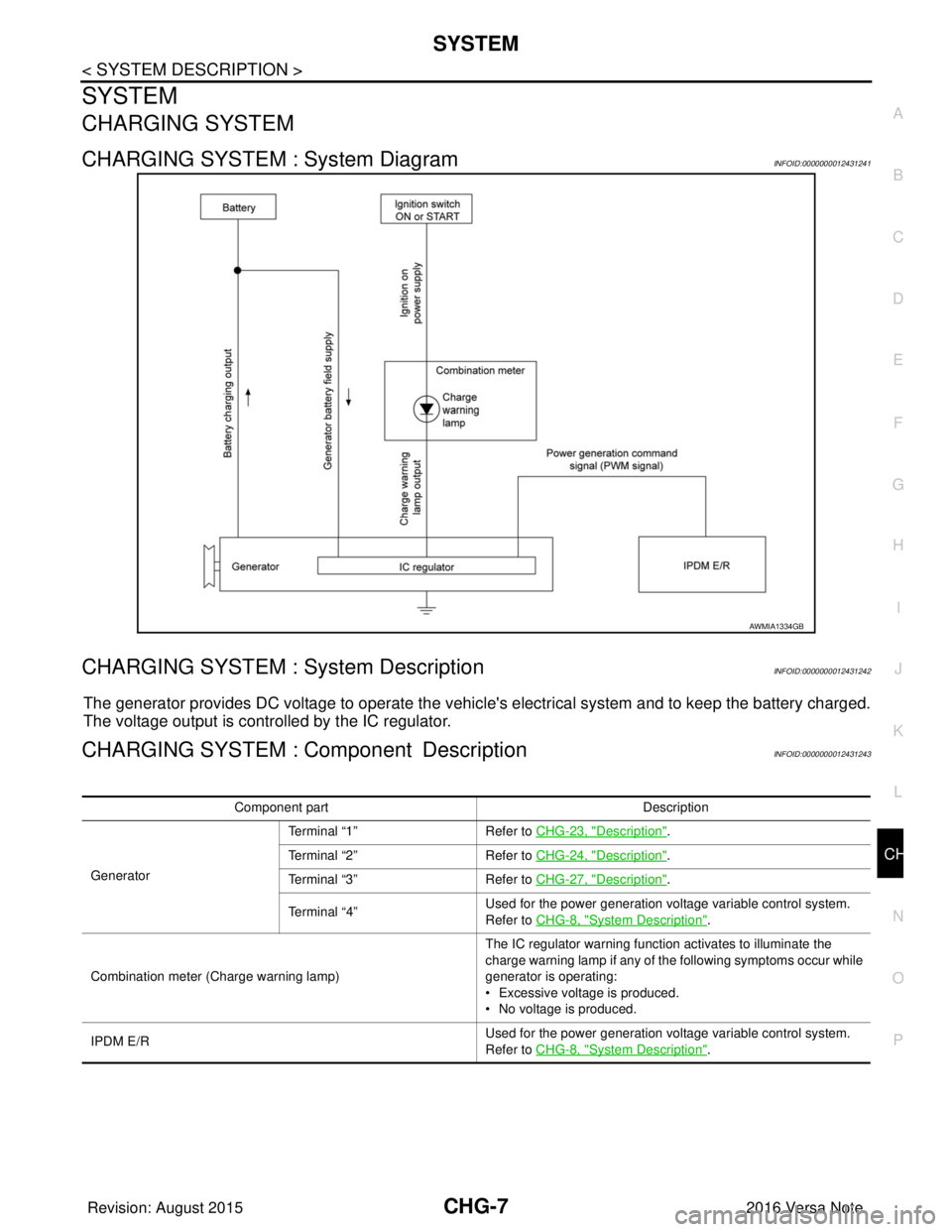
CHARGING SYSTEM : System DiagramINFOID:0000000012431241
CHARGING SYSTEM : System DescriptionINFOID:0000000012431242
The generator provides DC voltage to operate the vehicl
e's electrical system and to keep the battery charged.
The voltage output is controlled by the IC regulator.
CHARGING SYSTEM : Component DescriptionINFOID:0000000012431243
AWMIA1334GB
Component part Description
Generator Terminal “1”
Refer to CHG-23, "
Description".
Terminal “2” Refer to CHG-24, "
Description".
Terminal “3” Refer to CHG-27, "
Description".
Terminal “4” Used for the power generation voltage variable control system.
Refer to CHG-8, "
System Description".
Combination meter (C harge warning lamp) The IC regulator warning function activates to illuminate the
charge warning lamp if any of the following symptoms occur while
generator is operating:
• Excessive voltage is produced.
• No voltage is produced.
IPDM E/R Used for the power generation voltage variable control system.
Refer to CHG-8, "
System Description".
Revision: August 2015
2016 Versa Note
cardiagn.com
Page 603 of 3641

CHG-8
< SYSTEM DESCRIPTION >
POWER GENERATION VOLTAGE VARIABLE CONTROL SYSTEM
POWER GENERATION VOLTAGE VARIABLE CONTROL SYSTEM
System DiagramINFOID:0000000012431244
System DescriptionINFOID:0000000012431245
Power generation variable voltage control system has been adopted. By varying the voltage to the generator,
engine load due to power generation of the generator is reduced and fuel consumption is decreased.
NOTE:
When any malfunction is detected in the power generation variable voltage control system, power generation
is performed according to the characteristic of the IC regulator in the generator.
ALMIA0566GB
Revision: August 2015 2016 Versa Note
cardiagn.com
Page 604 of 3641
CHG
CHARGING SYSTEMCHG-9
< WIRING DIAGRAM >
C
DE
F
G H
I
J
K L
B A
O P
N
WIRING DIAGRAM
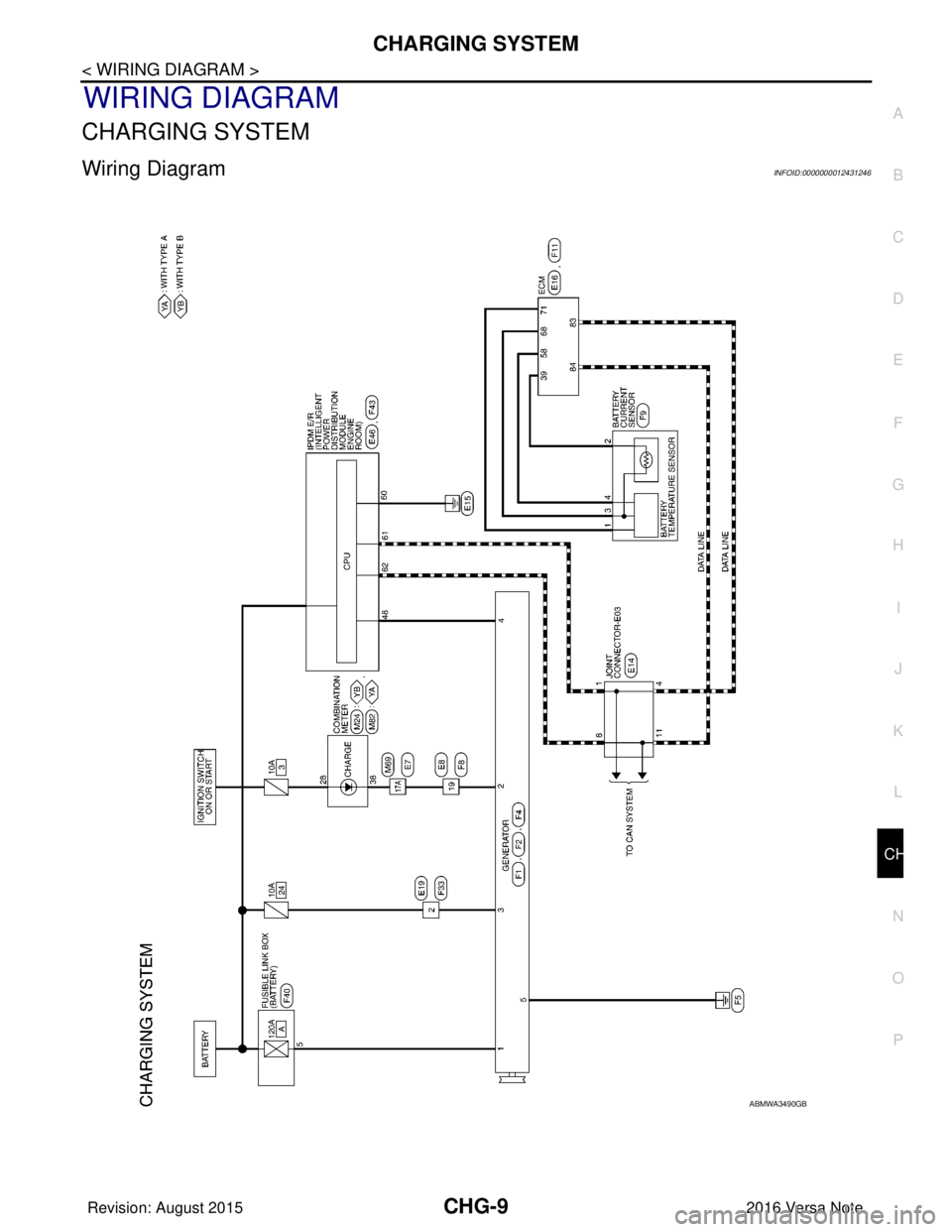
CHARGING SYSTEM
Wiring DiagramINFOID:0000000012431246
ABMWA3490GB
Revision: August 2015
2016 Versa Note
cardiagn.com
Page 605 of 3641
CHG-10
< WIRING DIAGRAM >
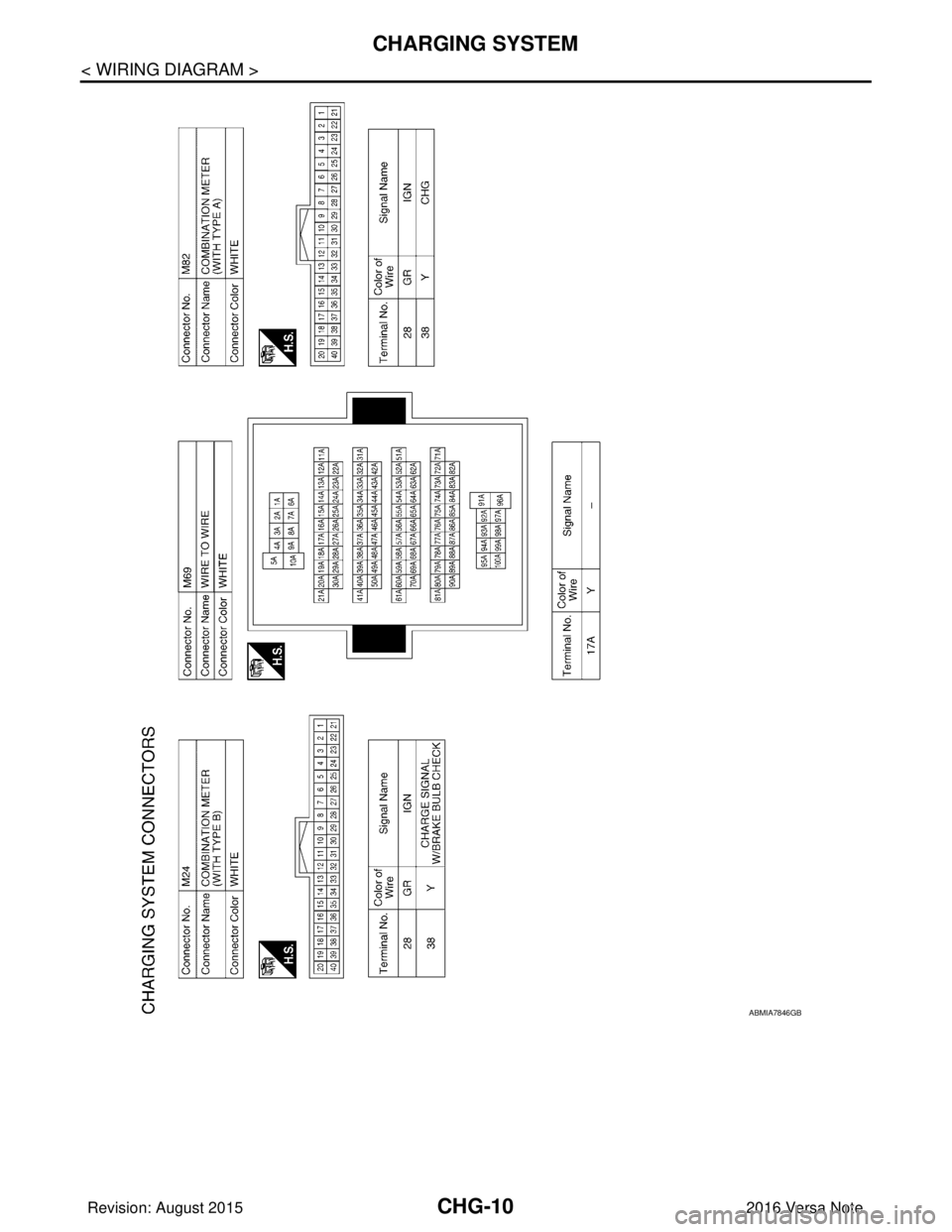
CHARGING SYSTEM
ABMIA7846GB
Revision: August 20152016 Versa Note
cardiagn.com