head light NISSAN NOTE 2016 Service User Guide
[x] Cancel search | Manufacturer: NISSAN, Model Year: 2016, Model line: NOTE, Model: NISSAN NOTE 2016Pages: 3641, PDF Size: 28.72 MB
Page 1005 of 3641
![NISSAN NOTE 2016 Service User Guide EM-4
< PRECAUTION >[HR16DE]
PRECAUTIONS
• Dowel pins are used for several parts alignment. When replacing and reassembling parts with dowel pins,
check that dowel pins are installed in the original](/img/5/57363/w960_57363-1004.png "NISSAN NOTE 2016 Service User Guide EM-4
< PRECAUTION >[HR16DE]
PRECAUTIONS
• Dowel pins are used for several parts alignment. When replacing and reassembling parts with dowel pins,
check that dowel pins are installed in the original")
EM-4
< PRECAUTION >[HR16DE]
PRECAUTIONS
• Dowel pins are used for several parts alignment. When replacing and reassembling parts with dowel pins,
check that dowel pins are installed in the original position.
• Cover openings of engine system with a tape or equival ent, if necessary, to seal out foreign materials.
• Mark and arrange disassembly parts in an organi zed way for easy troubleshooting and reassembly.
• When loosening nuts and bolts, start with the one furthest outside, then the one diagonally opposite, and so on. If the order of loosening is specified, do exactl y as specified. Power tools may be used in the step.
Inspection, Repair and ReplacementINFOID:0000000012431684
Before repairing or replacing, thoroughly inspect parts. Inspect new replacement parts in the same way, and
replace if necessary.
Assembly and InstallationINFOID:0000000012431685
• Use torque wrench to tighten bolts or nuts to specification.
• Tighten nuts and bolts in order exactly as specified in the procedure. If a tightening order or procedure is not
specified, tighten nuts and bolts equally in several differ ent steps. Start with the nuts or bolts in the center
and then tighten diagonally starting with the inside and moving to the outside in a spiral pattern.
• Replace with new gasket, packing, oil seal or O-ring.
• Thoroughly wash, clean, and air-blow each part. Carefully check engine oil or engine coolant passages for restrictions and blockages.
• Avoid damaging sliding or mating surfaces. Before assembling, completely remove foreign materials such as cloth lint or dust, and oil the sliding surfaces.
• After refilling engine coolant, bleed the air from the cooling system.
• After repairing, start the engine and increase engine s peed to check for engine coolant leaks, fuel leaks,
engine oil leaks, and exhaust gas leaks.
Parts Requiring Angle TighteningINFOID:0000000012431686
• For the final tightening of the following engine parts use Tool:
- Camshaft sprocket (INT) bolt
- Cylinder head bolts
- Main bearing cap bolts
- Connecting rod cap bolts
- Crankshaft pulley bolt (Note an angle wrench is required as bolt flange is provided with notches for angle tightening)
• Do not use a torque value for final tightening.
• The torque value for these parts are for a preliminary step.
• Ensure thread and seat surfaces are clean and coated with engine oil.
Precaution for Liquid GasketINFOID:0000000012431687
REMOVAL OF LIQUID GASKET SEALING
• After removing the bolts and nuts, separate the mating surface and remove the liquid gasket using Tool (A).
CAUTION:
Be careful not to damage the mating surfaces.
• In areas where the cutter is difficult to use, use a plastic hammer to lightly tap (1) the cutter where the liquid gasket is applied. Use a
plastic hammer to slide (2) the cutter by tapping on the side.
CAUTION:
Do not damage the mating surfaces. Tool number : KV10112100 (BT-8653-A)
Tool Number (A) : KV10111100 (J-37228)
AWBIA1249GB
Revision: August 2015
2016 Versa Note
cardiagn.com
Page 1068 of 3641
![NISSAN NOTE 2016 Service User Guide CAMSHAFTEM-67
< REMOVAL AND INSTALLATION > [HR16DE]
C
D
E
F
G H
I
J
K L
M A
EM
NP
O
12. Pull out the stopper pin (A), and then apply the tension to the
timing chain by rotating the crankshaft pulley c](/img/5/57363/w960_57363-1067.png "NISSAN NOTE 2016 Service User Guide CAMSHAFTEM-67
< REMOVAL AND INSTALLATION > [HR16DE]
C
D
E
F
G H
I
J
K L
M A
EM
NP
O
12. Pull out the stopper pin (A), and then apply the tension to the
timing chain by rotating the crankshaft pulley c")
CAMSHAFTEM-67
< REMOVAL AND INSTALLATION > [HR16DE]
C
D
E
F
G H
I
J
K L
M A
EM
NP
O
12. Pull out the stopper pin (A), and then apply the tension to the
timing chain by rotating the crankshaft pulley clockwise slightly.
13. Pull out the stopper pin of chain tensioner.
14. Install front cover.
15. Return the camshaft sprocket (INT) in the most retarded position:
a. Remove the stopper pin (A) from the camshaft sprocket (INT).
b. Turn the crankshaft pulley (1) slowly clockwise (A) and return the camshaft sprocket (INT) to the most retarded angle position.
• When first turning the crankshaft, the camshaft sprocket (INT)
will turn. Once it is turned more, and the vane (camshaft) also
turns, then it has reached t he most retarded angle position.
• The most retarded angle position can be checked by seeing if the stopper pin groove (A) is shifted clockwise.
• After spinning the crankshaft slightly in the counterclockwise direction, you can check the lock pin has joined by seeing if
the vane (camshaft) and the sprocket move together.
16. Install the camshaft position sensor (PHASE) to the rear end of cylinder head. • Tighten bolts with it completely inserted.
17. Check and adjust valve clearance. Refer to EM-10, "
Inspection and Adjustment".
18. Installation of the remaining components is in the reverse order of removal.
INSPECTION AFTER INSTALLATION
(1) : Plunger
(2) : Chain tensioner
(B) : Lever
(C) : Lever hole
(D) : Front cover has been removed for clarity.
PBIC3772E
(B) : Tape
PBIC3685E
PBIC3704E
(B) : Stopper pin hole
(C) : Most advanced angle
(D) : Lock pin engaged
PBIC3705E
Revision: August 2015 2016 Versa Note
cardiagn.com
Page 1257 of 3641
![NISSAN NOTE 2016 Service User Guide EC-130
< BASIC INSPECTION >[HR16DE]
IDLE AIR VOLUME LEARNING
IDLE AIR VOLUME LEARNING
DescriptionINFOID:0000000012431358
Idle Air Volume Learning is a function of ECM to learn the idle air volume that](/img/5/57363/w960_57363-1256.png "NISSAN NOTE 2016 Service User Guide EC-130
< BASIC INSPECTION >[HR16DE]
IDLE AIR VOLUME LEARNING
IDLE AIR VOLUME LEARNING
DescriptionINFOID:0000000012431358
Idle Air Volume Learning is a function of ECM to learn the idle air volume that")
EC-130
< BASIC INSPECTION >[HR16DE]
IDLE AIR VOLUME LEARNING
IDLE AIR VOLUME LEARNING
DescriptionINFOID:0000000012431358
Idle Air Volume Learning is a function of ECM to learn the idle air volume that keeps each engine idle speed
within the specific range. It must be performed under any of the following conditions:
• Each time electric throttle control actuator or ECM is replaced.
• Idle speed or ignition timing is out of specification.
Refer to
EC-130, "
Work Procedure".
Work ProcedureINFOID:0000000012431359
1.PRECONDITIONING
Make sure that all of the following conditions are satisfied.
Learning will be cancelled if any of the follo wing conditions are missed for even a moment.
• Battery voltage: More than 12.9 V (At idle)
• Engine coolant temperature: 70 - 100 °C (158 - 212° F)
• Selector lever: P or N (CVT), Neutral (M/T)
• Electric load switch: OFF
(Air conditioner, headlamp, rear window defogger)
- For vehicles equipped with dayt ime light systems, perform one of the following procedures before
starting engine not to illuminate headlamps.
• Apply parking brake
• Set lighting switch to the 1st position
• Steering wheel: Neutral (Straight-ahead position) position
• Vehicle speed: Stopped
• Transmission: Warmed-up
- CVT models
• With CONSULT: Drive vehicle until “FLUID TEMP SE ” in “DATA MONITOR” mode of “TRANSMISSION” sys-
tem indicates less than 0.9 V.
• Without CONSULT: Drive vehicle for 10 minutes.
- M/T models
• Drive vehicle for 10 minutes.
Do you have CONSULT?
YES >> GO TO 2.
NO >> GO TO 3.
2.IDLE AIR VOLUME LEARNING
With CONSULT
1. Perform ACCELERATOR PEDAL RELEAS ED POSITION LEARNING. Refer to EC-128, "
Description".
2. Perform THROTTLE VALVE CLOSED POSITION LEARNING. Refer to EC-129, "
Description".
3. Start engine and warm it up to normal operating temperature.
4. Select “IDLE AIR VOL LEARN” in “WORK SUPPORT” mode with CONSULT.
5. Touch “START” and wait 20 seconds.
Is
“CMPLT” displayed on CONSULT screen?
YES >> GO TO 4.
NO >> GO TO 5.
3.IDLE AIR VOLUME LEARNING
Without CONSULT
NOTE:
• It is better to count the ti me accurately with a clock.
• It is impossible to switch the di agnostic mode when an accelerator pedal position sensor circuit has
a malfunction.
1. Perform ACCELERATOR PEDAL RELEAS ED POSITION LEARNING. Refer to EC-128, "
Description".
2. Perform THROTTLE VALVE CLOSED POSITION LEARNING. Refer to EC-129, "
Description".
3. Start engine and warm it up to normal operating temperature.
4. Turn ignition switch OFF and wait at least 10 seconds.
5. Confirm that accelerator pedal is fully releas ed, turn ignition switch ON and wait 3 seconds.
Revision: August 2015 2016 Versa Note
cardiagn.com
Page 1278 of 3641
![NISSAN NOTE 2016 Service User Guide TROUBLE DIAGNOSIS - SPECIFICATION VALUEEC-151
< DTC/CIRCUIT DIAGNOSIS > [HR16DE]
C
D
E
F
G H
I
J
K L
M A
EC
NP
O
DTC/CIRCUIT DIAGNOSIS
TROUBLE DIAGNOSIS - SPECIFICATION VALUE
DescriptionINFOID:0000000](/img/5/57363/w960_57363-1277.png "NISSAN NOTE 2016 Service User Guide TROUBLE DIAGNOSIS - SPECIFICATION VALUEEC-151
< DTC/CIRCUIT DIAGNOSIS > [HR16DE]
C
D
E
F
G H
I
J
K L
M A
EC
NP
O
DTC/CIRCUIT DIAGNOSIS
TROUBLE DIAGNOSIS - SPECIFICATION VALUE
DescriptionINFOID:0000000")
TROUBLE DIAGNOSIS - SPECIFICATION VALUEEC-151
< DTC/CIRCUIT DIAGNOSIS > [HR16DE]
C
D
E
F
G H
I
J
K L
M A
EC
NP
O
DTC/CIRCUIT DIAGNOSIS
TROUBLE DIAGNOSIS - SPECIFICATION VALUE
DescriptionINFOID:0000000012431370
The specification (SP) value indicates the tolerance of
the value that is displayed in “SPEC” of “DATA MONI-
TOR” mode of CONSULT during normal operation of the Engine Control System. When the value in “SPEC” of
“DATA MONITOR” mode is within the SP value, the Engine Control System is confirmed OK. When the value
in “SPEC” of “DATA MONITOR” mode is NOT within the SP value, the Engine Control System may have one
or more malfunctions.
The SP value is used to detect malfunctions that may af fect the Engine Control System, but will not light the
MIL.
The SP value will be displayed for the following three items:
• B/FUEL SCHDL (The fuel injection pulse width programmed into ECM prior to any learned on board correc- tion)
• A/F ALPHA-B1 (The mean value of air-fuel ratio feedback correction factor per cycle)
• MAS A/F SE-B1 (The signal voltage of the mass air flow sensor)
Component Function CheckINFOID:0000000012431371
1.START
Make sure that all of the following conditions are satisfied.
• Vehicle driven distance: More than 5,000 km (3,107 miles)
• Barometric pressure: 98.3 - 104.3 kPa (1.003 - 1.064 kg/cm
2, 14.25 - 15.12 psi)
• Atmospheric temperature: 20 - 30 °C (68 - 86° F)
• Engine coolant temperature: 75 - 95 °C (167 - 203° F)
• Transmission: Warmed-up
- CVT models: After the engine is warmed up to normal operating temperature, drive vehicle until “FLUID TEMP SE” (CVT fluid temperature sensor signal) indicates more than 60 °C (140° F).
- M/T models: After the engine is warmed up to normal operating temperature, drive vehicle for 5 minutes.
• Electrical load: Not applied
- Rear window defogger switch, air conditioner switch, lighting switch are OFF. Steering wheel is straight
ahead.
• Engine speed: Idle
>> GO TO 2.
2.PERFORM “SPEC” OF “DATA MONITOR” MODE
With CONSULT
NOTE:
Perform “SPEC” in “DATA MONITOR” mode in maximum scale display.
1. Perform EC-133, "
Work Procedure".
2. Select “B/FUEL SCHDL”, “A/F ALPHA-B1” and “MAS A/F SE-B1” in “SPEC” of “DATA MONITOR” mode
with CONSULT.
3. Make sure that monitor items are within the SP value.
Is the inspection result normal?
YES >> END
NO >> Go to EC-152, "
Diagnosis Procedure".
Revision: August 2015 2016 Versa Note
cardiagn.com
Page 1571 of 3641
![NISSAN NOTE 2016 Service User Guide EC-444
< DTC/CIRCUIT DIAGNOSIS >[HR16DE]
ELECTRICAL LOAD SIGNAL
ELECTRICAL LOAD SIGNAL
DescriptionINFOID:0000000012431645
The electrical load signal (Headlamp switch signal, rear window defogger switc](/img/5/57363/w960_57363-1570.png "NISSAN NOTE 2016 Service User Guide EC-444
< DTC/CIRCUIT DIAGNOSIS >[HR16DE]
ELECTRICAL LOAD SIGNAL
ELECTRICAL LOAD SIGNAL
DescriptionINFOID:0000000012431645
The electrical load signal (Headlamp switch signal, rear window defogger switc")
EC-444
< DTC/CIRCUIT DIAGNOSIS >[HR16DE]
ELECTRICAL LOAD SIGNAL
ELECTRICAL LOAD SIGNAL
DescriptionINFOID:0000000012431645
The electrical load signal (Headlamp switch signal, rear window defogger switch signal, etc.) is transferred to
ECM through the CAN communication line.
Component Function CheckINFOID:0000000012431646
1.CHECK REAR WINDOW DEFOGGER SWITCH FUNCTION
1. Turn ignition switch ON.
2. Select “DATA MONITOR” mode with CONSULT.
3. Select “LOAD SIGNAL” and check indication under the following conditions.
Is the inspection result normal?
YES >> GO TO 2.
NO >> Go to EC-444, "
Diagnosis Procedure".
2.CHECK LIGHTING SWITCH FUNCTION
Check “LOAD SIGNAL” indication under the following conditions.
Is the inspection result normal?
YES >> GO TO 3.
NO >> Go to EC-444, "
Diagnosis Procedure".
3.CHECK HEATER FAN CONTROL SWITCH FUNCTION
Select “HEATER FAN SW” and check indication under the following conditions.
Is the inspection result normal?
YES >> INSPECTION END
NO >> Go to EC-444, "
Diagnosis Procedure".
Diagnosis ProcedureINFOID:0000000012431647
1.INSPECTION START
Confirm the malfunctioning circuit (rear window defogger, headlamp or heater fan). Refer to EC-444, "
Compo-
nent Function Check".
Which circuit is related to the incident?
Rear window defogger>>GO TO 2
Headlamp>>GO TO 3.
Heater fan>>GO TO 4.
2.CHECK REAR WINDOW DEFOGGER SYSTEM
Perform trouble diagnosis of rear window defogger system. Refer to DEF-17, "
Work Flow".
Monitor itemConditionIndication
LOAD SIGNAL Rear window defogger switch ON ON
OFF OFF
Monitor item
ConditionIndication
LOAD SIGNAL Lighting switch ON at 2nd position ON
OFF
OFF
Monitor item ConditionIndication
HEATER FAN SW Heater fan control switch ON ON
OFF OFF
Revision: August 2015
2016 Versa Note
cardiagn.com
Page 1605 of 3641
![NISSAN NOTE 2016 Service User Guide EC-478
< SERVICE DATA AND SPECIFICATIONS (SDS) [HR16DE]
SERVICE DATA AND SPECIFICATIONS (SDS)
SERVICE DATA AND SPECIFICATIONS (SDS)
SERVICE DATA AND SPECIFICATIONS (SDS)
Idle SpeedINFOID:0000000012431](/img/5/57363/w960_57363-1604.png "NISSAN NOTE 2016 Service User Guide EC-478
< SERVICE DATA AND SPECIFICATIONS (SDS) [HR16DE]
SERVICE DATA AND SPECIFICATIONS (SDS)
SERVICE DATA AND SPECIFICATIONS (SDS)
SERVICE DATA AND SPECIFICATIONS (SDS)
Idle SpeedINFOID:0000000012431")
EC-478
< SERVICE DATA AND SPECIFICATIONS (SDS) [HR16DE]
SERVICE DATA AND SPECIFICATIONS (SDS)
SERVICE DATA AND SPECIFICATIONS (SDS)
SERVICE DATA AND SPECIFICATIONS (SDS)
Idle SpeedINFOID:0000000012431675
*: Under the following conditions
• A/C switch: OFF
• Electric load: OFF (Lights, heater fan & rear window defogger)
• Steering wheel: Kept in straight-ahead position
Ignition TimingINFOID:0000000012431676
*: Under the following conditions
• A/C switch: OFF
• Electric load: OFF (Lights, heater fan & rear window defogger)
• Steering wheel: Kept in straight-ahead position
Calculated Load ValueINFOID:0000000012431677
Mass Air Flow SensorINFOID:0000000012431678
*: Engine is warmed up to normal operating temperature and running under no load.Transmission Condition Specification
CVT No load* (in P or N position) 650 ± 50 rpm
M/T No load* (in Neutral position) 650 ± 50 rpm
Transmission ConditionSpecification
CVT No load* (in P or N position) 4 ± 5 °BTDC
M/T No load* (in Neutral position) 10 ± 5°BTDC
Condition Specification (Using CONSULT or GST)
At idle 10 – 35%
At 2,500 rpm 10 – 35%
Supply voltageBattery voltage (11 – 14 V)
Output voltage at idle 0.8 – 1.3 V*
Mass air flow (Using CONSULT or GST) 0.8 – 4.0 g/s at idle*
2.0 – 10.0 g/s at 2,500 rpm*
Revision: August 2015 2016 Versa Note
cardiagn.com
Page 1653 of 3641

EXL-1
DRIVER CONTROLS
C
DE
F
G H
I
J
K
M
SECTION EXL
A
B
EXL
N
O P
CONTENTS
EXTERIOR LIGHTING SYSTEM
PRECAUTION ....... ........................................4
PRECAUTIONS .............................................. .....4
Precaution for Supplemental Restraint System
(SRS) "AIR BAG" and "SEAT BELT PRE-TEN-
SIONER" ............................................................. ......
4
Precaution for Work ..................................................4
PREPARATION ............................................5
PREPARATION .............................................. .....5
Special Service Tool ........................................... ......5
SYSTEM DESCRIPTION ..............................6
COMPONENT PARTS ................................... .....6
Component Parts Location .................................. ......6
Component Description .............................................6
SYSTEM ..............................................................8
HEADLAMP SYSTEM .................................................8
HEADLAMP SYSTEM : Syst em Diagram .................8
HEADLAMP SYSTEM : System Description ....... ......8
DAYTIME RUNNING LIGHT SYSTEM ........................9
DAYTIME RUNNING LIGHT SYSTEM : System
Diagram ............................................................... ......
9
DAYTIME RUNNING LIGHT SYSTEM : System
Description ................................................................
9
FRONT FOG LAMP SYSTEM .....................................9
FRONT FOG LAMP SYSTEM : System Diagram ......9
FRONT FOG LAMP SYSTEM : System Descrip-
tion ..........................................................................
10
TURN SIGNAL AND HAZARD WARNING LAMP
SYSTEM ................................................................ ....
10
TURN SIGNAL AND HAZARD WARNING LAMP
SYSTEM : System Diagram ....................................
10
TURN SIGNAL AND HAZARD WARNING LAMP
SYSTEM : System Description ...............................
10
PARKING, LICENSE PLATE AND TAIL LAMP
SYSTEM .......................................... ...........................
10
PARKING, LICENSE PLATE AND TAIL LAMP
SYSTEM : System Diagram ................................ ....
11
PARKING, LICENSE PLATE AND TAIL LAMP
SYSTEM : System Description ................................
11
DIAGNOSIS SYSTEM (BCM) (WITH INTELLI-
GENT KEY SYSTEM) .......................................
12
COMMON ITEM ..................................................... ....12
COMMON ITEM : CONSULT Function (BCM -
COMMON ITEM) .....................................................
12
HEADLAMP ........................................................... ....13
HEADLAMP : CONSULT Function (BCM - HEAD
LAMP) ......................................................................
13
FLASHER ............................................................... ....13
FLASHER : CONSULT Function (BCM - FLASH-
ER) ..........................................................................
14
COMB SW .............................................................. ....14
COMB SW : CONSULT Function (BCM - COMB
SW) ..........................................................................
14
BATTERY SAVER ................................................. ....15
BATTERY SAVER : CONSULT Function (BCM -
BATTERY SAVER) ..................................................
15
DIAGNOSIS SYSTEM (BCM) (WITHOUT IN-
TELLIGENT KEY SYSTEM) .............................
16
COMMON ITEM ..................................................... ....16
COMMON ITEM : CONSULT Function (BCM -
COMMON ITEM) .....................................................
16
HEADLAMP ........................................................... ....17
HEADLAMP : CONSULT Function (BCM - HEAD
LAMP) ......................................................................
17
FLASHER ............................................................... ....17
Revision: August 2015 2016 Versa Note
cardiagn.com
Page 1654 of 3641

EXL-2
FLASHER : CONSULT Function (BCM - FLASH-
ER) .........................................................................
17
COMB SW .............................................................. ...18
COMB SW : CONSULT Function (BCM - COMB
SW) .........................................................................
18
BATTERY SAVER ................................................. ...18
BATTERY SAVER : CONSULT Function (BCM -
BATTERY SAVER) .................................................
18
DIAGNOSIS SYSTEM (IPDM E/R) ................. ...20
Diagnosis Description .......................................... ...20
CONSULT Function (IPDM E/R) ............................21
ECU DIAGNOSIS INFORMATION ..............24
BCM, IPDM E/R .............................................. ...24
List of ECU Reference ......................................... ...24
WIRING DIAGRAM .....................................25
HEADLAMP .................................................... ...25
Wiring Diagram - For USA ................................... ...25
Wiring Diagram - For Canada .................................31
DAYTIME LIGHT SYSTEM ............................. ...37
Wiring Diagram .................................................... ...37
FRONT FOG LAMP ...........................................43
Wiring Diagram .................................................... ...43
TURN SIGNAL AND HAZARD WARNING
LAMP SYSTEM .............................................. ...
48
Wiring Diagram .................................................... ...48
PARKING, LICENSE PLATE AND TAIL
LAMPS SYSTEM ............................................ ...
55
Wiring Diagram .................................................... ...55
STOP LAMP ......................................................63
Wiring Diagram .................................................... ...63
BACK-UP LAMP ................................................67
Wiring Diagram .................................................... ...67
BASIC INSPECTION ...................................71
DIAGNOSIS AND REPAIR WORKFLOW ...... ...71
Work Flow ............................................................ ...71
DTC/CIRCUIT DIAGNOSIS ...................... ...74
POWER SUPPLY AND GROUND CIRCUIT .. ...74
BCM (BODY CONTROL SYSTEM) (WITH INTEL-
LIGENT KEY SYSTEM) ..... .......................................
74
BCM (BODY CONTROL S YSTEM) (WITH INTEL-
LIGENT KEY SYSTEM) : Dia gnosis Procedure .....
74
BCM (BODY CONTROL SYST EM) (WITHOUT IN-
TELLIGENT KEY SYSTEM) . ....................................
74
BCM (BODY CONTROL SYSTEM) (WITHOUT
INTELLIGENT KEY SYSTEM) : Diagnosis Proce-
dure ...................................................................... ...
74
IPDM E/R ................................................................ ...75
IPDM E/R : Diagnosis Procedure ............................75
HEADLAMP (HI) CIRCUIT ................................77
Description ........................................................... ...77
Component Function Check ...................................77
Diagnosis Procedure ...............................................77
HEADLAMP (LO) CIRCUIT ...............................79
Description ........................................................... ...79
Component Function Check ...................................79
Diagnosis Procedure ...............................................79
PARKING LAMP CIRCUIT ................................82
Description ........................................................... ...82
Component Function Check ...................................82
Diagnosis Procedure ...............................................82
TURN SIGNAL LAMP CIRCUIT ........................85
Description ........................................................... ...85
Component Function Check ...................................85
Diagnosis Procedure ...............................................85
FRONT FOG LAMP CIRCUIT ...........................88
Component Function Check ................................ ...88
Diagnosis Procedure ...............................................88
Component Inspection ............................................90
SYMPTOM DIAGNOSIS ............................91
EXTERIOR LIGHTING SYSTEM SYMPTOMS ...91
Symptom Table .................................................... ...91
BOTH SIDE HEADLAMPS DO NOT SWITCH
TO HIGH BEAM .................................................
93
Description ........................................................... ...93
Diagnosis Procedure ...............................................93
BOTH SIDE HEADLAMPS (LO) ARE NOT
TURNED ON ......................................................
94
Description ..............................................................94
Diagnosis Procedure ...............................................94
PARKING, LICENSE PLATE AND TAIL
LAMPS ARE NOT TURNED ON .......................
95
Description ........................................................... ...95
Diagnosis Procedure ...............................................95
BOTH SIDE FRONT FOG LAMPS ARE NOT
TURNED ON ......................................................
96
Description ..............................................................96
Diagnosis Procedure ...............................................96
PERIODIC MAINTENANCE .......................97
HEADLAMP AIMING ADJUSTMENT ............ ...97
Inspection ............................................................. ...97
Aiming Adjustment Procedure ................................98
Revision: August 2015 2016 Versa Note
cardiagn.com
Page 1660 of 3641
EXL-8
< SYSTEM DESCRIPTION >
SYSTEM
SYSTEM
HEADLAMP SYSTEM
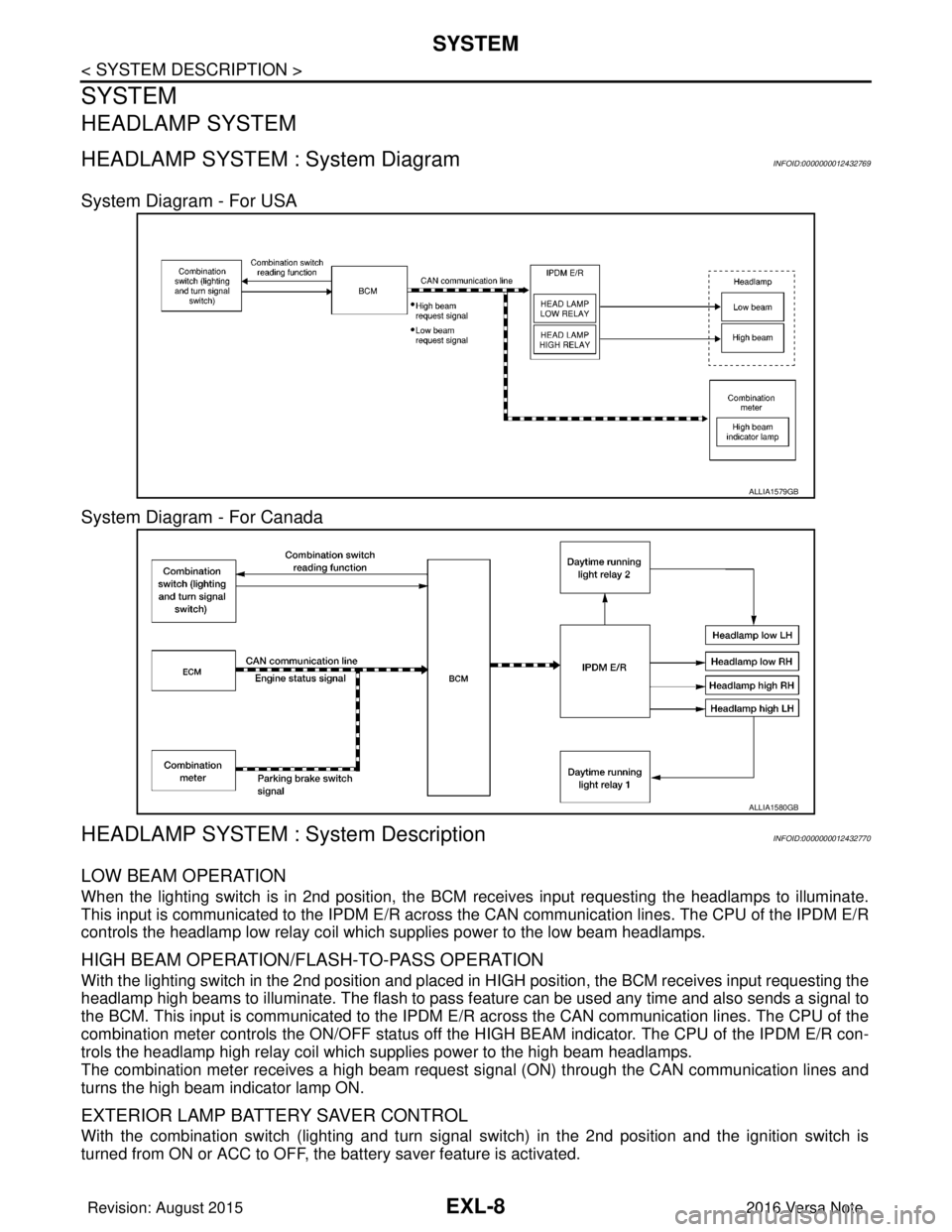
HEADLAMP SYSTEM : System Diagram INFOID:0000000012432769
System Diagram - For USA
System Diagram - For Canada
HEADLAMP SYSTEM : System DescriptionINFOID:0000000012432770
LOW BEAM OPERATION
When the lighting switch is in 2nd position, the BCM receives input requesting the headlamps to illuminate.
This input is communicated to the IPDM E/R across the CAN communication lines. The CPU of the IPDM E/R
controls the headlamp low relay coil which supplies power to the low beam headlamps.
HIGH BEAM OPERATION/FLASH-TO-PASS OPERATION
With the lighting switch in the 2nd position and placed in HIGH position, the BCM receives input requesting the
headlamp high beams to illuminate. The flash to pass f eature can be used any time and also sends a signal to
the BCM. This input is communicated to the IPDM E/R across the CAN communication lines. The CPU of the
combination meter controls the ON/OFF status off the HIGH BEAM indicator. The CPU of the IPDM E/R con-
trols the headlamp high relay coil which supplies power to the high beam headlamps.
The combination meter receives a high beam request signal (ON) through the CAN communication lines and
turns the high beam indicator lamp ON.
EXTERIOR LAMP BATTERY SAVER CONTROL
With the combination switch (lighting and turn signal switch) in the 2nd position and the ignition switch is
turned from ON or ACC to OFF, the battery saver feature is activated.
ALLIA1579GB
ALLIA1580GB
Revision: August 2015 2016 Versa Note
cardiagn.com
Page 1661 of 3641
SYSTEMEXL-9
< SYSTEM DESCRIPTION >
C
DE
F
G H
I
J
K
M A
B
EXL
N
O P
Under this condition, the headlamps remain illuminated for 45 seconds unless the lighting switch position is
changed. If the lighting switch position is changed, then the headlamps are turned off.
This setting can be changed by CONSULT. Refer to BCS-20, "
HEADLAMP : CONSULT Function (BCM -
HEAD LAMP)" (with Intelligent Key system) or BCS-93, "HEADLAMP : CONSULT Function (BCM - HEAD
LAMP)" (without Intelligent Key system).
DAYTIME RUNNING LIGHT SYSTEM
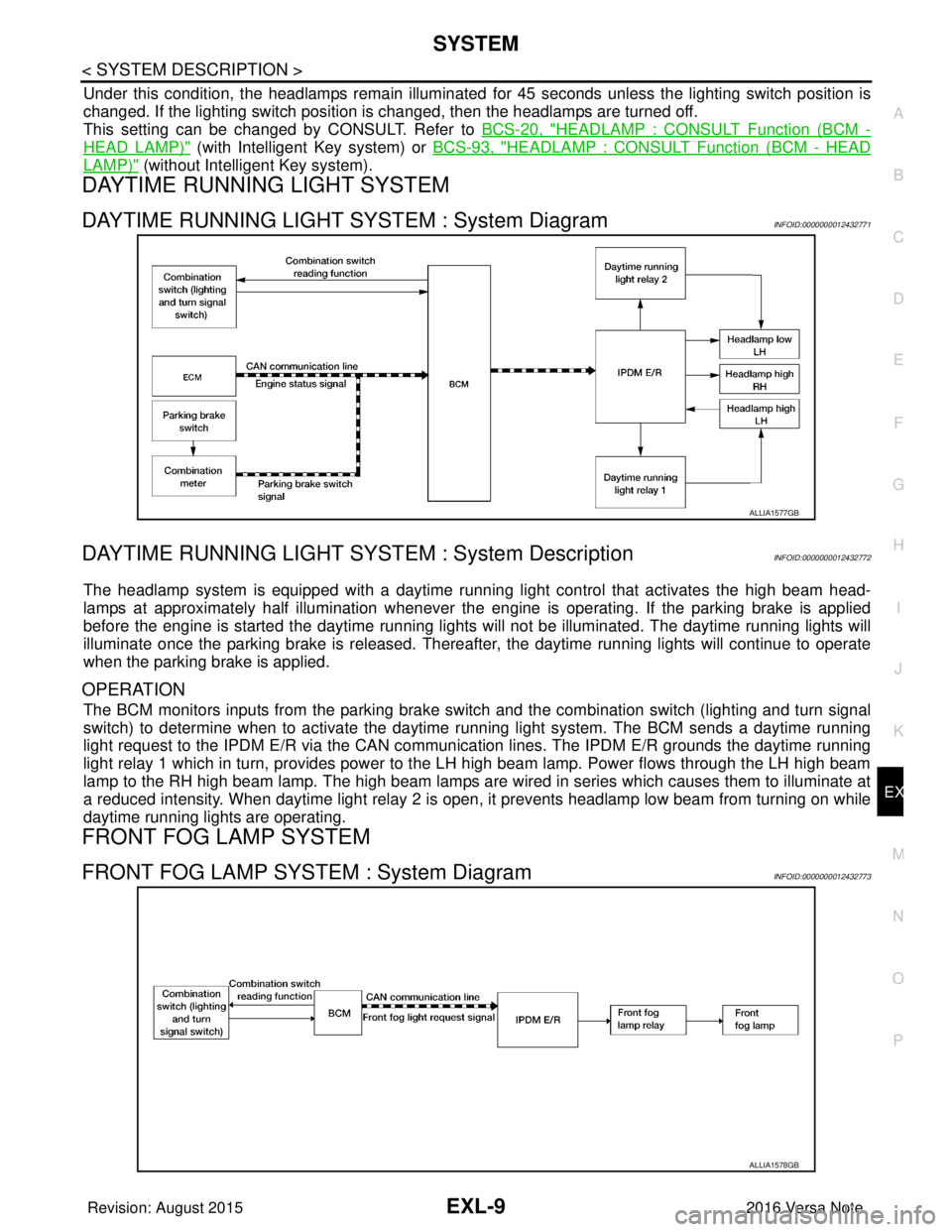
DAYTIME RUNNING LIGHT SYSTEM : System DiagramINFOID:0000000012432771
DAYTIME RUNNING LIGHT SYST EM : System DescriptionINFOID:0000000012432772
The headlamp system is equipped with a daytime running light control that activates the high beam head-
lamps at approximately half illumination whenever the e ngine is operating. If the parking brake is applied
before the engine is started the daytime running lights will not be illuminated. The daytime running lights will
illuminate once the parking brake is released. Thereaf ter, the daytime running lights will continue to operate
when the parking brake is applied.
OPERATION
The BCM monitors inputs from the parking brake swit ch and the combination switch (lighting and turn signal
switch) to determine when to activate the daytime running light system. The BCM sends a daytime running
light request to the IPDM E/R via the CAN communication lines. The IPDM E/R grounds the daytime running
light relay 1 which in turn, provides power to the LH high beam lamp. Power flows through the LH high beam
lamp to the RH high beam lamp. The high beam lamps are wired in series which causes them to illuminate at
a reduced intensity. When daytime light relay 2 is open, it prevents headlamp low beam from turning on while
daytime running lights are operating.
FRONT FOG LAMP SYSTEM
FRONT FOG LAMP SYSTEM : System DiagramINFOID:0000000012432773
ALLIA1577GB
ALLIA1578GB
Revision: August 2015 2016 Versa Note
cardiagn.com