wheel NISSAN NOTE 2016 Service Repair Manual
[x] Cancel search | Manufacturer: NISSAN, Model Year: 2016, Model line: NOTE, Model: NISSAN NOTE 2016Pages: 3641, PDF Size: 28.72 MB
Page 2749 of 3641
WT-6
< SYSTEM DESCRIPTION >
COMPONENT PARTS
SYSTEM DESCRIPTION
COMPONENT PARTS
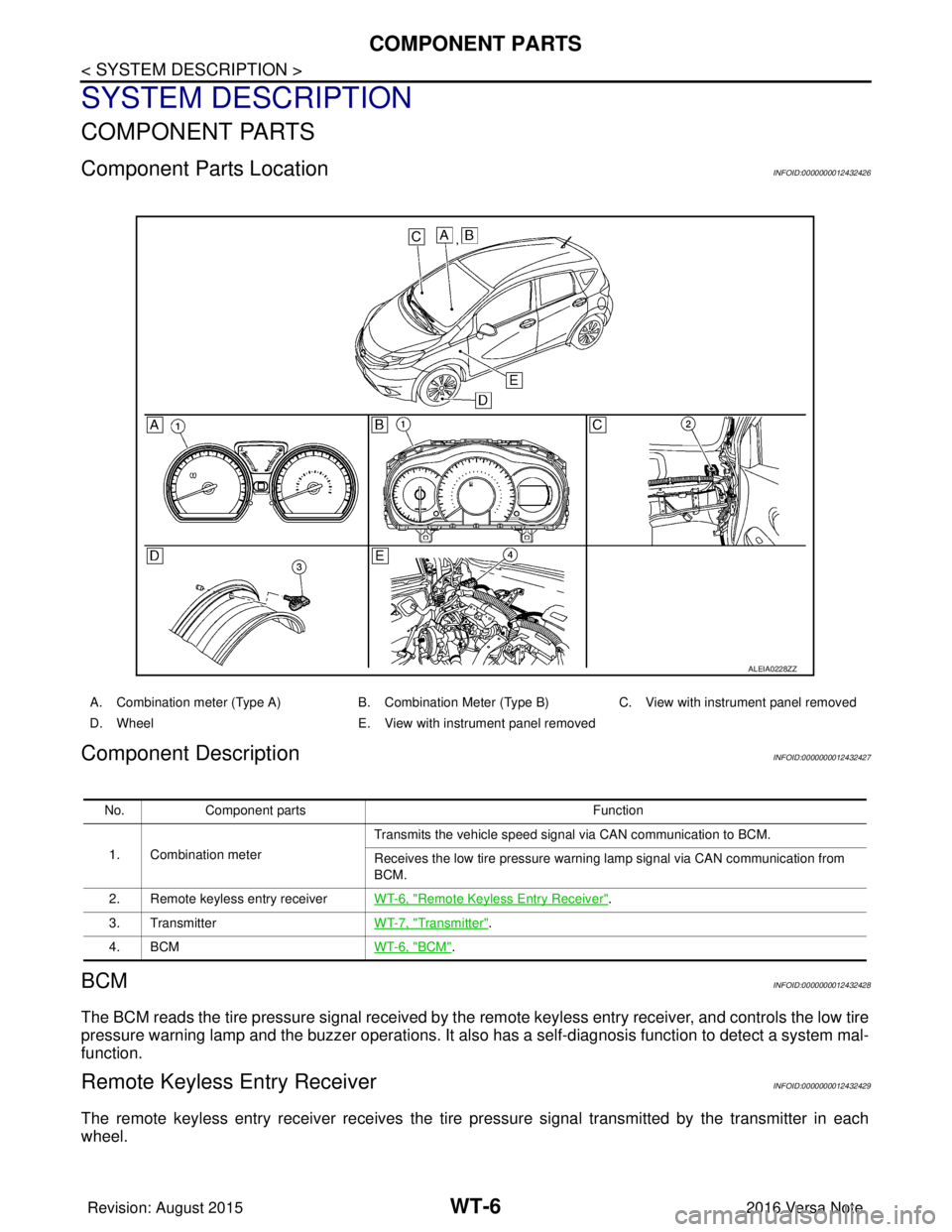
Component Parts LocationINFOID:0000000012432426
Component DescriptionINFOID:0000000012432427
BCMINFOID:0000000012432428
The BCM reads the tire pressure signal received by the remote keyless entry receiver, and controls the low tire
pressure warning lamp and the buzzer operations. It also has a self-diagnosis function to detect a system mal-
function.
Remote Keyless Entry ReceiverINFOID:0000000012432429
The remote keyless entry receiver receives the tire pressure signal transmitted by the transmitter in each
wheel.
ALEIA0228ZZ
A. Combination meter (Type A) B. Combination Meter (Type B)C. View with instrument panel removed
D. Wheel E. View with instrument panel removed
No. Component parts Function
1. Combination meter Transmits the vehicle speed signal via CAN communication to BCM.
Receives the low tire pressure warning lamp signal via CAN communication from
BCM.
2. Remote keyless entry receiver WT-6, "
Remote Keyless Entry Receiver".
3. Transmitter WT-7, "
Transmitter".
4. BCM WT-6, "
BCM".
Revision: August 2015 2016 Versa Note
cardiagn.com
Page 2750 of 3641

COMPONENT PARTSWT-7
< SYSTEM DESCRIPTION >
C
DF
G H
I
J
K L
M A
B
WT
N
O P
TransmitterINFOID:0000000012432430
A sensor-transmitter integrated with a valve is installed in each wheel, and transmits a detected tire pressure
signal in the form of a radio wave. The radio signal is received by the remote keyless entry receiver.
Low Tire Pressure Warning LampINFOID:0000000012432431
The combination meter receives tire pressure status from the BCM using CAN communication. When a low
tire pressure condition is sensed by the BCM, the combi nation meter low tire pressure warning lamp is acti-
vated.
Revision: August 2015 2016 Versa Note
cardiagn.com
Page 2764 of 3641
DIAGNOSIS AND REPAIR WORK FLOWWT-21
< BASIC INSPECTION >
C
DF
G H
I
J
K L
M A
B
WT
N
O P
BASIC INSPECTION
DIAGNOSIS AND REPAIR WORK FLOW
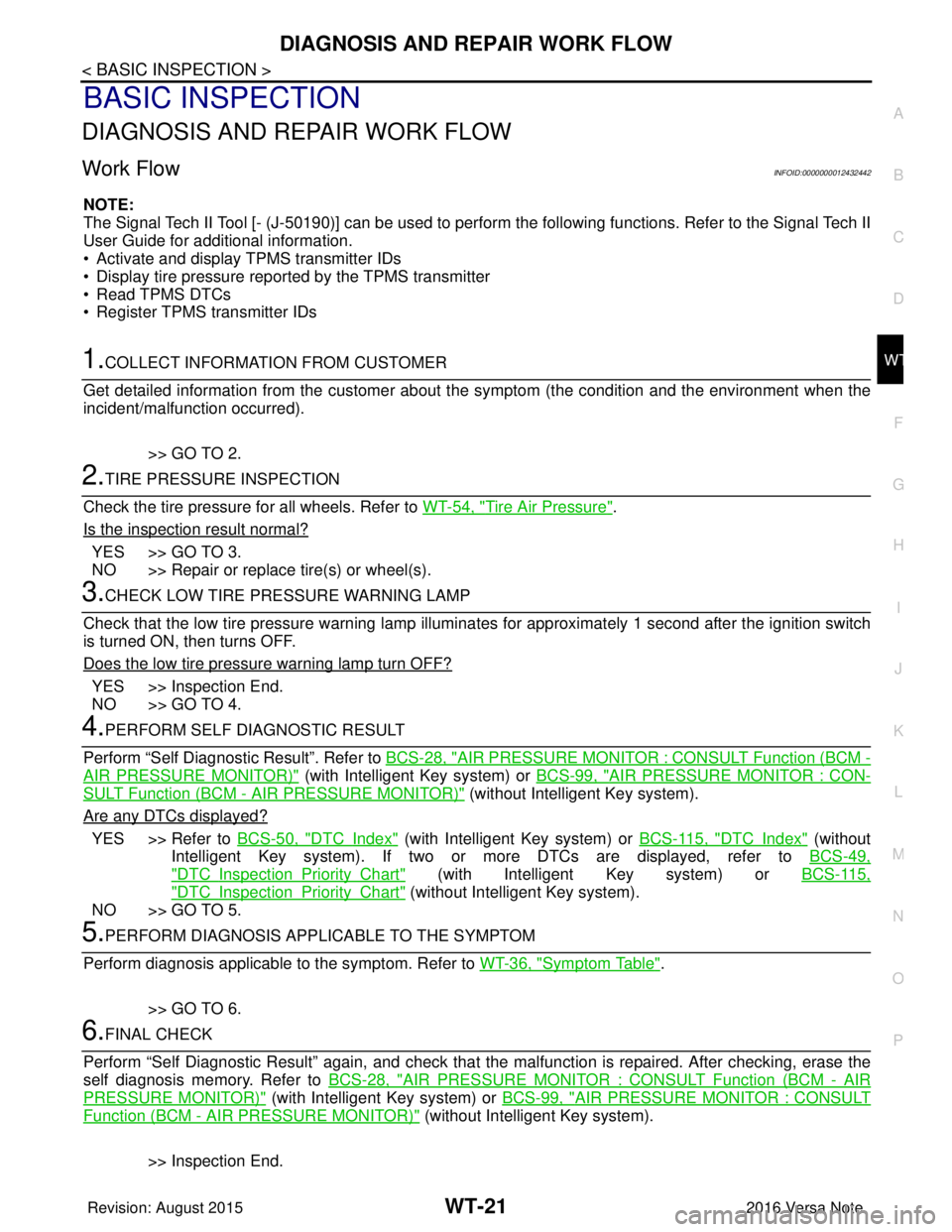
Work Flow INFOID:0000000012432442
NOTE:
The Signal Tech II Tool [- (J-50190)] can be used to perform the following functions. Refer to the Signal Tech II
User Guide for additional information.
• Activate and display TPMS transmitter IDs
• Display tire pressure repor ted by the TPMS transmitter
• Read TPMS DTCs
• Register TPMS transmitter IDs
1.COLLECT INFORMATION FROM CUSTOMER
Get detailed information from the customer about t he symptom (the condition and the environment when the
incident/malfunction occurred).
>> GO TO 2.
2.TIRE PRESSURE INSPECTION
Check the tire pressure for all wheels. Refer to WT-54, "
Tire Air Pressure".
Is the inspection result normal?
YES >> GO TO 3.
NO >> Repair or replace tire(s) or wheel(s).
3.CHECK LOW TIRE PRE SSURE WARNING LAMP
Check that the low tire pressure warning lamp illumi nates for approximately 1 second after the ignition switch
is turned ON, then turns OFF.
Does the low tire pressure warning lamp turn OFF?
YES >> Inspection End.
NO >> GO TO 4.
4.PERFORM SELF DIAGNOSTIC RESULT
Perform “Self Diagnostic Result”. Refer to BCS-28, "
AIR PRESSURE MONITOR : CONSULT Function (BCM -
AIR PRESSURE MONITOR)" (with Intelligent Key system) or BCS-99, "AIR PRESSURE MONITOR : CON-
SULT Function (BCM - AIR PRESSURE MONITOR)" (without Intelligent Key system).
Are any DTCs displayed?
YES >> Refer to BCS-50, "DTCIndex" (with Intelligent Key system) or BCS-115, "DTCIndex" (without
Intelligent Key system). If two or more DTCs are displayed, refer to BCS-49,
"DTCInspectionPriorityChart" (with Intelligent Key system) or BCS-115,
"DTCInspectionPriorityChart" (without Intelligent Key system).
NO >> GO TO 5.
5.PERFORM DIAGNOSIS APPLICABLE TO THE SYMPTOM
Perform diagnosis applicable to the symptom. Refer to WT-36, "
Symptom Table".
>> GO TO 6.
6.FINAL CHECK
Perform “Self Diagnostic Result” again, and check that the malfunction is repaired. After checking, erase the
self diagnosis memory. Refer to BCS-28, "
AIR PRESSURE MONITOR : CONSULT Function (BCM - AIR
PRESSURE MONITOR)" (with Intelligent Key system) or BCS-99, "AIR PRESSURE MONITOR : CONSULT
Function (BCM - AIR PRESSURE MONITOR)" (without Intelligent Key system).
>> Inspection End.
Revision: August 2015 2016 Versa Note
cardiagn.com
Page 2765 of 3641
WT-22
< BASIC INSPECTION >
ID REGISTRATION PROCEDURE
ID REGISTRATION PROCEDURE
DescriptionINFOID:0000000012432443
This procedure must be performed after replacing wheels, transmitters or the BCM.
Work ProcedureINFOID:0000000012432444
TPMS ID registration can be performed using one of the following procedures:
• Transmitter Activation tool [KV48105501 (J-45295-A)] with CONSULT (preferred method)
• Signal Tech II tool [- (J- 50190)] with CONSULT (preferred method)
• Signal Tech II tool [- (J-50190)] without CONSULT
• CONSULT only
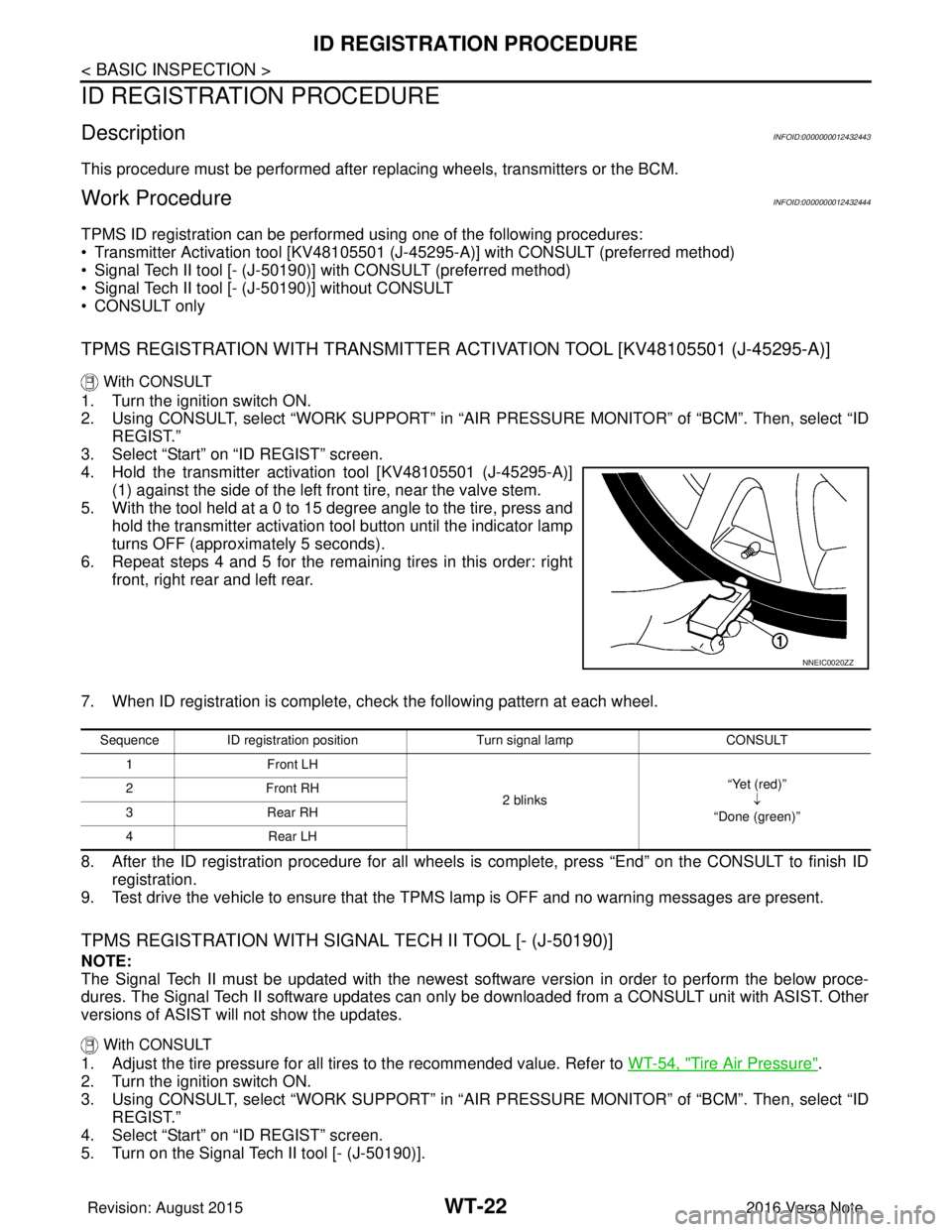
TPMS REGISTRATION WITH TRANSMITTER ACTIVATION TOOL [KV48105501 (J-45295-A)]
With CONSULT
1. Turn the ignition switch ON.
2. Using CONSULT, select “WORK SUPPORT” in “AIR PRESSURE MONITOR” of “BCM”. Then, select “ID
REGIST.”
3. Select “Start” on “ID REGIST” screen.
4. Hold the transmitter activation tool [KV48105501 (J-45295-A)] (1) against the side of the left front tire, near the valve stem.
5. With the tool held at a 0 to 15 degree angle to the tire, press and hold the transmitter activation tool button until the indicator lamp
turns OFF (approximately 5 seconds).
6. Repeat steps 4 and 5 for the remaining tires in this order: right front, right rear and left rear.
7. When ID registration is complete, check the following pattern at each wheel.
8. After the ID registration procedure for all wheels is complete, press “End” on the CONSULT to finish ID registration.
9. Test drive the vehicle to ensure that the TPMS lamp is OFF and no warning messages are present.
TPMS REGISTRATION WITH SIGNAL TECH II TOOL [- (J-50190)]
NOTE:
The Signal Tech II must be updated with the newest software version in order to perform the below proce-
dures. The Signal Tech II software updates can onl y be downloaded from a CONSULT unit with ASIST. Other
versions of ASIST wil l not show the updates.
With CONSULT
1. Adjust the tire pressure for all tires to the recommended value. Refer to WT-54, "Tire Air Pressure".
2. Turn the ignition switch ON.
3. Using CONSULT, select “WORK SUPPORT” in “AIR PRESSURE MONITOR” of “BCM”. Then, select “ID
REGIST.”
4. Select “Start” on “ID REGIST” screen.
5. Turn on the Signal Tech II tool [- (J-50190)].
NNEIC0020ZZ
Sequence ID registration position Turn signal lamp CONSULT
1F ro nt L H
2 blinks “Yet (red)”
↓
“Done (green)”
2F
ro nt R H
3R ea r R H
4R ear L H
Revision: August 2015 2016 Versa Note
cardiagn.com
Page 2766 of 3641
ID REGISTRATION PROCEDUREWT-23
< BASIC INSPECTION >
C
DF
G H
I
J
K L
M A
B
WT
N
O P
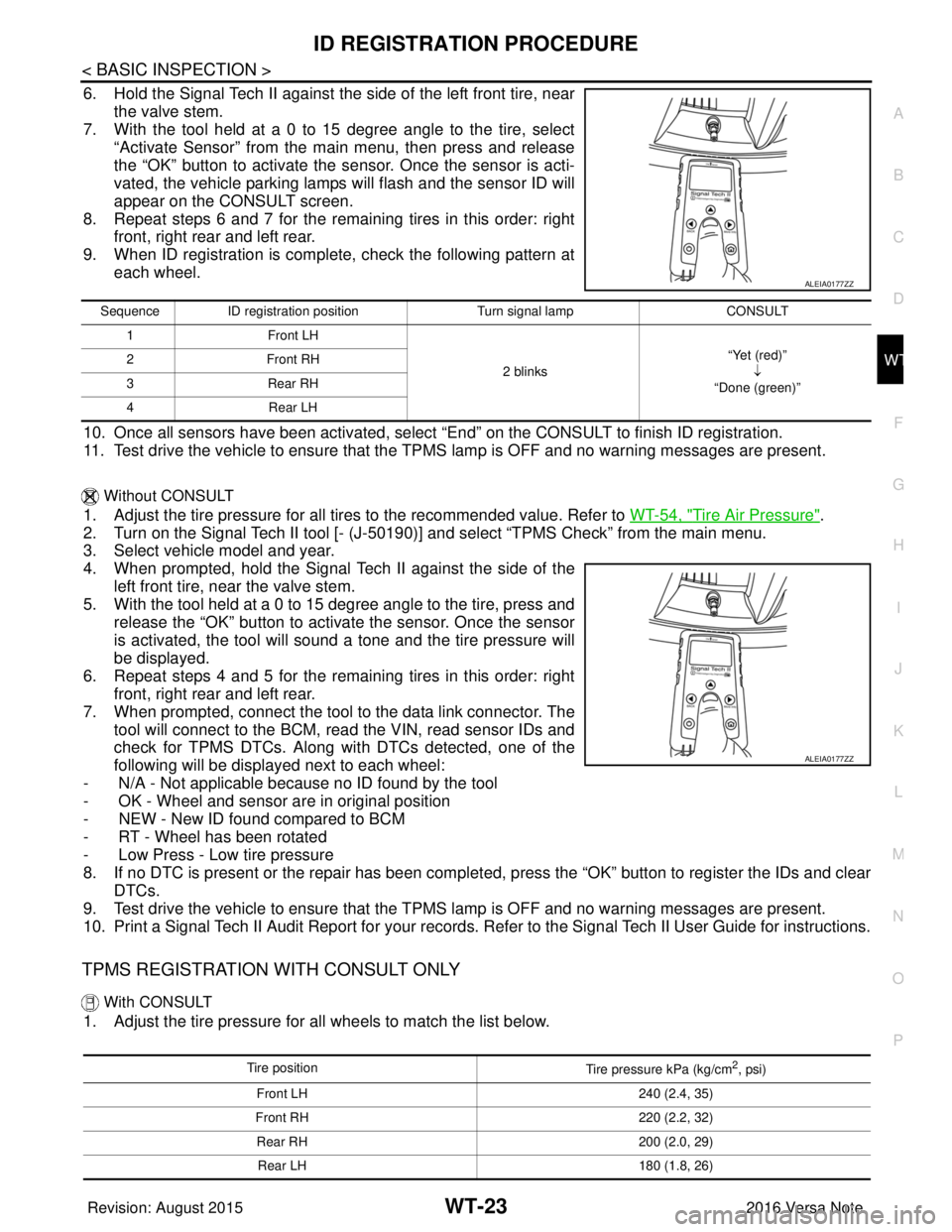
6. Hold the Signal Tech II against the side of the left front tire, near the valve stem.
7. With the tool held at a 0 to 15 degree angle to the tire, select
“Activate Sensor” from the main menu, then press and release
the “OK” button to activate the s ensor. Once the sensor is acti-
vated, the vehicle parking lamps will flash and the sensor ID will
appear on the CONSULT screen.
8. Repeat steps 6 and 7 for the remaining tires in this order: right front, right rear and left rear.
9. When ID registration is complete, check the following pattern at each wheel.
10. Once all sensors have been activated, select “End” on the CONSULT to finish ID registration.
11. Test drive the vehicle to ensure that the TPMS lamp is OFF and no warning messages are present.
Without CONSULT
1. Adjust the tire pressure for all tires to the recommended value. Refer to WT-54, "Tire Air Pressure".
2. Turn on the Signal Tech II tool [- (J-50190) ] and select “TPMS Check” from the main menu.
3. Select vehicle model and year.
4. When prompted, hold the Signal Te ch II against the side of the
left front tire, near the valve stem.
5. With the tool held at a 0 to 15 degree angle to the tire, press and release the “OK” button to activate the sensor. Once the sensor
is activated, the tool will sound a tone and the tire pressure will
be displayed.
6. Repeat steps 4 and 5 for the remaining tires in this order: right front, right rear and left rear.
7. When prompted, connect the tool to the data link connector. The tool will connect to the BCM, read the VIN, read sensor IDs and
check for TPMS DTCs. Along wit h DTCs detected, one of the
following will be displayed next to each wheel:
- N/A - Not applicable because no ID found by the tool
- OK - Wheel and sensor ar e in original position
- NEW - New ID found compared to BCM
- RT - Wheel has been rotated
- Low Press - Low tire pressure
8. If no DTC is present or the repair has been complet ed, press the “OK” button to register the IDs and clear
DTCs.
9. Test drive the vehicle to ensure that the TPMS lamp is OFF and no warning messages are present.
10. Print a Signal Tech II Audit Report for your records. Refer to the Signal Tech II User Guide for instructions.
TPMS REGISTRATION WITH CONSULT ONLY
With CONSULT
1. Adjust the tire pressure for all wheels to match the list below.
ALEIA0177ZZ
Sequence ID registration position Turn signal lamp CONSULT
1 Front LH
2 blinks“Yet (red)”
↓
“Done (green)”
2F
ro nt R H
3 Rear RH
4 Rear LH
ALEIA0177ZZ
Tire position
Tire pressure kPa (kg/cm2, psi)
Front LH 240 (2.4, 35)
Front RH 220 (2.2, 32)
Rear RH 200 (2.0, 29)
Rear LH 180 (1.8, 26)
Revision: August 2015 2016 Versa Note
cardiagn.com
Page 2767 of 3641

WT-24
< BASIC INSPECTION >
ID REGISTRATION PROCEDURE
2. Turn the ignition switch ON.
3. Using CONSULT, select “WORK SUPPORT” in “AIR PRESSURE MONITOR” of “BCM”. Then, select “ID
REGIST.”
4. Select “Start” on “ID REGIST” screen.
5. Drive the vehicle at a speed greater than 40 km/h (25 MPH) for 3 minutes or more.
6. After ID registration for all wheels is complete, press “End” on the CONSULT to finish ID registration.
7. Adjust the tire pressures for all tires to the recommended value. Refer to WT-54, "
Tire Air Pressure".
8. Test drive the vehicle to ensure that the TPMS lamp is OFF and no warning messages are present.
ID registration position CONSULT
Front LH “Yet (red)”↓
“Done (green)”
Front RH
Rear RHRear LH
Revision: August 2015 2016 Versa Note
cardiagn.com
Page 2768 of 3641
C1704, C1705, C1706, C1707 LOW TIRE PRESSURE
WT-25
< DTC/CIRCUIT DIAGNOSIS >
C
D F
G H
I
J
K L
M A
B
WT
N
O P
DTC/CIRCUIT DIAGNOSIS
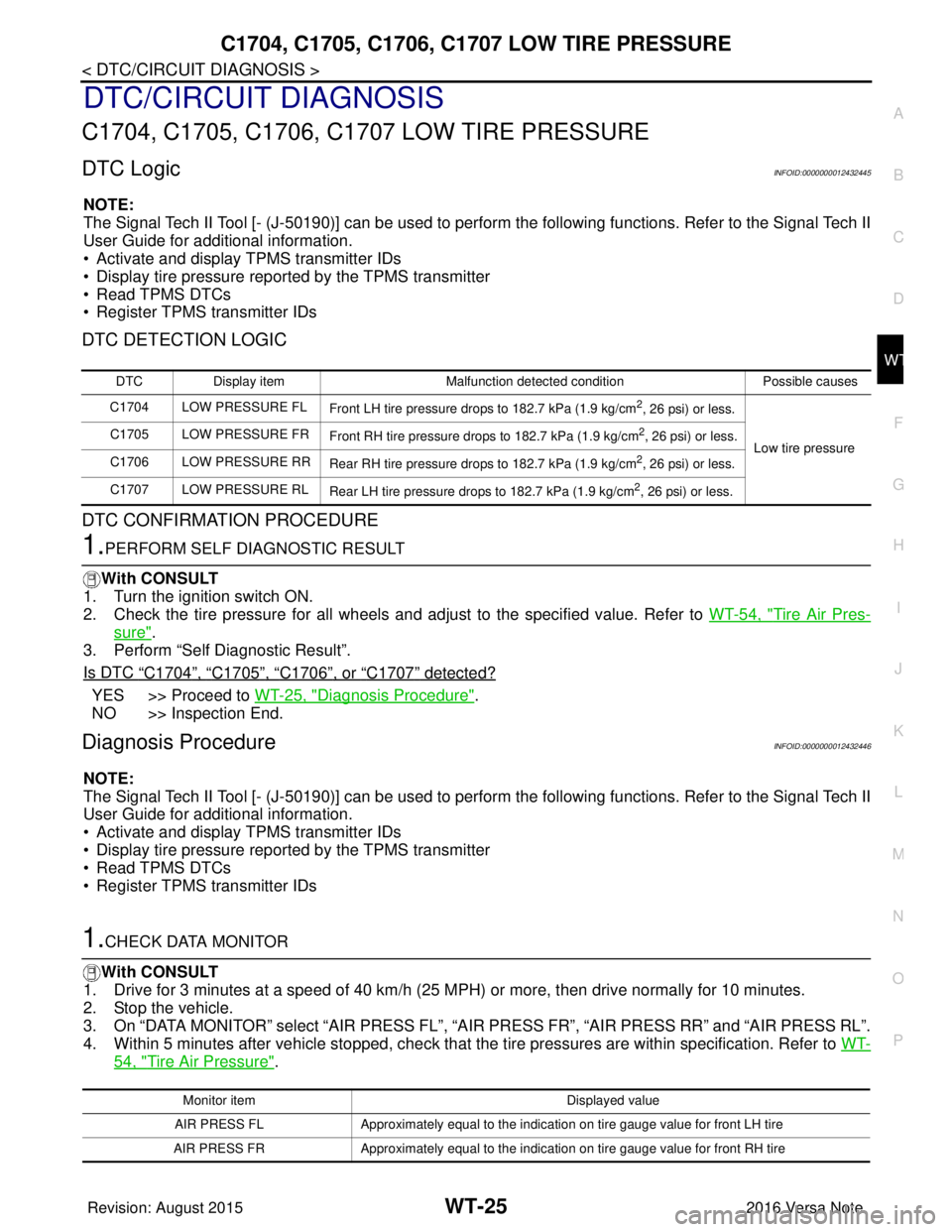
C1704, C1705, C1706, C1707 LOW TIRE PRESSURE
DTC LogicINFOID:0000000012432445
NOTE:
The Signal Tech II Tool [- (J-50190)] can be used to perform the following functions. Refer to the Signal Tech II
User Guide for additional information.
• Activate and display TPMS transmitter IDs
• Display tire pressure repor ted by the TPMS transmitter
• Read TPMS DTCs
• Register TPMS transmitter IDs
DTC DETECTION LOGIC
DTC CONFIRMATION PROCEDURE
1.PERFORM SELF DIAGNOSTIC RESULT
With CONSULT
1. Turn the ignition switch ON.
2. Check the tire pressure for all wheels and adjust to the specified value. Refer to WT-54, "
Tire Air Pres-
sure".
3. Perform “Self Diagnostic Result”.
Is DTC
“C1704”, “C1705”, “C1706”, or “C1707” detected?
YES >> Proceed to WT-25, "Diagnosis Procedure".
NO >> Inspection End.
Diagnosis ProcedureINFOID:0000000012432446
NOTE:
The Signal Tech II Tool [- (J-50190)] can be used to perform the following functions. Refer to the Signal Tech II
User Guide for additional information.
• Activate and display TPMS transmitter IDs
• Display tire pressure repor ted by the TPMS transmitter
• Read TPMS DTCs
• Register TPMS transmitter IDs
1.CHECK DATA MONITOR
With CONSULT
1. Drive for 3 minutes at a speed of 40 km/h (25 MPH) or more, then drive normally for 10 minutes.
2. Stop the vehicle.
3. On “DATA MONITOR” select “AIR PRESS FL”, “AIR PRESS FR”, “AIR PRESS RR” and “AIR PRESS RL”.
4. Within 5 minutes after vehicle stopped, check that the tire pressures are within specification. Refer to WT-
54, "Tire Air Pressure".
DTCDisplay item Malfunction detected condition Possible causes
C1704 LOW PRESSURE FL Front LH tire pressure drops to 182.7 kPa (1.9 kg/cm
2, 26 psi) or less.
Low tire pressure
C1705 LOW PRESSURE FR
Front RH tire pressure drops to 182.7 kPa (1.9 kg/cm
2, 26 psi) or less.
C1706 LOW PRESSURE RR Rear RH tire pressure drops to 182.7 kPa (1.9 kg/cm
2, 26 psi) or less.
C1707 LOW PRESSURE RL Rear LH tire pressure drops to 182.7 kPa (1.9 kg/cm
2, 26 psi) or less.
Monitor item Displayed value
AIR PRESS FL Approximately equal to the indication on tire gauge value for front LH tire
AIR PRESS FR Approximately equal to the indication on tire gauge value for front RH tire
Revision: August 2015 2016 Versa Note
cardiagn.com
Page 2770 of 3641
C1708, C1709, C1710, C1711 TRANSMITTER (NO DATA)
WT-27
< DTC/CIRCUIT DIAGNOSIS >
C
DF
G H
I
J
K L
M A
B
WT
N
O P
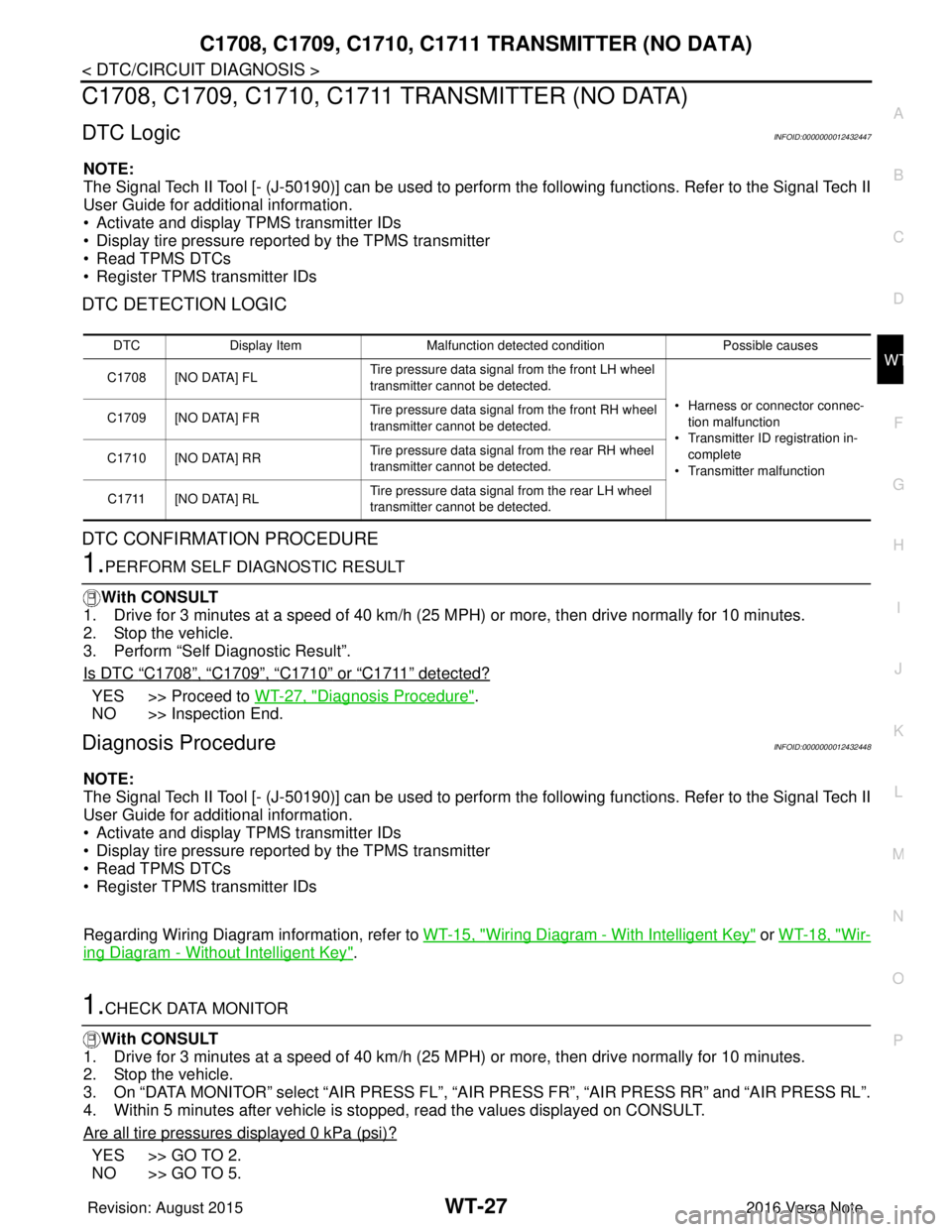
C1708, C1709, C1710, C1711 TRANSMITTER (NO DATA)
DTC LogicINFOID:0000000012432447
NOTE:
The Signal Tech II Tool [- (J-50190)] can be used to perform the following functions. Refer to the Signal Tech II
User Guide for additional information.
• Activate and display TPMS transmitter IDs
• Display tire pressure repor ted by the TPMS transmitter
• Read TPMS DTCs
• Register TPMS transmitter IDs
DTC DETECTION LOGIC
DTC CONFIRMATION PROCEDURE
1.PERFORM SELF DIAGNOSTIC RESULT
With CONSULT
1. Drive for 3 minutes at a speed of 40 km/h (25 MPH) or more, then drive normally for 10 minutes.
2. Stop the vehicle.
3. Perform “Self Diagnostic Result”.
Is DTC
“C1708”, “C1709”, “C1710” or “C1711” detected?
YES >> Proceed to WT-27, "Diagnosis Procedure".
NO >> Inspection End.
Diagnosis ProcedureINFOID:0000000012432448
NOTE:
The Signal Tech II Tool [- (J-50190)] can be used to perform the following functions. Refer to the Signal Tech II
User Guide for additional information.
• Activate and display TPMS transmitter IDs
• Display tire pressure repor ted by the TPMS transmitter
• Read TPMS DTCs
• Register TPMS transmitter IDs
Regarding Wiring Diagram information, refer to WT-15, "
Wiring Diagram - With Intelligent Key" or WT-18, "Wir-
ing Diagram - Without Intelligent Key".
1.CHECK DATA MONITOR
With CONSULT
1. Drive for 3 minutes at a speed of 40 km/h (25 MPH) or more, then drive normally for 10 minutes.
2. Stop the vehicle.
3. On “DATA MONITOR” select “AIR PRESS FL”, “AIR PRESS FR”, “AIR PRESS RR” and “AIR PRESS RL”.
4. Within 5 minutes after vehicle is stopped, read the values displayed on CONSULT.
Are all tire pressures displayed 0 kPa (psi)?
YES >> GO TO 2.
NO >> GO TO 5.
DTC Display Item Malfunction detected condition Possible causes
C1708 [NO DATA] FL Tire pressure data signal from the front LH wheel
transmitter cannot be detected.
• Harness or connector connec-tion malfunction
• Transmitter ID registration in- complete
• Transmitter malfunction
C1709 [NO DATA] FR
Tire pressure data signal from the front RH wheel
transmitter cannot be detected.
C1710 [NO DATA] RR Tire pressure data signal from the rear RH wheel
transmitter cannot be detected.
C1711 [NO DATA] RL Tire pressure data signal from the rear LH wheel
transmitter cannot be detected.
Revision: August 2015
2016 Versa Note
cardiagn.com
Page 2773 of 3641
WT-30
< DTC/CIRCUIT DIAGNOSIS >
C1716, C1717, C1718, C1719 TRANSMITTER (PRESSURE DATA)
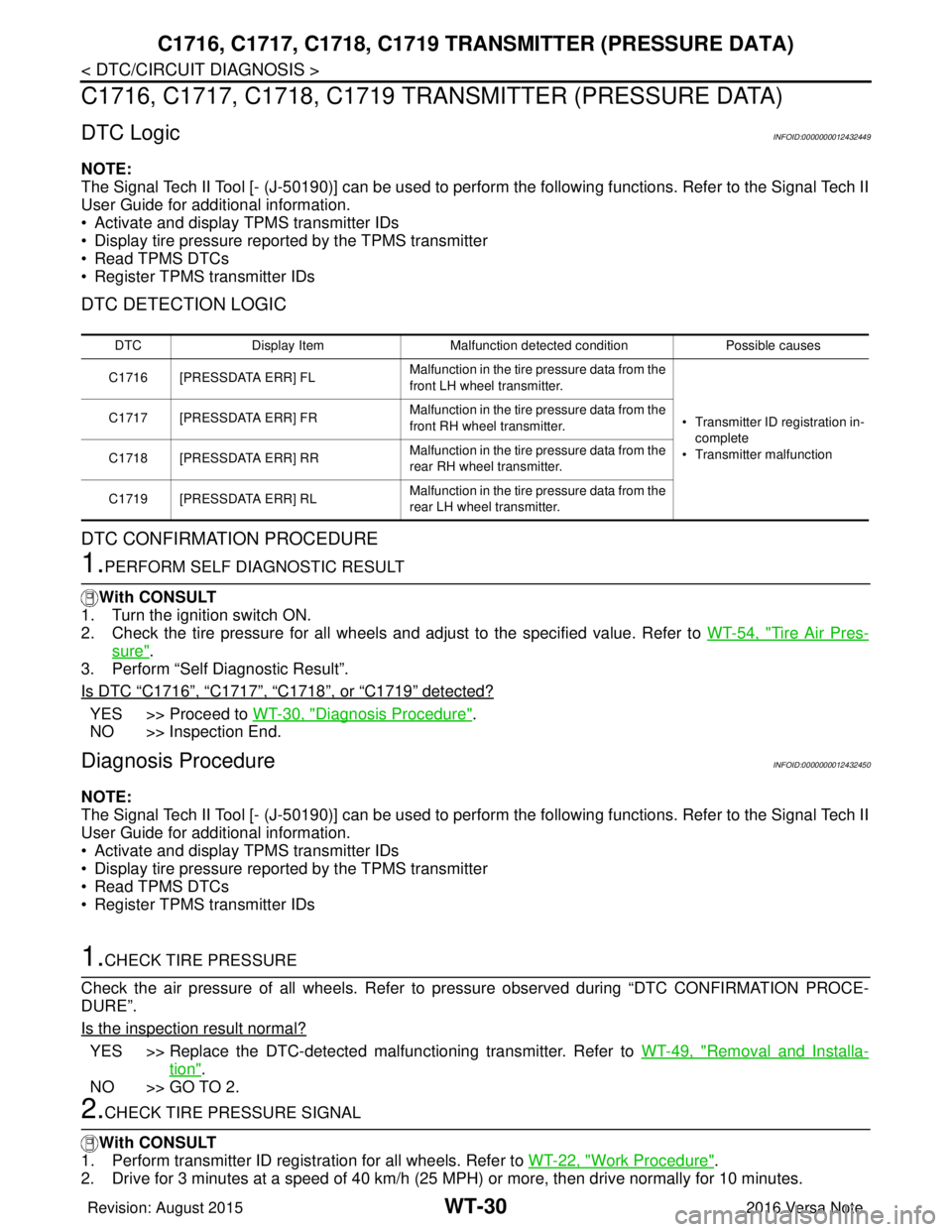
C1716, C1717, C1718, C1719 TRAN SMITTER (PRESSURE DATA)
DTC LogicINFOID:0000000012432449
NOTE:
The Signal Tech II Tool [- (J-50190)] can be used to perform the following functions. Refer to the Signal Tech II
User Guide for additional information.
• Activate and display TPMS transmitter IDs
• Display tire pressure reported by the TPMS transmitter
• Read TPMS DTCs
• Register TPMS transmitter IDs
DTC DETECTION LOGIC
DTC CONFIRMATION PROCEDURE
1.PERFORM SELF DIAGNOSTIC RESULT
With CONSULT
1. Turn the ignition switch ON.
2. Check the tire pressure for all wheels and adjust to the specified value. Refer to WT-54, "
Tire Air Pres-
sure".
3. Perform “Self Diagnostic Result”.
Is DTC
“C1716”, “C1717”, “C1718”, or “C1719” detected?
YES >> Proceed to WT-30, "Diagnosis Procedure".
NO >> Inspection End.
Diagnosis ProcedureINFOID:0000000012432450
NOTE:
The Signal Tech II Tool [- (J-50190)] can be used to perform the following functions. Refer to the Signal Tech II
User Guide for additional information.
• Activate and display TPMS transmitter IDs
• Display tire pressure reported by the TPMS transmitter
• Read TPMS DTCs
• Register TPMS transmitter IDs
1.CHECK TIRE PRESSURE
Check the air pressure of all wheels. Refer to pressure observed during “DTC CONFIRMATION PROCE-
DURE”.
Is the inspection result normal?
YES >> Replace the DTC-detected malfunctioning transmitter. Refer to WT-49, "Removal and Installa-
tion".
NO >> GO TO 2.
2.CHECK TIRE PRESSURE SIGNAL
With CONSULT
1. Perform transmitter ID regist ration for all wheels. Refer to WT-22, "
Work Procedure".
2. Drive for 3 minutes at a speed of 40 km/h (25 MPH) or more, then drive normally for 10 minutes.
DTC Display Item Malfunction detected condition Possible causes
C1716 [PRESSDATA ERR] FL Malfunction in the tire pressure data from the
front LH wheel transmitter.
• Transmitter ID registration in-
complete
• Transmitter malfunction
C1717 [PRESSDATA ERR] FR
Malfunction in the tire pressure data from the
front RH wheel transmitter.
C1718 [PRESSDATA ERR] RR Malfunction in the tire pressure data from the
rear RH wheel transmitter.
C1719 [PRESSDATA ERR] RL Malfunction in the tire pressure data from the
rear LH wheel transmitter.
Revision: August 2015
2016 Versa Note
cardiagn.com
Page 2786 of 3641

NOISE, VIBRATION AND HARSHNESS (NVH) TROUBLESHOOTINGWT-43
< SYMPTOM DIAGNOSIS >
C
DF
G H
I
J
K L
M A
B
WT
N
O P
NOISE, VIBRATION AND HARSHN ESS (NVH) TROUBLESHOOTING
NVH Troubleshooting ChartINFOID:0000000012432464
Use chart below to find the cause of the symptom . If necessary, repair or replace these parts.
×: Applicable
Reference page
WT-44WT-44WT-45WT-54FSU-8—
—
WT-54FSU-5FA X - 6RAX-4RSU-4—
—
FA X - 6BR-7ST-7
Possible cause and SUSPECTED PARTS
Improper installation, looseness
Out-of-round
Imbalance
Incorrect tire pressure
Uneven tire wear
Deformation or damage
Non-uniformity
Incorrect tire size
FRONT AXLE AND FRONT SUSPENSION
REAR AXLE AND REAR SUSPENSION
TIRES
ROAD WHEELS
DRIVE SHAFT
BRAKE
STEERING
Symptom TIRENoise
××××××× × × ××××
Shake ×××××× × × × ××××
Vibration ××××××
Shimmy ×××××××× × × × ××
Shudder ×
××××× × × × × ××
Poor quality ride or
handling ×××××× × × ××
WHEEL Noise
××× × × × × ×××
Shake ××× × × × × ×××
Shimmy, Shudder ×××× ×××××
Poor quality ride or
handling ×× × ×
× × ×
Revision: August 2015 2016 Versa Note
cardiagn.com