clutch NISSAN NOTE 2016 Service Owner's Manual
[x] Cancel search | Manufacturer: NISSAN, Model Year: 2016, Model line: NOTE, Model: NISSAN NOTE 2016Pages: 3641, PDF Size: 28.72 MB
Page 642 of 3641
CL-16
< REMOVAL AND INSTALLATION >
CLUTCH PIPING
REMOVAL
1. Remove the battery. Refer to PG-70, "Removal and Installation (Battery)".
2. Use one of the following methods to remove hose from clutch master cylinder. • Drain clutch fluid from reservoir tank and remove hose. Refer to CL-7, "
Draining".
• Remove hose from clutch master cylinder.
3. Remove clutch tube lock pin from clutch master cylinder.
4. Remove clutch tube lock pin at clutch housing.
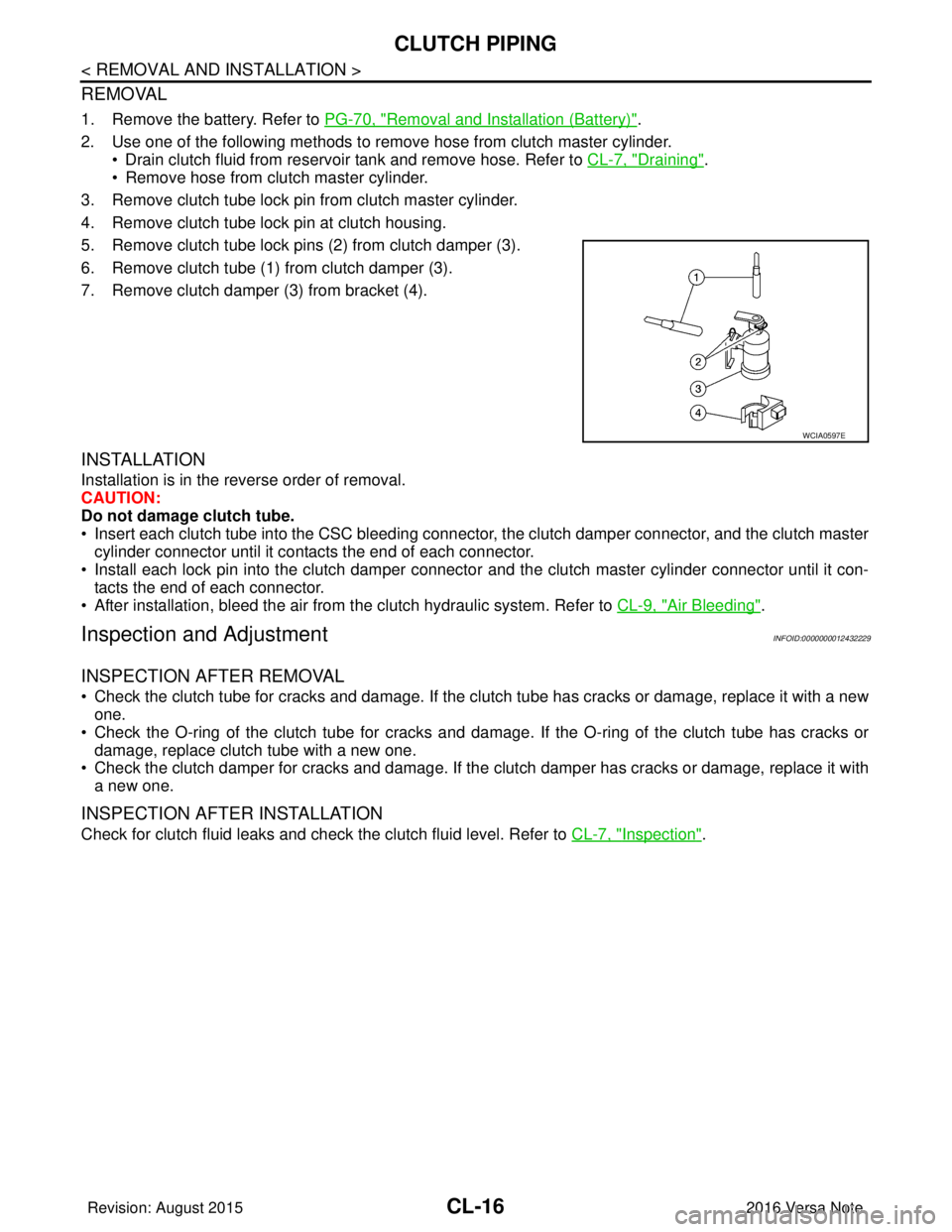
5. Remove clutch tube lock pins (2) from clutch damper (3).
6. Remove clutch tube (1) from clutch damper (3).
7. Remove clutch damper (3) from bracket (4).
INSTALLATION
Installation is in the reverse order of removal.
CAUTION:
Do not damage clutch tube.
• Insert each clutch tube into the CSC bleeding connector, the clutch damper connector, and the clutch master cylinder connector until it contacts the end of each connector.
• Install each lock pin into the clutch damper connecto r and the clutch master cylinder connector until it con-
tacts the end of each connector.
• After installation, bleed the air from the clutch hydraulic system. Refer to CL-9, "
Air Bleeding".
Inspection and AdjustmentINFOID:0000000012432229
INSPECTION AFTER REMOVAL
• Check the clutch tube for cracks and damage. If the cl utch tube has cracks or damage, replace it with a new
one.
• Check the O-ring of the clutch tube for cracks and dam age. If the O-ring of the clutch tube has cracks or
damage, replace clutch tube with a new one.
• Check the clutch damper for cracks and damage. If the clutch damper has cracks or damage, replace it with
a new one.
INSPECTION AFTER INSTALLATION
Check for clutch fluid leaks and check the clutch fluid level. Refer to CL-7, "Inspection".
WCIA0597E
Revision: August 2015 2016 Versa Note
cardiagn.com
Page 643 of 3641
CSC (CONCENTRIC SLAVE CYLINDER)CL-17
< UNIT REMOVAL AND INSTALLATION >
CEF
G H
I
J
K L
M A
B
CL
N
O P
UNIT REMOVAL AND INSTALLATION
CSC (CONCENTRIC SLAVE CYLINDER)
Exploded ViewINFOID:0000000012432230
Removal and InstallationINFOID:0000000012432231
CAUTION:
• Do not reuse CSC (concentric slave cylinder). CSC slides back to the original position every time
when removing transaxle assembly. At this time, du st on the sliding parts may damage the seal of
CSC and may cause clutch fluid leaks.
• Do not disassemble CSC.
• Do not spill clutch fluid onto pa inted surfaces. If clutch fluid spills, wipe up immediately and wash
the affected area with water.
NOTE:
When removing components such as hoses, tubes/lines, etc. , cap or plug openings to prevent fluid from spill-
ing.
REMOVAL
1. Remove engine transaxle assembly. Refer to EM-87, "Removal and Installation".
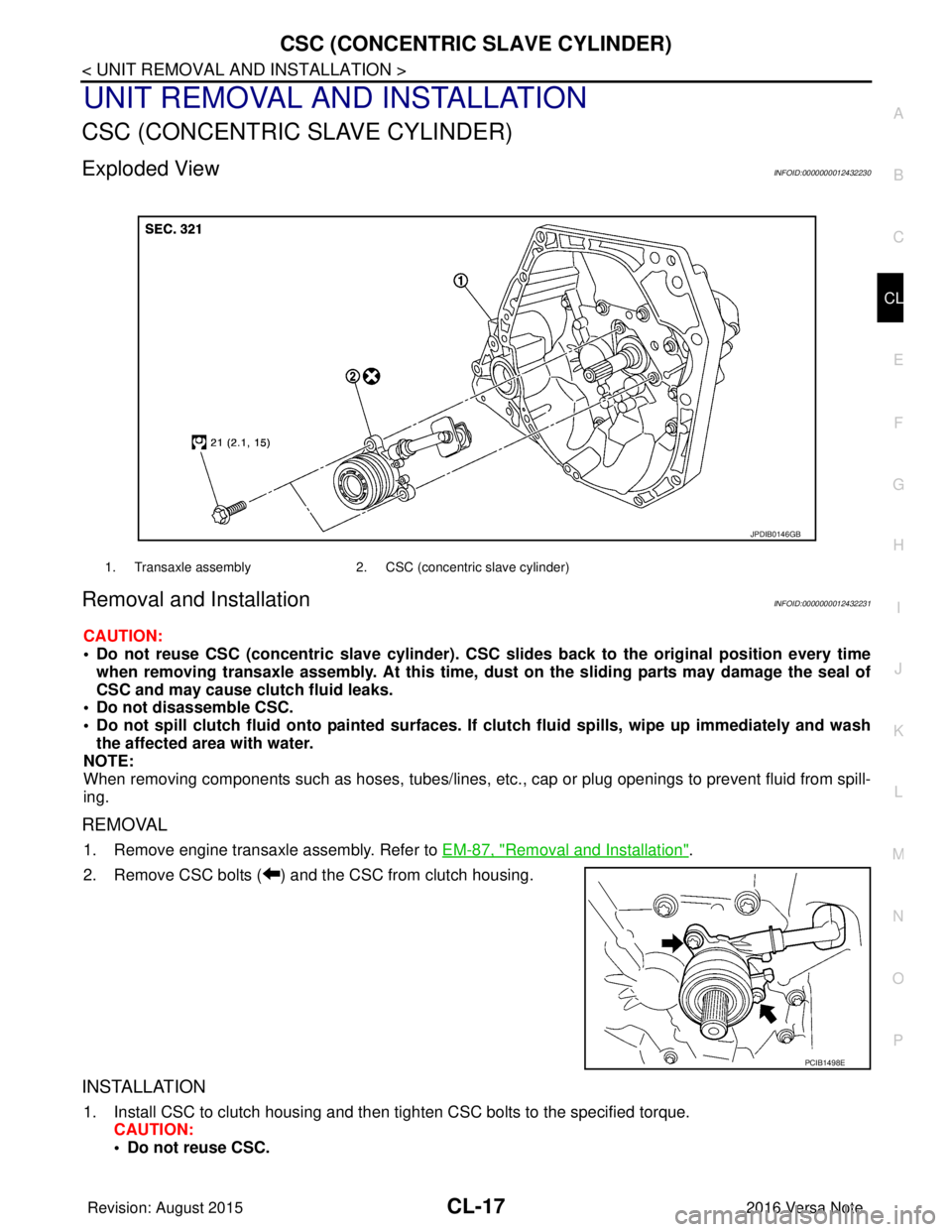
2. Remove CSC bolts ( ) and the CSC from clutch housing.
INSTALLATION
1. Install CSC to clutch housing and then tighten CSC bolts to the specified torque. CAUTION:
• Do not reuse CSC.
1. Transaxle assembly 2. CSC (concentric slave cylinder)
JPDIB0146GB
PCIB1498E
Revision: August 2015 2016 Versa Note
cardiagn.com
Page 644 of 3641

CL-18
< UNIT REMOVAL AND INSTALLATION >
CSC (CONCENTRIC SLAVE CYLINDER)
• Do not insert and operate CSC when transaxle is removed. Piston and stopper of CSC compo-nents may fall off.
2. Install engine and transaxle assembly. Refer to EM-87, "
Removal and Installation".
Inspection and AdjustmentINFOID:0000000012432232
INSPECTION AFTER INSTALLATION
Check for clutch fluid leaks and clutch fluid level. Refer to CL-7, "Inspection".
ADJUSTMENT AFTER INSTALLATION
Perform the air bleeding. Refer to CL-9, "Air Bleeding".
Revision: August 2015 2016 Versa Note
cardiagn.com
Page 645 of 3641
CLUTCH DISC AND CLUTCH COVERCL-19
< UNIT REMOVAL AND INSTALLATION >
CEF
G H
I
J
K L
M A
B
CL
N
O P
CLUTCH DISC AND CLUTCH COVER
Exploded ViewINFOID:0000000012432233
Removal and InstallationINFOID:0000000012432234
CAUTION:
• Do not reuse CSC (concentric slave cylinder). CSC slides back to the original position every time
when removing transaxle assembly. At this time, du st on the sliding parts may damage the seal of
CSC and may cause clutch fluid leaks.
• Do not allow any grease to contact the clutch di sc facing, pressure plate surface and flywheel sur-
face.
• Do not clean clutch disc using solvent.
REMOVAL
1. Remove engine and transaxle assembly. Refer to TM-24, "Removal and Installation".
2. Loosen clutch cover bolts evenly. Then remove clutch cover and clutch disc.
INSTALLATION
1. Clean clutch disc and input shaft splines to remove grease and dust caused by abrasion.
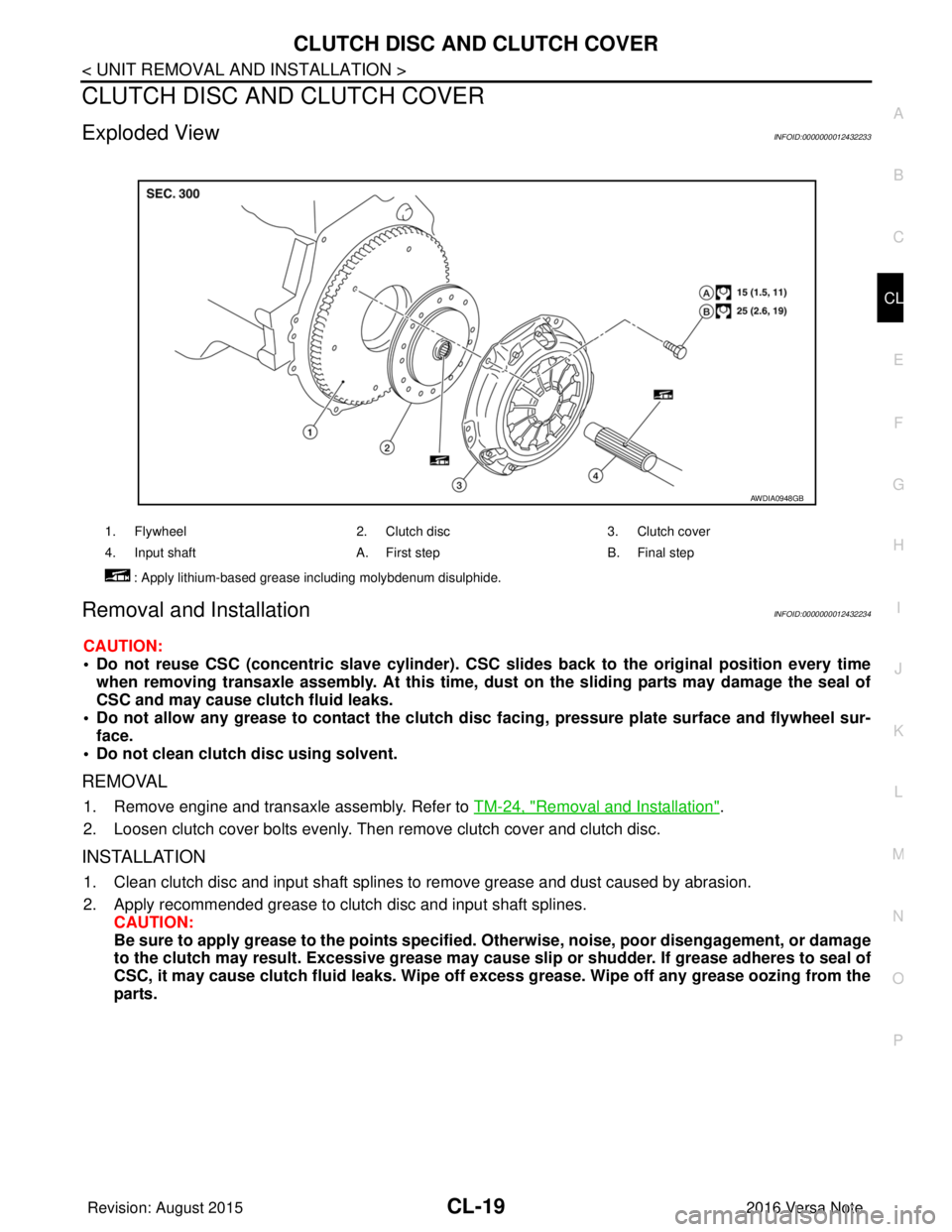
2. Apply recommended grease to clutch disc and input shaft splines. CAUTION:
Be sure to apply grease to the points specified. Otherwise, noise, poor disengagement, or damage
to the clutch may result. Excessi ve grease may cause slip or shudder. If grease adheres to seal of
CSC, it may cause clutch fluid leaks. Wipe off excess grease. Wipe off any grease oozing from the
parts.
1. Flywheel 2. Clutch disc3. Clutch cover
4. Input shaft A. First stepB. Final step
: Apply lithium-based grease including molybdenum disulphide.
AWDIA0948GB
Revision: August 2015 2016 Versa Note
cardiagn.com
Page 646 of 3641
CL-20
< UNIT REMOVAL AND INSTALLATION >
CLUTCH DISC AND CLUTCH COVER
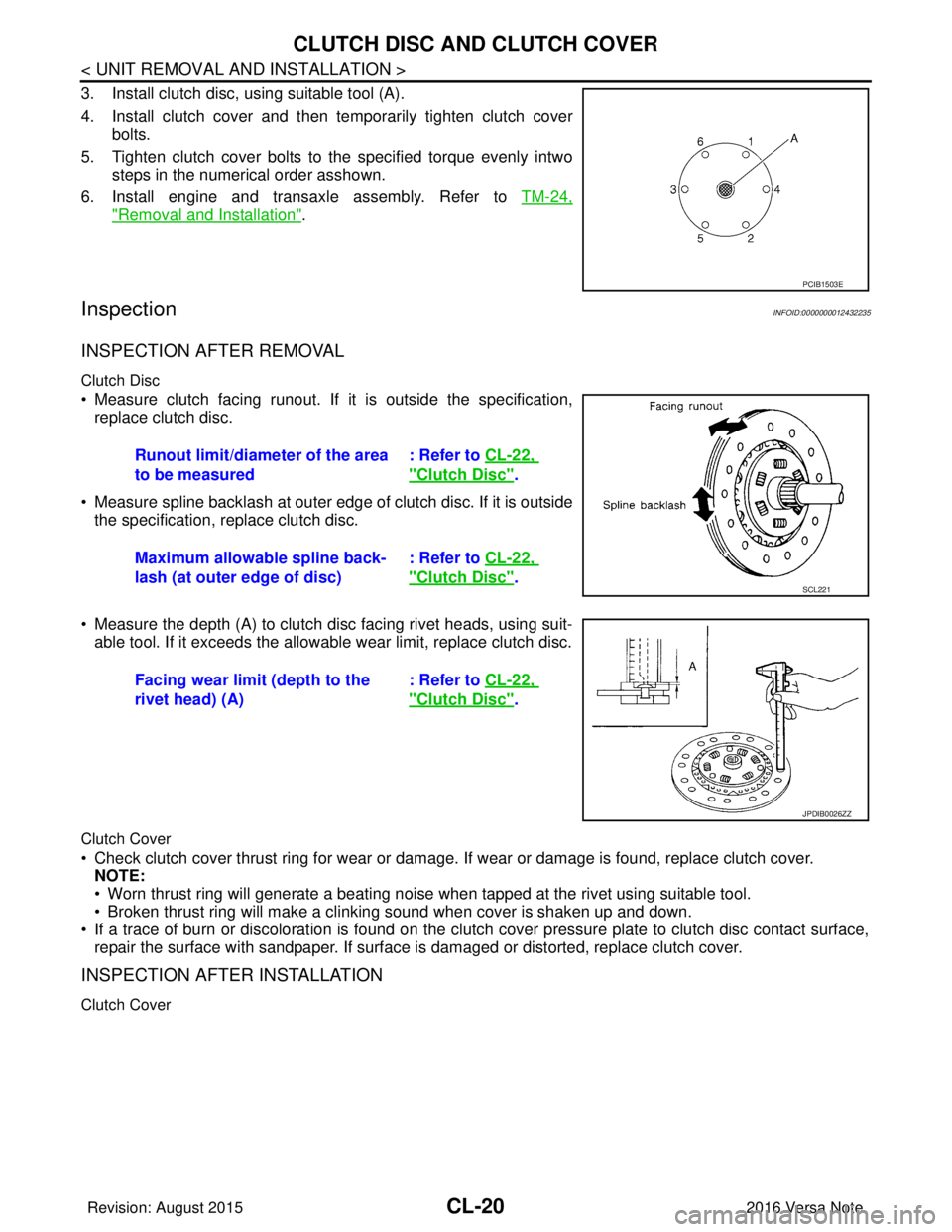
3. Install clutch disc, using suitable tool (A).
4. Install clutch cover and then temporarily tighten clutch coverbolts.
5. Tighten clutch cover bolts to the specified torque evenly intwo steps in the numerical order asshown.
6. Install engine and transaxle assembly. Refer to TM-24,
"Removal and Installation".
InspectionINFOID:0000000012432235
INSPECTION AFTER REMOVAL
Clutch Disc
• Measure clutch facing runout. If it is outside the specification,
replace clutch disc.
• Measure spline backlash at outer edge of clutch disc. If it is outside the specification, replace clutch disc.
• Measure the depth (A) to clutch disc facing rivet heads, using suit- able tool. If it exceeds the allowable wear limit, replace clutch disc.
Clutch Cover
• Check clutch cover thrust ring for wear or damage. If wear or damage is found, replace clutch cover.
NOTE:
• Worn thrust ring will generate a beating noise when tapped at the rivet using suitable tool.
• Broken thrust ring will make a clinking sound when cover is shaken up and down.
• If a trace of burn or discoloration is found on the clutch cover pressure plate to clutch disc contact surface,
repair the surface with sandpaper. If surface is damaged or distorted, replace clutch cover.
INSPECTION AFTER INSTALLATION
Clutch Cover
PCIB1503E
Runout limit/diameter of the area
to be measured : Refer to
CL-22,
"Clutch Disc".
Maximum allowable spline back-
lash (at outer edge of disc) : Refer to
CL-22,
"Clutch Disc".SCL221
Facing wear limit (depth to the
rivet head) (A) : Refer to
CL-22,
"Clutch Disc".
JPDIB0026ZZ
Revision: August 2015 2016 Versa Note
cardiagn.com
Page 647 of 3641
CLUTCH DISC AND CLUTCH COVERCL-21
< UNIT REMOVAL AND INSTALLATION >
CEF
G H
I
J
K L
M A
B
CL
N
O P
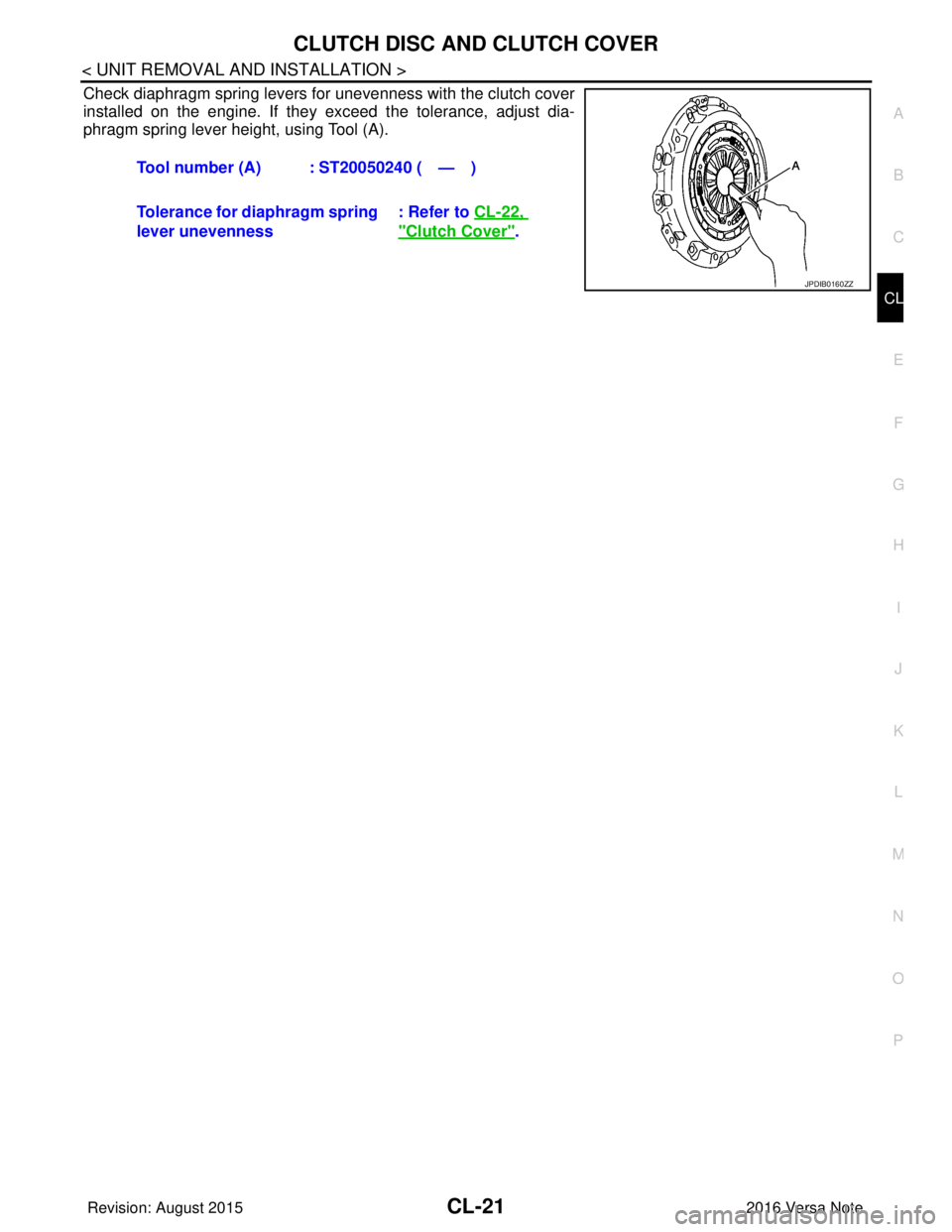
Check diaphragm spring levers for unevenness with the clutch cover
installed on the engine. If they exceed the tolerance, adjust dia-
phragm spring lever height, using Tool (A). Tool number (A) : ST20050240 ( — )
Tolerance for diaphragm spring
lever unevenness : Refer to
CL-22,
"Clutch Cover".
JPDIB0160ZZ
Revision: August 2015 2016 Versa Note
cardiagn.com
Page 648 of 3641
CL-22
< SERVICE DATA AND SPECIFICATIONS (SDS)
SERVICE DATA AND SPECIFICATIONS (SDS)
SERVICE DATA AND SPECIFICATIONS (SDS)
SERVICE DATA AND SPECIFICATIONS (SDS)
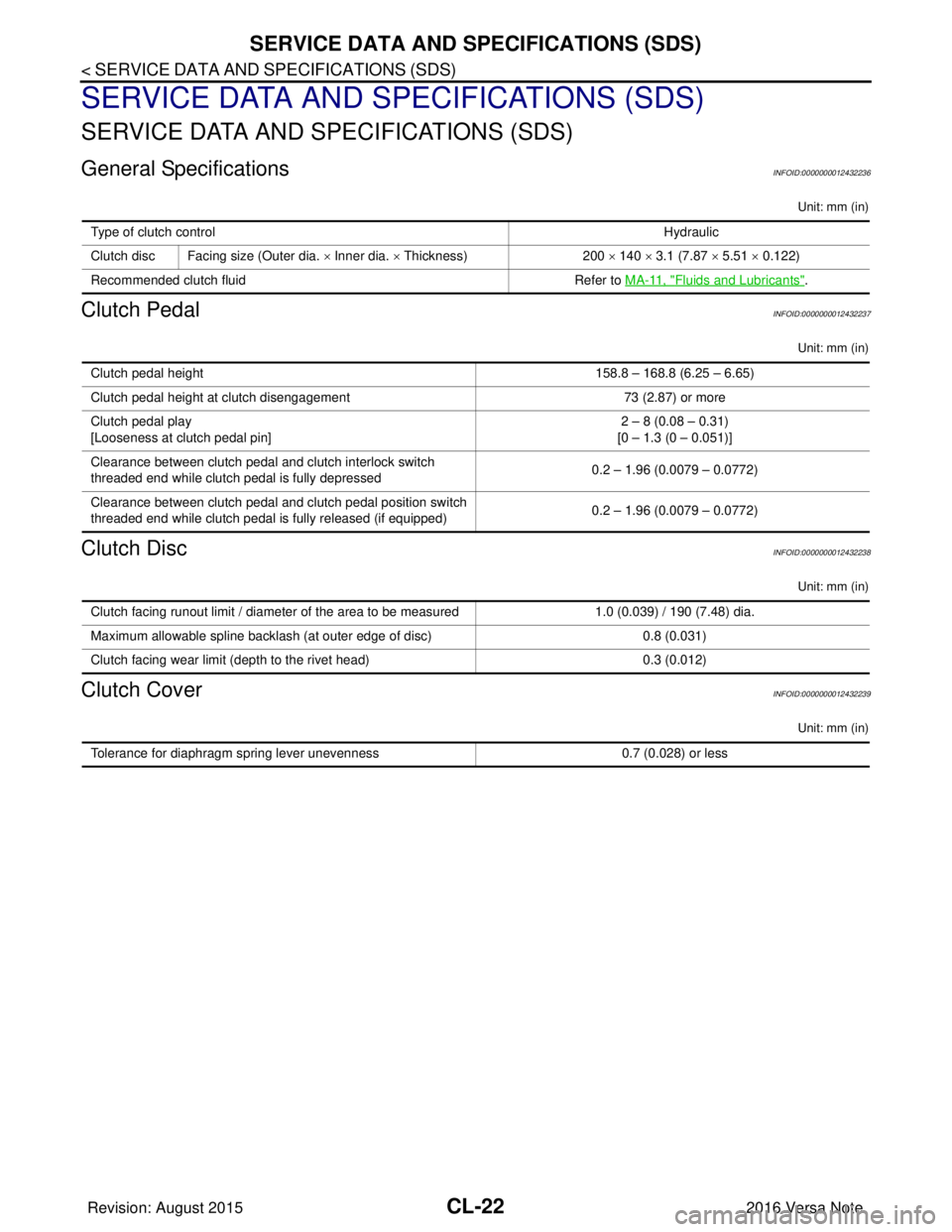
General SpecificationsINFOID:0000000012432236
Unit: mm (in)
Clutch PedalINFOID:0000000012432237
Unit: mm (in)
Clutch DiscINFOID:0000000012432238
Unit: mm (in)
Clutch CoverINFOID:0000000012432239
Unit: mm (in)
Type of clutch controlHydraulic
Clutch disc Facing size (Outer dia. × Inner dia. × Thickness) 200 × 140 × 3.1 (7.87 × 5.51 × 0.122)
Recommended clutch fluid Refer to MA-11, "
Fluids and Lubricants".
Clutch pedal height 158.8 – 168.8 (6.25 – 6.65)
Clutch pedal height at clutch disengagement 73 (2.87) or more
Clutch pedal play
[Looseness at clutch pedal pin] 2 – 8 (0.08 – 0.31)
[0 – 1.3 (0 – 0.051)]
Clearance between clutch pedal and clutch interlock switch
threaded end while clutch pedal is fully depressed 0.2 – 1.96 (0.0079 – 0.0772)
Clearance between clutch pedal and clutch pedal position switch
threaded end while clutch pedal is fully released (if equipped) 0.2 – 1.96 (0.0079 – 0.0772)
Clutch facing runout limit / diameter of the area to be measured
1.0 (0.039) / 190 (7.48) dia.
Maximum allowable spline backlash (at outer edge of disc) 0.8 (0.031)
Clutch facing wear limit (depth to the rivet head) 0.3 (0.012)
Tolerance for diaphragm spring lever unevenness0.7 (0.028) or less
Revision: August 2015 2016 Versa Note
cardiagn.com
Page 721 of 3641
![NISSAN NOTE 2016 Service Owners Manual DLK-32
< SYSTEM DESCRIPTION >[WITH INTELLIGENT KEY SYSTEM]
DIAGNOSIS SYSTEM (BCM)
DATA MONITOR
ACTIVE TEST
Monitor Item [Unit]
Main Description
REQ SW -DR [On/Off] ×Indicates condition of door reques](/img/5/57363/w960_57363-720.png "NISSAN NOTE 2016 Service Owners Manual DLK-32
< SYSTEM DESCRIPTION >[WITH INTELLIGENT KEY SYSTEM]
DIAGNOSIS SYSTEM (BCM)
DATA MONITOR
ACTIVE TEST
Monitor Item [Unit]
Main Description
REQ SW -DR [On/Off] ×Indicates condition of door reques")
DLK-32
< SYSTEM DESCRIPTION >[WITH INTELLIGENT KEY SYSTEM]
DIAGNOSIS SYSTEM (BCM)
DATA MONITOR
ACTIVE TEST
Monitor Item [Unit]
Main Description
REQ SW -DR [On/Off] ×Indicates condition of door request switch LH.
REQ SW -AS [On/Off] ×Indicates condition of door request switch RH.
REQ SW -BD/TR [On/Off] ×Indicates condition of back door request switch.
PUSH SW [On/Off] Indicates condition of push-button ignition switch.
CLUCH SW [On/Off] ×Indicates condition of clutch interlock switch.
BRAKE SW 1 [On/Off] ×Indicates condition of brake switch.
BRAKE SW 2 [On/Off] Indicates condition of brake switch.
DETE/CANCL SW [On/Off] ×Indicates condition of P (park) position.
SFT PN/N SW [On/Off] ×Indicates condition of P (park) or N (neutral) position.
UNLK SEN -DR [On/Off] ×Indicates condition of door unlock sensor.
PUSH SW -IPDM [On/Off] Indicates condition of push-button ignition switch received from IPDM E/R on
CAN communication line.
IGN RLY1 -F/B [On/Off] Indicates condition of ignition relay 1 received from IPDM E/R on CAN commu-
nication line.
DETE SW -IPDM [On/Off] Indicates condition of detent switch received from TCM on CAN communication
line.
SFT PN -IPDM [On/Off] Indicates condition of P (park) or N (neutral) position from TCM on CAN com-
munication line.
SFT P -MET [On/Off] Indicates condition of P (park) position from TCM on CAN communication line.
SFT N -MET [On/Off] Indicates condition of N (neutral) position from IPDM E/R on CAN communica-
tion line.
ENGINE STATE [Stop/Start/Crank/Run] ×Indicates condition of engine state from ECM on CAN communication line.
VEH SPEED 1 [mph/km/h] ×Indicates condition of ve
hicle speed signal receiv ed from ABS on CAN commu-
nication line.
VEH SPEED 2 [mph/km/h] ×Indicates condition of vehicle speed signal received from combination meter on
CAN communication line.
DOOR STAT -DR [LOCK/READY/UNLK] ×Indicates condition of driver side door status.
DOOR STAT -AS [LOCK/READY/UNLK] ×Indicates condition of passenger side door status.
ID OK FLAG [Set/Reset] Indicates condition of Intelligent Key ID.
PRMT ENG STRT [Set/Reset] Indicates condition of engine start possibility.
RKE OPE COUN1 [0-19] ×When remote keyless entry receiver receives the signal transmitted while oper-
ating on Intelligent Key, the numerical value start changing.
RKE OPE COUN2 [0-19] ×When remote keyless entry receiver receives the signal transmitted while oper-
ating on Intelligent Key, the numerical value start changing.
RKE-LOCK [On/Off] Indicates condition of lock signal from Intelligent Key.
RKE-UNLOCK [On/Off] Indicates condition of unlock signal from Intelligent Key.
RKE-PANIC [On/Off] Indicates condition of panic signal from Intelligent Key.
RKE-MODE CHG [On/Off] Indicates condition of mode change signal from Intelligent Key.
Test Item Description
INSIDE BUZZER This test is able to check combination meter warning chime operation [Take Out/Knob/Key/
Off].
LCD This test is able to check combination meter display in
formation [Off/LK WN/OUTKEY/NO
KY/BATT/INSRT/SFT P/ROTAT/ID NG/B&P I/B&P N].
BATTERY SAVER This test is able to check battery saver operation [On/Off].
Revision: August 2015 2016 Versa Note
cardiagn.com
Page 824 of 3641
![NISSAN NOTE 2016 Service Owners Manual SQUEAK AND RATTLE TROUBLE DIAGNOSESDLK-135
< SYMPTOM DIAGNOSIS > [WITH INTELLIGENT KEY SYSTEM]
C
D
E
F
G H
I
J
L
M A
B
DLK
N
O P
If the noise can be duplicated easily during the test drive, to help id](/img/5/57363/w960_57363-823.png "NISSAN NOTE 2016 Service Owners Manual SQUEAK AND RATTLE TROUBLE DIAGNOSESDLK-135
< SYMPTOM DIAGNOSIS > [WITH INTELLIGENT KEY SYSTEM]
C
D
E
F
G H
I
J
L
M A
B
DLK
N
O P
If the noise can be duplicated easily during the test drive, to help id")
SQUEAK AND RATTLE TROUBLE DIAGNOSESDLK-135
< SYMPTOM DIAGNOSIS > [WITH INTELLIGENT KEY SYSTEM]
C
D
E
F
G H
I
J
L
M A
B
DLK
N
O P
If the noise can be duplicated easily during the test drive, to help identify the source of the noise, try to dupli-
cate the noise with the vehicle stopped by doing one or all of the following:
1) Close a door.
2) Tap or push/pull around the area where the noise appears to be coming from.
3) Rev the engine.
4) Use a floor jack to recreate vehicle “twist”.
5) At idle, apply engine load (electrical load, half-clutch on M/T model, drive position on CVT and A/T models).
6) Raise the vehicle on a hoist and hit a tire with a rubber hammer.
• Drive the vehicle and attempt to duplicate the conditions the customer states exist when the noise occurs.
• If it is difficult to duplicate the noise, drive the vehicle slowly on an undulating or rough road to stress the
vehicle body.
CHECK RELATED SERVICE BULLETINS
After verifying the customer concern or symptom, check ASIST for Technical Service Bulletins (TSBs) related
to that concern or symptom.
If a TSB relates to the symptom, follow the procedure to repair the noise.
LOCATE THE NOISE AND IDENTIFY THE ROOT CAUSE
1. Narrow down the noise to a general area. To help pinpoint the source of the noise, use a listening tool (Chassis Ear: J-39570, Engine Ear: J-39565 and mechanic's stethoscope).
2. Narrow down the noise to a more specific area and identify the cause of the noise by: • removing the components in the area that you suspect the noise is coming from.Do not use too much force when removing clips and fasteners, otherwise clips and fasteners can be
broken or lost during the repair, resulting in the creation of new noise.
• tapping or pushing/pulling the component that you suspect is causing the noise.
Do not tap or push/pull the component with excessive force, otherwise the noise will be eliminated only
temporarily.
• feeling for a vibration with your hand by touching the component(s) that you suspect is (are) causing the
noise.
• placing a piece of paper between components that you suspect are causing the noise.
• looking for loose components and contact marks. Refer to DLK-135, "
Generic Squeak and Rattle Troubleshooting".
REPAIR THE CAUSE
• If the cause is a loose component, tighten the component securely.
• If the cause is insufficient clearance between components:
- separate components by repositioning or loos ening and retightening the component, if possible.
- insulate components with a suitable insulator such as urethane pads, foam blocks, felt cloth tape or urethane tape. A NISSAN Squeak and Rattle Kit (J-50397) is available through your authorized NISSAN Parts Depart-
ment.
CAUTION:
Do not use excessive force as many components are constructed of plastic and may be damaged.
NOTE:
• Always check with the Parts Department for the latest parts information.
• The materials contained in the NISSAN Squeak and Rattle Kit (J-50397) are listed on the inside cover of the
kit; and can each be ordered separately as needed.
• The following materials not found in the kit can also be used to repair squeaks and rattles.
- SILICONE GREASE: Use instead of UHMW tape that will be visible or does not fit. The silicone grease will
only last a few months.
- SILICONE SPRAY: Use when grease cannot be applied.
- DUCT TAPE: Use to eliminate movement.
CONFIRM THE REPAIR
Confirm that the cause of a noise is repaired by test driving the vehicle. Operate the vehicle under the same
conditions as when the noise originally occurred. Refer to the notes on the Diagnostic Worksheet.
Generic Squeak and Rattle TroubleshootingINFOID:0000000012430083
Refer to Table of Contents for specific component removal and installation information.
INSTRUMENT PANEL
Most incidents are caused by contact and movement between:
Revision: August 2015 2016 Versa Note
cardiagn.com
Page 952 of 3641
![NISSAN NOTE 2016 Service Owners Manual SQUEAK AND RATTLE TROUBLE DIAGNOSESDLK-263
< SYMPTOM DIAGNOSIS > [WITHOUT INTELLIGENT KEY SYSTEM]
C
D
E
F
G H
I
J
L
M A
B
DLK
N
O P
If the noise can be duplicated easily during the test drive, to help](/img/5/57363/w960_57363-951.png "NISSAN NOTE 2016 Service Owners Manual SQUEAK AND RATTLE TROUBLE DIAGNOSESDLK-263
< SYMPTOM DIAGNOSIS > [WITHOUT INTELLIGENT KEY SYSTEM]
C
D
E
F
G H
I
J
L
M A
B
DLK
N
O P
If the noise can be duplicated easily during the test drive, to help")
SQUEAK AND RATTLE TROUBLE DIAGNOSESDLK-263
< SYMPTOM DIAGNOSIS > [WITHOUT INTELLIGENT KEY SYSTEM]
C
D
E
F
G H
I
J
L
M A
B
DLK
N
O P
If the noise can be duplicated easily during the test drive, to help identify the source of the noise, try to dupli-
cate the noise with the vehicle stopped by doing one or all of the following:
1) Close a door.
2) Tap or push/pull around the area where the noise appears to be coming from.
3) Rev the engine.
4) Use a floor jack to recreate vehicle “twist”.
5) At idle, apply engine load (electrical load, half-clutch on M/T model, drive position on CVT and A/T models).
6) Raise the vehicle on a hoist and hit a tire with a rubber hammer.
• Drive the vehicle and attempt to duplicate the conditions the customer states exist when the noise occurs.
• If it is difficult to duplicate the noise, drive the vehicle slowly on an undulating or rough road to stress the
vehicle body.
CHECK RELATED SERVICE BULLETINS
After verifying the customer concern or symptom, check ASIST for Technical Service Bulletins (TSBs) related
to that concern or symptom.
If a TSB relates to the symptom, follow the procedure to repair the noise.
LOCATE THE NOISE AND IDENTIFY THE ROOT CAUSE
1. Narrow down the noise to a general area. To help pinpoint the source of the noise, use a listening tool (Chassis Ear: J-39570, Engine Ear: J-39565 and mechanic's stethoscope).
2. Narrow down the noise to a more specific area and identify the cause of the noise by: • removing the components in the area that you suspect the noise is coming from.Do not use too much force when removing clips and fasteners, otherwise clips and fasteners can be
broken or lost during the repair, resulting in the creation of new noise.
• tapping or pushing/pulling the component that you suspect is causing the noise.
Do not tap or push/pull the component with excessive force, otherwise the noise will be eliminated only
temporarily.
• feeling for a vibration with your hand by touching the component(s) that you suspect is (are) causing the
noise.
• placing a piece of paper between components that you suspect are causing the noise.
• looking for loose components and contact marks. Refer to DLK-263, "
Generic Squeak and Rattle Troubleshooting".
REPAIR THE CAUSE
• If the cause is a loose component, tighten the component securely.
• If the cause is insufficient clearance between components:
- separate components by repositioning or loos ening and retightening the component, if possible.
- insulate components with a suitable insulator such as urethane pads, foam blocks, felt cloth tape or urethane tape. A NISSAN Squeak and Rattle Kit (J-50397) is available through your authorized NISSAN Parts Depart-
ment.
CAUTION:
Do not use excessive force as many components are constructed of plastic and may be damaged.
NOTE:
• Always check with the Parts Department for the latest parts information.
• The materials contained in the NISSAN Squeak and Rattle Kit (J-50397) are listed on the inside cover of the
kit; and can each be ordered separately as needed.
• The following materials not found in the kit can also be used to repair squeaks and rattles.
- SILICONE GREASE: Use instead of UHMW tape that will be visible or does not fit. The silicone grease will
only last a few months.
- SILICONE SPRAY: Use when grease cannot be applied.
- DUCT TAPE: Use to eliminate movement.
CONFIRM THE REPAIR
Confirm that the cause of a noise is repaired by test driving the vehicle. Operate the vehicle under the same
conditions as when the noise originally occurred. Refer to the notes on the Diagnostic Worksheet.
Generic Squeak and Rattle TroubleshootingINFOID:0000000012430229
Refer to Table of Contents for specific component removal and installation information.
INSTRUMENT PANEL
Most incidents are caused by contact and movement between:
Revision: August 2015 2016 Versa Note
cardiagn.com