warning NISSAN NOTE 2016 Service Repair Manual
[x] Cancel search | Manufacturer: NISSAN, Model Year: 2016, Model line: NOTE, Model: NISSAN NOTE 2016Pages: 3641, PDF Size: 28.72 MB
Page 3029 of 3641
SRC-12
< SYSTEM DESCRIPTION >
SYSTEM
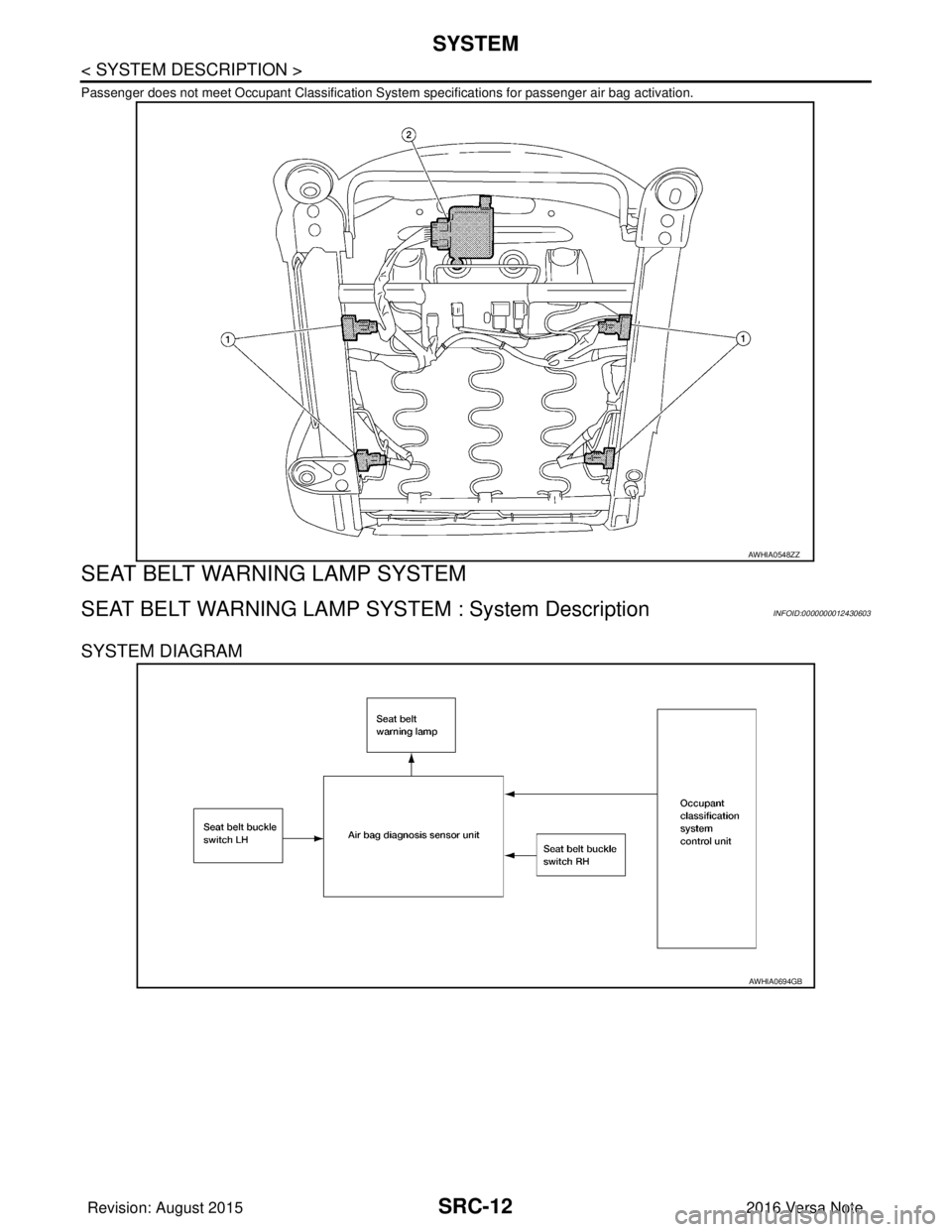
Passenger does not meet Occupant Classification System specifications for passenger air bag activation.
SEAT BELT WARNING LAMP SYSTEM
SEAT BELT WARNING LAMP SYSTEM : System DescriptionINFOID:0000000012430603
SYSTEM DIAGRAM
AWHIA0548ZZ
AWHIA0694GB
Revision: August 20152016 Versa Note
cardiagn.com
Page 3030 of 3641
SYSTEMSRC-13
< SYSTEM DESCRIPTION >
C
DE
F
G
I
J
K L
M A
B
SRC
N
O P
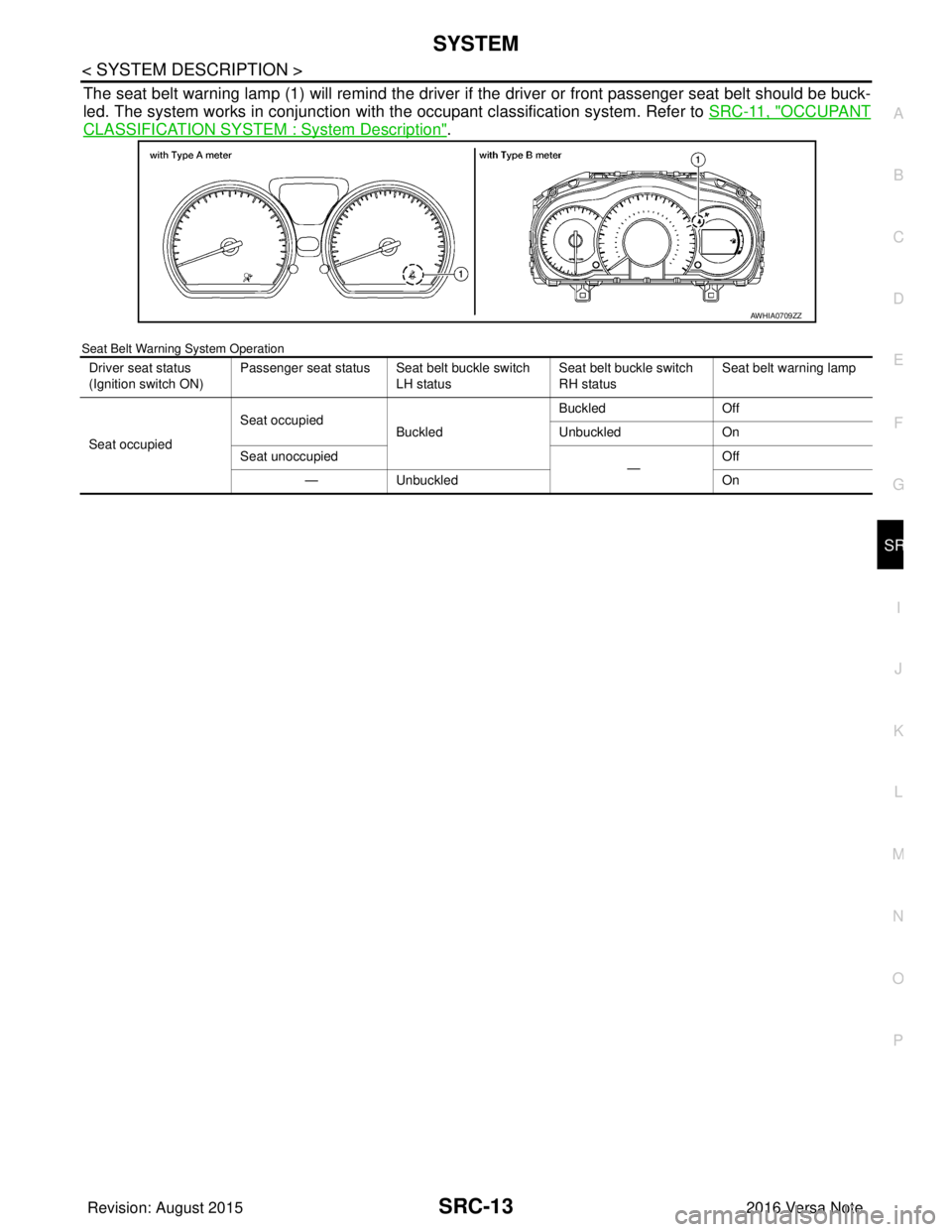
The seat belt warning lamp (1) will remind the driver if the driver or front passenger seat belt should be buck-
led. The system works in conjunction with the occupant classification system. Refer to SRC-11, "
OCCUPANT
CLASSIFICATION SYSTEM : System Description".
Seat Belt Warning System Operation
AWHIA0709ZZ
Driver seat status
(Ignition switch ON)Passenger seat status Seat belt buckle switch
LH status Seat belt buckle switch
RH status Seat belt warning lamp
Seat occupied Seat occupied
Buckled Buckled
Off
Unbuckled On
Seat unoccupied —Off
— Unbuckled On
Revision: August 2015 2016 Versa Note
cardiagn.com
Page 3031 of 3641

SRC-14
< SYSTEM DESCRIPTION >
DIAGNOSIS SYSTEM (AIR BAG)
DIAGNOSIS SYSTEM (AIR BAG)
DescriptionINFOID:0000000012430604
CAUTION:
• Never use electrical test equipment on any circuit related to the SRS unless instructed in this Ser-
vice Manual. SRS wiring harnesses can be identifi ed by yellow and/or orange harnesses or harness
connectors.
• Never repair, splice or modify the SRS wiring harn ess. If the harness is damaged, replace it with a
new one.
• Keep ground portion clean.
DIAGNOSIS FUNCTION
• The SRS self-diagnostic results can be read with air bag warning lamp and/or CONSULT.
• The user mode is exclusively prepared for the customer (driver). This mode warns the driver of a system
malfunction through the operation of the air bag warning lamp.
• The diagnosis mode allows the technician to locate and inspect the malfunctioning part.
• The mode applications for the air bag warning lamp and CONSULT are as per the following items.
× : Application, —: Not application
On Board Diagn osis FunctionINFOID:0000000012430605
ON-BOARD DIAGNOSIS
There are two self diagnosis functions with air bag warning lamp per the following items.
•USER MODE
• DIAGNOSIS MODE
METHOD OF STARTING
• Diagnosis mode changes from user mode to diagnosis mode when changing operation is performed.
• In user mode, when SRS air bag warning lamp is not turning ON, changing to diagnosis mode by ignition
switch operation is not possible.
• In diagnosis mode, when repair is complete and system is normal, the mode changes to user mode when
ignition switch is turned from OFF to ON.
Procedure to Change Diagnosis Mode
1. Turn ignition switch from OFF to ON.
2. SRS air bag lamp turns ON for 7 seconds and turns OFF, then turn ignition switch OFF within 2 seconds after the lamp turns OFF.
NOTE:
When in Diagnosis Mode, the air bag warning lamp may illuminate for more than 7 seconds after the igni-
tion switch is turned ON. If this is the case, the i gnition switch must still be cycled OFF after 7 seconds.
3. After turning ignition switch OFF, wait for 3 seconds or more.
4. Repeat operation 1 to 3 for 2 times so that operation 1 to 3 is repeated for 3 times in total.
5. Turn ignition switch from OFF to ON. Diagnosis mode changes.
USER MODE
In USER MODE, air bag warning lamp on combination meter turns ON when a malfunction is detected and
warns the customer (driver).
How to Read Air Bag Warning Lamp
1. Turn the ignition switch from OFF to ON, and check that the air bag warning lamp turns ON.
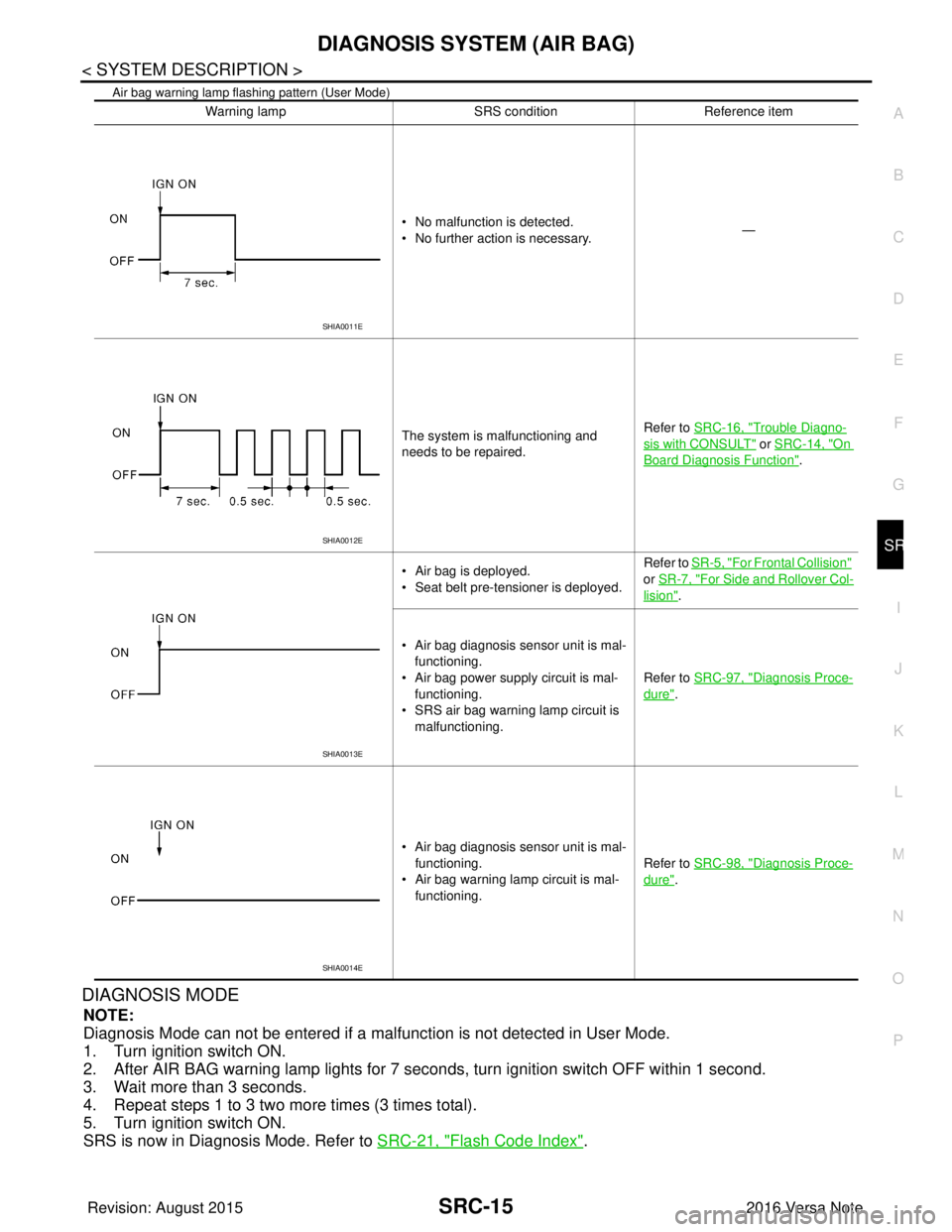
2. Compare the air bag warning lamp operation pattern with the examples.
Air Bag Warning Lamp Examples:
Diagnosis tool User modeDiagnosis mode
Air bag warning lamp ××
CONSULT –×
Revision: August 2015 2016 Versa Note
cardiagn.com
Page 3032 of 3641
DIAGNOSIS SYSTEM (AIR BAG)SRC-15
< SYSTEM DESCRIPTION >
C
DE
F
G
I
J
K L
M A
B
SRC
N
O P
Air bag warning lamp flashing pattern (User Mode)
DIAGNOSIS MODE
NOTE:
Diagnosis Mode can not be entered if a malfunction is not detected in User Mode.
1. Turn ignition switch ON.
2. After AIR BAG warning lamp lights for 7 seconds, turn ignition switch OFF within 1 second.
3. Wait more than 3 seconds.
4. Repeat steps 1 to 3 two more times (3 times total).
5. Turn ignition switch ON.
SRS is now in Diagnosis Mode. Refer to SRC-21, "
Flash Code Index".
Warning lamp SRS conditionReference item
• No malfunction is detected.
• No further action is necessary. —
The system is malfunctioning and
needs to be repaired. Refer to SRC-16, "
Trouble Diagno-
sis with CONSULT" or SRC-14, "On
Board Diagnosis Function".
• Air bag is deployed.
• Seat belt pre-tensioner is deployed. Refer to
SR-5, "
For Frontal Collision"
or SR-7, "
For Side and Rollover Col-
lision".
• Air bag diagnosis sensor unit is mal- functioning.
• Air bag power supply circuit is mal- functioning.
• SRS air bag warning lamp circuit is
malfunctioning. Refer to SRC-97, "
Diagnosis Proce-
dure".
• Air bag diagnosis sensor unit is mal- functioning.
• Air bag warning lamp circuit is mal- functioning. Refer to SRC-98, "
Diagnosis Proce-
dure".
SHIA0011E
SHIA0012E
SHIA0013E
SHIA0014E
Revision: August 2015
2016 Versa Note
cardiagn.com
Page 3033 of 3641
SRC-16
< SYSTEM DESCRIPTION >
DIAGNOSIS SYSTEM (AIR BAG)
Trouble Diagnosis with CONSULT
INFOID:0000000012430606
1. Connect CONSULT.
2. DTC is displayed on SELF-DIAG RESULTS.
NOTE:
If a malfunction is not detected on “SELF-DIAG RESULTS [CURRENT]”, but a malfunction is detected during
SRS Operation Check, the following cases may exist:
• “SELF-DIAG [PAST]” memory might not be erased. Refer to SRC-14, "
On Board Diagnosis Function".
• SRS system malfunctions intermittently. Refer to SRC-41, "
InspectionProcedure".
DIAGNOSIS MODE
1. Connect CONSULT.
2. Confirm that zero point reset of OCS is complete.
3. If no DTCs are detected on “SELF-DIAG RESULTS [CURRE NT]”, repair of SRS is completed. Go to step
4.
If any DTCs are detected on “SELF-DIAG RESULT S [CURRENT]”, the malfunction has not been repaired
completely or another malfunction is being detected. Perform SRS Operation Check again. Refer to SRC-
14, "On Board Diagnosis Function".
4. Touch “ERASE”. NOTE:
Touching “ERASE” will clear the SRS memory of the malfunction (“SELF-DIAG [PAST]”). If “SELF-
DIAG [PAST]” is not erased, User Mode may sh ow the previous system malfunction even if the
malfunction has been repaired completely.
5. Check that no malfunction is det ected in “SELF-DIAG [PAST]”.
6. Exit Diagnosis Mode and disconnect the CONSULT.
7. Perform SRS Operation Check. Refer to SRC-14, "
On Board Diagnosis Function".
SRS HISTORY CHECK
1. Check repair history of the SRS. If no repairs have been made, perform SRC-14, "On Board Diagnosis
Function". If repairs have been made, GO TO step 2.
2. Erase ”SELF-DIAG [PAST]” after repair. Refer to SRC-14, "
On Board Diagnosis Function".
CONSULT Function (AIR BAG)INFOID:0000000012430607
CONSULT can display each diagnostic item using the diagnostic test modes shown following.
Diagnostic Test ModeDiagnostic Item Description
Self Diagnostic Result SEL F-DIAG RESULT [CURRENT]A current Self-diagnosis result (also indicated by the number of
warning lamp flashes in the Diagnosis mode) is displayed on the
CONSULT screen in real time. This refers to a malfunctioning part
requiring repairs.
Data Monitor DATA MONITOR Displays air bag diagnosis sensor unit input/output data in real time.
ECU Identification ECU DISCRIMINATED NO. Air bag diagnosis sensor unit ECU discriminated number (identifica-
tion number) or part number is displayed. Air bag diagnosis sensor
unit has individual ECU discriminated number (identification num-
ber) or part number based on model and equipment.
Trouble Diagnostic Record TR OUBLE DIAG RECORD [PAST] With TROUBLE DIAG RECORD, diagnosis results previously
erased by a reset operation can be displayed on the CONSULT
screen.
Revision: August 2015
2016 Versa Note
cardiagn.com
Page 3034 of 3641
DIAGNOSIS SENSOR UNITSRC-17
< ECU DIAGNOSIS INFORMATION >
C
DE
F
G
I
J
K L
M A
B
SRC
N
O P
ECU DIAGNOSIS INFORMATION
DIAGNOSIS SENSOR UNIT
DTC IndexINFOID:0000000012430608
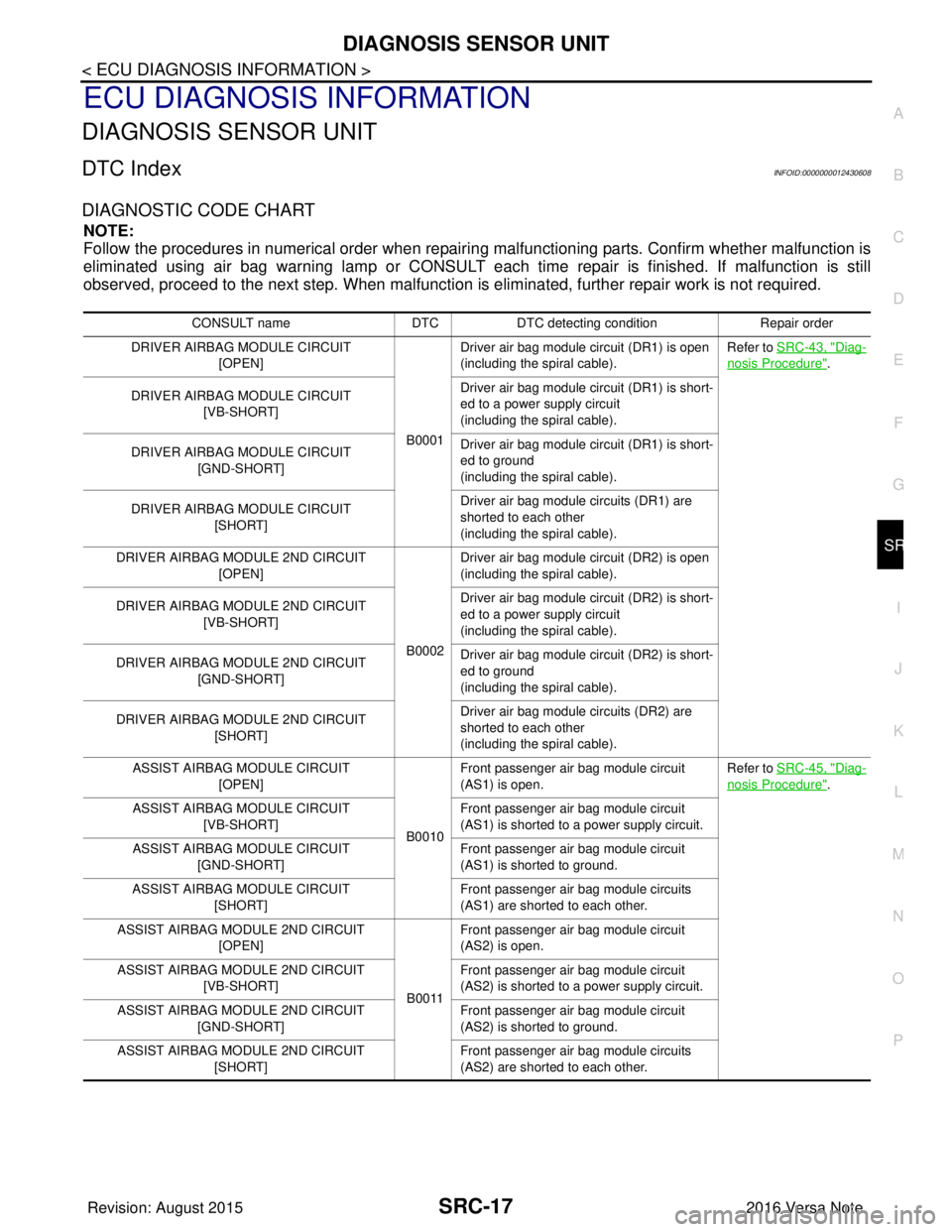
DIAGNOSTIC CODE CHART
NOTE:
Follow the procedures in numerical order when repairi ng malfunctioning parts. Confirm whether malfunction is
eliminated using air bag warning lamp or CONSULT each time repair is finished. If malfunction is still
observed, proceed to the next step. When malfunction is elim inated, further repair work is not required.
CONSULT nameDTCDTC detecting condition Repair order
DRIVER AIRBAG MODULE CIRCUIT [OPEN]
B0001Driver air bag module circuit (DR1) is open
(including the spiral cable).
Refer to SRC-43, "
Diag-
nosis Procedure".
DRIVER AIRBAG MODULE CIRCUIT [VB-SHORT] Driver air bag module circuit (DR1) is short-
ed to a power supply circuit
(including the spiral cable).
DRIVER AIRBAG MODULE CIRCUIT [GND-SHORT] Driver air bag module circuit (DR1) is short-
ed to ground
(including the spiral cable).
DRIVER AIRBAG MODULE CIRCUIT [SHORT] Driver air bag module circuits (DR1) are
shorted to each other
(including the spiral cable).
DRIVER AIRBAG MODULE 2ND CIRCUIT [OPEN]
B0002Driver air bag module circuit (DR2) is open
(including the spiral cable).
DRIVER AIRBAG MODULE 2ND CIRCUIT [VB-SHORT] Driver air bag module circuit (DR2) is short-
ed to a power supply circuit
(including the spiral cable).
DRIVER AIRBAG MODULE 2ND CIRCUIT [GND-SHORT] Driver air bag module circuit (DR2) is short-
ed to ground
(including the spiral cable).
DRIVER AIRBAG MODULE 2ND CIRCUIT [SHORT] Driver air bag module circuits (DR2) are
shorted to each other
(including the spiral cable).
ASSIST AIRBAG MODULE CIRCUIT [OPEN]
B0010Front passenger air bag module circuit
(AS1) is open.
Refer to SRC-45, "
Diag-
nosis Procedure".
ASSIST AIRBAG MODULE CIRCUIT [VB-SHORT] Front passenger air bag module circuit
(AS1) is shorted to a power supply circuit.
ASSIST AIRBAG MODULE CIRCUIT [GND-SHORT] Front passenger air bag module circuit
(AS1) is shorted to ground.
ASSIST AIRBAG MODULE CIRCUIT [SHORT] Front passenger air bag module circuits
(AS1) are shorted to each other.
ASSIST AIRBAG MODULE 2ND CIRCUIT [OPEN]
B0011Front passenger air bag module circuit
(AS2) is open.
ASSIST AIRBAG MODULE 2ND CIRCUIT [VB-SHORT] Front passenger air bag module circuit
(AS2) is shorted to a power supply circuit.
ASSIST AIRBAG MODULE 2ND CIRCUIT [GND-SHORT] Front passenger air bag module circuit
(AS2) is shorted to ground.
ASSIST AIRBAG MODULE 2ND CIRCUIT [SHORT] Front passenger air bag module circuits
(AS2) are shorted to each other.
Revision: August 2015
2016 Versa Note
cardiagn.com
Page 3038 of 3641

DIAGNOSIS SENSOR UNITSRC-21
< ECU DIAGNOSIS INFORMATION >
C
DE
F
G
I
J
K L
M A
B
SRC
N
O P
Flash Code IndexINFOID:0000000012430609
WARNING LAMP FLASH CODE CHART
OCCUPANT DETECTION SENSOR UNIT [UNIT FAIL]
B00A0The OCS control unit is malfunctioning. Refer to
SRC-84, "Diag-
nosis Procedure".
OCCUPANT DETECTION SENSOR UNIT [NO DATA]
OCCUPANT DETECTION SENSOR UNIT [UNDEFINED]
OCCUPANT DETECTION SENSOR UNIT [RESET FAIL]
OCCUPANT DETECTION SENSOR UNIT [COMM FAIL] Communication between the OCS control
unit and the air bag diagnosis sensor unit is
interrupted.
OCCUPANT DETECTION SENSOR [UNIT FAIL] The OCS sensor is malfunctioning.
OCCUPANT DETECTION SENSOR [POWER FAIL] The OCS sensor circuit is malfunctioning.
CONTROL UNIT [UNIT FAIL] B14XX
Air bag diagnosis sensor unit is malfunction-
ing. Refer to SRC-86, "
Diag-
nosis Procedure".
PASS A/B INDCTR CKT [UNIT MALFUNC]
B00D2Malfunction in front passenger air bag ON
indicator circuit.
Refer to SRC-88, "
Diag-
nosis Procedure".
PASS A/B INDCTR CKT [GND-SHORT] Front passenger air bag ON indicator circuit
is shorted to ground.
PASS A/B INDCTR CKT [VB-SHORT] Front passenger air bag ON indicator circuit
is shorted to power supply circuit.
PASS A/B INDCTR CKT [OPEN] Front passenger air bag ON indicator circuit
is open.
PASS A/B INDCTR CKT [PWE-SHORT/OPEN] Front passenger air bag ON indicator circuit
is open or shorted to power supply circuit.
PASSENGER AIRBAG INDICATOR CIRCUIT [FAIL]
B00D5Front passenger air bag OFF indicator is
malfunctioning.
Refer to SRC-90, "
Diag-
nosis Procedure".
PASSENGER AIRBAG INDICATOR CIRCUIT [OPEN] Front passenger air bag OFF indicator cir-
cuit is open.
PASSENGER AIRBAG INDICATOR CIRCUIT [VB-SHORT] Front passenger air bag OFF indicator is
shorted to a power supply circuit.
PASSENGER AIRBAG INDICATOR CIRCUIT [GND-SHORT] Front passenger air bag OFF indicator is
shorted to ground.
IGN VOLTAGE [LOW] B142AIgnition voltage to the air bag diagnosis sen-
sor unit is low.
Refer to SRC-92, "
Diag-
nosis Procedure".
IGN VOLTAGE [HIGH] Ignition voltage to the air bag diagnosis sen-
sor unit is high.
CAN COMMUNICATION FAILURE U1000 CAN system communication failure. Refer to
SRC-94, "
Diag-
nosis Procedure".
CAN COMMUNICATION FAILURE [CONTROL UNIT] U1010
CAN system (control unit) failure.
Refer to SRC-95, "
Diag-
nosis Procedure".
FRONTAL COLLISION DETECTION B1421 Frontal collision detected. Driver and/or
front passenger air bag modules are de-
ployed.Refer to SR-5, "
For
Frontal Collision".
SIDE COLLISION DETECTION B1422Side collision detected. Curtain air bag mod-
ule and seat belt pre-tensioner are de-
ployed. Refer to SR-7, "
For Side
and Rollover Collision".
CONSULT name
DTCDTC detecting condition Repair order
Revision: August 2015 2016 Versa Note
cardiagn.com
Page 3054 of 3641
DIAGNOSIS AND REPAIR WORK FLOWSRC-37
< BASIC INSPECTION >
C
DE
F
G
I
J
K L
M A
B
SRC
N
O P
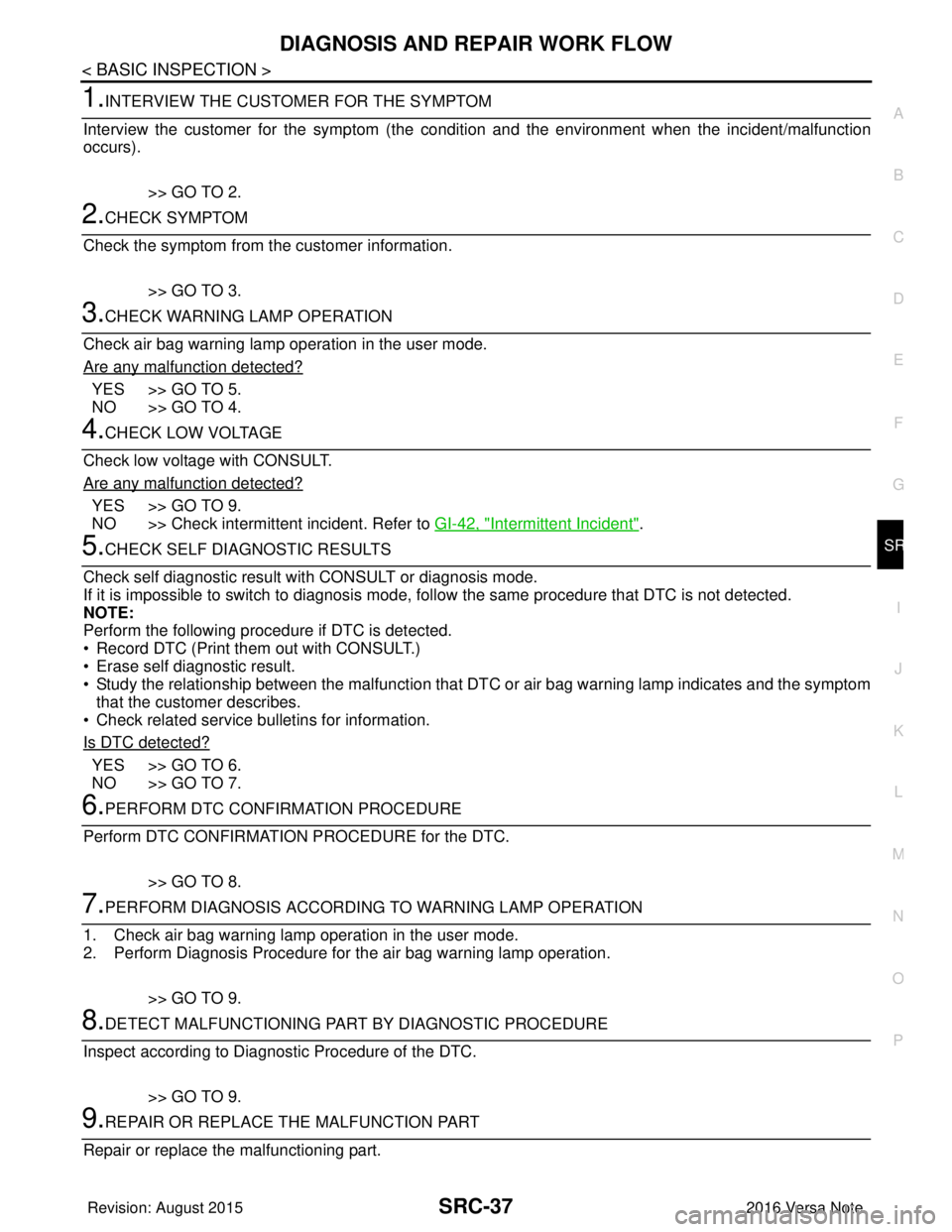
1.INTERVIEW THE CUSTOMER FOR THE SYMPTOM
Interview the customer for the symptom (the condi tion and the environment when the incident/malfunction
occurs).
>> GO TO 2.
2.CHECK SYMPTOM
Check the symptom from the customer information.
>> GO TO 3.
3.CHECK WARNING LAMP OPERATION
Check air bag warning lamp operation in the user mode.
Are any malfunction detected?
YES >> GO TO 5.
NO >> GO TO 4.
4.CHECK LOW VOLTAGE
Check low voltage with CONSULT.
Are any malfunction detected?
YES >> GO TO 9.
NO >> Check intermittent incident. Refer to GI-42, "
Intermittent Incident".
5.CHECK SELF DIAGNOSTIC RESULTS
Check self diagnostic result with CONSULT or diagnosis mode.
If it is impossible to switch to diagnosis mode, follow the same procedure that DTC is not detected.
NOTE:
Perform the following procedure if DTC is detected.
• Record DTC (Print them out with CONSULT.)
• Erase self diagnostic result.
• Study the relationship between the malfunction that DTC or air bag warning lamp indicates and the symptom that the customer describes.
• Check related service bulletins for information.
Is DTC detected?
YES >> GO TO 6.
NO >> GO TO 7.
6.PERFORM DTC CONFIRMATION PROCEDURE
Perform DTC CONFIRMATION PROCEDURE for the DTC.
>> GO TO 8.
7.PERFORM DIAGNOSIS ACCORDING TO WARNING LAMP OPERATION
1. Check air bag warning lamp operation in the user mode.
2. Perform Diagnosis Procedure for the air bag warning lamp operation.
>> GO TO 9.
8.DETECT MALFUNCTIONING PA RT BY DIAGNOSTIC PROCEDURE
Inspect according to Diagnostic Procedure of the DTC.
>> GO TO 9.
9.REPAIR OR REPLACE THE MALFUNCTION PART
Repair or replace the malfunctioning part.
Revision: August 2015 2016 Versa Note
cardiagn.com
Page 3055 of 3641

SRC-38
< BASIC INSPECTION >
DIAGNOSIS AND REPAIR WORK FLOW
>> GO TO 10.
10.ON BOARD DIAGNOSIS FUNCTION
Check self diagnostic result and air bag warning lamp operation in the user mode.
Is the malfunction repaired?
YES >> Inspection End.
NO >> GO TO 2.
Revision: August 2015 2016 Versa Note
cardiagn.com
Page 3057 of 3641

SRC-40
< BASIC INSPECTION >
INSPECTION AND ADJUSTMENT
2. Select start on “Zero point reset function” screen from, WORK SUPPORT of CONSULT “OCCUPANT
DETECTION”.
3. “Zero point reset” starts.
>> GO TO 2.
2.CONFIRMATION OF SETTING
1. Proceed to “Zero point reset function” screen from work support of CONSULT “OCCUPANT DETEC-
TION”.
2. Check that “Complete” or “Incomplete” is displayed on “Zero point reset status”.
CAUTION:
• “Complete” is displayed on “zero point reset current status” if the seat is reinstalled by seat removal
and installation, or “zero point reset” is already performed.
• “Zero point reset current status” displays “Incompl ete” if a new seat is installed. When turning key
switch ON without performing zero point reset , front passenger air bag OFF indicator turns ON.
When zero point reset is performed, front passenger air bag OFF indicator turns OFF.
• Air bag warning lamp blinks in user mode only.
• Air bag sensor unit does not record whethe r or not zero point reset is performed.
Is condition
“ALREADY PERFORMED”?
YES >> Print out “ZERO POINT RESET CURRENT STATUS” screen, and inspection end.
NO >> Check condition as per the following, and perform zero point reset again. • Passenger seat is occupied by an object.
• Excessive vibration is applied while performing zero point reset.
• Occupant detection system is malfunctioning.NOTE:
If “Incomplete” is displayed on “zero point reset cu rrent status”, zero point reset is not completed
normally. Check the condition as per the following and perform zero point reset again.
• Passenger seat is occupied by an object.
• Excessive vibration is applied while performing zero point reset.
• Occupant detection system is malfunctioning.
Revision: August 2015 2016 Versa Note
cardiagn.com