boot NISSAN NOTE 2016 Service Owner's Guide
[x] Cancel search | Manufacturer: NISSAN, Model Year: 2016, Model line: NOTE, Model: NISSAN NOTE 2016Pages: 3641, PDF Size: 28.72 MB
Page 3239 of 3641
ST-18
< UNIT DISASSEMBLY AND ASSEMBLY >
STEERING GEAR AND LINKAGE
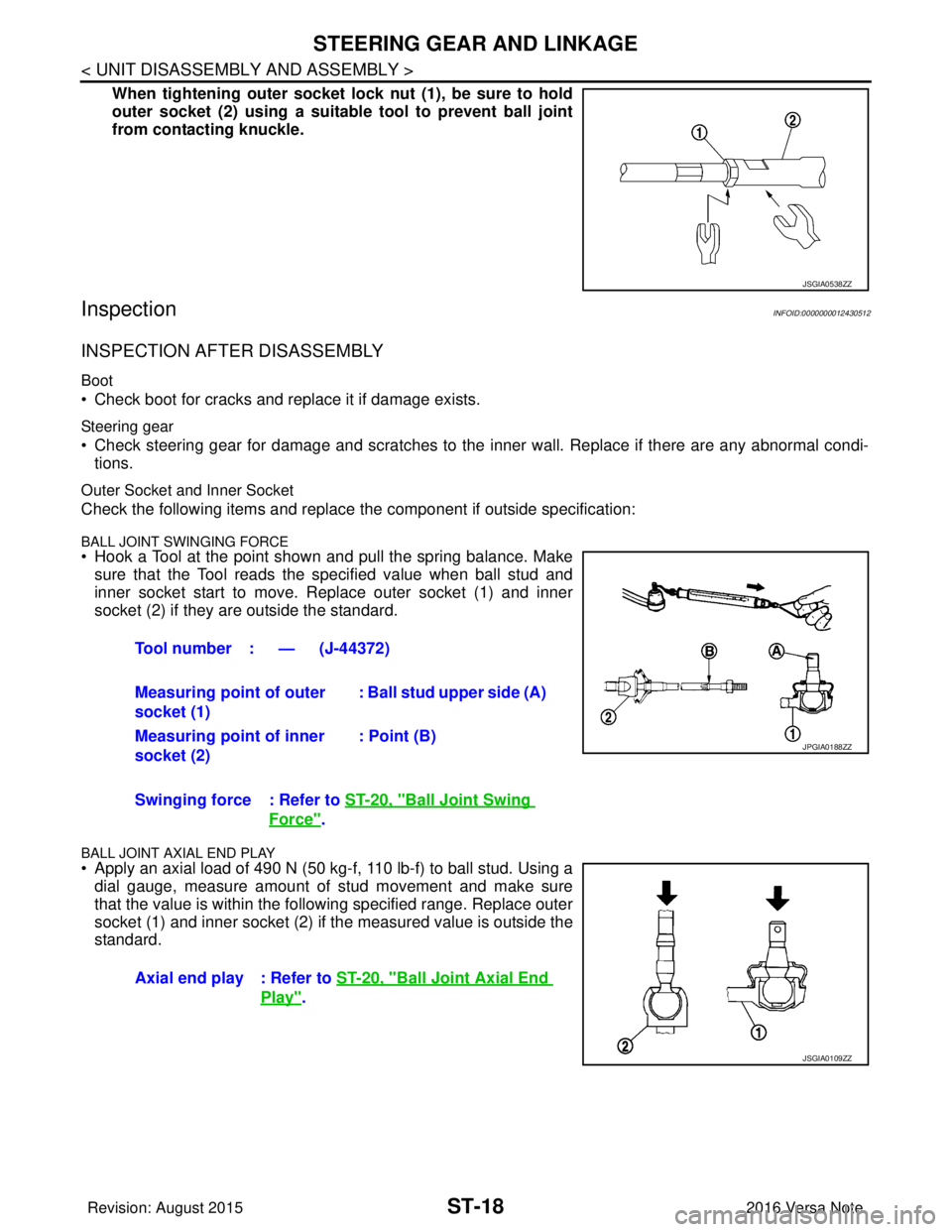
When tightening outer socket lock nut (1), be sure to hold
outer socket (2) using a suitable tool to prevent ball joint
from contacting knuckle.
InspectionINFOID:0000000012430512
INSPECTION AFTER DISASSEMBLY
Boot
• Check boot for cracks and replace it if damage exists.
Steering gear
• Check steering gear for damage and scratches to the inner wall. Replace if there are any abnormal condi- tions.
Outer Socket and Inner Socket
Check the following items and replace the component if outside specification:
BALL JOINT SWINGING FORCE• Hook a Tool at the point shown and pull the spring balance. Make
sure that the Tool reads the specified value when ball stud and
inner socket start to move. Replace outer socket (1) and inner
socket (2) if they are outside the standard.
BALL JOINT AXIAL END PLAY
• Apply an axial load of 490 N (50 kg-f, 110 lb-f) to ball stud. Using adial gauge, measure amount of stud movement and make sure
that the value is within the following specified range. Replace outer
socket (1) and inner socket (2) if the measured value is outside the
standard.
JSGIA0538ZZ
Tool number : — (J-44372)
Measuring point of outer
socket (1) : Ball stud upper side (A)
Measuring point of inner
socket (2) : Point (B)
Swinging force : Refer to ST-20, "
Ball Joint Swing
Force".
Axial end play : Refer to ST-20, "
Ball Joint Axial End
Play".
JPGIA0188ZZ
JSGIA0109ZZ
Revision: August 2015 2016 Versa Note
cardiagn.com
Page 3262 of 3641
![NISSAN NOTE 2016 Service Owners Guide CONTROL LINKAGETM-21
< REMOVAL AND INSTALLATION > [5MT: RS5F91R]
C
EF
G H
I
J
K L
M A
B
TM
N
O P
a. While pressing the lock of the selector cable in the direction of the arrows shown, remove the selec](/img/5/57363/w960_57363-3261.png "NISSAN NOTE 2016 Service Owners Guide CONTROL LINKAGETM-21
< REMOVAL AND INSTALLATION > [5MT: RS5F91R]
C
EF
G H
I
J
K L
M A
B
TM
N
O P
a. While pressing the lock of the selector cable in the direction of the arrows shown, remove the selec")
CONTROL LINKAGETM-21
< REMOVAL AND INSTALLATION > [5MT: RS5F91R]
C
EF
G H
I
J
K L
M A
B
TM
N
O P
a. While pressing the lock of the selector cable in the direction of the arrows shown, remove the selector cable from the shift
selector assembly.
b. While pressing the lock of the shifter cable in the direction of the arrows shown, remove the shifter cable from the shift selector
assembly.
10. Remove the shift selector assembly.
11. Remove center muffler, exhaust front tube, and heat plate. Refer to EX-5, "
Exploded View".
12. Remove the bracket from the vehicle.
13. Remove the grommet and then remove the shifter cable and selector cable from the vehicle.
INSTALLATION
Installation is in the reverse order of removal.
CAUTION:
• Install each cable without causing in terference with other parts. Do not allow cable to bend less than
120 mm (4.72 in), or exceed 180 degree twist.
• Install boot of each cable without causing interference with other parts. Do not exceed 90 degree twist.
• Fit boot to center console assembly an d the groove on shift selector handle.
• To install the shift selector handle, press it onto the shift selector. CAUTION:
• Do not reuse shift selector handle.
• Be careful with orientation of shift selector handle.
• Bolt hole is not threaded on new clutch housing. Self-tapping bolt is used to attach lock plate to clutch hous-
ing.
CAUTION:
Do not reuse self-tapping bolt.
• Insert each cable until it reaches the cable mounting bracket and shift selector assembly.
• Insert each cable until it reaches the shifter lever A and the selector lever.
• Move the shift selector to the neutral position.
InspectionINFOID:0000000012430956
INSPECTION AFTER INSTALLATION
Shift Selector Handle
Check that the shift selector handle is installed in the right position.
Shifter Cable and Selector Cable
• Pull each cable in the removal direction to check that it does not disconnect from the cable mounting
bracket.
• Pull each cable in the removal direction to check that it does not disconnect from the shift selector assembly.
• Pull grommet in the removal direction to che ck that it does not disconnect from the vehicle.
Shift Selector Assembly and Shift Selector
• Check that there is no unusual noise, binding, bending, looseness, and interference when the shift selector
is moved to each position. If there is a malfuncti on, then repair or replace the malfunctioning part.
• Check that the shift selector smoothl y returns to the neutral position after moving the shift selector from 1st
to 2nd gear and releasing it. If there is a malfunction, then repair or replace the malfunctioning part.
• Check that the shift selector smoothly returns to the neutral position after moving the shift selector from 5th to the reverse gear position and releasing it. If there is a malfunction, then repair or replace the malfunction-
ing part.
JPDIC0793ZZ
Revision: August 2015 2016 Versa Note
cardiagn.com