lock NISSAN NOTE 2016 Service Repair Manual
[x] Cancel search | Manufacturer: NISSAN, Model Year: 2016, Model line: NOTE, Model: NISSAN NOTE 2016Pages: 3641, PDF Size: 28.72 MB
Page 2543 of 3641
![NISSAN NOTE 2016 Service Repair Manual PCS-40
< SYSTEM DESCRIPTION >[POWER DISTRIBUTION SYSTEM]
DIAGNOSIS SYSTEM (BCM)
*: Initial SettingAUTO LOCK SET
MODE7 5 min
Auto door lock time setting.
MODE6 4 min
MODE5 3 min
MODE4 2 min
MODE3* 1 mi](/img/5/57363/w960_57363-2542.png "NISSAN NOTE 2016 Service Repair Manual PCS-40
< SYSTEM DESCRIPTION >[POWER DISTRIBUTION SYSTEM]
DIAGNOSIS SYSTEM (BCM)
*: Initial SettingAUTO LOCK SET
MODE7 5 min
Auto door lock time setting.
MODE6 4 min
MODE5 3 min
MODE4 2 min
MODE3* 1 mi")
PCS-40
< SYSTEM DESCRIPTION >[POWER DISTRIBUTION SYSTEM]
DIAGNOSIS SYSTEM (BCM)
*: Initial SettingAUTO LOCK SET
MODE7 5 min
Auto door lock time setting.
MODE6 4 min
MODE5 3 min
MODE4 2 min
MODE3* 1 min
MODE2 30 sec
MODE1 Off
Support Item
Setting Description
Revision: August 2015 2016 Versa Note
cardiagn.com
Page 2561 of 3641
![NISSAN NOTE 2016 Service Repair Manual PCS-58
< DTC/CIRCUIT DIAGNOSIS >[POWER DISTRIBUTION SYSTEM]
B2615 BLOWER RELAY CIRCUIT
B2615 BLOWER RELAY CIRCUIT
DTC LogicINFOID:0000000012433303
DTC DETECTION LOGIC
DTC CONFIRMATION PROCEDURE
1.PERF](/img/5/57363/w960_57363-2560.png "NISSAN NOTE 2016 Service Repair Manual PCS-58
< DTC/CIRCUIT DIAGNOSIS >[POWER DISTRIBUTION SYSTEM]
B2615 BLOWER RELAY CIRCUIT
B2615 BLOWER RELAY CIRCUIT
DTC LogicINFOID:0000000012433303
DTC DETECTION LOGIC
DTC CONFIRMATION PROCEDURE
1.PERF")
PCS-58
< DTC/CIRCUIT DIAGNOSIS >[POWER DISTRIBUTION SYSTEM]
B2615 BLOWER RELAY CIRCUIT
B2615 BLOWER RELAY CIRCUIT
DTC LogicINFOID:0000000012433303
DTC DETECTION LOGIC
DTC CONFIRMATION PROCEDURE
1.PERFORM SELF DIAGNOSTIC RESULT
1. Turn ignition switch to ON, and wait for 1 second or more.
2. Check “Self Diagnostic Result” of “BCM” using CONSULT.
Is DTC B2615 detected?
YES >> Go to PCS-60, "Diagnosis Procedure".
NO >> Inspection End.
Diagnosis ProcedureINFOID:0000000012433304
Regarding Wiring Diagram information, refer to PCS-42, "Wiring Diagram".
1.CHECK BLOWER RELAY CONTROL SIGNAL VOLTAGE
1. Remove blower relay.
2. Check voltage between blower relay connector J-1 terminal 2 and ground.
Is the inspection result normal?
YES >> GO TO 3.
NO >> GO TO 2.
2.CHECK BLOWER RELAY CONTROL SIGNAL CIRCUIT
1. Turn ignition switch OFF.
2. Disconnect BCM connector M98.
3. Check continuity between BCM connector M98 terminal 106 and blower relay connector J-1 terminal 2.
4. Check continuity between BCM connector M98 terminal 106 and ground.
Is the inspection result normal?
YES >> Replace BCM. Refer to BCS-74, "Removal and Installation".
NO >> Repair or replace harness or connectors.
CONSULT Display DTC Detection Condition Possible Cause
BLOWER RELAY CIRCUIT
[B2615] An immediate operation of blower relay is requested
by BCM, but there is no response for more than 1
second. • Harness or connectors.
• Blower relay.
• Fuse block J/B.
•BCM.
Blower relay
GroundCondition Vo l ta g e
(Approx.)
Connector Terminal
J-1 2—Ignition: OFF
0 V
Ignition: ON Battery voltage
BCM Blower relay
Continuity
Connector TerminalConnector Terminal
M98 106J-1 2Yes
BCM
GroundContinuity
Connector Terminal
M98 106 No
Revision: August 2015 2016 Versa Note
cardiagn.com
Page 2563 of 3641
![NISSAN NOTE 2016 Service Repair Manual PCS-60
< DTC/CIRCUIT DIAGNOSIS >[POWER DISTRIBUTION SYSTEM]
B2616 IGNITION RELAY CIRCUIT
B2616 IGNITION RELAY CIRCUIT
DTC LogicINFOID:0000000012433305
DTC DETECTION LOGIC
DTC CONFIRMATION PROCEDURE
1.](/img/5/57363/w960_57363-2562.png "NISSAN NOTE 2016 Service Repair Manual PCS-60
< DTC/CIRCUIT DIAGNOSIS >[POWER DISTRIBUTION SYSTEM]
B2616 IGNITION RELAY CIRCUIT
B2616 IGNITION RELAY CIRCUIT
DTC LogicINFOID:0000000012433305
DTC DETECTION LOGIC
DTC CONFIRMATION PROCEDURE
1.")
PCS-60
< DTC/CIRCUIT DIAGNOSIS >[POWER DISTRIBUTION SYSTEM]
B2616 IGNITION RELAY CIRCUIT
B2616 IGNITION RELAY CIRCUIT
DTC LogicINFOID:0000000012433305
DTC DETECTION LOGIC
DTC CONFIRMATION PROCEDURE
1. PERFORM SELF DIAGNOSTIC RESULT
1. Turn ignition switch to ON, and wait for 1 second or more.
2. Check “Self Diagnostic Result” of “BCM” using CONSULT.
Is DTC B2616 detected?
YES >> Refer to PCS-60, "Diagnosis Procedure".
NO >> Inspection End.
Diagnosis ProcedureINFOID:0000000012433306
Regarding Wiring Diagram information, refer to PCS-42, "Wiring Diagram".
1.CHECK IGNITION RELAY-2 CONTROL SIGNAL VOLTAGE
1. Remove ignition relay-2.
2. Check voltage between ignition relay-2 connector J-3 terminal 1 and ground.
Is the inspection result normal?
YES >> GO TO 3.
NO >> GO TO 2.
2.CHECK IGNITION RELAY-2 CONTROL SIGNAL CIRCUIT
1. Turn ignition switch OFF.
2. Disconnect BCM connector M98.
3. Check continuity between BCM connector M98 terminal 99 and ignition relay-2 connector J-3 terminal 1.
4. Check continuity between BCM connector M98 terminal 99 and ground.
Is the inspection result normal?
YES >> Replace BCM. Refer to BCS-74, "Removal and Installation".
NO >> Repair or replace harness or connectors.
CONSULT Display DTC Detection Condition Possible Cause
IGNITION RELAY CIRCUIT
[B2616] An immediate operation of ignition relay-2 is re-
quested by BCM, but there is no response for more
than 1 second. • Harness or connectors.
• Ignition relay-2.
• Fuse block J/B.
•BCM.
Ignition relay-2
Ground Condition Vo l ta g e
(Approx.)
Connector Terminal
J-3 1—Ignition: OFF
0 V
Ignition: ON Battery voltage
BCM Ignition relay-2
Continuity
Connector TerminalConnector Terminal
M98 99J-3 1Yes
BCM
GroundContinuity
Connector Terminal
M98 99 No
Revision: August 2015 2016 Versa Note
cardiagn.com
Page 2578 of 3641
![NISSAN NOTE 2016 Service Repair Manual PCS
PUSH-BUTTON IGNITION SWITCH DOES NOT OPERATEPCS-75
< SYMPTOM DIAGNOSIS > [POWER DISTRIBUTION SYSTEM]
C
D
E
F
G H
I
J
K L
B A
O P
N
SYMPTOM DIAGNOSIS
PUSH-BUTTON IGNITION SW
ITCH DOES NOT OPERATE
D](/img/5/57363/w960_57363-2577.png "NISSAN NOTE 2016 Service Repair Manual PCS
PUSH-BUTTON IGNITION SWITCH DOES NOT OPERATEPCS-75
< SYMPTOM DIAGNOSIS > [POWER DISTRIBUTION SYSTEM]
C
D
E
F
G H
I
J
K L
B A
O P
N
SYMPTOM DIAGNOSIS
PUSH-BUTTON IGNITION SW
ITCH DOES NOT OPERATE
D")
PCS
PUSH-BUTTON IGNITION SWITCH DOES NOT OPERATEPCS-75
< SYMPTOM DIAGNOSIS > [POWER DISTRIBUTION SYSTEM]
C
D
E
F
G H
I
J
K L
B A
O P
N
SYMPTOM DIAGNOSIS
PUSH-BUTTON IGNITION SW
ITCH DOES NOT OPERATE
DescriptionINFOID:0000000012433320
Check that vehicle Operating Conditions are as listed in “Conditions of Vehicle” below before starting Diagno-
sis Procedure. Make sure to chec k each symptom in Diagnosis Procedure.
NOTE:
The engine start function, door lock function, power distribution system, and NATS-NVIS in the Intelligent Key
system are closely related to each other regarding c ontrol. The vehicle security function can operate only
when the door lock and power distribut ion system are operating normally.
Conditions of Vehicle (Operating Conditions)
• ENGINE START BY I-KEY in “Work support” is set to On. Refer to BCS-22, "INTELLIGENT KEY : CON-
SULT Function (BCM - INTELLIGENT KEY)".
• One or more of Intelligent Keys with registered Intelligent Key ID is in the vehicle.
Diagnosis ProcedureINFOID:0000000012433321
1.PERFORM WORK SUPPORT
Perform INSIDE ANT DIAGNOSIS in “Work Support” of “INTELLIGENT KEY” using CONSULT. Refer to BCS-
22, "INTELLIGENT KEY : CONSULT Func tion (BCM - INTELLIGENT KEY)".
>> GO TO 2.
2.PERFORM SELF DIAGNOSTIC RESULT
Perform “Self Diagnostic Result” of “BCM” using CONSULT.
Are any DTCs detected?
YES >> Refer to BCS-50, "DTCIndex".
NO >> GO TO 3.
3.CHECK PUSH-BUTTON IGNITION SWITCH
Check push-button ignition switch. Refer to PCS-71, "
Component Inspection".
Is the inspection result normal?
YES >> Refer to GI-42, "Intermittent Incident".
NO >> Repair or replace malfunctioning parts.
Revision: August 2015 2016 Versa Note
cardiagn.com
Page 2588 of 3641

PG
PG-1
ELECTRICAL & POWER CONTROL
C
DE
F
G H
I
J
K L
B
SECTION PG
A
O P
N
CONTENTS
POWER SUPPLY, GROUND & CIRCUIT ELEMENTS
PRECAUTION .......
........................................3
PRECAUTIONS .............................................. .....3
Precaution for Supplemental Restraint System
(SRS) "AIR BAG" and "SEAT BELT PRE-TEN-
SIONER" ............................................................. ......
3
Precaution for Power Generation Voltage Variable
Control System ..........................................................
3
PREPARATION ............................................4
PREPARATION .............................................. .....4
Special Service Tools .......................................... ......4
Commercial Service Tool ..........................................4
SYSTEM DESCRIPTION ..............................5
ELECTRICAL UNITS LOCATION .................. .....5
Electrical Units Location ...................................... ......5
COMPONENT PARTS ........................................9
Circuit Breaker (Built Into BCM) .......................... ......9
Harness Connector ...................................................9
Standardized Relay ............................................. ....12
WIRING DIAGRAM ......................................15
POWER SUPPLY ROUTING CIRCUIT .......... ....15
Wiring Diagram — Battery Power Supply — ....... ....15
Wiring Diagram — Accessory Power Supply — .....23
Wiring Diagram — Ignition Power Supply — ..........27
GROUND ............................................................35
Ground Distribution ............................................. ....35
HARNESS ...................................................... ....42
Harness Layout ................................................... ....42
FUSE BLOCK - JUNCTION BOX (J/B) .............58
Terminal Arrangement ............................................58
FUSE AND FUSIBLE LINK BOX ................... ....59
Terminal Arrangement ............................................59
IPDM E/R (INTELLIGENT POWER DISTRI-
BUTION MODULE ENGINE ROOM) ................
60
IPDM E/R Terminal Arrangement ........................ ....60
BASIC INSPECTION ...................................61
BATTERY ..........................................................61
How to Handle Battery ......................................... ....61
Work Flow ................................................................61
INSPECTION AND ADJUSTMENT ..................64
ADDITIONAL SERVICE WHEN REMOVING BAT-
TERY NEGATIVE TERMINAL ............................... ....
64
ADDITIONAL SERVICE WHEN REMOVING
BATTERY NEGATIVE TERMINAL : Special Re-
pair Requirement .....................................................
64
FUSE INSPECTION ..........................................65
How To Check .........................................................65
FUSIBLE LINK INSPECTION ...........................69
Fusible Link .............................................................69
REMOVAL AND INSTALLATION ...............70
BATTERY ..........................................................70
Exploded View ..................................................... ....70
Removal and Installation (Battery) ..........................70
Removal and Installation (Battery Tray) ..................71
BATTERY TERMINAL WITH FUSIBLE LINK ...72
Exploded View .........................................................72
Removal and Installation .........................................72
BATTERY CURRENT SENSOR .......................73
Exploded View .........................................................73
Removal and Installation .........................................73
SERVICE DATA AND SPECIFICATIONS
(SDS) ............... .......................................... ...
74
Revision: August 2015 2016 Versa Note
cardiagn.com
Page 2596 of 3641
PG
COMPONENT PARTSPG-9
< SYSTEM DESCRIPTION >
C
DE
F
G H
I
J
K L
B A
O P
N
COMPONENT PARTS
Circuit Breaker (Built Into BCM)INFOID:0000000012433116
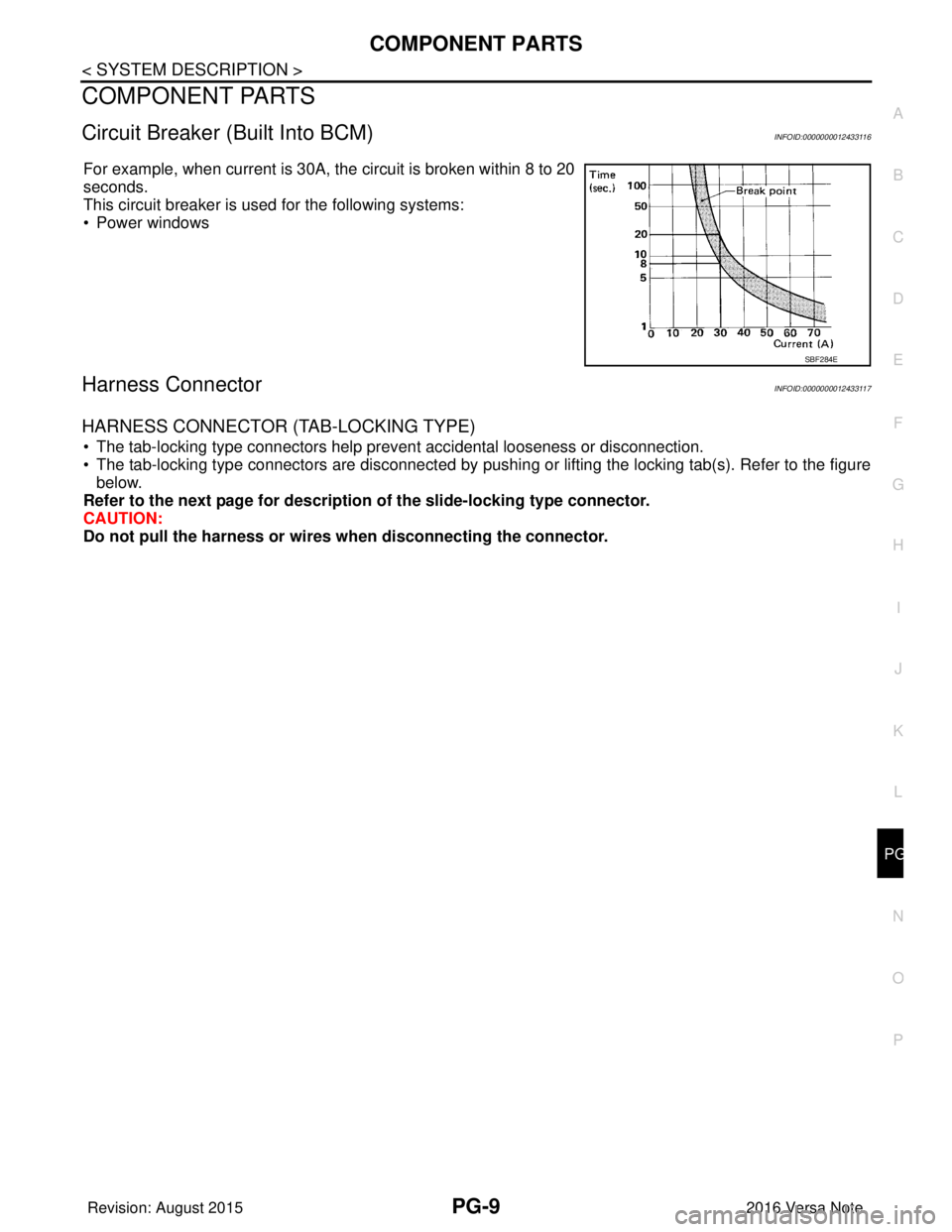
For example, when current is 30A, the circuit is broken within 8 to 20
seconds.
This circuit breaker is used for the following systems:
• Power windows
Harness ConnectorINFOID:0000000012433117
HARNESS CONNECTOR (TAB-LOCKING TYPE)
• The tab-locking type connectors help prevent accidental looseness or disconnection.
• The tab-locking type connectors are disconnected by pushi
ng or lifting the locking tab(s). Refer to the figure
below.
Refer to the next page for description of the slide-locking type connector.
CAUTION:
Do not pull the harness or wires when disconnecting the connector.
SBF284E
Revision: August 2015 2016 Versa Note
cardiagn.com
Page 2597 of 3641
![NISSAN NOTE 2016 Service Repair Manual PG-10
< SYSTEM DESCRIPTION >
COMPONENT PARTS
[Example]
HARNESS CONNECTOR (SLIDE-LOCKING TYPE)
• A new style slide-locking type connector is used on certain systems and components, especially those
r](/img/5/57363/w960_57363-2596.png "NISSAN NOTE 2016 Service Repair Manual PG-10
< SYSTEM DESCRIPTION >
COMPONENT PARTS
[Example]
HARNESS CONNECTOR (SLIDE-LOCKING TYPE)
• A new style slide-locking type connector is used on certain systems and components, especially those
r")
PG-10
< SYSTEM DESCRIPTION >
COMPONENT PARTS
[Example]
HARNESS CONNECTOR (SLIDE-LOCKING TYPE)
• A new style slide-locking type connector is used on certain systems and components, especially those
related to OBD.
• The slide-locking type connectors help prevent incomplete locking and accidental looseness or disconnec-
tion.
• The slide-locking type connectors are disconnected by pushing or pulling the slider. Refer to the figure
below.
CAUTION:
• Do not pull the harness or wires when disconnecting the connector.
• Be careful not to damage the connector su pport bracket when disconnecting the connector.
SEL769DA
Revision: August 2015 2016 Versa Note
cardiagn.com
Page 2598 of 3641
![NISSAN NOTE 2016 Service Repair Manual PG
COMPONENT PARTSPG-11
< SYSTEM DESCRIPTION >
C
DE
F
G H
I
J
K L
B A
O P
N
[Example]
HARNESS CONNECTOR (LEVER LOCKING TYPE)
• Lever locking type harness connectors are used on certain control units](/img/5/57363/w960_57363-2597.png "NISSAN NOTE 2016 Service Repair Manual PG
COMPONENT PARTSPG-11
< SYSTEM DESCRIPTION >
C
DE
F
G H
I
J
K L
B A
O P
N
[Example]
HARNESS CONNECTOR (LEVER LOCKING TYPE)
• Lever locking type harness connectors are used on certain control units")
PG
COMPONENT PARTSPG-11
< SYSTEM DESCRIPTION >
C
DE
F
G H
I
J
K L
B A
O P
N
[Example]
HARNESS CONNECTOR (LEVER LOCKING TYPE)
• Lever locking type harness connectors are used on certain control units and control modules such as ECM,
ABS actuator and electric unit (control unit), etc.
• Lever locking type harness connectors are also us ed on super multiple junction (SMJ) connectors.
• Always confirm the lever is fully locked in place by mo ving the lever as far as it will go to ensure full connec-
tion.
CAUTION:
SEL769V
Revision: August 2015 2016 Versa Note
cardiagn.com
Page 2599 of 3641
PG-12
< SYSTEM DESCRIPTION >
COMPONENT PARTS
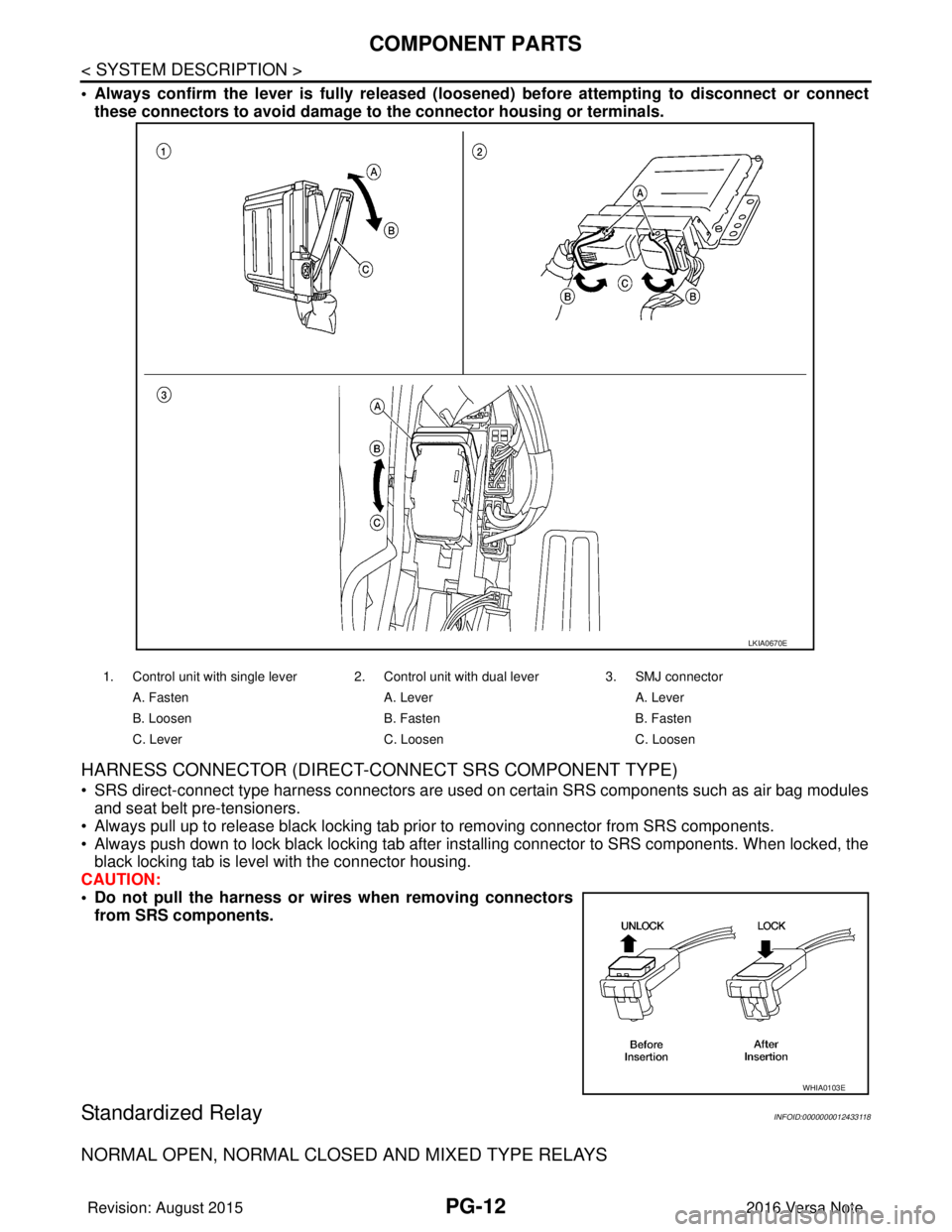
• Always confirm the lever is fully released (loosened) before attempting to disconnect or connect
these connectors to avoid damage to the connector housing or terminals.
HARNESS CONNECTOR (DIRECT-CONNECT SRS COMPONENT TYPE)
• SRS direct-connect type harness connectors are used on certain SRS components such as air bag modules
and seat belt pre-tensioners.
• Always pull up to release black locking tab prior to removing connector from SRS components.
• Always push down to lock black locking tab after inst alling connector to SRS components. When locked, the
black locking tab is level with the connector housing.
CAUTION:
• Do not pull the harness or wi res when removing connectors
from SRS components.
Standardized RelayINFOID:0000000012433118
NORMAL OPEN, NORMAL CLOS ED AND MIXED TYPE RELAYS
1. Control unit with single lever 2. Control unit with dual lever 3. SMJ connector
A. Fasten A. LeverA. Lever
B. Loosen B. FastenB. Fasten
C. Lever C. LoosenC. Loosen
LKIA0670E
WHIA0103E
Revision: August 2015 2016 Versa Note
cardiagn.com
Page 2630 of 3641
PG
HARNESSPG-43
< WIRING DIAGRAM >
C
DE
F
G H
I
J
K L
B A
O P
N
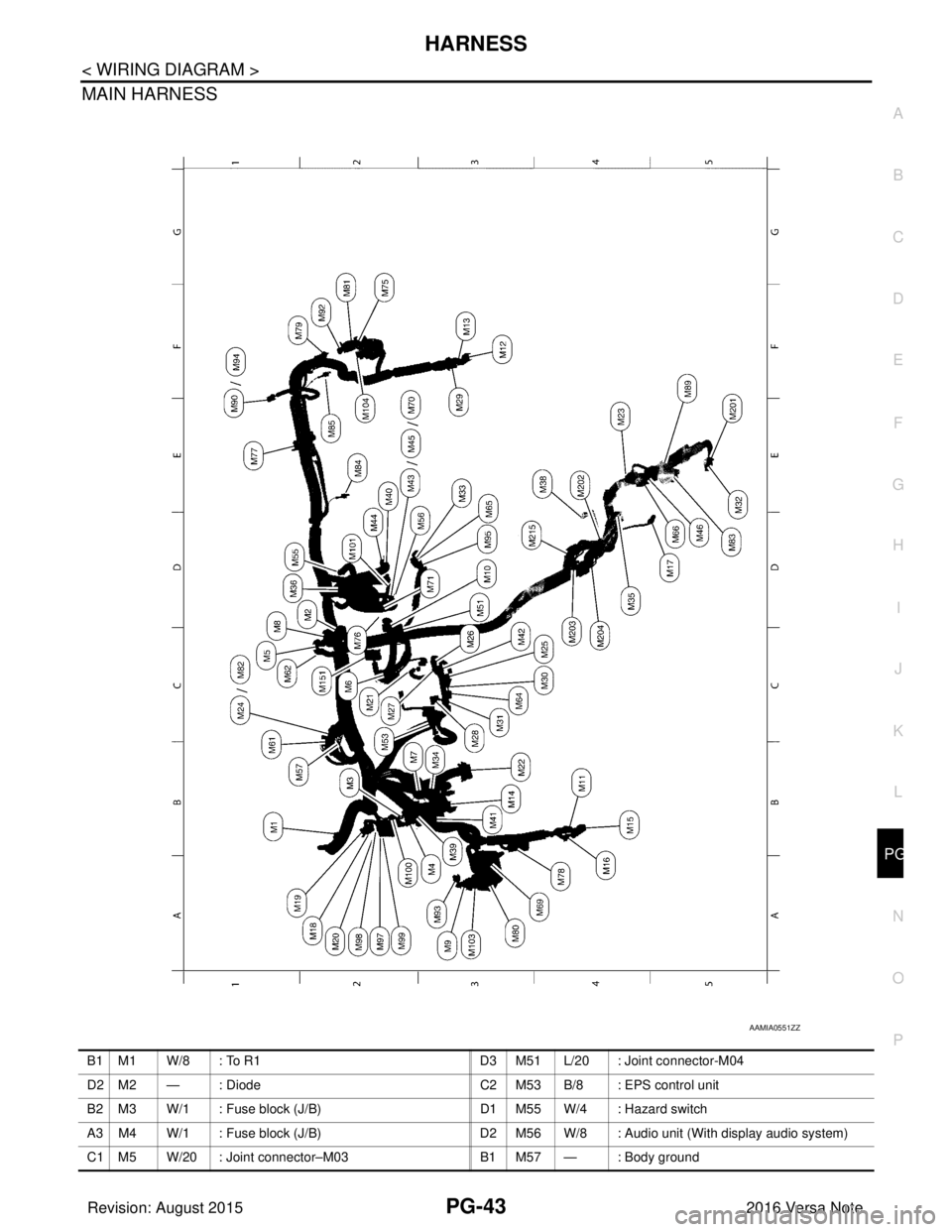
MAIN HARNESS
AAMIA0551ZZ
B1 M1 W/8 : To R1
D3 M51 L/20 : Joint connector-M04
D2 M2 — : Diode C2 M53 B/8 : EPS control unit
B2 M3 W/1 : Fuse block (J/B) D1 M55 W/4 : Hazard switch
A3 M4 W/1 : Fuse block (J/B) D2 M56 W/8 : Audio unit (With display audio system)
C1 M5 W/20 : Joint connector–M03 B1 M57 — : Body ground
Revision: August 2015 2016 Versa Note
cardiagn.com