Display NISSAN NOTE 2016 Service Repair Manual
[x] Cancel search | Manufacturer: NISSAN, Model Year: 2016, Model line: NOTE, Model: NISSAN NOTE 2016Pages: 3641, PDF Size: 28.72 MB
Page 2985 of 3641
![NISSAN NOTE 2016 Service Repair Manual SEC-128
< SYSTEM DESCRIPTION >[WITHOUT INTELLIGENT KEY SYSTEM]
DIAGNOSIS SYSTEM (IPDM E/R)
Concept of Auto Active Test
• IPDM E/R starts the auto active test with the door
switch signals transmitte](/img/5/57363/w960_57363-2984.png "NISSAN NOTE 2016 Service Repair Manual SEC-128
< SYSTEM DESCRIPTION >[WITHOUT INTELLIGENT KEY SYSTEM]
DIAGNOSIS SYSTEM (IPDM E/R)
Concept of Auto Active Test
• IPDM E/R starts the auto active test with the door
switch signals transmitte")
SEC-128
< SYSTEM DESCRIPTION >[WITHOUT INTELLIGENT KEY SYSTEM]
DIAGNOSIS SYSTEM (IPDM E/R)
Concept of Auto Active Test
• IPDM E/R starts the auto active test with the door
switch signals transmitted by BCM via CAN communica-
tion. Therefore, the CAN communication line between IPDM E/R and BCM is considered normal if the auto
active test starts successfully.
• The auto active test facilitates troubleshooting if any systems controlled by IPDM E/R cannot be operated.
Diagnosis Chart in Auto Active Test
CONSULT Function (IPDM E/R)INFOID:0000000012542534
APPLICATION ITEM
CONSULT performs the following functions via CAN communication with IPDM E/R.
AWMIA1737GB
Symptom Inspection contentsPossible cause
Any of the following components do not operate:
•Parking lamp
• Side marker lamp
• License plate lamp
•Tail lamp
• Front fog lamp
• Headlamp (HI, LO)
• Front wiper (HI, LO) Perform auto active test.
Does the applicable system op-
erate?YES BCM signal input circuit
NO • Lamp or motor
• Lamp or motor ground circuit
• Harness or connector between
IPDM E/R and applicable system
• IPDM E/R
A/C compressor does not operate Perform auto active test.
Does the magnet clutch oper-
ate?YES
• BCM signal input circuit
• CAN communication signal be-
tween BCM and ECM
• CAN communication signal be-
tween ECM and IPDM E/R
NO • Magnet clutch
• Harness or connector between
IPDM E/R and magnet clutch
• IPDM E/R
Cooling fan does not operate Perform auto active test.
Does the cooling fan operate?YES
• ECM signal input circuit
• CAN communication signal be-
tween ECM and IPDM E/R
NO • Cooling fan motor
• Harness or connector between
IPDM E/R and cooling fan motor
• IPDM E/R
Direct Diagnostic Mode Description
ECU Identification The IPDM E/R part number is displayed.
Self Diagnostic Result The IPDM E/R self diagnostic results are displayed.
Revision: August 2015 2016 Versa Note
cardiagn.com
Page 2986 of 3641
![NISSAN NOTE 2016 Service Repair Manual DIAGNOSIS SYSTEM (IPDM E/R)SEC-129
< SYSTEM DESCRIPTION > [WITHOUT INTELLIGENT KEY SYSTEM]
C
D
E
F
G H
I
J
L
M A
B
SEC
N
O P
ECU IDENTIFICATION
The IPDM E/R part number is displayed.
SELF DIAGNOSTIC R](/img/5/57363/w960_57363-2985.png "NISSAN NOTE 2016 Service Repair Manual DIAGNOSIS SYSTEM (IPDM E/R)SEC-129
< SYSTEM DESCRIPTION > [WITHOUT INTELLIGENT KEY SYSTEM]
C
D
E
F
G H
I
J
L
M A
B
SEC
N
O P
ECU IDENTIFICATION
The IPDM E/R part number is displayed.
SELF DIAGNOSTIC R")
DIAGNOSIS SYSTEM (IPDM E/R)SEC-129
< SYSTEM DESCRIPTION > [WITHOUT INTELLIGENT KEY SYSTEM]
C
D
E
F
G H
I
J
L
M A
B
SEC
N
O P
ECU IDENTIFICATION
The IPDM E/R part number is displayed.
SELF DIAGNOSTIC RESULT
Refer to PCS-20, "DTCIndex".
DATA MONITOR
ACTIVE TEST
Data Monitor The IPDM E/R input/output data is displayed in real time.
Active Test The IPDM E/R activates outputs to test components.
CAN Diag Support Mntr The result of transmit/receive diagnosis of CAN communication is displayed.
Direct Diagnostic Mode
Description
Monitor Item [Unit]Main
Signals Description
MOTOR FAN REQ [1/2/3/4] ×Indicates cooling fan speed signal received from ECM on CAN communication
line
AC COMP REQ [On/Off] ×Indicates A/C compressor request signal received from ECM on CAN commu-
nication line
TAIL&CLR REQ [On/Off] ×Indicates position light request signal
received from BCM on CAN communica-
tion line
HL LO REQ [On/Off] ×Indicates low beam request signal received from BCM on CAN communication
line
HL HI REQ [On/Off] ×Indicates high beam request signal received from BCM on CAN communication
line
FR FOG REQ [On/Off] ×Indicates front fog light request signal received from BCM on CAN communica-
tion line
FR WIP REQ [Stop/1LOW/Low/Hi] ×Indicates front wiper request signal received from BCM on CAN communication
line
WIP AUTO STOP [STOP P/ACT P] ×Indicates condition of front wiper auto stop signal
WIP PROT [Off/BLOCK] ×Indicates condition of front wiper fail-safe operation
IGN RLY1 -REQ [On/Off] Indicates ignition switch ON signal received from BCM on CAN communication
line
IGN RLY [On/Off] ×Indicates condition of ignition relay
PUSH SW [On/Off] Indicates condition of push-button ignition switch
INTER/NP SW [On/Off] Indicates condition of CVT shift position
ST RLY CONT [On/Off] Indicates starter relay status signal received from BCM on CAN communication
line
IHBT RLY -REQ [On/Off] Indicates starter control relay signal received from BCM on CAN communication
line
ST/INHI RLY [Off/ ST /INHI] Indicates condition of starter relay and starter control relay
DETENT SW [On/Off] Indicates condition of CVT shift selector (park position switch)
DTRL REQ [Off] Indicates daytime running light request signal received from BCM on CAN com-
munication line
THFT HRN REQ [On/Off] Indicates theft warning horn request signal received from BCM on CAN commu-
nication line
HORN CHIRP [On/Off] Indicates horn reminder signal received from BCM on CAN communication line
Test item Description
HORN This test is able to check horn operation [On].
FRONT WIPER This test is able to check wiper motor operation [Hi/Lo/Off].
Revision: August 2015 2016 Versa Note
cardiagn.com
Page 2997 of 3641
![NISSAN NOTE 2016 Service Repair Manual SEC-140
< BASIC INSPECTION >[WITHOUT INTELLIGENT KEY SYSTEM]
DIAGNOSIS AND REPAIR WORKFLOW
DETAILED FLOW
1.GET INFORMATION FOR SYMPTOM
Get the detailed information from the customer about the symptom](/img/5/57363/w960_57363-2996.png "NISSAN NOTE 2016 Service Repair Manual SEC-140
< BASIC INSPECTION >[WITHOUT INTELLIGENT KEY SYSTEM]
DIAGNOSIS AND REPAIR WORKFLOW
DETAILED FLOW
1.GET INFORMATION FOR SYMPTOM
Get the detailed information from the customer about the symptom")
SEC-140
< BASIC INSPECTION >[WITHOUT INTELLIGENT KEY SYSTEM]
DIAGNOSIS AND REPAIR WORKFLOW
DETAILED FLOW
1.GET INFORMATION FOR SYMPTOM
Get the detailed information from the customer about the symptom (the condition and the environment when
the incident/malfunction occurred).
>> GO TO 2.
2.CHECK DTC
1. Check DTC for BCM.
2. Perform the following procedure if DTC is displayed.
- Erase DTC.
- Study the relationship between the cause detected by DTC and the symptom described by the customer.
3. Check related service bulletins for information.
Is any symptom described and any DTC detected?
Symptom is described, DTC is displayed>>GO TO 3.
Symptom is described, DTC is not displayed>>GO TO 4.
Symptom is not described, DTC is displayed>>GO TO 5.
3.CONFIRM THE SYMPTOM
Confirm the symptom described by the customer.
Connect CONSULT to the vehicle in “Data Monitor” and check real-time diagnosis results.
Verify relation between the symptom and the condition when the symptom is detected.
>> GO TO 5.
4.CONFIRM THE SYMPTOM
Confirm the symptom described by the customer.
Connect CONSULT to the vehicle in “Data Monitor” and check real-time diagnosis results.
Verify relation between the symptom and the condition when the symptom is detected.
>> GO TO 6.
5.PERFORM DTC CONFIRMATION PROCEDURE
Perform DTC Confirmation Procedure for the display ed DTC, and then check that DTC is detected again.
If two or more DTCs are detected, refer to BCS-115, "
DTCInspectionPriorityChart" (BCM) and determine
trouble diagnosis order.
Is DTC detected?
YES >> GO TO 7.
NO >> Refer to GI-42, "
Intermittent Incident".
6.DETECT MALFUNCTIONING SYSTEM BY SYMPTOM TABLE
Detect malfunctioning system according to Symptom Table based on the confirmed symptom in step 4.
>> GO TO 7.
7.DETECT MALFUNCTIONING PART BY DIAGNOSTIC PROCEDURE
Inspect according to Diagnostic Procedure of the system.
NOTE:
The Diagnostic Procedure is described based on open circuit inspection. A short circuit inspection is also
required for the circuit check in the Diagnostic Procedure.
>> GO TO 8.
8.REPAIR OR REPLACE THE MALFUNCTIONING PART
1. Repair or replace the malfunctioning part.
2. Reconnect parts or connectors disconnected during Diagnostic Procedure again after repair and replace- ment.
Revision: August 2015 2016 Versa Note
cardiagn.com
Page 2998 of 3641
![NISSAN NOTE 2016 Service Repair Manual DIAGNOSIS AND REPAIR WORKFLOWSEC-141
< BASIC INSPECTION > [WITHOUT INTELLIGENT KEY SYSTEM]
C
D
E
F
G H
I
J
L
M A
B
SEC
N
O P
3. Check DTC. If DTC is displayed, erase it. >> GO TO 9.
9.FINAL CHECK
When](/img/5/57363/w960_57363-2997.png "NISSAN NOTE 2016 Service Repair Manual DIAGNOSIS AND REPAIR WORKFLOWSEC-141
< BASIC INSPECTION > [WITHOUT INTELLIGENT KEY SYSTEM]
C
D
E
F
G H
I
J
L
M A
B
SEC
N
O P
3. Check DTC. If DTC is displayed, erase it. >> GO TO 9.
9.FINAL CHECK
When")
DIAGNOSIS AND REPAIR WORKFLOWSEC-141
< BASIC INSPECTION > [WITHOUT INTELLIGENT KEY SYSTEM]
C
D
E
F
G H
I
J
L
M A
B
SEC
N
O P
3. Check DTC. If DTC is displayed, erase it. >> GO TO 9.
9.FINAL CHECK
When DTC was detected in step 8, perform DTC Confirmation Procedure or Component Function Check
again, and then check that the malfunctions have been fully repaired.
When symptom was described by the customer, refer to the confirmed symptom in step 3 or 4, and check that
the symptom is not detected.
Does the symptom reappear?
YES (DTC is detected)>>GO TO 7.
YES (Symptom remains)>>GO TO 6.
NO >> Inspection End.
Revision: August 2015 2016 Versa Note
cardiagn.com
Page 3005 of 3641
![NISSAN NOTE 2016 Service Repair Manual SEC-148
< DTC/CIRCUIT DIAGNOSIS >[WITHOUT INTELLIGENT KEY SYSTEM]
B2192, P1611 ID DI
SCORD, IMMU-ECM
B2192, P1611 ID DISCORD, IMMU-ECM
DescriptionINFOID:0000000012430474
BCM performs the ID verificati](/img/5/57363/w960_57363-3004.png "NISSAN NOTE 2016 Service Repair Manual SEC-148
< DTC/CIRCUIT DIAGNOSIS >[WITHOUT INTELLIGENT KEY SYSTEM]
B2192, P1611 ID DI
SCORD, IMMU-ECM
B2192, P1611 ID DISCORD, IMMU-ECM
DescriptionINFOID:0000000012430474
BCM performs the ID verificati")
SEC-148
< DTC/CIRCUIT DIAGNOSIS >[WITHOUT INTELLIGENT KEY SYSTEM]
B2192, P1611 ID DI
SCORD, IMMU-ECM
B2192, P1611 ID DISCORD, IMMU-ECM
DescriptionINFOID:0000000012430474
BCM performs the ID verification with ECM that allows the engine to start. BCM starts the communication with
ECM if ignition switch is turned ON and starts the engine if the ID is OK. ECM prevents the engine from start-
ing if the ID is not registered.
DTC LogicINFOID:0000000012430475
DTC DETECTION LOGIC
NOTE:
• If DTC B2192 is displayed with DTC U1000, first perform the trouble diagnosis for DTC U1000. Refer to BCS-127, "
DTC Logic".
• If DTC B2192 is displayed with DTC U1010, first perform the trouble diagnosis for DTC U1010. Refer to
BCS-128, "
DTC Logic".
DTC CONFIRMATION PROCEDURE
1.PERFORM DTC CONFIRMATION PROCEDURE
1. Turn ignition switch ON.
2. Check “Self Diagnostic Result” using CONSULT.
Is DTC detected?
YES >> Refer to SEC-148, "Diagnosis Procedure".
NO >> Inspection End.
Diagnosis ProcedureINFOID:0000000012430476
1.PERFORM INITIALIZATION
Perform initialization with CONSULT. Re-register all mechanical keys.
For initialization and registration of mechanical key, refer to CONSULT Immobilizer mode and follow the on-
screen instructions.
Can the system be initialized and can the engine be started with re-registered mechanical key?
YES >> ID was unregistered.
NO >> GO TO 2.
2.REPLACE BCM
1. Replace BCM. Refer to BCS-137, "
Removal and Installation".
2. Perform initialization with CONSULT. Re-register all mechanical keys. For initialization and registration of mechanical key, refer to CONSULT Immobilizer mode and follow the
on-screen instructions.
Can the system be initialized and can the engine be started with re-registered mechanical key?
YES >> BCM is malfunctioning.
NO >> GO TO 3.
3.REPLACE ECM
1. Replace ECM. Refer to EC-477, "
Removal and Installation".
2. Perform initialization with CONSULT. Re-register all mechanical keys.
For initialization and registration of mechanical key, refer to CONSULT Immobilizer mode and follow the
on-screen instructions.
Can the system be initialized and can the engine be started with re-registered mechanical key?
YES >> ECM is malfunctioning.
NO >> GO TO 4.
DTC No. Trouble diagnosis
name DTC detecting condition
Possible cause
B2192 ID DISCORD BCM-
ECM The ID verification results between BCM and ECM
are NG. The registration is necessary. •BCM
•ECM
P1611
Revision: August 2015 2016 Versa Note
cardiagn.com
Page 3007 of 3641
![NISSAN NOTE 2016 Service Repair Manual SEC-150
< DTC/CIRCUIT DIAGNOSIS >[WITHOUT INTELLIGENT KEY SYSTEM]
B2193, P1612 CH
AIN OF ECM-IMMU
B2193, P1612 CHAIN OF ECM-IMMU
DescriptionINFOID:0000000012430477
BCM performs the ID verification wit](/img/5/57363/w960_57363-3006.png "NISSAN NOTE 2016 Service Repair Manual SEC-150
< DTC/CIRCUIT DIAGNOSIS >[WITHOUT INTELLIGENT KEY SYSTEM]
B2193, P1612 CH
AIN OF ECM-IMMU
B2193, P1612 CHAIN OF ECM-IMMU
DescriptionINFOID:0000000012430477
BCM performs the ID verification wit")
SEC-150
< DTC/CIRCUIT DIAGNOSIS >[WITHOUT INTELLIGENT KEY SYSTEM]
B2193, P1612 CH
AIN OF ECM-IMMU
B2193, P1612 CHAIN OF ECM-IMMU
DescriptionINFOID:0000000012430477
BCM performs the ID verification with ECM that allows the engine to start. BCM starts the communication with
ECM if ignition switch is turned ON and starts the engine if the ID is OK. ECM prevents the engine from start-
ing if the ID is not registered.
DTC LogicINFOID:0000000012430478
DTC DETECTION LOGIC
NOTE:
• If DTC B2193 is displayed with DTC U1000, first perform the trouble diagnosis for DTC U1000. Refer to BCS-127, "
DTC Logic".
• If DTC B2193 is displayed with DTC U1010, first perform the trouble diagnosis for DTC U1010. Refer to
BCS-128, "
DTC Logic".
DTC CONFIRMATION PROCEDURE
1.PERFORM DTC CONFIRMATION PROCEDURE
1. Turn ignition switch ON.
2. Check “Self Diagnostic Result” using CONSULT.
Is DTC detected?
YES >> Refer to SEC-150, "Diagnosis Procedure".
NO >> Inspection End.
Diagnosis ProcedureINFOID:0000000012430479
1.REPLACE BCM
1. Replace BCM. Refer to BCS-137, "
Removal and Installation".
2. Perform initialization with CONSULT. For initialization, refer to CONSULT Immob ilizer mode and follow the on-screen instructions.
Does the engine start?
YES >> Inspection End.
NO >> ECM is malfunctioning. • Replace ECM.
• Perform ECM re-communicating function.
DTC No. Trouble diagnosis
name DTC detecting condition
Possible cause
B2193 CHAIN OF BCM-
ECM Inactive communication between ECM and BCM. • Harness or connectors
(The CAN communication line is
open or short)
•BCM
•ECM
P1612
Revision: August 2015
2016 Versa Note
cardiagn.com
Page 3024 of 3641
COMPONENT PARTSSRC-7
< SYSTEM DESCRIPTION >
C
DE
F
G
I
J
K L
M A
B
SRC
N
O P
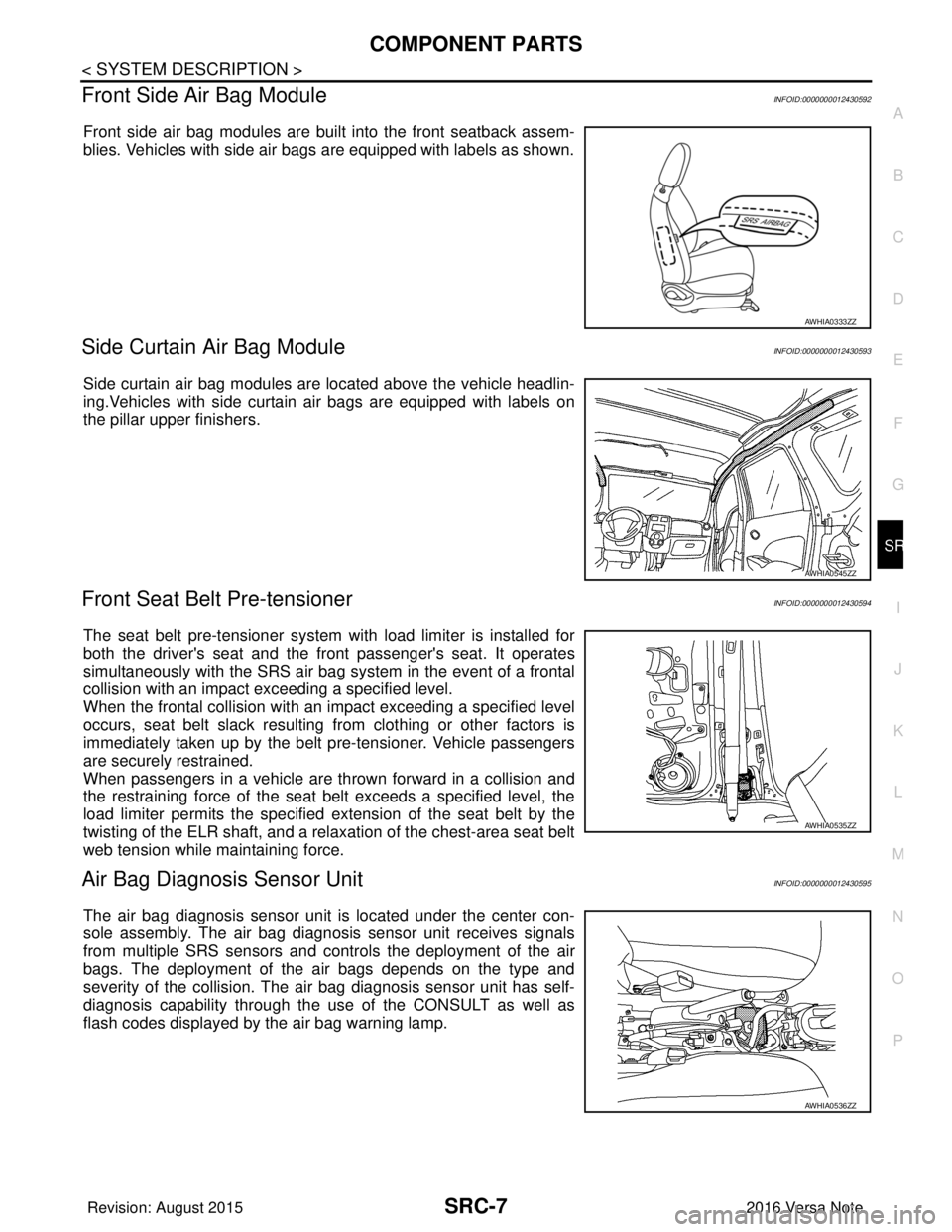
Front Side Air Bag ModuleINFOID:0000000012430592
Front side air bag modules are built into the front seatback assem-
blies. Vehicles with side air bags are equipped with labels as shown.
Side Curtain Air Bag ModuleINFOID:0000000012430593
Side curtain air bag modules are located above the vehicle headlin-
ing.Vehicles with side curtain air bags are equipped with labels on
the pillar upper finishers.
Front Seat Belt Pre-tensionerINFOID:0000000012430594
The seat belt pre-tensioner system with load limiter is installed for
both the driver's seat and the fr ont passenger's seat. It operates
simultaneously with the SRS air bag system in the event of a frontal
collision with an impact exceeding a specified level.
When the frontal collision with an im pact exceeding a specified level
occurs, seat belt slack resulting from clothing or other factors is
immediately taken up by the belt pre-tensioner. Vehicle passengers
are securely restrained.
When passengers in a vehicle are thrown forward in a collision and
the restraining force of the seat belt exceeds a specified level, the
load limiter permits the specified ex tension of the seat belt by the
twisting of the ELR shaft, and a relaxation of the chest-area seat belt
web tension while maintaining force.
Air Bag Diagnosis Sensor UnitINFOID:0000000012430595
The air bag diagnosis sensor unit is located under the center con-
sole assembly. The air bag diagnosis sensor unit receives signals
from multiple SRS sensors and cont rols the deployment of the air
bags. The deployment of the air bags depends on the type and
severity of the collision. The air bag diagnosis sensor unit has self-
diagnosis capability through the us e of the CONSULT as well as
flash codes displayed by the air bag warning lamp.
AWHIA0333ZZ
AWHIA0545ZZ
AWHIA0535ZZ
AWHIA0536ZZ
Revision: August 2015 2016 Versa Note
cardiagn.com
Page 3028 of 3641
SYSTEMSRC-11
< SYSTEM DESCRIPTION >
C
DE
F
G
I
J
K L
M A
B
SRC
N
O P
OCCUPANT CLASSIFICATION SYSTEM : System DescriptionINFOID:0000000012430602
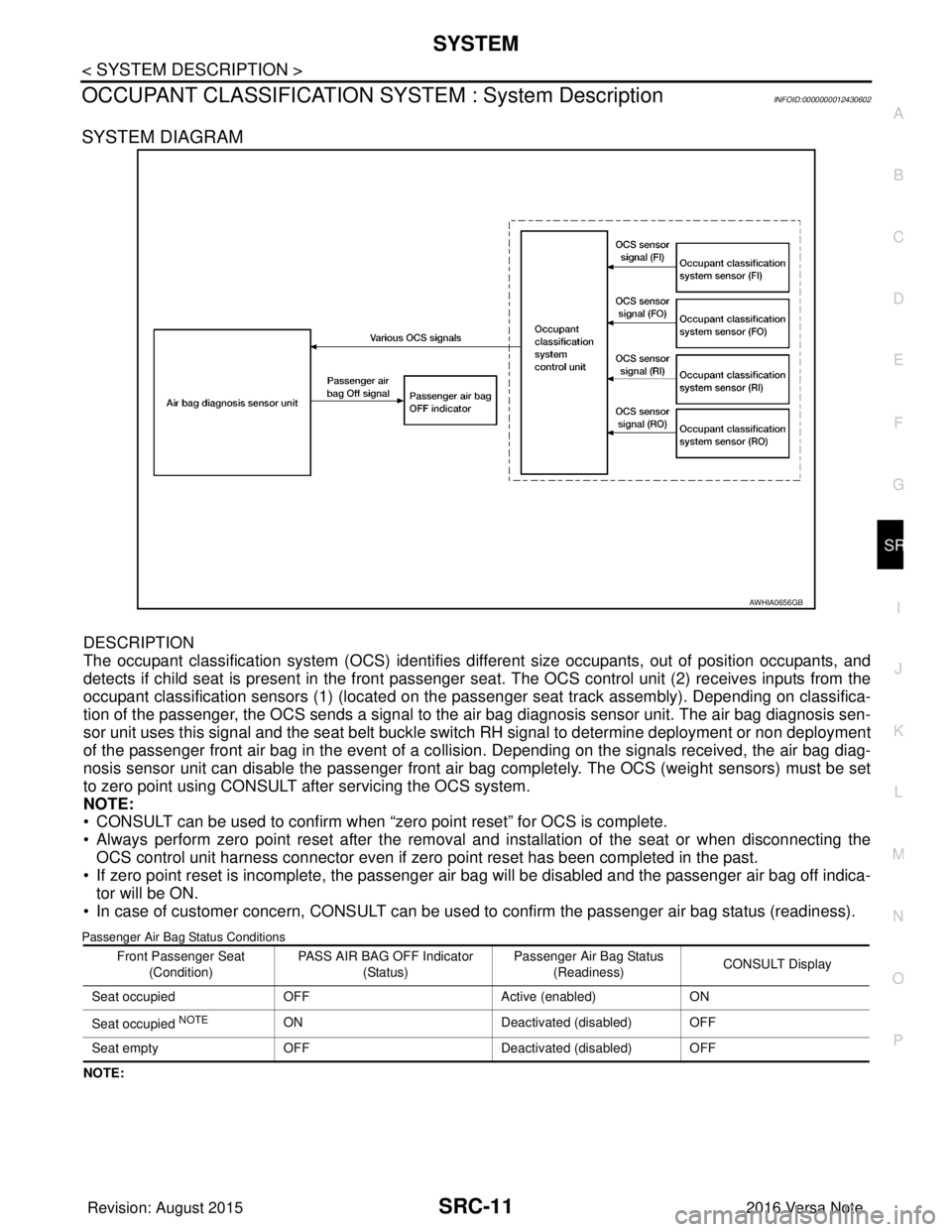
SYSTEM DIAGRAM
DESCRIPTION
The occupant classification system (OCS) identifies diff erent size occupants, out of position occupants, and
detects if child seat is present in the front passenger seat. The OCS control unit (2) receives inputs from the
occupant classification sensors (1) (located on the pa ssenger seat track assembly). Depending on classifica-
tion of the passenger, the OCS sends a signal to the air bag diagnosis sensor unit. The air bag diagnosis sen-
sor unit uses this signal and the seat belt buckle swit ch RH signal to determine deployment or non deployment
of the passenger front air bag in the event of a co llision. Depending on the signals received, the air bag diag-
nosis sensor unit can disable the passenger front air bag completely. The OCS (weight sensors) must be set
to zero point using CONSULT after servicing the OCS system.
NOTE:
• CONSULT can be used to confirm when “zero point reset” for OCS is complete.
• Always perform zero point reset after the removal and installation of the seat or when disconnecting the OCS control unit harness connector even if zero point reset has been completed in the past.
• If zero point reset is incomplete, the passenger air bag will be disabled and the passenger air bag off indica-
tor will be ON.
• In case of customer concern, CONSULT can be us ed to confirm the passenger air bag status (readiness).
Passenger Air Bag Status Conditions
NOTE:
AWHIA0656GB
Front Passenger Seat
(Condition) PASS AIR BAG OFF Indicator
(Status) Passenger Air Bag Status
(Readiness) CONSULT Display
Seat occupied OFF Active (enabled)ON
Seat occupied
NOTEON Deactivated (disabled) OFF
Seat empty OFF Deactivated (disabled) OFF
Revision: August 2015 2016 Versa Note
cardiagn.com
Page 3033 of 3641
SRC-16
< SYSTEM DESCRIPTION >
DIAGNOSIS SYSTEM (AIR BAG)
Trouble Diagnosis with CONSULT
INFOID:0000000012430606
1. Connect CONSULT.
2. DTC is displayed on SELF-DIAG RESULTS.
NOTE:
If a malfunction is not detected on “SELF-DIAG RESULTS [CURRENT]”, but a malfunction is detected during
SRS Operation Check, the following cases may exist:
• “SELF-DIAG [PAST]” memory might not be erased. Refer to SRC-14, "
On Board Diagnosis Function".
• SRS system malfunctions intermittently. Refer to SRC-41, "
InspectionProcedure".
DIAGNOSIS MODE
1. Connect CONSULT.
2. Confirm that zero point reset of OCS is complete.
3. If no DTCs are detected on “SELF-DIAG RESULTS [CURRE NT]”, repair of SRS is completed. Go to step
4.
If any DTCs are detected on “SELF-DIAG RESULT S [CURRENT]”, the malfunction has not been repaired
completely or another malfunction is being detected. Perform SRS Operation Check again. Refer to SRC-
14, "On Board Diagnosis Function".
4. Touch “ERASE”. NOTE:
Touching “ERASE” will clear the SRS memory of the malfunction (“SELF-DIAG [PAST]”). If “SELF-
DIAG [PAST]” is not erased, User Mode may sh ow the previous system malfunction even if the
malfunction has been repaired completely.
5. Check that no malfunction is det ected in “SELF-DIAG [PAST]”.
6. Exit Diagnosis Mode and disconnect the CONSULT.
7. Perform SRS Operation Check. Refer to SRC-14, "
On Board Diagnosis Function".
SRS HISTORY CHECK
1. Check repair history of the SRS. If no repairs have been made, perform SRC-14, "On Board Diagnosis
Function". If repairs have been made, GO TO step 2.
2. Erase ”SELF-DIAG [PAST]” after repair. Refer to SRC-14, "
On Board Diagnosis Function".
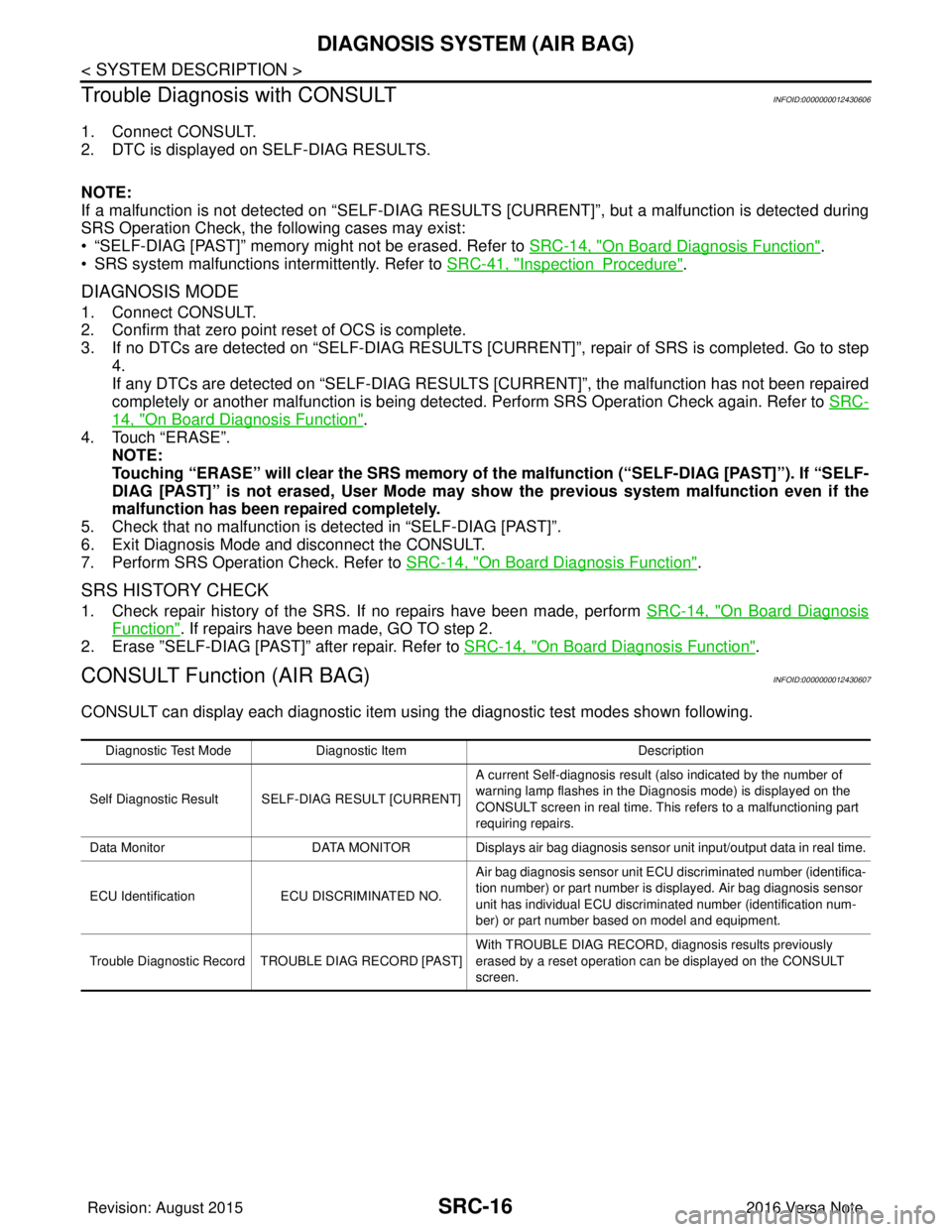
CONSULT Function (AIR BAG)INFOID:0000000012430607
CONSULT can display each diagnostic item using the diagnostic test modes shown following.
Diagnostic Test ModeDiagnostic Item Description
Self Diagnostic Result SEL F-DIAG RESULT [CURRENT]A current Self-diagnosis result (also indicated by the number of
warning lamp flashes in the Diagnosis mode) is displayed on the
CONSULT screen in real time. This refers to a malfunctioning part
requiring repairs.
Data Monitor DATA MONITOR Displays air bag diagnosis sensor unit input/output data in real time.
ECU Identification ECU DISCRIMINATED NO. Air bag diagnosis sensor unit ECU discriminated number (identifica-
tion number) or part number is displayed. Air bag diagnosis sensor
unit has individual ECU discriminated number (identification num-
ber) or part number based on model and equipment.
Trouble Diagnostic Record TR OUBLE DIAG RECORD [PAST] With TROUBLE DIAG RECORD, diagnosis results previously
erased by a reset operation can be displayed on the CONSULT
screen.
Revision: August 2015
2016 Versa Note
cardiagn.com
Page 3039 of 3641
SRC-22
< ECU DIAGNOSIS INFORMATION >
DIAGNOSIS SENSOR UNIT
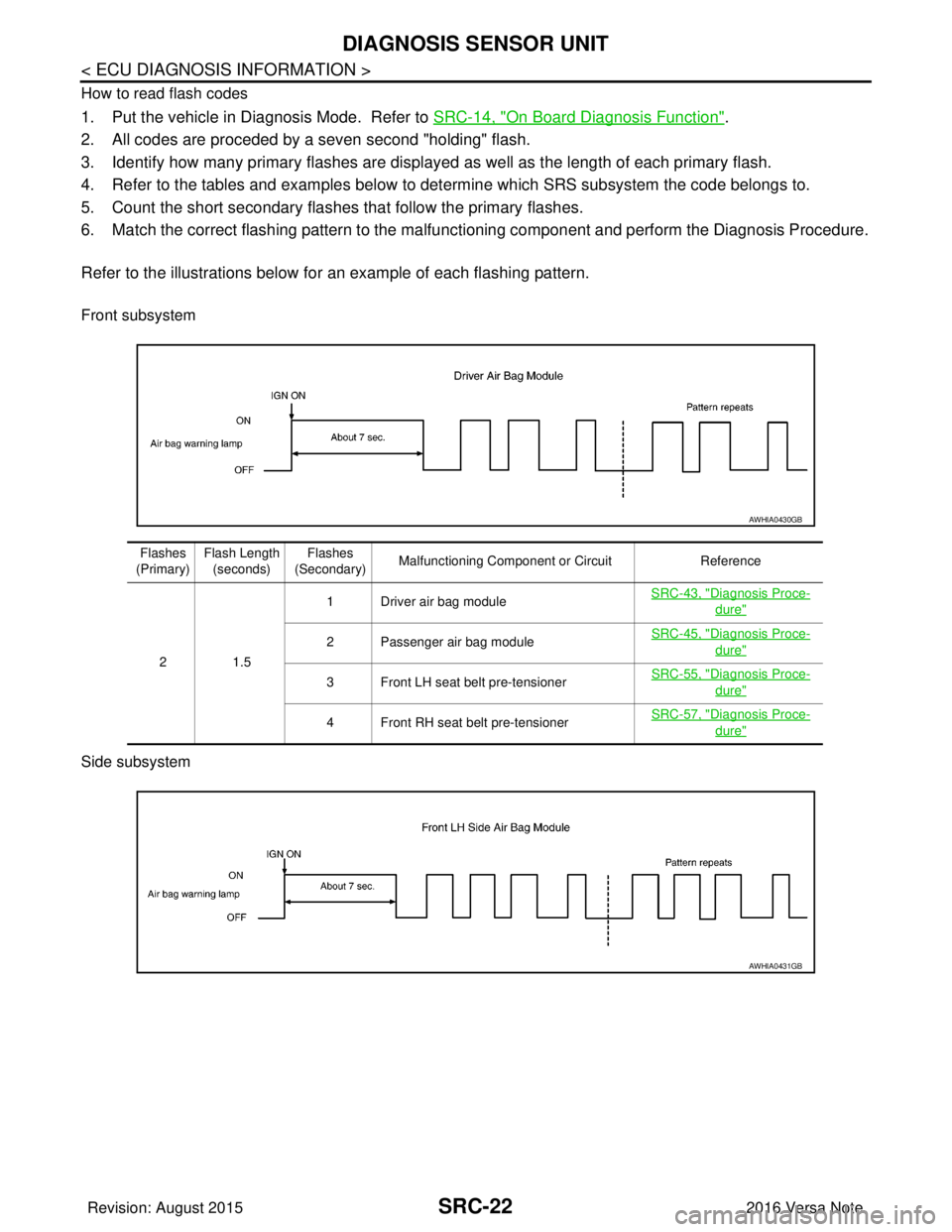
How to read flash codes
1. Put the vehicle in Diagnosis Mode. Refer to SRC-14, "On Board Diagnosis Function".
2. All codes are proceded by a seven second "holding" flash.
3. Identify how many primary flashes are display ed as well as the length of each primary flash.
4. Refer to the tables and examples below to determine which SRS subsystem the code belongs to.
5. Count the short secondary flashes that follow the primary flashes.
6. Match the correct flashing pattern to the malfunctioning component and perform the Diagnosis Procedure.
Refer to the illustrations below fo r an example of each flashing pattern.
Front subsystem
Side subsystem
AWHIA0430GB
Flashes
(Primary) Flash Length
(seconds) Flashes
(Secondary) Malfunctioning Component or Circuit
Reference
21 .5 1 Driver air bag module
SRC-43, "
Diagnosis Proce-
dure"
2 Passenger air bag moduleSRC-45, "Diagnosis Proce-
dure"
3 Front LH seat belt pre-tensioner
SRC-55, "Diagnosis Proce-
dure"
4 Front RH seat belt pre-tensionerSRC-57, "Diagnosis Proce-
dure"
AWHIA0431GB
Revision: August 2015
2016 Versa Note
cardiagn.com