Display NISSAN NOTE 2016 Service Repair Manual
[x] Cancel search | Manufacturer: NISSAN, Model Year: 2016, Model line: NOTE, Model: NISSAN NOTE 2016Pages: 3641, PDF Size: 28.72 MB
Page 3056 of 3641

INSPECTION AND ADJUSTMENTSRC-39
< BASIC INSPECTION >
C
DE
F
G
I
J
K L
M A
B
SRC
N
O P
INSPECTION AND ADJUSTMENT
ADDITIONAL SERVICE WHEN REPLACING CONTROL UNIT
ADDITIONAL SERVICE WHEN REPL ACING CONTROL UNIT : Description
INFOID:0000000012430612
Always perform zero point reset using CONSULT when removing and installing the passenger seat or servic-
ing the occupant classification system. If zero point reset is not performed the OCS may not operate normally,
which may increase the risk of serious injury in a collision.
ADDITIONAL SERVICE WHEN REPLACING CONTROL UNIT : Special Repair Re-
quirement
INFOID:0000000012430613
WORK PROCEDURE WHEN REPLACING CONTROL UNIT
1.PERFORM ZERO POINT RESET
Perform zero point reset. Refer to SRC-39, "
ZERO POINT RESET : Special Repair Requirement".
Is zero point reset performed normally?
YES >> INSPECTION END
NO >> Check condition as per the following, and perform zero point reset again. • Passenger seat is occupied by an object.
• Excessive vibration is applied while performing zero point reset.
• Occupant detection system is malfunctioning.NOTE:
If “Incomplete” is displayed on “zero point reset cu rrent status”, zero point reset is not completed
normally. Check the condition as per the following and perform zero point reset again.
• Passenger seat is occupied by an object.
• Excessive vibration is applied while performing zero point reset.
• Occupant detection system is malfunctioning.
ZERO POINT RESET
ZERO POINT RESET : DescriptionINFOID:0000000012430614
Zero point reset is an initializing procedure for occupant detection sensor that must be performed when replac-
ing or removing and installing passenger seat.
If zero point reset is not performed, the initializati on is incomplete and Occupant Detection System does not
operate normally.
NOTE:
• When zero point reset is performed once after removal and installation of passenger seat, CONSULT dis- plays “complete”.
• When reinstalling passenger seat after removal, the initial value for occupant detection sensor changes, and
Occupant Detection System does not operate normally.
• Always perform zero point reset after performing the work as per the following.
- Reinstallation of passenger seat
- Installation of passenger seat that is zero point reset complete
- Installation of passenger seat that is zero point reset in complete
ZERO POINT RESET : Special Repair RequirementINFOID:0000000012430615
1.PERFORM ZERO POINT RESET
1. Perform zero point reset. NOTE:
When performing zero point reset, be careful of the items described as per the following.
• Perform zero point reset after installing passenger seat to the vehicle
• Do not put any objects on passenger seat
• Do not apply excessive vibration to the vehicle
• Do not touch the vehicle
• Do not tilt the vehicle
Revision: August 2015 2016 Versa Note
cardiagn.com
Page 3057 of 3641

SRC-40
< BASIC INSPECTION >
INSPECTION AND ADJUSTMENT
2. Select start on “Zero point reset function” screen from, WORK SUPPORT of CONSULT “OCCUPANT
DETECTION”.
3. “Zero point reset” starts.
>> GO TO 2.
2.CONFIRMATION OF SETTING
1. Proceed to “Zero point reset function” screen from work support of CONSULT “OCCUPANT DETEC-
TION”.
2. Check that “Complete” or “Incomplete” is displayed on “Zero point reset status”.
CAUTION:
• “Complete” is displayed on “zero point reset current status” if the seat is reinstalled by seat removal
and installation, or “zero point reset” is already performed.
• “Zero point reset current status” displays “Incompl ete” if a new seat is installed. When turning key
switch ON without performing zero point reset , front passenger air bag OFF indicator turns ON.
When zero point reset is performed, front passenger air bag OFF indicator turns OFF.
• Air bag warning lamp blinks in user mode only.
• Air bag sensor unit does not record whethe r or not zero point reset is performed.
Is condition
“ALREADY PERFORMED”?
YES >> Print out “ZERO POINT RESET CURRENT STATUS” screen, and inspection end.
NO >> Check condition as per the following, and perform zero point reset again. • Passenger seat is occupied by an object.
• Excessive vibration is applied while performing zero point reset.
• Occupant detection system is malfunctioning.NOTE:
If “Incomplete” is displayed on “zero point reset cu rrent status”, zero point reset is not completed
normally. Check the condition as per the following and perform zero point reset again.
• Passenger seat is occupied by an object.
• Excessive vibration is applied while performing zero point reset.
• Occupant detection system is malfunctioning.
Revision: August 2015 2016 Versa Note
cardiagn.com
Page 3111 of 3641

SRC-94
< DTC/CIRCUIT DIAGNOSIS >
U1000 CAN COMM CIRCUIT
U1000 CAN COMM CIRCUIT
DescriptionINFOID:0000000012430674
CAN (Controller Area Network) is a serial communication system for real time application. It is an on-vehicle
multiplex communication system with high data communication speed and excellent error detection ability.
Many electronic control units are equipped into vehicl es, and each control unit shares information and links
with other control units during operation. With CAN co mmunication, control units are connected with two com-
munication lines (CAN-H line, CAN-L line) allowing a hi gh rate of information transmission with less wiring.
Each control unit transmits and receives data but selectively reads required data only. Refer to LAN-30, "
CAN
COMMUNICATION SYSTEM : CAN Communication Signal Chart".
DTC LogicINFOID:0000000012430675
DTC DETECTION LOGIC
DTC CONFIRMATION PROCEDURE
1.PERFORM SELF-DIAGNOSIS
1. Turn ignition switch ON and wait for 7 seconds or more.
2. Using CONSULT, perform SELF-DIAGNOSIS RESULTS of AIR BAG.
3. Check if any DTC is displayed in the self-diagnosis results.
Is DTC detected?
YES >> Refer to SRC-94, "Diagnosis Procedure".
NO >> Refer to GI-42, "
Intermittent Incident".
Diagnosis ProcedureINFOID:0000000012430676
1.CHECK CAN COMMUNICATION SYSTEM
Check CAN communication system. Refer to LAN-16, "
Trouble Diagnosis Flow Chart".
>> Inspection End.
CONSULT name DTCDTC detecting condition Repair order
CAN COMMUNICATION FAILURE U1000 When air bag diagnosis sensor unit is not
transmitting or receiving CAN communi-
cation signals for 2 or more seconds.Refer to SRC-94, "
Diagnosis
Procedure".
Revision: August 2015
2016 Versa Note
cardiagn.com
Page 3112 of 3641

U1010 CONTROL UNIT (CAN)SRC-95
< DTC/CIRCUIT DIAGNOSIS >
C
DE
F
G
I
J
K L
M A
B
SRC
N
O P
U1010 CONTROL UNIT (CAN)
DescriptionINFOID:0000000012430677
Air bag diagnosis sensor performs self-tests on key ON. If CAN communication failure within control unit is
detected, DTC is set.
DTC LogicINFOID:0000000012430678
DTC DETECTION LOGIC
DTC CONFIRMATION PROCEDURE
1.PERFORM SELF-DIAGNOSIS
1. Turn ignition switch ON.
2. Using CONSULT, perform SELF DIAGNOSIS RESULTS of AIR BAG.
3. Check if DTC is displayed in the self-diagnosis results.
Is DTC detected?
YES >> Refer to SRC-95, "Diagnosis Procedure".
NO >> Inspection End.
Diagnosis ProcedureINFOID:0000000012430679
1.REPLACE AIR BAG DIAGNOSIS SENSOR UNIT
Replace air bag diagnosis sensor unit. Refer to SR-30, "
Removal and Installation".
>> Inspection End.
CONSULT name DTCDTC detecting condition Repair order
CAN CONTROL UNIT FAILURE U1010CAN communication error is detected in
control unit. Refer to SRC-95, "
Diagnosis
Procedure".
Revision: August 2015
2016 Versa Note
cardiagn.com
Page 3190 of 3641

STC-6
< SYSTEM DESCRIPTION >
DIAGNOSIS SYSTEM (EPS CONTROL UNIT)
DIAGNOSIS SYSTEM (EPS CONTROL UNIT)
CONSULT FunctionINFOID:0000000012431944
FUNCTION
CONSULT can display each diagnostic item usi ng the diagnostic test modes shown following:
*: The following diagnosis information is cleared by erasing:
•DTC
• Freeze frame data (FFD)
ECU IDENTIFICATION
Displays the part number stored in the control unit.
SELF DIAGNOSTIC RESULT MODE
Refer to STC-10, "DTC Index".
When “CRNT” is displayed on “Self Diagnostic Result”.
• The system is presently malfunctioning.
When “PAST” is displayed on “Self Diagnostic Result”.• System malfunction in the past is detect ed, but the system is presently normal.
FREEZE FRAME DATA (FFD)
The following vehicle status is recorded when DTC is detected and is displayed on CONSULT:
DATA MONITOR MODE
*1: Almost in accordance with the value of “MOTOR S IG”. It is not a malfunction though these values are not
accorded when steering quickly.
Diagnostic test mode Function
ECU Identification The part number stored in the control unit can be read.
Self Diagnostic Result Self-diagnostic results and freeze frame data can be read and erased quickly.
*
Data MonitorInput/Output data in the EPS control unit can be read.
Item name Display item
IGN COUNTER
(0-39) The number of times that ignition switch is tu
rned ON after the DTC is detected is displayed.
• When “0” is displayed: It indicates that the system is presently malfunctioning.
• When except “0” is displayed: It indicates that system malfunction in the past is detected, but the system is pres-
ently normal.
NOTE:
Each time when ignition switch is turned OFF to ON, numerical number increases in 1 →2→3...38 →39.
When the operation number of times exceeds 39, the number does not increase and “39” is displayed until self-
diagnosis is erased.
Monitor item (Unit) Remarks
BATTERY VOLT (V) Displays the power supply voltage for EPS control unit.
TORQUE SENSOR (Nm) Displays steering wheel turning force detected by torque sensor.
MOTOR CURRENT (A) Displays the current value consumed by EPS motor.
*1
MOTOR SIG (A) Displays the current commanded value to EPS motor.
ASSIST TORQUE (Nm) Displays assist torque being output by the electric power steering.
C/U TEMP ( °C or °F) Displays the temperature of the EPS control unit.
ASSIST LEVEL (%) Normally displays 100%. In case of an excessive stationary steering, the assist
curvature gradually falls. However, it return to 100% when left standing.
*2
VEHICLE SPEED (km/h or MPH)
Vehicle speed is displayed from vehicle speed signal via CAN communication.*3
WARNING LAMP (On/Off)EPS warning lamp control status is displayed.
ENGINE STATUS (Stop/Run) Engine speed is displayed from engine status signal via CAN communication.
Revision: August 2015 2016 Versa Note
cardiagn.com
Page 3191 of 3641

DIAGNOSIS SYSTEM (EPS CONTROL UNIT)
STC-7
< SYSTEM DESCRIPTION >
C
D E
F
H I
J
K L
M A
B
STC
N
O P
*2: Normally displays 100%. In case of an excessive stationary steering, the assist curvature gradually falls.
However, it returns to 100% when left standing.
*3: It is not a malfunction, though it might not be corresponding just after ignition switch in turned ON.
Revision: August 2015 2016 Versa Note
cardiagn.com
Page 3192 of 3641

STC-8
< ECU DIAGNOSIS INFORMATION >
EPS CONTROL UNIT
ECU DIAGNOSIS INFORMATION
EPS CONTROL UNIT
Reference ValueINFOID:0000000012431945
VALUES ON THE DIAGNOSIS TOOL
CAUTION:
The output signal indicates the EPS control unit calculation data. The normal values will be displayed
even in the event that the output circuit (harness) is open.
*1: Almost in accordance with the value of “MOTOR S IG”. It is not a malfunction though these values are not
accorded when steering quickly.
*2: A fixed value is indicated regardless of steering turning.
*3: Normally displays 100%. In case of an excessive stat ionary steering, the assist curvature gradually falls.
However, it returns to 100% when left standing.
*4: It is not a malfunction, though it might not be co rresponding just after ignition switch in turned ON.
Monitor item Data monitor
Condition Display value
BATTERY VOLT Ignition switch: ON Battery voltage
TORQUE SENSOR Engine running Steering wheel: Not
steering (There is
no steering force) Approx. 0 Nm
Steering wheel: Right turn Positive value (Nm)
Steering wheel: Left turn Negative value (Nm)
MOTOR CURRENT Engine running Steering wheel: Not
steering (There is
no steering force) Approx. 0 A
Steering wheel: Right or left turn Displays consumption current of
EPS motor (A)
*1
MOTOR SIG
Engine runningSteering wheel: Not
steering (There is
no steering force) Approx. 0 A
Steering wheel: Right turn Positive value (A)
Steering wheel: Left turn Negative value (A)
ASSIST TORQUE Engine running Approx. 0 Nm
*2
C/U TEMPIgnition switch ON or engine running Displays temperature of inside of
EPS control unit (
°C or °F)
ASSIST LEVEL Engine running
100 %
*3
VEHICLE SPEEDVehicle stopped
0 km/h or mph
While driving Approximately equal to the indication
on speedometer*4
(inside of ±
10%)
WARNING LAMP EPS warning lamp: ON
On
EPS warning lamp: OFF Off
ENGINE STATUS Engine not running
Stop
Engine running Run
Revision: August 2015 2016 Versa Note
cardiagn.com
Page 3202 of 3641
STC-18
< DTC/CIRCUIT DIAGNOSIS >
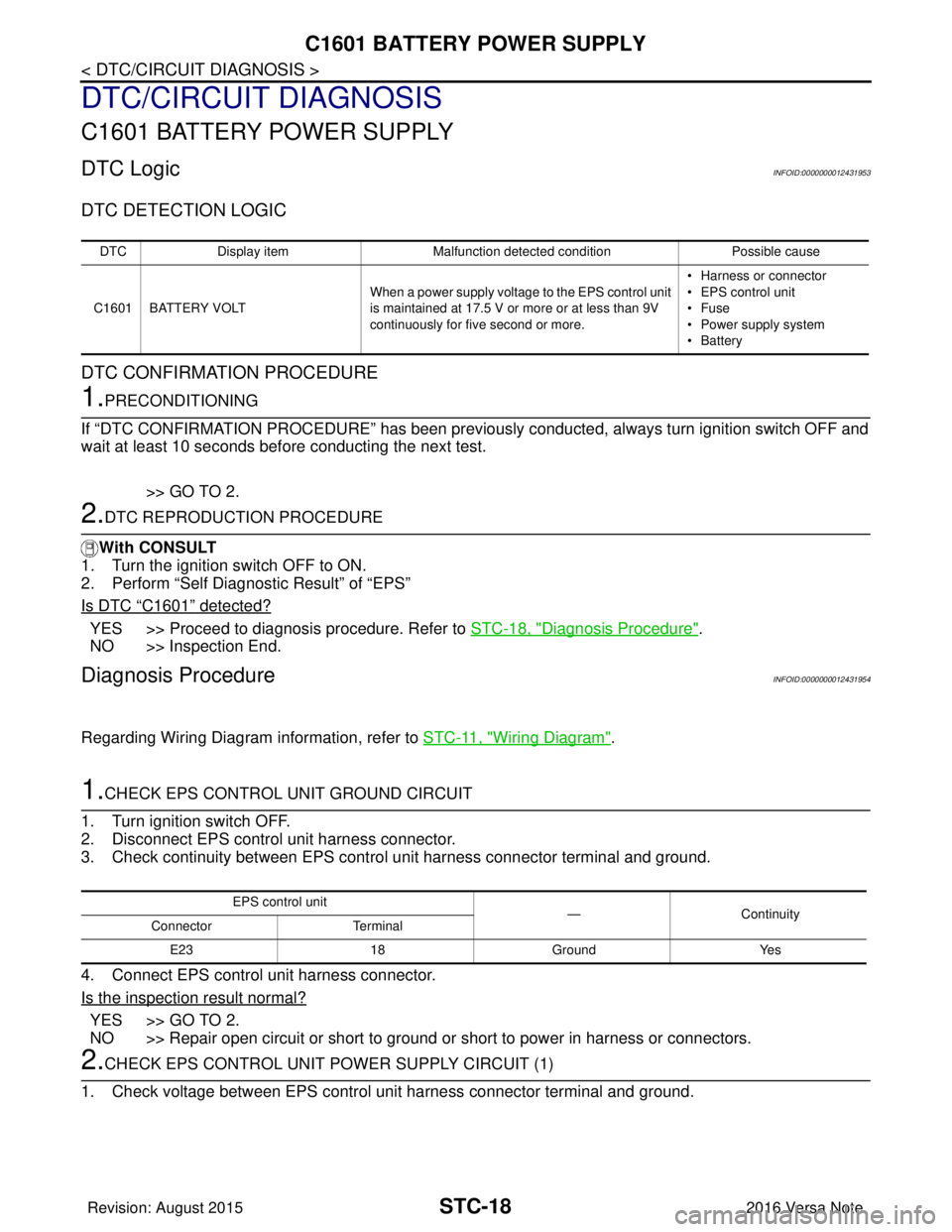
C1601 BATTERY POWER SUPPLY
DTC/CIRCUIT DIAGNOSIS
C1601 BATTERY POWER SUPPLY
DTC LogicINFOID:0000000012431953
DTC DETECTION LOGIC
DTC CONFIRMATION PROCEDURE
1.PRECONDITIONING
If “DTC CONFIRMATION PROCEDURE” has been previously conducted, always turn ignition switch OFF and
wait at least 10 seconds before conducting the next test.
>> GO TO 2.
2.DTC REPRODUCTION PROCEDURE
With CONSULT
1. Turn the ignition switch OFF to ON.
2. Perform “Self Diagnostic Result” of “EPS”
Is DTC
“C1601” detected?
YES >> Proceed to diagnosis procedure. Refer to STC-18, "Diagnosis Procedure".
NO >> Inspection End.
Diagnosis ProcedureINFOID:0000000012431954
Regarding Wiring Diagram information, refer to STC-11, "Wiring Diagram".
1.CHECK EPS CONTROL UNIT GROUND CIRCUIT
1. Turn ignition switch OFF.
2. Disconnect EPS control unit harness connector.
3. Check continuity between EPS contro l unit harness connector terminal and ground.
4. Connect EPS control unit harness connector.
Is the inspection result normal?
YES >> GO TO 2.
NO >> Repair open circuit or short to ground or short to power in harness or connectors.
2.CHECK EPS CONTROL UNIT PO WER SUPPLY CIRCUIT (1)
1. Check voltage between EPS control unit harness connector terminal and ground.
DTC Display item Malfunction detected condition Possible cause
C1601 BATTERY VOLT When a power supply voltage to the EPS control unit
is maintained at 17.5 V or more or at less than 9V
continuously for five second or more. • Harness or connector
• EPS control unit
•Fuse
• Power supply system
•Battery
EPS control unit
—Con tin uit y
Connector Terminal
E23 18Ground Yes
Revision: August 2015 2016 Versa Note
cardiagn.com
Page 3205 of 3641
C1604 TORQUE SENSORSTC-21
< DTC/CIRCUIT DIAGNOSIS >
C
DE
F
H I
J
K L
M A
B
STC
N
O P
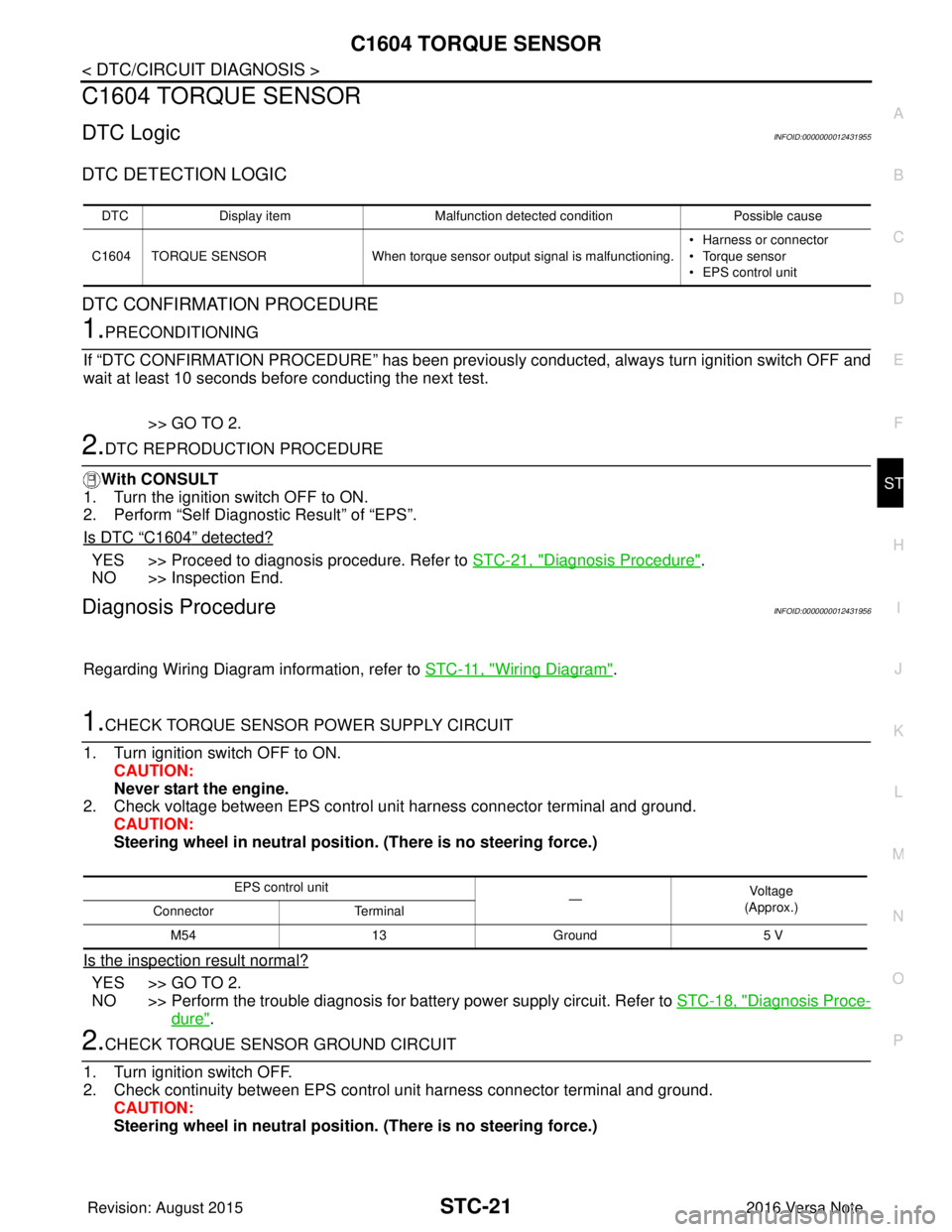
C1604 TORQUE SENSOR
DTC LogicINFOID:0000000012431955
DTC DETECTION LOGIC
DTC CONFIRMATION PROCEDURE
1.PRECONDITIONING
If “DTC CONFIRMATION PROCEDURE” has been previously conducted, always turn ignition switch OFF and
wait at least 10 seconds before conducting the next test.
>> GO TO 2.
2.DTC REPRODUCTION PROCEDURE
With CONSULT
1. Turn the ignition switch OFF to ON.
2. Perform “Self Diagnostic Result” of “EPS”.
Is DTC
“C1604” detected?
YES >> Proceed to diagnosis procedure. Refer to STC-21, "Diagnosis Procedure".
NO >> Inspection End.
Diagnosis ProcedureINFOID:0000000012431956
Regarding Wiring Diagram information, refer to STC-11, "Wiring Diagram".
1.CHECK TORQUE SENSOR POWER SUPPLY CIRCUIT
1. Turn ignition switch OFF to ON. CAUTION:
Never start the engine.
2. Check voltage between EPS control unit harness connector terminal and ground.
CAUTION:
Steering wheel in neutral position . (There is no steering force.)
Is the inspection result normal?
YES >> GO TO 2.
NO >> Perform the trouble diagnosis for battery power supply circuit. Refer to STC-18, "
Diagnosis Proce-
dure".
2.CHECK TORQUE SENSOR GROUND CIRCUIT
1. Turn ignition switch OFF.
2. Check continuity between EPS control unit harness connector terminal and ground. CAUTION:
Steering wheel in neutral position . (There is no steering force.)
DTCDisplay item Malfunction detected condition Possible cause
C1604 TORQUE SENSOR When torque sensor output signal is malfunctioning. • Harness or connector
• Torque sensor
• EPS control unit
EPS control unit
—Vo l ta g e
(Approx.)
Connector Terminal
M54 13Ground 5 V
Revision: August 2015 2016 Versa Note
cardiagn.com
Page 3207 of 3641

C1606 EPS MOTORSTC-23
< DTC/CIRCUIT DIAGNOSIS >
C
DE
F
H I
J
K L
M A
B
STC
N
O P
C1606 EPS MOTOR
DTC LogicINFOID:0000000012431957
DTC DETECTION LOGIC
DTC CONFIRMATION PROCEDURE
1.PRECONDITIONING
If “DTC CONFIRMATION PROCEDURE” has been previously conducted, always turn ignition switch OFF and
wait at least 10 seconds before conducting the next test.
>> GO TO 2.
2.DTC REPRODUCTION PROCEDURE
With CONSULT
1. Turn the ignition switch OFF to ON.
2. Perform “Self Diagnostic Result” of “EPS”.
Is DTC
“C1606” detected?
YES >> Proceed to diagnosis procedure. Refer to STC-23, "Diagnosis Procedure".
NO >> Inspection End.
Diagnosis ProcedureINFOID:0000000012431958
1.CHECK EPS MOTOR
Check the EPS motor. Refer to STC-23, "
Component Inspection".
Is the inspection result normal?
YES >> GO TO 2.
NO >> EPS motor is malfunction. Replace steering column assembly. Refer to ST-9, "
Exploded View".
2.CHECK CONNECTOR
1. Turn ignition switch OFF.
2. Disconnect EPS motor harness connector.
3. Check terminal for deformation, disconnection, looseness, and so on. If any malfunction is found, repair or replace terminal.
Is the inspection result normal?
YES >> Replace EPS control unit. Refer to STC-37, "Removal and Installation".
NO >> Repair or replace malfunctioning component.
Component Inspection INFOID:0000000012431959
1.CHECK EPS MOTOR
1. Turn the ignition switch OFF.
2. Disconnect EPS motor harness connector.
3. Check resistance between EPS motor connector terminals.
Is the inspection result normal?
DTC Display item Malfunction detected condition Possible cause
C1606 EPS MOTOR When the motor driver malfunction of EPS control
unit or EPS motor malfunction is detected. • Harness or connector
• EPS motor
• EPS control unit
EPS motor
Resistance (Approx.)
Te r m i n a l
19 200.1 Ω or less
Revision: August 2015 2016 Versa Note
cardiagn.com