key NISSAN NOTE 2016 Service Repair Manual
[x] Cancel search | Manufacturer: NISSAN, Model Year: 2016, Model line: NOTE, Model: NISSAN NOTE 2016Pages: 3641, PDF Size: 28.72 MB
Page 1726 of 3641
EXL-74
< DTC/CIRCUIT DIAGNOSIS >
POWER SUPPLY AND GROUND CIRCUIT
DTC/CIRCUIT DIAGNOSIS
POWER SUPPLY AND GROUND CIRCUIT
BCM (BODY CONTROL SYSTEM) (WITH INTELLIGENT KEY SYSTEM)
BCM (BODY CONTROL SYSTEM) (WITH INTELLIGENT KEY SYSTEM) : Diagnosis
Procedure
INFOID:0000000012542318
Regarding Wiring Diagram information, refer to BCS-52, "Wiring Diagram".
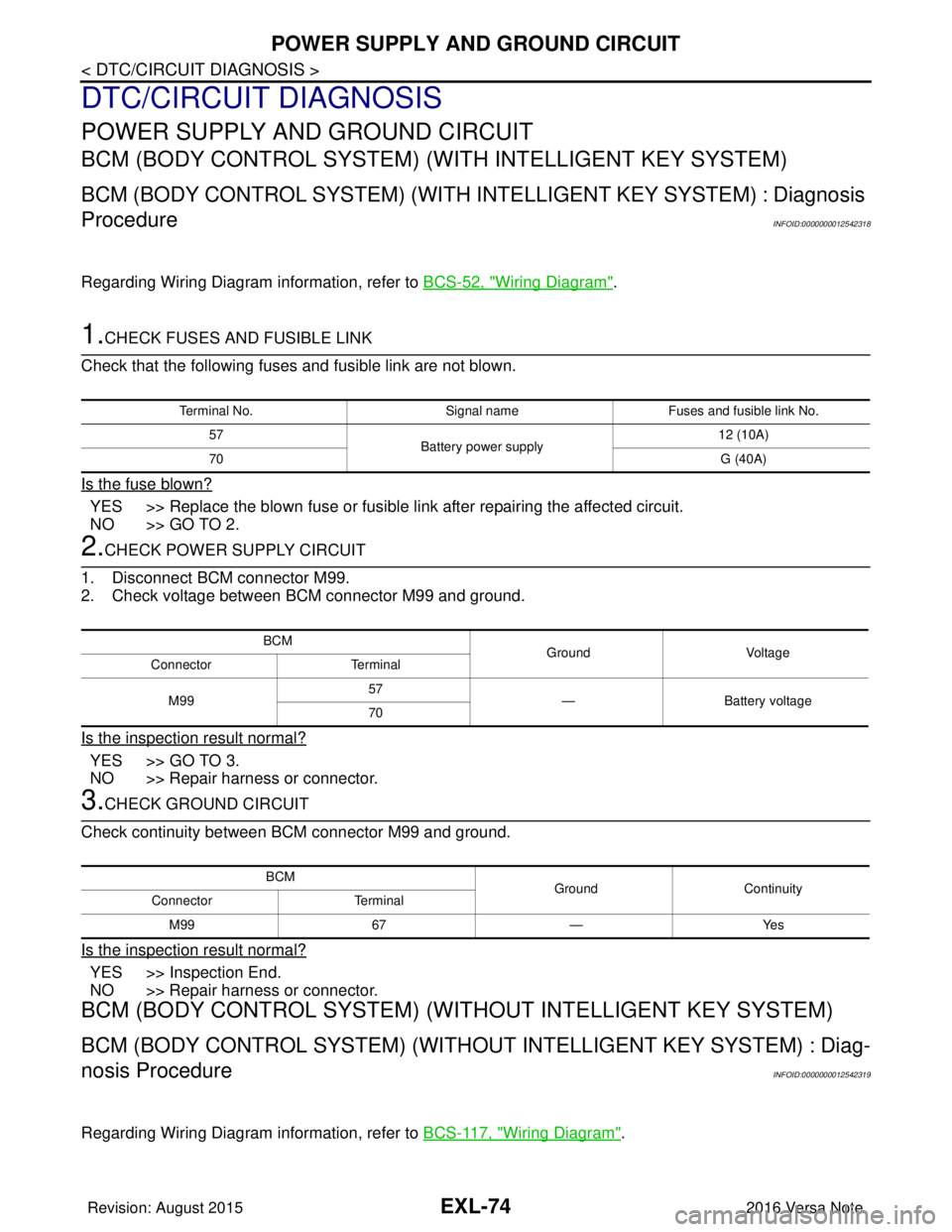
1.CHECK FUSES AND FUSIBLE LINK
Check that the following fuses and fusible link are not blown.
Is the fuse blown?
YES >> Replace the blown fuse or fusible link after repairing the affected circuit.
NO >> GO TO 2.
2.CHECK POWER SUPPLY CIRCUIT
1. Disconnect BCM connector M99.
2. Check voltage between BCM connector M99 and ground.
Is the inspection result normal?
YES >> GO TO 3.
NO >> Repair harness or connector.
3.CHECK GROUND CIRCUIT
Check continuity between BCM connector M99 and ground.
Is the inspection result normal?
YES >> Inspection End.
NO >> Repair harness or connector.
BCM (BODY CONTROL SYSTEM) (WIT HOUT INTELLIGENT KEY SYSTEM)
BCM (BODY CONTROL SYSTEM) (WITHOUT INTELLIGENT KEY SYSTEM) : Diag-
nosis Procedure
INFOID:0000000012542319
Regarding Wiring Diagram information, refer to BCS-117, "Wiring Diagram".
Terminal No.Signal nameFuses and fusible link No.
57 Battery power supply 12 (10A)
70 G (40A)
BCM
Ground Voltage
Connector Terminal
M99 57
— Battery voltage
70
BCM GroundContinuity
Connector Terminal
M99 67—Yes
Revision: August 2015 2016 Versa Note
cardiagn.com
Page 1738 of 3641
EXL-86
< DTC/CIRCUIT DIAGNOSIS >
TURN SIGNAL LAMP CIRCUIT
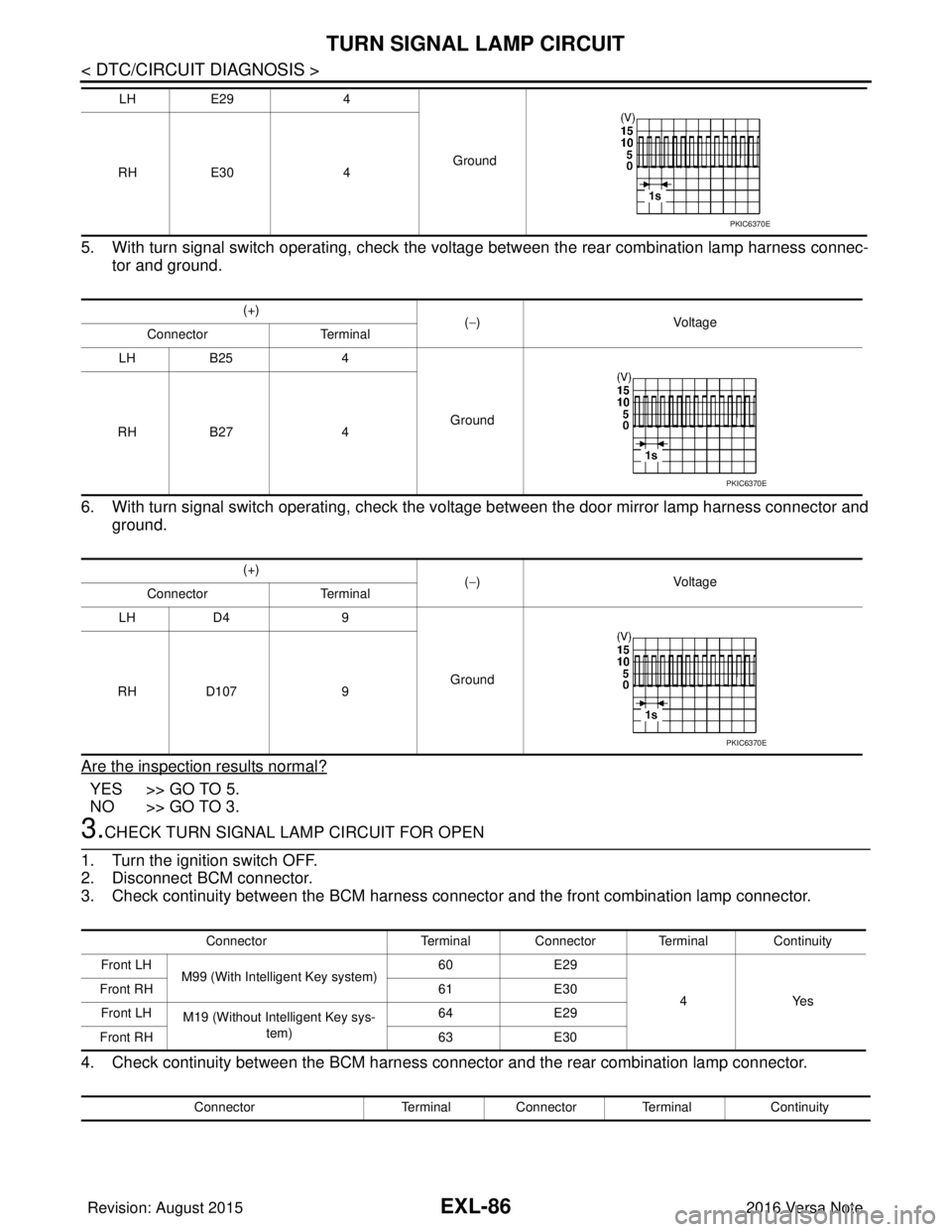
5. With turn signal switch operating, check the voltage between the rear combination lamp harness connec-tor and ground.
6. With turn signal switch operating, check the vo ltage between the door mirror lamp harness connector and
ground.
Are the inspection results normal?
YES >> GO TO 5.
NO >> GO TO 3.
3.CHECK TURN SIGNAL LAMP CIRCUIT FOR OPEN
1. Turn the ignition switch OFF.
2. Disconnect BCM connector.
3. Check continuity between the BCM harness connector and the front combination lamp connector.
4. Check continuity between the BCM harness connector and the rear combination lamp connector.
LH E29 4
Ground
RH E30 4
(+) (−) Voltage
Connector Terminal
LH B25 4
Ground
RH B27 4
(+) (−) Voltage
Connector Terminal
LH D4 9
Ground
RH D107 9
PKIC6370E
PKIC6370E
PKIC6370E
Connector Terminal Connector Terminal Continuity
Front LH M99 (With Intelligent Key system) 60
E29
4Yes
Front RH
61E30
Front LH M19 (Without Intelligent Key sys-
tem) 64
E29
Front RH 63E30
Connector Terminal Connector Terminal Continuity
Revision: August 2015 2016 Versa Note
cardiagn.com
Page 1739 of 3641
TURN SIGNAL LAMP CIRCUITEXL-87
< DTC/CIRCUIT DIAGNOSIS >
C
DE
F
G H
I
J
K
M A
B
EXL
N
O P
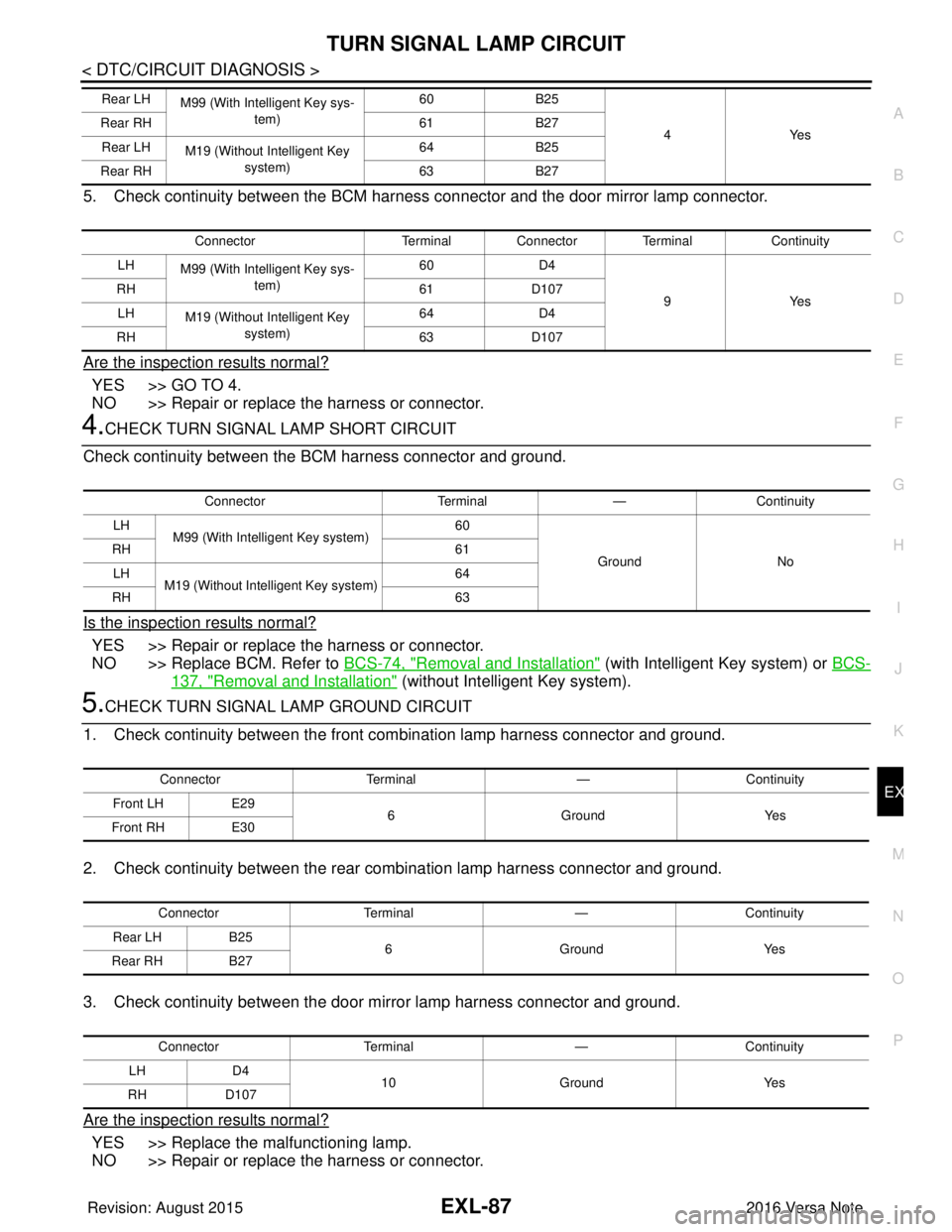
5. Check continuity between the BCM harness connector and the door mirror lamp connector.
Are the inspection results normal?
YES >> GO TO 4.
NO >> Repair or replace the harness or connector.
4.CHECK TURN SIGNAL LAMP SHORT CIRCUIT
Check continuity between the BCM harness connector and ground.
Is the inspection results normal?
YES >> Repair or replace the harness or connector.
NO >> Replace BCM. Refer to BCS-74, "
Removal and Installation" (with Intelligent Key system) or BCS-
137, "Removal and Installation" (without Intelligent Key system).
5.CHECK TURN SIGNAL LAMP GROUND CIRCUIT
1. Check continuity between the front combination lamp harness connector and ground.
2. Check continuity between the rear combination lamp harness connector and ground.
3. Check continuity between the door mirror lamp harness connector and ground.
Are the inspection results normal?
YES >> Replace the malfunctioning lamp.
NO >> Repair or replace the harness or connector.
Rear LH M99 (With Intelligent Key sys-
tem) 60
B25
4Y es
Rear RH
61B27
Rear LH M19 (Without Intelligent Key
system) 64
B25
Rear RH 63B27
Connector Terminal Connector Terminal Continuity
LH M99 (With Intelligent Key sys-
tem) 60
D4
9Y es
RH
61D107
LH M19 (Without Intelligent Key
system) 64
D4
RH 63D107
Connector Terminal—Continuity
LH M99 (With Intelligent Key system) 60
Ground No
RH
61
LH M19 (Without Intelligent Key system) 64
RH 63
ConnectorTerminal —Continuity
Front LH E29
6 Ground Yes
Front RH E30
Connector Terminal —Continuity
Rear LH B25
6 Ground Yes
Rear RH B27
Connector Terminal —Continuity
LH D4
10 Ground Yes
RH D107
Revision: August 2015 2016 Versa Note
cardiagn.com
Page 1743 of 3641
EXTERIOR LIGHTING SYSTEM SYMPTOMSEXL-91
< SYMPTOM DIAGNOSIS >
C
DE
F
G H
I
J
K
M A
B
EXL
N
O P
SYMPTOM DIAGNOSIS
EXTERIOR LIGHTING SYSTEM SYMPTOMS
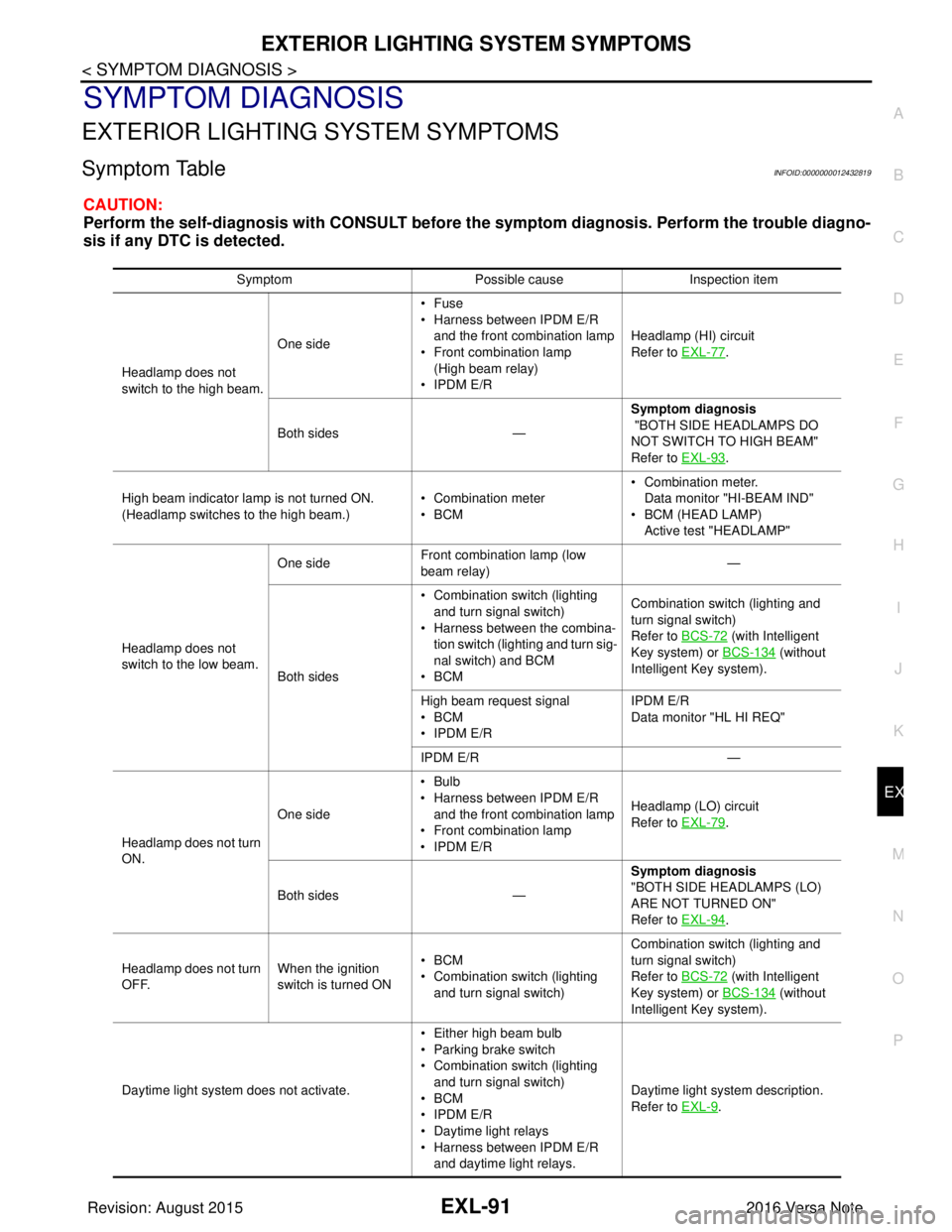
Symptom TableINFOID:0000000012432819
CAUTION:
Perform the self-diagnosis with CONSULT before th e symptom diagnosis. Perform the trouble diagno-
sis if any DTC is detected.
Symptom Possible causeInspection item
Headlamp does not
switch to the high beam. One side
•Fuse
• Harness between IPDM E/R
and the front combination lamp
• Front combination lamp
(High beam relay)
• IPDM E/R Headlamp (HI) circuit
Refer to EXL-77
.
Both sides — Symptom diagnosis
"BOTH SIDE HEADLAMPS DO
NOT SWITCH TO HIGH BEAM"
Refer to EXL-93
.
High beam indicator lamp is not turned ON.
(Headlamp switches to the high beam.) • Combination meter
•BCM• Combination meter.
Data monitor "HI-BEAM IND"
• BCM (HEAD LAMP)
Active test "HEADLAMP"
Headlamp does not
switch to the low beam. One side
Front combination lamp (low
beam relay) —
Both sides • Combination switch (lighting
and turn signal switch)
• Harness between the combina- tion switch (lighting and turn sig-
nal switch) and BCM
•BCM Combination switch (lighting and
turn signal switch)
Refer to BCS-72
(with Intelligent
Key system) or BCS-134
(without
Intelligent Key system).
High beam request signal
•BCM
• IPDM E/R IPDM E/R
Data monitor "HL HI REQ"
IPDM E/R —
Headlamp does not turn
ON. One side
•Bulb
• Harness between IPDM E/R
and the front combination lamp
• Front combination lamp
• IPDM E/R Headlamp (LO) circuit
Refer to EXL-79
.
Both sides — Symptom diagnosis
"BOTH SIDE HEADLAMPS (LO)
ARE NOT TURNED ON"
Refer to EXL-94
.
Headlamp does not turn
OFF. When the ignition
switch is turned ON•BCM
• Combination switch (lighting
and turn signal switch) Combination switch (lighting and
turn signal switch)
Refer to BCS-72
(with Intelligent
Key system) or BCS-134
(without
Intelligent Key system).
Daytime light system does not activate. • Either high beam bulb
• Parking brake switch
• Combination switch (lighting
and turn signal switch)
•BCM
• IPDM E/R
• Daytime light relays
• Harness between IPDM E/R
and daytime light relays. Daytime light system description.
Refer to EXL-9
.
Revision: August 2015
2016 Versa Note
cardiagn.com
Page 1745 of 3641
BOTH SIDE HEADLAMPS DO NOT SWITCH TO HIGH BEAM
EXL-93
< SYMPTOM DIAGNOSIS >
C
D E
F
G H
I
J
K
M A
B
EXL
N
O P
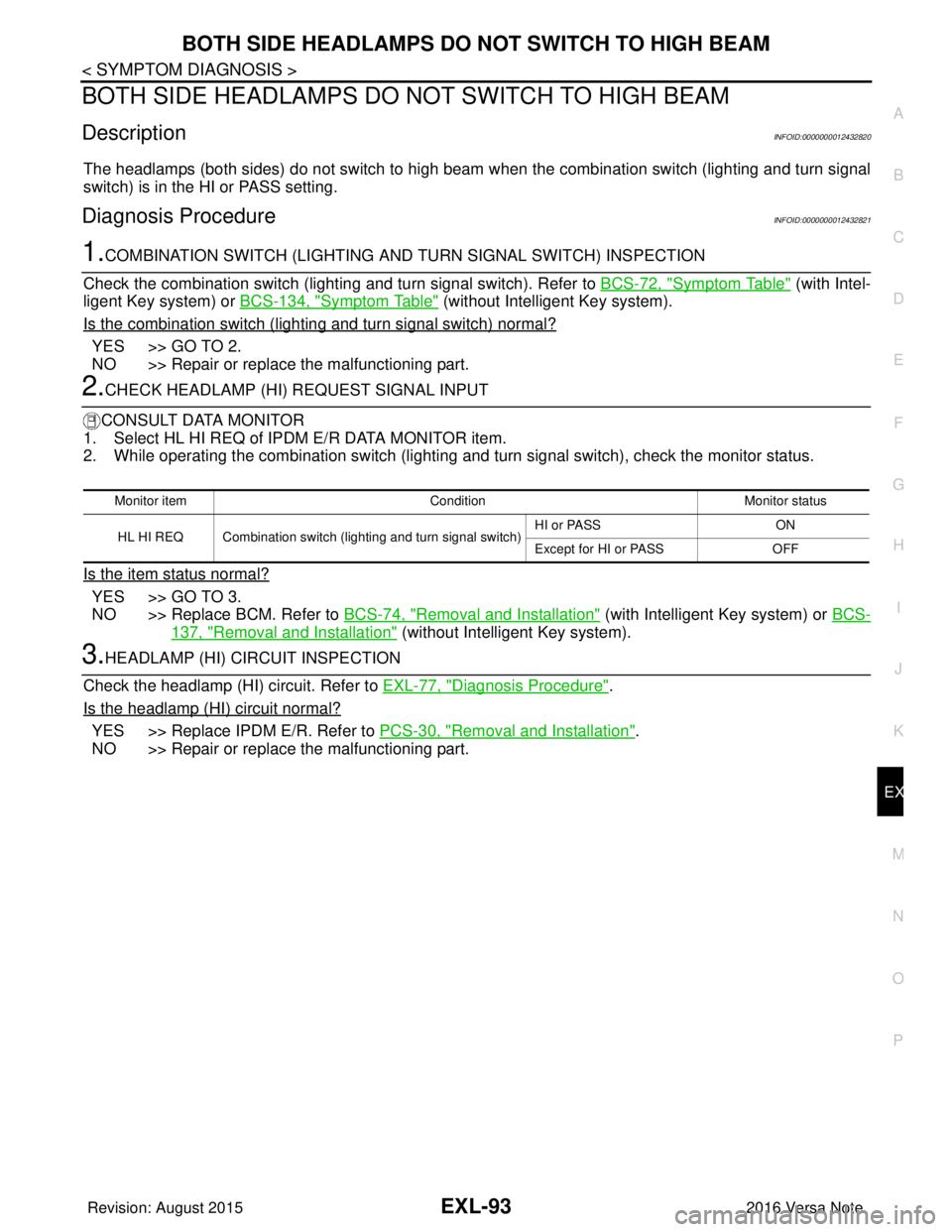
BOTH SIDE HEADLAMPS DO NOT SWITCH TO HIGH BEAM
DescriptionINFOID:0000000012432820
The headlamps (both sides) do not switch to high beam when the combination switch (lighting and turn signal
switch) is in the HI or PASS setting.
Diagnosis ProcedureINFOID:0000000012432821
1.COMBINATION SWITCH (LIGHTING AND TURN SIGNAL SWITCH) INSPECTION
Check the combination switch (lighti ng and turn signal switch). Refer to BCS-72, "
Symptom Table" (with Intel-
ligent Key system) or BCS-134, "
Symptom Table" (without Intelligent Key system).
Is the combination switch (lighting and turn signal switch) normal?
YES >> GO TO 2.
NO >> Repair or replace the malfunctioning part.
2.CHECK HEADLAMP (HI) REQUEST SIGNAL INPUT
CONSULT DATA MONITOR
1. Select HL HI REQ of IP DM E/R DATA MONITOR item.
2. While operating the combination switch (lighting and turn signal switch), check the monitor status.
Is the item status normal?
YES >> GO TO 3.
NO >> Replace BCM. Refer to BCS-74, "
Removal and Installation" (with Intelligent Key system) or BCS-
137, "Removal and Installation" (without Intelligent Key system).
3.HEADLAMP (HI) CIRCUIT INSPECTION
Check the headlamp (HI) circuit. Refer to EXL-77, "
Diagnosis Procedure".
Is the headlamp (HI) circuit normal?
YES >> Replace IPDM E/R. Refer to PCS-30, "Removal and Installation".
NO >> Repair or replace the malfunctioning part.
Monitor item ConditionMonitor status
HL HI REQ Combination switch (lighting and turn signal switch) HI or PASS
ON
Except for HI or PASS OFF
Revision: August 2015 2016 Versa Note
cardiagn.com
Page 1746 of 3641
EXL-94
< SYMPTOM DIAGNOSIS >
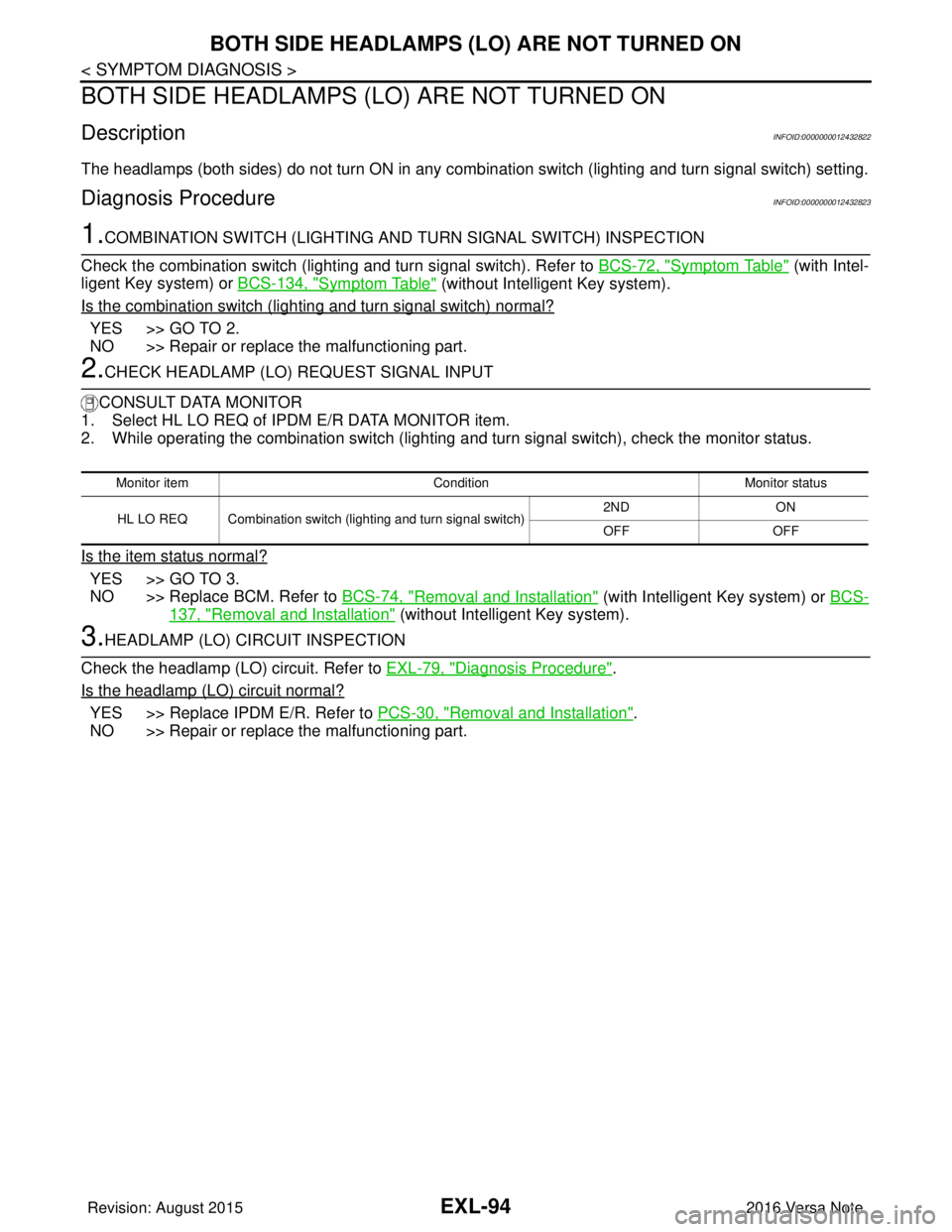
BOTH SIDE HEADLAMPS (LO) ARE NOT TURNED ON
BOTH SIDE HEADLAMPS (LO) ARE NOT TURNED ON
DescriptionINFOID:0000000012432822
The headlamps (both sides) do not turn ON in any combination switch (lighting and turn signal switch) setting.
Diagnosis ProcedureINFOID:0000000012432823
1.COMBINATION SWITCH (LIGHTING AND TURN SIGNAL SWITCH) INSPECTION
Check the combination switch (lighting and turn signal switch). Refer to BCS-72, "
Symptom Table" (with Intel-
ligent Key system) or BCS-134, "
Symptom Table" (without Intelligent Key system).
Is the combination switch (lighting and turn signal switch) normal?
YES >> GO TO 2.
NO >> Repair or replace the malfunctioning part.
2.CHECK HEADLAMP (LO) REQUEST SIGNAL INPUT
CONSULT DATA MONITOR
1. Select HL LO REQ of IPDM E/R DATA MONITOR item.
2. While operating the combination switch (lighting and turn signal switch), check the monitor status.
Is the item status normal?
YES >> GO TO 3.
NO >> Replace BCM. Refer to BCS-74, "
Removal and Installation" (with Intelligent Key system) or BCS-
137, "Removal and Installation" (without Intelligent Key system).
3.HEADLAMP (LO) CIRCUIT INSPECTION
Check the headlamp (LO) circuit. Refer to EXL-79, "
Diagnosis Procedure".
Is the headlamp (LO) circuit normal?
YES >> Replace IPDM E/R. Refer to PCS-30, "Removal and Installation".
NO >> Repair or replace the malfunctioning part.
Monitor item ConditionMonitor status
HL LO REQ Combination switch (lighting and turn signal switch) 2ND
ON
OFF OFF
Revision: August 2015 2016 Versa Note
cardiagn.com
Page 1747 of 3641
PARKING, LICENSE PLATE AND TAIL LAMPS ARE NOT TURNED ON
EXL-95
< SYMPTOM DIAGNOSIS >
C
D E
F
G H
I
J
K
M A
B
EXL
N
O P
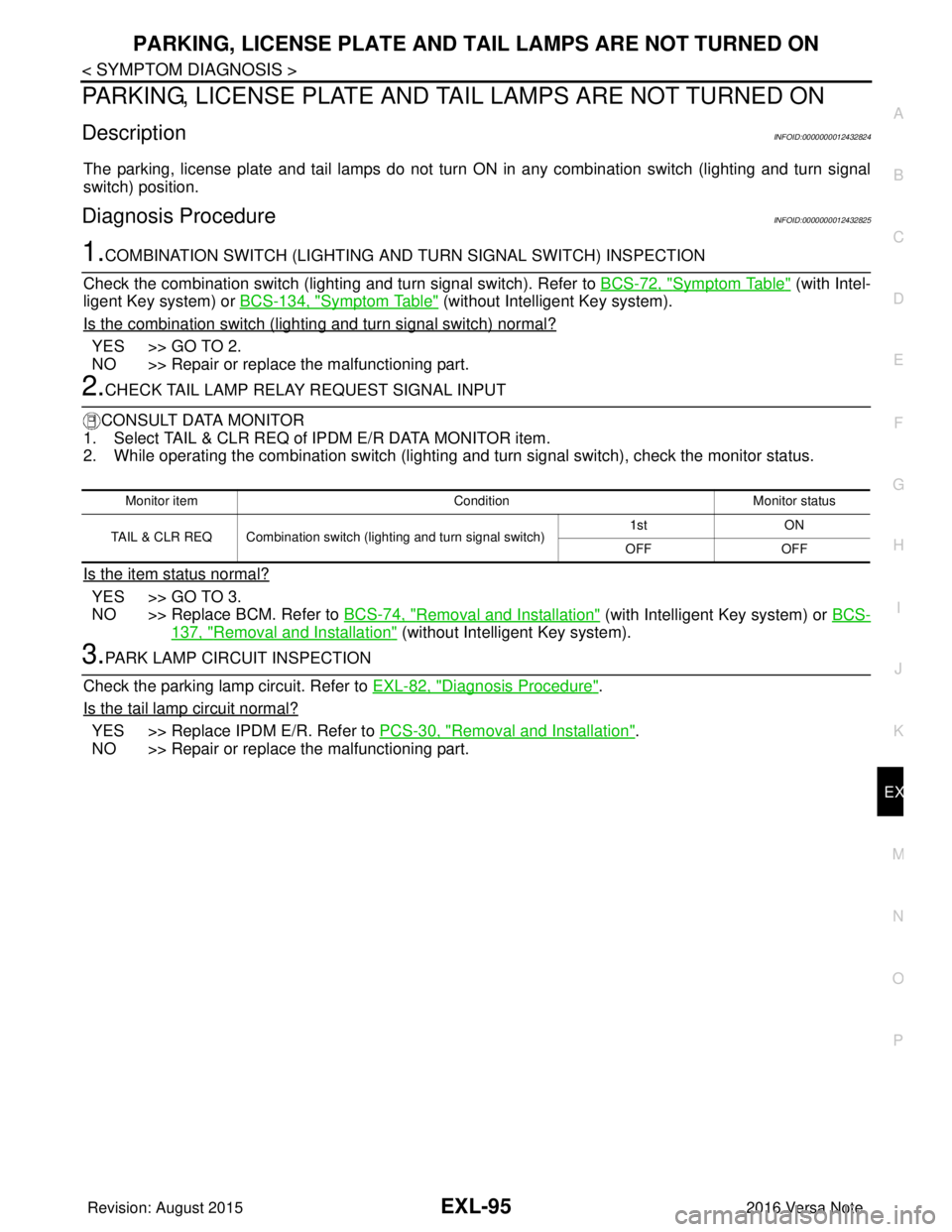
PARKING, LICENSE PLATE AND TA IL LAMPS ARE NOT TURNED ON
DescriptionINFOID:0000000012432824
The parking, license plate and tail lamps do not turn ON in any combination switch (lighting and turn signal
switch) position.
Diagnosis ProcedureINFOID:0000000012432825
1.COMBINATION SWITCH (LIGHTING AND TURN SIGNAL SWITCH) INSPECTION
Check the combination switch (lighti ng and turn signal switch). Refer to BCS-72, "
Symptom Table" (with Intel-
ligent Key system) or BCS-134, "
Symptom Table" (without Intelligent Key system).
Is the combination switch (lighting and turn signal switch) normal?
YES >> GO TO 2.
NO >> Repair or replace the malfunctioning part.
2.CHECK TAIL LAMP RELAY REQUEST SIGNAL INPUT
CONSULT DATA MONITOR
1. Select TAIL & CLR REQ of IPDM E/R DATA MONITOR item.
2. While operating the combination switch (lighting and turn signal switch), check the monitor status.
Is the item status normal?
YES >> GO TO 3.
NO >> Replace BCM. Refer to BCS-74, "
Removal and Installation" (with Intelligent Key system) or BCS-
137, "Removal and Installation" (without Intelligent Key system).
3.PARK LAMP CIRCUIT INSPECTION
Check the parking lamp circuit. Refer to EXL-82, "
Diagnosis Procedure".
Is the tail lamp circuit normal?
YES >> Replace IPDM E/R. Refer to PCS-30, "Removal and Installation".
NO >> Repair or replace the malfunctioning part.
Monitor item ConditionMonitor status
TAIL & CLR REQ Combination switch (lighting and turn signal switch) 1st
ON
OFF OFF
Revision: August 2015 2016 Versa Note
cardiagn.com
Page 1748 of 3641
EXL-96
< SYMPTOM DIAGNOSIS >
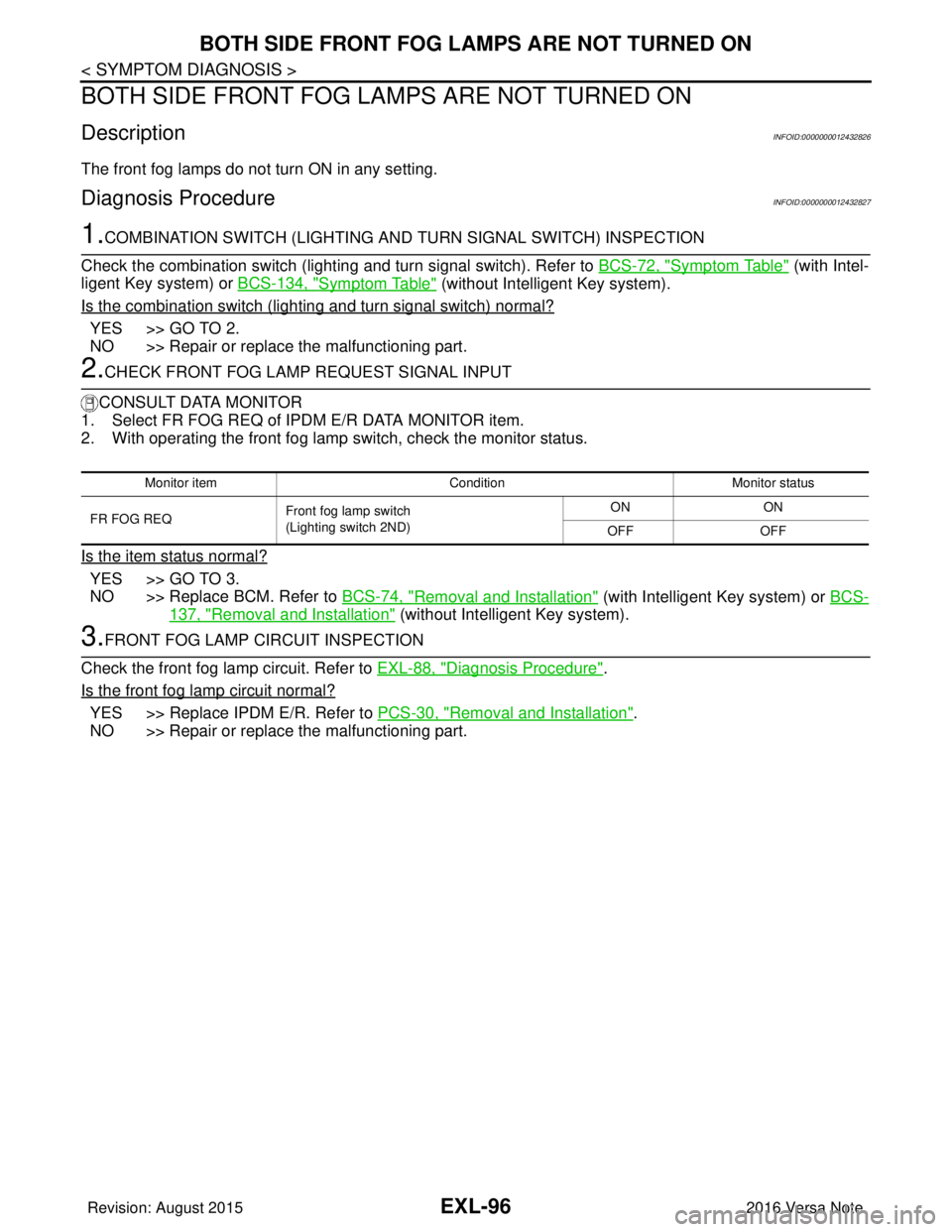
BOTH SIDE FRONT FOG LAMPS ARE NOT TURNED ON
BOTH SIDE FRONT FOG LA MPS ARE NOT TURNED ON
DescriptionINFOID:0000000012432826
The front fog lamps do not turn ON in any setting.
Diagnosis ProcedureINFOID:0000000012432827
1.COMBINATION SWITCH (LIGHTING AND TURN SIGNAL SWITCH) INSPECTION
Check the combination switch (lighting and turn signal switch). Refer to BCS-72, "
Symptom Table" (with Intel-
ligent Key system) or BCS-134, "
Symptom Table" (without Intelligent Key system).
Is the combination switch (lighting and turn signal switch) normal?
YES >> GO TO 2.
NO >> Repair or replace the malfunctioning part.
2.CHECK FRONT FOG LAMP REQUEST SIGNAL INPUT
CONSULT DATA MONITOR
1. Select FR FOG REQ of IPDM E/R DATA MONITOR item.
2. With operating the front fog lamp switch, check the monitor status.
Is the item status normal?
YES >> GO TO 3.
NO >> Replace BCM. Refer to BCS-74, "
Removal and Installation" (with Intelligent Key system) or BCS-
137, "Removal and Installation" (without Intelligent Key system).
3.FRONT FOG LAMP CIRCUIT INSPECTION
Check the front fog lamp circuit. Refer to EXL-88, "
Diagnosis Procedure".
Is the front fog lamp circuit normal?
YES >> Replace IPDM E/R. Refer to PCS-30, "Removal and Installation".
NO >> Repair or replace the malfunctioning part.
Monitor item ConditionMonitor status
FR FOG REQ Front fog lamp switch
(Lighting switch 2ND) ON
ON
OFF OFF
Revision: August 2015 2016 Versa Note
cardiagn.com
Page 1889 of 3641

GI-1
GENERAL INFORMATION
C
DE
F
G H
I
J
K L
M B
GI
SECTION GI
N
O P
CONTENTS
GENERAL INFORMATION
HOW TO USE THIS MANU AL ......................3
HOW TO USE THIS MANUAL ....................... .....3
Description .......................................................... ......3
Terms ........................................................................3
Units ..........................................................................3
Contents ....................................................................3
Relation between Illustrations and Descriptions .......4
Components ..............................................................4
HOW TO FOLLOW TROUBLE DIAGNOSES .....6
Description ................................................................6
How to Follow Test Groups in Trouble Diagnosis ......6
Key to Symbols Signifying Measurements or Pro-
cedures ............................................................... ......
7
HOW TO READ WIRING DIAGRAMS ................9
Connector Symbols ............................................. ......9
Sample/Wiring Diagram -Example- .........................10
Connector Information .............................................12
ABBREVIATIONS .......................................... ....14
Abbreviation List .................................................. ....14
TIGHTENING TORQUE OF STANDARD
BOLTS ................................................................
19
Description .......................................................... ....19
Tightening Torque Table (New Standard Includ-
ed) ...........................................................................
19
RECOMMENDED CHEMICAL PRODUCTS
AND SEALANTS ................................................
22
Recommended Chemical Products and Sealants ....22
PRECAUTION ..............................................23
PRECAUTIONS .............................................. ....23
Description .......................................................... ....23
Precaution for Supplemental Restraint System
(SRS) "AIR BAG" and "SEAT BELT PRE-TEN-
SIONER" .................................................................
23
Procedures without Cowl Top Cover .......................23
Cautions in Removing Battery Terminal and AV
Control Unit (Models with AV Control Unit) .............
23
General Precautions ............................................ ....24
Three Way Catalyst .................................................25
Fuel ..........................................................................25
Multiport Fuel Injection System or Engine Control
System .....................................................................
26
Hoses ......................................................................26
Engine Oils ..............................................................27
Air Conditioning .......................................................27
LIFTING POINT .................................................28
Special Service Tool ................................................28
Garage Jack and Safety Stand ................................28
2-Pole Lift ................................................................29
Board-on Lift ............................................................30
TOW TRUCK TOWING .....................................31
Tow Truck Towing ...................................................31
Vehicle Recovery (Freeing a Stuck Vehicle) ...........31
VEHICLE INFORMATION ...........................33
IDENTIFICATION INFORMATION ....................33
Model Variation .................................................... ....33
Identification Number ...............................................34
Identification Plate ...................................................35
Engine Serial Number .............................................36
CVT Number ............................................................36
Manual Transaxle Number ......................................36
Dimensions ..............................................................36
Wheels & Tires ........................................................37
BASIC INSPECTION ...................................38
SERVICE INFORMATION FOR ELECTRICAL
INCIDENT ..........................................................
38
Work Flow ............................................................ ....38
Control Units and Electrical Parts ............................38
How to Check Terminal ...........................................39
Intermittent Incident ............................................. ....42
Circuit Inspection .....................................................44
Revision: August 2015 2016 Versa Note
cardiagn.com
Page 1895 of 3641
HOW TO FOLLOW TROUBLE DIAGNOSES
GI-7
< HOW TO USE THIS MANUAL >
C
D E
F
G H
I
J
K L
M B
GI
N
O P
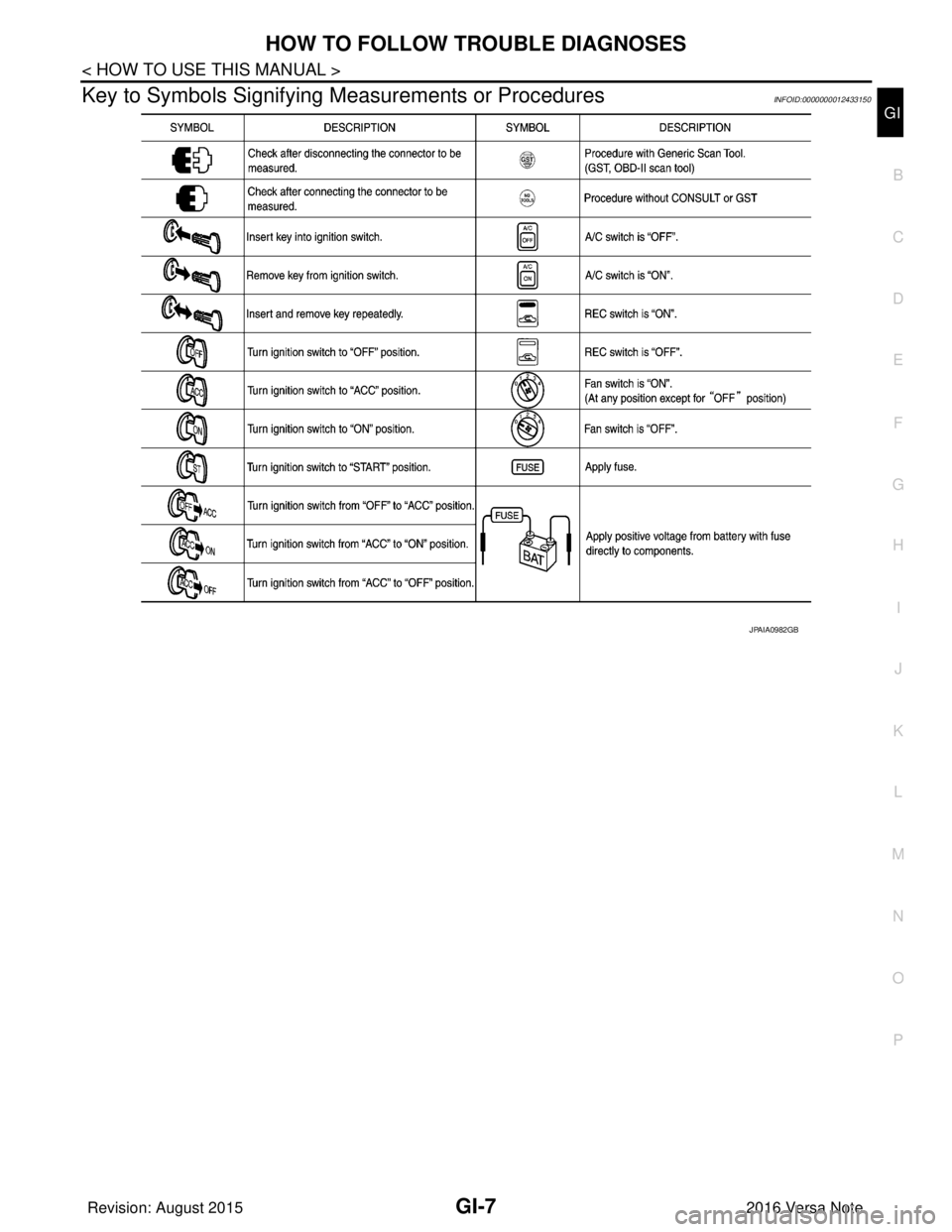
Key to Symbols Signifying Measurements or ProceduresINFOID:0000000012433150
JPAIA0982GB
Revision: August 2015 2016 Versa Note
cardiagn.com