lock NISSAN NOTE 2016 Service Repair Manual
[x] Cancel search | Manufacturer: NISSAN, Model Year: 2016, Model line: NOTE, Model: NISSAN NOTE 2016Pages: 3641, PDF Size: 28.72 MB
Page 2720 of 3641
RAX-2
< PRECAUTION >
PRECAUTIONS
PRECAUTION
PRECAUTIONS
Precaution for Supplemental Restraint System (SRS) "AIR BAG" and "SEAT BELT
PRE-TENSIONER"
INFOID:0000000012431904
The Supplemental Restraint System such as “A IR BAG” and “SEAT BELT PRE-TENSIONER”, used along
with a front seat belt, helps to reduce the risk or severity of injury to the driver and front passenger for certain
types of collision. Information necessary to service the system safely is included in the SR and SB section of
this Service Manual.
WARNING:
• To avoid rendering the SRS inopera tive, which could increase the risk of personal injury or death in
the event of a collision which would result in air bag inflation, all maintenance must be performed by
an authorized NISSAN/INFINITI dealer.
• Improper maintenance, including in correct removal and installation of the SRS, can lead to personal
injury caused by unintent ional activation of the system. For re moval of Spiral Cable and Air Bag
Module, see the SR section.
• Do not use electrical test equipmen t on any circuit related to the SRS unless instructed to in this
Service Manual. SRS wiring harn esses can be identified by yellow and/or orange harnesses or har-
ness connectors.
PRECAUTIONS WHEN USING POWER TOOLS (AIR OR ELECTRIC) AND HAMMERS
WARNING:
• When working near the Airbag Diagnosis Sensor Unit or other Airbag System sensors with the Igni-
tion ON or engine running, DO NOT use air or electri c power tools or strike near the sensor(s) with a
hammer. Heavy vibration could activate the sensor( s) and deploy the air bag(s), possibly causing
serious injury.
• When using air or electric power tools or hammers , always switch the Ignition OFF, disconnect the
battery and wait at least three minutes before performing any service.
Precautions for Wheel HubINFOID:0000000012431905
Observe the following precautions when assembling wheel hub.
• Perform work in a location that is free from dust, dirt and debris.
• Use paper shop towels while performing repairs. Fabric shop cloths must not be used because of the danger of lint adhering to parts.
• Do not drop any of the components such as the brake drum, wheel bearing, spindle, or wheel hub lock nut. If
any of these parts have been dropped, they must be replaced.
• Always check that the tools used to press-fit the wheel bearing to the brake drum have no wear and defor-
mation. Damaged tools will not guarantee that pre ssure can be applied vertically and damage parts.
Revision: August 2015 2016 Versa Note
cardiagn.com
Page 2724 of 3641
RAX-6
< REMOVAL AND INSTALLATION >
REAR WHEEL HUB
REMOVAL AND INSTALLATION
REAR WHEEL HUB
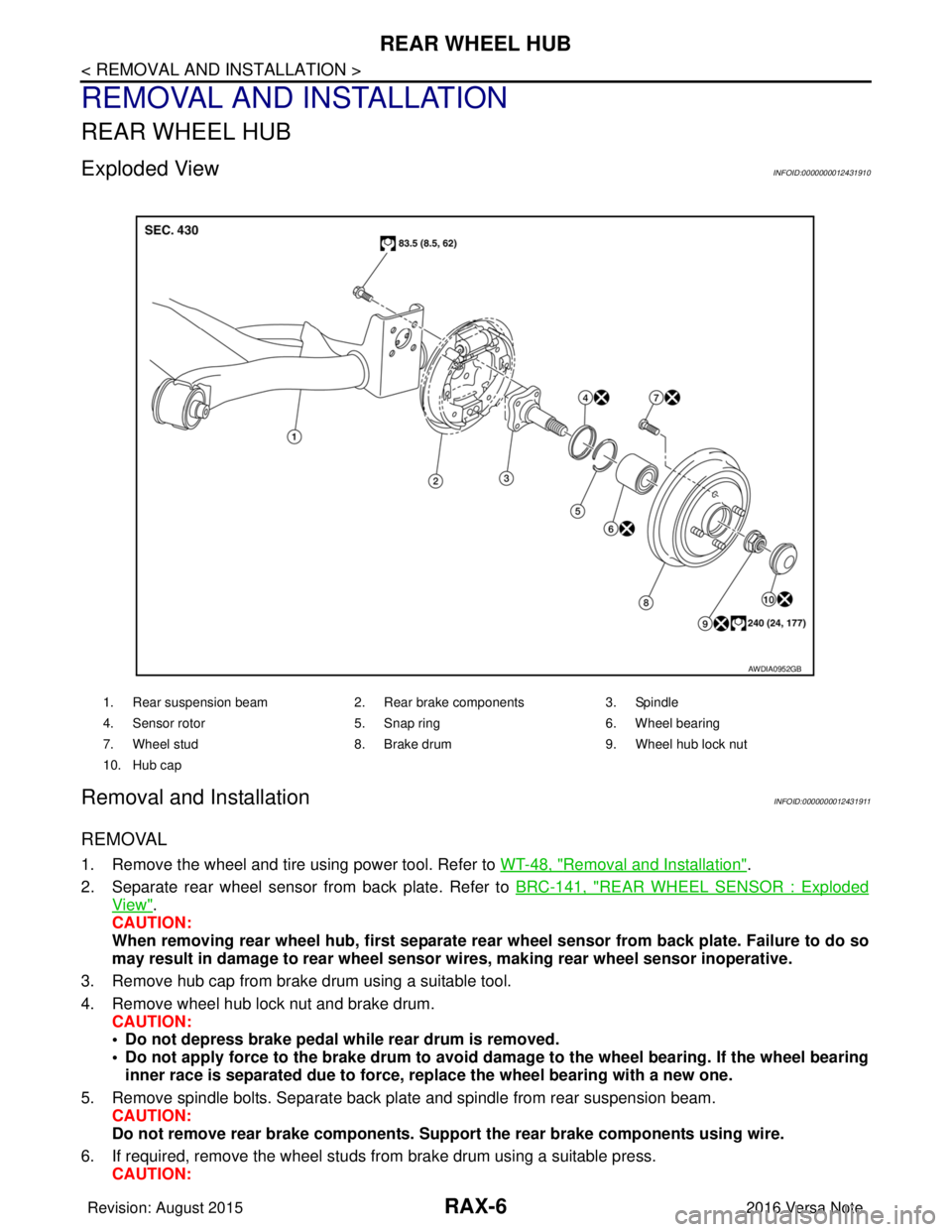
Exploded ViewINFOID:0000000012431910
Removal and InstallationINFOID:0000000012431911
REMOVAL
1. Remove the wheel and tire using power tool. Refer to WT-48, "Removal and Installation".
2. Separate rear wheel sensor from back plate. Refer to BRC-141, "
REAR WHEEL SENSOR : Exploded
View".
CAUTION:
When removing rear wheel hub, first separate rear wheel sensor from back plate. Failure to do so
may result in damage to rear wheel senso r wires, making rear wheel sensor inoperative.
3. Remove hub cap from brake drum using a suitable tool.
4. Remove wheel hub lock nut and brake drum. CAUTION:
• Do not depress brake pedal while rear drum is removed.
• Do not apply force to the brake drum to avoid dama ge to the wheel bearing. If the wheel bearing
inner race is separated due to force, replace the wheel bearing with a new one.
5. Remove spindle bolts. Separate back plate and spindle from rear suspension beam. CAUTION:
Do not remove rear brake comp onents. Support the rear brake components using wire.
6. If required, remove the wheel studs from brake drum using a suitable press.
CAUTION:
1. Rear suspension beam 2. Rear brake components 3. Spindle
4. Sensor rotor 5. Snap ring6. Wheel bearing
7. Wheel stud 8. Brake drum 9. Wheel hub lock nut
10. Hub cap
AWDIA0952GB
Revision: August 2015 2016 Versa Note
cardiagn.com
Page 2725 of 3641
REAR WHEEL HUBRAX-7
< REMOVAL AND INSTALLATION >
CEF
G H
I
J
K L
M A
B
RAX
N
O P
• Do not hammer the wheel stud a nd avoid impact to the brake drum.
• Press the wheel stud straight out to avoid damage.
7. Perform inspection after removal. Refer to RAX-9, "
Inspection".
INSTALLATION
Installation is in the reverse order of removal.
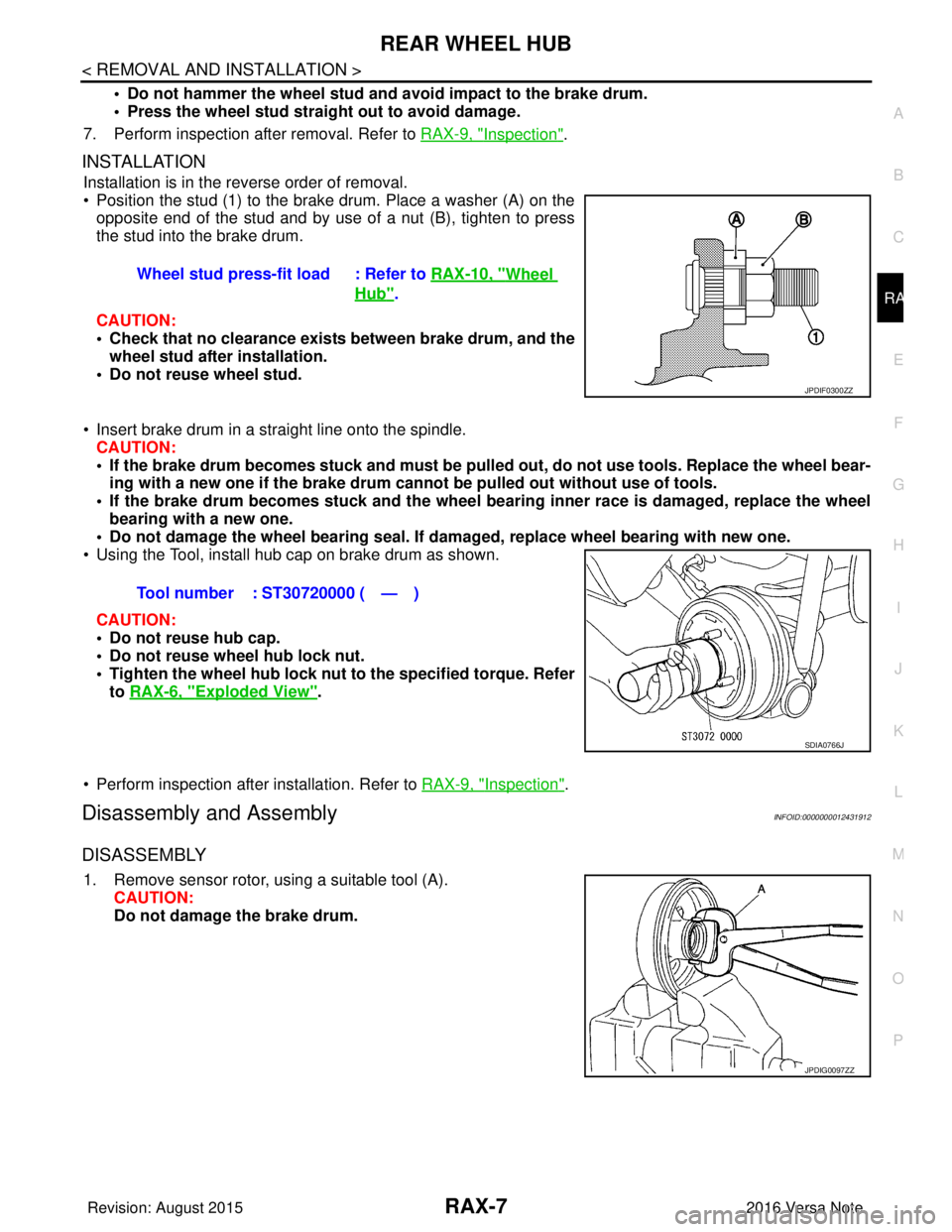
• Position the stud (1) to the brake drum. Place a washer (A) on the
opposite end of the stud and by use of a nut (B), tighten to press
the stud into the brake drum.
CAUTION:
• Check that no clearance exists between brake drum, and the wheel stud after installation.
• Do not reuse wheel stud.
• Insert brake drum in a straight line onto the spindle. CAUTION:
• If the brake drum becomes stuck and must be pulled out, do not use tools. Replace the wheel bear-
ing with a new one if the brake drum canno t be pulled out without use of tools.
• If the brake drum becomes stuck and the wheel bearing inner race is damaged, replace the wheel
bearing with a new one.
• Do not damage the wheel bearing seal. If da maged, replace wheel bearing with new one.
• Using the Tool, install hub cap on brake drum as shown.
CAUTION:
• Do not reuse hub cap.
• Do not reuse wheel hub lock nut.
• Tighten the wheel hub lock nut to the specified torque. Refer
to RAX-6, "
Exploded View".
• Perform inspection after installation. Refer to RAX-9, "
Inspection".
Disassembly and AssemblyINFOID:0000000012431912
DISASSEMBLY
1. Remove sensor rotor, using a suitable tool (A). CAUTION:
Do not damage the brake drum.Wheel stud press-fit load : Refer to
RAX-10, "
Wheel
Hub".
JPDIF0300ZZ
Tool number : ST30720000 ( — )
SDIA0766J
JPDIG0097ZZ
Revision: August 2015 2016 Versa Note
cardiagn.com
Page 2727 of 3641
REAR WHEEL HUBRAX-9
< REMOVAL AND INSTALLATION >
CEF
G H
I
J
K L
M A
B
RAX
N
O P
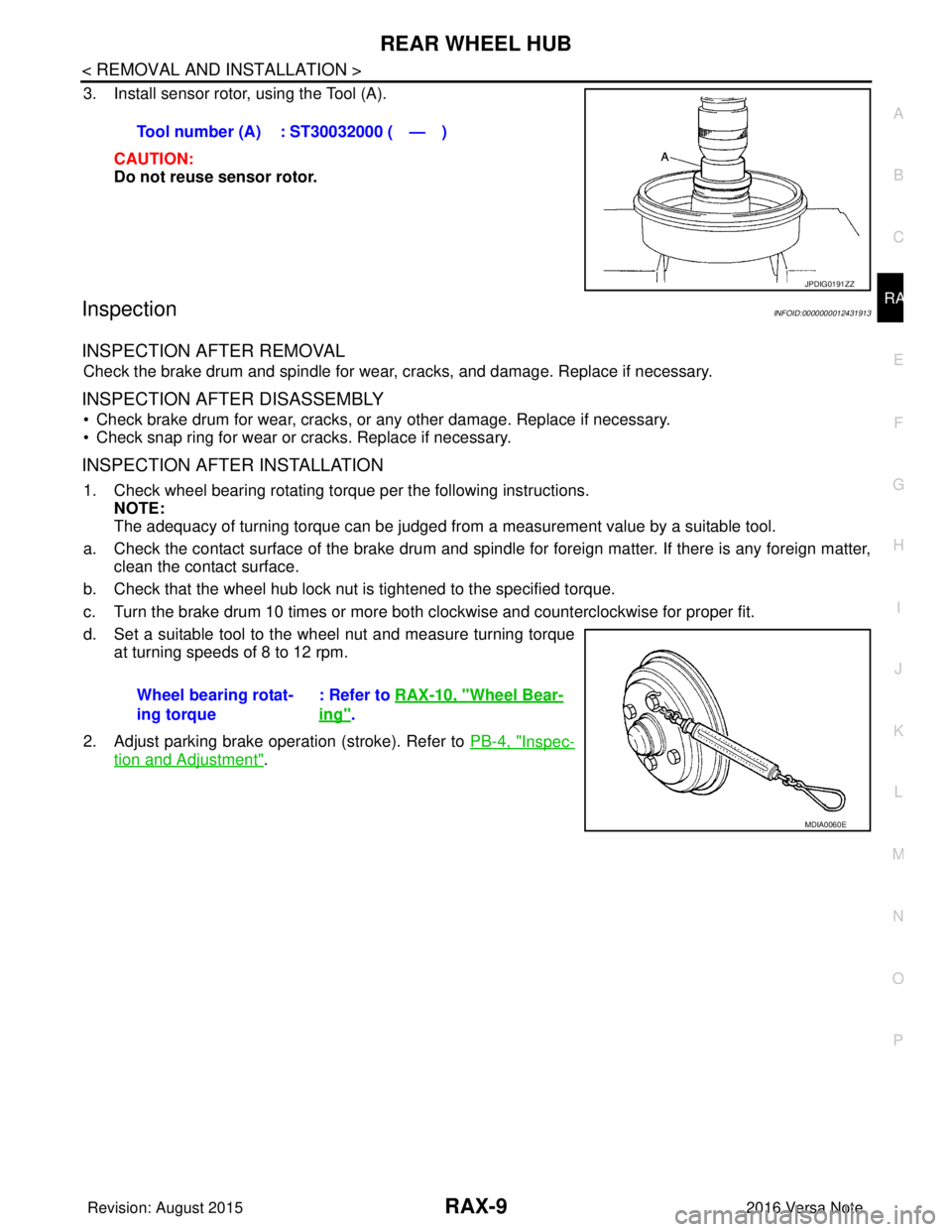
3. Install sensor rotor, using the Tool (A).
CAUTION:
Do not reuse sensor rotor.
InspectionINFOID:0000000012431913
INSPECTION AFTER REMOVAL
Check the brake drum and spindle for wear , cracks, and damage. Replace if necessary.
INSPECTION AFTER DISASSEMBLY
• Check brake drum for wear, cracks, or any other damage. Replace if necessary.
• Check snap ring for wear or cracks. Replace if necessary.
INSPECTION AFTER INSTALLATION
1. Check wheel bearing rotating torque per the following instructions. NOTE:
The adequacy of turning torque can be judged from a measurement value by a suitable tool.
a. Check the contact surface of the brake drum and spindle for foreign matter. If there is any foreign matter, clean the contact surface.
b. Check that the wheel hub lock nut is tightened to the specified torque.
c. Turn the brake drum 10 times or more bot h clockwise and counterclockwise for proper fit.
d. Set a suitable tool to the wheel nut and measure turning torque at turning speeds of 8 to 12 rpm.
2. Adjust parking brake operation (stroke). Refer to PB-4, "
Inspec-
tion and Adjustment".
Tool number (A) : ST30032000 ( — )
JPDIG0191ZZ
Wheel bearing rotat-
ing torque
: Refer to
RAX-10, "Wheel Bear-
ing".
MDIA0060E
Revision: August 2015 2016 Versa Note
cardiagn.com
Page 2730 of 3641
RSU-2
< PRECAUTION >
PRECAUTIONS
PRECAUTION
PRECAUTIONS
Precaution for Supplemental Restraint System (SRS) "AIR BAG" and "SEAT BELT
PRE-TENSIONER"
INFOID:0000000012431916
The Supplemental Restraint System such as “A IR BAG” and “SEAT BELT PRE-TENSIONER”, used along
with a front seat belt, helps to reduce the risk or severity of injury to the driver and front passenger for certain
types of collision. Information necessary to service the system safely is included in the SR and SB section of
this Service Manual.
WARNING:
• To avoid rendering the SRS inopera tive, which could increase the risk of personal injury or death in
the event of a collision which would result in air bag inflation, all maintenance must be performed by
an authorized NISSAN/INFINITI dealer.
• Improper maintenance, including in correct removal and installation of the SRS, can lead to personal
injury caused by unintent ional activation of the system. For re moval of Spiral Cable and Air Bag
Module, see the SR section.
• Do not use electrical test equipmen t on any circuit related to the SRS unless instructed to in this
Service Manual. SRS wiring harn esses can be identified by yellow and/or orange harnesses or har-
ness connectors.
PRECAUTIONS WHEN USING POWER TOOLS (AIR OR ELECTRIC) AND HAMMERS
WARNING:
• When working near the Airbag Diagnosis Sensor Unit or other Airbag System sensors with the Igni-
tion ON or engine running, DO NOT use air or electri c power tools or strike near the sensor(s) with a
hammer. Heavy vibration could activate the sensor( s) and deploy the air bag(s), possibly causing
serious injury.
• When using air or electric power tools or hammers , always switch the Ignition OFF, disconnect the
battery and wait at least three minutes before performing any service.
Precaution for SuspensionINFOID:0000000012431917
• When installing rubber bushings, the final tightening mu st be carried out under unladen conditions with tires
on ground. Spilled oil might shorten the life of rubber bushings. Be sure to wipe off any spilled oil.
- Unladen conditions mean that fuel, engine coolant and lubricant are full. Spare tire, jack, hand tools and mats are in designated positions.
• After servicing suspension parts, be sure to check wheel alignment.
• Self-lock nuts are not reusable. Always use new ones when installing. Since new self-lock nuts are pre-oiled,
tighten as they are.
• The tightening surface must be kept free of oil/grease.
• When jacking up the vehicle with a floor jack, do not hang the jack on the suspension beam.
Revision: August 2015 2016 Versa Note
cardiagn.com
Page 2736 of 3641
RSU-8
< REMOVAL AND INSTALLATION >
REAR SHOCK ABSORBER
REMOVAL AND INSTALLATION
REAR SHOCK ABSORBER
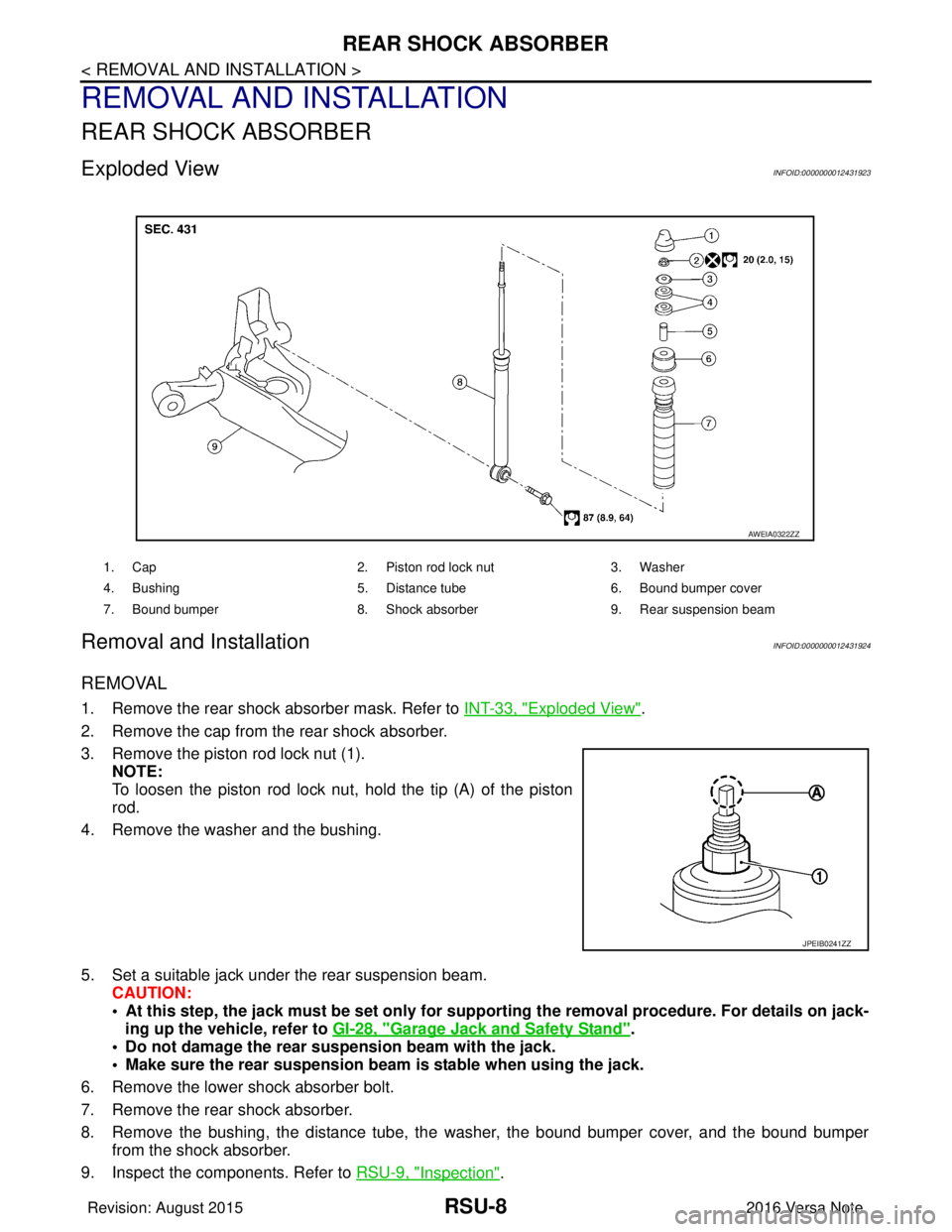
Exploded ViewINFOID:0000000012431923
Removal and InstallationINFOID:0000000012431924
REMOVAL
1. Remove the rear shock absorber mask. Refer to INT-33, "Exploded View".
2. Remove the cap from the rear shock absorber.
3. Remove the piston rod lock nut (1). NOTE:
To loosen the piston rod lock nut, hold the tip (A) of the piston
rod.
4. Remove the washer and the bushing.
5. Set a suitable jack under the rear suspension beam. CAUTION:
• At this step, the jack must be set only for supp orting the removal procedure. For details on jack-
ing up the vehicle, refer to GI-28, "
Garage Jack and Safety Stand".
• Do not damage the rear suspension beam with the jack.
• Make sure the rear suspension beam is stable when using the jack.
6. Remove the lower shock absorber bolt.
7. Remove the rear shock absorber.
8. Remove the bushing, the distance tube, the washer, the bound bumper cover, and the bound bumper
from the shock absorber.
9. Inspect the components. Refer to RSU-9, "
Inspection".
1. Cap 2. Piston rod lock nut 3. Washer
4. Bushing 5. Distance tube6. Bound bumper cover
7. Bound bumper 8. Shock absorber 9. Rear suspension beam
AWEIA0322ZZ
JPEIB0241ZZ
Revision: August 2015 2016 Versa Note
cardiagn.com
Page 2737 of 3641
REAR SHOCK ABSORBERRSU-9
< REMOVAL AND INSTALLATION >
C
DF
G H
I
J
K L
M A
B
RSU
N
O P
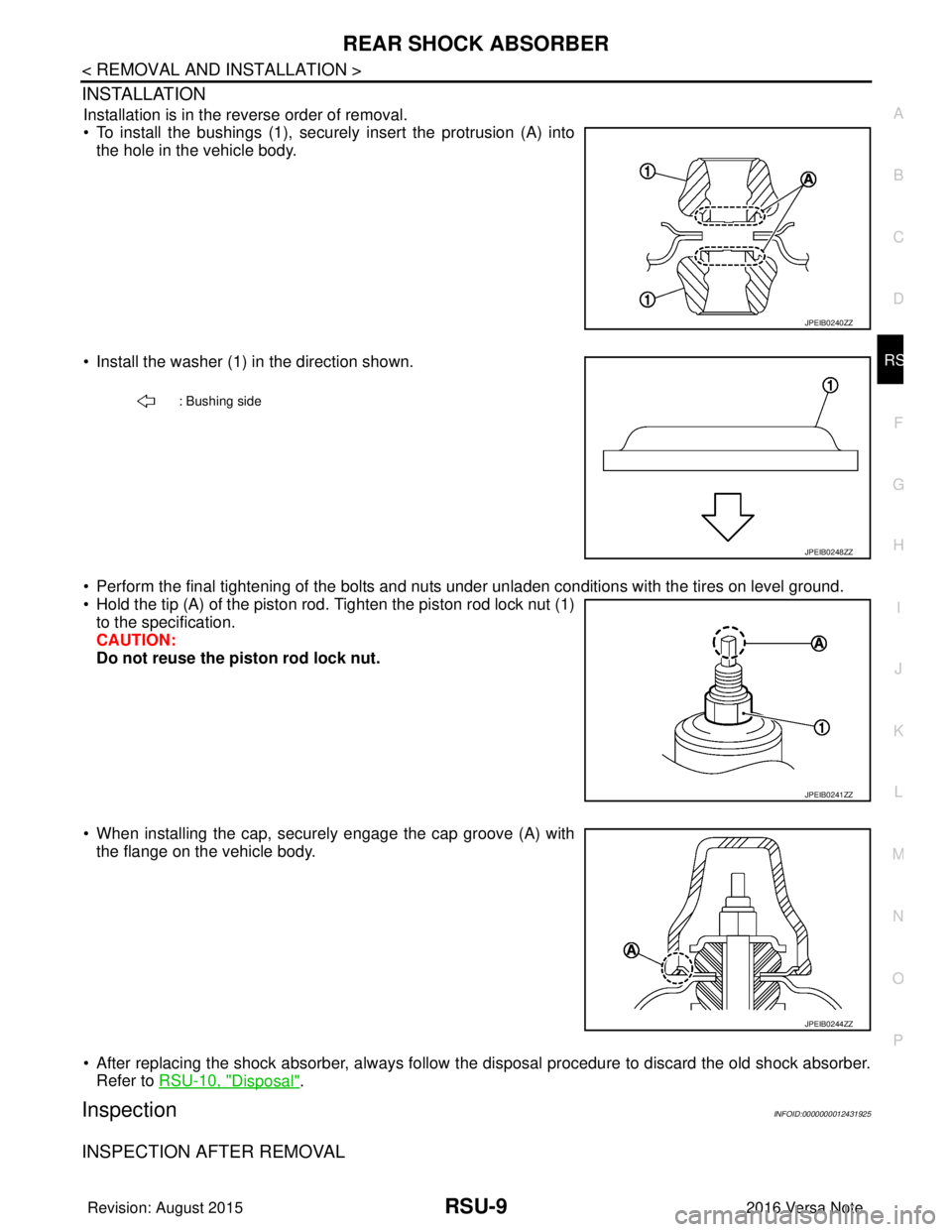
INSTALLATION
Installation is in the reverse order of removal.
• To install the bushings (1), securely insert the protrusion (A) into the hole in the vehicle body.
• Install the washer (1) in the direction shown.
• Perform the final tightening of the bolts and nuts under unladen conditions with the tires on level ground.
• Hold the tip (A) of the piston rod. Tighten the piston rod lock nut (1) to the specification.
CAUTION:
Do not reuse the piston rod lock nut.
• When installing the cap, securely engage the cap groove (A) with the flange on the vehicle body.
• After replacing the shock absorber, always follow t he disposal procedure to discard the old shock absorber.
Refer to RSU-10, "
Disposal".
InspectionINFOID:0000000012431925
INSPECTION AFTER REMOVAL
JPEIB0240ZZ
: Bushing side
JPEIB0248ZZ
JPEIB0241ZZ
JPEIB0244ZZ
Revision: August 2015 2016 Versa Note
cardiagn.com
Page 2753 of 3641

WT-10
< SYSTEM DESCRIPTION >
DIAGNOSIS SYSTEM (BCM)
DIAGNOSIS SYSTEM (BCM)
WITH INTELLIGENT KEY
WITH INTELLIGENT KEY : CONSULT Function (BCM - COMMON ITEM)INFOID:0000000012542957
APPLICATION ITEM
CONSULT performs the following functions via CAN communication with BCM.
SYSTEM APPLICATION
BCM can perform the following functions.
Direct Diagnostic Mode Description
ECU Identification The BCM part number is displayed.
Self Diagnostic Result The BCM self diagnostic results are displayed.
Data Monitor The BCM input/output data is displayed in real time.
Active Test The BCM activates outputs to test components.
Work support The settings for BCM functions can be changed.
Configuration • The vehicle specification can be read and saved.
• The vehicle specification can be written when replacing BCM.
CAN DIAG SUPPORT MNTR The result of transmit/receive diagnosis of CAN communication is displayed.
System Sub System Direct Diagnostic Mode
ECU Identification
Self Diagnostic Result
Data Monitor
Active Test
Work support
Configuration
CAN DIAG SUPPORT MNTR
Door lock
DOOR LOCK ×××
Rear window defogger REAR DEFOGGER ××
Warning chime BUZZER ××
Interior room lamp timer INT LAMP ×××
Exterior lamp HEAD LAMP ×××
Wiper and washer WIPER ×××
Turn signal and hazard warning lamps FLASHER ×××
Air conditioner AIR CONDITIONER ×
Intelligent Key system INTELLIGENT KEY ××××
Combination switch COMB SW ×
BCM BCM× × ×××
Immobilizer IMMU ××××
Interior room lamp battery saver BATTERY SAVER ×××
Vehicle security system THEFT ALM ××
RAP system RETAINED PWR ×
Signal buffer system SIGNAL BUFFER ×
TPMS AIR PRESSURE MONITOR ××××
Panic alarm system PANIC ALARM ×
Revision: August 2015 2016 Versa Note
cardiagn.com
Page 2755 of 3641

WT-12
< SYSTEM DESCRIPTION >
DIAGNOSIS SYSTEM (BCM)
SYSTEM APPLICATION
BCM can perform the following functions.
WITHOUT INTELLIGENT KEY : CONSULT Function (BCM - AIR PRESSURE MONI-
TOR)
INFOID:0000000012542959
NOTE:
The Signal Tech II Tool [– (J-50190)] can be used to perform the following functions. Refer to the Signal Tech
II User Guide for additional information.
• Activate and display TPMS transmitter IDs
• Display tire pressure reported by the TPMS transmitter
Direct Diagnostic ModeDescription
ECU Identification The BCM part number is displayed.
Self Diagnostic Result The BCM self diagnostic results are displayed.
Data Monitor The BCM input/output data is displayed in real time.
Active Test The BCM activates outputs to test components.
Work support The settings for BCM functions can be changed.
Configuration • The vehicle specification can be read and saved.
• The vehicle specification can be written when replacing BCM.
CAN DIAG SUPPORT MNTR The result of transmit/receive diagnosis of CAN communication is displayed.
System Sub System Direct Diagnostic Mode
ECU Identification
Self Diagnostic Result
Data Monitor
Active Test
Work support
Configuration
CAN DIAG SUPPORT MNTR
Door lock
DOOR LOCK ×××
Rear window defogger REAR DEFOGGER ××
Warning chime BUZZER ××
Interior room lamp timer INT LAMP ×××
Remote keyless entry system MULTI REMOTE ENT ×××
Exterior lamp HEAD LAMP ×××
Wiper and washer WIPER ×××
Turn signal and hazard warning lamps FLASHER ××
Air conditioner AIR CONDITIONER ×
Combination switch COMB SW ×
BCM BCM× × ×××
Immobilizer IMMU ×××
Interior room lamp battery saver BATTERY SAVER ×××
Vehicle security system THEFT ALM ××
RAP system RETAINED PWR ××
Signal buffer system SIGNAL BUFFER ×
TPMS AIR PRESSURE MONITOR ××××
Panic alarm system PANIC ALARM ×
Revision: August 2015 2016 Versa Note
cardiagn.com
Page 2803 of 3641
SB-6
< BASIC INSPECTION >
COMPONENT INSPECTION
SEAT BELT RETRACTOR ON-VEHICLE CHECK
Emergency Locking Retractors (ELR) and Automatic Locking Retractors (ALR)
NOTE:
All seat belt retractors are Emergency Locking Retractors (ELR) type. In an emergency (sudden stop) the
retractor will lock and prevent the webbing from extendi ng any further. All 3-point type seat belt retractors
except the driver seat belt also have an Automati c Locking Retractors (ALR) mode. The ALR mode (also
called child restraint mode) is used when installing child seats. The ALR mode is activated when the seat belt
is fully extended. When the webbing is then retracted part ially, the ALR mode automatically locks the seat belt
in a specific position so the webbing cannot be extended any further. To cancel the ALR mode, allow the seat
belt to fully wind back into the retractor.
Check the seat belt retractors with the following test(s ) to determine if a retractor assembly is operating prop-
erly.
ELR Function Stationary Check
Grasp the shoulder webbing and pull forward quickly. T he retractor should lock and prevent the belt from
extending further.
ALR Function Stationary Check
1. Pull out the entire length of seat belt from retractor until a click is heard.
2. Retract the webbing partially. A clicking noise shoul d be heard as the webbing retracts, indicating that the
retractor is in the Automatic Locking Retractors (ALR) mode.
3. Grasp the seat belt and try to pull out the retractor. The webbing must lock and not extend any further. If it
does not operate normally, replace the retractor assembly.
4. Allow the entire length of the webbing to re tract to cancel the automatic locking mode.
ELR Function Moving Check
WARNING:
Perform the following test in a safe, open area clear of other vehicles and obstructions (for example, a
large, empty parking lot). Road surface must be p aved and dry. Never perform the following test on
wet or gravel roads or on public streets and highw ays. This could result in an accident and serious
personal injury. The driver and passenger must be prepared to brace themselves in the event that the
retractor does not lock.
1. Fasten driver seat belt. Buckle a passenger into the seat for the belt that is to be tested.
2. Proceed to the designated safe area.
3. Drive the vehicle at approximately 16 km/h ( 10 mph). Notify any passengers of a pending sudden stop
and the driver and passenger must be prepared to brace themselves in the event that the retractor does
not lock. Apply brakes firmly and make a very hard stop.
During stopping, seat belts should lock and not be extended. If the seat belt retractor assembly does not lock,
perform the retractor off-vehicle check.
FRONT SEAT BELT RETRACTOR OFF-VEHICLE CHECK
1. Remove the front seat belt retractor. Refer to SB-9, "SEAT BELT RETRACTOR : Removal and Installa-
tion".
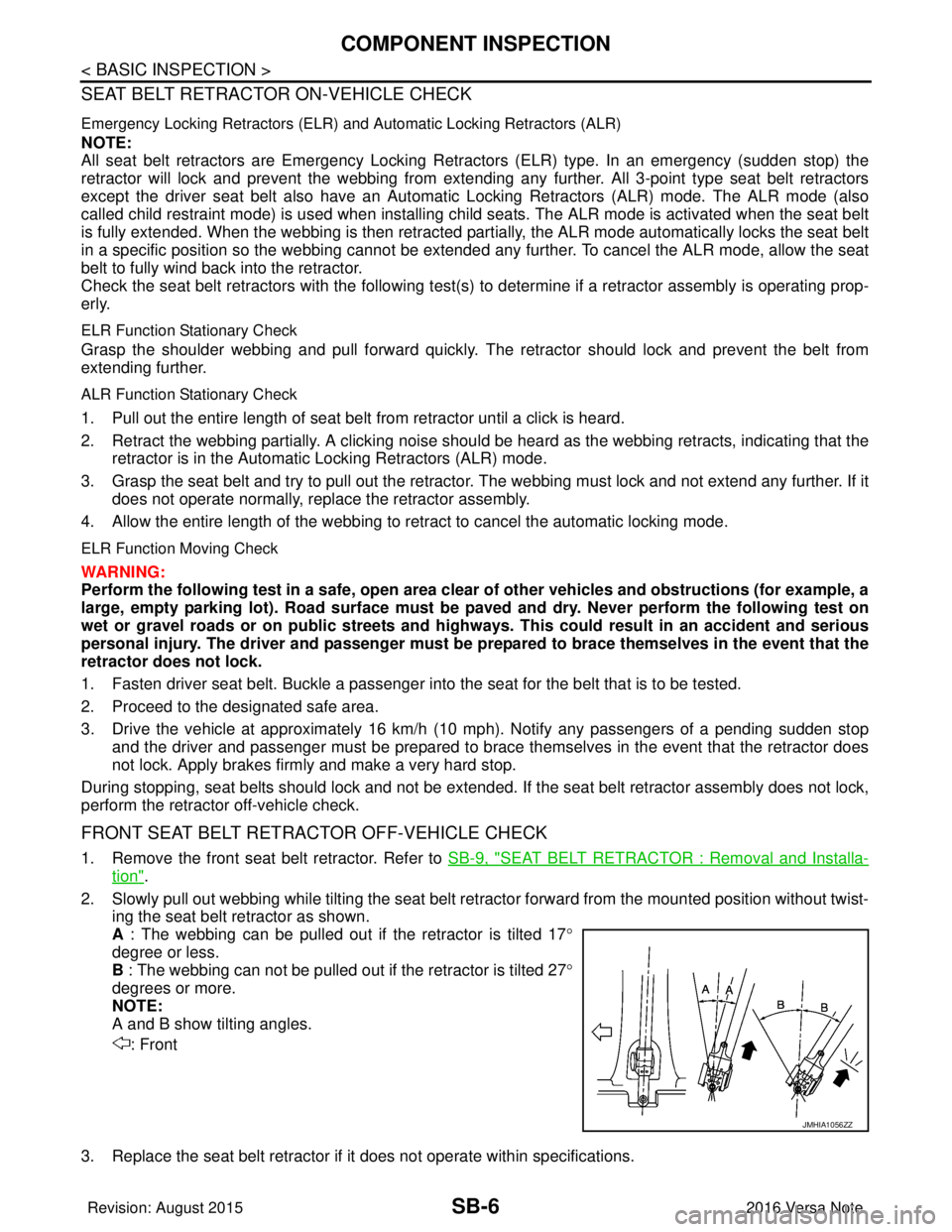
2. Slowly pull out webbing while tilting the seat belt re tractor forward from the mounted position without twist-
ing the seat belt retractor as shown.
A : The webbing can be pulled out if the retractor is tilted 17 °
degree or less.
B : The webbing can not be pulled out if the retractor is tilted 27°
degrees or more.
NOTE:
A and B show tilting angles.
: Front
3. Replace the seat belt retractor if it does not operate within specifications.
JMHIA1056ZZ
Revision: August 2015 2016 Versa Note
cardiagn.com