battery NISSAN NOTE 2016 Service Repair Manual
[x] Cancel search | Manufacturer: NISSAN, Model Year: 2016, Model line: NOTE, Model: NISSAN NOTE 2016Pages: 3641, PDF Size: 28.72 MB
Page 3135 of 3641
FRONT PASSENGER AIR BAG MODULESR-19
< REMOVAL AND INSTALLATION >
C
DE
F
G
I
J
K L
M A
B
SR
N
O P
FRONT PASSENGER AIR BAG MODULE
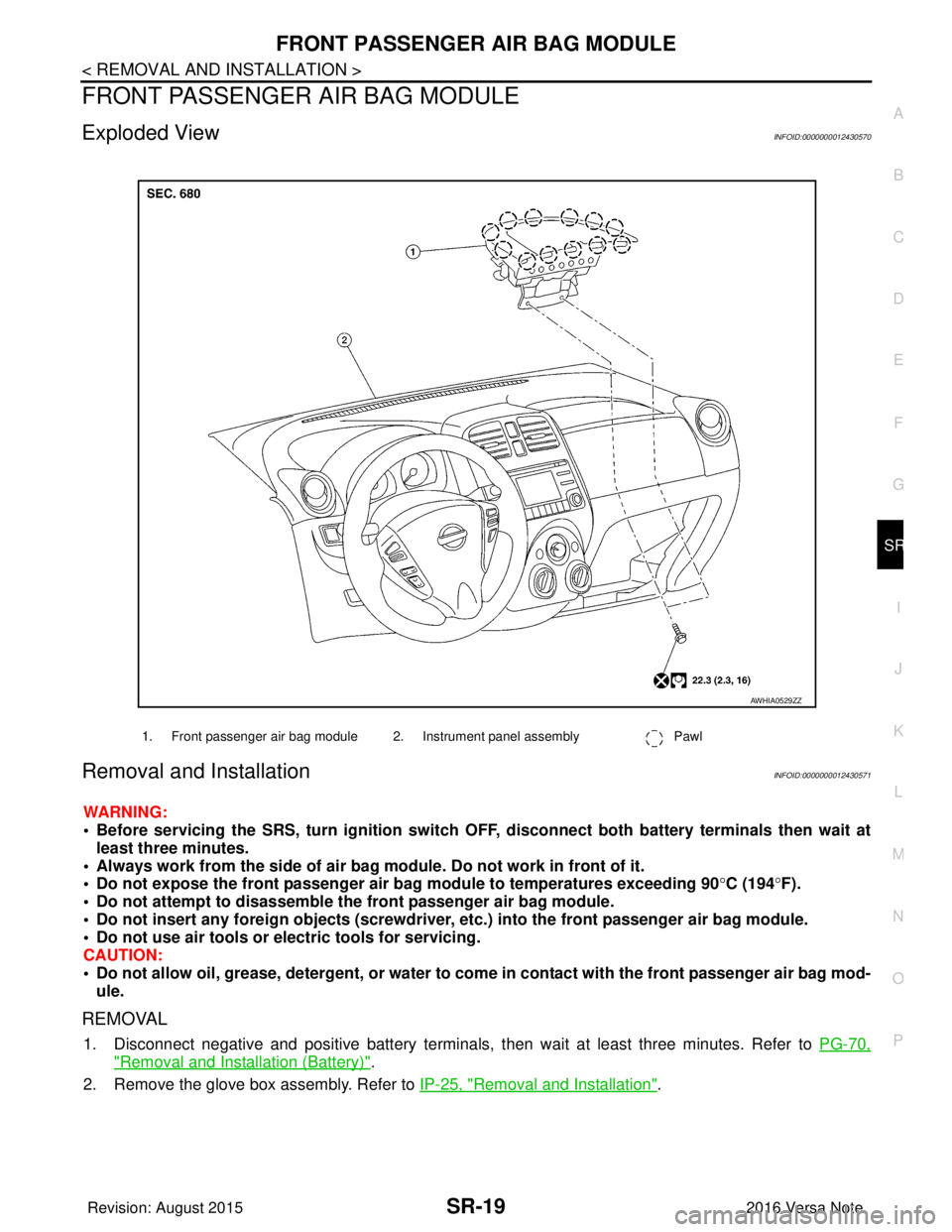
Exploded ViewINFOID:0000000012430570
Removal and InstallationINFOID:0000000012430571
WARNING:
• Before servicing the SRS, turn ig nition switch OFF, disconnect both battery terminals then wait at
least three minutes.
• Always work from the side of air bag module. Do not work in front of it.
• Do not expose the front passenger air bag module to temperatures exceeding 90 °C (194° F).
• Do not attempt to disassemble the front passenger air bag module.
• Do not insert any foreign objects (screwdriver, etc.) into the front passenger air bag module.
• Do not use air tools or electric tools for servicing.
CAUTION:
• Do not allow oil, grease, detergent, or water to co me in contact with the front passenger air bag mod-
ule.
REMOVAL
1. Disconnect negative and positive battery terminals, then wait at least three minutes. Refer to PG-70,
"Removal and Installation (Battery)".
2. Remove the glove box assembly. Refer to IP-25, "
Removal and Installation".
1. Front passenger air bag module 2. Instrument panel assembly Pawl
AWHIA0529ZZ
Revision: August 2015 2016 Versa Note
cardiagn.com
Page 3137 of 3641
SIDE CURTAIN AIR BAG MODULESR-21
< REMOVAL AND INSTALLATION >
C
DE
F
G
I
J
K L
M A
B
SR
N
O P
SIDE CURTAIN AIR BAG MODULE
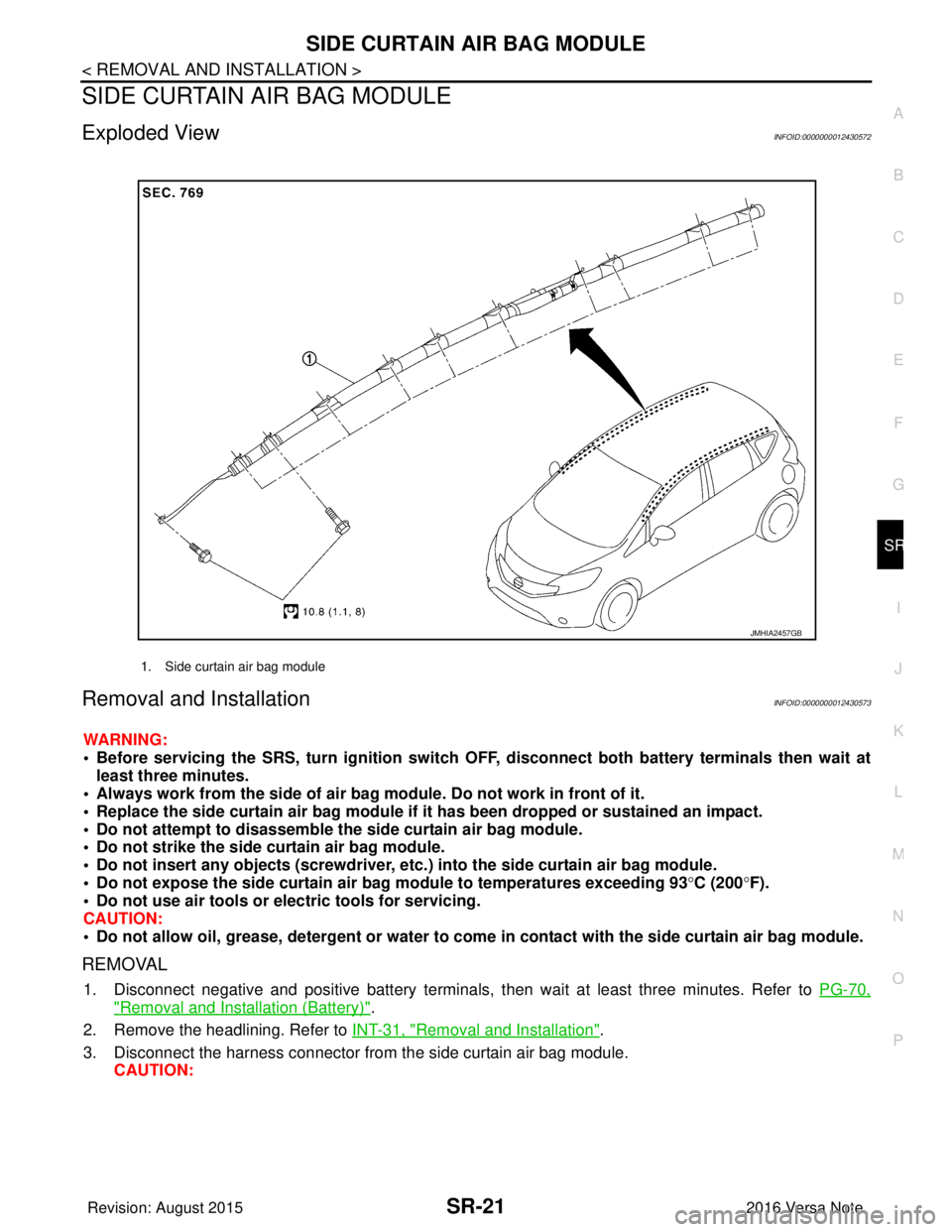
Exploded ViewINFOID:0000000012430572
Removal and InstallationINFOID:0000000012430573
WARNING:
• Before servicing the SRS, turn ig nition switch OFF, disconnect both battery terminals then wait at
least three minutes.
• Always work from the side of air bag module. Do not work in front of it.
• Replace the side curtain air bag module if it has been dropped or sustained an impact.
• Do not attempt to disassemble the side curtain air bag module.
• Do not strike the side curtain air bag module.
• Do not insert any objects (screwdriver, etc. ) into the side curtain air bag module.
• Do not expose the side curtain air bag module to temperatures exceeding 93 °C (200 °F).
• Do not use air tools or electric tools for servicing.
CAUTION:
• Do not allow oil, grease, detergent or water to come in contact with the side curtain air bag module.
REMOVAL
1. Disconnect negative and positive battery terminals, then wait at least three minutes. Refer to PG-70,
"Removal and Installation (Battery)".
2. Remove the headlining. Refer to INT-31, "
Removal and Installation".
3. Disconnect the harness connector from the side curtain air bag module. CAUTION:
1. Side curtain air bag module
JMHIA2457GB
Revision: August 2015 2016 Versa Note
cardiagn.com
Page 3140 of 3641
SR-24
< REMOVAL AND INSTALLATION >
CRASH ZONE SENSOR
CRASH ZONE SENSOR
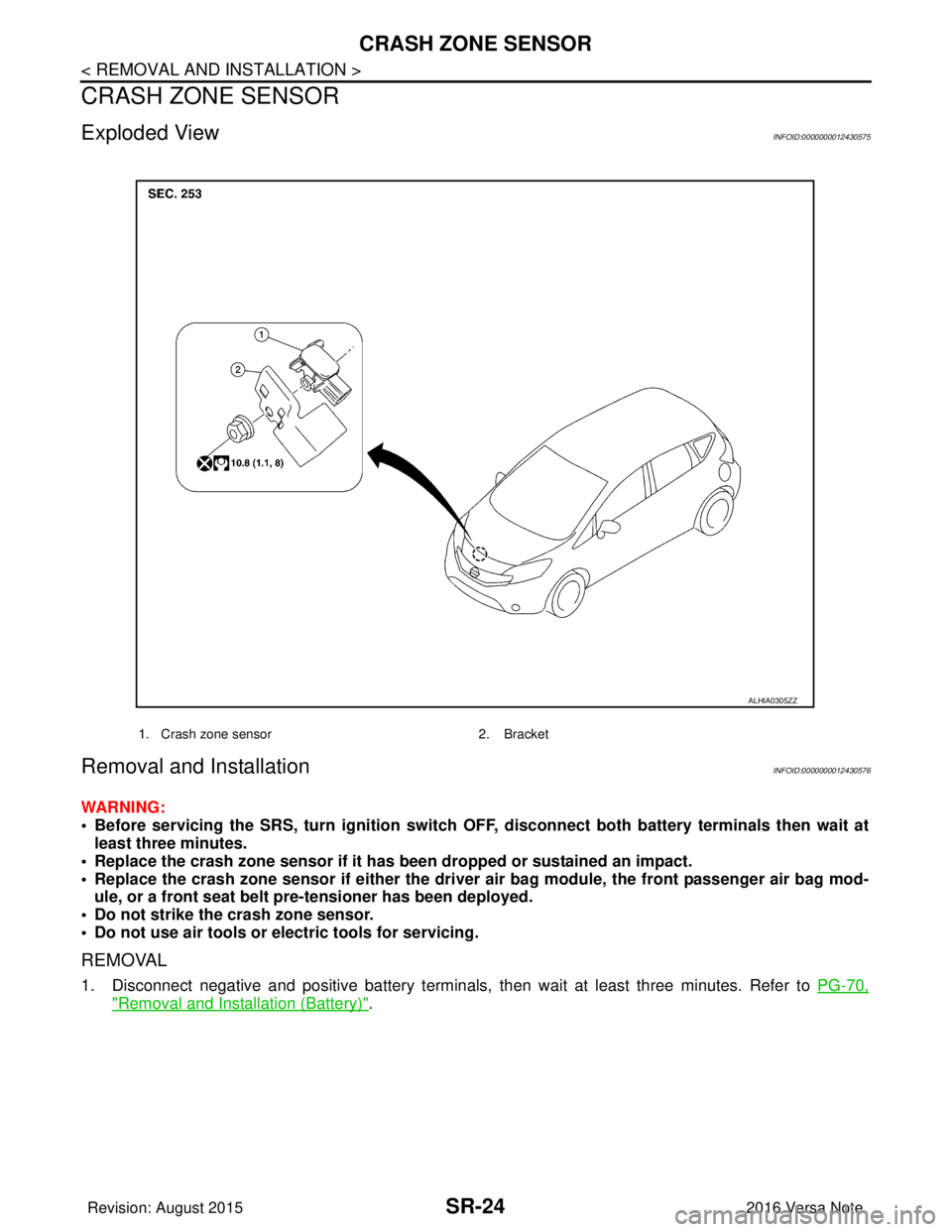
Exploded ViewINFOID:0000000012430575
Removal and InstallationINFOID:0000000012430576
WARNING:
• Before servicing the SRS, turn ignition switch OFF, disconnect bot h battery terminals then wait at
least three minutes.
• Replace the crash zone sensor if it has been dropped or sustained an impact.
• Replace the crash zone sensor if either the driver air bag module, the front passenger air bag mod- ule, or a front seat belt pre-tensioner has been deployed.
• Do not strike the crash zone sensor.
• Do not use air tools or el ectric tools for servicing.
REMOVAL
1. Disconnect negative and positive battery terminals, then wait at least three minutes. Refer to PG-70,
"Removal and Installation (Battery)".
1. Crash zone sensor 2. Bracket
ALHIA0305ZZ
Revision: August 2015 2016 Versa Note
cardiagn.com
Page 3142 of 3641
SR-26
< REMOVAL AND INSTALLATION >
SATELLITE SENSOR
SATELLITE SENSOR
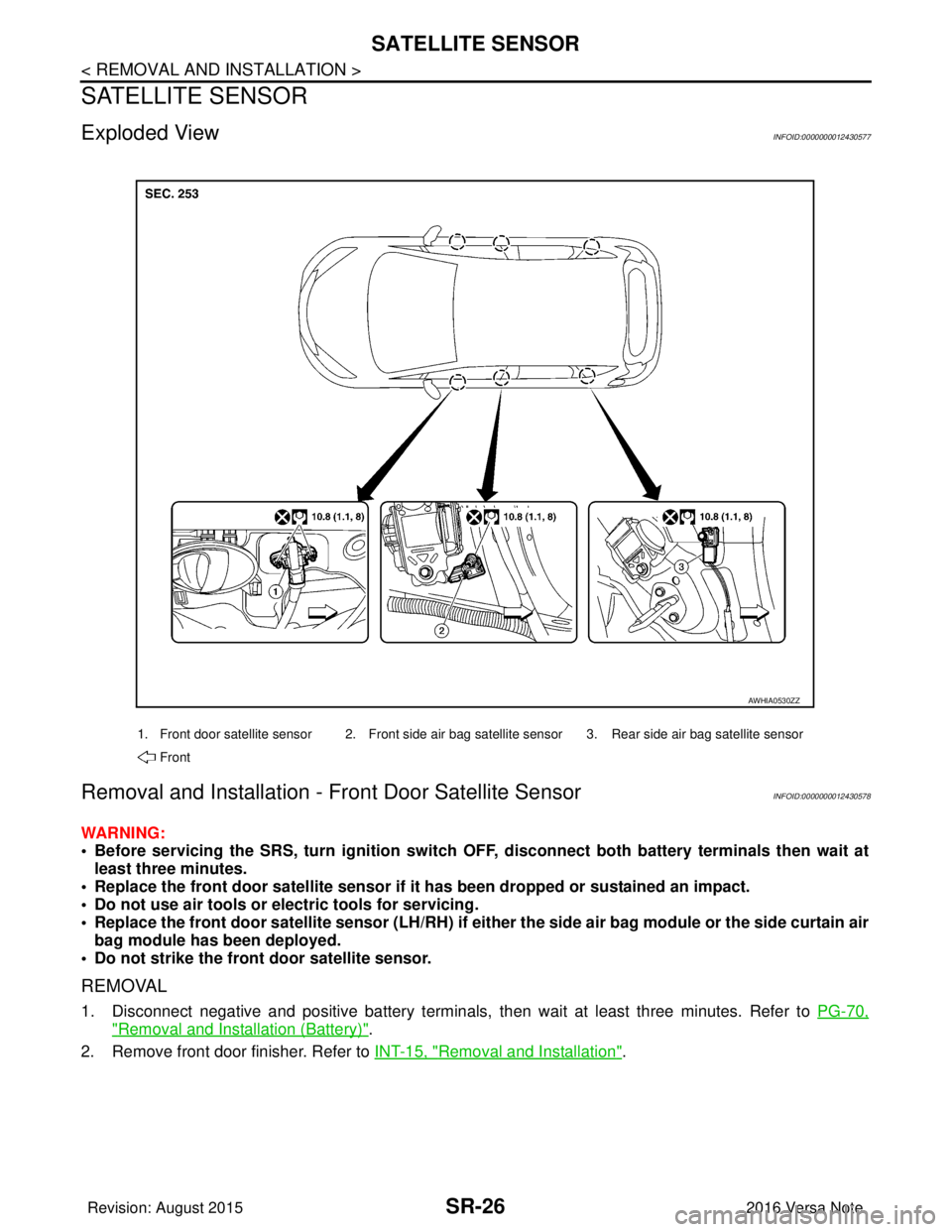
Exploded ViewINFOID:0000000012430577
Removal and Installation - Front Door Satellite SensorINFOID:0000000012430578
WARNING:
• Before servicing the SRS, turn ignition switch OFF, disconnect bot h battery terminals then wait at
least three minutes.
• Replace the front door satellite sensor if it has been dropped or sustained an impact.
• Do not use air tools or el ectric tools for servicing.
• Replace the front door satellite sensor (LH/RH) if either the side air bag module or the side curtain air bag module has been deployed.
• Do not strike the front door satellite sensor.
REMOVAL
1. Disconnect negative and positive battery terminals, then wait at least three minutes. Refer to PG-70,
"Removal and Installation (Battery)".
2. Remove front door finisher. Refer to INT-15, "
Removal and Installation".
1. Front door satellite sensor 2. Front side air bag satellite sensor 3. Rear side air bag satellite sensor
Front
AWHIA0530ZZ
Revision: August 2015 2016 Versa Note
cardiagn.com
Page 3143 of 3641
SATELLITE SENSORSR-27
< REMOVAL AND INSTALLATION >
C
DE
F
G
I
J
K L
M A
B
SR
N
O P
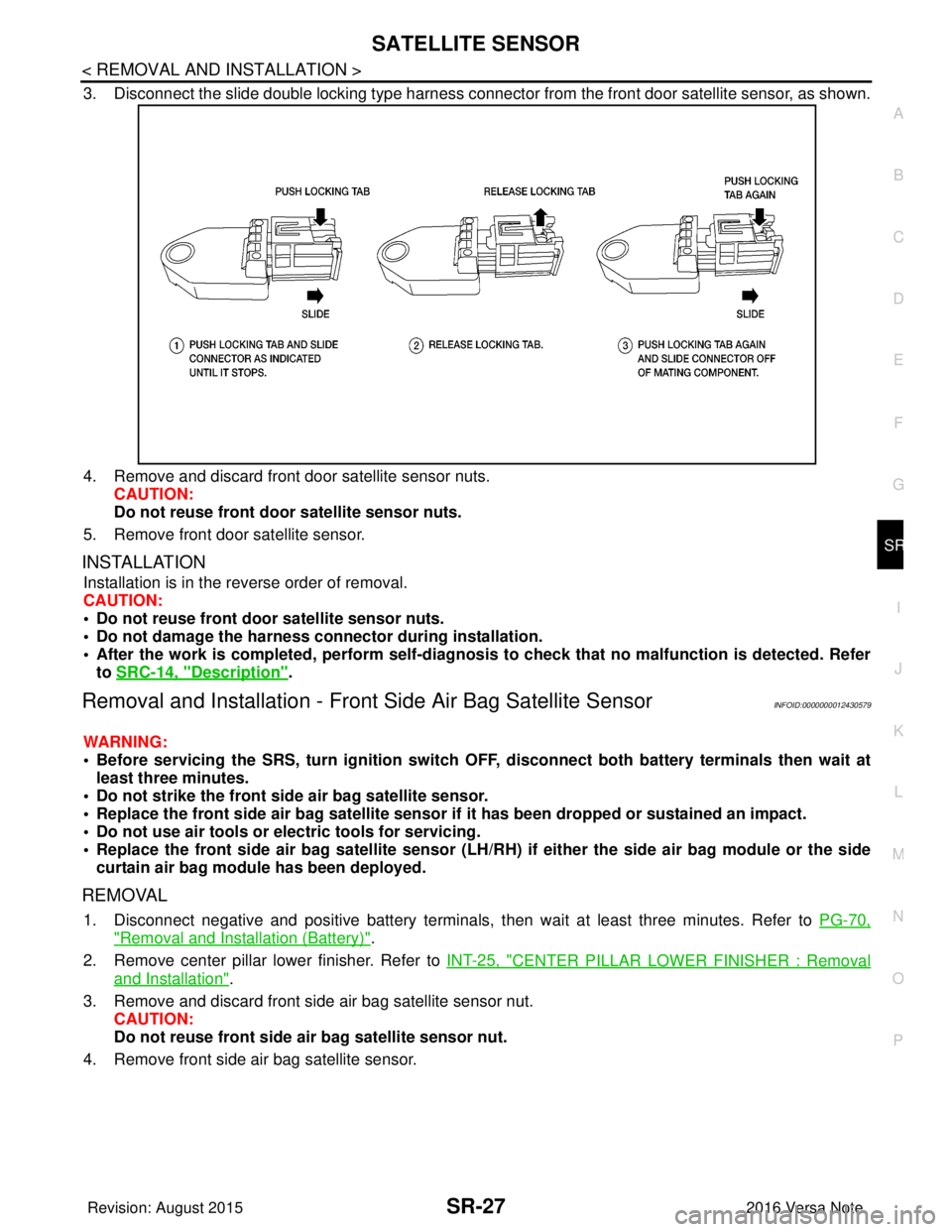
3. Disconnect the slide double locking type harness connecto r from the front door satellite sensor, as shown.
4. Remove and discard front door satellite sensor nuts. CAUTION:
Do not reuse front door satellite sensor nuts.
5. Remove front door satellite sensor.
INSTALLATION
Installation is in the reverse order of removal.
CAUTION:
• Do not reuse front door satellite sensor nuts.
• Do not damage the harness conn ector during installation.
• After the work is completed, perform self-diagnosi s to check that no malfunction is detected. Refer
to SRC-14, "
Description".
Removal and Installation - Fron t Side Air Bag Satellite SensorINFOID:0000000012430579
WARNING:
• Before servicing the SRS, turn ig nition switch OFF, disconnect both battery terminals then wait at
least three minutes.
• Do not strike the front side air bag satellite sensor.
• Replace the front side air bag satellite sensor if it has been dropped or sustained an impact.
• Do not use air tools or electric tools for servicing.
• Replace the front side air bag satellite sensor (LH/RH) if either the side air bag module or the side
curtain air bag module has been deployed.
REMOVAL
1. Disconnect negative and positive battery terminals, then wait at least three minutes. Refer to PG-70,
"Removal and Installation (Battery)".
2. Remove center pillar lower finisher. Refer to INT-25, "
CENTER PILLAR LOWER FINISHER : Removal
and Installation".
3. Remove and discard front side air bag satellite sensor nut. CAUTION:
Do not reuse front side air bag satellite sensor nut.
4. Remove front side air bag satellite sensor.
Revision: August 2015 2016 Versa Note
cardiagn.com
Page 3144 of 3641

SR-28
< REMOVAL AND INSTALLATION >
SATELLITE SENSOR
5. Disconnect the slide double locking type harness connector from front side air bag satellite sensor, asshown.
INSTALLATION
Installation is in the reverse order of removal.
Position the front side air bag satellite sensor using t he locating pin before tightening the nut to specification.
CAUTION:
• Do not reuse the front side air bag satellite sensor nut.
• Do not damage the harness connector during installation.
• After the work is completed, perform self-diagnos is to check that no malfunction is detected. Refer
to SRC-14, "
Description".
Removal and Installation - Rear Side Air Bag Satellite SensorINFOID:0000000012430580
WARNING:
• Before servicing the SRS, turn ignition switch OFF, disconnect bot h battery terminals then wait at
least three minutes.
• Replace the rear side air bag satellite sensor if it has been dropped or sustained an impact.
• Replace the rear side air bag satellite sensor (LH/RH) if either the side air bag module or the side cur-
tain air bag module has been deployed.
• Do not strike the rear side air bag satellite sensor.
• Do not use air tools or el ectric tools for servicing.
REMOVAL
1. Disconnect negative and positive battery terminals, then wait at least three minutes. Refer to PG-70,
"Removal and Installation (Battery)".
2. Remove luggage side lower finisher. Refer to INT-34, "
LUGGAGE SIDE LOWER FINISHER : Removal
and Installation".
Revision: August 2015 2016 Versa Note
cardiagn.com
Page 3146 of 3641
SR-30
< REMOVAL AND INSTALLATION >
AIR BAG DIAGNOSIS SENSOR UNIT
AIR BAG DIAGNOSIS SENSOR UNIT
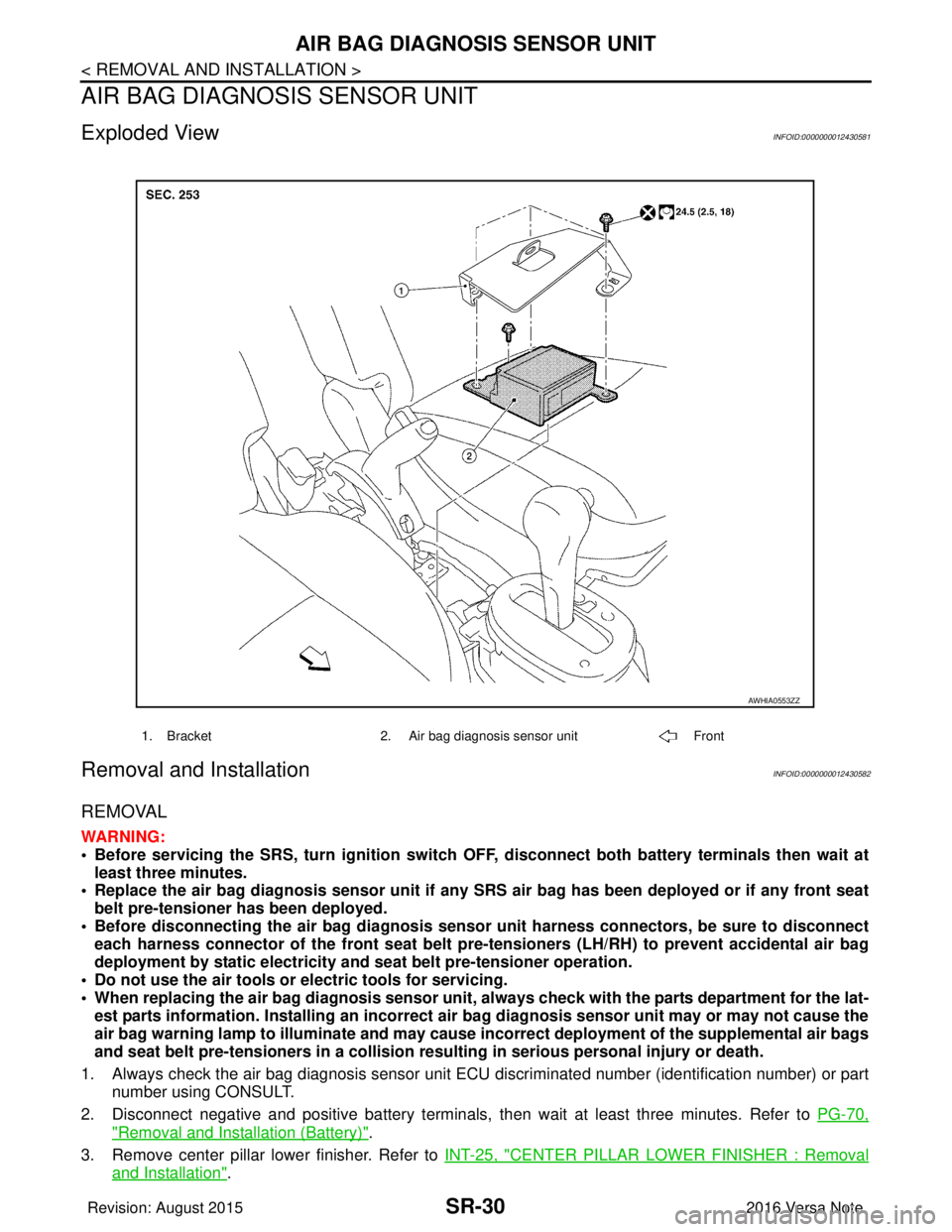
Exploded ViewINFOID:0000000012430581
Removal and InstallationINFOID:0000000012430582
REMOVAL
WARNING:
• Before servicing the SRS, turn ignition switch OFF, disconnect bot h battery terminals then wait at
least three minutes.
• Replace the air bag diagnosis senso r unit if any SRS air bag has been deployed or if any front seat
belt pre-tensioner has been deployed.
• Before disconnecting the air bag diagnosis sensor unit harness conn ectors, be sure to disconnect
each harness connector of the front seat belt pre-tensioners (LH/RH) to prevent accidental air bag
deployment by static electricity and seat belt pre-tensioner operation.
• Do not use the air tools or electric tools for servicing.
• When replacing the air bag diagno sis sensor unit, always check with th e parts department for the lat-
est parts information. Installing an incorrect air bag diagnosis sen sor unit may or may not cause the
air bag warning lamp to illuminate and may cause in correct deployment of the supplemental air bags
and seat belt pre-tensioners in a collision resulting in serious personal injury or death.
1. Always check the air bag diagnosis sensor unit ECU discriminated number (identification number) or part
number using CONSULT.
2. Disconnect negative and positive battery terminals, then wait at least three minutes. Refer to PG-70,
"Removal and Installation (Battery)".
3. Remove center pillar lower finisher. Refer to INT-25, "
CENTER PILLAR LOWER FINISHER : Removal
and Installation".
1. Bracket2. Air bag diagnosis sensor unit Front
AWHIA0553ZZ
Revision: August 2015 2016 Versa Note
cardiagn.com
Page 3148 of 3641
SR-32
< REMOVAL AND INSTALLATION >
OCCUPANT CLASSIFICATION SYSTEM CONTROL UNIT
OCCUPANT CLASSIFICATION SYSTEM CONTROL UNIT
Removal and InstallationINFOID:0000000012430583
OCCUPANT CLASSIFICATION SYSTEM CONTROL UNIT
WARNING:
• Before servicing the SRS, turn ignition switch OFF, disconnect bot h battery terminals then wait at
least three minutes.
• Do not use air tools or el ectric tools for servicing.
Removal
1. Slide front passenger seat to full forward position.
2. Disconnect negative and positive battery terminals, then wait at least three minutes. Refer to PG-70,
"Removal and Installation (Battery)".
3. Release front J-clips, then disconnect harness connector from occupant classification system control unit.
4. Remove screws and occupant classification system control unit. CAUTION:
• Replace the occupant classification control unit if it has been dropped or sustained an impact.
• Do not strike the occupant classification control unit.
Installation
Installation is in the reverse order of removal.
WARNING:
• Zero point reset must be performed every time the occupant classification system control unit is
removed/replaced. Refer to SRC-39, "
ZERO POINT RESET : Description".
CAUTION:
• Do not damage the harness connector during installation.
• After installation is complete, check that no syst em malfunction is detected causing the air bag
warning lamp to illuminate.
• If a malfunction is indicated by the air bag warnin g lamp after repair or replacement of the malfunc-
tioning parts, perform the diagnosis. Refer to SRC-16, "
Trouble Diagnosis with CONSULT".
OCCUPANT CLASSIFICATION SYSTEM SENSORS
WARNING:
• Before servicing the SRS, turn ignition switch OFF, disconnect bot h battery terminals then wait at
least three minutes.
• Do not use air tools or el ectric tools for servicing.
Removal
1. Disconnect negative and positive battery terminals, then wait at least three minutes. Refer to PG-70,
"Removal and Installation (Battery)".
2. Remove front passenger seat. Refer to SE-22, "
PASSENGER SIDE : Removal and Installation".
3. Disconnect harness connectors from occu pant classification system sensors.
4. Remove nuts (LH/RH) and remove seat frame from seat tracks.
5. Remove nuts from occupant classification sensor and remove.
Installation
1. Install occupant classification system sensor to seat track using nuts. CAUTION:
• Do not reuse nuts. Replace with new part during installation.
• Tighten nuts to specification.
2. Install seat frame to seat track using nuts and washer. CAUTION:
Do not reuse nuts or washer. Replace with new part during installation.
Occupant classification
sensor nuts
:22 N·m (2.2 kg-m, 16 ft-lb)
Revision: August 2015
2016 Versa Note
cardiagn.com
Page 3154 of 3641

STR-2
< PRECAUTION >
PRECAUTIONS
PRECAUTION
PRECAUTIONS
Precaution for Supplemental Restraint System (SRS) "AIR BAG" and "SEAT BELT
PRE-TENSIONER"
INFOID:0000000012432057
The Supplemental Restraint System such as “A IR BAG” and “SEAT BELT PRE-TENSIONER”, used along
with a front seat belt, helps to reduce the risk or severity of injury to the driver and front passenger for certain
types of collision. Information necessary to service the system safely is included in the SR and SB section of
this Service Manual.
WARNING:
• To avoid rendering the SRS inopera tive, which could increase the risk of personal injury or death in
the event of a collision which would result in air bag inflation, all maintenance must be performed by
an authorized NISSAN/INFINITI dealer.
• Improper maintenance, including in correct removal and installation of the SRS, can lead to personal
injury caused by unintent ional activation of the system. For re moval of Spiral Cable and Air Bag
Module, see the SR section.
• Do not use electrical test equipmen t on any circuit related to the SRS unless instructed to in this
Service Manual. SRS wiring harn esses can be identified by yellow and/or orange harnesses or har-
ness connectors.
PRECAUTIONS WHEN USING POWER TOOLS (AIR OR ELECTRIC) AND HAMMERS
WARNING:
• When working near the Airbag Diagnosis Sensor Unit or other Airbag System sensors with the Igni-
tion ON or engine running, DO NOT use air or electri c power tools or strike near the sensor(s) with a
hammer. Heavy vibration could activate the sensor( s) and deploy the air bag(s), possibly causing
serious injury.
• When using air or electric power tools or hammers , always switch the Ignition OFF, disconnect the
battery and wait at least three minutes before performing any service.
Revision: August 2015 2016 Versa Note
cardiagn.com
Page 3155 of 3641
PREPARATIONSTR-3
< PREPARATION >
C
DE
F
G H
I
J
K L
M A
STR
NP
O
PREPARATION
PREPARATION
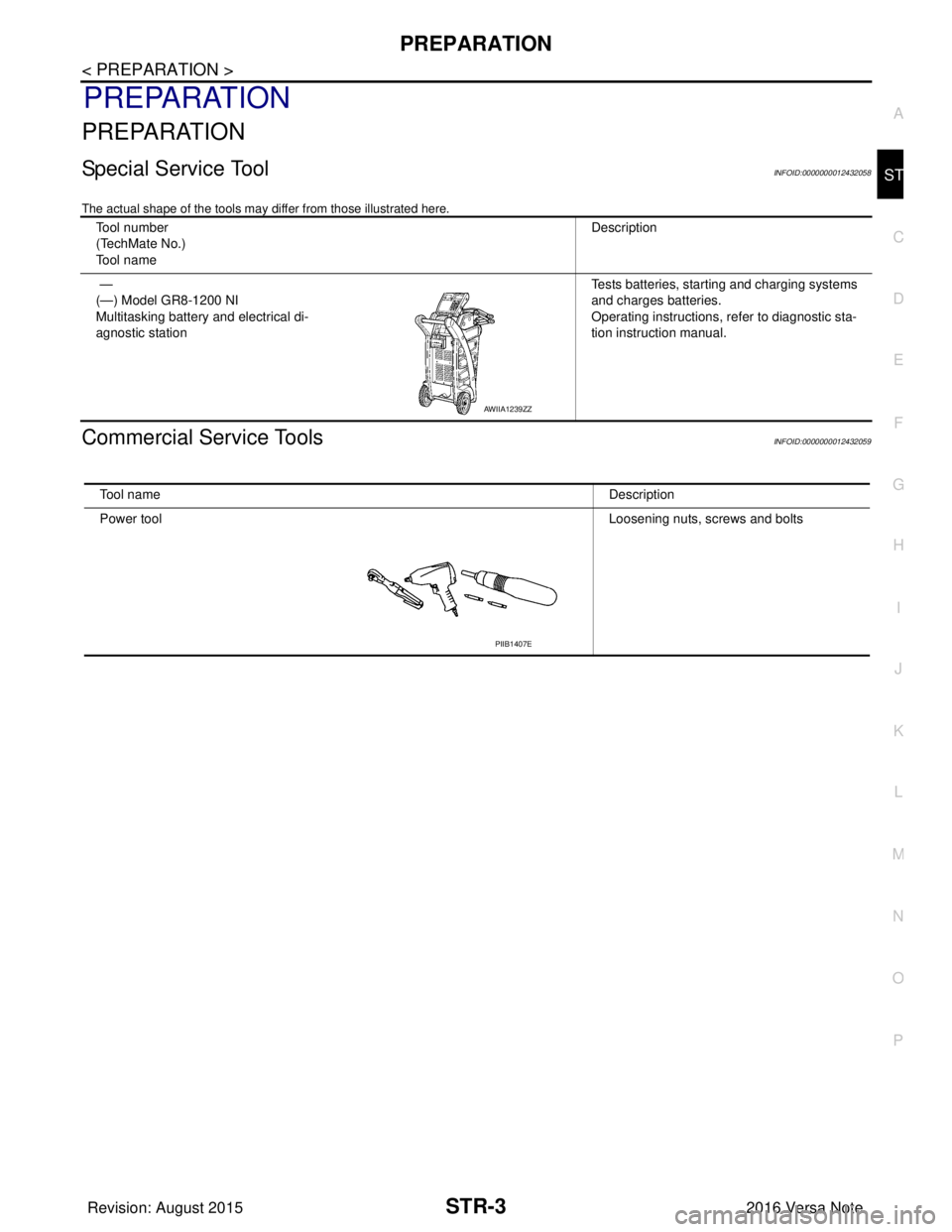
Special Service ToolINFOID:0000000012432058
The actual shape of the tools may di
ffer from those illustrated here.
Commercial Service ToolsINFOID:0000000012432059
Tool number
(TechMate No.)
Tool name Description
—
(—) Model GR8-1200 NI
Multitasking battery and electrical di-
agnostic station Tests batteries, starting and charging systems
and charges batteries.
Operating instructions, refer to diagnostic sta-
tion instruction manual.
AWIIA1239ZZ
Tool name
Description
Power tool Loosening nuts, screws and bolts
PIIB1407E
Revision: August 2015 2016 Versa Note
cardiagn.com