battery NISSAN NOTE 2016 Service Repair Manual
[x] Cancel search | Manufacturer: NISSAN, Model Year: 2016, Model line: NOTE, Model: NISSAN NOTE 2016Pages: 3641, PDF Size: 28.72 MB
Page 3204 of 3641

STC-20
< DTC/CIRCUIT DIAGNOSIS >
C1601 BATTERY POWER SUPPLY
NO >> Repair or replace malfunctioning component.
6.CHECK CONNECTOR
1. Turn ignition switch OFF.
2. Disconnect torque sensor harness connector.
3. Check terminal for deformation, disconnection, looseness, and so on. If any malfunction is found, repair or replace terminal.
Is the inspection result normal?
YES >> Replace EPS control unit. Refer to STC-37, "Removal and Installation".
NO >> Repair or replace malfunctioning component.
Revision: August 2015 2016 Versa Note
cardiagn.com
Page 3205 of 3641
C1604 TORQUE SENSORSTC-21
< DTC/CIRCUIT DIAGNOSIS >
C
DE
F
H I
J
K L
M A
B
STC
N
O P
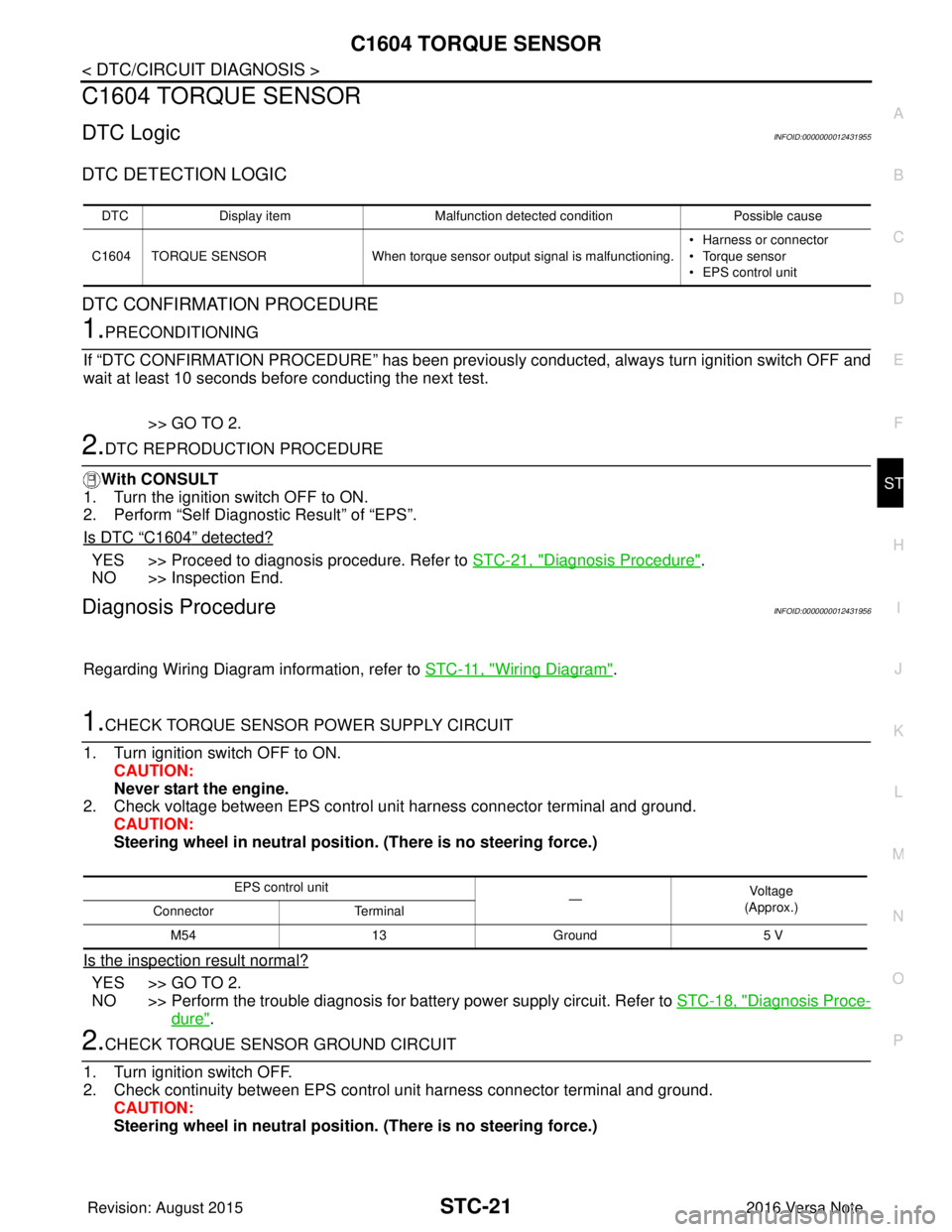
C1604 TORQUE SENSOR
DTC LogicINFOID:0000000012431955
DTC DETECTION LOGIC
DTC CONFIRMATION PROCEDURE
1.PRECONDITIONING
If “DTC CONFIRMATION PROCEDURE” has been previously conducted, always turn ignition switch OFF and
wait at least 10 seconds before conducting the next test.
>> GO TO 2.
2.DTC REPRODUCTION PROCEDURE
With CONSULT
1. Turn the ignition switch OFF to ON.
2. Perform “Self Diagnostic Result” of “EPS”.
Is DTC
“C1604” detected?
YES >> Proceed to diagnosis procedure. Refer to STC-21, "Diagnosis Procedure".
NO >> Inspection End.
Diagnosis ProcedureINFOID:0000000012431956
Regarding Wiring Diagram information, refer to STC-11, "Wiring Diagram".
1.CHECK TORQUE SENSOR POWER SUPPLY CIRCUIT
1. Turn ignition switch OFF to ON. CAUTION:
Never start the engine.
2. Check voltage between EPS control unit harness connector terminal and ground.
CAUTION:
Steering wheel in neutral position . (There is no steering force.)
Is the inspection result normal?
YES >> GO TO 2.
NO >> Perform the trouble diagnosis for battery power supply circuit. Refer to STC-18, "
Diagnosis Proce-
dure".
2.CHECK TORQUE SENSOR GROUND CIRCUIT
1. Turn ignition switch OFF.
2. Check continuity between EPS control unit harness connector terminal and ground. CAUTION:
Steering wheel in neutral position . (There is no steering force.)
DTCDisplay item Malfunction detected condition Possible cause
C1604 TORQUE SENSOR When torque sensor output signal is malfunctioning. • Harness or connector
• Torque sensor
• EPS control unit
EPS control unit
—Vo l ta g e
(Approx.)
Connector Terminal
M54 13Ground 5 V
Revision: August 2015 2016 Versa Note
cardiagn.com
Page 3216 of 3641
STC-32
< SYMPTOM DIAGNOSIS >
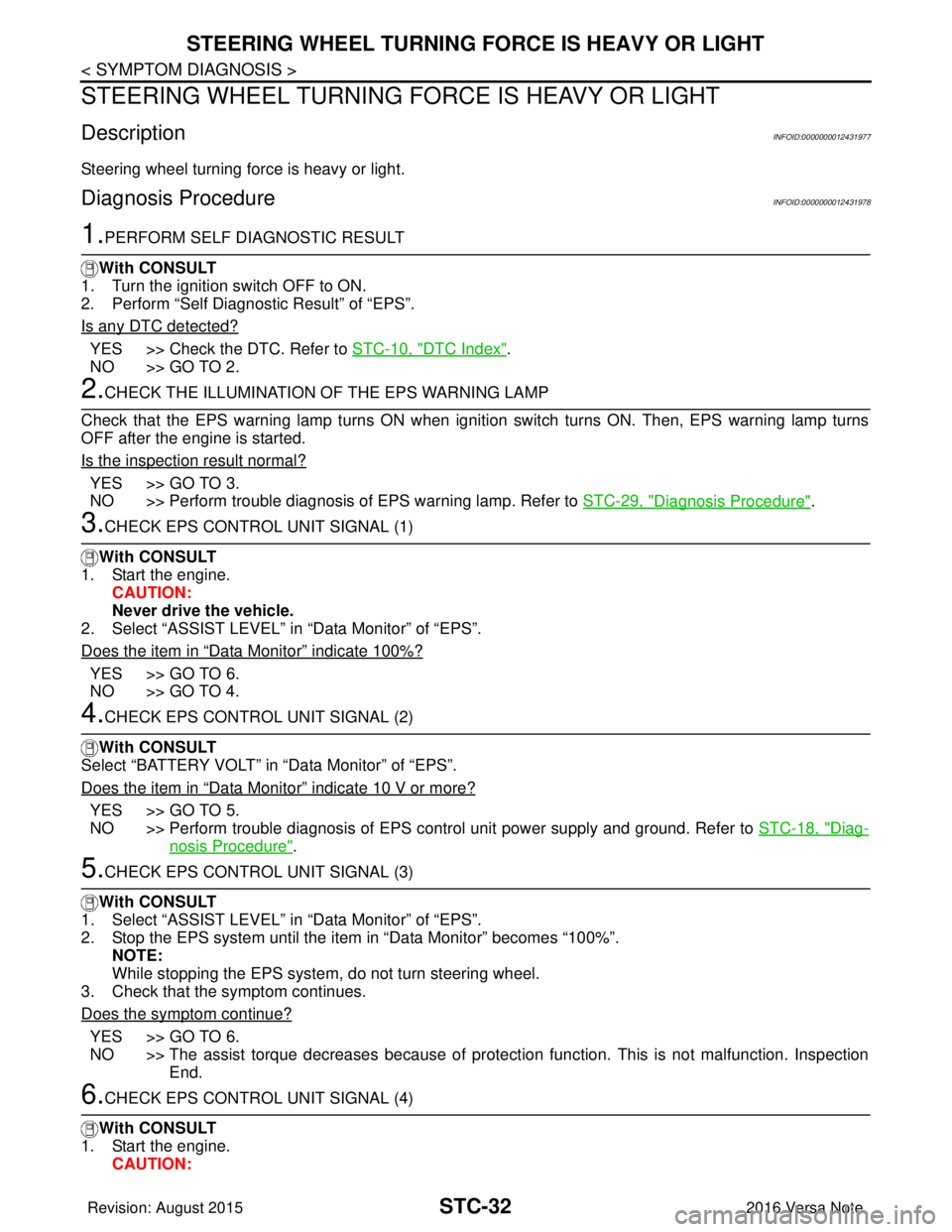
STEERING WHEEL TURNING FORCE IS HEAVY OR LIGHT
STEERING WHEEL TURNING FORCE IS HEAVY OR LIGHT
DescriptionINFOID:0000000012431977
Steering wheel turning force is heavy or light.
Diagnosis ProcedureINFOID:0000000012431978
1.PERFORM SELF DIAGNOSTIC RESULT
With CONSULT
1. Turn the ignition switch OFF to ON.
2. Perform “Self Diagnostic Result” of “EPS”.
Is any DTC detected?
YES >> Check the DTC. Refer to STC-10, "DTC Index".
NO >> GO TO 2.
2.CHECK THE ILLUMINATION OF THE EPS WARNING LAMP
Check that the EPS warning lamp turns ON when igni tion switch turns ON. Then, EPS warning lamp turns
OFF after the engine is started.
Is the inspection result normal?
YES >> GO TO 3.
NO >> Perform trouble diagnosis of EPS warning lamp. Refer to STC-29, "
Diagnosis Procedure".
3.CHECK EPS CONTROL UNIT SIGNAL (1)
With CONSULT
1. Start the engine. CAUTION:
Never drive the vehicle.
2. Select “ASSIST LEVEL” in “Data Monitor” of “EPS”.
Does the item in
“Data Monitor” indicate 100%?
YES >> GO TO 6.
NO >> GO TO 4.
4.CHECK EPS CONTROL UNIT SIGNAL (2)
With CONSULT
Select “BATTERY VOLT” in “Data Monitor” of “EPS”.
Does the item in
“Data Monitor” indicate 10 V or more?
YES >> GO TO 5.
NO >> Perform trouble diagnosis of EPS control unit power supply and ground. Refer to STC-18, "
Diag-
nosis Procedure".
5.CHECK EPS CONTROL UNIT SIGNAL (3)
With CONSULT
1. Select “ASSIST LEVEL” in “Data Monitor” of “EPS”.
2. Stop the EPS system until the item in “Data Monitor” becomes “100%”.
NOTE:
While stopping the EPS system, do not turn steering wheel.
3. Check that the symptom continues.
Does the symptom continue?
YES >> GO TO 6.
NO >> The assist torque decreases because of protection function. This is not malfunction. Inspection End.
6.CHECK EPS CONTROL UNIT SIGNAL (4)
With CONSULT
1. Start the engine. CAUTION:
Revision: August 2015 2016 Versa Note
cardiagn.com
Page 3219 of 3641
UNBALANCE STEERING WHEEL TURNING FORCE (TORQUE VARIATION)
STC-35
< SYMPTOM DIAGNOSIS >
C
D E
F
H I
J
K L
M A
B
STC
N
O P
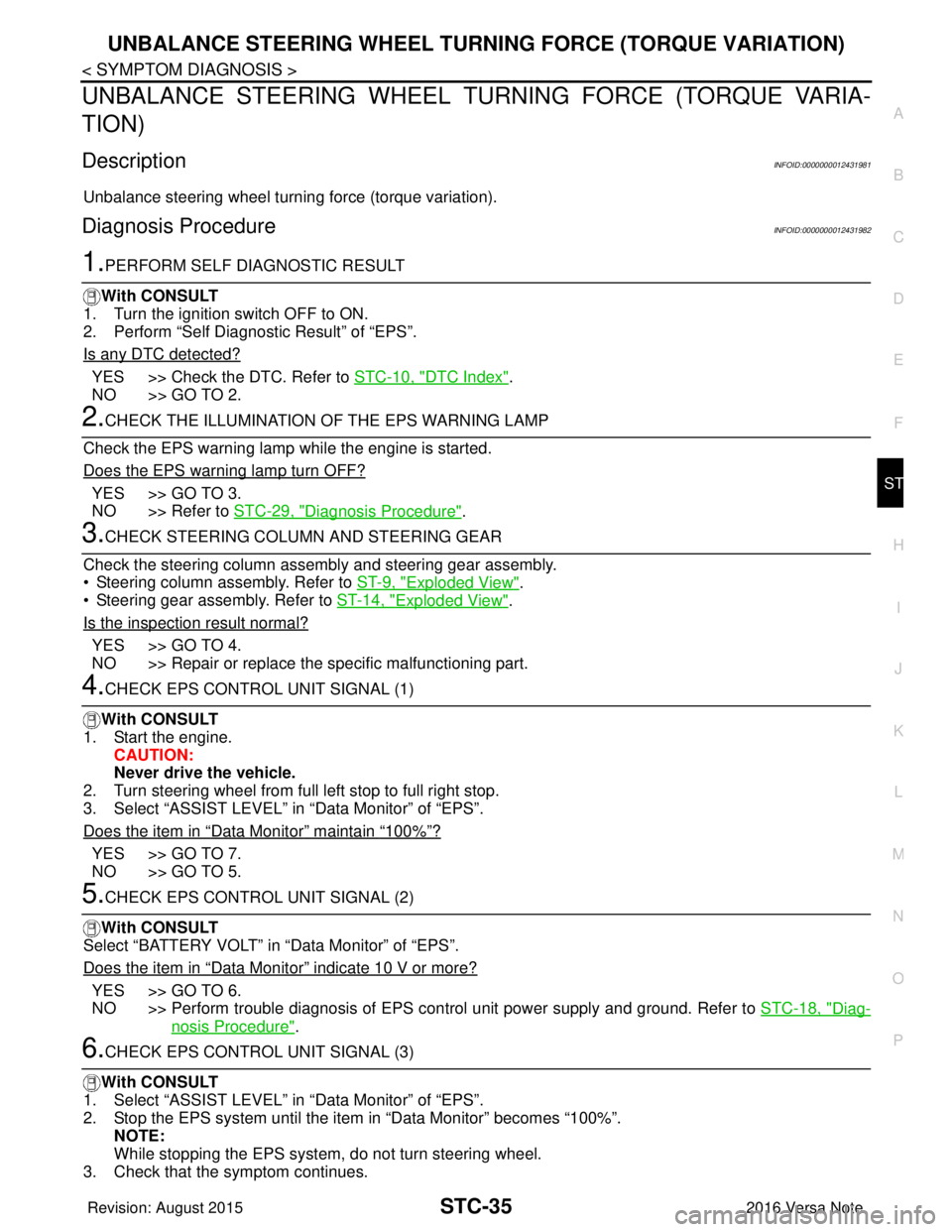
UNBALANCE STEERING WHEEL TU RNING FORCE (TORQUE VARIA-
TION)
DescriptionINFOID:0000000012431981
Unbalance steering wheel turning force (torque variation).
Diagnosis ProcedureINFOID:0000000012431982
1.PERFORM SELF DIAGNOSTIC RESULT
With CONSULT
1. Turn the ignition switch OFF to ON.
2. Perform “Self Diagnostic Result” of “EPS”.
Is any DTC detected?
YES >> Check the DTC. Refer to STC-10, "DTC Index".
NO >> GO TO 2.
2.CHECK THE ILLUMINATION OF THE EPS WARNING LAMP
Check the EPS warning lamp while the engine is started.
Does the EPS warning lamp turn OFF?
YES >> GO TO 3.
NO >> Refer to STC-29, "
Diagnosis Procedure".
3.CHECK STEERING COLU MN AND STEERING GEAR
Check the steering column assembly and steering gear assembly.
• Steering column assembly. Refer to ST-9, "
Exploded View".
• Steering gear assembly. Refer to ST-14, "
Exploded View".
Is the inspection result normal?
YES >> GO TO 4.
NO >> Repair or replace the specific malfunctioning part.
4.CHECK EPS CONTROL UNIT SIGNAL (1)
With CONSULT
1. Start the engine. CAUTION:
Never drive the vehicle.
2. Turn steering wheel from full left stop to full right stop.
3. Select “ASSIST LEVEL” in “Data Monitor” of “EPS”.
Does the item in
“Data Monitor” maintain “100%”?
YES >> GO TO 7.
NO >> GO TO 5.
5.CHECK EPS CONTROL UNIT SIGNAL (2)
With CONSULT
Select “BATTERY VOLT” in “Data Monitor” of “EPS”.
Does the item in
“Data Monitor” indicate 10 V or more?
YES >> GO TO 6.
NO >> Perform trouble diagnosis of EPS control unit power supply and ground. Refer to STC-18, "
Diag-
nosis Procedure".
6.CHECK EPS CONTROL UNIT SIGNAL (3)
With CONSULT
1. Select “ASSIST LEVEL” in “Data Monitor” of “EPS”.
2. Stop the EPS system until the item in “Data Monitor” becomes “100%”. NOTE:
While stopping the EPS system, do not turn steering wheel.
3. Check that the symptom continues.
Revision: August 2015 2016 Versa Note
cardiagn.com
Page 3221 of 3641
EPS CONTROL UNITSTC-37
< REMOVAL AND INSTALLATION >
C
DE
F
H I
J
K L
M A
B
STC
N
O P
REMOVAL AND INSTALLATION
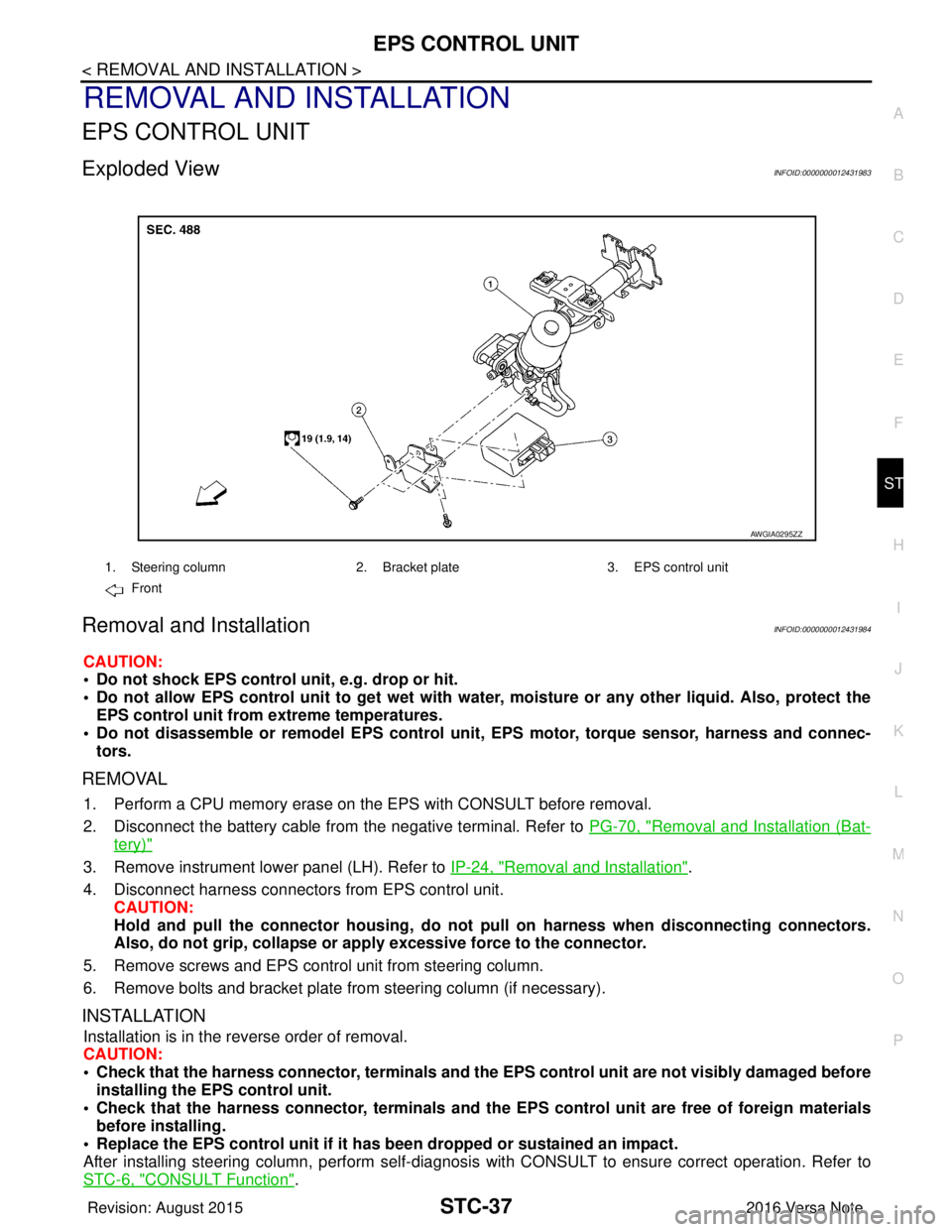
EPS CONTROL UNIT
Exploded ViewINFOID:0000000012431983
Removal and InstallationINFOID:0000000012431984
CAUTION:
• Do not shock EPS control unit, e.g. drop or hit.
• Do not allow EPS control unit to get wet with wate r, moisture or any other liquid. Also, protect the
EPS control unit from extreme temperatures.
• Do not disassemble or remodel EPS control unit, EPS motor, torque sensor, harness and connec-
tors.
REMOVAL
1. Perform a CPU memory erase on t he EPS with CONSULT before removal.
2. Disconnect the battery cable from the negative terminal. Refer to PG-70, "
Removal and Installation (Bat-
tery)"
3. Remove instrument lower panel (LH). Refer to IP-24, "Removal and Installation".
4. Disconnect harness connectors from EPS control unit. CAUTION:
Hold and pull the connector housing, do not pull on harness when disconnecting connectors.
Also, do not grip, collapse or ap ply excessive force to the connector.
5. Remove screws and EPS control unit from steering column.
6. Remove bolts and bracket plate from steering column (if necessary).
INSTALLATION
Installation is in the reverse order of removal.
CAUTION:
• Check that the harness connector, terminals and the EPS control unit are not visibly damaged before
installing the EPS control unit.
• Check that the harness connector, te rminals and the EPS control unit are free of foreign materials
before installing.
• Replace the EPS control unit if it has been dropped or sustained an impact.
After installing steering column, perform self-diagnosis with CONSULT to ensure correct operation. Refer to
STC-6, "
CONSULT Function".
1. Steering column 2. Bracket plate3. EPS control unit
Front
AWGIA0295ZZ
Revision: August 2015 2016 Versa Note
cardiagn.com
Page 3223 of 3641

ST-2
< PRECAUTION >
PRECAUTIONS
PRECAUTION
PRECAUTIONS
Precaution for Supplemental Restraint System (SRS) "AIR BAG" and "SEAT BELT
PRE-TENSIONER"
INFOID:0000000012430493
The Supplemental Restraint System such as “A IR BAG” and “SEAT BELT PRE-TENSIONER”, used along
with a front seat belt, helps to reduce the risk or severity of injury to the driver and front passenger for certain
types of collision. Information necessary to service the system safely is included in the SR and SB section of
this Service Manual.
WARNING:
• To avoid rendering the SRS inopera tive, which could increase the risk of personal injury or death in
the event of a collision which would result in air bag inflation, all maintenance must be performed by
an authorized NISSAN/INFINITI dealer.
• Improper maintenance, including in correct removal and installation of the SRS, can lead to personal
injury caused by unintent ional activation of the system. For re moval of Spiral Cable and Air Bag
Module, see the SR section.
• Do not use electrical test equipmen t on any circuit related to the SRS unless instructed to in this
Service Manual. SRS wiring harn esses can be identified by yellow and/or orange harnesses or har-
ness connectors.
PRECAUTIONS WHEN USING POWER TOOLS (AIR OR ELECTRIC) AND HAMMERS
WARNING:
• When working near the Airbag Diagnosis Sensor Unit or other Airbag System sensors with the Igni-
tion ON or engine running, DO NOT use air or electri c power tools or strike near the sensor(s) with a
hammer. Heavy vibration could activate the sensor( s) and deploy the air bag(s), possibly causing
serious injury.
• When using air or electric power tools or hammers , always switch the Ignition OFF, disconnect the
battery and wait at least three minutes before performing any service.
Service Notice or Precautions for Steering SystemINFOID:0000000012430494
• In case of removing the steering gear, make the final tightening with grounded and unloaded vehicle condi- tion, and then check wheel alignment.
• Observe the following precautions when disassembling.
- Before disassembly, thoroughly clean the outside of the unit.
- Disassembly should be done in a clean work area. It is im portant to prevent the internal parts from becoming
contaminated by dirt or other foreign matter.
- For easier and proper assembly, place disassembled parts in order on a parts rack.
- Use nylon cloth or paper towels to clean the parts; co mmon shop rags can leave lint that might interfere with
their operation.
- Do not reuse non-reusable parts.
- Before assembling, apply the specified grease to the directed parts.
FOR ELECTRIC POWER STEERING (EPS)
• During quick steering, rasping noise may be heard from around the steering wheel. This is not a malfunction.
The noise is an operating noise of the EPS system under normal conditions. If the rasping noise occurs dur-
ing slow steering, this may not be an operating noise of the system. In this case, it is necessary to find out
the location of the noise and repair, if necessary.
• Do not repeat static steering. (Mot or and EPS control unit could be heated.)
Revision: August 2015 2016 Versa Note
cardiagn.com
Page 3248 of 3641
![NISSAN NOTE 2016 Service Repair Manual PRECAUTIONSTM-7
< PRECAUTION > [5MT: RS5F91R]
C
EF
G H
I
J
K L
M A
B
TM
N
O P
PRECAUTION
PRECAUTIONS
Precaution for Supplemental Restraint System (SRS) "AIR BAG" and "SEAT BELT
PRE-TENSIONER"
INFOID](/img/5/57363/w960_57363-3247.png "NISSAN NOTE 2016 Service Repair Manual PRECAUTIONSTM-7
< PRECAUTION > [5MT: RS5F91R]
C
EF
G H
I
J
K L
M A
B
TM
N
O P
PRECAUTION
PRECAUTIONS
Precaution for Supplemental Restraint System (SRS) \"AIR BAG\" and \"SEAT BELT
PRE-TENSIONER\"
INFOID")
PRECAUTIONSTM-7
< PRECAUTION > [5MT: RS5F91R]
C
EF
G H
I
J
K L
M A
B
TM
N
O P
PRECAUTION
PRECAUTIONS
Precaution for Supplemental Restraint System (SRS) "AIR BAG" and "SEAT BELT
PRE-TENSIONER"
INFOID:0000000012430936
The Supplemental Restraint System such as “AIR BAG” and “SEAT BELT PRE-TENSIONER”, used along
with a front seat belt, helps to reduce the risk or severi ty of injury to the driver and front passenger for certain
types of collision. Information necessary to service the system safely is included in the SR and SB section of
this Service Manual.
WARNING:
• To avoid rendering the SRS inoper ative, which could increase the risk of personal injury or death in
the event of a collision which would result in air bag inflation, all maintenance must be performed by
an authorized NISSAN/INFINITI dealer.
• Improper maintenance, including in correct removal and installation of the SRS, can lead to personal
injury caused by unintentional act ivation of the system. For removal of Spiral Cable and Air Bag
Module, see the SR section.
• Do not use electrical test equipm ent on any circuit related to the SRS unless instructed to in this
Service Manual. SRS wiring harnesses can be identi fied by yellow and/or orange harnesses or har-
ness connectors.
PRECAUTIONS WHEN USING POWER TOOLS (AIR OR ELECTRIC) AND HAMMERS
WARNING:
• When working near the Airbag Diagnosis Sensor Un it or other Airbag System sensors with the Igni-
tion ON or engine running, DO NOT use air or el ectric power tools or strike near the sensor(s) with a
hammer. Heavy vibration could activate the sensor( s) and deploy the air bag(s), possibly causing
serious injury.
• When using air or electric power tools or hammers, always switch the Ignition OFF, disconnect the
battery and wait at least three mi nutes before performing any service.
General PrecautionsINFOID:0000000012430937
CAUTION:
• Do not reuse CSC (Concentric Sl ave Cylinder). CSC slides back to th e original position every time
when removing transaxle assembly. At this time, du st on the sliding parts may damage the seal of
CSC and may cause clutch fluid leakage. Refer to CL-17, "
Removal and Installation".
• Do not reuse transaxle gear oi l, once it has been drained.
• Check oil level or replace gear oil with vehicle on level surface.
• During removal or installation, keep insi de of transaxle clear of dust or dirt.
• Check for the correct installation alignment prior to removal or disassembly. If matching marks are
required, be certain they do not interfer e with the function of the parts marked.
• In principle, tighten bolts or nu ts gradually in several steps workin g diagonally from inside to out-
side. If tightening sequence is specified, use it.
• Do not damage sliding surfaces and mating surfaces.
Precaution for WorkINFOID:0000000012430938
• When removing or disassembling each component, be ca reful not to damage or deform it. If a component
may be subject to interference, be sure to protect it with a shop cloth.
• When removing (disengaging) components with a screwdriver or similar tool, be sure to wrap the component with a shop cloth or vinyl tape to protect it.
• Protect the removed parts with a shop cloth and prevent them from being dropped.
• Replace a deformed or damaged clip.
• If a part is specified as a non-reusabl e part, always replace it with a new one.
• Be sure to tighten bolts and nuts securely to the specified torque.
• After installation is complete, be sure to check that each part works properly.
• Follow the steps below to clean components:
- Water soluble dirt:
• Dip a soft cloth into lukewarm water, wring the water out of the cloth and wipe the dirty area.
• Then rub with a soft, dry cloth.
Revision: August 2015 2016 Versa Note
cardiagn.com
Page 3261 of 3641
![NISSAN NOTE 2016 Service Repair Manual TM-20
< REMOVAL AND INSTALLATION >[5MT: RS5F91R]
CONTROL LINKAGE
CONTROL LINKAGE
Exploded ViewINFOID:0000000012430954
Removal and InstallationINFOID:0000000012430955
REMOVAL
1. Move the shift selecto](/img/5/57363/w960_57363-3260.png "NISSAN NOTE 2016 Service Repair Manual TM-20
< REMOVAL AND INSTALLATION >[5MT: RS5F91R]
CONTROL LINKAGE
CONTROL LINKAGE
Exploded ViewINFOID:0000000012430954
Removal and InstallationINFOID:0000000012430955
REMOVAL
1. Move the shift selecto")
TM-20
< REMOVAL AND INSTALLATION >[5MT: RS5F91R]
CONTROL LINKAGE
CONTROL LINKAGE
Exploded ViewINFOID:0000000012430954
Removal and InstallationINFOID:0000000012430955
REMOVAL
1. Move the shift selector to the neutral position.
2. Remove the battery tray. Refer to
PG-71, "
Removal and Installation (Battery Tray)".
3. Pull out and disconnect cables from shifter lever A and selector lever, using a suitable tool.
4. While pressing the lock of the selector cable in the direction of the arrows shown, remove the selector cable from the cable
mounting bracket.
5. While pressing the lock of the shifter cable in the direction of the arrows shown, remove the shifter cable from the cable mounting
bracket.
6. Remove cable mounting bracket from clutch housing.
7. Pull the shift selector handle upward to remove.
8. Remove center console assembly. Refer to IP-18, "
Removal and
Installation".
9. Pull out and disconnect each cable from the shift selector assembly, using a suitable tool.
1. Shifter lever A 2. Selector lever 3. Selector cable
4. Shifter cable 5. Cable mounting bracket6. Tapping bolt
7. Bracket 8. Grommet9. Shift selector assembly
10. Shift selector 11. Shift selector handle
JPDIC0789GB
JPDIC0793ZZ
Revision: August 2015 2016 Versa Note
cardiagn.com
Page 3296 of 3641
![NISSAN NOTE 2016 Service Repair Manual PRECAUTIONSTM-55
< PRECAUTION > [CVT: RE0F11A]
C
EF
G H
I
J
K L
M A
B
TM
N
O P
PRECAUTION
PRECAUTIONS
Precaution for Supplemental Restraint System (SRS) "AIR BAG" and "SEAT BELT
PRE-TENSIONER"
INFOI](/img/5/57363/w960_57363-3295.png "NISSAN NOTE 2016 Service Repair Manual PRECAUTIONSTM-55
< PRECAUTION > [CVT: RE0F11A]
C
EF
G H
I
J
K L
M A
B
TM
N
O P
PRECAUTION
PRECAUTIONS
Precaution for Supplemental Restraint System (SRS) \"AIR BAG\" and \"SEAT BELT
PRE-TENSIONER\"
INFOI")
PRECAUTIONSTM-55
< PRECAUTION > [CVT: RE0F11A]
C
EF
G H
I
J
K L
M A
B
TM
N
O P
PRECAUTION
PRECAUTIONS
Precaution for Supplemental Restraint System (SRS) "AIR BAG" and "SEAT BELT
PRE-TENSIONER"
INFOID:0000000012430981
The Supplemental Restraint System such as “AIR BAG” and “SEAT BELT PRE-TENSIONER”, used along
with a front seat belt, helps to reduce the risk or severi ty of injury to the driver and front passenger for certain
types of collision. Information necessary to service the system safely is included in the SR and SB section of
this Service Manual.
WARNING:
• To avoid rendering the SRS inoper ative, which could increase the risk of personal injury or death in
the event of a collision which would result in air bag inflation, all maintenance must be performed by
an authorized NISSAN/INFINITI dealer.
• Improper maintenance, including in correct removal and installation of the SRS, can lead to personal
injury caused by unintentional act ivation of the system. For removal of Spiral Cable and Air Bag
Module, see the SR section.
• Do not use electrical test equipm ent on any circuit related to the SRS unless instructed to in this
Service Manual. SRS wiring harnesses can be identi fied by yellow and/or orange harnesses or har-
ness connectors.
PRECAUTIONS WHEN USING POWER TOOLS (AIR OR ELECTRIC) AND HAMMERS
WARNING:
• When working near the Airbag Diagnosis Sensor Un it or other Airbag System sensors with the Igni-
tion ON or engine running, DO NOT use air or el ectric power tools or strike near the sensor(s) with a
hammer. Heavy vibration could activate the sensor( s) and deploy the air bag(s), possibly causing
serious injury.
• When using air or electric power tools or hammers, always switch the Ignition OFF, disconnect the
battery and wait at least three mi nutes before performing any service.
Precaution for Procedure without Cowl Top CoverINFOID:0000000012430982
When performing the procedure after removing cowl top cover, cover
the lower end of windshield with urethane, etc to prevent damage to
windshield.
Precaution for TCM, Transaxle Asse mbly or Control Valve ReplacementINFOID:0000000012430983
CAUTION:
• To replace TCM, refer to TM-125, "
Description".
• To replace transaxle assembly or control valve, refer to TM-127, "
Description".
Precaution for G Sensor Removal/Installation or ReplacementINFOID:0000000012430984
CAUTION:
To remove/install or replace G sensor, refer to TM-130, "
Description".
PIIB3706J
Revision: August 2015 2016 Versa Note
cardiagn.com
Page 3297 of 3641
![NISSAN NOTE 2016 Service Repair Manual TM-56
< PRECAUTION >[CVT: RE0F11A]
PRECAUTIONS
General Precautions
INFOID:0000000012430985
• Turn ignition switch OFF an d disconnect the battery cable
from the negative terminal before connecting o](/img/5/57363/w960_57363-3296.png "NISSAN NOTE 2016 Service Repair Manual TM-56
< PRECAUTION >[CVT: RE0F11A]
PRECAUTIONS
General Precautions
INFOID:0000000012430985
• Turn ignition switch OFF an d disconnect the battery cable
from the negative terminal before connecting o")
TM-56
< PRECAUTION >[CVT: RE0F11A]
PRECAUTIONS
General Precautions
INFOID:0000000012430985
• Turn ignition switch OFF an d disconnect the battery cable
from the negative terminal before connecting or disconnect-
ing the CVT assembly harness connector. Because battery
voltage is applied to TCM even if ignition switch is turned
OFF.
• When connecting or disconnect ing pin connectors into or
from TCM, do not damage pin terminals (bend or break).
Check that there are not any bends or breaks on TCM pin ter-
minal, when connect ing pin connectors.
• Perform TCM input/output si gnal inspection and check
whether TCM functions normally or not before replacing TCM.
Refer to TM-99, "
Reference Value".
• Perform “DTC (Diagnostic Trouble Code) CONFIRMATION
PROCEDURE”.
If the repair is completed DTC should not be displayed in the
“DTC CONFIRMATION PROCEDURE”.
• Always use the specified brand of CVT fluid. Refer to MA-11, "
Fluids and Lubricants".
• Use lint-free paper not cloth rags during work.
• Dispose of the waste oil using the methods prescribed by law, ordinance, etc. after replacing the CVT fluid.
• Before proceeding with disassembly, thoroughly clean the outside of the transaxle. It is important to prevent the internal parts from becoming contami nated by dirt or other foreign matter.
• Disassembly should be done in a clean work area.
SEF289H
AAT470A
MEF040DA
JSBIA1315ZZ
Revision: August 2015 2016 Versa Note
cardiagn.com