service NISSAN PATHFINDER 2023 Repair Manual
[x] Cancel search | Manufacturer: NISSAN, Model Year: 2023, Model line: PATHFINDER, Model: NISSAN PATHFINDER 2023Pages: 665, PDF Size: 4.64 MB
Page 330 of 665
•When using a wheel without the
TPMS such as the spare tire, when a
spare tire is mounted or a wheel is
replaced, tire pressure will not be in-
dicated, the TPMS will not function
and the low tire pressure warning
light will flash for approximately 1
minute. The light will remain on af ter
1 minute. Have your tires replaced
and/or TPMS system reset as soon as
possible. It is recommended that you
visit a NISSAN dealer for this service.
• Replacing tires with those not origi-
nally specified by NISSAN could af-
fect the proper operation of the
TPMS.
• Do not inject any tire liquid or aerosol
tire sealant into the tires, as this may
cause a malfunction of the tire pres-
sure sensors.
CAUTION
• The TPMS may not function properly
when the wheels are equipped with
tire chains or the wheels are buried in
snow. •
Do not place metalized film or any
metal parts (antenna, etc.) on the
windows. This may cause poor re-
ception of the signals from the tire
pressure sensors, and the TPMS will
not function properly.
Some devices and transmitters may tem-
porarily interfere with the operation of the
TPMS and cause the low tire pressure
warning light to illuminate.
Some examples are:
• Facilities or electric devices using similar radio frequencies are near the vehicle.
• If a transmitter set to similar frequencies is being used in or near the vehicle.
• If a computer (or similar equipment) or a DC/AC converter is being used in or near
the vehicle.
The low tire pressure warning light may
illuminate in the following cases.
• If the vehicle is equipped with a wheel and tire without TPMS.
• If the TPMS has been replaced and the ID has not been registered. • If the wheel is not originally specified by
NISSAN.
FCC Notice:
For USA:
This device complies with Part 15 of the
FCC Rules. Operation is subject to the fol-
lowing two conditions: (1) This device
may not cause harmful interference, and
(2) this device must accept any interfer-
ence received, including interference
that may cause undesired operation.
NOTE:
Changes or modifications not ex-
pressly approved by the party respon-
sible for compliance could void the us-
er's authority to operate the
equipment.
For Canada:
This device contains licence-exempt
transmitter(s)/receiver(s) that comply
with Innovation, Science and Economic
Development Canada’s licence-exempt
RSS(s). Operation is subject to the fol-
lowing two conditions: (1) This device
may not cause interference. (2) This de-
vice must accept any interference, in-
cluding interference that may cause un-
desired operation of the device.
Starting and driving5-7
Page 333 of 665
The vehicle must be driven as appropriate
based on the conditions of the vehicle, road
and traffic.
WARNING
The following actions can increase the
chance of losing control of the vehicle if
there is a sudden loss of tire air pres-
sure. Losing control of the vehicle may
cause a collision and result in personal
injury.
• The vehicle generally moves or pulls
in the direction of the flat tire.
• Do not rapidly apply the brakes.
• Do not rapidly release the accelerator
pedal.
• Do not rapidly turn the steering
wheel.
1. Remain calm and do not overreact.
2. Maintain a firm grip on the steering wheel with both hands and try to hold a
straight course.
3. When appropriate, slowly release the ac- celerator pedal to gradually slow the
vehicle. 4. Gradually steer the vehicle to a safe lo-
cation off the road and away from traffic
if possible.
5. Lightly apply the brake pedal to gradu- ally stop the vehicle.
6. Turn on the hazard warning flashers and contact a roadside emergency service
to change the tire. For additional infor-
mation, see “Changing a flat tire” (P. 6-4).
DRINKING ALCOHOL/DRUGS AND
DRIVING
WARNING
Never drive under the influence of alco-
hol or drugs. Alcohol in the blood-
stream reduces coordination, delays
reaction time and impairs judgement.
Driving af ter drinking alcohol increases
the likelihood of being involved in an
accident injuring yourself and others.
Additionally, if you are injured in an ac-
cident, alcohol can increase the sever-
ity of the injury. NISSAN is committed to safe driving. How-
ever, you must choose not to drive under
the influence of alcohol. Every year thou-
sands of people are injured or killed in
alcohol-related collisions. Although the lo-
cal laws vary on what is considered to be
legally intoxicated, the fact is that alcohol
affects all people differently and most
people underestimate the effects of
alcohol.
Remember, drinking and driving don't mix!
That is true for drugs (over-the-counter,
prescription) and illegal drugs, too. Don't
drive if your ability to operate your vehicle is
impaired by alcohol, drugs, or some other
physical condition.
DRIVING SAFETY PRECAUTIONS
Your NISSAN is designed for both normal
and off-road use. However, avoid driving in
deep water or mud as your NISSAN is
mainly designed for leisure use, unlike a
conventional off-road vehicle.
Remember that 2-Wheel Drive (2WD) mod-
els are less capable than 4-Wheel Drive
(4WD) models for rough road driving and
extrication when stuck in deep snow or
mud, or the like.
5-10Starting and driving
Page 341 of 665
ENGINE PROTECTION MODE
The engine has an engine protection mode
to reduce the chance of damage if the
coolant temperature becomes too high
(for example, when climbing steep grades
in high temperatures with heavy loads,
such as when towing a trailer). When the
engine temperature reaches a certain
level:
• The engine coolant temperature gaugewill move toward the H position.
• Engine power may be reduced.
• The air conditioning cooling function may be automatically turned off for a short
time (the blower will continue to operate).
Engine power and, under some conditions,
vehicle speed will decrease. Vehicle speed
can be controlled with the accelerator
pedal, but the vehicle may not accelerate at
the desired speed. The transmission will
downshif t or upshif t as it reaches pre-
scribed shif t points. You can also shif t
manually.
As driving conditions change and engine
coolant temperature is reduced, vehicle
speed can be increased using the accel-
erator pedal, and the air conditioning cool-
ing function will automatically be turned
back on. The Malfunction Indicator Light (MIL) may
also come on if the engine coolant tem-
perature is not reduced or the air condi-
tioning cooling function does not turn back
on. If
only it remains on, you do not need to
have your vehicle towed, but have it in-
spected soon. It is recommended that you
visit a NISSAN dealer for this service. For
additional information, see “Malfunction In-
dicator Light (MIL)” (P. 2-20).
WARNING
Overheating can result in reduced en-
gine power and vehicle speed. The re-
duced speed may be lower than other
traffic, which could increase the chance
of a collision. Be especially careful
when driving. If the vehicle cannot
maintain a safe driving speed, pull to
the side of the road in a safe area. Allow
the engine to cool and return to normal
operation. For additional information,
see “If your vehicle overheats” (P. 6-13).
CAUTION
Running the engine with the engine oil
pressure warning light on could cause
serious damage to the engine almost
immediately. Such damage is not cov-
ered by warranty. Turn off the engine as
soon as it is safe to do so.
AUTOMATIC TRANSMISSION (A/T)
WARNING
• Do not depress the accelerator pedal
while shif ting from P (Park) or N (Neu-
tral) to R (Reverse), D (Drive), or M
(Manual) range. Always depress the
brake pedal until shif ting is com-
pleted. Failure to do so could cause
you to lose control and have an
accident.
• Cold engine idle speed is high, so use
caution when shif ting into a forward
or reverse gear before the engine has
warmed up.
• Do not downshif t abruptly on slip-
pery roads. This may cause a loss of
control.
DRIVING THE VEHICLE
5-18Starting and driving
Page 345 of 665
In the event of a malfunction of the vehi-
cle’s electronics, the transmission may lock
in the P (Park) position. Have the vehicle’s
electronics checked immediately. It is rec-
ommended that you visit a NISSAN dealer
for this service.
The P (Park) position is automatically en-
gaged if:
• You place the ignition switch in the OFFposition
• You unfasten the driver’s seat belt and open the driver side door when the ve-
hicle is stationary or driving at very low
speed and the transmission is in the D
(Drive) position, the N (Neutral) position,
the R (Reverse) position or M (Manual)
mode with your foot off the brake.
CAUTION
To avoid A/T malfunction, you must
manually place the shif t position in the
P (Park) position under the above
conditions.
R (Reverse)
CAUTION
• To prevent transmission damage,
use the R (Reverse) position only
when the vehicle is completely
stopped and the brake is pressed.
Use the R (Reverse) position to back up.
Make sure the vehicle is completely
stopped before selecting the R (Reverse)
position. The brake pedal must be de-
pressed and the shif t lever button
pressed to move the shif t lever from the
home position to R (Reverse). If the ve-
hicle is placed in R (Reverse) position
while the vehicle is moving forward, the
chime will sound and the vehicle will
switch into the N (Neutral) position.
NOTE:
If the vehicle is moving over 5 mph (8
km/h ), when shif ting to D (Drive) from R
(Reverse), the N (Neutral) position will au-
tomatically be selected. A buzzer will
sound, noting that D (Drive) was not se-
lected. When selecting D (Drive) while re-
versing below 5 mph (8 km/h), the range
will change normally.
N (Neutral)
Neither forward nor reverse gear is en-
gaged when the vehicle is completely
stopped, and the brake is pressed. The en-
gine can be started in this position. You
may shif t to the N (Neutral) position and
restart a stalled engine while the vehicle is
moving.
You can select this position by holding the
shif t lever at this position for 0.5 seconds.
D (Drive)
Use this position for all normal forward
driving when the vehicle is completely
stopped, and the brake is pressed. The A/T
changes gears automatically. All forward
gears are available. If the vehicle is placed
in the D (Drive) position while the vehicle
is reversing, the chime will sound and the
vehicle will switch into the N (Neutral)
position.
5-22Starting and driving
Page 346 of 665
NOTE:
If the vehicle is moving over 5 mph (8
km/h) when shif ting to D (Drive) from R
(Reverse), the N (Neutral) position will au-
tomatically be selected. A buzzer will
sound, noting that D (Drive) was not se-
lected. When selecting D (Drive) while re-
versing below 5 mph (8 km/h), the range
will change normally.
Neutral hold mode function (if so
equipped)
This function enables you to get out of the
vehicle when it is in the N (Neutral) position,
while the engine is running. While this func-
tion is activated, the vehicle can be moved
by pushing with hand (when car washing).
When using this function, release the elec-
tronic parking brake.
WARNING
• Use this function on a level surface
only. Failure to do so may cause the
vehicle to move accidentally and
could result in a collision or serious
personal injury.
• Do not use this function for a purpose
other than car washing. •
Do not turn the engine off af ter neu-
tral hold mode function is activated,
otherwise the N (Neutral) position
will not be kept and the vehicle will
automatically be placed in the P
(Park) position.
• If this function is not activated re-
gardless of proper operation, trans-
mission may malfunction. It is rec-
ommended that you visit a NISSAN
dealer for this service.
To activate the Neutral hold mode, perform
the following operations:
1. Push the ignition switch to start the engine.
2. Release the electronic parking brake.
3. Depress and hold the brake pedal.
4. Push the P (Park) button.
5. Slide the shif t lever to the N (Neutral) position, and hold it for 0.5 second until
“N” appears in the vehicle information
display. 6. Slide the shif t lever to the N (Neutral)
position again, and hold it for 0.5 sec-
onds, until a message “Neutral Hold
Mode has been activated” appears in
the vehicle information display. For addi-
tional information, see “Neutral Hold
Mode activated” (P. 2-41) or (P. 2-68).
7. The ignition switch has to be kept in the ON position. Otherwise Neutral hold
mode is canceled and the P (Park) posi-
tion is engaged automatically.
To exit the Neutral hold mode, place the
shif t lever in any position other than the N
(Neutral) position.
NOTE:
• It is necessary to perform the steps 4
through 6 within approximately 5 sec-
onds to prevent incorrect operation.
• When the shif ter is changed to the N
(Neutral) position, approximately 5
seconds later, a message will appear in
the vehicle information display. For ad-
ditional information, see “Neutral Hold
Mode guidance” (P. 2-41) or (P. 2-68).
Starting and driving5-23
Page 348 of 665
4M (4th), 3M (3rd) and 2M (2nd)
Use these positions for hill climbing or en-
gine braking on downhill grades.
1M (1st)
Use this position when climbing steep hills
slowly or driving slowly through deep snow,
or for maximum engine braking on steep
downhill grades.
• Remember not to drive at high speeds forextended periods of time in lower than
the 8th range. This reduces fuel economy.
• Pulling the same paddle shif ter twice will shif t the ranges in succession. However, if
this motion is rapidly done, the second
shif ting may not be completed properly.
• In the manual shif t mode, the trans-
mission may not shif t to the selected
gear. This helps maintain driving per-
formance and reduces the chance of
vehicle damage or loss of control.
• In the manual shif t mode, the trans-
mission may shif t up automatically to a
higher range than selected if the en-
gine speed is too high. When the ve-
hicle speed decreases, the transmis-
sion automatically shif ts down and
shif ts to 1st gear before the vehicle
comes to a stop.
Accelerator downshif t
— in D (Drive) position —
For passing or hill climbing, depress the
accelerator pedal to the floor. This shif ts
the transmission down into a lower gear,
depending on the vehicle speed.
High fluid temperature protection
mode
This transmission has a high fluid tem-
perature protection mode. If the fluid tem-
perature becomes too high (for example,
when climbing steep grades in high tem-
peratures with heavy loads, such as when
towing a trailer), engine power and, under
some conditions, vehicle speed will be de-
creased automatically to reduce the
chance of transmission damage. Vehicle
speed can be controlled with the accelera-
tor pedal, but the engine and vehicle speed
may be limited.
Fail-safe
When the fail-safe operation occurs, please
note that the transmission will be locked in
any of the forward gears according to the
condition.
If the vehicle is driven under extreme
conditions, such as excessive wheel
spinning and subsequent hard braking,
the fail-safe system may be activated.
The Malfunction Indicator Light (MIL)
may come on to indicate the fail-safe
mode is activated. For additional infor-
mation, see “Malfunction Indicator Light
(MIL)” (P. 2-20). This will occur even if all
electrical circuits are functioning prop-
erly. In this case, place the ignition switch
in the OFF position and wait for 10 sec-
onds. Then push the switch back to the
ON position. The vehicle should return to
its normal operating condition. If it does
not return to its normal operating condi-
tion, have the transmission checked and
repaired, if necessary. It is recommended
that you visit a NISSAN dealer for this
service.
Starting and driving5-25
Page 352 of 665
•If any of the following conditions oc-
cur, the automatic brake hold func-
tion may not function. Have the sys-
tem checked promptly. It is
recommended that you visit a
NISSAN dealer for this service. Failure
to operate the vehicle in accordance
with these conditions could cause
the vehicle to move or roll away un-
expectedly and result in serious per-
sonal injury or property damage.
– A warning message appears in the
vehicle information display.
– The indicator light on the auto-
matic brake hold switch does not
illuminate when the switch is
pushed.
• The automatic brake hold function
will not be activated if the Slip indica-
tor light, electronic parking brake
warning light or master warning light
illuminate and the chassis control
system fault message appears in the
vehicle information display. •
Automatic brake hold function is op-
erated by applying sufficient braking
force to hold the vehicle in its place,
so there are cases when this hold
function is maintained even if the ac-
celerator pedal is depressed. In this
situation, it is advised to depress the
brake pedal first, then to turn off au-
tomatic brake hold switch. This will
cancel the hold function.
• To maintain the braking force to keep
the vehicle to a standstill, a noise
may be heard. This is not a
malfunction.
HOW TO ACTIVATE/DEACTIVATE
THE AUTOMATIC BRAKE HOLD
FUNCTION
How to activate the automatic
brake hold function
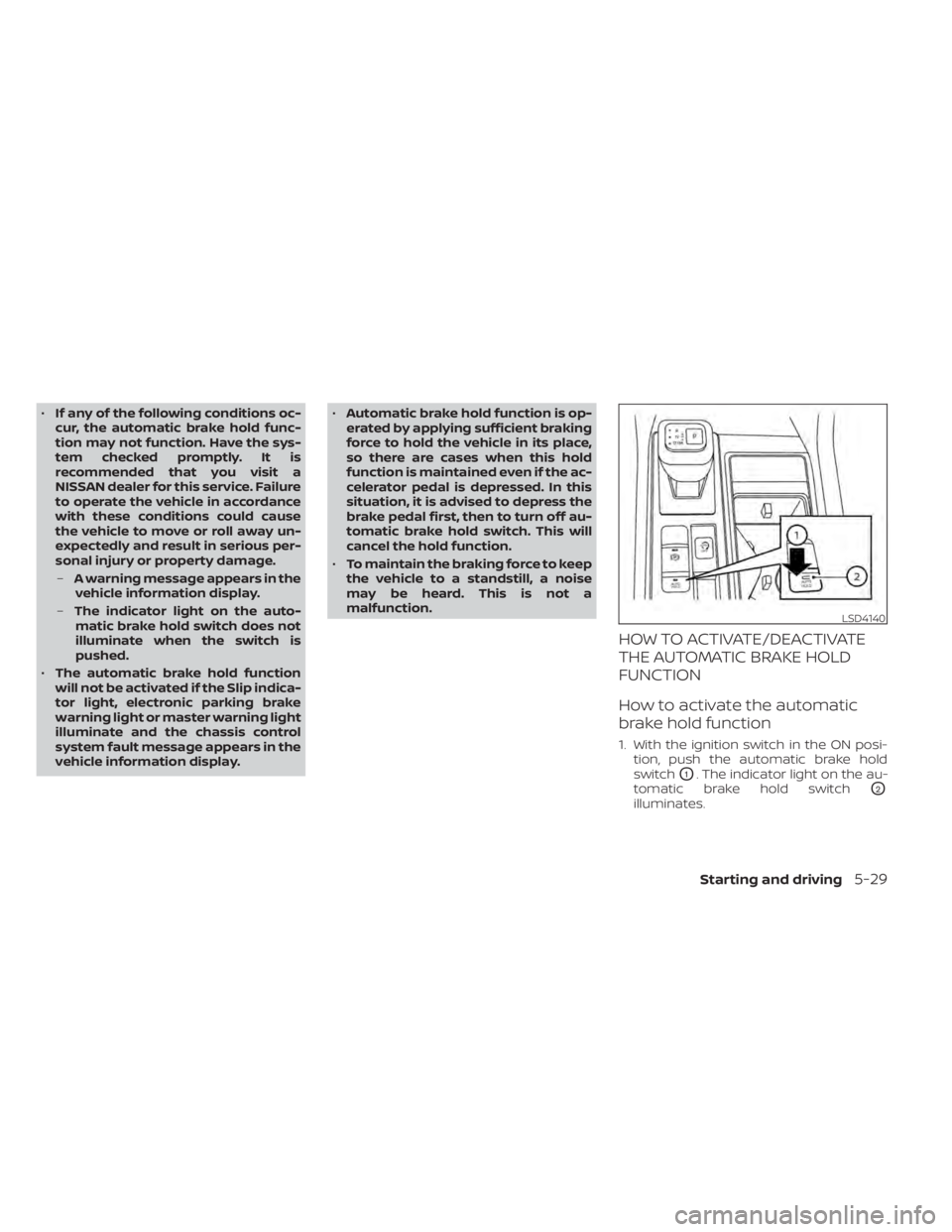
1. With the ignition switch in the ON posi- tion, push the automatic brake hold
switch
O1. The indicator light on the au-
tomatic brake hold switch
O2
illuminates.
LSD4140
Starting and driving5-29
Page 355 of 665
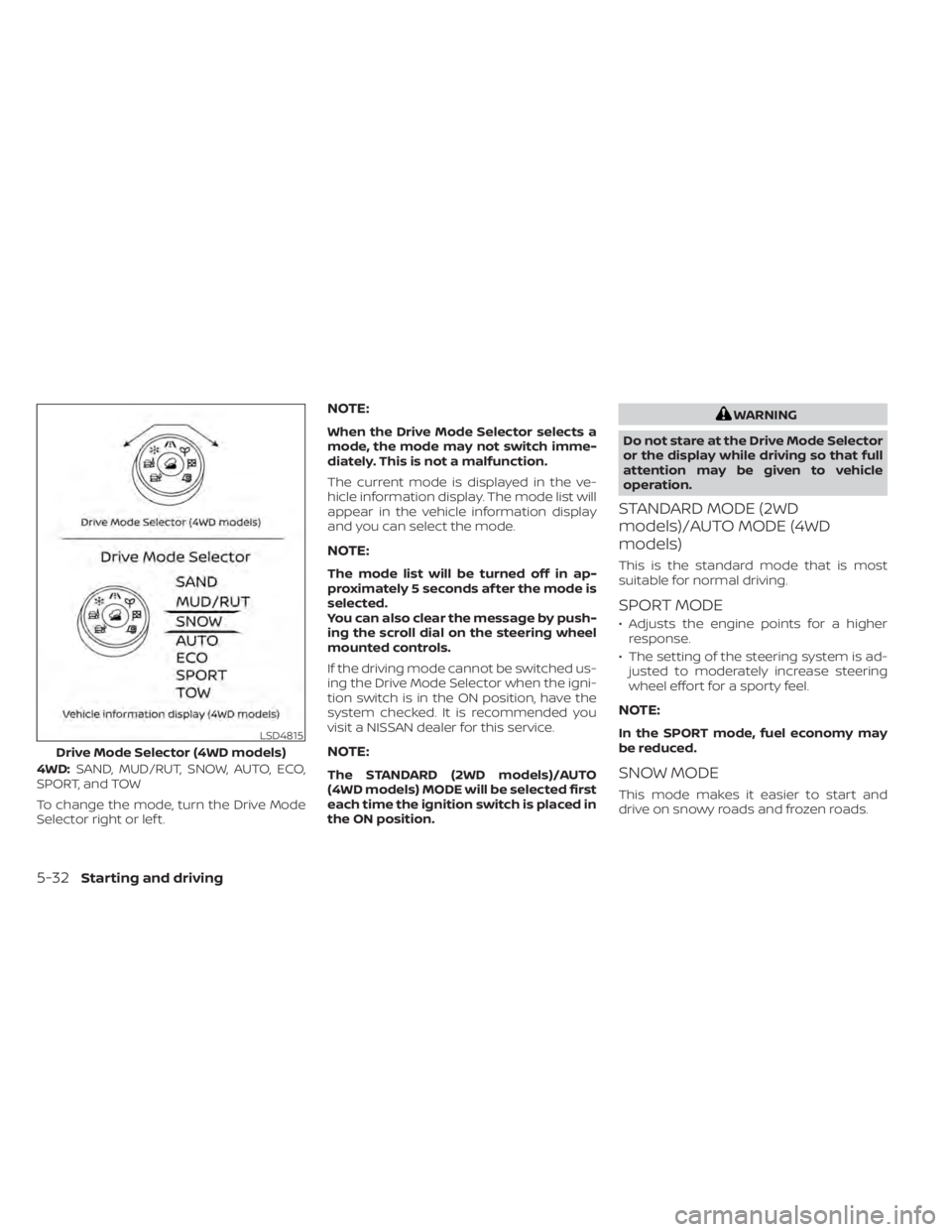
4WD:SAND, MUD/RUT, SNOW, AUTO, ECO,
SPORT, and TOW
To change the mode, turn the Drive Mode
Selector right or lef t.
NOTE:
When the Drive Mode Selector selects a
mode, the mode may not switch imme-
diately. This is not a malfunction.
The current mode is displayed in the ve-
hicle information display. The mode list will
appear in the vehicle information display
and you can select the mode.
NOTE:
The mode list will be turned off in ap-
proximately 5 seconds af ter the mode is
selected.
You can also clear the message by push-
ing the scroll dial on the steering wheel
mounted controls.
If the driving mode cannot be switched us-
ing the Drive Mode Selector when the igni-
tion switch is in the ON position, have the
system checked. It is recommended you
visit a NISSAN dealer for this service.
NOTE:
The STANDARD (2WD models)/AUTO
(4WD models) MODE will be selected first
each time the ignition switch is placed in
the ON position.
WARNING
Do not stare at the Drive Mode Selector
or the display while driving so that full
attention may be given to vehicle
operation.
STANDARD MODE (2WD
models)/AUTO MODE (4WD
models)
This is the standard mode that is most
suitable for normal driving.
SPORT MODE
• Adjusts the engine points for a higher response.
• The setting of the steering system is ad- justed to moderately increase steering
wheel effort for a sporty feel.
NOTE:
In the SPORT mode, fuel economy may
be reduced.
SNOW MODE
This mode makes it easier to start and
drive on snowy roads and frozen roads.
LSD4815
Drive Mode Selector (4WD models)
5-32Starting and driving
Page 360 of 665
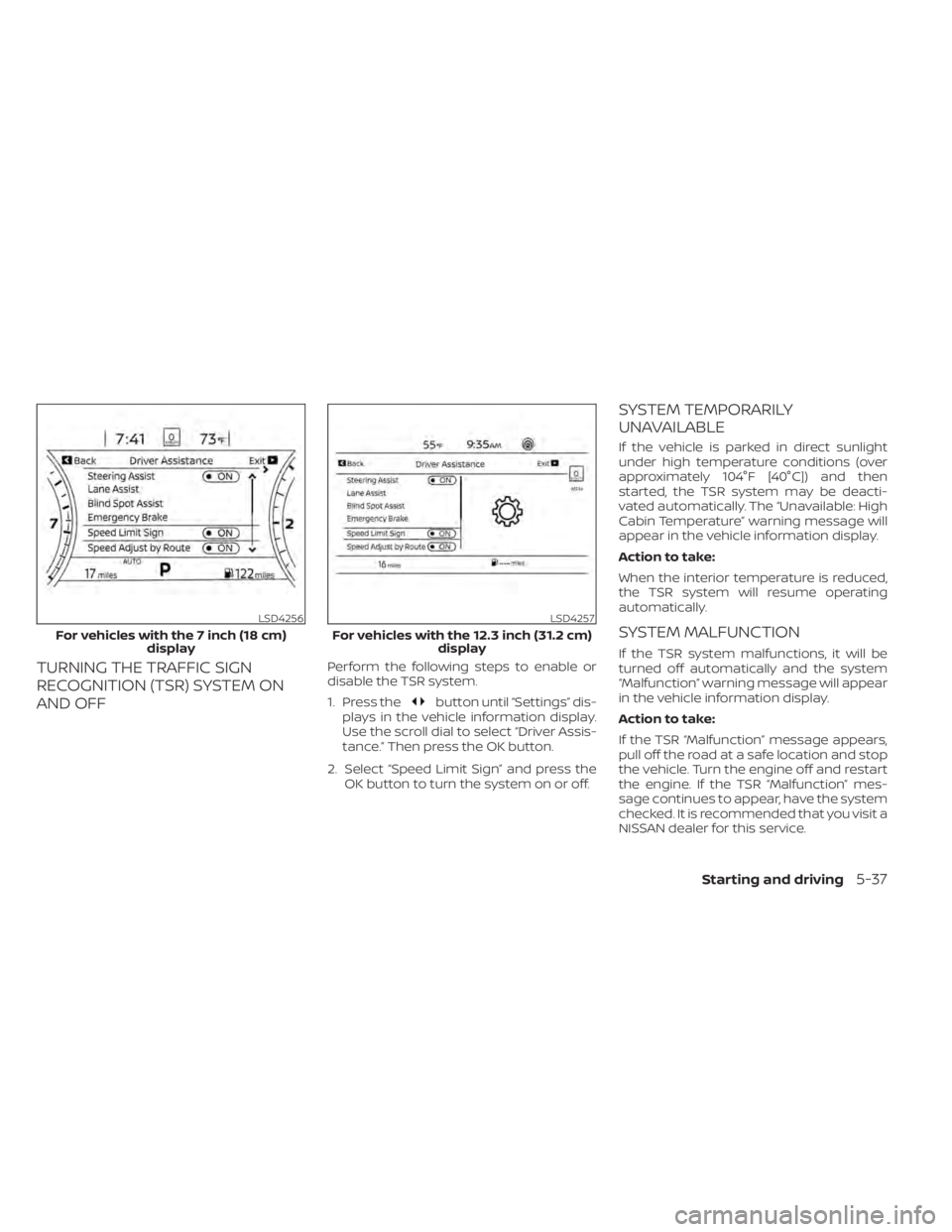
TURNING THE TRAFFIC SIGN
RECOGNITION (TSR) SYSTEM ON
AND OFFPerform the following steps to enable or
disable the TSR system.
1. Press the
button until “Settings” dis-
plays in the vehicle information display.
Use the scroll dial to select “Driver Assis-
tance.” Then press the OK button.
2. Select “Speed Limit Sign” and press the OK button to turn the system on or off.
SYSTEM TEMPORARILY
UNAVAILABLE
If the vehicle is parked in direct sunlight
under high temperature conditions (over
approximately 104°F [40°C]) and then
started, the TSR system may be deacti-
vated automatically. The “Unavailable: High
Cabin Temperature” warning message will
appear in the vehicle information display.
Action to take:
When the interior temperature is reduced,
the TSR system will resume operating
automatically.
SYSTEM MALFUNCTION
If the TSR system malfunctions, it will be
turned off automatically and the system
“Malfunction” warning message will appear
in the vehicle information display.
Action to take:
If the TSR “Malfunction” message appears,
pull off the road at a safe location and stop
the vehicle. Turn the engine off and restart
the engine. If the TSR “Malfunction” mes-
sage continues to appear, have the system
checked. It is recommended that you visit a
NISSAN dealer for this service.
LSD4256
For vehicles with the 7 inch (18 cm) display
LSD4257
For vehicles with the 12.3 inch (31.2 cm) display
Starting and driving5-37
Page 367 of 665
Af ter the above conditions have finished
and the necessary operating conditions
are satisfied, the LDW functions will resume.
SYSTEM MALFUNCTION
If the LDW system malfunctions, it will can-
cel automatically and “Not Available Sys-
tem Malfunction” will appear in the vehicle
information display. If “Not Available Sys-
tem Malfunction” appears in the vehicle in-
formation display, pull off the road to a safe
location and stop the vehicle. Place the
shif t position in the P (Park) position and
the ignition switch in the OFF position and
restart the engine/motor. If “Not Available
System Malfunction” continues to appear
in the vehicle information display, have the
system checked. It is recommended that
you visit a NISSAN dealer for this service.
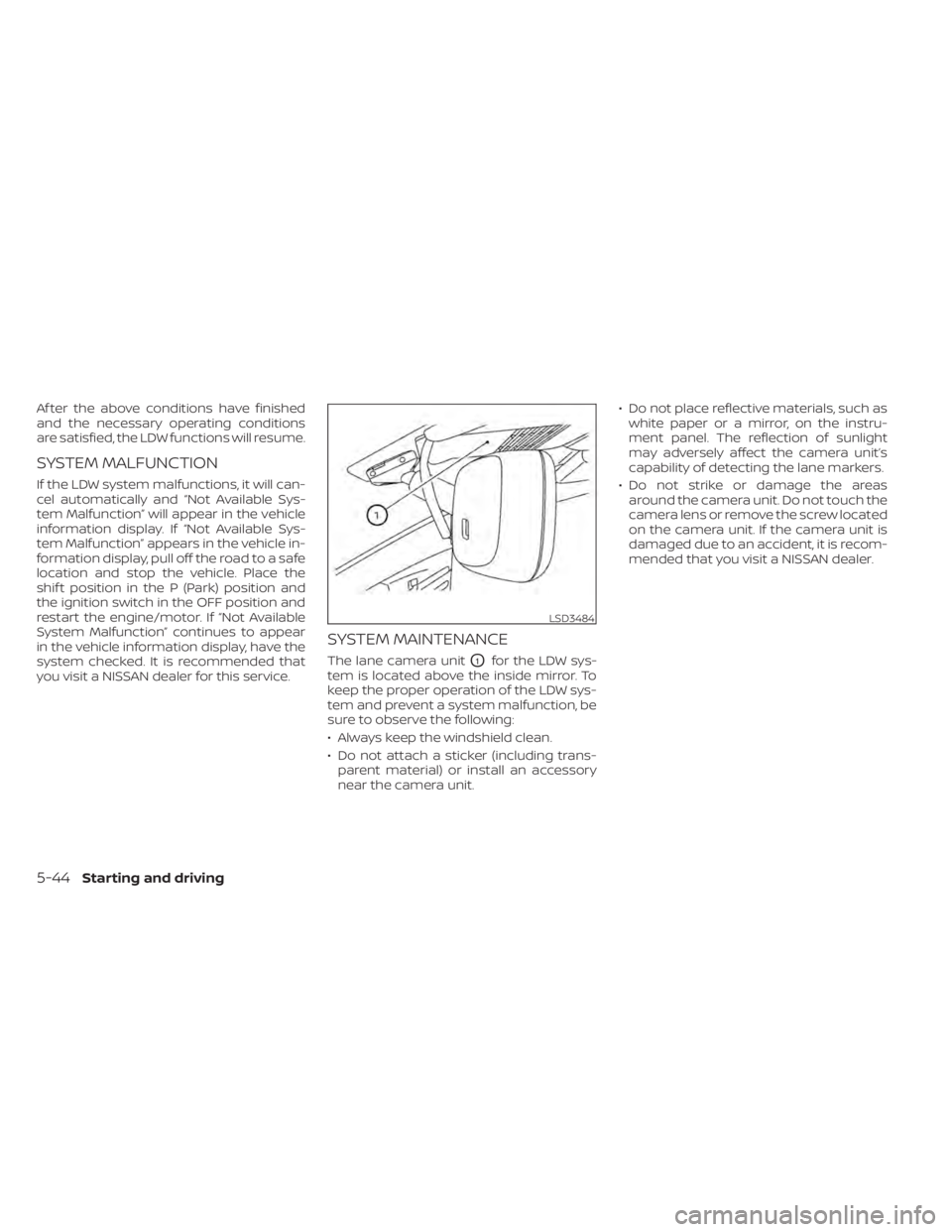
SYSTEM MAINTENANCE
The lane camera unitO1for the LDW sys-
tem is located above the inside mirror. To
keep the proper operation of the LDW sys-
tem and prevent a system malfunction, be
sure to observe the following:
• Always keep the windshield clean.
• Do not attach a sticker (including trans- parent material) or install an accessory
near the camera unit. • Do not place reflective materials, such as
white paper or a mirror, on the instru-
ment panel. The reflection of sunlight
may adversely affect the camera unit’s
capability of detecting the lane markers.
• Do not strike or damage the areas around the camera unit. Do not touch the
camera lens or remove the screw located
on the camera unit. If the camera unit is
damaged due to an accident, it is recom-
mended that you visit a NISSAN dealer.
LSD3484
5-44Starting and driving