wiring NISSAN PULSAR 1987 Repair Manual
[x] Cancel search | Manufacturer: NISSAN, Model Year: 1987, Model line: PULSAR, Model: NISSAN PULSAR 1987Pages: 238, PDF Size: 28.91 MB
Page 201 of 238

Electrical System 201
nosed pliers. This will safeguard the diodes
by transferring any excess heat to the jaws of
the pliers.
Using a suitable drift, install the bearing into
the drive end bracket, install the retainer plate and
screws. Tighten the screws securely. Using a suitable press and press plates, install
the bearing to the slip ring end of the rotor shaft.
Ensure that pressure is ex erted only on the inner race
and that the stop ring groove is nearest to the sl i p
rings. Ensure that the rotor sh aft rear bearing stop
ring is positioned so that the protruding part of the
ring is located in the deepest part of the groove. Install the stator, diode pack and
regulator
assembly to the slip ring e nd bracket. Install the
retaining nuts and washers and tighten securely. Install the nut and insulator to the terminal
and tighten securely. Using a piece of wire, hold the brushes in a
retracted position. Hold the drive end bracket in a soft jawed
vice and install the rotor shaft assembly to the drive
end bracket. Install the pulley, retaining nut and washer to
the rotor shaft and tighten the retaining nut to the
specified torque. Apply a heated 200 watt soldering iron to the
slip ring end bracket at the bearing mounting boss for
3-4 minutes to heat the bracket and allow the
installation of the rotor shaft rear bearing. Aligning the marks made on dismantling and
ensuring that the rotor sh aft rear bearing retaining
ring protrusion is located in the deepest part of its
groove, install the rotor/stator assembly to the slip ring
end bracket.
Remove the brush retr acting wire from the
alternator, ensure that the alternator component
marks are aligned, install the retaining through bolts
and tighten them securely. Check the alternator rotor for smooth oper-
ation and install the al ternator to the vehicle
as
previously described.
Check the alternator operation on the vehicle
as previously described.
8. STARTER MOTOR
Special Equipment Required:
To Renew Brushes — Soldering iron
To Renew Armature Bearings — Bearing puller
DESCRIPTION
Two types of starter motors are installed to the
range of vehicles covere d by this manual, either
Hitachi or Bosch.
The starter motor is the induced pole type with
four brushes and four pole shoes with field coils.
A solenoid switch is attached to the starter drive
end bracket. The solenoid plunger is connected to
the overrunning clutch and drive pinion assembly
through a lever and pivot arrangement.
When the solenoid windings are energized, the
plunger acting on the lever and pivot engages the drive
pinion with the flywheel ri ng gear and at the same
time closes the switch supplying power from the
positive lead of the battery to the starter motor field
coils and armature to operate the motor.
As the engine fires, the over-running clutch of the
drive pinion assembly prevents high speed rotation of.
and possible damage to, the starter armature if the
solenoid windings are not immediately de-energized
by releasing the ignition key.
The starter solenoid switch windings are energized
by the ignition switch.
TO TEST ON VEHICLE
Should the starter motor fail to operate when the
ignition switch is turned to the Start position, check
the following points:
Check the battery condition and state of
charge. Refer to the Battery heading for the correct
procedure.
Clean the battery terminals, taking particular
care to remove the scale from the positive ( + )
terminal post and terminal. Check the earth connection for tightness and
cleanliness.
Switch on the headlamps and turn the igni-
tion switch to Start. If the lamps dim but the starter
motor does not operate, it could indicate that a short
circuit has developed in the starting system. Check that the engine is not seized or that the
starter motor drive pinion and ring gear are not
locked as these conditions would -give the same
indications as above.
(5) If the lamps do not dim and the starter
motor does not operate, this would indicate an open
circuit such as a broken or disconnected wire or a
switch not operating.
If the vehicle is equipped with an automatic
transaxle, turn the ignition switch to Start and move
the selector lever through all the gear selection range.
If the starter motor operates in any position other
than N or P, the neutral safety switch is faulty.
(6) Check all the external wiring to ensure that
the fault is not external. If the external circuit proves
satisfactory, indicating that the problem is in the
starter motor, the unit will have to be removed and
tested.
TO REMOVE AND INSTAL
Disconnect the negative battery terminal.
Disconnect the wiring from the starter motor
solenoid. Remove the starter motor mounting bolts,
Page 205 of 238

Electrical System 205
Dismantled view of the brush holder assembly. Bosch
starter motor.
side and the other lead to the negative side. If there is
any indication of leakage the ohmmeter will show a
reading other than infinity. Repair or renew the brush
holder if leakage is evident.
(2) Check the brushes for adequate length.
Brushes should be renewed when their length is below
Specifications. They should be a free sliding fit in the
brush holders.
NOTE: Due to the difficulty involved in
removing and installing the brushes in the
Bosch starter motor, it is recommended that
the brush holder be renewed as an assembly.
(3) Check that the commutator is free from
pitting and burning. Clean with a petrol moistened
cloth and polish with a strip of fine glass paper.
A badly worn commutator may be repaired by
mounting in a lathe, spi nning at high speed, and
taking a light cut with a very sharp tool. After turning,
undercut the insulation between the segments.
(4) Check the armature for short circuit using an
ohmmeter.
Place one of the test lead s on the armature shaft
or core and move the other lead around the circum-
ference of the commutator. If the ohmmeter shows a
reading at any point the armature is faulty and should
be renewed.
Check the drive assembly clutch pinion teeth
for wear, scoring or chipping. A clutch in good
condition should take up the drive in one direction
only. It should rotate easily and smoothly in the
non-drive direction and the assembly should move
smoothly along the armature or drive shaft helical
splines.
Check the armature shaft bushes for wear
and renew as necessary. The old bushes must be
removed and the new ones pressed into the end
brackets using a polished mandrel of the exact diam-
eter of the armature shaft. NOTE: The new bushes must not be reamed
to size, as reaming will impair the porosity
of the bushes and cause early failure. New
bushes should be allowed to stand immersed
in clean light engine oil for one hour before
installation.
To Assemble
Assembly is a reversal of the dismantling proce-
dure with attention to the following points:
Lubricate the helix of the drive shaft lightly
with graphite grease and install the drive assembly
to
the drive shaft. Install the stop collar and snap ring, slide the
stop collar over the snap ring to lock the snap ring in
position.
Lubricate the bushes in both end brackets
sparingly with engine oil. Install the engaging lever and gear set into the
drive end bracket. Install the centre rear bracket and the engag-
ing lever seal into the drive end bracket.
Slide the brush holder assembly into position
on the commutator ensuring that the brush holders
are correctly positioned in the anchor points. Install the commutator end bracket to
the
armature, install the shims and C clip. Check that the armature end float is satisfac-
tory and adjust as necessary using shims of the correct
thickness.
Align the slot in the commutator end bracket
with the cut out on the wiring seal and install the
armature end cover to the commutator end bracket.
Install the cover retaini ng screws but do not tighten.
Ensure that the permanent magnets in the
yoke have not picked up any debris and slide the yoke
over the armature ensuring that the wiring seal locates
correctly in the slot in the yoke.
View showing the planetary gear set. Bosch starter
motor.
Page 206 of 238
206 Electrical System
Install the armature and yoke to the drive end
bracket rotating the drive to align the reduction gears.
Do not use force.
Install the retaining through bolts to the
commutator end bracket and lighten the through bolts
and armature end cover retaining screws securely. Install the solenoid to the drive end bracket,
install the retaining screws and tighten them securely.
Install the brush connector strap and
install
the retaining nut and washer and tighten securely.
9 . IGNITION SYSTEM
The testing and repair procedures for the ignition
system are fully covered in the Fuel and Engine
Management section.
10. STEERING WHEEL
The removal and installation procedures for the
steering wheel and horn pad are fully covered in the
Steering section.
11. SWITCHES AND CONTROLS
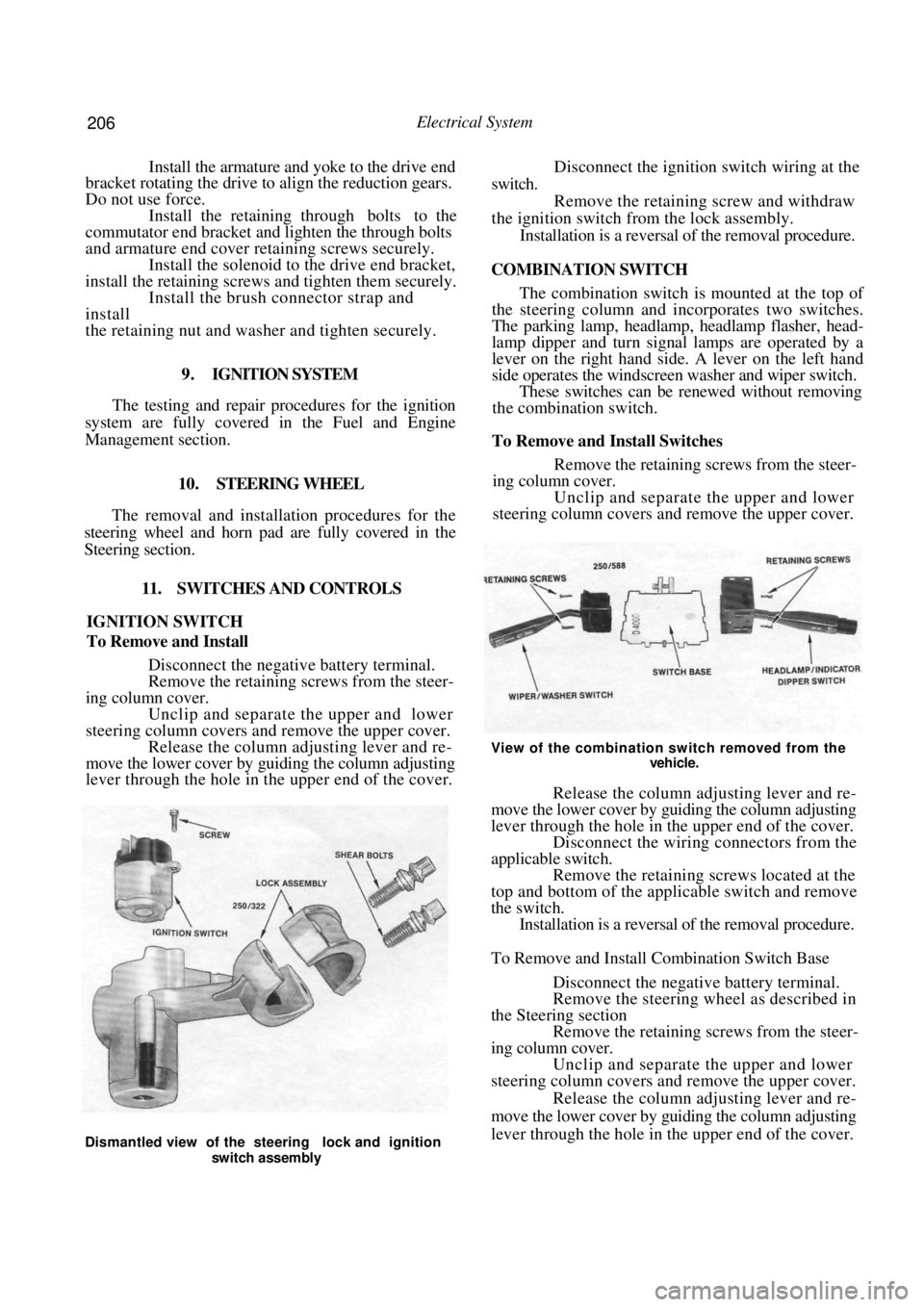
IGNITION SWITCH
To Remove and Install
Disconnect the negative battery terminal.
Remove the retaining screws from the steer-
ing column cover. Unclip and separate the upper and lower
steering column covers and remove the upper cover. Release the column adjusting lever and re-
move the lower cover by guiding the column adjusting
lever through the hole in the upper end of the cover.
Disconnect the ignition switch wiring at the
switch. Remove the retaining screw and withdraw
the ignition switch fr om the lock assembly.
Installation is a reversal of the removal procedure.
COMBINATION SWITCH
The combination switch is mounted at the top of
the steering column and incorporates two switches.
The parking lamp, headlamp, headlamp flasher, head-
lamp dipper and turn signal lamps are operated by a
lever on the right hand side. A lever on the left hand
side operates the windscreen washer and wiper switch.
These switches can be re newed without removing
the combination switch.
To Remove and Install Switches
Remove the retaining screws from the steer-
ing column cover.
Unclip and separate the upper and lower
steering column covers and remove the upper cover.
View of the combination switch removed from the
vehicle.
Release the column adjusting lever and re-
move the lower cover by guiding the column adjusting
lever through the hole in the upper end of the cover. Disconnect the wiring connectors from the
applicable switch. Remove the retaining screws located at the
top and bottom of the applicable switch and remove
the switch. Installation is a reversal of the removal procedure.
To Remove and Install Combination Switch Base
Disconnect the negative battery terminal.
Remove the steering wheel as described in
the Steering section Remove the retaining screws from the steer-
ing column cover. Unclip and separate the upper and lower
steering column covers and remove the upper cover.
Release the column adjusting lever and re-
move the lower cover by guiding the column adjusting
lever through the hole in the upper end of the cover.
Dismantled view of the steering lock and ignition
switch assembly
Page 207 of 238
Electrical System 207
Disconnect the wiring connectors from the
rear of the combination switch.
Loosen the clamping screw located at the left
hand side of the combination switch. Push, turn and slide the combination switch
from the steering column. Installation is a reversal of the removal procedure.
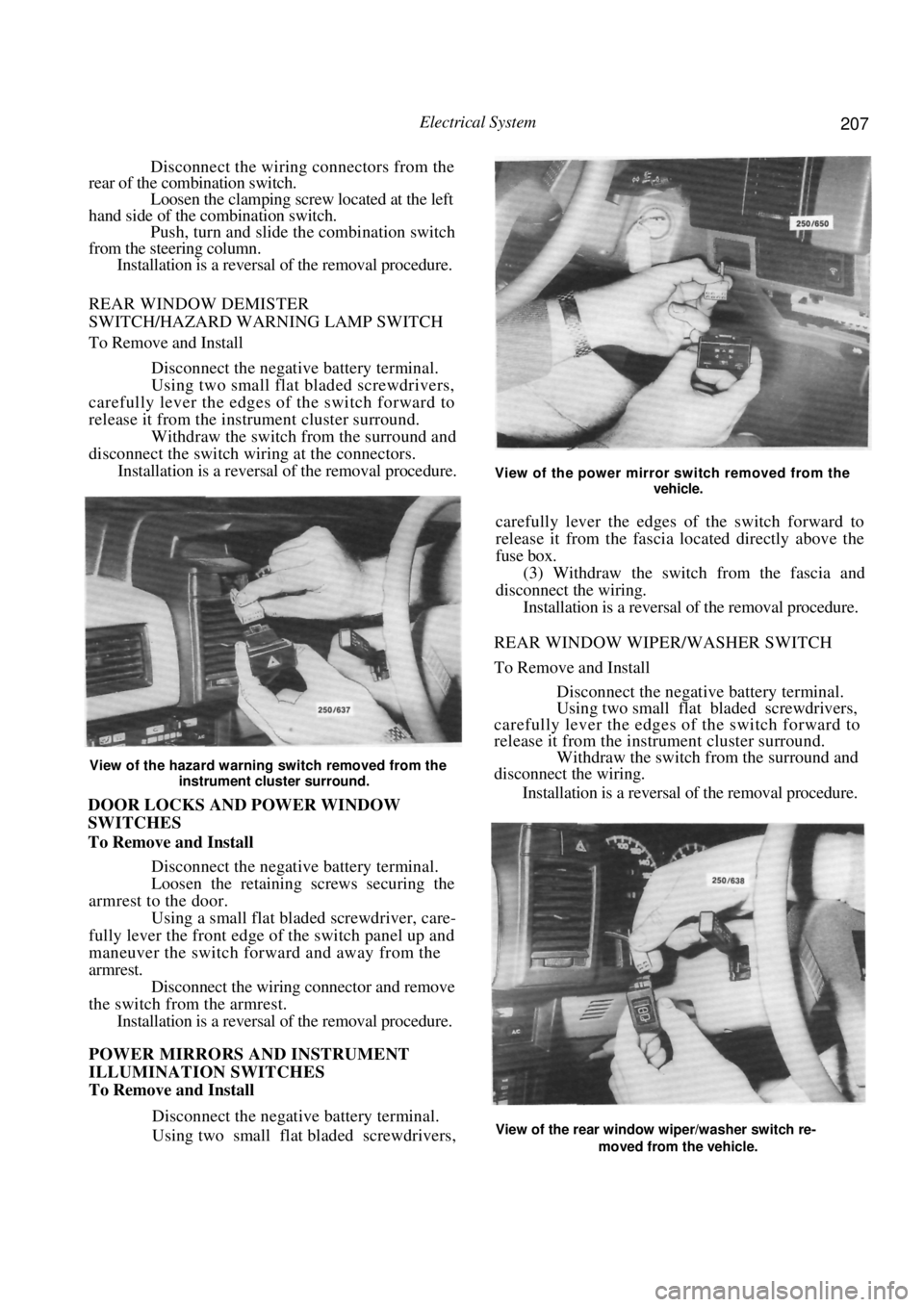
REAR WINDOW DEMISTER
SWITCH/HAZARD WARNING LAMP SWITCH
To Remove and Install
Disconnect the negative battery terminal.
Using two small flat bladed screwdrivers,
carefully lever the edges of the switch forward to
release it from the instrument cluster surround.
Withdraw the switch from the surround and
disconnect the switch wiri ng at the connectors.
Installation is a reversal of the removal procedure.
View of the hazard warning switch removed from the
instrument cluster surround.
DOOR LOCKS AND POWER WINDOW
SWITCHES
To Remove and Install
Disconnect the negative battery terminal.
Loosen the retaining screws securing the
armrest to the door. Using a small flat bladed screwdriver, care-
fully lever the front edge of the switch panel up and
maneuver the switch forward and away from the
armrest. Disconnect the wiring connector and remove
the switch from the armrest. Installation is a reversal of the removal procedure.
POWER MIRRORS AND INSTRUMENT
ILLUMINATION SWITCHES
To Remove and Install
Disconnect the negative battery terminal.
Using two small flat bladed screwdrivers,
View of the power mirror switch removed from the
vehicle.
carefully lever the edges of the switch forward to
release it from the fascia lo cated directly above the
fuse box.
(3) Withdraw the switch from the fascia and
disconnect the wiring.
Installation is a reversal of the removal procedure.
REAR WINDOW WIPER/WASHER SWITCH
To Remove and Install
Disconnect the negative battery terminal.
Using two small flat bladed screwdrivers,
carefully lever the edges of the switch forward to
release it from the instrument cluster surround. Withdraw the switch from the surround and
disconnect the wiring.
Installation is a reversal of the removal procedure.
View of the rear window wiper/washer switch re-
moved from the vehicle.
Page 208 of 238
208 Electrical System
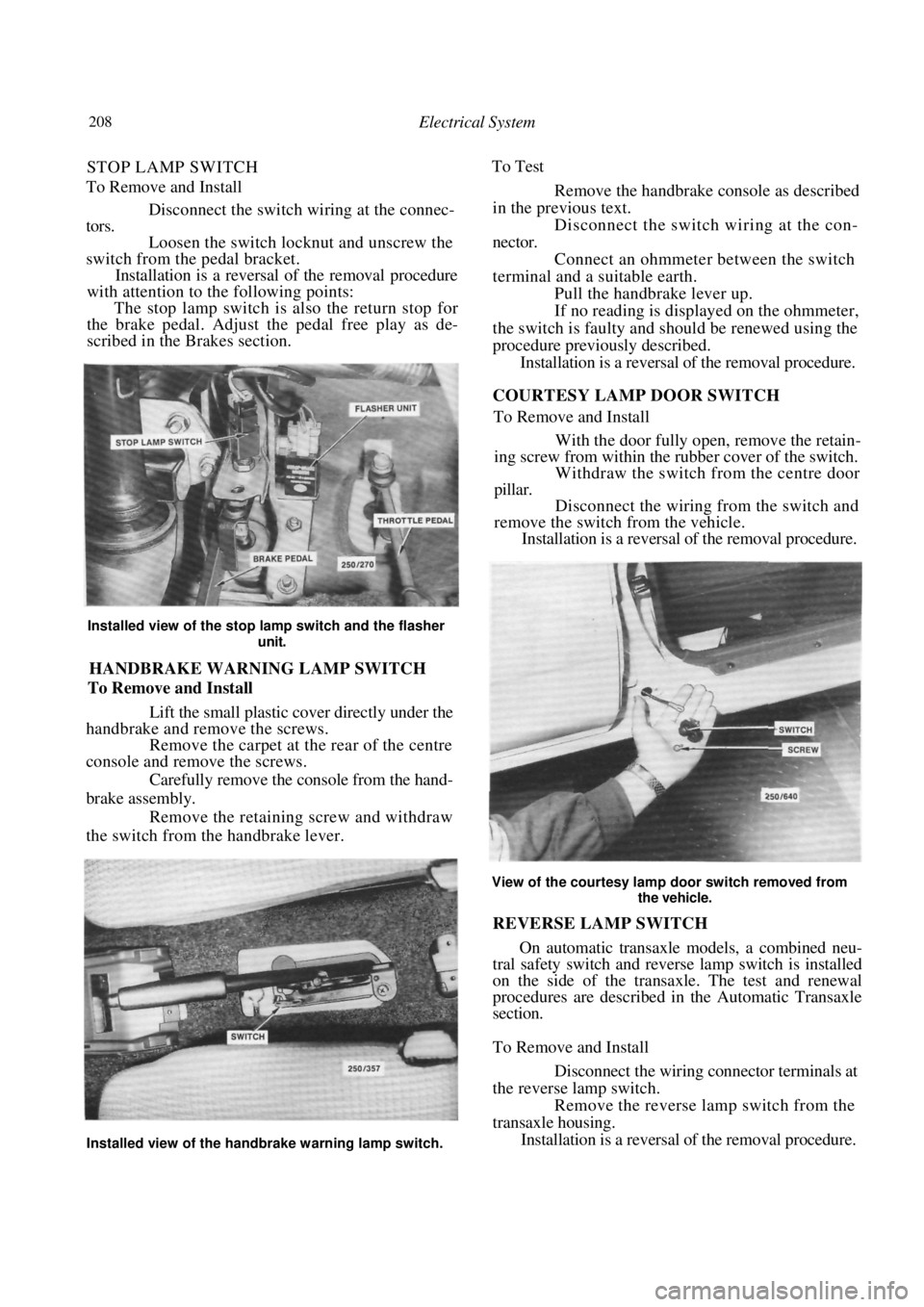
STOP LAMP SWITCH
To Remove and Install
Disconnect the switch wi ring at the connec-
tors.
Loosen the switch locknut and unscrew the
switch from the pedal bracket.
Installation is a reversal of the removal procedure
with attention to the following points:
The stop lamp switch is also the return stop for
the brake pedal. Adjust the pedal free play as de-
scribed in the Brakes section.
Installed view of the stop lamp switch and the flasher
unit.
HANDBRAKE WARNING LAMP SWITCH
To Remove and Install
Lift the small plastic cover directly under the
handbrake and remove the screws.
Remove the carpet at the rear of the centre
console and remove the screws.
Carefully remove the console from the hand-
brake assembly. Remove the retaining screw and withdraw
the switch from the handbrake lever. To Test
Remove the handbrake console as described
in the previous text.
Disconnect the switch wiring at the con-
nector. Connect an ohmmeter between the switch
terminal and a suitable earth. Pull the handbrake lever up.
If no reading is displayed on the ohmmeter,
the switch is faulty and should be renewed using the
procedure previously described. Installation is a reversal of the removal procedure.
COURTESY LAMP DOOR SWITCH
To Remove and Install
With the door fully open, remove the retain-
ing screw from within the rubber cover of the switch. Withdraw the switch from the centre door
pillar.
Disconnect the wiring from the switch and
remove the switch from the vehicle. Installation is a reversal of the removal procedure.
View of the courtesy lamp door switch removed from
the vehicle.
REVERSE LAMP SWITCH
On automatic transaxle models, a combined neu-
tral safety switch and reverse lamp switch is installed
on the side of the transaxle. The test and renewal
procedures are described in the Automatic Transaxle
section.
To Remove and Install
Disconnect the wiring connector terminals at
the reverse lamp switch. Remove the reverse lamp switch from the
transaxle housing. Installation is a reversal of the removal procedure.
Installed view of the handbrake warning lamp switch.
Page 209 of 238

Electrical System 209
12. INSTRUMENT CLUSTER
TO REMOVE AND INSTAL
Disconnect the negative battery terminal.
Remove the retaining screws from the instru-
ment cluster surround. Carefully withdraw the instrument cluster
surround from the instrument panel sufficiently to
enable the wiring to be disconnected. Remove the
surround from the vehicle.
.
FLEXIBLE PRINTED
CIRCUIT
Rear view of the instrument cluster removed from the
vehicle.
(4) Remove the instrument cluster assembly
retaining screws and gently ease the assembly from the
instrument panel sufficiently to enable the wiring to be
disconnected.
If necessary, remove the instruments as follows:
Carefully depress the retaining clips on the
front lens and remove the front lens. On models equipped with a tachometer, slide
the plastic rib from between the speedometer and the
tachometer. Remove the screws retaining the speedome-
ter and the tachometer or fuel/temperature gauges
from the rear of the instrument cluster.
CLUSTER ASSEMBLY
(d) Withdraw both instruments from the front of
the instrument cluster being careful as these instru-
ments are held by protruding pin terminals.
NOTE: Do not touch the faces of the instru-
ment dials as they mark easily.
(e) On models equipped with a tachometer,
remove the retaining nuts and remove the tempera-
ture and/or the fuel gauge from the cluster assembly.
Installation is a reversal of the removal procedure
ensuring that all electrical connectors are correctly
installed.
13. BLOWER FAN
The removal and installation procedure for the
blower fan is described in the Cooling and Heating
Systems section.
14. RADIO/CASSETTE
TO REMOVE AND INSTAL
Disconnect the negative battery terminal.
Remove the release hole covers on each side
of the radio/cassette.
Dismantled view of the instrument cluster.
Illustration of the radio/cass ette removal tool showing
the required dimensions.
BULB HOLDERS
BULB HOLDERS
Removing the release hole covers from the radio/cas-
sette.
Page 210 of 238
210 Electrical System
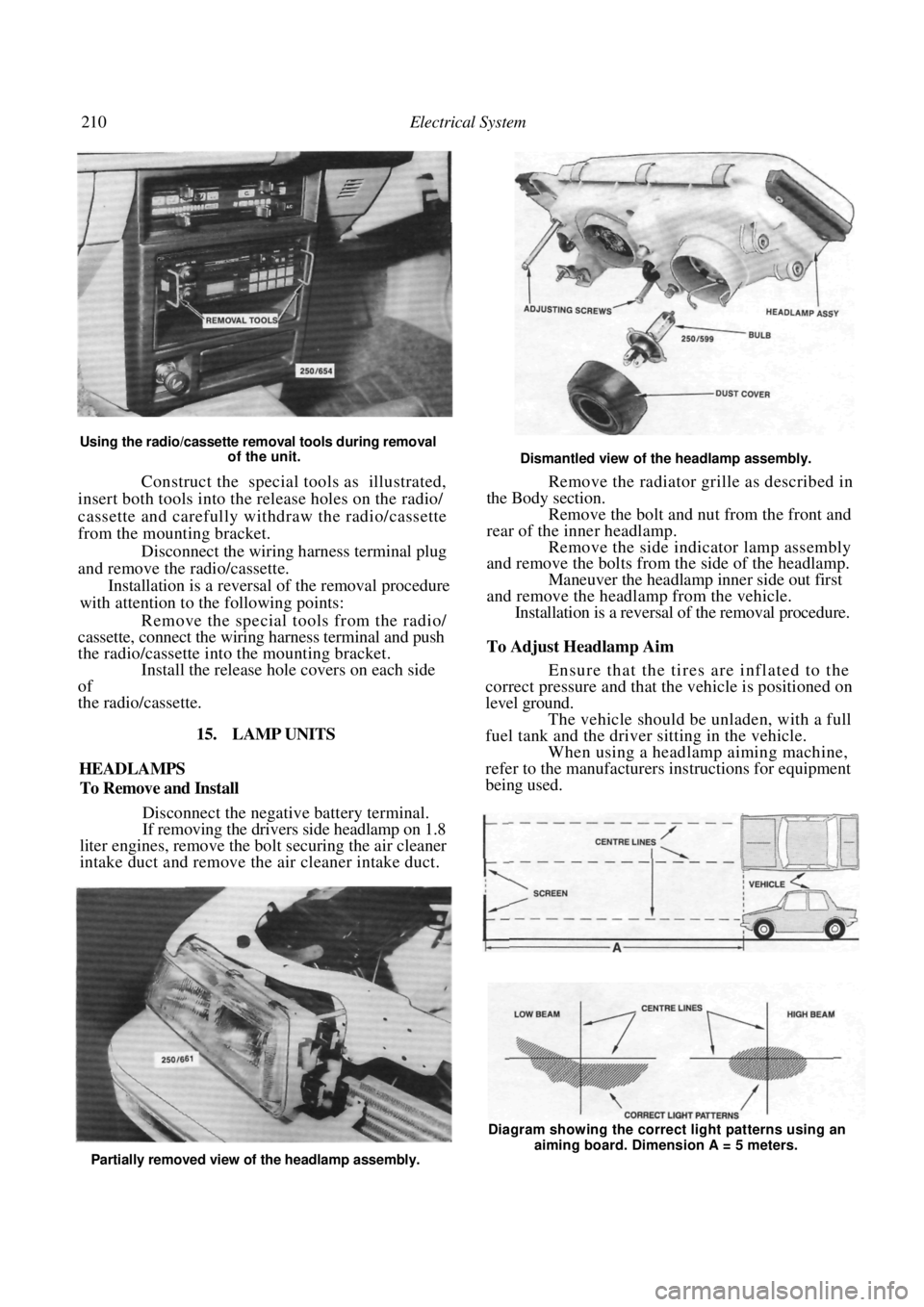
Using the radio/cassette removal tools during removal of the unit.
Construct the special tools as illustrated,
insert both tools into the release holes on the radio/
cassette and carefully withdraw the radio/cassette
from the mounting bracket.
Disconnect the wiring harness terminal plug
and remove the radio/cassette.
Installation is a reversal of the removal procedure
with attention to the following points:
Remove the special tools from the radio/
cassette, connect the wiring harness terminal and push
the radio/cassette into the mounting bracket. Install the release hole covers on each side
of
the radio/cassette.
15. LAMP UNITS
HEADLAMPS
To Remove and Install
Disconnect the negative battery terminal.
If removing the drivers side headlamp on 1.8
liter engines, remove the bo lt securing the air cleaner
intake duct and remove the air cleaner intake duct.
Dismantled view of the headlamp assembly.
Remove the radiator grille as described in
the Body section. Remove the bolt and nut from the front and
rear of the inner headlamp. Remove the side indicator lamp assembly
and remove the bolts from the side of the headlamp.
Maneuver the headlamp inner side out first
and remove the headlamp from the vehicle. Installation is a reversal of the removal procedure.
To Adjust Headlamp Aim
Ensure that the tires are inflated to the
correct pressure and that the vehicle is positioned on
level ground.
The vehicle should be unladen, with a full
fuel tank and the driver sitting in the vehicle. When using a headlamp aiming machine,
refer to the manufacturers instructions for equipment
being used.
Partially removed view of the headlamp assembly. Diagram showing the correct light patterns using an
aiming board. Dimension A = 5 meters.
Page 211 of 238
Electrical System 211
When using an aiming board, position the
vehicle five meters from and square to the aiming
board. Gently rock the vehi cle and allow the suspen-
sion to stabilize. Mark a reference line on the board to
correspond with the horizontal centre line of the
headlamp low beam bulbs. Mark two reference lines on the board to
correspond with the vertical centre lines of
the
headlamp low beam bulbs. Switch on the headlamps and select low
beam. Adjust the headlamps by turning the adjust-
ing screws located at the rear of the headlamp
assemblies. Adjust the headlamps to comply with local
regulations. As a guide, adjust the lamps so that the
low beam pattern strikes the aiming board with the
horizontal cut off point 50 mm below the headlamp
bulb horizontal centre line and the point where the
beam raises from the horizontal is on the headlamp
low beam bulb vertical centre line.
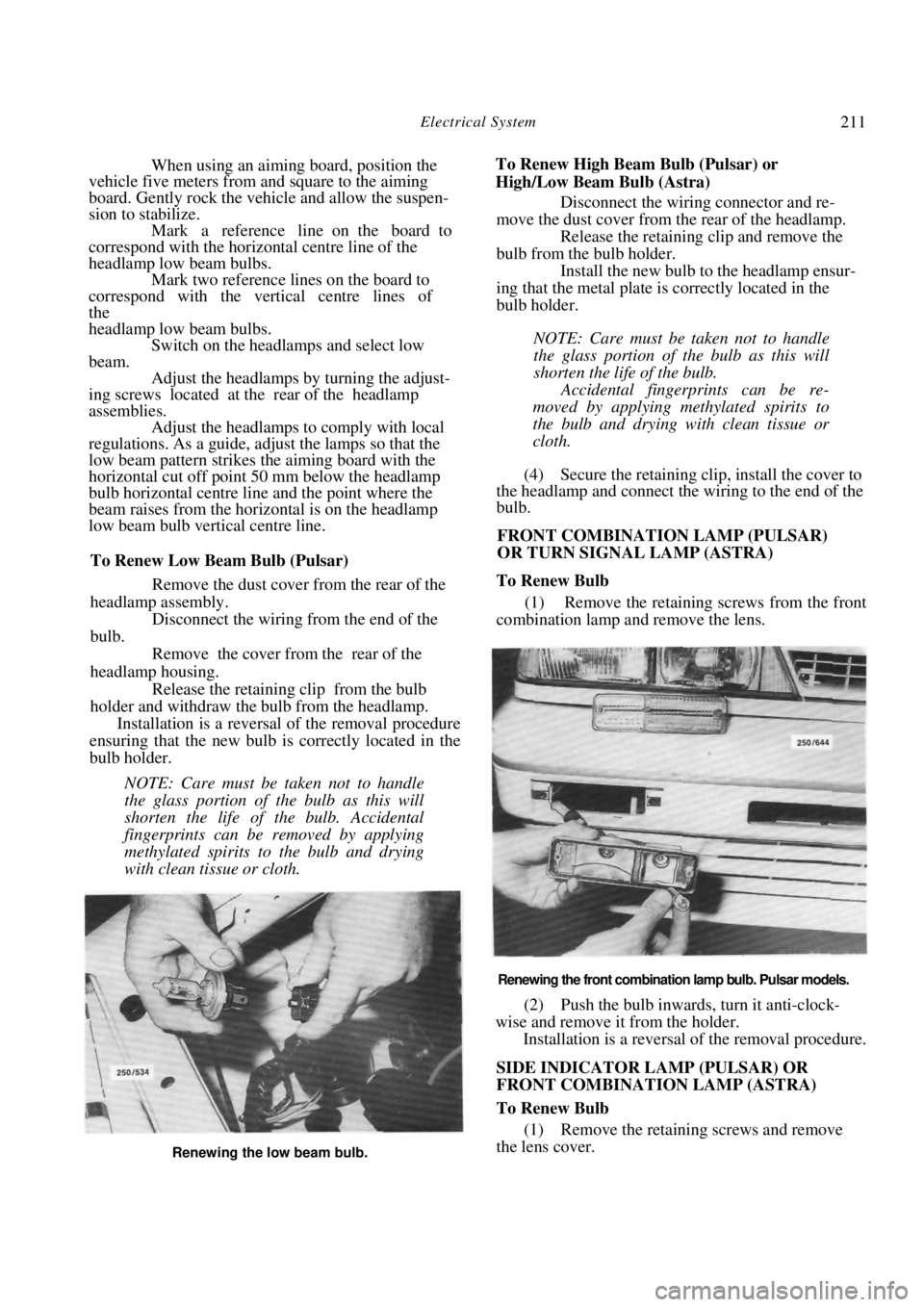
To Renew Low Beam Bulb (Pulsar)
Remove the dust cover from the rear of the
headlamp assembly.
Disconnect the wiring from the end of the
bulb.
Remove the cover from the rear of the
headlamp housing. Release the retaining clip from the bulb
holder and withdraw the bulb from the headlamp. Installation is a reversal of the removal procedure
ensuring that the new bulb is correctly located in the
bulb holder.
NOTE: Care must be taken not to handle
the glass portion of the bulb as this will
shorten the life of the bulb. Accidental
fingerprints can be removed by applying
methylated spirits to the bulb and drying
with clean tissue or cloth.
To Renew High Beam Bulb (Pulsar) or
High/Low Beam Bulb (Astra) Disconnect the wiring connector and re-
move the dust cover from the rear of the headlamp. Release the retaining clip and remove the
bulb from the bulb holder. Install the new bulb to the headlamp ensur-
ing that the metal plate is correctly located in the
bulb holder.
NOTE: Care must be taken not to handle
the glass portion of the bulb as this will
shorten the life of the bulb.
Accidental fingerprints can be re-
moved by applying methylated spirits to
the bulb and drying with clean tissue or
cloth.
(4) Secure the retaining clip, install the cover to
the headlamp and connect the wiring to the end of the
bulb.
FRONT COMBINATION LAMP (PULSAR)
OR TURN SIGNAL LAMP (ASTRA)
To Renew Bulb
(1) Remove the retaining screws from the front
combination lamp and remove the lens.
Renewing the front combination lamp bulb. Pulsar models.
(2) Push the bulb inwards, turn it anti-clock-
wise and remove it from the holder. Installation is a reversal of the removal procedure.
SIDE INDICATOR LAMP (PULSAR) OR
FRONT COMBINATION LAMP (ASTRA)
To Renew Bulb
(1) Remove the retaining screws and remove
the lens cover.
Renewing the low beam bulb.
Page 214 of 238
214 Electrical System
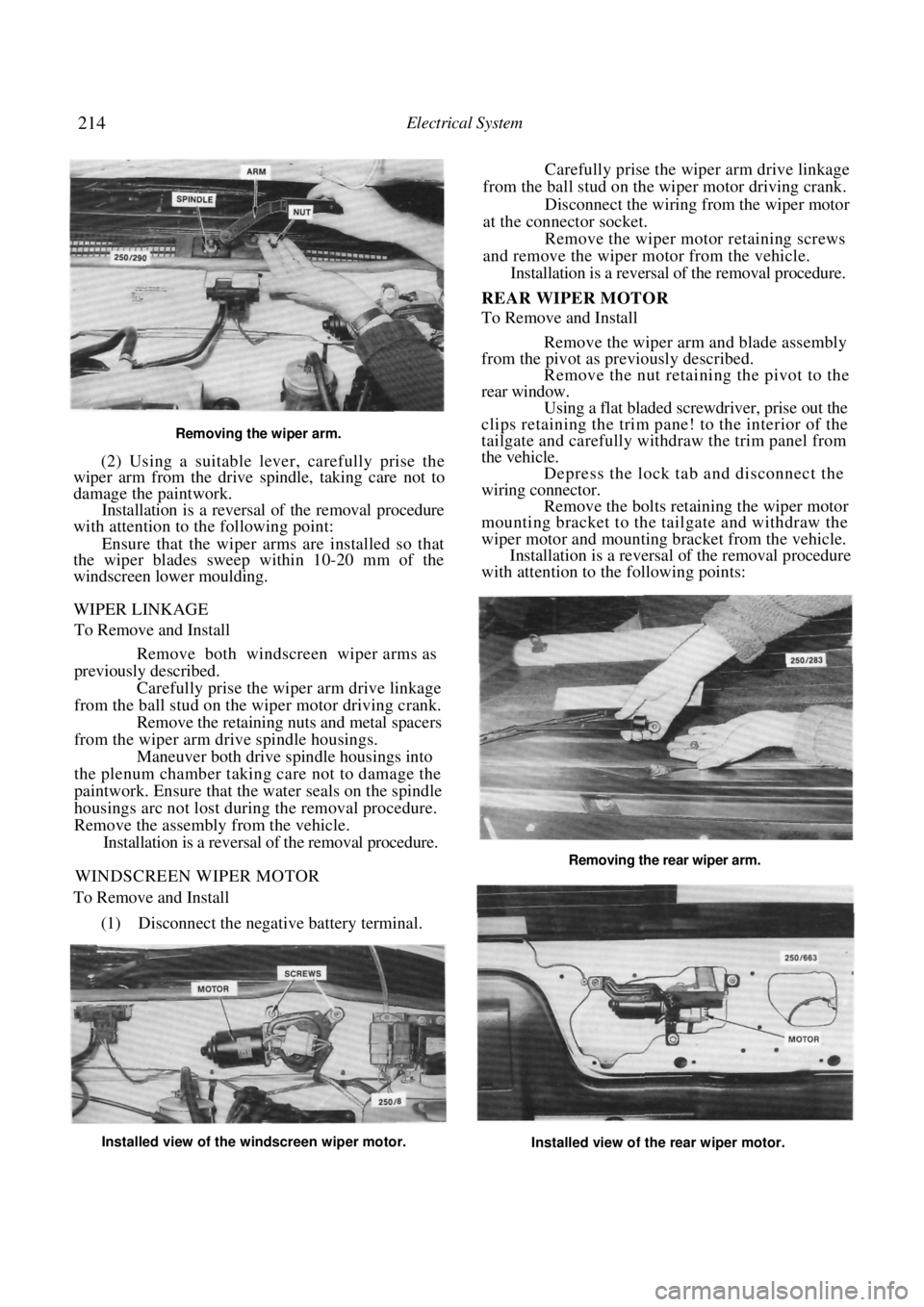
Removing the wiper arm.
(2) Using a suitable lever, carefully prise the
wiper arm from the drive spindle, taking care not to
damage the paintwork.
Installation is a reversal of the removal procedure
with attention to the following point:
Ensure that the wiper arms are installed so that
the wiper blades sweep within 10-20 mm of the
windscreen lower moulding.
WIPER LINKAGE
To Remove and Install
Remove both windscreen wiper arms as
previously described.
Carefully prise the wiper arm drive linkage
from the ball stud on the wiper motor driving crank. Remove the retaining nuts and metal spacers
from the wiper arm dr ive spindle housings.
Maneuver both drive spindle housings into
the plenum chamber taking care not to damage the
paintwork. Ensure that th e water seals on the spindle
housings arc not lost during the removal procedure.
Remove the assembly from the vehicle. Installation is a reversal of the removal procedure.
WINDSCREEN WIPER MOTOR
To Remove and Install
(1) Disconnect the negative battery terminal.
Carefully prise the wiper arm drive linkage
from the ball stud on the wiper motor driving crank.
Disconnect the wiring from the wiper motor
at the connector socket. Remove the wiper motor retaining screws
and remove the wiper motor from the vehicle. Installation is a reversal of the removal procedure.
REAR WIPER MOTOR
To Remove and Install
Remove the wiper arm and blade assembly
from the pivot as previously described. Remove the nut retaining the pivot to the
rear window. Using a flat bladed screwdriver, prise out the
clips retaining the trim pane! to the interior of the
tailgate and carefully wit hdraw the trim panel from
the vehicle. Depress the lock tab and disconnect the
wiring connector. Remove the bolts retaining the wiper motor
mounting bracket to the tailgate and withdraw the
wiper motor and mounting bracket from the vehicle.
Installation is a reversal of the removal procedure
with attention to the following points:
Installed view of the windscreen wiper motor.
Installed view of the rear wiper motor.
Removing the rear wiper arm.
Page 215 of 238
Electrical System 215
Ensure that the wiper motor is in the Park
position before installing the wiper arm. If in doubt,
turn the wiper switch to the Off position and turn the
ignition switch to the On position until the wiper
motor stops.
Install the wiper arm to the pivot so that the
wiper blade is horizontal to the lower edge of the edge
of the rear window when in the Park position.
17. FUSES, FUSIBLE LINKS AND RELAYS
TO CHECK AND RENEW FUSE
NOTE: If a fuse is found to be faulty or
burnt out, use a replacement fuse of the
specified amperage only. The specified amp-
erage is marked on the fuse.
The use of a higher amperage fuse than
that specified could cause damage to the
vehicle wiring harness.
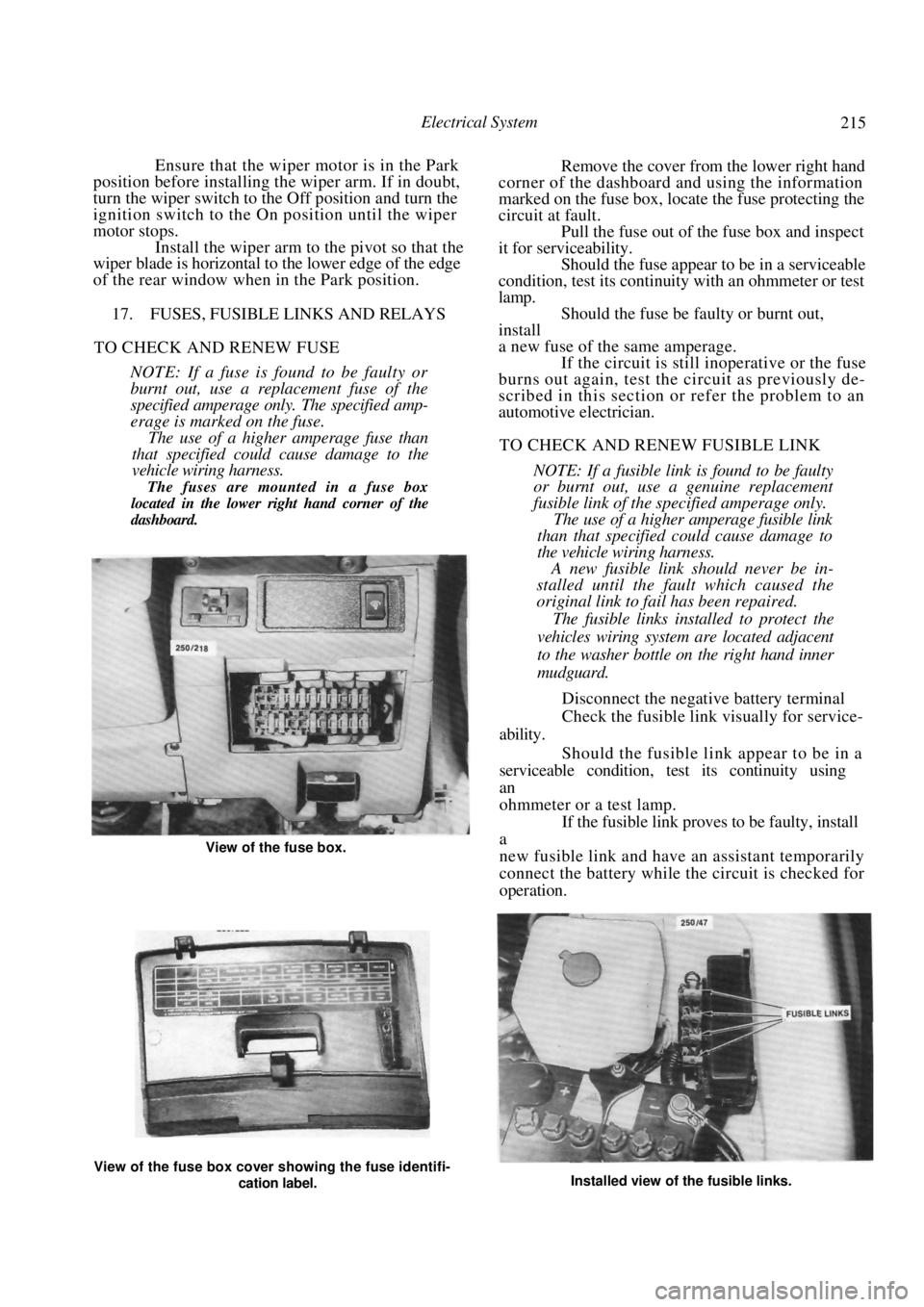
The fuses are mounted in a fuse box
located in the lower right hand corner of the
dashboard.
Remove the cover from the lower right hand
corner of the dashboard and using the information
marked on the fuse box, locate the fuse protecting the
circuit at fault. Pull the fuse out of the fuse box and inspect
it for serviceability.
Should the fuse appear to be in a serviceable
condition, test its continuity with an ohmmeter or test
lamp. Should the fuse be faulty or burnt out,
install
a new fuse of the same amperage. If the circuit is still inoperative or the fuse
burns out again, test the circuit as previously de-
scribed in this section or refer the problem to an
automotive electrician.
TO CHECK AND RENEW FUSIBLE LINK
NOTE: If a fusible link is found to be faulty
or burnt out, use a genuine replacement
fusible link of the specified amperage only.
The use of a higher amperage fusible link
than that specified could cause damage to
the vehicle wiring harness.
A new fusible link should never be in-
stalled until the fault which caused the
original link to fail has been repaired.
The fusible links installed to protect the
vehicles wiring system are located adjacent
to the washer bottle on the right hand inner
mudguard.
Disconnect the negative battery terminal
Check the fusible link visually for service-
ability.
Should the fusible link appear to be in a
serviceable condition, test its continuity using
an
ohmmeter or a test lamp. If the fusible link proves to be faulty, install
a
new fusible link and have an assistant temporarily
connect the battery while the circuit is checked for
operation.
View of the fuse box cover showing the fuse identifi-
cation label. Installed view of the fusible links.
View of the fuse box.