ignition NISSAN TEANA 2008 Service Manual
[x] Cancel search | Manufacturer: NISSAN, Model Year: 2008, Model line: TEANA, Model: NISSAN TEANA 2008Pages: 5121, PDF Size: 69.03 MB
Page 3372 of 5121
MWI-118
< SYMPTOM DIAGNOSIS >
THE OIL PRESSURE WARNING LAMP DOES NOT TURN ON
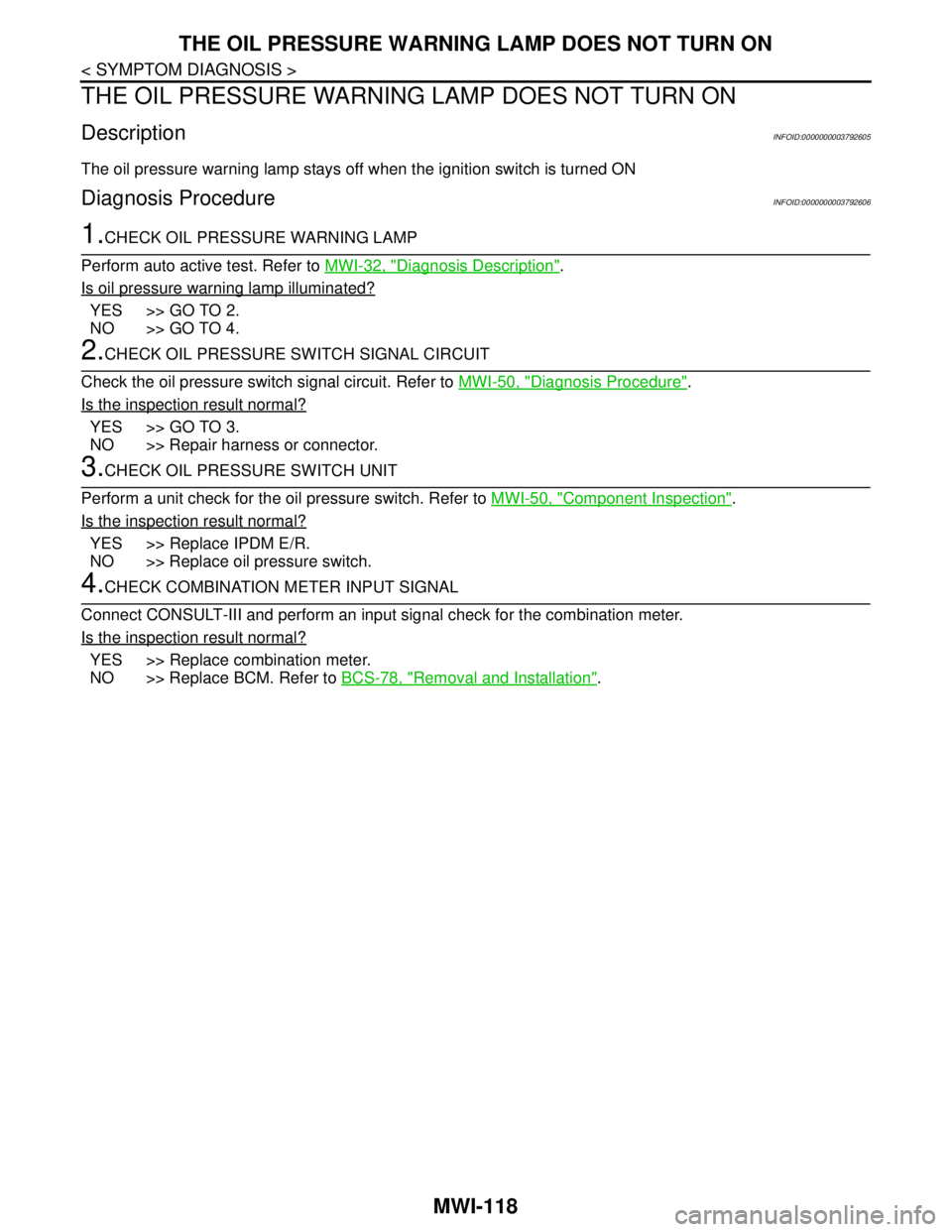
THE OIL PRESSURE WARNING LAMP DOES NOT TURN ON
DescriptionINFOID:0000000003792605
The oil pressure warning lamp stays off when the ignition switch is turned ON
Diagnosis ProcedureINFOID:0000000003792606
1.CHECK OIL PRESSURE WARNING LAMP
Perform auto active test. Refer to MWI-32, "
Diagnosis Description".
Is oil pressure warning lamp illuminated?
YES >> GO TO 2.
NO >> GO TO 4.
2.CHECK OIL PRESSURE SWITCH SIGNAL CIRCUIT
Check the oil pressure switch signal circuit. Refer to MWI-50, "
Diagnosis Procedure".
Is the inspection result normal?
YES >> GO TO 3.
NO >> Repair harness or connector.
3.CHECK OIL PRESSURE SWITCH UNIT
Perform a unit check for the oil pressure switch. Refer to MWI-50, "
Component Inspection".
Is the inspection result normal?
YES >> Replace IPDM E/R.
NO >> Replace oil pressure switch.
4.CHECK COMBINATION METER INPUT SIGNAL
Connect CONSULT-III and perform an input signal check for the combination meter.
Is the inspection result normal?
YES >> Replace combination meter.
NO >> Replace BCM. Refer to BCS-78, "
Removal and Installation".
Page 3373 of 5121
MWI
THE OIL PRESSURE WARNING LAMP DOES NOT TURN OFF
MWI-119
< SYMPTOM DIAGNOSIS >
C
D
E
F
G
H
I
J
K
L
MB A
O
P
THE OIL PRESSURE WARNING LAMP DOES NOT TURN OFF
DescriptionINFOID:0000000003792607
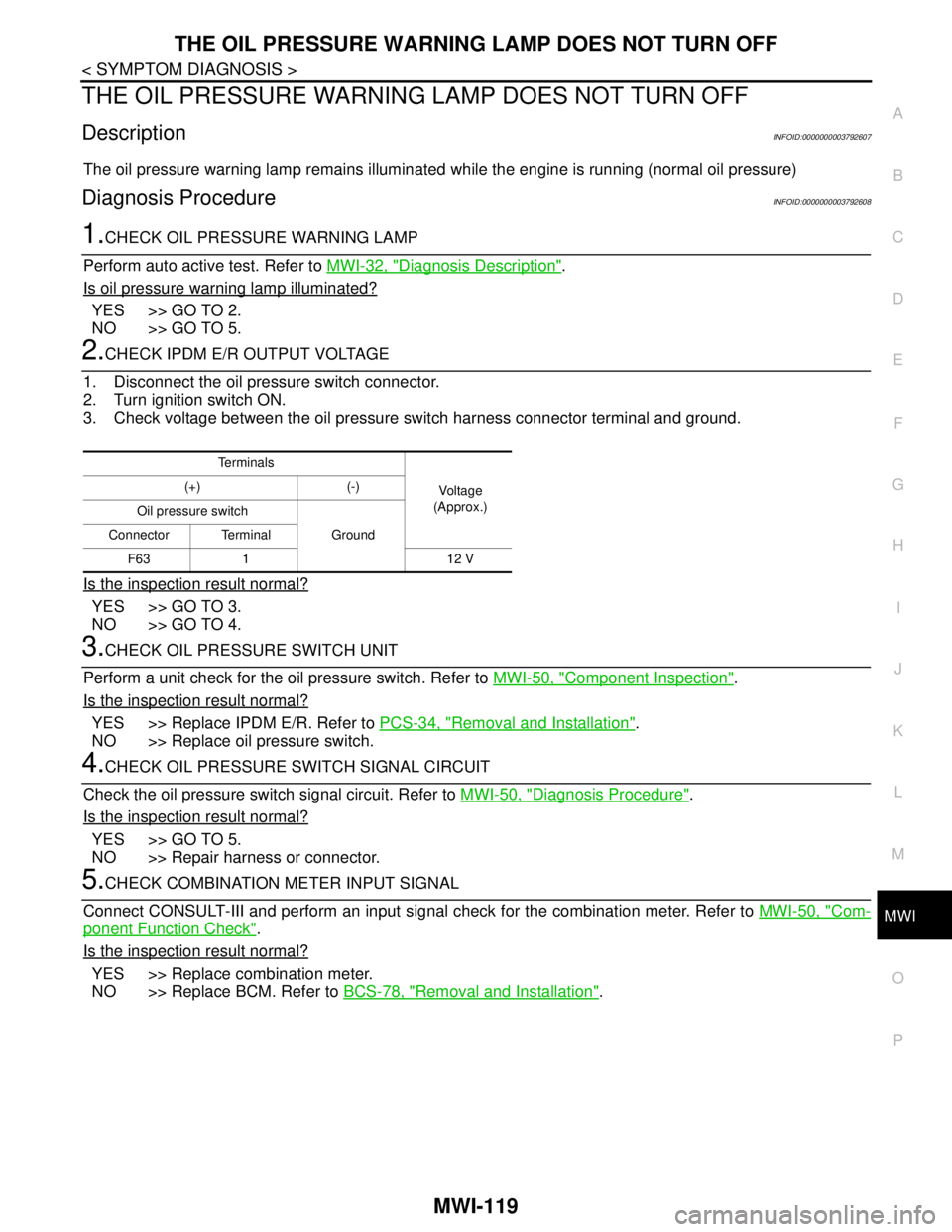
The oil pressure warning lamp remains illuminated while the engine is running (normal oil pressure)
Diagnosis ProcedureINFOID:0000000003792608
1.CHECK OIL PRESSURE WARNING LAMP
Perform auto active test. Refer to MWI-32, "
Diagnosis Description".
Is oil pressure warning lamp illuminated?
YES >> GO TO 2.
NO >> GO TO 5.
2.CHECK IPDM E/R OUTPUT VOLTAGE
1. Disconnect the oil pressure switch connector.
2. Turn ignition switch ON.
3. Check voltage between the oil pressure switch harness connector terminal and ground.
Is the inspection result normal?
YES >> GO TO 3.
NO >> GO TO 4.
3.CHECK OIL PRESSURE SWITCH UNIT
Perform a unit check for the oil pressure switch. Refer to MWI-50, "
Component Inspection".
Is the inspection result normal?
YES >> Replace IPDM E/R. Refer to PCS-34, "Removal and Installation".
NO >> Replace oil pressure switch.
4.CHECK OIL PRESSURE SWITCH SIGNAL CIRCUIT
Check the oil pressure switch signal circuit. Refer to MWI-50, "
Diagnosis Procedure".
Is the inspection result normal?
YES >> GO TO 5.
NO >> Repair harness or connector.
5.CHECK COMBINATION METER INPUT SIGNAL
Connect CONSULT-III and perform an input signal check for the combination meter. Refer to MWI-50, "
Com-
ponent Function Check".
Is the inspection result normal?
YES >> Replace combination meter.
NO >> Replace BCM. Refer to BCS-78, "
Removal and Installation".
Te r m i n a l s
Voltag e
(Approx.) (+) (-)
Oil pressure switch
Ground Connector Terminal
F63 1 12 V
Page 3374 of 5121
MWI-120
< SYMPTOM DIAGNOSIS >
THE PARKING BRAKE RELEASE WARNING CONTINUES DISPLAYING, OR
DOES NOT DISPLAY
THE PARKING BRAKE RELEASE WARNING CONTINUES DISPLAYING,
OR DOES NOT DISPLAY
DescriptionINFOID:0000000003792609
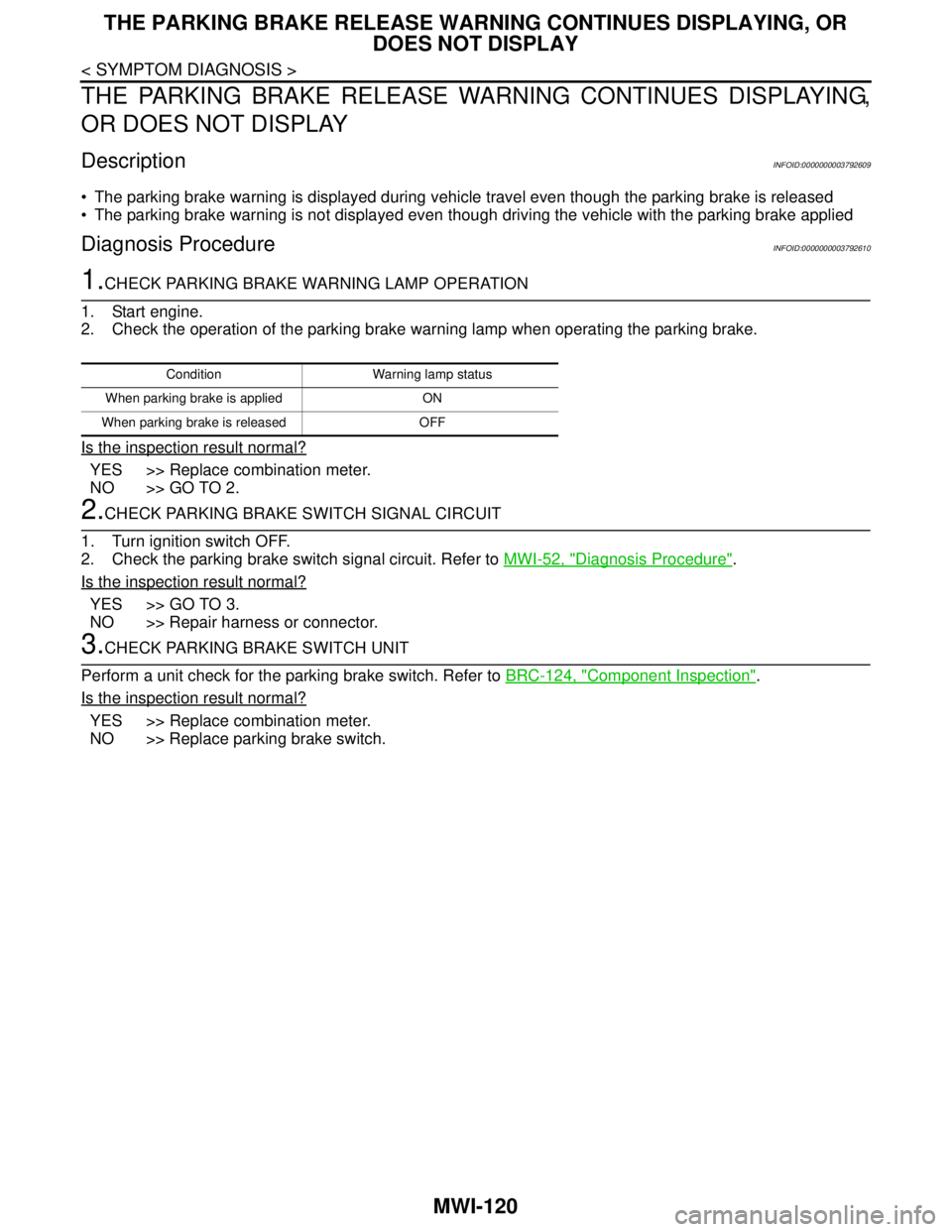
The parking brake warning is displayed during vehicle travel even though the parking brake is released
The parking brake warning is not displayed even though driving the vehicle with the parking brake applied
Diagnosis ProcedureINFOID:0000000003792610
1.CHECK PARKING BRAKE WARNING LAMP OPERATION
1. Start engine.
2. Check the operation of the parking brake warning lamp when operating the parking brake.
Is the inspection result normal?
YES >> Replace combination meter.
NO >> GO TO 2.
2.CHECK PARKING BRAKE SWITCH SIGNAL CIRCUIT
1. Turn ignition switch OFF.
2. Check the parking brake switch signal circuit. Refer to MWI-52, "
Diagnosis Procedure".
Is the inspection result normal?
YES >> GO TO 3.
NO >> Repair harness or connector.
3.CHECK PARKING BRAKE SWITCH UNIT
Perform a unit check for the parking brake switch. Refer to BRC-124, "
Component Inspection".
Is the inspection result normal?
YES >> Replace combination meter.
NO >> Replace parking brake switch.
Condition Warning lamp status
When parking brake is applied ON
When parking brake is released OFF
Page 3392 of 5121

PCS
PCS-1
ELECTRICAL & POWER CONTROL
C
DE
F
G H
I
J
K L
B
SECTION PCS
A
O P
N
CONTENTS
POWER CONTROL SYSTEM
IPDM E/R
FUNCTION DIAGNOSIS .. .............................
4
RELAY CONTROL SYSTEM ......................... .....4
System Diagram .................................................. ......4
System Description ...................................................4
Component Parts Location ........................................6
POWER CONTROL SYSTEM .............................7
System Diagram .................................................. ......7
System Description ...................................................7
Component Parts Location ........................................7
SIGNAL BUFFER SYSTEM ................................8
System Diagram .................................................. ......8
System Description ...................................................8
Component Parts Location ........................................8
POWER CONSUMPTION CONTROL SYS-
TEM .....................................................................
9
System Diagram .................................................. ......9
System Description ...................................................9
Component Parts Location ......................................10
DIAGNOSIS SYSTEM (IPDM E/R) .....................11
Diagnosis Description ......................................... ....11
CONSULT-III Function (IPDM E/R) .........................13
COMPONENT DIAGNOSIS .........................16
U1000 CAN COMM CIRCUIT ......................... ....16
Description .......................................................... ....16
DTC Logic ...............................................................16
Diagnosis Procedure ...............................................16
B2098 IGNITION RELAY ON STUCK ...............17
Description .......................................................... ....17
DTC Logic ...............................................................17
Diagnosis Procedure ...............................................17
B2099 IGNITION RELAY OFF STUCK ..............18
Description ........................................................... ....18
DTC Logic ................................................................18
Diagnosis Procedure ...............................................18
POWER SUPPLY AND GROUND CIRCUIT ....19
Diagnosis Procedure ...............................................19
ECU DIAGNOSIS .........................................20
IPDM E/R (INTELLIGENT POWER DISTRI-
BUTION MODULE ENGINE ROOM) ................
20
Reference Value .................................................. ....20
Wiring Diagram - IPDM E/R - ..................................28
Fail-safe ...................................................................31
DTC Index ...............................................................33
ON-VEHICLE REPAIR .................................34
IPDM E/R (INTELLIGENT POWER DISTRI-
BUTION MODULE ENGINE ROOM) ................
34
Exploded View ..................................................... ....34
Removal and Installation .........................................34
POWER DISTRIBUTION SYSTEM
BASIC INSPECTION ....... ............................
35
DIAGNOSIS AND REPAIR WORKFLOW ........35
Work Flow ............................................................ ....35
FUNCTION DIAGNOSIS ..............................38
POWER DISTRIBUTION SYSTEM ...................38
System Description .............................................. ....38
Component Parts Location ......................................40
Component Description ..........................................40
DIAGNOSIS SYSTEM (BCM) ...........................41
COMMON ITEM ..................................................... ....41
COMMON ITEM : CONSULT-III Function (BCM -
COMMON ITEM) .....................................................
41
INTELLIGENT KEY ................................................ ....42
Page 3393 of 5121

PCS-2
INTELLIGENT KEY : CONSULT-III Function
(BCM - INTELLIGENT KEY) ...................................
42
COMPONENT DIAGNOSIS ........................46
U1000 CAN COMM CIRCUIT ............................46
BCM ...........................................................................46
BCM : Description ...................................................46
BCM : DTC Logic ....................................................46
BCM : Diagnosis Procedure ...................................46
IPDM E/R ...................................................................46
IPDM E/R : Description ...........................................46
IPDM E/R : DTC Logic ............................................46
IPDM E/R : Diagnosis Procedure ...........................46
U1010 CONTROL UNIT (CAN) .........................48
BCM ...........................................................................48
BCM : DTC Logic ....................................................48
BCM : Diagnosis Procedure ...................................48
BCM : Special Repair Requirement ........................48
B2553 IGNITION RELAY ...................................49
Description ..............................................................49
DTC Logic ...............................................................49
Diagnosis Procedure ..............................................49
B260A IGNITION RELAY ..................................51
Description ..............................................................51
DTC Logic ...............................................................51
Diagnosis Procedure ..............................................51
B2614 ACC RELAY ...........................................53
Description ..............................................................53
DTC Logic ...............................................................53
Diagnosis Procedure ..............................................53
Component Inspection ............................................54
B2615 BLOWER RELAY CIRCUIT ...................55
Description ..............................................................55
DTC Logic ...............................................................55
Diagnosis Procedure ..............................................55
Component Inspection ............................................56
B2616 IGNITION RELAY CIRCUIT ...................57
Description ..............................................................57
DTC Logic ...............................................................57
Diagnosis Procedure ..............................................57
Component Inspection ............................................58
B2618 BCM ........................................................59
Description ..............................................................59
DTC Logic ...............................................................59
Diagnosis Procedure ..............................................59
B261A PUSH-BUTTON IGNITION SWITCH .....60
Description ..............................................................60
DTC Logic ...............................................................60
Diagnosis Procedure ..............................................60
POWER SUPPLY AND GROUND CIRCUIT .....62
BCM ...........................................................................62
BCM : Diagnosis Procedure ....................................62
PUSH-BUTTON IGNITION SWITCH .................63
Description ..............................................................63
Component Function Check ..................................63
Diagnosis Procedure ...............................................63
Component Inspection ............................................64
PUSH-BUTTON IGNITION SWITCH POSI-
TION INDICATOR ..............................................
66
Description ..............................................................66
Component Function Check ..................................66
Diagnosis Procedure ...............................................66
Component Inspection ............................................67
POWER DISTRIBUTION SYSTEM ...................68
Wiring Diagram - PDS (POWER DISTRIBUTION
SYSTEM) - ..............................................................
68
ECU DIAGNOSIS .......................................73
BCM (BODY CONTROL MODULE) ..................73
Reference Value .....................................................73
Wiring Diagram - BCM - ..........................................96
Fail-safe ................................................................102
DTC Inspection Priority Chart .............................104
DTC Index ............................................................105
IPDM E/R (INTELLIGENT POWER DISTRI-
BUTION MODULE ENGINE ROOM) ................
107
Reference Value ...................................................107
Wiring Diagram - IPDM E/R - ................................115
Fail-safe ................................................................118
DTC Index ............................................................120
PRECAUTION ...........................................121
PRECAUTIONS ................................................121
Precaution for Supplemental Restraint System
(SRS) "AIR BAG" and "SEAT BELT PRE-TEN-
SIONER" ...............................................................
121
Precaution Necessary for Steering Wheel Rota-
tion after Battery Disconnect .................................
121
SYMPTOM DIAGNOSIS ...........................122
POWER DISTRIBUTION SYSTEM ..................122
Symptom Table .....................................................122
PUSH-BUTTON IGNITION SWITCH DOES
NOT OPERATE ................................................
124
Description ............................................................124
Diagnosis Procedure .............................................124
PUSH-BUTTON IGNITION SWITCH POSI-
TION INDICATOR DOES NOT ILLUMINATE ..
125
Description ............................................................125
Diagnosis Procedure .............................................125
Page 3394 of 5121

PCS
PCS-3
C
D
E
F
G
H
I
J
K
L B A
O
P N
ON-VEHICLE REPAIR ...............................126
BCM (BODY CONTROL MODULE) .................126
Exploded View ......................................................126
Removal and Installation .......................................126
PUSH BUTTON IGNITION SWITCH ...............127
Removal and Installation .......................................127
Page 3396 of 5121
![NISSAN TEANA 2008 Service Manual PCS
RELAY CONTROL SYSTEM
PCS-5
< FUNCTION DIAGNOSIS >[IPDM E/R]
C
D
E
F
G
H
I
J
K
L B A
O
P N
NOTE:
BCM controls the starter relay.Control relay Input/output Transmit unit Control part Reference page](/img/5/57391/w960_57391-3395.png "NISSAN TEANA 2008 Service Manual PCS
RELAY CONTROL SYSTEM
PCS-5
< FUNCTION DIAGNOSIS >[IPDM E/R]
C
D
E
F
G
H
I
J
K
L B A
O
P N
NOTE:
BCM controls the starter relay.Control relay Input/output Transmit unit Control part Reference page")
PCS
RELAY CONTROL SYSTEM
PCS-5
< FUNCTION DIAGNOSIS >[IPDM E/R]
C
D
E
F
G
H
I
J
K
L B A
O
P N
NOTE:
BCM controls the starter relay.Control relay Input/output Transmit unit Control part Reference page
• Headlamp low relay
Headlamp high relay Low beam request signal
High beam request signalBCM (CAN) Headlamp low
Headlamp highEXL-11
(Xenon headlamp)
EXL-200
(Halogen headlamp)
Front fog lamp relay Front fog light request signal BCM (CAN) Front fog lampEXL-17
(Xenon headlamp)
EXL-204
(Halogen headlamp)
Tail lamp relay Position light request signal BCM (CAN) Parking lamp
Side marker lamp
License plate lamp
Tail lampEXL-21
(Xenon headlamp)
EXL-208
(Halogen headlamp)
IlluminationsINL-12
Front wiper relay
Front wiper high relayFront wiper request signal BCM (CAN)
Front wiperWW-5
Front wiper auto stop signal Front wiper motor
Horn relay Theft warning horn request
signal
Horn reminder signalBCM (CAN) Horn (low)
Horn (high)SEC-17
Starter relayNOTE
Starter control relayStarter control relay signal BCM (CAN)
Starter motorSEC-104SEC-102
Steering lock unit condition
signalSteering lock unit
Starter relay control signal TCM
Steering lock relaySteering lock relay signal BCM (CAN)
Steering lock unitSEC-69
Steering lock unit condition
signalSteering lock unit
Control device (Detention
switch) signalControl device (Detention
switch)
A/C relayA/C compressor request sig-
nalECM (CAN)A/C compressor
(magnet clutch)HAC-36
(Without 7-inch dis-
play)
HAC-154
(With 7-inch display)
Cooling fan relay-1
Cooling fan relay-2
Cooling fan relay-3Cooling fan speed request sig-
nalECM (CAN) Cooling fan motor-
1
Cooling fan motor-
2EC-60
Headlamp washer relayHeadlamp washer request
signalBCM (CAN) Headlamp washerWW-10
Ignition relayIgnition switch ON signal BCM (CAN)
Ignition relay PCS-17Vehicle speed signal Combination meter (CAN)
Push-button ignition switch
signalPush-button ignition
switch
Page 3400 of 5121
![NISSAN TEANA 2008 Service Manual PCS
POWER CONSUMPTION CONTROL SYSTEM
PCS-9
< FUNCTION DIAGNOSIS >[IPDM E/R]
C
D
E
F
G
H
I
J
K
L B A
O
P N
POWER CONSUMPTION CONTROL SYSTEM
System DiagramINFOID:0000000003857763
System DescriptionINFOI](/img/5/57391/w960_57391-3399.png "NISSAN TEANA 2008 Service Manual PCS
POWER CONSUMPTION CONTROL SYSTEM
PCS-9
< FUNCTION DIAGNOSIS >[IPDM E/R]
C
D
E
F
G
H
I
J
K
L B A
O
P N
POWER CONSUMPTION CONTROL SYSTEM
System DiagramINFOID:0000000003857763
System DescriptionINFOI")
PCS
POWER CONSUMPTION CONTROL SYSTEM
PCS-9
< FUNCTION DIAGNOSIS >[IPDM E/R]
C
D
E
F
G
H
I
J
K
L B A
O
P N
POWER CONSUMPTION CONTROL SYSTEM
System DiagramINFOID:0000000003857763
System DescriptionINFOID:0000000003773265
OUTLINE
IPDM E/R incorporates a power consumption control function that reduces the power consumption accord-
ing to the vehicle status.
IPDM E/R changes its status (control mode) with the sleep wake up signal received from BCM via CAN com-
munication.
Normal mode (wake-up)- CAN communication is normally performed with other control units.
- Individual unit control by IPDM E/R is normally performed.
Low power consumption mode (sleep)- Low power consumption control is active.
- CAN transmission is stopped.
SLEEP MODE ACTIVATION
IPDM E/R judges that the sleep-ready conditions are fulfilled when the ignition switch is OFF and none of the
conditions below are present. Then it transmits a sleep-ready signal (ready) to BCM via CAN communica-
tion.
- Outputting signals to actuators
- Switches or relays operating
- Output requests are being received from control units via CAN communication.
IPDM E/R stops CAN communication and enters the low power consumption mode when it receives a sleep
wake up signal (sleep) from BCM and the sleep-ready conditions are fulfilled.
WAKE-UP OPERATION
IPDM E/R changes from the low power consumption mode to the normal mode when it receives a sleep
wake-up signal (wake up) from BCM or any of the following conditions is fulfilled. In addition, it transmits a
sleep-ready signal (not-ready) to BCM via CAN communication to report the CAN communication start.
- Ignition switch ON
- An output request is received from a control unit via CAN communication.
JPMIA1046GB
Page 3402 of 5121
![NISSAN TEANA 2008 Service Manual PCS
DIAGNOSIS SYSTEM (IPDM E/R)
PCS-11
< FUNCTION DIAGNOSIS >[IPDM E/R]
C
D
E
F
G
H
I
J
K
L B A
O
P N
DIAGNOSIS SYSTEM (IPDM E/R)
Diagnosis DescriptionINFOID:0000000003773267
AUTO ACTIVE TEST
Descript](/img/5/57391/w960_57391-3401.png "NISSAN TEANA 2008 Service Manual PCS
DIAGNOSIS SYSTEM (IPDM E/R)
PCS-11
< FUNCTION DIAGNOSIS >[IPDM E/R]
C
D
E
F
G
H
I
J
K
L B A
O
P N
DIAGNOSIS SYSTEM (IPDM E/R)
Diagnosis DescriptionINFOID:0000000003773267
AUTO ACTIVE TEST
Descript")
PCS
DIAGNOSIS SYSTEM (IPDM E/R)
PCS-11
< FUNCTION DIAGNOSIS >[IPDM E/R]
C
D
E
F
G
H
I
J
K
L B A
O
P N
DIAGNOSIS SYSTEM (IPDM E/R)
Diagnosis DescriptionINFOID:0000000003773267
AUTO ACTIVE TEST
Description
In auto active test mode, the IPDM E/R sends a drive signal to the following systems to check their operation.
Oil pressure warning lamp
Front wiper (LO, HI)
Parking lamps
License plate lamps
Tail lamps
Front fog lamps
Headlamps (LO, HI)
A/C compressor (magnet clutch)
Cooling fan
Operation Procedure
1. Close the hood and lift the wiper arms from the windshield. (Prevent windshield damage due to wiper
operation)
NOTE:
When auto active test is performed with hood opened, sprinkle water on windshield beforehand.
2. Turn ignition switch OFF.
3. Turn the ignition switch ON, and within 20 seconds, press the driver door switch 10 times. Then turn the
ignition switch OFF.
CAUTION:
Close passenger door.
4. Turn the ignition switch ON within 10 seconds. After that the horn sounds once and the auto active test
starts.
5. The oil pressure warning lamp starts blinking when the auto active test starts.
6. After a series of the following operations is repeated 3 times, auto active test is completed.
NOTE:
When auto active test mode has to be cancelled halfway through test, turn ignition switch OFF.
CAUTION:
• If auto active test mode cannot be actuated, check door switch system. Refer to DLK-57,
"ComponentFunctionCheck".
Do not start the engine.
Inspection in Auto Active Test Mode
When auto active test mode is actuated, the following 5 steps are repeated 3 times.
Operation
sequenceInspection location Operation
A Oil pressure warning lamp Blinks continuously during operation of auto active test
1 Front wiper LO for 5 seconds → HI for 5 seconds
2Parking lamps
License plate lamps
Tail lamps
Front fog lamps10 seconds
3 Headlamps LO ⇔ HI 5 times
4 A/C compressor (magnet clutch) ON ⇔ OFF 5 times
5 Cooling fan LO for 5 seconds → MID for 3 seconds → HI for 2 seconds
Page 3404 of 5121
![NISSAN TEANA 2008 Service Manual PCS
DIAGNOSIS SYSTEM (IPDM E/R)
PCS-13
< FUNCTION DIAGNOSIS >[IPDM E/R]
C
D
E
F
G
H
I
J
K
L B A
O
P N
CONSULT-III Function (IPDM E/R)INFOID:0000000003773268
APPLICATION ITEM
CONSULT-III performs the f](/img/5/57391/w960_57391-3403.png "NISSAN TEANA 2008 Service Manual PCS
DIAGNOSIS SYSTEM (IPDM E/R)
PCS-13
< FUNCTION DIAGNOSIS >[IPDM E/R]
C
D
E
F
G
H
I
J
K
L B A
O
P N
CONSULT-III Function (IPDM E/R)INFOID:0000000003773268
APPLICATION ITEM
CONSULT-III performs the f")
PCS
DIAGNOSIS SYSTEM (IPDM E/R)
PCS-13
< FUNCTION DIAGNOSIS >[IPDM E/R]
C
D
E
F
G
H
I
J
K
L B A
O
P N
CONSULT-III Function (IPDM E/R)INFOID:0000000003773268
APPLICATION ITEM
CONSULT-III performs the following functions via CAN communication with IPDM E/R.
SELF DIAGNOSTIC RESULT
Refer to PCS-33, "DTCIndex".
DATA MONITOR
Monitor item
Cooling fan does not operatePerform auto active test.
Does the cooling fan operate?YES ECM signal input circuit
CAN communication signal
between ECM and IPDM E/
R
NO Harness or connector be-
tween IPDM E/R and cool-
ing fan motor
Harness or connector be-
tween IPDM E/R and cool-
ing fan relay
Cooling fan motor
Cooling fan relay
IPDM E/R Symptom Inspection contents Possible cause
Diagnosis mode Description
Ecu Identification Allows confirmation of IPDM E/R part number.
Self Diagnostic Result Displays the diagnosis results judged by IPDM E/R.
Data Monitor Displays the real-time input/output data from IPDM E/R input/output data.
Active Test IPDM E/R can provide a drive signal to electronic components to check their operations.
CAN Diag Support Monitor The results of transmit/receive diagnosis of CAN communication can be read.
Monitor Item
[Unit]MAIN SIG-
NALSDescription
MOTOR FAN REQ
[1/2/3/4]×Displays the value of the cooling fan speed request signal received from ECM via
CAN communication.
AC COMP REQ
[Off/On]×Displays the status of the A/C compressor request signal received from ECM via
CAN communication.
TAIL&CLR REQ
[Off/On]×Displays the status of the position light request signal received from BCM via CAN
communication.
HL LO REQ
[Off/On]×Displays the status of the low beam request signal received from BCM via CAN
communication.
HL HI REQ
[Off/On]×Displays the status of the high beam request signal received from BCM via CAN
communication.
FR FOG REQ
[Off/On]×Displays the status of the front fog light request signal received from BCM via
CAN communication.
FR WIP REQ
[Stop/1LOW/Low/Hi]×Displays the status of the front wiper request signal received from BCM via CAN
communication.
WIP AUTO STOP
[STOP P/ACT P]×Displays the status of the front wiper auto stop signal judged by IPDM E/R.
WIP PROT
[Off/BLOCK]×Displays the status of the front wiper fail-safe operation judged by IPDM E/R.
IGN RLY1 -REQ
[Off/On]Displays the status of the ignition switch ON signal received from BCM via CAN
communication.