trunk NISSAN TEANA 2008 Service Manual
[x] Cancel search | Manufacturer: NISSAN, Model Year: 2008, Model line: TEANA, Model: NISSAN TEANA 2008Pages: 5121, PDF Size: 69.03 MB
Page 2934 of 5121

BCM (BODY CONTROL MODULE)
INL-55
< ECU DIAGNOSIS >
C
D
E
F
G
H
I
J
K
MA
B
INL
N
O
P
REQ SW -RRNOTE:
The item is indicated, but not monitored. Off
REQ SW -RRNOTE:
The item is indicated, but not monitored. Off
REQ SW -BD/TRTrunk lid opener request switch is not pressed Off
Trunk lid opener request switch is pressed On
PUSH SWPush-button ignition switch (push switch) is not pressed Off
Push-button ignition switch (push switch) is pressed On
IGN RLY2 -F/BIgnition switch in OFF or ACC position Off
Ignition switch in ON position On
CLUCH SWNOTE:
The item is indicated, but not monitored. Off
BRAKE SW 1The brake pedal is not depressed On
The brake pedal is depressed Off
DETE/CANCL SWSelector lever in P position Off
Selector lever in any position other than P On
SFT PN/N SWSelector lever in any position other than P and N Off
Selector lever in P or N position On
S/L -LOCKSteering is locked Off
Steering is unlocked On
S/L -UNLOCKSteering is unlocked Off
Steering is locked On
S/L RELAY-F/BIgnition switch in OFF or ACC position Off
Ignition switch in ON position On
UNLK SEN -DRDriver door is unlocked Off
Driver door is locked On
PUSH SW -IPDMPush-button ignition switch (push-switch) is not pressed Off
Push-button ignition switch (push-switch) is pressed On
IGN RLY1 -F/BIgnition switch in OFF or ACC position Off
Ignition switch in ON position On
DETE SW -IPDMSelector lever in P position Off
Selector lever in any position other than P On
SFT PN -IPDMSelector lever in any position other than P and N Off
Selector lever in P or N position On
SFT P -METSelector lever in any position other than P Off
Selector lever in P position On
SFT N -METSelector lever in any position other than N Off
Selector lever in N position On
ENGINE STATEEngine stopped Stop
While the engine stalls Stall
At engine cranking Crank
Engine running Run
S/L LOCK-IPDMSteering is locked Off
Steering is unlocked On Monitor Item Condition Value/Status
Page 2938 of 5121
BCM (BODY CONTROL MODULE)
INL-59
< ECU DIAGNOSIS >
C
D
E
F
G
H
I
J
K
MA
B
INL
N
O
P
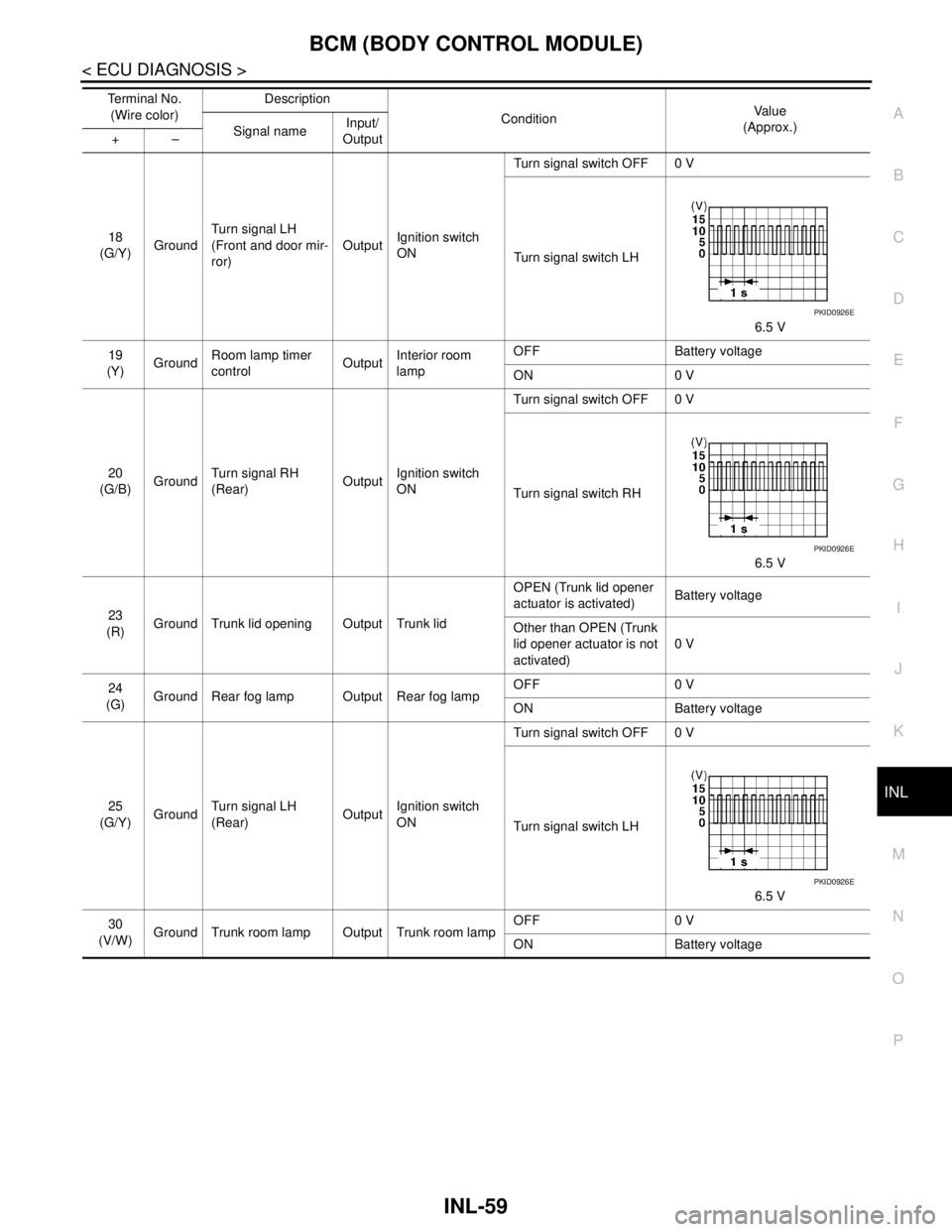
18
(G/Y)GroundTurn signal LH
(Front and door mir-
ror)OutputIgnition switch
ONTurn signal switch OFF 0 V
Turn signal switch LH
6.5 V
19
(Y)GroundRoom lamp timer
controlOutputInterior room
lampOFF Battery voltage
ON 0 V
20
(G/B)GroundTurn signal RH
(Rear)OutputIgnition switch
ONTurn signal switch OFF 0 V
Turn signal switch RH
6.5 V
23
(R)Ground Trunk lid opening Output Trunk lidOPEN (Trunk lid opener
actuator is activated)Battery voltage
Other than OPEN (Trunk
lid opener actuator is not
activated)0 V
24
(G)Ground Rear fog lamp Output Rear fog lampOFF 0 V
ON Battery voltage
25
(G/Y)GroundTurn signal LH
(Rear)OutputIgnition switch
ONTurn signal switch OFF 0 V
Turn signal switch LH
6.5 V
30
(V/W)Ground Trunk room lamp Output Trunk room lampOFF 0 V
ON Battery voltage Te r m i n a l N o .
(Wire color)Description
ConditionVa l u e
(Approx.)
Signal nameInput/
Output +–
PKID0926E
PKID0926E
PKID0926E
Page 2939 of 5121
INL-60
< ECU DIAGNOSIS >
BCM (BODY CONTROL MODULE)
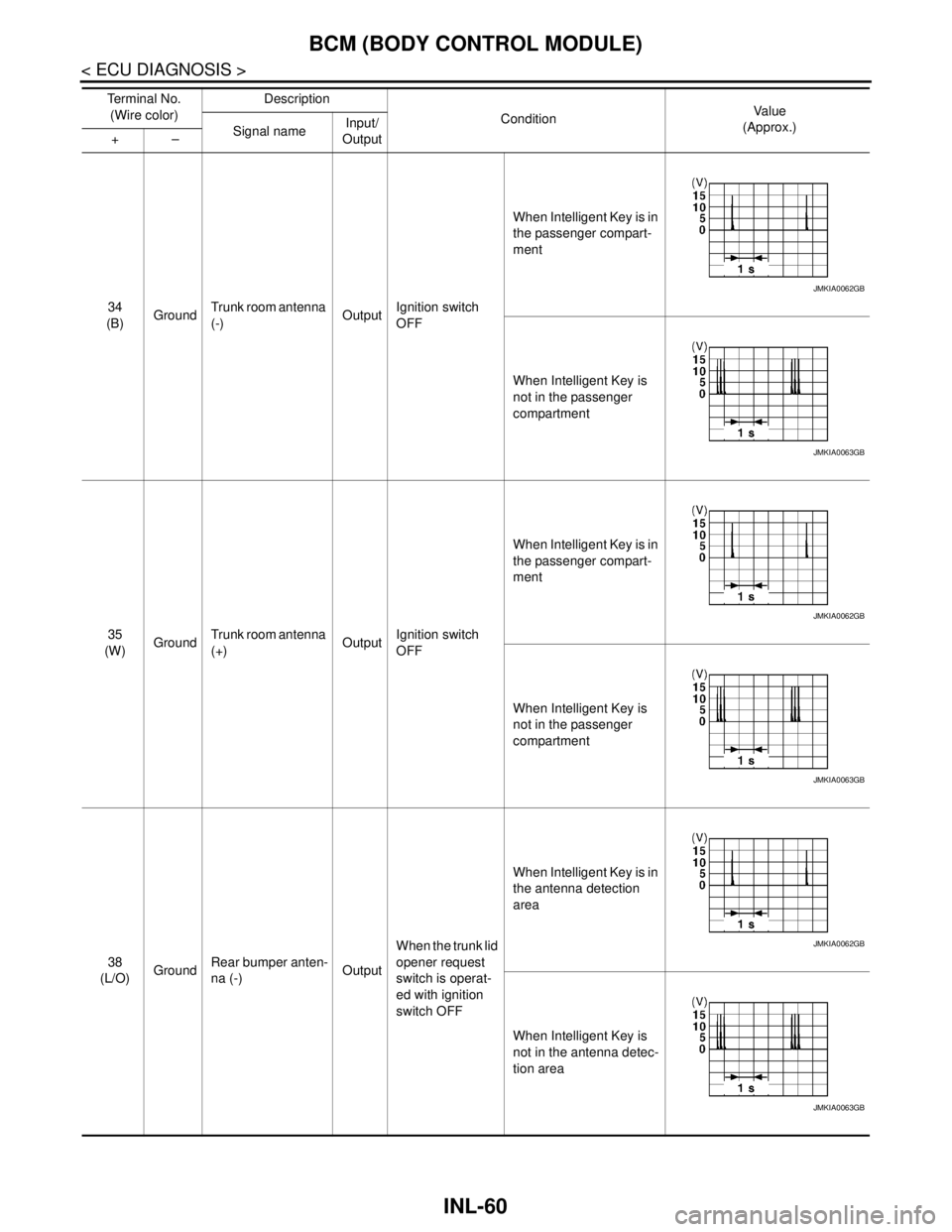
34
(B)GroundTrunk room antenna
(-)OutputIgnition switch
OFFWhen Intelligent Key is in
the passenger compart-
ment
When Intelligent Key is
not in the passenger
compartment
35
(W)GroundTrunk room antenna
(+)OutputIgnition switch
OFFWhen Intelligent Key is in
the passenger compart-
ment
When Intelligent Key is
not in the passenger
compartment
38
(L/O)GroundRear bumper anten-
na (-)OutputWhen the trunk lid
opener request
switch is operat-
ed with ignition
switch OFFWhen Intelligent Key is in
the antenna detection
area
When Intelligent Key is
not in the antenna detec-
tion area Te r m i n a l N o .
(Wire color)Description
ConditionVa l u e
(Approx.)
Signal nameInput/
Output +–
JMKIA0062GB
JMKIA0063GB
JMKIA0062GB
JMKIA0063GB
JMKIA0062GB
JMKIA0063GB
Page 2940 of 5121
BCM (BODY CONTROL MODULE)
INL-61
< ECU DIAGNOSIS >
C
D
E
F
G
H
I
J
K
MA
B
INL
N
O
P
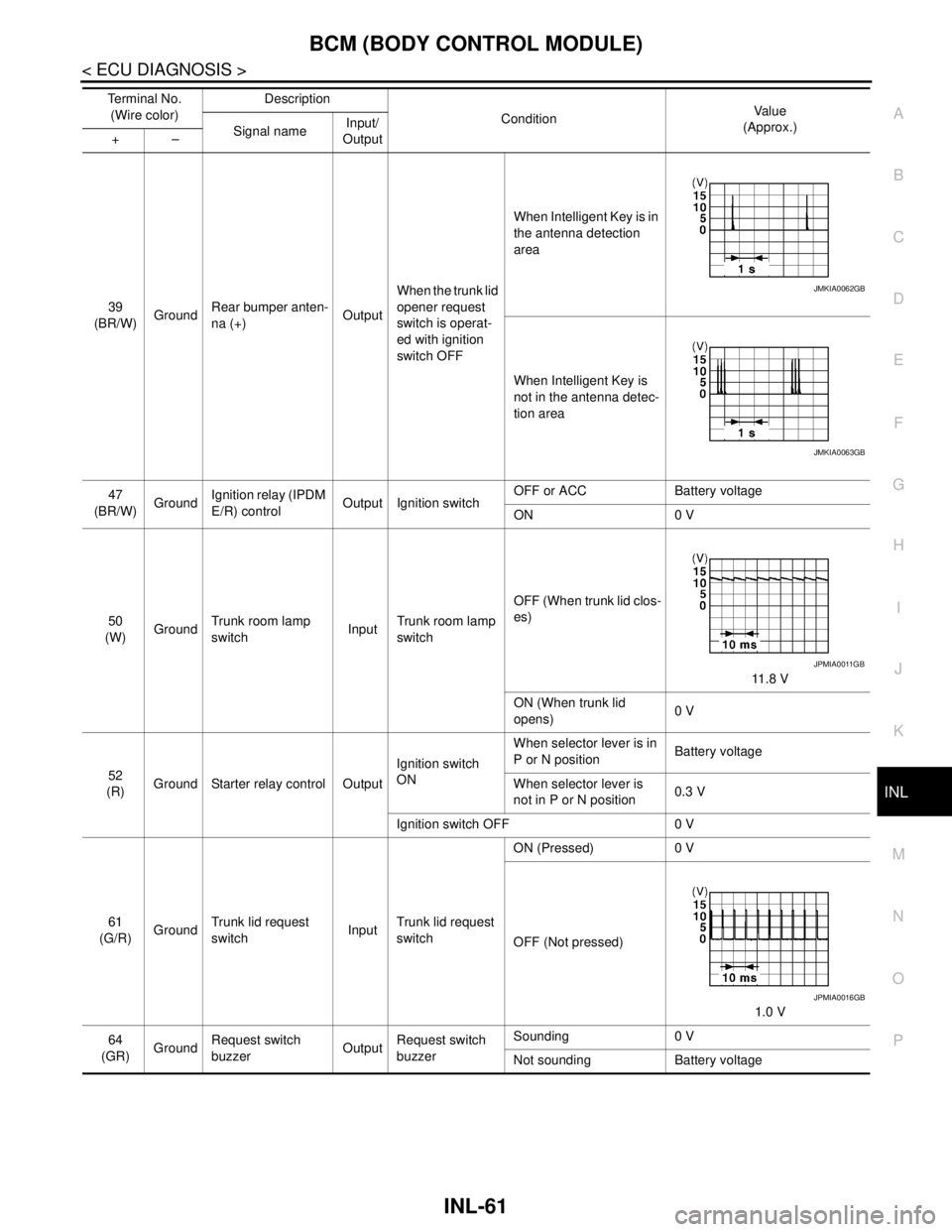
39
(BR/W)GroundRear bumper anten-
na (+)OutputWhen the trunk lid
opener request
switch is operat-
ed with ignition
switch OFFWhen Intelligent Key is in
the antenna detection
area
When Intelligent Key is
not in the antenna detec-
tion area
47
(BR/W)GroundIgnition relay (IPDM
E/R) controlOutput Ignition switchOFF or ACC Battery voltage
ON 0 V
50
(W)GroundTrunk room lamp
switchInputTrunk room lamp
switchOFF (When trunk lid clos-
es)
11.8 V
ON (When trunk lid
opens)0 V
52
(R)Ground Starter relay control OutputIgnition switch
ONWhen selector lever is in
P or N positionBattery voltage
When selector lever is
not in P or N position0.3 V
Ignition switch OFF 0 V
61
(G/R)GroundTrunk lid request
switchInputTrunk lid request
switchON (Pressed) 0 V
OFF (Not pressed)
1.0 V
64
(GR)GroundRequest switch
buzzerOutputRequest switch
buzzerSounding 0 V
Not sounding Battery voltage Te r m i n a l N o .
(Wire color)Description
ConditionVa l u e
(Approx.)
Signal nameInput/
Output +–
JMKIA0062GB
JMKIA0063GB
JPMIA0011GB
JPMIA0016GB
Page 2941 of 5121
INL-62
< ECU DIAGNOSIS >
BCM (BODY CONTROL MODULE)
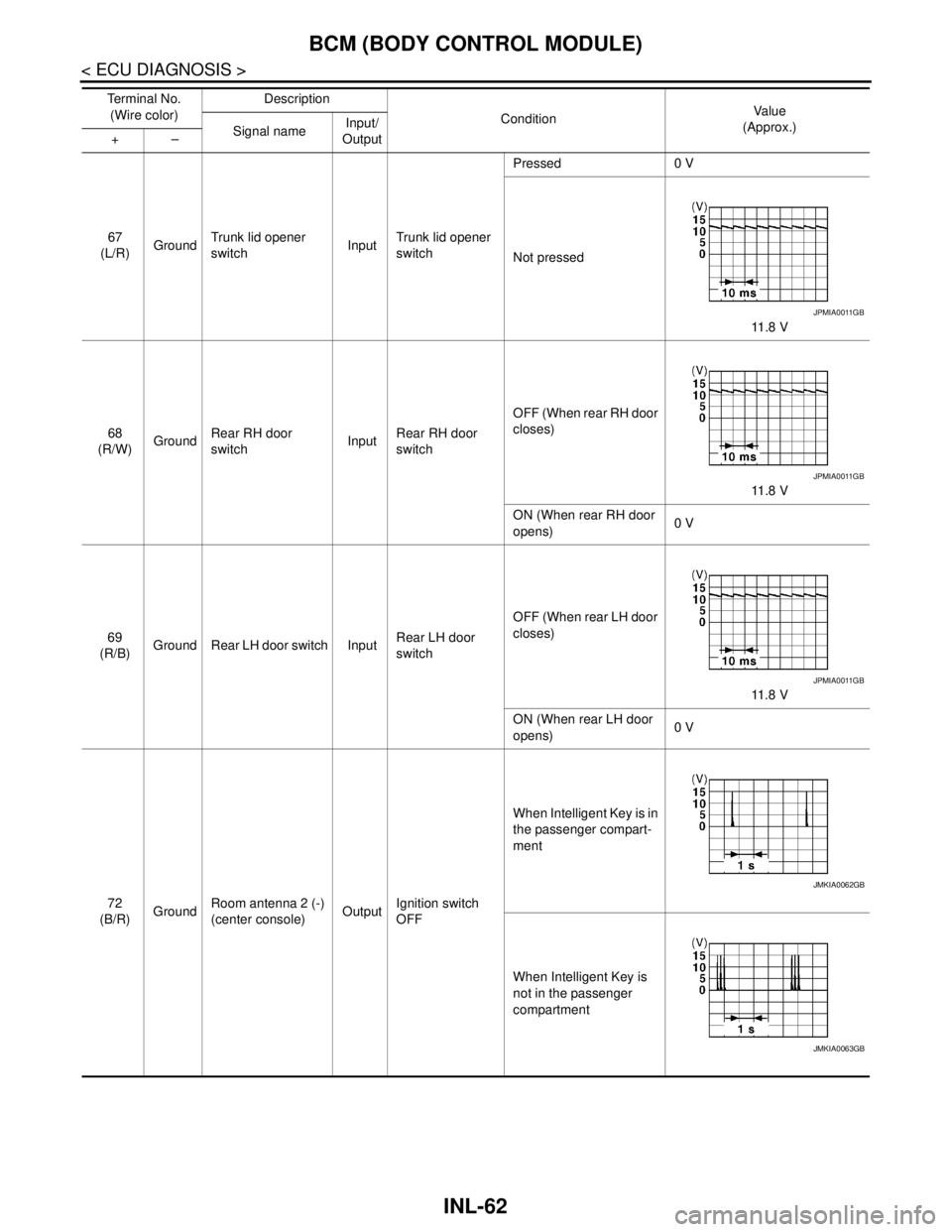
67
(L/R)GroundTrunk lid opener
switchInputTrunk lid opener
switchPressed 0 V
Not pressed
11 . 8 V
68
(R/W)GroundRear RH door
switchInputRear RH door
switchOFF (When rear RH door
closes)
11 . 8 V
ON (When rear RH door
opens)0 V
69
(R/B)Ground Rear LH door switch InputRear LH door
switchOFF (When rear LH door
closes)
11 . 8 V
ON (When rear LH door
opens)0 V
72
(B/R)GroundRoom antenna 2 (-)
(center console)OutputIgnition switch
OFFWhen Intelligent Key is in
the passenger compart-
ment
When Intelligent Key is
not in the passenger
compartment Te r m i n a l N o .
(Wire color)Description
ConditionVa l u e
(Approx.)
Signal nameInput/
Output +–
JPMIA0011GB
JPMIA0011GB
JPMIA0011GB
JMKIA0062GB
JMKIA0063GB
Page 2966 of 5121
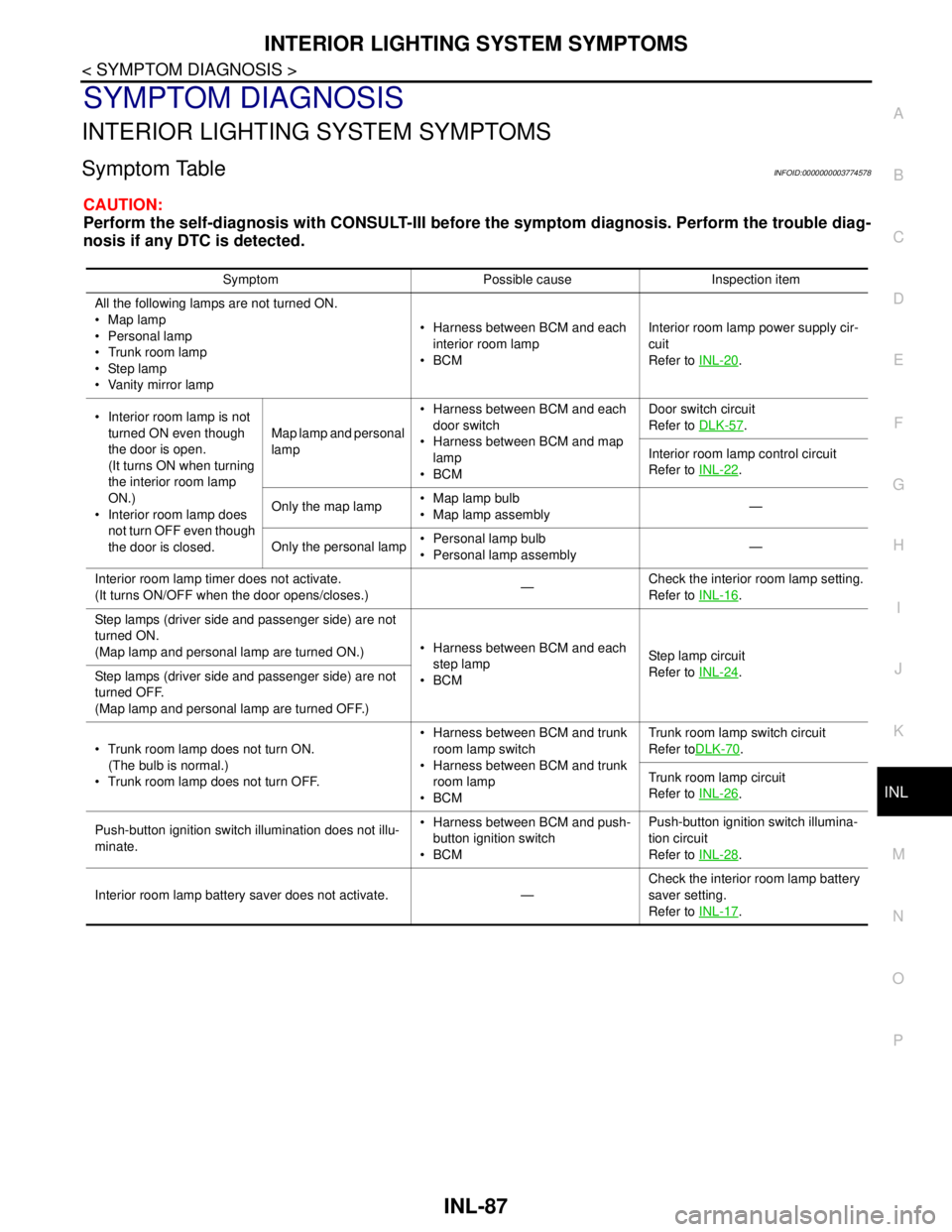
INTERIOR LIGHTING SYSTEM SYMPTOMS
INL-87
< SYMPTOM DIAGNOSIS >
C
D
E
F
G
H
I
J
K
MA
B
INL
N
O
P
SYMPTOM DIAGNOSIS
INTERIOR LIGHTING SYSTEM SYMPTOMS
Symptom TableINFOID:0000000003774578
CAUTION:
Perform the self-diagnosis with CONSULT-III before the symptom diagnosis. Perform the trouble diag-
nosis if any DTC is detected.
Symptom Possible cause Inspection item
All the following lamps are not turned ON.
Map lamp
Personal lamp
Trunk room lamp
Step lamp
Vanity mirror lamp Harness between BCM and each
interior room lamp
BCMInterior room lamp power supply cir-
cuit
Refer to INL-20
.
Interior room lamp is not
turned ON even though
the door is open.
(It turns ON when turning
the interior room lamp
ON.)
Interior room lamp does
not turn OFF even though
the door is closed.Map lamp and personal
lamp Harness between BCM and each
door switch
Harness between BCM and map
lamp
BCMDoor switch circuit
Refer to DLK-57
.
Interior room lamp control circuit
Refer to INL-22
.
Only the map lamp Map lamp bulb
Map lamp assembly—
Only the personal lamp Personal lamp bulb
Personal lamp assembly—
Interior room lamp timer does not activate.
(It turns ON/OFF when the door opens/closes.)—Check the interior room lamp setting.
Refer to INL-16
.
Step lamps (driver side and passenger side) are not
turned ON.
(Map lamp and personal lamp are turned ON.) Harness between BCM and each
step lamp
BCMStep lamp circuit
Refer to INL-24
.
Step lamps (driver side and passenger side) are not
turned OFF.
(Map lamp and personal lamp are turned OFF.)
Trunk room lamp does not turn ON.
(The bulb is normal.)
Trunk room lamp does not turn OFF. Harness between BCM and trunk
room lamp switch
Harness between BCM and trunk
room lamp
BCMTrunk room lamp switch circuit
Refer toDLK-70
.
Trunk room lamp circuit
Refer to INL-26
.
Push-button ignition switch illumination does not illu-
minate. Harness between BCM and push-
button ignition switch
BCMPush-button ignition switch illumina-
tion circuit
Refer to INL-28
.
Interior room lamp battery saver does not activate. —Check the interior room lamp battery
saver setting.
Refer to INL-17
.
Page 2976 of 5121
TRUNK ROOM LAMP
INL-97
< ON-VEHICLE REPAIR >
C
D
E
F
G
H
I
J
K
MA
B
INL
N
O
P
TRUNK ROOM LAMP
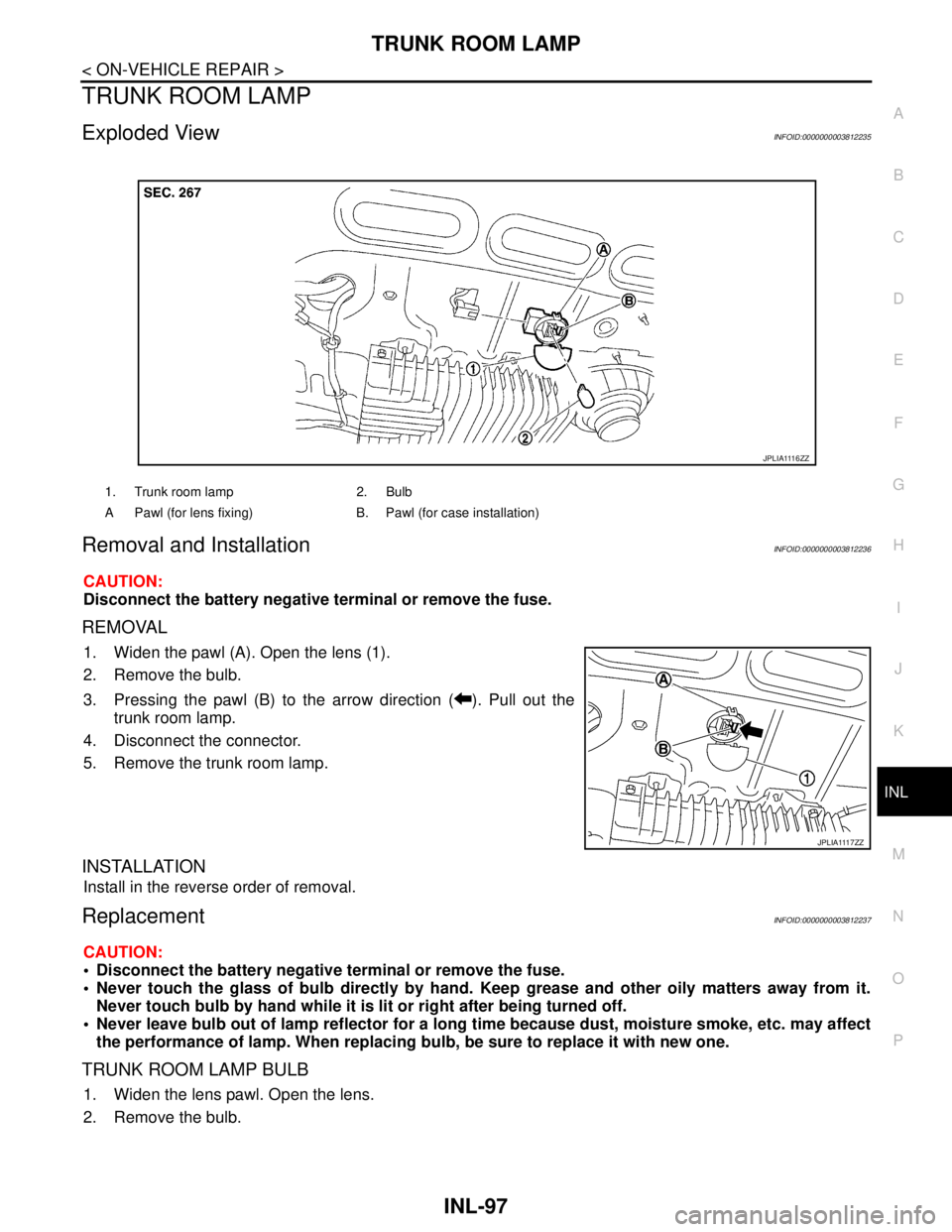
Exploded ViewINFOID:0000000003812235
Removal and InstallationINFOID:0000000003812236
CAUTION:
Disconnect the battery negative terminal or remove the fuse.
REMOVAL
1. Widen the pawl (A). Open the lens (1).
2. Remove the bulb.
3. Pressing the pawl (B) to the arrow direction ( ). Pull out the
trunk room lamp.
4. Disconnect the connector.
5. Remove the trunk room lamp.
INSTALLATION
Install in the reverse order of removal.
ReplacementINFOID:0000000003812237
CAUTION:
Disconnect the battery negative terminal or remove the fuse.
Never touch the glass of bulb directly by hand. Keep grease and other oily matters away from it.
Never touch bulb by hand while it is lit or right after being turned off.
Never leave bulb out of lamp reflector for a long time because dust, moisture smoke, etc. may affect
the performance of lamp. When replacing bulb, be sure to replace it with new one.
TRUNK ROOM LAMP BULB
1. Widen the lens pawl. Open the lens.
2. Remove the bulb.
1. Trunk room lamp 2. Bulb
A Pawl (for lens fixing) B. Pawl (for case installation)
J P L I A 111 6 Z Z
J P L I A 111 7 Z Z
Page 2977 of 5121

INL-98
< SERVICE DATA AND SPECIFICATIONS (SDS)
SERVICE DATA AND SPECIFICATIONS (SDS)
SERVICE DATA AND SPECIFICATIONS (SDS)
SERVICE DATA AND SPECIFICATIONS (SDS)
Bulb SpecificationsINFOID:0000000003774604
Item Type Wattage (W)
Push-button ignition switch illumination LED —
Map lamp Wedge 8
Mood lampMap lamp
LED — Front door grip
Rear door grip
Vanity mirror lamp — 2
Ashtray illumination Wedge 1.4
Glove box lamp Wedge 1.4
Ste p l am p We dg e 2. 7
Personal lamp Wedge 8
Trunk room lamp Wedge 3.4
Page 2979 of 5121

INT-2
Precaution for Supplemental Restraint System
(SRS) "AIR BAG" and "SEAT BELT PRE-TEN-
SIONER" .................................................................
27
Precaution Necessary for Steering Wheel Rota-
tion after Battery Disconnect ..................................
27
Precaution for Procedure without Cowl Top Cover ...28
Precaution for Work ................................................28
PREPARATION ...........................................29
PREPARATION .................................................29
Commercial Service Tools ......................................29
ON-VEHICLE REPAIR ................................30
FRONT DOOR FINISHER .................................30
DRIVER SIDE ............................................................30
DRIVER SIDE : Exploded View ..............................30
DRIVER SIDE : Removal and Installation ..............30
PASSENGER SIDE ...................................................32
PASSENGER SIDE : Exploded View .....................33
PASSENGER SIDE : Removal and Installation .....33
REAR DOOR FINISHER ....................................36
Exploded View ........................................................36
Removal and Installation ........................................36
BODY SIDE TRIM ..............................................39
Exploded View ........................................................39
Removal and Installation ........................................39
REAR PARCEL SHELF FINISHER ...................43
Exploded View ........................................................43
Removal and Installation ........................................43
REAR SUNSHADE ............................................45
Exploded View ........................................................45
Removal and Installation .........................................45
FLOOR TRIM .....................................................47
Exploded View ........................................................47
Removal and Installation .........................................47
HEADLINING .....................................................49
NORMAL ROOF ........................................................49
NORMAL ROOF : Exploded View ..........................49
NORMAL ROOF : Removal and Installation ...........50
SUNROOF .................................................................52
SUNROOF : Exploded View ...................................53
SUNROOF : Removal and Installation ....................54
TRUNK ROOM TRIM .........................................57
Exploded View ........................................................57
Removal and Installation .........................................57
TRUNK LID TRIM ..............................................59
Exploded View ........................................................59
Removal and Installation .........................................59
REAR SUNSHADE CONTROL UNIT ................61
Exploded View ........................................................61
Removal and Installation .........................................61
REAR SUNSHADE SWITCH .............................62
FRONT .......................................................................62
FRONT : Exploded View .........................................62
FRONT : Removal and Installation .........................62
REAR .........................................................................62
REAR : Exploded View ...........................................63
REAR : Removal and Installation ............................63
Page 2981 of 5121
INT-4
< FUNCTION DIAGNOSIS >
REAR SUNSHADE SYSTEM
FUNCTION DIAGNOSIS
REAR SUNSHADE SYSTEM
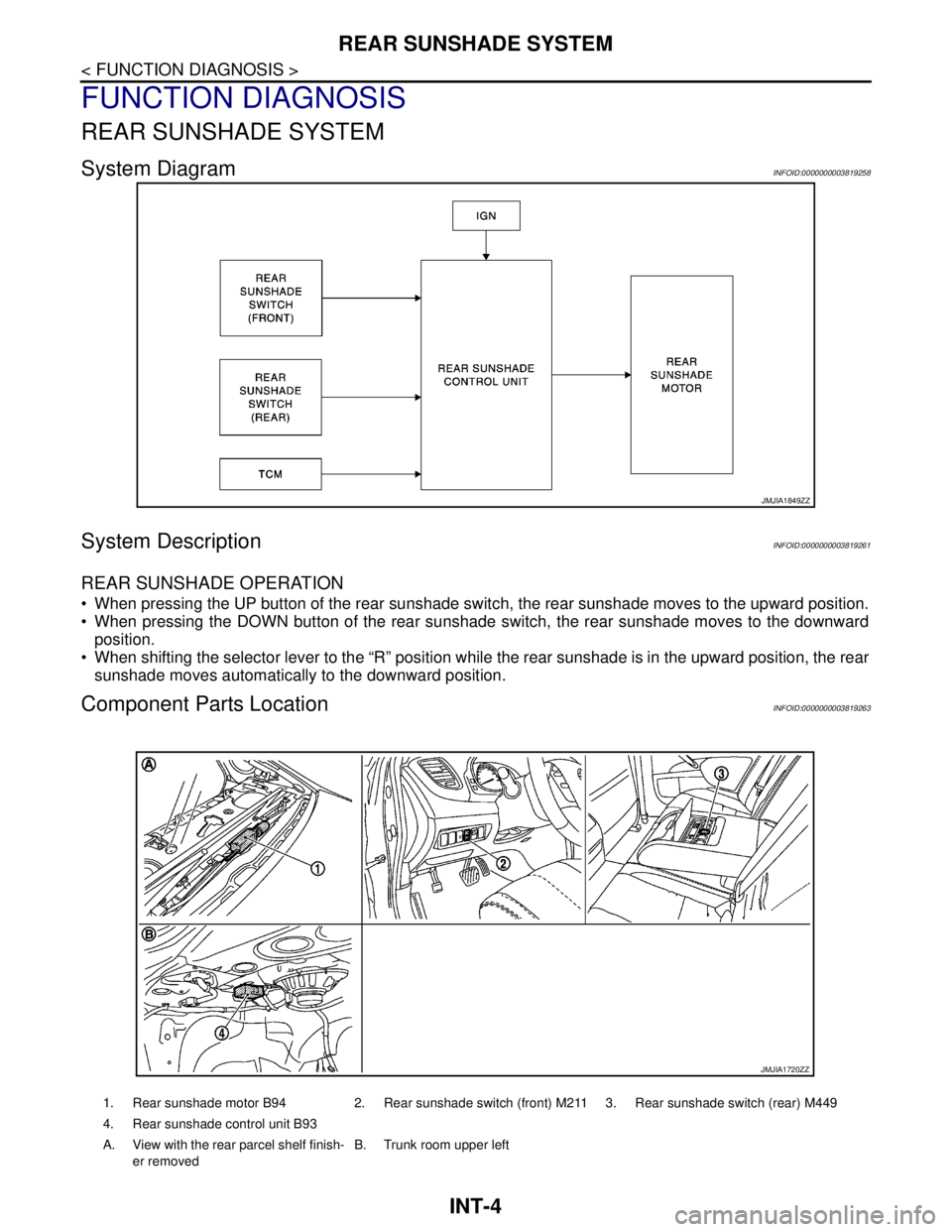
System DiagramINFOID:0000000003819258
System DescriptionINFOID:0000000003819261
REAR SUNSHADE OPERATION
When pressing the UP button of the rear sunshade switch, the rear sunshade moves to the upward position.
When pressing the DOWN button of the rear sunshade switch, the rear sunshade moves to the downward
position.
When shifting the selector lever to the “R” position while the rear sunshade is in the upward position, the rear
sunshade moves automatically to the downward position.
Component Parts LocationINFOID:0000000003819263
JMJIA1849ZZ
1. Rear sunshade motor B94 2. Rear sunshade switch (front) M211 3. Rear sunshade switch (rear) M449
4. Rear sunshade control unit B93
A. View with the rear parcel shelf finish-
er removedB. Trunk room upper left
JMJIA1720ZZ