gear switch NISSAN TEANA 2008 User Guide
[x] Cancel search | Manufacturer: NISSAN, Model Year: 2008, Model line: TEANA, Model: NISSAN TEANA 2008Pages: 5121, PDF Size: 69.03 MB
Page 1695 of 5121
![NISSAN TEANA 2008 User Guide EC-234
< COMPONENT DIAGNOSIS >[VQ25DE, VQ35DE]
P0500 VSS
P0500 VSS
DescriptionINFOID:0000000003856685
The vehicle speed signal is sent to the combination meter from the “ABS actuator and electric un](/img/5/57391/w960_57391-1694.png "NISSAN TEANA 2008 User Guide EC-234
< COMPONENT DIAGNOSIS >[VQ25DE, VQ35DE]
P0500 VSS
P0500 VSS
DescriptionINFOID:0000000003856685
The vehicle speed signal is sent to the combination meter from the “ABS actuator and electric un")
EC-234
< COMPONENT DIAGNOSIS >[VQ25DE, VQ35DE]
P0500 VSS
P0500 VSS
DescriptionINFOID:0000000003856685
The vehicle speed signal is sent to the combination meter from the “ABS actuator and electric unit (control
unit)” by CAN communication line. The combination meter then sends a signal to the ECM by CAN communi-
cation line.
DTC LogicINFOID:0000000003856686
DTC DETECTION LOGIC
NOTE:
If DTC P0500 is displayed with DTC U1000 or U1001, first perform the trouble diagnosis for DTC
U1000, U1001. Refer to EC-135, "
DTC Logic".
If DTC P0500 is displayed with DTC P0607, first perform the trouble diagnosis for DTC P0607. Refer
to EC-242, "
DTC Logic".
DTC CONFIRMATION PROCEDURE
1.INSPECTION START
Will CONSULT-III be used?
Will CONSULT-III be used?
YES >> GO TO 2.
NO >> GO TO 5.
2.PRECONDITIONING
If DTC Confirmation Procedure has been previously conducted, always turn ignition switch OFF and wait at
least 10 seconds before conducting the next test.
>> GO TO 3.
3.CHECK VEHICLE SPEED SIGNAL
NOTE:
This procedure may be conducted with the drive wheels lifted in the shop or by driving the vehicle. If a
road test is expected to be easier, it is unnecessary to lift the vehicle.
With CONSULT-III
1. Start engine (VDC switch OFF).
2. Read “VHCL SPEED SE” in “DATA MONITOR” mode with CONSULT-III. The vehicle speed on CON-
SULT-III should exceed 10 km/h (6 MPH) when rotating wheels with suitable gear position.
Is the inspection result normal?
YES >> GO TO 4.
NO >> Go to EC-235, "
Diagnosis Procedure".
4.PERFORM DTC CONFIRMATION PROCEDURE
1. Select “DATA MONITOR” mode with CONSULT-III.
2. Warm engine up to normal operating temperature.
3. Maintain the following conditions for at least 50 consecutive seconds.
CAUTION:
DTC No. Trouble diagnosis name DTC detecting condition Possible cause
P0500 Vehicle speed sensorThe almost 0 km/h (0 MPH) signal from
vehicle speed signal is sent to ECM even
when vehicle is being driven. Harness or connectors
(The CAN communication line is open or short-
ed)
Harness or connectors
(The vehicle speed signal circuit is open or
shorted)
Wheel sensor
Combination meter
ABS actuator and electric unit (control unit)
Page 4390 of 5121
PRECAUTIONS
SRC-147
< PRECAUTION >
C
D
E
F
G
I
J
K
L
MA
B
SRC
N
O
P
PRECAUTION
PRECAUTIONS
Precaution for Supplemental Restraint System (SRS) "AIR BAG" and "SEAT BELT
PRE-TENSIONER"
INFOID:0000000003814141
The Supplemental Restraint System such as “AIR BAG” and “SEAT BELT PRE-TENSIONER”, used along
with a front seat belt, helps to reduce the risk or severity of injury to the driver and front passenger for certain
types of collision. Information necessary to service the system safely is included in the “SRS AIRBAG” and
“SEAT BELT” of this Service Manual.
WARNING:
To avoid rendering the SRS inoperative, which could increase the risk of personal injury or death in
the event of a collision which would result in air bag inflation, all maintenance must be performed by
an authorized NISSAN/INFINITI dealer.
Improper maintenance, including incorrect removal and installation of the SRS, can lead to personal
injury caused by unintentional activation of the system. For removal of Spiral Cable and Air Bag
Module, see the “SRS AIRBAG”.
Never use electrical test equipment on any circuit related to the SRS unless instructed to in this Ser-
vice Manual. SRS wiring harnesses can be identified by yellow and/or orange harnesses or harness
connectors.
ServiceINFOID:0000000003814109
Do not use electrical test equipment to check SRS circuits unless instructed to in this Service Manual.
Before servicing the SRS, turn ignition switch OFF, disconnect battery negative terminal and wait at least 3
minutes.
For approximately 3 minutes after the battery negative terminal is removed, it is still possible for the air bag
and seat belt pre-tensioner to deploy. Therefore, do not work on any SRS connectors or wires until at least 3
minutes have elapsed.
Diagnosis sensor unit must always be installed with their arrow marks “⇐” pointing towards the front of the
vehicle for proper operation. Also check diagnosis sensor unit for cracks, deformities or rust before installa-
tion and replace as required.
The spiral cable must be aligned in the neutral position since its rotations are limited. Do not turn steering
wheel and column after removal of steering gear.
Handle air bag module carefully. Always place driver and front passenger air bag modules with the pad side
facing upward and seat mounted front side air bag module standing with the stud bolt side facing down.
Conduct self-diagnosis to check entire SRS for proper function after replacing any components.
After air bag inflates, the front instrument panel assembly should be replaced if damaged.
Always replace instrument panel pad following front passenger air bag deployment.
Page 4393 of 5121
PRECAUTIONS
ST-3
< PRECAUTION >
C
D
E
F
H
I
J
K
L
MA
B
ST
N
O
P
PRECAUTION
PRECAUTIONS
Precaution for Supplemental Restraint System (SRS) "AIR BAG" and "SEAT BELT
PRE-TENSIONER"
INFOID:0000000003971958
The Supplemental Restraint System such as “AIR BAG” and “SEAT BELT PRE-TENSIONER”, used along
with a front seat belt, helps to reduce the risk or severity of injury to the driver and front passenger for certain
types of collision. Information necessary to service the system safely is included in the “SRS AIRBAG” and
“SEAT BELT” of this Service Manual.
WARNING:
• To avoid rendering the SRS inoperative, which could increase the risk of personal injury or death in
the event of a collision which would result in air bag inflation, all maintenance must be performed by
an authorized NISSAN/INFINITI dealer.
Improper maintenance, including incorrect removal and installation of the SRS, can lead to personal
injury caused by unintentional activation of the system. For removal of Spiral Cable and Air Bag
Module, see the “SRS AIRBAG”.
Never use electrical test equipment on any circuit related to the SRS unless instructed to in this Ser-
vice Manual. SRS wiring harnesses can be identified by yellow and/or orange harnesses or harness
connectors.
Precaution Necessary for Steering Wheel Rotation after Battery Disconnect
INFOID:0000000003806307
NOTE:
Before removing and installing any control units, first turn the push-button ignition switch to the LOCK posi-
tion, then disconnect both battery cables.
After finishing work, confirm that all control unit connectors are connected properly, then re-connect both
battery cables.
Always use CONSULT-III to perform self-diagnosis as a part of each function inspection after finishing work.
If a DTC is detected, perform trouble diagnosis according to self-diagnosis results.
This vehicle is equipped with a push-button ignition switch and a steering lock unit.
If the battery is disconnected or discharged, the steering wheel will lock and cannot be turned.
If turning the steering wheel is required with the battery disconnected or discharged, follow the procedure
below before starting the repair operation.
OPERATION PROCEDURE
1. Connect both battery cables.
NOTE:
Supply power using jumper cables if battery is discharged.
2. Carry the Intelligent Key or insert it to the key slot and turn the push-button ignition switch to ACC position.
(At this time, the steering lock will be released.)
3. Disconnect both battery cables. The steering lock will remain released with both battery cables discon-
nected and the steering wheel can be turned.
4. Perform the necessary repair operation.
5. When the repair work is completed, re-connect both battery cables. With the brake pedal released, turn
the push-button ignition switch from ACC position to ON position, then to LOCK position. (The steering
wheel will lock when the push-button ignition switch is turned to LOCK position.)
6. Perform self-diagnosis check of all control units using CONSULT-III.
Service Notice or Precautions for Steering SystemINFOID:0000000003806308
CAUTION:
In case of removing steering gear assembly, make the final tightening with grounded and unloaded
vehicle condition, and then check wheel alignment.
Observe the following precautions when disassembling.
- Before disassembly, thoroughly clean the outside of the unit.
- Disassembly should be done in a clean work area. It is important to prevent the internal parts from
becoming contaminated by dirt or other foreign matter.
Page 4404 of 5121
ST-14
< ON-VEHICLE REPAIR >
STEERING COLUMN
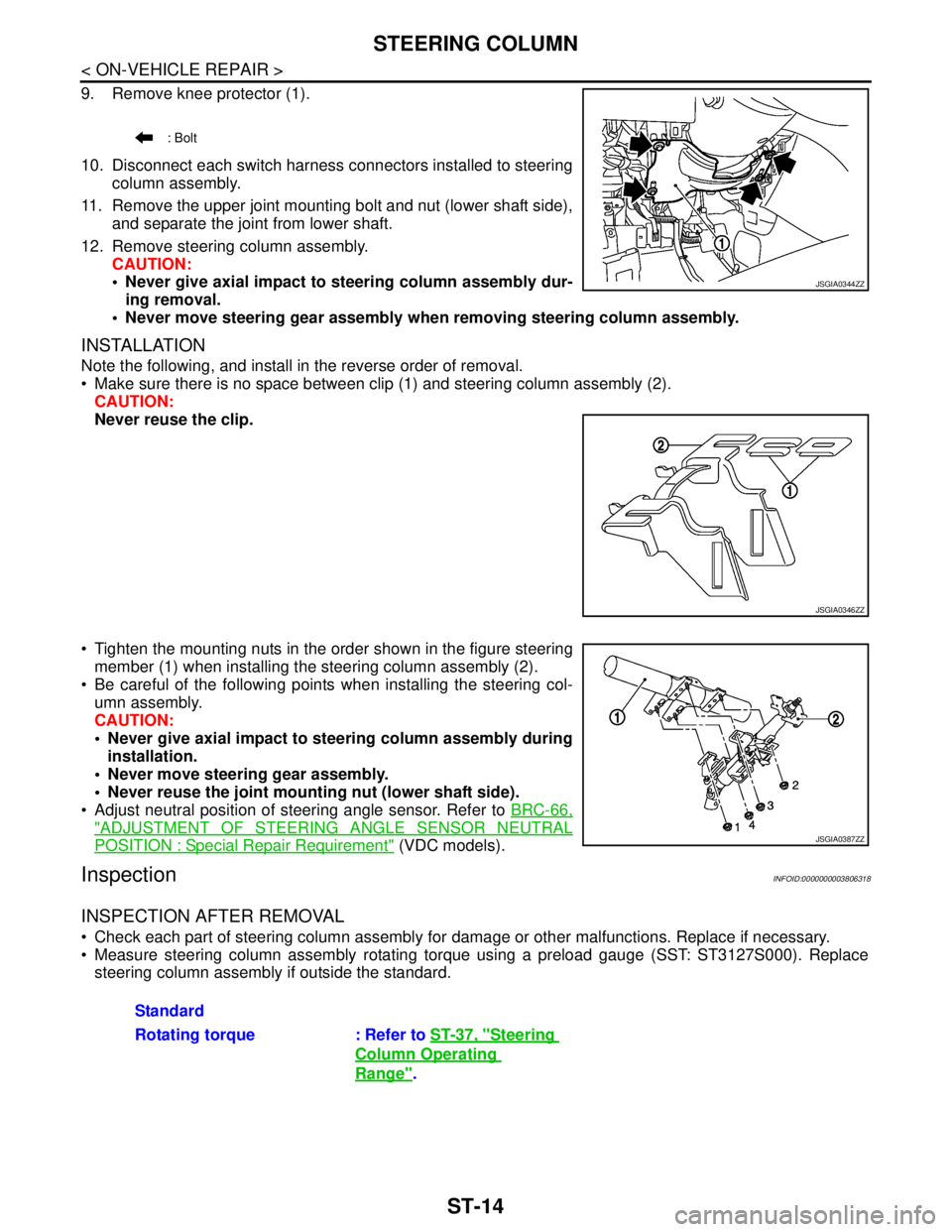
9. Remove knee protector (1).
10. Disconnect each switch harness connectors installed to steering
column assembly.
11. Remove the upper joint mounting bolt and nut (lower shaft side),
and separate the joint from lower shaft.
12. Remove steering column assembly.
CAUTION:
Never give axial impact to steering column assembly dur-
ing removal.
Never move steering gear assembly when removing steering column assembly.
INSTALLATION
Note the following, and install in the reverse order of removal.
Make sure there is no space between clip (1) and steering column assembly (2).
CAUTION:
Never reuse the clip.
Tighten the mounting nuts in the order shown in the figure steering
member (1) when installing the steering column assembly (2).
Be careful of the following points when installing the steering col-
umn assembly.
CAUTION:
Never give axial impact to steering column assembly during
installation.
Never move steering gear assembly.
Never reuse the joint mounting nut (lower shaft side).
Adjust neutral position of steering angle sensor. Refer to BRC-66,
"ADJUSTMENT OF STEERING ANGLE SENSOR NEUTRAL
POSITION : Special Repair Requirement" (VDC models).
InspectionINFOID:0000000003806318
INSPECTION AFTER REMOVAL
Check each part of steering column assembly for damage or other malfunctions. Replace if necessary.
Measure steering column assembly rotating torque using a preload gauge (SST: ST3127S000). Replace
steering column assembly if outside the standard.
: Bolt
JSGIA0344ZZ
JSGIA0346ZZ
JSGIA0387ZZ
Standard
Rotating torque : Refer to ST-37, "
Steering
Column Operating
Range".
Page 4435 of 5121
POWER STEERING SOLENOID VALVE
STC-7
< COMPONENT DIAGNOSIS >
C
D
E
F
H
I
J
K
L
MA
B
STC
N
O
P
POWER STEERING SOLENOID VALVE
DescriptionINFOID:0000000003893528
Power steering solenoid valve controls the power steering oil pressure in the gear housing assembly.
Diagnosis ProcedureINFOID:0000000003893529
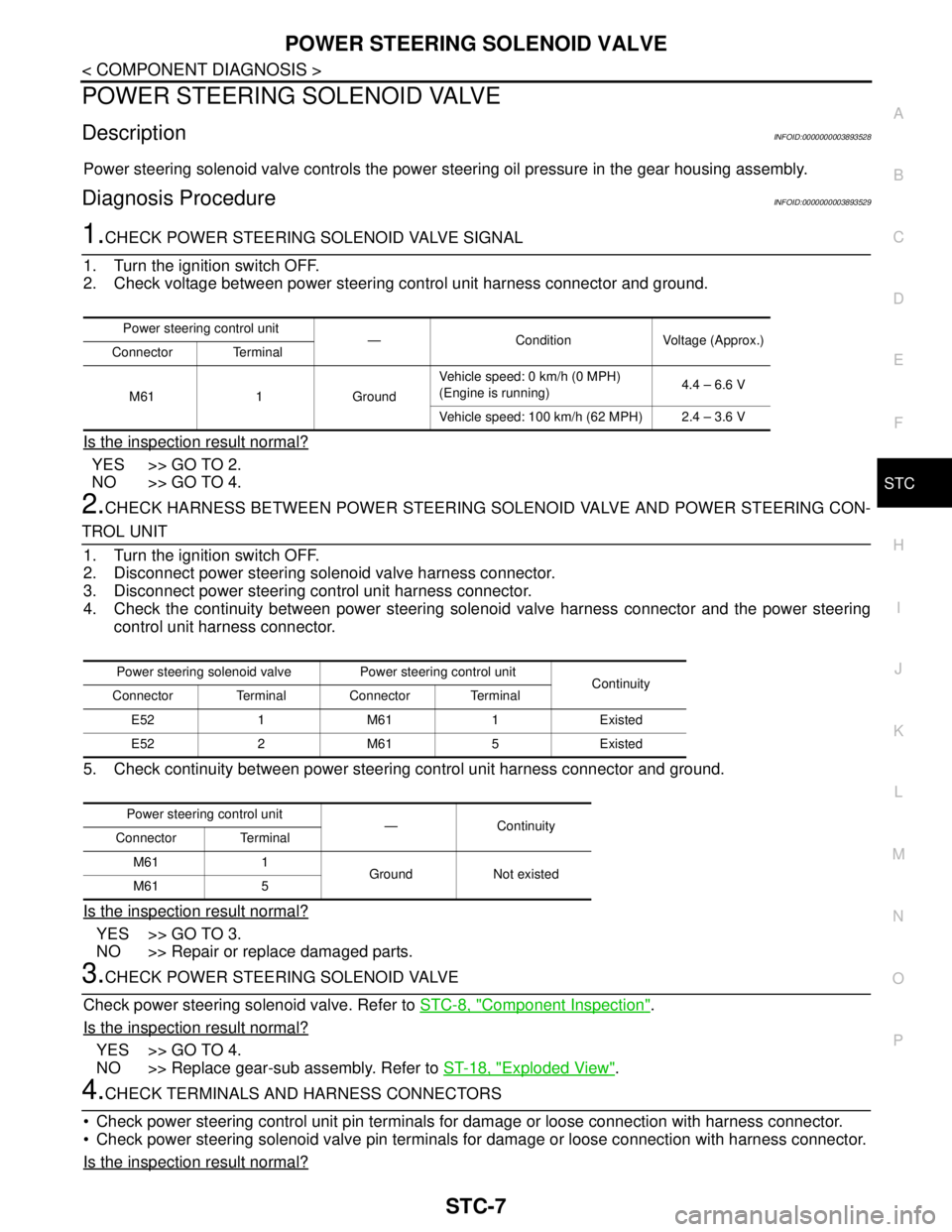
1.CHECK POWER STEERING SOLENOID VALVE SIGNAL
1. Turn the ignition switch OFF.
2. Check voltage between power steering control unit harness connector and ground.
Is the inspection result normal?
YES >> GO TO 2.
NO >> GO TO 4.
2.CHECK HARNESS BETWEEN POWER STEERING SOLENOID VALVE AND POWER STEERING CON-
TROL UNIT
1. Turn the ignition switch OFF.
2. Disconnect power steering solenoid valve harness connector.
3. Disconnect power steering control unit harness connector.
4. Check the continuity between power steering solenoid valve harness connector and the power steering
control unit harness connector.
5. Check continuity between power steering control unit harness connector and ground.
Is the inspection result normal?
YES >> GO TO 3.
NO >> Repair or replace damaged parts.
3.CHECK POWER STEERING SOLENOID VALVE
Check power steering solenoid valve. Refer to STC-8, "
Component Inspection".
Is the inspection result normal?
YES >> GO TO 4.
NO >> Replace gear-sub assembly. Refer to ST-18, "
Exploded View".
4.CHECK TERMINALS AND HARNESS CONNECTORS
Check power steering control unit pin terminals for damage or loose connection with harness connector.
Check power steering solenoid valve pin terminals for damage or loose connection with harness connector.
Is the inspection result normal?
Power steering control unit
— Condition Voltage (Approx.)
Connector Terminal
M61 1 GroundVehicle speed: 0 km/h (0 MPH)
(Engine is running)4.4 – 6.6 V
Vehicle speed: 100 km/h (62 MPH) 2.4 – 3.6 V
Power steering solenoid valve Power steering control unit
Continuity
Connector Terminal Connector Terminal
E52 1 M61 1 Existed
E52 2 M61 5 Existed
Power steering control unit
—Continuity
Connector Terminal
M61 1
Ground Not existed
M61 5
Page 4436 of 5121

STC-8
< COMPONENT DIAGNOSIS >
POWER STEERING SOLENOID VALVE
YES >> INSPECTION END
NO >> Repair or replace damaged parts.
Component InspectionINFOID:0000000003893530
1.CHECK POWER STEERING SOLENOID VALVE
1. Turn the ignition switch OFF.
2. Disconnect power steering solenoid valve harness connector.
3. Check resistance between power steering solenoid valve connector terminals.
4. Check power steering solenoid valve by listening for its operation sound while applying battery voltage to
power steering solenoid valve connector E52 terminals 1 (positive) and 2 (negative).
Is the inspection result normal?
YES >> INSPECTION END
NO >> Replace gear-sub assembly. Refer to ST-18, "
Exploded View".
Power steering solenoid valve
Resistance (Approx.)
Connector Terminal
E52 1 2 4 – 6 Ω
Page 4450 of 5121
DIAGNOSIS AND REPAIR WORKFLOW
STR-3
< BASIC INSPECTION >
C
D
E
F
G
H
I
J
K
L
MA
STR
N
P O
NOTE:
If any malfunction is found, immediately disconnect the battery cable from the negative terminal.
1.CHECK ENGINE START
Crank the engine and check that the engine starts.
Does the engine start?
YES >> GO TO 2.
NO >> GO TO 3.
2.CHECK THAT THE STARTER MOTOR STOPS
Check that the starter motor stops after starting the engine.
Does the starter motor stop?
YES >> INSPECTION END
NO >> Replace magnetic switch.
3.CHECK THE ENGINE SPEED WITH CRANKING
Check that the engine turns at cranking.
Does engine turn by cranking?
YES >> GO TO 4.
NO >> GO TO 5.
4.CHECK THE ENGINE SPEED WITH CRANKING
Check that the engine speed is not low at cranking.
Does engine turn normally?
YES >> Check ignition/fuel system.
NO >> Check charge condition, corrosion and connection condition of the battery. Refer to STR-2, "
Work
Flow".
5.CHECK STARTER MOTOR ACTIVATION
Check that the starter motor turns at cranking.
Does starter motor turn?
YES >> GO TO 6.
NO >> GO TO 7.
6.CHECK STARTER MOTOR UNIT
1. Remove starter motor.
2. Check that the gear shaft of starter motor rotates.
Does gear shaft turn?
YES >> Check pinion clutch. Refer to the following.
• VQ25DE models: STR-16, "
VQ25DE : Inspection"
VQ35DE models: STR-22, "VQ35DE : Inspection"
NO >> Check reduction gear, armature and gear shaft.
7.CHECK POWER SUPPLY CIRCUIT
Check the following conditions.
Fuse and fusible link
Charge condition, corrosion and connection condition of the battery. Refer to STR-2, "
Work Flow".
Are these inspection results normal?
YES >> GO TO 8.
NO >> Repair as needed.
8.CHECK STARTING SYSTEM WIRING
Check the following.
“B” terminal circuit. Refer to STR-8, "
Diagnosis Procedure".
“S” terminal circuit. Refer to STR-9, "
Diagnosis Procedure".
Are these inspection results normal?
YES >> GO TO 9.
Page 4451 of 5121
STR-4
< BASIC INSPECTION >
DIAGNOSIS AND REPAIR WORKFLOW
NO >> Repair as needed.
9.CHECK MAGNETIC SWITCH OPERATION SOUND
Check that a magnetic switch operation sound can be heard when the ignition switch is set at the starting posi-
tion.
Does magnetic switch operation sound occur?
YES >> GO TO 10.
NO >> Replace magnetic switch.
10.PINION AND RING GEAR ENGAGEMENT CHECK
Check condition of pinion and ring gear mesh.
Is the inspection result normal?
YES >> GO TO 12.
NO >> GO TO 11.
11 .CHECK STARTER MOTOR UNIT
Check the following.
Adjust pinion movement. Refer to the following.
- VQ25DE models: STR-16, "
VQ25DE : Inspection"
- VQ35DE models: STR-22, "VQ35DE : Inspection"
Check pinion moving mechanism.
Check ring gear.
Are these inspection results normal?
YES >> INSPECTION END
NO >> Repair or replace, if necessary.
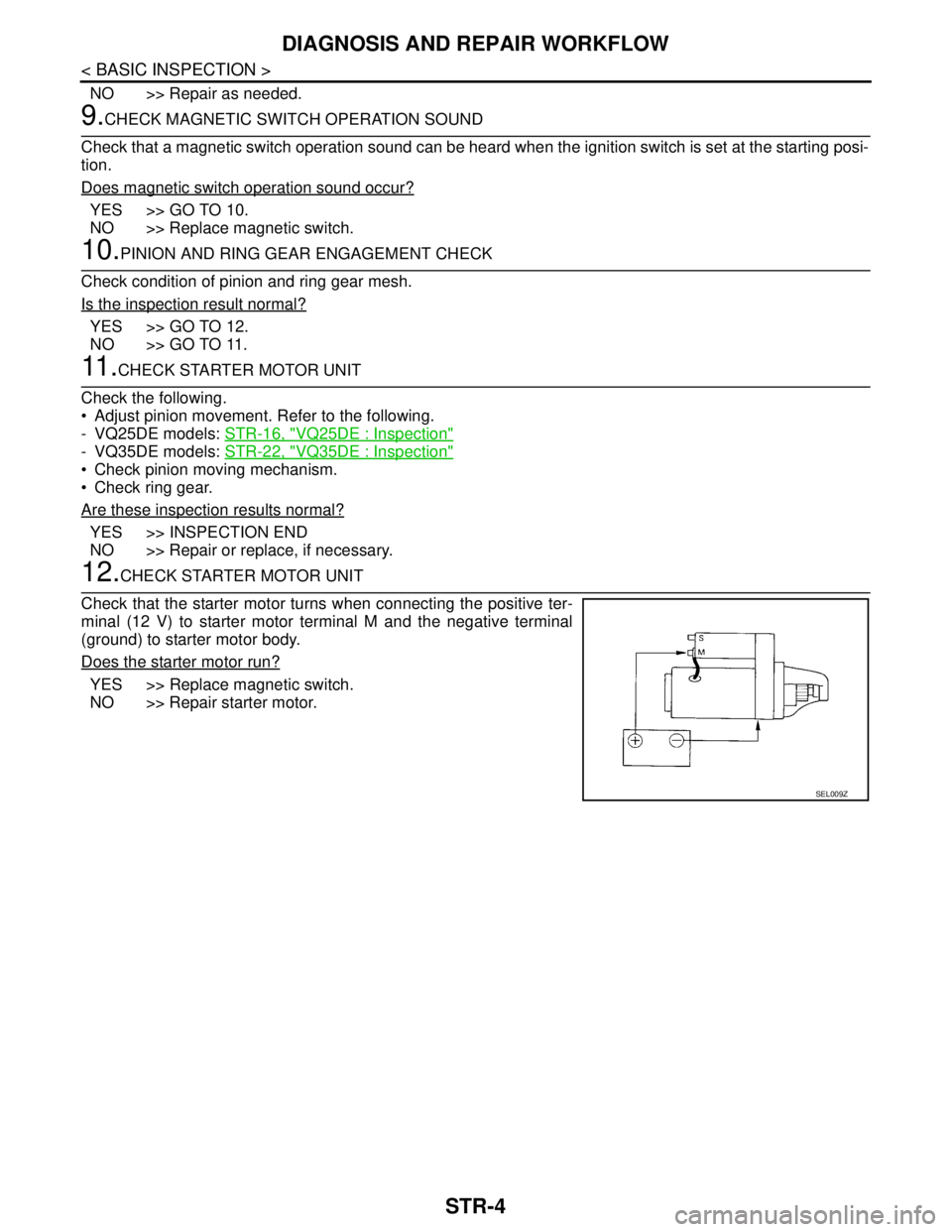
12.CHECK STARTER MOTOR UNIT
Check that the starter motor turns when connecting the positive ter-
minal (12 V) to starter motor terminal M and the negative terminal
(ground) to starter motor body.
Does the starter motor run?
YES >> Replace magnetic switch.
NO >> Repair starter motor.
SEL009Z
Page 4463 of 5121
STR-16
< ON-VEHICLE REPAIR >
STARTER MOTOR
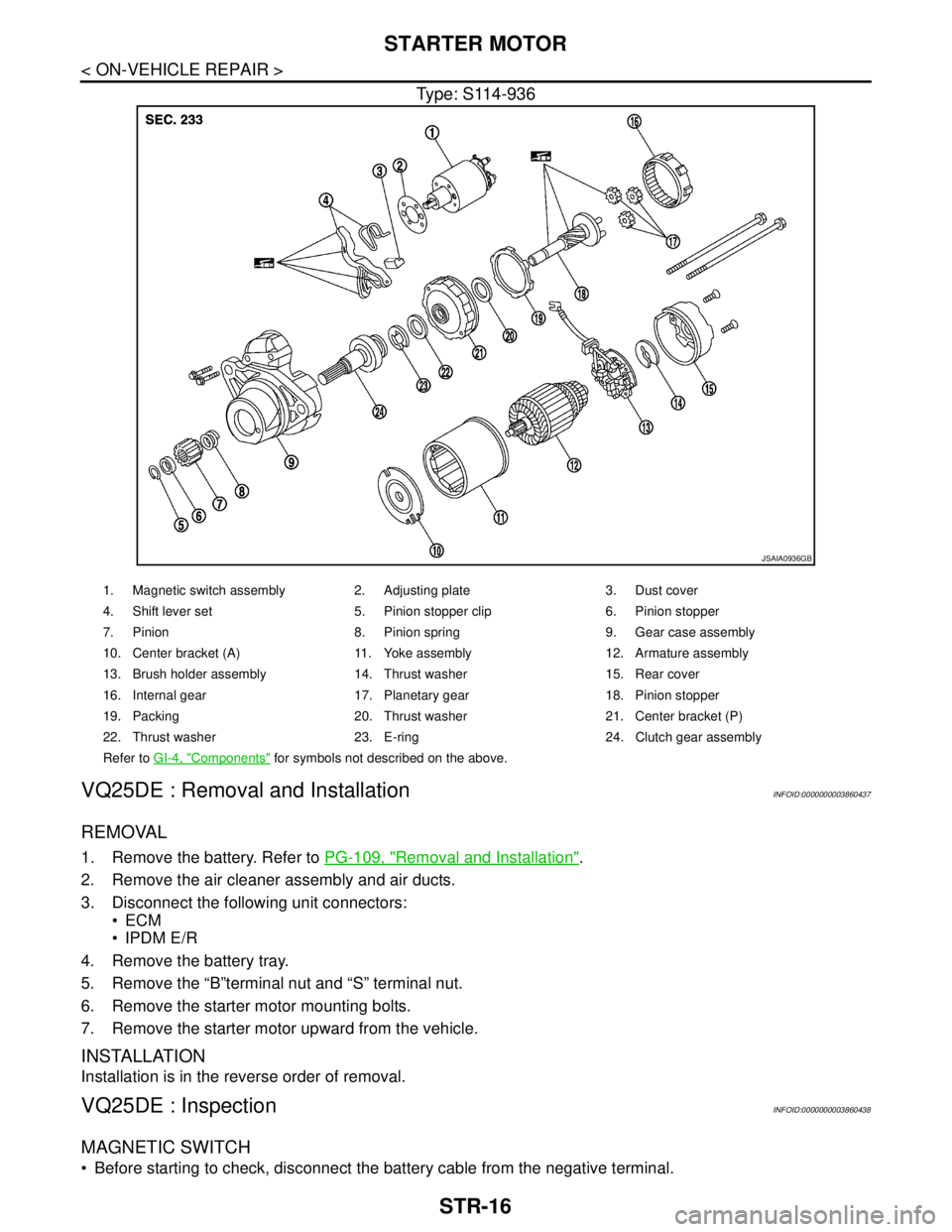
Type: S114-936
VQ25DE : Removal and InstallationINFOID:0000000003860437
REMOVAL
1. Remove the battery. Refer to PG-109, "Removal and Installation".
2. Remove the air cleaner assembly and air ducts.
3. Disconnect the following unit connectors:
ECM
IPDM E/R
4. Remove the battery tray.
5. Remove the “B”terminal nut and “S” terminal nut.
6. Remove the starter motor mounting bolts.
7. Remove the starter motor upward from the vehicle.
INSTALLATION
Installation is in the reverse order of removal.
VQ25DE : InspectionINFOID:0000000003860438
MAGNETIC SWITCH
Before starting to check, disconnect the battery cable from the negative terminal.
JSAIA0936GB
1. Magnetic switch assembly 2. Adjusting plate 3. Dust cover
4. Shift lever set 5. Pinion stopper clip 6. Pinion stopper
7. Pinion 8. Pinion spring 9. Gear case assembly
10. Center bracket (A) 11. Yoke assembly 12. Armature assembly
13. Brush holder assembly 14. Thrust washer 15. Rear cover
16. Internal gear 17. Planetary gear 18. Pinion stopper
19. Packing 20. Thrust washer 21. Center bracket (P)
22. Thrust washer 23. E-ring 24. Clutch gear assembly
Refer to GI-4, "
Components" for symbols not described on the above.
Page 4468 of 5121
STARTER MOTOR
STR-21
< ON-VEHICLE REPAIR >
C
D
E
F
G
H
I
J
K
L
MA
STR
N
P O
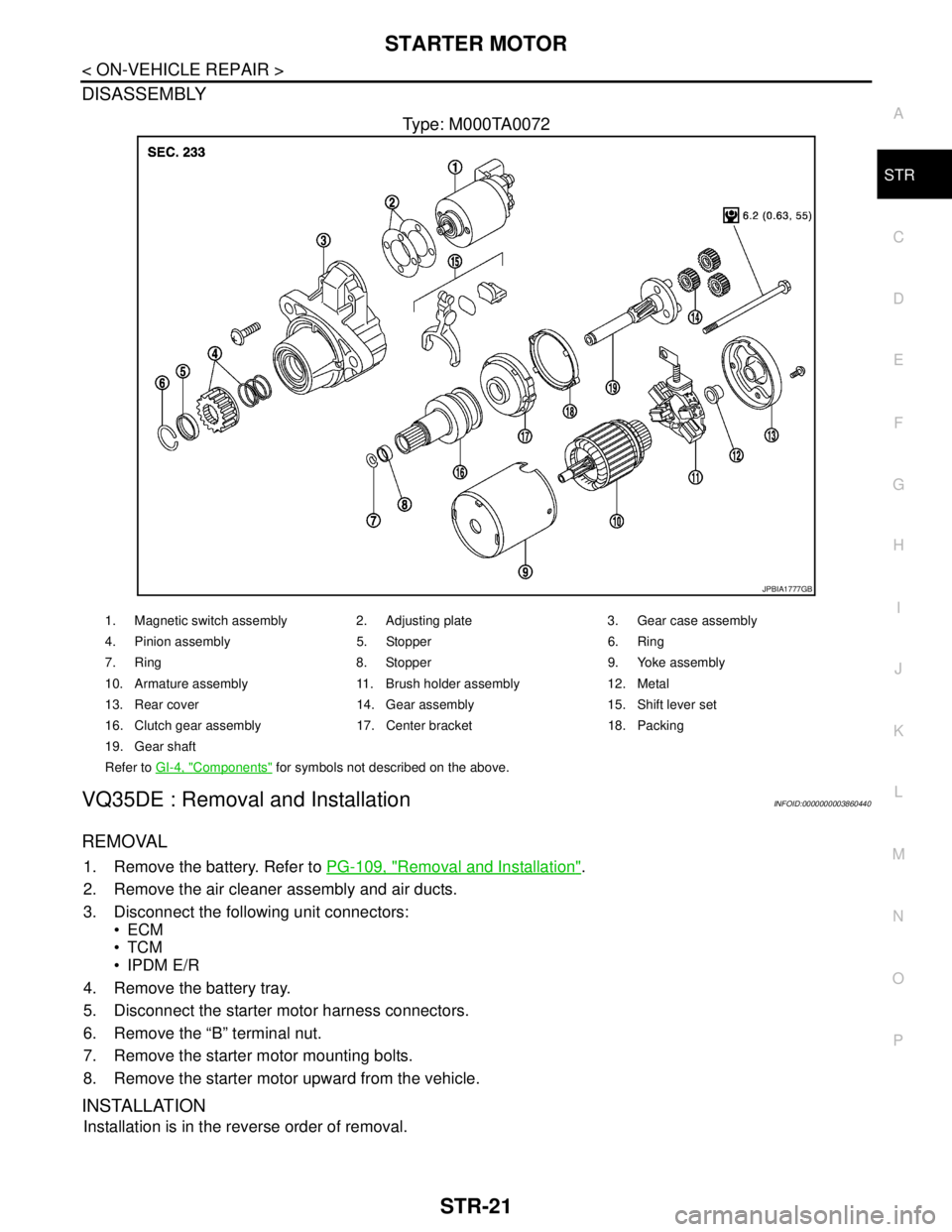
DISASSEMBLY
Type: M000TA0072
VQ35DE : Removal and InstallationINFOID:0000000003860440
REMOVAL
1. Remove the battery. Refer to PG-109, "Removal and Installation".
2. Remove the air cleaner assembly and air ducts.
3. Disconnect the following unit connectors:
ECM
TCM
IPDM E/R
4. Remove the battery tray.
5. Disconnect the starter motor harness connectors.
6. Remove the “B” terminal nut.
7. Remove the starter motor mounting bolts.
8. Remove the starter motor upward from the vehicle.
INSTALLATION
Installation is in the reverse order of removal.
JPBIA1777GB
1. Magnetic switch assembly 2. Adjusting plate 3. Gear case assembly
4. Pinion assembly 5. Stopper 6. Ring
7. Ring 8. Stopper 9. Yoke assembly
10. Armature assembly 11. Brush holder assembly 12. Metal
13. Rear cover 14. Gear assembly 15. Shift lever set
16. Clutch gear assembly 17. Center bracket 18. Packing
19. Gear shaft
Refer to GI-4, "
Components" for symbols not described on the above.