turn signal NISSAN TEANA 2008 User Guide
[x] Cancel search | Manufacturer: NISSAN, Model Year: 2008, Model line: TEANA, Model: NISSAN TEANA 2008Pages: 5121, PDF Size: 69.03 MB
Page 66 of 5121
ADP-60
< COMPONENT DIAGNOSIS >
SLIDING SENSOR
SLIDING SENSOR
DescriptionINFOID:0000000003759161
The sliding sensor is installed to the seat cushion frame.
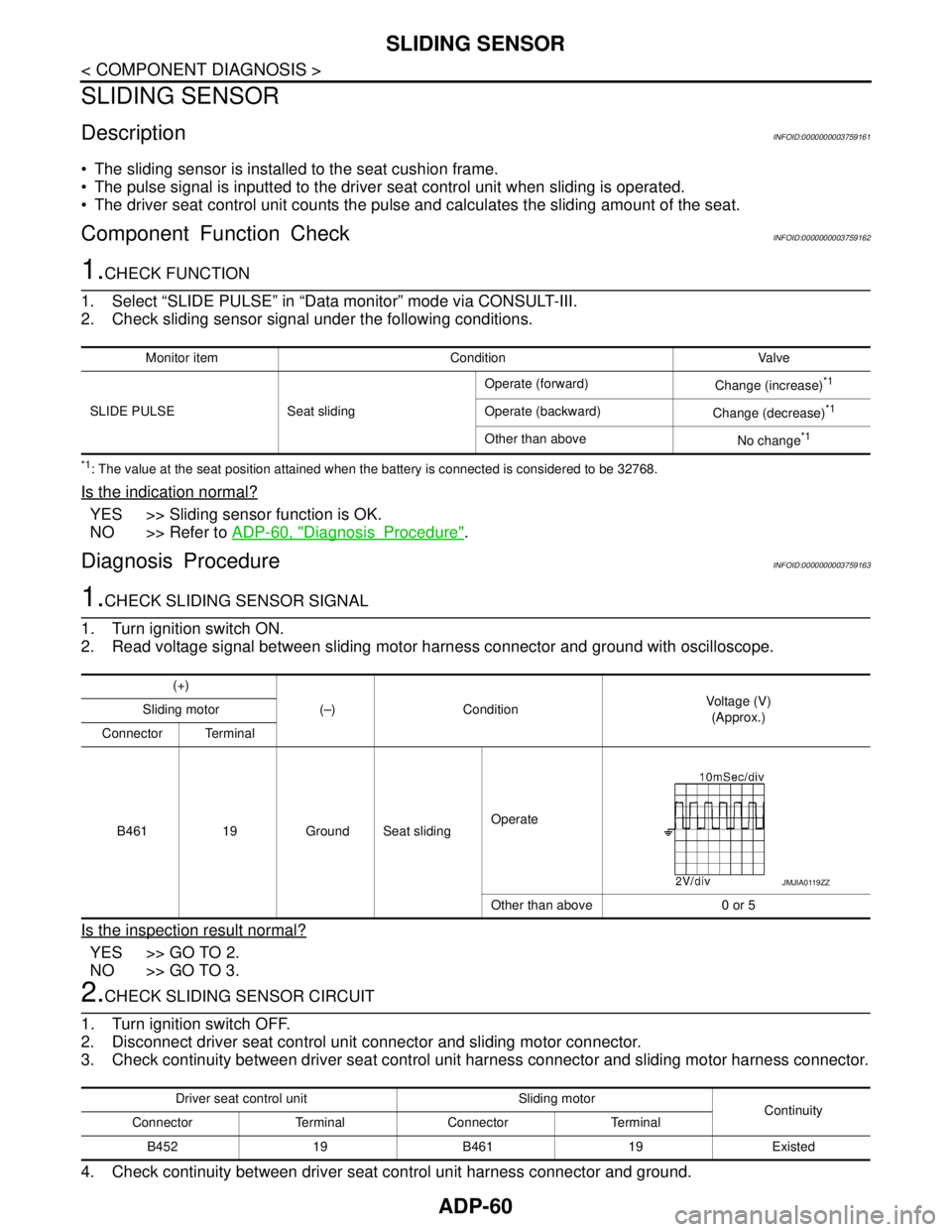
The pulse signal is inputted to the driver seat control unit when sliding is operated.
The driver seat control unit counts the pulse and calculates the sliding amount of the seat.
Component Function CheckINFOID:0000000003759162
1.CHECK FUNCTION
1. Select “SLIDE PULSE” in “Data monitor” mode via CONSULT-III.
2. Check sliding sensor signal under the following conditions.
*1: The value at the seat position attained when the battery is connected is considered to be 32768.
Is the indication normal?
YES >> Sliding sensor function is OK.
NO >> Refer to ADP-60, "
DiagnosisProcedure".
Diagnosis ProcedureINFOID:0000000003759163
1.CHECK SLIDING SENSOR SIGNAL
1. Turn ignition switch ON.
2. Read voltage signal between sliding motor harness connector and ground with oscilloscope.
Is the inspection result normal?
YES >> GO TO 2.
NO >> GO TO 3.
2.CHECK SLIDING SENSOR CIRCUIT
1. Turn ignition switch OFF.
2. Disconnect driver seat control unit connector and sliding motor connector.
3. Check continuity between driver seat control unit harness connector and sliding motor harness connector.
4. Check continuity between driver seat control unit harness connector and ground.
Monitor item Condition Valve
SLIDE PULSE Seat slidingOperate (forward)
Change (increase)
*1
Operate (backward)
Change (decrease)*1
Other than above
No change*1
(+)
(–) ConditionVoltage (V)
(Approx.) Sliding motor
Connector Terminal
B461 19 Ground Seat slidingOperate
Other than above 0 or 5
JMJIA0119ZZ
Driver seat control unit Sliding motor
Continuity
Connector Terminal Connector Terminal
B452 19 B461 19 Existed
Page 68 of 5121
ADP-62
< COMPONENT DIAGNOSIS >
RECLINING SENSOR
RECLINING SENSOR
DescriptionINFOID:0000000003759164
The reclining sensor is installed to the seatback frame.
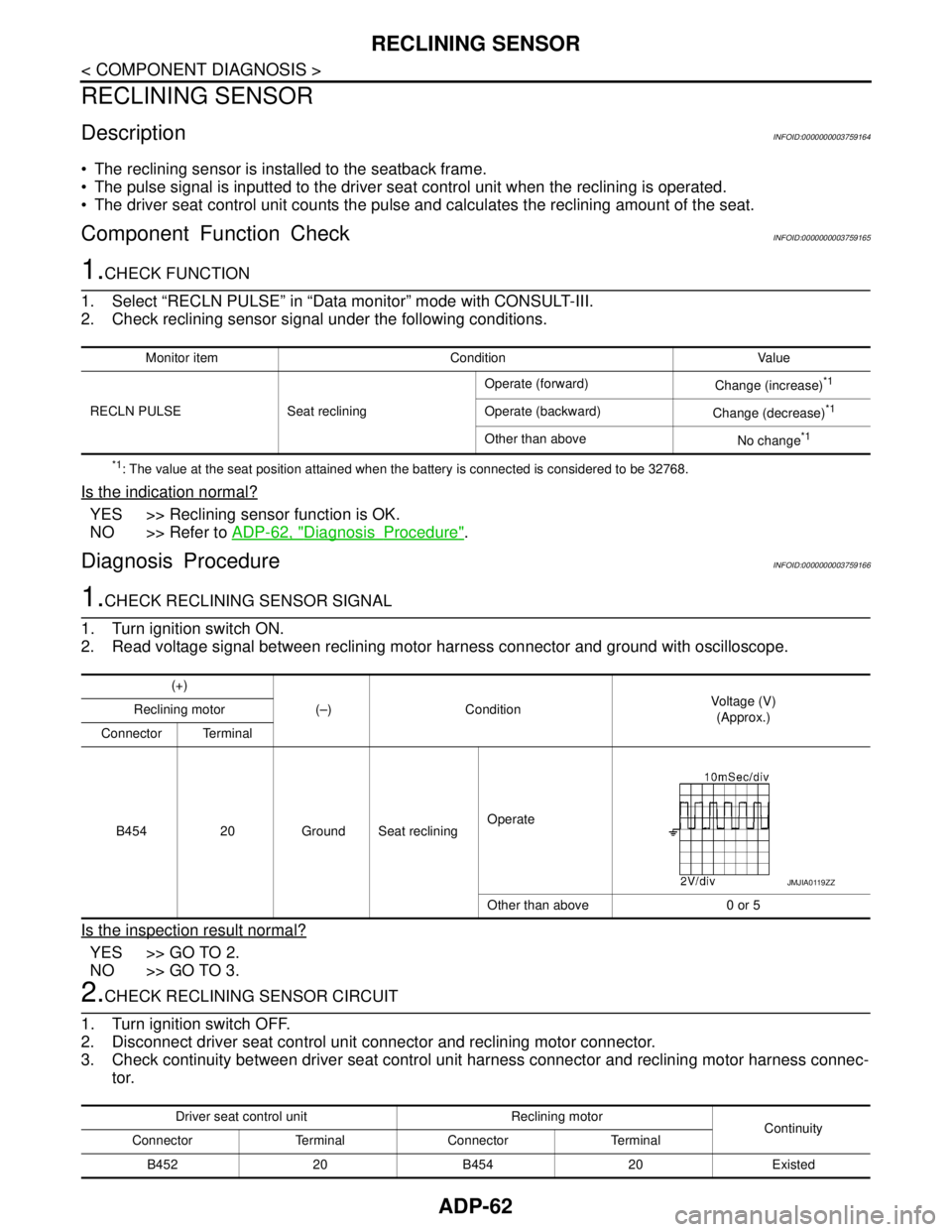
The pulse signal is inputted to the driver seat control unit when the reclining is operated.
The driver seat control unit counts the pulse and calculates the reclining amount of the seat.
Component Function CheckINFOID:0000000003759165
1.CHECK FUNCTION
1. Select “RECLN PULSE” in “Data monitor” mode with CONSULT-III.
2. Check reclining sensor signal under the following conditions.
*1: The value at the seat position attained when the battery is connected is considered to be 32768.
Is the indication normal?
YES >> Reclining sensor function is OK.
NO >> Refer to ADP-62, "
DiagnosisProcedure".
Diagnosis ProcedureINFOID:0000000003759166
1.CHECK RECLINING SENSOR SIGNAL
1. Turn ignition switch ON.
2. Read voltage signal between reclining motor harness connector and ground with oscilloscope.
Is the inspection result normal?
YES >> GO TO 2.
NO >> GO TO 3.
2.CHECK RECLINING SENSOR CIRCUIT
1. Turn ignition switch OFF.
2. Disconnect driver seat control unit connector and reclining motor connector.
3. Check continuity between driver seat control unit harness connector and reclining motor harness connec-
tor.
Monitor item Condition Value
RECLN PULSE Seat recliningOperate (forward)
Change (increase)
*1
Operate (backward)
Change (decrease)*1
Other than above
No change*1
(+)
(–) ConditionVoltage (V)
(Approx.) Reclining motor
Connector Terminal
B454 20 Ground Seat recliningOperate
Other than above 0 or 5
JMJIA0119ZZ
Driver seat control unit Reclining motor
Continuity
Connector Terminal Connector Terminal
B452 20 B454 20 Existed
Page 70 of 5121
ADP-64
< COMPONENT DIAGNOSIS >
LIFTING SENSOR (FRONT)
LIFTING SENSOR (FRONT)
DescriptionINFOID:0000000003759167
The lifting sensor (front) is installed to the seat cushion frame.
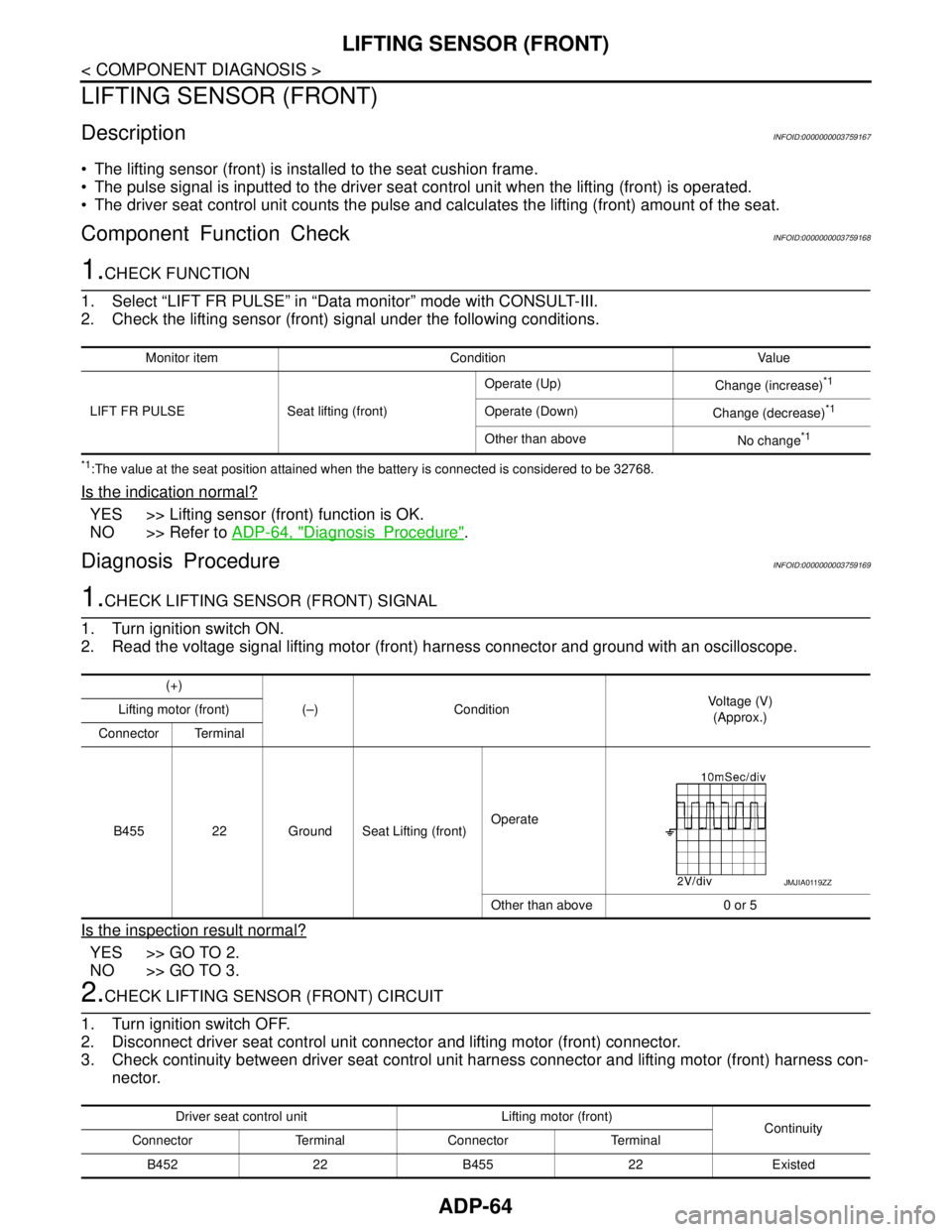
The pulse signal is inputted to the driver seat control unit when the lifting (front) is operated.
The driver seat control unit counts the pulse and calculates the lifting (front) amount of the seat.
Component Function CheckINFOID:0000000003759168
1.CHECK FUNCTION
1. Select “LIFT FR PULSE” in “Data monitor” mode with CONSULT-III.
2. Check the lifting sensor (front) signal under the following conditions.
*1:The value at the seat position attained when the battery is connected is considered to be 32768.
Is the indication normal?
YES >> Lifting sensor (front) function is OK.
NO >> Refer to ADP-64, "
DiagnosisProcedure".
Diagnosis ProcedureINFOID:0000000003759169
1.CHECK LIFTING SENSOR (FRONT) SIGNAL
1. Turn ignition switch ON.
2. Read the voltage signal lifting motor (front) harness connector and ground with an oscilloscope.
Is the inspection result normal?
YES >> GO TO 2.
NO >> GO TO 3.
2.CHECK LIFTING SENSOR (FRONT) CIRCUIT
1. Turn ignition switch OFF.
2. Disconnect driver seat control unit connector and lifting motor (front) connector.
3. Check continuity between driver seat control unit harness connector and lifting motor (front) harness con-
nector.
Monitor item Condition Value
LIFT FR PULSE Seat lifting (front)Operate (Up)
Change (increase)
*1
Operate (Down)
Change (decrease)*1
Other than above
No change*1
(+)
(–) ConditionVoltage (V)
(Approx.) Lifting motor (front)
Connector Terminal
B455 22 Ground Seat Lifting (front)Operate
Other than above 0 or 5
JMJIA0119ZZ
Driver seat control unit Lifting motor (front)
Continuity
Connector Terminal Connector Terminal
B452 22 B455 22 Existed
Page 72 of 5121
ADP-66
< COMPONENT DIAGNOSIS >
LIFTING SENSOR (REAR)
LIFTING SENSOR (REAR)
DescriptionINFOID:0000000003759170
The lifting sensor (rear) is installed to the seat cushion frame.
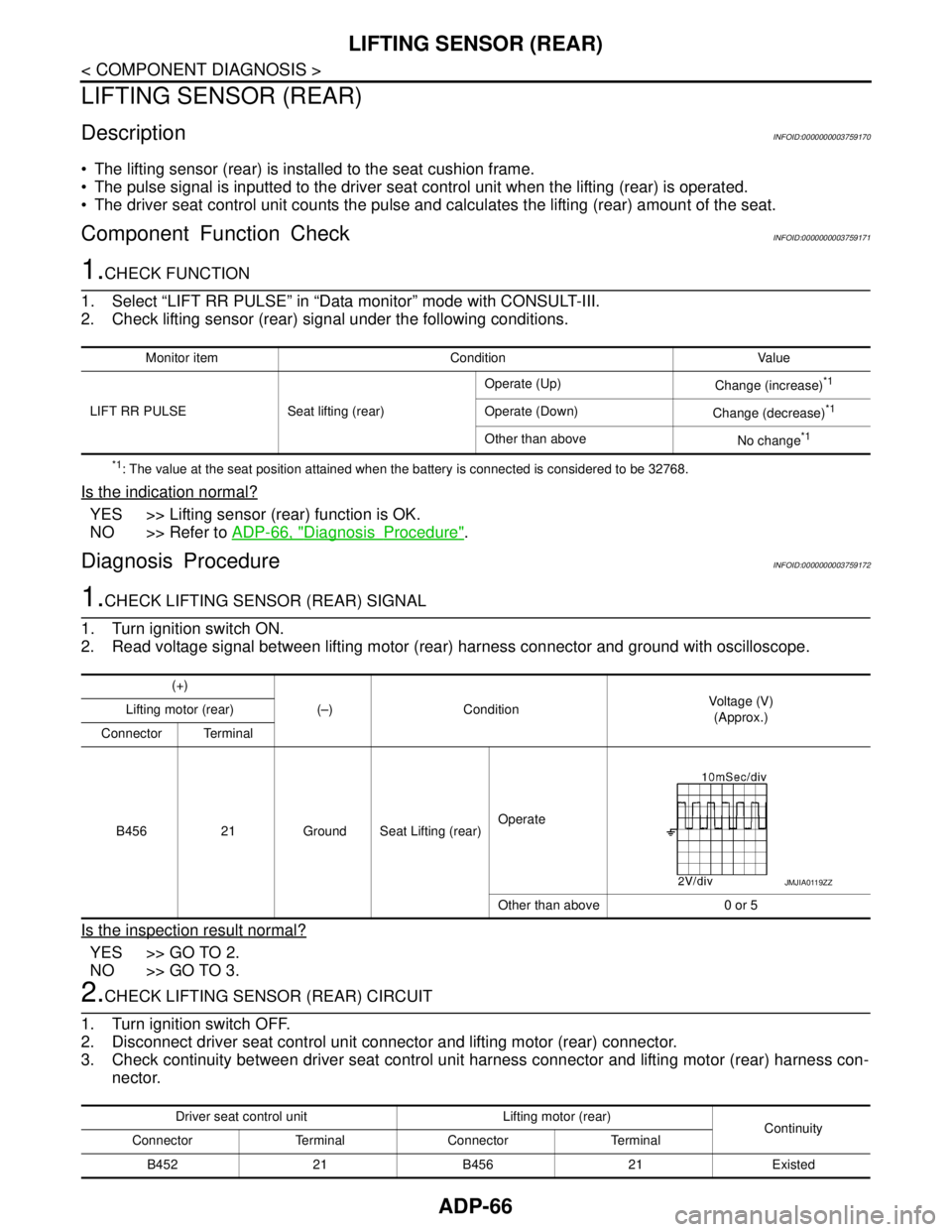
The pulse signal is inputted to the driver seat control unit when the lifting (rear) is operated.
The driver seat control unit counts the pulse and calculates the lifting (rear) amount of the seat.
Component Function CheckINFOID:0000000003759171
1.CHECK FUNCTION
1. Select “LIFT RR PULSE” in “Data monitor” mode with CONSULT-III.
2. Check lifting sensor (rear) signal under the following conditions.
*1: The value at the seat position attained when the battery is connected is considered to be 32768.
Is the indication normal?
YES >> Lifting sensor (rear) function is OK.
NO >> Refer to ADP-66, "
DiagnosisProcedure".
Diagnosis ProcedureINFOID:0000000003759172
1.CHECK LIFTING SENSOR (REAR) SIGNAL
1. Turn ignition switch ON.
2. Read voltage signal between lifting motor (rear) harness connector and ground with oscilloscope.
Is the inspection result normal?
YES >> GO TO 2.
NO >> GO TO 3.
2.CHECK LIFTING SENSOR (REAR) CIRCUIT
1. Turn ignition switch OFF.
2. Disconnect driver seat control unit connector and lifting motor (rear) connector.
3. Check continuity between driver seat control unit harness connector and lifting motor (rear) harness con-
nector.
Monitor item Condition Value
LIFT RR PULSE Seat lifting (rear)Operate (Up)
Change (increase)
*1
Operate (Down)
Change (decrease)*1
Other than above
No change*1
(+)
(–) ConditionVoltage (V)
(Approx.) Lifting motor (rear)
Connector Terminal
B456 21 Ground Seat Lifting (rear)Operate
Other than above 0 or 5
JMJIA0119ZZ
Driver seat control unit Lifting motor (rear)
Continuity
Connector Terminal Connector Terminal
B452 21 B456 21 Existed
Page 82 of 5121

ADP-76
< COMPONENT DIAGNOSIS >
SEAT MEMORY INDICATOR
SEAT MEMORY INDICATOR
DescriptionINFOID:0000000003759207
Memory indicators are equipped on the seat memory switch installed to the driver side door trim. The opera-
tion signal is inputted to the driver seat control unit when the memory switch is operated.
The status of automatic drive positioner system can be checked according to the illuminating/blinking status.
Component Function CheckINFOID:0000000003759208
1.CHECK FUNCTION
1. Select “MEMORY SW INDCTR” in “Active test” mode with CONSULT-III.
2. Check the memory indicator operation.
Is the operation of relevant parts normal?
YES >> Seat memory indicator function is OK.
NO >> Refer to ADP-76, "
DiagnosisProcedure".
Diagnosis ProcedureINFOID:0000000003759209
1.CHECK SEAT MEMORY INDICATOR OPERATION
Check seat memory indicator operation.
Which is the malfunctioning indicator?
All indicators are NG>>GO TO 2.
An indicator is NG>>GO TO 4.
2.CHECK FUSE
1. Turn ignition switch OFF.
2. Check that the blown fuse after repairing the affected circuit if a fuse is blown.
Is the fuse blown?
YES >> Replace the blown fuse after repairing the affected circuit if a fuse is blown.
NO >> GO TO 3.
3.CHECK SEAT MEMORY INDICATOR POWER SUPPLY
1. Disconnect seat memory switch connector.
2. Check voltage between seat memory switch harness connector and ground.
Is the inspection result normal?
YES >> GO TO 4.
NO >> Repair or replace harness.
4.CHECK SEAT MEMORY INDICATOR
Check seat memory indicator. Refer to ADP-77, "
Component Inspection".
Test item Description
MEMORY SW INDCTROFF
Memory switch indicatorOFF
ON-1 Indicator 1: ON
ON-2 Indicator 2: ON
Signal name Fuse No.
Battery power supply 10 (10A)
(+)
(–)Voltage (V)
(Approx.) Seat memory switch
Connector Terminal
D13 5 Ground Battery voltage
Page 84 of 5121

ADP-78
< COMPONENT DIAGNOSIS >
BCM (BODY CONTROL MODULE)
BCM (BODY CONTROL MODULE)
Reference ValueINFOID:0000000003940046
VALUES ON THE DIAGNOSIS TOOL
CONSULT-III MONITOR ITEM
Monitor Item Condition Value/Status
FR WIPER HIOther than front wiper switch HI Off
Front wiper switch HI On
FR WIPER LOWOther than front wiper switch LO Off
Front wiper switch LO On
FR WASHER SWFront washer switch OFF Off
Front washer switch ON On
FR WIPER INTOther than front wiper switch INT Off
Front wiper switch INT On
FR WIPER STOPFront wiper is not in STOP position Off
Front wiper is in STOP position On
INT VOLUME Wiper intermittent dial is in a dial position 1 - 7 Wiper intermittent dial position
TURN SIGNAL ROther than turn signal switch RH Off
Turn signal switch RH On
TURN SIGNAL LOther than turn signal switch LH Off
Turn signal switch LH On
TAIL LAMP SWOther than lighting switch 1ST and 2ND Off
Lighting switch 1ST or 2ND On
HI BEAM SWOther than lighting switch HI Off
Lighting switch HI On
HEAD LAMP SW 1Other than lighting switch 2ND Off
Lighting switch 2ND On
HEAD LAMP SW 2Other than lighting switch 2ND Off
Lighting switch 2ND On
PASSING SWOther than lighting switch PASS Off
Lighting switch PASS On
AUTO LIGHT SWOther than lighting switch AUTO Off
Lighting switch AUTO On
FR FOG SWFront fog lamp switch OFF Off
Front fog lamp switch ON On
RR FOG SWRear fog lamp switch OFF Off
Rear fog lamp switch ON On
DOOR SW-DRDriver door closed Off
Driver door opened On
DOOR SW-ASPassenger door closed Off
Passenger door opened On
DOOR SW-RRRear RH door closed Off
Rear RH door opened On
DOOR SW-RLRear LH door closed Off
Rear LH door opened On
Page 89 of 5121
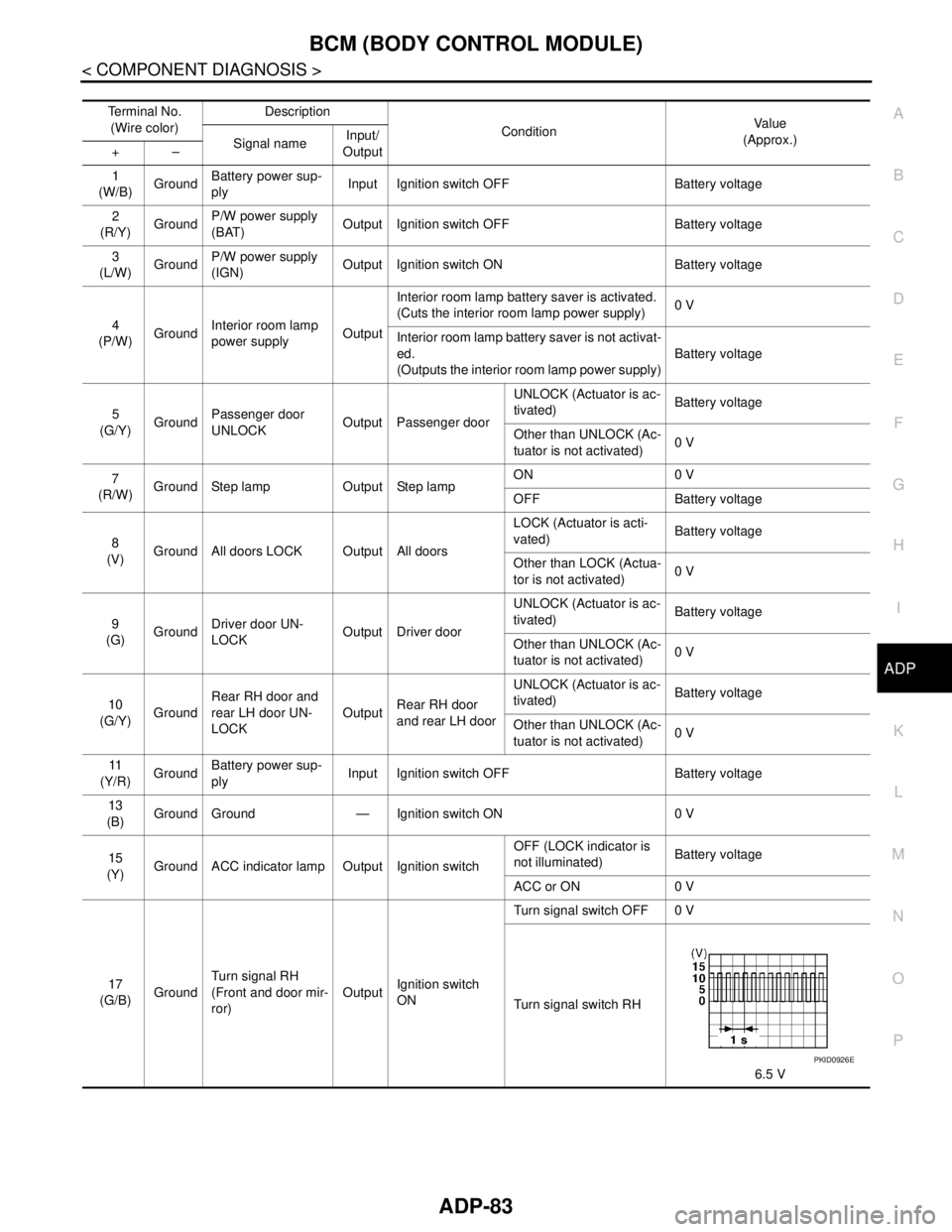
BCM (BODY CONTROL MODULE)
ADP-83
< COMPONENT DIAGNOSIS >
C
D
E
F
G
H
I
K
L
MA
B
ADP
N
O
P
Te r m i n a l N o .
(Wire color)Description
ConditionVa l u e
(Approx.)
Signal nameInput/
Output +–
1
(W/B)GroundBattery power sup-
plyInput Ignition switch OFF Battery voltage
2
(R/Y)GroundP/W power supply
(BAT)Output Ignition switch OFF Battery voltage
3
(L/W)GroundP/W power supply
(IGN)Output Ignition switch ON Battery voltage
4
(P/W)GroundInterior room lamp
power supplyOutputInterior room lamp battery saver is activated.
(Cuts the interior room lamp power supply)0 V
Interior room lamp battery saver is not activat-
ed.
(Outputs the interior room lamp power supply)Battery voltage
5
(G/Y)GroundPassenger door
UNLOCKOutput Passenger doorUNLOCK (Actuator is ac-
tivated)Battery voltage
Other than UNLOCK (Ac-
tuator is not activated)0 V
7
(R/W)Ground Step lamp Output Step lampON 0 V
OFF Battery voltage
8
(V)Ground All doors LOCK Output All doorsLOCK (Actuator is acti-
vated)Battery voltage
Other than LOCK (Actua-
tor is not activated)0 V
9
(G)GroundDriver door UN-
LOCKOutput Driver doorUNLOCK (Actuator is ac-
tivated)Battery voltage
Other than UNLOCK (Ac-
tuator is not activated)0 V
10
(G/Y)GroundRear RH door and
rear LH door UN-
LOCKOutputRear RH door
and rear LH doorUNLOCK (Actuator is ac-
tivated)Battery voltage
Other than UNLOCK (Ac-
tuator is not activated)0 V
11
(Y/R)GroundBattery power sup-
plyInput Ignition switch OFF Battery voltage
13
(B)
Ground Ground — Ignition switch ON 0 V
15
(Y)Ground ACC indicator lamp Output Ignition switchOFF (LOCK indicator is
not illuminated)Battery voltage
ACC or ON 0 V
17
(G/B)GroundTurn signal RH
(Front and door mir-
ror)OutputIgnition switch
ONTurn signal switch OFF 0 V
Turn signal switch RH
6.5 V
PKID0926E
Page 90 of 5121
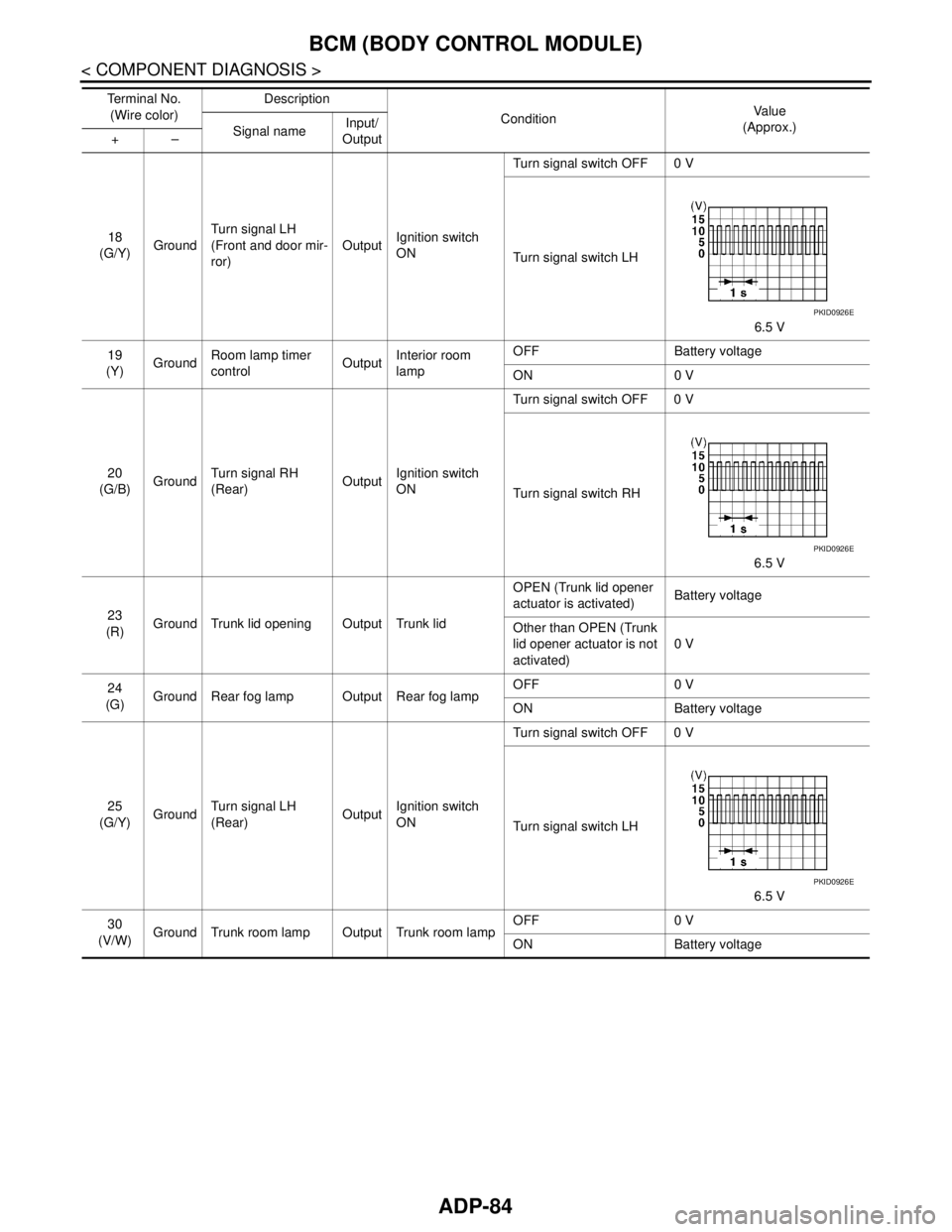
ADP-84
< COMPONENT DIAGNOSIS >
BCM (BODY CONTROL MODULE)
18
(G/Y)GroundTurn signal LH
(Front and door mir-
ror)OutputIgnition switch
ONTurn signal switch OFF 0 V
Turn signal switch LH
6.5 V
19
(Y)GroundRoom lamp timer
controlOutputInterior room
lampOFF Battery voltage
ON 0 V
20
(G/B)GroundTurn signal RH
(Rear)OutputIgnition switch
ONTurn signal switch OFF 0 V
Turn signal switch RH
6.5 V
23
(R)Ground Trunk lid opening Output Trunk lidOPEN (Trunk lid opener
actuator is activated)Battery voltage
Other than OPEN (Trunk
lid opener actuator is not
activated)0 V
24
(G)Ground Rear fog lamp Output Rear fog lampOFF 0 V
ON Battery voltage
25
(G/Y)GroundTurn signal LH
(Rear)OutputIgnition switch
ONTurn signal switch OFF 0 V
Turn signal switch LH
6.5 V
30
(V/W)Ground Trunk room lamp Output Trunk room lampOFF 0 V
ON Battery voltage Te r m i n a l N o .
(Wire color)Description
ConditionVa l u e
(Approx.)
Signal nameInput/
Output +–
PKID0926E
PKID0926E
PKID0926E
Page 100 of 5121
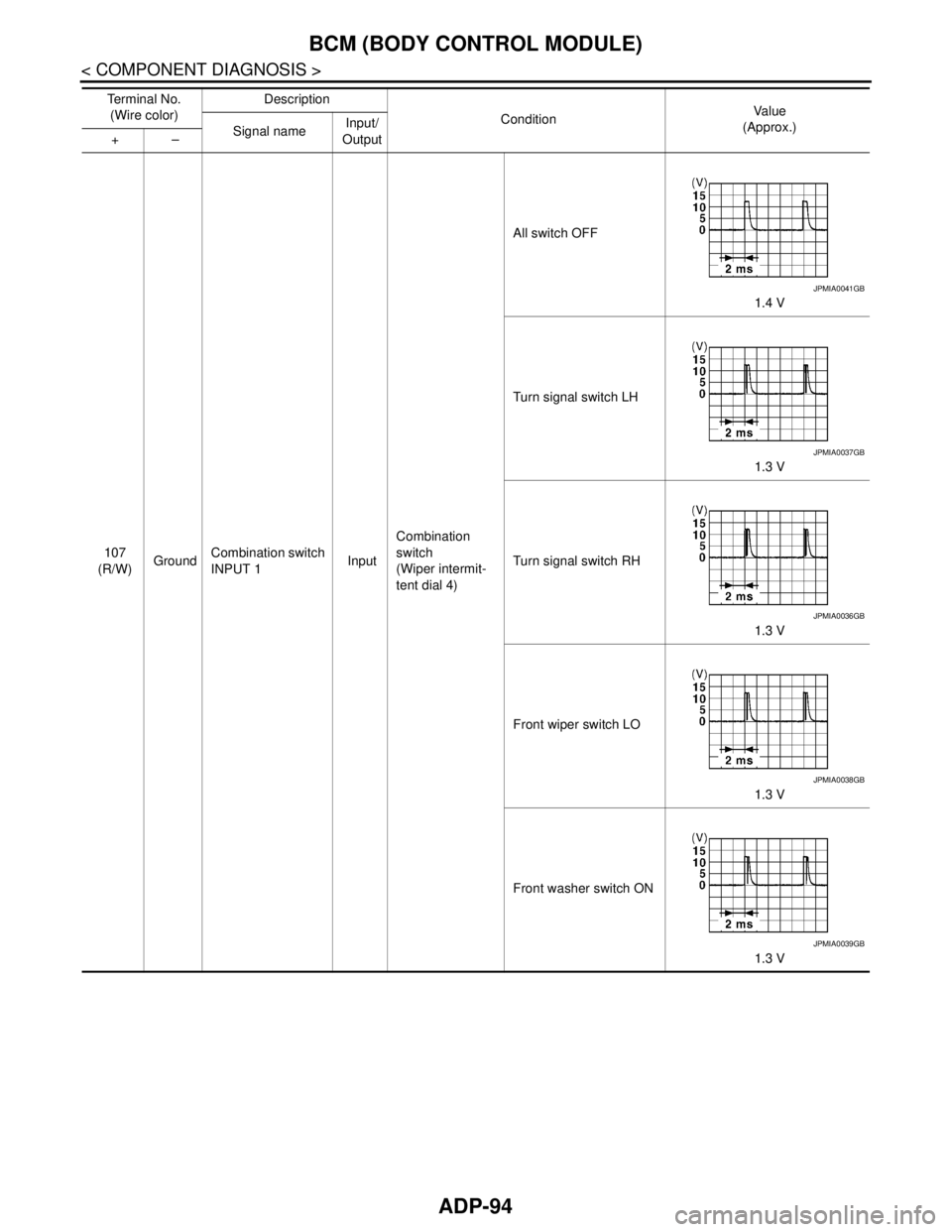
ADP-94
< COMPONENT DIAGNOSIS >
BCM (BODY CONTROL MODULE)
107
(R/W)GroundCombination switch
INPUT 1InputCombination
switch
(Wiper intermit-
tent dial 4)All switch OFF
1.4 V
Turn signal switch LH
1.3 V
Turn signal switch RH
1.3 V
Front wiper switch LO
1.3 V
Front washer switch ON
1.3 V Te r m i n a l N o .
(Wire color)Description
ConditionVa l u e
(Approx.)
Signal nameInput/
Output +–
JPMIA0041GB
JPMIA0037GB
JPMIA0036GB
JPMIA0038GB
JPMIA0039GB
Page 105 of 5121
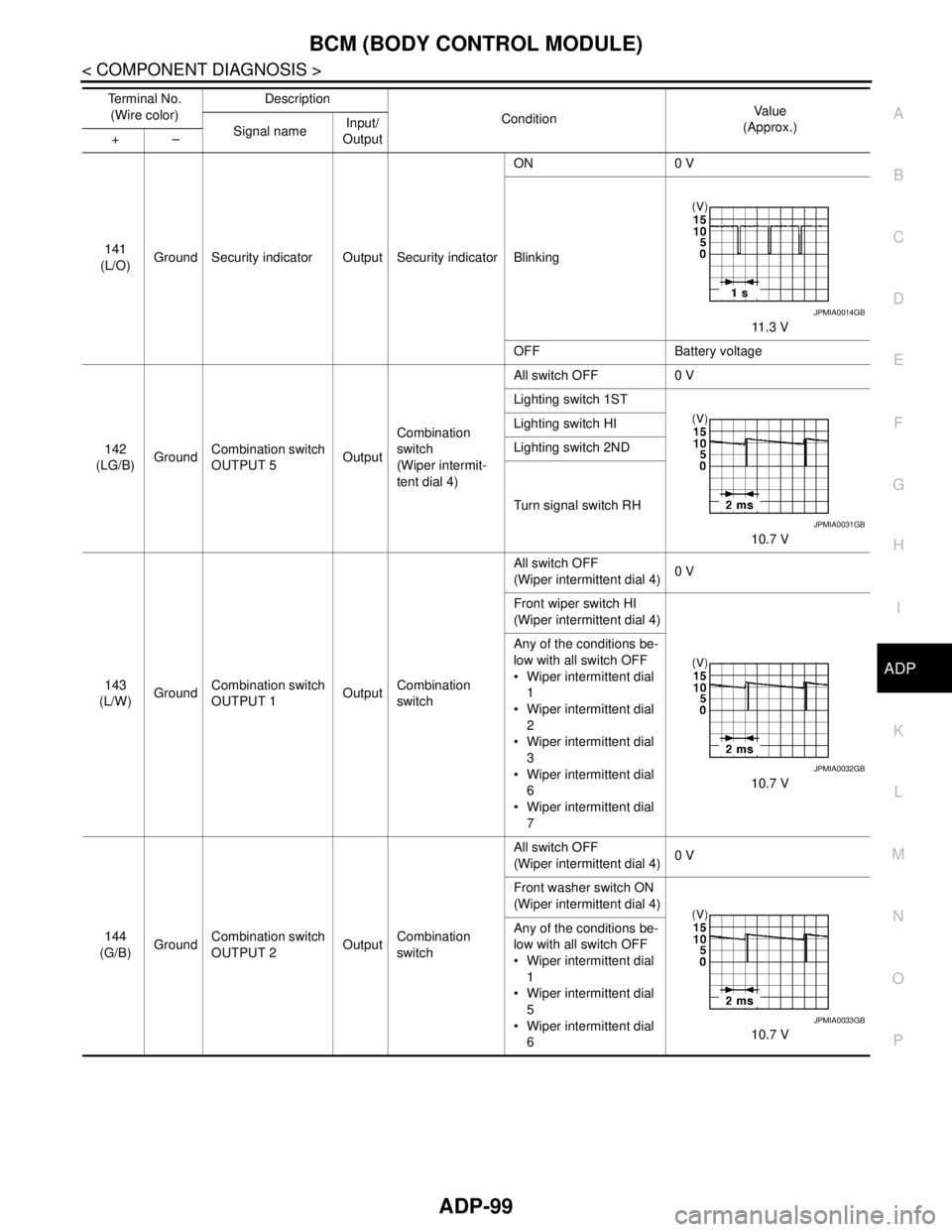
BCM (BODY CONTROL MODULE)
ADP-99
< COMPONENT DIAGNOSIS >
C
D
E
F
G
H
I
K
L
MA
B
ADP
N
O
P
141
(L/O)Ground Security indicator Output Security indicatorON 0 V
Blinking
11.3 V
OFF Battery voltage
142
(LG/B)GroundCombination switch
OUTPUT 5OutputCombination
switch
(Wiper intermit-
tent dial 4)All switch OFF 0 V
Lighting switch 1ST
10.7 V Lighting switch HI
Lighting switch 2ND
Turn signal switch RH
143
(L/W)GroundCombination switch
OUTPUT 1OutputCombination
switchAll switch OFF
(Wiper intermittent dial 4)0 V
Front wiper switch HI
(Wiper intermittent dial 4)
10.7 V Any of the conditions be-
low with all switch OFF
Wiper intermittent dial
1
Wiper intermittent dial
2
Wiper intermittent dial
3
Wiper intermittent dial
6
Wiper intermittent dial
7
144
(G/B)GroundCombination switch
OUTPUT 2OutputCombination
switchAll switch OFF
(Wiper intermittent dial 4)0 V
Front washer switch ON
(Wiper intermittent dial 4)
10.7 V Any of the conditions be-
low with all switch OFF
Wiper intermittent dial
1
Wiper intermittent dial
5
Wiper intermittent dial
6 Te r m i n a l N o .
(Wire color)Description
ConditionVa l u e
(Approx.)
Signal nameInput/
Output +–
JPMIA0014GB
JPMIA0031GB
JPMIA0032GB
JPMIA0033GB