fuse NISSAN TEANA 2008 Service Manual
[x] Cancel search | Manufacturer: NISSAN, Model Year: 2008, Model line: TEANA, Model: NISSAN TEANA 2008Pages: 5121, PDF Size: 69.03 MB
Page 4743 of 5121
![NISSAN TEANA 2008 Service Manual TM-270
< COMPONENT DIAGNOSIS >[CVT: RE0F10A]
SHIFT LOCK SYSTEM
YES >> Go to TM-270, "Diagnosis Procedure".
NO >> GO TO 2.
2. CHECK CVT SHIFT LOCK OPERATION
Attempt to shift the selector lever to any o](/img/5/57391/w960_57391-4742.png "NISSAN TEANA 2008 Service Manual TM-270
< COMPONENT DIAGNOSIS >[CVT: RE0F10A]
SHIFT LOCK SYSTEM
YES >> Go to TM-270, \"Diagnosis Procedure\".
NO >> GO TO 2.
2. CHECK CVT SHIFT LOCK OPERATION
Attempt to shift the selector lever to any o")
TM-270
< COMPONENT DIAGNOSIS >[CVT: RE0F10A]
SHIFT LOCK SYSTEM
YES >> Go to TM-270, "Diagnosis Procedure".
NO >> GO TO 2.
2. CHECK CVT SHIFT LOCK OPERATION
Attempt to shift the selector lever to any other position with the brake pedal depressed.
Can the selector lever be shifted to any other position?
YES >> INSPECTION END
NO >> Go to TM-270, "
Diagnosis Procedure".
Diagnosis ProcedureINFOID:0000000003806484
1. CHECK POWER SOURCE
1. Turn ignition switch OFF.
2. Disconnect stop lamp switch connector.
3. Turn ignition switch ON.
4. Check voltage between stop lamp switch vehicle side harness connector and ground.
Is the inspection result normal?
YES >> GO TO 2.
NO >> Harness for short or open between fuse block J/B connector terminal 4F and stop lamp switch
harness connector terminal 3
10 A fuse [No. 3, located in the J/B]
Ignition switch
2.CHECK STOP LAMP SWITCH
Check stop lamp switch. Refer to TM-271, "
Component Inspection (Stop Lamp Switch)".
Is the inspection result normal?
YES >> GO TO 3.
NO >> Repair or replace damaged parts.
3.CHECK HARNESS BETWEEN STOP LAMP SWITCH AND CONTROL DEVICE (PART 1)
1. Turn ignition switch OFF.
2. Disconnect control device connector.
3. Check continuity between stop lamp switch vehicle side harness connector terminal and control device
vehicle side harness connector terminal.
Is the inspection result normal?
YES >> GO TO 4.
NO >> Repair or replace damaged parts.
4.CHECK HARNESS BETWEEN STOP LAMP SWITCH AND CONTROL DEVICE (PART 2)
Check continuity between stop lamp switch vehicle side harness connector terminal and ground.
Is the inspection result normal?
YES >> GO TO 5.
NO >> Repair or replace damaged parts.
Stop lamp switch vehicle side harness connector
GroundVoltage (Approx.)
Connector Terminal
E115 3 Battery Voltage
Stop lamp vehicle side harness connector Control device vehicle side harness connector
Continuity
Connector Terminal Connector Terminal
E115 4 M57 6 Existed
Stop lamp vehicle side harness connector
GroundContinuity
Connector Terminal
E115 4 Not existed
Page 4819 of 5121
![NISSAN TEANA 2008 Service Manual VTL-8
< PRECAUTION >[WITHOUT 7 INCH DISPLAY]
PRECAUTIONS
Precaution for Procedure without Cowl Top Cover
INFOID:0000000003802519
When performing the procedure after removing cowl top cover, cover
the](/img/5/57391/w960_57391-4818.png "NISSAN TEANA 2008 Service Manual VTL-8
< PRECAUTION >[WITHOUT 7 INCH DISPLAY]
PRECAUTIONS
Precaution for Procedure without Cowl Top Cover
INFOID:0000000003802519
When performing the procedure after removing cowl top cover, cover
the")
VTL-8
< PRECAUTION >[WITHOUT 7 INCH DISPLAY]
PRECAUTIONS
Precaution for Procedure without Cowl Top Cover
INFOID:0000000003802519
When performing the procedure after removing cowl top cover, cover
the lower end of windshield with urethane, etc.
Precautions For Xenon Headlamp ServiceINFOID:0000000003802520
WARNING:
Comply with the following warnings to prevent any serious accident.
Disconnect the battery cable (negative terminal) or the power supply fuse before installing, remov-
ing, or touching the xenon headlamp (bulb included). The xenon headlamp contains high-voltage
generated parts.
Never work with wet hands.
Check the xenon headlamp ON-OFF status after assembling it to the vehicle. Never turn the xenon
headlamp ON in other conditions. Connect the power supply to the vehicle-side connector.
(Turning it ON outside the lamp case may cause fire or visual impairments.)
Never touch the bulb glass immediately after turning it OFF. It is extremely hot.
CAUTION:
Comply with the following cautions to prevent any error and malfunction.
Install the xenon bulb securely. (Insufficient bulb socket installation may melt the bulb, the connec-
tor, the housing, etc. by high-voltage leakage or corona discharge.)
Never perform HID circuit inspection with a tester.
Never touch the xenon bulb glass with hands. Never put oil and grease on it.
Dispose of the used xenon bulb after packing it in thick vinyl without breaking it.
Never wipe out dirt and contamination with organic solvent (thinner, gasoline, etc.).
Working with HFC-134a (R-134a)INFOID:0000000003802521
CAUTION:
CFC-12 (R-12) refrigerant and HFC-134a (R-134a) refrigerant are not compatible. These refrigerants
must never be mixed, even in the smallest amounts. Compressor malfunction is likely occur if the
refrigerants are mixed.
Use only specified lubricant for the HFC-134a (R-134a) A/C system and HFC-134a (R-134a) compo-
nents. Compressor malfunction is likely to occur if lubricant other than that specified is used.
The specified HFC-134a (R-134a) lubricant rapidly absorbs moisture from the atmosphere. The fol-
lowing handling precautions must be observed:
- Cap (seal) immediately the component to minimize the entry of moisture from the atmosphere when
removing refrigerant components from a vehicle.
- Never remove the caps (unseal) until just before connecting the components when installing refrig-
erant components to a vehicle. Connect all refrigerant loop components as quickly as possible to
minimize the entry of moisture into system.
- Use only the specified lubricant from a sealed container. Reseal immediately containers of lubricant.
Lubricant becomes moisture saturated and should not be used without proper sealing.
- Never allow lubricant (NISSAN A/C System Oil Type S) to come in contact with styrene foam parts.
Damage may result.
General Refrigerant PrecautionINFOID:0000000003802522
WARNING:
Never breath A/C refrigerant and lubricant vapor or mist. Exposure may irritate eyes, nose and
throat. Use only approved recovery/recycling equipment to discharge HFC-134a (R-134a) refrigerant.
PIIB3706J
Page 4820 of 5121
![NISSAN TEANA 2008 Service Manual PRECAUTIONS
VTL-9
< PRECAUTION >[WITHOUT 7 INCH DISPLAY]
C
D
E
F
G
H
J
K
L
MA
B
VTL
N
O
P
Ventilate work area before resuming service if accidental system discharge occurs. Additional health
and safet](/img/5/57391/w960_57391-4819.png "NISSAN TEANA 2008 Service Manual PRECAUTIONS
VTL-9
< PRECAUTION >[WITHOUT 7 INCH DISPLAY]
C
D
E
F
G
H
J
K
L
MA
B
VTL
N
O
P
Ventilate work area before resuming service if accidental system discharge occurs. Additional health
and safet")
PRECAUTIONS
VTL-9
< PRECAUTION >[WITHOUT 7 INCH DISPLAY]
C
D
E
F
G
H
J
K
L
MA
B
VTL
N
O
P
Ventilate work area before resuming service if accidental system discharge occurs. Additional health
and safety information may be obtained from refrigerant and lubricant manufacturers.
Never release refrigerant into the air. Use approved recovery/recycling equipment to capture the
refrigerant each time an air conditioning system is discharged.
Wear always eye and hand protection (goggles and gloves) when working with any refrigerant or air
conditioning system.
Never store or heat refrigerant containers above 52°C (126°F).
Never heat a refrigerant container with an open flame; Place the bottom of the container in a warm
pail of water if container warming is required.
Never intentionally drop, puncture, or incinerate refrigerant containers.
Keep refrigerant away from open flames: poisonous gas is produced if refrigerant burns.
Refrigerant displaces oxygen, therefore be certain to work in well ventilated areas to prevent suffo-
cation.
Never pressure test or leakage test HFC-134a (R-134a) service equipment and/or vehicle air condi-
tioning systems with compressed air during repair. Some mixtures of air and HFC-134a (R-134a)
have been shown to be combustible at elevated pressures. These mixtures, if ignited, may cause
injury or property damage. Additional health and safety information may be obtained from refriger-
ant manufacturers.
Refrigerant ConnectionINFOID:0000000003802523
A new type refrigerant connection has been introduced to all refrigerant lines except the following locations.
Expansion valve to evaporator
Refrigerant pressure sensor to liquid tank
O-RING AND REFRIGERANT CONNECTION
CAUTION:
The new and former refrigerant connections use different O-ring configurations. Never confuse O-
rings since they are not interchangeable. Refrigerant may leak at the connection if a wrong O-ring is
installed.
F. Former type refrigerant connection N. New type refrigerant connection
:O-ring size
JPIIA0986ZZ
Page 4876 of 5121
![NISSAN TEANA 2008 Service Manual PRECAUTIONS
VTL-65
< PRECAUTION >[WITH 7 INCH DISPLAY]
C
D
E
F
G
H
J
K
L
MA
B
VTL
N
O
P
Precaution for Procedure without Cowl Top CoverINFOID:0000000003894447
When performing the procedure after remov](/img/5/57391/w960_57391-4875.png "NISSAN TEANA 2008 Service Manual PRECAUTIONS
VTL-65
< PRECAUTION >[WITH 7 INCH DISPLAY]
C
D
E
F
G
H
J
K
L
MA
B
VTL
N
O
P
Precaution for Procedure without Cowl Top CoverINFOID:0000000003894447
When performing the procedure after remov")
PRECAUTIONS
VTL-65
< PRECAUTION >[WITH 7 INCH DISPLAY]
C
D
E
F
G
H
J
K
L
MA
B
VTL
N
O
P
Precaution for Procedure without Cowl Top CoverINFOID:0000000003894447
When performing the procedure after removing cowl top cover, cover
the lower end of windshield with urethane, etc.
Precautions For Xenon Headlamp ServiceINFOID:0000000003894448
WARNING:
Comply with the following warnings to prevent any serious accident.
Disconnect the battery cable (negative terminal) or the power supply fuse before installing, remov-
ing, or touching the xenon headlamp (bulb included). The xenon headlamp contains high-voltage
generated parts.
Never work with wet hands.
Check the xenon headlamp ON-OFF status after assembling it to the vehicle. Never turn the xenon
headlamp ON in other conditions. Connect the power supply to the vehicle-side connector.
(Turning it ON outside the lamp case may cause fire or visual impairments.)
Never touch the bulb glass immediately after turning it OFF. It is extremely hot.
CAUTION:
Comply with the following cautions to prevent any error and malfunction.
Install the xenon bulb securely. (Insufficient bulb socket installation may melt the bulb, the connec-
tor, the housing, etc. by high-voltage leakage or corona discharge.)
Never perform HID circuit inspection with a tester.
Never touch the xenon bulb glass with hands. Never put oil and grease on it.
Dispose of the used xenon bulb after packing it in thick vinyl without breaking it.
Never wipe out dirt and contamination with organic solvent (thinner, gasoline, etc.).
Working with HFC-134a (R-134a)INFOID:0000000003894449
CAUTION:
CFC-12 (R-12) refrigerant and HFC-134a (R-134a) refrigerant are not compatible. These refrigerants
must never be mixed, even in the smallest amounts. Compressor malfunction is likely occur if the
refrigerants are mixed.
Use only specified lubricant for the HFC-134a (R-134a) A/C system and HFC-134a (R-134a) compo-
nents. Compressor malfunction is likely to occur if lubricant other than that specified is used.
The specified HFC-134a (R-134a) lubricant rapidly absorbs moisture from the atmosphere. The fol-
lowing handling precautions must be observed:
- Cap (seal) immediately the component to minimize the entry of moisture from the atmosphere when
removing refrigerant components from a vehicle.
- Never remove the caps (unseal) until just before connecting the components when installing refrig-
erant components to a vehicle. Connect all refrigerant loop components as quickly as possible to
minimize the entry of moisture into system.
- Use only the specified lubricant from a sealed container. Reseal immediately containers of lubricant.
Lubricant becomes moisture saturated and should not be used without proper sealing.
- Never allow lubricant (NISSAN A/C System Oil Type S) to come in contact with styrene foam parts.
Damage may result.
General Refrigerant PrecautionINFOID:0000000003894450
WARNING:
Never breath A/C refrigerant and lubricant vapor or mist. Exposure may irritate eyes, nose and
throat. Use only approved recovery/recycling equipment to discharge HFC-134a (R-134a) refrigerant.
PIIB3706J
Page 4877 of 5121
![NISSAN TEANA 2008 Service Manual VTL-66
< PRECAUTION >[WITH 7 INCH DISPLAY]
PRECAUTIONS
Ventilate work area before resuming service if accidental system discharge occurs. Additional health
and safety information may be obtained from](/img/5/57391/w960_57391-4876.png "NISSAN TEANA 2008 Service Manual VTL-66
< PRECAUTION >[WITH 7 INCH DISPLAY]
PRECAUTIONS
Ventilate work area before resuming service if accidental system discharge occurs. Additional health
and safety information may be obtained from")
VTL-66
< PRECAUTION >[WITH 7 INCH DISPLAY]
PRECAUTIONS
Ventilate work area before resuming service if accidental system discharge occurs. Additional health
and safety information may be obtained from refrigerant and lubricant manufacturers.
Never release refrigerant into the air. Use approved recovery/recycling equipment to capture the
refrigerant each time an air conditioning system is discharged.
Wear always eye and hand protection (goggles and gloves) when working with any refrigerant or air
conditioning system.
Never store or heat refrigerant containers above 52°C (126°F).
Never heat a refrigerant container with an open flame; Place the bottom of the container in a warm
pail of water if container warming is required.
Never intentionally drop, puncture, or incinerate refrigerant containers.
Keep refrigerant away from open flames: poisonous gas is produced if refrigerant burns.
Refrigerant displaces oxygen, therefore be certain to work in well ventilated areas to prevent suffo-
cation.
Never pressure test or leakage test HFC-134a (R-134a) service equipment and/or vehicle air condi-
tioning systems with compressed air during repair. Some mixtures of air and HFC-134a (R-134a)
have been shown to be combustible at elevated pressures. These mixtures, if ignited, may cause
injury or property damage. Additional health and safety information may be obtained from refriger-
ant manufacturers.
Refrigerant ConnectionINFOID:0000000003894451
A new type refrigerant connection has been introduced to all refrigerant lines except the following locations.
Expansion valve to evaporator
Refrigerant pressure sensor to liquid tank
O-RING AND REFRIGERANT CONNECTION
CAUTION:
The new and former refrigerant connections use different O-ring configurations. Never confuse O-
rings since they are not interchangeable. Refrigerant may leak at the connection if a wrong O-ring is
installed.
F. Former type refrigerant connection N. New type refrigerant connection
:O-ring size
JPIIA0986ZZ
Page 4949 of 5121
WCS
POWER SUPPLY AND GROUND CIRCUIT
WCS-19
< COMPONENT DIAGNOSIS >
C
D
E
F
G
H
I
J
K
L
MB A
O
P
COMPONENT DIAGNOSIS
POWER SUPPLY AND GROUND CIRCUIT
COMBINATION METER
COMBINATION METER : Diagnosis ProcedureINFOID:0000000003838728
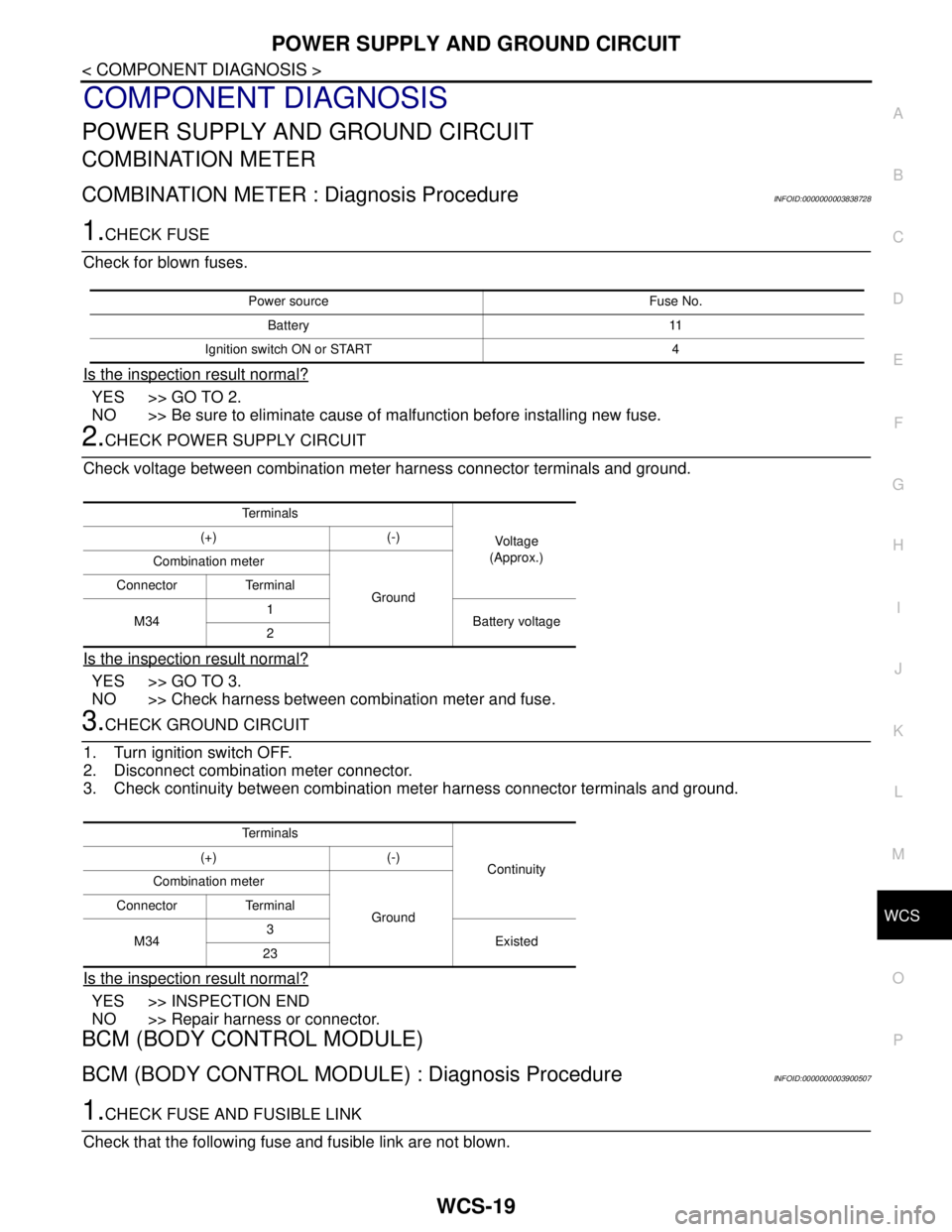
1.CHECK FUSE
Check for blown fuses.
Is the inspection result normal?
YES >> GO TO 2.
NO >> Be sure to eliminate cause of malfunction before installing new fuse.
2.CHECK POWER SUPPLY CIRCUIT
Check voltage between combination meter harness connector terminals and ground.
Is the inspection result normal?
YES >> GO TO 3.
NO >> Check harness between combination meter and fuse.
3.CHECK GROUND CIRCUIT
1. Turn ignition switch OFF.
2. Disconnect combination meter connector.
3. Check continuity between combination meter harness connector terminals and ground.
Is the inspection result normal?
YES >> INSPECTION END
NO >> Repair harness or connector.
BCM (BODY CONTROL MODULE)
BCM (BODY CONTROL MODULE) : Diagnosis ProcedureINFOID:0000000003900507
1.CHECK FUSE AND FUSIBLE LINK
Check that the following fuse and fusible link are not blown.
Power source Fuse No.
Battery 11
Ignition switch ON or START 4
Te r m i n a l s
Vo l ta g e
(Approx.) (+) (-)
Combination meter
Ground Connector Terminal
M341
Battery voltage
2
Te r m i n a l s
Continuity (+) (-)
Combination meter
Ground Connector Terminal
M343
Existed
23
Page 4950 of 5121

WCS-20
< COMPONENT DIAGNOSIS >
POWER SUPPLY AND GROUND CIRCUIT
Is the fuse fusing?
YES >> Replace the blown fuse or fusible link after repairing the affected circuit if a fuse or fusible link is
blown.
NO >> GO TO 2.
2.CHECK POWER SUPPLY CIRCUIT
1. Turn ignition switch OFF.
2. Disconnect BCM connectors.
3. Check voltage between BCM harness connector and ground.
Is the measurement value normal?
YES >> GO TO 3.
NO >> Repair harness or connector.
3.CHECK GROUND CIRCUIT
Check continuity between BCM harness connector and ground.
Does continuity exist?
YES >> INSPECTION END
NO >> Repair harness or connector.
Signal name Fuse and fusible link No.
Battery power supplyI
10
Te r m i n a l s
Voltag e
(Approx.) (+) (−)
BCM
Ground Connector Terminal
M118 1
Battery voltage
M119 11
BCM
GroundContinuity
Connector Terminal
M119 13 Existed
Page 4983 of 5121
WCS
BCM (BODY CONTROL MODULE)
WCS-53
< ECU DIAGNOSIS >
C
D
E
F
G
H
I
J
K
L
MB A
O
P
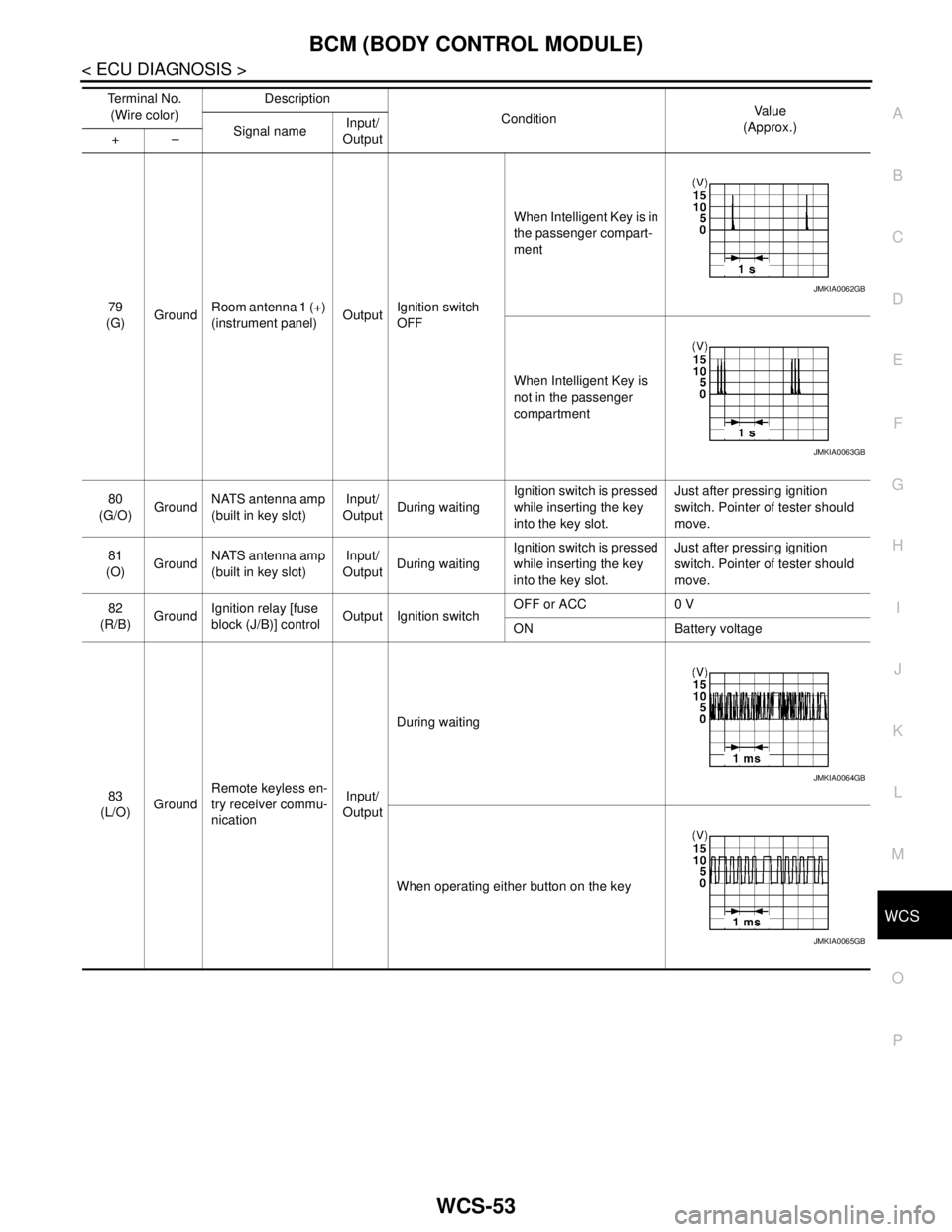
79
(G)GroundRoom antenna 1 (+)
(instrument panel)OutputIgnition switch
OFFWhen Intelligent Key is in
the passenger compart-
ment
When Intelligent Key is
not in the passenger
compartment
80
(G/O)GroundNATS antenna amp
(built in key slot)Input/
OutputDuring waitingIgnition switch is pressed
while inserting the key
into the key slot.Just after pressing ignition
switch. Pointer of tester should
move.
81
(O)GroundNATS antenna amp
(built in key slot)Input/
OutputDuring waitingIgnition switch is pressed
while inserting the key
into the key slot.Just after pressing ignition
switch. Pointer of tester should
move.
82
(R/B)GroundIgnition relay [fuse
block (J/B)] controlOutput Ignition switchOFF or ACC 0 V
ON Battery voltage
83
(L/O)GroundRemote keyless en-
try receiver commu-
nicationInput/
OutputDuring waiting
When operating either button on the key Te r m i n a l N o .
(Wire color)Description
ConditionVa l u e
(Approx.)
Signal nameInput/
Output +–
JMKIA0062GB
JMKIA0063GB
JMKIA0064GB
JMKIA0065GB
Page 4990 of 5121
WCS-60
< ECU DIAGNOSIS >
BCM (BODY CONTROL MODULE)
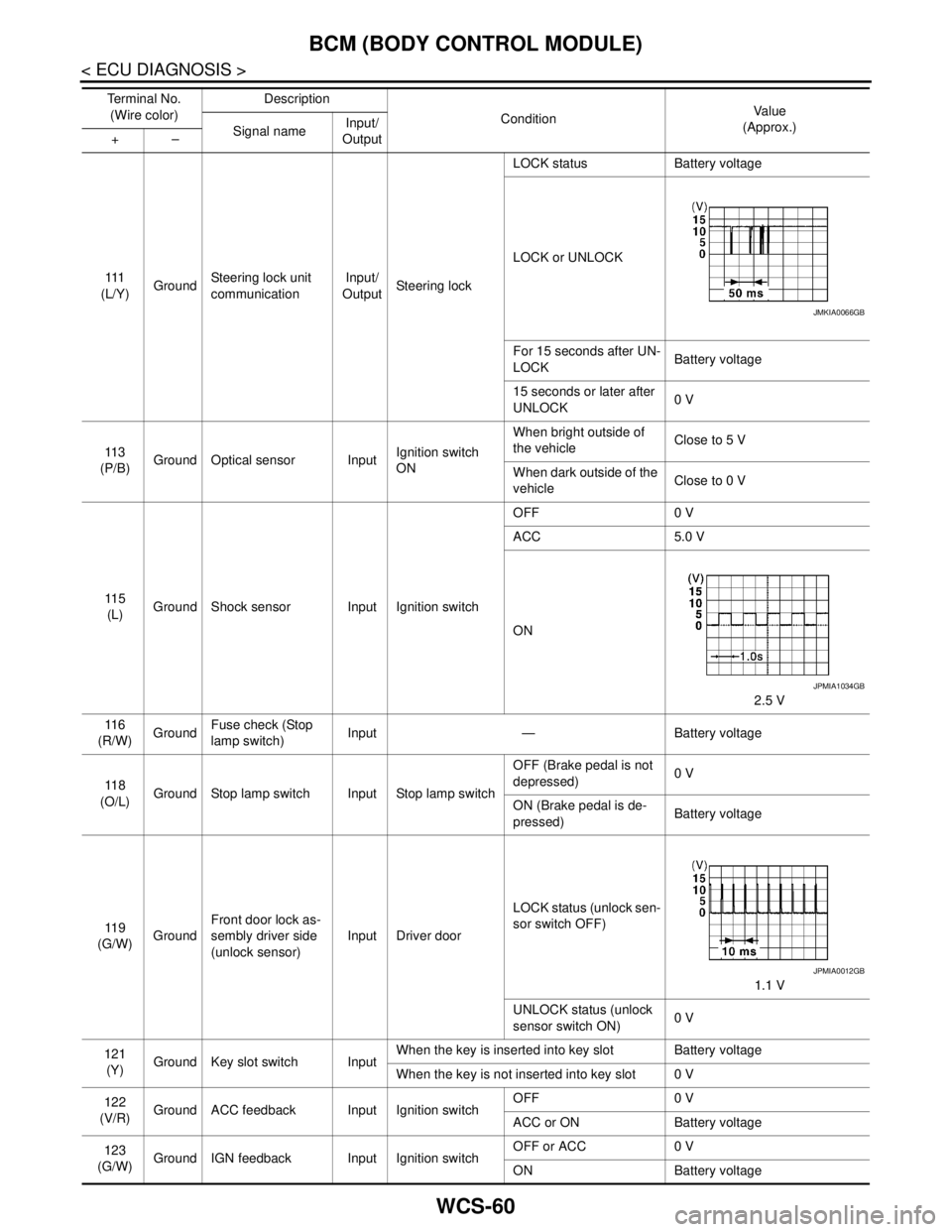
111
(L/Y)GroundSteering lock unit
communicationInput/
OutputSteering lockLOCK status Battery voltage
LOCK or UNLOCK
For 15 seconds after UN-
LOCKBattery voltage
15 seconds or later after
UNLOCK0 V
11 3
(P/B)Ground Optical sensor InputIgnition switch
ONWhen bright outside of
the vehicleClose to 5 V
When dark outside of the
vehicleClose to 0 V
11 5
(L)Ground Shock sensor Input Ignition switchOFF 0 V
ACC 5.0 V
ON
2.5 V
11 6
(R/W)GroundFuse check (Stop
lamp switch)Input — Battery voltage
11 8
(O/L)Ground Stop lamp switch Input Stop lamp switchOFF (Brake pedal is not
depressed)0 V
ON (Brake pedal is de-
pressed)Battery voltage
11 9
(G/W)GroundFront door lock as-
sembly driver side
(unlock sensor)Input Driver doorLOCK status (unlock sen-
sor switch OFF)
1.1 V
UNLOCK status (unlock
sensor switch ON)0 V
121
(Y)Ground Key slot switch InputWhen the key is inserted into key slot Battery voltage
When the key is not inserted into key slot 0 V
122
(V/R)Ground ACC feedback Input Ignition switchOFF 0 V
ACC or ON Battery voltage
123
(G/W)Ground IGN feedback Input Ignition switchOFF or ACC 0 V
ON Battery voltage Te r m i n a l N o .
(Wire color)Description
ConditionVa l u e
(Approx.)
Signal nameInput/
Output +–
JMKIA0066GB
JPMIA1034GB
JPMIA0012GB
Page 5013 of 5121

WW-1
DRIVER CONTROLS
C
D
E
F
G
H
I
J
K
M
SECTION WW
A
B
WW
N
O
P
CONTENTS
WIPER & WASHER
BASIC INSPECTION ....................................3
DIAGNOSIS AND REPAIR WORKFLOW ..........3
Work Flow .................................................................3
FUNCTION DIAGNOSIS ...............................5
FRONT WIPER AND WASHER SYSTEM ..........5
System Diagram ........................................................5
System Description ...................................................5
Component Parts Location ........................................8
Component Description ............................................8
HEADLAMP WASHER SYSTEM .......................10
System Diagram ......................................................10
System Description .................................................10
Component Parts Location ......................................11
Component Description ..........................................11
DIAGNOSIS SYSTEM (BCM) ............................12
COMMON ITEM .........................................................12
COMMON ITEM : CONSULT-III Function (BCM -
COMMON ITEM) .....................................................
12
WIPER .......................................................................13
WIPER : CONSULT-III Function (BCM - WIPER) ....13
DIAGNOSIS SYSTEM (IPDM E/R) .....................15
Diagnosis Description .............................................15
CONSULT-III Function (IPDM E/R) .........................17
COMPONENT DIAGNOSIS .........................20
WIPER AND WASHER FUSE, FUSIBLE LINK
....
20
Description ..............................................................20
Diagnosis Procedure ...............................................20
POWER SUPPLY AND GROUND CIRCUIT ......21
BCM (BODY CONTROL MODULE) ..........................21
BCM (BODY CONTROL MODULE) : Diagnosis
Procedure ................................................................
21
IPDM E/R (INTELLIGENT POWER DISTRIBU-
TION MODULE ENGINE ROOM) ..............................
21
IPDM E/R (INTELLIGENT POWER DISTRIBU-
TION MODULE ENGINE ROOM) : Diagnosis Pro-
cedure ......................................................................
21
FRONT WIPER MOTOR LO CIRCUIT ..............23
Component Function Check ....................................23
Diagnosis Procedure ...............................................23
FRONT WIPER MOTOR HI CIRCUIT ...............25
Component Function Check ....................................25
Diagnosis Procedure ...............................................25
FRONT WIPER AUTO STOP SIGNAL CIR-
CUIT ..................................................................
27
Component Function Check ....................................27
Diagnosis Procedure ...............................................27
FRONT WIPER MOTOR GROUND CIRCUIT ...29
Diagnosis Procedure ...............................................29
WASHER SWITCH ............................................30
Description ...............................................................30
Component Inspection .............................................30
HEADLAMP WASHER RELAY ........................31
Component Inspection .............................................31
HEADLAMP WASHER CIRCUIT ......................32
Component Function Check ....................................32
Diagnosis Procedure ...............................................32
FRONT WIPER AND WASHER SYSTEM ........35
Wiring Diagram - FRONT WIPER AND WASHER
SYSTEM - ................................................................
35
HEADLAMP WASHER SYSTEM ......................39
Wiring Diagram -HEADLAMP WASHER SYS-
TEM- ........................................................................
39