Ioni NISSAN TEANA 2008 Repair Manual
[x] Cancel search | Manufacturer: NISSAN, Model Year: 2008, Model line: TEANA, Model: NISSAN TEANA 2008Pages: 5121, PDF Size: 69.03 MB
Page 143 of 5121
SEAT MEMORY SWITCH
ADP-137
< ON-VEHICLE REPAIR >
C
D
E
F
G
H
I
K
L
MA
B
ADP
N
O
P
SEAT MEMORY SWITCH
Exploded ViewINFOID:0000000003759242
Refer to INT-30, "DRIVER SIDE : Exploded View".
Removal and InstallationINFOID:0000000003759243
REMOVAL
CAUTION:
When removing and installing, use shop cloths to protect parts from damage.
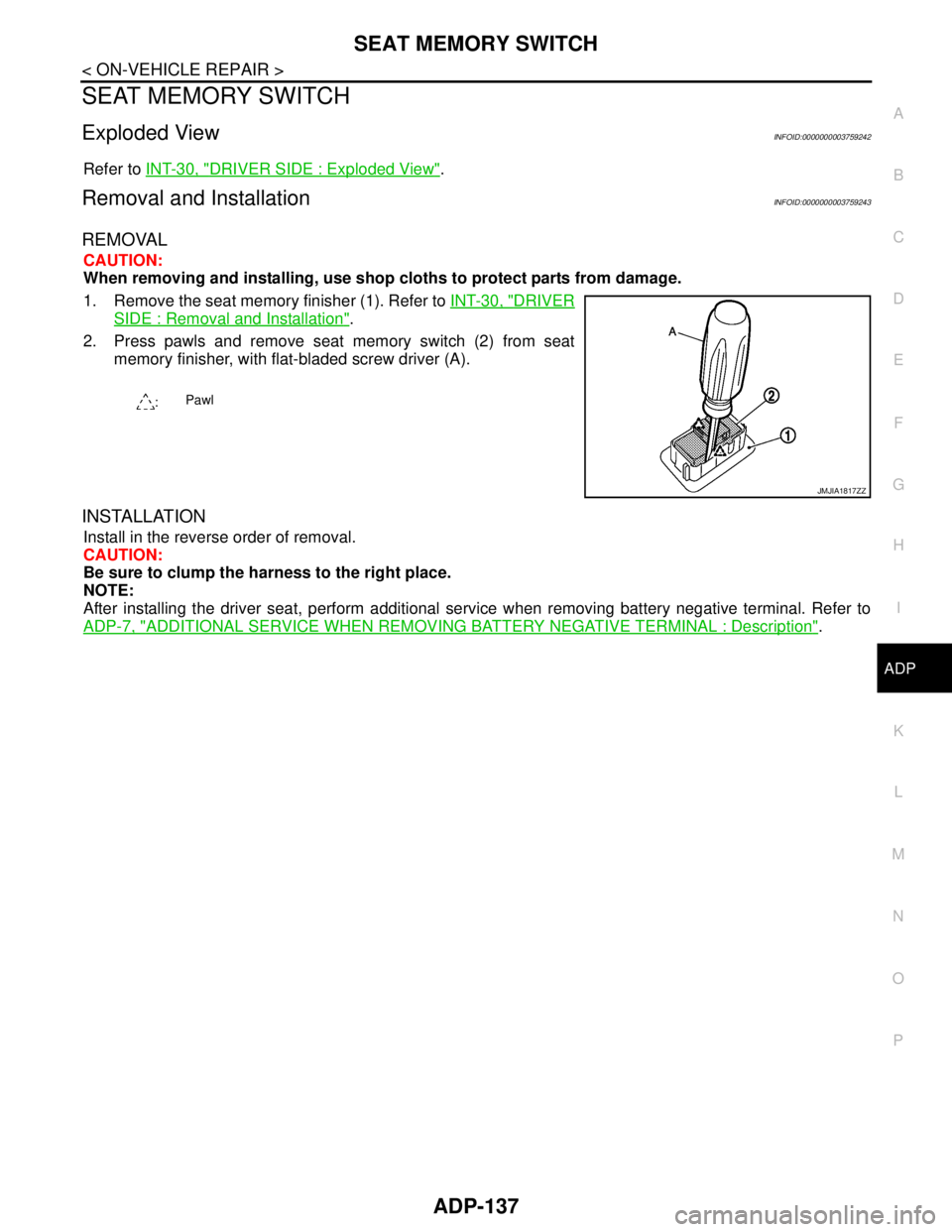
1. Remove the seat memory finisher (1). Refer to INT-30, "
DRIVER
SIDE : Removal and Installation".
2. Press pawls and remove seat memory switch (2) from seat
memory finisher, with flat-bladed screw driver (A).
INSTALLATION
Install in the reverse order of removal.
CAUTION:
Be sure to clump the harness to the right place.
NOTE:
After installing the driver seat, perform additional service when removing battery negative terminal. Refer to
ADP-7, "
ADDITIONAL SERVICE WHEN REMOVING BATTERY NEGATIVE TERMINAL : Description".
:Pawl
JMJIA1817ZZ
Page 144 of 5121
ADP-138
< ON-VEHICLE REPAIR >
POWER SEAT SWITCH
POWER SEAT SWITCH
Exploded ViewINFOID:0000000003940128
Refer to SE-89, "Exploded View".
Removal and InstallationINFOID:0000000003940129
REMOVAL
CAUTION:
When removing and installing, use shop cloths to protect parts from damage.
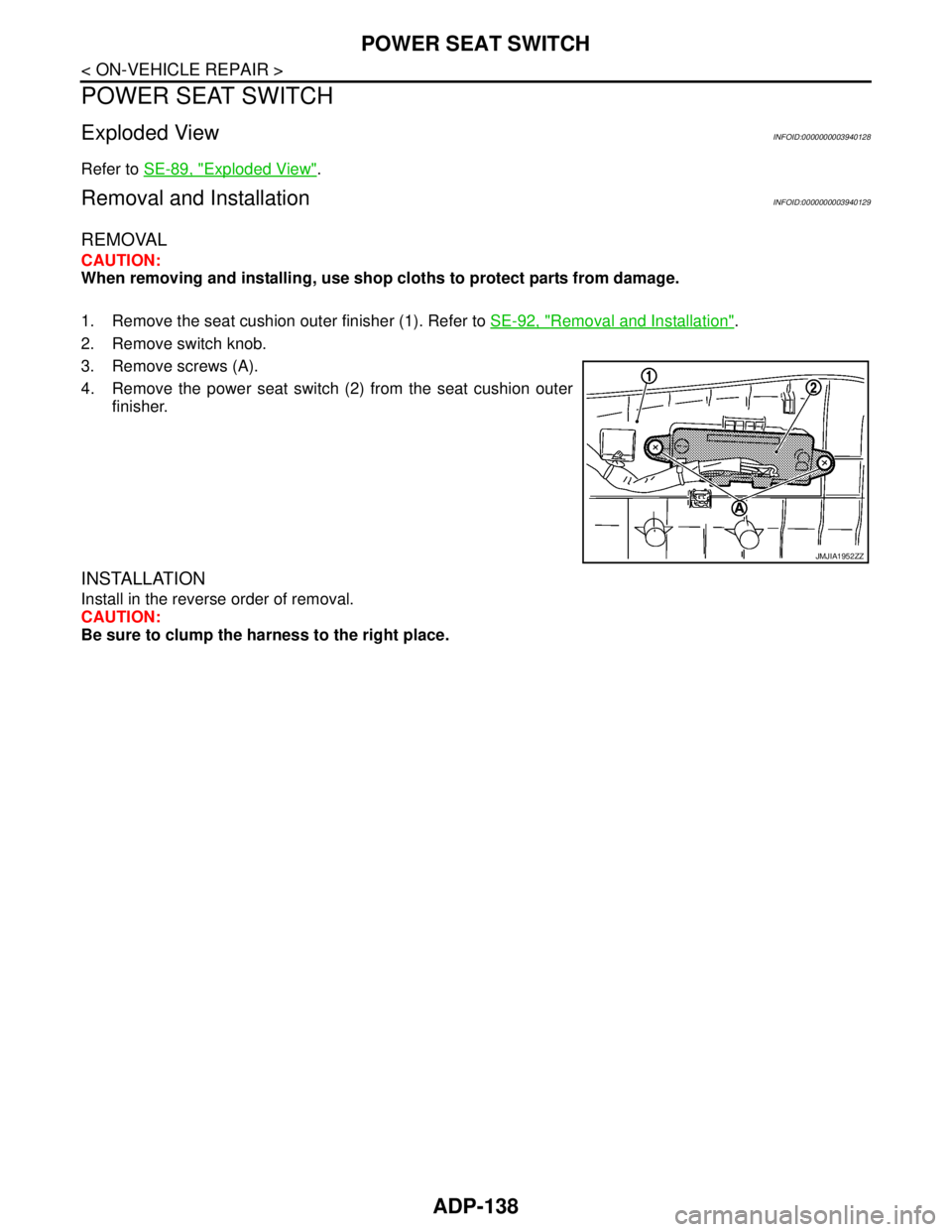
1. Remove the seat cushion outer finisher (1). Refer to SE-92, "
Removal and Installation".
2. Remove switch knob.
3. Remove screws (A).
4. Remove the power seat switch (2) from the seat cushion outer
finisher.
INSTALLATION
Install in the reverse order of removal.
CAUTION:
Be sure to clump the harness to the right place.
JMJIA1952ZZ
Page 155 of 5121
![NISSAN TEANA 2008 Repair Manual AV
DIAGNOSIS AND REPAIR WORKFLOW
AV-11
< BASIC INSPECTION >[AUDIO SYSTEM]
C
D
E
F
G
H
I
J
K
L
MB A
O
P
BASIC INSPECTION
DIAGNOSIS AND REPAIR WORKFLOW
Work FlowINFOID:0000000003765587
OVERALL SEQUENCE](/img/5/57391/w960_57391-154.png "NISSAN TEANA 2008 Repair Manual AV
DIAGNOSIS AND REPAIR WORKFLOW
AV-11
< BASIC INSPECTION >[AUDIO SYSTEM]
C
D
E
F
G
H
I
J
K
L
MB A
O
P
BASIC INSPECTION
DIAGNOSIS AND REPAIR WORKFLOW
Work FlowINFOID:0000000003765587
OVERALL SEQUENCE")
AV
DIAGNOSIS AND REPAIR WORKFLOW
AV-11
< BASIC INSPECTION >[AUDIO SYSTEM]
C
D
E
F
G
H
I
J
K
L
MB A
O
P
BASIC INSPECTION
DIAGNOSIS AND REPAIR WORKFLOW
Work FlowINFOID:0000000003765587
OVERALL SEQUENCE
DETAILED FLOW
1.GET INFORMATION FOR SYMPTOM
Get detailed information from the customer about the symptom (the condition and the environment when the
incident/malfunction occurred).
>> GO TO 2.
2.CONFIRM THE SYMPTOM
Try to confirm the symptom described by the customer. Verify the relation between the symptom and the con-
dition when the symptom is detected.
>> GO TO 3.
3.DETECT MALFUNCTIONING PART BY DIAGNOSTIC PROCEDURE
Inspect according to Diagnostic Procedure of the system.
ALNIA0182GB
Page 156 of 5121
![NISSAN TEANA 2008 Repair Manual AV-12
< BASIC INSPECTION >[AUDIO SYSTEM]
DIAGNOSIS AND REPAIR WORKFLOW
Is a malfunctioning part detected?
YES >> GO TO 4.
NO >> GO TO 2.
4.REPAIR OR REPLACE THE MALFUNCTIONING PART
1. Repair or replac](/img/5/57391/w960_57391-155.png "NISSAN TEANA 2008 Repair Manual AV-12
< BASIC INSPECTION >[AUDIO SYSTEM]
DIAGNOSIS AND REPAIR WORKFLOW
Is a malfunctioning part detected?
YES >> GO TO 4.
NO >> GO TO 2.
4.REPAIR OR REPLACE THE MALFUNCTIONING PART
1. Repair or replac")
AV-12
< BASIC INSPECTION >[AUDIO SYSTEM]
DIAGNOSIS AND REPAIR WORKFLOW
Is a malfunctioning part detected?
YES >> GO TO 4.
NO >> GO TO 2.
4.REPAIR OR REPLACE THE MALFUNCTIONING PART
1. Repair or replace the malfunctioning part.
2. Reconnect parts or connectors disconnected during Diagnostic Procedure.
>> GO TO 5.
5.FINAL CHECK
Refer to confirmed symptom in step 2, and check that the symptom is not detected.
Has the symptom been repaired?
YES >> INSPECTION END
NO >> GO TO 2.
Page 157 of 5121
![NISSAN TEANA 2008 Repair Manual AV
AUDIO SYSTEM
AV-13
< FUNCTION DIAGNOSIS >[AUDIO SYSTEM]
C
D
E
F
G
H
I
J
K
L
MB A
O
P
FUNCTION DIAGNOSIS
AUDIO SYSTEM
System DiagramINFOID:0000000003765588
System DescriptionINFOID:0000000003765589](/img/5/57391/w960_57391-156.png "NISSAN TEANA 2008 Repair Manual AV
AUDIO SYSTEM
AV-13
< FUNCTION DIAGNOSIS >[AUDIO SYSTEM]
C
D
E
F
G
H
I
J
K
L
MB A
O
P
FUNCTION DIAGNOSIS
AUDIO SYSTEM
System DiagramINFOID:0000000003765588
System DescriptionINFOID:0000000003765589")
AV
AUDIO SYSTEM
AV-13
< FUNCTION DIAGNOSIS >[AUDIO SYSTEM]
C
D
E
F
G
H
I
J
K
L
MB A
O
P
FUNCTION DIAGNOSIS
AUDIO SYSTEM
System DiagramINFOID:0000000003765588
System DescriptionINFOID:0000000003765589
AUDIO SYSTEM
The audio system consists of the following components.
Audio unit
Antenna amp.
Glass antenna
Steering switch
Front door speakers
Rear door speakers
Front squawkers
Audio display unit
AM/FM Radio Mode
AM/FM radio tuner is integrated into audio unit.
When AM/FM radio waves are received by rear window glass antenna, the radio waves are amplified by an
antenna amp. to input them to audio unit. Sound signals are output to each speaker for the audio unit. The
FM sub antenna is installed on the rear window glass and the audio unit is received.
CD Mode
The audio unit has CD function.
The audio unit outputs sound signals to each speaker when CD is inserted into the audio unit.
JSNIA1295GB
Page 158 of 5121
![NISSAN TEANA 2008 Repair Manual AV-14
< FUNCTION DIAGNOSIS >[AUDIO SYSTEM]
AUDIO SYSTEM
Component Parts Location
INFOID:0000000003765590
Component DescriptionINFOID:0000000003765591
1. Front squawker RH 2. Front squawker LH 3. Front](/img/5/57391/w960_57391-157.png "NISSAN TEANA 2008 Repair Manual AV-14
< FUNCTION DIAGNOSIS >[AUDIO SYSTEM]
AUDIO SYSTEM
Component Parts Location
INFOID:0000000003765590
Component DescriptionINFOID:0000000003765591
1. Front squawker RH 2. Front squawker LH 3. Front")
AV-14
< FUNCTION DIAGNOSIS >[AUDIO SYSTEM]
AUDIO SYSTEM
Component Parts Location
INFOID:0000000003765590
Component DescriptionINFOID:0000000003765591
1. Front squawker RH 2. Front squawker LH 3. Front door speaker LH
4. Rear door speaker LH 5. Antenna amp. 6. Rear door speaker RH
7. Front door speaker RH 8. Steering switch 9. Audio unit
10. Audio display unit
A. Within rear pillar finisher RH
JPNIA1057ZZ
Part name Description
AUDIO UNIT Has radio function and CD playing function.
Sound signals are output to each speaker.
AUDIO DISPLAY UNIT Display images are controlled by AV communication from audio unit.
FRONT DOOR SPEAKER Outputs sound signals from audio unit.
Outputs sound (mid and low range).
REAR DOOR SPEAKER Outputs sound signals from audio unit.
Outputs sound (mid and low range).
FRONT SQUAWKER Outputs sound signals from audio unit.
Outputs sound (high and mid range).
STEERING SWITCH Steering switch signals (operation signals) are output to audio unit.
ANTENNA AMP. Radio signal received by glass antenna is amplified and transmitted to audio
unit.
Power (antenna amp. ON signal) is supplied from audio unit.
Page 159 of 5121
![NISSAN TEANA 2008 Repair Manual AV
DIAGNOSIS SYSTEM (AUDIO UNIT)
AV-15
< FUNCTION DIAGNOSIS >[AUDIO SYSTEM]
C
D
E
F
G
H
I
J
K
L
MB A
O
P
DIAGNOSIS SYSTEM (AUDIO UNIT)
Diagnosis DescriptionINFOID:0000000003765592
Self-diagnosis mode](/img/5/57391/w960_57391-158.png "NISSAN TEANA 2008 Repair Manual AV
DIAGNOSIS SYSTEM (AUDIO UNIT)
AV-15
< FUNCTION DIAGNOSIS >[AUDIO SYSTEM]
C
D
E
F
G
H
I
J
K
L
MB A
O
P
DIAGNOSIS SYSTEM (AUDIO UNIT)
Diagnosis DescriptionINFOID:0000000003765592
Self-diagnosis mode")
AV
DIAGNOSIS SYSTEM (AUDIO UNIT)
AV-15
< FUNCTION DIAGNOSIS >[AUDIO SYSTEM]
C
D
E
F
G
H
I
J
K
L
MB A
O
P
DIAGNOSIS SYSTEM (AUDIO UNIT)
Diagnosis DescriptionINFOID:0000000003765592
Self-diagnosis mode can perform the following items.
Versions display
Channel check diagnosis
Key check diagnosis
AV communication diagnosis
VERSIONS DISPLAY FUNCTION
1. Turn ignition switch ON.
2. Turn the audio unit off.
3. While pressing “1” button, turn volume control dial clockwise or
counterclockwise for 30 clicks or more.
4. Diagnosis default screen of audio display unit is displayed.
NOTE:
Diagnosis default screen = All icons and segments of the audio display unit are turned on.
5. Pressing the AUDIO switch briefly displays the version display mode. Pressing the AUDIO switch briefly
switches to each version display. Pressing and holding the AUDIO switch when displaying each software
version returns to the diagnosis default screen.
Version display item
6. Self-diagnosis mode is canceled when the ignition switch is turned OFF.
CHANNEL CHECK DIAGNOSIS FUNCTION
1. Turn ignition switch ON.
2. Turn the audio unit off.
3. While pressing the “1” button, turn the volume control dial clock-
wise or counterclockwise for 30 clicks or more.
JSNIA1334GB
Mode Description
Ve r s i o n s d i s p l a ySoftware V###### Audio unit software version is displayed.
Hardware V###### Audio unit hardware version is displayed.
Disp HW V###### Display unit hardware version is displayed.
CD Mech V###### Audio unit CD mechanism version is displayed.
EEPROM V###### Audio unit EEPROM version is displayed.
Disp SW V###### Display unit software version is displayed.
JSNIA1334GB
Page 164 of 5121
![NISSAN TEANA 2008 Repair Manual AV-20
< COMPONENT DIAGNOSIS >[AUDIO SYSTEM]
STEERING SWITCH SIGNAL A CIRCUIT
STEERING SWITCH SIGNAL A CIRCUIT
DescriptionINFOID:0000000003765594
Transmits the steering switch signal to audio unit.
Dia](/img/5/57391/w960_57391-163.png "NISSAN TEANA 2008 Repair Manual AV-20
< COMPONENT DIAGNOSIS >[AUDIO SYSTEM]
STEERING SWITCH SIGNAL A CIRCUIT
STEERING SWITCH SIGNAL A CIRCUIT
DescriptionINFOID:0000000003765594
Transmits the steering switch signal to audio unit.
Dia")
AV-20
< COMPONENT DIAGNOSIS >[AUDIO SYSTEM]
STEERING SWITCH SIGNAL A CIRCUIT
STEERING SWITCH SIGNAL A CIRCUIT
DescriptionINFOID:0000000003765594
Transmits the steering switch signal to audio unit.
Diagnosis ProcedureINFOID:0000000003765595
1.CHECK STEERING SWITCH SIGNAL A CIRCUIT
1. Disconnect audio unit connector and spiral cable connector.
2. Check continuity between audio unit harness connector and spiral cable harness connector.
3. Check continuity between audio unit harness connector and ground.
Is the inspection result normal?
YES >> GO TO 2.
NO >> Repair harness or connector.
2.CHECK SPIRAL CABLE
Check spiral cable.
Is the inspection result normal?
YES >> GO TO 3.
NO >> Replace spiral cable.
3.CHECK AUDIO UNIT VOLTAGE
1. Connect audio unit connector and spiral cable connector.
2. Turn ignition switch ON.
3. Check voltage between audio unit harness connector terminals.
Is the inspection result normal?
YES >> GO TO 4.
NO >> Replace audio unit.
4.CHECK STEERING SWITCH
1. Turn ignition switch OFF.
2. Check steering switch. Refer to AV-21, "
Component Inspection".
Is the inspection result normal?
YES >> INSPECTION END
NO >> Replace steering switch.
Audio unit Spiral cable
Continuity
Connector Terminal Connector Terminal
M46 6 M33 24 Existed
Audio unit
—Continuity
Connector Terminal
M46 6 Ground Not existed
(+) (−)
Vo l ta g e Audio unit
Connector Terminal Connector Terminal
M46 6 M46 15 Approx. 5.0 V
Page 165 of 5121
![NISSAN TEANA 2008 Repair Manual AV
STEERING SWITCH SIGNAL A CIRCUIT
AV-21
< COMPONENT DIAGNOSIS >[AUDIO SYSTEM]
C
D
E
F
G
H
I
J
K
L
MB A
O
P
Component InspectionINFOID:0000000003765596
Measure the resistance between the steering swi](/img/5/57391/w960_57391-164.png "NISSAN TEANA 2008 Repair Manual AV
STEERING SWITCH SIGNAL A CIRCUIT
AV-21
< COMPONENT DIAGNOSIS >[AUDIO SYSTEM]
C
D
E
F
G
H
I
J
K
L
MB A
O
P
Component InspectionINFOID:0000000003765596
Measure the resistance between the steering swi")
AV
STEERING SWITCH SIGNAL A CIRCUIT
AV-21
< COMPONENT DIAGNOSIS >[AUDIO SYSTEM]
C
D
E
F
G
H
I
J
K
L
MB A
O
P
Component InspectionINFOID:0000000003765596
Measure the resistance between the steering switch connector ter-
minals.
Standard
JSNIA1145GB
Steering switch
ConditionResistance
Ω Con-
nectorTe r m i -
nalsCon-
nectorTe r m i -
nal
M30314
M303 17SEEK DOWN switch
ON315 – 327
SEEK UP switch ON 119 – 123
SOURCE switch ON 0
15VOL UP switch ON 119 – 123
VOL DOWN switch ON 0
Page 166 of 5121
![NISSAN TEANA 2008 Repair Manual AV-22
< COMPONENT DIAGNOSIS >[AUDIO SYSTEM]
STEERING SWITCH SIGNAL B CIRCUIT
STEERING SWITCH SIGNAL B CIRCUIT
DescriptionINFOID:0000000003765597
Transmits the steering switch signal to audio unit.
Dia](/img/5/57391/w960_57391-165.png "NISSAN TEANA 2008 Repair Manual AV-22
< COMPONENT DIAGNOSIS >[AUDIO SYSTEM]
STEERING SWITCH SIGNAL B CIRCUIT
STEERING SWITCH SIGNAL B CIRCUIT
DescriptionINFOID:0000000003765597
Transmits the steering switch signal to audio unit.
Dia")
AV-22
< COMPONENT DIAGNOSIS >[AUDIO SYSTEM]
STEERING SWITCH SIGNAL B CIRCUIT
STEERING SWITCH SIGNAL B CIRCUIT
DescriptionINFOID:0000000003765597
Transmits the steering switch signal to audio unit.
Diagnosis ProcedureINFOID:0000000003765598
1.CHECK STEERING SWITCH SIGNAL B CIRCUIT
1. Disconnect audio unit connector and spiral cable connector.
2. Check continuity between audio unit harness connector and spiral cable harness connector.
3. Check continuity between audio unit harness connector and ground.
Is the inspection result normal?
YES >> GO TO 2.
NO >> Repair harness or connector.
2.CHECK SPIRAL CABLE
Check spiral cable.
Is the inspection result normal?
YES >> GO TO 3.
NO >> Replace spiral cable.
3.CHECK AUDIO UNIT VOLTAGE
1. Connect audio unit connector and spiral cable connector.
2. Turn ignition switch ON.
3. Check voltage between audio unit harness connector terminals.
Is the inspection result normal?
YES >> GO TO 4.
NO >> Replace audio unit.
4.CHECK STEERING SWITCH
1. Turn ignition switch OFF.
2. Check steering switch. Refer to AV-23, "
Component Inspection".
Is the inspection result normal?
YES >> INSPECTION END
NO >> Replace steering switch.
Audio unit Spiral cable
Continuity
Connector Terminal Connector Terminal
M46 16 M33 31 Existed
Audio unit
—Continuity
Connector Terminal
M46 16 Ground Not existed
(+) (−)
Vo l ta g e Audio unit
Connector Terminal Connector Terminal
M46 16 M46 15 Approx. 5.0 V