Ioni NISSAN TEANA 2008 Workshop Manual
[x] Cancel search | Manufacturer: NISSAN, Model Year: 2008, Model line: TEANA, Model: NISSAN TEANA 2008Pages: 5121, PDF Size: 69.03 MB
Page 74 of 5121
ADP-68
< COMPONENT DIAGNOSIS >
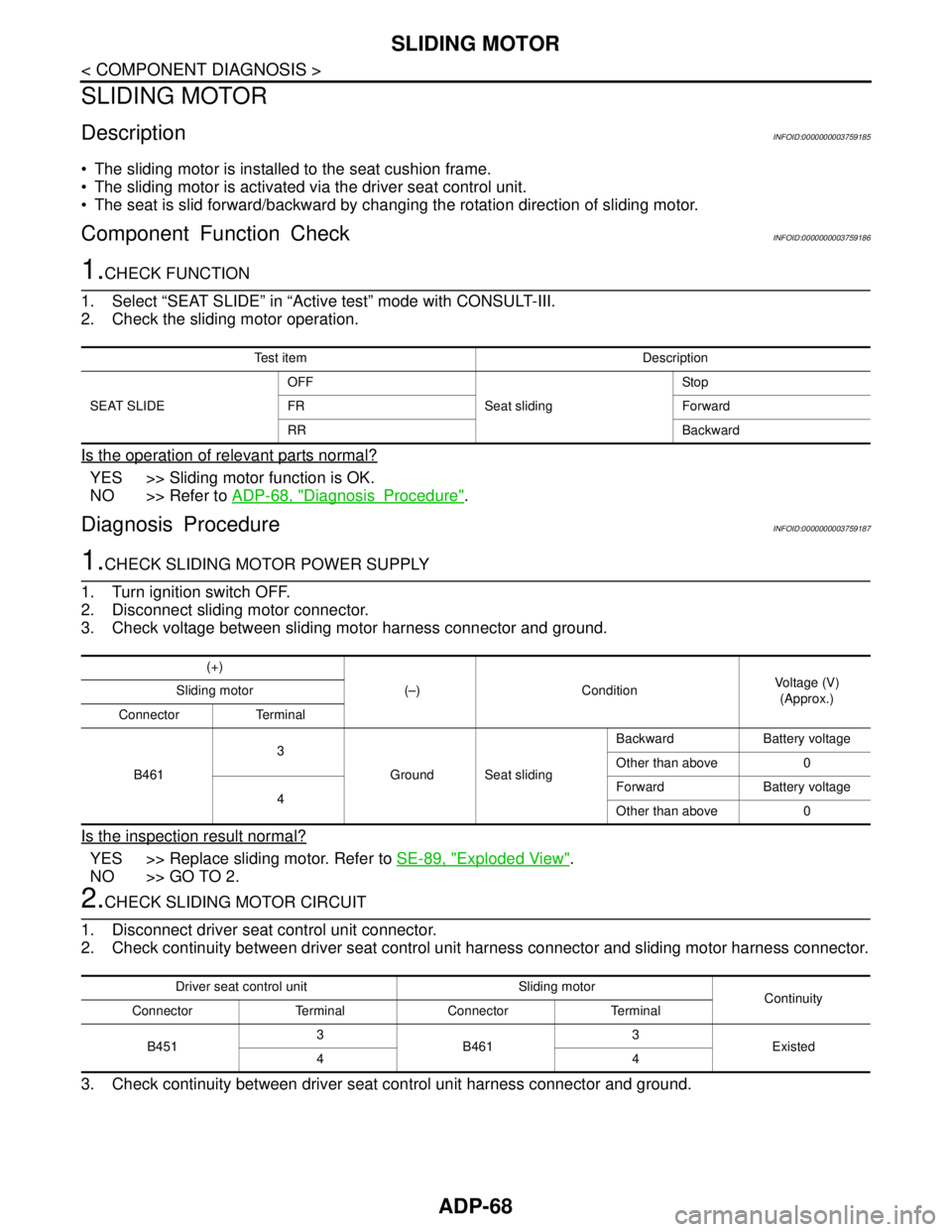
SLIDING MOTOR
SLIDING MOTOR
DescriptionINFOID:0000000003759185
The sliding motor is installed to the seat cushion frame.
The sliding motor is activated via the driver seat control unit.
The seat is slid forward/backward by changing the rotation direction of sliding motor.
Component Function CheckINFOID:0000000003759186
1.CHECK FUNCTION
1. Select “SEAT SLIDE” in “Active test” mode with CONSULT-III.
2. Check the sliding motor operation.
Is the operation of relevant parts normal?
YES >> Sliding motor function is OK.
NO >> Refer to ADP-68, "
DiagnosisProcedure".
Diagnosis ProcedureINFOID:0000000003759187
1.CHECK SLIDING MOTOR POWER SUPPLY
1. Turn ignition switch OFF.
2. Disconnect sliding motor connector.
3. Check voltage between sliding motor harness connector and ground.
Is the inspection result normal?
YES >> Replace sliding motor. Refer to SE-89, "Exploded View".
NO >> GO TO 2.
2.CHECK SLIDING MOTOR CIRCUIT
1. Disconnect driver seat control unit connector.
2. Check continuity between driver seat control unit harness connector and sliding motor harness connector.
3. Check continuity between driver seat control unit harness connector and ground.
Test item Description
SEAT SLIDEOFF
Seat slidingSto p
FR Forward
RR Backward
(+)
(–) ConditionVoltage (V)
(Approx.) Sliding motor
Connector Terminal
B4613
Ground Seat slidingBackward Battery voltage
Other than above 0
4Forward Battery voltage
Other than above 0
Driver seat control unit Sliding motor
Continuity
Connector Terminal Connector Terminal
B4513
B4613
Existed
44
Page 76 of 5121
ADP-70
< COMPONENT DIAGNOSIS >
RECLINING MOTOR
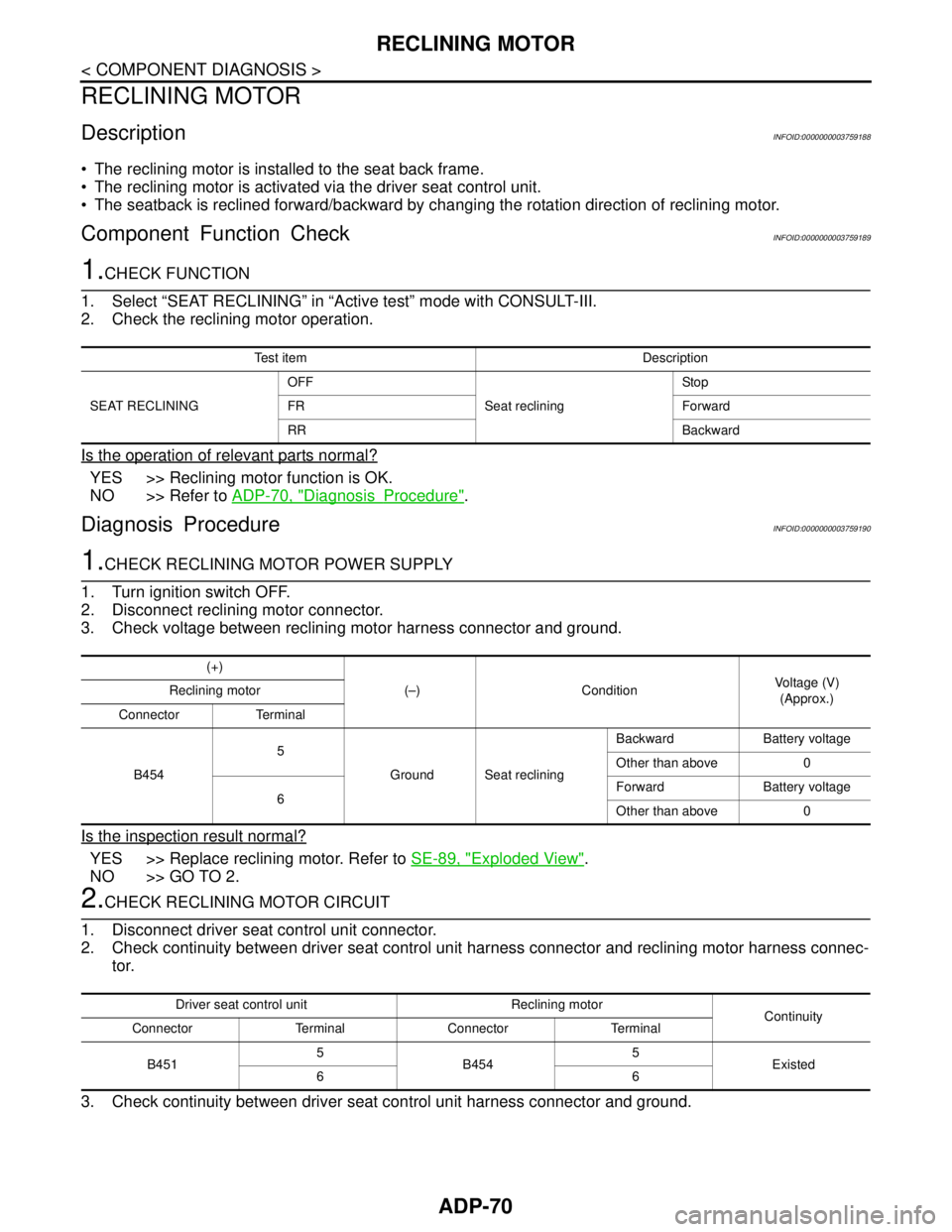
RECLINING MOTOR
DescriptionINFOID:0000000003759188
The reclining motor is installed to the seat back frame.
The reclining motor is activated via the driver seat control unit.
The seatback is reclined forward/backward by changing the rotation direction of reclining motor.
Component Function CheckINFOID:0000000003759189
1.CHECK FUNCTION
1. Select “SEAT RECLINING” in “Active test” mode with CONSULT-III.
2. Check the reclining motor operation.
Is the operation of relevant parts normal?
YES >> Reclining motor function is OK.
NO >> Refer to ADP-70, "
DiagnosisProcedure".
Diagnosis ProcedureINFOID:0000000003759190
1.CHECK RECLINING MOTOR POWER SUPPLY
1. Turn ignition switch OFF.
2. Disconnect reclining motor connector.
3. Check voltage between reclining motor harness connector and ground.
Is the inspection result normal?
YES >> Replace reclining motor. Refer to SE-89, "Exploded View".
NO >> GO TO 2.
2.CHECK RECLINING MOTOR CIRCUIT
1. Disconnect driver seat control unit connector.
2. Check continuity between driver seat control unit harness connector and reclining motor harness connec-
tor.
3. Check continuity between driver seat control unit harness connector and ground.
Test item Description
SEAT RECLININGOFF
Seat recliningSto p
FR Forward
RR Backward
(+)
(–) ConditionVoltage (V)
(Approx.) Reclining motor
Connector Terminal
B4545
Ground Seat recliningBackward Battery voltage
Other than above 0
6Forward Battery voltage
Other than above 0
Driver seat control unit Reclining motor
Continuity
Connector Terminal Connector Terminal
B4515
B4545
Existed
66
Page 78 of 5121
ADP-72
< COMPONENT DIAGNOSIS >
LIFTING MOTOR (FRONT)
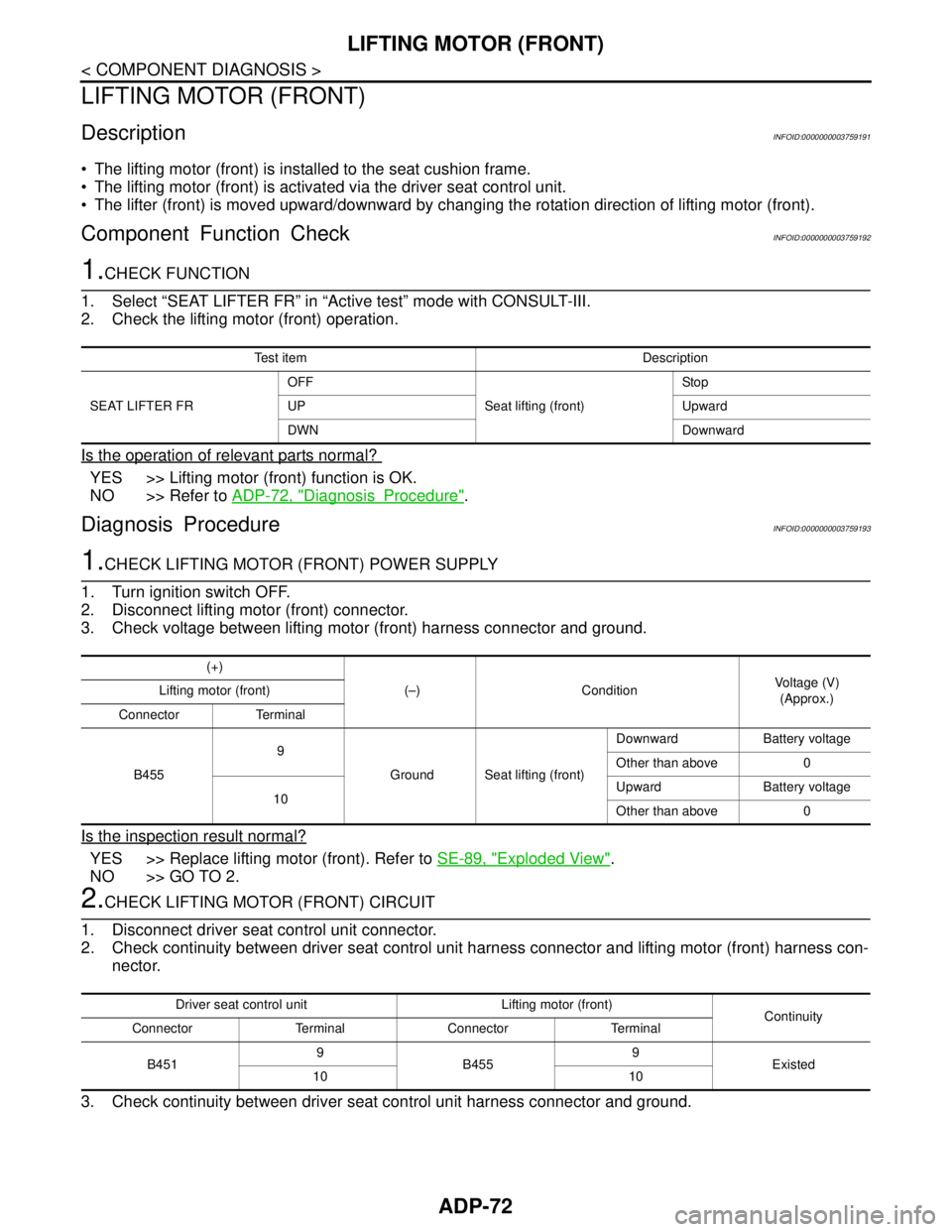
LIFTING MOTOR (FRONT)
DescriptionINFOID:0000000003759191
The lifting motor (front) is installed to the seat cushion frame.
The lifting motor (front) is activated via the driver seat control unit.
The lifter (front) is moved upward/downward by changing the rotation direction of lifting motor (front).
Component Function CheckINFOID:0000000003759192
1.CHECK FUNCTION
1. Select “SEAT LIFTER FR” in “Active test” mode with CONSULT-III.
2. Check the lifting motor (front) operation.
Is the operation of relevant parts normal?
YES >> Lifting motor (front) function is OK.
NO >> Refer to ADP-72, "
DiagnosisProcedure".
Diagnosis ProcedureINFOID:0000000003759193
1.CHECK LIFTING MOTOR (FRONT) POWER SUPPLY
1. Turn ignition switch OFF.
2. Disconnect lifting motor (front) connector.
3. Check voltage between lifting motor (front) harness connector and ground.
Is the inspection result normal?
YES >> Replace lifting motor (front). Refer to SE-89, "Exploded View".
NO >> GO TO 2.
2.CHECK LIFTING MOTOR (FRONT) CIRCUIT
1. Disconnect driver seat control unit connector.
2. Check continuity between driver seat control unit harness connector and lifting motor (front) harness con-
nector.
3. Check continuity between driver seat control unit harness connector and ground.
Test item Description
SEAT LIFTER FROFF
Seat lifting (front)Sto p
UP Upward
DWN Downward
(+)
(–) ConditionVoltage (V)
(Approx.) Lifting motor (front)
Connector Terminal
B4559
Ground Seat lifting (front)Downward Battery voltage
Other than above 0
10Upward Battery voltage
Other than above 0
Driver seat control unit Lifting motor (front)
Continuity
Connector Terminal Connector Terminal
B4519
B4559
Existed
10 10
Page 80 of 5121
ADP-74
< COMPONENT DIAGNOSIS >
LIFTING MOTOR (REAR)
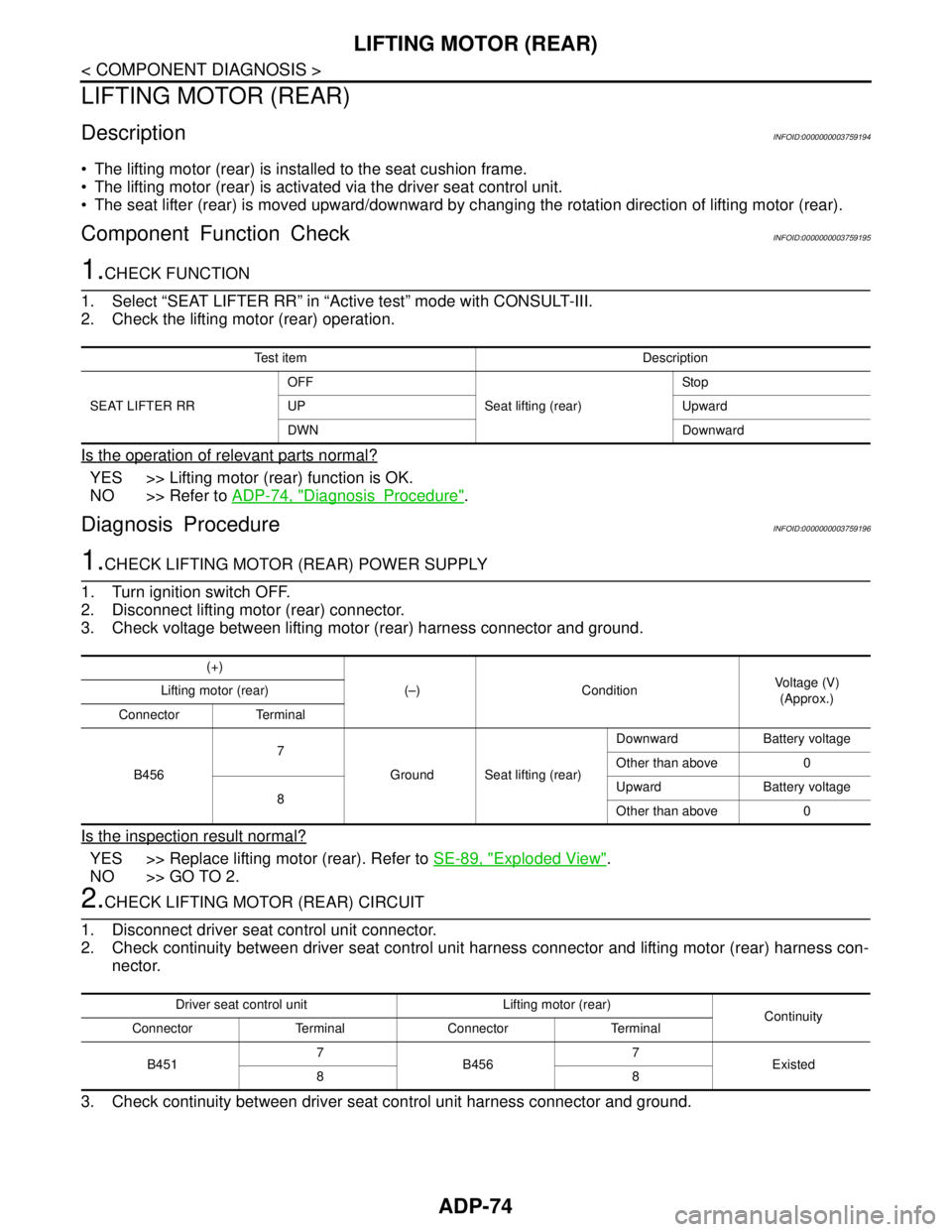
LIFTING MOTOR (REAR)
DescriptionINFOID:0000000003759194
The lifting motor (rear) is installed to the seat cushion frame.
The lifting motor (rear) is activated via the driver seat control unit.
The seat lifter (rear) is moved upward/downward by changing the rotation direction of lifting motor (rear).
Component Function CheckINFOID:0000000003759195
1.CHECK FUNCTION
1. Select “SEAT LIFTER RR” in “Active test” mode with CONSULT-III.
2. Check the lifting motor (rear) operation.
Is the operation of relevant parts normal?
YES >> Lifting motor (rear) function is OK.
NO >> Refer to ADP-74, "
DiagnosisProcedure".
Diagnosis ProcedureINFOID:0000000003759196
1.CHECK LIFTING MOTOR (REAR) POWER SUPPLY
1. Turn ignition switch OFF.
2. Disconnect lifting motor (rear) connector.
3. Check voltage between lifting motor (rear) harness connector and ground.
Is the inspection result normal?
YES >> Replace lifting motor (rear). Refer to SE-89, "Exploded View".
NO >> GO TO 2.
2.CHECK LIFTING MOTOR (REAR) CIRCUIT
1. Disconnect driver seat control unit connector.
2. Check continuity between driver seat control unit harness connector and lifting motor (rear) harness con-
nector.
3. Check continuity between driver seat control unit harness connector and ground.
Test item Description
SEAT LIFTER RROFF
Seat lifting (rear)Sto p
UP Upward
DWN Downward
(+)
(–) ConditionVoltage (V)
(Approx.) Lifting motor (rear)
Connector Terminal
B4567
Ground Seat lifting (rear)Downward Battery voltage
Other than above 0
8Upward Battery voltage
Other than above 0
Driver seat control unit Lifting motor (rear)
Continuity
Connector Terminal Connector Terminal
B4517
B4567
Existed
88
Page 82 of 5121
ADP-76
< COMPONENT DIAGNOSIS >
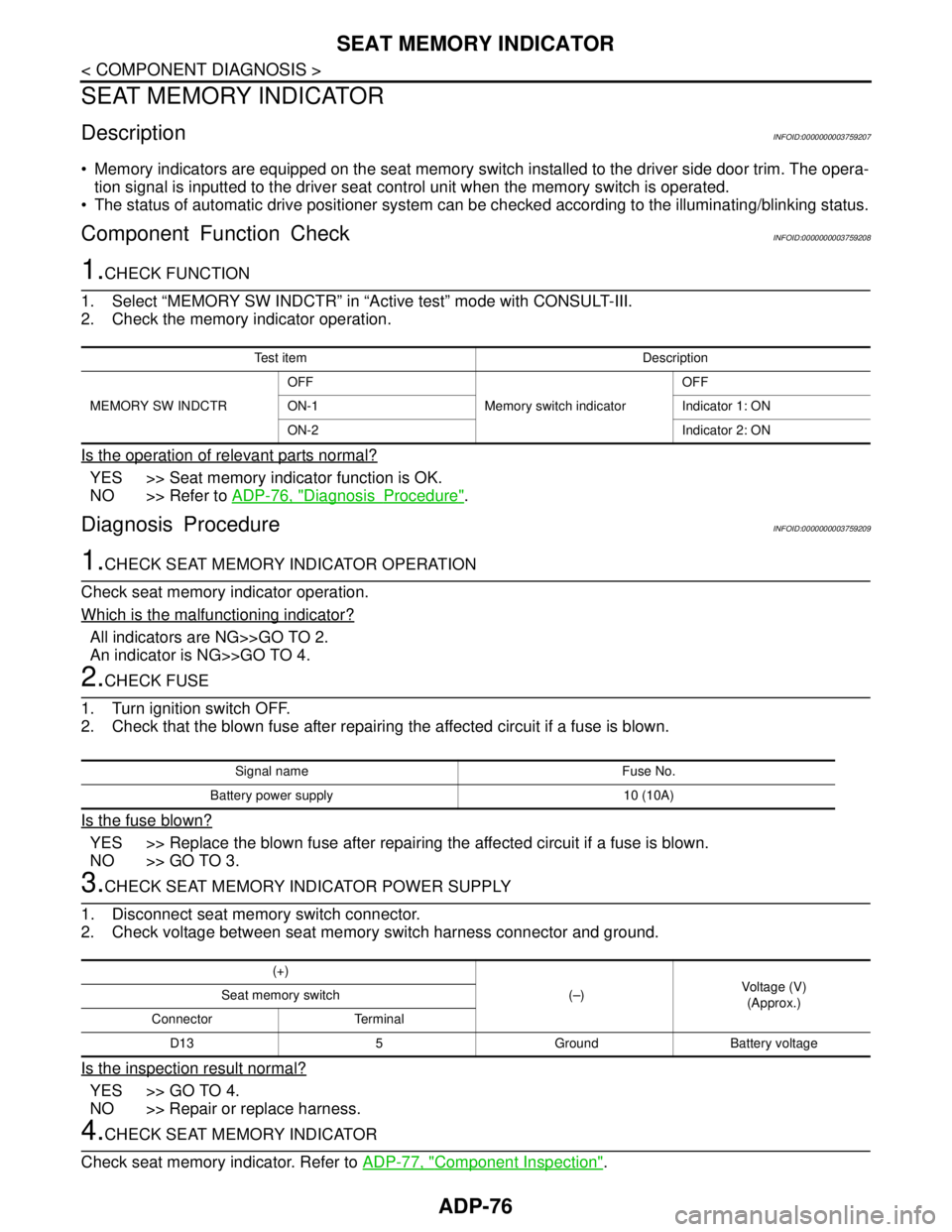
SEAT MEMORY INDICATOR
SEAT MEMORY INDICATOR
DescriptionINFOID:0000000003759207
Memory indicators are equipped on the seat memory switch installed to the driver side door trim. The opera-
tion signal is inputted to the driver seat control unit when the memory switch is operated.
The status of automatic drive positioner system can be checked according to the illuminating/blinking status.
Component Function CheckINFOID:0000000003759208
1.CHECK FUNCTION
1. Select “MEMORY SW INDCTR” in “Active test” mode with CONSULT-III.
2. Check the memory indicator operation.
Is the operation of relevant parts normal?
YES >> Seat memory indicator function is OK.
NO >> Refer to ADP-76, "
DiagnosisProcedure".
Diagnosis ProcedureINFOID:0000000003759209
1.CHECK SEAT MEMORY INDICATOR OPERATION
Check seat memory indicator operation.
Which is the malfunctioning indicator?
All indicators are NG>>GO TO 2.
An indicator is NG>>GO TO 4.
2.CHECK FUSE
1. Turn ignition switch OFF.
2. Check that the blown fuse after repairing the affected circuit if a fuse is blown.
Is the fuse blown?
YES >> Replace the blown fuse after repairing the affected circuit if a fuse is blown.
NO >> GO TO 3.
3.CHECK SEAT MEMORY INDICATOR POWER SUPPLY
1. Disconnect seat memory switch connector.
2. Check voltage between seat memory switch harness connector and ground.
Is the inspection result normal?
YES >> GO TO 4.
NO >> Repair or replace harness.
4.CHECK SEAT MEMORY INDICATOR
Check seat memory indicator. Refer to ADP-77, "
Component Inspection".
Test item Description
MEMORY SW INDCTROFF
Memory switch indicatorOFF
ON-1 Indicator 1: ON
ON-2 Indicator 2: ON
Signal name Fuse No.
Battery power supply 10 (10A)
(+)
(–)Voltage (V)
(Approx.) Seat memory switch
Connector Terminal
D13 5 Ground Battery voltage
Page 83 of 5121
SEAT MEMORY INDICATOR
ADP-77
< COMPONENT DIAGNOSIS >
C
D
E
F
G
H
I
K
L
MA
B
ADP
N
O
P
Is the inspection result normal?
YES >> GO TO 5.
NO >> Replace seat memory switch. Refer to ADP-137, "
Removal and Installation".
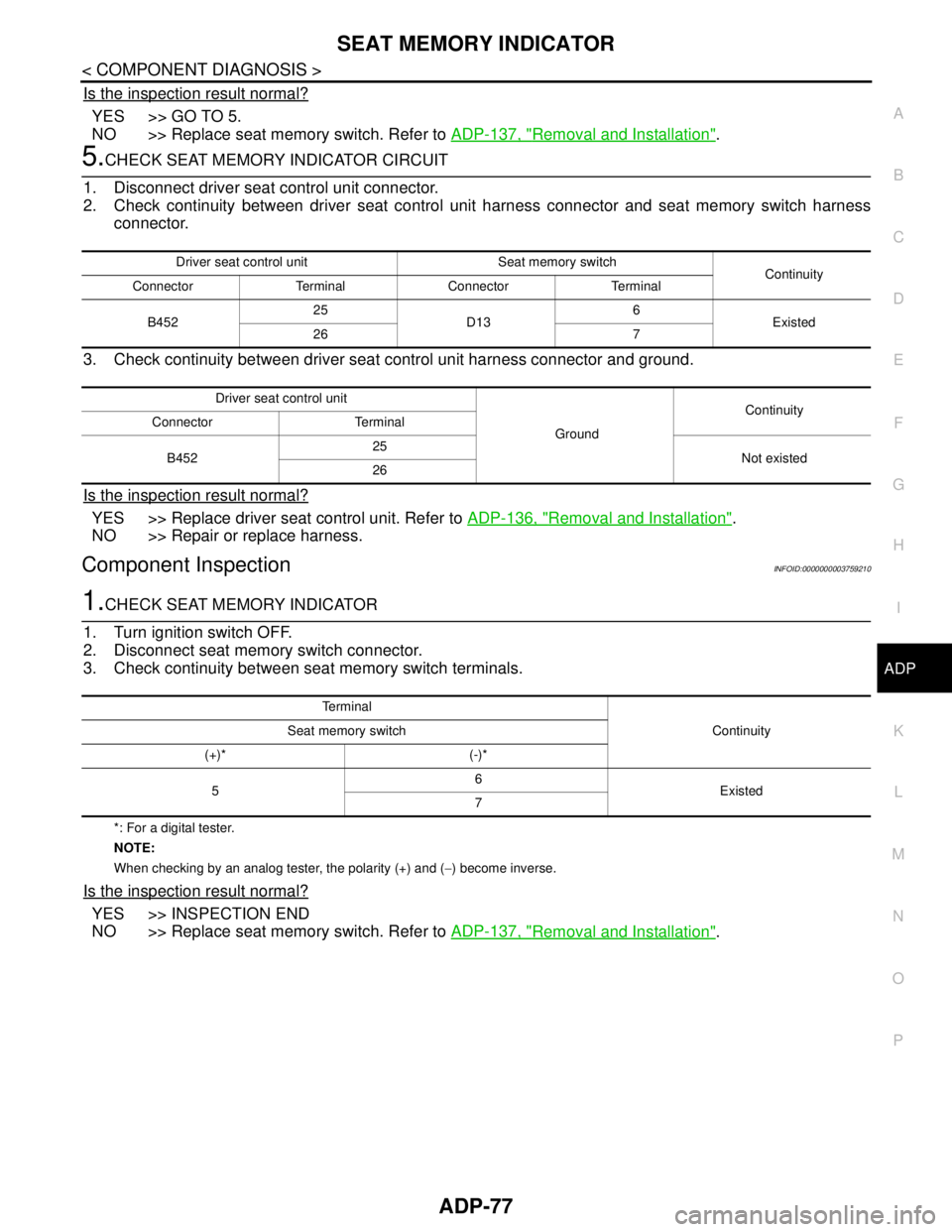
5.CHECK SEAT MEMORY INDICATOR CIRCUIT
1. Disconnect driver seat control unit connector.
2. Check continuity between driver seat control unit harness connector and seat memory switch harness
connector.
3. Check continuity between driver seat control unit harness connector and ground.
Is the inspection result normal?
YES >> Replace driver seat control unit. Refer to ADP-136, "Removal and Installation".
NO >> Repair or replace harness.
Component InspectionINFOID:0000000003759210
1.CHECK SEAT MEMORY INDICATOR
1. Turn ignition switch OFF.
2. Disconnect seat memory switch connector.
3. Check continuity between seat memory switch terminals.
*: For a digital tester.
NOTE:
When checking by an analog tester, the polarity (+) and (−) become inverse.
Is the inspection result normal?
YES >> INSPECTION END
NO >> Replace seat memory switch. Refer to ADP-137, "
Removal and Installation".
Driver seat control unit Seat memory switch
Continuity
Connector Terminal Connector Terminal
B45225
D136
Existed
26 7
Driver seat control unit
GroundContinuity
Connector Terminal
B45225
Not existed
26
Te r m i n a l
Continuity Seat memory switch
(+)* (-)*
56
Existed
7
Page 96 of 5121
ADP-90
< COMPONENT DIAGNOSIS >
BCM (BODY CONTROL MODULE)
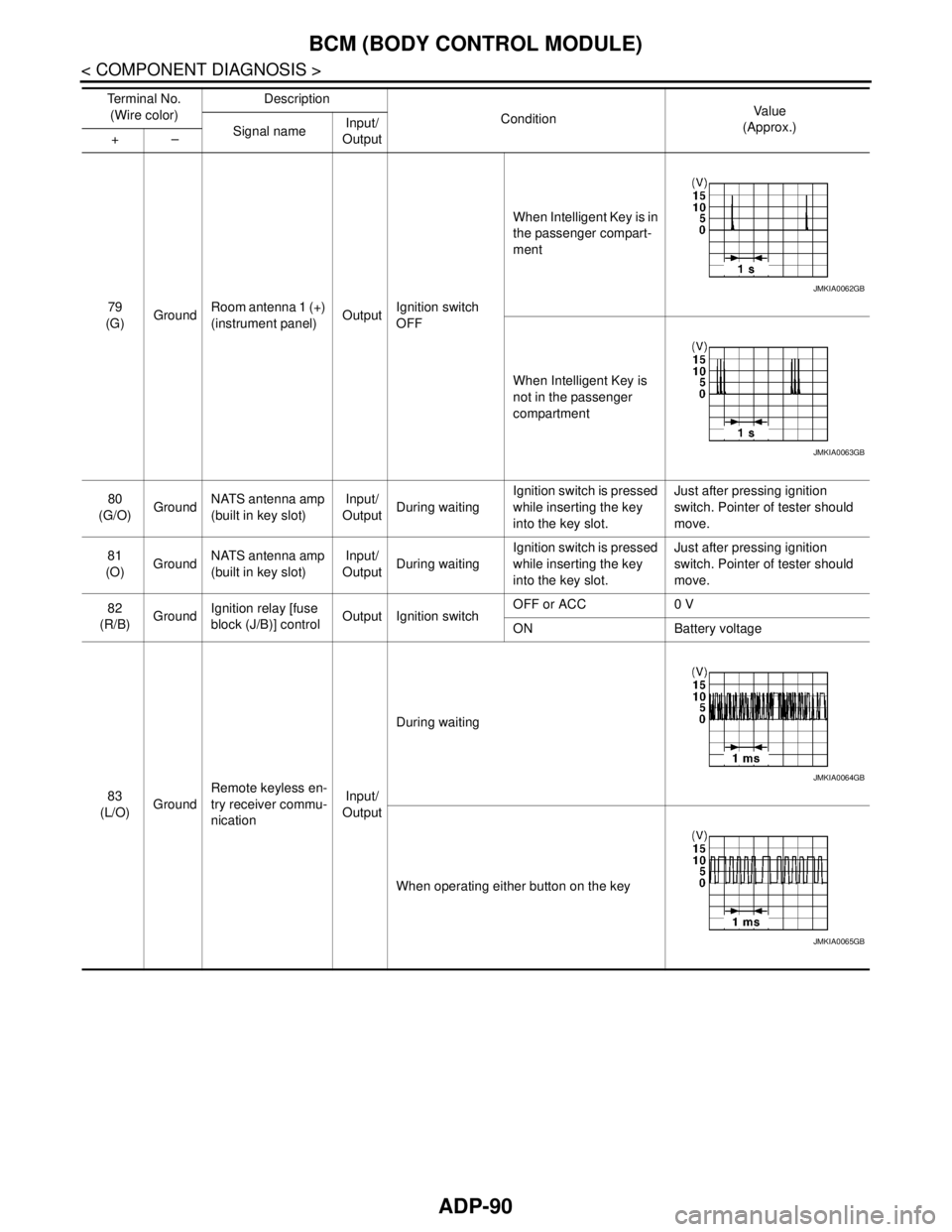
79
(G)GroundRoom antenna 1 (+)
(instrument panel)OutputIgnition switch
OFFWhen Intelligent Key is in
the passenger compart-
ment
When Intelligent Key is
not in the passenger
compartment
80
(G/O)GroundNATS antenna amp
(built in key slot)Input/
OutputDuring waitingIgnition switch is pressed
while inserting the key
into the key slot.Just after pressing ignition
switch. Pointer of tester should
move.
81
(O)GroundNATS antenna amp
(built in key slot)Input/
OutputDuring waitingIgnition switch is pressed
while inserting the key
into the key slot.Just after pressing ignition
switch. Pointer of tester should
move.
82
(R/B)GroundIgnition relay [fuse
block (J/B)] controlOutput Ignition switchOFF or ACC 0 V
ON Battery voltage
83
(L/O)GroundRemote keyless en-
try receiver commu-
nicationInput/
OutputDuring waiting
When operating either button on the key Te r m i n a l N o .
(Wire color)Description
ConditionVa l u e
(Approx.)
Signal nameInput/
Output +–
JMKIA0062GB
JMKIA0063GB
JMKIA0064GB
JMKIA0065GB
Page 103 of 5121

BCM (BODY CONTROL MODULE)
ADP-97
< COMPONENT DIAGNOSIS >
C
D
E
F
G
H
I
K
L
MA
B
ADP
N
O
P
111
(L/Y)GroundSteering lock unit
communicationInput/
OutputSteering lockLOCK status Battery voltage
LOCK or UNLOCK
For 15 seconds after UN-
LOCKBattery voltage
15 seconds or later after
UNLOCK0 V
11 3
(P/B)Ground Optical sensor InputIgnition switch
ONWhen bright outside of
the vehicleClose to 5 V
When dark outside of the
vehicleClose to 0 V
11 5
(L)Ground Shock sensor Input Ignition switchOFF 0 V
ACC 5.0 V
ON
2.5 V
11 6
(R/W)GroundFuse check (Stop
lamp switch)Input — Battery voltage
11 8
(O/L)Ground Stop lamp switch Input Stop lamp switchOFF (Brake pedal is not
depressed)0 V
ON (Brake pedal is de-
pressed)Battery voltage
11 9
(G/W)GroundFront door lock as-
sembly driver side
(unlock sensor)Input Driver doorLOCK status (unlock sen-
sor switch OFF)
1.1 V
UNLOCK status (unlock
sensor switch ON)0 V
121
(Y)Ground Key slot switch InputWhen the key is inserted into key slot Battery voltage
When the key is not inserted into key slot 0 V
122
(V/R)Ground ACC feedback Input Ignition switchOFF 0 V
ACC or ON Battery voltage
123
(G/W)Ground IGN feedback Input Ignition switchOFF or ACC 0 V
ON Battery voltage Te r m i n a l N o .
(Wire color)Description
ConditionVa l u e
(Approx.)
Signal nameInput/
Output +–
JMKIA0066GB
JPMIA1034GB
JPMIA0012GB
Page 104 of 5121
ADP-98
< COMPONENT DIAGNOSIS >
BCM (BODY CONTROL MODULE)
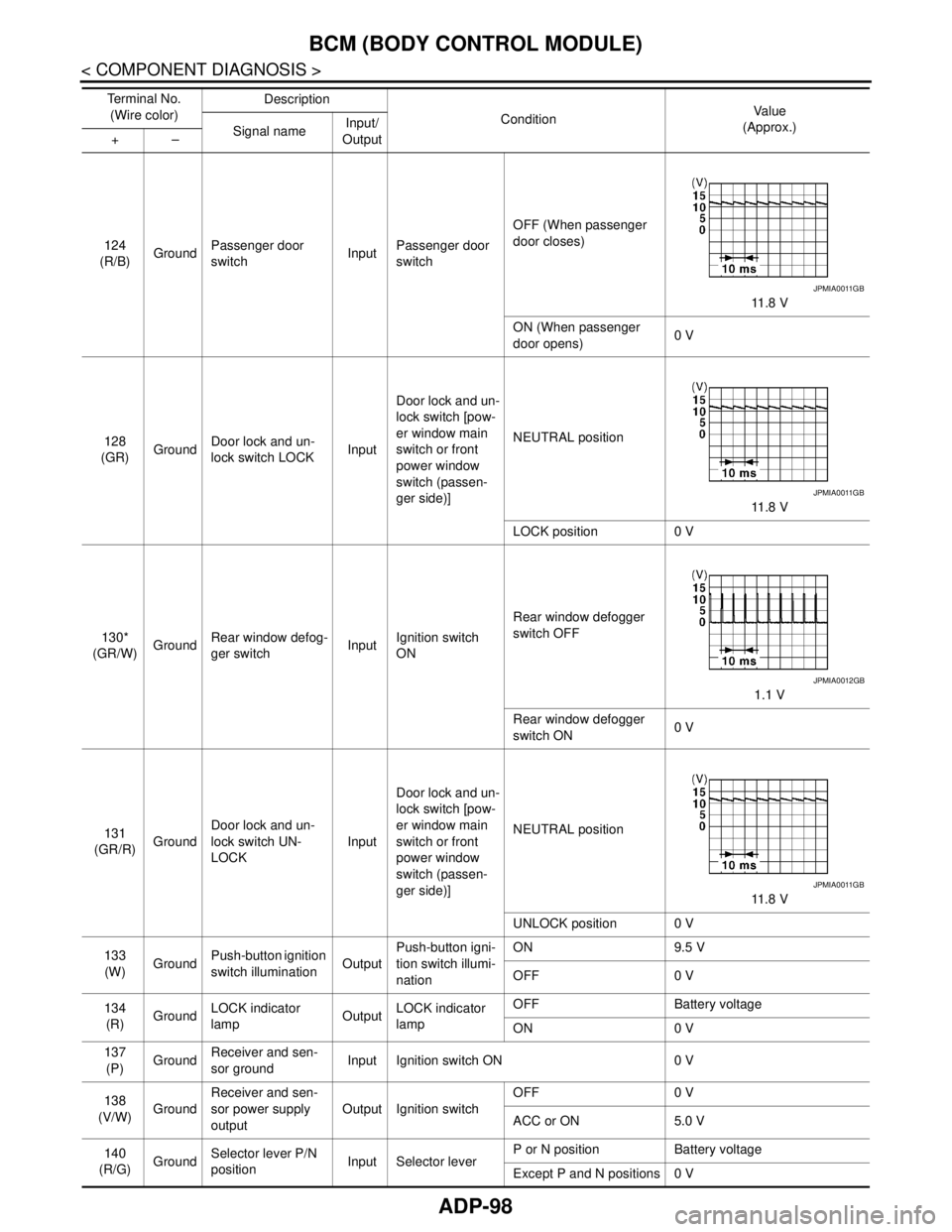
124
(R/B)GroundPassenger door
switchInputPassenger door
switchOFF (When passenger
door closes)
11 . 8 V
ON (When passenger
door opens)0 V
128
(GR)GroundDoor lock and un-
lock switch LOCKInputDoor lock and un-
lock switch [pow-
er window main
switch or front
power window
switch (passen-
ger side)]NEUTRAL position
11 . 8 V
LOCK position 0 V
130*
(GR/W)GroundRear window defog-
ger switchInputIgnition switch
ONRear window defogger
switch OFF
1.1 V
Rear window defogger
switch ON0 V
131
(GR/R)GroundDoor lock and un-
lock switch UN-
LOCKInputDoor lock and un-
lock switch [pow-
er window main
switch or front
power window
switch (passen-
ger side)]NEUTRAL position
11 . 8 V
UNLOCK position 0 V
133
(W)GroundPush-button ignition
switch illuminationOutputPush-button igni-
tion switch illumi-
nationON 9.5 V
OFF 0 V
134
(R)GroundLOCK indicator
lampOutputLOCK indicator
lampOFF Battery voltage
ON 0 V
137
(P)GroundReceiver and sen-
sor groundInput Ignition switch ON 0 V
138
(V/W)GroundReceiver and sen-
sor power supply
outputOutput Ignition switchOFF 0 V
ACC or ON 5.0 V
140
(R/G)GroundSelector lever P/N
positionInput Selector leverP or N position Battery voltage
Except P and N positions 0 V Te r m i n a l N o .
(Wire color)Description
ConditionVa l u e
(Approx.)
Signal nameInput/
Output +–
JPMIA0011GB
JPMIA0011GB
JPMIA0012GB
JPMIA0011GB
Page 131 of 5121
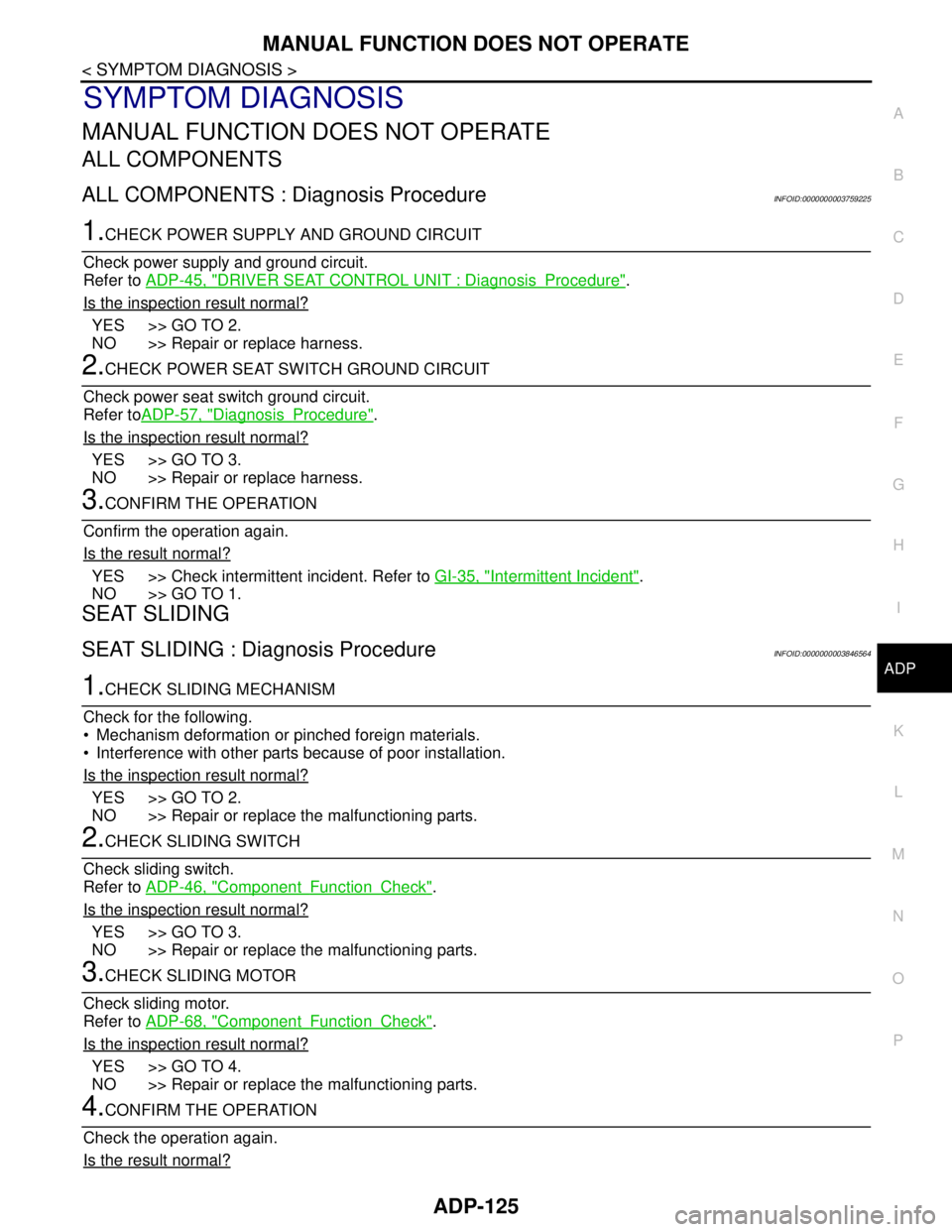
MANUAL FUNCTION DOES NOT OPERATE
ADP-125
< SYMPTOM DIAGNOSIS >
C
D
E
F
G
H
I
K
L
MA
B
ADP
N
O
P
SYMPTOM DIAGNOSIS
MANUAL FUNCTION DOES NOT OPERATE
ALL COMPONENTS
ALL COMPONENTS : Diagnosis ProcedureINFOID:0000000003759225
1.CHECK POWER SUPPLY AND GROUND CIRCUIT
Check power supply and ground circuit.
Refer to ADP-45, "
DRIVER SEAT CONTROL UNIT : DiagnosisProcedure".
Is the inspection result normal?
YES >> GO TO 2.
NO >> Repair or replace harness.
2.CHECK POWER SEAT SWITCH GROUND CIRCUIT
Check power seat switch ground circuit.
Refer toADP-57, "
DiagnosisProcedure".
Is the inspection result normal?
YES >> GO TO 3.
NO >> Repair or replace harness.
3.CONFIRM THE OPERATION
Confirm the operation again.
Is the result normal?
YES >> Check intermittent incident. Refer to GI-35, "Intermittent Incident".
NO >> GO TO 1.
SEAT SLIDING
SEAT SLIDING : Diagnosis ProcedureINFOID:0000000003846564
1.CHECK SLIDING MECHANISM
Check for the following.
Mechanism deformation or pinched foreign materials.
Interference with other parts because of poor installation.
Is the inspection result normal?
YES >> GO TO 2.
NO >> Repair or replace the malfunctioning parts.
2.CHECK SLIDING SWITCH
Check sliding switch.
Refer to ADP-46, "
ComponentFunctionCheck".
Is the inspection result normal?
YES >> GO TO 3.
NO >> Repair or replace the malfunctioning parts.
3.CHECK SLIDING MOTOR
Check sliding motor.
Refer to ADP-68, "
ComponentFunctionCheck".
Is the inspection result normal?
YES >> GO TO 4.
NO >> Repair or replace the malfunctioning parts.
4.CONFIRM THE OPERATION
Check the operation again.
Is the result normal?