relay NISSAN TEANA 2014 Service Manual
[x] Cancel search | Manufacturer: NISSAN, Model Year: 2014, Model line: TEANA, Model: NISSAN TEANA 2014Pages: 4801, PDF Size: 51.2 MB
Page 2367 of 4801
FRONT FOG LAMP CIRCUITEXL-101
< DTC/CIRCUIT DIAGNOSIS >
C
D E
F
G H
I
J
K
M A
B
EXL
N
O P
FRONT FOG LAMP CIRCUIT
DescriptionINFOID:0000000009463591
The IPDM E/R (intelligent power di stribution module engine room) controls the front fog lamp relay based on
inputs from the BCM over the CAN communication lines . When the front fog lamp relay is energized, power
flows from the front fog lamp relay in the IPDM E/R to the front fog lamps.
Component Function CheckINFOID:0000000009463592
1.CHECK FRONT FOG LAMP OPERATION
WITHOUT CONSULT
1. Activate IPDM E/R auto active test. Refer to PCS-9, "CONSULT Function (IPDM E/R)"
.
2. Check that the front fog lamp is turned ON.
WITH CONSULT
1. Select EXTERNAL LAMP of IP DM E/R active test item.
2. While operating the test items, check that the front fog lamp is turned ON.
Is the inspection result normal?
YES >> Front fog lamp circuit is normal.
NO >> Refer to EXL-101, "Diagnosis Procedure"
.
Diagnosis ProcedureINFOID:0000000009463593
Regarding Wiring Diagram information, refer to EXL-54, "Wiring Diagram".
1.CHECK FRONT FOG LAMP FUSE
1. Turn the ignition switch OFF.
2. Check that the following fuse is not blown.
Is the fuse blown?
YES >> Replace the fuse after repairing the affected circuit.
NO >> GO TO 2.
2.CHECK FRONT FOG LAMP OUTPUT VOLTAGE
CONSULT
1. Turn the ignition switch OFF.
2. Disconnect the front fog lamp harness connector E214 or E227 in question.
3. Turn the ignition switch ON.
4. Turn the front fog lamps ON.
5. Check the voltage between the front fog lamp harness connector E214 or E227 terminal 1 and ground.
Is the inspection result normal?
YES >> GO TO 4. FOG : Front fog lamp ON
OFF : Front fog lamp OFF
Unit Location Fuse No. Capacity
Front fog lamp IPDM E/R 42 15A
(+) (− )Voltage
Connector Terminal
LH E214 1 Ground Battery voltage
RH E227
Revision: November 20132014 Altima NAMRevision: November 20132014 Altima NAM
Page 2369 of 4801
PARKING LAMP CIRCUITEXL-103
< DTC/CIRCUIT DIAGNOSIS >
C
D E
F
G H
I
J
K
M A
B
EXL
N
O P
PARKING LAMP CIRCUIT
DescriptionINFOID:0000000009463594
The IPDM E/R (intelligent power distribution module engi ne room) controls the tail lamp relay based on inputs
from the BCM over the CAN communication lines. When t he tail lamp relay is energized, power flows through
fuses 51 and 52, located in the IPDM E/R. Power then fl ows to the front and rear combination lamps, license
plate lamps.
Component Function CheckINFOID:0000000009463595
1.CHECK PARKING LAMP OPERATION
WITHOUT CONSULT
1. Activate IPDM E/R auto active test. Refer to PCS-8, "Diagnosis Description"
.
2. Check that the parking lamp is turned ON.
WITH CONSULT
1. Select EXTERNAL LAMP of IP DM E/R active test item.
2. While operating the test items, check that the parking lamp is turned ON.
Is the inspection result normal?
YES >> Parking lamp circuit is normal.
NO >> Refer to EXL-103, "Diagnosis Procedure"
.
Diagnosis ProcedureINFOID:0000000009463596
Regarding Wiring Diagram information, refer to EXL-68, "Wiring Diagram".
1.CHECK PARKING LAMP FUSES
1. Turn the ignition switch OFF.
2. Check that the following fuses are not blown.
Is the fuse blown?
YES >> Replace the blown fuse after repairing the affected circuit.
NO >> GO TO 2.
2.CHECK TAIL LAMP RELAY OUTPUT (VOLTAGE)
1. Disconnect the front or rear combination lamp connector or license plate lamp connector in question.
2. Turn the ignition switch ON.
3. Turn the parking lamps ON.
4. With the parking lamps ON, check voltage between t he front combination lamp front (parking) connector
and ground. TAIL : Parking lamp ON
OFF : Parking lamp OFF
Unit Location Fuse No. Capacity
Parking lamps IPDM E/R 51 10A
52 10A
(+) (− ) Vo l ta g e
(Approx.)
Connector Terminal
LH E217 6 Ground Battery voltage
RH E224 (without front fog lamps)
E351 (with front fog lamps)
Revision: November 20132014 Altima NAMRevision: November 20132014 Altima NAM
Page 2384 of 4801
EXL-118
< SYMPTOM DIAGNOSIS >
DAYTIME LIGHT SYSTEM INOPERATIVE
DAYTIME LIGHT SYSTEM INOPERATIVE
DescriptionINFOID:0000000009463609
The daytime light system is inoperative even though the combination switch (lighting and turn signal switch)
and parking brake switch are in the normal setting, also whenever engine is operating.
Diagnosis ProcedureINFOID:0000000009463610
1.CHECK DAYTIME LIGHT OPERATION
1. Perform BCM(HEADLAMP) DAYTIME RUNNING LIGHT active test. Refer to BCS-19, "HEADLAMP :
CONSULT Function (BCM - HEADLAMP)".
2. Check that the daytime lights turn on.
Is the inspection results normal?
YES >> Replace BCM. Refer to BCS-80, "Removal and Installation".
NO >> GO TO 2.
2.CHECK DAYTIME LIGHT RELAY FUSE
1. Turn ignition switch OFF.
2. Check that the following fuse is not blown.
Is the fuse blown?
YES >> Replace the blown fuse after repairing the affected circuit.
NO >> GO TO 3.
3.CHECK DAYTIME LIGHT BULBS
Check the daytime light bulbs are not open.
Is the inspection result normal?
YES >> GO TO 4.
NO >> Replace the bulbs.
4.PERFORM DAYTIME LIGH T CIRCUIT INSPECTION
Check the daytime light circuit. Refer to EXL-98, "Diagnosis Procedure"
.
Is the inspection results normal?
YES >> Replace IPDM E/R. Refer to PCS-32, "Removal and Installation".
NO >> Repair or replace the malfunctioning part.
Unit Fuse No. Capacity
Daytime light 43 10 A
Revision: November 20132014 Altima NAMRevision: November 20132014 Altima NAM
Page 2386 of 4801
EXL-120
< SYMPTOM DIAGNOSIS >
PARKING, LICENSE PLATE AND TAIL LAMPS ARE NOT TURNED ON
PARKING, LICENSE PLATE AND TAIL LAMPS ARE NOT TURNED ON
DescriptionINFOID:0000000009463613
The parking, license plate and tail lamps do not turn ON in with any lighting switch setting.
Diagnosis ProcedureINFOID:0000000009463614
1.COMBINATION SWITCH (LIGHTING AND TURN SIGNAL SWITCH) INSPECTION
Check the combination switch (lighting and turn signal switch). Refer to BCS-79, "Symptom Table"
.
Is the inspection results normal?
YES >> GO TO 2
NO >> Repair or replace the malfunctioning part.
2.CHECK TAIL LAMP RELAY REQUEST SIGNAL INPUT
CONSULT DATA MONITOR
1. Select TAIL & CLR REQ of IPDM E/R DATA MONITOR item.
2. While operating the lighting swit ch, check the monitor status.
Is the inspection results normal?
YES >> GO TO 3
NO >> Replace BCM. Refer to BCS-80, "Removal and Installation"
.
3.PARK LAMP CIRCUIT INSPECTION
Check the parking lamp circuit. Refer to EXL-103, "Diagnosis Procedure"
.
Is the inspection results normal?
YES >> Replace IPDM E/R. Refer to PCS-32, "Removal and Installation".
NO >> Repair or replace the malfunctioning part.
Monitor item Condition Monitor status
TAIL & CLR REQ Lighting switch 1st ON
OFF OFF
Revision: November 20132014 Altima NAMRevision: November 20132014 Altima NAM
Page 2539 of 4801
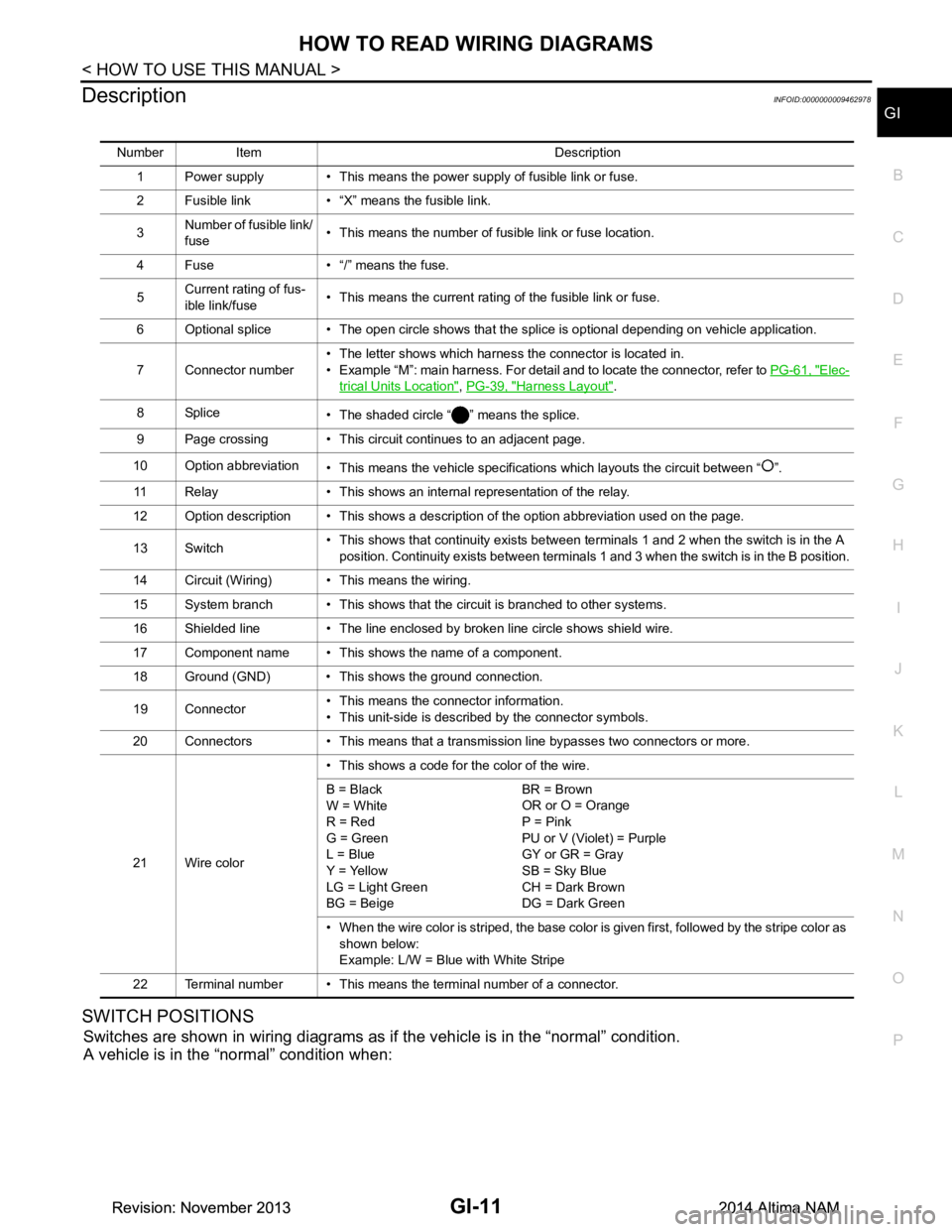
HOW TO READ WIRING DIAGRAMSGI-11
< HOW TO USE THIS MANUAL >
C
D E
F
G H
I
J
K L
M B
GI
N
O P
DescriptionINFOID:0000000009462978
SWITCH POSITIONS
Switches are shown in wiring diagrams as if the vehicle is in the “normal” condition.
A vehicle is in the “normal” condition when:
Number Item Description
1 Power supply • This means the power supply of fusible link or fuse.
2 Fusible link • “X” means the fusible link.
3 Number of fusible link/
fuse • This means the number of fusible link or fuse location.
4 Fuse • “/” means the fuse.
5 Current rating of fus-
ible link/fuse • This means the current rating of the fusible link or fuse.
6 Optional splice • The open circle shows that the splice is optional depending on vehicle application.
7 Connector number • The letter shows which harness the connector is located in.
• Example “M”: main harness. For detail and to locate the connector, refer to PG-61, "Elec-
trical Units Location", PG-39, "Harness Layout".
8Splice • The shaded circle “ ” means the splice.
9 Page crossing • This circuit continues to an adjacent page.
10 Option abbreviation • This means the vehicle specifications which layouts the circuit between “ ”.
11 Relay • This shows an internal representation of the relay.
12 Option description • This shows a description of the option abbreviation used on the page.
13 Switch • This shows that continuity exists between terminals 1 and 2 when the switch is in the A
position. Continuity exists between terminals 1 and 3 when the switch is in the B position.
14 Circuit (Wiring) • This means the wiring.
15 System branch • This shows that the circuit is branched to other systems.
16 Shielded line • The line enclosed by broken line circle shows shield wire.
17 Component name • This shows the name of a component.
18 Ground (GND) • This shows the ground connection.
19 Connector • This means the connector information.
• This unit-side is described by the connector symbols.
20 Connectors • This means that a transmission line bypasses two connectors or more.
21 Wire color • This shows a code for the color of the wire.
B = Black
W = White
R = Red
G = Green
L = Blue
Y = Yellow
LG = Light Green
BG = Beige BR = Brown
OR or O = Orange
P = Pink
PU or V (Violet) = Purple
GY or GR = Gray
SB = Sky Blue
CH = Dark Brown
DG = Dark Green
• When the wire color is striped, the base color is given first, followed by the stripe color as shown below:
Example: L/W = Blue with White Stripe
22 Terminal number • This means the terminal number of a connector.
Revision: November 20132014 Altima NAMRevision: November 20132014 Altima NAM
Page 2572 of 4801
GI-44
< BASIC INSPECTION >
SERVICE INFORMATION FOR ELECTRICAL INCIDENT
lowing section illustrates ways to simulate the conditions/environment under which the owner experiences an
electrical incident.
The section is broken into the six following topics:• Vehicle vibration
• Heat sensitive
• Freezing
• Water intrusion
• Electrical load
• Cold or hot start up
Get a thorough description of the incident from the customer . It is important for simulating the conditions of the
problem.
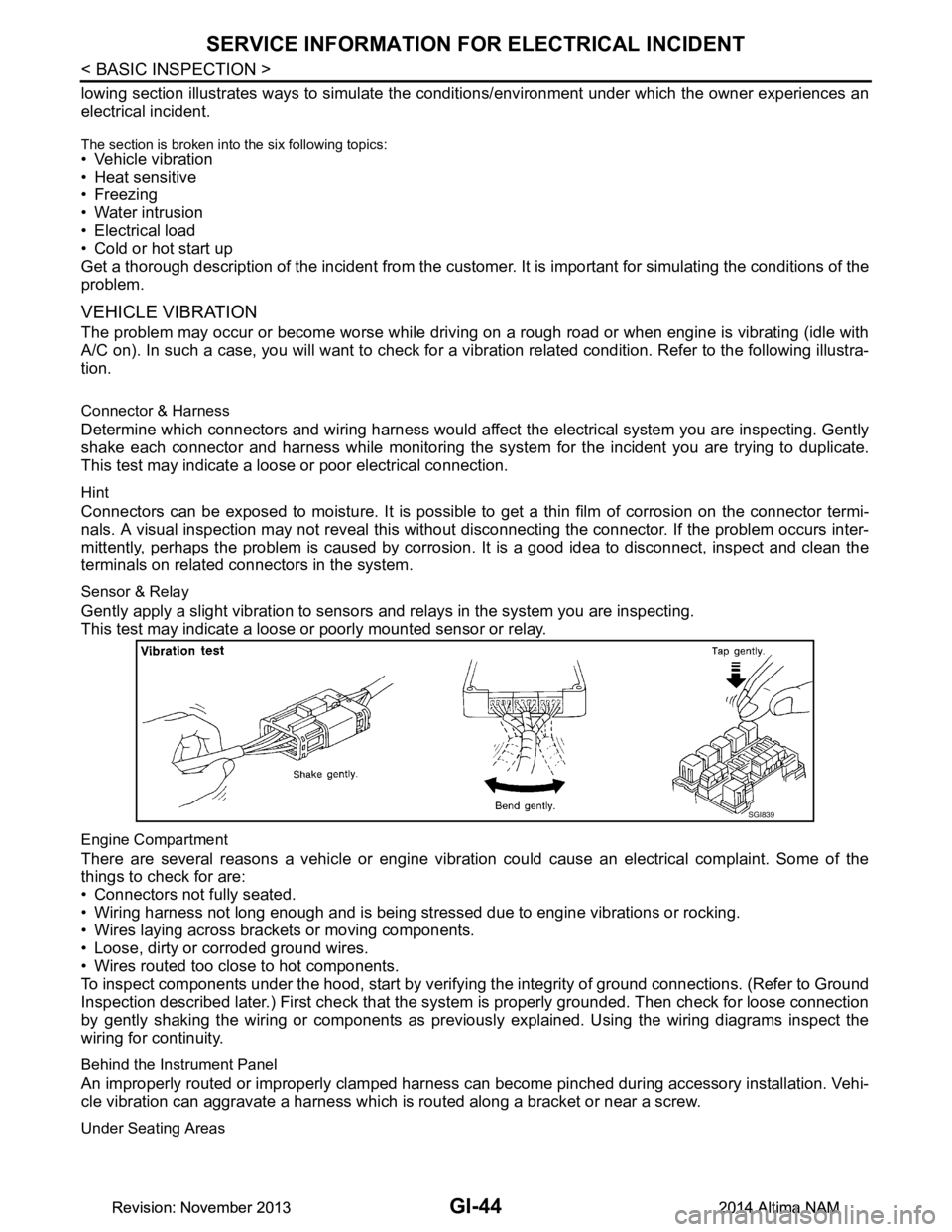
VEHICLE VIBRATION
The problem may occur or become worse while driving on a rough road or when engine is vibrating (idle with
A/C on). In such a case, you will want to check for a vi bration related condition. Refer to the following illustra-
tion.
Connector & Harness
Determine which connectors and wiring harness would affect the electrical system you are inspecting. Gently
shake each connector and harness while monitoring the sy stem for the incident you are trying to duplicate.
This test may indicate a loose or poor electrical connection.
Hint
Connectors can be exposed to moisture. It is possible to get a thin film of corrosion on the connector termi-
nals. A visual inspection may not reveal this without disconnecting the connector. If the problem occurs inter-
mittently, perhaps the problem is caused by corrosion. It is a good idea to disconnect, inspect and clean the
terminals on related connectors in the system.
Sensor & Relay
Gently apply a slight vibration to sensors and relays in the system you are inspecting.
This test may indicate a loose or poorly mounted sensor or relay.
Engine Compartment
There are several reasons a vehicle or engine vibration could cause an electrical complaint. Some of the
things to check for are:
• Connectors not fully seated.
• Wiring harness not long enough and is being stressed due to engine vibrations or rocking.
• Wires laying across brackets or moving components.
• Loose, dirty or corroded ground wires.
• Wires routed too close to hot components.
To inspect components under the hood, start by verifyi ng the integrity of ground connections. (Refer to Ground
Inspection described later.) First check that the system is properly grounded. Then check for loose connection
by gently shaking the wiring or components as previous ly explained. Using the wiring diagrams inspect the
wiring for continuity.
Behind the Instrument Panel
An improperly routed or improperly clamped harness can become pinched during accessory installation. Vehi-
cle vibration can aggravate a harness which is routed along a bracket or near a screw.
Under Seating Areas
SGI839
Revision: November 20132014 Altima NAMRevision: November 20132014 Altima NAM
Page 2574 of 4801
GI-46
< BASIC INSPECTION >
SERVICE INFORMATION FOR ELECTRICAL INCIDENT
Circuit Inspection
INFOID:0000000009463015
DESCRIPTION
• In general, testing electrical circuits is an easy ta sk if it is approached in a logical and organized method.
Before beginning it is important to have all available in formation on the system to be tested. Also, get a thor-
ough understanding of system operation. Then you will be able to use the appropriate equipment and follow
the correct test procedure.
• You may have to simulate vehicle vibrations while te sting electrical components. Gently shake the wiring
harness or electrical component to do this.
NOTE:
Refer to GI-40, "How to Check Terminal"
to probe or check terminal.
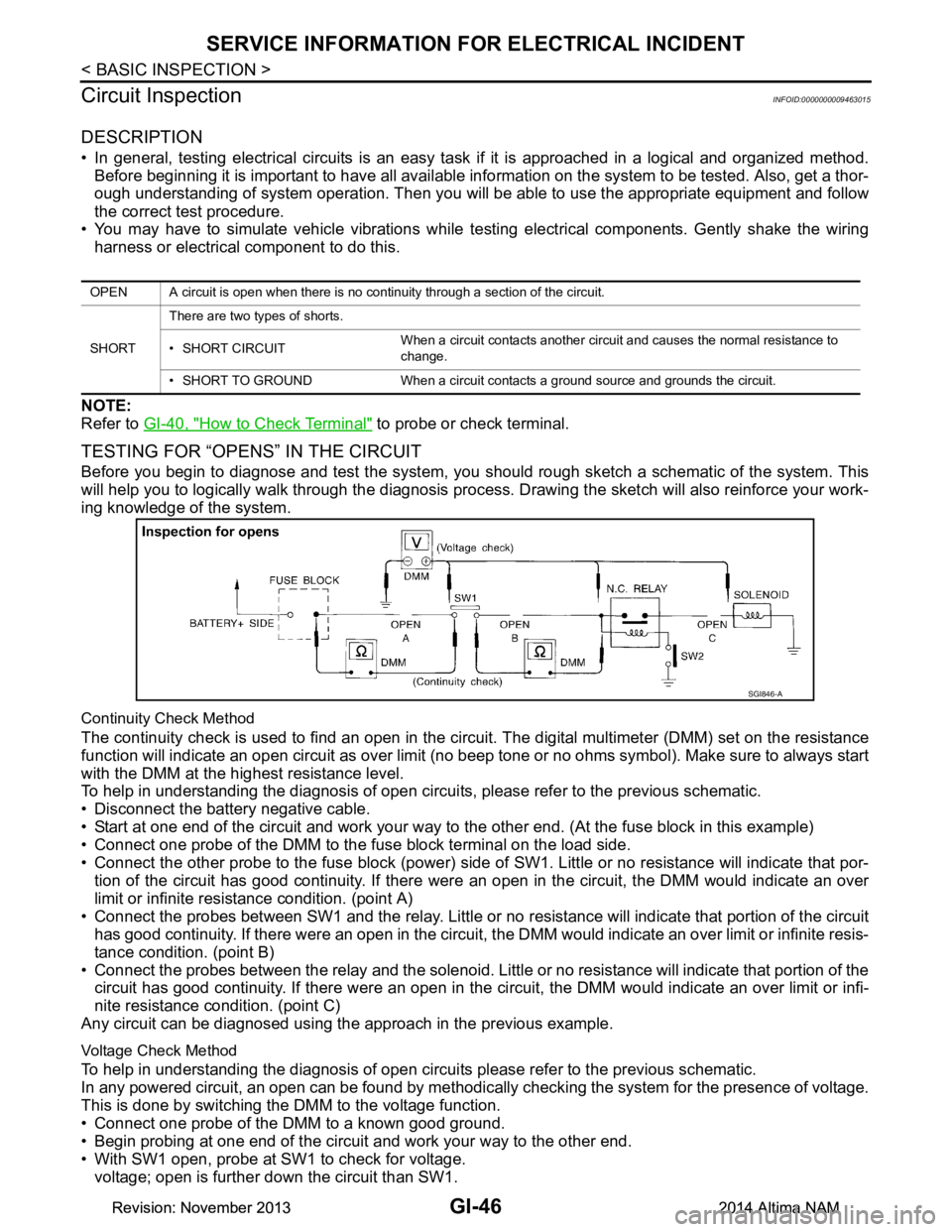
TESTING FOR “OPENS” IN THE CIRCUIT
Before you begin to diagnose and test the system, you should rough sketch a schematic of the system. This
will help you to logically walk through the diagnosis process. Drawing the sketch will also reinforce your work-
ing knowledge of the system.
Continuity Check Method
The continuity check is used to find an open in the circ uit. The digital multimeter (DMM) set on the resistance
function will indicate an open circuit as over limit (no beep tone or no ohms symbol). Make sure to always start
with the DMM at the highest resistance level.
To help in understanding the diagnosis of open circui ts, please refer to the previous schematic.
• Disconnect the battery negative cable.
• Start at one end of the circuit and work your way to the other end. (At the fuse block in this example)
• Connect one probe of the DMM to the fuse block terminal on the load side.
• Connect the other probe to the fuse block (power) side of SW1. Little or no resistance will indicate that por-
tion of the circuit has good continuity. If there were an open in the circuit, the DMM would indicate an over
limit or infinite resistance condition. (point A)
• Connect the probes between SW1 and the relay. Little or no resistance will indicate that portion of the circuit
has good continuity. If there were an open in the circuit, t he DMM would indicate an over limit or infinite resis-
tance condition. (point B)
• Connect the probes between the relay and the solenoid. Little or no resistance will indicate that portion of the
circuit has good continuity. If there were an open in the ci rcuit, the DMM would indicate an over limit or infi-
nite resistance condition. (point C)
Any circuit can be diagnosed using the approach in the previous example.
Voltage Check Method
To help in understanding the diagnosis of open circui ts please refer to the previous schematic.
In any powered circuit, an open can be found by methodica lly checking the system for the presence of voltage.
This is done by switching the DMM to the voltage function.
• Connect one probe of the DMM to a known good ground.
• Begin probing at one end of the circuit and work your way to the other end.
• With SW1 open, probe at SW1 to check for voltage. voltage; open is further down the circuit than SW1.
OPEN A circuit is open when there is no continuity through a section of the circuit.
SHORT There are two types of shorts.
• SHORT CIRCUIT When a circuit contacts another circuit and causes the normal resistance to
change.
• SHORT TO GROUND When a circuit contacts a ground source and grounds the circuit.
SGI846-A
Revision: November 20132014 Altima NAMRevision: November 20132014 Altima NAM
Page 2575 of 4801
SERVICE INFORMATION FOR ELECTRICAL INCIDENTGI-47
< BASIC INSPECTION >
C
D E
F
G H
I
J
K L
M B
GI
N
O P
no voltage; open is between fuse block and SW1 (point A).
• Close SW1 and probe at relay. voltage; open is further down the circuit than the relay.
no voltage; open is between SW1 and relay (point B).
• Close the relay and probe at the solenoid. voltage; open is further down the circuit than the solenoid.
no voltage; open is between relay and solenoid (point C).
Any powered circuit can be diagnosed using the approach in the previous example.
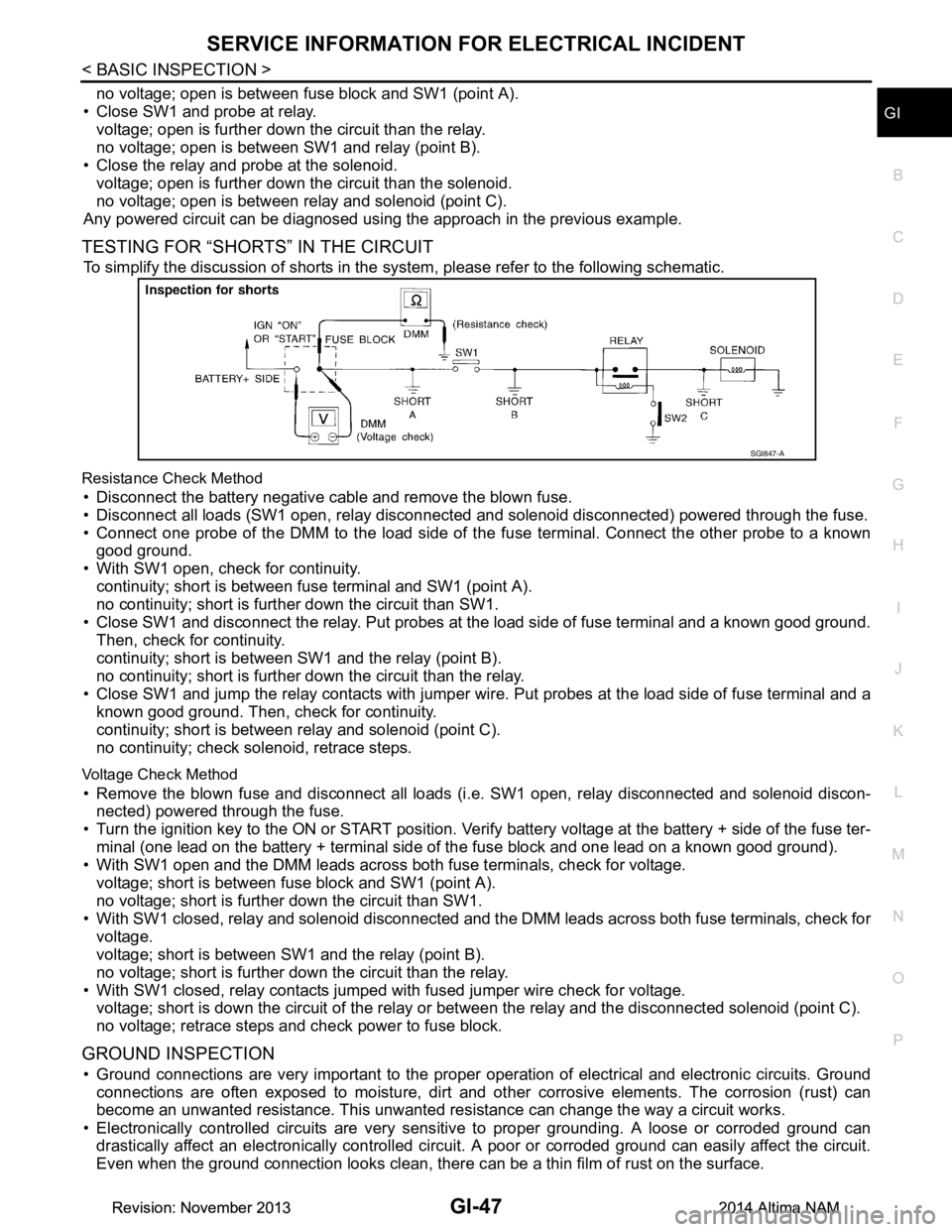
TESTING FOR “SHORTS” IN THE CIRCUIT
To simplify the discussion of shorts in the system, please refer to the following schematic.
Resistance Check Method
• Disconnect the battery negative cable and remove the blown fuse.
• Disconnect all loads (SW1 open, relay disconnected and solenoid disconnected) powered through the fuse.
• Connect one probe of the DMM to the load side of the fuse terminal. Connect the other probe to a known
good ground.
• With SW1 open, check for continuity. continuity; short is between fuse terminal and SW1 (point A).
no continuity; short is further down the circuit than SW1.
• Close SW1 and disconnect the relay. Put probes at the load side of fuse terminal and a known good ground. Then, check for continuity.
continuity; short is between SW1 and the relay (point B).
no continuity; short is further down the circuit than the relay.
• Close SW1 and jump the relay contacts with jumper wir e. Put probes at the load side of fuse terminal and a
known good ground. Then, check for continuity.
continuity; short is between relay and solenoid (point C).
no continuity; check solenoid, retrace steps.
Voltage Check Method
• Remove the blown fuse and disconnect all loads (i .e. SW1 open, relay disconnected and solenoid discon-
nected) powered through the fuse.
• Turn the ignition key to the ON or START position. Veri fy battery voltage at the battery + side of the fuse ter-
minal (one lead on the battery + terminal side of the fuse block and one lead on a known good ground).
• With SW1 open and the DMM leads across both fuse terminals, check for voltage.
voltage; short is between fuse block and SW1 (point A).
no voltage; short is further down the circuit than SW1.
• With SW1 closed, relay and solenoid disconnected and t he DMM leads across both fuse terminals, check for
voltage.
voltage; short is between SW1 and the relay (point B).
no voltage; short is further down the circuit than the relay.
• With SW1 closed, relay contacts jumped with fused jumper wire check for voltage. voltage; short is down the circuit of the relay or between the relay and the disconnected solenoid (point C).
no voltage; retrace steps and check power to fuse block.
GROUND INSPECTION
• Ground connections are very important to the proper operation of electrical and electronic circuits. Ground
connections are often exposed to moisture, dirt and ot her corrosive elements. The corrosion (rust) can
become an unwanted resistance. This unwanted re sistance can change the way a circuit works.
• Electronically controlled circuits are very sens itive to proper grounding. A loose or corroded ground can
drastically affect an electronically controlled circuit. A poor or corroded ground can easily affect the circuit.
Even when the ground connection looks clean, there c an be a thin film of rust on the surface.
SGI847-A
Revision: November 20132014 Altima NAMRevision: November 20132014 Altima NAM
Page 2619 of 4801
REFRIGERATION SYSTEMHA-13
< SYSTEM DESCRIPTION >
C
D E
F
G H
J
K L
M A
B
HA
N
O P
SYSTEM DESCRIPTION
REFRIGERATION SYSTEM
Refrigerant CycleINFOID:0000000009463918
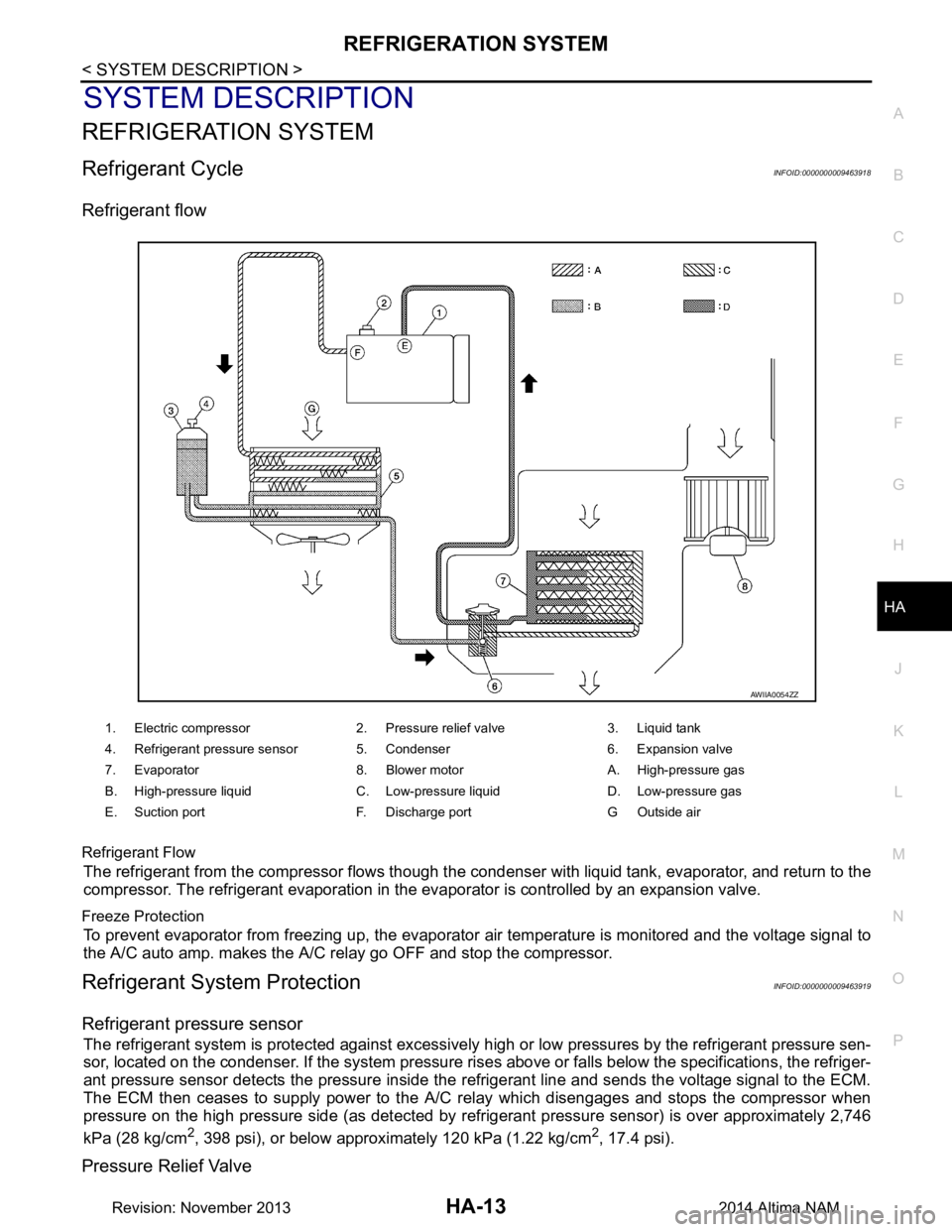
Refrigerant flow
Refrigerant Flow
The refrigerant from the compressor flows though the c ondenser with liquid tank, evaporator, and return to the
compressor. The refrigerant evaporation in the evaporator is controlled by an expansion valve.
Freeze Protection
To prevent evaporator from freezing up, the evaporator air temperature is monitored and the voltage signal to
the A/C auto amp. makes the A/C relay go OFF and stop the compressor.
Refrigerant System ProtectionINFOID:0000000009463919
Refrigerant pressure sensor
The refrigerant system is protected against excessively hi gh or low pressures by the refrigerant pressure sen-
sor, located on the condenser. If the system pressure rise s above or falls below the specifications, the refriger-
ant pressure sensor detects the pressure inside the refrigerant line and sends the voltage signal to the ECM.
The ECM then ceases to supply power to the A/C relay which disengages and stops the compressor when
pressure on the high pressure side (as detected by refr igerant pressure sensor) is over approximately 2,746
kPa (28 kg/cm
2, 398 psi), or below approximately 120 kPa (1.22 kg/cm2, 17.4 psi).
Pressure Relief Valve
1. Electric compressor 2. Pressure relief valve 3. Liquid tank
4. Refrigerant pressure sensor 5. Condenser 6. Expansion valve
7. Evaporator 8. Blower motor A. High-pressure gas
B. High-pressure liquid C. Low-pressure liquid D. Low-pressure gas
E. Suction port F. Discharge port G Outside air
AWIIA0054ZZ
Revision: November 20132014 Altima NAM
Page 2659 of 4801
![NISSAN TEANA 2014 Service Manual
HAC-10
< SYSTEM DESCRIPTION >[AUTOMATIC AIR CONDITIONER]
COMPONENT PARTS
Component Description
INFOID:0000000009463092
1. ECM 2. IPDM E/R 3. BCM (view with combination meter removed)
4. A/C auto amp](/img/5/57390/w960_57390-2658.png "NISSAN TEANA 2014 Service Manual
HAC-10
< SYSTEM DESCRIPTION >[AUTOMATIC AIR CONDITIONER]
COMPONENT PARTS
Component Description
INFOID:0000000009463092
1. ECM 2. IPDM E/R 3. BCM (view with combination meter removed)
4. A/C auto amp")
HAC-10
< SYSTEM DESCRIPTION >[AUTOMATIC AIR CONDITIONER]
COMPONENT PARTS
Component Description
INFOID:0000000009463092
1. ECM 2. IPDM E/R 3. BCM (view with combination meter removed)
4. A/C auto amp. (view with A/C switch assembly removed) 5. A/C switch assembly 6. A/C Compressor
7. Sunload sensor 8. Refrigerant pressure sensor (view with front bumper fascia removed)9. Ambient sensor
10. Fuse Block (J/B), Front blower motor relay 11. In-vehicle sensor 12. Accessory relay-2 (view with instru-
ment panel removed)
13. Blower motor (view with front A/C as- sembly removed from vehicle) 14. Intake door motor 15. Mode door motor
16. Air mix door motor LH 17. Air mix door motor RH 18. Intake sensor
ALIIA0599ZZ
Component Description
A/C auto amp. A/C auto amp. controls front automatic air conditioning system by inputting and calculating signals
from each sensor and each switch.
A/C Compressor Vaporized refrigerant is drawn into the A/C compressor from the evaporator, where it is compressed
to a high pressure, high temperature vapor. The hot, compressed vapor is then discharged to the con-
denser.
A/C switch assembly The A/C switch assembly controls the operation of the A/C and heating system based on inputs from
the temperature control knob, the mode switches, the blower control dial, the ambient temperature
sensor, the intake sensor, and inputs received from the ECM across the CAN. Diagnosis of the A/C
switch assembly can be performed using the CONSULT. There is no self-diagnostic feature available.
Air mix door motor LH The air mix door controls the mix of hot or cold air that enters the ventilation system. It is controlled
by the A/C auto amp. based on the position of the temperature dial. The air mix door motor LH re-
ceives position commands from the A/C auto amp. and reports actual door position back via an LCU
(Local Control Unit) installed inside the motor. Commands and responses are sent across the LIN (Lo-
cal Interconnect Network) to each motor simultaneously, with each motor having its own unique ad-
dress, thereby only responding to requests sent to its specific address. The LCU reads the door
position from a Position Balanced Resistor (PBR), also part of the motor, and returns that information
to the A/C auto amp. The LCU switches the polarity of the circuits connected to the DC motor to drive
the motor forward or backward as requested by the A/C auto amp. If the air mix door moves to a po-
sition less than 5% or more than 95% of its expected or allowed positions, the A/C auto amp. will set
a DTC.
Revision: November 20132014 Altima NAMRevision: November 20132014 Altima NAM